1ページ
Satera
LBP732Ci
ユーザーズガイド
USRMA-8526-02 2026-05 ja Copyright CANON INC. 2026
もくじ
もくじ
はじめに .................................................................................................................................................................. 2
ユーザーズガイドの使いかた ......................................................................................................................................... 3
ユーザーズガイドの画面構成 ................................................................................................................................... 4
ユーザーズガイドの読みかた ................................................................................................................................... 7
マニュアルの種類と内容 ............................................................................................................................................... 9
メニュールートマップ ................................................................................................................................................ 10
おことわり ............................................................................................................................................................... 11
本機について ...................................................................................................................................................... 17
各部の名称とはたらき ................................................................................................................................................ 19
本体前面 ............................................................................................................................................................ 20
本体背面 ............................................................................................................................................................ 23
本体内部 ............................................................................................................................................................ 25
手差しトレイ ...................................................................................................................................................... 26
給紙カセット ...................................................................................................................................................... 27
操作パネル ......................................................................................................................................................... 28
電源を入れる ............................................................................................................................................................ 30
電源を切る ......................................................................................................................................................... 31
用紙をセットする ...................................................................................................................................................... 32
用紙のセット方法 ................................................................................................................................................ 33
用紙の基本的なセット方法 .............................................................................................................................. 34
封筒をセットする .......................................................................................................................................... 42
はがきをセットする ....................................................................................................................................... 46
ロゴなどが印刷された用紙をセットする ............................................................................................................ 48
用紙サイズと種類を設定する ................................................................................................................................. 50
給紙カセットの用紙サイズと種類を設定する ...................................................................................................... 51
手差しトレイの用紙サイズと種類を設定する ...................................................................................................... 53
手差しトレイでよく使う用紙サイズと種類を登録する .......................................................................................... 55
定形外サイズの用紙を登録する(ユーザー設定用紙) .......................................................................................... 57
機能ごとに適切な給紙部を自動で選択する ......................................................................................................... 58
本体のメンテナンス ................................................................................................................................................... 59
日常のお手入れ ................................................................................................................................................... 62
本体外部を清掃する ................................................................................................................................. 63
トナーカートリッジを交換する .............................................................................................................................. 64
回収トナー容器を交換する .................................................................................................................................... 68
定着器を交換する ................................................................................................................................................ 71
本機を移動する ................................................................................................................................................... 73
交換部品 ............................................................................................................................................................ 75
消耗品の残量を確認する ....................................................................................................................................... 79
無償保証や保守サービスについて ................................................................................................................................. 80
無償保証について ................................................................................................................................................ 81
キヤノンサービスパック(CSP) ............................................................................................................................ 82
I
3ページ
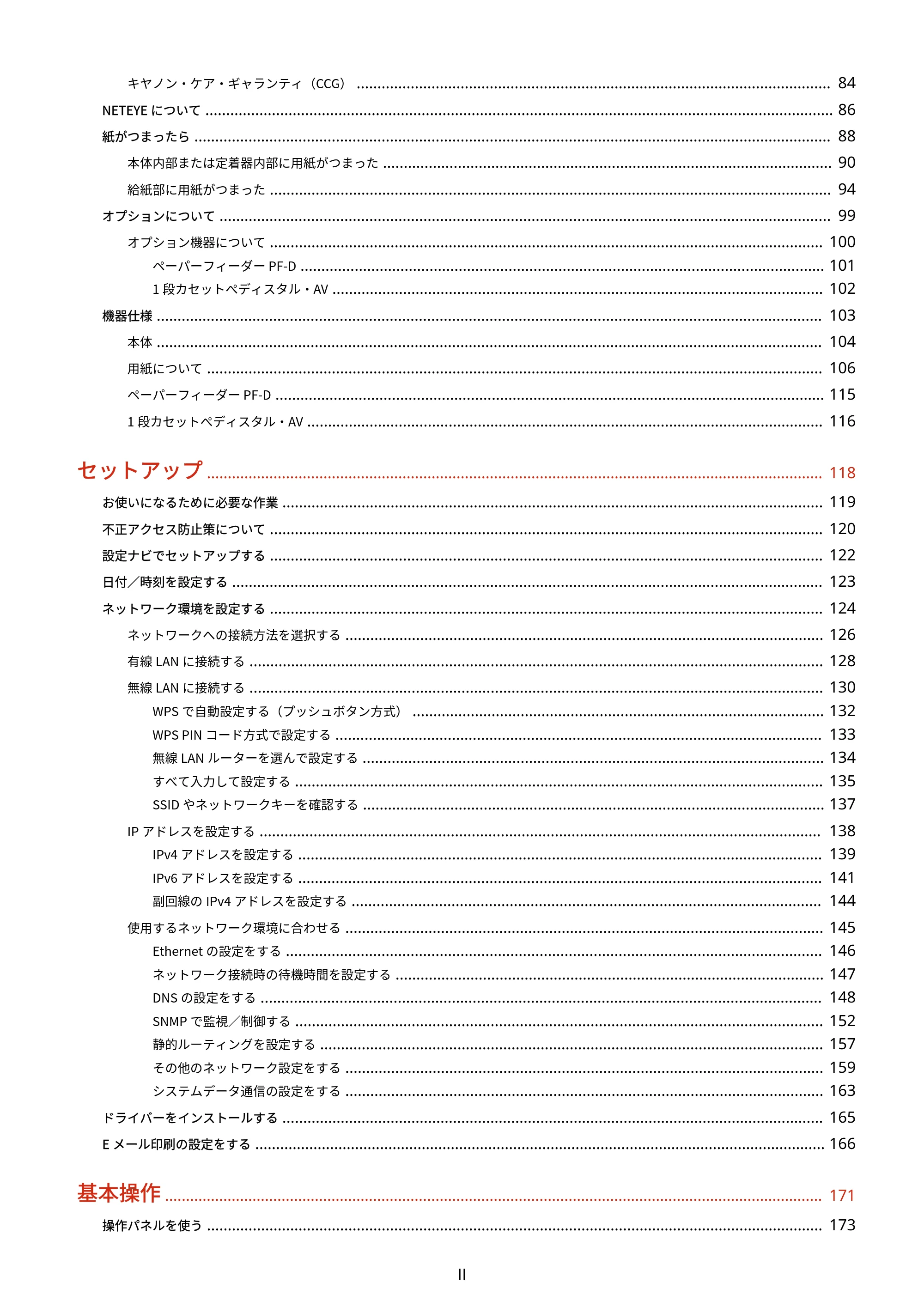
キヤノン・ケア・ギャランティ(CCG) .................................................................................................................. 84
NETEYE について ....................................................................................................................................................... 86
紙がつまったら ......................................................................................................................................................... 88
本体内部または定着器内部に用紙がつまった ............................................................................................................ 90
給紙部に用紙がつまった ....................................................................................................................................... 94
オプションについて ................................................................................................................................................... 99
オプション機器について ..................................................................................................................................... 100
ペーパーフィーダー PF-D .............................................................................................................................. 101
1 段カセットぺディスタル・AV ...................................................................................................................... 102
機器仕様 ................................................................................................................................................................ 103
本体 ................................................................................................................................................................ 104
用紙について .................................................................................................................................................... 106
ペーパーフィーダー PF-D .................................................................................................................................... 115
1 段カセットぺディスタル・AV ............................................................................................................................ 116
セットアップ .................................................................................................................................................... 118
お使いになるために必要な作業 .................................................................................................................................. 119
不正アクセス防止策について ..................................................................................................................................... 120
設定ナビでセットアップする ..................................................................................................................................... 122
日付/時刻を設定する .............................................................................................................................................. 123
ネットワーク環境を設定する ..................................................................................................................................... 124
ネットワークへの接続方法を選択する ................................................................................................................... 126
有線 LAN に接続する .......................................................................................................................................... 128
無線 LAN に接続する .......................................................................................................................................... 130
WPS で自動設定する(プッシュボタン方式) ................................................................................................... 132
WPS PIN コード方式で設定する ..................................................................................................................... 133
無線 LAN ルーターを選んで設定する ............................................................................................................... 134
すべて入力して設定する ............................................................................................................................... 135
SSID やネットワークキーを確認する ............................................................................................................... 137
IP アドレスを設定する ....................................................................................................................................... 138
IPv4 アドレスを設定する .............................................................................................................................. 139
IPv6 アドレスを設定する .............................................................................................................................. 141
副回線の IPv4 アドレスを設定する ................................................................................................................. 144
使用するネットワーク環境に合わせる ................................................................................................................... 145
Ethernet の設定をする ................................................................................................................................. 146
ネットワーク接続時の待機時間を設定する ....................................................................................................... 147
DNS の設定をする ....................................................................................................................................... 148
SNMP で監視/制御する ............................................................................................................................... 152
静的ルーティングを設定する ......................................................................................................................... 157
その他のネットワーク設定をする ................................................................................................................... 159
システムデータ通信の設定をする ................................................................................................................... 163
ドライバーをインストールする .................................................................................................................................. 165
E メール印刷の設定をする ......................................................................................................................................... 166
基本操作 .............................................................................................................................................................. 171
操作パネルを使う .................................................................................................................................................... 173
II
4ページ
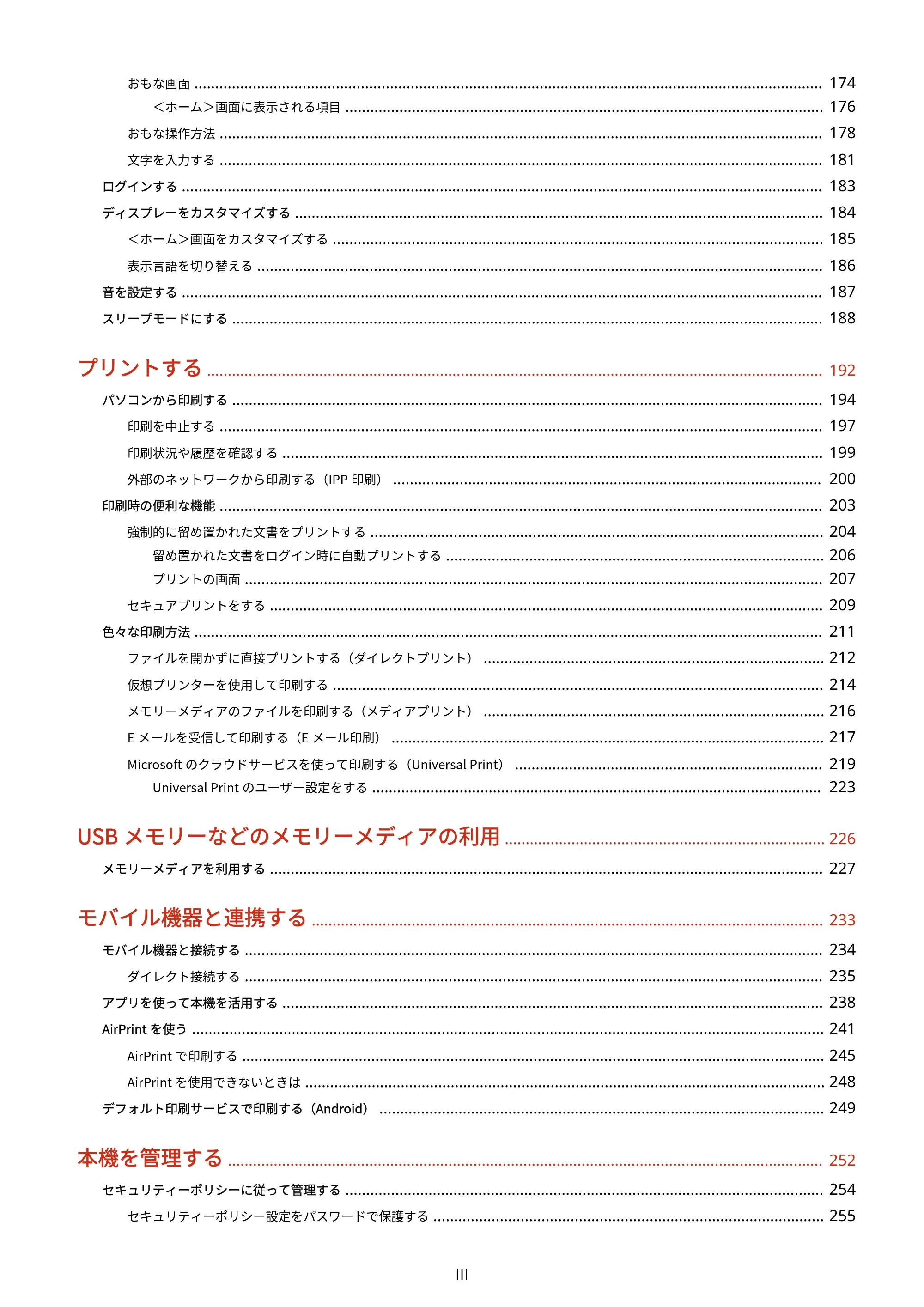
おもな画面 ....................................................................................................................................................... 174
<ホーム>画面に表示される項目 ................................................................................................................... 176
おもな操作方法 ................................................................................................................................................. 178
文字を入力する ................................................................................................................................................. 181
ログインする .......................................................................................................................................................... 183
ディスプレーをカスタマイズする ............................................................................................................................... 184
<ホーム>画面をカスタマイズする ...................................................................................................................... 185
表示言語を切り替える ........................................................................................................................................ 186
音を設定する .......................................................................................................................................................... 187
スリープモードにする .............................................................................................................................................. 188
プリントする .................................................................................................................................................... 192
パソコンから印刷する .............................................................................................................................................. 194
印刷を中止する ................................................................................................................................................. 197
印刷状況や履歴を確認する .................................................................................................................................. 199
外部のネットワークから印刷する(IPP 印刷) ....................................................................................................... 200
印刷時の便利な機能 ................................................................................................................................................. 203
強制的に留め置かれた文書をプリントする ............................................................................................................. 204
留め置かれた文書をログイン時に自動プリントする ........................................................................................... 206
プリントの画面 ........................................................................................................................................... 207
セキュアプリントをする ..................................................................................................................................... 209
色々な印刷方法 ....................................................................................................................................................... 211
ファイルを開かずに直接プリントする(ダイレクトプリント) .................................................................................. 212
仮想プリンターを使用して印刷する ...................................................................................................................... 214
メモリーメディアのファイルを印刷する(メディアプリント) .................................................................................. 216
E メールを受信して印刷する(E メール印刷) ........................................................................................................ 217
Microsoft のクラウドサービスを使って印刷する(Universal Print) .......................................................................... 219
Universal Print のユーザー設定をする ............................................................................................................ 223
USB メモリーなどのメモリーメディアの利用 ............................................................................. 226
メモリーメディアを利用する ..................................................................................................................................... 227
モバイル機器と連携する ........................................................................................................................... 233
モバイル機器と接続する ........................................................................................................................................... 234
ダイレクト接続する ........................................................................................................................................... 235
アプリを使って本機を活用する .................................................................................................................................. 238
AirPrint を使う ........................................................................................................................................................ 241
AirPrint で印刷する ............................................................................................................................................ 245
AirPrint を使用できないときは ............................................................................................................................. 248
デフォルト印刷サービスで印刷する(Android) ........................................................................................................... 249
本機を管理する ............................................................................................................................................... 252
セキュリティーポリシーに従って管理する ................................................................................................................... 254
セキュリティーポリシー設定をパスワードで保護する .............................................................................................. 255
III
5ページ
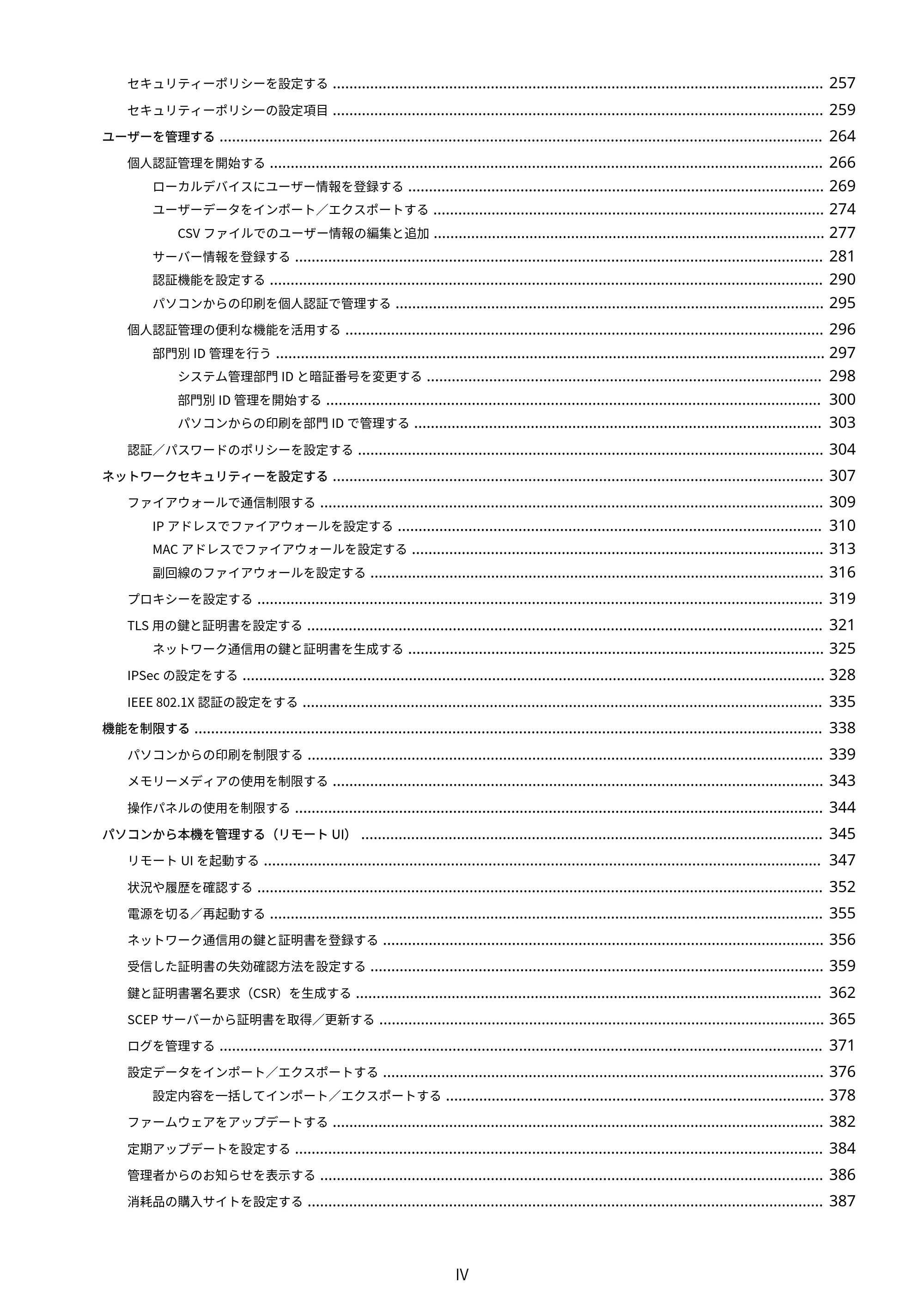
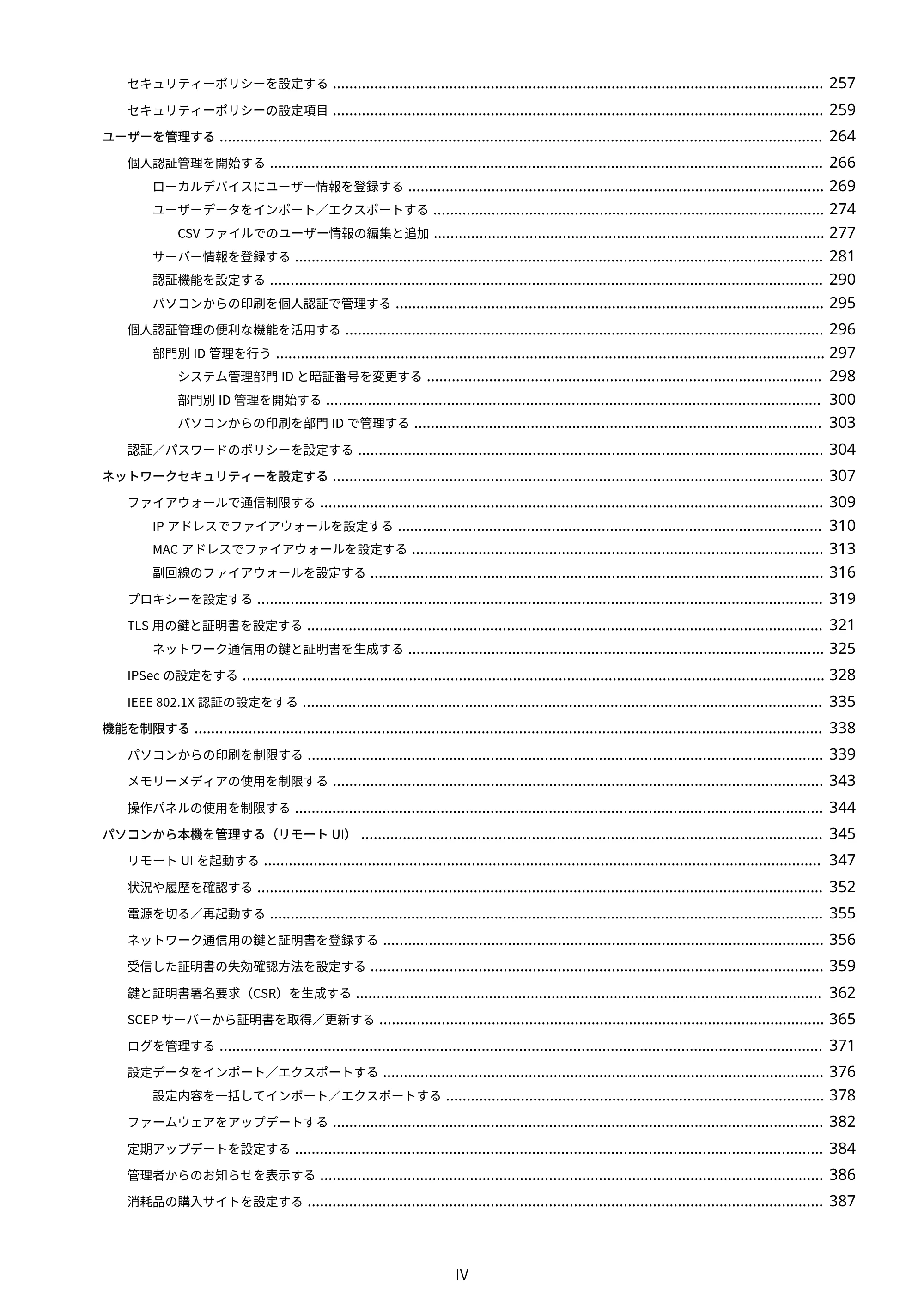
セキュリティーポリシーを設定する ...................................................................................................................... 257
セキュリティーポリシーの設定項目 ...................................................................................................................... 259
ユーザーを管理する ................................................................................................................................................. 264
個人認証管理を開始する ..................................................................................................................................... 266
ローカルデバイスにユーザー情報を登録する .................................................................................................... 269
ユーザーデータをインポート/エクスポートする .............................................................................................. 274
CSV ファイルでのユーザー情報の編集と追加 .............................................................................................. 277
サーバー情報を登録する ............................................................................................................................... 281
認証機能を設定する ..................................................................................................................................... 290
パソコンからの印刷を個人認証で管理する ....................................................................................................... 295
個人認証管理の便利な機能を活用する ................................................................................................................... 296
部門別 ID 管理を行う .................................................................................................................................... 297
システム管理部門 ID と暗証番号を変更する ............................................................................................... 298
部門別 ID 管理を開始する ....................................................................................................................... 300
パソコンからの印刷を部門 ID で管理する .................................................................................................. 303
認証/パスワードのポリシーを設定する ................................................................................................................ 304
ネットワークセキュリティーを設定する ...................................................................................................................... 307
ファイアウォールで通信制限する ......................................................................................................................... 309
IP アドレスでファイアウォールを設定する ...................................................................................................... 310
MAC アドレスでファイアウォールを設定する ................................................................................................... 313
副回線のファイアウォールを設定する ............................................................................................................. 316
プロキシーを設定する ........................................................................................................................................ 319
TLS 用の鍵と証明書を設定する ............................................................................................................................ 321
ネットワーク通信用の鍵と証明書を生成する .................................................................................................... 325
IPSec の設定をする ............................................................................................................................................ 328
IEEE 802.1X 認証の設定をする ............................................................................................................................. 335
機能を制限する ....................................................................................................................................................... 338
パソコンからの印刷を制限する ............................................................................................................................ 339
メモリーメディアの使用を制限する ...................................................................................................................... 343
操作パネルの使用を制限する ............................................................................................................................... 344
パソコンから本機を管理する(リモート UI) ............................................................................................................... 345
リモート UI を起動する ...................................................................................................................................... 347
状況や履歴を確認する ........................................................................................................................................ 352
電源を切る/再起動する ..................................................................................................................................... 355
ネットワーク通信用の鍵と証明書を登録する .......................................................................................................... 356
受信した証明書の失効確認方法を設定する ............................................................................................................. 359
鍵と証明書署名要求(CSR)を生成する ................................................................................................................ 362
SCEP サーバーから証明書を取得/更新する ........................................................................................................... 365
ログを管理する ................................................................................................................................................. 371
設定データをインポート/エクスポートする .......................................................................................................... 376
設定内容を一括してインポート/エクスポートする ........................................................................................... 378
ファームウェアをアップデートする ...................................................................................................................... 382
定期アップデートを設定する ............................................................................................................................... 384
管理者からのお知らせを表示する ......................................................................................................................... 386
消耗品の購入サイトを設定する ............................................................................................................................ 387
IV
6ページ
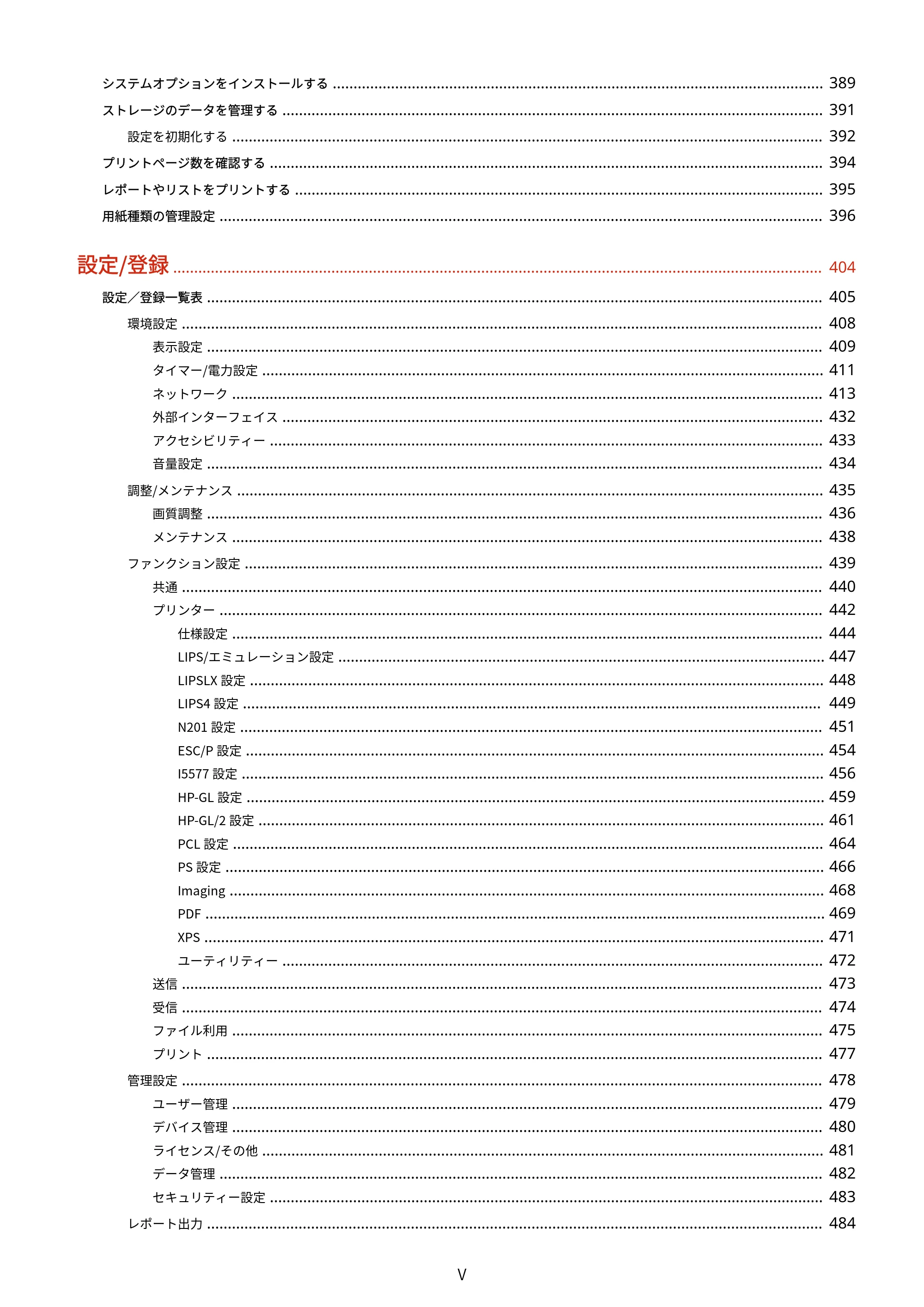
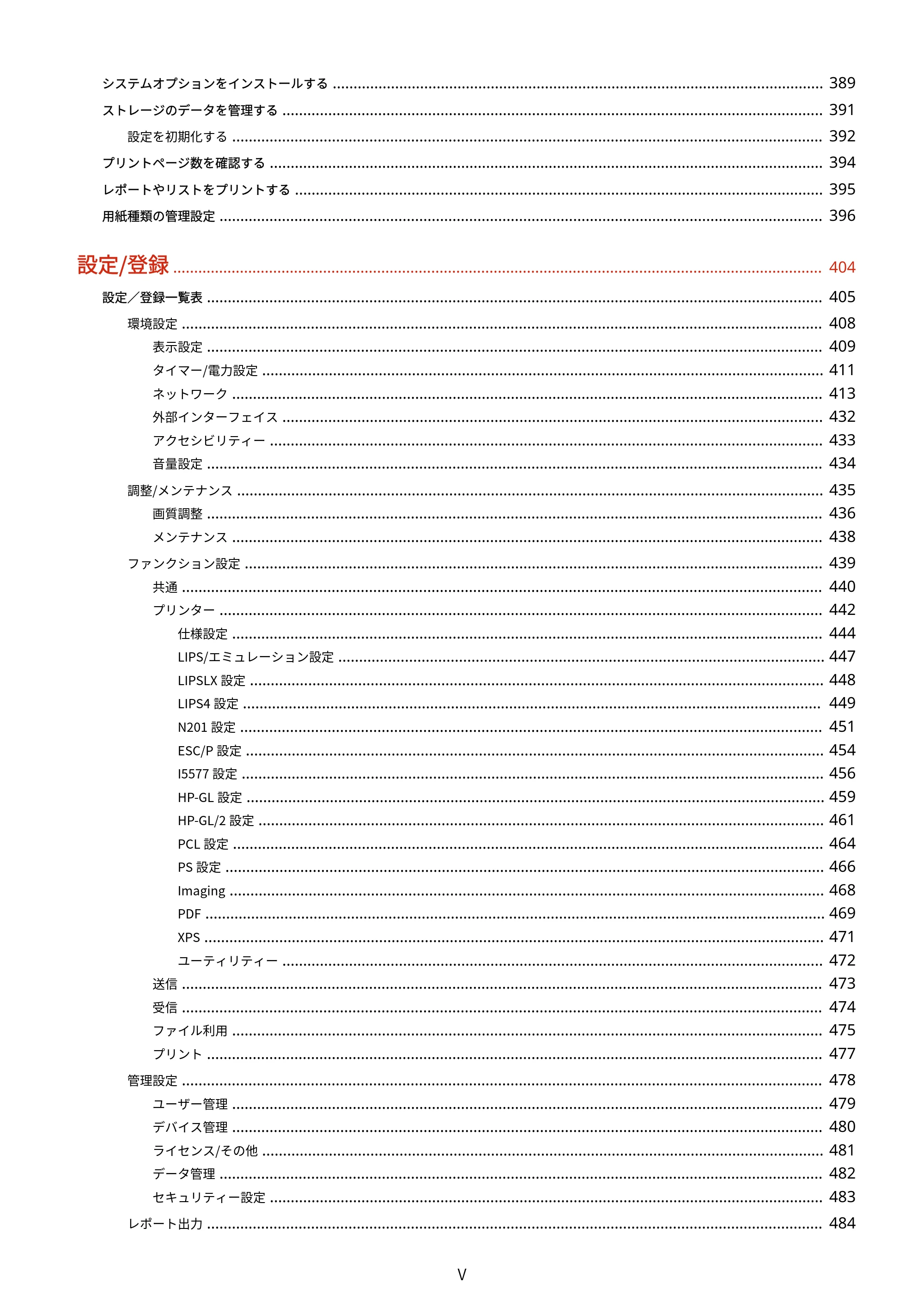
システムオプションをインストールする ...................................................................................................................... 389
ストレージのデータを管理する .................................................................................................................................. 391
設定を初期化する .............................................................................................................................................. 392
プリントページ数を確認する ..................................................................................................................................... 394
レポートやリストをプリントする ............................................................................................................................... 395
用紙種類の管理設定 ................................................................................................................................................. 396
設定/登録 ............................................................................................................................................................ 404
設定/登録一覧表 .................................................................................................................................................... 405
環境設定 .......................................................................................................................................................... 408
表示設定 .................................................................................................................................................... 409
タイマー/電力設定 ....................................................................................................................................... 411
ネットワーク .............................................................................................................................................. 413
外部インターフェイス .................................................................................................................................. 432
アクセシビリティー ..................................................................................................................................... 433
音量設定 .................................................................................................................................................... 434
調整/メンテナンス ............................................................................................................................................. 435
画質調整 .................................................................................................................................................... 436
メンテナンス .............................................................................................................................................. 438
ファンクション設定 ........................................................................................................................................... 439
共通 .......................................................................................................................................................... 440
プリンター ................................................................................................................................................. 442
仕様設定 .............................................................................................................................................. 444
LIPS/エミュレーション設定 ..................................................................................................................... 447
LIPSLX 設定 .......................................................................................................................................... 448
LIPS4 設定 ........................................................................................................................................... 449
N201 設定 ............................................................................................................................................ 451
ESC/P 設定 ........................................................................................................................................... 454
I5577 設定 ............................................................................................................................................ 456
HP-GL 設定 ........................................................................................................................................... 459
HP-GL/2 設定 ........................................................................................................................................ 461
PCL 設定 .............................................................................................................................................. 464
PS 設定 ................................................................................................................................................ 466
Imaging ............................................................................................................................................... 468
PDF ..................................................................................................................................................... 469
XPS ..................................................................................................................................................... 471
ユーティリティー .................................................................................................................................. 472
送信 .......................................................................................................................................................... 473
受信 .......................................................................................................................................................... 474
ファイル利用 .............................................................................................................................................. 475
プリント .................................................................................................................................................... 477
管理設定 .......................................................................................................................................................... 478
ユーザー管理 .............................................................................................................................................. 479
デバイス管理 .............................................................................................................................................. 480
ライセンス/その他 ....................................................................................................................................... 481
データ管理 ................................................................................................................................................. 482
セキュリティー設定 ..................................................................................................................................... 483
レポート出力 .................................................................................................................................................... 484
V
7ページ
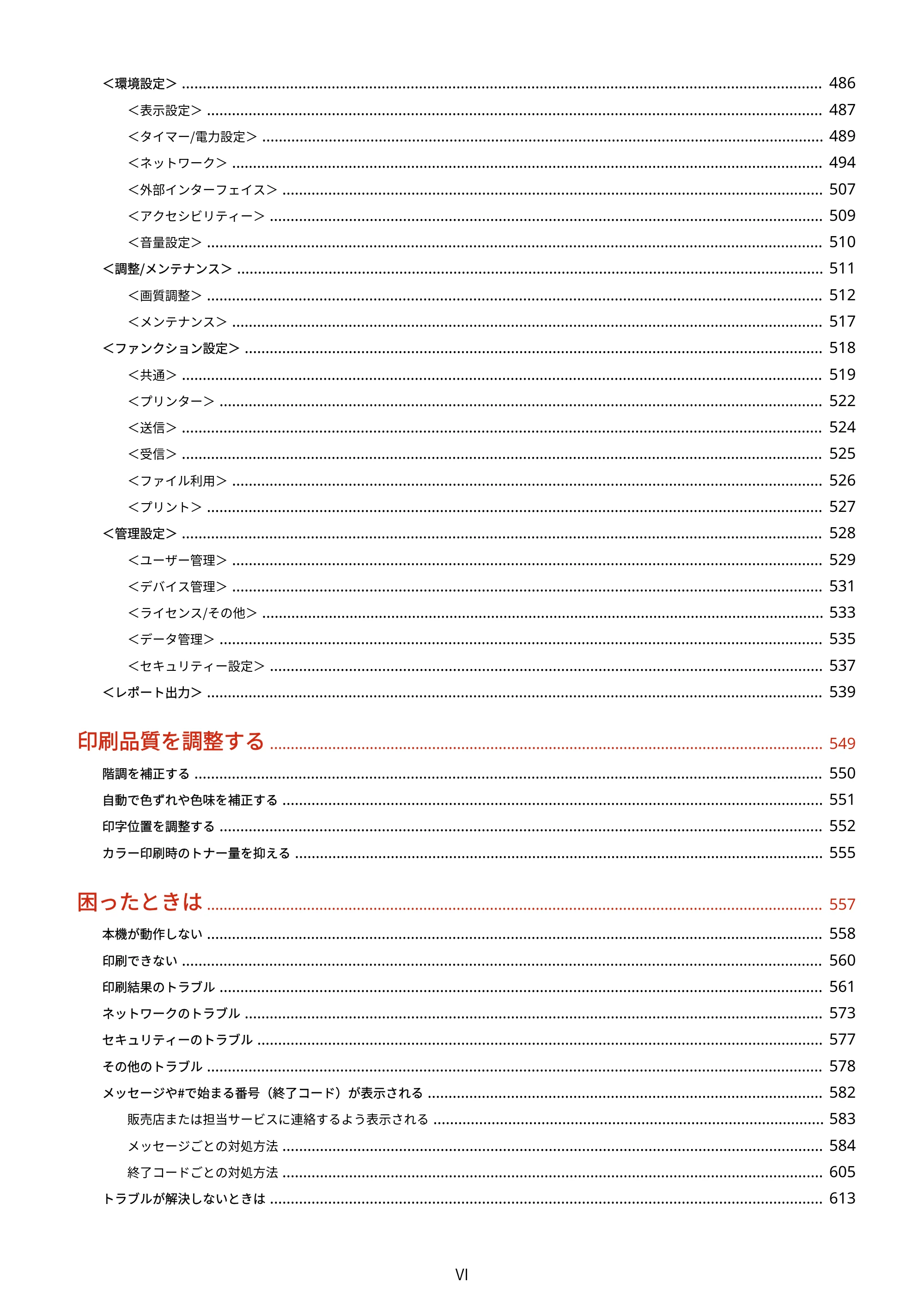
<環境設定> .......................................................................................................................................................... 486
<表示設定> .................................................................................................................................................... 487
<タイマー/電力設定> ....................................................................................................................................... 489
<ネットワーク> .............................................................................................................................................. 494
<外部インターフェイス> .................................................................................................................................. 507
<アクセシビリティー> ..................................................................................................................................... 509
<音量設定> .................................................................................................................................................... 510
<調整/メンテナンス> ............................................................................................................................................. 511
<画質調整> .................................................................................................................................................... 512
<メンテナンス> .............................................................................................................................................. 517
<ファンクション設定> ........................................................................................................................................... 518
<共通> .......................................................................................................................................................... 519
<プリンター> ................................................................................................................................................. 522
<送信> .......................................................................................................................................................... 524
<受信> .......................................................................................................................................................... 525
<ファイル利用> .............................................................................................................................................. 526
<プリント> .................................................................................................................................................... 527
<管理設定> .......................................................................................................................................................... 528
<ユーザー管理> .............................................................................................................................................. 529
<デバイス管理> .............................................................................................................................................. 531
<ライセンス/その他> ....................................................................................................................................... 533
<データ管理> ................................................................................................................................................. 535
<セキュリティー設定> ..................................................................................................................................... 537
<レポート出力> .................................................................................................................................................... 539
印刷品質を調整する ..................................................................................................................................... 549
階調を補正する ....................................................................................................................................................... 550
自動で色ずれや色味を補正する .................................................................................................................................. 551
印字位置を調整する ................................................................................................................................................. 552
カラー印刷時のトナー量を抑える ............................................................................................................................... 555
困ったときは .................................................................................................................................................... 557
本機が動作しない .................................................................................................................................................... 558
印刷できない .......................................................................................................................................................... 560
印刷結果のトラブル ................................................................................................................................................. 561
ネットワークのトラブル ........................................................................................................................................... 573
セキュリティーのトラブル ........................................................................................................................................ 577
その他のトラブル .................................................................................................................................................... 578
メッセージや#で始まる番号(終了コード)が表示される ............................................................................................... 582
販売店または担当サービスに連絡するよう表示される .............................................................................................. 583
メッセージごとの対処方法 .................................................................................................................................. 584
終了コードごとの対処方法 .................................................................................................................................. 605
トラブルが解決しないときは ..................................................................................................................................... 613
VI
8ページ
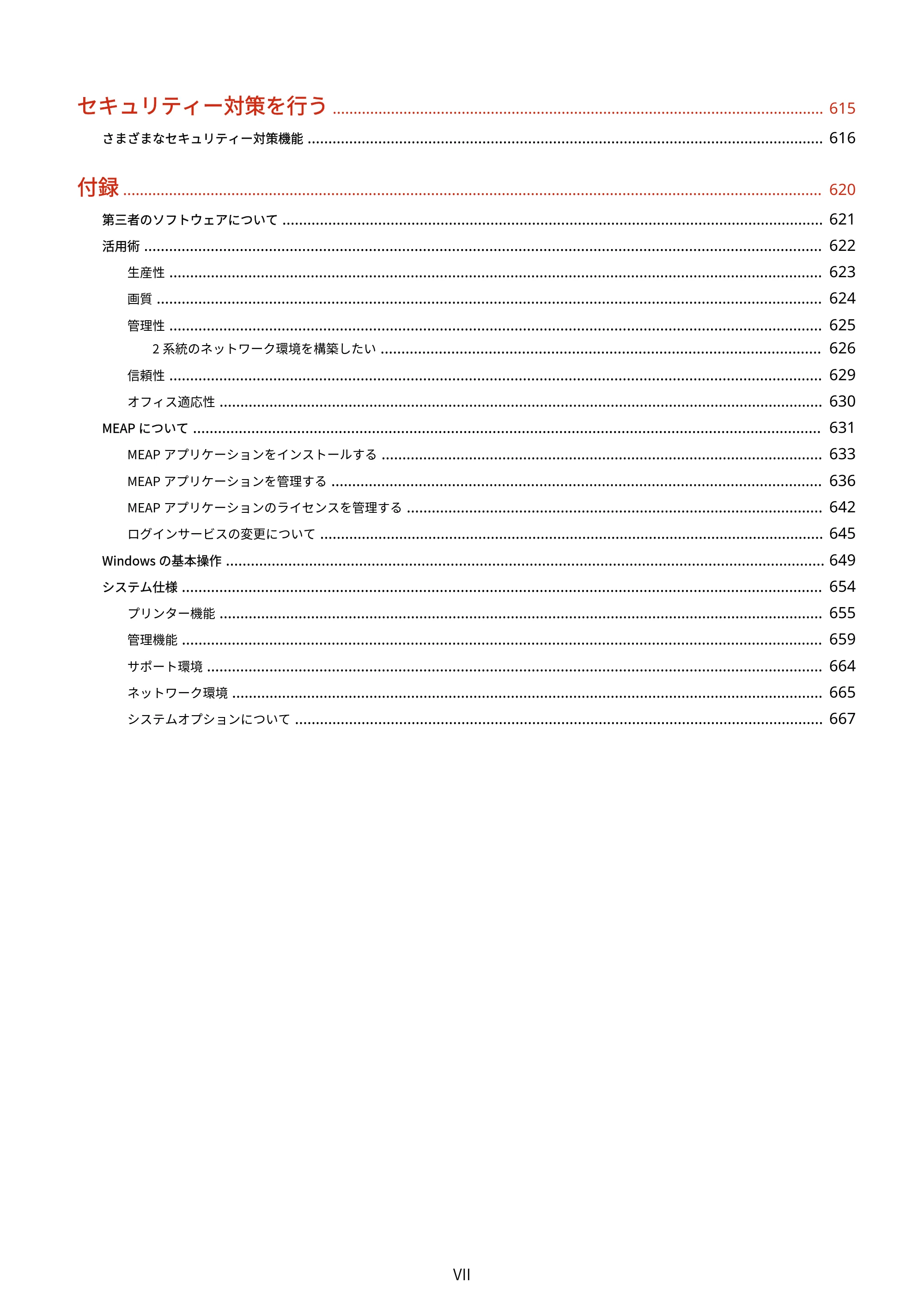
セキュリティー対策を行う ...................................................................................................................... 615
さまざまなセキュリティー対策機能 ............................................................................................................................ 616
付録 ........................................................................................................................................................................ 620
第三者のソフトウェアについて .................................................................................................................................. 621
活用術 ................................................................................................................................................................... 622
生産性 ............................................................................................................................................................. 623
画質 ................................................................................................................................................................ 624
管理性 ............................................................................................................................................................. 625
2 系統のネットワーク環境を構築したい .......................................................................................................... 626
信頼性 ............................................................................................................................................................. 629
オフィス適応性 ................................................................................................................................................. 630
MEAP について ....................................................................................................................................................... 631
MEAP アプリケーションをインストールする .......................................................................................................... 633
MEAP アプリケーションを管理する ...................................................................................................................... 636
MEAP アプリケーションのライセンスを管理する .................................................................................................... 642
ログインサービスの変更について ......................................................................................................................... 645
Windows の基本操作 ................................................................................................................................................ 649
システム仕様 .......................................................................................................................................................... 654
プリンター機能 ................................................................................................................................................. 655
管理機能 .......................................................................................................................................................... 659
サポート環境 .................................................................................................................................................... 664
ネットワーク環境 .............................................................................................................................................. 665
システムオプションについて ............................................................................................................................... 667
VII
9ページ
はじめに
はじめに ..................................................................................................................................................................... 2
ユーザーズガイドの使いかた .................................................................................................................................... 3
ユーザーズガイドの画面構成 .............................................................................................................................. 4
ユーザーズガイドの読みかた .............................................................................................................................. 7
マニュアルの種類と内容 ........................................................................................................................................... 9
メニュールートマップ ............................................................................................................................................ 10
おことわり ............................................................................................................................................................. 11
はじめに
1
はじめに
はじめに
9SA3-000
ユーザーズガイドの使いかた、免責事項や著作権など、お客様に知っておいていただきたい事項を記載しています。必要に応
じてお読みください。
◼ 本機のマニュアルについて
ユーザーズガイド(本マニュアル)の使いかたや、本機の機能や操作方法を調べるための各種マニュアルについて説明しま
す。
ユーザーズガイドの使いかた(P. 3)
マニュアルの種類と内容(P. 9)
◼ 免責事項や著作権について
免責事項や著作権などを知りたいときにご覧ください。
おことわり(P. 11)
はじめに
2
ユーザーズガイドの使いかた
ユーザーズガイドの使いかた
9SA3-001
ユーザーズガイドはパソコンやスマートフォンなどで見る取扱説明書です。ここでは、ユーザーズガイドの画面構成や読みか
たについて説明します。また、ユーザーズガイドの表示を設定することもできます。
◼ ユーザーズガイドの画面構成
ユーザーズガイドを構成する画面や配置されているボタンなどの使いかたについて説明します。 ユーザーズガイドの画面
構成(P. 4)
◼ ユーザーズガイドの読みかた
ユーザーズガイドで使われているマークの意味や、操作パネル上のキーやパソコン画面上のボタンをどのように表記している
かなど、ユーザーズガイドをお読みになるうえで知っておいていただきたいことがらについて説明します。 ユーザーズガイ
ドの読みかた(P. 7)
◼ ユーザーズガイドの表示を設定する
ユーザーズガイドの文字サイズを変更したり、ユーザーズガイドを表示する機器に合わせた画面レイアウトに切り替えたりす
ることができます。
- PDF 形式のマニュアルを見られない場合は、Adobe Acrobat Reader をアドビシステムズ社のホームページ
(https://get.adobe.com/reader/)からダウンロードしてください。
探したい内容を見つける
もくじから探す
- 画面左に配置されている「もくじ」から項目を選ぶことで目的のページを探します。
検索して探す
- 「印刷設定」、「無線 LAN」のようなキーワードを入力して検索すると、それを含むページが候補として表示されま
すので、その中から目的のページを探します。「ネットワークに接続」のような文章をキーワードとすることもで
きます。また、複数のキーワードをスペース(空白)で区切る AND 検索にも対応しています。検索画面の内容や
操作方法については、 検索(P. 5) を参照してください。
はじめに
3
ユーザーズガイドの画面構成
ユーザーズガイドの画面構成
9SA3-002
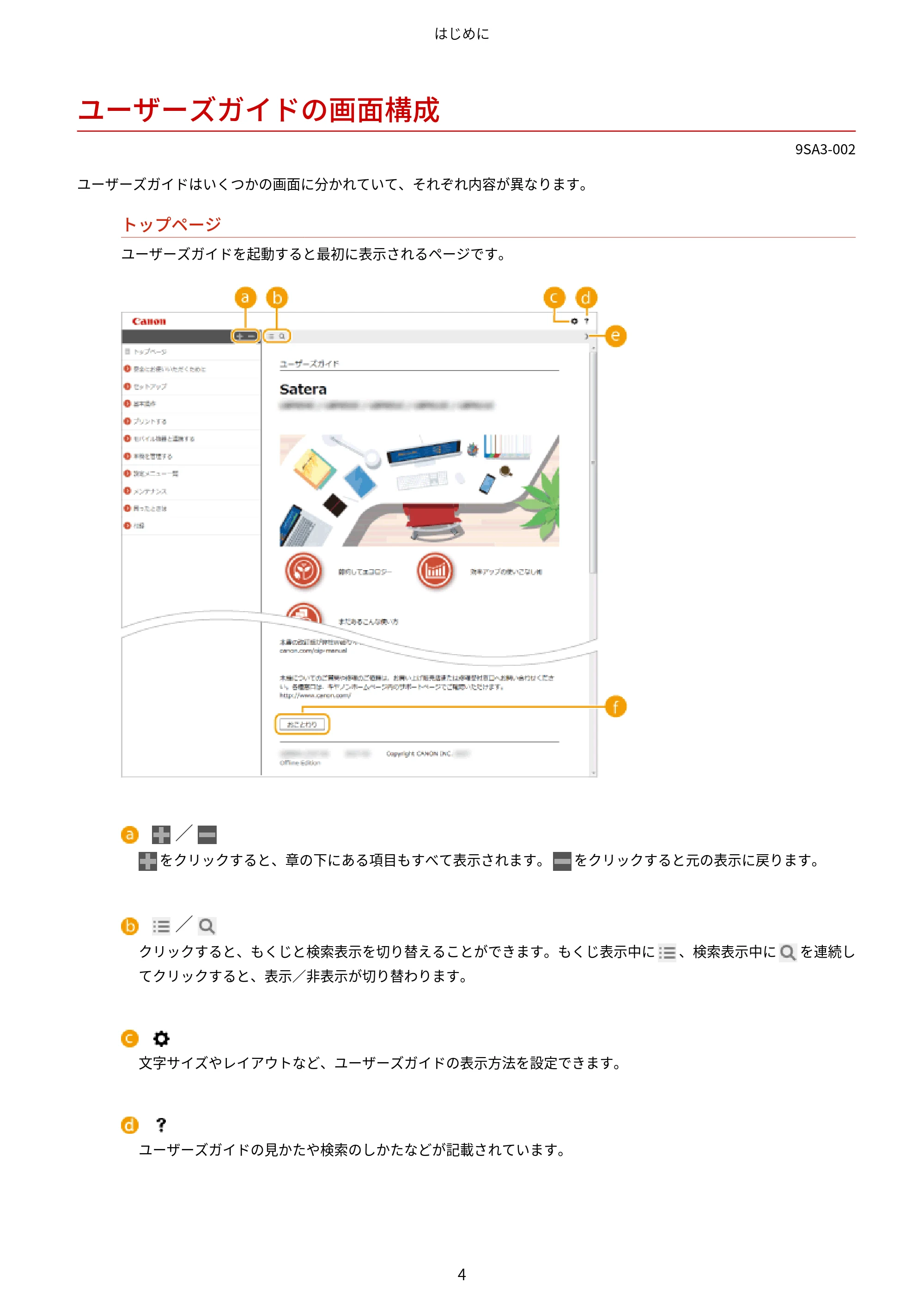
ユーザーズガイドはいくつかの画面に分かれていて、それぞれ内容が異なります。
トップページ
ユーザーズガイドを起動すると最初に表示されるページです。
/
をクリックすると、章の下にある項目もすべて表示されます。 をクリックすると元の表示に戻ります。
/
クリックすると、もくじと検索表示を切り替えることができます。もくじ表示中に 、検索表示中に を連続し
てクリックすると、表示/非表示が切り替わります。
文字サイズやレイアウトなど、ユーザーズガイドの表示方法を設定できます。
ユーザーズガイドの見かたや検索のしかたなどが記載されています。
はじめに
4
13ページ
/
クリックすると、前後のページを表示します。
[おことわり]
本機の使用にあたり、注意していただきたいことが記載されています。
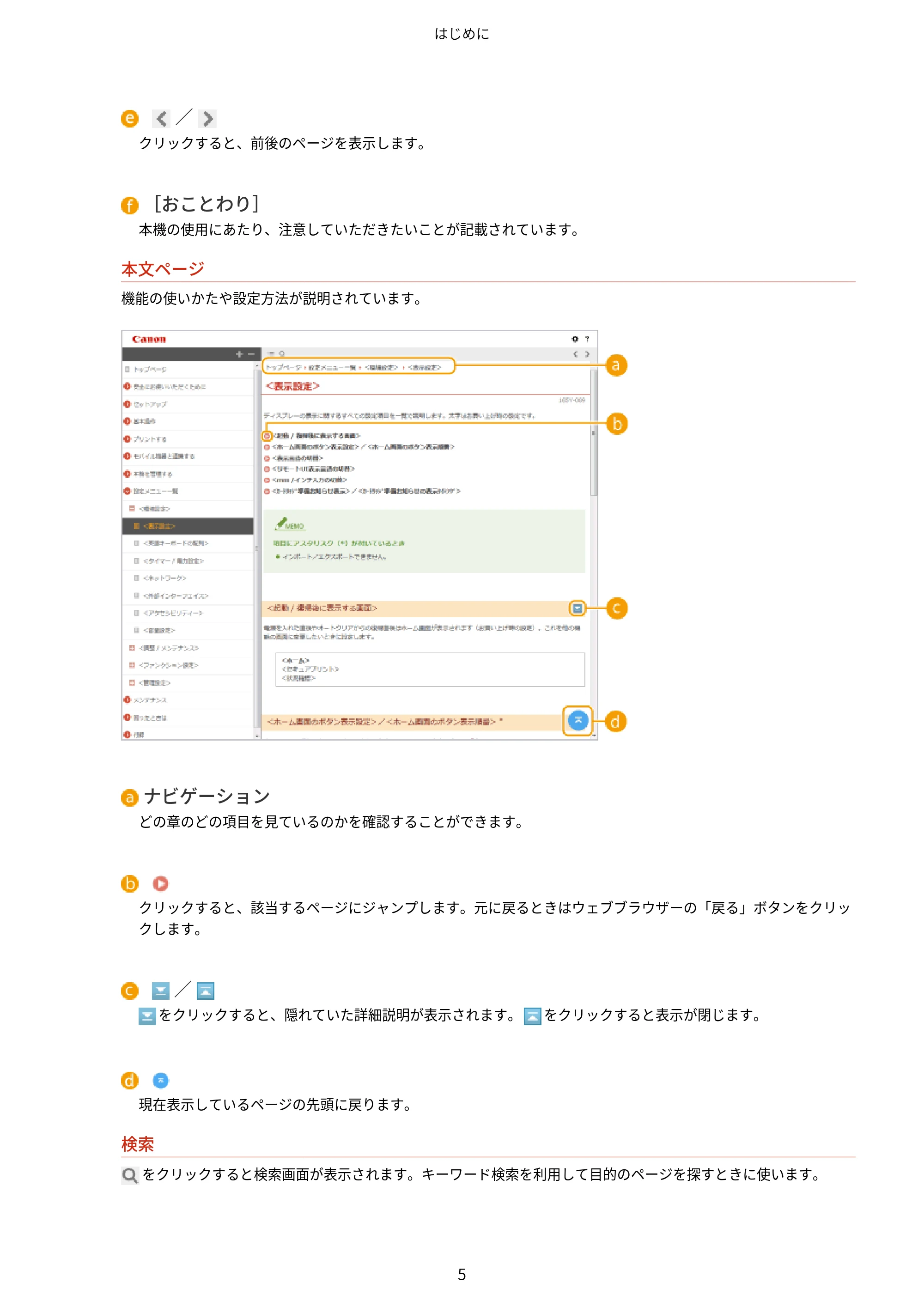
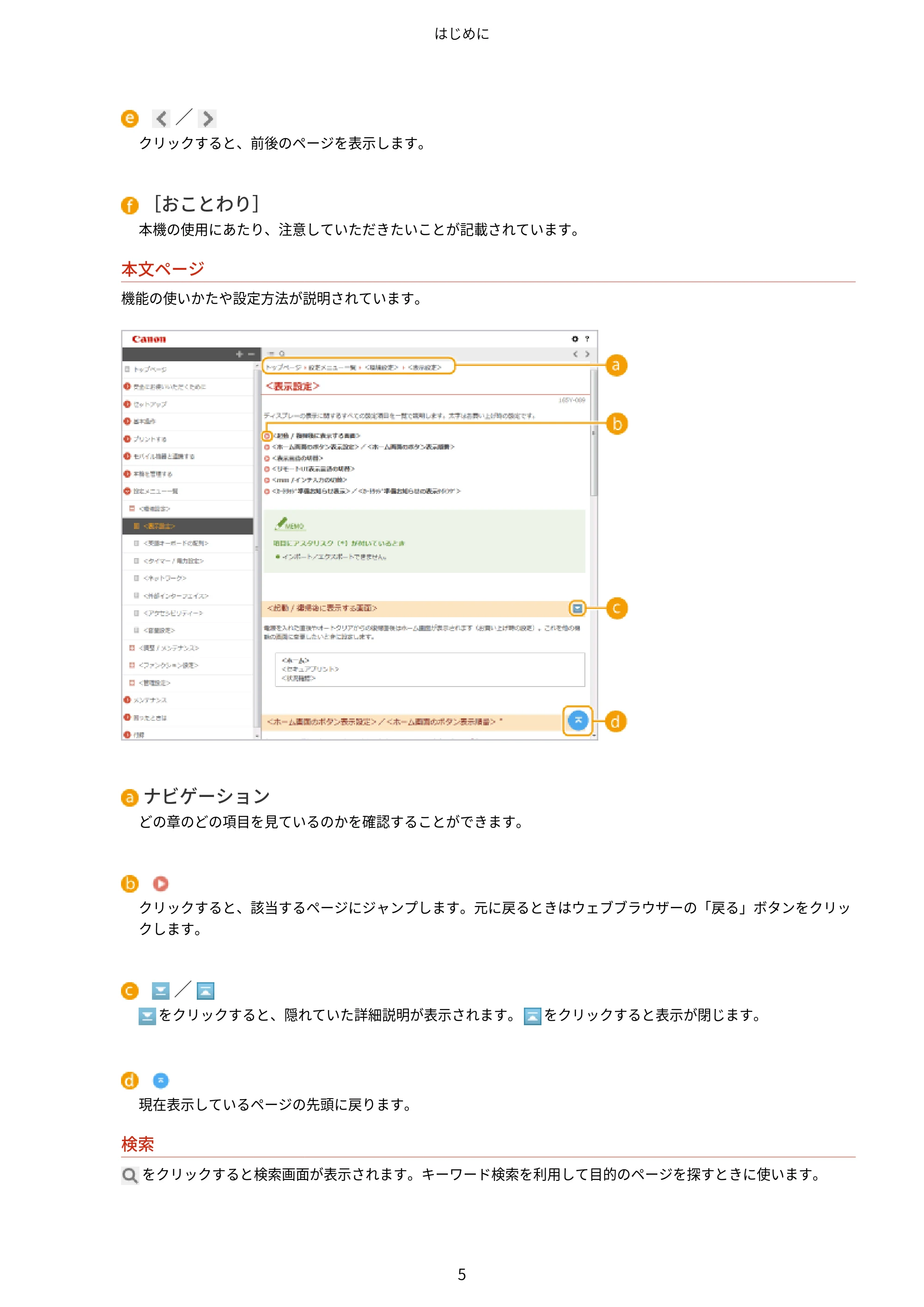
本文ページ
機能の使いかたや設定方法が説明されています。
ナビゲーション
どの章のどの項目を見ているのかを確認することができます。
クリックすると、該当するページにジャンプします。元に戻るときはウェブブラウザーの「戻る」ボタンをクリッ
クします。
/
をクリックすると、隠れていた詳細説明が表示されます。 をクリックすると表示が閉じます。
現在表示しているページの先頭に戻ります。
検索
をクリックすると検索画面が表示されます。キーワード検索を利用して目的のページを探すときに使います。
はじめに
5
14ページ
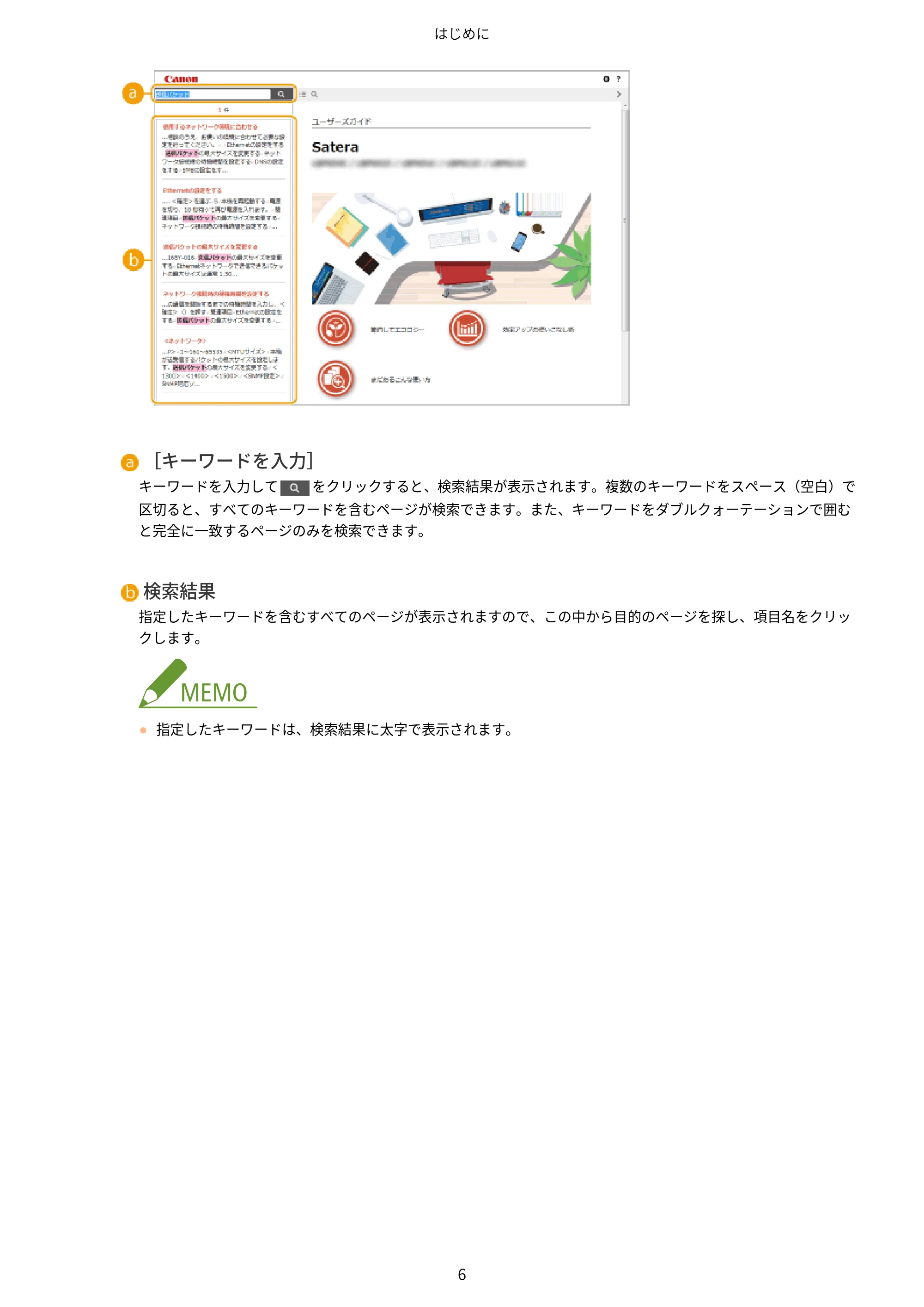
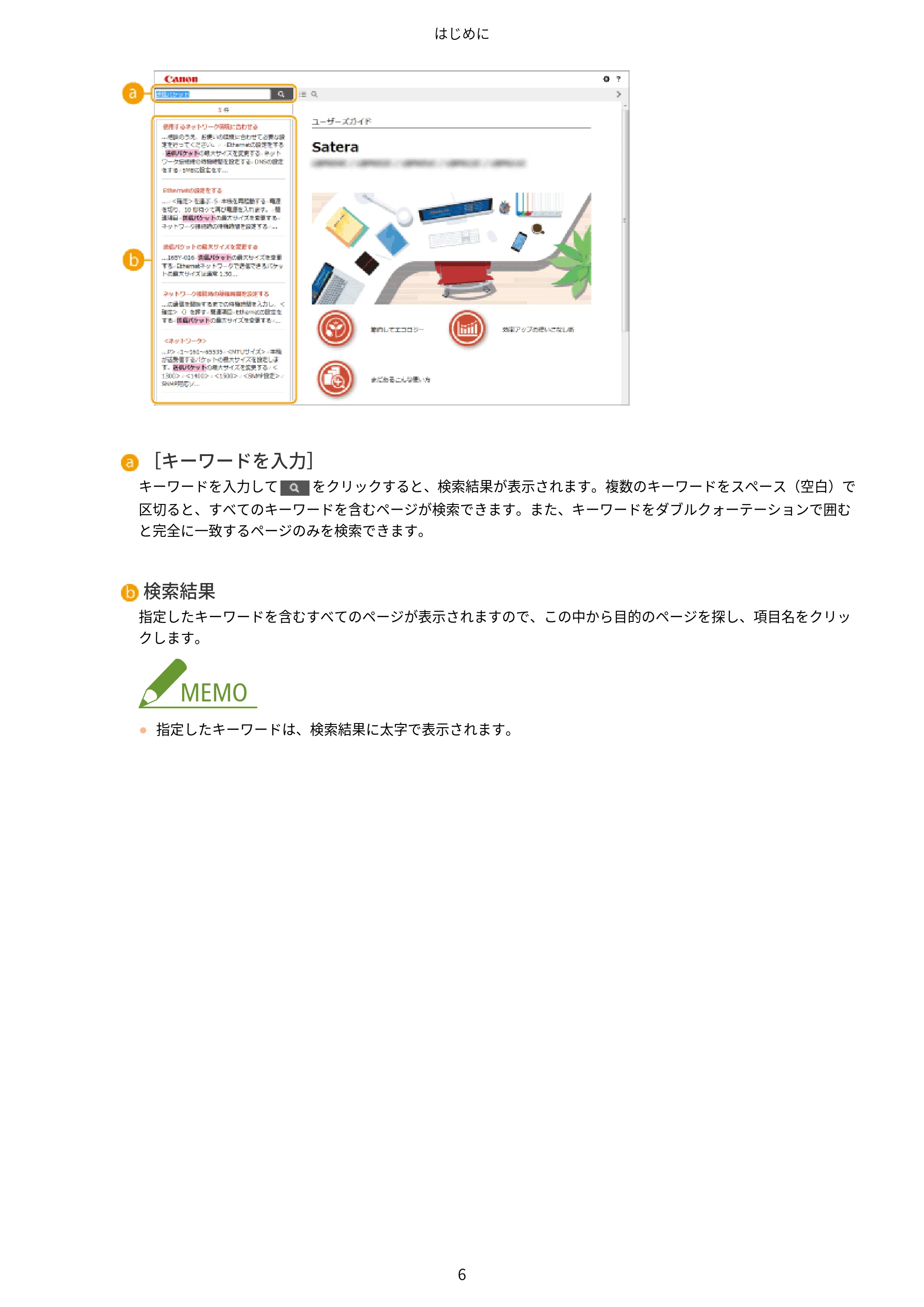
[キーワードを入力]
キーワードを入力して をクリックすると、検索結果が表示されます。複数のキーワードをスペース(空白)で
区切ると、すべてのキーワードを含むページが検索できます。また、キーワードをダブルクォーテーションで囲む
と完全に一致するページのみを検索できます。
検索結果
指定したキーワードを含むすべてのページが表示されますので、この中から目的のページを探し、項目名をクリッ
クします。
- 指定したキーワードは、検索結果に太字で表示されます。
はじめに
6
ユーザーズガイドの読みかた
ユーザーズガイドの読みかた
9SA3-003
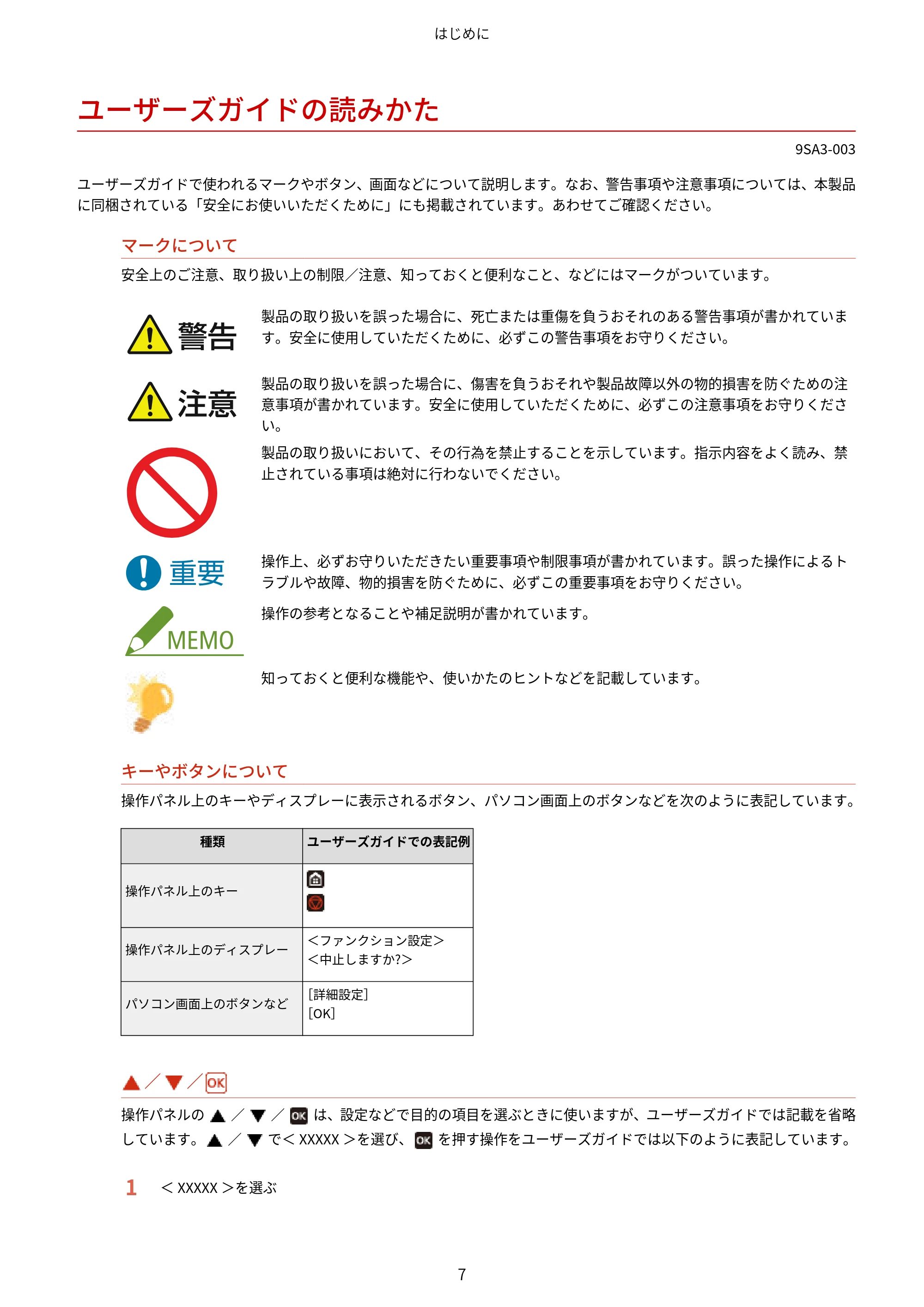
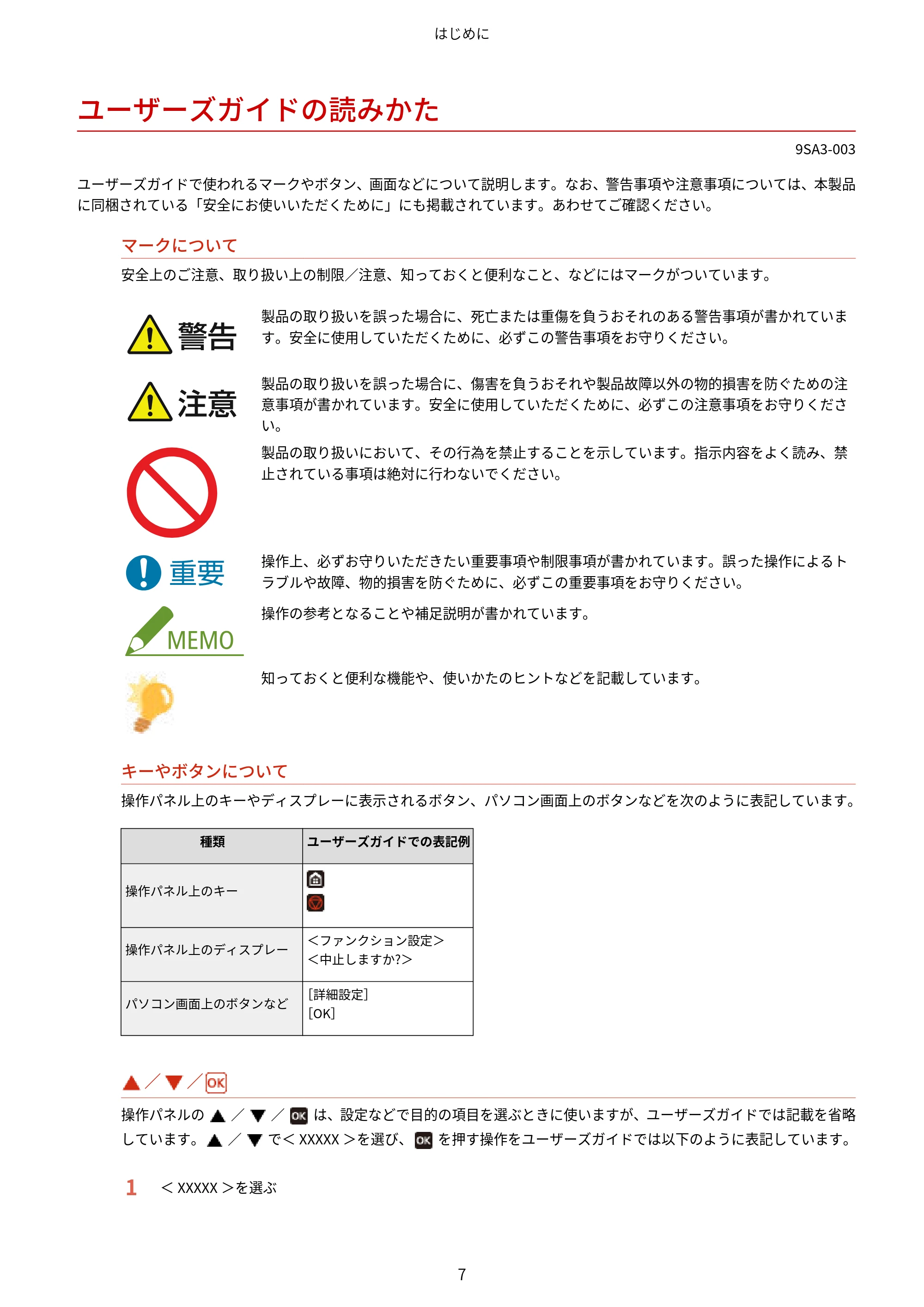
ユーザーズガイドで使われるマークやボタン、画面などについて説明します。なお、警告事項や注意事項については、本製品
に同梱されている「安全にお使いいただくために」にも掲載されています。あわせてご確認ください。
マークについて
安全上のご注意、取り扱い上の制限/注意、知っておくと便利なこと、などにはマークがついています。
製品の取り扱いを誤った場合に、死亡または重傷を負うおそれのある警告事項が書かれていま
す。安全に使用していただくために、必ずこの警告事項をお守りください。
製品の取り扱いを誤った場合に、傷害を負うおそれや製品故障以外の物的損害を防ぐための注
意事項が書かれています。安全に使用していただくために、必ずこの注意事項をお守りくださ
い。
製品の取り扱いにおいて、その行為を禁止することを示しています。指示内容をよく読み、禁
止されている事項は絶対に行わないでください。
操作上、必ずお守りいただきたい重要事項や制限事項が書かれています。誤った操作によるト
ラブルや故障、物的損害を防ぐために、必ずこの重要事項をお守りください。
操作の参考となることや補足説明が書かれています。
知っておくと便利な機能や、使いかたのヒントなどを記載しています。
キーやボタンについて
操作パネル上のキーやディスプレーに表示されるボタン、パソコン画面上のボタンなどを次のように表記しています。
種類 ユーザーズガイドでの表記例
操作パネル上のキー
操作パネル上のディスプレー
<ファンクション設定>
<中止しますか?>
パソコン画面上のボタンなど
[詳細設定]
[OK]
/ /
操作パネルの / / は、設定などで目的の項目を選ぶときに使いますが、ユーザーズガイドでは記載を省略
しています。 / で< XXXXX >を選び、 を押す操作をユーザーズガイドでは以下のように表記しています。
1 < XXXXX >を選ぶ
はじめに
7
16ページ
画面について
お使いの OS によっては、掲載している画面内容と一部異なる場合があります。また、プリンタードライバーやソフト
ウェアはバージョンアップによって画面内容が変更されている場合があります。
イラストについて
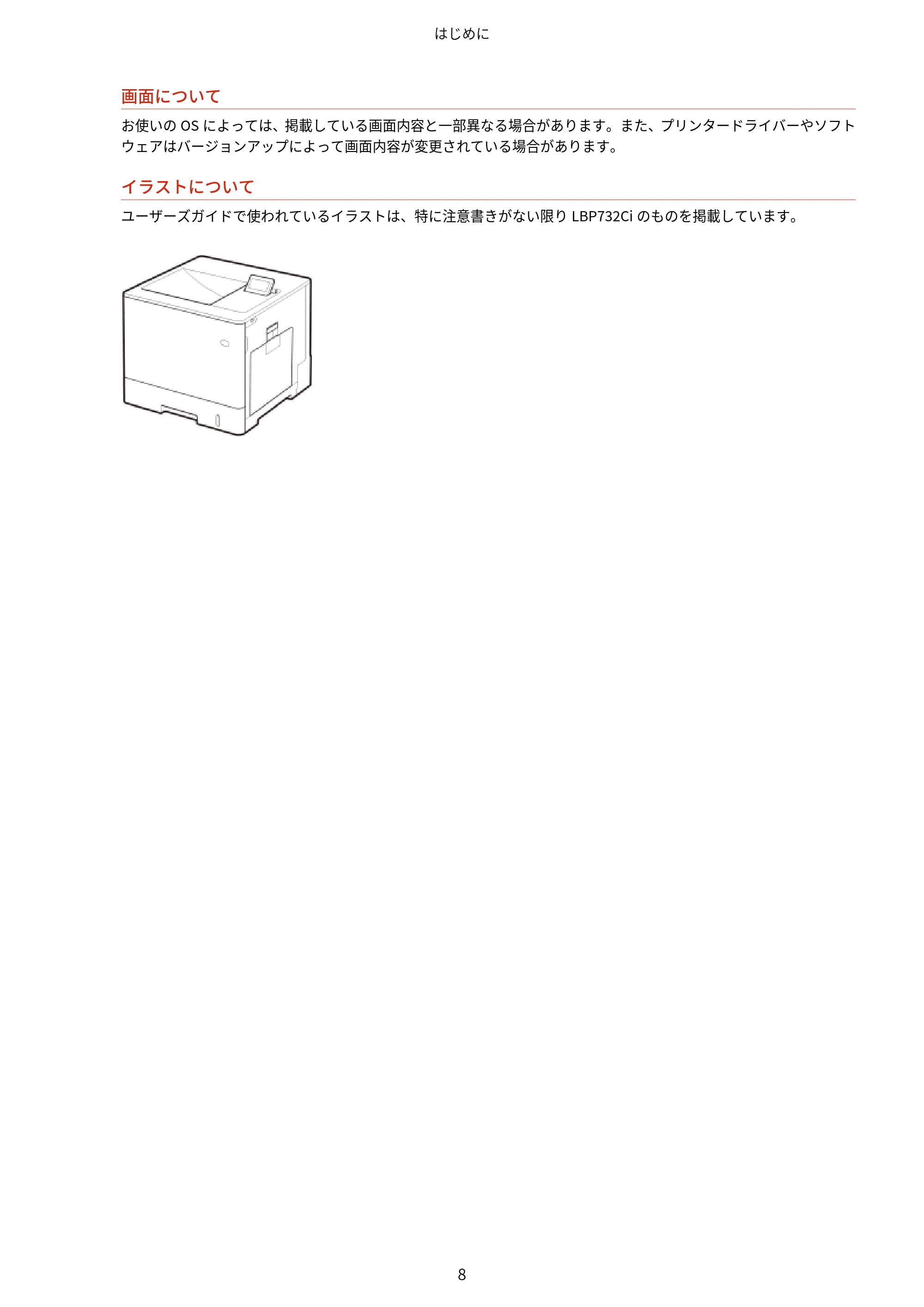
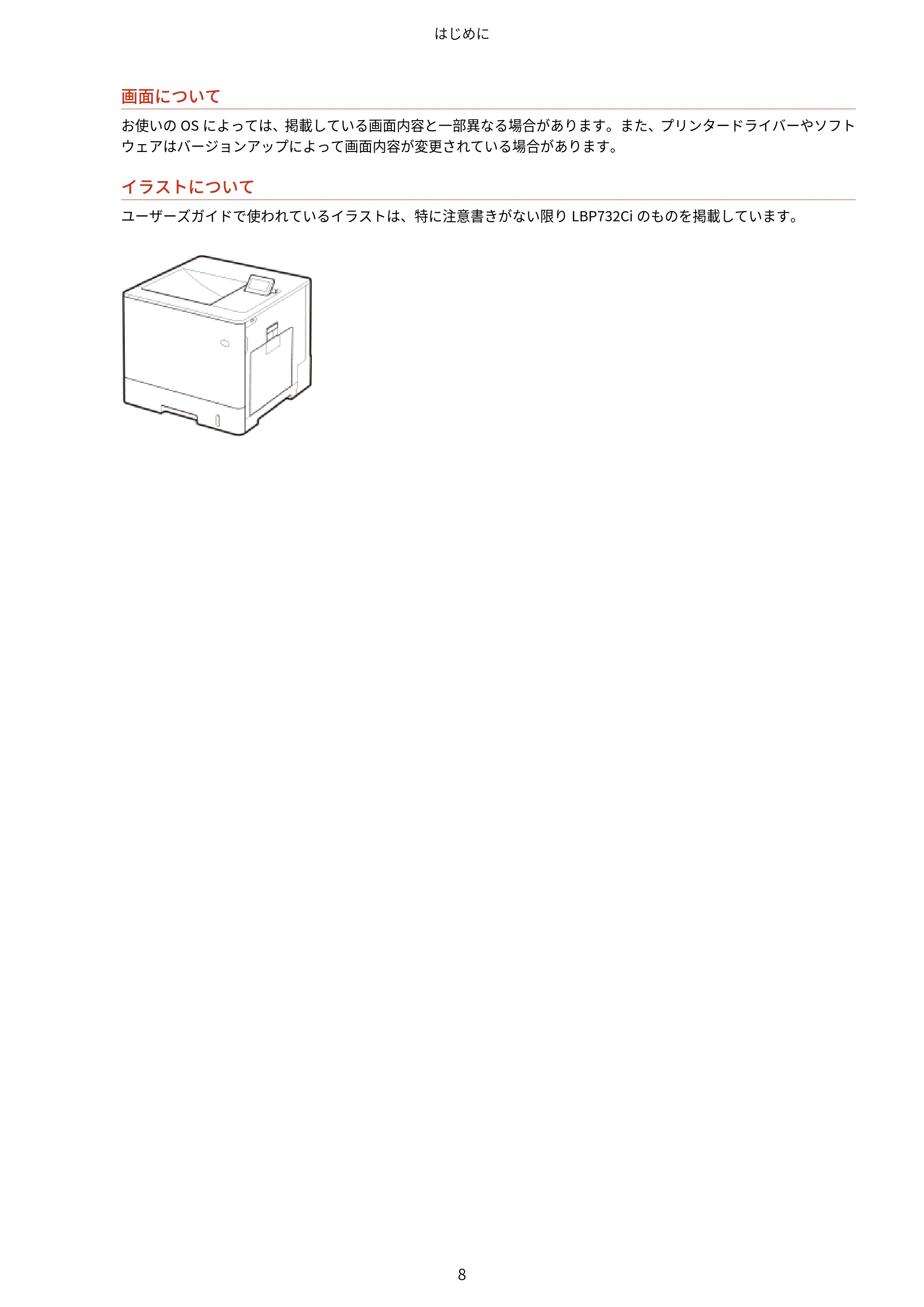
ユーザーズガイドで使われているイラストは、特に注意書きがない限り LBP732Ci のものを掲載しています。
はじめに
8
マニュアルの種類と内容
マニュアルの種類と内容
9SA3-005
本機では、次のマニュアルを提供しています。目的と用途に合わせてお使いください。
安全にお使いいただくために お使いになる人やほかの人への危害、および財産への損害を未然に防ぐための内
容を記載しています。
セットアップガイド 本機の電源を初めて入れたときに行う初期設定や、 ソフトウェアとドライバのイ
ンストール方法について説明しています。
ユーザーズガイド(本マニュアル) Web ブラウザーを使って閲覧するマニュアルで、本機のすべての機能を説明して
います。使用目的から調べたり、キーワードを入力して目的のページを検索した
りできます。 ユーザーズガイドの使いかた(P. 3)
エミュレーション Web ブラウザーを使って閲覧するマニュアルで、各種エミュレーションモードの
使いかたについて説明しています。オンラインマニュアルサイトからご覧になる
ことができます。
本体からのプリント設定 Web ブラウザーを使って閲覧するマニュアルで、LIPS プリンターの使いかたにつ
いて説明しています。オンラインマニュアルサイトからご覧になることができま
す。
はじめに
9
メニュールートマップ
メニュールートマップ
9SA3-006
本機の画面に表示される設定項目については、メニュールートマップ(PDF マニュアル)を参照してください。
Satera LBP732Ci
はじめに
10
おことわり
おことわり
9SA3-007
◼ 化学安全情報について
製品の安全データシート(SDS)は、 https://canon.jp/ecology/にて提供しております。
◼ 国際エネルギースタープログラムについて
国際エネルギースタープログラムは、コンピュータをはじめとしてオフィス機器の省エ
ネルギー化推進のための、国際的なプログラムです。このプログラムは、エネルギー消
費を効率的に抑えるための機能を備えた製品の開発、普及の促進を目的としたもので、
事業者の自主判断により、参加することができる任意制度となっています。
◼ IPv6 Ready Logo について
本製品搭載のプロトコルスタックは、IPv6 Forum が定める IPv6 Ready Logo Phase-2 を取得していま
す。
◼ 物質エミッションの拡散に関する認定基準について
本製品は、エコマーク基準の 物質エミッションの放散速度に関する認定基準を満たしています。(トナーは本製品推奨トナー
を使用し、印刷を行った場合について、エコマーク基準に基づき試験を実施しました。)
◼ 資源再利用について
キヤノンでは環境保全ならびに資源の有効活用のため、リサイクルの推進に努めております。回収窓口が製品により異なりま
すので、以下の内容をお読みいただき、ご理解とご協力をお願いします。
使用済み複合機・プリンターの受け入れ場所について
使用済みとなった複合機・プリンターにつきましては、次のように回収を行っています。お問い合わせ先に注意してご
連絡願います。
キヤノンでは、環境保全と資源の有効活用のため、回収されたオフィス用、使用済み複合機・プリンターのリサイクル
を推進しています。使用済みの複合機・プリンターの回収については、お買い求めの販売店、または弊社お客様相談セ
ンターもしくは担当の営業にお問い合わせください。なお、事情により回収にご協力いただけない場合には、廃棄物処
理法に従い処分してください。
はじめに
11
20ページ
使用済みドラムユニット、トナー容器( カートリッジを含む)などの回収について
使用済みとなったトナー容器などにつきましては、次のように回収を行っています。お問い合わせ先に注意してご連絡
願います。
キヤノンでは、環境保全と資源の有効活用のため、使用済みドラムユニットおよび使用済みトナー容器の回収とリサイ
クルを推進しています。使用済みドラムユニット、トナー容器の回収については、担当のサービス店、または弊社お客
様相談センターにお問い合わせください。なお、事情により回収にご協力いただけない場合には、トナーがこぼれない
ようにビニール袋などに入れて、地域の条例に従い処分してください。
◼ 商標について
Mopria®, the Mopria® Logo and the Mopria® Alliance logo are registered trademarks and service marks of Mopria
Alliance, Inc. in the United States and other countries. Unauthorized use is strictly prohibited.
Adobe、Acrobat、Reader は、Adobe Systems Incorporated(アドビ システムズ 社)の商標です。
This product contains the Universal Font Scaling Technology or UFST® under license from Monotype Imaging, Inc.”
“UFST® is a trademark of Monotype Imaging, Inc. registered in the United States Patent and Trademark Office and may
be registered in certain jurisdictions.
UFST: Copyright © 1989 - 1996, 1997, 2003, 2004, 2008, 2014, all rights reserved, by Monotype Imaging Inc.
Apple、Bonjour、iPad、iPhone、iPod touch、Mac、macOS、OS X、および Safari は、Apple Inc.の商標です。
Google Chrome、Chrome OS、Chromebook、Google Workspace、Android は、Google LLC の商標です。
Portions of this software are copyright © 2007 The FreeType Project (www.freetype.org).
All rights reserved.
Java is a registered trademark of Oracle and /or its affiliates.
Adobe、PostScript および PostScript ロゴは、Adobe Systems Incorporated (アドビ システムズ 社)の米国ならびに他の国に
おける商標または商標登録です。
Copyright © 2007 -08 Adobe Systems Incorporated. All rights reserved.
はじめに
12
21ページ
Protected by U.S. Patents 5,737,599; 5,781,785; 5,819,301; 5,929,866; 5,943,063; 6,073,148; 6,515,763; 6,639,593;
6,754,382; 7,046,403; 7,213,269; 7,242,415; Patents pending in the U.S. and other countries.
All instances of the name PostScript in the text are references to the PostScript language as defined by Adobe Systems
Incorporated unless otherwise stated. The name PostScript also is used as a product trademark for Adobe Systems'
implementation of the PostScript language interpreter.
Except as otherwise stated, any reference to a "PostScript printing device," "PostScript display device," or similar item
refers to a printing device, display device or item (respectively) that contains PostScript technology created or licensed
by Adobe Systems Incorporated and not to devices or items that purport to be merely compatible with the PostScript
language.
Adobe, the Adobe logo, PostScript, the PostScript logo, and PostScript 3 are either registered trademarks or trademarks
of Adobe Systems Incorporated in the United States and/or other countries.
Linux is a registered trademark of Linus Torvalds. Microsoft and Windows are either registered trademarks or
trademarks of Microsoft Corporation in the United States and/or other countries.
All other trademarks are the property of their respective owners.
PDF ロゴは、Adobe Systems Incorporated (アドビ システムズ 社)の米国ならびに他の国における商標または商標登録です。
Copyright © 2008 Adobe Systems Incorporated. All rights reserved.
Protected by U.S. Patents 6,185,684; 6,205,549; 7,213,269; 7,272,628; 7,278,168; Patents pending in the U.S. and other
countries.
All instances of the name PostScript in the text are references to the PostScript language as defined by Adobe Systems
Incorporated unless otherwise stated. The name PostScript also is used as a product trademark for Adobe Systems'
implementation of the PostScript language interpreter.
Except as otherwise stated, any reference to a "PostScript printing device," "PostScript display device," or similar item
refers to a printing device, display device or item (respectively) that contains PostScript technology created or licensed
by Adobe Systems Incorporated and not to devices or items that purport to be merely compatible with the PostScript
language.
Adobe, the Adobe logo, Adobe LiveCycle® Policy Server, PostScript, the PostScript Logo, and PostScript 3 are either
registered trademarks or trademarks of Adobe Systems Incorporated in the United States and/or other countries.
All other trademarks are the property of their respective owners.
本書中の社名や商品名は、各社の登録商標または商標です。
All other trademarks are the property of their respective owners.
はじめに
13
22ページ
◼ 免責事項
- 本書の内容は予告なく変更することがありますのでご了承ください。
- キヤノン株式会社は、ここに定める場合を除き、市場性、商品性、特定使用目的の適合性、または特許権の非侵害性に対
する保証を含め、明示的または暗示的にかかわらず本書に関していかなる種類の保証を負うものではありません。キヤノ
ン株式会社は、直接的、間接的、または結果的に生じたいかなる自然の損害、あるいは本書をご利用になったことにより
生じたいかなる損害または費用についても、責任を負うものではありません。
- PDF 形式のマニュアルを見られない場合は、Adobe Acrobat Reader をアドビシステムズ社のホームページ(https://
get.adobe.com/reader/)からダウンロードしてください。
◼ 著作権
本書の内容の一部または全部を無断で転載することは禁止されています。
V_230207
はじめに
14
23ページ
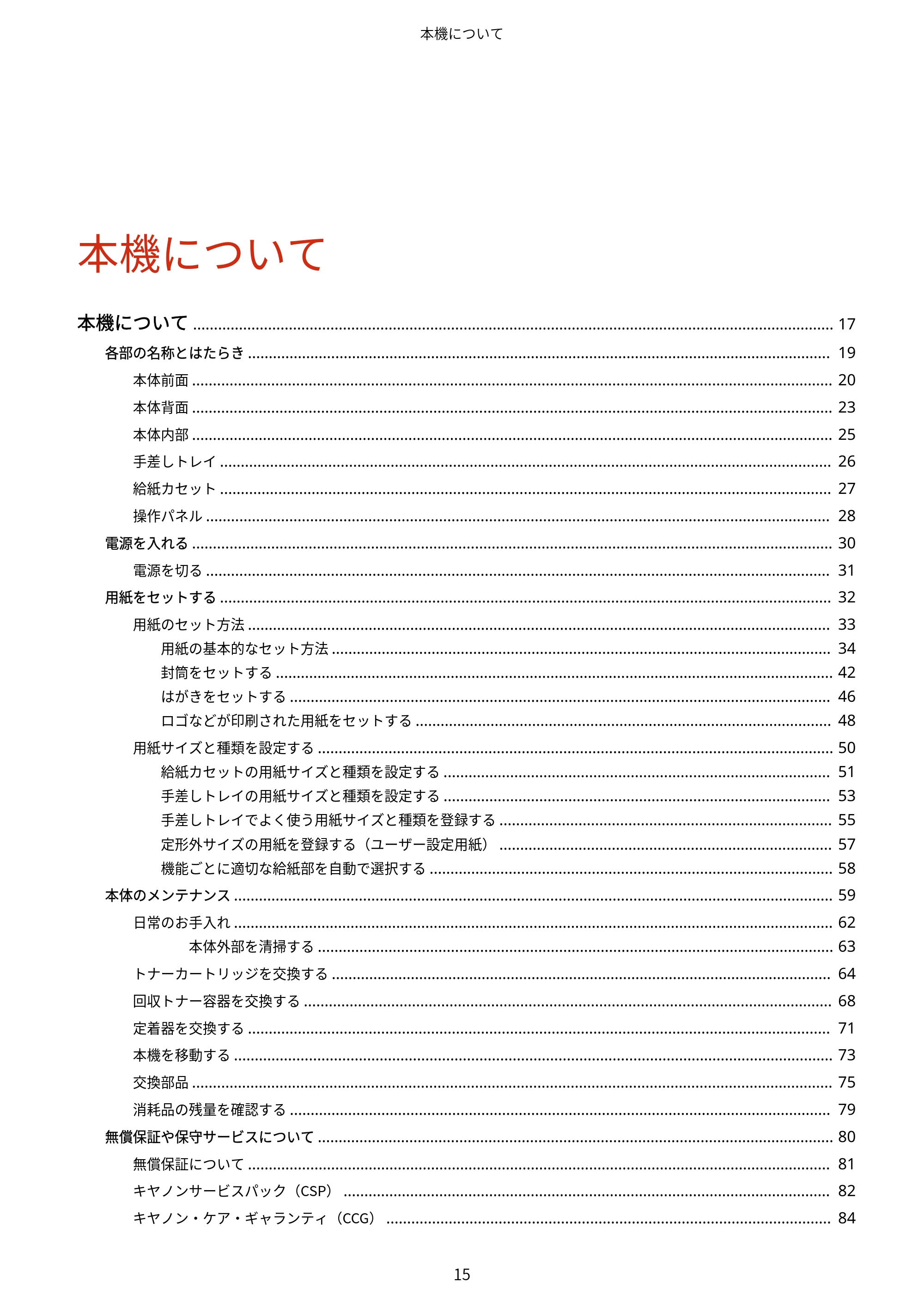
本機について
本機について .......................................................................................................................................................... 17
各部の名称とはたらき ............................................................................................................................................ 19
本体前面 .......................................................................................................................................................... 20
本体背面 .......................................................................................................................................................... 23
本体内部 .......................................................................................................................................................... 25
手差しトレイ ................................................................................................................................................... 26
給紙カセット ................................................................................................................................................... 27
操作パネル ...................................................................................................................................................... 28
電源を入れる .......................................................................................................................................................... 30
電源を切る ...................................................................................................................................................... 31
用紙をセットする ................................................................................................................................................... 32
用紙のセット方法 ............................................................................................................................................ 33
用紙の基本的なセット方法 ........................................................................................................................ 34
封筒をセットする ...................................................................................................................................... 42
はがきをセットする .................................................................................................................................. 46
ロゴなどが印刷された用紙をセットする .................................................................................................... 48
用紙サイズと種類を設定する ............................................................................................................................ 50
給紙カセットの用紙サイズと種類を設定する ............................................................................................. 51
手差しトレイの用紙サイズと種類を設定する ............................................................................................. 53
手差しトレイでよく使う用紙サイズと種類を登録する ................................................................................ 55
定形外サイズの用紙を登録する(ユーザー設定用紙) ................................................................................ 57
機能ごとに適切な給紙部を自動で選択する ................................................................................................. 58
本体のメンテナンス ................................................................................................................................................ 59
日常のお手入れ ................................................................................................................................................ 62
本体外部を清掃する ............................................................................................................................ 63
トナーカートリッジを交換する ........................................................................................................................ 64
回収トナー容器を交換する ............................................................................................................................... 68
定着器を交換する ............................................................................................................................................ 71
本機を移動する ................................................................................................................................................ 73
交換部品 .......................................................................................................................................................... 75
消耗品の残量を確認する .................................................................................................................................. 79
無償保証や保守サービスについて ............................................................................................................................ 80
無償保証について ............................................................................................................................................ 81
キヤノンサービスパック(CSP) ..................................................................................................................... 82
キヤノン・ケア・ギャランティ(CCG) ........................................................................................................... 84
本機について
15
24ページ
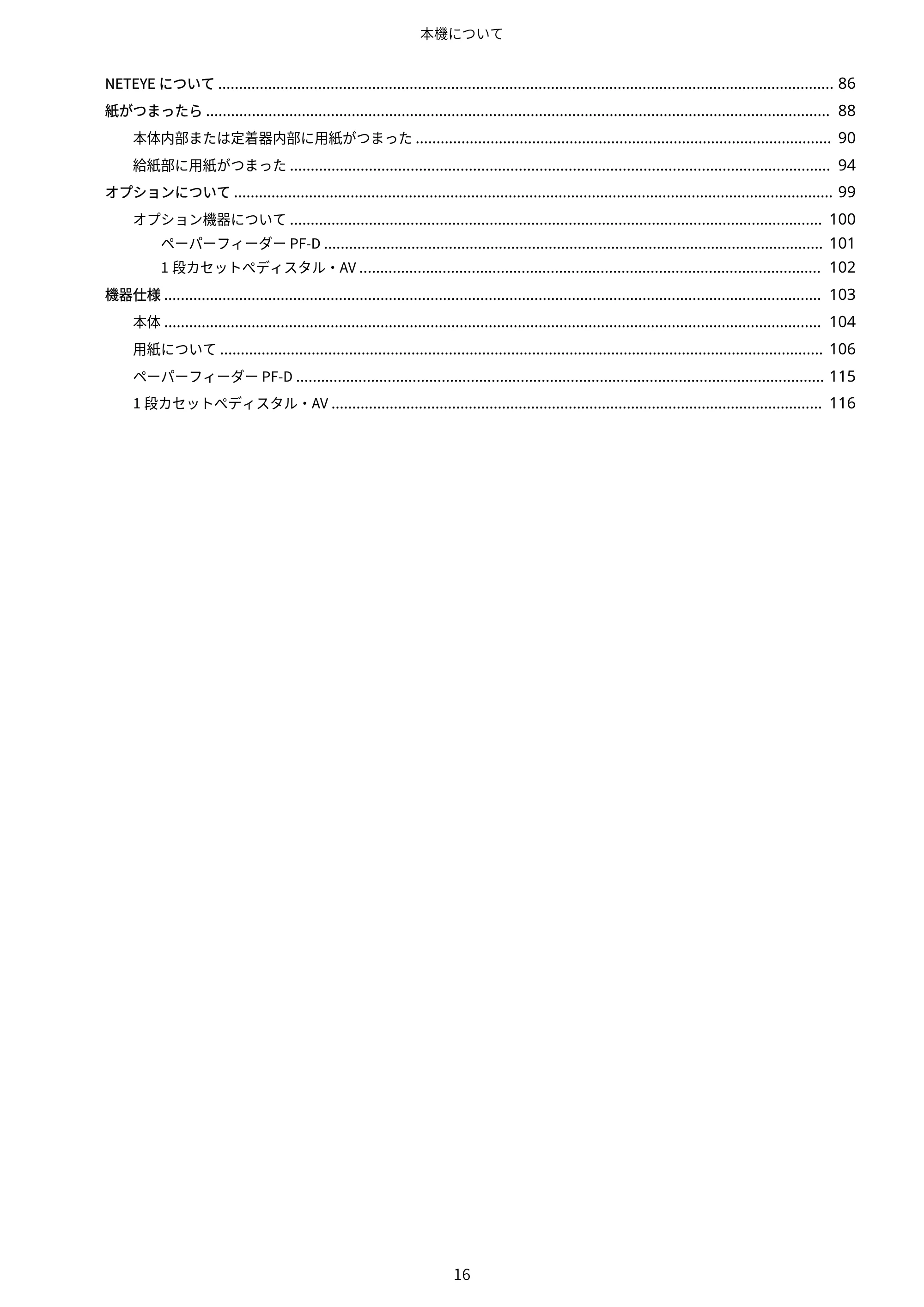
NETEYE について .................................................................................................................................................... 86
紙がつまったら ...................................................................................................................................................... 88
本体内部または定着器内部に用紙がつまった .................................................................................................... 90
給紙部に用紙がつまった .................................................................................................................................. 94
オプションについて ................................................................................................................................................ 99
オプション機器について ................................................................................................................................ 100
ペーパーフィーダー PF-D ........................................................................................................................ 101
1 段カセットぺディスタル・AV ............................................................................................................... 102
機器仕様 .............................................................................................................................................................. 103
本体 .............................................................................................................................................................. 104
用紙について ................................................................................................................................................. 106
ペーパーフィーダー PF-D ............................................................................................................................... 115
1 段カセットぺディスタル・AV ...................................................................................................................... 116
本機について
16
本機について
本機について
9SA3-008
各部の名称や用紙のセット方法など、本機を使用するうえで必要な情報について説明します。また、本体のメンテナンス方法
や紙づまりが起きたときの対処方法、本機の仕様などについても本章で確認することができます。
◼ 各部の名称とはたらき
本体の外観と内部について、各部の名前とそのはたらきをご紹介します。
各部の名称とはたらき(P. 19)
◼ 電源を入れる
電源の入れかたや切りかたについて説明します。
電源を入れる(P. 30)
◼ 用紙をセットする
給紙カセットや手差しトレイに用紙をセットする方法について説明します。
用紙をセットする(P. 32)
◼ 本体のメンテナンス
本体のお手入れや消耗品の交換など、本機の保守・管理について説明します。
本体のメンテナンス(P. 59)
本機について
17
26ページ
◼ 紙がつまったら
本機を使用中に紙がつまったときの対処方法について説明します。
紙がつまったら(P. 88)
◼ オプションについて
本機をさらに快適に使うためのオプション機器を調べたいときにご覧ください。
オプションについて(P. 99)
◼ 本機の仕様について
本体やオプション機器に関する仕様を調べたいときにご覧ください。
機器仕様(P. 103)
本機について
18
各部の名称とはたらき
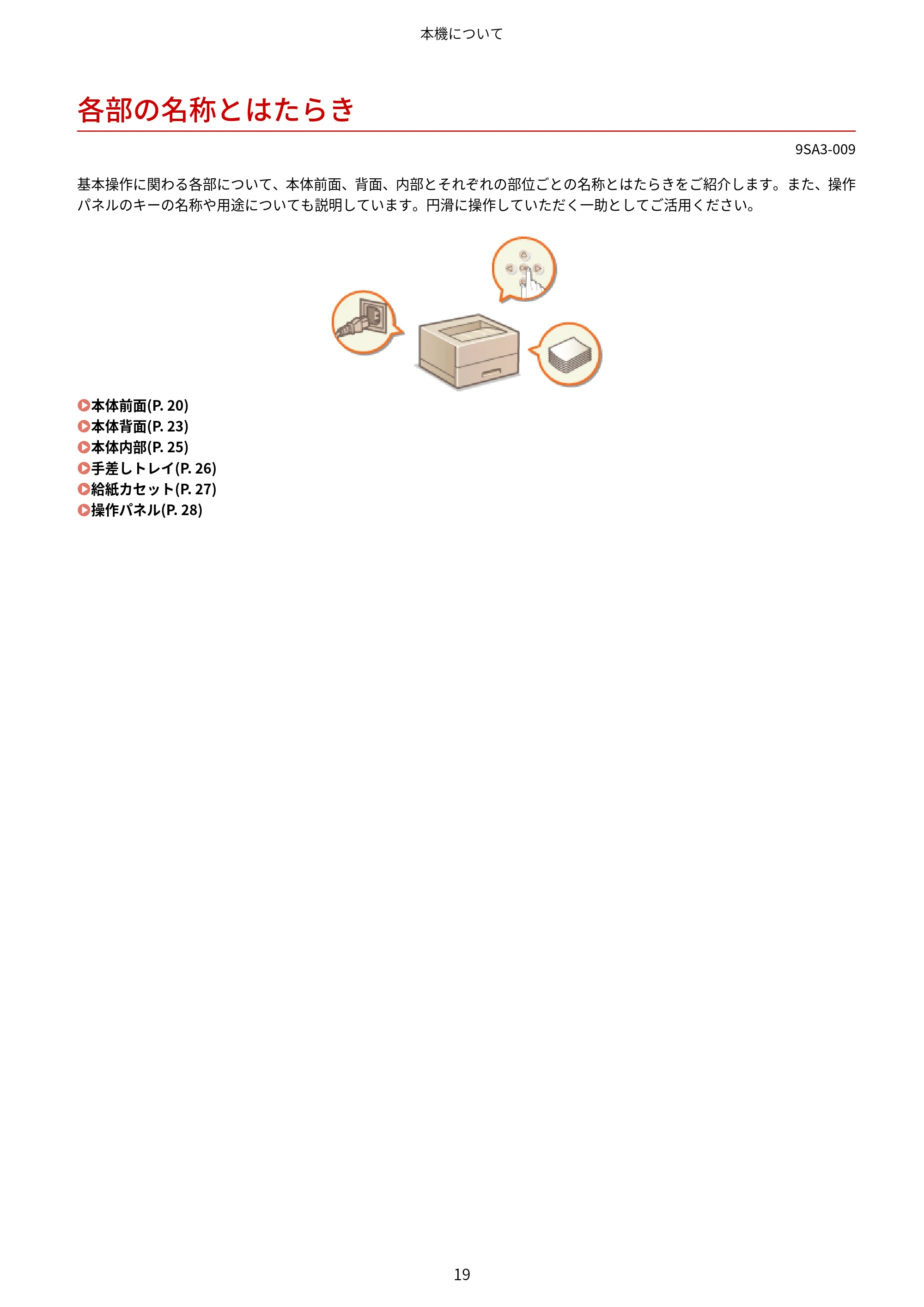
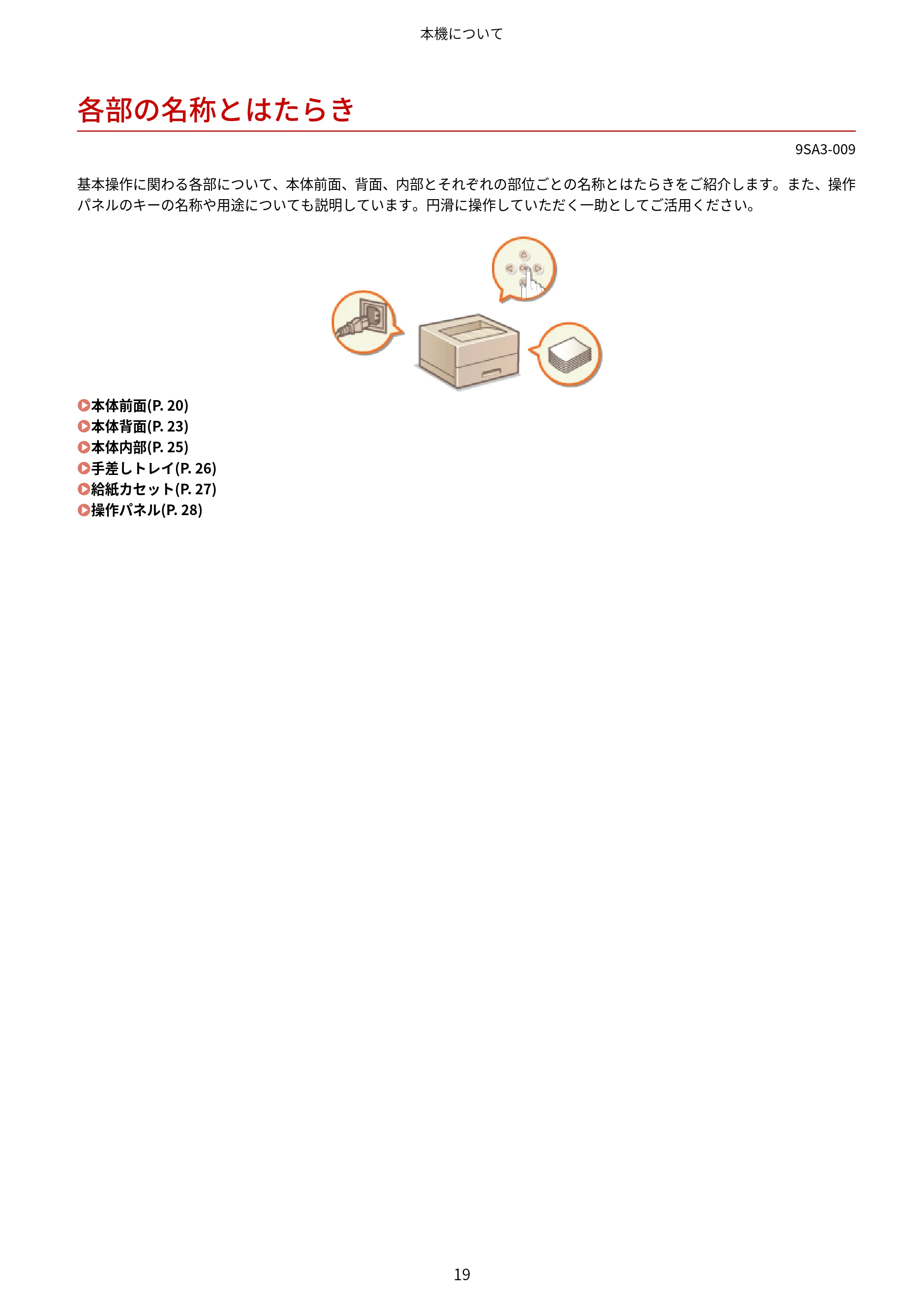
各部の名称とはたらき
9SA3-009
基本操作に関わる各部について、本体前面、背面、内部とそれぞれの部位ごとの名称とはたらきをご紹介します。また、操作
パネルのキーの名称や用途についても説明しています。円滑に操作していただく一助としてご活用ください。
本体前面(P. 20)
本体背面(P. 23)
本体内部(P. 25)
手差しトレイ(P. 26)
給紙カセット(P. 27)
操作パネル(P. 28)
本機について
19
本体前面
本体前面
9SA3-00A
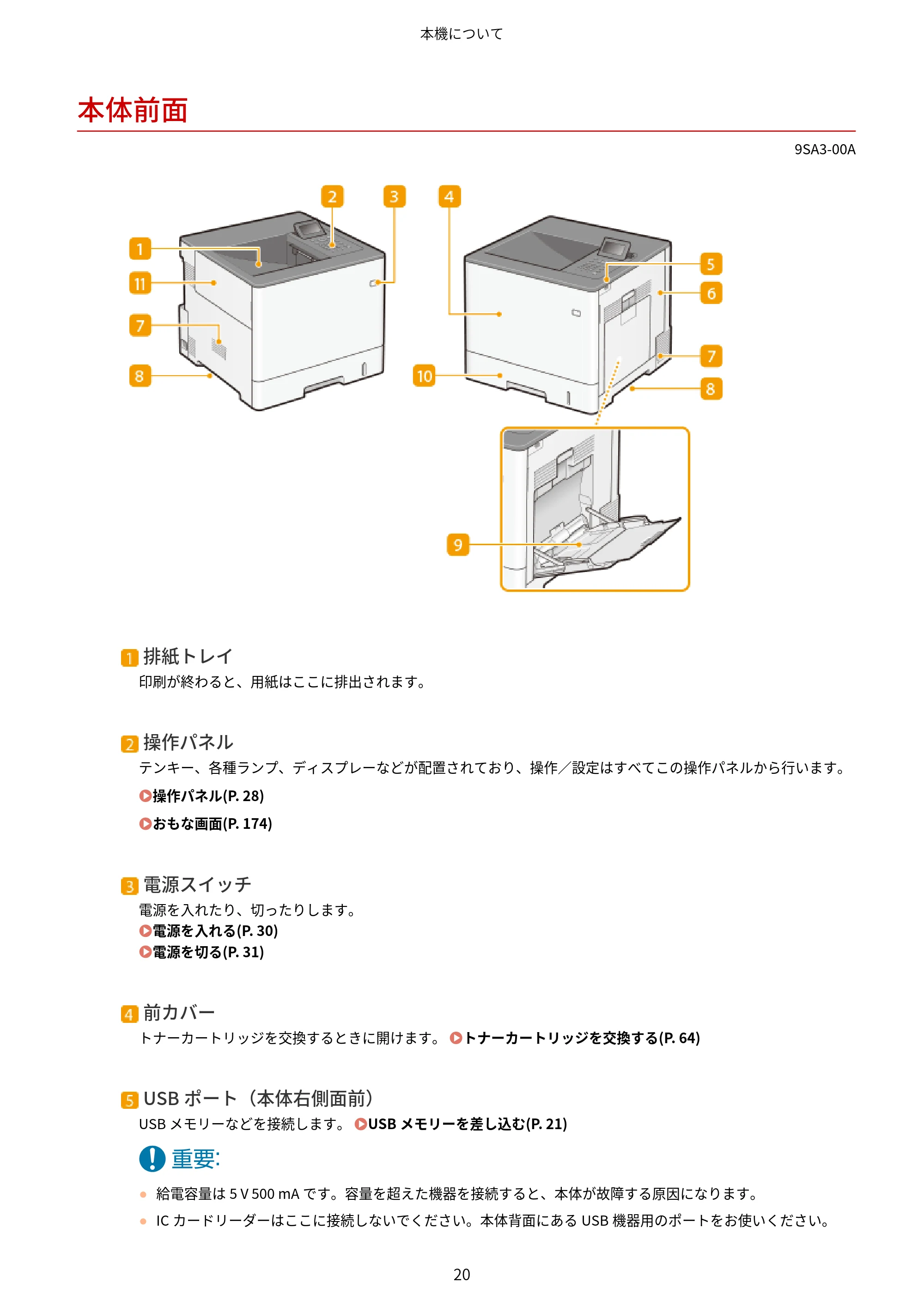
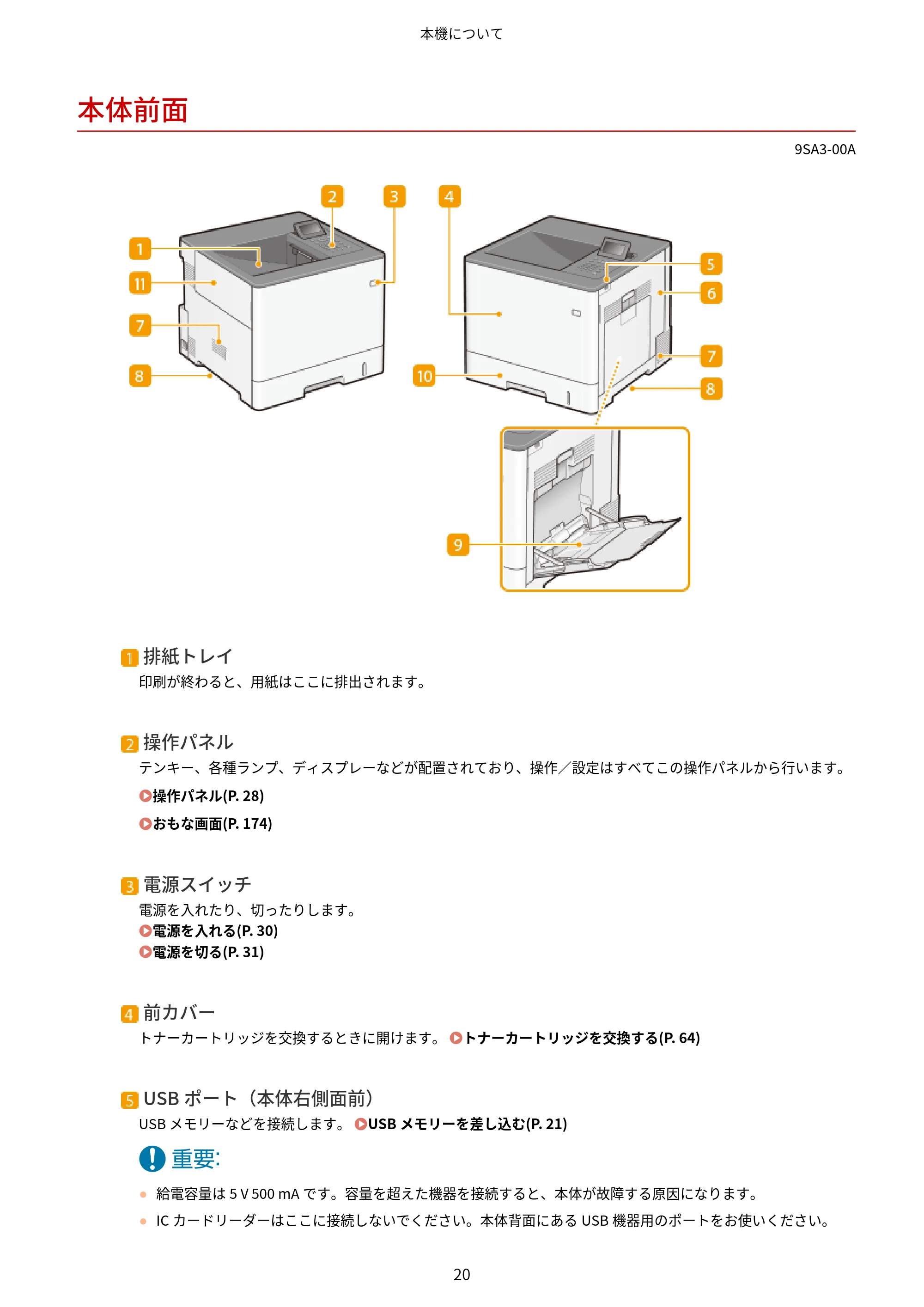
排紙トレイ
印刷が終わると、用紙はここに排出されます。
操作パネル
テンキー、各種ランプ、ディスプレーなどが配置されており、操作/設定はすべてこの操作パネルから行います。
操作パネル(P. 28)
おもな画面(P. 174)
電源スイッチ
電源を入れたり、切ったりします。
電源を入れる(P. 30)
電源を切る(P. 31)
前カバー
トナーカートリッジを交換するときに開けます。 トナーカートリッジを交換する(P. 64)
USB ポート(本体右側面前)
USB メモリーなどを接続します。 USB メモリーを差し込む(P. 21)
- 給電容量は 5 V 500 mA です。容量を超えた機器を接続すると、本体が故障する原因になります。
- IC カードリーダーはここに接続しないでください。本体背面にある USB 機器用のポートをお使いください。
本機について
20
29ページ
- メモリーメディアによっては正しくデータを保存できない場合があります。
- USB ポート(本体右側面前)は USB 2.0 に対応しています。
右カバー
定着器を交換したり、つまった用紙を取り除いたりするときに開けます。
紙がつまったら(P. 88)
定着器を交換する(P. 71)
通気口
本体内部の換気と冷却を行います。通気口のそばに障害物を置くと換気の妨げになりますのでご注意ください。
運搬用取っ手
本機を移動するときには、ここを持ちます。 本機を移動する(P. 73)
手差しトレイ
給紙カセットにセットされていない用紙を一時的に使うときなどは、ここにセットします。
手差しトレイ(P. 26)
用紙の基本的なセット方法(P. 34)
給紙カセット
よく使う用紙は、ここにセットします。
給紙カセット(P. 27)
用紙の基本的なセット方法(P. 34)
左カバー
回収トナー容器を交換するときに開けます。
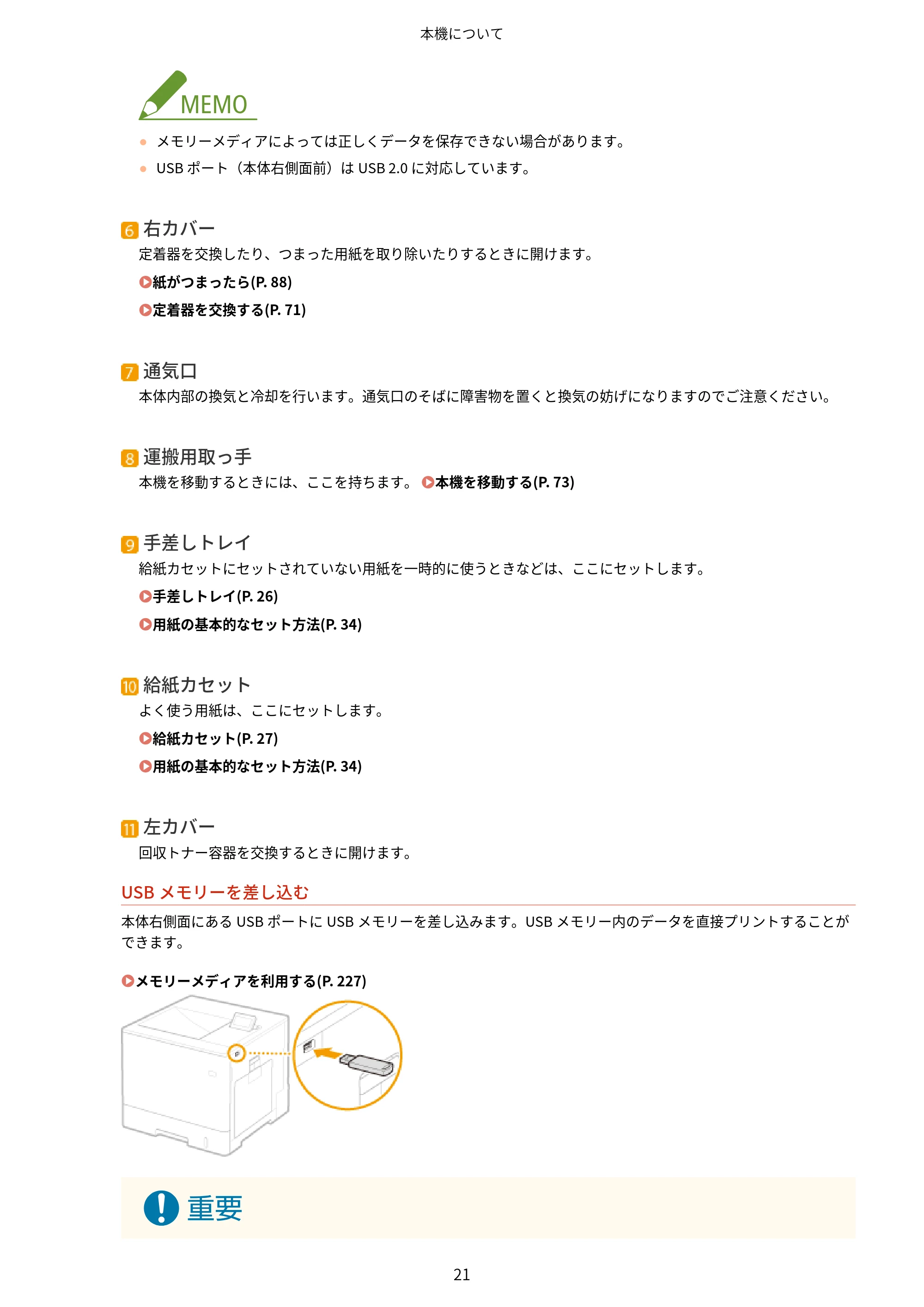
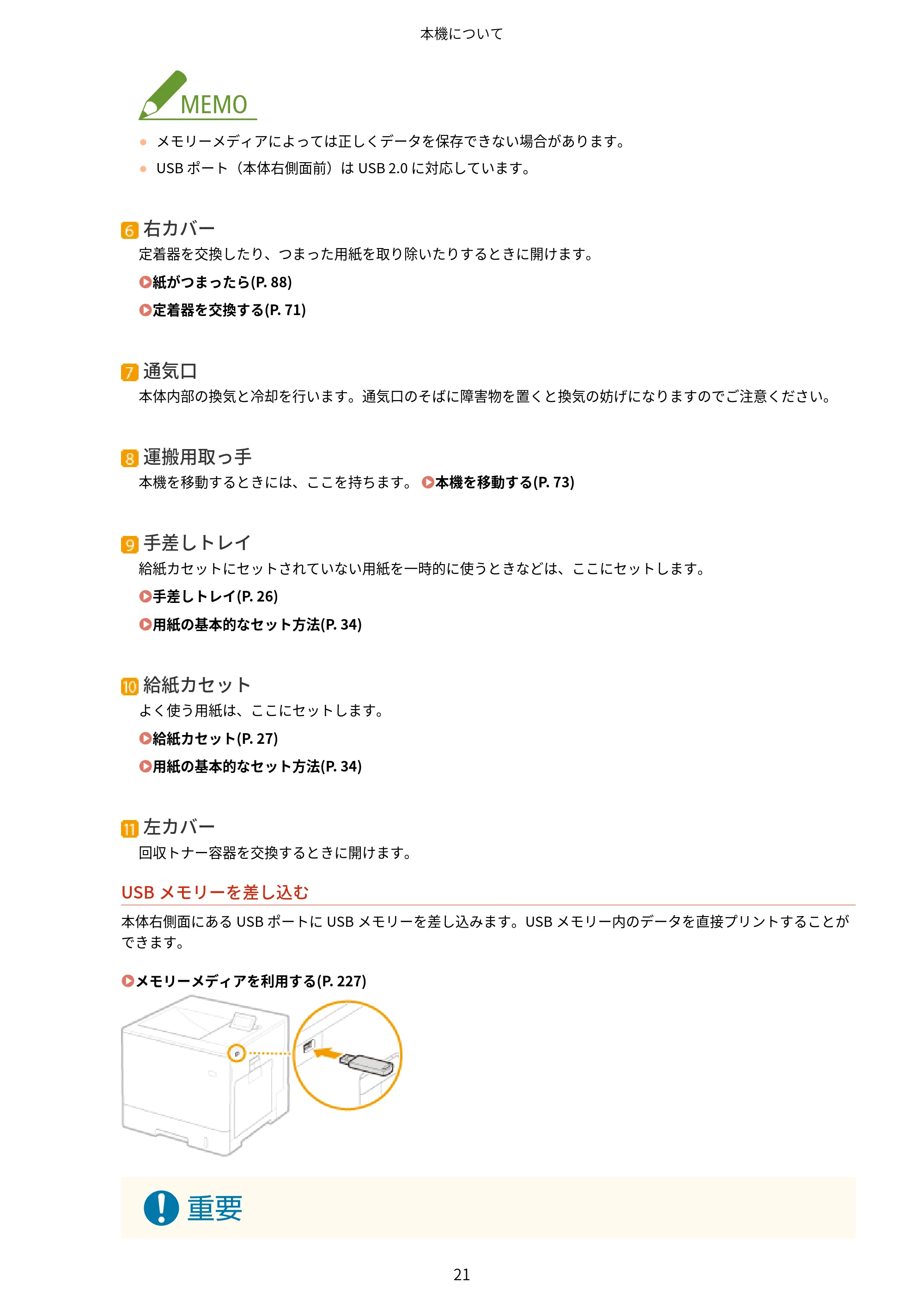
USB メモリーを差し込む
本体右側面にある USB ポートに USB メモリーを差し込みます。USB メモリー内のデータを直接プリントすることが
できます。
メモリーメディアを利用する(P. 227)
本機について
21
30ページ
- USB メモリーを挿入する前に、USB メモリーが正しい向きになっているか確認してください。間違った向
きで差し込もうとすると、USB メモリーと本体が故障する原因になります。
- USB メモリーを取り外すときは、必ず メモリーメディアを差し込む/取り外す(P. 227) の手順に従って
行ってください。手順以外の方法で USB メモリーを取り外した場合、USB メモリーと本体が故障する原因
になります。
- ファイルシステム(対応フォーマット)が FAT32(32 GB まで)/exFAT(2 TB まで)の USB メモリーを
使用できます。
次のような機器や使用のしかたはサポートしていません
- セキュリティー機能付きのメモリーメディア
- USB 規格に準拠していないメモリーメディア
- USB 接続のメモリーカードリーダー
- 延長ケーブルを使ってのメモリーメディアの使用
- USB ハブ経由でのメモリーメディアの使用
本機について
22
本体背面
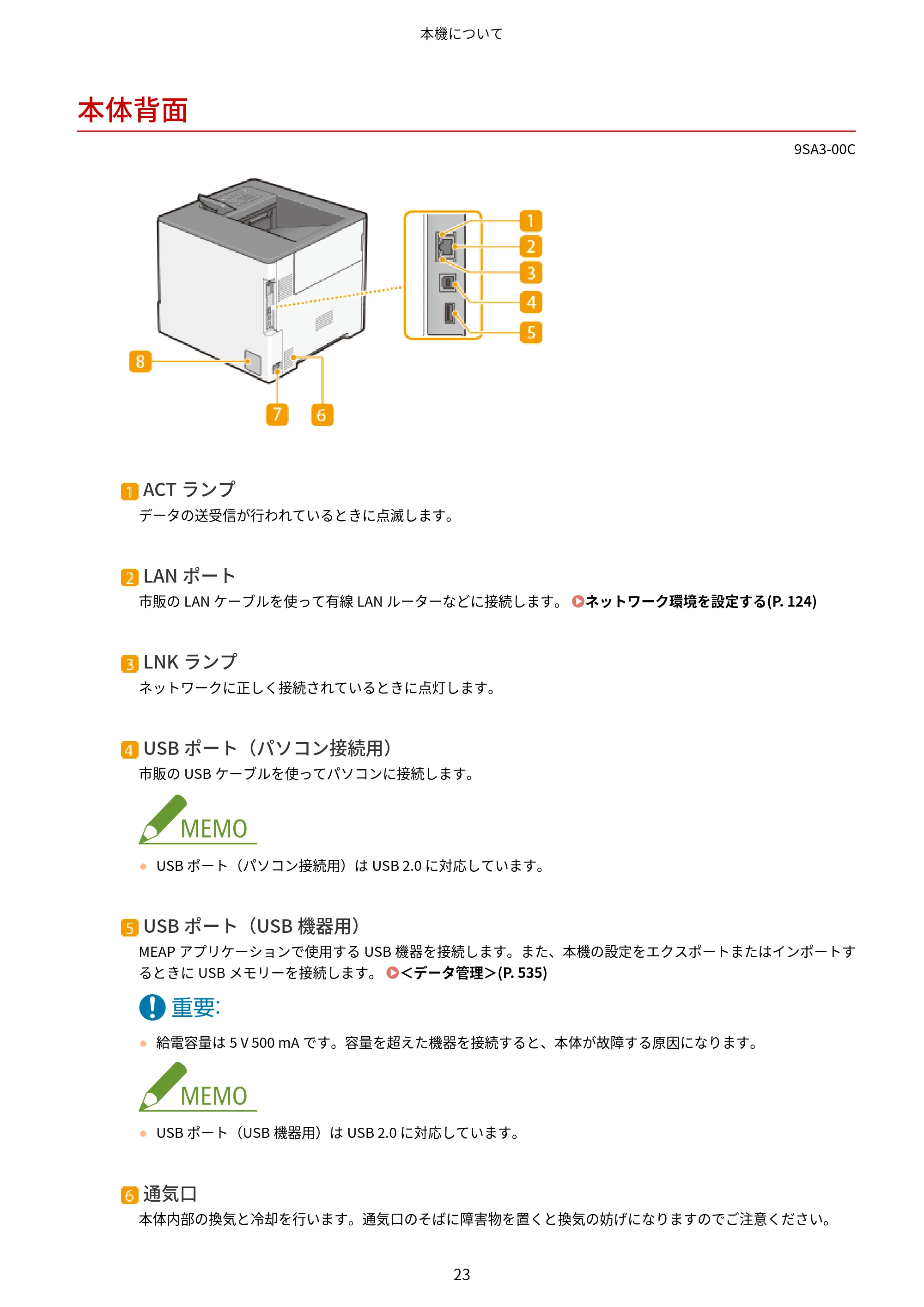
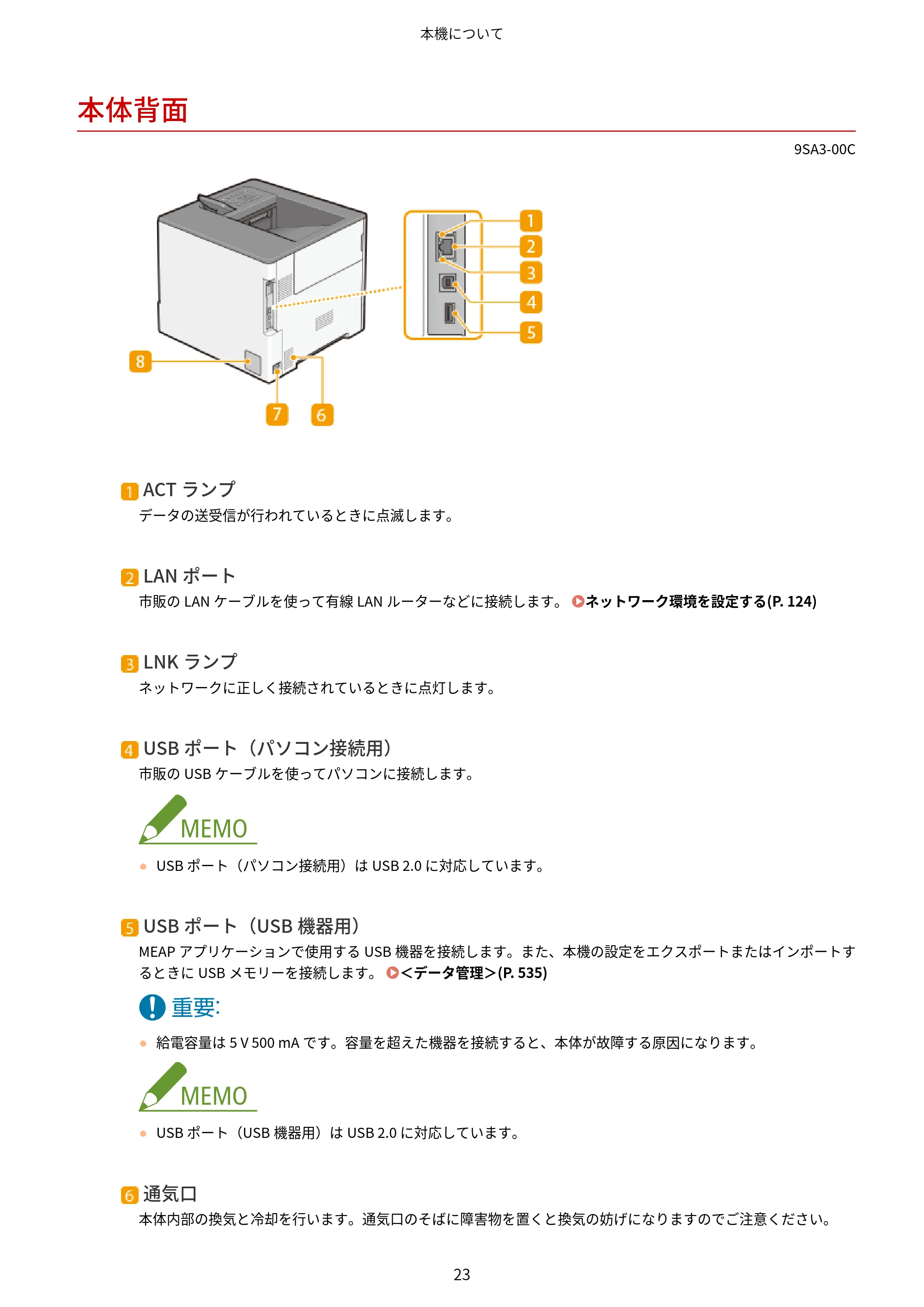
本体背面
9SA3-00C
ACT ランプ
データの送受信が行われているときに点滅します。
LAN ポート
市販の LAN ケーブルを使って有線 LAN ルーターなどに接続します。 ネットワーク環境を設定する(P. 124)
LNK ランプ
ネットワークに正しく接続されているときに点灯します。
USB ポート(パソコン接続用)
市販の USB ケーブルを使ってパソコンに接続します。
- USB ポート(パソコン接続用)は USB 2.0 に対応しています。
USB ポート(USB 機器用)
MEAP アプリケーションで使用する USB 機器を接続します。また、本機の設定をエクスポートまたはインポートす
るときに USB メモリーを接続します。 <データ管理>(P. 535)
- 給電容量は 5 V 500 mA です。容量を超えた機器を接続すると、本体が故障する原因になります。
- USB ポート(USB 機器用)は USB 2.0 に対応しています。
通気口
本体内部の換気と冷却を行います。通気口のそばに障害物を置くと換気の妨げになりますのでご注意ください。
本機について
23
32ページ
電源ソケット
電源コードを接続します。
定格銘板ラベル
お問い合わせの際に必要となるシリアルナンバーが記載されています。 トラブルが解決しないときは(P. 613)
本機について
24
本体内部
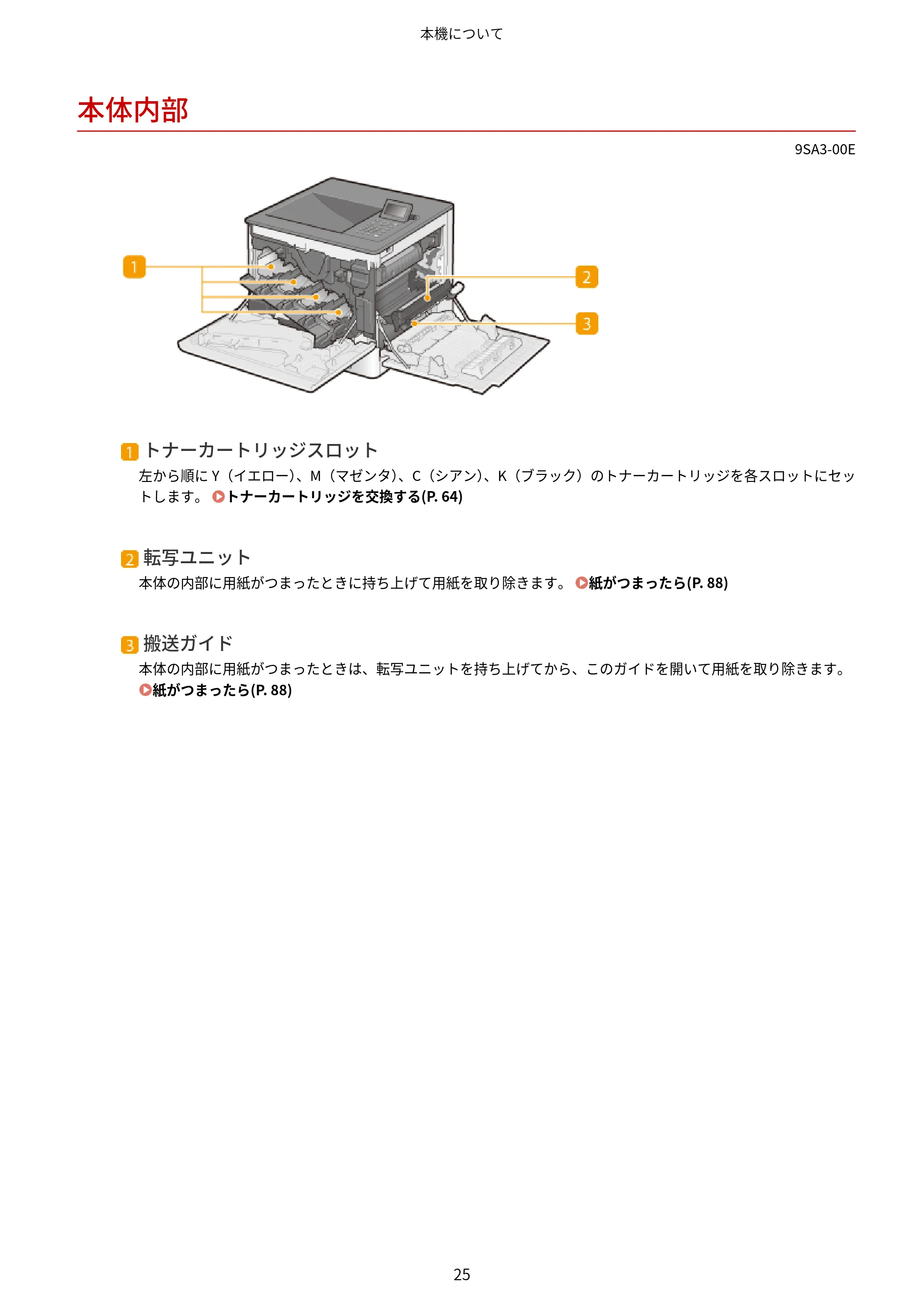
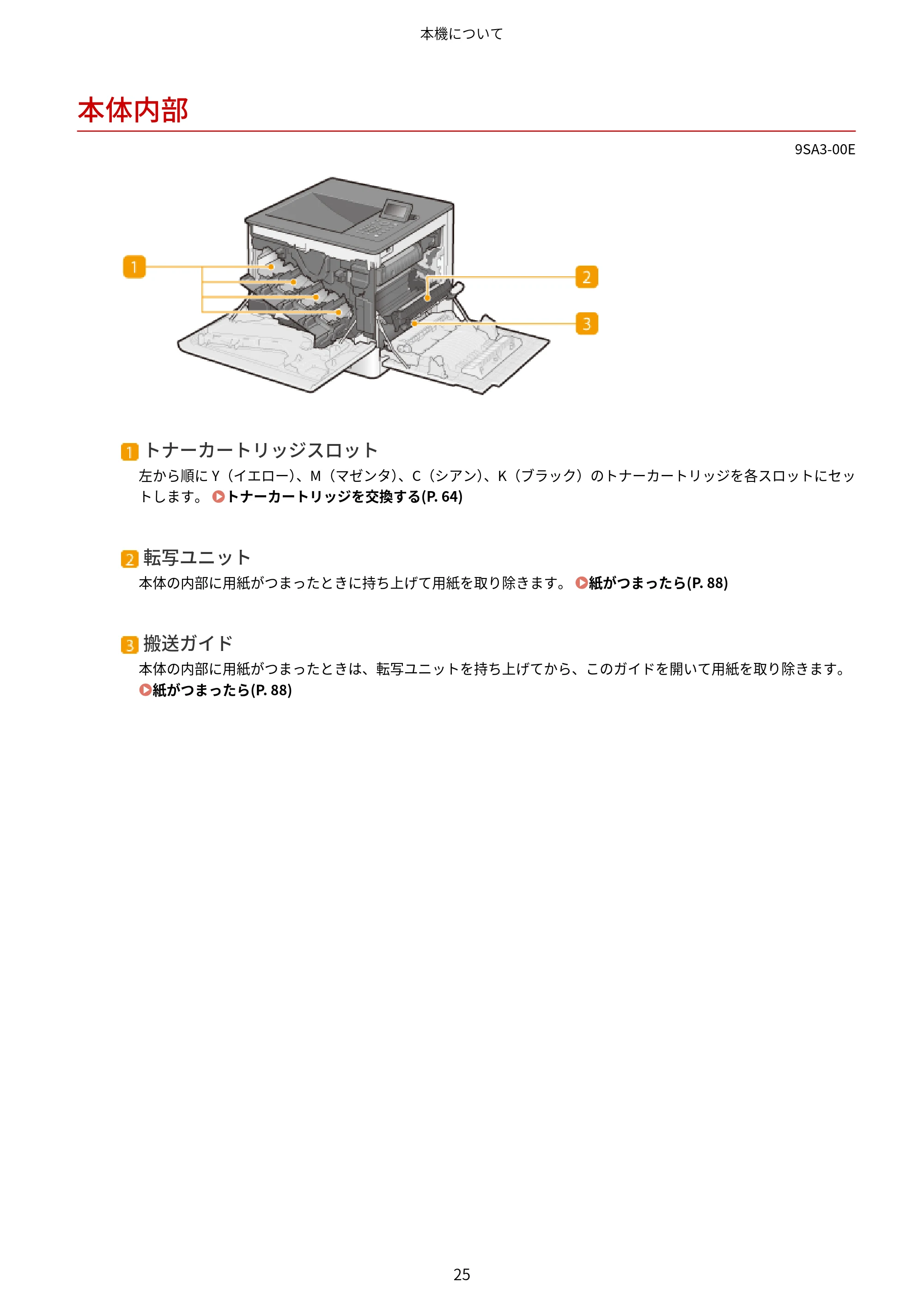
本体内部
9SA3-00E
トナーカートリッジスロット
左から順に Y(イエロー)、M(マゼンタ)、C(シアン)、K(ブラック)のトナーカートリッジを各スロットにセッ
トします。 トナーカートリッジを交換する(P. 64)
転写ユニット
本体の内部に用紙がつまったときに持ち上げて用紙を取り除きます。 紙がつまったら(P. 88)
搬送ガイド
本体の内部に用紙がつまったときは、転写ユニットを持ち上げてから、このガイドを開いて用紙を取り除きます。
紙がつまったら(P. 88)
本機について
25
手差しトレイ
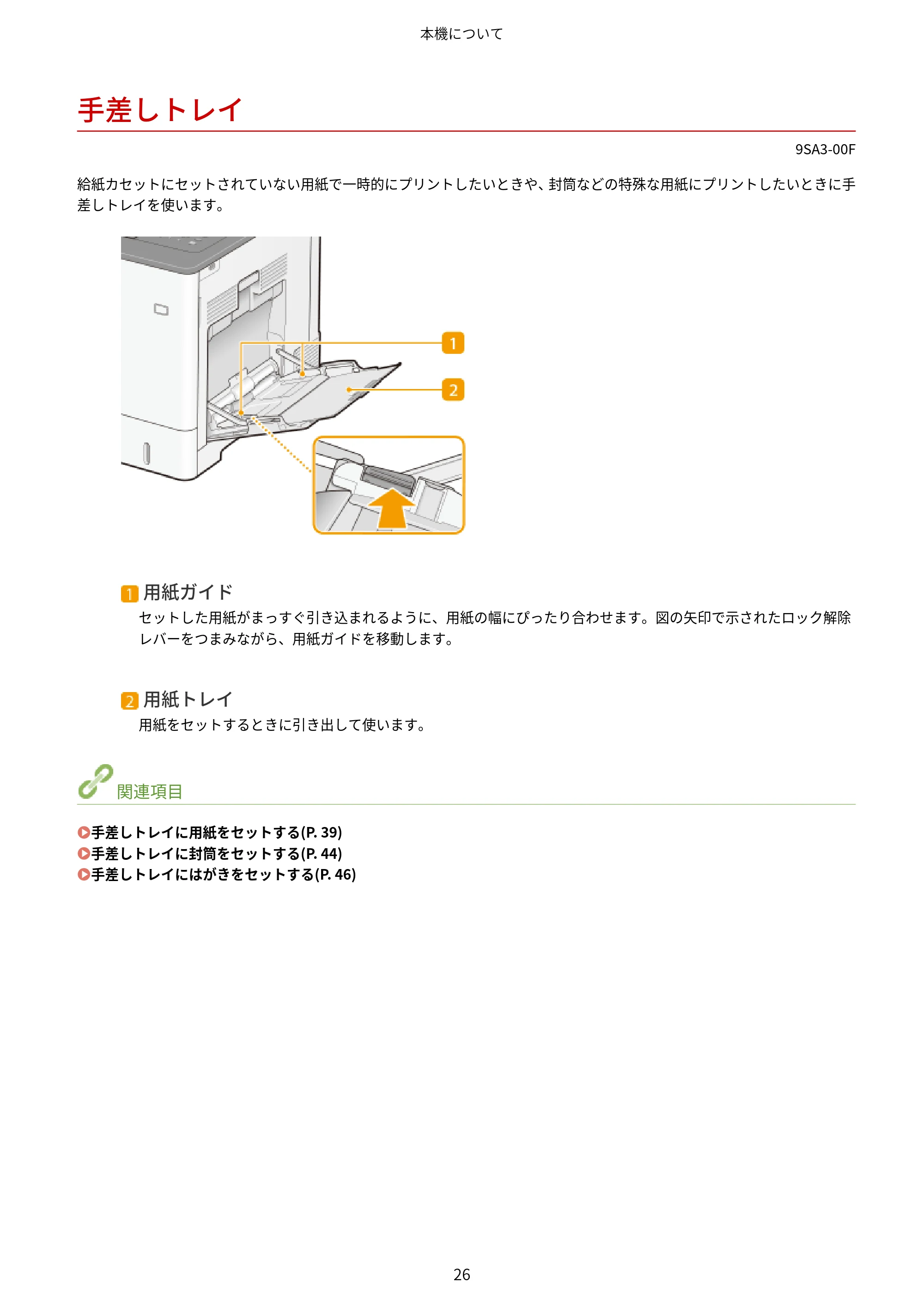
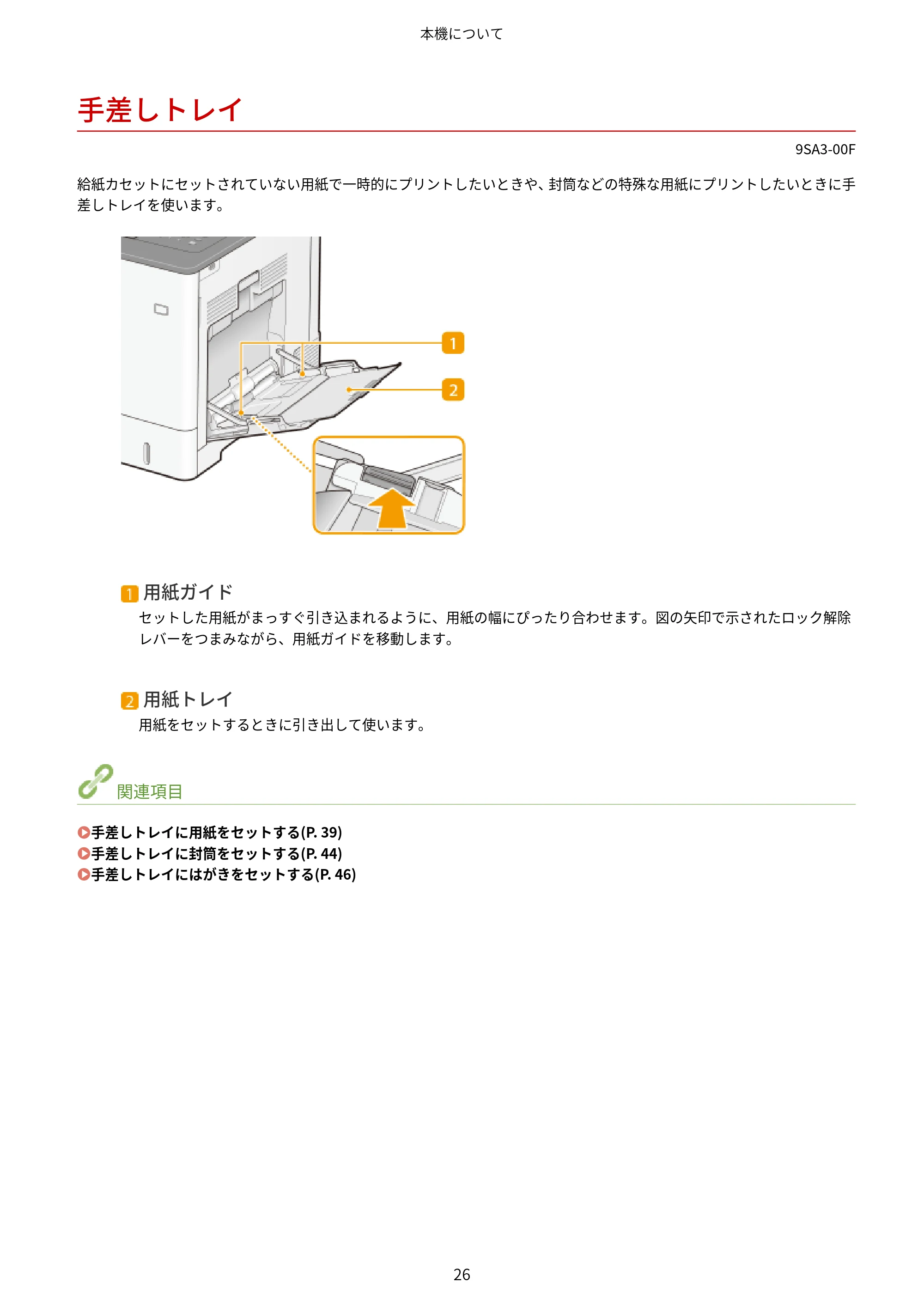
手差しトレイ
9SA3-00F
給紙カセットにセットされていない用紙で一時的にプリントしたいときや、封筒などの特殊な用紙にプリントしたいときに手
差しトレイを使います。
用紙ガイド
セットした用紙がまっすぐ引き込まれるように、用紙の幅にぴったり合わせます。図の矢印で示されたロック解除
レバーをつまみながら、用紙ガイドを移動します。
用紙トレイ
用紙をセットするときに引き出して使います。
関連項目
手差しトレイに用紙をセットする(P. 39)
手差しトレイに封筒をセットする(P. 44)
手差しトレイにはがきをセットする(P. 46)
本機について
26
給紙カセット
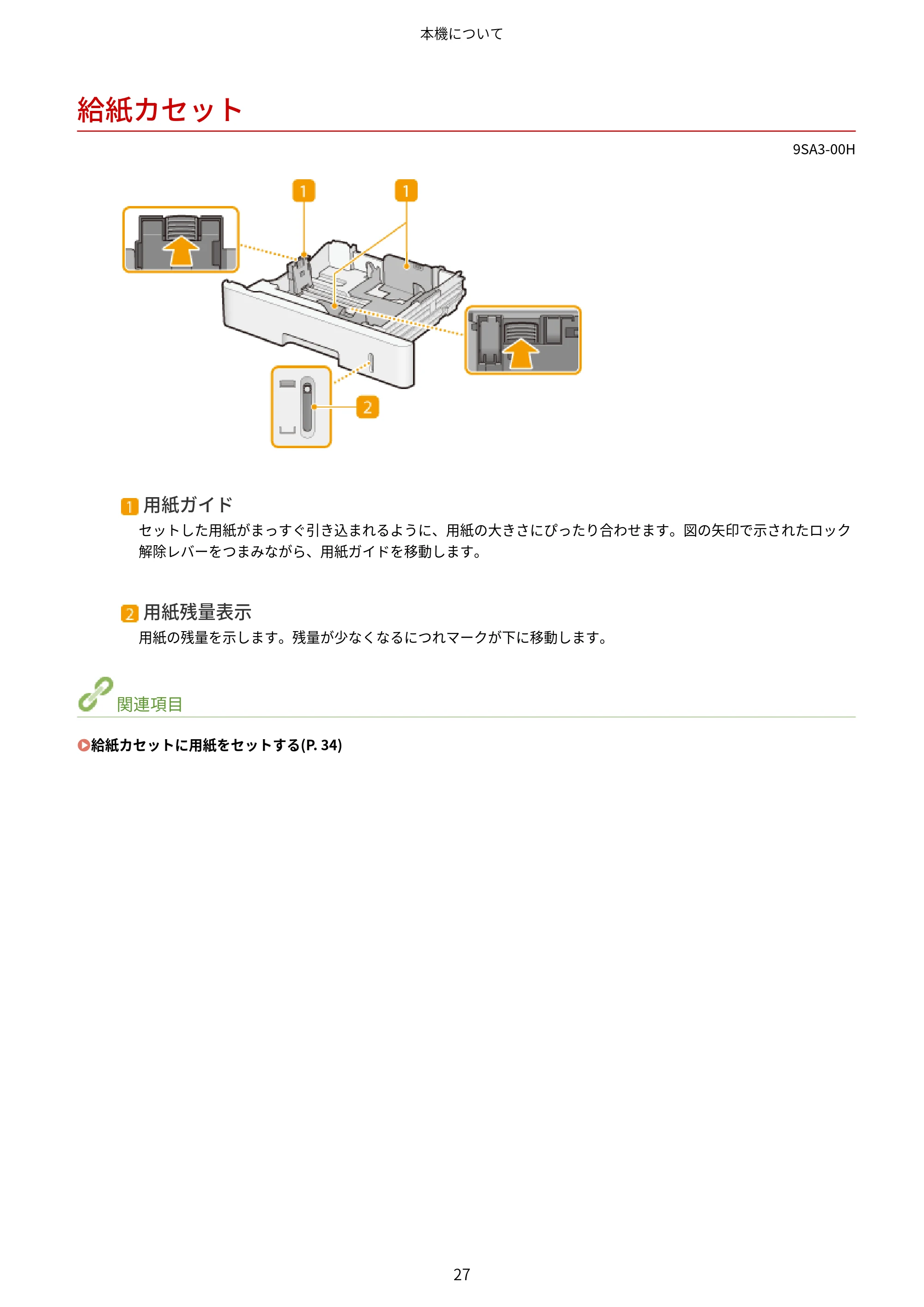
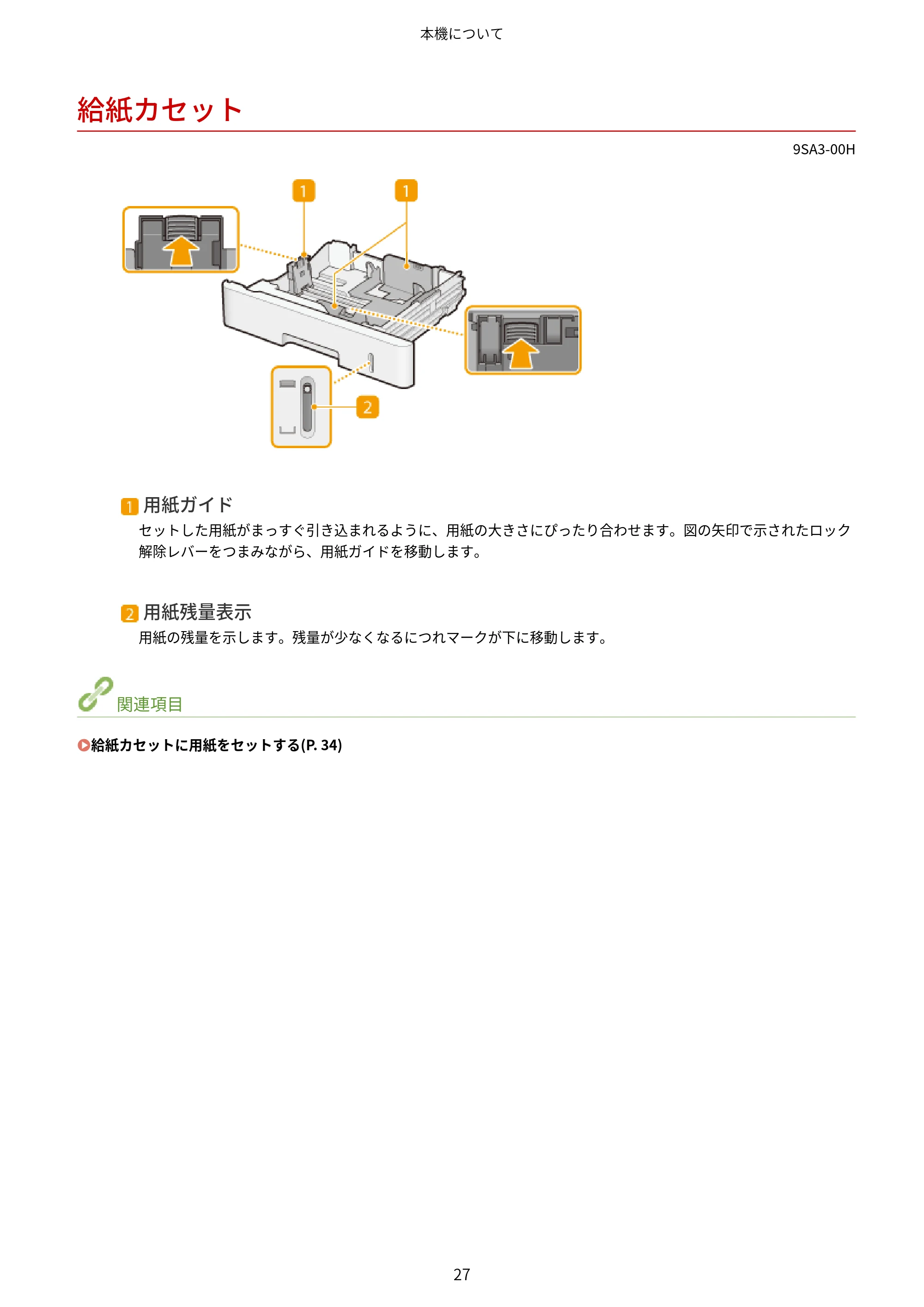
給紙カセット
9SA3-00H
用紙ガイド
セットした用紙がまっすぐ引き込まれるように、用紙の大きさにぴったり合わせます。図の矢印で示されたロック
解除レバーをつまみながら、用紙ガイドを移動します。
用紙残量表示
用紙の残量を示します。残量が少なくなるにつれマークが下に移動します。
関連項目
給紙カセットに用紙をセットする(P. 34)
本機について
27
操作パネル
操作パネル
9SA3-00J
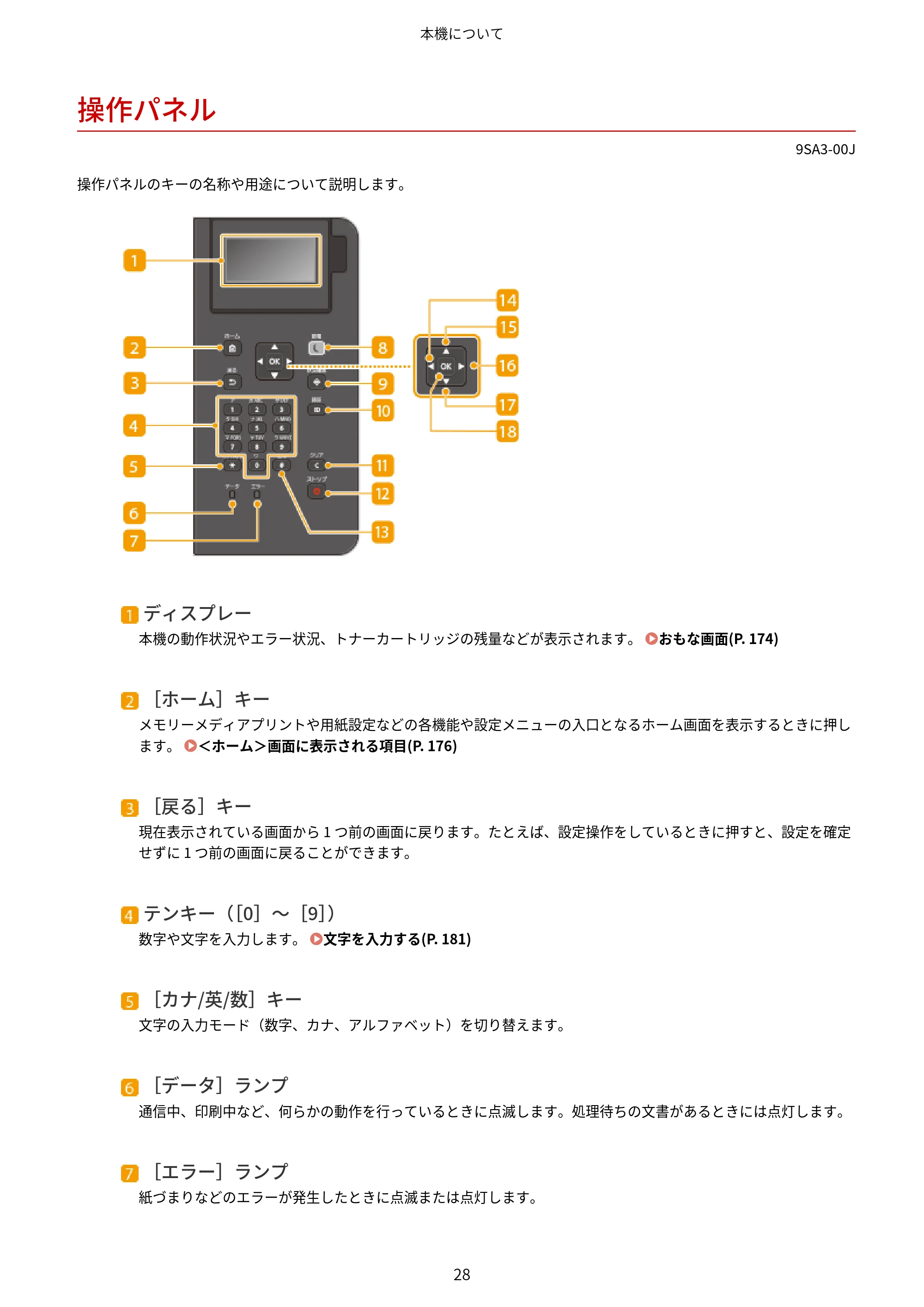
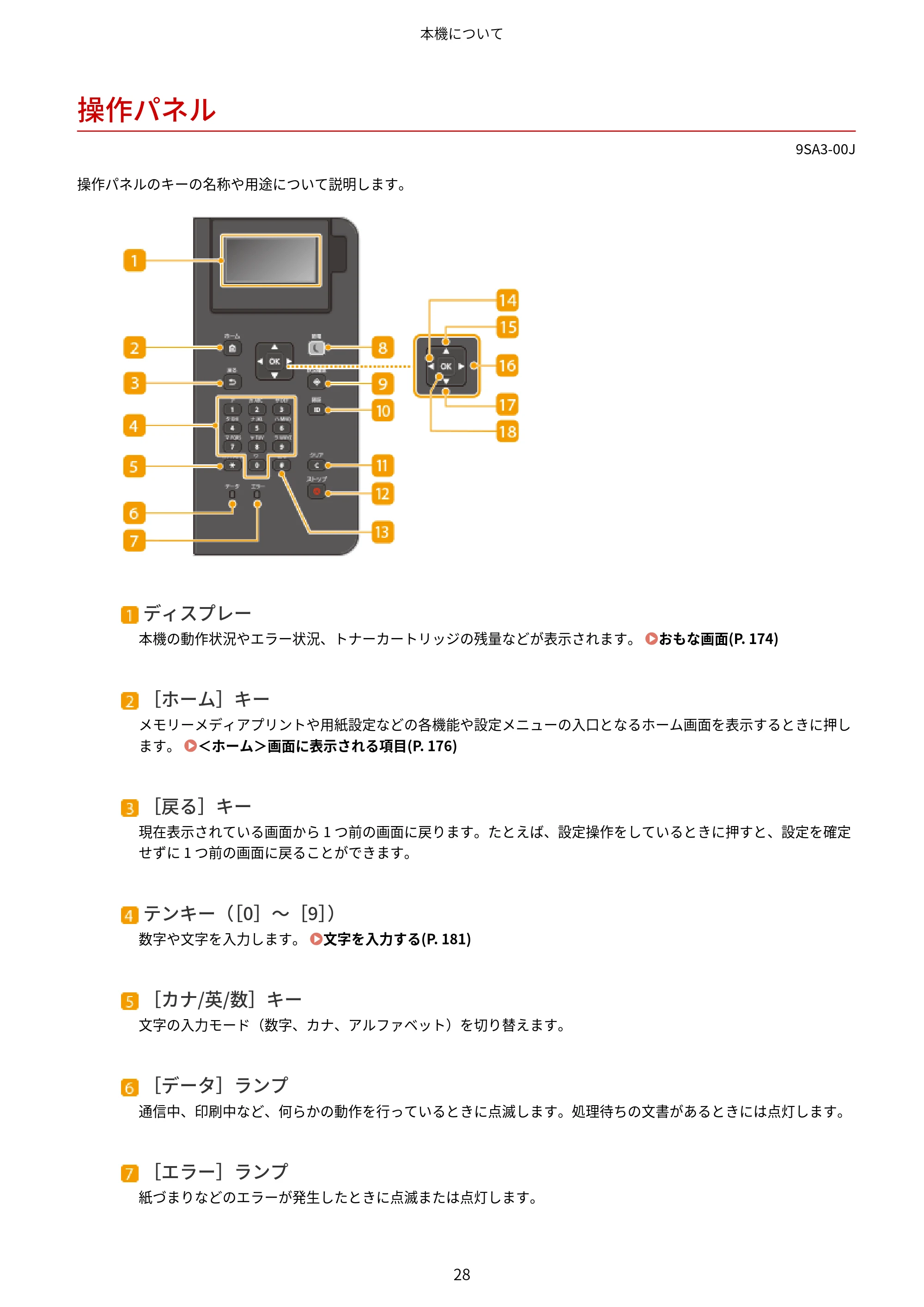
操作パネルのキーの名称や用途について説明します。
ディスプレー
本機の動作状況やエラー状況、トナーカートリッジの残量などが表示されます。 おもな画面(P. 174)
[ホーム]キー
メモリーメディアプリントや用紙設定などの各機能や設定メニューの入口となるホーム画面を表示するときに押し
ます。 <ホーム>画面に表示される項目(P. 176)
[戻る]キー
現在表示されている画面から 1 つ前の画面に戻ります。たとえば、設定操作をしているときに押すと、設定を確定
せずに 1 つ前の画面に戻ることができます。
テンキー([0]~[9])
数字や文字を入力します。 文字を入力する(P. 181)
[カナ/英/数]キー
文字の入力モード(数字、カナ、アルファベット)を切り替えます。
[データ]ランプ
通信中、印刷中など、何らかの動作を行っているときに点滅します。処理待ちの文書があるときには点灯します。
[エラー]ランプ
紙づまりなどのエラーが発生したときに点滅または点灯します。
本機について
28
37ページ
- 点滅している場合は、ディスプレーに表示されているメッセージに従って対処してください。 困ったときは
(P. 557)
- 点灯している場合は、販売店または担当サービスにご連絡ください。
[節電]キー
スリープモード(節電状態)にします。スリープモード中はキーが黄緑色に点灯し、キーを再度押すとスリープモー
ドが解除されます。 スリープモードにする(P. 188)
[状況確認]キー
印刷状況、使用履歴、IP アドレスなどのネットワーク設定の情報などを確認できます。また、用紙やトナーカート
リッジの残量確認、エラー発生状況なども確認できます。 <状況確認>画面(P. 174)
[認証]キー
部門別 ID 管理が設定されているとき、ログイン操作で使います。ID と暗証番号を入力したあとに押してください。
操作が終わったときは、このキーを再度押してログアウトします。 ログインする(P. 183)
[クリア]キー
入力した文字や数字を取り消します。
[ストップ]キー
印刷などの動作を中止します。
[記号]キー
「@」や「/」のような記号を入力するときに押します。
[ ]キー
設定時に押すと、前の画面に戻ります。文字入力時に押すと、カーソルが左に移動します。
[ ]キー
設定時に押すと、1 つ上の項目を選択します。設定値変更時に押すと、値が増加します。
[ ]キー
設定時に押すと、次の画面に進みます。文字入力時に押すと、カーソルが右に移動します。
[ ]キー
設定時に押すと、1 つ下の項目を選択します。設定値変更時に押すと、値が減少します。
[ ]キー
選択/設定した内容を確定します。
本機について
29
電源を入れる
電源を入れる
9SA3-00K
電源の入れかたについて説明します。
1
電源プラグがコンセントに確実に差し込まれていることを確認する
2
電源スイッチを押す
➠ ディスプレーに起動画面が表示されます。
- 電源を入れたあと、最初に表示される画面を選択できます。 <起動/復帰後に表示する画面>(P. 487)
- 電源を入れた直後は、操作パネルのキーの反応が遅くなる場合があります。
- Mac が USB ケーブルで本機に接続されているとき、本機の電源を入れるとパソコンも同時に起動することがあり
ます。このような場合は、USB ケーブルを取り外してから本機の電源を入れてください。なお、USB ハブを使用し
て接続すると、この問題が解決されることがあります。
関連項目
電源を切る(P. 31)
本機について
30
電源を切る
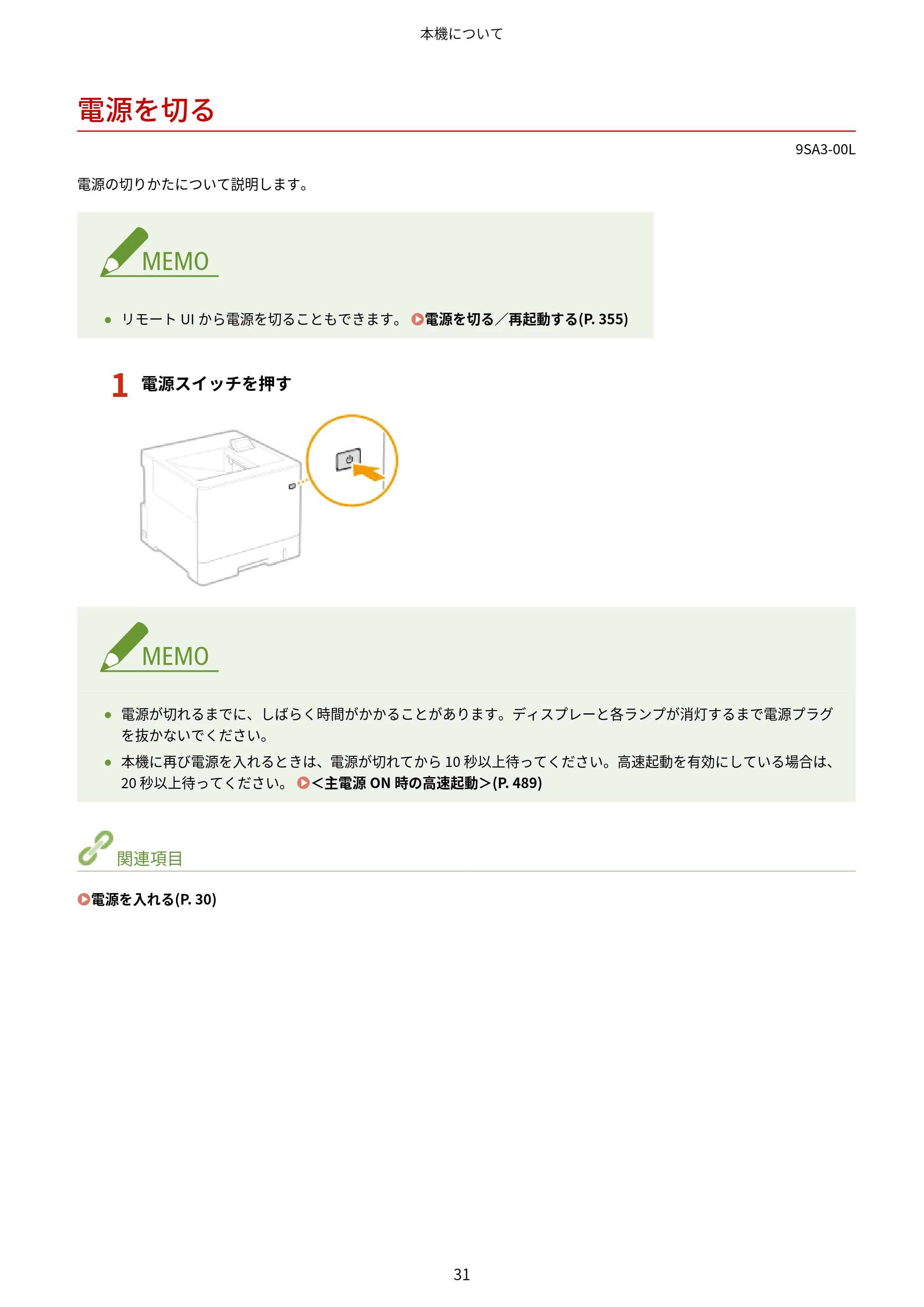
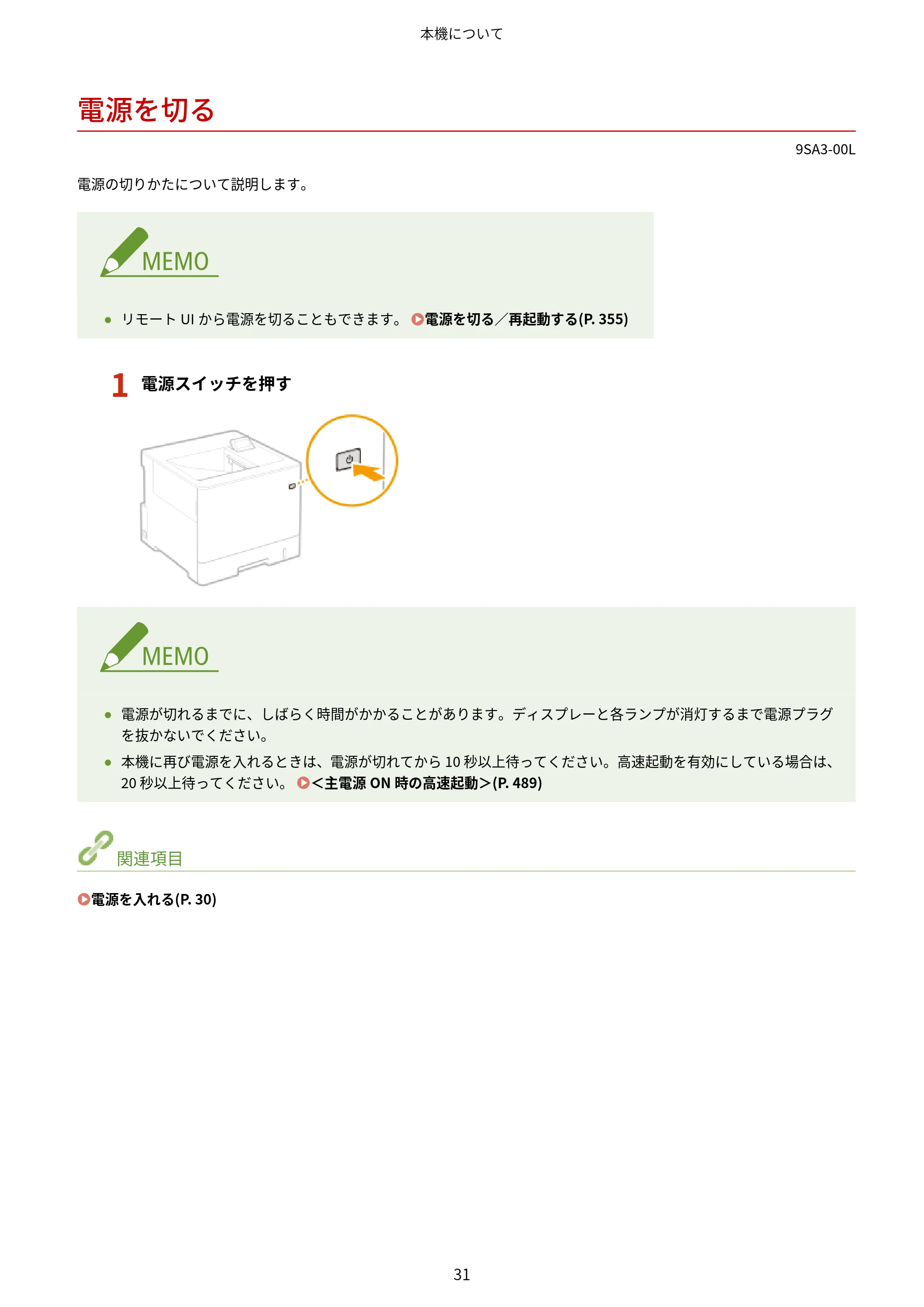
電源を切る
9SA3-00L
電源の切りかたについて説明します。
- リモート UI から電源を切ることもできます。 電源を切る/再起動する(P. 355)
1
電源スイッチを押す
- 電源が切れるまでに、しばらく時間がかかることがあります。ディスプレーと各ランプが消灯するまで電源プラグ
を抜かないでください。
- 本機に再び電源を入れるときは、電源が切れてから 10 秒以上待ってください。高速起動を有効にしている場合は、
20 秒以上待ってください。 <主電源 ON 時の高速起動>(P. 489)
関連項目
電源を入れる(P. 30)
本機について
31
用紙をセットする
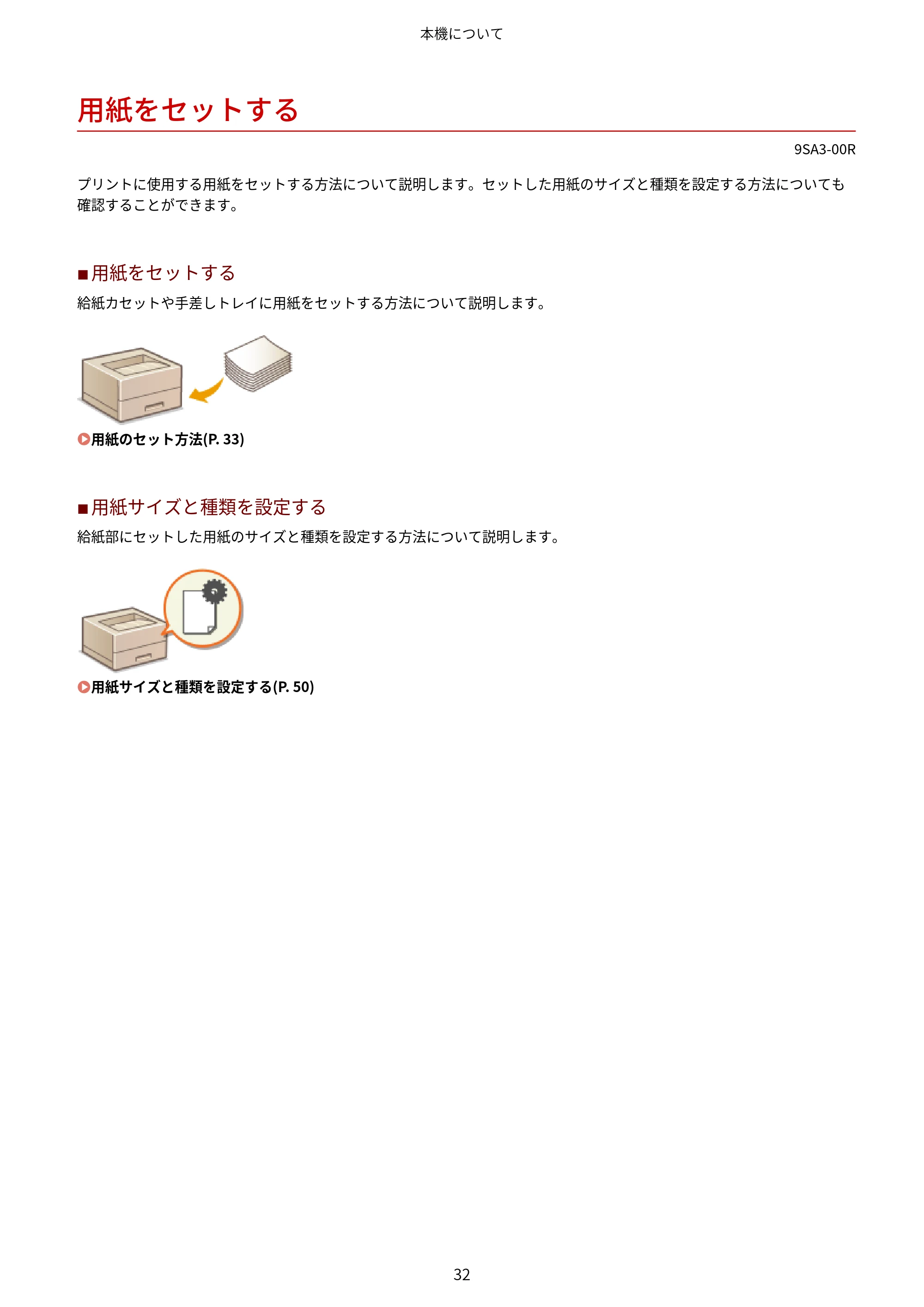
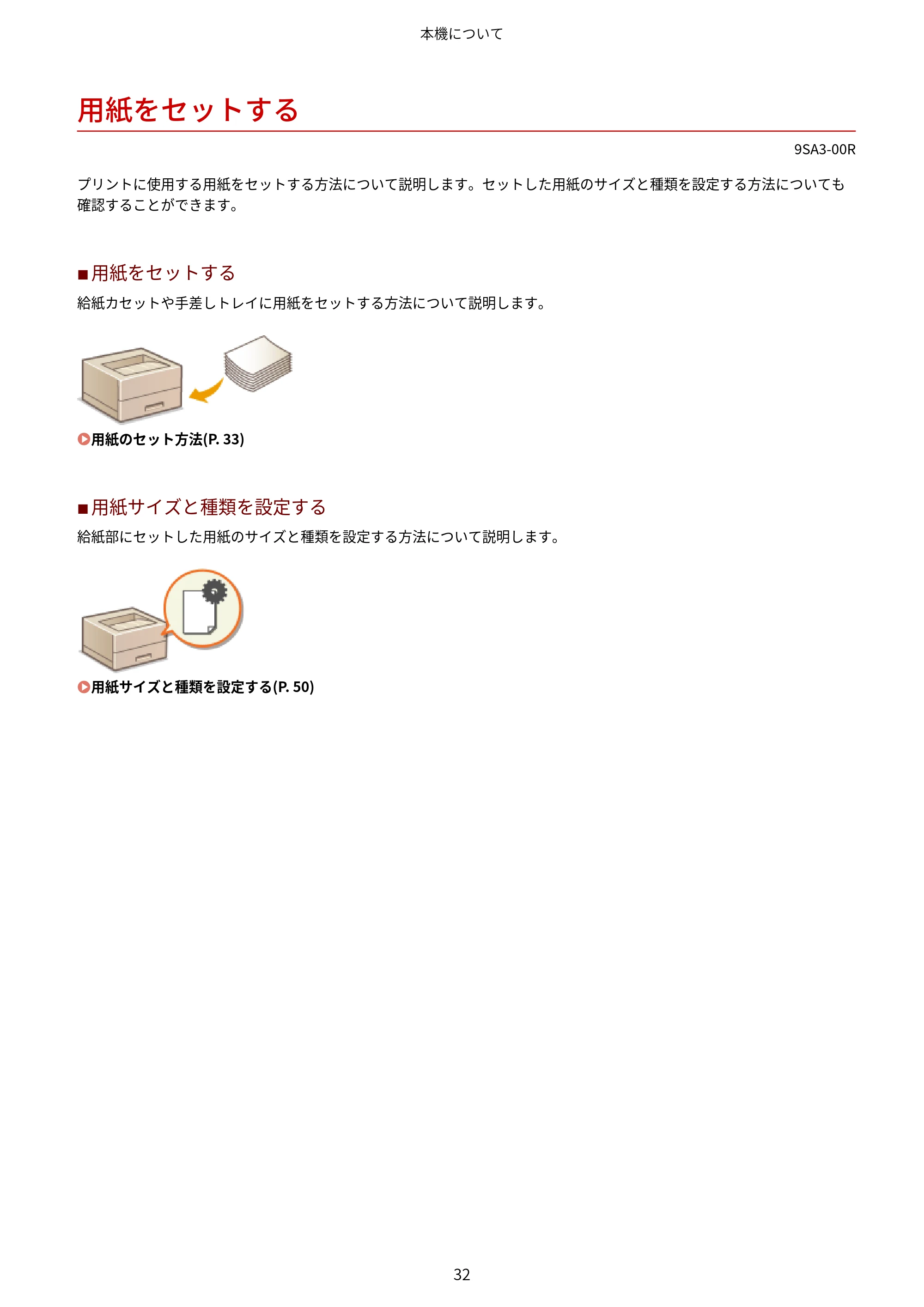
用紙をセットする
9SA3-00R
プリントに使用する用紙をセットする方法について説明します。セットした用紙のサイズと種類を設定する方法についても
確認することができます。
◼ 用紙をセットする
給紙カセットや手差しトレイに用紙をセットする方法について説明します。
用紙のセット方法(P. 33)
◼ 用紙サイズと種類を設定する
給紙部にセットした用紙のサイズと種類を設定する方法について説明します。
用紙サイズと種類を設定する(P. 50)
本機について
32
用紙のセット方法
用紙のセット方法
9SA3-00S
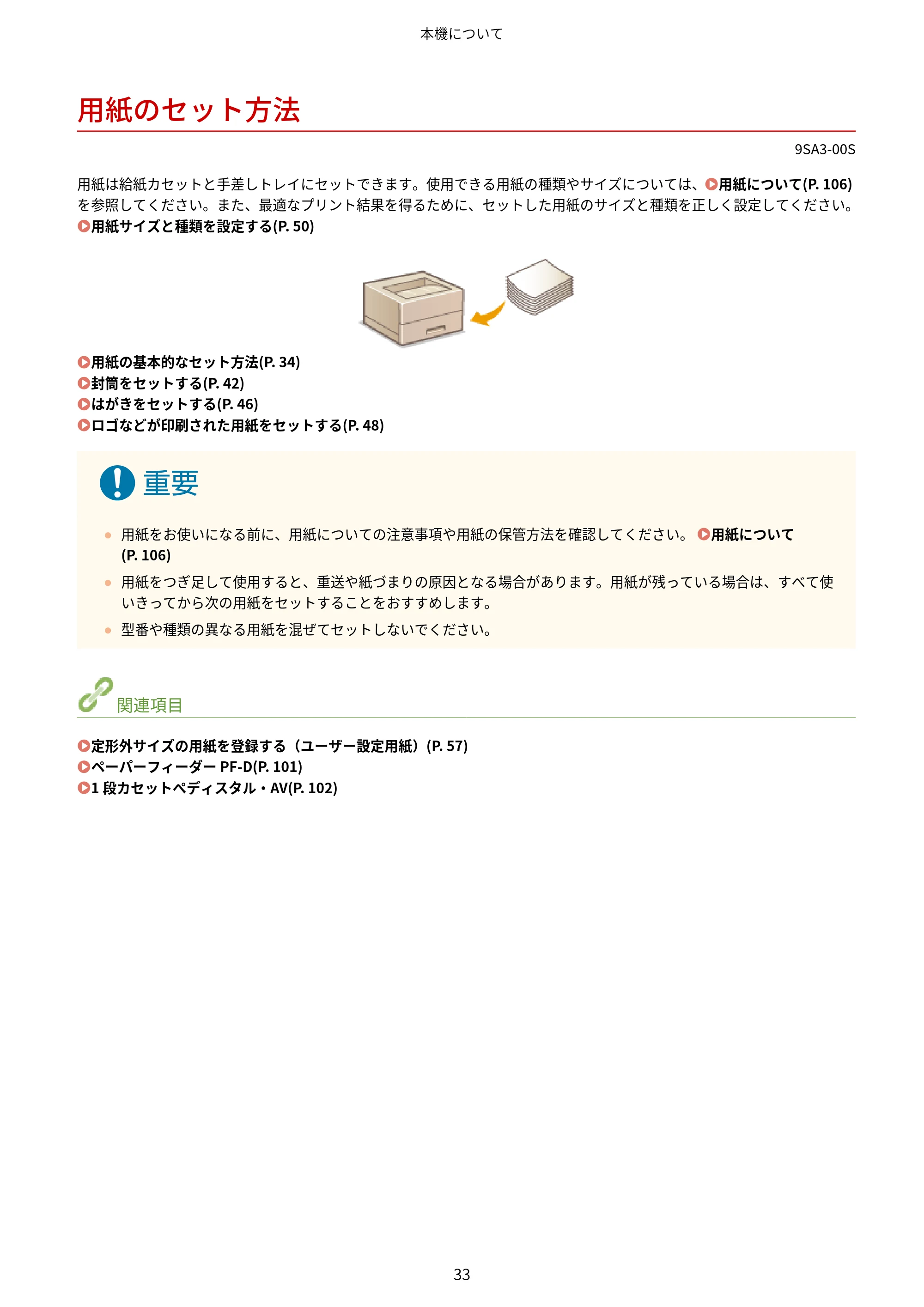
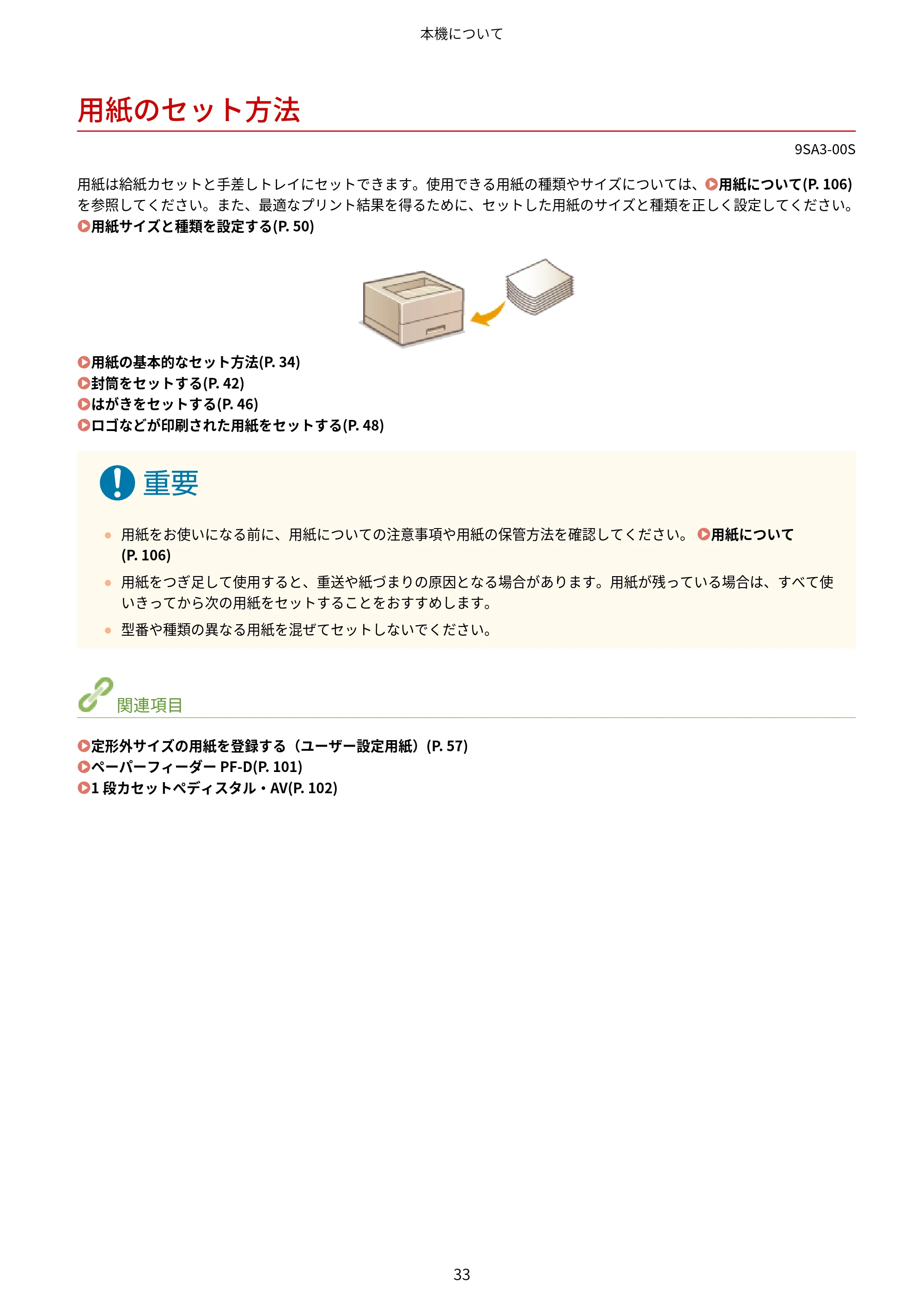
用紙は給紙カセットと手差しトレイにセットできます。使用できる用紙の種類やサイズについては、 用紙について(P. 106)
を参照してください。また、最適なプリント結果を得るために、セットした用紙のサイズと種類を正しく設定してください。
用紙サイズと種類を設定する(P. 50)
用紙の基本的なセット方法(P. 34)
封筒をセットする(P. 42)
はがきをセットする(P. 46)
ロゴなどが印刷された用紙をセットする(P. 48)
- 用紙をお使いになる前に、用紙についての注意事項や用紙の保管方法を確認してください。 用紙について
(P. 106)
- 用紙をつぎ足して使用すると、重送や紙づまりの原因となる場合があります。用紙が残っている場合は、すべて使
いきってから次の用紙をセットすることをおすすめします。
- 型番や種類の異なる用紙を混ぜてセットしないでください。
関連項目
定形外サイズの用紙を登録する(ユーザー設定用紙)(P. 57)
ペーパーフィーダー PF-D(P. 101)
1 段カセットぺディスタル・AV(P. 102)
本機について
33
用紙の基本的なセット方法
用紙の基本的なセット方法
9SA3-00U
普通紙や再生紙などをはじめ、用紙の汎用的なセット方法を説明します。普段よく使う種類やサイズの用紙は、給紙カセット
にセットしてください。給紙カセットにセットされていない用紙を一時的に使うときは、手差しトレイにセットしてくださ
い。
給紙カセットに用紙をセットする(P. 34)
手差しトレイに用紙をセットする(P. 39)
- オプションのペーパーフィーダー PF-D や 1 段カセットぺディスタル・AV については、給紙カセットの手順で用紙
をセットしてください。
- 用紙の梱包紙に給紙面についての指示が書かれているときは、指示に従って用紙をセットしてください。
- 用紙の裁断面の状態によっては、プリントするときに重なって通紙されたり紙づまりが生じたりする場合がありま
す。用紙の向きを変えてセットしなおすことで、裁断面の影響を軽減できることがあります。
- 用紙切れでプリント動作が中断されたときは、用紙を補給してください。用紙補給後、プリント動作が再開されま
す。
給紙カセットに用紙をセットする
定型サイズの用紙をセットする(P. 34)
非定型サイズの用紙(ユーザー設定用紙)をセットする(P. 36)
用紙のセット方向
セットできる用紙と置きかたは以下のとおりです。
用紙 置きかた
A4、B5、A5(ヨコ)、A6、B6、リーガル*、レター、ステートメント、エグゼクティブ、Oficio*、Brazil-Oficio*、Mexico-
Oficio*、Goverment Letter、Goverment Legal*、Australia Foolscap*、Foolscap/Folio*、16K、F4A*、Indian-Legal*、
ユーザー設定(ヨコ)、フリー(ヨコ)
A5(タテ)、ユーザー設定(タテ)、フリー(タテ)
*オプションのペーパーフィーダー PF-D や 1 段カセットぺディスタル・AV のみセット可能です。
◼ 定型サイズの用紙をセットする
給紙カセットに用紙サイズの指標がある用紙は以下の手順でセットします。用紙サイズの指標がないときは、 非定型サイズ
の用紙(ユーザー設定用紙)をセットする(P. 36) を参照してください。
1
給紙カセットを止まるまで引き出す
本機について
34
43ページ
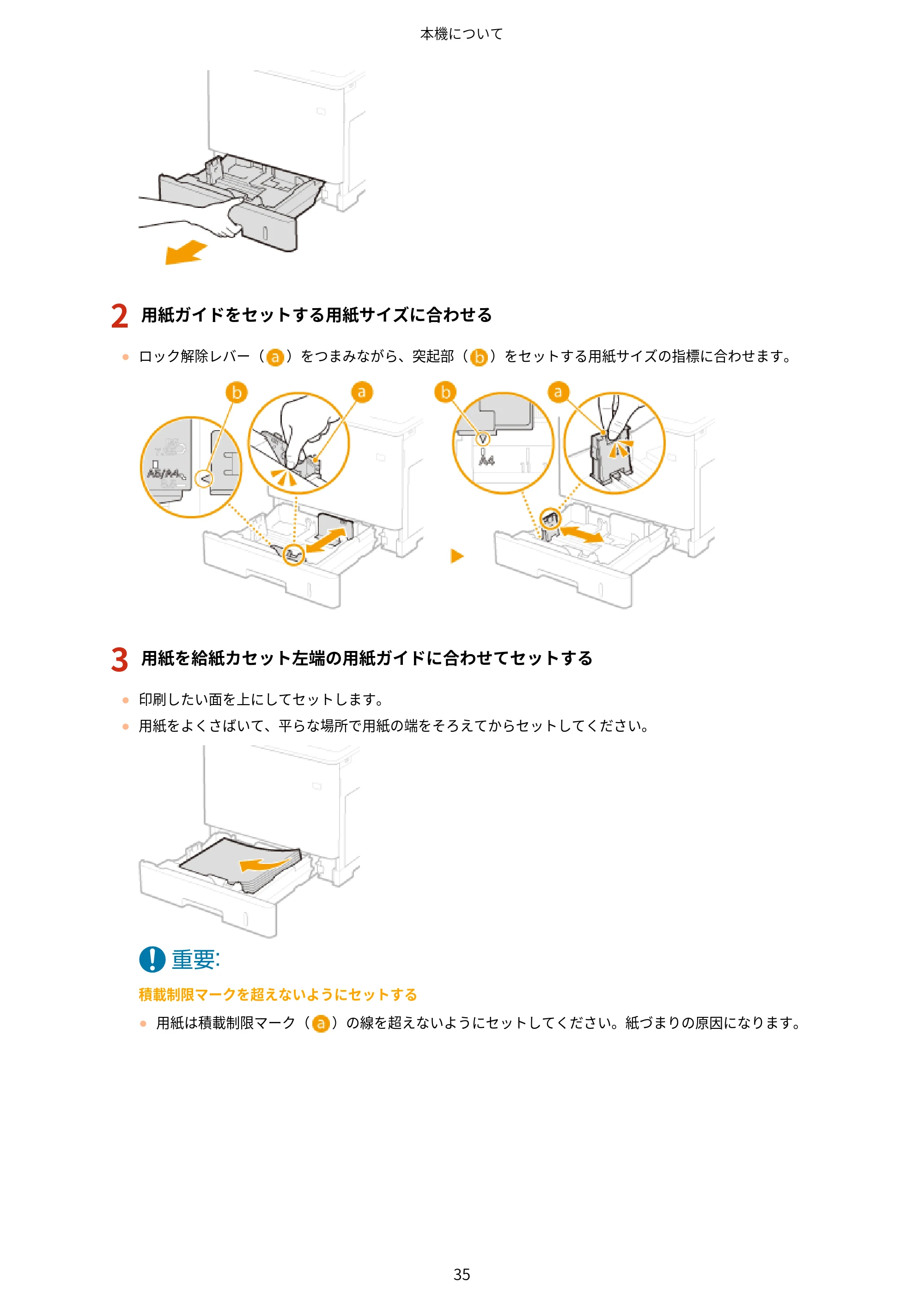
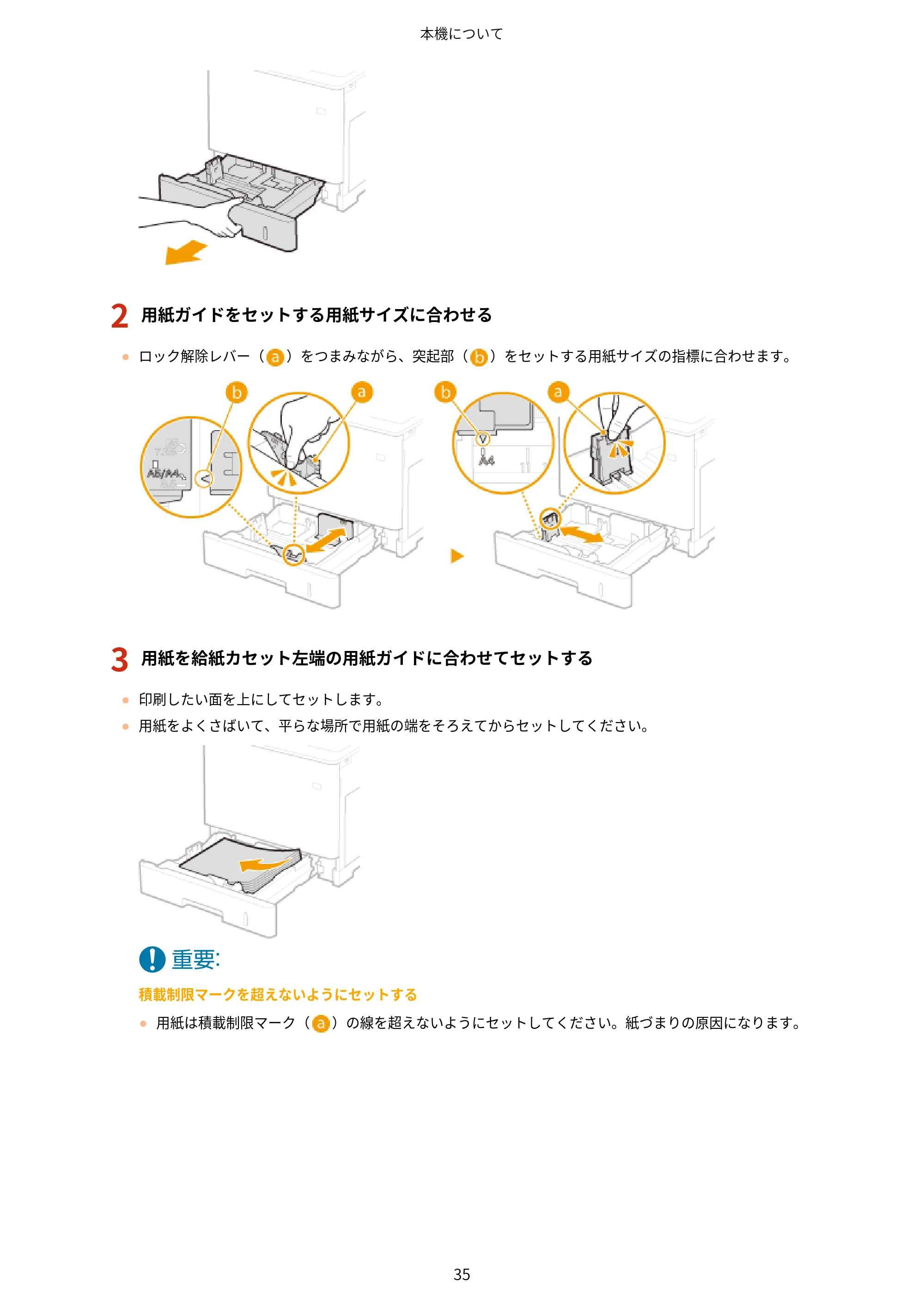
2
用紙ガイドをセットする用紙サイズに合わせる
- ロック解除レバー( )をつまみながら、突起部( )をセットする用紙サイズの指標に合わせます。
3
用紙を給紙カセット左端の用紙ガイドに合わせてセットする
- 印刷したい面を上にしてセットします。
- 用紙をよくさばいて、平らな場所で用紙の端をそろえてからセットしてください。
積載制限マークを超えないようにセットする
- 用紙は積載制限マーク( )の線を超えないようにセットしてください。紙づまりの原因になります。
本機について
35
44ページ
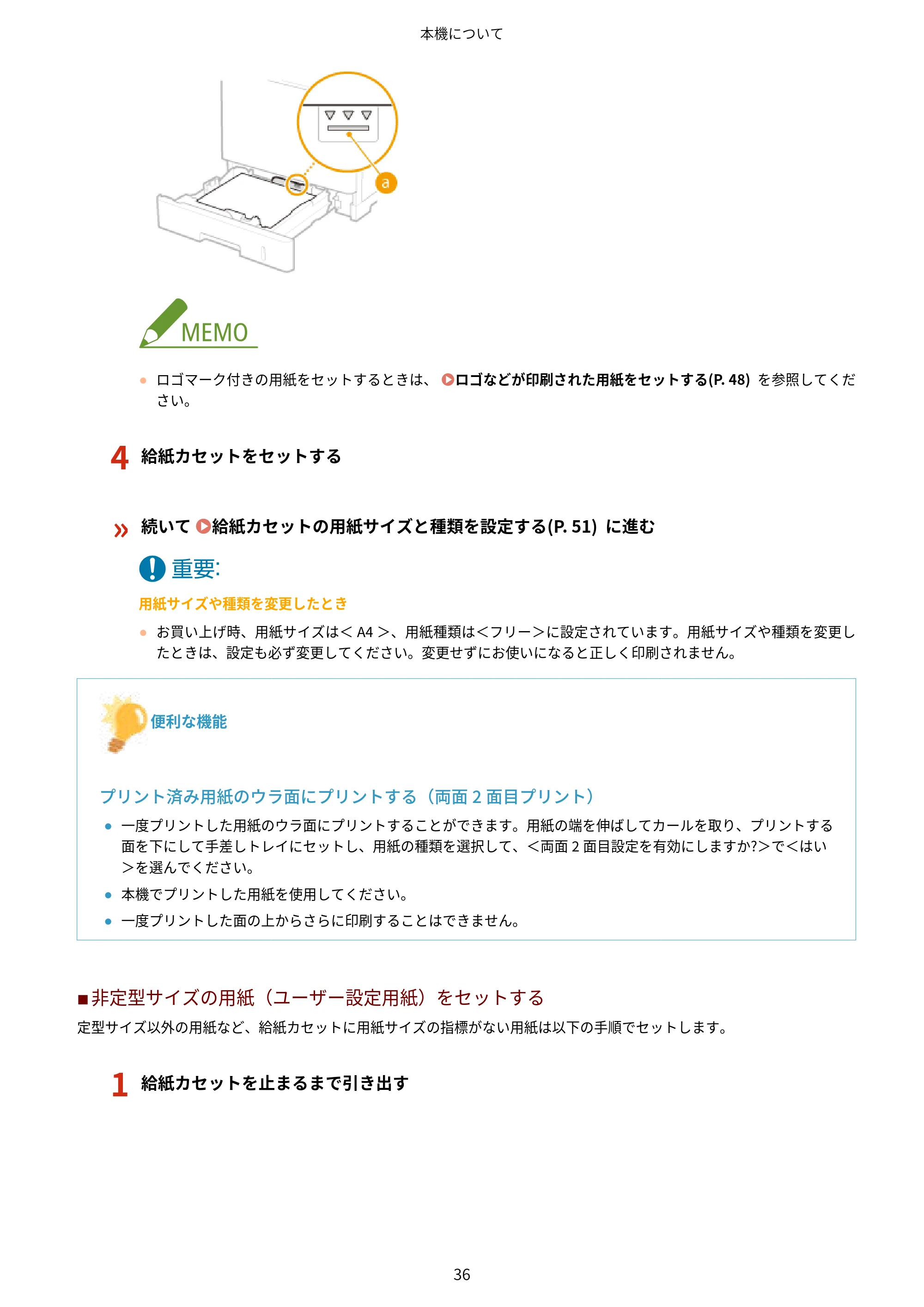
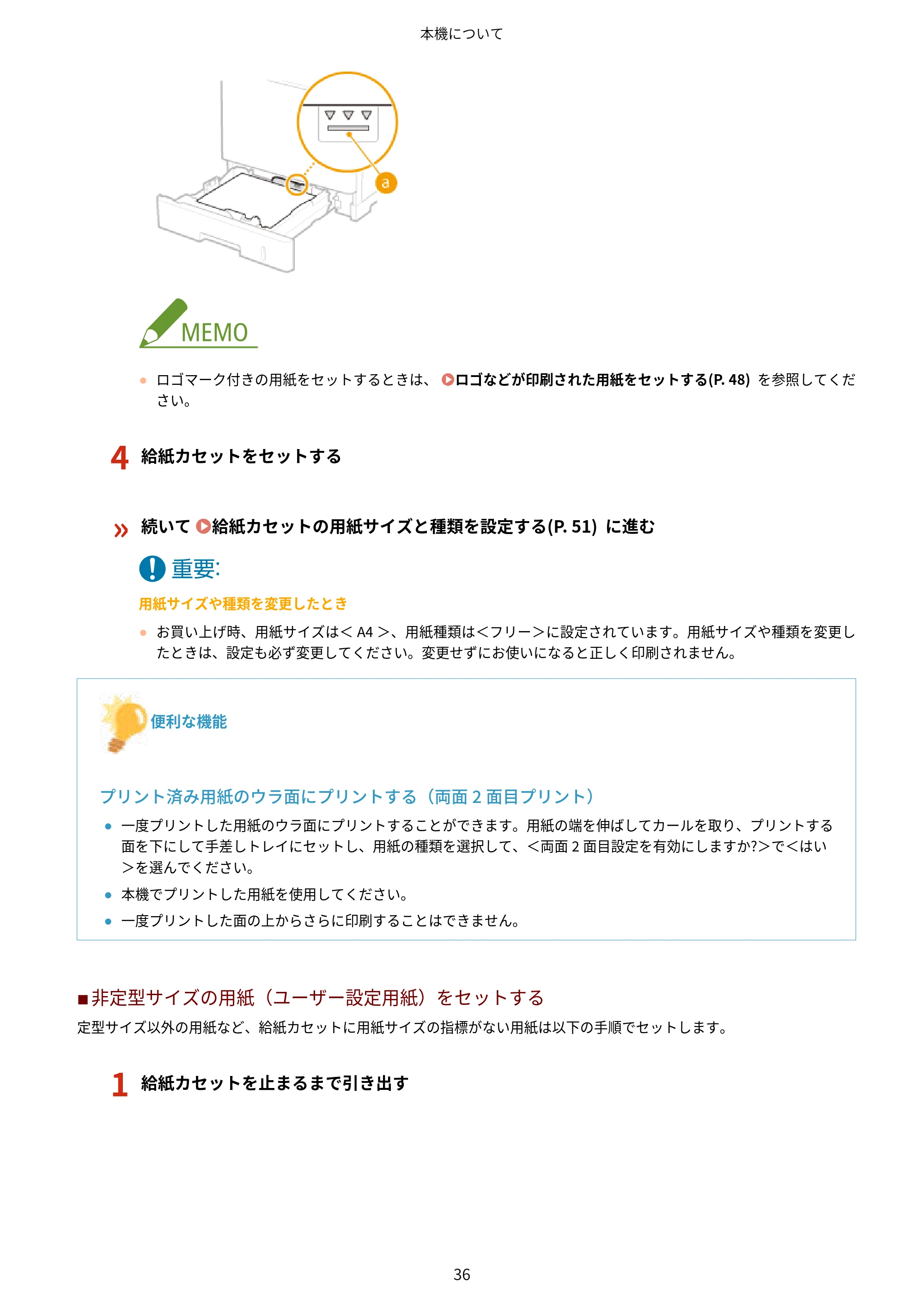
- ロゴマーク付きの用紙をセットするときは、 ロゴなどが印刷された用紙をセットする(P. 48) を参照してくだ
さい。
4
給紙カセットをセットする
»
続いて 給紙カセットの用紙サイズと種類を設定する(P. 51) に進む
用紙サイズや種類を変更したとき
- お買い上げ時、用紙サイズは< A4 >、用紙種類は<フリー>に設定されています。用紙サイズや種類を変更し
たときは、設定も必ず変更してください。変更せずにお使いになると正しく印刷されません。
便利な機能
プリント済み用紙のウラ面にプリントする(両面 2 面目プリント)
- 一度プリントした用紙のウラ面にプリントすることができます。用紙の端を伸ばしてカールを取り、プリントする
面を下にして手差しトレイにセットし、用紙の種類を選択して、<両面 2 面目設定を有効にしますか?>で<はい
>を選んでください。
- 本機でプリントした用紙を使用してください。
- 一度プリントした面の上からさらに印刷することはできません。
◼ 非定型サイズの用紙(ユーザー設定用紙)をセットする
定型サイズ以外の用紙など、給紙カセットに用紙サイズの指標がない用紙は以下の手順でセットします。
1
給紙カセットを止まるまで引き出す
本機について
36
45ページ
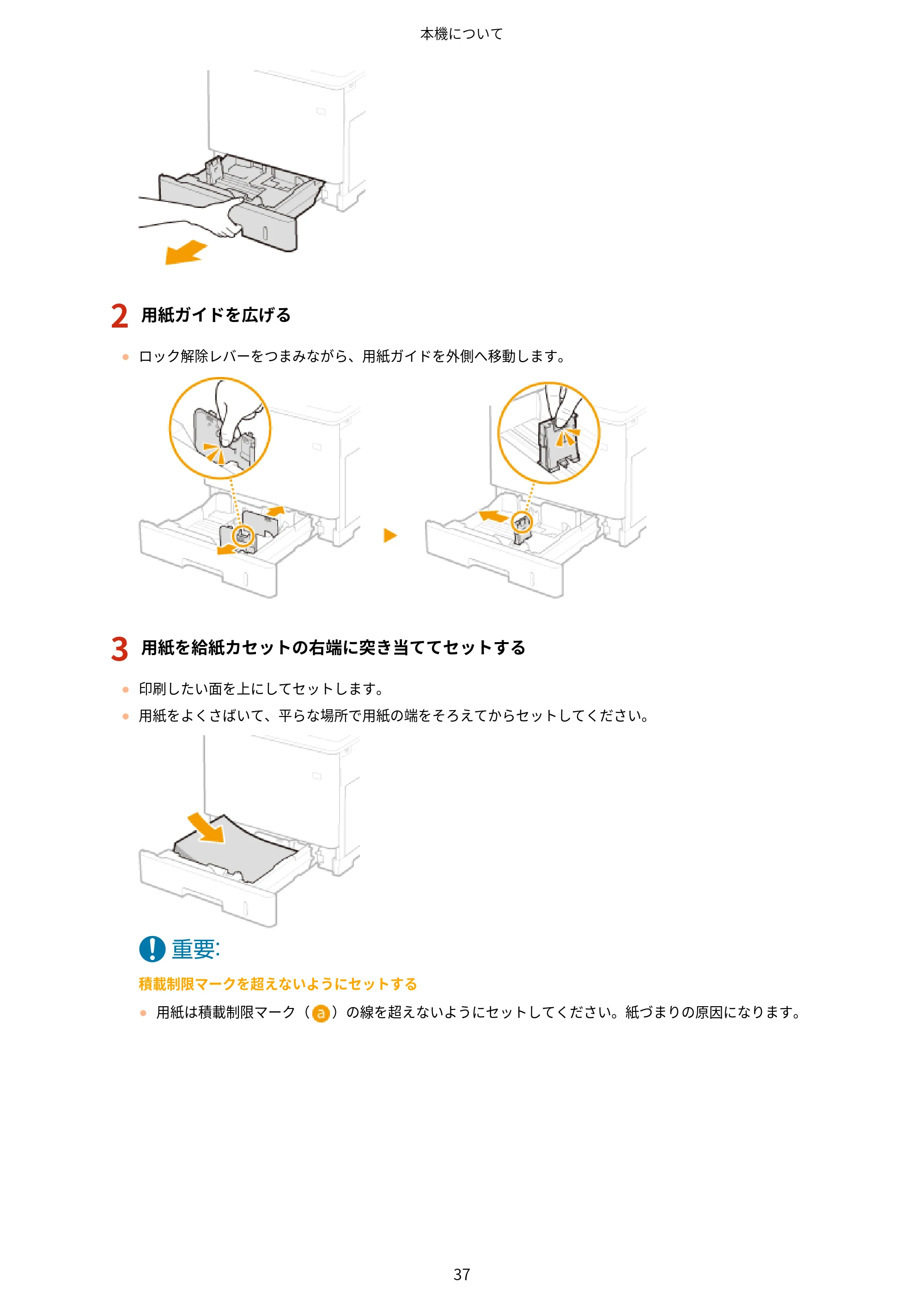
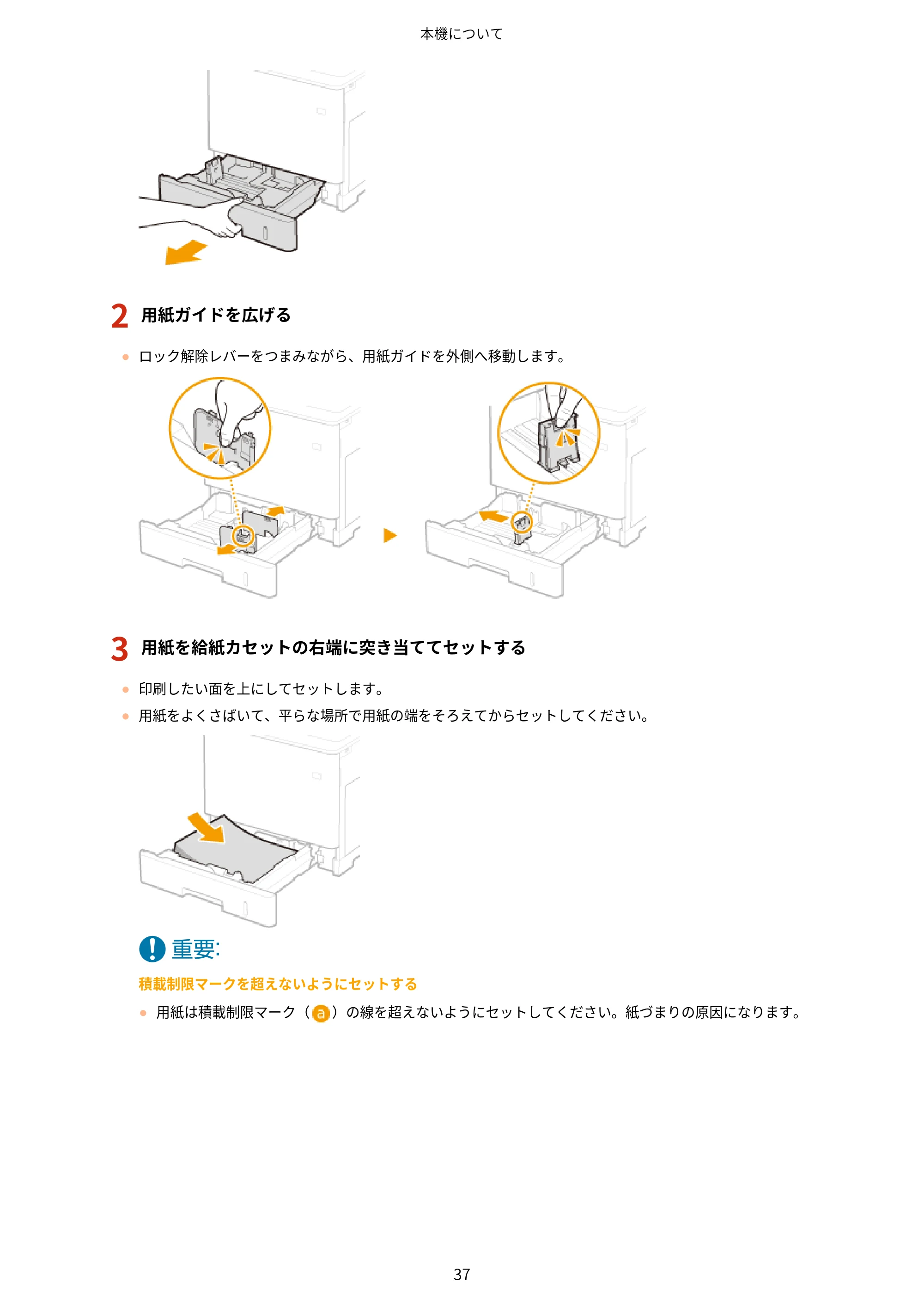
2
用紙ガイドを広げる
- ロック解除レバーをつまみながら、用紙ガイドを外側へ移動します。
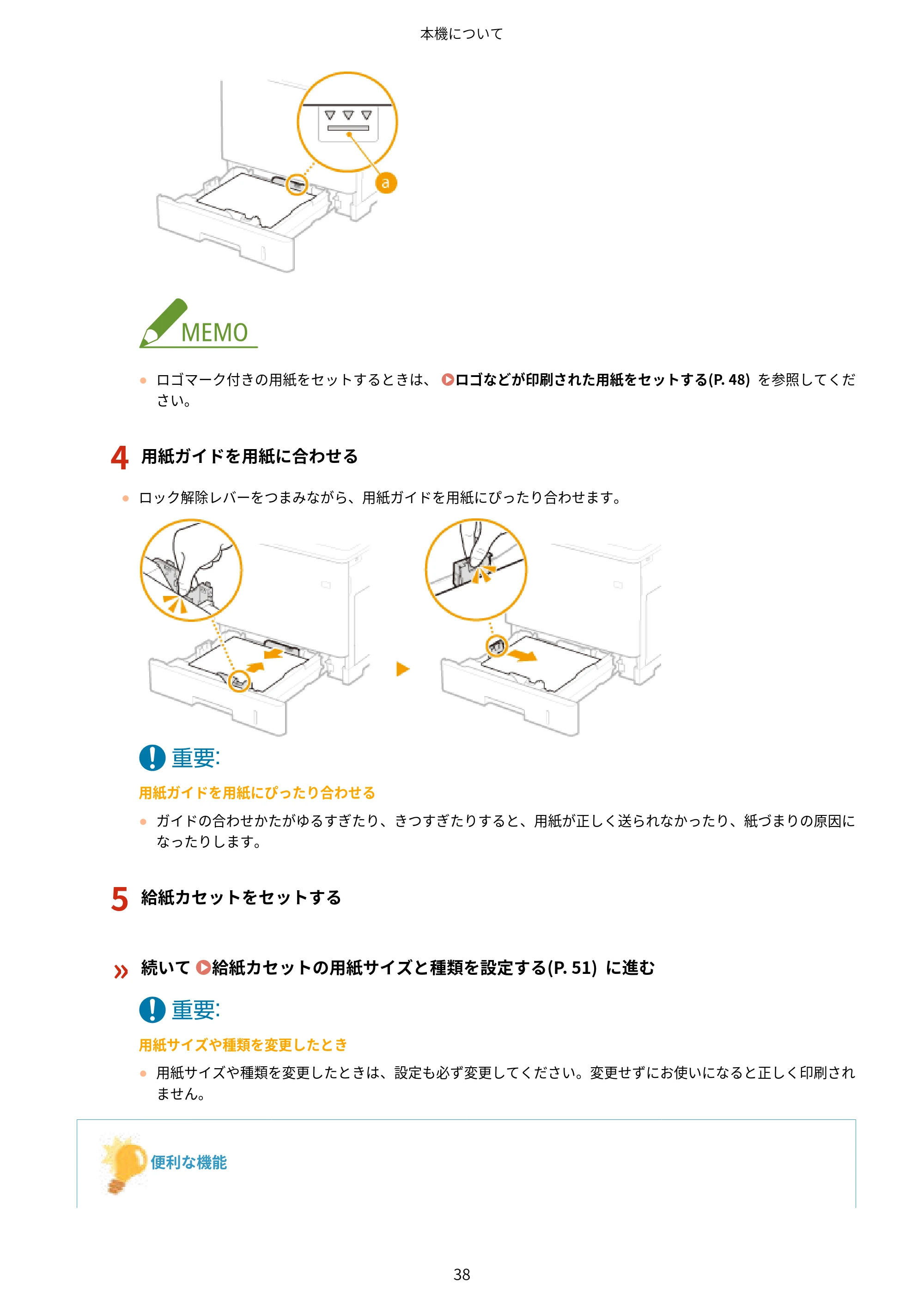
3
用紙を給紙カセットの右端に突き当ててセットする
- 印刷したい面を上にしてセットします。
- 用紙をよくさばいて、平らな場所で用紙の端をそろえてからセットしてください。
積載制限マークを超えないようにセットする
- 用紙は積載制限マーク( )の線を超えないようにセットしてください。紙づまりの原因になります。
本機について
37
46ページ
- ロゴマーク付きの用紙をセットするときは、 ロゴなどが印刷された用紙をセットする(P. 48) を参照してくだ
さい。
4
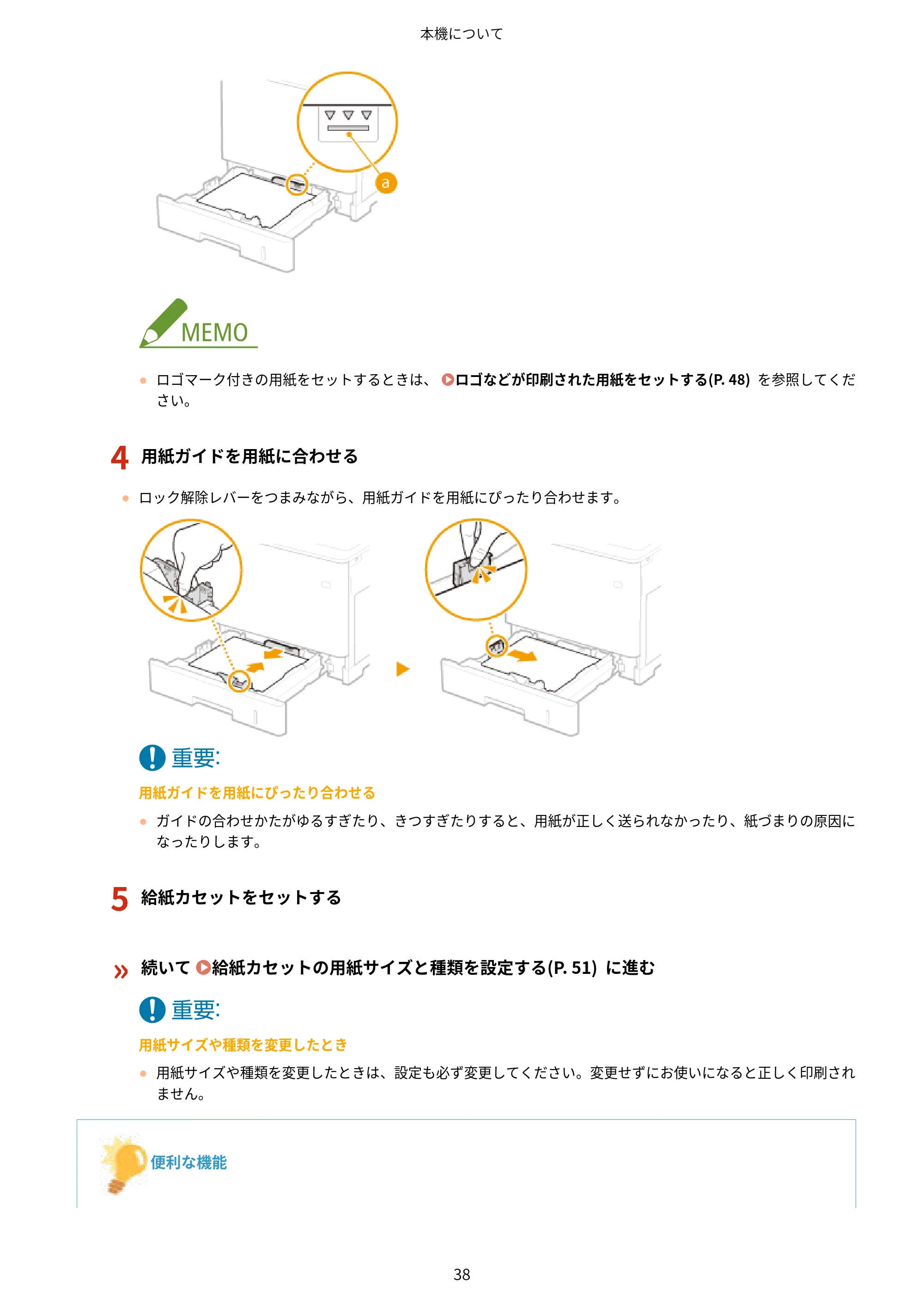
用紙ガイドを用紙に合わせる
- ロック解除レバーをつまみながら、用紙ガイドを用紙にぴったり合わせます。
用紙ガイドを用紙にぴったり合わせる
- ガイドの合わせかたがゆるすぎたり、きつすぎたりすると、用紙が正しく送られなかったり、紙づまりの原因に
なったりします。
5
給紙カセットをセットする
»
続いて 給紙カセットの用紙サイズと種類を設定する(P. 51) に進む
用紙サイズや種類を変更したとき
- 用紙サイズや種類を変更したときは、設定も必ず変更してください。変更せずにお使いになると正しく印刷され
ません。
便利な機能
本機について
38
47ページ
プリント済み用紙のウラ面にプリントする(両面 2 面目プリント)
- 一度プリントした用紙のウラ面にプリントすることができます。用紙の端を伸ばしてカールを取り、プリントする
面を下にして手差しトレイにセットし、用紙の種類を選択して、<両面 2 面目設定を有効にしますか?>で<はい
>を選んでください。
- 本機でプリントした用紙を使用してください。
- 一度プリントした面の上からさらに印刷することはできません。
手差しトレイに用紙をセットする
用紙のセット方向
セットできる用紙と置きかたは以下のとおりです。
用紙 置きかた
A4、B5、A5(ヨコ)、A6、B6、リーガル、レター、ステートメント、エグゼクティブ、Oficio、Brazil-Oficio、Mexico-
Oficio、Goverment Letter、Goverment Legal、Australia Foolscap、Foolscap/Folio、16K、F4A、Indian-Legal、3×
5、ユーザー設定(ヨコ)、フリー(ヨコ)、はがき、往復はがき、4面はがき、封筒
A5(タテ)、ユーザー設定(タテ)、フリー(タテ)
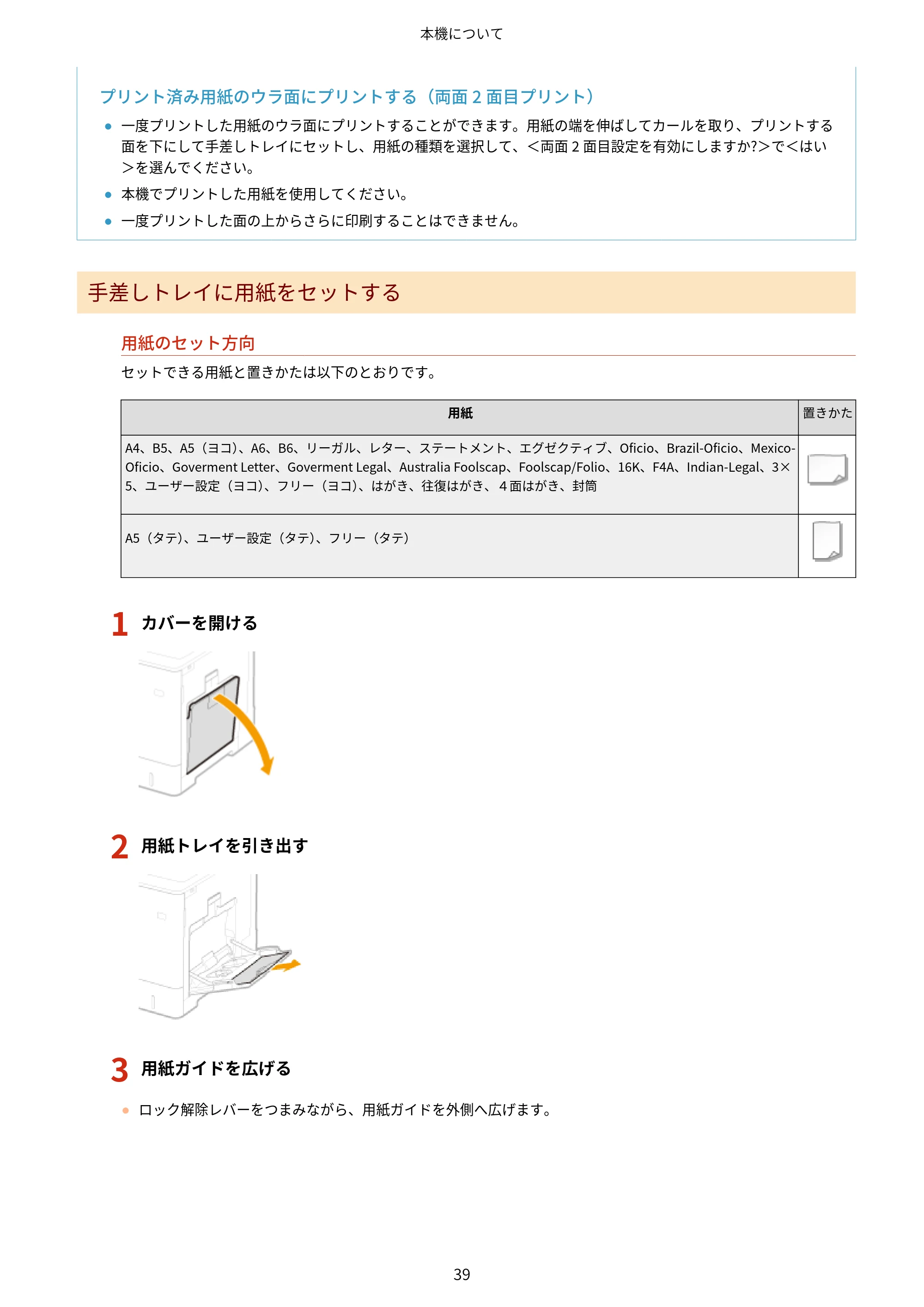
1
カバーを開ける
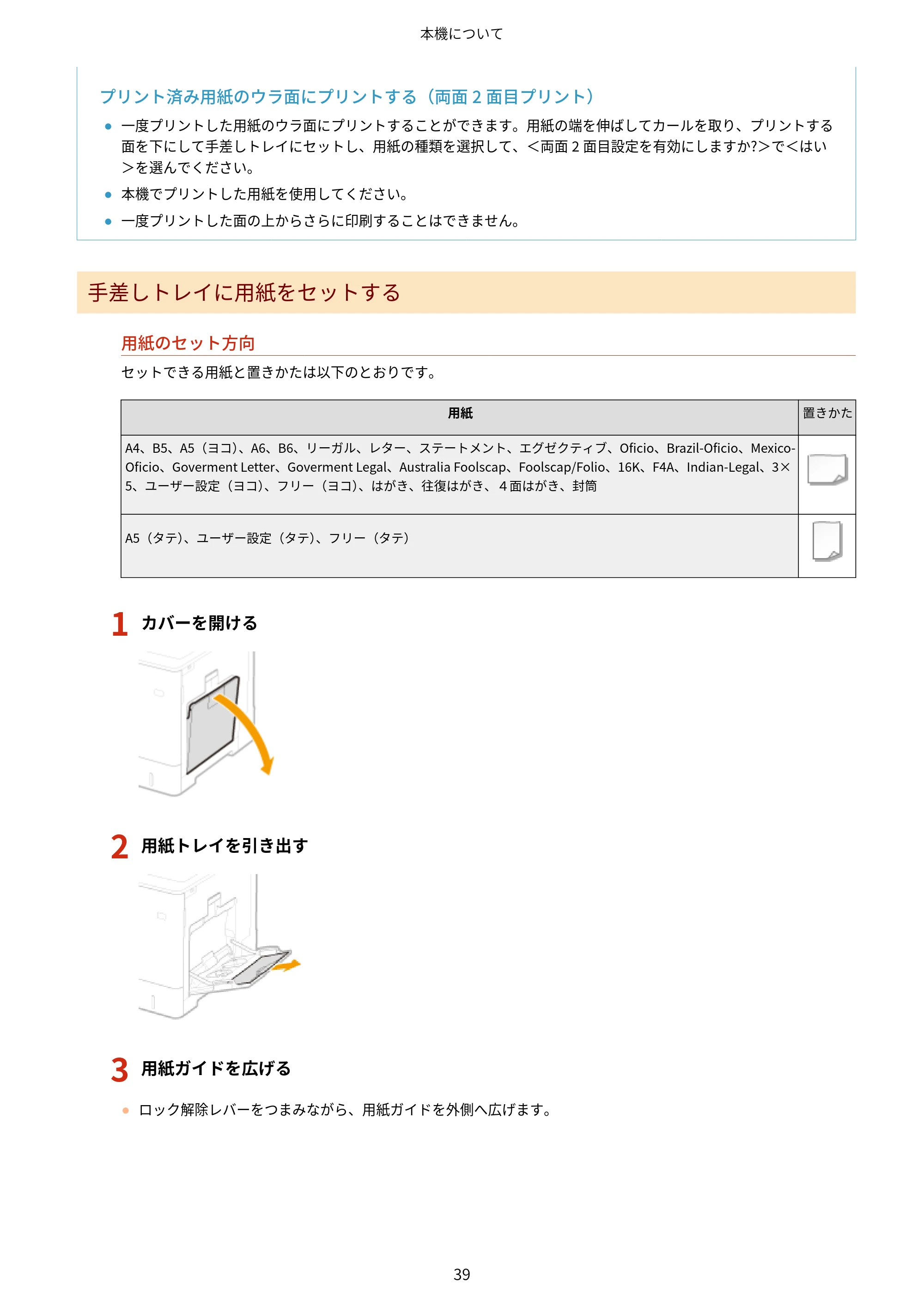
2
用紙トレイを引き出す
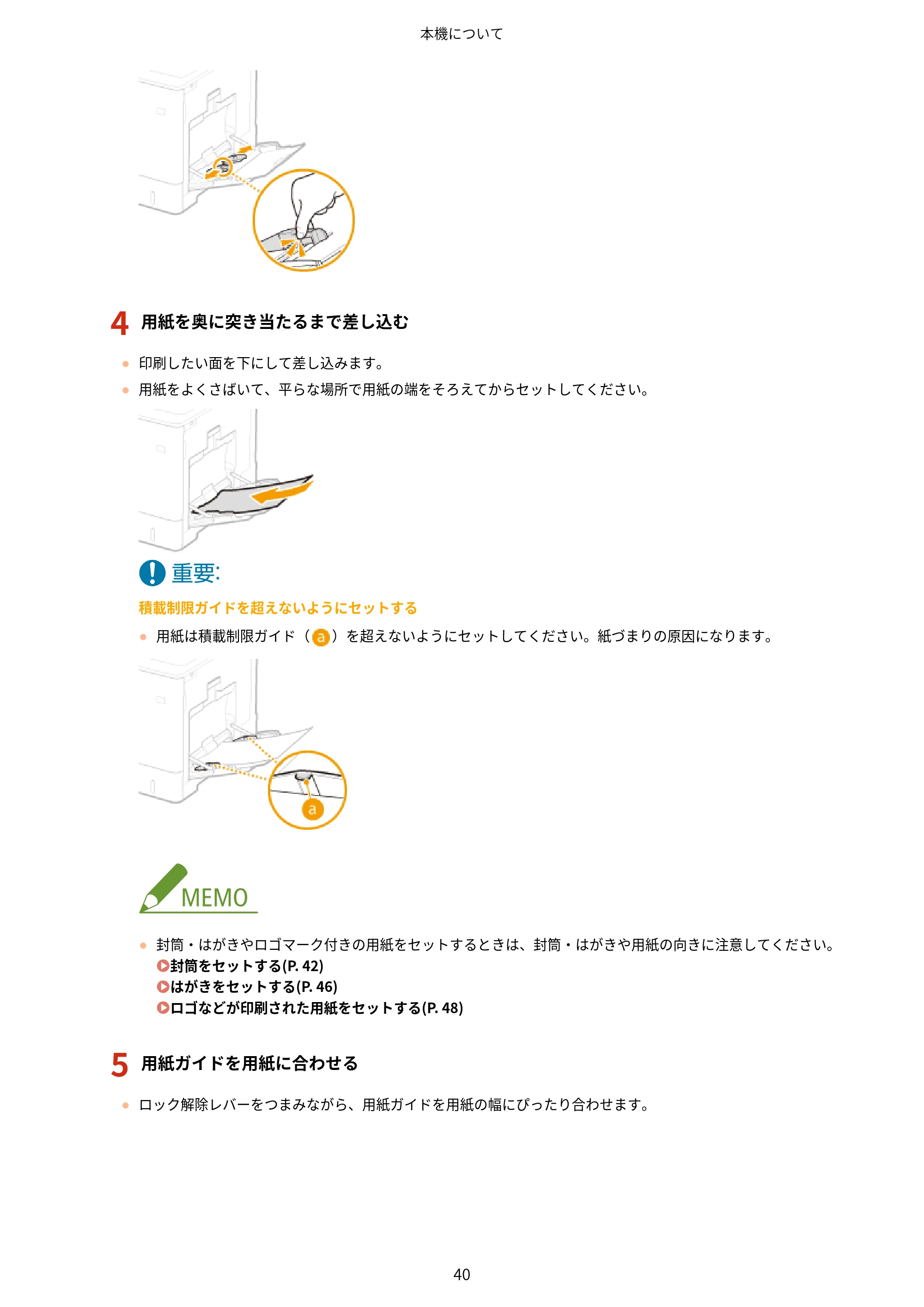
3
用紙ガイドを広げる
- ロック解除レバーをつまみながら、用紙ガイドを外側へ広げます。
本機について
39
48ページ
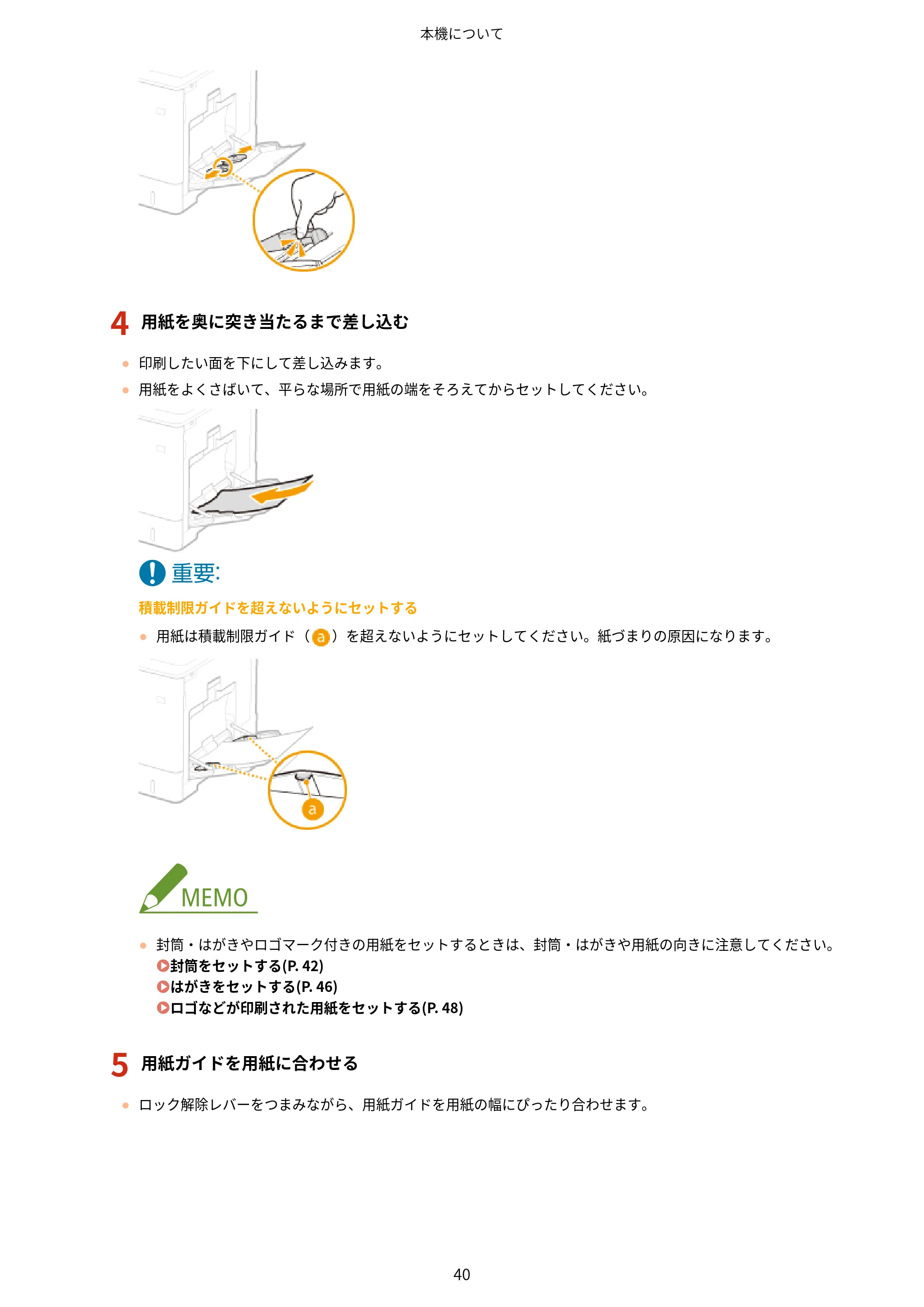
4
用紙を奥に突き当たるまで差し込む
- 印刷したい面を下にして差し込みます。
- 用紙をよくさばいて、平らな場所で用紙の端をそろえてからセットしてください。
積載制限ガイドを超えないようにセットする
- 用紙は積載制限ガイド( )を超えないようにセットしてください。紙づまりの原因になります。
- 封筒・はがきやロゴマーク付きの用紙をセットするときは、封筒・はがきや用紙の向きに注意してください。
封筒をセットする(P. 42)
はがきをセットする(P. 46)
ロゴなどが印刷された用紙をセットする(P. 48)
5
用紙ガイドを用紙に合わせる
- ロック解除レバーをつまみながら、用紙ガイドを用紙の幅にぴったり合わせます。
本機について
40
49ページ
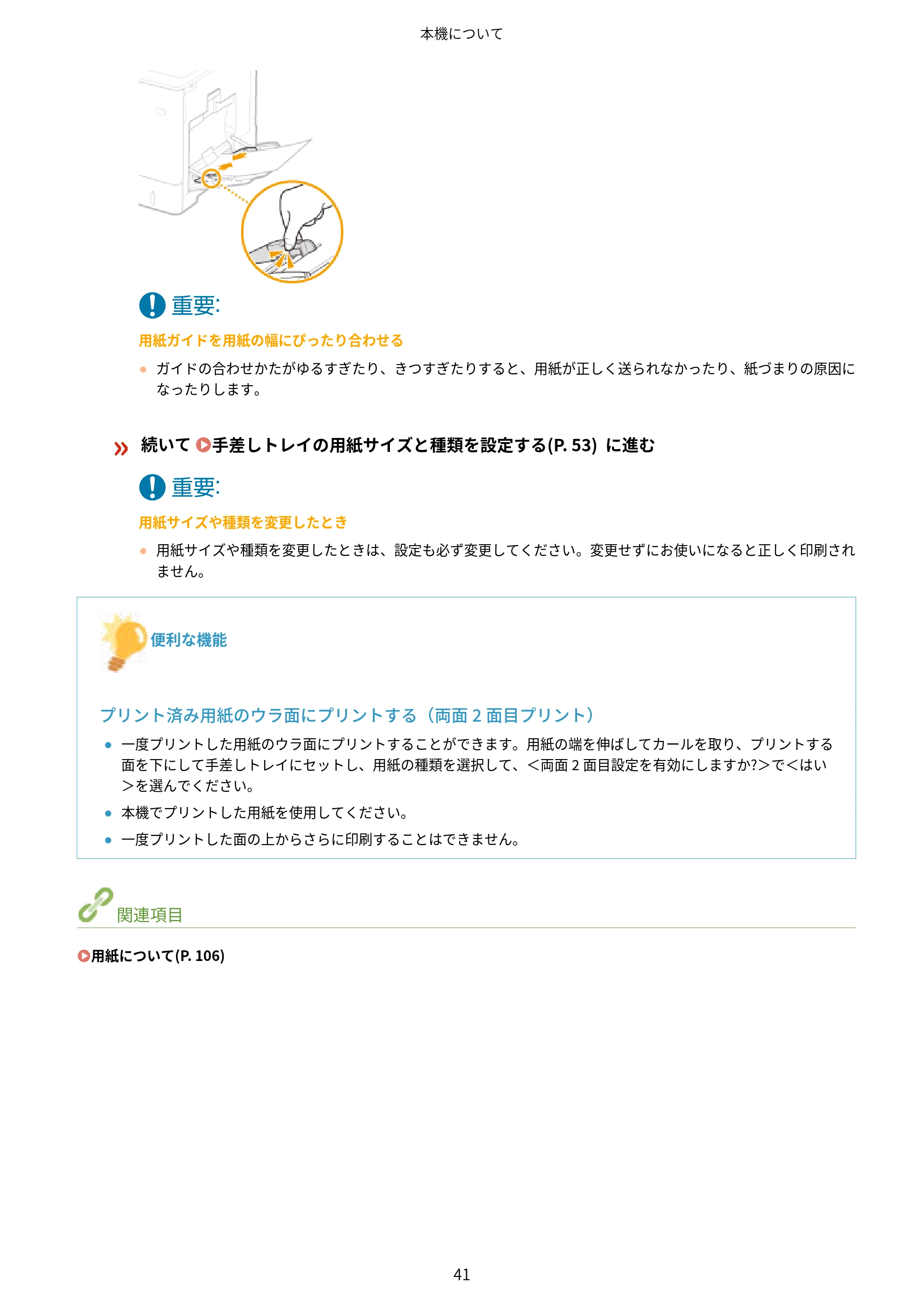
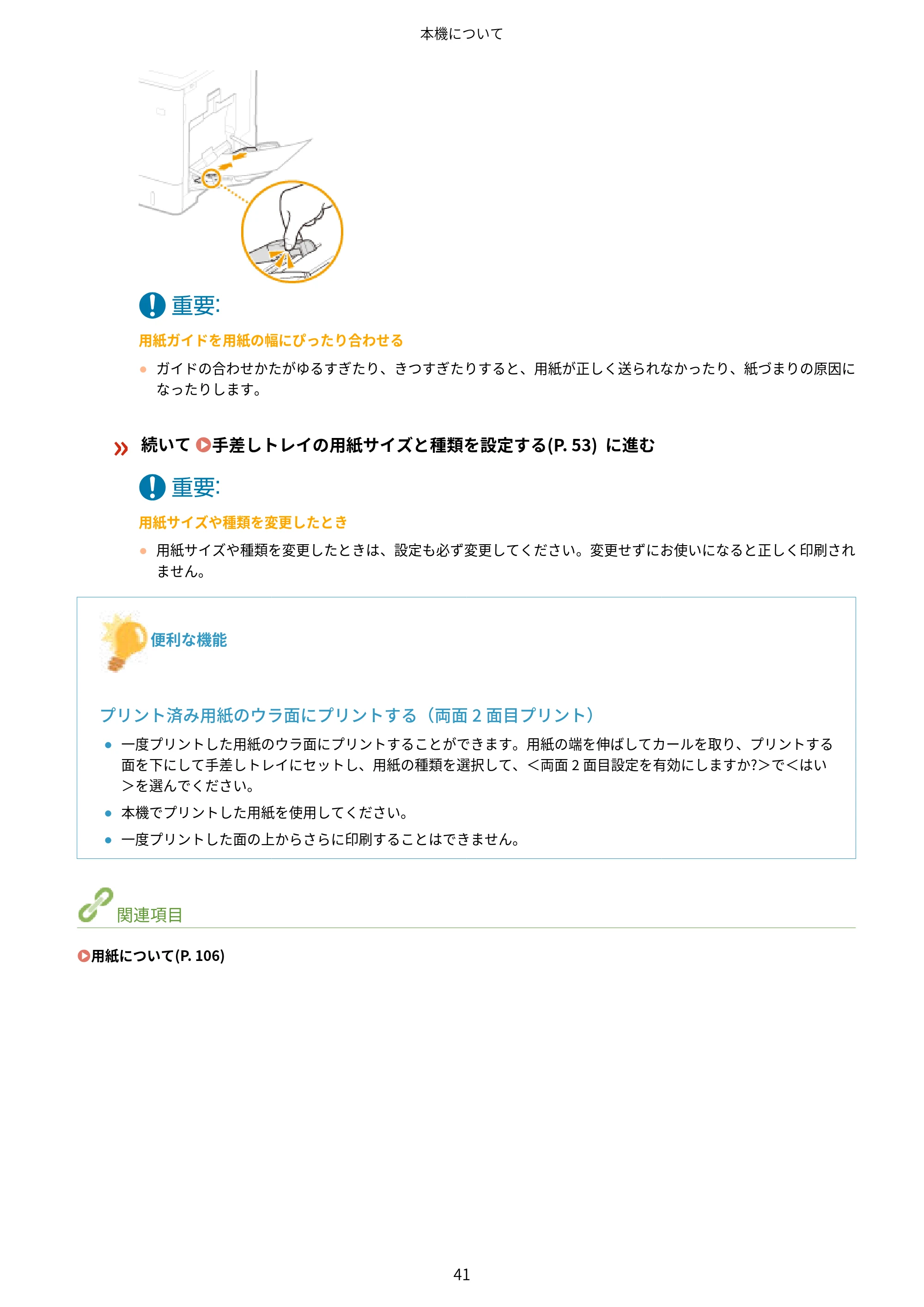
用紙ガイドを用紙の幅にぴったり合わせる
- ガイドの合わせかたがゆるすぎたり、きつすぎたりすると、用紙が正しく送られなかったり、紙づまりの原因に
なったりします。
»
続いて 手差しトレイの用紙サイズと種類を設定する(P. 53) に進む
用紙サイズや種類を変更したとき
- 用紙サイズや種類を変更したときは、設定も必ず変更してください。変更せずにお使いになると正しく印刷され
ません。
便利な機能
プリント済み用紙のウラ面にプリントする(両面 2 面目プリント)
- 一度プリントした用紙のウラ面にプリントすることができます。用紙の端を伸ばしてカールを取り、プリントする
面を下にして手差しトレイにセットし、用紙の種類を選択して、<両面 2 面目設定を有効にしますか?>で<はい
>を選んでください。
- 本機でプリントした用紙を使用してください。
- 一度プリントした面の上からさらに印刷することはできません。
関連項目
用紙について(P. 106)
本機について
41
封筒をセットする
封筒をセットする
9SA3-00W
封筒は手差しトレイにセットします。セットする前にカールを取るなどの準備を行うほか、セットする面や向きにも注意して
ください。
封筒をセットする前の準備(P. 42)
手差しトレイに封筒をセットする(P. 44)
- ここでは、封筒をセットする前に行う準備と、セットする際の正しい向きについて説明しています。封筒を手差し
トレイにセットするときの全体的な手順については、 用紙の基本的なセット方法(P. 34) を参照してください。
封筒をセットする前の準備
セットする前に、次の手順で封筒を整えてください。
- 封の部分にのりが付いた封筒を使用すると、定着器の熱や圧力により、のりが溶けることがあります。
- 封筒の種類や保存環境によっては、しわが発生する場合があります。
- 封筒の用紙が重なりあっている部分にスジが入ることがあります。
1
カールを取る
- 5 枚ほど手に取ります。ねじれをなおし、四隅の固い部分をほぐすようにします。
本機について
42
51ページ
- この操作を 5 回繰り返します。
2
平らにならしたあと、封筒内の空気を抜く
- 平らな場所に置き、矢印の方向に手で伸ばして封筒内の空気を抜きます。
- この操作を 5 回繰り返します。
3
四辺を押さえる
- 四辺の折り目をしっかりとつけます。特に給紙方向先端の辺の折り目を念入りにつけてください。封の部分がめく
れないようにしっかりと押さえてください。
- 折り目がしっかりついていないと、紙づまりの原因になることがあります。その場合は、1 枚ずつ四辺の折り目をつ
けなおしてください。
本機について
43
52ページ
4
平らな場所でそろえる
- 封筒のフラップ部の内側に、別の封筒が入りこんでいないか確認してください。
手差しトレイに封筒をセットする
封筒のオモテ面(貼り合わせがない面)をふせて、以下のようにセットします(推奨)。
洋形長 3 号、ISO-C5、Monarch、No.10、DL
封筒のふたを閉じて、ふたが手前側になるようにセットします。
長形 3 号、長形 4 号、長形 40 号
ふたが右側になるようにセットします。
本機について
44
53ページ
- 封筒は積載制限ガイドを超えないようにセットしてください。手順どおり封筒を整えても正しく給紙されない場合
は、手差しトレイに複数枚セットせずに、1 枚ずつセットしてください。
- 封筒のウラ面(貼り合わせがある面)にはプリントしないでください。
- 封筒にプリントした場合は、10 枚排紙されるごとにトレイから封筒を取り除いてください。
本機について
45
はがきをセットする
はがきをセットする
9SA3-00X
はがきは手差しトレイにセットします。セットする前にカールを取るなどの準備を行うほか、セットする面や向きにも注意し
てください。
はがきをセットする前の準備(P. 46)
手差しトレイにはがきをセットする(P. 46)
- ここでは、はがきをセットする前に行う準備と、セットする際の正しい向きについて説明しています。はがきを手
差しトレイにセットするときの全体的な手順については、 用紙の基本的なセット方法(P. 34) を参照してくださ
い。
はがきをセットする前の準備
はがきはカールを取ってからセットしてください。カールしたままでは斜めにプリントされたり、画像がゆがんでプリントさ
れたりすることがあります。また、はがきが下向きにカールしていると、紙づまりが起こりやすくなります。
- はがきは、郵便はがきをご使用ください。ただし、インクジェット用の郵便はがきは使用できません。
手差しトレイにはがきをセットする
プリントする面を下にして、次の図のようにセットします。
はがき
はがきの上端が左側になるようにセットします。
本機について
46
55ページ
往復はがき
はがきを広げた状態で、上端が手前側になるようにセットします。
4 面はがき
はがきの上端が左側になるようにセットします。
- はがきは積載制限ガイドを超えないようにセットしてください。手順どおりにはがきを整えても正しく給紙されな
い場合は、手差しトレイに複数枚セットせずに、1 枚ずつセットしてください。
本機について
47
ロゴなどが印刷された用紙をセットする
ロゴなどが印刷された用紙をセットする
9SA3-00Y
ロゴマークなどが印刷されている用紙をセットするときは、給紙カセット、手差しトレイともに、用紙の向きに注意する必要
があります。ロゴマークなどがある面に正しく文書をプリントするために、レイアウトやプリントのしかたに応じて用紙を
セットしてください。
給紙カセットにロゴ入り用紙をセットする(P. 48)
手差しトレイにロゴ入り用紙をセットする(P. 49)
- ここでは、ロゴマークなどが印刷された用紙をセットするときの正しい向きについて説明しています。用紙を給紙
カセットや手差しトレイにセットするときの全体的な手順については、 用紙の基本的なセット方法(P. 34) を参
照してください。
- <給紙方法切替>で<プリント面優先>を選択した場合の用紙セット方法
- 本体の用紙カセット:ロゴをふせた状態
- 本体の用紙カセット以外の給紙箇所:ロゴが見える状態
給紙カセットにロゴ入り用紙をセットする
ロゴ入り用紙がタテ向きかヨコ向きかによって、セットのしかたが異なります。ロゴの面(プリントする面)を上にして、次
の図のようにセットします。
タテ向きの用紙 印刷結果
ヨコ向きの用紙 印刷結果
本機について
48
57ページ
手差しトレイにロゴ入り用紙をセットする
ロゴ入り用紙がタテ向きかヨコ向きかによって、セットのしかたが異なります。ロゴの面(プリントする面)を下にして、次
の図のようにセットします。
タテ向きの用紙 印刷結果
ヨコ向きの用紙 印刷結果
本機について
49
用紙サイズと種類を設定する
用紙サイズと種類を設定する
9SA3-010
セットした用紙に合わせて用紙サイズと種類を設定する必要があります。今までセットされていた用紙と異なる用紙をセッ
トした場合も、忘れずに設定を変更してください。
給紙カセットの用紙サイズと種類を設定する(P. 51)
手差しトレイの用紙サイズと種類を設定する(P. 53)
手差しトレイでよく使う用紙サイズと種類を登録する(P. 55)
定形外サイズの用紙を登録する(ユーザー設定用紙)(P. 57)
機能ごとに適切な給紙部を自動で選択する(P. 58)
- セットした用紙と設定が一致していないと、正しく印刷できないだけでなく、紙づまりや印刷不良の原因となりま
す。
一括インポート/エクスポートについて
- <用紙設定>は、本機と同一シリーズの製品にのみインポート/エクスポートできます。 設定データをインポー
ト/エクスポートする(P. 376)
- 一括エクスポート時、<用紙設定>は[設定/登録の基本情報]に含まれます。 設定内容を一括してインポート
/エクスポートする(P. 378)
本機について
50
給紙カセットの用紙サイズと種類を設定する
給紙カセットの用紙サイズと種類を設定する
9SA3-011
PMW-SPDR
1
給紙カセットに用紙をセットする 用紙の基本的なセット方法(P. 34)
給紙カセットを開くと、画面上部に現在の用紙設定が表示されます。
- <用紙カセット開閉時の確認画面を表示>が< ON >に設定されている場合、給紙カセットを本体に押し込むと、
用紙設定の確認を促す画面が表示されます。 <用紙カセット開閉時の確認画面を表示>(P. 487)
- 用紙の設定をあとから行う場合は、<ホーム>画面で、<用紙設定>を選びます。
2
表示されている用紙サイズを確認する
- セットした用紙と異なる用紙サイズが表示された場合は、用紙が正しくセットされていない可能性があります。
用紙をセットしなおしてください。
3
セットした用紙サイズと表示されているサイズが異なる場合は、<用紙設定>を選んだあと、用
紙をセットした給紙カセットを選ぶ
4
用紙サイズを選ぶ
<フリー>について
- セットする用紙をひんぱんに変更する場合は、<フリー>に設定しておくことで、その都度、設定を変更する手
間が省けます。プリンタードライバーでの設定とセットされている用紙のサイズが大きく異なる場合にエラーメ
ッセージを表示させることもできます。 <フリーサイズ時不一致検知>(P. 522)
定形外サイズの用紙をセットした場合
0YAS-02E
本機について
51
60ページ
給紙カセットにセットした用紙サイズを設定します。
1 <ユーザー設定サイズ>を選ぶ
2 < X >辺と< Y >辺の長さを設定する
- < X >または< Y >を選び、テンキーまたは と でそれぞれの辺の長さを指定します。
- よく使う用紙サイズを< S1 >~< S5 >ボタンに登録しておけば、<登録サイズ>を選んで呼び出すことが
できます。 定形外サイズの用紙を登録する(ユーザー設定用紙)(P. 57)
3 <確定>を選ぶ
5
用紙の種類を選ぶ
<フリー>について
- セットする用紙をひんぱんに変更する場合は、<フリー>に設定しておくことで、その都度、設定を変更する手
間が省けます。ただし、プリンタードライバー側で設定した用紙種類と、実際にセットされた用紙種類が異なっ
ていても印刷が行われるため、注意が必要です。
- プリンタードライバーで設定した用紙種類が[自動]の場合は、[普通紙 1]として動作します
- 用紙種類の詳細設定を確認するには、<詳細情報> 確認する用紙の種類を選択します。
関連項目
機器仕様(P. 103)
本機について
52
手差しトレイの用紙サイズと種類を設定する
手差しトレイの用紙サイズと種類を設定する
9SA3-012
PMW-SPMT
- プリンタードライバーで指定した用紙のサイズや種類と、手差しトレイにセットした用紙のサイズや種類が一致し
ない場合、紙づまりや印刷不良が発生する可能性があります。
1
手差しトレイに用紙をセットする 手差しトレイに用紙をセットする(P. 39)
➠ 用紙サイズと種類を設定する画面が表示されます。
2
用紙サイズを設定する
<フリー>について
- セットする用紙をひんぱんに変更する場合は、<フリー>に設定しておくことで、その都度、設定を変更する手
間が省けます。プリンタードライバーでの設定とセットされている用紙のサイズが大きく異なる場合にエラーメ
ッセージを表示させることもできます。 <フリーサイズ時不一致検知>(P. 522)
- セットした用紙と異なる用紙サイズが表示された場合は、用紙が正しくセットされていない可能性があります。
定形サイズの用紙をセットした場合
<用紙サイズ>から用紙サイズを選びます。
定形外サイズの用紙をセットした場合
0YAS-02F 0SUS-026 0U7J-02C
1 <ユーザー設定サイズ>を選ぶ
2 < X >辺と< Y >辺の長さを設定する
- < X >または< Y >を選び、テンキーまたは と でそれぞれの辺の長さを指定します。
- よく使う用紙サイズを< S1 >~< S5 >ボタンに登録しておけば、<登録サイズ>を選んで呼び出すことが
できます。 定形外サイズの用紙を登録する(ユーザー設定用紙)(P. 57)
本機について
53
62ページ
3 <確定>を選ぶ
封筒をセットした場合
1 封筒の種類を選ぶ
はがきをセットした場合
1 はがきの種類を選ぶ
- はがきの両面にプリントする場合は、1 面目にプリントしたあと、再び手差しトレイにセットし、2 面目に
プリントしてください。1 面目にプリントしたあと、カールがついてしまった場合はカールをなおしてから
プリントしてください。
3
用紙の種類を選ぶ
<フリー>について
- セットする用紙をひんぱんに変更する場合は、<フリー>に設定しておくことで、その都度、設定を変更する手
間が省けます。ただし、プリンタードライバー側で設定した用紙種類と、実際にセットされた用紙種類が異なっ
ていても印刷が行われるため、注意が必要です。
- プリンタードライバーで設定した用紙種類が[自動]の場合は、[普通紙 1]として動作します。
- 用紙種類の詳細設定を確認するには、<詳細情報> 確認する用紙の種類を選択します。
関連項目
機器仕様(P. 103)
本機について
54
手差しトレイでよく使う用紙サイズと種類を登録する
手差しトレイでよく使う用紙サイズと種類を登録する
9SA3-013
いつも同じ用紙を手差しトレイにセットするのであれば、その用紙のサイズや種類をあらかじめ登録しておきます。こうする
ことで、用紙セットのたびに設定する手間を省くことができて便利です。
- ここでの設定を行うと、通常、用紙をセットしたときに現れるサイズ/種類の選択画面が表示されなくなります。
その状態のまま、設定と異なるサイズや種類の用紙をセットすると正しく印刷できないことがあります。この場合
は、手順 3 で<用紙セット時に指定>を選んでから、用紙をセットしてください。
1
<ホーム>画面で、<用紙設定>を選ぶ <ホーム>画面(P. 174)
2
<手差し>を選ぶ
3
用紙のサイズを選ぶ
<フリー>について
- セットする用紙をひんぱんに変更する場合は、<フリー>に設定しておくことで、その都度、設定を変更する手
間が省けます。プリンタードライバーでの設定とセットされている用紙のサイズが大きく異なる場合にエラーメ
ッセージを表示させることもできます。 <フリーサイズ時不一致検知>(P. 522)
定形サイズの用紙を登録する場合
1 定形サイズの用紙を選ぶ
定形外サイズの用紙を登録する場合
1 <ユーザー設定サイズ>を選ぶ
2 < X >辺と< Y >辺の長さを設定する
本機について
55
64ページ
- < X >または< Y >を選び、テンキーまたは と でそれぞれの辺の長さを指定します。
- よく使う用紙サイズを< S1 >~< S5 >ボタンに登録しておけば、<登録サイズ>を選んで呼び出すことが
できます。 定形外サイズの用紙を登録する(ユーザー設定用紙)(P. 57)
3 <確定>を選ぶ
封筒を登録する場合
1 封筒の種類を選ぶ
はがきを登録する場合
1 はがきの種類を選ぶ
4
用紙の種類を選ぶ
<フリー>について
- セットする用紙をひんぱんに変更する場合は、<フリー>に設定しておくことで、その都度、設定を変更する手
間が省けます。ただし、プリンタードライバー側で設定した用紙種類と、実際にセットされた用紙種類が異なっ
ていても印刷が行われるため、注意が必要です。
- プリンタードライバーで設定した用紙種類が[自動]の場合は、[普通紙 1]として動作します。
- 用紙種類の詳細設定を確認するには、<詳細情報> 確認する用紙の種類を選択します。
関連項目
手差しトレイに用紙をセットする(P. 39)
機器仕様(P. 103)
本機について
56
定形外サイズの用紙を登録する(ユーザー設定用紙)
定形外サイズの用紙を登録する(ユーザー設定用紙)
9SA3-014
定形外サイズの用紙で、よく使うサイズを 5 種類まで登録できます。ここで登録した用紙は、給紙カセットや手差しトレイの
用紙サイズ選択画面に表示されます( 給紙カセットの用紙サイズと種類を設定する(P. 51) 、または 手差しトレイの用紙
サイズと種類を設定する(P. 53) )。
1
<ホーム>画面で、<用紙設定>を選ぶ <ホーム>画面(P. 174)
2
<ユーザー設定サイズの登録>を選ぶ
3
登録するボタンを< S1 >~< S5 >から選び、<登録>を選ぶ
- <名称変更>を選んで、わかりやすい登録名に変更することもできます。
- 登録済みのボタンを選択したときは、続けて<編集>を選びます。
4
用紙のサイズを設定する
- < X >辺と< Y >辺の長さを設定します。< X >または< Y >を選び、テンキーまたは と でそれぞれの辺の
長さを指定します。
5
<確定>を選ぶ
関連項目
用紙の基本的なセット方法(P. 34)
本機について
57
機能ごとに適切な給紙部を自動で選択する
機能ごとに適切な給紙部を自動で選択する
9SA3-015
各給紙部を自動用紙選択の対象にするかどうかを設定します。< ON >にしておくと、文書サイズにあった用紙がセットされ
ている給紙部を本機が自動的に選択します。また、用紙がなくなったときに、他の給紙部に同じ用紙がセットされていれば、
自動的にそちらに切り替えて印刷されます。
- 給紙箇所のいずれかを必ず< ON >に設定してください。すべての給紙箇所で< OFF >を選んだ場合は、設定を完
了できません。
1
<ホーム>画面で、<設定>を選ぶ <ホーム>画面(P. 174)
2
<ファンクション設定> <共通> <給紙動作> <給紙箇所の自動選択の設定>を選ぶ
3
機能を選ぶ
- <その他>はレポート出力時の設定となります。
4
自動選択の対象となる給紙部を< ON >にする
手順 3 で<プリンター>を選択したとき
複数の給紙部をグループ化するかどうかを設定します。グループ化すると、給紙部を指定して印刷した際にグルー
プ内で自動選択が行われます。グループ化する場合は、<グループ設定>を選び、<グループを使用する>を< ON
>にしたあと、各給紙部が属するグループ <確定>を選びます。
本機について
58
本体のメンテナンス
本体のメンテナンス
9SA3-016
PMW-MNTC
本体のお手入れや消耗品の交換など、本機の保守・管理について説明します。また、キヤノンの保守サービスについてもご紹
介します。メンテナンス時の注意事項については、本製品に同梱されている「安全にお使いいただくために」をご確認くださ
い。
保守について
- 本機の補修用性能部品およびトナーカートリッジの最低保有期間は、製造打ち切り後 7 年間です。
- 操作に問題が発生した場合は、ユーザーズガイドの「 困ったときは(P. 557) 」を参照してください。それでも解
決しない場合や点検が必要と考えられる場合は、販売店または担当サービスに連絡してください。
設置について
- お客様の使用環境や動作モードにより、稼働音が気になる場合は、事務所とは別の場所に設置することをおすすめ
します。
- 部屋を急に暖めたり、温度や湿度が低い場所から高い場所へ本機を移動させたりすると、本体内部に水滴(結露)
が発生することがあります。そのまま使用すると紙づまり、印字不良、故障などのおそれがありますので、2 時間
以上放置して周囲の温度や湿度に慣らしてからご使用ください。
- ハードディスク等のストレージ機器を搭載している製品は、高地(海抜 3000m 以上)で使用すると、正常に動作
できない場合があります。
◼ 基本的なお手入れ
日常のお手入れ(P. 62)
本機について
59
68ページ
◼ 消耗品を交換する
トナーカートリッジを交換する(P. 64) 回収トナー容器を交換する(P. 68)
定着器を交換する(P. 71) 交換部品(P. 75)
消耗品の残量を確認する(P. 79)
◼ その他 保守・調整について
本機について
60
69ページ
本機を移動する(P. 73)
本機について
61
日常のお手入れ
日常のお手入れ
9SA3-017
印刷品質の低下を防ぎ、快適で安全にお使いいただくために、本機を定期的に清掃することをおすすめします。
本体外部 本体外部を清掃する(P. 63)
定着加圧ローラー <定着加圧ローラーのクリーニング>(P. 517)
本機について
62
71ページ
本体外部を清掃する
9SA3-018
本体の表面を定期的に拭き、きれいな状態を保ってください。
- 本機の表面に黒い点が見られる場合がありますが、再生材使用によるものであり、品質には問題ありません。
1
電源を切り、電源プラグをコンセントから抜く
電源を切る(P. 31)
- 電源を切る前に、本機の動作状況を確認してください。実行中の作業があっても電源を切ることができますが、
作業が中断されたりデータが破損したりすることがあります。
2
本体表面を拭く
- 柔らかい布に水または薄めた中性洗剤を含ませ、かたく絞って拭きます。
- 水分が完全に乾いてから次の手順に進んでください。
3
電源プラグをコンセントに差し込み、電源を入れる
電源を入れる(P. 30)
本機について
63
トナーカートリッジを交換する
トナーカートリッジを交換する
9SA3-019
トナー残量が少なくなったり、なくなったりすると、トナーカートリッジの準備や交換をお知らせするメッセージが表示され
ます。メッセージに従って、新しいトナーカートリッジの準備や交換を行ってください。
トナーカートリッジ交換の注意事項(P. 64)
トナーカートリッジの交換手順(P. 65)
トナーカートリッジ交換の注意事項
- 本体内部の接点部( )に触れないでください。故障の原因になることがあります。
- トナーカートリッジの交換は、トナーカートリッジ交換のメッセージが表示されてから行ってください。
- 必ず取っ手を持ってください。
- ドラム表面( )を傷つけたり、光にさらしたりしないでください。また、電気接点部( )やトナーカートリッ
ジメモリー( )には触れないでください。
本機について
64
73ページ
- メッセージの詳細については、 メッセージごとの対処方法(P. 584) を参照してください。
- トナーカートリッジの型番については、 消耗品(P. 75) を参照してください。
- 現在のトナー残量を確認することができます。 消耗品の残量を確認する(P. 79)
トナーカートリッジの交換手順
トナーカートリッジの交換の際は、画面に表示されている交換手順の動画と、下記の手順を合わせてご確認ください。
1
前カバーを開ける
2
トナーカートリッジを引き出す
3
新しいトナーカートリッジを保護ケースから取り出す
本機について
65
74ページ
4
トナーカートリッジを 5~6 回振って内部のトナーを均一にならし、平らな場所に置く
- ドラム保護カバー( )はまだ取り外さないでください。
5
ドラム保護カバーを取り外す
6
トナーカートリッジを取り付ける
- トナーカートリッジガイド( )に合わせて、奥に当たるまで確実に押し込みます。
- ドラム部分をスロットの枠などにぶつけないように注意してください。
- トナーカートリッジと同じ色のラベル( )が貼ってあるスロットに取り付けてください。
本機について
66
75ページ
7
前カバーを閉める
本機について
67
回収トナー容器を交換する
回収トナー容器を交換する
9SA3-01A
回収トナー容器の空き容量が少なくなったり、なくなったりすると、回収トナー容器の準備や交換をお知らせするメッセージ
が表示されます。メッセージに従って、新しい回収トナー容器の準備や交換を行ってください。
回収トナー容器交換の注意事項(P. 68)
回収トナー容器の交換手順(P. 68)
回収トナー容器交換の注意事項
- 本体内部の接点部( )に触れないでください。故障の原因になることがあります。
- 回収トナー容器の交換は、回収トナー容器交換のメッセージが表示されてから行ってください。
- 回収トナー容器とは、印刷時に発生する余分なトナーを蓄積して回収するための容器です。
- メッセージの詳細については、 メッセージごとの対処方法(P. 584) を参照してください。
- 回収トナー容器の型番については、 消耗品(P. 75) を参照してください。
- 現在の回収トナー容器の空き容量を確認することができます。 消耗品の残量を確認する(P. 79)
回収トナー容器の交換手順
回収トナー容器の交換の際は、画面にも交換手順が表示されます。次の手順と合わせてご確認ください。
1
前カバーを開ける
本機について
68
77ページ
2
左カバーを開ける
3
左カバーごと回収トナー容器を取り外す
- 回収トナー容器は傾けないでください。容器内のトナーがこぼれることがあります。
4
新しい回収トナー容器を保護袋から取り出す
- 回収トナー容器は分解、改造しないでください。
5
新しい回収トナー容器を取り付けて閉める
本機について
69
78ページ
6
前カバーを閉める
本機について
70
定着器を交換する
定着器を交換する
9SA3-01C
定着器の交換時期が近づくと、定着器の準備や交換をお知らせするメッセージが表示されます。メッセージに従って、新しい
定着器の準備や交換を行ってください。
- 定着器の交換は、定着器交換のメッセージが表示されてから行ってください。
- メッセージの詳細については、 メッセージごとの対処方法(P. 584) を参照してください。
- 定着器の型番については、 消耗品(P. 75) を参照してください。
1
右カバーを開ける
2
両側のハンドルを持って定着器をまっすぐに引き出す
3
新しい定着器を保護袋から取り出す
本機について
71
80ページ
4
定着器を本体にセットする
- 奥に当たるまで確実に押し込みます。
5
右カバーを閉める
本機について
72
本機を移動する
本機を移動する
9SA3-01E
本機は重量物です。けがなどの事故を未然に防ぐためにも、移動するときは必ず次の手順に従ってください。なお、移動する
前に、安全に関する注意事項は、本製品に同梱されている「安全にお使いいただくために」をご確認ください。
- 移転や引っ越しなどで本機を輸送する場合は、輸送中の破損や故障を避けるため、次のことを行ってください。
- トナーカートリッジを取り外す
- 購入時のパッケージ(箱)や梱包材を使ってしっかりと梱包する
1
本機とパソコンの電源を切る
電源を切る(P. 31)
2
接続されているケーブルやコードをイラストの番号順に抜く
- LAN ケーブル( )~USB 機器( )の有無は接続環境によって異なります。
電源プラグ
アース線
電源コード
LAN ケーブル
USB ケーブル
USB 機器
3
長距離を移動する場合はトナーカートリッジを取り出す トナーカートリッジを交換する
(P. 64)
4
カバーや手差しトレイなどをすべて閉じ、移動場所に運ぶ
- 本機は重量物( 機器仕様(P. 103) )です。無理のないように運んでください。
- 本体の運搬用取っ手に手を差し込んで、必ず 2 人以上で運んでください。
本機について
73
82ページ
オプションのペーパーフィーダーまたはカセットぺディスタルを装着している場合
- 本体を持ち上げる前に本体とペーパーフィーダーまたはカセットぺディスタルとのロックを解除し、別に運んで
ください。
5
移動場所にゆっくりおろす
- 移動後の設置手順については、「セットアップガイド」を参照してください。 マニュアルの種類と内容(P. 9)
本機について
74
交換部品
交換部品
9SA3-01F
本機の交換部品(消耗品・消耗部品)について説明します。交換部品のお取り扱いおよび保管に際しては、注意事項をお守り
ください。
最適な印刷品位のため、交換用トナー、カートリッジ及びパーツは、キヤノン純正品のご使用を
おすすめします。
消耗品(P. 75)
消耗部品(P. 77)
- 本機の設置環境や印刷する用紙サイズ、原稿の種類によって、記載の寿命より早く交換が必要になる場合がありま
す。
- 画像の品質保持のために、環境の変化に応じて自動補正(キャリブレーション)が実行されます。また、電源を入
れたときやスリープから復帰したときにも自動補正が実行される場合があります。補正実行時にはトナーカート
リッジを使用するため、寿命が短くなることがあります。
- 白黒印刷時にもカラーのトナーカートリッジを使用するため、白黒印刷を多用した場合でも、カラー用の各色の印
字可能枚数が少なくなることがあります。
- 現在の交換部品の残量を確認することができます。 消耗品の残量を確認する(P. 79)
消耗品
◼ トナーカートリッジ
付属のトナー
付属のトナーの平均印字可能枚数は次のとおりです。
- ブラック
平均印字可能枚数* :6,000 枚
- イエロー、マゼンタ、シアン
平均印字可能枚数*:3,200 枚
交換用のトナー
キヤノン純正トナー 平均印字可能枚数
本機について
75
84ページ
Canon Cartridge 064 Black
(キヤノントナーカートリッジ 064 ブラック)
- 平均印字可能枚数*
6,000 枚
Canon Cartridge 064 Yellow
(キヤノントナーカートリッジ 064 イエロー)
Canon Cartridge 064 Magenta
(キヤノントナーカートリッジ 064 マゼンタ)
Canon Cartridge 064 Cyan
(キヤノントナーカートリッジ 064 シアン)
- 平均印字可能枚数*
5,000 枚
Canon Cartridge 064 H Black
(キヤノントナーカートリッジ 064 H ブラック)
- 平均印字可能枚数*
13,400 枚
Canon Cartridge 064 H Yellow
(キヤノントナーカートリッジ 064 H イエロー)
Canon Cartridge 064 H Magenta
(キヤノントナーカートリッジ 064 H マゼンタ)
Canon Cartridge 064 H Cyan
(キヤノントナーカートリッジ 064 H シアン)
- 平均印字可能枚数*
10,400 枚
* 国際標準化機構(International Organization for Standardization)により発行された「印字可能枚数の測定方法」に関する国際
標準(ISO/IEC 19798)に準拠し、A4 サイズの普通紙を使用、印字濃度が工場出荷初期設定値の場合の枚数です。
トナーカートリッジは次のとおり保管する
誤った場所や環境で保管すると、データ破損などのおそれがあります。
- 使用する直前まで未開封の状態で保管する
- 次の環境で保管する
- 保管温度範囲:0~35℃
- 保管湿度範囲:35~85%RH(相対湿度/結露しないこと)*
*保管湿度範囲内でも、外気温との差がある場合は内部に水滴が付着することがあり(結露)、印字品質に悪影響を及ぼす。
- 次の場所に保管しない
- 火気のある場所
- 直射日光や電灯の光に 5 分以上当たる場所
- 空気中に塩分を多く含む場所
- 腐食性ガス(エアゾールスプレーやアンモニアなど)が充満している場所
- 高温多湿の場所
- 温度変化および湿度変化が激しく、結露が生じやすい場所
- ホコリの多い場所
- 幼児の手の届く場所
- 磁気が影響する製品(フロッピーディスクやディスクドライブなど)の近く
- トナーカートリッジは立てたり、裏返したり、逆さにしたりしない
- 梱包材は保管しておき、本機からトナーカートリッジを取り出して保管する場合に再び使用する
- 梱包材は予告なく位置、形状が変更されたり、追加や削除されたりすることがある
トナーカートリッジの偽造品に関するご注意
- キヤノン製トナーカートリッジの「偽造品」が流通していることが確認されています。「偽造品」はキヤノ
ン株式会社の商標権を侵害するものです。また誤って「偽造品」を使用されますと、印字品位の低下など、
本機について
76
85ページ
機械本体の本来の性能が十分に発揮されない場合があります。「偽造品」に起因する故障や事故につきまし
ては、責任を負いかねますのでご了承ください。詳しくは下記ホームページをご覧ください。
global.canon/ctc
- 使用済みトナーカートリッジの回収については、 おことわり(P. 11) を参照してください。
消耗部品
◼ 回収トナー容器
回収トナー容器は必ず本製品専用のものをお使いください。
- 回収トナー BOX WT-B1
回収トナー容器の平均印字可能枚数は、54,000 枚(A4 またはレターサイズ)です。
- 回収トナー容器を交換するとき 回収トナー容器を交換する(P. 68)
◼ 定着器
- FUSER KIT FK-A1
定着器の平均印字可能枚数は、150,000 枚です。
- 定着器を交換するときは、 定着器を交換する(P. 71) を参照してください。またキヤノンホームページで
もご覧いただけます。
本機について
77
86ページ
- ご要望の場合は、専門の担当サービスが交換を行うこともできます。本プリンターをお買い求めの販売店な
どへ依頼してください。
- 担当サービスが消耗部品を交換した場合には、部品代と技術料、訪問料金が別途必要となります。
本機について
78
消耗品の残量を確認する
消耗品の残量を確認する
9SA3-01H
消耗品の残量は以下の手順で確認できます。特に、大量に印刷する前には、新しいトナーカートリッジを用意しておく必要が
ないか確認してください。
(状況確認) <デバイス状況> <消耗品情報>
- 消耗品の残量は、リモート UI から確認することもできます。 本機の状態を確認する(P. 353)
関連項目
トナーカートリッジを交換する(P. 64)
回収トナー容器を交換する(P. 68)
メッセージごとの対処方法(P. 584)
本機について
79
無償保証や保守サービスについて
無償保証や保守サービスについて
9SA3-01J
ご購入製品をいつまでもベストの状態でご使用いただくために
ご愛用いただく製品向けに、保守サービスをパッケージ化した「キヤノンサービスパック(CSP)」と契約型の保守サービス
制度「キヤノン・ケア・ギャランティ(CCG)」を用意しています。
「キヤノンサービスパック(CSP)」や「キヤノン・ケア・ギャランティ(CCG)」は、電話による障害の解決支援や設置先での
修理対応、安定した運用稼動のための定期点検(CCG のみ)を実施します。
無償保証について(P. 81)
キヤノンサービスパック(CSP)(P. 82)
キヤノン・ケア・ギャランティ(CCG)(P. 84)
本機について
80
無償保証について
無償保証について
9SA3-01K
弊社の機器登録用ウェブサイトにお客様が機器情報をご登録いただくことで、お買い上げ日から 6 か月間無償保証サービスを
提供いたします。
下記ホームページからご登録をお願いいたします。
canon.jp/biz-regists
ご登録後に保証書を電子発行(ウェブサイトでの閲覧および印刷)いたしますので、印刷の上、大切に保管願います。
無償保証の保守サービスをお受けになるためには、ご登録後に電子発行される保証書、お買い上げ日が確認できる書面(納品
書、領収書等)をあわせて、お買上げの販売店または担当サービスにご提示ください。
本機について
81
キヤノンサービスパック(CSP)
キヤノンサービスパック(CSP)
9SA3-01L
キヤノンサービスパック(以下 CSP)は、万一故障した場合の訪問料、作業料、部品代
*1 がパッケージ化された保守サービス
商品です。無償保証期間を含めた複数年パック(3 年、4 年、5 年)、または保証期間後の 1 年パックから選択することができ
ます。
*1 キヤノンマーケティングジャパンが別途定める特定の部品料金はこの限りではありません。
CSP のメリット
安心 1:予期せぬ出費を防ぐ
修理復旧作業にかかる費用は CSP の料金に含まれているため、部品代*1 やその交換にかかる費用は発生しません。あ
らかじめ保守料金を予算化でき、予期せぬ出費を防ぐことができます。
(CSP は、故障が発生した際に修理・調整をおこなうサービスです)
安心 2:安心の技術力
キヤノン認定のカスタマーエンジニアがお客様先へ訪問し、機器の診断から修理作業まできめ細やかなサービスを提供
します。お客様に部品の交換作業をお願いすることはありません。
安心 3:コールセンターの的確な対応
CSP は保守専用のコールセンターで障害の内容を承ります。障害の内容に応じて復旧方法のアドバイスやサービス実
施店への修理手配など的確な対応を行ないます。
修理受付時間:月~金曜日 9:00~17:30
- ご連絡先の電話番号はお客様 ID シールに記載しております。
- 祝祭日、年末年始等のキヤノンマーケティングジャパンが指定する休日を除きます。
安心 4:簡単購入、簡単登録
CSP はパッケージ化された商品のため簡単に購入することができます。
また、契約書による契約手続きは不要で、CSP 購入後速やかに登録をお願いします。保守登録は WEB、FAX、郵送で
申請できます。
- 詳しくは、下記ホームページをご覧ください。
canon.jp/csp
購入時の注意
購入タイミング
CSP スタンダードは対象製品を購入したタイミングで一緒にご購入ください。
CSP 保証延長は、無償保証期間経過後に CSP 保証延長を付ける場合、無償保証期間が終了する 3 ヶ月前から終了日ま
でにご購入ください。CSP スタンダード 3 年、4 年パックの保守期間経過後に CSP を付ける場合は、保守期間が終了
する 3 ヶ月前から保守終了日までにご購入ください。
本機について
82
91ページ
サービス提供可能期間
CSP のサービス提供可能期間は延長期間を含め、対象製品お買い上げより最大 5 年間です。
CSP の登録期間
CSP のご購入後お早めにご登録ください。
CSP の登録申請後に発送する ID シールに障害発生時の電話連絡先を記載しています。
購入後の注意
1.下記の事由による対象製品の故障または損傷については、CSP の対象外とさせていただきます。
- 対象製品取り扱い上の不注意または誤用
- 火災、天災地変等の不可抗力、その他キヤノン MJ またはサービス実施店の責によらざる事由
- キヤノン MJ 指定以外の製品、部品、付属品、消耗品(キヤノン MJ の定める規格に適合しない用紙や再生品のカー
トリッジ等)の使用
- キヤノン MJ またはサービス実施店以外の者が実施した改造、修理、分解、加工、設置、輸送・移動
- 電気的ノイズ、公衆回線障害、その他外的要因
2.前項の他、下記の作業についても本サービスの対象外とさせていただきます。
- 対象製品の移動及び撤去作業
- 対象製品のオーバーホール及び改造作業
本機について
83
キヤノン・ケア・ギャランティ(CCG)
キヤノン・ケア・ギャランティ(CCG)
9SA3-01R
キヤノン・ケア・ギャランティ(以下 CCG)は製品購入後いつでも締結可能
*1 な年間契約型の保守サービス制度で、万一故障
した場合の訪問料、作業料、部品代*2 が含まれています。
*1 ご契約を申し込まれる機器が正常に稼働していない場合は、ご契約できません。
*2 キヤノンマーケティングジャパンが別途定める特定の部品料金はこの限りではありません。
キヤノン保守契約制度のメリット
安心 1:予期せぬ出費を防ぐ
修理復旧作業にかかる費用は CCG の料金に含まれているため、部品代*2 やその交換にかかる費用は発生しません。あ
らかじめ保守料金を予算化でき、予期せぬ出費を防ぐことができます。
(CCG は、故障が発生した際に修理・調整を行うサービスです)
安心 2:安心の技術力
キヤノン認定のカスタマーエンジニアがお客様先へ訪問し、製品の診断から修理作業まできめ細やかなサービスを提供
します。お客様に部品の交換作業をお願いすることはありません。
安心 3:保守内容のカスタマイズ
保守料金の支払い方法(一括払い/月払い)や契約の自動更新、点検作業の追加など、お客様のご要望に合わせて契約
内容をカスタマイズすることが可能です。*3
安心 4:時間外サービス
土日や夜間など、サービス実施時間を延長することができます。
- 別途追加契約が必要になります。*3
*3 条件によっては契約をお受けできない場合があります。
- 詳しくは、下記ホームページをご覧ください。
canon.jp/ccg
購入後の注意
1.下記の事由による対象製品の故障または損傷については、CCG の対象外とさせていただきます。
- 対象製品取り扱い上の不注意または誤用
- 火災、天災地変等の不可抗力、その他キヤノン MJ またはサービス実施店の責によらざる事由
- キヤノンMJ指定以外の製品、部品、付属品、消耗品(キヤノン MJ の定める規格に適合しない用紙や再生品のカ
ートリッジ等)の使用
- キヤノンMJまたはサービス実施店以外の者が実施した改造、修理、分解、加工、設置、輸送・移動
- 電気的ノイズ、公衆回線障害、その他外的要因
本機について
84
93ページ
2.前項の他、下記の作業についても本サービスの対象外とさせていただきます。
- 対象製品の移動及び撤去作業
- 対象製品のオーバーホール及び改造作業
本機について
85
NETEYEについて
NETEYE について
9SA3-01S
NETEYE(ネットアイ)は、インターネットを利用してレーザービームプリンター/スモールオフィス向け複合機の状態を常
に見守り、快適な使用環境をご提供するオンラインサポートサービスです。デバイス(機器)の稼働状態や消耗品残量などを
リアルタイムで把握することで、故障・予兆監視、消耗品の自動配送などの迅速な修理・保守サービスを提供し、お客さまの
管理負荷軽減を実現します。また、お客さまの機器と NETEYE サーバー間の通信内容は完全暗号化されていますので、さまざ
まなデータ送受信を安全に行うことができます。
サービス内容
カートリッジ・自動配送サービス
消耗品(※1)の交換タイミングが近づくと自動的にお客さま先へ交換用の消耗品を配送。
配送と同時に使用済み容器も回収。
※1)レーザービームプリンター: トナーカートリッジ、ドラムカートリッジ、回収トナーボックス
スモールオフィス向け複合機: トナーカートリッジ、回収トナーボックス
カートリッジ・クイック発注サービス
カートリッジの残量を検知し、弊社通販サイトをメールでご案内。
ご案内メールに記載の URL からカートリッジを手軽に発注可能。
稼働状況 Web 確認サービス
機器の使用状況を専用 Web サイトで閲覧・集計が可能。
遠隔監視サービス
モニタリングサービス
異常時には状況確認のご連絡をし、復旧サポート。必要に応じてサービス担当者も手配。
- 詳しくは、サービスサイトをご参照ください。
canon.jp/neteye
サービス開始方法
お申し込み
お申し込みサービスによって異なります。詳細は下記のページをご覧下さい。
https://canon.jp/biz/product/printer/extensions/neteye
本機について
86
95ページ
- ご利用には担当サービスによる設定が必要になります。詳しくは担当の営業にお問い合わせください。
本機について
87
紙がつまったら
紙がつまったら
9SA3-01U
紙づまりが起きると、メッセージとともに紙がつまった位置および対処方法が表示されます。画面を見ても対処方法がわから
ないときは、 紙づまり位置について(P. 89) の参照先を確認し、つまった紙を取り除いてください。紙づまり処理時の注
意事項については、本製品に同梱されている「安全にお使いいただくために」をご確認ください。
- つまった用紙は無理に取り除こうとしないでください。無理に取り除こうとすると、けがをしたり、部品などが損
傷する恐れがあります。
- どうしても取り除けない場合は、販売店または担当サービスにご連絡ください。
- 紙づまりの処理がすべて終了したら、ローラー部に衣服や手が巻き込まれないよう、本体またはオプション機器か
ら直ちに手を離してください。
紙づまりを処理するときの注意事項
- 紙づまりを処理するときは電源を切らないでください。印刷中のデータが消去されます。
- 用紙が破れたときは、紙片が残らないように取り除いてください。
◼ ひんぱんに用紙がつまるときは
本体やオプション機器に不具合がないのに、ひんぱんに紙がつまるときは、次を確認してください。
用紙ガイドがずれていませんか?
- 給紙箇所にセットされている用紙と用紙ガイドをぴったり合わせてください。
用紙が重なって送られていませんか?
- 用紙が重なった状態で送られて紙づまりが起きる場合は、用紙の向きを変えてセットしなおしてください。
本機について
88
97ページ
用紙種類は正しいですか?
- <用紙種類>で、用紙種類を確認してください。 用紙サイズと種類を設定する(P. 50)
- 給紙箇所にセットされている用紙と用紙種類の設定が異なる場合は、 用紙のセット方法(P. 33) を参考に用紙種類
を設定しなおしてください。
紙片が残っていませんか?
- つまった用紙を取り除いたときに、本体内に紙片が残った可能性があります。もう一度、用紙がつまっていた箇所
を開き、紙片があれば取り除いてください(用紙を取り除くときは無理に引っ張らないでください)。
紙づまり位置について
紙づまりが起きる位置と対処方法については、次の図と参照先を確認してください。
本体内部 本体内部または定着器内部に用紙がつまった(P. 90)
給紙カセット 給紙部に用紙がつまった(P. 94)
- 紙づまり位置を確認しても、実際には紙がつまっていないことがあります。そのような場合でも、画面の表
示に従ってすべての位置を確認してください。
- 紙づまりをお知らせする画面は、紙づまりの処理がすべて終わるまで、繰り返し表示されます。
- 画面に表示された紙づまり位置以外の用紙を取り除かないでください。別の箇所での紙づまりや成果物の
落丁の原因となります。
本機について
89
本体内部または定着器内部に用紙がつまった
本体内部または定着器内部に用紙がつまった
9SA3-01W
画面で紙づまり位置を確認し、次の手順に従って用紙を取り除いてください。
作業の前にご確認ください
- 本機やオプション機器のカバーやカセットが閉じていることを確認してから、紙づまりの処理を始めてください。
1
用紙をゆっくり引き抜く
2
トレイを閉める
3
右カバーを開ける
4
用紙をゆっくり引き抜く
本機について
90
99ページ
5
搬送ユニットの奥に用紙がつまっているか確認する
1 搬送ユニットを持ち上げる
2 搬送ガイドの両側にある緑色のレバーを下げる
3 用紙をゆっくり引き抜く
- 定着していないトナーをこぼさないように、できるだけ水平に引き抜いてください。
6
定着器内部に用紙がつまっているか確認する
1 搬送ユニットを下げる
本機について
91
100ページ
2 両側のハンドルを持って定着器をまっすぐに引き出す
3 カバーを開ける
4 用紙をゆっくり引き抜く
- 定着していないトナーをこぼさないように、できるだけ水平に引き抜いてください。
5 カバーを閉める
6 用紙をゆっくり引き抜く
- つまっている用紙がかんたんに取り除けるほうから引き抜いてください。
- 定着していないトナーをこぼさないように、できるだけ水平に引き抜いてください。
7 定着器を本体にセットする
- 奥に当たるまで確実に押し込みます。
本機について
92
101ページ
7
右カバーを閉める
メッセージが消えないとき
- 他にも用紙がつまっている可能性があります。別の位置も確認して、つまっている用紙を取り除いてください。
それでもメッセージが消えないときは、右カバーが確実に閉まっているかを確認してください。
本機について
93
給紙部に用紙がつまった
給紙部に用紙がつまった
9SA3-01X
画面で紙づまり位置を確認し、次の手順に従って用紙を取り除いてください。
給紙カセット 1 の紙づまり対処方法(P. 94)
給紙カセット 2、3、4 の紙づまり対処方法(オプション)(P. 96)
作業の前にご確認ください
- 本機やオプション機器のカバーやカセットが閉じていることを確認してから、紙づまりの処理を始めてください。
給紙カセット 1 の紙づまり対処方法
1
右カバーを開ける
2
搬送ユニットの奥に用紙がつまっているか確認する
1 搬送ユニットを持ち上げる
2 搬送ガイドの両側にある緑色のレバーを下げる
本機について
94
103ページ
3 用紙をゆっくり引き抜く
- 定着していないトナーをこぼさないように、できるだけ水平に引き抜いてください。
3
給紙カセットに用紙がつまっているか確認する
1 給紙カセットを止まるまで引き出す
2 用紙をゆっくり引き抜く
3 給紙カセットをセットする
4
右カバーを閉める
本機について
95
104ページ
メッセージが消えないとき
- 他にも用紙がつまっている可能性があります。別の位置も確認して、つまっている用紙を取り除いてください。
それでもメッセージが消えないときは、右カバーが確実に閉まっているかを確認してください。
給紙カセット 2、3、4 の紙づまり対処方法(オプション)
- 給紙カセット 3、4 も給紙カセット 2 と同じ手順で用紙を取り除いてください。
1
右カバーを開ける
2
搬送ユニットの奥に用紙がつまっているか確認する
1 搬送ユニットを持ち上げる
2 搬送ガイドの両側にある緑色のレバーを下げる
3 用紙をゆっくり引き抜く
- 定着していないトナーをこぼさないように、できるだけ水平に引き抜いてください。
本機について
96
105ページ
3
右カバーを閉める
4
ペーパーフィーダーの右カバーを開ける
5
緑色のレバーを下げて、搬送ガイドを開く
6
用紙をゆっくり引き抜く
7
給紙カセットを止まるまで引き出して、用紙をゆっくり引き抜く
本機について
97
106ページ
8
給紙カセットをセットする
9
ペーパーフィーダーの右カバーを閉める
メッセージが消えないとき
- 他にも用紙がつまっている可能性があります。別の位置も確認して、つまっている用紙を取り除いてください。
それでもメッセージが消えないときは、右カバーが確実に閉まっているかを確認してください。
本機について
98
オプションについて
オプションについて
9SA3-01Y
本機にオプションを装着することで、より多くの機能が使えるようになります。
- システム関連のオプション製品については、 システムオプションについて(P. 667) を参照してください
◼ どんなオプションがあるか知りたい
オプション機器について(P. 100)
◼ 目的別にオプション機器を探したい
給紙カセットを追加したい
ペーパーフィーダー PF-D(P. 101)
1 段カセットぺディスタル・AV(P. 102)
- 本機に装着しているオプションの構成によっては、表示されない設定項目があります。
本機について
99
オプション機器について
オプション機器について
9SA3-020
オプション機器を組み合わせることによって、より効率的に機能を使いこなすことができます。
◼ オプション装着時
ペーパーフィーダー PF-D
よく使う用紙は、ここにセットします。給紙カセット 1 にセットできないサイズの用紙もセットできます。 ペー
パーフィーダー PF-D(P. 101)
1 段カセットぺディスタル・AV
よく使う用紙は、ここにセットします。給紙カセット 1 にセットできないサイズの用紙もセットできます。 1 段
カセットぺディスタル・AV(P. 102)
本機について
100
ペーパーフィーダー PF-D
ペーパーフィーダー PF-D
9SA3-021
給紙カセットを 1 つ追加できます。異なるサイズの用紙をセットできるので、用紙差し替えの手間を軽減できます。
給紙カセット
用紙をセットします。 用紙の基本的なセット方法(P. 34)
右カバー
紙づまりを処理するときに開きます。 給紙部に用紙がつまった(P. 94)
- ペーパーフィーダー PF-D は、3 台まで取り付けることができます。また 1 段カセットぺディスタル・AV と合わせ
て装着する場合は、2 台まで取り付けることができます。
- 取り付け方法については、「セットアップガイド」を参照してください。
本機について
101
1段カセットぺディスタル・AV
1 段カセットぺディスタル・AV
9SA3-022
給紙カセットを 1 つ追加できます。異なるサイズの用紙をセットできるので、用紙差し替えの手間を軽減できます。
給紙カセット
用紙をセットします。 用紙の基本的なセット方法(P. 34)
右カバー
紙づまりを処理するときに開きます。 給紙部に用紙がつまった(P. 94)
- 1 段カセットぺディスタル・AV の上にペーパーフィーダー PF-D を 2 台まで取り付けることができます。
- 取り付け方法については、「セットアップガイド」を参照してください。
本機について
102
機器仕様
機器仕様
9SA3-023
0YAS-0KU
本製品の本体やオプション機器に関する仕様について説明します。なお、本製品が改良されて仕様が変更になったり、今後発
売される製品によって内容が変更になったりすることがありますので、ご了承ください。本製品に関する情報は、キヤノン
ホームページ(https://global.canon/)を参照してください。
- 本製品のシステムに関する仕様を確認したい場合には、 システム仕様(P. 654) を参照してください。
◼ 本体に関する仕様について
本体(P. 104)
用紙について(P. 106)
◼ 本体に装着するオプション機器の仕様について
ペーパーフィーダー PF-D(P. 115)
1 段カセットぺディスタル・AV(P. 102)
本機について
103
本体
本体
9SA3-024
名称 キヤノン Satera LBP732Ci
形式 デスクトップ
書き込み解像度 600 dpi × 600 dpi
階調 256 階調
使用可能な用紙 用紙サイズ
カセット
- 最大:216.0 mm × 297.0 mm
- 最小:101.6 mm × 148.0 mm
手差し
- 最大:216.0 mm × 355.6 mm
- 最小:76.2 mm × 127.0 mm
用紙坪量
- カセット:60 g/m²~163 g/m²
- 手差し:60 g/m²~216 g/m²
用紙種類 用紙について(P. 106)
ウォームアップタイム *1 主電源立ち上げ時
- <主電源 ON 時の高速起動>が< ON >の場合:2 秒以下*2
- <主電源 ON 時の高速起動>が< OFF >の場合:22 秒以下
スリープモードからの立ち上げ時
6 秒以下
ファーストプリントタイム カラー:6.3 秒
白黒:5.3 秒
連続印刷速度 *3
(A4/LTR 普通紙等倍)
38 枚/分 (A4)
40 枚/分 (LTR)
給紙方式/給紙容量 *4 カセット
- 550 枚(80 g/m²/75 g/m²)
- 640 枚(64 g/m²)
- 上記以外の場合:高さ 60 mm 以下
手差し
- 100 枚(80 g/m²/75 g/m²/64 g/m²)
- 上記以外の場合:高さ 11 mm 以下
本機について
104
113ページ
排紙方式/給紙容量 *4 200 枚 (80 g/m²/75 g/m²/64 g/m²)
電源 AC 100V、7.9A、50 Hz/60 Hz 共通
消費電力 最大消費電力
1,500 W 以下
スリープ時の消費電力
約 0.9 W
主電源 OFF 時
- <主電源 ON 時の高速起動>が< ON >の場合:約 0.9 W
- <主電源 ON 時の高速起動>が< OFF >の場合:0.4 W 以下
エネルギー消費効率
(省エネ法(平成 25 年 3 月 1 日付)で定められた測定方法
による数値)
58 kWh/年(区分名:プリンター A)
大きさ
(幅 × 奥行 × 高さ)
458 mm × 464 mm × 443 mm
質量
(トナーカートリッジを含む)
約 29 kg
機械占有寸法
(幅 × 奥行)
696 mm × 764 mm(給紙カセットを引き出し、手差しトレイを伸ばしたサイ
ズ)
*周囲は 100mm 以上のスペースをあけてください。
メモリー容量 RAM:2 GB
eMMC:15 GB
使用環境(本体のみ) 温度範囲:10 ~ 30 ℃
湿度範囲:20 ~ 80 %RH(相対湿度・結露しないこと)
*1 使用環境、使用条件によって変わる場合があります。
*2 使用状況により高速起動されない場合があります。
*3A4/LTR、片面等倍時。普通紙、同一データを連続印刷した場合の自社試験による速度です。はがきや小サイズ紙など、用紙の
種類・サイズ・送り方向などによっては印刷速度が低下します。また連続印刷時に、プリンター本体の温度調整や画質調整など
のため動作を休止もしくは遅くさせる場合があります。
*4 設置環境や使用する用紙によって異なることがあります。
本機について
105
用紙について
用紙について
9SA3-025
本機で使用できる用紙は以下のとおりです。
また、用紙に関する注意事項も合わせてご確認ください。
使用可能な用紙サイズ(P. 106)
使用可能な用紙種類(P. 111)
使用できない用紙(P. 112)
用紙についての注意事項(P. 113)
本機で印刷した用紙の保管について(P. 113)
使用可能な用紙サイズ
用紙サイズ 給紙箇所(標準) 給紙箇所(オプション)
給紙カセット 1 手差しトレイ ペーパーフィーダー
PF-D
1 段カセットぺディス
タル・AV
A4 ○ ○ ○ ○
A5 ○ ○ ○ ○
A5R ○ ○ ○ ○
A6 ○ ○ ○ ○
B5 ○ ○ ○ ○
B6 ○ ○ ○ ○
16K ○ ○ ○ ○
LTR ○ ○ ○ ○
LGL × ○ ○ ○
STMT ○ ○ ○ ○
EXEC ○ ○ ○ ○
FOOLSCAP/FOLIO × ○ ○ ○
OFICIO × ○ ○ ○
本機について
106
115ページ
用紙サイズ 給紙箇所(標準) 給紙箇所(オプション)
給紙カセット 1 手差しトレイ ペーパーフィーダー
PF-D
1 段カセットぺディス
タル・AV
OFICIO (Mexico) × ○ ○ ○
LETTER
(Government)
○ ○ ○ ○
OFICIO (Brazil) × ○ ○ ○
LEGAL (India) × ○ ○ ○
LEGAL
(Government)
× ○ ○ ○
FOOLSCAP
(Australia)
× ○ ○ ○
F4A × ○ ○ ○
3x5inch × ○ × ×
フリー(76.2 mm × 127.0 mm~216.0 mm × 355.6 mm) ○*1 ○ ○*2 ○*2
ユーザー設定サイズ
(76.2 mm × 127.0 mm~216.0 mm × 355.6 mm)
○*1 ○ ○*2 ○*2
はがき × ○ × ×
往復はがき × ○ × ×
4 面はがき × ○ × ×
長形 3 号 × ○ × ×
長形 4 号 × ○ × ×
長形 40 号 × ○ × ×
洋形長 3 号 × ○ × ×
No.10 (COM10) × ○ × ×
本機について
107
116ページ
用紙サイズ 給紙箇所(標準) 給紙箇所(オプション)
給紙カセット 1 手差しトレイ ペーパーフィーダー
PF-D
1 段カセットぺディス
タル・AV
ISO-C5 × ○ × ×
DL × ○ × ×
Monarch × ○ × ×
*1 101.6 mm x 148.0 mm ~ 216.0 mm x 297.0 mm までのユーザー設定サイズを使用できます。
*2 101.6 mm x 148.0 mm ~ 216.0 mm x 355.6 mm までのユーザー設定サイズを使用できます。
本機で使用できる用紙サイズについて
- 本機で使用できる用紙や封筒のサイズは以下のとおりです。
本機について
108
117ページ
本機について
109
118ページ
- それ以外に使用できる用紙のサイズは以下のとおりです。
FOOLSCAP/FOLIO(215.9 mm × 330.2 mm)
OFICIO(215.9 mm × 317.5 mm)
OFICIO(Mexico)(216.0 mm × 341.0 mm)
LETTER(Government)(203.2 mm × 266.7 mm)
OFICIO(Brazil)(216.0 mm × 355.0 mm)
LEGAL(India)(215.0 mm × 345.0 mm)
LEGAL(Government)(203.2 mm × 330.2 mm)
FOOLSCAP (Australia)(206.0 mm × 337.0 mm)
F4A(215.9 mm × 342.9 mm)
はがき(148.0 mm × 100.0 mm)
往復はがき(200.0 mm × 148.0 mm)
4 面はがき(296.0 mm × 200.0 mm)
3x5inch(76.2 mm × 127.0 mm)
用紙の「タテ」と「ヨコ」の表記について
- ユーザーズガイドでは、用紙の向きにかかわらず、用紙を正面から見て垂直な辺( )を「タテ」、水平な辺
( )を「ヨコ」と表記します。
本機について
110
119ページ
使用可能な用紙種類
本機は、非塩素用紙を使用できます。
用紙種類 用紙坪量 給紙箇所(標準) 給紙箇所(オプション)
給紙カセット 1 手差しトレイ ペーパーフィーダー PF-D 1 段カセットぺディスタル・
AV
薄紙 60 g/m² ○ ○ ○ ○
普通紙 1 61~74 g/m² ○ ○ ○ ○
普通紙 2 75~90 g/m² ○ ○ ○ ○
普通紙 3 91~105 g/m² ○ ○ ○ ○
厚紙 1 106~119 g/m² ○ ○ ○ ○
厚紙 2 120~128 g/m² ○ ○ ○ ○
厚紙 3 129~163 g/m² ○ ○ ○ ○
厚紙 4 164~200 g/m² × ○ × ×
厚紙 5 201~216 g/m² × ○ × ×
色紙 61~74 g/m² ○ ○ ○ ○
再生紙 1 *1 61~74 g/m² ○ ○ ○ ○
再生紙 2 *1 75~90 g/m² ○ ○ ○ ○
レターヘッド 1 61~74 g/m² ○ ○ ○ ○
レターヘッド 2 75~90 g/m² ○ ○ ○ ○
レターヘッド 3 91~105 g/m² ○ ○ ○ ○
レターヘッド 4 106~119 g/m² ○ ○ ○ ○
レターヘッド 5 120~128 g/m² ○ ○ ○ ○
本機について
111
120ページ
用紙種類 用紙坪量 給紙箇所(標準) 給紙箇所(オプション)
給紙カセット 1 手差しトレイ ペーパーフィーダー PF-D 1 段カセットぺディスタル・
AV
レターヘッド 6 129~163 g/m² ○ ○ ○ ○
レターヘッド 7 164~200 g/m² × ○ × ×
ラベル用紙 118~130 g/m² ○ × ○ ○
ボンド紙 1 60~74 g/m² ○ ○ ○ ○
ボンド紙 2 75~105 g/m² ○ ○ ○ ○
封筒 80~100 g/m² × ○ × ×
はがき *2 190 g/m² × ○ × ×
*1 古紙配合率 100 %の再生紙が使用できます。
*2 インクジェット用を除く郵便はがきが使用できます。
◼ 両面プリント時に使用可能な用紙について
- 両面プリントするときは、次の用紙を使用してください。
用紙サイズ: A4、B5、A5R、LGL、LTR、EXEC、16K、FOOLSCAP/FOLIO、OFICIO、OFICIO(Mexico)、LETTER
(Government)、OFICIO(Brazil)、LEGAL(India)、LEGAL(Government)、FOOLSCAP(Australia)、
F4A、フリー(148.0 mm × 210.0 mm ~ 216.0 mm ×355.6 mm)、ユーザー設定サイズ(148.0 mm ×
210.0 mm ~ 216.0 mm ×355.6 mm)
用紙の種類: 薄紙、普通紙 1、普通紙 2、普通紙 3、厚紙 1、厚紙 2、厚紙 3、色紙、再生紙 1、再生紙 2、レターヘッド
1、レターヘッド 2、レターヘッド 3、レターヘッド 4、レターヘッド 5、レターヘッド 6、ボンド紙 1、ボ
ンド紙 2
用紙の厚さ: 60 g/m²~163 g/m²
上記以外の用紙を使う場合は、<両面 2 面目設定を有効にしますか?>で<はい>を選んでプリント済み用紙のウラ面にプリ
ントしてください。
使用できない用紙
プリントする前に、使用する用紙が適切かどうかを確認します。紙づまりやプリント不良の原因になるため、以下の用紙は使
用しないようにします。
- しわ/折り目がある紙、カールしている紙、破れている紙、湿っている紙*1
- 薄いわら半紙、非常に薄い紙、目の粗い紙、つるつるした紙
- 熱転写プリンターでプリントされた紙、プリントされた紙のウラ面
本機について
112
121ページ
- のりなどの粘着剤がはみ出している用紙、裏紙が簡単にはがれるラベル用紙
- インクジェット専用の郵便はがき
*1 湿った用紙にプリントすると、排紙部周辺から湯気が出たり、排紙部に水滴が付いたりすることがありますが、異常ではあ
りません。これは、トナーを定着するときの熱によって、用紙に含まれる水分が蒸発しているためです。室温が低い場合に発生
しやすくなります。
用紙についての注意事項
用紙を使うときは
- 用紙は本機が設置されている環境に十分慣らしてからご使用ください。異なる温度/湿度に保管されていた用紙を
使用すると、紙づまりや印字不良が起こる場合があります。
用紙の保管方法
- 用紙は開封後すぐにお使いになることをおすすめします。用紙が残った場合は、入っていた包装紙に再度包み、平
らな場所で保管してください。
- 湿気や乾燥を防ぐため、使用するまでは包装したままにしておいてください。
- 用紙が丸まったり折り目が付いたりするような置きかたをしないでください。
- 用紙を立てて保管したり、大量に積み重ねたりしないでください。
- 直射日光の当たる場所、湿度の高い場所、乾燥している場所、使用場所との温度差や湿度差が著しい場所には保管
しないでください。
湿った用紙に印刷すると
- 排紙部周辺から湯気が出たり、排紙部に水滴が付いたりすることがあります。これは、トナーを定着するときの熱
によって用紙に含まれる水分が蒸発しているためですので、異常ではありません(特に、室温が低い場合に発生し
やすくなります)。
本機で印刷した用紙の保管について
本機で印刷した用紙の取り扱いや保管には、次のことに気を付けてください。
◼ 印刷した用紙の保管方法
- 平らな場所に保管してください。
- クリアホルダなど PVC(ポリ塩化ビニル)素材のものと一緒に保管しないでください。トナーが溶けて用紙と PVC
素材が貼り付くことがあります。
- 折れたりしわになったりしないように保管してください。トナーがはがれることがあります。
- 長期間(2 年以上)保管するときはバインダーなどに入れて保管してください。
- 長期間保管すると、用紙の変色によりプリントが変色したように見えることがあります。
- 高温の場所には保管しないでください。
本機について
113
122ページ
◼ のり付けするときの注意
- 不溶性の接着剤を必ず使用してください。
- 不要になった印刷物で試してから、接着剤を使用してください。
- のり付けした用紙を重ねるときは、完全に乾いていることを確認してください。
本機について
114
ペーパーフィーダー PF-D
ペーパーフィーダー PF-D
9SA3-026
用紙サイズ/坪量/種類 用紙について(P. 106)
給紙容量/給紙段数 ● 550 枚(80 g/m² / 75 g/m²)
- 640 枚(64 g/m²)
- 高さ 60 mm 以下
大きさ(幅×奥行×高さ) 458 mm × 464 mm × 130 mm
質量 約 6.1 kg
本機について
115
1段カセットぺディスタル・AV
1 段カセットぺディスタル・AV
9SA3-027
用紙サイズ/坪量/種類 用紙について(P. 106)
給紙容量/給紙段数 ● 550 枚(80 g/m² / 75 g/m²)
- 640 枚(64 g/m²)
- 高さ 60 mm 以下
大きさ(幅×奥行×高さ) 597 mm x 635 mm x 225 mm
質量 約 15.5 kg
本機について
116
125ページ
セットアップ
セットアップ ....................................................................................................................................................... 118
お使いになるために必要な作業 ............................................................................................................................. 119
不正アクセス防止策について ................................................................................................................................ 120
設定ナビでセットアップする ................................................................................................................................ 122
日付/時刻を設定する .......................................................................................................................................... 123
ネットワーク環境を設定する ................................................................................................................................ 124
ネットワークへの接続方法を選択する ............................................................................................................ 126
有線 LAN に接続する ...................................................................................................................................... 128
無線 LAN に接続する ...................................................................................................................................... 130
WPS で自動設定する(プッシュボタン方式) .......................................................................................... 132
WPS PIN コード方式で設定する ............................................................................................................... 133
無線 LAN ルーターを選んで設定する ....................................................................................................... 134
すべて入力して設定する ......................................................................................................................... 135
SSID やネットワークキーを確認する ....................................................................................................... 137
IP アドレスを設定する ................................................................................................................................... 138
IPv4 アドレスを設定する ......................................................................................................................... 139
IPv6 アドレスを設定する ......................................................................................................................... 141
副回線の IPv4 アドレスを設定する .......................................................................................................... 144
使用するネットワーク環境に合わせる ............................................................................................................ 145
Ethernet の設定をする ............................................................................................................................ 146
ネットワーク接続時の待機時間を設定する ............................................................................................... 147
DNS の設定をする ................................................................................................................................... 148
SNMP で監視/制御する ......................................................................................................................... 152
静的ルーティングを設定する ................................................................................................................... 157
その他のネットワーク設定をする ............................................................................................................ 159
システムデータ通信の設定をする ............................................................................................................ 163
ドライバーをインストールする ............................................................................................................................. 165
E メール印刷の設定をする .................................................................................................................................... 166
セットアップ
117
セットアップ
セットアップ
9SA3-028
本機の各機能をお使いいただく前に、あらかじめ使用環境の設定が必要です。はじめにセットアップ完了までの一連の流れを
ご確認いただき、その上で実際の設定を行ってください。 お使いになるために必要な作業(P. 119)
◼ 管理者と一般ユーザー
本機の運用にあたっては、まず管理者を選定し、一般ユーザーはその管理下で操作するような体制にすることをおすすめしま
す。管理者は本機の運用ルールを決め、ネットワークやセキュリティーに関する重要な設定を行います。そのあと、必要に応
じて各ユーザーのアクセス権を設定します。
本機の初期設定を行う(設定ナビ)
- 日付/時刻やネットワークの設定など、本機を使うために必要な初期設定を画面の案内に従ってかんたんに設定す
ることができます。 設定ナビでセットアップする(P. 122)
セットアップ
118
お使いになるために必要な作業
お使いになるために必要な作業
9SA3-029
Step 1~4 の順で本機のセットアップを行います。リンクをクリックして該当するページを表示し、詳細を確認してください。
また、本機を安全にお使いいただくために、 不正アクセス防止策について(P. 120) も合わせて確認してください。
Step 1 設定ナビでセットアップする(P. 122)
Step 2 ネットワーク環境を設定する(P. 124)
- 設定ナビに含まれていないネットワークの設定を行います。また、設定ナビを使わない場合は、
ここからネットワークの設定を行ってください。
Step 3 ドライバーをインストールする(P. 165)
Step 4 E メール印刷の設定をする(P. 166)
リモート UI から設定する
- ネットワーク環境の設定が完了したら、パソコンからリモート UI を使って本機を効率的に設定できるようになり
ます。 リモート UI を起動する(P. 347)
他機のデータをインポートして設定の手間を省く
- 他のキヤノン複合機に登録している設定データをパソコンに保存(エクスポート)して、その設定データを本機へ
取り込む(インポート)ことができます。 設定データをインポート/エクスポートする(P. 376)
セットアップ
119
不正アクセス防止策について
不正アクセス防止策について
9SA3-0CW
外部ネットワークからの不正アクセス防止対策について記載しています。本機や他のプリンター、複合機をネットワーク環境
でお使いの方、管理者の方は、ご利用の前に必ずお読みください。近年のプリンターや複合機は、ネットワークに接続するこ
とでコンピューターから印刷やリモート操作をしたり、スキャンした原稿をインターネット経由で送信したりなど、さまざま
な機能を利用できるようになっています。その反面、ネットワーク上では外部からの不正アクセスや盗聴による脅威にもさら
されるため、情報漏えい等のセキュリティーリスクへの対策が不可欠です。以降では、ネットワーク環境でプリンターや複合
機を使用する際に必ず行っていただきたい不正アクセス対策のポイントについて説明します。
- 本製品は電気通信事業者(移動通信会社、固定通信会社、インターネットプロバイダーなど)の通信回線(公衆無
線 LAN を含む)に直接接続することができません。本製品をインターネットに接続する場合は、必ずルーターなど
を経由して接続してください。
プライベート IP アドレスで運用する(P. 120)
ファイアウォールで通信を制限する(P. 121)
TLS 暗号化通信を設定する(P. 121)
複合機が持つ情報をパスワード/暗証番号で管理する(P. 121)
プライベート IP アドレスで運用する
IP アドレスとは、ネットワーク上の機器に割り当てられる番号のことで、インターネット接続に使われる IP アドレスを「グ
ローバル IP アドレス」、社内 LAN などのローカルエリアネットワークで使われる IP アドレスを「プライベート IP アドレス」
と呼びます。プリンター、複合機に設定されている IP アドレスがグローバル IP アドレスの場合は、インターネット上の不特
定多数のユーザーからアクセス可能な状態であり、外部からの不正アクセスによる情報漏えいなどのリスクも高まります。一
方で、プライベート IP アドレスが設定されているプリンター、複合機なら、社内 LAN などのローカルエリアネットワーク上
のユーザーからしかアクセスすることができません。
【グローバル IP アドレス】
外部からアクセス可
【プライベート IP アドレス】
ローカルエリア内でのみアクセス可
基本的には、プリンター、複合機の IP アドレスにはプライベート IP アドレスを設定して運用してください。プライベート IP
アドレスには、以下のいずれかの範囲のアドレスが使用されます。お使いのプリンター、複合機に設定されている IP アドレ
スがプライベート IP アドレスかどうかを確認してください。
◼ プライベート IP アドレスの範囲
- 10.0.0.0 ~ 10.255.255.255
- 172.16.0.0 ~ 172.31.255.255
- 192.168.0.0 ~ 192.168.255.255
セットアップ
120
129ページ
IP アドレスの確認のしかたについては、 IPv4 アドレスを設定する(P. 139) を参照してください。
- プリンター、複合機にグローバル IP アドレスが設定されていても、ファイアウォール等で外部からのアクセスを防
御する環境を構築すれば、不正アクセスのリスクは軽減されます。プリンター、複合機にグローバル IP アドレスを
設定して運用したいときは、ネットワーク管理者にご相談ください。
ファイアウォールで通信を制限する
ファイアウォールとは、外部ネットワークからの不正アクセスを防止し、ローカルエリア内のネットワークへの攻撃や侵入を
防ぐシステムです。お使いのネットワーク環境で、特定の外部 IP アドレスからの通信を制限することで、危険と思われる外
部からのアクセスをあらかじめ遮断できます。キヤノンのプリンター、複合機に搭載された機能でも IP アドレスのフィルタ
リングができます。IP アドレスのフィルタリングについては、 IP アドレスでファイアウォールを設定する(P. 310) を参照
してください。
TLS 暗号化通信を設定する
TLS 通信については ネットワークセキュリティーを設定する(P. 307) を、設定手順については TLS 用の鍵と証明書を設
定する(P. 321) を参照してください。
複合機が持つ情報をパスワード/暗証番号で管理する
万が一、悪意のある第三者から不正アクセスを受けたとしても、プリンター、複合機が持つさまざまな情報をパスワードや暗
証番号で保護しておけば、情報漏えいによるリスクを大幅に軽減できます。キヤノンのプリンター、複合機は、さまざまな情
報をパスワード/暗証番号で保護できるようになっています。
各機能のパスワード/暗証番号設定
- User Authentication による個人認証管理 個人認証管理を開始する(P. 266)
- システム管理項目の暗証番号設定 システム管理部門 ID と暗証番号を変更する(P. 298)
これらの内容は不正アクセス防止策の一例です。その他の詳細は 本機を管理する(P. 252) を参照のうえ、お使いの環境に
合わせて必要な対策を行ってください。
セットアップ
121
設定ナビでセットアップする
設定ナビでセットアップする
9SA3-02C
PMW-STSG
初めて本機に電源を入れたとき( 電源を入れる(P. 30) )、画面に沿って本機の初期設定を行う設定ナビがはじまります。設
定ナビは、次の順番で設定画面が表示されます。
Step 1 表示言語を設定する
表示言語を選択します。
Step 2 タイムゾーンを設定する
本機を使用するタイムゾーンを選択します。
Step 3 日付/時刻を設定する
本機の日付と時刻を設定します。
Step 4 リモート UI 認証時の「Administrator」のパスワードを設定する
リモート UI に「Administrator」でログインする際に使用するパスワードを設定します。
- パスワードを設定しない場合は、確認画面で<いいえ>を選んで Step5 へ進んでください。
- 本機はログインサービスに User Authentication(個人認証管理)を使用する設定になっていま
す。詳しくは、 個人認証管理を開始する(P. 266) を参照してください。
Step 5 ネットワークへの接続方法を設定する
ネットワークへの接続方法を設定します。
- <有線 LAN >を選択すると設定ナビが完了して、<ホーム>画面が表示されます。
- 無線 LAN の設定について詳しくは、 無線 LAN に接続する(P. 130) を参照してください。
◼ あとで設定ナビを開始する
次の場合は設定ナビを起動できません
- 部門別 ID 管理が有効になっているとき
- 各種カードによる認証が行われているとき
<設定> <管理設定> <ライセンス/その他> <設定ナビの開始> <はい>
- あとで設定ナビを開始した場合、すでにリモート UI 認証時の「Administrator」のパスワードを設定しているとき
は、Step 4 は表示されず Step 5 に進みます。
セットアップ
122
日付/時刻を設定する
日付/時刻を設定する
9SA3-02E
本機の日付と時刻を設定します。設定した日時は、時刻を指定する機能の基準として使われますので正確にセットしてくださ
い。
タイムゾーンを設定する(P. 123)
現在日時を設定する(P. 123)
タイムゾーンを設定する
<設定> <環境設定> <タイマー/電力設定> <日付/時刻の設定> <タイムゾーン>
UTC とは
- UTC とは世界各地の基準となる協定世界時のことで、日本は UTC との間に + 9 時間の時差があります。インター
ネットを介した通信では、正しく設定することが前提となっています。
現在日時を設定する
<設定> <環境設定> <タイマー/電力設定> <日付/時刻の設定> <現在日時の設定>
- 時刻の表示形式を変更することができます。
<時刻の形式>(P. 489)
- ネットワーク上の SNTP によってサーバーとの日付/時刻あわせを自動的に行うこともできます。 SNTP の設
定をする(P. 159)
- 時計のずれが気になるときは、定期的に時刻を合わせてください。
セットアップ
123
ネットワーク環境を設定する
ネットワーク環境を設定する
9SA3-02F
本機をネットワーク環境で使用するには、有線 LAN または無線 LAN で接続してネットワーク内の固有の IP アドレスを指定し
ます。本機は基本的なネットワーク機能に加えて、高度なセキュリティー設定などにも対応しています。通信環境やお使いの
機器に合わせて必要な設定を行ってください。
安全にご利用いただくために
- 適切なセキュリティー対策をしないままネットワークに接続すると、第三者から不正にアクセスされる恐れがあり
ます。大切なデータや情報を守るため、ネットワークセキュリティーを設定してください。 ネットワークセキュ
リティーを設定する(P. 307)
- USB ケーブルでパソコンと接続することもできます( 各部の名称とはたらき(P. 19) )。
- 本機とモバイル機器を無線で直接接続することもできます。 ダイレクト接続する(P. 235)
◼ 作業の前に確認してください
次の順序でネットワークへの接続作業を行います。
はじめに確認する
- パソコンとルーターは正しくつながっていますか?詳しくは、それぞれの機器に付属の取扱
説明書をご覧いただくか、メーカーにお問い合わせください。
- パソコン側のネットワーク設定は完了していますか?設定が正しく完了していないと、以降
の手順を行ってもネットワークでお使いいただくことができません。
- お使いの環境によっては、ネットワークの通信方式(半二重/全二重)や Ethernet の種
類(1000BASE-T/100BASE-TX/10BASE-T)の設定を変更する必要があります( Ethernet
の設定をする(P. 146) )。詳しくは、ネットワーク管理者にお問い合わせください。
- 本機の MAC アドレスを確認するときは、 <ネットワーク>(P. 494) をご覧ください。
- IEEE802.1X を導入したネットワークに接続するときは、 IEEE 802.1X 認証の設定をす
る(P. 335) をご覧ください。
有線 LAN か無線 LAN どちらにするか選ぶ
ネットワークへの接続方法を選択する(P. 126)
セットアップ
124
133ページ
本機とルーターを接続する
- 有線接続の場合、LAN ケーブルが正しい場所に確実に差し込まれているか確認してくださ
い。
- 無線接続の場合、本機とルーター間で接続が確立されているか確認してください。
有線 LAN に接続する(P. 128)
無線 LAN に接続する(P. 130)
IP アドレスを設定する
- 本機では IPv4 アドレスと IPv6 アドレスを設定できます。お使いのネットワーク環境に合
わせて設定してください。
IP アドレスを設定する(P. 138)
正しく接続できたことを確認する
- パソコンからリモート UI を起動します( リモート UI を起動する(P. 347) )。リモート UI
の画面が表示されれば、接続は完了です。
<スリープ時の消費電力>が<少ない>に設定されているとき
- 本機がスリープ状態になっていると、お使いのユーティリティソフトウェアによっては通信に失敗することがあり
ます。設定の前に (節電)を押してスリープ状態から復帰させてください。
関連項目
使用するネットワーク環境に合わせる(P. 145)
セットアップ
125
ネットワークへの接続方法を選択する
ネットワークへの接続方法を選択する
9SA3-02H
本機とパソコンなどの接続方法を設定します。接続方法は、次のとおりです。
- 有線 LAN のみ
- 無線 LAN のみ
- 有線 LAN と無線 LAN を同時に併用
- 有線 LAN と別の有線 LAN を同時に併用
有線 LAN と無線 LAN、または有線 LAN と別の有線 LAN を同時に併用する場合、本機の LAN ポートから接続する回線を「主
回線」、無線 LAN または別の有線 LAN から接続する回線を「副回線」と呼びます。
<設定> <環境設定> <ネットワーク> <インターフェイス選択> インターフェイスを選択
- 副回線を使用する場合は 副回線を使用する際の注意事項(P. 627) を参照してください。
<無線 LAN >または<有線 LAN+無線 LAN >を選択した場合
- <無線 LAN 設定>の設定はクリアされます。
- 無線 LAN を主回線に、有線 LAN を副回線に設定することはできません。
セットアップ
126
135ページ
<有線 LAN+有線 LAN >を選択した場合
- <スリープ時の消費電力>を<多い>に設定してください。 <スリープ時の消費電力>(P. 491)
関連項目
有線 LAN に接続する(P. 128)
無線 LAN に接続する(P. 130)
セットアップ
127
有線LANに接続する
有線 LAN に接続する
9SA3-02J
ルーターを介して本機とパソコンを接続します。接続には LAN ケーブルを使用します。
- 本機にはルーターや LAN ケーブルは付属していませんので、別途ご用意ください。
- 本機は、Ethernet の 1000BASE-T/100BASE-TX/10BASE-T に対応しています。
- 100BASE-TX/10BASE-T で接続するときは、カテゴリー 5 対応のツイストペアケーブルをご使用ください。
1000BASE-T で接続するときは、エンハンスドカテゴリー 5 対応のツイストペアケーブルをご使用いただくことを
おすすめします。
- 1000BASE-T、100BASE-TX、10BASE-T 対応の機器が混在しているときは、お使いの Ethernet の種類すべてに対応
する機器(スイッチングハブなど)が必要です。詳しくは、販売店または担当サービスにお問い合わせください。
1
LAN ケーブルを使って、本機をルーターに接続する
- コネクタがきちんとポートに収まるよう、カチッと音がするまで押し込んでください。
副回線の有線 LAN に接続する
<インターフェイス選択>で<有線 LAN+有線 LAN >に選択したとき、副回線の有線 LAN の接続をおこないます。
<インターフェイス選択>(P. 503)
1 USB-LAN アダプターを本機の USB ポート(本体右側面奥)に接続する 各部の名称とはたらき(P. 19)
- 複数の USB-LAN アダプターを接続することはできません。
セットアップ
128
137ページ
- 使用可能な USB-LAN アダプターについては、販売店または担当サービスにお問い合わせください。
セットアップ
129
無線LANに接続する
無線 LAN に接続する
9SA3-02K
無線 LAN ルーター(アクセスポイント)を介して、本機とパソコンやモバイル機器を無線で接続します。無線 LAN ルーター
が WPS(Wi-Fi Protected Setup)に対応している場合は、かんたんに接続することができます。対応していない場合や、認
証や暗号化などの設定を詳しく指定したい場合は、手動で設定します。パソコンやモバイル機器側の接続はあらかじめ済ませ
ておいてください。
◼ WPS で設定する
お使いの無線 LAN ルーターが WPS に対応している場合は、プッシュボタン方式または PIN コード方式で設定することができ
ます。
WPS で自動設定する(プッシュボタン方式)(P. 132)
WPS PIN コード方式で設定する(P. 133)
◼ 手動で設定する
手動設定には、無線 LAN ルーターを選んで設定する方法と、無線 LAN 接続の設定をすべて手動入力する方法があります。ど
ちらの設定方法の場合も、あらかじめ SSID やネットワークキーなどの必要情報を手元にご用意ください。
無線 LAN ルーターを選んで設定する(P. 134)
すべて入力して設定する(P. 135)
SSID やネットワークキーを確認する(P. 137)
◼ 無線 LAN の設定や情報を確認する
設定した情報を確認できます。
<設定> <環境設定> <ネットワーク> <無線 LAN 設定> <接続情報>
- 無線通信に使用する電波は、一定の範囲内であれば壁などの障害物を越えてしまうため、十分なセキュリティーで
保護されていないネットワークに接続した場合は、個人情報などが第三者へ漏えいする恐れがあります。
- 本機の無線 LAN は次のセキュリティー規格に対応しています。お使いの無線 LAN ルーターが対応しているかどう
かについては、機器に付属の取扱説明書を参照するか、メーカーへお問い合わせください。
セットアップ
130
139ページ
128(104)/64(40)ビット WEP
WPA-PSK(TKIP/AES-CCMP)
WPA2-PSK(TKIP/AES-CCMP)
WPA3-SAE(AES-CCMP)
WPA-EAP(AES-CCMP)
WPA2-EAP(AES-CCMP)
WPA3-EAP(AES-CCMP)
ただし、<インターフェイス選択>で<有線 LAN+無線 LAN >を選択している場合は、WPA-EAP および WPA2-EAP
は使用できません。
- 無線 LAN ルーターの操作方法は、機器によって異なります。必ずお使いの機器に付属の取扱説明書をご覧くださ
い。
- [弱い暗号の使用を禁止する]にチェックマークが付いているとき( セキュリティー強度と暗号方式を設定する
(P. 323) )は、セキュリティー設定が設定されていない、または WEP、TKIP のどちらかに設定されている無線 LAN
ルーターとは接続できません。
- 本機に無線 LAN ルーターは付属していませんので、別途ご用意ください。
- 無線 LAN ルーターは IEEE 802.11b/g/n に準拠し、2.4GHz 帯で使用可能である必要があります。詳しくは、機器に
付属の取扱説明書を参照するか、メーカーへお問い合わせください。
ダイレクト接続する
- 無線 LAN ルーターを介さずに、モバイル機器と本機を無線で直接接続できます。 ダイレクト接続する(P. 235)
消費電力を抑える
- <パワーセーブモード>を< ON >にすると、無線 LAN ルーターが送信する信号に合わせて、定期的に本機を節電
状態にすることができます。<無線 LAN 設定> <パワーセーブモード>(P. 504)
セットアップ
131
WPSで自動設定する(プッシュボタン方式)
WPS で自動設定する(プッシュボタン方式)
9SA3-02L
お使いの無線ルーターが WPS(Wi-Fi Protected Setup)のプッシュボタン方式に対応している場合は、ボタン操作によって
かんたんに設定することができます。
<設定> <環境設定> <ネットワーク> <無線 LAN 設定> < WPS プッシュボタン方式>
確認画面で<はい>を選択 2 分以内に無線ルーターの WPS ボタンを長押しする
➠ 無線 LAN ルーターが検出され設定が完了すると、画面に<接続しました。>と表示されます。
- お使いの無線 LAN ルーターによっては、ボタンを 2 秒以上押す必要があります。必ずお使いの機器に付属の取扱説
明書で確認してください。
- 無線 LAN ルーターが WEP 認証を使用するように設定されている場合、WPS では接続できないことがあります。
セットアップ
132
WPS PINコード方式で設定する
WPS PIN コード方式で設定する
9SA3-02R
WPS(Wi-Fi Protected Setup)対応ルーターの中にはプッシュボタン方式に対応していないものがあり、この場合は PIN コー
ドを入力して設定します。本機で生成した PIN コードを、パソコンなどを使って無線 LAN ルーターに登録します。
本機で PIN コードを生成する
<設定> <環境設定> <ネットワーク> <無線 LAN 設定> < WPS PIN コード方式> 確認
画面で<はい>を選択
PIN コードを無線 LAN ルーターに登録する
PIN コードを生成してから 2 分以内に登録してください。詳しい操作方法については、無線 LAN ルーターに付属の取
扱説明書をご覧ください。
1
無線 LAN ルーターにパソコンからアクセスする
2
WPS PIN コードの設定画面を表示する
3
生成した PIN コードを登録する
➠ 無線 LAN ルーターが検出され設定が完了すると、画面に<接続しました。>と表示されます。
- 無線 LAN ルーターが WEP 認証を使用するように設定されている場合、WPS では接続できないことがあります。
セットアップ
133
無線LANルーターを選んで設定する
無線 LAN ルーターを選んで設定する
9SA3-02S
接続可能な無線 LAN ルーターを本機のディスプレーから選びます。無線 LAN ルーターのセキュリティー規格が WEP、WPA/
WPA2-PSK または WPA3-SAE の場合、ネットワークキーには WEP キーまたは PSK を入力して設定します。SSID やネット
ワークキー、セキュリティー規格や認証/暗号化方式などの情報は、あらかじめ確認のうえ、メモしておいてください。
SSID やネットワークキーを確認する(P. 137)
セキュリティー設定について
- 無線 LAN ルーターを選んで設定すると、WEP の認証方式は<オープンシステム>に、WPA/WPA2-PSK および
WPA3-SAE の暗号化方式は<自動>(AES-CCMP または TKIP)に設定されます。WEP の認証方式に<共有キー>
を選びたい場合や、WPA/WPA2-PSK および WPA3-SAE の暗号化方式に< AES-CCMP >を指定したい場合は、<手
動入力>で設定してください。 すべて入力して設定する(P. 135)
- 無線 LAN ルーターのセキュリティー規格が WPA/WPA2-EAP/WPA3-EAP の場合は、暗号化方式は AES-CCMP にな
ります。また、無線 LAN で接続する前に本機の IEEE 802.1X 認証を設定しておいてください。 IEEE 802.1X 認証
の設定をする(P. 335)
1
<ホーム>画面で、<設定>を選ぶ <ホーム>画面(P. 174)
2
<環境設定> <ネットワーク> <無線 LAN 設定> < SSID 設定>を選ぶ
3
<アクセスポイント選択>を選ぶ
- 接続可能な無線 LAN ルーターが探索されます。
4
無線 LAN ルーターを選び、接続する
無線 LAN ルーターのセキュリティー設定が WEP、WPA/WPA2-PSK または WPA3-SAE の場合
1 使用する無線 LAN ルーターを選ぶ
2 ネットワークキーを入力する
3 確認画面で<はい>を選択する
➠ 設定が完了すると、画面に<接続しました。>と表示されます。
無線 LAN ルーターのセキュリティー設定が WEP、WPA/WPA2-PSK または WPA3-SAE 以外の場
合
1 使用する無線 LAN ルーターを選び、確認画面で<はい>を選択する
➠ 設定が完了すると、画面に<接続しました。>と表示されます。
セットアップ
134
すべて入力して設定する
すべて入力して設定する
9SA3-02U
認証や暗号化などのセキュリティーの設定などを詳しく設定したい場合や、他の方法で接続できない場合は、無線 LAN 接続
の設定をすべて入力して設定します。SSID やネットワークキー、セキュリティー規格や認証/暗号化方式などの情報は、あ
らかじめ確認のうえ、メモしておいてください。 SSID やネットワークキーを確認する(P. 137)
1
<ホーム>画面で、<設定>を選ぶ <ホーム>画面(P. 174)
2
<環境設定> <ネットワーク> <無線 LAN 設定> < SSID 設定>を選ぶ
3
<手動入力>を選び、あらかじめ確認しておいた SSID を入力する
- SSID を入力し、<確定>を選びます。
- 文字の入力方法については、 文字を入力する(P. 181) を参照してください。
4
<セキュリティー設定>で設定方式を選ぶ
WEP を使用する
1 < WEP >を選ぶ
2 認証方法を選ぶ
- パスワードとして WEP キーを使用する場合は、<共有キー>を選びます。
- <オープンシステム>を選んだ場合、無線 LAN ルーターが共有キー認証を使用している場合は接続時に認証
エラーが生じますが、本機の設定は自動的に<共有キー>に変更され再接続します。
3 編集する WEP キーを押す
- < WEP キー編集> WEP キー(1~4)の順に選びます。
- WEP キーは 4 つまで設定できます。
4 あらかじめ確認しておいたネットワークキーを入力する
- ネットワークキーを入力し、<確定>を選びます。
5 使用する WEP キーを選ぶ
- < WEP キー選択> 編集した WEP キーの順に選びます。
WPA-PSK、WPA2-PSK または WPA3-SAE を使用する
1 < WPA/WPA2-PSK >、< WPA2-PSK/WPA3-SAE >または< WPA3-SAE >を選ぶ
2 暗号化方式を選ぶ
- 接続する無線 LAN ルーターに合わせて、自動的に AES-CCMP または TKIP を設定させるには<自動>を選び
ます。
- 手順 1 で< WPA3-SAE >を選択した場合は、次の手順に進みます。
3 あらかじめ確認しておいたネットワークキーを入力する
- ネットワークキーを入力し、<確定>を選びます。
セットアップ
135
144ページ
WPA-EAP、WPA2-EAP または WPA3-EAP を使用する
1 < WPA/WPA2-EAP >を押す
2 確認画面で<はい>を選択する
5
確認画面で<はい>を選択する
➠ 無線 LAN ルーターが検出され設定が完了すると、画面に<接続しました。>と表示されます。
セットアップ
136
SSIDやネットワークキーを確認する
SSID やネットワークキーを確認する
9SA3-02W
無線 LAN ルーターへの接続を手動で設定するときに、無線 LAN ルーターの SSID やネットワークキー、セキュリティー規格
などを指定する必要があります。SSID やネットワークキーは無線ルーターに表記されている場合がありますので、あらかじ
め確認しておいてください。また、無線 LAN ルーターのセキュリティー規格が WPA/WPA2-EAP/WPA3-EAP の場合は、あらか
じめ本機の IEEE 802.1X 認証を設定しておいてください( IEEE 802.1X 認証の設定をする(P. 335) )。詳しくは、各機器に
付属の取扱説明書を参照するか、メーカーにお問い合わせください。
SSID
無線 LAN のネットワークを識別するための名前です。「アクセスポイント名」や「ネットワーク名」など
と表記されることもあります。
ネットワーク
キー
データの暗号化に使用されるキーワード、またはネットワークの認証時に使用されるパスワードです。「暗
号化キー」、「WEP キー」、「WPA/WPA2 パスフレーズ」、「PSK」、「事前共有キー」などと表記されることも
あります。
セキュリティー
規格(認証/暗号
化)
- セキュリティー規格(WEP/WPA-PSK/WPA2-PSK/WPA-EAP/WPA2-EAP/WPA3-SAE)
- 認証方式(オープンシステム/共有キー/IEEE 802.1X 認証)
- 暗号化方式(TKIP/AES-CCMP)
- <インターフェイス選択>で<有線 LAN+無線 LAN >を選択している場合は、< WPA/WPA2-EAP >は使用できま
せん。
セットアップ
137
IPアドレスを設定する
IP アドレスを設定する
9SA3-02X
本機をネットワークに接続するには、そのネットワーク内で固有の IP アドレスが必要です。IP アドレスは「IPv4」と「IPv6」
の 2 つのバージョンに対応していますので、お使いの環境に合わせて設定してください。なお、IPv4 と IPv6 は片方だけ使用
することも、同時に両方を使用することもできます。
<インターフェイス選択>で主回線と副回線の接続方法を選択した場合、副回線の IP アドレスは、<副回線設定>の< IP ア
ドレス設定>で設定します。
IPv4 アドレスを設定する(P. 139)
IPv6 アドレスを設定する(P. 141)
副回線の IPv4 アドレスを設定する(P. 144)
セットアップ
138
IPv4アドレスを設定する
IPv4 アドレスを設定する
9SA3-02Y
IPv4 アドレスの設定方法には、DHCP などを使って自動で割り当てる方法と、自分で入力する方法があります。お使いの環境
に合わせていずれかを選択してください。また、必要に応じて接続テストを行ってください。
IPv4 アドレスの設定(P. 139)
IPv4 アドレスの接続テストをする(P. 140)
IPv4 アドレスの設定
1
<ホーム>画面で、<設定>を選ぶ <ホーム>画面(P. 174)
2
<環境設定> <ネットワーク> < TCP/IP 設定> < IPv4 設定>を選ぶ
- Administrator 暗証番号入力画面が表示された場合は、正しい Administrator 暗証番号を入力します。 <
Administrator 暗証番号の設定>(P. 479)
3
< IPv4 を使用> < ON >を選び、IPv4 設定を有効にする
4
< IP アドレス設定>を選び、IP アドレスを設定する
- 自動取得と手動取得の両方を設定しておくこともできます。両方を設定し、リモート UI で[DHCP サーバーからア
ドレスを取得できなかった場合は前回取得したアドレスを解放する]のチェックを外しておくと、IP アドレスの自
動取得に失敗したとき、手動入力した IP アドレスが使用されます。
自動的に割り当てる
1 < IP アドレス設定> <自動取得>を選ぶ
2 <プロトコル選択> < DHCP >を選ぶ
3 < Auto IP >が< ON >になっているか確認する
- < OFF >のときは、< ON >に変更します。
4 <確定>を選ぶ
- < Auto IP >を選択すると、お使いのネットワーク(LAN)内で使用可能な IP アドレスを自動的に検索し、各項
目の値を割り当てることができます。この機能は、DHCP サーバーを運用せずに自動的に IP アドレスを割り当て
ることができますが、ルーターを越えた通信はできません。
- < DHCP >や< Auto IP >のいずれも使用できない環境であるにもかかわらず、いずれかを選択したままにして
おくと、ネットワーク内でサービスが提供されているかを確認するための通信が発生します。使用しない場合は、
選択を解除しておくことをおすすめします。
- Auto IP が有効でも、DHCP で取得された IP アドレスが優先されます。
セットアップ
139
148ページ
手動入力で設定する
1 自動取得しないように設定する
- <自動取得>を選んだあと、<プロトコル選択>と< Auto IP >を< OFF >に設定します。
2 <手動取得>を選ぶ
3 それぞれの画面にテンキーで入力し、 を押します。
IPv4 アドレスの接続テストをする
正しく接続できているときは、パソコンからリモート UI のログイン画面を表示することができます( リモート UI を起動
する(P. 347) )。また、本体の操作パネルから接続テストをすることができます。
<設定> <環境設定> <ネットワーク> < TCP/IP 設定> < IPv4 設定> < PING コマンド
> 使用中の他の機器の IP アドレスを入力 < OK >
➠ 正しく接続されているときは<ホストから応答がありました。>というメッセージが表示されます。
- IP アドレスが正しく設定されていても、本機をスイッチングハブなどに接続しているとネットワークに接続されな
いことがあります。この場合は、本機の通信開始のタイミングを遅らせて接続しなおしてください。 ネットワー
ク接続時の待機時間を設定する(P. 147)
関連項目
IPv6 アドレスを設定する(P. 141)
セットアップ
140
IPv6アドレスを設定する
IPv6 アドレスを設定する
9SA3-030
IPv6 アドレスには次のような種類があります。必要に応じて登録してください。なお、ステートレスアドレスは 4 つまで登
録可能です。また、必要に応じて接続テストを行ってください。
種類 解説
リンクローカルアドレス 同一リンク内でのみ使用できるアドレスで、何も設定しなくても自動的に生成されます。ルーターを越え
る範囲の通信には使用できません。
ステートレスアドレス DHCP サーバーがない環境でも、ルーターが通知するプレフィクスと、本機の MAC アドレスをベースに
してアドレスを自動的に生成します。
手動アドレス 手動で入力するアドレスです。プレフィックス長およびデフォルトルーターアドレスを指定します。
ステートフルアドレス アドレスは DHCP サーバーから取得します。
IPv6 アドレスの設定(P. 141)
IPv6 アドレスの接続テストをする(P. 142)
IPv6 アドレスの設定
1
リモート UI を起動する リモート UI を起動する(P. 347)
2
ポータルページで[設定/登録]をクリックする リモート UI の画面について(P. 349)
3
[ネットワーク] [IPv6 設定]をクリックする
4
[IPv6 を使用する]にチェックマークを付け、必要な設定をする
セットアップ
141
150ページ
[IPv6 を使用する]
本機で IPv6 を使用するときはチェックマークを付けます。使用しない場合はチェックマークを外してください。
[ステートレスアドレスを使用する]
ステートレスアドレスを使用するときはチェックマークを付けます。使用しない場合はチェックマークを外してく
ださい。
[手動アドレスを使用する]
アドレスを入力して設定するときはチェックマークを付け、[IP アドレス]、[プレフィックス長]、[デフォルトルー
ターアドレス]を入力します。
次のアドレスは入力できません。
- IPv4 互換アドレス(上位 96 ビットが「0」で下位 32 ビットに IPv4 アドレスが入っている IPv6 アドレス)
- IPv4 射影アドレス(上位 96 ビットが「0:0:0:0:ffff:」で下位 32 ビットに IPv4 アドレスが入っている IPv6 アドレ
ス)
[IP アドレス]
IPv6 アドレスを入力します。「ff」で始まるアドレス(マルチキャストアドレス)は入力できません。
[プレフィックス長]
ネットワークアドレス部の長さを入力します。
[デフォルトルーターアドレス]
必要に応じてデフォルトルーターをアドレスで指定します。「ff」で始まるアドレス(マルチキャストアドレス)は
入力できません。
[DHCPv6 を使用する]
ステートフルアドレスを使用するときはチェックマークを付けます。使用しない場合はチェックマークを外してく
ださい。
[ステートフルアドレスのプレフィックスのみ取得する]
DHCPv6 を使用して、DHCP サーバーからステートフルアドレスの前半部分のみを取得するときはチェックマーク
を付けます。
5
[OK]をクリックする
IPv6 アドレスの接続テストをする
正しく接続できているときは、パソコンからリモート UI のログイン画面を表示することができます( リモート UI を起動
する(P. 347) )。
- IP アドレスが正しく設定されていても、本機をスイッチングハブなどに接続しているとネットワークに接続されな
いことがあります。この場合は、本機の通信開始のタイミングを遅らせて接続しなおしてください。 ネットワー
ク接続時の待機時間を設定する(P. 147)
セットアップ
142
151ページ
関連項目
IPv4 アドレスを設定する(P. 139)
セットアップ
143
副回線のIPv4アドレスを設定する
副回線の IPv4 アドレスを設定する
9SA3-031
副回線に使用する IPv4 アドレスを指定します。
- 副回線で使用できる IP アドレスは、IPv4 アドレスのみです。
1
<ホーム>画面で、<設定>を選ぶ <ホーム>画面(P. 174)
2
<環境設定> <ネットワーク> <副回線設定>を選ぶ
3
< IP アドレス設定>を選び、副回線の IP アドレスを設定する
- 自動取得と手動取得の両方を設定しておくこともできます。両方を設定し、リモート UI で[DHCP サーバーからア
ドレスを取得できなかった場合は前回取得したアドレスを解放する]のチェックを外しておくと、IP アドレスの自
動取得に失敗したとき、手動入力した IP アドレスが使用されます。
DHCP で自動的に割り当てる
1 < IP アドレス設定> <自動取得>を選ぶ
2 < DHCP >を選ぶ
- < DHCP >が使用できない環境であるにもかかわらず、< DHCP >を選択したままにしておくと、ネットワーク
内でサービスが提供されているかを確認するための通信が発生します。使用しない場合は、選択を解除しておく
ことをおすすめします。
手動入力で設定する
1 自動取得しないように設定する
- <自動取得> < OFF >を選びます。
2 <手動取得>を選ぶ
3 IP アドレス、サブネットマスクを入力する
- それぞれの画面にテンキーで入力し、 を押します。
- ルーターを介して他のネットワークに接続する場合は、ゲートウェイアドレスを入力し、<静的ルーティ
ング設定>も併せて設定してください。 静的ルーティングを設定する(P. 157)
セットアップ
144
使用するネットワーク環境に合わせる
使用するネットワーク環境に合わせる
9SA3-032
ネットワークの規模や形態は、目的や用途によってさまざまです。本機はできるかぎり多くの環境に適合するよう、多様な技
術を採り入れています。あらかじめネットワーク管理者にご相談のうえ、お使いの環境に合わせて必要な設定を行ってくださ
い。
Ethernet の設定をする(P. 146)
ネットワーク接続時の待機時間を設定する(P. 147)
DNS の設定をする(P. 148)
SNMP で監視/制御する(P. 152)
静的ルーティングを設定する(P. 157)
その他のネットワーク設定をする(P. 159)
システムデータ通信の設定をする(P. 163)
セットアップ
145
Ethernetの設定をする
Ethernet の設定をする
9SA3-033
Ethernet とは LAN 内の通信方法を定めた規格です。通常、通信方式(半二重/全二重)や Ethernet 種類(1000BASE-T/
100BASE-TX/10BASE-T)は自動で設定されるようになっていますが、手動に切り替えて個別に設定することもできます。必
要に応じて設定してください。
主回線と副回線のそれぞれに、< Ethernet ドライバー設定>があります。必要に応じて設定してください。
1
<ホーム>画面で、<設定>を選ぶ <ホーム>画面(P. 174)
2
<環境設定> <ネットワーク> < Ethernet ドライバー設定>を選ぶ
- 副回線の Ethernet の設定を行うときは、<環境設定> <ネットワーク> <副回線設定> < Ethernet ドラ
イバー設定>を選びます。
3
自動または手動の設定をする
- 通常は<自動検出>で< ON >を選びます。Ethernet の通信方式や種類が検出されて自動的に設定されます。
Ethernet の設定を自動検出する
<自動検出> < ON >の順に選びます。
Ethernet の設定を手動でする
1 自動検出しないように設定する
- <自動検出> < OFF >の順に選びます。
2 <通信方式> 通信方式を選ぶ
<半二重>
送信/受信を交互に行います。接続するルーターが半二重通信を使うように設定されているときに選びます。
<全二重>
送信/受信を同時に行います。通常はこちらを選んでください。
3 < Ethernet の種類> Ethernet の種類を選ぶ
- < Ethernet の種類>から< 10BASE-T >、< 100BASE-TX >、< 1000BASE-T >のいずれかを選びます。
関連項目
ネットワーク接続時の待機時間を設定する(P. 147)
セットアップ
146
ネットワーク接続時の待機時間を設定する
ネットワーク接続時の待機時間を設定する
9SA3-034
スイッチングハブなどを数台つないでネットワークの冗長化を図った場合、パケットのループを回避するための仕組みが必要
となります。そのためにはスイッチポートの役割決めが有効ですが、ネットワークに新しく機器を追加するなどの変更を行っ
た直後はうまく通信できないことがあります。このようなネットワークに本機を接続するときは、通信開始までの待機時間を
設定します。
<設定> <環境設定> <ネットワーク> <起動時の接続待機時間> 待機時間を入力
関連項目
Ethernet の設定をする(P. 146)
セットアップ
147
DNSの設定をする
DNS の設定をする
9SA3-035
0YAS-00X
DNS(Domain Name System)は、ホスト名(ドメイン名)と IP アドレスを対応させる名前解決サービスです。お使いのネッ
トワークに応じて DNS や mDNS、DHCP オプションの設定を行います。IPv4 と IPv6 とで設定が分かれていますのでご注意
ください。設定には Administrator 権限が必要です。
- DHCP オプション設定は主回線にのみ適用されます。
1
リモート UI を起動する リモート UI を起動する(P. 347)
2
ポータルページで[設定/登録]をクリックする リモート UI の画面について(P. 349)
3
[ネットワーク]をクリックする
4
DNS の設定をする
- 設定情報については、プロバイダーまたはネットワーク管理者にお問い合わせください。パソコンの設定を参考に
することもできます。 パソコンのネットワーク接続情報を確認する(P. 579)
IPv4 の DNS を設定する
1 [IPv4 設定]をクリックする
2 IPv4 の DNS を設定する
セットアップ
148
157ページ
[DHCP オプション設定]
[ホスト名を取得する]
DHCP サーバーからホスト名を取得する(オプション 12 を有効にする)ときはチェックマークを付けま
す。
[DNS の動的更新をする]
本機に代わって DHCP サーバーにホスト名の対応付けの情報を自動更新させる(オプション 81 を有効に
する)ときはチェックマークを付けます。
[DNS サーバーアドレスを取得する]
DHCP サーバーから DNS サーバーアドレスを取得する(オプション 6 を有効にする)ときはチェックマー
クを付けます。
[ドメイン名を取得する]
DHCP サーバーからドメイン名を取得する(オプション 15 を有効にする)ときはチェックマークを付け
ます。
[POP サーバーアドレスを取得する]
DHCP サーバーから POP3 サーバーアドレスを取得する(オプション 70 を有効にする)ときはチェック
マークを付けます。
[DHCP サーバーからアドレスを取得できなかった場合は前回取得したアドレスを解放する]
IP アドレスの自動取得に失敗したとき、手動入力した IP アドレス使用するときはチェックマークを外し
ます。
[DNS 設定]
[プライマリー DNS サーバーアドレス]
DNS サーバーの IP アドレスを入力します。
[セカンダリー DNS サーバーアドレス]
セカンダリー DNS サーバーがあるときは、その IP アドレスを入力します。
[ホスト名]
DNS サーバーに登録するホスト名を半角英数字で入力します。
[ドメイン名]
本機が属するドメイン名を半角英数字で入力します(入力例:「example.com」)。
セットアップ
149
158ページ
[DNS の動的更新をする]
DHCP 環境などで、ホスト名と IP アドレスの対応付けが変更されたときに自動更新するにはチェック
マークを付けます。
[mDNS 設定]
[mDNS を使用する]
mDNS(multicast DNS)は DNS を使わずにホスト名を解決するプロトコルで、Bonjour などに採用され
ています。使用するときはチェックマークを付け、[mDNS 名]を入力します。
3 [OK]をクリックする
IPv6 の DNS を設定する
1 [IPv6 設定]をクリックする
2 IPv6 の DNS を設定する
- [IPv6 を使用する]にチェックマークが付いていないときは設定できません。 IPv6 アドレスを設定する
(P. 141)
[DHCP オプション設定]
[DNS サーバーアドレスを取得する]
DHCP サーバーから DNS サーバーアドレスを取得する(オプション 23 を有効にする)ときはチェック
マークを付けます。
[ドメイン名を取得する]
DHCP サーバーからドメイン名を取得する(オプション 24 を有効にする)ときはチェックマークを付け
ます。
[DNS 設定]
[プライマリー DNS サーバーアドレス]
DNS サーバーの IP アドレスを入力します。「ff」で始まるアドレス(マルチキャストアドレス)は入力で
きません。
[セカンダリー DNS サーバーアドレス]
セットアップ
150
159ページ
セカンダリー DNS サーバーがあるときは、その IP アドレスを入力します。「ff」で始まるアドレス(マル
チキャストアドレス)は入力できません。
[IPv4 と同じホスト名/ドメイン名を使用する]
IPv4 と同じ設定にするときはチェックマークを付けます。
[ホスト名]
DNS サーバーに登録するホスト名を半角英数字で入力します。
[ドメイン名]
本機が属するドメイン名を半角英数字で入力します(入力例:「example.com」)。
[DNS の動的更新をする]
DHCP 環境などで、ホスト名と IP アドレスの対応付けが変更されたときに自動更新するにはチェック
マークを付けます。DNS サーバーに登録したいアドレスの種類を指定するときは、必要に応じて[手動ア
ドレスを登録する]、[ステートフルアドレスを登録する]、または[ステートレスアドレスを登録する]
にチェックマークを付けます。
[mDNS 設定]
[mDNS を使用する]
mDNS(multicast DNS)は DNS を使わずにホスト名を解決するプロトコルで、Bonjour などに採用され
ています。使用するときはチェックマークを付けます。
[IPv4 と同じ mDNS 名を使用する]
IPv4 と同じ設定にするときはチェックマークを付けます。別に設定するときは、チェックマークを外して
[mDNS 名]を入力します。
3 [OK]をクリックする
セットアップ
151
SNMPで監視/制御する
SNMP で監視/制御する
9SA3-036
Simple Network Management Protocol(SNMP)は、MIB と呼ばれる管理情報データベースをもとに、ネットワーク上の通
信機器を監視・制御するためのプロトコルです。本機は SNMPv1 と、セキュリティー機能が強化された SNMPv3 に対応して
おり、印刷するときやリモート UI を使用するときなどにパソコンから本機の状況を確認できます。SNMPv1 と SNMPv3 はい
ずれか一方を使用することも、両方を併用することもできます。使用目的や環境に合わせてそれぞれの設定を行ってくださ
い。
SNMPv1
SNMPv1 はコミュニティー名と呼ばれる情報で通信範囲を決定しますが、コミュニティー名は平文でネットワークに流
されるため、セキュリティー面では脆弱です。安全性を確保したい場合は SNMPv1 を無効にし、SNMPv3 を利用して
ください。
SNMPv3
SNMPv3 を使用すると、強固なセキュリティー機能を持つネットワーク機器管理を実現できます。設定はリモート UI
から行います。あらかじめ TLS を有効にしておいてください( TLS 用の鍵と証明書を設定する(P. 321) )。また、<
リモート UI の設定>( <リモート UI の設定>(P. 534) )の< TLS を使用>を< ON >にしたあと、本機の電源を
入れなおしてください。
- SNMP 管理ソフトウェアが利用できる場合は、これをインストールしたパソコンから本機の設定や監視、制御がで
きます。詳しくは、お使いのソフトウェアの取扱説明書を参照してください。
1
リモート UI を起動する リモート UI を起動する(P. 347)
2
ポータルページで[設定/登録]をクリックする リモート UI の画面について(P. 349)
3
[ネットワーク] [SNMP 設定]の順に進む
4
SNMPv1 の設定をする
- SNMPv1 設定を変更しないときは、次の手順に進みます。
セットアップ
152
161ページ
[SNMPv1 を使用する]
SNMPv1 を使用するときはチェックマークを付けます。このチェックマークが付いていないと SNMPv1 の他の項
目は設定できません。
[専用コミュニティーを使用する]
専用コミュニティーとは、キヤノンのデバイス管理ソフトウェア用に用意されたコミュニティーです。専用コミュ
ニティーを使用するときはチェックマークを付け、[MIB アクセス権限]を指定します。使用しないときはチェック
マークを外してください。
※詳細については、お使いのソフトウェアのマニュアルを参照してください。
[コミュニティー名 1 を使用する]/[コミュニティー名 2 を使用する]
コミュニティー名を指定するときはチェックマークを付けます。指定しないときはチェックマークを外してくださ
い。
[MIB アクセス権限]
それぞれのコミュニティーについて、MIB のアクセス権限を[読込/書込]または[読込のみ]から選びます。
[読込/書込] MIB のオブジェクトへの読み込みと書き込みの両方を許可します。
[読込のみ] MIB のオブジェクトへの読み込みだけを許可します。
[コミュニティー名]
コミュニティー名を半角英数字で入力します。
5
[SNMPv3 を使用する]にチェックマークを付けて、SNMPv3 の設定をする
- SNMPv3 設定を変更しないときは、次の手順に進みます。
1 [Administrator 設定]をクリックする
セットアップ
153
162ページ
[Administrator を使用する]
Administrator を使用する場合はチェックマークを付けます。
- [認証アルゴリズム]と[暗号化アルゴリズム]は変更できません。
[認証と同じパスワードを使用する]
ユーザー認証で使用しているパスワードと同じパスワードを使用したい場合はチェックマークを付けま
す。
2 [OK]をクリックする
3 [ユーザー設定] [登録]をクリックする
[ユーザー名]
ユーザー名を半角英数字で入力します。
[MIB アクセス権限]
MIB のアクセス権限を、[読込/書込]または[読込のみ]から選びます。
[読込/書込]:MIB のオブジェクトへの読み込みと書き込みの両方を許可します。
[読込のみ]:MIB のオブジェクトへの読み込みだけを許可します。
[セキュリティー設定]
認証と暗号化の有無の組み合わせを、[認証あり/暗号化あり]、[認証あり/暗号化なし]または[認証な
し/暗号化なし]から選びます。
[認証アルゴリズム]
お使いの環境に応じて MD5、SHA1 または SHA2 のいずれかを選びます。SHA2 は 4 種類のハッシュ長
(224 ビット、256 ビット、384 ビット、512 ビット)の中から選びます。
セットアップ
154
163ページ
[暗号化アルゴリズム]
[セキュリティー設定]で[認証あり/暗号化あり]を選んだ場合に、お使いの環境に応じた暗号化アルゴ
リズムを選択します。
[認証パスワード]/[暗号化パスワード]
[セキュリティー設定]の設定に応じて、[認証パスワード]または[暗号化パスワード]と[確認入力]
の両方に同じパスワードを半角英数字で入力します。使用するアルゴリズム(認証/暗号化)ごとに設定
します。
4 [OK]をクリックする
5 [ネットワーク] [SNMP 設定]をクリックする
6
プリンター管理情報取得の設定をする
- SNMP を使ってネットワーク上のパソコンから、印刷プロトコルやポートなどのプリンター管理情報を定期的に取
得できます。
[ホストからプリンター管理情報を取得する]
SNMP を使って本機のプリンター管理情報を監視するときはチェックマークを付けます。監視しない場合はチェッ
クマークを外してください。
7
[OK]をクリックする
SNMPv1 を使用しないとき
- プリンタードライバーによる本機からの情報取得など、一部の機能が使用できなくなります。
操作パネルで設定するとき
- <ホーム>画面の<設定>から SNMP 設定を有効/無効に切り替えることもできます。 < SNMP 設定>
(P. 500)
SNMPv1 と SNMPv3 を併用するとき
- SNMPv1 の MIB アクセス権限を[読込のみ]に設定することをおすすめします。MIB へのアクセス権限は SNMPv1
と SNMPv3 で別々に設定できます(SNMPv3 ではさらにユーザーごとにも設定できます)が、SNMPv1 で[読込/
書込](フルアクセス権限)を設定すると本機のほぼすべての操作ができるため、SNMPv3 の特徴である強固なセ
キュリティー機能を生かすことができなくなります。
セットアップ
155
164ページ
関連項目
TLS 用の鍵と証明書を設定する(P. 321)
セットアップ
156
静的ルーティングを設定する
静的ルーティングを設定する
9SA3-037
ネットワーク経路を手動で指定する、「静的ルーティング」を設定することができます。
例えば、主回線、副回線それぞれでルーターを介して他のネットワークに接続しているプリンターからデータを送信する場
合、通常は主回線のゲートウェイを介した送信が優先されるところを、副回線のゲートウェイを介してデータを送信すると
いったことが可能になります。
*1 主回線のゲートウェイ
*2 副回線のゲートウェイ
*3 静的ルーティング設定
- ルーターを介して他のネットワークに接続する場合は、あらかじめ[IPv4 設定]/[副回線設定 : 基本設定]にあ
るゲートウェイアドレスを入力してください。 IPv4 アドレスを設定する(P. 139) 副回線の IPv4 アドレスを
設定する(P. 144)
1
リモート UI を起動する リモート UI を起動する(P. 347)
2
ポータルページで[設定/登録]をクリックする リモート UI の画面について(P. 349)
3
[ネットワーク] [静的ルーティング設定]をクリックする
4
[静的ルーティングを使用する]にチェックマークを付ける
セットアップ
157
166ページ
5
静的ルーティング情報を登録する行の[登録]をクリックする
- すでに登録済の行の場合は[編集]および[削除]が表示されます。
6
[宛先アドレス]、[ゲートウェイアドレス]を入力 [OK] [OK]をクリック
- それぞれ対応するボタンを押してから入力します。
- 経路の順番は、静的ルーティング設定画面の[順番]に表示されます。
- 接続できる機器の登録数は、最大 16 個です。
- 静的ルーティング設定の成功/失敗は[経路登録]に表示されます。
- [経路登録]に失敗が表示された場合、失敗した静的ルーティング設定を選択して、アドレスやゲートウェイアドレ
スを再設定してください。
セットアップ
158
その他のネットワーク設定をする
その他のネットワーク設定をする
9SA3-038
お使いのネットワーク環境に合わせて、以下の項目の設定をしてください。
SNTP の設定をする(P. 159)
デバイス管理システムから本機を監視する(P. 160)
BMLinkS の設定をする(P. 160)
SNTP の設定をする
SNTP はネットワーク上のタイムサーバーを基準にして時刻を調整するためのプロトコルです。SNTP を使うと一定間隔でタ
イムサーバーを確認するので、常に正確な時刻を保つことができます。SNTP の設定はリモート UI を使って行います。
- SNTP による NTP サーバーとの時刻同期を行う場合は、本機を使用する地域のタイムゾーンを事前に設定する必要
があります。 日付/時刻を設定する(P. 123)
- SNTP 設定が設定されていない場合に、特定のサービスを使用すると、外部の SNTP サーバーにアクセスして時刻
をあわせる場合があります。
1
リモート UI を起動する リモート UI を起動する(P. 347)
2
ポータルページで[設定/登録]をクリックする リモート UI の画面について(P. 349)
3
[ネットワーク] [SNTP 設定]の順に進む
4
[SNTP を使用する]にチェックマークを付け、必要な情報を入力する
[SNTP を使用する]
チェックマークを付けると SNTP を使用して時刻調整を行います。使用しないときはチェックマークを外してくだ
さい。
[ポーリング間隔]
何分おきに時刻を調整するかを入力します。
[NTP サーバーアドレス]
セットアップ
159
168ページ
NTP または SNTP サーバーの IP アドレスを入力します。DNS サーバーを利用できるときは、IP アドレスの代わり
にホスト名(または FQDN)を半角英数字で入力することもできます(入力例:「ntp.example.com」)。
[NTP サーバー接続確認]
登録したサーバーとの SNTP による通信状況を確認できます。ただし、このときは通信状況を確認するだけで、時
刻合わせは行いません。
5
[OK]をクリックする
デバイス管理システムから本機を監視する
デバイス管理ソフトウェアを導入すると、サーバーを介してネットワーク上の機器の設定情報、障害情報など、さまざまな情
報を収集/管理することができます。
1
リモート UI を起動する リモート UI を起動する(P. 347)
2
ポータルページで[設定/登録]をクリックする リモート UI の画面について(P. 349)
3
[ネットワーク] [マルチキャスト探索設定]をクリックする
4
[探索応答する]にチェックマークを付け、必要な情報を入力する
[探索応答する]
チェックマークを付けるとデバイス管理ソフトウェアからの探索パケットに応答し、管理下に入ります。
[スコープ名]
本機を特定のスコープに所属させる場合は、スコープ名を半角英数字で入力します。
5
[OK]をクリック
BMLinkS の設定をする
BMLinkS(ビーエムリンクス)とは、異なるメーカーのオフィス機器が混在する環境でそれらの機器を使いやすくするための
仕組みを定めたものです。ここでは、BMLinkS の機能を使うための設定を行います。BMLinkS については BMLinkS のホーム
ページを参照してください。
セットアップ
160
169ページ
- IPv6 環境では使用できません。
1
リモート UI を起動する リモート UI を起動する(P. 347)
2
ポータルページで[設定/登録]をクリックする リモート UI の画面について(P. 349)
3
[ネットワーク] [BMLinkS 設定]をクリックする
4
[BMLinkS を使用する]にチェックマークを付けて、BMLinkS の設定をする
[TLS を使用する]
本機とパソコンとの通信を TLS で暗号化するかを指定します。
[受け付けるジョブの種類]
パソコンから印刷できる文書を機密文書に限定する場合は、[機密印刷のみ]を指定します。 強制的に留め置かれ
た文書をプリントする(P. 204)
[Discovery 送信間隔]
本機の機器情報を何分/何時間おきにパソコンに送信するかを指定します。管理者が機器の状態(エラー、トナー
残量など)を監視するときなどに使います。
[設置場所の情報]
本機の設置場所や所属部門などを入力するための画面が表示されます。ネットワークを介してパソコンから本機を
検索するときに探しやすい情報を入力してください。
5
[OK]をクリック
セットアップ
161
170ページ
関連項目
<ネットワーク>(P. 494)
セットアップ
162
システムデータ通信の設定をする
システムデータ通信の設定をする
9SA3-039
副回線を使って、DNS の名前解決やプロキシーを介したデータ通信を行う場合に本設定を行います。設定には Administrator
権限が必要です。
- 副回線の DNS サーバーアドレス設定とプロキシー設定は、特定のシステムデータ通信にのみ利用可能です。通常の
インターネット接続では使用できません。システムデータ通信以外の用途で副回線に DNS やプロキシーを使用す
る場合は、主回線の設定に副回線で使用するアドレスやポート番号を登録してください。
- 特定のシステムデータ通信を主回線で利用することもできます。
1
リモート UI を起動する リモート UI を起動する(P. 347)
2
ポータルページで[設定/登録]をクリックする リモート UI の画面について(P. 349)
3
[ネットワーク] [システムデータ通信用設定]をクリックする
4
必要な設定をする
副回線の DNS を設定する
1 [IPv4 DNS 設定]でお使いの環境に合わせて、DNS サーバーの IP アドレスを入力する。
副回線のプロキシーを設定する
1 [プロキシーを使用する]にチェックマークを付ける。
2 お使いの環境に応じてプロキシーサーバーのアドレスとポート番号を入力する。
3 プロキシー認証をする場合は、[プロキシー認証を使用する]にチェックマークを付けて、ユーザー名とパスワー
ドを入力する。
使用回線の選択をする
1 [使用する回線の選択]で[主回線]または[副回線]を選択する。
- <使用回線の選択>で<主回線>を選択した場合は、< DNS サーバーアドレス設定>と<プロキシー設定>は<
主回線>の設定内容が反映されます。
DNS の設定をする(P. 148)
プロキシーを設定する(P. 319)
セットアップ
163
172ページ
5
[OK]をクリックする
セットアップ
164
ドライバーをインストールする
ドライバーをインストールする
9SA3-03A
各種ドライバー、関連ソフトウェアなどをパソコンにインストールします。
1
インストールする前に準備する
- あらかじめオプション機器を本体に装着しておいてください。 オプション機器について(P. 100)
- 同梱の CD/DVD-ROM からインストール、または下記の URL からダウンロードしてください。
https://canon.jp/download/
- ドライバーやソフトウェアの最新版は、キヤノンホームページに随時掲載されます。動作環境などをご確認の上、
必要に応じてダウンロードしてください。
- お使いの機種や環境によっては、一部の機能をお使いいただけないことがあります。
- OS によっては一部対応していないドライバーもあります。最新の OS の対応状況については、キヤノンホームペ
ージでご確認ください。
2
インストールを実行する
- インストール方法について詳しくは、お使いになるドライバーやソフトウェアのマニュアルを参照してください。
- [ファイアウォール設定]で送受信を許可されていない IP アドレスの場合、ドライバーをインストールできません。
詳しくは、 IP アドレスでファイアウォールを設定する(P. 310) を参照してください。
- ドライバーをインストールしたコンピューターの IP アドレスが[ファイアウォール設定]で送受信を許可されなく
なった場合、そのコンピューターから印刷は行えません。
セットアップ
165
Eメール印刷の設定をする
E メール印刷の設定をする
9SA3-03C
本機で E メールを受信し印刷するための設定について説明します。メール受信に関する設定はパソコンから、印刷に関する設
定は本機の操作パネルから行います。設定には Administrator 権限が必要です。
1
リモート UI を起動する リモート UI を起動する(P. 347)
2
ポータルページで[設定/登録]をクリックする リモート UI の画面について(P. 349)
3
[送信] [ネットワーク設定-E メール設定]をクリックする
4
E メール印刷機能の各項目を設定します。
SMTP プロトコルで E メール印刷をするときは
本機に SMTP プロトコルで E メールを送信すると、受信した時点ですぐに印刷します。キヤノン製複合機からファ
クス文書を転送して本機で印刷したいときは、この機能を有効にしてください。
[SMTP 受信]
チェックマークを付けると、SMTP プロトコルでの E メール印刷ができるようになります。
セットアップ
166
175ページ
POP メールサーバーから E メール印刷するときは
E メールの受信動作をした時点で、サーバーのメールボックスに保存されている E メールをすべて印刷します。印
刷したい E メールを本機宛に送っておくと、一定時間ごとに自動的に印刷したり、任意のタイミングにまとめて印
刷したりすることができます。
- 本機で受信した E メールはすべてサーバーから削除されますので、E メール印刷専用のメールアドレスのご利用
をおすすめします。
POP プロトコルの使用条件
- POP メールサーバーは UIDL コマンドをサポートしている必要があります。詳しくは、ネットワーク管理者また
はサーバー管理者にお問い合わせください。
[POP 受信]
チェックマークを付けると、POP メールサーバーからの E メール印刷ができるようになります。操作パネルの設定
メニューにある< POP 受信を使用>でも設定できます。
[POP サーバー]
E メールを受信するサーバー名または IP アドレスを入力します。
[POP ログイン名]
メールサーバーに接続するためのユーザー名を 32 文字以内の半角英数字で入力します。
[POP パスワード]/[確認入力]
メールサーバーに接続するためのパスワードを設定するときは、[POP パスワード]と[確認入力]の両方に同じパ
スワードを 32 文字以内の半角英数字で入力します。
セットアップ
167
176ページ
[POP 発行間隔]
メールサーバーへ自動的に接続する間隔を分単位で設定します。サーバーのメールボックスに新着メールがあれ
ば、自動受信して印刷します。操作パネルの設定メニューにある< POP 発行間隔>でも設定できます。
自動受信を行わないようにする
- [POP 発行間隔]を[0]に設定します。[0]に設定したときは手動で E メールを受信してください。
[POP 受信]
E メールを受信するサーバーのポート番号を設定します。
認証/暗号化設定をするときは
[TLS を許可する(POP)]
チェックマークを付けると、POP サーバーとの通信を TLS で暗号化します。
[POP 認証方式]
POP サーバーの認証方式を設定します。認証時にパスワードを暗号化するときは[APOP]、メール受信(POP)に
よってユーザー認証を行うときは[POP AUTH]を選びます。
[POP 受信時に証明書を確認する]
チェックマークを付けると、POP 受信時に TLS サーバー証明書が正規のものであるかどうか確認します。
証明書が期限切れではないか、失効していないか、証明書チェーンに問題はないかなどを検証したりします。
[CN を検証項目に追加する]
チェックマークを付けると、POP 受信時の証明書の確認時に追加で CN(Common Name)を確認します。
[TLS を許可(SMTP 受信)]
SMTP サーバー機能を使って E メールや I ファクスを受信するときに、通信を TLS で暗号化する場合は[常に TLS]
または[ON]を選択します。
セットアップ
168
177ページ
5
[OK]をクリックする
セットアップ
169
178ページ
基本操作
基本操作 ................................................................................................................................................................ 171
操作パネルを使う ................................................................................................................................................. 173
おもな画面 .................................................................................................................................................... 174
<ホーム>画面に表示される項目 ............................................................................................................ 176
おもな操作方法 .............................................................................................................................................. 178
文字を入力する .............................................................................................................................................. 181
ログインする ........................................................................................................................................................ 183
ディスプレーをカスタマイズする ......................................................................................................................... 184
<ホーム>画面をカスタマイズする ............................................................................................................... 185
表示言語を切り替える .................................................................................................................................... 186
音を設定する ........................................................................................................................................................ 187
スリープモードにする .......................................................................................................................................... 188
基本操作
170
基本操作
基本操作
9SA3-03E
操作パネルの使いかたなど、各機能をお使いになるうえで共通する基本的なことがらについて説明します。
◼ 操作パネルを使う
設定値を調整するときや設定内容を確定するときなど、操作パネルのどのキーをどう使うかについて説明しています。
操作パネルを使う(P. 173)
◼ ログインする
ログイン画面が表示されたときの操作方法について説明します。
ログインする(P. 183)
◼ <ホーム>画面をカスタマイズする
<ホーム>画面に表示される画面をより使いやすくするために、項目を並べ替える方法を説明します。
ディスプレーをカスタマイズする(P. 184)
◼ 音を設定する
操作エラー時の警告音など、各種音量の内容と設定方法について説明しています。
基本操作
171
180ページ
音を設定する(P. 187)
◼ スリープモードにする
スリープモード(節電状態)にする方法について説明します。
スリープモードにする(P. 188)
基本操作
172
操作パネルを使う
操作パネルを使う
9SA3-03F
操作パネルのディスプレーやキーを使って、本機の設定や各機能の操作をすることができます。ここでは、ディスプレーや
キーの基本的な使いかたを説明しています。
おもな画面(P. 174)
おもな操作方法(P. 178)
文字を入力する(P. 181)
輝度調整
ディスプレーの明るさを調節する
ディスプレーの表示が見づらいときは、操作パネルで明るさを調節してください。
<設定> <環境設定> <アクセシビリティー> <輝度調整> または で明るさを
調整
関連項目
操作パネル(P. 28)
基本操作
173
おもな画面
おもな画面
9SA3-03H
ディスプレーに表示されるおもな画面の説明をします。
ホーム
<ホーム>画面
<ホーム>画面は、 (ホーム)を押すと表示されます。ディスプレーには、<メモリーメディア>や<モバイルポー
タル>など各機能の操作を始めるための<ホーム>画面や設定画面が表示されます。また、エラーメッセージや動作状
況などの情報もディスプレーから確認できます。 <ホーム>画面に表示される項目(P. 176)
<メニュー>画面
<設定>を選ぶと、<メニュー>画面が表示されます。管理設定や表示設定、ネットワークの設定など、本機で行う設
定の多くは<設定>を選択してから始めます。
現在のメニュー階層
現在の階層が表示されます。
設定項目一覧
現在表示しているメニュー階層に属する設定項目が一覧表示されます。
- 下層にメニューがない場合は設定画面が表示されます。
状況確認
<状況確認>画面
(状況確認)を押すと、<状況確認>画面が表示されます。印刷の動作状況だけでなく、トナー残量や用紙残量な
ど本体に関わる情報も確認することができます。
基本操作
174
183ページ
エラー画面
エラー発生時に対処方法が表示されることがあります。画面の指示に従って操作を進めてください。 メッセージご
との対処方法(P. 584)
表示例:紙づまりが発生したとき
- <ホーム画面の表示順番>を選ぶと、ボタンを並べ替えて、<ホーム>画面をカスタマイズすることができます。
ディスプレーをカスタマイズする(P. 184)
- 「電源を入れた直後の画面」、「用紙やトナーの残量に関するメッセージ」など、画面表示に関する各種設定を変更
することができます。 <表示設定>(P. 487)
- 一定時間操作しなかったときに表示される画面を設定することができます。 <オートクリア後の機能>
(P. 490)
関連項目
操作パネル(P. 28)
基本操作
175
<ホーム>画面に表示される項目
ホーム
<ホーム>画面に表示される項目
9SA3-03J
<ホーム>画面に表示される各項目を説明します。
Wi-Fi アイコン
無線 LAN に接続しているときに表示されます。
トナーカートリッジの残量表示
トナーカートリッジの残量が段階的に表示されます。非表示にすることもできます。 <トナー残量アイコンを表
示>(P. 488)
<設定>
<ファンクション設定>や<環境設定>など、本機で行う設定の多くはこのボタンから始めます。 設定/登録
(P. 404)
<用紙設定>
給紙カセットや手差しトレイにセットした用紙のサイズや種類を設定するときに使います。 用紙サイズと種類を
設定する(P. 50)
<メモリーメディア>
USB メモリー内のファイルを印刷するときに選択します。 メモリーメディアを利用する(P. 227)
<プリント>
本機内に留め置かれている文書を印刷したり、プリントのジョブ状況を確認することができます。
<モバイルポータル>
モバイル機器と接続するときに使います。 モバイル機器と連携する(P. 233)
<ホーム画面の表示順番>
<ホーム>画面のボタンの表示順を変更することができます。 <ホーム>画面をカスタマイズする(P. 185)
基本操作
176
185ページ
<ファームウェア更新>
インターネット経由でファームウェアを更新することができます。 ファームウェアをアップデートする(P. 382)
<遠隔監視サービス>
監視サーバーと正常に通信できることを確認します。
<カウンター確認>
これまでの総印刷枚数をカラー/白黒別に表示します。 プリントページ数を確認する(P. 394)
また、本体のシリアル No.や IP アドレス、オプションなどのデバイス情報も確認することができます。
基本操作
177
おもな操作方法
おもな操作方法
9SA3-03K
異なる機能や設定であっても、画面に表示されているボタンの操作方法や項目の選びかたは同じです。ここでは、表示頻度の
高いボタンの操作方法や項目の選びかたについて説明します。
/ を使う
画面をスクロールする
画面右端にスクロールバーが表示されている場合は、画面に表示しきれない情報がまだあることを示しています。
この場合、 / で画面をスクロールしてください。現在選択されている項目は反転して表示されます。
数値を変更する
数値を入力するときは、 / を使います。画面左上に が表示されているときは、テンキーで直接入力するこ
ともできます。 文字を入力する(P. 181)
基本操作
178
187ページ
- 入力欄の下に表示されている( )内の数値が入力範囲です。
/ を使う
次の画面に進む/前の画面に戻る
次の画面に進むときは を押します。前の画面に戻るときは を押します。
- 次の画面には を押して進むこともでき、前の画面には (戻る)を押して戻ることもできます。
設定値を調整する
スライダーの目盛を調整する場合は / を使います。
カーソルを移動する
文字や数字を入力するときに / を使います。 文字を入力する(P. 181)
を使う
確定するときは を押します。
テンキーを使う
文字や数字を入力するときはテンキーを使います。 文字を入力する(P. 181)
基本操作
179
188ページ
- 表示言語の切り替えなど、画面表示に関する各種設定を変更したい <表示設定>(P. 487)
- 本機を一定時間操作しなかったときに自動的に表示される画面を変更したい <オートクリア後の機能>
(P. 490)
- スクロール速度の変更など、操作性に関する各種設定を変更したい <アクセシビリティー>(P. 509)
関連項目
操作パネル(P. 28)
文字を入力する(P. 181)
基本操作
180
文字を入力する
文字を入力する
9SA3-03L
文字や数字を入力するときはテンキーを使います。なお、テンキーではカタカナしか入力できません。システム管理者名など
に漢字やひらがなを使いたい場合はリモート UI から登録してください。
文字の種類を切り替える
を押すと文字の種類が「カナ→aA(英字)→12(数字)」のように切り替わります。切り替えられる文字の種類は「A
(英大文字)→a(英小文字)→12(数字)」の場合もあります。
- <入力モード>を選択し、 を押しても切り替えることができます。
入力できる文字の種類
次の表は入力できる文字です。切り替えられる文字の種類が「A→a→12」の場合、「aA」列の文字が大文字と小文字で
切り替わり、「カナ」列は入力できません。
基本操作
181
190ページ
使用するキー aA 12 カナ
@.-_/ 1 アイウエオァィゥェォ
ABCabc 2 カキクケコ
DEFdef 3 サシスセソ
GHIghi 4 タチツテトッ
JKLjkl 5 ナニヌネノ
MNOmno 6 ハヒフヘホ
PQRSpqrs 7 マミムメモ
TUVtuv 8 ヤユヨャュョ
WXYZwxyz 9 ラリルレロ
(入力不可) 0 ワヲン
(スペース)-.*#!”,;:^`_=/|’?$@%&+\~()[]{}<>(入力不可)
゙(濁音)
゚(半濁音)
-(ハイフン)
- 入力モードが< aA >のときに を押すか、<記号>を選択して を押すと、入力できる記号がディスプ
レーに表示されます。 / / / で入力したい記号を選択し、 を押して入力します。
文字を削除する
(クリア)を押すごとに 1 文字ずつ削除されます。長押しすると、入力した文字がすべて削除されます。
カーソルを移動する(スペースを入力する)
または を押します。文字の最後にカーソルを合わせて を押すと、スペースが入力されます。
基本操作
182
ログインする
ログイン
ログインする
9SA3-03R
0YAS-022
部門別 ID 管理を設定している場合や、システム管理部門 ID を設定している場合にログイン操作が必要となります。ログイン
画面が表示されたら、以下の手順で部門 ID と暗証番号を入力してください。
- オートクリア移行時間が設定されているときは、オートクリアが実行されると自動的にログアウトします。 <
オートクリア移行時間>(P. 490)
1
<部門 ID >または<システム管理部門 ID >を選ぶ
2
ID を入力して、 を押す
3
<暗証番号>を選ぶ
4
暗証番号を入力して、 を押す
5
(認証)を押す
➠ ログインに成功すると、機能が利用できるようになります。
- 使用後はログアウトしてください。
- IC カードを使ってログインする方法もあります。IC カードについては販売店または担当サービスにお問い合わせ
ください。
関連項目
操作パネルを使う(P. 173)
ディスプレーをカスタマイズする(P. 184)
ユーザーを管理する(P. 264)
リモート UI を起動する(P. 347)
基本操作
183
ディスプレーをカスタマイズする
ディスプレーをカスタマイズする
9SA3-03S
<ホーム>画面をより使いやすくするためにカスタマイズできます。
「ホーム」のカスタマイズ
項目を並べ替えて機能をすぐに選べる画面にカスタマイズできます。
<ホーム>画面をカスタマイズする(P. 185)
表示言語の切り替え
画面に表示される言語を日本語以外の言語に切り替えます。
表示言語を切り替える(P. 186)
関連項目
操作パネルを使う(P. 173)
基本操作
184
<ホーム>画面をカスタマイズする
<ホーム>画面をカスタマイズする
9SA3-03U
ボタンをより使いやすくするために、項目の表示順を自由に変更することができます。
1
<ホーム>画面で、<ホーム画面の表示順番>を選ぶ <ホーム>画面(P. 174)
2
/ で移動する項目を選び、 を押す
3
/ で移動し、 を押す
4
目的の並び順になったら、 (戻る)を押す
- 本設定の操作には、管理者権限でのログインが必要です。
基本操作
185
表示言語を切り替える
表示言語を切り替える
9SA3-03W
ディスプレーの表示を、日本語以外の言語に切り替えることができます。
1
<ホーム>画面で、<設定>を選ぶ <ホーム>画面(P. 174)
2
<環境設定> <表示設定> <表示言語の切替>を選ぶ
3
一覧から言語を選ぶ
基本操作
186
音を設定する
音量設定
音を設定する
9SA3-03X
操作パネルのキーを押したときの確認音や、本機にトラブルが起きたときの警告音などを鳴らすかどうかを、個別に設定する
ことができます。
1
<ホーム>画面で、<設定>を選ぶ <ホーム>画面(P. 174)
2
<環境設定> <音量設定>を選ぶ
3
各確認音/警告音を選んだあと、< ON >または< OFF >を選ぶ
設定項目 概要
<入力音> 操作パネルのキーを押したときの音
<入力無効音> 操作パネルで無効なキーを押したときの音、または入力文字数が超過したときの音
<補給予告音> トナーの残量が少なくなったことを知らせる音
<警告音> 紙づまりや誤操作など、本機のトラブルを知らせる音
<ジョブ終了音> 印刷が終了したことを知らせる音
<スリープ移行音> スリープモードに移行することを知らせる音、または<主電源 ON 時の高速起動>を< ON
>にしている場合に、主電源を切ったときの音(使用状況により高速起動されない場合は、
ブザーは鳴りません。)
<ログイン音> ログインできたことを知らせる音
基本操作
187
スリープモードにする
スリープモードにする
9SA3-03Y
スリープモードは、本体内部の動作を一部休止して消費電力量を抑える機能です。たとえば、昼休みなどで本機をしばらく使
わない場合、操作パネルの (節電)を押してください。これだけの操作で、かんたんに節電できます。
夜間など本機を長時間使用しない場合は (節電)を押す
- 安全のため本機を休止状態にしてください。
状態を確認するには
- スリープモード時は、 (節電)が緑色に点灯します。
スリープモードにならない場合
- 本機で何らかの操作をしている
- データランプが点灯または点滅している 操作パネル(P. 28)
- 調整中やクリーニング中など、本機が動作中
- 紙づまりが発生している
- メニュー画面が表示されている
基本操作
188
197ページ
- エラー発生時に<エラースリープ>を< OFF >にしている
- ダイレクト接続の SSID/ネットワークキー表示画面が表示されている
- 設定のインポート/エクスポート中
スリープモードを解除する
(節電)のほか、操作パネルのいずれかのキーを押すと解除されます。
オートスリープ移行時間を変更する
自動的にスリープモードに移行する機能を、オートスリープと言います。移行時間を変更する場合は次の手順で操作し
てください。
<設定> <環境設定 <タイマー/電力設定> <オートスリープ移行時間> または でオー
トスリープへの移行時間を選ぶ
- 自動的にスリープモードになる時間帯を曜日ごとに設定できます。 <オートスリープ時刻の設定>
(P. 492)
スリープ時の消費電力を設定する
本機がスリープ状態のときの消費電力を設定できます。スリープ時の消費電力を設定する場合は、次の手順で操作して
ください。
<設定> <環境設定> <タイマー/電力設定> <スリープ時の消費電力> <少ない>または<
多い>を選ぶ
- <少ない>を選択するとスリープ時の消費電力は少なくなりますが、復帰時間は長くなります。
スリープ時にも無線 LAN を使用する場合
- <スリープ時の消費電力>を<多い>に設定してください。 <スリープ時の消費電力>(P. 491)
スリープの解除時刻を設定する
指定した時刻になるとスリープモードが解除されるように設定できます。スリープモードの解除時刻を設定する場合
は、次の手順で操作してください。
<設定> <環境設定> <タイマー/電力設定> <スリープ復帰時刻の設定> < ON > ま
たは でオートスリープからの復帰時間を選ぶ
基本操作
189
198ページ
スリープ時にプリントジョブを受け付けても操作パネルはスリープを続けるようにする
プリントジョブを受け付けても操作パネルはスリープモードから復帰させないように設定することができます。また
逆に、プリントジョブを受け付けた場合に、操作パネルをスリープモードから復帰させて、ジョブを受け付けたことが
分かるように設定することもできます。
<設定> <環境設定> <タイマー/電力設定> <ジョブ受信時のスリープ復帰設定>で<パネル
は復帰しない>を選ぶ
- <ジョブ受信時のスリープ復帰設定>で<パネルも復帰する>を選択すると、<パネルは復帰しない>選択
時より電力を消費するようになります。
基本操作
190
199ページ
プリントする
プリントする ....................................................................................................................................................... 192
パソコンから印刷する .......................................................................................................................................... 194
印刷を中止する .............................................................................................................................................. 197
印刷状況や履歴を確認する ............................................................................................................................. 199
外部のネットワークから印刷する(IPP 印刷) ............................................................................................... 200
印刷時の便利な機能 .............................................................................................................................................. 203
強制的に留め置かれた文書をプリントする ..................................................................................................... 204
留め置かれた文書をログイン時に自動プリントする ................................................................................. 206
プリントの画面 ....................................................................................................................................... 207
セキュアプリントをする ................................................................................................................................ 209
色々な印刷方法 .................................................................................................................................................... 211
ファイルを開かずに直接プリントする(ダイレクトプリント) ....................................................................... 212
仮想プリンターを使用して印刷する ............................................................................................................... 214
メモリーメディアのファイルを印刷する(メディアプリント) ....................................................................... 216
E メールを受信して印刷する(E メール印刷) ................................................................................................ 217
Microsoft のクラウドサービスを使って印刷する(Universal Print) ............................................................... 219
Universal Print のユーザー設定をする ..................................................................................................... 223
プリントする
191
プリントする
プリントする
9SA3-040
PMW-PTIG
パソコンで作成した文書や画像を印刷します。ここでは、基本的な操作手順、便利な印刷機能を紹介します。
◼ 基本操作をご紹介
パソコンから印刷するときの基本的な操作方法を説明します。
パソコンから印刷する(P. 194)
印刷を中止する(P. 197)
印刷状況や履歴を確認する(P. 199)
外部のネットワークから印刷する(IPP 印刷)(P. 200)
◼ 印刷時の便利な機能
大量印刷の前に試し印刷や編集を行ったり、印刷物の放置や複製を防いだり、印刷時に役に立つ機能を紹介します。
強制的に留め置かれた文書をプリントする(P. 204)
セキュアプリントをする(P. 209)
◼ さまざまな環境でスムーズに印刷
パソコンがないときや出張先で印刷するときなど、本機専用のプリンタードライバーが使えない環境でも、さまざまな方法で
印刷することができます。
ファイルを開かずに直接プリントする(ダイレクトプリント)(P. 212)
仮想プリンターを使用して印刷する(P. 214)
メモリーメディアのファイルを印刷する(メディアプリント)(P. 216)
E メールを受信して印刷する(E メール印刷)(P. 217)
Microsoft のクラウドサービスを使って印刷する(Universal Print)
(P. 219)
プリントする
192
201ページ
- スマートフォンやタブレットなどのモバイル端末から、写真や PDF ファイルなどを印刷することができます。詳し
くは、 モバイル機器と連携する(P. 233) をご覧ください。
プリントする
193
パソコンから印刷する
パソコンから印刷する
9SA3-041
プリンタードライバーをインストールしたパソコンからの基本的な印刷方法について説明します。
プリンタードライバーのヘルプについて(P. 194)
印刷の基本操作(P. 194)
プリンタードライバーのヘルプについて
プリンタードライバーの設定画面の[ヘルプ](Windows)または (Mac OS)をクリックすると、ヘルプ画面が表示され
ます。ユーザーズガイドに記載されていない機能の説明や設定方法については、ヘルプを参照してください。
印刷の基本操作
パソコンから印刷するときの基本的な流れを説明します。
Windows の場合(P. 194)
Mac OS の場合(P. 195)
Windowsの場合
1
文書を開いて、印刷画面を表示する
2
本機を選び、[詳細設定]または[プロパティ]をクリックする
3
必要に応じて印刷設定をし、[OK]をクリックする
- 設定内容に応じて、タブを切り替えてください。
プリントする
194
203ページ
4
[印刷]または[OK]をクリックする
➠ 印刷が開始されます。
- 中止したいときは、 印刷を中止する(P. 197) を参照してください。
Mac OSの場合
1
文書を開いて、印刷画面を表示する
2
本機を選ぶ
3
必要に応じて印刷設定をする
- ドロップダウンリストから設定パネルを選び、各パネルで印刷設定をします。
4
[プリント]をクリックする
➠ 印刷が開始されます。
- 中止したいときは、 印刷を中止する(P. 197) を参照してください。
プリントする
195
204ページ
関連項目
印刷状況や履歴を確認する(P. 199)
プリントする
196
印刷を中止する
印刷を中止する
9SA3-042
印刷を途中で中止することができます。また、本機の操作パネルから印刷を中止することもできます。 印刷状況や履歴を確
認する(P. 199)
Windows の場合(P. 197)
Mac OS の場合(P. 198)
Windowsの場合
1
デスクトップのタスクトレイに表示されているプリンターアイコンをダブルクリックする
プリンターアイコンが表示されないとき
- プリンターフォルダーを開き、本機のアイコンをクリックまたはダブルクリックします。
2
中止したい文書を選んで、[ドキュメント] [キャンセル]をクリックする
- リストに表示がない文書は、すでに本機にデータが送られているため印刷を中止することはできません。
3
[はい]をクリックする
プリントする
197
206ページ
➠ 印刷が中止されます。
Mac OSの場合
1
Dock に表示されているプリンターアイコンをクリックする
2
中止したいファイルを選んで、[削除]または をクリックする
➠ 印刷が中止されます。
プリントする
198
印刷状況や履歴を確認する
印刷状況や履歴を確認する
9SA3-043
印刷待ちの状況を確認したり、印刷時にエラーが起きていないかを確認したりすることができます。また、「他の文書よりも
先に印刷する」、「印刷をいったん止める」、「印刷を中止する」といった操作もできます。
- 個人認証管理を使用しているときに、ログインユーザーが<状況確認>画面で他人のジョブを操作できないように
設定できます。 <認証ユーザー以外のジョブの操作制限>(P. 531)
1
(状況確認)を押す
2
<プリントジョブ>を選ぶ
3
印刷状況または履歴を確認する
印刷状況を確認する
1 <ジョブ状況>で、状況を確認したい文書を選ぶ
➠ 文書の詳細情報が表示されます。
印刷履歴を確認する
1 <ジョブ履歴>で、項目を選択したあと、履歴の内容を確認したい文章を選ぶ
- 正しく印刷された文書には< OK >と表示されます。< NG >と表示されている場合は、印刷を中止したか、
エラーが発生したことを示しています。
➠ 文書の詳細情報が表示されます。
関連項目
印刷を中止する(P. 197)
プリントする
199
外部のネットワークから印刷する(IPP印刷)
外部のネットワークから印刷する(IPP 印刷)
9SA3-044
IPP ポートを使用すると、外部のネットワークからインターネット経由での印刷が可能になります。IPP 印刷するには、プリ
ンタードライバーに IPP ポートを設定する必要があります。さらに IPPS を使用する場合は、本機の鍵と証明書をパソコンに
インストールする必要があります。 本機の鍵と証明書をパソコンにインストールする(P. 201)
- IPP 印刷するには、< IPP 印刷の設定>を設定する必要があります( < IPP 印刷の設定>(P. 497) )。
- ここでの操作をするには、管理者のアカウントでパソコンにログオンする必要があります。
1
プリンタードライバーを準備する
- CD-ROM が付属する場合は、パソコンに CD-ROM をセットしてください。
- ダウンロードする場合は、キヤノンホームページ(https://canon.jp/download/)からお使いになるドライバーを
ダウンロードしてください。
2
[ ] [Windows システム ツール] [コントロールパネル] [ハードウェアとサウン
ド] [デバイスとプリンター]を選ぶ
3
[プリンターの追加]をクリックする
4
[プリンターが一覧にない場合]をクリックする
5
[共有プリンターを名前で選択する]を選び、接続先を入力して、[次へ]をクリックする
- IPP を使用するときは、接続先に「http://<本機の IP アドレス>/ipp」を入力します。
- IPPS を使用するときは、接続先に「https://<本機の IP アドレス>/ipp」を入力します。DNS サーバーを使用して
いるときは、本機の IP アドレスの代わりに<ホスト名.ドメイン名>(FQDN)を入力します。
6
[ディスク使用...]をクリックする
7
[参照...]をクリックする
8
プリンタードライバーが収録されているフォルダーを指定し、INF ファイルを選んだあと、[開
く]をクリックする
- INF ファイルは[Driver]フォルダーに格納されています。
9
画面の指示に従って設定を進める
プリントする
200
209ページ
➠ プリンタードライバーがインストールされます。IPPS を使うときは、パソコンに本機の鍵と証明書をインストー
ルしてください。
◼ 本機の鍵と証明書をパソコンにインストールする
ここでは Microsoft Edge を使用して、鍵と証明書をインストールする手順を説明します。
1
Web ブラウザーを起動する
2
アドレス入力欄に「https://(本機の IP アドレス)/」を入力し、キーボードの[ENTER]キー
を押す
3
URL 入力欄の[セキュリティ保護なし] [このサイトへの接続は安全ではありません] [証
明書の表示]をクリックする
4
[詳細]タブの[ファイルにコピー]をクリックする
5
[次へ]をクリックする
6
ファイル形式を選んで[次へ]をクリックする
7
保存先と証明書のファイル名を確定して[次へ]をクリックする
8
保存する内容を確認して、[完了] [OK]をクリックする
➠ 証明書の保存が終了しました。
9
[OK]をクリックする
10
Web ブラウザーを閉じる
11
手順 8 で保存した証明書をパソコンにインストールする
DER/Base64(拡張子「cer」)の場合
1 保存した証明書をダブルクリックする
2 [証明書のインストール]をクリックする
3 任意の保存場所を選び、[次へ]をクリックする
プリントする
201
210ページ
4 [証明書をすべて次のストアに配置する]を選び、[参照...] [信頼されたルート証明機関]を選んで、[OK]
をクリックする
5 [次へ] [完了]をクリックする
PKCS#7(拡張子「p7b」)の場合
1 保存した証明書をダブルクリックする
2 [論理ストア名]に表示されている証明書が格納されているフォルダーのパスをダブルクリックする
3 [オブジェクトの種類]に表示されている[証明書]をダブルクリックする
4 [発行先]に表示されているファイルをダブルクリックする
5 [証明書のインストール]をクリックする
6 任意の保存場所を選び、[次へ]をクリックする
7 [証明書をすべて次のストアに配置する]を選び、[参照...] [信頼されたルート証明機関]を選んで、[OK]
をクリックする
8 [次へ] [完了]をクリックする
プリントする
202
印刷時の便利な機能
印刷時の便利な機能
9SA3-045
セキュリティーを高めることを目的とした印刷方法を紹介します。
強制的に留め置かれた文書をプリントする(P. 204) セキュアプリントをする(P. 209)
プリントする
203
強制的に留め置かれた文書をプリントする
プリント
強制的に留め置かれた文書をプリントする
9SA3-046
プリントされた用紙の放置や持ち去りなどを防止するため、パソコンからのプリントデー
タをすぐにプリントしないように本機が設定されている場合があります。 強制留め置
き印刷の設定をする(P. 339)
その場合は、本機を操作してプリントを実行する必要があります。
- プリントが実行されずに一定時間経過すると、本機に留め置かれた文書は自動的に削除されてプリントできなくな
ります。
- 留め置かれた文書は、本機の電源を切っても保持されます。
- 留め置かれた文書の保存時間は変更できます。 <ジョブの保存期間>(P. 527)
1
<ホーム>画面で<プリント>を選ぶ <ホーム>画面(P. 174)
2
<ジョブリスト切替>画面の<ジョブ種類>で文書の種類を選ぶ
3
<確定>を選ぶ
4
<ジョブ選択>画面から文書を選択し、 を押す
- 一度に 100 文書まで選択してプリントできます。
5
<確定>を選ぶ
プリントする
204
213ページ
6
<プリント開始>を選ぶ
➠ プリントが開始されます。
- プリントを中止したい場合は、<プリント済み>から中止したいジョブを選択して<ジョブ削除>を選択します。
操作パネルの (ストップ)を押して「プリントジョブ一覧」からジョブを選択して中止することもできます。
- (状況確認)を押してプリント状況や履歴を確認できます。 印刷状況や履歴を確認する(P. 199)
ログイン時に自動プリントする
- 自動プリント機能が有効な場合は、本機にログインしたときに、留め置かれている自分の文書を自動的にプリント
するように設定できます。 留め置かれた文書をログイン時に自動プリントする(P. 206)
プリントする
205
留め置かれた文書をログイン時に自動プリントする
留め置かれた文書をログイン時に自動プリントする
9SA3-047
本機にログインしたときに、留め置かれている自分の文書を自動的にプリントするように設定できます。
1
リモートを起動する リモート UI を起動する(P. 347)
2
ポータルページで[設定/登録]をクリックする リモート UI の画面について(P. 349)
3
[プリンター] [プリント]をクリックする
4
[強制留め置きをする]にチェックマークが付いていることを確認する
5
[ログイン時に自動プリント機能を使用する]を選択する
6
[OK]をクリックする
- ログイン時に自動プリントされるのは、ログインユーザー個人の文書のみです。また、プリント時に暗証番号/パ
スワードが必要な以下の文書は、自動プリントの対象外です。
- 暗号化セキュアプリントの文書
- 一度のログインで自動プリントされるのは、最大 100 文書までです。
プリントする
206
プリントの画面
プリントの画面
9SA3-048
操作パネルの<ホーム>画面で<プリント>を選ぶと、<ジョブリスト切替>画面が表示されます。この画面では、留め置か
れた文書のジョブの種類とプリント状態を選べます。
<ジョブリスト切替>画面で<確定>を選ぶと、<ジョブ選択>画面で文書を選択できます。選択した文書はプリントまたは
削除することができます。
◼ <ジョブリスト切替>画面
<ジョブ種類>
一覧に表示する文書の種類を選択します。
- <個人>:ログインユーザーの文書を表示します。
- <共有>:特定の条件で留め置かれた文書を表示します。
<共有>を選択して表示される文書は、すべてのユーザーが表示/プリントできます。
- <グループ>:ログインユーザーと同じ部門 ID の文書を表示します。
- <グループ>は、IC カード認証を使用している場合のみ設定が可能です。
<プリント状態>
一覧に表示するプリントの状態を<プリント待ち>または<プリント済み>から選択します。
◼ <ジョブ選択>画面
<全選択>/<選択解除>
- 文書を選択していない状態で<全選択>を押すと、一覧に表示されている文書がすべて選択されます。
- 文書を選択している状態で<選択解除>を押すと、選択がすべて解除されます。
文書の一覧
以下の文書が一覧で表示されます。
- 強制留め置き
- セキュアプリント
プリントする
207
216ページ
- 暗号化セキュアプリント
文書を選択すると、チェックマークが付きます。
- 一度に選択できる文書数は 100 文書までです。
◼ <実行する操作を選択>画面
<プリント開始>
選択した文書のプリントが開始されます。
<ジョブ削除>
選択した文書のジョブを本機から削除します。
プリントする
208
セキュアプリントをする
セキュアプリントをする
9SA3-049
アプリケーションで作成した文書をセキュア文書として印刷する操作について説明します。
セキュア文書の印刷データをパソコンから本機に送る(P. 209)
セキュア文書の印刷データをパソコンから本機に送る
1
アプリケーションで文書を開いて、印刷画面を表示させる
2
本機のプリンタードライバーを選び、[詳細設定]または[プロパティ]をクリックする
3
[出力方法]で[セキュアプリント]を選ぶ
➠[情報]ポップアップ画面が表示されます。メッセージを確認し、[はい]または[いいえ]をクリックしてくだ
さい。
4
必要に応じて印刷設定をして、[OK]をクリックする
- 設定内容に応じて、タブを切り替えてください。
プリントする
209
218ページ
5
[印刷]または[OK]をクリックする
➠ セキュア文書の印刷データが本機に送られ、印刷待ち文書としてメモリーに保存されます。
関連項目
印刷状況や履歴を確認する(P. 199)
プリントする
210
色々な印刷方法
色々な印刷方法
9SA3-04A
外出先などで本機専用のプリンタードライバーが使えないときに、リモート UI、メモリーメディアやメーカー共通のプリン
タードライバーを使って印刷する方法を説明します。
ファイルを開かずに直接プリントす
る(ダイレクトプリント)(P. 212)
仮想プリンターを使用して印刷する
(P. 214)
メモリーメディアのファイルを印刷
する(メディアプリント)(P. 216)
E メールを受信して印刷する(E メー
ル印刷)(P. 217)
Microsoft のクラウドサービスを
使って印刷する(Universal Print)
(P. 219)
プリントする
211
ファイルを開かずに直接プリントする(ダイレクトプリント)
ファイルを開かずに直接プリントする(ダイレクトプリント)
9SA3-04C
リモート UI を使って、パソコンやネットワーク上に保存されているファイルを、プリン
タードライバーを使わずに本機から直接印刷することができます。パソコン上でファイル
を開いて印刷する必要がありません。
1
リモート UI を起動する リモート UI を起動する(P. 347)
2
ポータルページで[ダイレクトプリント]をクリックする リモート UI の画面について(P. 349)
3
ファイル形式を選び、ファイルを選ぶ
- [画像ファイル]では JPEG または TIFF を印刷することができます。
4
必要に応じて、印刷設定をする
- PDF ファイルを印刷する場合に、パスワードが設定されていたり、印刷時にパスワードの入力が必要な場合は、[PDF
ファイルの指定] [文書パスワード]にパスワードを入力します。ポリシーサーバーと連携している PDF ファイ
ルを印刷する場合は、[PDF ファイルの指定] [ポリシーサーバーのユーザー名]と[ポリシーサーバーのパス
ワード]を入力します。
- 印刷が禁止されている PDF ファイルを印刷する場合や低解像度での印刷のみ許可されている PDF ファイルを高解
像度で印刷する場合は、マスターパスワードを入力してください。
- PDF/XPS ファイルは、選択した用紙サイズよっては印刷が中止される場合があります。
プリントする
212
221ページ
5
[プリント開始]をクリックする
➠ 印刷が開始されます。
- ファイルの転送中に[プリント開始]を連続してクリックしないでください。ファイルの転送には、時間がかかる
場合がありますが、転送中に連続してクリックすると、ファイルに不具合が生じて転送できない場合があります。
- データによっては正しく印刷されないことがあります。
- ダイレクトプリントを使用して印刷できない場合や印字位置がずれる場合は、ファイルをアプリケーションから開
いてプリンタードライバーを使用することで、正しく印刷できる場合があります。
プリントする
213
仮想プリンターを使用して印刷する
仮想プリンターを使用して印刷する
9SA3-04E
仮想プリンターは、あらかじめ仮想プリンターとして登録しておいた印刷設定を LPD
印刷または FTP 印刷で使用することができる機能です。たとえば、用紙種類や部数、
両面プリントなどの設定を登録しておくことで、ジョブごとに設定する手間を省けま
す。
仮想プリンターを追加する(P. 214)
仮想プリンターで印刷する(P. 215)
- セキュアプリント、暗号化セキュアプリントのジョブは仮想プリンターが無効となり、本機に留め置きされます。
- LPD 印刷をする場合は、 < LPD 印刷の設定>(P. 496) を< ON >に設定してください。
- FTP 印刷をする場合は、 < FTP 印刷の設定>(P. 496) を< ON >に設定してください。
- 仮想プリンターで使用できるページ記述言語とファイル形式は、PS と PDF です。
仮想プリンターを追加する
1
リモート UI を起動する リモート UI を起動する(P. 347)
2
ポータルページで[設定/登録]をクリックする リモート UI の画面について(P. 349)
3
[プリンター] [仮想プリンター管理]をクリックする
4
[仮想プリンターの追加]をクリックする
- 同時に複数ブラウザから操作することはできません。
5
仮想プリンター名を入力し、必要な設定をする
プリントする
214
223ページ
- 同じ仮想プリンター名で複数登録することはできません。
- 仮想プリンター名は最大 20 個まで登録できます。
6
[追加]をクリックする
- 本設定は、Administrator の権限でリモート UI からログインして操作する必要があります。詳しくは ローカルデ
バイスにユーザー情報を登録する(P. 269) の[設定するロール :]の項目を参照してください。
- 本設定は、一括インポートに対応した本設定が利用できる機種にインポート/エクスポートできます。 設定デー
タをインポート/エクスポートする(P. 376)
- 一括エクスポート時、本設定は[設定/登録の基本情報]に含まれます。 設定内容を一括してインポート/エク
スポートする(P. 378)
仮想プリンターで印刷する
LPD 印刷の場合
- LPR -S [本機の IP アドレス] -P [仮想プリンター名][ファイル名]
例:「001」の仮想プリンターで「sample.pdf」を印刷する場合
lpr -S 本機の IP アドレス -P 001 sample.pdf
FTP 印刷の場合
- put [ファイル名][仮想プリンター名]
例:「001」の仮想プリンターで「sample.pdf」を印刷する場合
> put sample.pdf 001
プリントする
215
メモリーメディアのファイルを印刷する(メディアプリント)
メモリーメディアのファイルを印刷する(メディアプリント)
9SA3-04F
メモリーメディアに保存されているファイルを、パソコンを使わずに本機から直接印
刷することができます。外出先からデータを持ち帰って印刷したり、出張先に持ち込
んで印刷したりするときに便利です。
メモリーメディアを使うには
- 使用できるメモリーメディアや、メモリーメディアの差し込み/取り外し方法については、 USB メモリーを差し
込む(P. 21) を参照してください。
- メモリーメディアの操作方法については、 メモリーメディアを利用する(P. 227) を参照してください。
- ファイル形式によっては、あらかじめオプションを装着しておく必要があります。 システムオプションについ
て(P. 667)
プリントする
216
Eメールを受信して印刷する(Eメール印刷)
E メールを受信して印刷する(E メール印刷)
9SA3-04H
E メール印刷とは、POP3 メールサーバーから受信した E メールの本文や添付された
TIFF 形式の画像を、パソコンを介さずに直接印刷する機能です。一定間隔の自動受信の
ほか、手動で受信することもできます。SMTP プロトコルを使うと、メールサーバーを
介さず本機に直接送信された E メールを印刷します。
E メールを手動で受信する(P. 217)
- ファイルの構造によっては印刷できないものもあります。
- 本機で E メールを受信し印刷するための設定は、 E メール印刷の設定をする(P. 166) を参照してください。
- E メール印刷の仕様については、 プリンター機能(P. 655) を参照してください。
◼ E メール印刷の概要
全体
- E メールの本文には、メールヘッダの情報もあわせて印刷されます。
- メール本文欄の文字が 1 行に入り切らない場合は自動的に改行されます。
- トナーカートリッジが寿命に近づくと、E メールを受信できなくなります。
E メールを手動で受信する
POP3 メールサーバーから E メール印刷するように設定されているときは、手動で E メールを受信して印刷することもできま
す。自動受信する前にサーバーへ接続したい場合や、自動受信を行わないように設定している場合は、以下の方法で手動動受
信してください。
1
(状況確認)を押す
2
<受信ジョブ> < E メール受信確認>を選ぶ
➠ メールサーバーへ接続します。サーバーのメールボックスに新着メールがあれば、E メール印刷が開始されます。
関連項目
印刷状況や履歴を確認する(P. 199)
プリントする
217
226ページ
レポートやリストをプリントする(P. 395)
プリントする
218
Microsoftのクラウドサービスを使って印刷する(Universal Print)
Microsoft のクラウドサービスを使って印刷する(Universal
Print)
9SA3-04J
Universal Print とは、Microsoft のクラウド経由で文書をプリントできるサービスです。
プリンタードライバーをインストールすることなくプリントが可能です。インターネット
に接続されていれば、離れた場所からでもプリントできます。
使用条件
Universal Print を使用するには、Microsoft365 サービスのユーザー登録と Microsoft Entra ID サービスの利用が必要
です。
- 副回線を使用した通信では、Universal Print を使用できません。
必要な設定
管理者の設定
リモート UI を使って Microsoft Entra ID に本機を登録します。 Microsoft Entra ID に本機を登録する(P. 220)
ユーザーの設定
お使いのパソコンで Universal Print を使用できるように設定します。 Microsoft Entra ID に登録したプリンター
をパソコンに設定する(P. 222)
プロキシーサーバーを使用しているとき
- プロキシーサーバーを経由して Universal Print を使用する場合は、お使いのパソコンでプロキシーの設定
も行う必要があります。
ユーザーと Universal Print ジョブの関連付け
User Authentication で認証されているユーザーと、Universal Print のジョブを関連付けることができます。この設定
を行わなくても Universal Print は使用できます。 Universal Print のユーザー設定をする(P. 223)
Universal Print での印刷について
Universal Print での印刷については、Microsoft のホームページを参照してください。
プリントする
219
228ページ
- お使いの OS によっては、印刷エラーや印刷結果に不具合が発生する場合があります。OS の対応状況につ
いては、Microsoft のホームページから Universal Print のトラブルシューティングを参照してください。
- 強制留め置き印刷が有効な場合、Universal Print のジョブは強制留め置き印刷の設定に従って動作します。
強制留め置き印刷の設定をする(P. 339)
Microsoft Entra ID に本機を登録する
1
リモート UI を起動する リモート UI を起動する(P. 347)
2
ポータルページで[設定/登録]をクリックする リモート UI の画面について(P. 349)
3
[ネットワーク] [Universal Print の設定]をクリックする
4
[基本設定]の[編集]をクリックする
5
[Universal Print を使用する]にチェックマークを付け、[プリンター名]に本体の名称を入力
する
- サーバーから送られてきたサーバー証明書を検証するときは、[サーバー証明書を検証する]にチェックマークを付
けます。
- CN(Common Name)を検証項目に追加するときは、[CN を検証項目に追加する]にチェックマークを付けます。
- [アプリケーション ID]/[Microsoft Entra ID 認証 URL]/[Microsoft Entra ID 登録 URL]は、通常は変更する
必要はありません。特定のクラウド環境を使用する場合のみ変更する必要があります。
- [Microsoft Entra ID 認証 URL]/[Microsoft Entra ID 登録 URL]/[アプリケーション ID]を初期値に戻したい
場合は、各項目の[初期値に戻す]をクリックするか、手動で以下の初期値を入力します。
- [Microsoft Entra ID 認証 URL]:https://login.microsoftonline.com/organizations/oauth2/v2.0
- [Microsoft Entra ID 登録 URL]:https://register.print.microsoft.com/api/v1.0/register
- [アプリケーション ID]:f9fc375c-c7ba-4e5c-b213-23affd792cc1
6
[OK]をクリックする
7
[登録状況]にある[登録]をクリックする
8
数秒待ってから[ ]をクリックする
プリントする
220
229ページ
9
[登録用 URL]に表示されている URL のリンクをクリックする
10
画面の指示に従って本機を登録する
11
数分待ってからリモート UI の画面で[ ]をクリックする
➠ 登録が完了すると、[登録状況]に[登録済み]と表示されます。
12
Web ブラウザーで Microsoft Entra ID の Universal Print 管理画面を表示する
13
登録した機種を選び、[プリンターの共有]をクリックする
- パソコンで表示する名称を変更したいときは、[プリンター共有名]に変更後の名称を入力し、[プリンターの共有]
をクリックします。
➠ 画面右上に[プリンターは共有されています。]と表示されます。
14
[メンバー]をクリックし、[追加]をクリックする
15
登録したプリンターを使用するメンバーやグループをリストから選ぶ
- 選択されたメンバーやグループがプリンターを使用できるようになります。
◼ 登録したプリンターを削除するときは
1
リモート UI を起動する リモート UI を起動する(P. 347)
2
ポータルページで[設定/登録]をクリックする リモート UI の画面について(P. 349)
3
[ネットワーク] [Universal Print の設定]をクリックする
プリントする
221
230ページ
4
[登録状況]の[登録解除]をクリックする
5
[OK]をクリックする
6
Web ブラウザーで Microsoft Entra ID のデバイス管理画面を表示する
7
削除したい機種を選び、[削除]をクリックする
Microsoft Entra ID に登録したプリンターをパソコンに設定する
1
[ ] [ 設定] [アカウント]をクリックする
2
[職場または学校にアクセスする] [接続]をクリックする
3
画面の指示に従って、Microsoft365 アカウントでサインインする
4
[ホーム] [デバイス]をクリックする
5
[プリンターとスキャナー] [プリンターまたはスキャナーを追加します]をクリックする
6
登録したプリンターをリストから選ぶ
プリントする
222
Universal Printのユーザー設定をする
Universal Print のユーザー設定をする
9SA3-04K
User Authentication で認証されているユーザーと、Universal Print のジョブを関連付けて管理したい場合は本設定を行って
ください。本設定を行わなくても Universal Print は実行可能です。
ユーザー自身で設定する(P. 223)
管理者が設定する(P. 223)
管理者が csv ファイルを使用して設定する(P. 224)
ユーザー自身で設定する
1
リモート UI を起動する リモート UI を起動する(P. 347)
2
ポータルページで[設定/登録]をクリックする リモート UI の画面について(P. 349)
3
[ユーザー管理] [認証管理]をクリックする
4
[Universal Print 情報]の[Universal Print のユーザー名 :]を入力する
- [Universal Print のユーザー名 :]には、Microsoft 365 アカウントで使用しているメールアドレスまたは電話番号な
どを入力します。
管理者が設定する
1
リモート UI を起動する リモート UI を起動する(P. 347)
2
ポータルページで[設定/登録]をクリックする リモート UI の画面について(P. 349)
3
[ユーザー管理] [認証管理]をクリックする
4
設定したいユーザーの[編集]をクリックする
Universal Print を使用するユーザーが未登録の場合
- [ユーザーの追加]をクリックしてユーザー情報を登録します。ユーザー情報を登録するときに、[Universal Print
情報]の[Universal Print のユーザー名 :]を入力してください。
プリントする
223
232ページ
5
[Universal Print 情報]の[Universal Print のユーザー名 :]を入力する
- [Universal Print のユーザー名 :]には、Microsoft 365 アカウントで使用しているメールアドレスまたは電話番号な
どを入力します。
6
[更新]をクリックする
管理者が csv ファイルを使用して設定する
csv ファイルを編集して Microsoft 365 アカウントと User Authentication のユーザーを関連付けることができます。
1
リモート UI を起動する リモート UI を起動する(P. 347)
2
ポータルページで[設定/登録]をクリックする リモート UI の画面について(P. 349)
3
[ユーザー管理] [認証管理] [Universal Print の設定]をクリックする
4
[エクスポート開始]をクリックする
- Microsoft 365 アカウントと関連付けられているユーザー情報が一件も登録されていない場合は、csv ファイルを使
用して設定することができません。[関連付けの追加...]をクリックし、関連付けられているユーザーを追加してか
ら[エクスポート開始]をクリックしてください。
5
書き出された csv ファイルを編集する
- 「mcp_uid」に登録済みのユーザー名を入力します。
- 「azureaccount_name」に Microsoft 365 アカウントで使用しているメールアドレスまたは電話番号などを入力しま
す。
6
[インポート]をクリックし、手順 5 で編集した csv ファイルを指定する
7
[インポート開始]をクリックする
プリントする
224
233ページ
USB メモリーなどのメモリーメディ
アの利用
USB メモリーなどのメモリーメディアの利用 ........................................................................................ 226
メモリーメディアを利用する ................................................................................................................................ 227
USB メモリーなどのメモリーメディアの利用
225
USBメモリーなどのメモリーメディアの利用
USB メモリーなどのメモリーメディアの利用
9SA3-04L
USB 準拠のメモリーメディアを介して、ネットワーク接続されていないパソコン内のデータも本機から利用することができま
す。メモリーメディアを利用するための準備が必要です。 メモリーメディアを利用する(P. 227)
USB メモリーなどのメモリーメディアの利用
226
メモリーメディアを利用する
メモリーメディアを利用する
9SA3-04R
本機に直接メモリーメディアを差し込んで利用できます。
USB2.0 準拠のメモリーメディアを使用できます。メモリーメディアの対応フォーマットは FAT32(32 GB まで)/exFAT(2
TB まで)です。
以下の機器や使用方法はサポートしていません。
- セキュリティー機能付きのメモリーメディア
- USB 接続のメモリーカードリーダー
- USB 延長ケーブル/USB ハブ経由での使用
メモリーメディア利用の準備(P. 227)
メモリーメディアを差し込む/取り外す(P. 227)
メモリーメディアのファイルをプリントする(P. 228)
メモリーメディア利用の準備
メモリーメディアを使用するときは、事前に次の準備をします。
◼ メモリーメディアを使用してプリントできるようにする
<設定> <ファンクション設定> <ファイル利用> <メモリーメディア設定> <プリント機
能を使用> < ON >
メモリーメディアを正しく接続しているにもかかわらず認識されないときは、< USB 外部記憶デバイスに MEAP ドライバー
を使用>を< OFF >にします。
< USB 外部記憶デバイスに MEAP ドライバーを使用>(P. 507)
メモリーメディア差し込み時に、メモリーメディアからのプリント設定画面を表示する
- <メモリーメディア接続時の操作画面表示>を< ON >に設定します。メモリーメディア差し込み時に確認画面が
表示され、プリントをすぐに実行できるようになります。 <メモリーメディア接続時の操作画面表示>(P. 526)
※メモリーメディアからのプリント設定画面を表示するには、本機をスリープモードから解除してから、メモリー
メディアを差し込みます。 スリープモードを解除する(P. 189)
メモリーメディアを差し込む/取り外す
メモリーメディアを差し込む向きや、取り外し方法が正しくないと、本機やメモリーメディアが故障するおそれがあります。
USB メモリーなどのメモリーメディアの利用
227
236ページ
◼ メモリーメディアを差し込む
本体右側面にある USB ポートに、メモリーメディアを正しい向きで差し込みます。
◼ メモリーメディアを取り外す
以下のいずれかの方法で取り外します。
- メモリーメディアのプリント画面で<メモリーメディア取り外し> <メモリーメディアを取り外しますか?>で<はい
>を選択
- (状況確認) <デバイス状況> <メモリーメディア取り外し>を選択
メモリーメディアのファイルをプリントする
1
本機の USB ポートにメモリーメディアを差し込む メモリーメディアを差し込む/取り外す
(P. 227)
2
<ホーム>画面で<メモリーメディア>を選ぶ <ホーム>画面(P. 174)
3
<ファイルを選択してプリント>を選ぶ
- ファイルを全て選択する場合は<全選択>を選択します。
- ファイルの種類が混在している場合は< PDF >、< XPS >、< JPEG/TIFF >のいずれかを選択します。
選択中のファイルを再度選ぶと、選択が解除されます。ファイルの選択をすべて解除するには、<選択解除>を選
択します。
4
<確定>を選ぶ
XPS ファイルをプリントチケットで印刷するとき
印刷するファイルのファイル形式が XPS の場合、ファイルに埋め込まれているプリントチケット(印刷設定)に従っ
て印刷することができます。
1 <プリントチケットで印刷>で<する>を選ぶ
2 <プリント開始>を選ぶ
➠ 印刷が開始されます。印刷が終了したら、メモリーメディアを取り外してください。 メモリーメディアを
差し込む/取り外す(P. 227)
USB メモリーなどのメモリーメディアの利用
228
237ページ
5
必要に応じて印刷設定をする
設定する項目を選びます。
<部数>
印刷する部数を設定します。テンキーで入力し、 を押します。
<カラーモード>
白黒で印刷するか、カラーで印刷するかを選択します。
<用紙>
印刷に使う用紙がセットされている給紙部を選択します。
- のアイコンは手差しトレイを示しています。
- 数字のアイコンは給紙カセットの位置を示しています。
- 給紙部については、 各部の名称とはたらき(P. 19) および オプション機器について(P. 100) を参照してくださ
い。
<ページ集約>
- JPEG ファイル、TIFF ファイルの場合、<ページ集約>はできません。
複数ページの画像を 1 枚の用紙の同じ面に並べて印刷します。用紙 1 枚に印刷するページ数を選択します。たとえば、
< 4 in 1 >とは「1 枚の用紙に 4 ページを収める」という意味です。
<両面>
用紙の両面に印刷します。とじ位置を選択します。
<左右開き>
用紙をとじたとき、左右開きとなるように両面に印刷します。
<上下開き>
用紙をとじたとき、上下開きとなるように両面に印刷します。
USB メモリーなどのメモリーメディアの利用
229
238ページ
- 用紙サイズや種類によっては両面印刷できないことがあります。 用紙について(P. 106)
<解像度>
よりきれいにプリントするには、<スーパーファイン>を設定します。
<プリント範囲>
2 ページ以上あるファイルをプリントする場合に、プリントするページを指定します。
<プリント範囲(TIFF)>
- PDF ファイル、XPS ファイル、JPEG ファイルの場合、<プリント範囲(TIFF)>はできません。
2 ページ以上あるファイルをプリントする場合に、プリントするページを指定します。
<用紙サイズに拡大/縮小>
- JPEG ファイル、TIFF ファイルの場合、<用紙サイズに拡大/縮小>はできません。
PDF/XPS ファイルをプリントするときに、自動で拡大・縮小します。
<拡大/縮小>
- PDF ファイル、XPS ファイルの場合、<拡大/縮小>はできません。
画像ファイルをプリントするときに、用紙サイズにあわせて自動で拡大・縮小します。
<印字領域拡大>
上下左右の余白を狭くして、プリント領域を拡大します。
<ソート>
- JPEG ファイル、TIFF ファイルの場合、<ソート>はできません。
PDF/XPS ファイルをプリントするときに、ソートします。
<画像の向き>
- PDF ファイル、XPS ファイルの場合、<画像の向き>はできません。
画像ファイルの縦横比を自動判別して、縦向きまたは横向きにプリントします。縦向きまたは横向きに固定してプリン
トすることもできます。
<印字位置>
- PDF ファイル、XPS ファイルの場合、<印字位置>はできません。
USB メモリーなどのメモリーメディアの利用
230
239ページ
画像ファイルをプリントするときに、プリント領域を中央または左上に設定します。
<中間調>
中間調(画像の明るい部分と暗い部分の中間の領域)を最適な画質で再現する印刷方法を選びます。
JPEG ファイル、TIFF ファイルの場合
<解像度>
テキストデータなどの輪郭がはっきりと見えるような精細なプリントを行います。分字や細い線のデータなどをプリ
ントするのに適しています。
<階調>
デジタルカメラの写真など、細かな階調(グラデーション)のある画像をなめらかに印刷します。
<誤差拡散>
文字や細い線のデータ、CAD データなどの輪郭線をプリントするのに適しています。
- <誤差拡散>を使用した場合、定着させたトナー、質感の安定性が下がる場合があります。
PDF ファイル、XPS ファイルの場合
<誤差拡散>
文字や細い線のデータ、CAD データなどの輪郭線をプリントするのに適しています。
- この設定は、<解像度>が<ファイン>のときのみ有効になります。
- <誤差拡散>を使用した場合、定着させたトナー、質感の安定性が下がる場合があります。
<解像度/階調>
<誤差拡散>を<しない>に設定した場合に、中間調の再現方法を選びます。1 つの文書に対して画像の種類別に設定
することができます。
6
<プリント開始>を選ぶ
➠ プリントが開始されます。
- 中止したいときは、<中止> <はい>の順に選びます。
7
メモリーメディアを正しく取り外す メモリーメディアを差し込む/取り外す(P. 227)
正しく取り外さないと、本機やメモリーメディアが故障するおそれがあります。
USB メモリーなどのメモリーメディアの利用
231
240ページ
モバイル機器と連携する
モバイル機器と連携する ................................................................................................................................. 233
モバイル機器と接続する ....................................................................................................................................... 234
ダイレクト接続する ....................................................................................................................................... 235
アプリを使って本機を活用する ............................................................................................................................. 238
AirPrint を使う ..................................................................................................................................................... 241
AirPrint で印刷する ........................................................................................................................................ 245
AirPrint を使用できないときは ....................................................................................................................... 248
デフォルト印刷サービスで印刷する(Android) ................................................................................................... 249
モバイル機器と連携する
232
モバイル機器と連携する
モバイル機器と連携する
9SA3-04S
スマートフォンやタブレットなどのモバイル機器と本機を連携させることで、アプリを使って印刷が手軽に行えます。また、
モバイル機器から本機を遠隔操作し、印刷状況を確認したり、本機の設定を変更したりすることもできます。
モバイル機器と接続する(P. 234)
アプリを使って本機を活用する(P. 238)
AirPrint を使う(P. 241)
デフォルト印刷サービスで印刷する(Android)(P. 249)
- ご使用のモバイル機器によっては、正しく動作しないことがあります。
モバイル機器と連携する
233
モバイル機器と接続する
モバイル機器と接続する
9SA3-04U
モバイル機器と本機を接続する方法には、「無線 LAN ルーターを介して接続」と「ダイレクト接続」の 2 つの方法がありま
す。通信環境やお使いの機器に合わせて接続方法を選んでください。
モバイル機器と通信するには、<モバイルポータル>( <ホーム>画面(P. 174) )から行います。接続済みのモバイル機
器の情報などは、ここで確認できます。
◼ 無線 LAN ルーターを介して接続する
パソコンと本機を接続するのと同じように、無線 LAN ルーターを介して、モバイル機器と本機を接続します。お使いの無線
LAN ルーターとモバイル機器の接続方法については、機器付属の取扱説明書を参照するか、メーカーにお問い合わせくださ
い。
本機は、有線 LAN または無線 LAN でルーターに接続してください。 ネットワーク環境を設定する(P. 124)
- 無線 LAN ルーターを介して、モバイル機器と本機を接続する場合、<モバイルポータル>( <ホーム>画面
(P. 174) ) <デバイス名/IP アドレスを表示>を選んで<デバイス名/IP アドレス>画面から本機の情報を確認
することができます。
- <ダイレクト接続を使用>を< ON >に設定している場合は、<モバイルポータル>( <ホーム>画面(P. 174) )
< LAN 接続> <デバイス名/IP アドレスを表示>を選択して<デバイス名/IP アドレス>画面から本機の情報
を確認することができます。
◼ ダイレクト接続する
無線 LAN ルーターを介さずに、モバイル機器と本機を無線で直接接続します。無線 LAN 環境がなくても、すぐに本機と無線
で接続することができます。 ダイレクト接続する(P. 235)
モバイル機器と連携する
234
ダイレクト接続する
ダイレクト接続する
9SA3-04W
無線 LAN ルーターがない環境でも、モバイル機器から無線で本機に直接接続できる「アクセスポイントモード」や「Wi-Fi
Direct」を使うことで、お手元のモバイル機器と本機をむずかしい設定なしに接続することができます。
ダイレクト接続を準備する(P. 235)
ダイレクト接続する(アクセスポイントモード)(P. 236)
ダイレクト接続する(Wi-Fi Direct)(P. 236)
ダイレクト接続を準備する
次の順序でアクセスポイントモードを使った接続作業を行います。
本機のネットワーク設定を確認する
- <設定> <環境設定> <ネットワーク> < TCP/IP 設定> < IPv4 設定> <
IPv4 を使用>を< ON >に設定してください。
モバイル機器を準備をする
- モバイル機器を Wi-Fi に接続できるように設定してください。
本機の接続準備をする
- <設定> <環境設定> <ネットワーク> <ダイレクト接続設定> <ダイレク
ト接続を使用>を< ON >に設定してください。
- <設定> <環境設定> <ネットワーク> <ダイレクト接続設定> <ダイレク
ト接続の種類選択>で使用するダイレクト接続の種類を選択してください。
- <モバイルポータル>( <ホーム>画面(P. 174) ) ダイレクト接続で<開始>を選
んでください。
- <インターフェイス選択> で<無線 LAN >または<有線 LAN+無線 LAN >を選択してい
る場合、<ダイレクト接続の種類選択>で< Wi-Fi Direct >は使用できません。 <イン
ターフェイス選択>(P. 503)
モバイル機器と連携する
235
244ページ
- Canon PRINT Business の対応 OS や詳しい設定方法、操作手順に関してはアプリのヘルプや、キヤノンホームペー
ジ(https://global.canon/gomp/)をご覧ください。
- 操作パネルに<現在の設定では使用できません。管理者に問い合わせてください。>というメッセージが表示され
て<開始>を選択できない場合は、<ダイレクト接続を使用>が< ON >に設定されていることを確認してくださ
い。<ダイレクト接続を使用>が< ON >で<開始>を選択できない場合は、<ダイレクト接続時の IP アドレス設
定>で IP アドレスを変更してください。 <ダイレクト接続を使用>(P. 504) 、 <ダイレクト接続時の IP アド
レス設定>(P. 505)
- アクセスポイントモードを使用する場合、< SSID/ネットワークキー固定時常時接続>を< ON >に設定して本機
を起動していた場合は、<モバイルポータル>で<開始>を選択せずにダイレクト接続が可能になります。 <
SSID/ネットワークキー固定時常時接続>(P. 505)
ダイレクト接続する(アクセスポイントモード)
- 本体とモバイル機器の接続完了までに時間がかかる場合があります。
◼ 手動で接続する
1
<ホーム>画面で、<モバイルポータル>を選ぶ <ホーム>画面(P. 174)
- すでに接続中のモバイル機器がある場合は、手順 3 に進みます。
2
<開始>を選ぶ
3
ディスプレーに表示された SSID とネットワークキーの情報を使用してモバイル機器から接続
設定を行う
4
目的の操作を終えたら、<停止>を選ぶ
ダイレクト接続する(Wi-Fi Direct)
◼ モバイル機器から本体に接続する
1
モバイル機器でダイレクト接続を開始する
- モバイル機器の Wi-Fi 設定画面から Wi-Fi Direct 画面を開き、検知した Wi-Fi Direct デバイスの中から本機をタップ
します。
➠ 本体の画面にモバイル端末から接続要求を受信した旨のメッセージが表示されます。
モバイル機器と連携する
236
245ページ
2
本体の画面の<はい>を選ぶ
➠ 本体とモバイル機器の接続が開始されます。
3
目的の操作を終えたら、<停止>を選ぶ
◼ 本体からモバイル機器に接続する
1
画面に表示されたデバイス名から、ダイレクト接続するデバイス名を選択する
➠ モバイル機器に接続を許可するかどうかの選択画面が表示されます。
2
モバイル機器の画面の[はい]をタップする
➠ 本体とモバイル機器の接続が開始されます。
3
目的の操作を終えたら、<停止>を選ぶ
- 接続されているモバイル機器を確認するには<ダイレクト接続>画面の<接続情報>を選択してください。
- ダイレクト接続中、お使いのモバイル機器によってはインターネットに接続できないことがあります。
- デバイス名を表示中に、モバイル機器から 5 分以内に無線接続を行わなかった場合、接続待機状態が終了します。
- ダイレクト接続で通信中、本機とモバイル機器とでデータの送受信が無い状態が続くと、通信が終了する場合があ
ります。
- ダイレクト接続中はスリープモードの節電効果が下がります。
- 本機が無線 LAN を使用している場合、ダイレクト接続時も無線 LAN ネットワークへの接続を維持している必要が
あります。本機が無線 LAN ネットワークに接続していないときや、接続処理中はダイレクト接続を開始できませ
ん。また、ダイレクト接続で通信中、本機の無線 LAN が切断されると、通信が終了する場合があります。
- 目的の操作が完了したら、必ず本機とモバイル機器の接続を終了してください。接続したままの状態にしておくと、
スリープモードの節電効果が下がります。
- ダイレクト接続を利用する場合、モバイル機器側で IP アドレスを手動で設定しないでください。設定を行うと、ダ
イレクト接続利用後に通信が正しく行えなくなることがあります。
モバイル機器と連携する
237
アプリを使って本機を活用する
アプリを使って本機を活用する
9SA3-04X
本機と接続したモバイル機器からアプリを使って印刷などを行います。キヤノンの専用アプリをはじめ、さまざまなアプリに
対応しています。お使いの機器や用途、利用シーンなどに応じて使い分けてください。
◼ Canon PRINT Business
iOS/Android 対応モバイル機器から印刷などをするアプリです。印刷するときは、本機での操作は不要です。対応 OS や詳し
い設定方法、操作手順に関してはアプリケーションのヘルプや、キヤノンホームページ(https://global.canon/gomp/)をご
覧ください。
- Canon PRINT Business は無料でダウンロードできますが、インターネットへの接続料金はお客様のご負担となり
ます。
◼ Canon Print Service で印刷する
Android の印刷サブシステムをサポートしているアプリケーションのメニューから簡単に印刷できます。対応 OS や詳しい
設定方法、操作手順に関しては、キヤノンホームページ(https://global.canon/psmp/)をご覧ください。
◼ Mopria
®
で印刷する
本機は Mopria®にも対応しています。Mopria®を使用すれば、メーカーや機種が異なっていても共通の操作や設定で Android
対応モバイル機器から印刷することができます。たとえば、複数のメーカーの Mopria®対応プリンターをお使いの場合や、外
出先に Mopria®対応プリンターがあった場合などに、メーカーや機種ごとの専用アプリをインストールすることなく印刷でき
ます。対応機種や動作環境の詳細は、http://www.mopria.org をご覧ください。
Mopria
®
の設定を確認する
リモート UI に管理者モードでログインする( リモート UI を起動する(P. 347) ) [設定/登録]
[ネットワーク] [Mopria 設定] [Mopria を使用する]にチェック [OK]
◼ IPP Everywhere で印刷する
本機は IPP Everywhere にも対応しています。IPP Everywhere を使用すると、Chromebook から IPP Everywhere 対応プリ
ンターに印刷できるようになります。
モバイル機器と連携する
238
247ページ
IPP Everywhere の設定を確認する
リモート UI に管理者モードでログインする( リモート UI を起動する(P. 347) ) [設定/登録]
[ネットワーク] [IPP Everywhere 設定] [IPP Everywhere を使用する]にチェック [OK]
- IPP Everywhere を使用すると、< TCP/IP 設定>にある以下の設定値も< ON >になります。
- HTTP を使用
- IPP 印刷の設定
- IPv4 mDNS を使用
- IPv6 mDNS を使用
◼ Windows Phone から印刷する(Windows 10 Mobile 以降)
Windows Phone から印刷することができます。アプリのダウンロードやドライバーは必要ありません。< WSD 印刷を使用
>、< WSD 参照を使用>、<マルチキャスト探索設定>が有効になっていることを確認してください。
< WSD 設定>(P. 497)
<マルチキャスト探索設定>(P. 498)
◼ Chrome OS から印刷する
Chrome OS から印刷することができます。アプリのダウンロードやドライバーは必要ありません。本機で印刷するために
は、Mopria®の設定を有効にする必要があります。
Mopria
®
の設定を確認する
リモート UI に管理者モードでログインする( リモート UI を起動する(P. 347) ) [設定/登録]
[ネットワーク] [Mopria 設定] [Mopria を使用する]にチェック [OK]
印刷する
1
本機の電源が入っていて、Chromebook と接続されていることを確認してから印刷してくださ
い。
- 確認方法については、 ネットワーク環境を設定する(P. 124) を参照してください。
- 印刷方法については、Chromebook のヘルプページ(https://support.google.com/chromebook/answer/
7225252)をご覧ください。
モバイル機器と連携する
239
248ページ
- 本機と Chromebook を USB ケーブルで接続することもできます。操作方法については、Chromebook の
ヘルプページ(https://support.google.com/chromebook/answer/7225252)をご覧ください。
- 国と地域によっては、Chrome OS からの印刷に対応していません。
モバイル機器と連携する
240
AirPrintを使う
AirPrint を使う
9SA3-04Y
AirPrint を使用するために必要な設定や、Apple 製機器から印刷する手順について説明しています。
AirPrint の設定
AirPrint の設定をする(P. 241)
AirPrint 専用ページを表示する(P. 243)
AirPrint でできること
AirPrint で印刷する(P. 245)
困ったときは
AirPrint を使用できないときは(P. 248)
AirPrint の設定をする
本機を識別するための名称や設置場所を設定します。設定は、本体から離れた場所からリモート UI を使って行うこともでき
ます。
◼ リモート UI で設定する
1
リモート UI を起動し、管理者モードでログインする リモート UI を起動する(P. 347)
2
[設定/登録]をクリックする
- iPad や iPhone、iPod touch などのモバイル機器を使う場合、以降の「クリック」という指示は「タップ」と読み
替えてください。
3
[ネットワーク] [AirPrint 設定]をクリックする
4
必要な情報を入力し、[OK]をクリックする
モバイル機器と連携する
241
250ページ
[AirPrint を使用する]
AirPrint を使用するときはチェックマークを付けます。AirPrint を使用できないようにする場合は、チェック
マークを外してください。
[AirPrint のエラーを表示する]
AirPrint での印刷時に、印刷データに問題があり、データどおりに印刷ができない場合に操作パネルにエラー画
面を表示するかどうかを設定できます。
[プリンター名]
本体の名称を入力します。すでに[mDNS 設定]([環境設定](設定/登録)の[ネットワーク])で mDNS 名を
登録している場合は、登録した名称が表示されます。
[設置場所]
本体の設置場所を入力します。すでに[デバイス情報の設定]([管理設定](設定/登録)の[デバイス管理])で
設置場所を登録している場合は、登録した名称が表示されます。
[緯度]
本体が設置されている緯度を入力します。
[経度]
本体が設置されている経度を入力します。
5
本機を再起動する
- 電源を切り、10 秒待って再び電源を入れます。
◼ 操作パネルで設定する
1
<ホーム>画面で<設定>を選ぶ <ホーム>画面(P. 174)
2
<環境設定> <ネットワーク> < AirPrint を使用>を選ぶ
- この設定を行うためには、Administrator 暗証番号の入力が必要です。
モバイル機器と連携する
242
251ページ
3
< ON >を選ぶ
AirPrint を使用すると、< TCP/IP 設定>にある以下の設定値も< ON >になります。
- HTTP を使用
- IPP 印刷の設定
- IPv4 mDNS を使用
- IPv6 mDNS を使用
- 一度設定した[プリンター名]を変更すると今まで印刷できていた Mac から印刷できなくなることがあります。こ
れは IPv4 の< mDNS 名>( DNS の設定をする(P. 148) )も変更されるために起きる現象です。この場合は Mac
に本機を追加しなおしてください。
- AirPrint を使用中は、IPv6 の mDNS 名の< IPv4 と同じ mDNS 名を使用>が<ON>に固定されます。
- プリンター名を入力しておくと AirPrint 対応プリンターが複数台あるとき、識別しやすくなります。
AirPrint 専用ページを表示する
AirPrint 専用ページから AirPrint の設定画面を表示したり、用紙やトナーなどの消耗品の状態を確認したりすることができま
す。また、セキュリティー機能の設定も行うことができます。
◼ Mac から表示する
1
デスクトップの Dock で[システム環境設定] [プリンタとスキャナ]をクリックする
2
本機を選び、[オプションとサプライ]をクリックする
3
[プリンタの Web ページを表示]をクリックする
4
リモート UI にログインする
- AirPrint の設定を変更するには、システム管理者としてログインする必要があります。
◼ 専用ページを設定する
管理者権限でログインすると AirPrint 専用ページからも、AirPrint 設定を変更することができます。
モバイル機器と連携する
243
252ページ
[AirPrint]
本体の名称、設置場所など AirPrint 設定で入力した内容を確認できます。[編集]をクリックすると設定内容を変更
することができます。
[プリントのセキュリティ設定]
TLS や認証を使って印刷できるように設定します。
< IPP 印刷の設定>がすでに設定されているときは、その設定値が表示されます。[プリントのセキュリティ設定]
で登録した値は< IPP 印刷の設定>にも連動して変更されます。
ユーザー管理
認証するユーザーの追加/編集ができます。( ユーザーを管理する(P. 264) )
[TLS 設定]
TLS 設定で使用している鍵と証明書を変更できます。( TLS 用の鍵と証明書を設定する(P. 321) )
[鍵と証明書設定]
鍵・証明書の生成、インストール、証明書の発行要求などができます。( TLS 用の鍵と証明書を設定する
(P. 321) )
◼ 消耗品やデバイスのバージョンを確認する
本体の各給紙部の情報やトナー残量、デバイスのバージョンを確認できます。
商標について
Apple、Bonjour、iPad、iPhone、iPod touch、Mac、macOS、OS X、および Safari は、Apple Inc.の商標です。AirPrint お
よび AirPrint ロゴは、Apple Inc.の商標です。
iOS は、米国および他の国々で登録された Cisco の商標であり、ライセンスに基づいて使用しています。
モバイル機器と連携する
244
AirPrintで印刷する
AirPrint で印刷する
9SA3-050
iPad、iPhone、iPod touch、Mac からプリンタードライバーを使わずに印刷することができます。
iPad、iPhone または iPod touch から印刷する(P. 245)
Mac から印刷する(P. 246)
動作環境
AirPrint で印刷するには、次のいずれかの Apple 製機器が必要です。
- iPad (すべてのモデル)
- iPhone (3GS 以降)
- iPod touch (第 3 世代以降)
- Mac(OS X 10.7 以降)*1
*1 USB 接続でお使いの場合は OS X 10.9 以降
ネットワーク環境
次のいずれかの環境が必要です。
- Apple 製機器と本機が同一の LAN に接続されている。
- Apple 製機器と本機がダイレクト接続されている。
- Mac と本機が USB 接続されている。
iPad、iPhone または iPod touch から印刷する
1
本機の電源が入っていて、お使いの Apple 製機器と接続されていることを確認する
- 確認方法については ネットワーク環境を設定する(P. 124) を参照してください。
- ダイレクト接続については、 ダイレクト接続する(P. 235) を参照してください。
2
お使いの Apple 製機器のアプリケーションで、 をタップしてメニューオプションを表示する
3
[プリント]をタップする
4
[プリンタ]で本機を選ぶ
➠ ネットワーク内で接続されているプリンターが表示されます。ここでは本機を選びます。
モバイル機器と連携する
245
254ページ
- アプリケーションが AirPrint に対応していないと[プリンタ]で本機を選択する画面は表示されません。この場
合は印刷できません。
5
必要に応じて印刷の設定をする
- 設定できる項目や使用できる用紙サイズは、お使いのアプリケーションにより異なります。
6
[プリント]をタップする
➠ 印刷が開始されます。
印刷の進行状況を確認するには
- 印刷中に Apple 製機器のホームボタンを 2 回押す [プリント]をタップする。
- 印刷データに問題があり、データどおりに印刷ができない場合に操作パネルにエラー画面を表示するかどう
かを設定できます。詳細は < AirPrint のエラーを表示>(P. 503) を参照してください。
- パソコンからのプリントデータをすぐにプリントしないように本機が設定されている場合は、AirPrint のプ
リントデータも本機に留め置かれます。その場合は、本機を操作してプリントを実行する必要があります。
強制的に留め置かれた文書をプリントする(P. 204)
Mac から印刷する
1
本機の電源が入っていて、Mac と接続されていることを確認する
- 確認方法については ネットワーク環境を設定する(P. 124) を参照してください。
2
お使いの Mac で、[システム環境設定] [プリンタとスキャナ]から本機を追加する
3
アプリケーションで文書を開き、印刷ダイアログボックスを表示させる
- 印刷ダイアログボックスの表示方法はアプリケーションによって異なります。お使いのアプリケーションの取扱説
明書を参照してください。
4
印刷ダイアログボックスで本機を選ぶ
➠ Mac に追加されたプリンターが表示されます。ここでは本機を選びます。
モバイル機器と連携する
246
255ページ
5
必要に応じて印刷設定をする
- 設定できる項目や使用できる用紙サイズは、お使いのアプリケーションにより異なります。
6
[プリント]をクリックする
➠ 印刷が開始されます。
- 印刷データに問題があり、データどおりに印刷ができない場合に操作パネルにエラー画面を表示するかどうかを設
定できます。詳細は < AirPrint のエラーを表示>(P. 503) を参照してください。
モバイル機器と連携する
247
AirPrintを使用できないときは
AirPrint を使用できないときは
9SA3-051
AirPrint を使用できないときは、こちらの対処方法をお試しください。
- 本機の電源が入っていることを確認します。すでに電源が入っている場合はいったん電源を切り、10 秒待って再び電源を
入れて、問題が解決するか確認してください。
- 本機の画面にエラーメッセージが表示されていないことを確認します。
- Apple 製機器と本機が同一の LAN に接続されていることを確認します。なお、本機の電源を入れてから、通信の準備が完
了するまで数分かかる場合があります。
- お使いの Apple 製機器で、Bonjour が有効に設定されていることを確認します。
- 部門別 ID 管理を有効にしていて、AirPrint を使用する場合は、[ID 不定プリンタージョブを許可する]にチェックマーク
を入れてください。 パソコンからの印刷を部門 ID で管理する(P. 303)
- 印刷の場合は、本機に用紙がセットされていて、十分なトナー残量があることを確認します。 AirPrint 専用ページを表
示する(P. 243)
モバイル機器と連携する
248
デフォルト印刷サービスで印刷する(Android)
デフォルト印刷サービスで印刷する(Android)
9SA3-052
お使いの Android 端末がデフォルト印刷サービスに対応している場合は、Android 端末からデフォルト印刷サービスで印刷で
きます。
デフォルト印刷サービスを使用して本機で印刷するためには、Mopria®の設定を有効にする必要があります。
Mopria
®
の設定を確認する
リモート UI に管理者モードでログインする( リモート UI を起動する(P. 347) ) [設定/登録]
[ネットワーク] [Mopria 設定] [Mopria を使用する]にチェック [OK]
- お使いの Android 端末のデフォルト印刷サービスで、キヤノン製複合機/プリンターを使用するには、お使いの
Android 端末で以下の設定をする必要があります。
- デフォルト印刷サービスを ON にする
- Mopria®を OFF、またはインストールしていない状態にする
- Canon Print Service を OFF、またはインストールしていない状態にする
モバイル機器と連携する
249
258ページ
本機を管理する
本機を管理する ................................................................................................................................................... 252
セキュリティーポリシーに従って管理する ............................................................................................................ 254
セキュリティーポリシー設定をパスワードで保護する ..................................................................................... 255
セキュリティーポリシーを設定する ............................................................................................................... 257
セキュリティーポリシーの設定項目 ............................................................................................................... 259
ユーザーを管理する .............................................................................................................................................. 264
個人認証管理を開始する ................................................................................................................................ 266
ローカルデバイスにユーザー情報を登録する ........................................................................................... 269
ユーザーデータをインポート/エクスポートする ..................................................................................... 274
CSV ファイルでのユーザー情報の編集と追加 .................................................................................... 277
サーバー情報を登録する ......................................................................................................................... 281
認証機能を設定する ................................................................................................................................ 290
パソコンからの印刷を個人認証で管理する ............................................................................................... 295
個人認証管理の便利な機能を活用する ............................................................................................................ 296
部門別 ID 管理を行う ............................................................................................................................... 297
システム管理部門 ID と暗証番号を変更する ...................................................................................... 298
部門別 ID 管理を開始する ................................................................................................................. 300
パソコンからの印刷を部門 ID で管理する .......................................................................................... 303
認証/パスワードのポリシーを設定する ......................................................................................................... 304
ネットワークセキュリティーを設定する ............................................................................................................... 307
ファイアウォールで通信制限する ................................................................................................................... 309
IP アドレスでファイアウォールを設定する .............................................................................................. 310
MAC アドレスでファイアウォールを設定する .......................................................................................... 313
副回線のファイアウォールを設定する ..................................................................................................... 316
プロキシーを設定する .................................................................................................................................... 319
TLS 用の鍵と証明書を設定する ...................................................................................................................... 321
ネットワーク通信用の鍵と証明書を生成する ........................................................................................... 325
IPSec の設定をする ....................................................................................................................................... 328
IEEE 802.1X 認証の設定をする ....................................................................................................................... 335
機能を制限する .................................................................................................................................................... 338
パソコンからの印刷を制限する ...................................................................................................................... 339
メモリーメディアの使用を制限する ............................................................................................................... 343
操作パネルの使用を制限する ......................................................................................................................... 344
パソコンから本機を管理する(リモート UI) ........................................................................................................ 345
リモート UI を起動する .................................................................................................................................. 347
本機を管理する
250
259ページ
状況や履歴を確認する .................................................................................................................................... 352
電源を切る/再起動する ................................................................................................................................ 355
ネットワーク通信用の鍵と証明書を登録する .................................................................................................. 356
受信した証明書の失効確認方法を設定する ..................................................................................................... 359
鍵と証明書署名要求(CSR)を生成する ......................................................................................................... 362
SCEP サーバーから証明書を取得/更新する ................................................................................................... 365
ログを管理する .............................................................................................................................................. 371
設定データをインポート/エクスポートする .................................................................................................. 376
設定内容を一括してインポート/エクスポートする ................................................................................. 378
ファームウェアをアップデートする ............................................................................................................... 382
定期アップデートを設定する ......................................................................................................................... 384
管理者からのお知らせを表示する ................................................................................................................... 386
消耗品の購入サイトを設定する ...................................................................................................................... 387
システムオプションをインストールする ............................................................................................................... 389
ストレージのデータを管理する ............................................................................................................................. 391
設定を初期化する .......................................................................................................................................... 392
プリントページ数を確認する ................................................................................................................................ 394
レポートやリストをプリントする ......................................................................................................................... 395
用紙種類の管理設定 .............................................................................................................................................. 396
本機を管理する
251
本機を管理する
本機を管理する
9SA3-053
個人情報の漏えいや外部からの不正使用など、本機を取り巻くさまざまなリスクを軽減するために、効果的・継続的な対策が
必要になります。本機を安全にご利用いただくために、ユーザー管理やセキュリティー設定など、本機の重要な設定は管理者
が統括して行ってください。
◼ 基本的な管理体制を構築する
セキュリティーポリシーに従って管理する(P. 254)
ユーザーを管理する(P. 264)
ネットワークセキュリティーを設定する(P. 307)
◼ 不注意/誤操作/悪用などのリスクに対処する
機能を制限する(P. 338)
◼ 効率良く管理する
パソコンから本機を管理する(リモート UI)(P. 345)
本機を管理する
252
261ページ
◼ システム構成や設定を管理する
システムオプションをインストールする(P. 389)
設定を初期化する(P. 392)
◼ その他
プリントページ数を確認する(P. 394)
レポートやリストをプリントする(P. 395)
用紙種類の管理設定(P. 396)
本機を管理する
253
セキュリティーポリシーに従って管理する
セキュリティーポリシーに従って管理する
9SA3-054
情報セキュリティーの基本方針や対策基準といったセキュリティーポリシーは多くの組織で定められており、パソコンやプリ
ンター/複合機などの情報機器はこれに従って運用することが望まれます。本機では、セキュリティーポリシーに関連する複
数の設定をリモート UI から一括管理し、専用のパスワードを設けることで情報セキュリティーの担当者だけが設定を変更で
きるようにすることができます。あらかじめリモート UI に TLS を使用できるようにしておいてください。 リモート UI を
起動する(P. 347)
セキュリティーポリシー設定をパスワードで保護する(P. 255)
セキュリティーポリシーを設定する(P. 257)
セキュリティーポリシーの設定項目(P. 259)
- セキュリティーポリシー設定は、情報セキュリティーに関わる機能や設定の一括管理を目的としており、情報漏え
い自体を防ぐ機能ではありません。
本機を管理する
254
セキュリティーポリシー設定をパスワードで保護する
セキュリティーポリシー設定をパスワードで保護する
9SA3-055
セキュリティーポリシーに関連する本機の設定は、パスワードで保護することをおすすめします。パスワードを設定すること
で、セキュリティーポリシー設定を編集する権限を、パスワードを知っている情報セキュリティーの担当者だけに限定するこ
とができます。
1
リモート UI を起動する リモート UI を起動する(P. 347)
2
ポータルページで[設定/登録]をクリックする リモート UI の画面について(P. 349)
3
[セキュリティー設定] [セキュリティーポリシー設定]をクリックする
➠[セキュリティーポリシーの確認]ページが表示されます。
4
[パスワード設定]をクリックする
5
パスワードを入力し、[OK]をクリックする
- パスワードは半角英数字および記号で入力します。
- 間違ったパスワードを入力していないか確認するために、新しいパスワードと同じパスワードを[確認入力]欄に
入力します。
パスワードを変更するには
- [現在のパスワード :]と[新しいパスワード :]を入力し、[新しいパスワード :]と同じパスワードを[確認入
力 :]に入力したあと、[OK]をクリックします。
パスワードを解除するには
- [現在のパスワード :]のみを入力し、[新しいパスワード :]と[確認入力 :]は空欄(未入力の状態)のまま[OK]
をクリックします。[パスワードの設定ポリシー]で入力文字の制限を設定している場合は、未入力の状態で設定
できませんので、あらかじめ制限を解除しておいてください。 セキュリティーポリシーの設定項目(P. 259)
- 設定したパスワードは忘れないようにしてください。パスワードを忘れた場合は、販売店または担当サービスにお
問い合わせください(有償)。
本機を管理する
255
264ページ
- パスワードの設定/変更には、Administrator の権限でリモート UI からログインして操作する必要があります。
- パスワードを設定すると、本機の設定を初期化するときにもここで設定したパスワードによる認証が必要になりま
す。また、認証後に初期化が実行されると、パスワードも消去されます。 設定を初期化する(P. 392)
本機を管理する
256
セキュリティーポリシーを設定する
セキュリティーポリシーを設定する
9SA3-056
情報セキュリティーに関わる本機の設定を一括して適用/管理することができます。セキュリティーポリシーを管理する情
報セキュリティーの担当者は、組織の方針に従って本機にセキュリティーポリシーを適用してください。セキュリティーポリ
シーを設定するには、Administrator の権限でリモート UI にログインしてください。
1
リモート UI を起動する リモート UI を起動する(P. 347)
2
ポータルページで[設定/登録]をクリックする リモート UI の画面について(P. 349)
3
[セキュリティー設定] [セキュリティーポリシー設定]をクリックする
4
[セキュリティーポリシーの設定]をクリックする
➠[設定にあたっての注意事項]が表示されます。内容を確認してください。
- パスワード( セキュリティーポリシー設定をパスワードで保護する(P. 255) )を設定していないときは、内容
を確認して[OK]をクリックし、手順 6 に進んでください。
5
パスワードを入力し、[ログイン]をクリックする
6
必要な項目を設定し、[OK]をクリックする
- 設定内容については、 セキュリティーポリシーの設定項目(P. 259) を参照してください。
- ここでチェックマークを付けた項目に関連する設定は、<設定>やリモート UI から変更できなくなります。
本機を管理する
257
266ページ
- セキュリティーポリシー設定を適用した結果変更された本機の設定は、チェックマークを外して解除しただけで
は適用前の設定に戻りません。<設定>またはリモート UI から該当する設定を変更してください。
7
[OK]をクリックする
- セキュリティーポリシーを設定した場合は、操作パネルやリモート UI の<設定/登録>画面を表示させたとき、
機能や操作が制限されていることを知らせるメッセージが表示されます。
◼ セキュリティーポリシー設定を他の機器にも反映する
本機のセキュリティーポリシー設定は、インポート/エクスポートすることができます。複数の機器*に同じポリシーを適用
することで、組織全体の機器を同一の設定状態で管理することができます。 設定データをインポート/エクスポートする
(P. 376)
* セキュリティーポリシー設定に対応したキヤノン製機器のみ
- セキュリティーポリシー設定をインポートできるのは、セキュリティーポリシー設定のパスワードがエクスポート
元とインポート先とで一致する場合、またはインポート先にパスワードが設定されていない場合のみです。イン
ポート先にパスワードが設定されていない場合は、エクスポート元と同じパスワードがインポート先に設定されま
す。
本機を管理する
258
セキュリティーポリシーの設定項目
セキュリティーポリシーの設定項目
9SA3-057
本機のセキュリティーポリシーに関連する設定項目は次のとおりです。設定画面の適用したい項目にチェックマークを付け
てください。
◼[インターフェイス]
[無線ポリシー]
無線接続を禁止することで、不特定多数のアクセスを抑止します。
[ダイレクト接続の使用を禁止する]<ダイレクト接続を使用>、< SSID/ネットワークキー固定時常時接続>
が< OFF >になります。モバイル機器からのアクセスができなくなりま
す。
ダイレクト接続する
(P. 235)
<ネットワーク>
(P. 494)
[無線 LAN の使用を禁止する] <インターフェイス選択>で<無線 LAN >または<有線 LAN+無線 LAN
>を設定している場合は、<有線 LAN >に変更されます。無線 LAN ルー
ターやアクセスポイントを介した無線接続ができなくなります。
<インターフェイス選
択>(P. 503)
[USB ポリシー]
USB 接続を禁止することで、不正な接続やデータの持ち出しを防ぎます。
[USB デバイスとしての使用を禁止する] < USB デバイスとして使用>が< OFF >になります。パソ
コンとの USB 接続ができなくなります。
< USB デバイスとして使用
>(P. 507)
[USB 外部記憶デバイスの使用を禁止する]< USB 外部記憶デバイスを使用>が< OFF >になります。
USB 外部記憶デバイスを使用できなくなります。
< USB 外部記憶デバイスを
使用>(P. 507)
◼[ネットワーク]
[通信の運用ポリシー]
署名や証明書の検証を必須にすることで、より安全に通信できます。
[SMB/WebDAV サーバー機能では署名を
必ず検証する]
本機にはセキュリティーポリシーが適用される設定項目はありませ
ん。
-
[TLS 通信時は必ずサーバー証明書を検証
する]
次の設定が< ON >になり< CN >にチェックマークが付きます。
- < POP 受信時の証明書確認>
- < MEAP アプリケーションで TLS 通信時の証明書確認>
TLS 通信時に共通名を含む電子証明書の検証を行うようになりま
す。
< POP 受信時の証明
書確認>(P. 524)
< MEAP アプリケー
ションで TLS 通信時の
証明書確認>(P. 533)
[サーバー機能では平文認証を禁止する] ● < FTP 印刷の設定>の< FTP 印刷を使用>が< OFF >になり
ます。
- < E メール設定> <通信設定> < TLS の許可>の<
SMTP 受信>が<常に TLS >になります。
- [ネットワーク]の[専用ポートの認証方式]が[モード 2]に
なります。
本機をサーバーとして利用する際に、平文認証や平文認証を使う機
能を使用できなくなります。
< FTP 印刷の設定>
(P. 496)
<通信設定>(P. 524)
<専用ポートの認証方
式>(P. 500)
本機を管理する
259
268ページ
[SNMPv1 の使用を禁止する] < SNMP 設定>の< SNMPv1 を使用>が< OFF >になります。パ
ソコンからデバイス情報を取得する際に SNMPv1 を使用できなく
なります。
< SNMP 設定>
(P. 500)
- [TLS 通信時は必ずサーバー証明書を検証する]にチェックマークを付けても、IEEE 802.1X ネットワークとの通信
は適用対象外となります。
- [サーバー機能では平文認証を禁止する]にチェックマークを付けると、デバイス管理ソフトウェアやドライバーな
どが古いバージョンの場合には、本体への接続ができなくなる場合があります。最新バージョンのものをお使いく
ださい。
[ポートの利用ポリシー]
使用しないポートを閉じることで、外部からの侵入を防ぎます。
[LPD ポートを制限する(ポート番号 : 515)] < LPD 印刷の設定>が< OFF >になります。LPD 印刷ができ
なくなります。
< LPD 印刷の設定
>(P. 496)
[RAW ポートを制限する(ポート番号 : 9100)] < RAW 印刷の設定>が< OFF >になります。RAW 印刷ができ
なくなります。
< RAW 印刷の設定
>(P. 496)
[FTP ポートを制限する(ポート番号 : 21)] < FTP 印刷の設定>の< FTP 印刷を使用>が< OFF >になり
ます。FTP 印刷ができなくなります。
< FTP 印刷の設定
>(P. 496)
[WSD ポートを制限する(ポート番号 : 3702、
60000)]
< WSD 設定>の< WSD 印刷を使用>、< WSD 参照を使用>が
< OFF >になります。WSD の機能を使用できなくなります。
< WSD 設定>
(P. 497)
[BMLinkS ポートを制限する(ポート番号 :
1900)]
< BMLinkS 設定>の< BMLinkS を使用>が< OFF >になりま
す。BMLinkS 対応の印刷ができなくなります。
< BMLinkS 設定>
(P. 497)
[IPP ポートを制限する(ポート番号 : 631)] < IPP 印刷の設定>と< Mopria を使用>が< OFF >になりま
す。IPP 印刷ができなくなります。また、Mopria による印刷が
できなくなります。
< IPP 印刷の設定
>(P. 497)
< Mopria を使用>
(P. 502)
[SMB ポートを制限する(ポート番号 : 139、445)]本機にはセキュリティーポリシーが適用される設定項目はあり
ません。
-
[SMTP ポートを制限する(ポート番号 : 25)] [ネットワーク設定-E メール設定] [SMTP/POP 設定]の
[SMTP 受信]のチェックマークが外れ、設定できなくなります。
SMTP 受信ができなくなります。
E メール印刷の設定
をする(P. 166)
[専用ポートを制限する(ポート番号 : 9002、
9006、9007、9011-9015、9017-9019、9022、
9023、9025、20317、47545-47547)]
[専用ポートを使用する]のチェックマークが外れ、設定できな
くなります。専用ポートを使用できなくなります。
<専用ポート設定>
(P. 500)
[リモートオペレーションのポートを制限する
(ポート番号 : 5900)]
<リモートオペレーション設定>が< OFF >になります。リ
モートオペレーションの機能を使用できなくなります。
<リモートオペレー
ション設定>(P. 534)
[SIP(IPFAX)ポートを制限する(ポート番号 :
5004、5005、5060、5061、49152)]
本機にはセキュリティーポリシーが適用される設定項目はあり
ません。
-
[mDNS ポートを制限する(ポート番号 : 5353)] 次の設定が< OFF >になります。
- < mDNS 設定>の< IPv4 mDNS を使用>と< IPv6 mDNS
を使用>
- < Mopria を使用>
< mDNS 設定>
(P. 496)
< Mopria を使用>
(P. 502)
本機を管理する
260
269ページ
mDNS によるネットワーク上の探索や自動設定ができなくなり
ます。また、Mopria による印刷ができなくなります。
[SLP ポートを制限する(ポート番号 : 427)] <マルチキャスト探索設定>の<探索応答>が< OFF >になり
ます。SLP によるネットワーク上の探索や自動設定ができなく
なります。
<マルチキャスト探
索設定>(P. 498)
[SNMP ポートを制限する(ポート番号 : 161)] < SNMP 設定>の< SNMPv1 を使用>と< SNMPv3 を使用>
が< OFF >になります。SNMP によるパソコンからのデバイス
情報の取得や設定ができなくなります。
< SNMP 設定>
(P. 500)
◼[認証]
[認証の運用ポリシー]
ユーザー認証を徹底することにより、未登録ユーザーによる不正な操作を回避します。
[ゲストユーザーのデバイス使用を禁止
する]
< Administrator 暗証番号の設定>が< ON >になります。
[リモート UI 認証]の[認証モード :]で[ゲスト認証モード]を設
定していた場合は[通常認証モード]になります。
[リモート UI 認証]の[認証モード :]で[ゲスト認証モード]を選
択できなくなります。
未登録のユーザーは Administrator 権限が必要な設定項目にアクセ
スできなくなり、パソコンからのプリントジョブもキャンセルされま
す。
< Administrator 暗証
番号の設定>(P. 529)
認証機能の詳細を設定
する(P. 292)
[自動的にログアウトする設定を強制す
る]
<オートクリア移行時間>が有効になります。一定時間操作しない
と自動的にログアウトします。リモート UI の設定画面で[ログアウ
トまでの時間 :]を選んでください。
<オートクリア移行時
間>(P. 490)
[パスワードの運用ポリシー]
パスワードの運用方法を厳しく制限します。
[外部サーバーに対するパスワードのキャッ
シュ保存を禁止する]
[外部サーバーの認証パスワードのキャッシュ保存を禁止する]に
チェックマークが付き、[ログインユーザーの認証情報を保存する]
のチェックマークが外れます。外部サーバーにアクセスするとき
は必ずパスワード入力が必要になります。また、ログインユーザー
の認証情報を保持しなくなります。
パスワードのポリ
シーを設定する
(P. 305)
サーバー情報を登録
する(P. 281)
[デフォルトパスワード使用時に警告を表示す
る]
[デフォルトパスワード使用時に警告を表示する]にチェックマー
クが付きます。お買い上げ時に設定されているパスワードを使用
していると警告メッセージが表示されます。
パスワードのポリ
シーを設定する
(P. 305)
[リモートアクセス時のデフォルトパスワード
の使用を禁止する]
[リモートアクセス時にデフォルトパスワードの使用を許可する]
のチェックマークが外れます。パソコンから本機にアクセスする
際に、お買い上げ時に設定されているパスワードを使用できなくな
ります。
パスワードのポリ
シーを設定する
(P. 305)
[パスワードの設定ポリシー]
ユーザー認証で使用するパスワードに一定の複雑さや有効期間を設定し、第三者が容易に推測できないようにします。
[パスワードの最小文字数を設定する] [パスワードの最小文字数を設定する]のチェックマークが付
き、[最小文字数]で指定された文字数に満たないパスワード
を設定できなくなります。
パスワードのポリシー
を設定する(P. 305)
本機を管理する
261
270ページ
[パスワードの有効期間を設定する] [パスワードを無期限にする]のチェックマークが外れます。
[パスワードの有効期間を設定する]にチェックマークが付き
ます。[有効期間]でパスワードの有効期間を設定します。
ローカルデバイスに
ユーザー情報を登録する
(P. 269)
パスワードのポリシー
を設定する(P. 305)
[同じ文字が 3 文字以上連続する文字列の使用
を禁止する]
[同じ文字が 3 文字以上連続する文字列の使用を禁止する]に
チェックマークが付きます。3 文字以上連続する同じ文字が
含まれているパスワードを設定できなくなります。
パスワードのポリシー
を設定する(P. 305)
[英大文字 1 文字以上の使用を強制する] [英大文字 1 文字以上の使用を強制する]にチェックマークが
付きます。アルファベットの大文字を含まないパスワードを
設定できなくなります。
パスワードのポリシー
を設定する(P. 305)
[英小文字 1 文字以上の使用を強制する] [英小文字 1 文字以上の使用を強制する]にチェックマークが
付きます。アルファベットの小文字を含まないパスワードを
設定できなくなります。
パスワードのポリシー
を設定する(P. 305)
[数字 1 文字以上の使用を強制する] [数字 1 文字以上の使用を強制する]にチェックマークが付き
ます。数字を含まないパスワードを設定できなくなります。
パスワードのポリシー
を設定する(P. 305)
[記号 1 文字以上の使用を強制する] [記号 1 文字以上の使用を強制する]にチェックマークが付き
ます。記号を含まないパスワードを設定できなくなります。
パスワードのポリシー
を設定する(P. 305)
[ロックアウトのポリシー]
入力したパスワードによるログイン操作が一定回数連続で失敗した場合、しばらくの間はログインできないようにします。
[ロックアウトを有効にする] [認証機能の設定]の[ロックアウトを有効にする]にチェックマークが付
きます。[ロックアウトのしきい値]および[ロックアウト時間]を指定し
てください。
ロックアウトのポリシー
を設定する(P. 304)
◼[鍵/証明書]
弱い暗号を使用できないようにしたり、ユーザーのパスワードと鍵を特定のハードウェア内で暗号化したりして大切なデータ
を保護します。
[弱い暗号の使用を禁止する] [弱い暗号の使用を禁止する]にチェックマークが付きます。弱い
暗号が使用できなくなります。チェックマークを付けると[弱い
暗号を用いた鍵/証明書の使用を禁止する]が選択可能になりま
す。
セキュリティー強
度と暗号方式を設定
する(P. 323)
[弱い暗号を用いた鍵/証明書の使用を禁止す
る]
[弱い暗号の使用を禁止する]の[弱い暗号を用いた鍵/証明書の
使用を禁止する]にチェックマークが付きます。弱い暗号を使用
した鍵と証明書が使用できなくなります。
セキュリティー強
度と暗号方式を設定
する(P. 323)
[パスワードと鍵の保存に TPM を使用する] 本機にはセキュリティーポリシーが適用される設定項目はありま
せん。
‐
◼[ログ]
ログの記録を必須にすることで、定期的に監査できるようにします。
[監査ログの記録を強制する] ● 次の設定が< ON >になります。
- <ジョブ履歴の表示>
- <監査ログを取得>
- <ネットワーク経由の認証ログを取得>
<ジョブ履歴の表示>
(P. 531)
<監査ログを取得>
(P. 531)
本機を管理する
262
271ページ
- <ジョブ履歴の表示>の<管理ソフトからの履歴取得>が<許可する
>になります。
監査ログが常に記録されるようになります。
<ネットワーク経由の認
証ログを取得>(P. 531)
[SNTP の設定を強制する] < SNTP 設定>の< SNTP を使用>が< ON >になります。SNTP による
時刻同期が必須になります。リモート UI の設定画面で[NTP サーバーアド
レス]を入力してください。
< SNTP 設定>(P. 496)
◼[ジョブ]
[印刷のポリシー]
印刷による情報漏えいを抑止します。
[受信したジョブの即時印刷を禁止する][強制留め置きをする]にチェックマークが付きます。[条件設定]の
[動作]が[共有として留め置く]のみ設定可能になります。
印刷操作を行ってもすぐに印刷されなくなります。
強制留め置き印刷の
設定をする(P. 339)
[送受信のポリシー]
送信時の宛先操作や受信データの処理方法を制限します。
[アドレス帳に登録済みの宛先へのみ送信を許可する]本機にはセキュリティーポリシーが適用される設定項目はありません。-
[FAX 番号の確認入力を強制する] 本機にはセキュリティーポリシーが適用される設定項目はありません。-
[自動転送を禁止する] 本機にはセキュリティーポリシーが適用される設定項目はありません。-
◼[ストレージ]
本機のメモリー領域内の不要なデータを削除することで、情報漏えいを防ぎます。
[データの完全消去を強制する]本機にはセキュリティーポリシーが適用される設定項目はありません。-
本機を管理する
263
ユーザーを管理する
ユーザーを管理する
9SA3-058
本機を使用するユーザーを認証アプリケーション(ログインサービス)で管理することにより、より高いセキュリティーレベ
ルを保ち、効率的な本機の運用が可能です( ログインサービスについて(P. 264) )。使用環境や求められるセキュリティー
対策に応じて、管理者がユーザーの一括管理を行ってください。 ユーザー管理機能について(P. 264)
個人認証管理を開始する(P. 266)
個人認証管理の便利な機能を活用する(P. 296)
ログインサービスについて
本機のユーザー管理は、おもに User Authentication という認証アプリケーション(ログインサービス)を使用して行いま
す。User Authentication では、ユーザーごとに登録した「ユーザー名」と「パスワード」を使って、ユーザーの個人認証を
行います。ユーザー情報は、本機のデータベースや外部認証サーバーと連携して照合されます。ユーザーごとに使用できる機
能を細かく設定できるため、本機の機能制限によるセキュリティーの向上を実現することができます。また、認証先によって
は「部門別 ID 管理」というグループ管理を同時に行うことも可能です。
ユーザー管理機能について
ユーザー管理を行うことで、得られるメリットは次のとおりです。大切なデータや情報を保護し、コスト削減を実現するため
にも、本機へのアクセス制限やユーザーの使用範囲の設定を行ってください。
第三者の不正使用を防止できる
許可されたユーザーだけが本機を使えるので、部外者の出入りが多い設置場所でも第三者の無断使用を制限でき、情報
漏えいを防ぐことができます。
権限レベルを設定できる
個人認証管理では、「ロール」と呼ばれる権限レベルをユーザーごとに設定することでユーザーの使用範囲を決定しま
す。ロールには、フルアクセス権を持つ「Administrator」と、Administrator の権限が必要な項目は利用できない
「GeneralUser」があります。
本機を管理する
264
273ページ
使用制限を設けることができる
個人認証管理では、Administrator の権限を持つ管理者がユーザーの使用範囲を管理することができます。
ユーザーをグループ単位で管理できる
ユーザーを部門 ID というグループに所属させて管理すること(部門別 ID 管理)により、印刷したページ数の累計を集
計して部門 ID ごとに確認することができます。また、「印刷は 500 ページまで」といった上限を部門 ID ごとに設定す
ることも可能です。コスト意識を高めるとともに、本機の運用方法を見直すヒントになります。
ユーザーアカウントに紐づいた「鍵束」で操作をスムーズに
- ログイン時の認証情報と異なる認証情報が必要な場合、初回は認証情報の入力が必要ですが、一度認証に成功すれ
ば、次回からの入力は不要になります。この認証情報を鍵束と言います。鍵束はユーザーアカウントに紐づいてい
るため、電源を切っても認証情報の再入力が不要になります。
ユーザーアカウントと部門別 ID を紐づけてプリントの枚数を制限
- User Authentication のユーザーアカウントには、部門 ID を紐づけることができます。部門 ID にあらかじめ、プリ
ント制限を設定しておくことで、ユーザーが所属する部門ごとにプリントに制限枚数を設けることが可能です。
ユーザーアカウントに部門別 ID を紐づけるには ローカルデバイスにユーザー情報を登録する(P. 269) を、部門
ごとに制限枚数を設定するには 部門別 ID 管理を開始する(P. 300) を参照してください。
本機を管理する
265
個人認証管理を開始する
個人認証管理を開始する
9SA3-059
ログインサービスの User Authentication は、ユーザーごとに登録した情報により個人認証を行うため、本機にアクセス可能
なユーザーを限定することができます。ユーザー情報の登録先(認証先)は本機とサーバーの 2 つに大別され、本機だけを認
証先とするほか、ネットワーク上の Active Directory や Microsoft Entra ID または LDAP サーバーを認証サーバーとして追加
指定して、これらに登録されている既存のユーザー情報を活用することも可能です( 認証先について(P. 266) )。なお、
ユーザーのログイン方法には「認証情報を入力する方法」と「IC カードを使う方法」があります( ログイン方法について
(P. 266) )。User Authentication の設定を始める前に、認証先とログイン方法を決めておいてください。 User
Authentication による個人認証管理を開始する(P. 267)
ローカルデバイスにユーザー情報を登録する(P. 269)
ユーザーデータをインポート/エクスポートする(P. 274)
サーバー情報を登録する(P. 281)
認証機能を設定する(P. 290)
パソコンからの印刷を個人認証で管理する(P. 295)
認証先について
個人認証管理で利用できる認証先は次の通りです。それぞれ必要な環境や設定が異なりますので、動作環境を確認しておいて
ください。 システム仕様(P. 654)
ローカルデバイス(本機)
ユーザー情報を本機のデータベースで管理します。ユーザー情報はリモート UI から登録/編集します。ローカルデバ
イスを単独の認証先とする場合は、部門別 ID 管理を同時に行うこともできます。 ローカルデバイスにユーザー情報
を登録する(P. 269)
Active Directory/Microsoft Entra ID/LDAP サーバー
ローカルデバイスに加えて、認証サーバーとして Active Directory がインストールされた Windows Server、Microsoft
Entra ID を使用するクラウドサーバー、または LDAP サーバーを指定することができます。サーバーに登録されている
ユーザーをそのまま一般ユーザーとして追加できるメリットがあります。ユーザーに管理者権限を持たせるには、
Active Directory や Microsoft Entra ID または LDAP サーバー内で特定の管理者グループに所属させる必要がありま
す。認証サーバーを追加指定するには、認証時に使用するサーバー情報を登録する必要があります。 サーバー情報
を登録する(P. 281)
ログイン方法について
個人認証管理でユーザーがログインする方法には次の種類があります。
本機を管理する
266
275ページ
キーボード認証(リモート UI のみ)
ユーザー名とパスワードを入力してロ
グインする方法です。認証先を問わず
利用することができます。
- 本体操作部からはユーザー名とパスワードでログインすることはできません。
IC カード認証(本体からのみ)
IC カードを使用してユーザー認証を行います。IC カードをかざすだけなので、ユー
ザー名やパスワードを覚えておく必要もなく、かんたんにログインできます。この機能
を使用するにはオプションが必要です。詳しくは、販売店または担当サービスにお問い
合わせください。
User Authentication による個人認証管理を開始する
次の順序で個人認証管理の設定を行います。
はじめに確認する
- 本機とパソコンが正しく接続されていますか? ネットワーク環境を設定する(P. 124)
- 認証サーバーを利用する場合、本機の DNS 設定は完了しましたか?
- 認証サーバーを利用する場合、日付と時刻は正しく設定されていますか? 日付/時刻を設
定する(P. 123)
ログインサービスを確認する
- リモート UI に Administrator の権限でログインし、[設定/登録] [ユーザー管理]
[認証管理] [認証サービス情報]をクリックしてログインサービスが User
Authentication であることを確認します。
認証先の設定を行う
- ローカルデバイスへのユーザー登録や認証サーバーの指定を行います。
ローカルデバイスにユーザー情報を登録する(P. 269)
サーバー情報を登録する(P. 281)
本機を管理する
267
276ページ
ユーザーの認証方式を選択する
認証機能を設定する(P. 290)
パソコンからの印刷を個人認証で管理する(P. 295)
- リモート UI での操作終了後は、必ずログアウトしてください。ログアウトせずにリモート UI を閉じると、再度ロ
グインするまでに時間がかかることがあります。
本機を管理する
268
ローカルデバイスにユーザー情報を登録する
ローカルデバイスにユーザー情報を登録する
9SA3-05A
個人認証管理を行うには、あらかじめ本機のデータベースにユーザー情報を登録する必要
があります。
ユーザー情報を登録する(P. 269)
二要素認証を有効にする(P. 272)
ユーザー情報を登録する
1
リモート UI を起動する リモート UI を起動する(P. 347)
2
ポータルページで[設定/登録]をクリックする リモート UI の画面について(P. 349)
3
[ユーザー管理] [認証管理]をクリックする
「Administrator」を無効にする
- 管理者権限を持つユーザーとしてユーザー名が「Administrator」のユーザーが工場出荷時に登録されています。
この「Administrator」を削除することはできませんが「Administrator」の権限を持つ別のユーザーを追加した
あとで、無効にすることができます。「Administrator」を無効にすると操作パネルで Administrator のみが設定
できる項目は変更できなくなります。
4
[ユーザーの追加]をクリックする
ユーザー情報を編集するには
- 編集したいユーザーの[編集]をクリックしてユーザー情報を変更し、[更新]をクリックします。
ユーザー情報を削除するには
- 削除したいユーザーにチェックマークを付け、[削除] [OK]をクリックします。
5
必要な情報を入力する
本機を管理する
269
278ページ
[ユーザー名 :]/[パスワード :]/[確認入力 :]
ユーザー名とパスワードを入力します。確認のため、再度[確認入力 :]にパスワードを入力してください。ユー
ザー名は半角と全角の両方で入力できます。
- パスワードのポリシーを詳細に設定している場合は、そのポリシーに従ったパスワードを入力してください。
パスワードのポリシーを設定する(P. 305)
[パスワードを無期限にする]
登録するユーザーに対してパスワードの有効期限を無期限にする場合はチェックマークを付けます。
本設定は[セキュリティーポリシーの設定]で[認証] [パスワードの設定ポリシー] [パスワードの有効
期間]が[Off]の場合に設定できます。
[次回ログイン時にパスワードを変更する]
登録するユーザーが初めてログインするときに、強制的にパスワードを変更させる場合はチェックマークを付け
ます。ユーザーがパスワードを変更すると、自動的にチェックマークが外れます。
[表示名 :]/[よみ :]
登録するユーザーの名前と読みがなを入力します。表示名は強制留め置きで表示されるユーザー名に使用されま
す。
[E メールアドレス :]
ユーザーがパソコンなどで使用している E メールアドレスを入力します。
- [パスワード :]は、一般ユーザーが自分で変更することも可能です。
- [メールアドレスの設定を許可する]にチェックマークをつけることで一般ユーザーでもメールアドレスを設定で
きます。 ユーザーのログイン方法と認証先を設定する(P. 290)
6
他の必要な設定をする
本機を管理する
270
279ページ
[Universal Print のユーザー名 :]
[設定/登録] [ネットワーク] [Universal Print の設定]が有効の場合は、Universal Print のジョブと関
連付けるために Microsoft 365 アカウントで使用しているメールアドレスまたは電話番号などを設定できます。
[部門 ID :]
部門別 ID 管理を併用するときは、[部門 ID の設定]をクリックし、一覧からユーザーを所属させる部門 ID を選
ぶ必要があります。まず、一覧画面の[新規部門の登録]から必要な部門 ID を登録してください。ここで選んだ
部門 ID を削除したときは、必ず設定を変更してください。 部門別 ID 管理を開始する(P. 300)
[設定するロール :]
ユーザーの権限(ロール)を次の中から選びます。権限により操作できる設定項目が異なります( 設定/登録
(P. 404) )。
[Administrator] 本機のすべての操作をすることができます。
[GeneralUser] 一般ユーザーの権限を設定します。
[IC カード 1 に登録する ID :]/[IC カード 2 に登録する ID :]/[正当性値 :]
IC カード認証を使用するときは、カードの ID や正当性値(再発行回数)を指定します。
[ユーザーアカウントの有効期限を設定する]
アカウントの有効期限を設定するときはチェックマークを付け、[有効期限]を設定します。
[ユーザーアカウントを無効にする]
アカウントを一時的に無効にするときにチェックマークを付けます。
7
[追加]をクリックする
一括インポート/エクスポートについて
- 本設定は、一括インポートに対応した本設定が利用できる機種にインポート/エクスポートできます。 設定デー
タをインポート/エクスポートする(P. 376)
本機を管理する
271
280ページ
- 一括エクスポート時、本設定は[認証ユーザー管理]に含まれます。 設定内容を一括してインポート/エクス
ポートする(P. 378)
未登録の部門 ID を確認する
- 手順 4 の画面で[未登録部門 ID の確認...]をクリックすると、ユーザー情報として登録されている部門 ID と本機
に登録されている部門 ID の照合が行われ、本機に登録されていない部門 ID を確認することができます。
部門 ID を一括で設定する
- 手順 4 の画面で[部門 ID の一括設定...]をクリックすると、部門 ID を新規作成してユーザーへ一括で設定するこ
とができます。
- ユーザー名が数字のみで、かつ 7 桁以下の数字で表現できる場合、同じ番号が部門 ID として同ユーザーに付与さ
れます。同ユーザーのパスワードが 7 桁以下の数字のみで登録されている場合は、部門 ID の暗証番号として同時
に設定されます。
- ユーザー名やパスワードが上記の条件に当てはまらない場合、部門 ID は 0000001 から順に自動的に割り当てられ、
暗証番号には 0(なし)が設定されます。
部門 ID と同名のユーザー名を登録する
- 手順 4 の画面で[部門 ID と同名ユーザーの登録...]をクリックすると、部門 ID と同名のユーザーが新規登録され
ます。キーボード認証時は、テンキー入力だけで認証を行えます。
二要素認証を有効にする
リモート UI にログインする際、 ユーザー情報を登録する(P. 269) で設定したパスワードとは別の要素(ワンタイムパス
ワード)を入力することで、不正アクセスへのセキュリティーを高めることができます。
- ワンタイムパスワードを取得するには、事前にスマートフォンやタブレットなどのモバイル機器に Microsoft
Authenticator や Google 認証システムといったワンタイムパスワード生成アプリ(以下、「モバイルアプリ」と呼
びます。)のインストールが必要です。また、本機とモバイル機器の時刻を合わせておく必要があります。
- 二要素認証は、ログインしたユーザーアカウントにのみ有効にできます。
1
リモート UI を起動する リモート UI を起動する(P. 347)
2
ポータルページで[設定/登録]をクリックする リモート UI の画面について(P. 349)
3
[ユーザー管理] [認証管理]をクリックする
- Administrator 権限を持つユーザーは、[ユーザー管理]画面で[編集]をクリックします。
4
[二要素認証を使用する]をチェックし、[更新]をクリックする
本機を管理する
272
281ページ
5
モバイル機器からモバイルアプリを起動し、リモート UI の[二要素認証の有効化]画面に表示
された QR コードを読み取る
- QR コードが読み取れない場合は、モバイルアプリに[手動入力用キー :]で表示されたキーを入力してくださ
い。
6
[ワンタイムパスワード :]画面にモバイルアプリで生成されたワンタイムパスワードを入力
[確認]をクリックする
アカウント情報を紛失または削除した場合は
- QR コードや[手動入力用キー :]のキーとモバイルアプリがあれば、どのモバイル機器からでもアカウント情報を
登録したり、復元したりすることができます。モバイル機器を紛失したり、モバイルアプリに登録したアカウント
情報を誤って削除した場合に備えて、パソコンの画面上に表示された QR コードや[手動入力用キー :]のキーは、
モバイル機器で撮影したり、スクリーンショット機能で画像にして保存することをおすすめします。
- モバイル機器で撮影したり、スクリーンショット機能で画像として保存したりした QR コードや[手動入力用キー :]
のキーは、他人に見られないよう大切に保管してください。
- モバイル機器を紛失、またはモバイルアプリに登録されたアカウント情報を削除し、かつ復元用に QR コードや[手
動入力用キー :]のキーを保管していない場合、ワンタイムパスワードを取得できないためリモート UI にログイン
することができません。リモート UI にログインするには、Administrator 権限を持つユーザーに手順 4 で設定した
[二要素認証を使用する]のチェックを外してもらってください。
関連項目
サーバー情報を登録する(P. 281)
認証機能を設定する(P. 290)
パソコンからの印刷を個人認証で管理する(P. 295)
本機を管理する
273
ユーザーデータをインポート/エクスポートする
ユーザーデータをインポート/エクスポートする
9SA3-05C
本機のユーザー情報をパソコンに保存したり(エクスポート)、他の機器のユーザー情報を本機に読み込んだり(インポート)
できます。ユーザーを一度に登録することができて便利です。
ユーザーデータをエクスポートする(P. 274)
ユーザーデータを手動でインポートする(P. 274)
- インポートする CSV ファイルを編集する場合は CSV ファイルでのユーザー情報の編集と追加(P. 277) を参照
してください。
- インポートする CSV ファイル内に重複データが存在する場合は、常に先に読み込まれたデータが優先して登録さ
れます。
- 登録/編集したユーザー情報は、バックアップのためエクスポートしておくことをおすすめします。
ユーザーデータをエクスポートする
1
リモート UI を起動する リモート UI を起動する(P. 347)
2
ポータルページで[設定/登録]をクリックする リモート UI の画面について(P. 349)
3
[ユーザー管理] [認証管理]をクリックする
4
[エクスポート]をクリックする
5
ファイル形式を選択して、[エクスポート開始]をクリックする
- User Authentication で使用できるファイル形式で作成されたユーザー情報をエクスポートします。ファイルの拡
張子は、「csv」です。
6
画面に従って、ファイルの保存場所を指定
➠ csv ファイルが保存されます。
ユーザーデータを手動でインポートする
1
リモート UI を起動する リモート UI を起動する(P. 347)
本機を管理する
274
283ページ
2
ポータルページで[設定/登録]をクリックする リモート UI の画面について(P. 349)
3
[ユーザー管理] [認証管理]をクリックする
4
[インポート] [手動インポート設定...]をクリックする
5
必要な設定をする
[ファイルのパス :]
インポートするファイルのパスを指定します。
[ファイル形式 :]
インポートするファイル形式を選択します。
- < User Authentication フォーマット>:
User Authentication で使用できるファイル形式で作成されたユーザー情報をインポートします。ファイルの
拡張子は、「csv」です。
[インポート方法 :]
ユーザーデータの差分のみをインポートするか、ユーザーデータを全てインポートするかを選択します。
- [完全インポート]を選択した場合、すでに同じユーザー名のユーザーが登録されているときは、インポートする
ユーザーの情報は上書きされます。
- 完全インポート時は、インポートファイルに記載されていないユーザーは、本機から削除されます。ただし、工
場出荷時に登録されている「-----」と「Administrator」はインポートファイルに記載されていなくても残りま
す。
[適用タイミング :]
[すぐに適用する]または、[日時を指定して適用する]を選択します。[日時を指定して適用する]を選択した場
合は、日時または、時刻のみを選択して入力します。
- 電源が入っていない場合や完全なスリープ状態になっているなどの理由で、指定したタイミングで適用できない
場合は、復帰したタイミングで反映します。
本機を管理する
275
284ページ
6
[インポート開始]をクリックする
- インポートした CSV ファイルに部門 ID(dept_id)、暗証番号(dept_pin)の記載がある場合は、インポート完
了後に[未登録部門 ID の確認]ボタンが表示されます。部門 ID の登録を行ってください。
本機を管理する
276
CSVファイルでのユーザー情報の編集と追加
CSV ファイルでのユーザー情報の編集と追加
9SA3-05E
インポート/エクスポートで使用する csv ファイルの各カラムの内容を説明します。csv ファイルを編集する場合は参照して
ください。
なお、変更要否が「×」のカラムに対しては、内容の変更は行わないでください。
カラム名称 変
更
要
否
使用可能文字 不可文
字
リ
モー
ト UI
画面
との
対応
備考
uid ○ 1 以上 32 以内の
文字
制御文
字、半角
スペー
スおよ
び次の
文字
¥ / : * ? |
< > [ ] ; ,
= + @ "
- インポートする場合は、必ず入力してください。
- "@"は設定により使用可能です。 ユーザーのログイン
方法と認証先を設定する(P. 290)
password ○ 0 以上 32 以内の
ISO885915 範囲
の文字
制御文
字
- エクスポート時は「********」(*8 つ)と出力されます。
- パスワードを更新する場合は、「********」を削除して新
しいパスワードで上書きします。ただし、「差分インポー
ト」を実行する場合に、値を空の状態(未入力)にして
も、空(未入力)として上書きされずに、既存の値が残
ります。
- 差分インポート時にこの項目の入力を省略した場合、既
存ユーザーは元のパスワードを引き継ぎます。
pin × - - - 本製品では使用しません。
cn ○ 0 以上 32 以内の
文字
制御文
字
なし
cn;lang-ja;phonetic ○ 0 以上 32 以内の
文字
制御文
字
表示言語で「日本語」を選択している場合に「よみ」として
表示されます。
mail 〇 0 以上 256 以内
の半角英数字お
よび記号
制御文
字
なし
avatorImgPath × - - - 本製品では使用しません。
dept_id ○ 最大 7 桁の数値 半角数
値以外
なし
dept_pin ○ 最大 7 桁の数値 半角数
値以外
なし
本機を管理する
277
286ページ
カラム名称 変
更
要
否
使用可能文字 不可文
字
リ
モー
ト UI
画面
との
対応
備考
roleName ○ 0 以上 32 以内の
文字
制御文
字、半角
スペー
スおよ
び次の
文字
¥ / : * ? |
< > [ ] ; ,
= + @ "
&
この項目の入力を省略したり、ロール管理にて登録されてい
ない名称が指定された場合は、初期設定のロールに補正され
ます。
cardId1 ○ 0 以上 128 以内
の半角英数字お
よび記号
制御文
字
- 大文字と小文字を区別しません。
- 他のユーザーや、「cardID2」との重複はできません。他
のユーザーや「cardID2」との重複時は、空欄で登録され
ます。
issueNumber1 ○ 0~2147483647 半角数
値以外
なし
cardId2 ○ 0 以上 128 以内
の半角英数字お
よび記号
制御文
字
- 大文字と小文字を区別しません。
- 他のユーザーや、「cardID1」との重複はできません。他
のユーザーや「cardID1」との重複時は、空欄で登録され
ます。
issueNumber2 ○ 0~2147483647 半角数
値以外
なし
accountExpires ○ 備考参照 備考参
照
YYYYMMDD 形式です。インポート後、自動的に時間として
「235959」を補完します。
accountDisabled ○ 1 または 0 1(無効)
または 0
(有効)
以外
なし
group × - - - 本製品では使用しません。
createDate ○ 備考参照 備考参
照
- (な
し)
- エクスポート時、「TYYYYMMDDhhmmssmmm」の形式
で出力されます。文字化け防止のため、先頭に「T」が付
与されます。
- インポートするには、次のいずれかの形式で入力してく
ださい。
- YYYYMMDDhhmmssmmm
- TYYYYMMDDhhmmssmmm
- YYYYMMDD
- TYYYYMMDD
- この項目の入力を省略した場合、新規ユーザーはイン
ポート日時が登録日時となります。既存ユーザーは、元
の登録日時を引き継ぎます。
lastLoginDate ○ 備考参照 備考参
照
- (な
し)
- ユーザーの最終ログイン日時を格納します。
本機を管理する
278
287ページ
カラム名称 変
更
要
否
使用可能文字 不可文
字
リ
モー
ト UI
画面
との
対応
備考
- エクスポート時、「TYYYYMMDDhhmmssmmm」の形式
で出力されます。文字化け防止のため、先頭に「T」が付
与されます。
- インポートするには、次のいずれかの形式で入力してく
ださい。
- YYYYMMDDhhmmssmmm
- TYYYYMMDDhhmmssmmm
- YYYYMMDD
- TYYYYMMDD
- ユーザーのログインの有無と、ユーザー自動削除の判定
に使用されます。
- この項目の入力を省略した場合、新規ユーザーは最終ロ
グイン日時が空欄となります。既存ユーザーは、元の最
終ログイン日時を引き継ぎます。
dc × 0 文字以上 32 文
字以内
制御文
字
- (な
し)
変更できません。以下の方法でユーザー登録された場合に
自動付与されます。
- サーバー認証後に登録されたユーザー
uuid × - - - 変更できません。ユーザー登録時に自動付与されます。
sdl_digest × - - - 変更できません。パスワード登録/変更時に自動生成され
ます。
uac_advbox_digest1 × - - - 変更できません。パスワード登録/変更時に自動生成され
ます。
uac_advbox_digest2 × - - - 変更できません。パスワード登録/変更時に自動生成され
ます。
pin_digest × - - - 変更できません。暗証番号登録/変更時に自動生成されま
す。
server_user_flg × - - - 変更できません。サーバー認証後に登録されたユーザーの
識別フラグです。
server_user_gp_key × - - - 変更できません。サーバー認証後に登録されたユーザーの
所属グループです。
server_user_gp_value × - - - 変更できません。サーバー認証後に登録されたユーザーの
所属グループです。
non_expire_password 〇 1 または 0 1(有効)
または 0
(無効)
以外
この項目の入力を省略した場合、0(無効)として反映され
ます。
next_password_change_required 〇 1 または 0 1(有効)
または 0
(無効)
以外
この項目の入力を省略した場合、0(無効)として反映され
ます。
CharSet - - - - SJIS の場合は、カラム行に「CharSet:SJIS」と記載されてい
ます。
本機を管理する
279
288ページ
- CSV ファイルの先頭の行はカラム行です。
- 各項目の順序は不同です。
- CSV ファイルで対応しているエンコードは UTF-8、SJIS、BIG5、GB2312、韓国語です。
- エクスポートされた CSV ファイルは、以下の条件のいずれかを満たす文字列が"["と"]"で囲まれています。CSV
ファイルの編集時、以下の条件を満たす文字列を新たに追加するときは"["と"]"で囲んでください。
- 0 から始まる数字
- 12 桁以上の数字
- "["と"]"で囲まれた文字列
本機を管理する
280
サーバー情報を登録する
サーバー情報を登録する
9SA3-05F
Active Directory や Microsoft Entra ID または LDAP サーバーを認証サーバーとして追加
指定するには、認証時に使用するサーバー情報を登録する必要があります。必要に応じて
接続テストを行ってください。
1
リモート UI を起動する リモート UI を起動する(P. 347)
2
ポータルページで[設定/登録]をクリックする リモート UI の画面について(P. 349)
3
[ユーザー管理] [認証管理]をクリックする
4
[サーバー設定] [編集...]をクリックする
5
認証サーバーとドメイン情報を設定する
[Active Directory を利用する]
Active Directory を利用するときはチェックマークを付けます。
本機を管理する
281
290ページ
[ドメインリストの設定 :]
ログイン先の Active Directory 情報を自動取得するか、手動で指定するかを選びます。手動で指定するときは、
[手動で設定する]を選んで[Active Directory 管理]からログイン先のドメインを追加してください。
[サイト内アクセスモードを利用する]
複数の Active Directory サーバーがある場合、本機が所属するサイト内の Active Directory に優先してアクセス
するときは、チェックマークを付けます。必要に応じて[サイト情報の取得タイミング :]と[サイトのアクセス
範囲 :]を変更してください。
- [サイトのアクセス範囲 :]の[デバイスが所属するサイトのみ]が設定されていても、本体の起動時にドメイン
コントローラーにアクセスを行う場合は、本体が所属するサイト以外へもアクセスが行われることがあります。
その場合、通常はサイト内のドメインコントローラーに対してのアクセスが優先されます。例外として、サイト
内のドメインコントローラーにアクセスできず、サイト外のドメインコントローラーにアクセスできた場合はサ
イト外のドメインコントローラーへのアクセスが優先されます。
[サービスチケットのキャッシュ数 :]
本機が保持できるサービスチケットの数を指定します。サービスチケットはログインしたことの証となる Active
Directory の機能で、同じユーザーの次回ログインにかかる時間を短縮することができます。
[LDAP サーバーを利用する]
LDAP サーバーを利用するときはチェックマークを付けます。
[Microsoft Entra ID を利用する]
Microsoft Entra ID を利用するときはチェックマークを付けます。
[タイムアウト時間]
認証サーバーとの接続を試みる時間および応答待ち時間の上限を設定します。[ログインユーザーの認証情報を
保存する]を有効にしている場合に、ここで設定した時間が経過するまでログインできないときは、キャッシュ
に保持している認証情報を使ってログインを試みます。
[ログイン先のデフォルトドメイン :]
優先して接続するドメインを指定します。
Active Directory のドメインを手動で指定する
1 [Active Directory を利用する]にチェックマークを付け、[ドメインリストの設定 :]で[手動で設定する]を
選ぶ
2 [Active Directory 管理] [OK]をクリックする
3 [ドメインの追加]をクリックする
4 必要な情報を設定する
本機を管理する
282
291ページ
[ドメイン名 :]
ログイン先となる Active Directory のドメイン名を入力します(入力例:「company.domain.com」)。
[NetBIOS 名]
NetBIOS のドメイン名を入力します(入力例:「company」)。
[プライマリーホスト名または IP アドレス :]/[セカンダリーホスト名または IP アドレス :]
Active Directory サーバーのホスト名または IPv4 アドレスを入力します(入力例:「ad-server1」)。セカン
ダリーサーバーを利用するときは、[セカンダリーホスト名または IP アドレス :]で指定してください。
- 入力例:
ホスト名の場合:「ad-server1」
IPv4 アドレスの場合:「192.168.18.138」
[ユーザー名 :]/[パスワード :]
Active Directory サーバーにアクセスして検索を行うためのユーザー名とパスワードを入力します。
[検索開始位置 :]
ActiveDirectory サーバーにアクセスして検索を行う場所を指定します。
[カード ID (IC カード認証) :]/[正当性値 (IC カード認証) :]
IC カード認証を利用するときは、カードの ID や正当性値(再発行回数)を指定します。
[ログイン名 :]/[表示名]/[E メールアドレス :]
Active Directory サーバー上で、各ユーザーアカウントのログイン名/表示名/E メールアドレスが登録され
ているデータフィールド(属性名)をそれぞれ指定します(入力例:「sAMAccountName」、「cn」、「mail」)。
5 [接続テスト]をクリックし、接続できることを確認したあと、[追加]をクリックする
サーバー情報を編集するには
本機を管理する
283
292ページ
- 編集したいサーバー情報の[編集...]をクリックして情報を変更し、[更新]をクリックします。
LDAP サーバー情報を登録する
1 [LDAP サーバーを利用する]にチェックマークを付け、[LDAP サーバー管理] [OK]をクリックする
2 [サーバーの追加...]をクリックする
3 LDAP サーバー情報を設定する
[サーバー名 :]
LDAP サーバーに付ける名称を入力します。「localhost」は使用できません。また、半角スペースをサーバー
名に含めることはできません。
[プライマリーアドレス]
LDAP サーバーの IP アドレスまたはホスト名を入力します(入力例:「ldap.example.com」)。ループバック
アドレス(127.0.0.1)は使用できません。
[ポート番号 :]
LDAP サーバーとの通信で使用するポート番号を入力します。サーバー側の設定に合わせてください。入力
を省略した場合、[TLS を使用する]にチェックマークを付けたときは「636」に、チェックマークを外した
ときは「389」に設定されます。
[セカンダリーアドレス :]/[ポート番号 :]
お使いの環境でセカンダリーサーバーを利用するときは、その IP アドレスやポート番号を入力します。
[コメント]
必要に応じて説明やメモなどを入力します。
[TLS を使用する]
LDAP サーバーとの情報通信を TLS で暗号化するときは、チェックマークを付けます。
[認証情報を使用する]
本機を管理する
284
293ページ
LDAP サーバーが匿名アクセスを許可しているときに限り、チェックマークを外すと匿名で LDAP サーバー
にアクセスできます。ユーザー名とパスワードを使って認証するときは、チェックマークを付けたままにし
て、[ユーザー名 :]と[パスワード :]を入力してください。
この設定にチェックマークを付けると、LDAP サーバーの[プライマリーアドレス]または[セカンダリー
アドレス :]の設定を変更するときに[認証情報を使用する]で設定した[パスワード :]の入力が必要にな
ります。
[検索開始位置 :]
LDAP サーバー認証時、ユーザー情報を検索する位置(階層)を指定します。
4 属性名やドメイン名の設定方法を指定する
[ユーザー名 (キーボード認証) :]
LDAP サーバー上で、ユーザー名が登録されている LDAP データのフィールド(属性名)を指定します(入
力例:「uid」)。
[カード ID (IC カード認証) :]/[正当性値 (IC カード認証) :]
IC カード認証を利用するときは、カードの ID や正当性値(再発行回数)を指定します。
[ログイン名 :]/[表示名]/[E メールアドレス :]
LDAP サーバー上で、各ユーザーアカウントのログイン名/表示名/E メールアドレスが登録されている
LDAP データのフィールド(属性名)をそれぞれ指定します(入力例:「uid」、「cn」、「mail」)。
[ドメイン名を指定]/[ドメイン名を取得する属性名を指定]
ログイン先のドメイン名の指定方法を選びます。ドメイン名を直接指定するときは、[ドメイン名を指定]を
選び、ドメイン名を入力します。LDAP サーバー上で、ドメイン名が登録されている LDAP データのフィー
ルド(属性名)を指定するときは、[ドメイン名を取得する属性名を指定]を選び、属性名を入力します(入
力例:「dc」)。
5 [接続テスト]をクリックし、接続できることを確認したあと、[追加]をクリックする
サーバー情報を編集するには
- 編集したいサーバー情報の[編集...]をクリックして情報を変更し、[更新]をクリックします。
本機を管理する
285
294ページ
Microsoft Entra ID のドメインを設定する
- Microsoft Entra ID を認証サーバーとして指定する場合は、Microsoft365 サービスのユーザー登録と Microsoft
Entra ID サ ー ビ ス の 利 用 が 必 要 で す 。 Microsoft Entra 管 理 セ ン タ ー か ら 本 機 を 登 録 し て く だ さ い 。
Microsoft Entra ID にアプリを登録する(P. 652)
1 [Microsoft Entra ID を利用する]にチェックマークを付け、[ドメインの設定] [OK]をクリックする
2 必要な情報を設定する
[ログイン先の表示名 :]
ログインの表示先に表示する名称を入力します。
- 初期値:Microsoft Entra ID
[ドメイン名 :]
ログイン先となる Microsoft Entra ID のドメイン名を入力します。
[アプリケーション ID :]
アプリケーション(クライアント)ID を入力します。
[シークレット :]
Microsoft Entra ID で発行したシークレットを入力します。[鍵と証明書]を使用する場合は、入力する必要
はありません。
本機を管理する
286
295ページ
[鍵と証明書]
鍵と証明書を使用する場合は、[鍵と証明書]を押します。[証明書のエクスポート]を押すと、Microsoft
Entra ID に登録する証明書をエクスポートできます。
[Microsoft Entra ID 認証 URL]/[Microsoft Entra ID API URL ]
URL を入力します。ご使用のクラウド環境によっては変更する必要があります。
[Microsoft Entra ID 認証 URL]/[Microsoft Entra ID API URL ]の URL を初期値に戻す場合は、[初期値に
戻す]をクリックします。
- 初期値:
[Microsoft Entra ID 認証 URL]:https://login.microsoftonline.com
[Microsoft Entra ID API URL ]:https://graph.microsoft.com
[カード ID (IC カード認証) :]/[正当性値 (IC カード認証) :]
IC カード認証を使用するときは、カードの ID や正当性値(再発行回数)を指定します。
[ログイン名 :]/[表示名 :]/[E メールアドレス :]
Microsoft Entra ID サーバー上で、各ユーザーアカウントのログイン名/表示名/E メールアドレスが登録さ
れているデータフィールド(属性名)をそれぞれ指定します。
- 初期値:「WindowsLogonName」、「displayName」、「mail」
- 入力例:「userPrincipalName」、「displayName」、「mail」
[ドメイン名 :]
通常は変更しません。
- 初期値:AzureAD
[補完するドメイン名 :]
補完するドメイン名を入力します。@マーク以降の入力を省くことができます。
3 [接続テスト]をクリックし、接続できることを確認したあと、[更新]をクリックする
6
ユーザー情報や権限の設定をする
本機を管理する
287
296ページ
[ログインユーザーの認証情報を保存する]
操作パネルからログインしたユーザーの認証情報を保持するときはチェックマークを付けます。設定後は、サー
バーに接続できない場合でも保持した認証情報を使ってログインすることができます。必要に応じて[保存期
間 :]を変更してください。
[参照するユーザー属性 :]
ユーザーの権限(ロール)を決定するために参照するサーバー上のデータフィールド(属性名)を入力します。
所属グループを示す「memberOf」がすでに設定されていますので、通常はこのままお使いいただけます。
[適用するロール名を[参照するユーザー属性]から取得する]
[参照するユーザー属性 :]で指定したサーバー上のデータフィールドに登録されている文字列をそのままロール
名として使用します。あらかじめ本機で選択可能なロール名を確認し、サーバー側で登録しておいてください。
[適用条件]
ユーザーの権限を決定する条件を設定できます。適用条件は上から順に適用されます。
[一致条件] [文字列]との一致条件を選びます。
[文字列]
[参照するユーザー属性 :]で指定した属性に登録されている文字列を入力します。ユーザー
の所属グループに応じた権限を設定するときは、所属グループ名を入力してください。
[ロール] 条件を満たしたユーザーに適用する権限を選びます。
Active Directory サーバーを使用するときの[適用条件]
- あらかじめ「Canon Peripheral Admins」グループの所属メンバーが[Administrator]に設定されていますの
で、サーバーで作成した別のグループに他の権限を割り当ててください。
7
[更新]をクリックする
8
本機を再起動する 本機を再起動する(P. 355)
本機を管理する
288
297ページ
DNS の設定について
Active Directory 側で Kerberos ポートのポート番号を変更している場合は、さらに次の設定が必要です。
- Active Directory の Kerberos サービスの情報が SRV レコードとして次のように登録します。
- サービス: 「_kerberos」
- プロトコル: 「_udp」
- ポート番号: Active Directory ドメイン(ゾーン)の Kerberos サービスが実際に使用しているポート番号
- このサービスを提供しているホスト: Active Directory ドメイン(ゾーン)の Kerberos サービスを実際に提供し
ているドメインコントローラーのホスト名
一括インポート/エクスポートについて
- 本設定は、一括インポートに対応した本設定が利用できる機種にインポート/エクスポートできます。 設定デー
タをインポート/エクスポートする(P. 376)
- 一括エクスポート時、本設定は[設定/登録の基本情報]に含まれます。 設定内容を一括してインポート/エク
スポートする(P. 378)
関連項目
ローカルデバイスにユーザー情報を登録する(P. 269)
認証機能を設定する(P. 290)
パソコンからの印刷を個人認証で管理する(P. 295)
本機を管理する
289
認証機能を設定する
認証機能を設定する
9SA3-05H
ユーザーのログイン方法、認証先、その他の認証機能をお使いの環境や用途に合わせて設定します。
ユーザーのログイン方法と認証先を設定する
個人認証管理で使用したいログイン方法( ログイン方法について(P. 266) )や認証先( 認証先について(P. 266) )を指
定します。いずれの認証先もあらかじめ設定が完了している必要がありますので確認してください。
ローカルデバイスにユーザー情報を登録する(P. 269)
サーバー情報を登録する(P. 281)
1
リモート UI を起動する リモート UI を起動する(P. 347)
2
ポータルページで[設定/登録]をクリックする リモート UI の画面について(P. 349)
3
[ユーザー管理] [認証管理]をクリックする
4
[基本設定] [編集]をクリックする
5
必要な設定をする
- 使用したいログイン方法を選び、認証先などの詳細を設定します。
IC カード認証の設定をする
IC カード認証を使用するときは、次の設定を行います。
[利用する認証機能 :]
[IC カード認証]にチェックマークを付けます。
本機を管理する
290
299ページ
[認証先 :]
ユーザーの認証先を選びます。
- [IC カード(みなし認証)]を選ぶと IC カードに登録されている情報だけでログインが行われ、ログインしたユー
ザーは一般ユーザーの権限で本機を操作することができます。
- 認証サーバーを利用するときは、[サーバー]を選んでサーバーの種類を選択してください。
[ログイン中に他ユーザーの IC カード認証を許可する]
他のユーザーがログイン中の場合でも、IC カードを使って本機にログインできるようにするときはチェックマーク
を付けます。この機能が有効な場合、IC カードをかざすと先にログインしていたユーザーは自動的にログアウトさ
れます。機能別認証を行っているときは使用できません。
[セカンダリーの認証先を設定する]
ユーザーが認証サーバーに登録されていない場合に[ローカルデバイス]や[プラグイン]のユーザー情報を利用
してログインできるようにするときは、チェックマークを付けます。
[プラグイン]はユーザー認証連携プラグインがインストールされている場合に選択できます。詳しくはユーザー認
証連携プラグインのユーザーズガイドをご参照ください。
- 別のユーザーが同一カードに対して紐づけ登録をした場合は、既存のユーザーとの紐づけは解除されます。
- 本機能で登録されたユーザーでは、キーボード認証でのログインはできません。サーバーのユーザー情報を使っ
てキーボード認証でもログインをしたい場合は、キーボード認証の認証先で、サーバーを指定してください。
- 本機にユーザーを登録した後、サーバーのユーザー情報が変更されても、本機のユーザー情報は自動更新されま
せん。再度 IC カードを登録することで最新の情報が反映されます。
- サーバーから取得したユーザー情報に本機では使用できない文字列が使用されていた場合には、IC カードの登録
ができません。
キーボード認証の設定をする
キーボード認証を使用するときは、次の設定を行います。
本機を管理する
291
300ページ
[認証先 :]
ユーザーの認証先を選びます。
- 本機のデータベースでユーザー情報を管理するときは、[ローカルデバイス]にチェックマークを付けます。
- 認証サーバーを利用するときは、[サーバー]を選んでサーバーの種類を選択してください。
[以前のパスワードの使用を制限する]
過去に利用したパスワードの再利用を禁止する場合はチェックマークを付けます。パスワードの履歴数もあわせて
設定します。
[パスワード変更禁止期間を設定する]
パスワードの変更禁止期間を設定する場合はチェックマークを付けます。制限期間も合わせて設定します。
認証機能の詳細を設定する
個人認証機能をより詳細に設定することができます。
[認証モード :]
リモート UI にログインするときの認証モードを選びます。[ゲスト認証モード]を選ぶと、未登録のユーザーも
[Guest ログイン]からログインできるようになります。管理者だけログインできるようにするときは[管理者認証
モード]を選んでください。
本機を管理する
292
301ページ
[二要素認証を必ず使用 :]
リモート UI にログインするときに二要素認証の使用を強制することができます。対象ユーザーを[すべてのユー
ザー]または[管理者ユーザーのみ]から選びます。
[Web サービスの認証方式 :]
ウェブサービスアプリケーションとの通信時に使用するローカルデバイスの認証方式を選択します。
[ユーザー名の大文字/小文字を区別する]
ユーザー名の大文字と小文字を区別するかどうかを設定できます。
- [ファンクション設定] [プリンター] [プリント] [ユーザー名の大文字/小文字を区別する]と合わ
せて設定することをおすすめします。
[ユーザー名に「@」の使用を許可する]
ユーザー名に「@」の使用を許可するかどうかを設定します。
[ユーザーの登録時に部門 ID を自動的に設定する]
リモート UI からユーザーを登録/編集したときに自動で部門 ID を割り当てることができます。既に部門 ID が割
り当てられている場合は、部門 ID は付与されません。本設定はリモート UI からのみ行うことができます。
- ユーザー名が数字のみで、かつ 7 桁以下の数字で表現できる場合、同じ番号が部門 ID として同ユーザーに付与さ
れます。同ユーザーのパスワードが 7 桁以下の数字のみで登録されている場合は、部門 ID の暗証番号として同時
に設定されます。
- ユーザー名やパスワードが上記の条件に当てはまらない場合は部門 ID は 0000001 から順に自動的に割り当てら
れ、暗証番号には 0(なし)が設定されます。
- 以下の場合は部門 ID の自動登録は行いません。
- 操作パネルからのユーザー登録
- 部門 ID が 1000 部門登録されている
- ユーザーが 1001 人以上登録されている
[ユーザーの削除時に部門 ID を自動的に削除する]
ユーザーを削除したときに自動で所属している部門 ID も削除します。該当の部門 ID に紐づくカウンター集計情報
も削除されます。部門 ID に複数のユーザーが登録されている場合は、自動削除されません。
[ユーザー登録時のデフォルトロール :]
ユーザーに権限が設定されていない場合などに適用するロールを選びます。
本機を管理する
293
302ページ
[メールアドレスの設定を許可する]
Administrator 権限を持たないユーザーでも自身のユーザーアカウントにメールアドレスを設定することができま
す。
[利用を制限する機能 :]
個人認証管理中に利用できないようにする機能にチェックマークを付けます。
[一定期間ログインしていないユーザーを削除する]
ローカルデバイスに登録されているユーザーが一定期間本機にログインしていない場合に自動的に削除する場合は
チェックマークを付けます。自動削除までの日数と削除を実行する時間もあわせて指定します。
- [自動削除までの日数 :]を「0」日に設定した場合は、[自動削除する時刻 :]として設定された時刻に管理者を除
く全アカウントが削除されます。
- 自動削除として指定された日時に、電源が入っていない場合や完全なスリープ状態になっているなどの理由で、
削除できなかった場合は次回の起動時に削除します。
- 一度もログインしていないユーザーの最終ログイン日時は、そのユーザーの登録日時になります。
[Kerberos 認証時の通信方式 :]
Kerberos 認証時の使用する通信方式を選択します。
6
[更新]をクリックする
7
本機を再起動する 本機を再起動する(P. 355)
一括インポート/エクスポートについて
- 本設定は、一括インポートに対応した本設定が利用できる機種にインポート/エクスポートできます。 設定デー
タをインポート/エクスポートする(P. 376)
- 一括エクスポート時、本設定は[設定/登録の基本情報]に含まれます。 設定内容を一括してインポート/エク
スポートする(P. 378)
関連項目
ローカルデバイスにユーザー情報を登録する(P. 269)
サーバー情報を登録する(P. 281)
パソコンからの印刷を個人認証で管理する(P. 295)
本機を管理する
294
パソコンからの印刷を個人認証で管理する
パソコンからの印刷を個人認証で管理する
9SA3-05J
パソコンからの印刷に個人認証管理を適用することができます。ユーザーが特定できない場合はこれらの操作が実行されま
せんので、セキュリティーの向上が期待できます。
リモート UI を起動 [設定/登録] [ユーザー管理] [認証管理] [基本設定] [編
集...] [利用を制限する機能 :] [ユーザー認証していないリモートジョブ]にチェックマークを付
ける
一括インポート/エクスポートについて
- 本設定は、一括インポートに対応した本設定が利用できる機種にインポート/エクスポートできます。 設定デー
タをインポート/エクスポートする(P. 376)
- 一括エクスポート時、本設定は[設定/登録の基本情報]に含まれます。 設定内容を一括してインポート/エク
スポートする(P. 378)
関連項目
ローカルデバイスにユーザー情報を登録する(P. 269)
サーバー情報を登録する(P. 281)
認証機能を設定する(P. 290)
本機を管理する
295
個人認証管理の便利な機能を活用する
個人認証管理の便利な機能を活用する
9SA3-05K
個人認証管理のメリットはユーザー認証だけではありません。ユーザーのグループ管理など、個人認証管理をベースにプリン
ター/複合機の可能性をさらに広げる便利な機能を紹介します。
部門別 ID 管理
本機に登録したユーザーを所属部署などのグループにまとめて、部門 ID の単位で管理します。ページ数の累計を集計
して部門 ID ごとに確認したり、印刷の利用枚数に上限を設けたりできるため、コスト削減の一助となります。 部門
別 ID 管理を行う(P. 297)
本機を管理する
296
部門別ID管理を行う
部門別 ID 管理を行う
9SA3-05L
ユーザーを所属部署などのグループにまとめて、部門 ID の単位で管理します。まず管理対象とする部門 ID をすべて作成し、
それぞれのユーザーを所属させてください( ローカルデバイスにユーザー情報を登録する(P. 269) )。ユーザーを部門 ID
に所属させたら、部門別 ID 管理を有効にします。パソコンからの印刷に対しても同じように管理を行うときは、別途必要な
設定を行ってください。これらの設定には Administrator の権限が必要です。
システム管理部門 ID と暗証番号を変更する(P. 298)
部門別 ID 管理を開始する(P. 300)
パソコンからの印刷を部門 ID で管理する(P. 303)
一括インポート/エクスポートについて
- 本設定は、一括インポートに対応した本設定が利用できる機種にインポート/エクスポートできます。 設定デー
タをインポート/エクスポートする(P. 376)
- 一括エクスポート時、本設定は[部門別 ID 管理設定]に含まれます。 設定内容を一括してインポート/エクス
ポートする(P. 378)
本機を管理する
297
システム管理部門IDと暗証番号を変更する
システム管理部門 ID と暗証番号を変更する
9SA3-05R
部門別 ID 管理中にユーザーがログインするには、あらかじめそのユーザーに部門 ID を設定しておく必要があります。システ
ム管理部門 ID と暗証番号はどちらも「7654321」に設定されていますが、セキュリティーの観点からそのままご使用になる
のは望ましくありません。下記の手順に従って必ず変更してください。
- 設定した暗証番号は忘れないようにしてください。暗証番号を忘れた場合は、販売店または担当サービスにお問い
合わせください(有償)。
- 本設定は工場出荷時に設定されている User Authentication の管理者設定ではありません。User Authentication
で管理者権限を持つユーザーを設定する場合は、[設定するロール :]に「Administrator」を設定してください。
ローカルデバイスにユーザー情報を登録する(P. 269)
1
<ホーム>画面で<設定>を選ぶ <ホーム>画面(P. 174)
2
<管理設定> <ユーザー管理> <システム管理者情報の設定>を選ぶ
3
<システム管理部門 ID と暗証番号>を選ぶ
4
システム管理部門 ID と暗証番号を設定する
- <システム管理部門 ID > <システム管理暗証番号>の順に設定します。
- 「00」や「0000000」のように、0 だけのシステム管理部門 ID や暗証番号は登録できません。
- 7 桁未満の数字を入力しても、先頭に「0」が追加されて 7 桁の数字として設定されます。
- システム管理部門 ID と暗証番号は、7 桁の入力を必須にすることもできます。詳しくは、販売店または担当サー
ビスにお問い合わせください。
管理者情報を設定する
1 <システム管理者名>/< E メールアドレス>/<連絡先>/<コメント>を選ぶ
本機を管理する
298
307ページ
2 情報を入力し、<確定>を選ぶ
- 文字の入力方法については、 文字を入力する(P. 181) を参照してください。
関連項目
部門別 ID 管理を開始する(P. 300)
ローカルデバイスにユーザー情報を登録する(P. 269)
本機を管理する
299
部門別ID管理を開始する
部門別 ID 管理を開始する
9SA3-05S
ユーザーを部門 ID ごとにまとめてグループ管理を行います。この操作によって部門別 ID 管理が開始され、印刷の利用ページ
数が集計されます。
部門別 ID 管理を有効にする(P. 300)
部門 ID と暗証番号を登録する(P. 301)
- 本機に登録したユーザーに部門 ID が設定されているか確認してください。 ローカルデバイスにユーザー情報を
登録する(P. 269)
- 部門別 ID 管理はローカルデバイスに登録されたユーザーのみ有効です。
- Administrator 権限を持つユーザーでログインすると、システム管理者 ID と暗証番号が自動的に付与され、部門 ID
として管理されます。
- 部門 ID の登録上限数については、 管理機能(P. 659) を参照してください。
部門別 ID 管理を有効にする
1
リモート UI を起動する リモート UI を起動する(P. 347)
2
ポータルページで[設定/登録]をクリックする リモート UI の画面について(P. 349)
3
[ユーザー管理] [部門別 ID 管理]をクリックする
4
[編集]をクリックする
5
[部門別 ID 管理をする]にチェックマークを付ける
本機を管理する
300
309ページ
6
[OK]をクリックする
部門 ID と暗証番号を登録する
1
リモート UI を起動する リモート UI を起動する(P. 347)
2
ポータルページで[設定/登録]をクリックする リモート UI の画面について(P. 349)
3
[ユーザー管理] [部門別 ID 管理]をクリックする
4
[新規部門の登録]をクリックする
部門 ID の設定情報を編集するには
- 編集したい部門 ID をクリックして編集画面を表示します。
部門 ID の設定情報を削除するには
- 削除したい部門 ID の[削除] [OK]をクリックします。
5
必要な情報を入力し、[OK]をクリックする
[部門 ID]
部門 ID を 7 桁以内の数字で入力します。
[暗証番号]
暗証番号を 7 桁以内の数字で入力します。[確認入力]に再度暗証番号を入力します。暗証番号を設定しないとき
は、空欄のままにしてください。
[制限面数]
登録する部門に対して、印刷ページ数を制限できます。対象の種類にチェックマークを付け、ページ数を入力し
ます。
- 「00」や「0000000」のように、0 だけの部門 ID や暗証番号は登録できません。
- 7 桁未満の数字を入力しても、先頭に「0」が追加されて 7 桁の数字として設定されます。
本機を管理する
301
310ページ
- 部門 ID と暗証番号は、7 桁の入力を必須にすることもできます。詳しくは、お買い求めの販売店または担当サー
ビスにお問い合わせください。
- カラー/白黒が混在している文書のプリント中に、プリント制限のいずれかが上限に達した場合、出力は中止さ
れます。
カウント情報を確認するには
- 今までに実行した印刷の総ページ数を部門 ID ごとに確認したいときは、 手順 4 の画面で[部門 ID のカウント面
数]を確認します。白紙ページ、階調補正などでサンプル印刷されたページはカウントされません。
部門 ID と暗証番号を使ってログインする
- 部門 ID と同名のユーザーを登録することで、登録した部門 ID と暗証番号を使ってログイン操作を行うことができ
ます。 ローカルデバイスにユーザー情報を登録する(P. 269)
関連項目
パソコンからの印刷を部門 ID で管理する(P. 303)
本機を管理する
302
パソコンからの印刷を部門IDで管理する
パソコンからの印刷を部門 ID で管理する
9SA3-05U
パソコンからの印刷に部門別 ID 管理を適用することができます。「セキュリティーを向上させたい」、「印刷枚数を把握した
い」などの目的があるときに設定してください。
1
リモート UI を起動する リモート UI を起動する(P. 347)
2
ポータルページで[設定/登録]をクリックする リモート UI の画面について(P. 349)
3
[ユーザー管理] [部門別 ID 管理]をクリックする
4
[編集]をクリックする
5
操作を遮断したい項目のチェックマークを外す
- チェックマークを外すと、該当するジョブの実行時に部門 ID の入力が必要となります。
- チェックマークを付けると、部門 ID に対応していないプリンタードライバーなどからのプリントや白黒プリントを
許可します。
6
[OK]をクリックする
本機を管理する
303
認証/パスワードのポリシーを設定する
認証/パスワードのポリシーを設定する
9SA3-05W
ロックアウト(一時的にログインできない状態)や、パスワードの運用/入力に関するポリシーを設定します。
ロックアウトのポリシーを設定する(P. 304)
パスワードのポリシーを設定する(P. 305)
ロックアウトのポリシーを設定する
ユーザー認証に失敗した場合、失敗したユーザーに対して一時的にログインできない状態にします。ただし、部門 ID や PIN
などの認証には適用されません。
1
リモート UI を起動する リモート UI を起動する(P. 347)
2
ポータルページで[設定/登録]をクリックする リモート UI の画面について(P. 349)
3
[セキュリティー設定] [認証/パスワード設定]をクリックする
4
[認証機能の設定]の[編集]をクリックする
5
[ロックアウトを有効にする]にチェックマークを付け、詳細を設定する
[ロックアウトのしきい値]
チェックマークを外すと、該当するジョブの実行時に部門 ID の入力が必要となります。
[ロックアウト時間]
ロックアウトを解除するまでの時間を設定します。
- Windows などの OS や、FTP、IPP、SNMPv3 を利用するアプリケーションから本機のログイン操作を行うと、
設定した回数よりも少ない回数でロックアウトする場合があります。
6
[OK]をクリックする
本機を管理する
304
313ページ
一括インポート/エクスポートについて
- 本設定は、一括インポートに対応した本設定が利用できる機種にインポート/エクスポートできます。 設定デー
タをインポート/エクスポートする(P. 376)
- 一括エクスポート時、本設定は[設定/登録の基本情報]に含まれます。 設定内容を一括してインポート/エク
スポートする(P. 378)
パスワードのポリシーを設定する
1
リモート UI を起動する リモート UI を起動する(P. 347)
2
ポータルページで[設定/登録]をクリックする リモート UI の画面について(P. 349)
3
[セキュリティー設定] [認証/パスワード設定]をクリックする
4
[パスワード設定]の[編集]をクリックする
5
パスワードの運用やユーザー認証でのポリシーを設定する
[外部サーバーの認証パスワードのキャッシュ保存を禁止する]
ログイン時に入力したパスワードをキャッシュに保存させない場合は、チェックマークを付けます。
[デフォルトパスワード使用時に警告を表示する]
Administrator が工場出荷時のユーザー名とパスワードで本機にログインするときに、パスワードの変更を促す
画面を表示させる場合は、チェックマークを付けます。
本機を管理する
305
314ページ
- パスワードの有効期限が切れた場合は、この設定にかかわらずパスワードの変更画面が表示されます。
[リモートアクセス時にデフォルトパスワードの使用を許可する]
リモート UI からログインするときに、工場出荷時のパスワードでログインさせる場合は、チェックマークを付け
ます。
[パスワードの最小文字数を設定する]
パスワードの登録に必要な最小文字数を設定します。パスワードの長さを設定した場合、パスワードが空白に設
定されているユーザーを登録することはできません。
[パスワードの有効期間を設定する]
定期的にパスワードを変更させる場合はチェックマークを付け、[有効期間]で期間を指定します。
[同じ文字が 3 文字以上連続する文字列の使用を禁止する]
パスワードに同じ文字を 3 つ以上続けて使用させない場合は、チェックマークを付けます。
[英大文字 1 文字以上の使用を強制する]
英大文字を 1 文字以上含めたパスワードのみ登録させる場合は、チェックマークを付けます。
[英小文字 1 文字以上の使用を強制する]
英小文字を 1 文字以上含めたパスワードのみ登録させる場合は、チェックマークを付けます。
[数字 1 文字以上の使用を強制する]
数字を 1 文字以上含めたパスワードのみ登録させる場合は、チェックマークを付けます。
[記号 1 文字以上の使用を強制する]
記号を 1 文字以上含めたパスワードのみ登録させる場合は、チェックマークを付けます。
6
[OK]をクリックする
- ~ の設定は、部門別 ID 管理および PIN には適用されません。設定後に登録/編集されるパスワードに対し
て有効になります。すでに登録されているパスワードがこれらの設定の制限を超えている場合は、ユーザー認証時
にパスワードの変更を促す画面が表示されます。
一括インポート/エクスポートについて
- 本設定は、一括インポートに対応した本設定が利用できる機種にインポート/エクスポートできます。 設定デー
タをインポート/エクスポートする(P. 376)
- 一括エクスポート時、本設定は[設定/登録の基本情報]に含まれます。 設定内容を一括してインポート/エク
スポートする(P. 378)
本機を管理する
306
ネットワークセキュリティーを設定する
ネットワークセキュリティーを設定する
9SA3-05X
悪意のある第三者による通信内容の盗聴や改ざん、なりすまし…。これらは正規ユーザーに想定外の損失をもたらす恐れがあ
ります。大切なデータや情報を守るため、本機にはネットワークのセキュリティーを高めるさまざまな対策が用意されていま
す。
ファイアウォール設定
特定の IP アドレスを持つ機器との通信だけを許可することで、第三者の不正アクセス、ネットワークへの攻撃や侵入
を遮断できます。 ファイアウォールで通信制限する(P. 309)
プロキシー設定
外部ネットワークとの通信時にプロキシーサーバーを経由して接続します。プロキシ―サーバーを使うとより安全に
ウェブサイトを閲覧することができるため、セキュリティーの向上が期待できます。 プロキシーを設定する(P. 319)
TLS 暗号化通信
Web ブラウザーや電子メールクライアントなどでデータを暗号化してネットワーク上で送受信する方法です。TLS 暗
号化通信を使えば、リモート UI で本機にアクセスするときに安全に通信できるようになります。 TLS 用の鍵と証明
書を設定する(P. 321)
IPSec 通信
TLS 暗号化通信は Web ブラウザーや電子メールクライアントなど、特定のアプリケーションで暗号化する技術ですが、
IPSec 通信は IP プロトコルのレベルで暗号化を行います。そのため、さらに汎用性の高いセキュリティーを実現でき
ます。 IPSec の設定をする(P. 328)
本機を管理する
307
316ページ
IEEE 802.1X 認証
IEEE 802.1X を導入したネットワークに機器を接続して通信を始めようとすると、まずその機器が正しいユーザーであ
るかどうか確認されます。確認は RADIUS サーバーに問い合わせることで行われ、正しいユーザーであれば認証されま
す。認証が下りないかぎり LAN スイッチ(アクセスポイント)は機器からの通信要求を遮断します。本機は IEEE
802.1X 認証を導入したネットワークにクライアントとして接続することができます。 IEEE 802.1X 認証の設定をす
る(P. 335)
本機を管理する
308
ファイアウォールで通信制限する
ファイアウォールで通信制限する
9SA3-05Y
特定の IP アドレスや MAC アドレスを持つ機器だけに通信を許可するパケットフィルタリングを設定することで、意図しない
第三者による不正アクセスのリスクを低減させます。設定には Administrator の権限が必要です。
IP アドレスでファイアウォールを設定する(P. 310)
MAC アドレスでファイアウォールを設定する(P. 313)
副回線のファイアウォールを設定する(P. 316)
本機を管理する
309
IPアドレスでファイアウォールを設定する
IP アドレスでファイアウォールを設定する
9SA3-060
指定した IP アドレスを持つ機器との通信だけを許可または拒否することができます。IP アドレスでファイアウォールを設定
したあとは、遮断された通信の履歴を確認することができます。また、ファイアウォール設定をしたうえで、PING コマンド
などの ICMP 送受信の許可/拒否を設定することができます。
1
リモート UI を起動する リモート UI を起動する(P. 347)
2
ポータルページで[設定/登録]をクリックする リモート UI の画面について(P. 349)
3
[ネットワーク] [IPv4 アドレスフィルター]/[IPv6 アドレスフィルター]の[送信フィ
ルター]または[受信フィルター]をクリックする
- 指定する IP アドレスに応じたフィルターを選んでください。本機からパソコンへのデータ送信を制限するとき
は[送信フィルター]を、パソコンからのデータ受信を制限するときは[受信フィルター]を選びます。
4
フィルターを設定する
- まず前提条件として「本機との通信を許可するのか、拒否するのか」のデフォルトポリシーを選択し、次に例外と
する通信機器を IP アドレスで指定します。
[フィルターを使用する]
チェックマークを付けると通信制限が有効になります。通信制限をしないときはチェックマークを外してくださ
い。
[デフォルトポリシー]
前提条件として本機との通信を許可するのか拒否するのかを選択します。
[拒否]
[例外アドレス]に入力した IP アドレスを持つ機器とだけ通信(送信/受信)し、それ以外
の IP アドレスを持つ機器との通信は制限します。
[許可]
[例外アドレス]に入力した IP アドレスを持つ機器との通信(送信/受信)を制限します。
それ以外の IP アドレスを持つ機器とは通信可能です。
5
[新規登録]をクリックする
6
例外アドレスを設定する
- [登録するアドレス]に IP アドレス(またはその範囲)を入力します。
本機を管理する
310
319ページ
- IP アドレスを間違えて設定すると、リモート UI からアクセスできなくなることがあります。この場合は、操作
パネルから< IPv4 アドレスフィルター>または< IPv6 アドレスフィルター>にある<送信フィルター>/<受
信フィルター>の<フィルターを使用>を< OFF >にしてください。 <ネットワーク>(P. 494)
IP アドレスの入力形式
入力方法 入力例
単一のアドレスを指定するとき IPv4 の場合は、「.」(ピリオド)で数字を区
切ります。
192.168.0.10
IPv6 の場合は、「:」(コロン)で英数字を区
切ります。
fe80::10
アドレスを範囲で指定するとき 「-」(ハイフン)でアドレスをつなぎます。 192.168.0.10-192.168.0.20
アドレスの範囲をプレフィックスで指定するとき アドレス、「/」(スラッシュ)、プレフィック
ス長の順に入力します。
192.168.0.32/27
fe80::1234/64
送信フィルターで[拒否]を選んだとき
- マルチキャストおよびブロードキャストアドレスは制限対象外です。
7
必要に応じてポート番号を指定する
- 入力した IP アドレスからの受信で、さらに特定のポート番号を使う通信だけを例外アドレスとすることができま
す。ポート番号を入力したあと、[追加]をクリックしてください。IPv4/IPv6 ともに、例外アドレス 1 件につ
き、50 件までポートを登録できます。
8
[OK]をクリックする
設定した IP アドレスを削除するとき
- 削除する例外アドレスの[削除]をクリックします。
本機を管理する
311
320ページ
遮断された通信の履歴を確認するには
- ファイアウォールによって遮断された通信履歴は、[設定/登録] [ネットワーク] [IP アドレスブロック履
歴]から最新の 100 件を表示できます。遮断された通信の履歴は、CSV 形式でエクスポートすることができます。
ログをファイルに出力する(P. 373)
- [デフォルトポリシー]を[拒否]にしている場合、[IP アドレスブロック履歴]にはファイアウォールによって遮
断された通信の履歴は表示されません。
ICMP 送受信の許可/拒否を設定するには
[設定/登録] [ネットワーク] [IPv4 アドレスフィルター]/[IPv6 アドレスフィルター]
の[ICMP 送受信設定] [ICMP の送受信を常に許可する]にチェックマークを付けるまたは
チェックマークを外す
操作パネルで設定するとき
- <ホーム>画面の<設定>から IP アドレスによる通信制限を有効/無効に切り替えることもできます。 <ネッ
トワーク>(P. 494)
一括インポート/エクスポートについて
- 本設定は、一括インポートに対応した本設定が利用できる機種にインポート/エクスポートできます。 設定デー
タをインポート/エクスポートする(P. 376)
- 一括エクスポート時、本設定は[設定/登録の基本情報]に含まれます。 設定内容を一括してインポート/エク
スポートする(P. 378)
関連項目
MAC アドレスでファイアウォールを設定する(P. 313)
本機を管理する
312
MACアドレスでファイアウォールを設定する
MAC アドレスでファイアウォールを設定する
9SA3-061
指定した MAC アドレスを持つ機器との通信だけを許可し、それ以外の機器との通信を拒否します。逆に、特定の MAC アドレ
スを持つ機器との通信だけを拒否し、それ以外は許可することもできます。
- 本機を無線 LAN または副回線で接続している場合、この機能は使えません。
1
リモート UI を起動する リモート UI を起動する(P. 347)
2
ポータルページで[設定/登録]をクリックする リモート UI の画面について(P. 349)
3
[ネットワーク] [MAC アドレスフィルター]の[送信フィルター]または[受信フィル
ター]をクリックする
- 本機からパソコンへのデータ送信を制限するときは[送信フィルター]を、パソコンからのデータ受信を制限する
ときは[受信フィルター]を選びます。
4
フィルターを設定する
- まず前提条件として「本機との通信を許可するのか、拒否するのか」のデフォルトポリシーを選択し、次に例外と
する通信機器を MAC アドレスで指定します。
[フィルターを使用する]
チェックマークを付けると通信制限が有効になります。通信制限をしないときはチェックマークを外してくださ
い。
[デフォルトポリシー]
前提条件として本機との通信を許可するのか拒否するのかを選択します。
[拒否]
[例外アドレス]に入力した MAC アドレスを持つ機器とだけ通信(送信/受信)し、それ以
外の MAC アドレスを持つ機器との通信は制限します。
[許可]
[例外アドレス]に入力した MAC アドレスを持つ機器との通信(送信/受信)を制限しま
す。それ以外の MAC アドレスを持つ機器とは通信可能です。
本機を管理する
313
322ページ
5
例外アドレスを設定する
- [例外アドレス]に MAC アドレスを入力し、[追加]をクリックします。
- アドレスは「-」(ハイフン)や「:」(コロン)で区切らずに入力してください。
- MAC アドレスを間違えて設定すると、リモート UI からアクセスできなくなることがあります。この場合は、操
作パネルから< MAC アドレスフィルター>にある<送信フィルター>/<受信フィルター>の<フィルターを
使用>を< OFF >にしてください。 <ネットワーク>(P. 494)
送信フィルターで[拒否]を選んだとき
- マルチキャストおよびブロードキャストアドレスは制限対象外です。
6
[OK]をクリックする
設定した MAC アドレスを削除するとき
- 削除する MAC アドレスを選び、[削除]をクリックします。
操作パネルで設定するとき
- <ホーム>画面の<設定>から MAC アドレスによる通信制限を有効/無効に切り替えることもできます。 <
ネットワーク>(P. 494)
一括インポート/エクスポートについて
- 本設定は、一括インポートに対応した本設定が利用できる機種にインポート/エクスポートできます。 設定デー
タをインポート/エクスポートする(P. 376)
- 一括エクスポート時、本設定は[設定/登録の基本情報]に含まれます。 設定内容を一括してインポート/エク
スポートする(P. 378)
関連項目
本機を管理する
314
323ページ
IP アドレスでファイアウォールを設定する(P. 310)
本機を管理する
315
副回線のファイアウォールを設定する
副回線のファイアウォールを設定する
9SA3-062
副回線での通信において、指定した IP アドレスを持つ機器との通信だけを許可または拒否することができます。
- 副回線で登録できる IP アドレスは、IPv4 アドレスのみです。
- 工場出荷時に登録されている通信可能な例外アドレスと例外ポート番号については、 管理機能(P. 659) を参照く
ださい。
1
リモート UI を起動する リモート UI を起動する(P. 347)
2
ポータルページで[設定/登録]をクリックする リモート UI の画面について(P. 349)
3
[ネットワーク] [副回線設定]の[ファイアウォール設定]をクリックする
- 指定する IP アドレスに応じたフィルターを選んでください。本機からパソコンへのデータ送信を制限するとき
は[IPv4 アドレス : 送信フィルター]を、パソコンからのデータ受信を制限するときは[IPv4 アドレス : 受信フ
ィルター]を選びます。
4
フィルターを設定する
- まず前提条件として「本機との通信を許可するのか、拒否するのか」のデフォルトポリシーを選択し、次に例外と
する通信機器を IP アドレスで指定します。
[フィルターを使用する]
チェックマークを付けると通信制限が有効になります。通信制限をしないときはチェックマークを外してくださ
い。
[デフォルトポリシー]
前提条件として本機との通信を許可するのか拒否するのかを選択します。
本機を管理する
316
325ページ
[拒否]
[例外アドレス]に入力した IP アドレスを持つ機器とだけ通信(送信/受信)し、それ以外
の IP アドレスを持つ機器との通信は制限します。
[許可]
[例外アドレス]に入力した IP アドレスを持つ機器との通信(送信/受信)を制限します。
それ以外の IP アドレスを持つ機器とは通信可能です。
5
[新規登録]をクリックする
6
例外アドレスを設定する
- [登録するアドレス]に IP アドレス(またはその範囲)を入力します。
- IP アドレスを間違えて設定すると、リモート UI からアクセスできなくなることがあります。この場合は、操作
パネルから< IPv4 アドレスフィルター>にある<送信フィルター>/<受信フィルター>の<フィルターを使
用>を< OFF >にしてください。
<ネットワーク>(P. 494)
IP アドレスの入力形式
入力方法 入力例
単一のアドレスを指定するとき 「.」(ピリオド)で数字を区切ります。 192.168.0.10
アドレスを範囲で指定するとき 「-」(ハイフン)でアドレスをつなぎます。 192.168.0.10-192.168.0.20
アドレスの範囲をプレフィックスで指定するとき アドレス、「/」(スラッシュ)、プレフィック
ス長の順に入力します。
192.168.0.32/27
送信フィルターで[拒否]を選んだとき
- マルチキャストおよびブロードキャストアドレスは制限対象外です。
7
必要に応じてポート番号を指定する
- 入力した IP アドレスからの受信で、さらに特定のポート番号を使う通信だけを例外アドレスとすることができま
す。ポート番号を入力したあと、[追加]をクリックしてください。例外アドレス 1 件につき、50 件までポート
を登録できます。
8
[OK]をクリックする
設定した IP アドレスを削除するとき
- 削除する例外アドレスの[削除]をクリックします。
本機を管理する
317
326ページ
遮断された通信の履歴を確認するには
- ファイアウォールによって遮断された通信履歴は、[設定/登録] [ネットワーク] [IP アドレスブロック履
歴]から最新の 100 件を表示できます。遮断された通信の履歴は、CSV 形式でエクスポートすることができます。
ログをファイルに出力する(P. 373)
- [デフォルトポリシー]を[拒否]にしている場合、[IP アドレスブロック履歴]にはファイアウォールによって遮
断された通信の履歴は表示されません。
操作パネルで設定するとき
- <ホーム>画面の<設定>から IP アドレスによる通信制限を有効/無効に切り替えることもできます。 <ネッ
トワーク>(P. 494)
一括インポート/エクスポートについて
- 本設定は、一括インポートに対応した本設定が利用できる機種にインポート/エクスポートできます。 設定デー
タをインポート/エクスポートする(P. 376)
- 一括エクスポート時、本設定は[設定/登録の基本情報]に含まれます。 設定内容を一括してインポート/エク
スポートする(P. 378)
本機を管理する
318
プロキシーを設定する
プロキシーを設定する
9SA3-063
プロキシー(HTTP プロキシーサーバー)とは、おもにウェブサイトの閲覧などでネットワークの外にある機器との HTTP 通
信を代行するパソコンやソフトウェアなどのことです。ネットワーク外部に直接通信するのではなく、プロキシーサーバーを
中継して外部に接続します。プロキシーを設定することで、外部ネットワークとの通信管理がしやすくなるだけでなく、不正
アクセスの遮断やウィルス対策の集約化など、セキュリティーを強化できます。設定には Administrator の権限が必要です。
1
リモート UI を起動する リモート UI を起動する(P. 347)
2
ポータルページで[設定/登録]をクリックする リモート UI の画面について(P. 349)
3
[ネットワーク] [プロキシー設定]をクリックする
4
[プロキシーを使用する]にチェックマークを付け、必要な情報を入力する
[ HTTP プロキシーサーバーのアドレス]
使用するプロキシーサーバーのアドレスを入力します。お使いの環境に応じて IP アドレスやホスト名などを設
定してください。
[HTTP プロキシーサーバーのポート番号]
使用するプロキシーサーバーのポート番号を入力します。
[同一ドメインにもプロキシーを使用する]
チェックマークを付けると、同じドメインにある機器と通信するときにも指定したプロキシーサーバーが使用さ
れます。
- この設定は主回線のプロキシー設定画面のみ表示されます。
[プロキシー認証を使用する]
プロキシーサーバーの認証機能を使用するときはチェックマークを付け、[ユーザー名]に認証するユーザー名
を、[パスワード]に新しく設定するパスワードを半角英数字で入力します。
本機を管理する
319
328ページ
5
[OK]をクリックする
一括インポート/エクスポートについて
- 本設定は、一括インポートに対応した本設定が利用できる機種にインポート/エクスポートできます。 設定デー
タをインポート/エクスポートする(P. 376)
- 一括エクスポート時、本設定は[設定/登録の基本情報]に含まれます。 設定内容を一括してインポート/エク
スポートする(P. 378)
本機を管理する
320
TLS用の鍵と証明書を設定する
TLS 用の鍵と証明書を設定する
9SA3-064
パソコンなどの機器から本機にアクセスしてデータをやりとりする際に、盗聴、改ざん、なりすましなどを防ぐために、TLS
暗号化通信を利用することができます。TLS 暗号化通信を行うには、暗号化に必要な「鍵と証明書」(サーバー証明書)を本
設定で指定する必要があります。鍵と証明書は、本機にあらかじめ登録されているものを使うこともできますが、自分で生成
したものや認証局から取得したものを使うこともできます。設定には Administrator の権限が必要です。
TLS を設定する(P. 321)
セキュリティー強度と暗号方式を設定する(P. 323)
- 自分で生成した鍵と証明書を使いたい場合は、鍵と証明書を生成してから以下の操作を行ってください。 ネット
ワーク通信用の鍵と証明書を生成する(P. 325)
- 認証局から取得した鍵と証明書を使いたい場合は、鍵と証明書を登録してから以下の操作を行ってください。 鍵
と証明書を登録する(P. 356)
TLS を設定する
1
リモート UI を起動する リモート UI を起動する(P. 347)
2
ポータルページで[設定/登録]をクリックする リモート UI の画面について(P. 349)
3
[ネットワーク] [TLS 設定]をクリックする
4
[鍵と証明書]をクリックする
5
TLS 暗号化通信に使う鍵と証明書の[使用する]をクリックする
本機を管理する
321
330ページ
- 本機にあらかじめ登録されている鍵と証明書を使いたい場合は、[Default Key]を選びます。
6
[ネットワーク] [TLS 設定]をクリックする
7
[上限バージョン]と[下限バージョン]を指定する
8
使用するアルゴリズムにチェックマークを付け、[OK]をクリックする
TLS バージョンと使用可能なアルゴリズムの組み合わせは次のとおりです。
○:利用可能
×:利用不可能
アルゴリズム
TLS バージョン
[TLS 1.3][TLS 1.2][TLS 1.1][TLS 1.0]
[使用する暗号化アルゴリズム]
[AES-CBC (256bit)] × ○ ○ ○
[AES-GCM (256bit)] ○ ○ × ×
[3DES-CBC] × ○ ○ ○
[AES-CBC (128bit)] × ○ ○ ○
[AES-GCM (128bit)] ○ ○ × ×
[CHACHA20-POLY1305] ○ × × ×
[使用する鍵交換アルゴリズム]
[RSA] × ○ ○ ○
[ECDHE] ○ ○ ○ ○
[X25519] ○ × × ×
[使用する署名アルゴリズム]
本機を管理する
322
331ページ
[RSA] ○ ○ ○ ○
[ECDSA] ○ ○ ○ ○
[使用する HMAC アルゴリズム]
[SHA1] × ○ ○ ○
[SHA256] ○ ○ × ×
[SHA384] ○ ○ × ×
- [CHACHA20-POLY1305]または[X25519]にチェックマークを付けると、[暗号方式を FIPS 140-2 準拠にする]
は使用できなくなります。
TLS を有効にしてリモート UI を起動したとき
- TLS 有効時にリモート UI を起動すると、セキュリティー証明書に関する警告メッセージが表示されることがありま
す。この場合はアドレス入力欄に入力した URL に間違いがないか確認してから、操作を続行してください。 リ
モート UI を起動する(P. 347)
一括インポート/エクスポートについて
- 本設定の[使用可能なバージョンの指定]と[アルゴリズムの設定]は、一括インポートに対応した本設定が利用
できる機種にインポート/エクスポートできます。 また、一括エクスポート時、[設定/登録の基本情報]に含まれ
ます。
設定データをインポート/エクスポートする(P. 376)
設定内容を一括してインポート/エクスポートする(P. 378)
セキュリティー強度と暗号方式を設定する
1
リモート UI を起動する リモート UI を起動する(P. 347)
2
ポータルページで[設定/登録]をクリックする リモート UI の画面について(P. 349)
3
[セキュリティー設定] [暗号/鍵設定]をクリックする
4
[暗号設定]の[編集]をクリックする
5
暗号設定と暗号方式を設定し、[OK]をクリックする
本機を管理する
323
332ページ
[弱い暗号の使用を禁止する]
鍵の長さが 1024bits 以下の弱い暗号の使用を禁止する場合は、チェックマークを付けます。弱い暗号を使用した
鍵と証明書の仕様を禁止する場合は、[弱い暗号を用いた鍵/証明書の使用を禁止する]にチェックマークを付け
ます。
[暗号方式を FIPS 140-2 準拠にする]
暗号を利用する機能を FIPS140-2 に準拠させる場合は、チェックマークを付けます。
- [暗号方式を FIPS 140-2 準拠にする]にチェックマークを付けると、TLS 通信の暗号化方式を、米国政府の
FIPS(Federal Information Processing Standards) 140-2 に準拠させることができますが、次のような制限がありま
す。
- FIPS 認定外のアルゴリズム(RSA2048bit 未満)を使った証明書を TLS に用途設定しようとするとエラーになり
ます。
- FIPS 認定された暗号アルゴリズムをサポートしていない通信相手とは通信エラーになります。
- [CHACHA20-POLY1305]と[X25519]は使用できなくなります。
一括インポート/エクスポートについて
- 本設定は、一括インポートに対応した本設定が利用できる機種にインポート/エクスポートできます。 設定デー
タをインポート/エクスポートする(P. 376)
- 一括エクスポート時、本設定は[設定/登録の基本情報]に含まれます。 設定内容を一括してインポート/エク
スポートする(P. 378)
関連項目
ネットワーク通信用の鍵と証明書を生成する(P. 325)
鍵と証明書署名要求(CSR)を生成する(P. 362)
ネットワーク通信用の鍵と証明書を登録する(P. 356)
リモート UI を起動する(P. 347)
E メール印刷の設定をする(P. 166)
本機を管理する
324
ネットワーク通信用の鍵と証明書を生成する
ネットワーク通信用の鍵と証明書を生成する
9SA3-065
TLS 暗号化通信で使用する鍵と証明書(サーバー証明書)を、本機で自己生成することが
できます。すぐに TLS 暗号化通信を開始したいときは、あらかじめ本機に登録されている
鍵と証明書を使うと便利ですが、管理者は必要に応じて鍵と証明書を生成してください。
なお、鍵と証明書を生成しただけでは TLS 暗号化通信で使用できません。 TLS 用の鍵
と証明書を設定する(P. 321)
- 認証局の署名が付いたサーバー証明書を使いたいときは、証明書の代わりに CSR を鍵といっしょに生成することが
できます。 鍵と CSR を生成する(P. 362)
1
リモート UI を起動する リモート UI を起動する(P. 347)
2
ポータルページで[設定/登録]をクリックする リモート UI の画面について(P. 349)
3
[デバイス管理] [鍵と証明書設定]をクリックする
4
[鍵生成]をクリックする
登録されている鍵と証明書を削除するとき
- 削除したい鍵と証明書を選ぶ [削除] [OK]をクリックします。
- 使用中の鍵と証明書には「TLS」や「IEEE 802.1X」などの使用目的が表示され、この状態では削除できません。
目的の機能を解除するか、別の鍵と証明書に変更してから削除してください。
5
[ネットワーク通信用]をクリックする
6
鍵と証明書の設定をする
本機を管理する
325
334ページ
[鍵の名前]
鍵に付ける名称を半角英数字で入力します。一覧表示されたときに探しやすい名称を付けてください。
[署名アルゴリズム]
署名に利用するハッシュ関数を選びます。鍵の長さによって選択できるハッシュ関数が異なります( 管理機
能(P. 659) )。SHA384 と SHA512 のハッシュ関数をサポートしているのは、1024 ビット以上の長さの鍵です。
[鍵のアルゴリズム]
鍵の生成アルゴリズムを[RSA]または[ECDSA]から選びます。[RSA]を選んだ場合は鍵の長さを、[ECDSA]
を選んだ場合は鍵の種類を選びます。いずれの場合も数値が大きいほど安全性が高まりますが、通信時の処理が
遅くなります。
- [署名アルゴリズム]で[SHA384]または[SHA512]を選んだときは、[鍵のアルゴリズム]で[RSA]を選ん
だ場合の鍵長を[512 bit]に設定するととはできません。
[有効期限開始日(YYYY/MM/DD)]/[有効期限終了日(YYYY/MM/DD)]
証明書の有効期間の開始日と終了日を入力します。[有効期限終了日(YYYY/MM/DD)]は[有効期限開始日
(YYYY/MM/DD)]の日付より前に設定することはできません。
[国/地域名]
[国/地域名で選択]をクリックしてプルダウンメニューから国/地域名を選ぶか、[インターネット国コードで入
力]をクリックして国コード(日本の場合は「JP」)を入力します。
[都道府県]/[市町村]
必要に応じて所在地を半角英数字で入力します。
[組織]/[組織単位]
必要に応じて組織名を半角英数字で入力します。
[共通名]
必要に応じて証明書の主体者の名称を半角英数字で入力します。「Common Name」や「CN」、「一般名」と呼ぶ
こともあります。
[発行先代替名]
- 必要に応じて、SAN(Subject Alternative Name)に設定する IP アドレスまたはドメインを入力します。
- [発行先代替名]を設定しない場合は、[設定しない]にチェックマークを付けます。
- [IP アドレス]には、IPv4 アドレスのみ設定できます。
本機を管理する
326
335ページ
7
[OK]をクリックする
- 鍵と証明書の生成には時間がかかることがあります。
- 生成した鍵と証明書は本機に自動的に登録されます。
関連項目
ネットワーク通信用の鍵と証明書を登録する(P. 356)
TLS 用の鍵と証明書を設定する(P. 321)
IPSec の設定をする(P. 328)
本機を管理する
327
IPSecの設定をする
IPSec の設定をする
9SA3-066
IPSec を利用すると、IP ネットワーク上で送受信される IP パケットの盗聴や改ざんなどを防ぐことができます。IPSec は、イ
ンターネットの基本プロトコルである IP にセキュリティー機能を追加するため、アプリケーションやネットワーク構成に依
存せずにセキュリティーを確保することができます。本機で IPSec 通信を行うには、IPSec の適用範囲や認証と暗号化のアル
ゴリズムなどを指定する必要があります。設定には Administrator の権限が必要です。
IPSec を有効にする(P. 329)
ポリシーを登録する(P. 329)
通信モードについて
- 本機がサポートしている IPSec の通信モードはトランスポートモードのみです。そのため、IP パケットのデータ部
分だけしか認証と暗号化が適用されません。
鍵交換プロトコルについて
ISAKMP(Internet Security Association and Key Management Protocol)に基づいて鍵の交換を行う IKEv1(Internet
Key Exchange version 1)を本機はサポートしています。認証方式は、事前共有鍵方式または電子署名方式のどちらか
を設定します。
- 事前共有鍵方式を設定する場合は、IPSec 通信を行う相手との間で使用するパスフレーズ(事前共有鍵)を事前に
決めておく必要があります。
- 電子署名方式を設定する場合は、IPSec 通信を行う相手とお互いの認証を行うため、CA 証明書と PKCS#12 形式の
鍵と証明書を使用します。CA 証明書や鍵と証明書を新たに登録する場合は、 ネットワーク通信用の鍵と証明書
を登録する(P. 356) を参照してください。なお、あらかじめ SNTP を使用できるように設定しておく必要がありま
す。 SNTP の設定をする(P. 159)
- IPSec 通信では[暗号方式を FIPS 140-2 準拠にする]の設定にかかわらず、常に FIPS140-2 認証を取得した暗号モ
ジュールが使用されます。
- IPSec 通信を FIPS 140-2 に準拠させるには、デバイスが存在するネットワーク環境において、IPSec 通信で DH と
RSA のそれぞれで、鍵長が 2048bit 以上に設定されている必要があります。
- デバイスで鍵長の設定ができるのは DH のみです。
- RSA についての設定はデバイスには無いので、環境構築時に注意が必要です。
- セキュリティーポリシーは、10 個まで登録できます。
本機を管理する
328
337ページ
IPSec を有効にする
1
リモート UI を起動する リモート UI を起動する(P. 347)
2
ポータルページで[設定/登録]をクリックする リモート UI の画面について(P. 349)
3
[ネットワーク] [IPSec 設定]をクリックする
4
[IPSec を使用する]にチェックマークを付け、[OK]をクリックする
- セキュリティーポリシーに該当するパケットだけを受信するようにしたいときは、[ポリシー外パケットの受信]の
[拒否]を選択します。
ポリシーを登録する
1
リモート UI を起動する リモート UI を起動する(P. 347)
2
ポータルページで[設定/登録]をクリックする リモート UI の画面について(P. 349)
3
[ネットワーク] [IPSec ポリシー一覧]をクリックする
4
[新規 IPSec ポリシーの登録]をクリックする
5
ポリシーを設定する
本機を管理する
329
338ページ
[ポリシー名]
ポリシーを区別するための名称を入力します。
[ポリシーの ON/OFF]
登録したポリシーを有効にする場合は[ON]を選択します。
[AES の鍵の長さを 256bit に制限する]
AES の暗号方式の鍵長を 256bit に制限し、CC 認証の規格を満たしたい場合はチェックマークを付けます。
6
IPSec の適用範囲を設定する
1 [セレクター設定]をクリックする
2 IPSec のポリシーを適用する IP アドレスを指定する
- 本機側の IP アドレスは[ローカルアドレス設定]で、通信相手側の IP アドレスは[リモートアドレス設定]
で指定してください。
[全 IP アドレス] 送受信されるすべての IP パケットに IPSec を適用します。
[自 IPv4 アドレス] 本機の IPv4 アドレスを使って送受信される IP パケットに IPSec を適用します。
[自 IPv6 アドレス] 本機の IPv6 アドレスを使って送受信される IP パケットに IPSec を適用します。
[全 IPv4 アドレス] 通信相手側の IPv4 アドレスを使って送受信される IP パケットに IPSec を適用します。
[全 IPv6 アドレス] 通信相手側の IPv6 アドレスを使って送受信される IP パケットに IPSec を適用します。
[IPv4 手動指定]
IPSec を適用する IPv4 アドレスを入力して指定します。
- IPv4 アドレスを個別に入力するときは、[単一アドレス]を選びます。
- IPv4 アドレスの範囲を入力するときは、[範囲アドレス]を選びます。[開始アドレス]
と[終了アドレス]をそれぞれ入力してください。
本機を管理する
330
339ページ
- IPv4 アドレスの範囲をサブネットマスクで指定するときは、[サブネット指定]を選び
ます。[開始アドレス]と[サブネット指定]をそれぞれ入力してください。
[IPv6 手動指定]
IPSec を適用する IPv6 アドレスを入力して指定します。
- IPv6 アドレスを個別に入力するときは、[単一アドレス]を選びます。
- IPv6 アドレスの範囲を入力するときは、[範囲アドレス]を選びます。[開始アドレス]
と[終了アドレス]をそれぞれ入力してください。
- IPv6 アドレスの範囲をプレフィックスで指定するときは、[プレフィックスアドレス]
を選びます。[開始アドレス]と[プレフィックス長]をそれぞれ入力してください。
3 IPSec を適用するポートを設定する
- IPSec を適用するポートをポート番号で指定する場合は、[ポート番号で指定]を選びます。すべてのポート
番号に IPSec を適用する場合は[全ポート]を選びます。特定のポート番号に IPSec を適用する場合は、[単
一指定]を選んでポート番号を入力します。なお、本機側のポートは[ローカルポート]で、通信相手側の
ポートは[リモートポート]で指定してください。
- IPSec を適用するポートをサービス名で指定する場合は[サービス名で指定]を選び、使用するサービスに
チェックマークを付けます。
4 [OK]をクリックする
7
認証と暗号化の設定をする
1 [IKE 設定]をクリックする
2 必要な設定をする
[IKE モード]
鍵交換プロトコルの動作モードを選びます。[メイン]にすると IKE セッション自体を暗号化するためセキュ
リティーが強化されますが、暗号化しない[アグレッシブ]よりも通信に負荷がかかります。
本機を管理する
331
340ページ
[有効期間]
生成される IKE SA の有効期間を設定します。
[認証方式]
本機の認証方法を次の中から選んで設定します。
[事前共有鍵方式]
通信相手側が設定しているものと同じパスフレーズ(事前共有鍵)を設定します。[共
有鍵の設定]をクリックし、共有鍵として使用する文字列を入力したあと、[OK]を
クリックします。
[電子署名方式]
通信相手との相互認証で使用する鍵と証明書を設定します。[鍵と証明書]をクリック
し、使用する鍵の[使用する]をクリックします。
[認証/暗号化アルゴリズム]
IKE フェーズ 1 の認証と暗号化のアルゴリズムの設定方法を[自動]または[手動指定]から選びます。[自
動]を選んだ場合は、本機と通信相手の両方が使用可能なアルゴリズムが自動的に設定されます。特定のア
ルゴリズムを指定したいときは[手動指定]を選び、次の設定をします。
[認証] ハッシュアルゴリズムを選びます。
[暗号] 暗号化アルゴリズムを選びます。
[DH グループ] 鍵の強度を決定する鍵交換方式(Diffie-Hellman 鍵交換方式)のグループを選びます。
3 [OK]をクリックする
- [IKE]画面で[IKE モード]の[メイン]を選択し、[認証方式]を[事前共有鍵方式]に設定した場合に、
複数のセキュリティーポリシーを登録するときには、次の制限を受けます。
- 事前共有鍵方式の共有鍵:セキュリティーポリシーを適用するリモート IP アドレスを単一指定以外で複数
指定した場合は、セキュリティーポリシーの共有鍵はすべて同一になります。
- 優先順位:セキュリティーポリシーを適用するリモート IP アドレスを複数指定した場合は、単一指定した
場合よりも、セキュリティーポリシーの優先順位が下になります。
8
IPSec 通信の設定をする
1 [IPSec 通信設定]をクリックする
2 必要な設定をする
本機を管理する
332
341ページ
[有効期間]
生成される IPSec SA の有効期間を設定します。[時間]または[サイズ]のどちらかを必ず設定してくださ
い。両方を設定すると、先に有効期限に達したものが適用されます。
[PFS]
[PFS を使用する]にチェックマークを付けると暗号鍵の機密性が上がりますが、通信に負荷がかかります。
なお、通信相手の機器でも PFS(Perfect Forward Secrecy)を有効にしておく必要があります。
[認証/暗号化アルゴリズム]
IKE フェーズ 2 の認証と暗号化のアルゴリズムの設定方法を[自動]または[手動指定]から選びます。[自
動]を選んだ場合は、ESP 認証と暗号化のアルゴリズムが自動的に設定されます。特定の認証方式を選びた
いときは[手動指定]を選び、次のいずれかの認証方式を選びます。
[ESP]
認証と暗号化の両方を行います。[ESP 認証]と[ESP 暗号]でアルゴリズムを選んで
ください。認証または暗号化のアルゴリズムを設定しないときは、[NULL]を選びま
す。
[ESP (AES-GCM)] ESP のアルゴリズムとして AES-GCM を使用し、認証と暗号化の両方を行います。
[AH (SHA1)]
認証は行いますが、データは暗号化しません。アルゴリズムとして SHA1 を使用しま
す。
3 [OK]クリックする
9
[OK]をクリックする
10
登録したポリシーを有効にし、優先順位を確認する
- ポリシーは一覧の上位から優先して適用されます。優先順位を変更したい場合は、一覧からポリシーを選んで[優
先度を上げる]または[優先度を下げる]をクリックします。
IPSec ポリシーを管理する
手順 4 の画面から、ポリシーを編集することができます。
- ポリシーの内容を編集したい場合は、一覧からポリシー名をクリックします。
本機を管理する
333
342ページ
- ポリシーを無効にしたい場合は、一覧からポリシー名をクリック [ポリシーの ON/OFF]の[OFF]を選
択 [OK]をクリックします。
- ポリシーを削除したい場合は、一覧からポリシーを選んで[削除] [OK]をクリックします。
操作パネルで設定するとき
- <ホーム>画面の<設定>から IPSec 通信を有効/無効に切り替えることもできます。 < IPSec 設定>
(P. 499)
一括インポート/エクスポートについて
- 本設定は、一括インポートに対応した本設定が利用できる機種にインポート/エクスポートできます。 設定デー
タをインポート/エクスポートする(P. 376)
- 一括エクスポート時、本設定は[設定/登録の基本情報]に含まれます。 設定内容を一括してインポート/エク
スポートする(P. 378)
本機を管理する
334
IEEE 802.1X認証の設定をする
IEEE 802.1X 認証の設定をする
9SA3-067
IEEE 802.1X 認証が導入されたネットワーク環境では、認証サーバー(RADIUS サーバー)に認証されたクライアント機器(サ
プリカント)だけがアクセス制御を行う LAN スイッチ(オーセンティケーター)にネットワーク接続を許可されているため、
不正なアクセスが遮断されています。この IEEE 802.1X 認証が導入されているネットワークに本機を接続するには、認証サー
バーが管理している認証方式などを本機側で設定する必要があります。設定には Administrator の権限が必要です。
IEEE 802.1X の認証方式
本機が対応している認証方式は次のとおりです。どの認証方式を使う場合でも、本機に CA 証明書を登録しておく必要
があります。 CA 証明書を登録する(P. 357)
EAP-TLS(Extensible Authentication Protocol-Transport Level Security)
本機と認証サーバーの双方で証明書を発行して認証を行います。本機側では、認証サーバーから送信される証明書
(サーバー証明書)を検証するための CA 証明書を登録する必要があります。また、認証サーバー側が本機を認証す
るための PKCS#12 形式の鍵と証明書(クライアント証明書)を、本設定で指定する必要がありますので、あらかじ
め登録しておいてください( 鍵と証明書を登録する(P. 356) )。他の認証方式と併用することはできません。
EAP-TTLS(EAP-Tunneled TLS)
認証サーバーのみが証明書を発行します。本機側では、認証サーバーから送信される証明書(サーバー証明書)を
検証するための CA 証明書を登録する必要があります。また、認証サーバーが本機を認証するためのユーザー名とパ
スワードを、本設定で指定する必要があります。EAP-TTLS がサポートする内部認証プロトコルは MS-CHAPv2
(Microsoft Challenge Handshake Authentication Protocol Version 2)、PAP(Password Authentication Protocol)
の 2 種類があります。
PEAP(Protected EAP)
認証サーバーのみが証明書を発行します。本機側では、認証サーバーから送信される証明書(サーバー証明書)を
検証するための CA 証明書を登録する必要があります。また、認証サーバーが本機を認証するためのユーザー名とパ
スワードを、本設定で指定する必要があります。PEAP がサポートする内部認証プロトコルは MS-CHAPv2 のみで
す。
IEEE 802.1X の認証方式を設定する
1
リモート UI を起動する リモート UI を起動する(P. 347)
2
ポータルページで[設定/登録]をクリックする リモート UI の画面について(P. 349)
本機を管理する
335
344ページ
3
[ネットワーク] [IEEE 802.1X 設定]をクリックする
4
[IEEE 802.1X を使用する]にチェックマークを付け、必要な設定をする
[ログイン名]
IEEE 802.1X 認証を受けるログインユーザーの名称(EAP Identity)を入力します。
[認証サーバーの証明書を検証する]
認証サーバーから送られてきたサーバー証明書を検証するときはチェックマークを付けます。
[認証サーバー名を検証する]
サーバー証明書で共通名(Common Name)を検証するときはチェックマークを付け、[認証サーバー名]でロ
グインユーザーが登録されている認証サーバーの名称を入力します。
5
認証方式を選び、必要な設定をする
EAP-TLS を選ぶ
1 [TLS を使用する]にチェックマークを付け、[鍵と証明書]をクリックする
2 一覧から使用する鍵の[使用する]をクリックする
本機を管理する
336
345ページ
EAP-TTLS/PEAP を選ぶ
1 [TTLS を使用する]または[PEAP を使用する]にチェックマークを付ける
- EAP-TTLS を使用する場合は、[TTLS 設定(TTLS 内部プロトコル) ]から[MSCHAPv2 を使用する]または
[PAP を使用する]を選びます。
2 [ユーザー名/パスワード変更]をクリックする
- IEEE 802.1X 認証のログイン名とは違うユーザー名を設定するときは、[ユーザー名にログイン名を使用す
る]のチェックマークを外します。IEEE 802.1X 認証のログイン名と同じユーザー名にするときは、チェッ
クマークを付けた状態にしてください。
3 ユーザー名やパスワードを設定する
- パスワードを設定または変更するときはチェックマークを付け、[パスワード]と[確認入力]の両方に同じ
パスワードを入力します。
6
[OK]をクリックする
操作パネルで設定するとき
- <ホーム>画面の<設定>から IEEE 802.1X 認証を有効/無効に切り替えることもできます。 < IEEE 802.1X
設定>(P. 501)
一括インポート/エクスポートについて
- 本設定は、一括インポートに対応した本設定が利用できる機種にインポート/エクスポートできます。 設定デー
タをインポート/エクスポートする(P. 376)
- 一括エクスポート時、本設定は[設定/登録の基本情報]に含まれます。 設定内容を一括してインポート/エク
スポートする(P. 378)
本機を管理する
337
機能を制限する
機能を制限する
9SA3-068
ユーザーの操作によっては情報流失につながる機能や、悪用される恐れのある機能に対して使用条件を設定し、機能を制限す
ることができます。また、機能自体を完全に使えなくすることもできます。
パソコンからの印刷を制限する
パソコンからは印刷できないようにしたり、本機側で本人確認しなければ印刷できないようにしたりすることができま
す。暗号化セキュアプリントの文書しか印刷できないようにすることも可能です。 パソコンからの印刷を制限する
(P. 339)
メモリーメディアの使用を制限する
USB メモリーなどのメモリーメディアは便利な反面、情報漏えいなどのセキュリティーリスクをはらんでいます。セ
キュリティーポリシーに合わせて、メモリーメディアへのアクセスを制限することができます。 メモリーメディア
の使用を制限する(P. 343)
操作パネルの使用を制限する
操作パネルのキーやファンクションの使用を制限し、本機の設定が不用意に変更されたり、操作されたりるのを防ぎま
す。 操作パネルの使用を制限する(P. 344)
本機を管理する
338
パソコンからの印刷を制限する
パソコンからの印刷を制限する
9SA3-069
パソコンからの印刷( パソコンから印刷する(P. 194) )を特定の文書だけに制限することができます。印刷操作の直後に
は印刷せずに本機側での本人確認後にだけ印刷できるようにすることも可能です。( 強制的に留め置かれた文書をプリント
する(P. 204) )また、印刷できる文書を暗号化セキュアプリントに限定することで、出力紙の放置や印刷データの盗聴による
情報漏えいを未然に防ぐことができます。設定には Administrator の権限が必要です。
パソコンからの印刷を禁止する(P. 339)
強制留め置き印刷の設定をする(P. 339)
その他の制限を設定する(P. 341)
パソコンからの印刷を禁止する
パソコンから印刷できないようにします。
<設定> <ファンクション設定> <プリンター> <プリンタージョブの制限> < ON > 許
可するジョブを選ぶ
強制留め置き印刷の設定をする
パソコンから文書を印刷するときに、印刷データを本機内にとどめてすぐには印刷されな
いようにすることができます( 強制的に留め置かれた文書をプリントする(P. 204) )。
本機で本人確認を行ってからしか印刷できないよう設定することもできるので、大切な文
書を他人に見られたり、間違えて持って行かれたりする心配がなく、安心して印刷するこ
とができます。設定には Administrator の権限が必要です。
1
リモート UI を起動する リモート UI を起動する(P. 347)
2
ポータルページで[設定/登録]をクリックする リモート UI の画面について(P. 349)
3
[プリンター] [プリント]をクリックする
4
[強制留め置きをする]にチェックマークを付け、必要な条件を設定したあと、[OK]をクリッ
クする
本機を管理する
339
348ページ
- ユーザーや IP アドレスなど、印刷文書を留め置く条件を詳しく設定することができます。条件を設定しない場合
は、ユーザ―不定以外のすべての印刷文書を留め置きます。条件を設定していない状態でユーザー不定のジョブを
受信した場合は印刷ジョブはキャンセルされ、留め置きされません。
文書を留め置く条件を設定する
1 [新規登録...]をクリックする
2 文書を留め置く条件を設定し、[OK]をクリックする
[条件名]
設定する条件の名称を入力します。一覧表示したときにわかりやすい名称を付けてください。
[条件を有効にする]
条件を有効にする場合は、チェックマークを付けます。
[種類]
条件の種類を次の中から選びます。
[ユーザー名] 特定のユーザー名を条件に指定します。空欄とした場合は、ユーザーを特定
できない印刷文書を対象にします。
[IP アドレス] 特定の IP アドレスを指定します。範囲で指定することもできます。
[入力方式] 特定の印刷プロトコルをドロップダウンリストから選びます。
[動作対象]
動作対象を設定した値、または設定した値以外に設定できます。
[動作]
条件に合致した文書をどう扱うかを選びます。[共有として留め置く]を選んだときに、[置換 ID]を設定す
ることで、印刷時にログに出力されるユーザー名を指定することができます。文書を破棄する場合は、[取り
消す]を選びます。
3 条件の適用順序を設定し、[OK]をクリックする
- 条件は一覧の上位から優先して適用されます。優先順位を変更したい場合は、一覧から[上げる]または[下
げる]をクリックします。
- 条件の内容を編集したい場合は、一覧から条件名をクリックします。
- 条件を無効にしたい場合は、一覧から条件名をクリック [条件を有効にする]のチェックマークを外しま
す。
- 条件を削除したい場合は、一覧から削除したい条件の[削除] [OK]をクリックします。
本機を管理する
340
349ページ
強制留め置き印刷の詳細設定をする
- 留め置いた印刷文書の保存期間や表示方法などを詳細に設定することができます。 <プリント>(P. 527)
一括インポート/エクスポートについて
- 本設定は、一括インポートに対応した本設定が利用できる機種にインポート/エクスポートできます。 設定デー
タをインポート/エクスポートする(P. 376)
- 一括エクスポート時、本設定は[設定/登録の基本情報]に含まれます。 設定内容を一括してインポート/エク
スポートする(P. 378)
暗号化セキュアプリントジョブのみ受け付ける
その他の制限を設定する
1
リモート UI を起動する リモート UI を起動する(P. 347)
2
ポータルページで[設定/登録]をクリックする リモート UI の画面について(P. 349)
3
[プリンター] [プリント]をクリックする
4
その他の制限を設定する
[プリント後ジョブを削除する]
プリント後にジョブを削除させる場合は、チェックマークを付けます。
[暗号化セキュアプリントジョブのみ受け付ける]
コンピューターからのプリントジョブは、暗号化セキュアプリントのみ受け付ける場合は、チェックマークを付
けます。
[マイジョブの判定条件にドメイン名を含める]
本機を管理する
341
350ページ
ログインユーザーのプリントジョブを「ユーザー名+ドメイン名」で判定させる場合は、チェックマークを付け
ます。
[認証ユーザー以外のジョブを表示する]
認証ユーザー以外のジョブを表示する場合は、チェックマークを付けます。
[認証ユーザー以外のジョブの削除を制限する]
認証ユーザー以外のジョブを表示している場合に、認証ユーザー以外のジョブを削除できないようにする場合は、
チェックマークを付けます。
[ユーザー名の大文字/小文字を区別する]
ユーザー名の大文字/小文字を区別させる場合は、チェックマークを付けます。
[ログイン時に自動プリント機能を使用する]
強制留め置き印刷のジョブを、各ユーザーがログイン時に自動プリントさせることを許可する場合は、チェック
マークを付けます。
[ジョブの削除時に暗証番号を必要とする]
セキュアプリントの削除時に暗証番号を入力させる場合は、チェックマークを付けます。
一括インポート/エクスポートについて
- 本設定は、一括インポートに対応した本設定が利用できる機種にインポート/エクスポートできます。 設定デー
タをインポート/エクスポートする(P. 376)
- 一括エクスポート時、本設定は[設定/登録の基本情報]に含まれます。 設定内容を一括してインポート/エク
スポートする(P. 378)
本機を管理する
342
メモリーメディアの使用を制限する
メモリーメディアの使用を制限する
9SA3-06A
USB メモリーなどのメモリーメディアは手軽で便利な反面、適切に管理されていない環境下では逆に情報漏えいの要因となる
恐れがあります。ここでは、メモリーメディアの使用を禁止してメモリーメディア内のデータを印刷できないようにします。
設定には Administrator の権限が必要です。
<設定> <ファンクション設定> <ファイル利用> <メモリーメディア設定> <プリント機
能を使用>の< OFF >を選択
関連項目
メモリーメディアを利用する(P. 227)
メモリーメディアのファイルを印刷する(メディアプリント)(P. 216)
本機を管理する
343
操作パネルの使用を制限する
操作パネルの使用を制限する
9SA3-06C
操作パネルのキーやファンクションの使用を制限し、本機の設定が不用意に変更されたり、操作されたりするのを防ぎます。
設定には Administrator の権限が必要です。
1
リモート UI を起動する リモート UI を起動する(P. 347)
2
ポータルページで[設定/登録]をクリックする リモート UI の画面について(P. 349)
3
[デバイス管理] [キーロック/ファンクションロック設定]をクリックする
4
ロックするキーやファンクションにチェックマークを付け、[OK]をクリックする
一括インポート/エクスポートについて
- 本設定は、一括インポートに対応した本設定が利用できる機種にインポート/エクスポートできます。 設定デー
タをインポート/エクスポートする(P. 376)
- 一括エクスポート時、本設定は[設定/登録の基本情報]に含まれます。 設定内容を一括してインポート/エク
スポートする(P. 378)
本機を管理する
344
パソコンから本機を管理する(リモートUI)
パソコンから本機を管理する(リモート UI)
9SA3-06E
パソコンの Web ブラウザーから本機を遠隔操作し、「印刷状況を確認する」、「本機の設定を変更する」といった操作ができま
す。デスクに居ながら本機を操作できるので大変便利です。Web ブラウザーに本機の IP アドレスを入力し、「リモート UI」
とよばれるポータルページを起動することによって遠隔操作を行います。リモート UI の動作環境については、 システム仕
様(P. 654) を参照してください。
リモート UI の使いかた
リモート UI にログインする方法や、リモート UI の基本画面について説明します。
リモート UI を起動する(P. 347)
待機中の文書や本機の状態を確認する
印刷した文書の状況を確認したり、エラー情報や用紙残量を確認したりする方法を説明します。
状況や履歴を確認する(P. 352)
リモート UI でできるその他のいろいろな機能
「万が一に備えて本機の設定内容をバックアップする」など、リモート UI による遠隔操作でできるその他の便利な機能
を紹介します。
電源を切る/再起動する(P. 355)
ネットワーク通信用の鍵と証明書を登録する
(P. 356)
受信した証明書の失効確認方法を設定する(P. 359)
鍵と証明書署名要求(CSR)を生成する(P. 362)
SCEP サーバーから証明書を取得/更新する
(P. 365)
ログを管理する(P. 371)
設定データをインポート/エクスポートする
(P. 376)
ファームウェアをアップデートする(P. 382)
定期アップデートを設定する(P. 384)
管理者からのお知らせを表示する(P. 386)
消耗品の購入サイトを設定する(P. 387)
本機を管理する
345
354ページ
- Web ブラウザーでプリンターのリモート UI を開いている時には、他の Web サイトにアクセスしないようにしてく
ださい。また、リモート UI で設定変更を行っているコンピューターから離席する場合や設定変更が終了した場合
は、Web ブラウザーを必ず終了してください。
プロキシーサーバーを使用しているとき
- プロキシーサーバーを経由して本機にアクセスすることはできません。プロキシーサーバーをお使いの環境では、
プロキシーサーバーを経由せずに本機にアクセスできるように Web ブラウザーを設定してください。
本機を管理する
346
リモートUIを起動する
リモート UI を起動する
9SA3-06F
パソコンの Web ブラウザーに本機の IP アドレスを入力して、リモート UI を起動します。操作の前に、あらかじめ本機に設
定されている IP アドレスを確認しておいてください。 IP アドレスを設定する(P. 138)
また、本製品はセキュリティー対策のため、「Administrator」のデフォルトパスワード「7654321」ではリモート UI にログ
インできない設定になっています。操作パネルで「Administrator」のパスワードを変更してからリモート UI にログインして
ください。
<設定> <管理設定> <ユーザー管理> <認証管理> < Administrator パスワードの設定>
で「Administrator」のパスワードを変更
- 変更したパスワードは忘れないようにしてください。パスワードを忘れた場合は、お買い求めの販売店または担当
サービスにお問い合わせください(有償)。
- ユーザーの認証先を本機と Active Directory サーバーの両方に設定しているとき( ユーザーのログイン方法と認
証先を設定する(P. 290) )は、本機と Active Directory サーバーの時刻を合わせておく必要があります。
TLS で通信を暗号化する
- リモート UI の通信を暗号化したいときは、TLS 用の鍵と証明書を設定し( TLS 用の鍵と証明書を設定する
(P. 321) )、<リモート UI の設定>( <リモート UI の設定>(P. 534) )の< TLS を使用>を< ON >にしたあ
と、本機の電源を入れなおしてください。
「Administrator」のデフォルトパスワードでリモート UI にログインする
- 「Administrator」のデフォルトパスワードでリモート UI にログインできるように設定を変更することもできます。
パスワードのポリシーを設定する(P. 305)
リモート UI を起動する(P. 347)
リモート UI ログイン後のタイムアウト時間を設定する(P. 349)
リモート UI の画面について(P. 349)
リモート UI を起動する
1
Web ブラウザーを起動する
2
本機の IP アドレスを入力し、キーボードの[ENTER]キーを押す
本機を管理する
347
356ページ
- アドレス入力欄に「http://(本機の IP アドレス)/」のように入力します。
リモート UI が起動しないときは
- この操作で手順 3 のログイン画面が表示されないときは、Web ブラウザーのキャッシュを削除し、IP アドレスを
入力しなおしてください。
セキュリティーに関するメッセージが表示されたときは
- リモート UI の通信が暗号化されている場合に、警告メッセージが表示されることがあります。証明書や TLS の
設定に問題がないときは、ウェブサイトの閲覧を続けてください。
3
リモート UI にログインする
- 登録されている[ユーザー名]と[パスワード]を入力し、[ログイン先]を選んで[ログイン]をクリックしま
す。
- [Guest ログイン]が表示されているときは、未登録のユーザーもこのボタンから一般ユーザーとしてログインする
ことができます。
- ユーザー認証の設定によっては、ログイン画面を省略してメイン画面(ポータルページ)が表示されることもあ
ります。 リモート UI の画面について(P. 349)
二要素認証を有効にしている場合
ログインするには、 ユーザー情報を登録する(P. 269) で設定したパスワードとは別の要素(ワンタイムパスワー
ド)を入力する必要があります。
- ワンタイムパスワードを取得するには、事前にスマートフォンやタブレットなどのモバイル機器に
Microsoft Authenticator や Google 認証システムといったワンタイムパスワード生成アプリ(以下、「モバ
イルアプリ」と呼びます。)のインストールが必要です。また、本機とモバイル機器の時刻を合わせておく
必要があります。
1 登録されている[ユーザー名]と[パスワード]を入力し、[ログイン先]を選んで[ログイン]をクリックす
る
- モバイルアプリにアカウントを登録済みの場合は、手順 4 に進みます。
- 二要素認証を無効にしたユーザーアカウントでも、[二要素認証を必ず使用 :]で指定した対象者に該当する
場合は、モバイルアプリを使って新たに二要素認証を有効にする必要があります。 認証機能の詳細を設定
する(P. 292)
本機を管理する
348
357ページ
2 メッセージを確認し、[OK]を押す
3 モバイル機器からモバイルアプリを起動し、表示された QR コードをモバイルアプリで読み取る
- QR コードが読み取れない場合は、モバイルアプリに[手動入力用キー :]で表示されたキーを入力してくだ
さい。
4 [ワンタイムパスワードの入力]画面で、モバイルアプリに表示されたワンタイムパスワードを入力する
- 2 回目以降は、モバイルアプリに登録したアカウントのワンタイムパスワードを入力すればログインできま
す。
- モバイル機器を紛失したり、モバイルアプリに登録したアカウント情報を誤って削除してリモート UI にロ
グインできない場合は、 二要素認証を有効にする(P. 272) を参照してください。
4
リモート UI のメイン画面(ポータルページ)が表示されることを確認する リモート UI の画
面について(P. 349)
- リモート UI で操作しているときは、Web ブラウザーの[戻る]ボタンは使わないでください。[戻る]を使用して
も、正しくページが変わらないことがあります。
リモート UI ログイン後のタイムアウト時間を設定する
リモート UI へログインし、一定時間操作しなかった場合、ユーザーは自動的にログアウトされます。ログアウトするまでの
時間は設定できます。
リモート UI を起動 [設定/登録] [ネットワーク] [セッション設定] [リモート UI へログ
イン後のタイムアウト時間] ログイン後のタイムアウト時間を設定 [OK]
リモート UI の画面について
リモート UI にログインすると、次のポータルページが表示されます。このページに表示される項目と、基本的な使いかたに
ついて説明します。
- 管理者としてログインしたときのみ表示される項目や、使用できる機能があります。
- 複数のユーザーが同時にリモート UI を操作しているとき、または本機の操作パネルとリモート UI を同時に操作し
ているときは、最後に行った操作が有効になります。
本機を管理する
349
358ページ
デバイス情報
本機の現在の状況と、エラーや消耗品などに関する情報が表示されます。
表示言語
リモート UI の画面に表示される言語を切り替えます。
[ログアウト]
リモート UI をログアウトして、ログインページに戻ります。
[管理者へメール]
管理者宛にメールを作成します。管理者のメールアドレスは、[設定/登録] [ユーザー管理] [システム管理
者情報/サービス担当者情報の設定]で設定できます。
[状況確認/中止]
ジョブ状況の確認や処理の中止ができます。また、トナーや用紙の残量などの詳細情報も確認できます。 状況や
履歴を確認する(P. 352)
[設定/登録]
本機の設定内容を変更できます。設定内容をパソコンに保存したり、パソコンから読み込んだりすることもできま
す。 設定データをインポート/エクスポートする(P. 376)
- 本機の設定の大半は操作パネルとリモート UI の両方から変更できますが、どちらか一方からしか変更できない設
定もあります。
本機を管理する
350
359ページ
[アプリケーション]
文書の印刷ができます。
ファイルを開かずに直接プリントする(ダイレクトプリント)(P. 212)
[管理用アプリケーション]
アプリケーションの管理などができます。
[ポータルの表示設定]
[アプリケーション]と[管理用アプリケーション]に配置されるボタンの順番を変更します。
お知らせ/サポート
管理者からのお知らせや本機のサポート情報へのリンクが表示されます。 管理者からのお知らせを表示する
(P. 386)
- 表示中のページを最新の情報に更新するときは、 をクリックします。
関連項目
設定/登録(P. 404)
本機を管理する
351
状況や履歴を確認する
状況や履歴を確認する
9SA3-06H
リモート UI から実行待ちのジョブの状況や、実行されたジョブの履歴を確認することができます。エラー情報や消耗品の残
量など、本機の状態を確認することもできます。
印刷の状況を確認する(P. 352)
ジョブの履歴を確認する(P. 353)
本機の状態を確認する(P. 353)
- 個人認証管理を使用しているときに、ログインユーザーが<状況確認>画面で他人のジョブを操作できないように
設定できます。 <認証ユーザー以外のジョブの操作制限>(P. 531)
印刷の状況を確認する
待機中の印刷文書の状況を確認できます。他の文書より先に出力させたり、処理を中止したりすることもできます。
リモート UI を起動 [状況確認/中止] [プリント]の[ジョブ状況]
操作ボタン
- [中止]:印刷を中止します。中止した文書は削除され、元に戻すことはできません。
- [優先プリント]:待機中の文書を、現在出力中の文書の次に出力します。
- [一時停止]:印刷した文書の印刷を中断します。中断した文書は、[再開]をクリックすれば印刷を再開できま
す。
本機を管理する
352
361ページ
文書のアイコン
クリックすると、文書の詳細情報を確認できます。
ジョブの履歴を確認する
印刷、受信の履歴が表示されます。
リモート UI を起動 [状況確認/中止] [ジョブ履歴]
[CSV 形式で保存]
履歴データを書き出し、CSV 形式のファイル(*.csv)としてパソコンに保存することができます。
機能の切り替え
確認したい機能を選んで、[表示切替]をクリックします。なお、表示される機能は、お使いの機種やオプションに
より異なります。
本機の状態を確認する
エラー情報、用紙やトナーの残量、装着されているオプション情報、今までに印刷された文書の合計ページ数など、本機のさ
まざまな情報を確認することができます。
リモート UI を起動 [状況確認/中止] 確認したい項目を選択
本機を管理する
353
362ページ
関連項目
リモート UI を起動する(P. 347)
本機を管理する
354
電源を切る/再起動する
電源を切る/再起動する
9SA3-06J
リモート UI から本機のシャットダウンや再起動を行うことができます。
- 電源を切ったり、再起動したりすると、印刷中の処理は中止されます。
本機の電源を切る(P. 355)
本機を再起動する(P. 355)
本機の電源を切る
リモート UI を起動 [設定/登録] [デバイス管理] [リモートシャットダウン] [実行]
本機を再起動する
リモート UI を起動 [設定/登録] [デバイスの再起動] [再起動実行] [OK]
関連項目
リモート UI を起動する(P. 347)
電源を入れる(P. 30)
電源を切る(P. 31)
本機を管理する
355
ネットワーク通信用の鍵と証明書を登録する
ネットワーク通信用の鍵と証明書を登録する
9SA3-06K
「鍵と証明書」、「CA 証明書」を、リモート UI を使ってパソコンから本機に登録することができます。これらの登録は管理者
が行ってください。
鍵と証明書を登録する(P. 356)
CA 証明書を登録する(P. 357)
鍵と証明書および CA 証明書を使用する通信方式は次のとおりです。登録した鍵と証明書を実際の通信で使いたい場
合は、各通信方式の設定で鍵と証明書を指定する必要があります。なお、X.509 DER 形式の CA 証明書は、各通信方式
の設定で指定する必要はなく、本機に登録するだけで使用できるようになります。
- TLS 暗号化通信 TLS 用の鍵と証明書を設定する(P. 321)
- IPSec IPSec の設定をする(P. 328)
- IEEE 802.1X IEEE 802.1X 認証の設定をする(P. 335)
鍵と証明書を登録する
リモート UI から鍵と証明書(サーバー証明書)を登録します。本機に登録可能な鍵と証明書については、 システム仕様
(P. 654) を参照してください。
1
リモート UI を起動する リモート UI を起動する(P. 347)
2
ポータルページで[設定/登録]をクリックする リモート UI の画面について(P. 349)
3
[デバイス管理] [鍵と証明書設定]をクリックする
4
[鍵と証明書の登録]をクリックする
5
[インストール]をクリックする
6
鍵と証明書をインストールする
- [ファイルの選択]をクリックしてインストールするファイル(鍵と証明書)を指定したあと、[インストール開始]
をクリックします。
本機を管理する
356
365ページ
7
鍵と証明書を登録する
1 登録したい鍵と証明書を選び、[登録]をクリックする
2 鍵の名前とパスワードを入力し、[OK]をクリックする
[鍵の名前]
本機に登録するときの鍵の名称を半角英数字で入力します。
[パスワード]
登録するファイルに設定されている秘密鍵のパスワードを半角英数字で入力します。
鍵と証明書を管理する
手順 4 の画面から、鍵と証明書の詳細確認や削除を行うことができます。
- が表示されているときは、鍵が壊れているか無効です。
- が表示されているときは、鍵に対する証明書が存在しません。
- 鍵の名前をクリックすると、証明書の詳細情報が表示されます。また、この画面で[証明書の検証]をクリックす
ると、証明書が有効かどうかを検証することができます。
- 鍵と証明書を削除するには、鍵と証明書を選んで[削除] [OK]をクリックします。
CA 証明書を登録する
本機にはあらかじめ X.509 DER 形式の CA 証明書が登録されています。お使いの機能で新たな CA 証明書が必要な場合には登
録を行ってください。なお、本機に登録可能な CA 証明書については、 システム仕様(P. 654) を参照してください。
1
リモート UI を起動する リモート UI を起動する(P. 347)
本機を管理する
357
366ページ
2
ポータルページで[設定/登録]をクリックする リモート UI の画面について(P. 349)
3
[デバイス管理] [CA 証明書設定]をクリックする
4
[CA 証明書登録]をクリックする
5
[インストール]をクリックする
6
CA 証明書をインストールする
- [ファイルの選択]をクリックしてインストールするファイル(CA 証明書)を指定したあと、[インストール開始]
をクリックします。
7
CA 証明書を登録する
- 登録したい CA 証明書を選び、[登録]をクリックします。
CA 証明書を管理する
手順 4 の画面から、CA 証明書の詳細確認や削除を行うことができます。
- をクリックすると、CA 証明書の詳細情報が表示されます。また、この画面で[証明書の検証]をクリックする
と、CA 証明書が有効かどうかを検証することができます。
- CA 証明書を削除するには、CA 証明書を選んで[削除] [OK]をクリックします。
本機を管理する
358
受信した証明書の失効確認方法を設定する
受信した証明書の失効確認方法を設定する
9SA3-06L
通信中の相手から受信した証明書が有効かどうかを検証するには、本体に登録した「証明書失効リスト(CRL)」と照合する
方法と、OCSP(Online Certificate Status Protocol)レスポンダー(OCSP に対応したサーバー)に問い合わせる方法があり
ます。お使いの環境に合わせて証明書の失効確認方法を設定してください。これらの登録は管理者が行ってください。
証明書失効リスト(CRL)を登録する(P. 359)
証明書失効確認(OCSP)を設定する(P. 360)
証明書失効リスト(CRL)を登録する
リモート UI から証明書失効リスト(CRL)を登録します。本機に登録可能な証明書失効リスト(CRL)については、 シス
テム仕様(P. 654) を参照してください。
1
リモート UI を起動する リモート UI を起動する(P. 347)
2
ポータルページで[設定/登録]をクリックする リモート UI の画面について(P. 349)
3
[デバイス管理] [証明書失効リスト(CRL)設定]をクリックする
4
[CRL の登録]をクリックする
5
証明書失効リスト(CRL)を登録する
- [ファイルの選択]をクリックして登録するファイル(証明書失効リスト)を指定したあと、[登録]をクリックし
ます。
証明書失効リスト(CRL)を管理する
手順 4 の画面から、証明書失効リスト(CRL)の詳細確認や削除を行うことができます。
- をクリックすると、証明書失効リスト(CRL)の詳細情報が表示されます。また、この画面で[CRL の検証]を
クリックすると、証明書失効リスト(CRL)が有効かどうかを検証することができます。
- 証明書失効リスト(CRL)を削除するには、証明書失効リスト(CRL)を選んで[削除] [OK]をクリックしま
す。
一括インポート/エクスポートについて
- 本設定は、一括インポートに対応した本設定が利用できる機種にインポート/エクスポートできます。 設定デー
タをインポート/エクスポートする(P. 376)
- 一括エクスポート時、本設定は[証明書/証明書失効リスト(CRL)設定]に含まれます。 設定内容を一括してイン
ポート/エクスポートする(P. 378)
本機を管理する
359
368ページ
証明書失効確認(OCSP)を設定する
証明書の検証レベルや OCSP レスポンダーの接続先などを設定します。
1
リモート UI を起動する リモート UI を起動する(P. 347)
2
ポータルページで[設定/登録]をクリックする リモート UI の画面について(P. 349)
3
[デバイス管理] [証明書失効確認(OCSP)設定]をクリックする
4
[証明書失効確認(OCSP)を使用する]にチェックマークを付け、証明書失効確認(OCSP)を設定
する
[証明書検証レベル]
以下の場合に証明書を有効とするかを設定します。
- OCSP レスポンダーに接続できない場合
- 通信タイムアウトになった場合
- OCSP レスポンダーによる証明書の失効確認の結果が不明(unknown)など失効確認ができなかった場合
[OCSP レスポンダー設定]
OCSP レスポンダーに接続する URL を指定します。
[任意の URL]
[任意の URL を使用する]または[証明書記載の URL、任意の URL の順に使用する]を選択した場合、OCSP レ
スポンダーの URL を入力します(ASCII コードのみ、最大 255 文字まで)。
[通信タイムアウト]
OCSP レスポンダーとの通信をタイムアウトする時間を設定します。設定した時間内に OCSP レスポンダーから
応答がないときは、接続を中止します。
5
[OK]をクリックする
本機を管理する
360
369ページ
一括インポート/エクスポートについて
- 本設定は、一括インポートに対応した本設定が利用できる機種にインポート/エクスポートできます。 設定デー
タをインポート/エクスポートする(P. 376)
- 一括エクスポート時、本設定は[設定/登録の基本情報]に含まれます。 設定内容を一括してインポート/エク
スポートする(P. 378)
本機を管理する
361
鍵と証明書署名要求(CSR)を生成する
鍵と証明書署名要求(CSR)を生成する
9SA3-06R
本機で自己生成した証明書は認証局の署名がないため、通信相手によっては通信エラーとなってしまうことがあります。認証
局の署名が付いた証明書を発行してもらうためには、証明書署名要求(CSR:Certificate Signing Request)のデータが必要
です。CSR は、管理者がリモート UI から生成することができます。
鍵と CSR を生成する(P. 362)
鍵に証明書を登録する(P. 363)
鍵と CSR を生成する
鍵と CSR を本機で生成します。CSR のデータは画面に表示されるほか、ファイルに出力することもできます。
1
リモート UI を起動する リモート UI を起動する(P. 347)
2
ポータルページで[設定/登録]をクリックする リモート UI の画面について(P. 349)
3
[デバイス管理] [鍵と証明書設定]をクリックする
4
[鍵生成]をクリックする
5
[鍵と証明書署名要求(CSR)]をクリックする
6
鍵と証明書の必要項目を設定する
[鍵の名前]
鍵に付ける名前を入力します。一覧表示されたときに探しやすい名前を付けてください。
本機を管理する
362
371ページ
[署名アルゴリズム]
署名に利用するハッシュ関数を選びます。
[鍵のアルゴリズム]
鍵のアルゴリズムを選び、[RSA]の場合は鍵の長さを、[ECDSA]の場合は鍵の種類をドロップダウンリストか
ら指定してください。
[国/地域名]
国コードを一覧から選択するか、入力によって指定します。
[都道府県]/[市町村]
所在地を入力します。
[組織]/[組織単位]
組織名を入力します。
[共通名]
IP アドレスまたは FQDN を入力します。
- Windows の環境で IPPS 印刷を行うときは、必ず本機の IP アドレスを入力してください。
- 本機の FQDN を入力する場合は、DNS サーバーが必要です。DNS サーバーを使用していない場合は IP アドレ
スを入力してください。
[発行先代替名]
必要に応じて、SAN(Subject Alternative Name)に設定する IP アドレスまたはドメインを入力します。
- [発行先代替名]を設定しない場合は、[設定しない]にチェックマークを付けます。
- [IP アドレス]には、IPv4 アドレスのみ設定できます。
7
[OK]をクリックする
➠ CSR のデータが表示されます。
- CSR データをファイルに保存したいときは、[ファイルに保存]をクリックして保存先を選んでください。
- CSR を生成した鍵は、鍵と証明書の一覧画面に表示されますが、このままでは使用することができません。この鍵
を使用するには、CSR を基に発行された証明書を登録する必要があります。 鍵に証明書を登録する(P. 363)
鍵に証明書を登録する
CSR を基に申請および発行された証明書を鍵に登録します。
1
リモート UI を起動する リモート UI を起動する(P. 347)
2
ポータルページで[設定/登録]をクリックする リモート UI の画面について(P. 349)
本機を管理する
363
372ページ
3
[デバイス管理] [鍵と証明書設定]をクリックする
4
[証明書]の一覧で、証明書を登録したい鍵の をクリックする
5
[証明書の登録]をクリックする
6
証明書を登録する
- [ファイルの選択]をクリックして登録するファイル(証明書)を指定したあと、[登録]をクリックします。
本機を管理する
364
SCEPサーバーから証明書を取得/更新する
SCEP サーバーから証明書を取得/更新する
9SA3-06S
本機で生成した鍵に必要な証明書を、証明書を管理する SCEP(Simple Certificate Enrollment Protocol)サーバーへ発行要
求します。SCEP サーバーから発行された証明書は、本機へ自動的に登録されます。証明書発行要求には Administrator の権
限が必要です。
SCEP サーバーの通信設定をする(P. 365)
証明書の発行を要求する(P. 366)
指定した時刻に証明書の発行を要求する(P. 367)
証明書の発行要求状況を確認する(P. 369)
SCEP サーバーの通信設定をする
SCEP サーバーと通信するための情報を設定します。
1
リモート UI を起動する リモート UI を起動する(P. 347)
2
ポータルページで[設定/登録]をクリックする リモート UI の画面について(P. 349)
3
[デバイス管理] [証明書発行要求設定(SCEP)]をクリックする
4
[通信設定]をクリックする
5
通信設定に必要な項目を設定する
[SCEP サーバーの URL :]
接続する SCEP サーバーの URL を指定します。
[ポート番号 :]
SCEP サーバーとの通信で使用するポート番号を入力します。
[通信タイムアウト :]
SCEP サーバーとの通信をタイムアウトする時間を設定します。設定した時間内に SCEP サーバーから応答がな
いときは、接続を中止します。
本機を管理する
365
374ページ
6
[更新]をクリックする
- [証明書自動発行要求タイマーを有効にする]にチェックを入れている場合、設定は更新できません。 指
定した時刻に証明書の発行を要求する(P. 367)
- 対応している SCEP については、 管理機能(P. 659) を参照ください。
- HTTPS による通信はサポートしていません。
証明書の発行を要求する
証明書の発行を手動で要求します。
1
リモート UI を起動する リモート UI を起動する(P. 347)
2
ポータルページで[設定/登録]をクリックする リモート UI の画面について(P. 349)
3
[デバイス管理] [証明書発行要求設定(SCEP)]をクリックする
4
[証明書の発行要求]をクリックする
5
証明書の発行要求に必要な項目を設定する
[鍵の名前 :]
鍵に付ける名前を入力します。一覧表示されたときに探しやすい名前を付けてください。
[署名アルゴリズム :]
本機を管理する
366
375ページ
署名に利用するハッシュ関数を選びます。
[鍵の長さ(bit) :]
鍵の長さを選びます。
[組織 :]
組織名を入力します。
[共通名 :]
IP アドレスまたは FQDN を入力します。
- Windows の環境で IPPS 印刷を行うときは、必ず本機の IP アドレスを入力してください。
- 本機の FQDN を入力する場合は、DNS サーバーが必要です。DNS サーバーを使用していない場合は IP アドレ
スを入力してください。
[発行先代替名]
必要に応じて、SAN(Subject Alternative Name)に設定する IP アドレスまたはドメインを入力します。
- [発行先代替名]を設定しない場合は、[設定しない]にチェックマークを付けます。
- [IP アドレス]には、IPv4 アドレスのみ設定できます。
[チャレンジパスワード :]
SCEP サーバー側でパスワードが設定されている場合、証明書発行要求のリクエストデータ(PKCS#9)に含まれ
るチャレンジパスワードを入力します。
[鍵の使用先 :]
鍵の使用先を選びます。[IPSec]を選択した場合は、使用先の IPSec をドロップダウンリストから選択します。
- [用途なし]以外を選択する場合は、あらかじめ各機能を有効な状態にしてください。各機能が無効な状態で
証明書の取得に成功した場合、使用先として証明書は割り当てられますが、各機能は自動的には有効に切り替
わりません。
6
[発行要求]をクリックする
7
[再起動]をクリックする
- [証明書自動発行要求タイマーを有効にする]にチェックを入れている場合、手動で発行要求はできません。
指定した時刻に証明書の発行を要求する(P. 367)
- ここで設定した情報は本体の記録装置には保存されません。
指定した時刻に証明書の発行を要求する
指定した時刻に証明書の発行を自動的に要求するよう設定します。
本機を管理する
367
376ページ
1
リモート UI を起動する リモート UI を起動する(P. 347)
2
ポータルページで[設定/登録]をクリックする リモート UI の画面について(P. 349)
3
[デバイス管理] [証明書発行要求設定(SCEP)]をクリックする
4
[証明書の自動発行要求設定]をクリックする
5
証明書の発行要求に必要な項目を設定する
[証明書自動発行要求タイマーを有効にする]
指定した時刻に証明書の発行を自動的に要求する場合はチェックをつけ、[発行要求開始日時 :]で開始日時を指
定します。
[発行要求時刻を自動調整する]
発行要求の時刻を調整する場合は、チェックをつけます。多数のプリンター/複合機が同時に発行要求を行うこ
とで SCEP サーバーが高負荷の状態となることを軽減させる場合に使用します。[発行要求開始日時 :]で指定し
た時刻からランダムに 1~600 秒時刻をずらします。
[通信エラー発生時、または証明書の発行要求を保留時にポーリングを行う]
通信エラーや証明書発行が保留になっているときに、SCEP サーバーの状態を確認する場合は、チェックをつけ
ます。ポーリングは回数と間隔を指定します。
- 以下の場合は、ポーリング処理は行われず、エラーとなります。
本機を管理する
368
377ページ
- 本体が保持可能な鍵と証明書の上限を超えた場合
- 取得したレスポンスデータにエラーがあった場合
- SCEP サーバー側でのエラーが発生した場合
[定期的に発行要求を送信する]
証明書の自動発行要求を定期的に行う場合はチェックをつけ、[発行要求間隔 :]で間隔を設定します。
自動発行要求が正常に終了すると、[次回発行要求日時 :]に次回の発行要求日時が表示されます。
[証明書を取得後、自動的に本体を再起動する]
証明書を取得後に本機を再起動させたい場合は、チェックをつけます。
- 一括インポート/エクスポート中でも再起動が実行されます。
[古い鍵と証明書を削除する]
古い鍵と証明書を上書きする場合は、チェックをつけます。
- 上書き対象は、鍵の使用先が同一の鍵と証明書です。
- Default Key は上書き削除されません。
[発行要求対象の鍵と証明書の設定]
生成する鍵の情報を入力します。設定項目は、 証明書の発行を要求する(P. 366) の手順 5 を参照ください。
6
[更新]をクリックする
証明書の発行要求状況を確認する
CSR を基に申請および発行された証明書を鍵に登録します。
リモート UI を起動 [設定/登録] [デバイス管理] [証明書発行要求設定(SCEP)] [証明書
の発行要求状況]をクリック
- [状況]に表示されるステータスは次のとおりです。
- [未実行]:次回の発行要求日時が[実行日時]に表示されます。
- [実行中]:ポーリング中です。
- [エラー]:通信エラー、鍵の上限エラーなどが発生し、エラー終了しました。
- [成功]:証明書の発行要求が成功した日時が[実行日時]に表示されます。
- [エラー]の[詳細]に表示される内容は次のとおりです。
[詳細] 原因
保留 SCEP サーバー側から保留のステータスが返ってきた。
鍵と証明書の登録上限エラー 本機の鍵と証明書の登録が上限に達した。
本機を管理する
369
378ページ
[詳細] 原因
通信エラー(TCP ERROR) SCEP サーバーへの接続が失敗した/通信タイムアウト
が発生した。
通信エラー(HTTP ERROR <コード>) HTTP エラーが発生した。
通信エラー(SCEP ERROR Fail Info 0 - アルゴリズム不明または非
サポート)
証明書のアルゴリズムが不明、またはサポートされていな
い。
通信エラー(SCEP ERROR Fail Info 1 - CMS メッセージの完全性
チェックエラー)
証明書の完全性チェック(CMS メッセージの署名検証)
に失敗した。
通信エラー(SCEP ERROR Fail Info 2 - トランザクション不許可ま
たは非サポート)
SCEP サーバーとの通信が許可されていない、またはサ
ポートされていない。
通信エラー(SCEP ERROR Fail Info 3 - CMS の signingTime 属性
の時刻とシステム時刻のずれ)
CMS(PKCS#7)の authenticated 属性にある signingTime
属性の時刻が、SCEP サーバーの時刻からずれている。
通信エラー(SCEP ERROR Fail Info 4 - 基準と一致する証明書な
し)
与えられた基準と一致する証明書が識別できない。
- 履歴は最大 20 件まで表示されます。20 件を超える場合は、古い情報から上書きされます。
- 本設定は、一括インポートに対応した本設定が利用できる機種にインポート/エクスポートできます。 設
定データをインポート/エクスポートする(P. 376)
- 一括エクスポート時、本設定は[設定/登録の基本情報]に含まれます。 設定内容を一括してインポート
/エクスポートする(P. 378)
関連項目
TLS 用の鍵と証明書を設定する(P. 321)
IEEE 802.1X 認証の設定をする(P. 335)
IPSec の設定をする(P. 328)
本機を管理する
370
ログを管理する
ログを管理する
9SA3-06U
本機がどのように使用されているかを確認/分析したいときは、ログを活用することができます。ログには操作日時、ユー
ザー名、操作の種類、機能の種類、操作結果などの情報が記録されます。ログの種類については、 システム仕様(P. 654) を
参照してください。ログの管理には Administrator の権限が必要です。
ログの記録を開始する(P. 371)
ログを自動でエクスポートする(P. 372)
ログをファイルに出力する(P. 373)
ログを削除する(P. 373)
Syslog プロトコルでログを送信する(P. 374)
- 監査ログの収集を有効にしている場合に、本機能で管理されるメモリー領域に何らかのエラーが発生したときは、
自動的に初期化が行われたあと、エラー画面が表示されます。
- エラー発生前の監査ログを取得できる場合:[監査ログのダウンロード]をクリックしてログを取得したあと、
[OK]をクリックします。
- エラー発生前の監査ログを取得できない場合:[OK]をクリックします。
- 初期化が完了すると、監査ログの収集が再開され、自動初期化の処理がログに記録されます。
ログの記録を開始する
ログの記録を開始するときは次の操作を行います。
リモート UI を起動 [設定/登録] [デバイス管理] [監査ログのエクスポート/クリア] [監
査ログ情報] [監査ログの収集]の[開始]をクリック
- スリープ時の消費電力が[少ない]に設定されている場合、本体がスリープ状態になっているときはログの収集が
行われません。
- ネットワーク接続ログ、本体管理ログを生成する場合は、[デバイス管理] [監査ログを取得] [監査ログを
取得する]のチェックマークを付けて、[OK] [設定の反映]をクリックしてください。
本機を管理する
371
380ページ
- ログを収集中に停電などで本機の電源が切れた場合、本機の再起動後に電源が切れる前のログから再収集が開始さ
れます。
- ログの収集中に停止した場合、次回開始を設定したあとに発生したログから収集され、停止していた間のログは収
集されません。
ログを自動でエクスポートする
1日1回指定時間または監査ログ件数が上限 95%(約 38,000 件)を越えた場合に指定フォルダへ監査ログを自動的にエクス
ポートすることができます。
1
リモート UI を起動する リモート UI を起動する(P. 347)
2
ポータルページで[設定/登録]をクリックする リモート UI の画面について(P. 349)
3
[デバイス管理] [監査ログのエクスポート/クリア] [監査ログの自動エクスポート設定]
をクリックする
4
[自動エクスポートを利用する]にチェックマークを付け、必要な設定をする
[ユーザー名 :]/[パスワード :]
エクスポート先のサーバーにログインするためのユーザー名、パスワードを入力します。
[SMB サーバー名 :]
ログファイルを格納する SMB サーバーのホスト名に加え、認証が必要なパスを指定します。
例:
- \\ホスト名
- \\IP アドレス\共有フォルダ名
[送信先のフォルダーパス :]
ログファイルを格納するフォルダのパスを入力します。
[実行時刻 :]
エクスポートする時刻を分単位で設定できます。
5
[接続確認]をクリックし、接続できることを確認したあと、[更新]をクリックする
本機を管理する
372
381ページ
- 監査ログが自動でエクスポートされます。ファイルの拡張子は、「csv」です。
- 自動エクスポートが成功したあと、収集した監査ログは自動的に削除されます。監査ログを手動で削除することは
できません。
- 監査ログの自動エクスポートと自動削除が成功した場合、それぞれのログが生成されます。次の実行時刻までにこ
れら以外にログの収集が行われなかった場合は、自動エクスポートは行われません。
- リモート UI からの手動でエクスポートすることもできます。 ログをファイルに出力する(P. 373)
- 自動エクスポートに失敗した場合は数回リトライを行います。1 度でも失敗すると、本機の操作パネルにエラー
メッセージが表示されます。
- Windows Server 2012 以降または Windows 10 以降の SMB サーバーを設定してください。
- 本機の電源が入っていない場合は、指定した時刻になってもエクスポートされません。復帰時にも実行しません。
- 本機がスリープしている場合は、自動的にスリープ状態から復帰したあと指定した時刻にエクスポートされます。
- SMB 3.0/3.1 の暗号通信に非対応のサーバーを利用する場合、監査ログの自動エクスポート時に通信経路上を監査
ログが平文で流れますのでご注意ください。
- お使いの環境によってはログの自動エクスポートが指定した時刻よりも遅れることがあります。
6
画面に従って、ファイルの保存場所を指定
➠ csv ファイルが保存されます。
ログをファイルに出力する
各種ログを CSV ファイル形式で出力してパソコンに保存し、CSV ファイルエディターかテキストエディターで開くことがで
きます。
- ログをファイルに出力する際には、TLS を使用するか、IPSec を設定してください。 IPSec の設定をする(P. 328)
リモート UI を起動 [設定/登録] [デバイス管理] [監査ログのエクスポート/クリア] [監
査ログのエクスポート] [エクスポート] 画面の指示に従ってファイルを保存
- 出力後、ログをすべて削除するときは、[エクスポート後にログを本体から削除する]にチェックマークを付けてか
ら[エクスポート]をクリックします。なお、このとき[キャンセル]をクリックして出力を中止すると、ファイ
ルに完全に出力されていなくてもログは削除されます。
- エクスポート実行中は、ログの収集が停止されます。
ログを削除する
取得したログをすべて削除します。
本機を管理する
373
382ページ
リモート UI を起動 [設定/登録] [デバイス管理] [監査ログのエクスポート/クリア] [監
査ログの削除] [削除] [はい]
- [監査ログの自動エクスポート設定]を有効にしている場合は、監査ログを手動で削除することはできません。
Syslog プロトコルでログを送信する
SIEM(セキュリティー情報・イベント管理)システムに Syslog を送信します。SIEM システムとの連携により、リアルタイ
ムのアラート情報からさまざまな情報の分析が一元で管理できるようになります。
1
リモート UI を起動する リモート UI を起動する(P. 347)
2
ポータルページで[設定/登録]をクリックする リモート UI の画面について(P. 349)
3
[デバイス管理] [監査ログのエクスポート/クリア] [Syslog 設定]をクリックする
4
[Syslog 送信を利用する]にチェックマークを付け、必要な設定をする
[Syslog サーバーのアドレス :]
接続する Syslog サーバーのアドレスを指定します。お使いの環境に応じて IP アドレスやホスト名などを入力し
てください。
[Syslog サーバーのポート番号 :]
Syslog サーバーが Syslog 通信に使用しているポート番号を入力します。空欄の場合は、RFC で規定されている
ポート番号(UDP:514、TCP:1468、TCP(TLS):6514)が設定されます。
[ファシリティー :]
本機を管理する
374
383ページ
送信するログメッセージの種類を指定します。RFC で規定されている[LPR]、[Security Messages]、[Log
Audit]、[Log Alert]、[Local0]~[Local7]から選択します。
[通信タイプ :]
通信タイプ([UDP]/[TCP])を指定します。
[TLS を使用する]
Syslog サーバーとの情報通信を TLS で暗号化するときは、チェックマークを付けます。
- [通信タイプ :]で[TCP]を選択した場合、TLS の使用を設定することができます。
[TLS 通信時に証明書を確認する]/[CN を検証項目に追加する]
接続時に送信される TLS サーバー証明書やその CN(Common Name)を検証するかどうかを設定します。
5
[更新]をクリックする
- 一部の監査ログは、30 秒ごとのポーリング後に Syslog 送信を行うため、エラーが発生してから若干のタイムラグ
が生じます。
- 対応している RFC は、5424(Syslog フォーマット)、5425(TLS)、5426(UDP)です。
関連項目
リモート UI を起動する(P. 347)
TLS 用の鍵と証明書を設定する(P. 321)
本機を管理する
375
設定データをインポート/エクスポートする
設定データをインポート/エクスポートする
9SA3-06W
ユーザー設定情報、各種設定値などのデータを書き出して(エクスポート)、パソコンに保存できます。エクスポートしたデー
タを本機に読み込むこと(インポート)も可能です。本機からエクスポートしたデータは他のキヤノンプリンター/複合機に
もインポートできますので、買い換えなどで新しい機器を設置する際にはインポートによって設定の手間を省くことができま
す。インポートできる設定項目についての詳細は、 設定/登録一覧表(P. 405) を参照してください。インポート/エクス
ポートには、設定データを一括してインポート/エクスポートする方法と、特定の設定データだけを個別に選ぶ方法とがあり
ます。
設定内容を一括してインポート/エクスポートする(P. 378)
管理者が責任を持って行う
- この操作は Administrator の権限を持つ管理者が行ってください。データをインポートすると、ユーザー設定情報、
ネットワーク設定などが上書きされ、機能によっては正常に動作しなかったり、運用に支障が出たりすることがあ
りますので、十分注意してください。
インポートやエクスポートが完了するまでは電源を切らない
- 処理が完了するまで数分かかることがあります。処理中に電源を切ると、データが破損したり、本機が故障したり
する恐れがあります。
- インポート/エクスポート処理中には以下の機能/処理の実行はできません。
- レポートプリントジョブ
- 一括インポート/エクスポート
- ソフトウェアの登録/更新の更新処理
- 本体パネルからの操作
- リモート UI からの操作
- 本体のスリープ
- 以下の機能/処理が実行されているとインポート/エクスポートは実行できません。
- レポートプリントジョブ
- 一括インポート/エクスポート
- ソフトウェアの登録/更新の更新処理
- 本体のシャットダウン処理中
- エラーコード表示
異なる表示言語でインポートやエクスポートをしない
- エクスポート元とインポート先で表示言語が異なる場合は、設定値が文字化けを起こし、本機が正しく動作しない
ことがあります。
エクスポートしたファイルを編集しない
- 動作不良の原因となる可能性がありますので、エクスポートした XML ファイルを開いて編集しないでください。
本機を管理する
376
385ページ
本機以外のキヤノンプリンター/複合機にインポートする場合
- インポートできない設定項目があります。 設定/登録一覧表(P. 405)
セキュリティーポリシー設定をパスワードで保護している場合
- セキュリティーポリシー設定をインポートできるのは、セキュリティーポリシー設定のパスワードがエクスポート
元とインポート先とで一致する場合、またはインポート先にパスワードが設定されていない場合のみです。イン
ポート先にパスワードが設定されていない場合は、エクスポート元と同じパスワードがインポート先に設定されま
す。
本機を管理する
377
設定内容を一括してインポート/エクスポートする
設定内容を一括してインポート/エクスポートする
9SA3-06X
設定データをパソコンに一括エクスポートしておき、買い換えなどで新しく設置した機器にこれまで使用していた設定データ
をインポートすることができます。2 台以上のキヤノンプリンター/複合機*をお使いの場合は、1 台目の設定を一括エクス
ポートしておけば一括インポートにより他のプリンター/複合機にコピーできますので、同じ設定を何度も行う手間が省けま
す。これらの作業を行うときは、Administrator の権限でリモート UI にログインしてください。
*一括インポート/一括エクスポートに対応した機種のみ
設定内容を一括エクスポートする(P. 378)
設定内容を一括インポートする(P. 379)
設定内容を一括エクスポートする
1
リモート UI を起動する リモート UI を起動する(P. 347)
2
ポータルページで[設定/登録]をクリックする リモート UI の画面について(P. 349)
3
[データ管理] [エクスポート]をクリックする
4
[すべて選択]にチェックマークを付ける
- 特定の項目ごとにエクスポートすることも可能です。設定/登録の各設定が、リモート UI からの一括エクスポー
トのどの項目に属するかは 設定/登録一覧表(P. 405) を参照してください。
5
[暗号化パスワード]を入力し、[セキュリティーレベル]を選択 [エクスポート開始] [OK]
をクリックする
- 暗号化パスワードは、エクスポートした設定データをインポートする際に必要です。半角英数字で入力してくださ
い。
- 確認のため、再度[確認入力]にパスワードを入力してください。
- 設定データ全体を暗号化する場合は[セキュリティーレベル]の[レベル 2]を指定してください。
本機を管理する
378
387ページ
- 画面が切り替わるまでに時間がかかることがあります。[エクスポート開始]を何度もクリックしないでくださ
い。
- [セキュリティーレベル]に対応していない他の機種へ設定データをインポートする場合は、[レベル 1]を指定
してください。
6
[状況確認]をクリックする
- [エクスポート中のため現在使用できません。]というメッセージが表示されているときは、リモート UI の操作をし
ないでください。
7
[ダウンロード開始]をクリックする
8
画面の指示に従って、データを保存する場所を指定する
パソコンを使わずに設定データを一括エクスポートするには
- 設定データを USB メモリーなどのメモリーメディアに一括エクスポートすることもできます。 < USB メモ
リーへのエクスポート>(P. 535)
設定内容を一括インポートする
パソコンに一括エクスポートした設定データをインポートします。それまでに設定されていた設定値は上書きされます。た
だし、機種によっては一括インポートできない設定項目もあります。 設定/登録一覧表(P. 405)
本機を管理する
379
388ページ
管理者情報を確認しておく
- 部門別 ID 管理中のプリンター/複合機に他機の部門別 ID 管理設定をインポートした場合、管理者情報も上書きさ
れるため、今まで使っていた管理者 ID と暗証番号ではログインできなくなる場合があります。操作の前に、他機に
保存されている管理者情報を確認しておいてください。
セキュリティーポリシー設定を適用しているとき
- セキュリティーポリシー設定をインポートできるのは、セキュリティーポリシー設定のパスワードがエクスポート
元とインポート先とで一致する場合、またはインポート先にパスワードが設定されていない場合のみです。イン
ポート先にパスワードが設定されていない場合は、エクスポート元と同じパスワードがインポート先に設定されま
す。
1
リモート UI を起動する リモート UI を起動する(P. 347)
2
ポータルページで[設定/登録]をクリックする リモート UI の画面について(P. 349)
3
[データ管理] [インポート]をクリックする
4
[ファイルの選択]をクリックしてインポートするファイルを選ぶ
5
[復号化パスワード]を入力し、[インポート開始] [OK]をクリックする
- [復号化パスワード]には、設定データをエクスポートした際に入力した暗号化パスワードを入力します。
- インポート結果を CSV 形式のファイルに書き出して確認したいときは、[インポート結果のレポートを作成する]に
チェックマークを付けます。
➠ 選択したファイルのデータが本機に読み込まれます
本機を管理する
380
389ページ
6
[OK] [状況確認]をクリックする
- インポートしたデータによっては再起動が必要な場合があります。[再起動実行]をクリックしてください。
- 前の手順で[インポート結果のレポートを作成する]にチェックマークを付けたときは、[設定/登録] [データ
管理] [インポート/エクスポート結果] [レポート作成]からインポート結果を書き出すことができます。
パソコンを使わずに設定データを一括インポートするには
- 設定データを USB メモリーなどのメモリーメディアから一括インポートすることもできます。 < USB メモ
リーからのインポート>(P. 535)
- レポートファイルは1つしか保存されません。次に一括インポートが実行されると、作成済みのレポートファイル
は削除されます。
- レポートは次の言語で作成されます。
- インポート直後の本機の表示言語が日本語の場合:日本語
- インポート直後の本機の表示言語が日本語以外の場合:英語
本機を管理する
381
ファームウェアをアップデートする
ファームウェアをアップデートする
9SA3-0CX
機能が追加されたり、機能に不具合があったときなどにファームウェアは更新されます。
ファームウェアが更新されたら、ここでの手順に従ってアップデートしてください。
ファームウェアのアップデートには Administrator の権限が必要です。
ファームウェアのバージョンを確認する(P. 382)
ファームウェアをアップデートする(P. 383)
- ファームウェアの更新中に以下のことは行わないでください。重大なエラーが発生する場合があります。
- 電源を切る
- LAN ケーブルを抜く
- 他のパソコンやアプリケーションから本体に対する通信をする(プリントなど)*1
- お使いのパソコンのスリープ設定をする*2
*1 ネットワーク環境でファームウェアを更新する場合は、他のユーザーからプリントなどが行われないように注意してください。
*2 スリープ状態になると、ファームウェアの更新が正常に行われないことがあります。
ファームウェアのアップデート前に準備すること
- 最新のファームウェアをキヤノンホームページ(https://global.canon/)からダウンロードしてください。
- ファームウェアのアップデートが正しく実行されなかったときなどに備えて、本機に保存されているデータや設定
値をバックアップしておいてください。
設定データをインポート/エクスポートする(P. 376)
アップデート中のご注意
- デバイスは何度か再起動を行います。
- ジョブが残っている場合は、更新処理が中断されます。
- 更新処理中に画面が数回遷移します。遷移に時間がかかることがありますが、更新処理が完了するまでブラウザは
閉じないでください。
ファームウェアのバージョンを確認する
ファームウェアを更新する前、およびファームウェアの更新後にデバイスのファームウェアバージョンを確認してください。
1
リモート UI を起動する リモート UI を起動する(P. 347)
本機を管理する
382
391ページ
2
ポータルページで[状況確認/中止]をクリックする リモート UI の画面について(P. 349)
3
[デバイス情報] [バージョン情報]の[コントローラー]を確認する
ファームウェアをアップデートする
1
リモート UI を起動する リモート UI を起動する(P. 347)
2
ポータルページで[設定/登録]をクリックする リモート UI の画面について(P. 349)
3
[ライセンス/その他] [ソフトウェアの登録/更新]をクリックする
4
[手動アップデート]をクリックする
5
[ファイルの選択]をクリックして使用するファームウェアデータを選び、[アップデート]をク
リックする
➠ <終了していないジョブがあるため、待機中です。処理を開始するために、デバイスを手動で再起動してくださ
い。ブラウザーは閉じても構いません。>というメッセージが表示されたら、本機の電源を入れなおしてくださ
い。 電源を切る/再起動する(P. 355)
本機を管理する
383
定期アップデートを設定する
定期アップデートを設定する
9SA3-071
定期的に新しいファームウェアをチェックして、自動的にアップデートするための設定
を行います。
- これらの操作は、必要な権限を持つユーザーのみ行うことができます。
- ファームウェアのダウンロードが完了していない、またはダウンロードしたファームウェアが適用されていない場
合は、定期アップデートを実行することはできません。
1
リモート UI を起動する リモート UI を起動する(P. 347)
2
ポータルページで[設定/登録]をクリックする リモート UI の画面について(P. 349)
3
[ライセンス/その他] [ソフトウェアの登録/更新]をクリックする
4
[定期アップデート設定] [編集...]をクリックする
5
[定期アップデートの設定を有効にする]にチェックマークを付けて、必要な設定をする
[アップデート時間]
[確認時間]
アップデートの確認を行う間隔([隔週]または[毎週]、日([日曜日]~[土曜日])、および時間)を選択しま
す。時間は 24 時間表記で表示されます。ファームウェアのチェックが指定した時刻から完了するまでに 3 時間
程度かかる場合があります。
[適用時間]
本機を管理する
384
393ページ
ダウンロードしたファームウェアを適用する時間を選択します。
[メール]
管理者の E メールアドレスを入力します。配信サーバーから送信された更新状態に関する E メールを受け取る
ことができます。
[コメント]
自動的に E メールに追加されるコメントを入力してください。たとえば、モデル名称を入力した場合は、E メー
ルでデバイスの状態を識別することができます。
- 以前にダウンロードしたファームウェアが定期アップデートにより適用されていない場合は、次の定期アッ
プデートは行われません。
- 定期アップデートが設定されている場合、配信サーバーから新しいファームウェアをダウンロードし終えた
後の指定された時間にファームウェアの更新が行われます。アップデート完了後に本機は自動的に再起動
します。
6
[設定]をクリックする
本機を管理する
385
管理者からのお知らせを表示する
管理者からのお知らせを表示する
9SA3-072
ユーザーへのお知らせをリモート UI のポータルページに表示することができます。設定
には Administrator の権限が必要です。
1
リモート UI を起動する リモート UI を起動する(P. 347)
2
ポータルページで[設定/登録]をクリックする リモート UI の画面について(P. 349)
3
[ライセンス/その他] [掲示板/サポートリンク]をクリックする
4
お知らせの内容を設定し、[OK]をクリックする
[メッセージ]
お知らせの内容を入力します。操作のちょっとしたヒントなど、重要性が低いお知らせの表示に適しています。
[ リモート UI]
お知らせをリモート UI のポータルページに表示する場合にチェックマークを付けます。
[サポートリンク]
リモート UI のポータルページに表示する本機のサポート情報へのリンクを入力します。
本機を管理する
386
消耗品の購入サイトを設定する
消耗品の購入サイトを設定する
9SA3-073
リモート UI から消耗品情報確認の際に表示される消耗品購入サイトのリンクを設定します。販売サイトへのリンクを設定す
ることで、ユーザーは消耗品を購入しやすくなります。
1
リモート UI を起動する リモート UI を起動する(P. 347)
2
ポータルページで[設定/登録]をクリックする リモート UI の画面について(P. 349)
3
[デバイス管理] [消耗品購入情報]をクリックする
4
必要な項目を設定する
[購入先]
消耗品購入先の名称を設定します。
[メールアドレス]
消耗品購入先のメールアドレスを設定します。
[URL]
消耗品購入先サイトの URL を設定します。
[消耗品購入ボタンを表示する]
リモート UI にトナーカートリッジ購入サイトへアクセスするためのボタンを表示するするときはチェックマー
クを付けます。
[カートリッジ残量お知らせツールを使用する]
カートリッジ残量お知らせツールを使うときはチェックマークを付けます。
[カートリッジ残量お知らせツールを使用時に消耗品購入ボタンを表示する]
本機を管理する
387
396ページ
カートリッジ残量お知らせツールにトナーカートリッジ購入サイトへアクセスするためのボタンを表示するとき
はチェックマークを付けます。
5
[OK]をクリックする
- 本設定は Administrator の管理者権限を持つユーザーのみ設定できます。
- 本設定は、本機と同一シリーズの製品にのみインポート/エクスポートできます。 設定データをインポート/エ
クスポートする(P. 376)
- 一括エクスポート時、本設定は[設定/登録の基本情報]に含まれます。 設定内容を一括してインポート/エク
スポートする(P. 378)
本機を管理する
388
システムオプションをインストールする
システムオプションをインストールする
9SA3-075
システムオプションを使うときは、Administrator の権限によるライセンス登録が必要な
場合があります。ライセンス登録にはライセンスアクセス番号証書に記載されている「ラ
イセンスアクセス番号」が必要ですので、あらかじめ手元に用意しておいてください。な
お、ライセンス登録は本製品がネットワークに接続されていなくても実行できます。
1
通信テストをする
- ネットワークを通じてライセンス登録できるかどうかテストします。
1 リモート UI を起動する リモート UI を起動する(P. 347)
2 ポータルページで[設定/登録]をクリックする リモート UI の画面について(P. 349)
3 [ライセンス/その他] [ソフトウェアの登録/更新] [ログ表示/通信テスト]をクリックする
4 [通信テスト]をクリックします
➠[通信テストを実行します。よろしいですか?]と表示されます。
4 [はい]をクリックします
➠ 通信テストの結果が表示されます。
- [接続 NG]と表示されたときは、LAN ケーブルが抜けていないか、ネットワークの設定が正しいかを確認し
てください。 設定ナビでセットアップする(P. 122)
- ネットワークに接続できないときは、オフラインでライセンス登録します。 ネットワークを介しての登録
ができないとき(P. 390)
2
[配信インストール]をクリックする
3
ライセンスアクセス番号を入力する
4
入力した番号を確認し、[次へ >]をクリックする
5
インストールする機能を選び、[開始]をクリックする
- 使用許諾の画面が表示されたら、内容を確認して[同意します]をクリックします。
6
[配信インストールへ]をクリックする
本機を管理する
389
398ページ
◼ ネットワークを介しての登録ができないとき
何らかの原因で本機をネットワークに接続できないときはオフラインでライセンス登録してください。はじめにネットワー
クに接続しているパソコンでライセンスキーを取得し、これを本機に入力することで登録します。ライセンスキーの取得に
は、ライセンスアクセス番号証書に記載されている「ライセンスアクセス番号」と本機のシリアル番号が必要です。
1
ライセンス発行ページ(http://www.canon.com/lms/license/)にアクセスし、ライセンス
キーを取得する
- 画面の指示に従ってライセンスアクセス番号とシリアル番号を入力し、ライセンスキーを取得します。
2
<ホーム>画面から、<設定>を選ぶ <ホーム>画面(P. 174)
3
<管理設定> <ライセンス/その他> <ライセンス登録>を選ぶ
4
ライセンスキーを入力する
5
<実行>を選ぶ
シリアル番号の確認方法について
- <カウンター確認> <デバイス構成確認>に表示されます。また、リモート UI のポータルページで確認するこ
ともできます。
本機を管理する
390
ストレージのデータを管理する
ストレージのデータを管理する
9SA3-076
本機のストレージには、残存するジョブデータ、パスワード情報などが保存されていま
す。本機は、これらのデータを暗号化することにより、情報を不正に読み取られること
を防いでいます。
設定を初期化する(P. 392)
- ストレージ内のデータの暗号化は、すべての不正行為からデータを守るわけではありません。データの管理には十
分ご注意ください。
- 暗号には、FIPS PUB 197 に従った AES アルゴリズムを採用しています。
本機を管理する
391
設定を初期化する
設定を初期化する
9SA3-077
設定内容を初期化して、お買い上げ時の値に戻すことができます。初期化を行うに
は Administrator の権限が必要です。
ネットワーク設定を初期化する(P. 392)
パネル設定を初期化する(P. 392)
すべてのデータ/設定を初期化する(P. 393)
- 初期化の前に、処理中や待機中の文書がないか確認してください。初期化を行うとこれらの文書は削除されます。
- 初期化の最中に電源を切らないでください。本製品に搭載されているメモリーが故障することがあります。
- 初期化には 30 分以上かかることがあります。初期化中は本機を操作できません。
初期化を行う前に
必要なデータはバックアップを行うか、ファイルに出力してください。
- 本機の設定情報 設定データをインポート/エクスポートする(P. 376)
- 個人認証管理でローカルデバイスに登録されたユーザーの認証情報 ローカルデバイスにユーザー情報を登録す
る(P. 269)
セキュリティーポリシー設定をパスワードで保護している場合
- <パネル設定初期化>または<全データ/設定の初期化>を実行するときにパスワードの入力が必要になります。
セキュリティーポリシー設定をパスワードで保護する(P. 255)
ネットワーク設定を初期化する
ネットワークに関する設定項目の設定値を初期化して、お買い上げ時の値に戻すことができます。
<設定> <管理設定> <データ管理> <ネットワーク設定初期化> <はい>
パネル設定を初期化する
各種設定項目の設定値を初期化して、お買い上げ時の値に戻すことができます。
本機を管理する
392
401ページ
<設定> <管理設定> <データ管理> <パネル設定初期化> <はい>
- ネットワークに関する設定は初期化されません。
すべてのデータ/設定を初期化する
本機のすべての設定値をお買い上げ時の状態に戻します。
<設定> <管理設定> <データ管理> <全データ/設定の初期化> <はい>
- すべてのデータ/設定を初期化するとジョブの履歴情報は消去されますが、「全データ/設定の初期化レポート」の
プリント結果は印刷の履歴に残ります。 印刷状況や履歴を確認する(P. 199)
- 設定によっては、個別に選択してお買い上げ時の状態に戻すこともできます。 設定/登録(P. 404)
本機を管理する
393
プリントページ数を確認する
プリントページ数を確認する
9SA3-078
これまでに行った印刷の総ページ数を確認できます。パソコンからの印刷だけでなく、メモリーメディアプリントやリストに
ついても印刷枚数にカウントされます。
1
<ホーム>画面で、<カウンター確認>を選ぶ <ホーム>画面(P. 174)
2
<カウンター情報>を選ぶ
3
プリントしたページ数を確認する
<101: トータル 1>
印刷の総ページ数を表示します。
<108: トータル(白黒 1)>
白黒印刷の総ページ数を表示します。
<149: トータル A(フルカラー+モノカラー 1)>
カラー印刷の総ページ数を表示します。
- <遠隔監視サービス>販売店または担当サービスにお問い合わせください。
- プリントしたページ数をレポートとしてプリントすることができます。
レポート出力(P. 484) <カウンターレポート>
- カウント条件については、販売店または担当サービスにお問い合わせください。
本機を管理する
394
レポートやリストをプリントする
レポートやリストをプリントする
9SA3-079
消耗品の状態やプリント履歴、各種設定などをレポートやリストとしてプリントして確認することができます。
各レポート、リストの詳細については、 レポート出力(P. 484) および <レポート出力>(P. 539) を参照してください。
本機を管理する
395
用紙種類の管理設定
用紙種類の管理設定
9SA3-07A
よく使う用紙の情報を[ユーザー設定用紙]として登録したり、登録したユーザー設定用紙の設定値を変更したりできます。
新しい用紙種類を登録する場合、まずその用紙に似た性質の用紙名をコピーして、内部動作のパラメータ全体をコピーしま
す。その上で用紙の名称や必要な項目だけ変更することで、適切な設定を容易に引き継ぐことができます。
また、特定のユーザー設定用紙の項目を編集することで、用紙の搬送不良や印刷品質の改良など、用紙の特性に合わせた調整
をすることができます。
- ユーザー設定用紙を登録したり、登録したユーザー設定用紙の設定値を変更するには、管理者としてログインする
必要があります。 ログインする(P. 183)
- 用紙種類を登録するときは、給紙位置を指定することはできません。給紙位置を登録するには、 給紙カセットの
用紙サイズと種類を設定する(P. 51) を参照してください。
- 登録したユーザー設定用紙の情報をインポート/エクスポートして他のキヤノン製プリンター/複合機と共有する
ことができます。 設定内容を一括してインポート/エクスポートする(P. 378)
よく使う用紙の情報を登録する(P. 396)
設定できる項目について(P. 398)
よく使う用紙の情報を登録する
1
リモート UI を起動する リモート UI を起動する(P. 347)
2
ポータルページで[設定/登録]をクリックする リモート UI の画面について(P. 349)
3
[用紙設定] [用紙種類の管理設定]の順に進む
4
編集する用紙種類を選択する
本機を管理する
396
405ページ
[複製]
[選択]でチェックマークを付けた用紙種類を複製し、ユーザー設定用紙を作成します。
[削除]
[選択]でチェックマークを付けた用紙種類を削除します。
- 削除できるのは、[種別]が[ユーザー設定用紙]の用紙種類のみです。
用紙の種類ドロップダウンリスト
表示する用紙の種類を選択します。
リストのソート
リストの表示順を選択します。
[表示切替]
および で選択した項目にリストの表示を切り替えます。
[名称]
[名称]に表示されている用紙種類をクリックすると[用紙詳細情報]を表示します。ユーザー設定用紙を選択し
た場合は編集できます。
[選択]
ここにチェックマークをつけて用紙種類を[複製]または[削除]します。
5
[編集]を選択して各項目を設定する
本機を管理する
397
406ページ
[編集]
ユーザー設定用紙の[用紙詳細情報]画面に表示されます。選択した項目の設定を変えることができます。
- 編集できるのは、[種別]がユーザー設定用紙の用紙種類のみです。
6
[OK]をクリックする
設定できる項目について
設定できる項目には以下があります。
◼[名称]
登録したユーザー設定用紙の名称を変更します。
- ユーザー設定用紙を登録する場合は、必ず名称を変更してください。デフォルトで登録されている用紙種類の設定
内容は変更できません。
◼[坪量]
登録したユーザー設定用紙の坪量を変更します。
- セットした用紙の坪量と異なる値を入力すると、紙づまりや画像不良が発生する可能性があります。
本機を管理する
398
407ページ
◼[表面性]
登録したユーザー設定用紙の表面性を変更します。
- セットした用紙と異なる表面性を選択すると、紙づまりや画像不良が発生する可能性があります。
◼[特徴]
登録したユーザー設定用紙の特徴を変更します。
- セットした用紙と異なる特徴を選択すると、紙づまりや画像不良が発生する可能性があります。
◼[色]
登録したユーザー設定用紙の色を変更します。
- セットした用紙と異なる色を選択すると、紙づまりや画像不良が発生する可能性があります。
◼[プレプリント用紙としてプリントする]
レターヘッドなどのあらかじめロゴのある用紙の場合は、[プレプリント用紙としてプリントする]にチェックマークを付け
ます。
- [プレプリント用紙としてプリントする]にチェックマークを付けた場合の用紙セット方法
- 手差しトレイ以外の給紙箇所:ロゴをふせた状態
- 手差しトレイ:ロゴが見える状態
◼[湿度環境モード]
お使いの環境の湿度が原因で印刷不良が発生することがあります。本設定により、改善されることがあります。
- 以下の場合は設定してください。印刷結果が改善されることがあります。
本機を管理する
399
408ページ
- [高湿度]:湿度が高い環境で使用しているときに、濃度が薄くなったり、ムラが発生したりする場合は設定して
ください。
- [低湿度 1]:湿度が低い環境で使用しているときに、画像や文字がにじむ場合は設定してください。
- [低湿度 2]:湿度が低い環境で使用しているときに、トナーが飛び散ったような画像や画像の塗りつぶし領域に
おける白い斑点(塗りつぶしの抜け)が発生した場合は設定してください。
- いずれの設定も行わない場合は、[普通]に設定してください。
◼[排紙貼り付き対策モード]
印刷データの画像濃度によっては、両面印刷時に用紙同士が貼り付いてしまう場合があります。本設定により、改善されるこ
とがあります。
- [モード 2]は[モード 1]より貼り付き改善効果が大きくなりますが、両面印刷時の印刷速度は遅くなります。
◼[紙粉による画像不良補正]
紙粉の多い用紙を使用すると、画像がかすれたり、すじが入ったりする場合があります。本設定により、改善されることがあ
ります。
- チェックマークを付けると、プリント速度が遅くなることがあります。
◼[用紙搬送補正]
手差しトレイから給紙する場合、用紙の搬送速度が遅いために発生する給紙不良を補正します。
- チェックマークを付けると、プリント速度が遅くなることがあります。
◼[薄紙うねり軽減]
薄紙に印刷したときに用紙がしわになる(うねる)場合は、本設定により、改善されることがあります。
- チェックマークを付けると、印刷がかすれることがあります。
本機を管理する
400
409ページ
◼[薄紙/普通紙のしわ補正]
薄紙、普通紙 1、普通紙 2、普通紙 3 に印刷したときに用紙がしわになる場合があります。本設定により、改善されることが
あります。
- チェックマークを付けると、プリント速度が遅くなります。
◼[封筒しわ補正]
封筒に印刷したときに用紙がしわになる場合があります。本設定により、改善されることがあります。
- チェックマークを付けると、印刷がかすれることがあります。
本機を管理する
401
410ページ
設定/登録
設定/登録 ............................................................................................................................................................... 404
設定/登録一覧表 ................................................................................................................................................. 405
環境設定 ........................................................................................................................................................ 408
表示設定 ................................................................................................................................................. 409
タイマー/電力設定 .................................................................................................................................. 411
ネットワーク .......................................................................................................................................... 413
外部インターフェイス ............................................................................................................................. 432
アクセシビリティー ................................................................................................................................ 433
音量設定 ................................................................................................................................................. 434
調整/メンテナンス ......................................................................................................................................... 435
画質調整 ................................................................................................................................................. 436
メンテナンス .......................................................................................................................................... 438
ファンクション設定 ....................................................................................................................................... 439
共通 ........................................................................................................................................................ 440
プリンター .............................................................................................................................................. 442
仕様設定 .......................................................................................................................................... 444
LIPS/エミュレーション設定 .............................................................................................................. 447
LIPSLX 設定 ..................................................................................................................................... 448
LIPS4 設定 ....................................................................................................................................... 449
N201 設定 ........................................................................................................................................ 451
ESC/P 設定 ....................................................................................................................................... 454
I5577 設定 ........................................................................................................................................ 456
HP-GL 設定 ...................................................................................................................................... 459
HP-GL/2 設定 ................................................................................................................................... 461
PCL 設定 .......................................................................................................................................... 464
PS 設定 ............................................................................................................................................ 466
Imaging ........................................................................................................................................... 468
PDF ................................................................................................................................................. 469
XPS .................................................................................................................................................. 471
ユーティリティー ............................................................................................................................. 472
送信 ........................................................................................................................................................ 473
受信 ........................................................................................................................................................ 474
ファイル利用 .......................................................................................................................................... 475
プリント ................................................................................................................................................. 477
管理設定 ........................................................................................................................................................ 478
ユーザー管理 .......................................................................................................................................... 479
デバイス管理 .......................................................................................................................................... 480
設定/登録
402
411ページ
ライセンス/その他 .................................................................................................................................. 481
データ管理 .............................................................................................................................................. 482
セキュリティー設定 ................................................................................................................................ 483
レポート出力 ................................................................................................................................................. 484
<環境設定> ........................................................................................................................................................ 486
<表示設定> ................................................................................................................................................. 487
<タイマー/電力設定> .................................................................................................................................. 489
<ネットワーク> .......................................................................................................................................... 494
<外部インターフェイス> ............................................................................................................................. 507
<アクセシビリティー> ................................................................................................................................ 509
<音量設定> ................................................................................................................................................. 510
<調整/メンテナンス> ......................................................................................................................................... 511
<画質調整> ................................................................................................................................................. 512
<メンテナンス> .......................................................................................................................................... 517
<ファンクション設定> ....................................................................................................................................... 518
<共通> ........................................................................................................................................................ 519
<プリンター> .............................................................................................................................................. 522
<送信> ........................................................................................................................................................ 524
<受信> ........................................................................................................................................................ 525
<ファイル利用> .......................................................................................................................................... 526
<プリント> ................................................................................................................................................. 527
<管理設定> ........................................................................................................................................................ 528
<ユーザー管理> .......................................................................................................................................... 529
<デバイス管理> .......................................................................................................................................... 531
<ライセンス/その他> .................................................................................................................................. 533
<データ管理> .............................................................................................................................................. 535
<セキュリティー設定> ................................................................................................................................ 537
<レポート出力> ................................................................................................................................................. 539
設定/登録
403
設定/登録
設定/登録
9SA3-07C
お客様の利用状況や環境に合わせて本機をカスタマイズしたいときに設定/登録を使用します。設定/登録は<ホーム>画面
で<設定>を選ぶと表示されます。
設定/登録の各項目で何が設定できるのかを説明しています。
- 本機に装着しているオプションの構成によっては、表示されない設定項目があります。
- 設定項目によってはすぐに変更が反映されないため、以下のいずれかの操作を実行する必要があります。
- 設定変更を促すメッセージが表示されている画面で<はい>を選ぶ
- <ホーム>画面で<設定の反映>を選ぶ
- 電源を入れなおして再起動する
設定/登録
404
設定/登録一覧表
設定/登録一覧表
9SA3-07E
設定/登録できる項目を次に示します。
環境設定(P. 408)
調整/メンテナンス(P. 435)
ファンクション設定(P. 439)
管理設定(P. 478)
レポート出力(P. 484)
- 本機に装着しているオプションの構成によっては、表示されない設定項目があります。
- 設定項目によってはすぐに変更が反映されないため、以下のいずれかの操作を実行する必要があります。
- 設定変更を促すメッセージが表示されている画面で<はい>を選ぶ
- <ホーム>画面で<設定の反映>を選ぶ
- 電源を入れなおして再起動する
- 管理者と一般ユーザーでは設定できる項目が異なります。また、管理者権限をもつユーザーが行った機能制
限によって、設定できる項目が異なります。
◼ 設定項目の説明
設定メニューの各項目で何が設定できるのかを説明します。なお操作できる項目はログイン時のユーザー権限や操作
する機器によって異なります。設定項目に、各設定項目の設定値が記載されています。赤い太字は工場出荷時の設定で
す。
◼「リモート UI による設定」について
設定項目の一覧表には「リモート UI による設定」という項目が記載されています。リモート UI からの設定変更の可否
が○×で記されています。
◼「一括インポート」について
設定項目の一覧表に「一括インポート」という項目が記載されています。リモート UI から一括インポートできる設定
項目かどうかが、ABC または×で記されています。ABC の意味は次のとおりです。
ケース A
本機に一括インポートする場合
本製品にバックアップ用の設定情報を戻します。
エクスポート
設定/登録
405
414ページ
インポート
設定情報
ケース B
本機と同じ機種に一括インポートする場合
本機と同一シリーズの製品が対象となります。
エクスポート
設定情報
インポート
ケース C
本機と異なる機種に一括インポートする場合
一括インポートに対応している機種が対象となります。
エクスポート
設定情報
インポート
◼「リモート UI でのエクスポート項目名」について
設定/登録の各設定が、リモート UI からの一括エクスポートのどの項目に属するかを記載しています。インポート/
エクスポート対象外の項目は「‐」と記載しています。 設定内容を一括してインポート/エクスポートする(P. 378)
リモート UI からの一括エクスポートで選択できる項目は以下のとおりです。
一括エクスポートで選択できる項目
設定/登録の基本情報
用紙種類の管理設定
プリンター設定の仕様設定
プリンター設定のダウンロードプロファイル
部門別 ID 管理設定
鍵設定
証明書/証明書失効リスト(CRL)設定
認証ユーザー管理
セキュリティーポリシー設定
設定/登録
406
415ページ
MEAP アプリケーションの設定情報
設定/登録
407
環境設定
環境設定
9SA3-07F
表示設定(P. 409)
タイマー/電力設定(P. 411)
ネットワーク(P. 413)
外部インターフェイス(P. 432)
アクセシビリティー(P. 433)
音量設定(P. 434)
- リモート UI で設定することができるのは、本製品の項目の一部です。リモート UI で設定できない項目につ
いては、本製品の操作パネルで設定してください。
- リモート UI では名称が異なる場合があります。
設定/登録
408
表示設定
表示設定
9SA3-07H
- 一括インポートの項目(A、B、C および×)については、 「一括インポート」について(P. 405) を参照
してください。
- 各項目の詳細については <表示設定>(P. 487) を参照してください。
設定/登録項目 設定項目
リモー
ト UI
による
設定
一括
イン
ポー
ト
リモート UI での
エクスポート項目
名
<ホーム画面のボタン表示順番>
<変更するボタンを選択>
<設定>、<用紙設定>、<メモリーメ
ディア>、<プリント>、<モバイルポー
タル>、<ホーム画面の表示順番>、<
ファームウェア更新>、<遠隔監視サービ
ス>
× C
設定/登録の基本
情報
<起動/復帰後に表示する画面>
<ホーム>、<メモリーメディアプリント
>、<プリント>、<状況確認>
× C
設定/登録の基本
情報
<表示言語の切替>
<Bahasa Melayu>, <Català>, <Čeština>,
<Dansk>, <Deutsch>, <Eesti>, <English>,
<Español>, <Euskara>, <Français>,
<Hrvatski>, <Italiano>, <Latviešu>,
<Lietuvių>, <Magyar>, <Nederlands>,
<Norsk>, <Polski>, <Português>,
<Română>, <Slovenčina>, <Slovenščina>,
<Suomi>, <Svenska>, <Tiếng Việt Nam>,
<Türkçe>, <Ελληνικά>, <български>,
<Pусский>, <Українська>, <ُ اَلْعَرَبِيَّة>, <ภาษา
ไทย>, <日本語>, <中文(繁體)>, <中文(简
体)>, <한국어>
× C
設定/登録の基本
情報
< mm/インチ入力の切替> < mm >、<インチ> × C
設定/登録の基本
情報
<用紙カセット開閉時の確認画面を表示> < OFF >、< ON > × C
設定/登録の基本
情報
< IP アドレスの表示設定> < OFF >、< ON > × C
設定/登録の基本
情報
<トナー残量アイコンを表示> < OFF >、< ON > × C
設定/登録の基本
情報
<モバイルポータルを表示> < OFF >、< ON > × C
設定/登録の基本
情報
<トナーカートリッジ交換予告時期>
<デフォルト>、<カスタム>
- <カスタム>選択時:<交換予告時期指
定>:2~20~99%
× B
設定/登録の基本
情報
設定/登録
409
418ページ
<回収トナー容器の交換予告メッセージを表示> < OFF >、< ON > × B
設定/登録の基本
情報
<定着器の交換予告メッセージを表示> < OFF >、< ON > × B
設定/登録の基本
情報
設定/登録
410
タイマー/電力設定
タイマー/電力設定
9SA3-07J
- 一括インポートの項目(A、B、C および×)については、 「一括インポート」について(P. 405) を参照
してください。
- 各項目の詳細については <タイマー/電力設定>(P. 489) を参照してください。
設定/登録項目 設定項目
リモー
ト UI に
よる設
定
一括イ
ンポー
ト
リモート UI でのエクス
ポート項目名
<日付/時刻の設定>
<現在日時の設定>:日付/時刻の設定(12
桁の数字)
× 設定/登録の基本情報
<タイムゾーン>:UTC-12 : 00~UTC+09 :
00~UTC+14 : 00
C 設定/登録の基本情報
<サマータイムの設定>:< OFF >、< ON
>
- < ON >選択時:<月>、<日>、<時>
C 設定/登録の基本情報
<時刻の形式> < 12 時間表示>、< 24 時間表示> C 設定/登録の基本情報
<主電源 ON 時の高速起動> < OFF >、< ON > C 設定/登録の基本情報
<オートクリア移行時間>
0 分(なし)、10~50 秒(10 秒間隔)、1~2
分~9 分(1 分間隔)
C 設定/登録の基本情報
<オートクリア移行時間の制限> < OFF >、< OFF > C 設定/登録の基本情報
<オートクリア後の機能> <復帰する>、<復帰しない> C 設定/登録の基本情報
<オートシャットダウン移行時間> 0 時間(なし)、1~8 時間(1 時間間隔) C 設定/登録の基本情報
<オートシャットダウン時刻の設定>
<日曜日>~<土曜日>まで 00:00~23:59(1
分間隔)
C 設定/登録の基本情報
<エラースリープ> < OFF >、< ON > C 設定/登録の基本情報
<オートスリープ移行時間>
10 秒、1 分、2 分、10 分、15 分、20 分、30
分、40 分、50 分、1 時間、90 分、2 時間
C 設定/登録の基本情報
<スリープ時の消費電力> <少ない>、<多い> C 設定/登録の基本情報
<ジョブ受信時のスリープ復帰設定>
<パネルは復帰しない>、<パネルも復帰す
る>
C 設定/登録の基本情報
<オートスリープ時刻の設定>
<日曜日>~<土曜日>まで
00:00~23:59(1 分間隔)
C 設定/登録の基本情報
<自動階調補正の実行時刻設定>
<日曜日>~<土曜日>まで
00:00~23:59(1 分間隔)
× C 設定/登録の基本情報
設定/登録
411
420ページ
<スリープ復帰時刻の設定>
< OFF >、< ON >
- < ON >選択時:00:00~23:59(1 分間
隔)
C 設定/登録の基本情報
設定/登録
412
ネットワーク
ネットワーク
9SA3-07K
- 一括インポートの項目(A、B、C および×)については、 「一括インポート」について(P. 405) を参照
してください。
- 各項目の詳細については <ネットワーク>(P. 494) を参照してください。
- <レポート出力>*1
設定/登録項目 設定項目 リモート UI による設定 一括インポート リモート UI でのエクスポート項目名
<レポート出力> <プリント> × -
*1 本設定は、リモート UI からのみ設定できます。
- <ネットワーク接続の確認表示>
設定/登録項目 設定項目
リモート UI による
設定
一括インポー
ト
リモート UI でのエクスポート項目名
<ネットワーク接続の確認表示>
< OFF >、< ON
>
× C 設定/登録の基本情報
- < TCP/IP 設定>:< IPv4 設定>
設定/登録項目 設定項目
リモー
ト UI に
よる設
定
一括イ
ンポー
ト
リモート UI でのエク
スポート項目名
< IPv4 を使用> < OFF >、< ON > C 設定/登録の基本情報
< IP アドレス設定>
<自動取得>
<プロトコル選択>:< OFF >、< DHCP >
< Auto IP >:< OFF >、< ON >
C 設定/登録の基本情報
<手動取得>
< IP アドレス>*2:< 0.0.0.0 >
<サブネットマスク>:< 0.0.0.0 >
<ゲートウェイアドレス>:< 0.0.0.0 >
C 設定/登録の基本情報
<設定確認>
< IP アドレス>:表示のみ
<サブネットマスク>:表示のみ
<ゲートウェイアドレス>:表示のみ
C*2 設定/登録の基本情報
< DHCP オプション設定>
<ホスト名の取得>:< OFF >、< ON > C 設定/登録の基本情報
< DNS の動的更新>:< OFF >、< ON > C 設定/登録の基本情報
設定/登録
413
422ページ
< DNS サーバーアドレスの取得>:< OFF >、< ON
>
C 設定/登録の基本情報
<ドメイン名の取得>:< OFF >、< ON > C 設定/登録の基本情報
< POP サーバーアドレスの取得>:< OFF >、< ON
>
C 設定/登録の基本情報
< DHCP サーバーからアドレスを取得できなかった場
合は前回取得したアドレスを解放する>*1:< OFF >、
< ON >
C 設定/登録の基本情報
< DNS 設定>*1
<ホスト名>:Canon ******("******"は
MAC アドレスの下 6 桁)
A 設定/登録の基本情報
<ドメイン名>:ドメイン名を入力 A 設定/登録の基本情報
< DNS の動的更新をする>:< OFF >、< ON > C 設定/登録の基本情報
< PING コマンド> < PING コマンド>:< 0.0.0.0 > × × -
*1 本設定は、リモート UI からのみ設定できます。
*2 < IP アドレス>は、A になります。
- < TCP/IP 設定>:< IPv6 設定>
設定/登録項目 設定項目
リモー
ト UI
による
設定
一括
イン
ポー
ト
リモート UI での
エクスポート項目
名
< IPv6 を使用>
< OFF >、< ON > C
設定/登録の基本
情報
<ステートレスアドレスを使用する>*1:< OFF
>、< ON >
C
設定/登録の基本
情報
<手動アドレスを使用する>*1:< OFF >、<
ON >
- < ON >選択時:
< IP アドレス>*1(IPv6 アドレス(最大 39 文
字))
<プレフィックス長>*1:1~64~128
<デフォルトルーターアドレス>*1(最大 39 文
字)
A
設定/登録の基本
情報
< DHCPv6 を使用する>*1:< OFF >、< ON > C
設定/登録の基本
情報
<ステートフルアドレスのプレフィックス
のみ取得>
< OFF >、< ON > C
設定/登録の基本
情報
< DHCP オプション設定>
< DNS サーバーアドレスの取得>:< OFF >、
< ON >
C
設定/登録の基本
情報
<ドメイン名の取得>:< OFF >、< ON > C
設定/登録の基本
情報
設定/登録
414
423ページ
< DNS 設定>*1
<プライマリー DNS サーバーアドレス>:(最大
39 文字)
C
設定/登録の基本
情報
<セカンダリー DNS サーバーアドレス>:(最大
39 文字)
C
設定/登録の基本
情報
< IPv4 と同じホスト名/ドメイン名を使用する
>:< OFF >、< ON >
A
設定/登録の基本
情報
<ホスト名>:Canon ******("***
***"は MAC アドレスの下 6 桁)
A
設定/登録の基本
情報
<ドメイン名>:ドメイン名を入力 A
設定/登録の基本
情報
< DNS の動的更新をする>:< OFF >、< ON
>
- < ON >選択時:
<ステートレスアドレスを登録する>:<
OFF >、< ON >
<手動アドレスを登録する>:< OFF >、
< ON >
<ステートフルアドレスを登録する>:<
OFF >、< ON >
C
設定/登録の基本
情報
*1 本設定は、リモート UI からのみ設定できます。
- < TCP/IP 設定>:< DNS 設定>
設定/登録項目 設定項目
リモート
UI による
設定
一括イ
ンポー
ト
リモート UI でのエクス
ポート項目名
< DNS サーバーアドレス設定>
<プライマリー DNS サーバー>:IP アドレス
を入力
C 設定/登録の基本情報
<セカンダリー DNS サーバー>:IP アドレス
を入力
C 設定/登録の基本情報
< mDNS 設定>
< IPv4 mDNS を使用>:< OFF >、< ON > C 設定/登録の基本情報
- < ON >選択時:
< mDNS 名>(63 文字まで)
C 設定/登録の基本情報
< IPv6 mDNS を使用>:< OFF >、< ON > C 設定/登録の基本情報
- < ON >選択時:
< IPv4 と同じ mDNS 名を使用>:< OFF >、
< ON >
C 設定/登録の基本情報
- < OFF >選択時:
< mDNS 名>(63 文字まで)
C 設定/登録の基本情報
- < TCP/IP 設定>
設定/登録項目 設定項目
リモー
ト UI
による
設定
一括
イン
ポー
ト
リモート UI での
エクスポート項目
名
設定/登録
415
424ページ
< LPD 印刷の設定>
< OFF >、< ON > C
設定/登録の基本情
報
- < ON >選択時:
< LPD バナーページの出力>:< OFF >、<
ON >
C
設定/登録の基本情
報
<受信タイムアウト>*1:1~5~60 分 C
設定/登録の基本情
報
< RAW 印刷の設定>
< OFF >、< ON > C
設定/登録の基本情
報
- < ON >選択時:
<双方向通信を使用>:< OFF >、< ON >
C
設定/登録の基本情
報
<受信タイムアウト>*1:1~5~60 分 C
設定/登録の基本情
報
< SNTP 設定>
< SNTP を使用>:< OFF >、< ON > C
設定/登録の基本情
報
<ポーリング間隔>*1:10~1440~2880 分 C
設定/登録の基本情
報
< NTP サーバーアドレス>*1(IP アドレスま
たはホスト名)
C
設定/登録の基本情
報
< FTP 印刷の設定>
< FTP 印刷を使用>:< OFF >、< ON > C
設定/登録の基本情
報
<ユーザー名>:guest C
設定/登録の基本情
報
<パスワード>:7654321 C
設定/登録の基本情
報
< FTP 印刷時のファイル名表示に UTF-8 を
使用>
< OFF >、< ON > C
設定/登録の基本情
報
< WSD の設定>
< WSD 印刷を使用>:< OFF >、< ON > C
設定/登録の基本情
報
< WSD 参照を使用>:< OFF >、< ON > C
設定/登録の基本情
報
< BMLinkS 設定>
< BMLinkS を使用>:< OFF >、< ON > C
設定/登録の基本情
報
< TLS を使用>:< OFF >、< ON > C
設定/登録の基本情
報
<受け付けるジョブの種類>:<機密印刷のみ
>、<すべて>
C
設定/登録の基本情
報
< Discovery 送信間隔>:30 分、1 時間、3 時
間、6 時間、12 時間、24 時間
C
設定/登録の基本情
報
<設置場所の情報>(<国/地域名>):日本
(JP)
C
設定/登録の基本情
報
設定/登録
416
425ページ
<設置場所の情報>(<会社/組織名>、<支
店名>、<ビル名>、<階数>、<ブロック名
>)
C
設定/登録の基本情
報
< IPP 印刷の設定>
< OFF >、< ON > C
設定/登録の基本情
報
- < ON >選択時:
< TLS 使用時のみ許可>:< OFF >、< ON
>
C
設定/登録の基本情
報
<認証を使用>:< OFF >、< ON > C
設定/登録の基本情
報
<マルチキャスト探索設定>
<探索応答>:< OFF >、< ON > C
設定/登録の基本情
報
<スコープ名> C
設定/登録の基本情
報
<スリープ通知設定>*1
<通知する>:< OFF >、< ON > C
設定/登録の基本情
報
<ポート番号>:1~11427~65535 C
設定/登録の基本情
報
<通過させるルーター数>:0~3~254 C
設定/登録の基本情
報
<通知間隔>:60~600~65535 秒 C
設定/登録の基本情
報
< HTTP を使用> < OFF >、< ON > C
設定/登録の基本情
報
< TLS 設定>*1
<鍵と証明書の設定>
<使用する> × -
<証明書詳細情報>:<バージョン>、<シリ
アル No.>、<署名アルゴリズム>、<発行先
>、<有効期限開始日>、<有効期限終了日
>、<発行者>、<公開鍵>、<証明書のぼ印
>、<発行先代替名>、<証明書の検証>
× -
<鍵の使用先>:使用中の鍵ペアの用途 × -
<使用可能なバージョンの指定>
<上限バージョン>:< TLS 1.0 >、< TLS 1.1
>、< TLS 1.2 >、< TLS 1.3 >
C
設定/登録の基本情
報
<下限バージョン>:< TLS 1.0 >、< TLS 1.1
>、< TLS 1.2 >、< TLS 1.3 >
C
設定/登録の基本情
報
<アルゴリズムの設定>
- 使用する暗号化アルゴリズム
< AES-CBC (256bit)>:< OFF >、< ON
>
< AES-CBC (128bit)>:< OFF >、< ON
>
< AES-GCM (256bit)>:< OFF >、< ON
>
C
設定/登録の基本情
報
設定/登録
417
426ページ
< AES-GCM (128bit)>:< OFF >、< ON
>
< 3DES-CBC >:< OFF >、< ON >
< CHACHA20-POLY1305 >:< OFF >、<
ON >
- 使用する鍵交換アルゴリズム
< RSA >:< OFF >、< ON >
< ECDHE >:< OFF >、< ON >
< X25519 >:< OFF >、< ON >
C
設定/登録の基本情
報
- 使用する署名アルゴリズム
< RSA >:< OFF >、< ON >
< ECDSA >:< OFF >、< ON >
C
設定/登録の基本情
報
- 使用する HMAC アルゴリズム
< SHA1 >:< OFF >、< ON >
< SHA256 >:< OFF >、< ON >
< SHA384 >:< OFF >、< ON >
C
設定/登録の基本情
報
<プロキシー設定>
<プロキシーを使用>:< OFF >、< ON > C
設定/登録の基本情
報
<サーバーアドレス>(IP アドレスまたは
FQDN)
C
設定/登録の基本情
報
<ポート番号>:1~80~65535 C
設定/登録の基本情
報
<同一ドメイン プロキシーを使用>:< OFF
>、< ON >
C
設定/登録の基本情
報
<認証設定>:<プロキシー認証を使用>(<
OFF >、< ON >)、<ユーザー名>(最大 24
文字)、<パスワード>(最大 24 文字)
C
設定/登録の基本情
報
<認証管理時の認証情報確認> < OFF >、< ON > C
設定/登録の基本情
報
*1 本設定は、リモート UI からのみ設定できます。
- < TCP/IP 設定>:< IPSec 設定>
設定/登録項目 設定項目
リモート UI によ
る設定
一括インポー
ト
リモート UI でのエクスポート項目名
< IPSec を使用> < OFF >、< ON > C 設定/登録の基本情報
<ポリシー外パケットの受信>*1 <許可>、<拒否> C 設定/登録の基本情報
*1 本設定は、リモート UI からのみ設定できます。
- < TCP/IP 設定>:< IPSec 設定>:< IPSec ポリシー一覧>*1
設定/登録
418
427ページ
設定/登録項目 設定項目
リ
モー
ト UI
によ
る設
定
一括
イン
ポー
ト
リモート UI で
のエクスポート
項目名
< IPSec ポリシー一覧>
<新規 IPSec ポリシーの登録>、<削除>、<優先度を上げる
>、<優先度を下げる>
C
設定/登録の基本
情報
<ポリシーの登録>
<ポリシー名>(最大 24 文字)、<ポリシーの ON/OFF >(<
ON >、< OFF >)、< AES の鍵の長さを 256bit に制限する>
(< ON >、< OFF >)、<セレクター設定>、< IKE 設定>、
< IPSec 通信設定>
C
設定/登録の基本
情報
<セレクター>
<ローカルアドレス設定>(<全 IP アドレス>、<自 IPv4 アド
レス>、<自 IPv6 アドレス>、< IPv4 手動指定>、< IPv6 手
動指定>)
C
設定/登録の基本
情報
- < IPv4 手動指定>(<単一アドレス>(<開始アドレス>)、
<範囲アドレス>(<開始アドレス>、<終了アドレス>)、
<サブネット指定>(<開始アドレス>、<サブネット指定
>))
C
設定/登録の基本
情報
- < IPv6 手動指定>(<単一アドレス>(<開始アドレス>)、
<範囲アドレス>(<開始アドレス>、<終了アドレス>)、
<プレフィックスアドレス>(<開始アドレス>、<プレ
フィックス長>))
C
設定/登録の基本
情報
- <プレフィックス長>(1~64~128) C
設定/登録の基本
情報
<リモートアドレス設定>(<全 IP アドレス>、<全 IPv4 アド
レス>、<全 IPv6 アドレス>、< IPv4 手動指定>、< IPv6 手
動指定>)
C
設定/登録の基本
情報
- < IPv4 手動指定>(<単一アドレス>(<開始アドレス>)、
<範囲アドレス>(<開始アドレス>、<終了アドレス>)、
<サブネット指定>(<開始アドレス>、<サブネット指定
>))
C
設定/登録の基本
情報
- < IPv6 手動指定>(<単一アドレス>(<開始アドレス>)、
<範囲アドレス>(<開始アドレス>、<終了アドレス>)、
<プレフィックスアドレス>(<開始アドレス>、<プレ
フィックス長>))
C
設定/登録の基本
情報
- <プレフィックス長>(1~64~128) C
設定/登録の基本
情報
<ポート設定>(<ポート番号で指定>、<サービス名で指定
>)
C
設定/登録の基本
情報
- <ポート番号で指定>(<ローカルポート>(<全ポート
>、<単一指定>)、<リモートポート>(<全ポート>、
<単一指定>))
C
設定/登録の基本
情報
- <単一指定>(1~65535) C
設定/登録の基本
情報
- <サービス名で指定>
< SMTP 受信>:< OFF >、< ON >
< SMTP 送信>:< OFF >、< ON >
C
設定/登録の基本
情報
設定/登録
419
428ページ
< POP3 >:< OFF >、< ON >
< LPD >:< OFF >、< ON >
< RAW >:< OFF >、< ON >
< IKE 設定>
< IKE モード>:<メイン>、<アグレッシブ> C
設定/登録の基本
情報
<有効期間>:1~480~65535 分 C
設定/登録の基本
情報
<認証方式>:<事前共有鍵方式>(<共有鍵の設定>)、<電
子署名方式>(<鍵と証明書>)
C
設定/登録の基本
情報
- <鍵と証明書>選択時
<使用する>
C
設定/登録の基本
情報
- <鍵と証明書>選択時
<証明書詳細情報>(<バージョン>、<シリアル No.>、
<署名アルゴリズム>、<発行先>、<有効期限開始日>、
<有効期限終了日>、<発行者>、<公開鍵>、<証明書の
ぼ印>、<発行先代替名>、<証明書の検証>)
C
設定/登録の基本
情報
- <鍵と証明書>選択時
<鍵の使用先>(使用中の鍵ペアの用途)
C
設定/登録の基本
情報
<認証/暗号化アルゴリズム>(<自動>、<手動指定>) C
設定/登録の基本
情報
<認証/暗号化アルゴリズム>:<手動指定>
- <認証>
< SHA1 >、< SHA2 >、< SHA1 と SHA2 >
C
設定/登録の基本
情報
- <暗号>
< 3DES-CBC >、< AES-CBC >、< 3DES-CBC と AES-CBC
>
C
設定/登録の基本
情報
- < DH グループ>
< Group14(2048)>、< ECDH-P256 >、< ECDH-P384 >
C
設定/登録の基本
情報
< IPSec 通信設定>
<有効期間>
<時間>:< OFF >、< ON >
C
設定/登録の基本
情報
- < ON >設定時:(1~480~65535 分) C
設定/登録の基本
情報
<有効期間>
<サイズ>:< OFF >、< ON >
C
設定/登録の基本
情報
- < ON >設定時:(0~1~65535MB) C
設定/登録の基本
情報
< PFS を使用する>:< OFF >、< ON > C
設定/登録の基本
情報
<認証/暗号化アルゴリズム>:<自動>、<手動指定> C
設定/登録の基本
情報
<認証/暗号化アルゴリズム>:<手動指定>(< ESP >、<
ESP(AES-GCM)>、< AH(SHA1)>)
C
設定/登録の基本
情報
設定/登録
420
429ページ
< ESP >設定時:
< ESP 認証>:< SHA1 >、< NULL >
< ESP 暗号>:< 3DES-CBC >、< AES-CBC >、< 3DES-
CBC と AES-CBC >、< NULL >
C
設定/登録の基本
情報
< ESP(AES-GCM)>設定時:なし C
設定/登録の基本
情報
< AH(SHA1)>設定時:なし C
設定/登録の基本
情報
<接続モード>:<トランスポート>(表示のみ) C
設定/登録の基本
情報
*1 本設定は、リモート UI からのみ設定できます。
- < TCP/IP 設定>
設定/登録項目 設定項目
リモート UI
による設定
一括イン
ポート
リモート UI でのエクスポー
ト項目名
< TCP/IP オプション設定>*1
<ウィンドウスケールオプションを使
用する>:< OFF >、< ON >
C 設定/登録の基本情報
< MTU サイズ>:600~1500 バイト
(600~1500)
C 設定/登録の基本情報
*1 本設定は、リモート UI からのみ設定できます。
- < SNMP 設定>
設定/登録項目 設定項目
リ
モー
ト UI
によ
る設
定
一括
イン
ポー
ト
リモート UI で
のエクスポー
ト項目名
< SNMPv1 を使用> < OFF >、< ON > C
設定/登録の基
本情報
<専用コミュニティーを使用する>*1
<専用コミュニティーを使用する>:< OFF >、<
ON >
C
設定/登録の基
本情報
< MIB アクセス権限>:<読込/書込>、<読込のみ
>
C
設定/登録の基
本情報
<コミュニティー名 1 を使用する>*1
<コミュニティー名 1 を使用する>:< OFF >、<
ON >
C
設定/登録の基
本情報
< MIB アクセス権限>:<読込/書込>、<読込のみ
>
C
設定/登録の基
本情報
<コミュニティー名>:public C
設定/登録の基
本情報
<コミュニティー名 2 を使用する>*1
<コミュニティー名 2 を使用する>:< OFF >、<
ON >
C
設定/登録の基
本情報
設定/登録
421
430ページ
< MIB アクセス権限>:<読込/書込>、<読込のみ
>
C
設定/登録の基
本情報
<コミュニティー名>:public2 C
設定/登録の基
本情報
< SNMPv3 を使用> < OFF >、< ON > C
設定/登録の基
本情報
< Administrator 設定>*1
< Administrator を使用する>:< OFF >、< ON
>
ユーザー名:表示のみ
MIB アクセス権限:表示のみ
セキュリティー設定:表示のみ
認証アルゴリズム:表示のみ
暗号化アルゴリズム:表示のみ
C
設定/登録の基
本情報
<認証と同じパスワードを使用する>:< OFF >、
< ON >
C
設定/登録の基
本情報
パスワードを設定/変更する:< OFF >、< ON >
<暗号化パスワード>:パスワードを入力
<確認入力>:パスワードを入力
C
設定/登録の基
本情報
<ユーザー設定>*1
<ユーザーの有効/無効> C
設定/登録の基
本情報
<登録>(<ユーザー名>、< MIB アクセス権限>
(<読込/書込>、<読込のみ>)、<セキュリティー
設定>(<認証あり/暗号化あり>、<認証あり/暗
号化なし>、<認証なし/暗号化なし>)、<認証ア
ルゴリズム>(< MD5 >、< SHA1 >、< SHA2-224
>、< SHA2-256 >、< SHA2-384 >、< SHA2-512
>)、<認証パスワード>、<暗号化アルゴリズム>
(< DES >、< AES >)、<暗号化パスワード>)
C
設定/登録の基
本情報
<ユーザーの編集>(<ユーザー名>、< MIB アク
セス権限>(<読込/書込>、<読込のみ>)、<セ
キュリティー設定>(<認証あり/暗号化あり>、<
認証あり/暗号化なし>、<認証なし/暗号化なし
>)、<認証アルゴリズム>(< MD5 >、< SHA1
>、< SHA2-224 >、< SHA2-256 >、< SHA2-384
>、< SHA2-512 >)、<認証パスワード>、<暗号
化アルゴリズム>(< DES >、< AES >)、<暗号
化パスワード>)
C
設定/登録の基
本情報
<削除> × -
<ホストからプリンター管理情報を取得す
る>*1
< OFF >、< ON > C
設定/登録の基
本情報
*1 本設定は、リモート UI からのみ設定できます。
- <ホストリソース MIB の RFC2790 準拠>
設定/登録項目 設定項目
リモート UI によ
る設定
一括インポー
ト
リモート UI でのエクスポート項
目名
<ホストリソース MIB の RFC2790 準拠>
< OFF >、< ON
>
× C 設定/登録の基本情報
設定/登録
422
431ページ
- <専用ポート設定>*1
設定/登録項目 設定項目
リモート UI に
よる設定
一括イン
ポート
リモート UI でのエクスポート項目名
<専用ポート設定> < OFF >、< ON > C 設定/登録の基本情報
<専用ポートの認証方式設定>
<モード 1 >、<モード 2
>
C 設定/登録の基本情報
*1 本設定は、リモート UI からのみ設定できます。
- <スプール機能を使用>
設定/登録項目 設定項目
リモート UI による
設定
一括インポー
ト
リモート UI でのエクスポート項目名
<スプール機能を使用> < OFF >、< ON > C 設定/登録の基本情報
- <並列受信>
設定/登録項目 設定項目
リモート UI による
設定
一括インポー
ト
リモート UI でのエクスポート項目名
<並列受信> < OFF >、< ON > C 設定/登録の基本情報
- <起動時の接続待機時間>
設定/登録項目 設定項目 リモート UI による設定 一括インポート リモート UI でのエクスポート項目名
<起動時の接続待機時間> 0~300 秒 C 設定/登録の基本情報
- < Ethernet ドライバー設定>
設定/登録項目 設定項目
リモート
UI による
設定
一括イン
ポート
リモート UI でのエクス
ポート項目名
< Ethernet ドライバー設定>
<自動検出>:< OFF >、< ON > C 設定/登録の基本情報
- <通信方式>:<半二重>、<全二重> C 設定/登録の基本情報
- < Ethernet の種類>:< 10BASE-T >、<
100BASE-TX >、< 1000BASE-T >
C 設定/登録の基本情報
<動作中の通信速度>:表示のみ × -
< MAC アドレス>:表示のみ × -
- < IEEE 802.1X 設定>
設定/登録項目 設定項目
リモー
ト UI に
よる設
定
一括イ
ンポー
ト
リモート UI でのエ
クスポート項目名
設定/登録
423
432ページ
< IEEE 802.1X を使用> < OFF >、< ON > C 設定/登録の基本情報
<ログイン名>*1 ログイン名 C 設定/登録の基本情報
<認証サーバーの証明書を検証する>*1 < OFF >、< ON > C 設定/登録の基本情報
<認証サーバー名を検証する>*1 < OFF >、< ON > C 設定/登録の基本情報
<認証サーバー名>*1 認証サーバー名 C 設定/登録の基本情報
< TLS を使用する>*1 < OFF >、< ON > C 設定/登録の基本情報
<鍵と証明書>*1
<使用する> × -
<証明書詳細情報>(<バージョン>、<シ
リアル No.>、<署名アルゴリズム>、<発行
先>、<有効期限開始日>、<有効期限終了
日>、<発行者>、<公開鍵>、<証明書の
ぼ印>、<発行先代替名>、<証明書の検証
>)
× -
<鍵の使用先>(使用中の鍵ペアの用途) × -
< TTLS を使用する>*1
< OFF >、< ON > C 設定/登録の基本情報
- < TTLS 設定(TTLS 内部プロトコル)>:<
MSCHAPv2 を使用する>、< PAP を使用
する>
C 設定/登録の基本情報
< PEAP を使用する>*1 < OFF >、< ON > C 設定/登録の基本情報
<ユーザー名にログイン名を使用する>*1 < OFF >、< ON > C 設定/登録の基本情報
<ユーザー名>*1 IEEE802.1X 認証を受けるユーザーの名称 C 設定/登録の基本情報
<パスワード>*1
IEEE802.1X 認証を受けるユーザーのパスワー
ド
C 設定/登録の基本情報
*1 本設定は、リモート UI からのみ設定できます。
- <ファイアウォール設定>:< IPv4 アドレスフィルター>
設定/登録項目 設定項目
リモー
ト UI に
よる設
定
一括イ
ンポー
ト
リモート UI でのエクス
ポート項目名
<送信フィルター>
<フィルターを使用>:< OFF >、< ON > C 設定/登録の基本情報
<デフォルトポリシー>*1:<許可>、<拒否
>
C 設定/登録の基本情報
<例外アドレス> *1:<新規登録>(IPv4 ア
ドレス(16 個まで))、<削除>
C 設定/登録の基本情報
<登録するアドレス>*1 C 設定/登録の基本情報
設定/登録
424
433ページ
<ポート番号を指定する>*1:< OFF >、<
ON >
C 設定/登録の基本情報
<ポート番号>*1:ポート番号を入力する
<削除>、<追加>
C 設定/登録の基本情報
<受信フィルター>
<フィルターを使用>:< OFF >、< ON > C 設定/登録の基本情報
<デフォルトポリシー>*1:<許可>、<拒否
>
C 設定/登録の基本情報
<例外アドレス>*1:<新規登録>(IPv4 アド
レス(16 個まで))、<削除>
C 設定/登録の基本情報
- <登録するアドレス>*1 C 設定/登録の基本情報
- <ポート番号を指定する>*1:< ON >、
< OFF >
C 設定/登録の基本情報
- <ポート番号>*1:ポート番号を入力する
<削除>、<追加>
C 設定/登録の基本情報
< IPv4 アドレス ICMP 送受信設定>*1
< ICMP の送受信を常に許可する>:< OFF
>、< ON >
C 設定/登録の基本情報
*1 本設定は、リモート UI からのみ設定できます。
- <ファイアウォール設定>:< IPv6 アドレスフィルター>
設定/登録項目 設定項目
リモー
ト UI に
よる設
定
一括イ
ンポー
ト
リモート UI でのエクス
ポート項目名
<送信フィルター>
<フィルターを使用>:< OFF >、< ON > C 設定/登録の基本情報
<デフォルトポリシー>*1:<許可>、<拒否
>
C 設定/登録の基本情報
<例外アドレス> *1:<新規登録>(IPv6 ア
ドレス(16 個まで))、<削除>
C 設定/登録の基本情報
<登録するアドレス>*1 C 設定/登録の基本情報
<ポート番号を指定する>*1:< OFF >、<
ON >
C 設定/登録の基本情報
<ポート番号>*1:ポート番号を入力する
<削除>、<追加>
C 設定/登録の基本情報
<受信フィルター>
<フィルターを使用>:< OFF >、< ON > C 設定/登録の基本情報
<デフォルトポリシー>*1:<許可>、<拒否
>
C 設定/登録の基本情報
<例外アドレス>*1:<新規登録>(IPv6 アド
レス(16 個まで))、<削除>
C 設定/登録の基本情報
- <登録するアドレス>*1 C 設定/登録の基本情報
設定/登録
425
434ページ
- <ポート番号を指定する>*1:< OFF >、
< ON >
C 設定/登録の基本情報
- <ポート番号>*1:ポート番号を入力する
<削除>、<追加>
C 設定/登録の基本情報
< IPv6 アドレス ICMP 送受信設定>*1
< ICMP の送受信を常に許可する>:< OFF
>、< ON >
C 設定/登録の基本情報
*1 本設定は、リモート UI からのみ設定できます。
- <ファイアウォール設定>:< MAC アドレスフィルター>
設定/登録項目 設定項目
リモート
UI による
設定
一括イ
ンポー
ト
リモート UI でのエクス
ポート項目名
<送信フィルター>
<フィルターを使用>:< OFF >、< ON > C 設定/登録の基本情報
<デフォルトポリシー>*1:<許可>、<拒否> C 設定/登録の基本情報
<例外アドレス>*1:<追加>(MAC アドレス
(100 個まで))、<編集>、<削除>
C 設定/登録の基本情報
<受信フィルター>
<フィルターを使用>:< OFF >、< ON > C 設定/登録の基本情報
<デフォルトポリシー>*1:<許可>、<拒否> C 設定/登録の基本情報
<例外アドレス>*1:<追加>(MAC アドレス
(100 個まで))、<編集>、<削除>
C 設定/登録の基本情報
*1 本設定は、リモート UI からのみ設定できます。
- <ファイアウォール設定>:< IP アドレスブロック履歴>
*1
設定/登録項目 設定項目
リモート UI によ
る設定
一括イン
ポート
リモート UI でのエク
スポート項目名
< IP アドレスブロック履歴>
<日時>、<種別>、< IP アドレス>、
<ポート番号>、<結果>
× -
*1 本設定は、リモート UI からのみ設定できます。
- < Mopria を使用>
設定/登録項目 設定項目
リモート UI による
設定
一括インポー
ト
リモート UI でのエクスポート項目名
< Mopria を使用> < OFF >、< ON > C 設定/登録の基本情報
- < AirPrint を使用>
設定/登録項目 設定項目
リモート UI
による設定
一括イン
ポート
リモート UI でのエクス
ポート項目名
< AirPrint を使用>
< OFF >、< ON >
- < ON >選択時:
C 設定/登録の基本情報
設定/登録
426
435ページ
<プリンター名>*1:プリンター名を入力
<設置場所>*1:設置場所を入力
*1 本設定は、リモート UI からのみ設定できます。
- < AirPrint のエラーを表示>
設定/登録項目 設定項目
リモート UI による
設定
一括インポー
ト
リモート UI でのエクスポート項目名
< AirPrint のエラーを表示> < OFF >、< ON > C 設定/登録の基本情報
- <位置情報>*1
設定/登録項目 設定項目 リモート UI による設定 一括インポート
リモート UI でのエクスポート
項目名
<位置情報>
<自動取得> × -
<緯度>:緯度を入力
<経度>:経度を入力
× -
*1 本設定は、リモート UI からのみ設定できます。
- < IPP Everywhere を使用>
設定/登録項目 設定項目
リモート UI による
設定
一括インポー
ト
リモート UI でのエクスポート項目名
< IPP Everywhere を使用> < OFF >、< ON > C 設定/登録の基本情報
- < Universal Print の設定>
*1
設定/登録項目 設定項目
リモート
UI による
設定
一括イン
ポート
リモート UI でのエクス
ポート項目名
<基本設定>
< Universal Print を使用する> < OFF >、< ON > C 設定/登録の基本情報
<サーバー証明書を検証する> < OFF >、< ON > C 設定/登録の基本情報
< CN を検証項目に追加する> < OFF >、< ON > C 設定/登録の基本情報
<プリンター名> OIP_PRINTER A 設定/登録の基本情報
<アプリケーション ID > f9fc375cc7ba-4e5c-b213-23affd792cc1 C 設定/登録の基本情報
< Microsoft Entra ID 認証 URL >
https://login.microsoftonline.com/
organizations/oauth2/v2.0
C 設定/登録の基本情報
< Microsoft Entra ID 登録 URL >
https://register.print.microsoft.com/api/
v1.0/register
C 設定/登録の基本情報
<登録状況>
<未登録>
<登録済み>
- 設定/登録の基本情報
設定/登録
427
436ページ
<登録確認中>
*1 本設定は、リモート UI からのみ設定できます。
- <インターフェイス選択>
設定/登録項目 設定項目
リモート UI に
よる設定
一括イン
ポート
リモート UI でのエクスポー
ト項目名
<インターフェイス選択>
<有線 LAN >、<無線 LAN >、<有
線 LAN+有線 LAN >、<有線 LAN+無
線 LAN >
× C 設定/登録の基本情報
- <無線 LAN 設定>
設定/登録項目 設定項目
リモート
UI による
設定
一括イン
ポート
リモート UI
でのエクス
ポート項目
名
< WPS プッシュボタン方式>
< WPS PIN コード方式>
< SSID 設定>
<アクセスポイント選択> :リストから選択 × × -
セキュリティー設定が WEP の場合:< WEP キー(5~26 文
字)>:WEP キーを入力
× × -
セキュリティー設定が WPA/WPA2-PSK、WPA2-PSK/WPA3-
SAE、WPA3-SAE の場合:<暗号化キー>:パスフレーズを入
力
× × -
<手動入力>:SSID を入力 × × -
<セキュリティー設定>:<なし>、< WEP >、< WPA/
WPA2-PSK >、< WPA/WPA2-EAP >、< WPA2-PSK/WPA3-
SAE >、< WPA3-SAE >
× × -
- <セキュリティー設定> (< WEP >)
< 802.11 認証>(<オープンシステム>、<共有キー>)、
< WEP キー 1 >、< WEP キー 2 >、< WEP キー 3 >、<
WEP キー 4 >
- <セキュリティー設定> (< WPA/WPA2-PSK >、<
WPA2-PSK/WPA3-SAE >)
<暗号化方式>(<自動>、< AES-CCMP >)
× × -
<パワーセーブモード> < OFF >、< ON > C
設定/登録の
基本情報
<接続情報>
< MAC アドレス>:表示のみ
<無線 LAN 状態>:表示のみ
<最新のエラー情報>:表示のみ
<チャンネル>:表示のみ
< SSID 設定>:表示のみ
<セキュリティー設定>:表示のみ
<パワーセーブモード>:表示のみ
× -
- <ダイレクト接続設定>
設定/登録
428
437ページ
設定/登録項目 設定項目
リモー
ト UI に
よる設
定
一括イ
ンポー
ト
リモート UI でのエクス
ポート項目名
<ダイレクト接続を使用> < OFF >、< ON > C 設定/登録の基本情報
<ダイレクト接続の種類選択>
<アクセスポイントモード>、< Wi-Fi
Direct >
C 設定/登録の基本情報
< Wi-Fi Direct のデバイス名> Wi-Fi Direct のデバイス名:機種名 × 設定/登録の基本情報
<ダイレクト接続の自動切断時間> 0=なし、1~30~60 分 C 設定/登録の基本情報
<アクセスポイントモード設定>
<任意の SSID を使用>:< OFF >、
< ON >
C 設定/登録の基本情報
- < ON >選択時:
< SSID >:SSID を入力
C 設定/登録の基本情報
<任意のネットワークキーを使用>:
< OFF >、< ON >
C 設定/登録の基本情報
- < ON >選択時:
<ネットワークキー>:ネットワーク
キーを入力
C 設定/登録の基本情報
< SSID/ネットワークキー固定時常時接続> < OFF >、< ON > C 設定/登録の基本情報
<ダイレクト接続時の IP アドレス設定> 192.168.22.1 C 設定/登録の基本情報
- <セッション設定>*1
設定/登録項目 設定項目
リモート UI によ
る設定
一括イン
ポート
リモート UI でのエクスポート項
目名
<リモート UI へログイン後のタイムアウト時間> 15~150 分 C 設定/登録の基本情報
*1 本設定は、リモート UI からのみ設定できます。
- <副回線設定>
設定/登録項目 設定項目
リモー
ト UI に
よる設
定
一括イ
ンポー
ト
リモート UI でのエ
クスポート項目名
< IP アドレス設定>
<自動取得>:< DHCP >、< OFF > × C
設定/登録の基本情
報
<手動取得>
< IP アドレス>:< 0.0.0.0 >
<サブネットマスク>:< 0.0.0.0 >
<ゲートウェイアドレス>:< 0.0.0.0 >
× A
設定/登録の基本情
報
<設定確認>:表示のみ × × -
<モバイル端末と通信時の優先回線設定> <主回線>、<副回線> × C
設定/登録の基本情
報
設定/登録
429
438ページ
< Ethernet ドライバー設定>
<自動検出>:< OFF >、< ON > 〇 C
設定/登録の基本情
報
- <通信方式>:<半二重>、<全二重> 〇 C
設定/登録の基本情
報
- < Ethernet の種類>:< 10BASE-T >、
< 100BASE-TX >、< 1000BASE-T >
〇 C
設定/登録の基本情
報
<動作中の通信速度>:表示のみ 〇 × -
< MAC アドレス>:表示のみ 〇 × -
- <副回線設定>:<ファイアウォール設定>:< IPv4 アドレスフィルター>
設定/登録項目 設定項目
リモート
UI によ
る設定
一括イ
ンポー
ト
リモート UI でのエクスポー
ト項目名
<送信フィルター>
<フィルターを使用>:< OFF >、< ON > C 設定/登録の基本情報
<デフォルトポリシー>*1:<許可>、<拒否
>
C 設定/登録の基本情報
<例外アドレス> *1:<新規登録>、<削除> C 設定/登録の基本情報
<登録するアドレス>*1 C 設定/登録の基本情報
<ポート番号を指定する>*1:< OFF >、<
ON >
C 設定/登録の基本情報
<ポート番号> *1:ポート番号を入力する
<削除>、<追加>
C 設定/登録の基本情報
<受信フィルター>
<フィルターを使用>:< OFF >、< ON > C 設定/登録の基本情報
<デフォルトポリシー>*1:<許可>、<拒否
>
C 設定/登録の基本情報
<例外アドレス> *1:<新規登録>、<削除> C 設定/登録の基本情報
<登録するアドレス>*1 C 設定/登録の基本情報
<ポート番号を指定する>*1:< OFF >、<
ON >
C 設定/登録の基本情報
<ポート番号>*1:ポート番号を入力する
<削除>、<追加>
C 設定/登録の基本情報
*1 本設定は、リモート UI からのみ設定できます。
- <副回線設定>:<システムデータ通信用設定>
設定/登録項目 設定項目
リモート
UI による
設定
一括イ
ンポー
ト
リモート UI でのエクスポート
項目名
< DNS サーバーアドレス設定>
<プライマリー DNS サーバー> C 設定/登録の基本情報
設定/登録
430
439ページ
<セカンダリー DNS サーバー> C 設定/登録の基本情報
<プロキシー設定>
<プロキシーを使用>:< OFF >、<
ON >
C 設定/登録の基本情報
<サーバーアドレス>(IP アドレスまた
は FQDN)
C 設定/登録の基本情報
<ポート番号>:1~80~65535 C 設定/登録の基本情報
<認証設定>
<プロキシー認証を使用>:< OFF >、
< ON >
C 設定/登録の基本情報
<ユーザー名>(最大 24 文字) C 設定/登録の基本情報
<パスワード>(最大 24 文字) C 設定/登録の基本情報
<使用回線の選択> <主回線>、<副回線> C 設定/登録の基本情報
- <静的ルーティング設定>
設定/登録項目 設定項目
リモート UI
による設定
一括イン
ポート
リモート UI でのエクス
ポート項目名
<静的ルーティング設定>
<静的ルーティングを使用>:< OFF >、<
ON >
C 設定/登録の基本情報
<登録>*1、<削除>*1 × -
- <登録>
<宛先アドレス>(< 0.0.0.0 >)、<ゲー
トウェイアドレス>(< 0.0.0.0 >)
C 設定/登録の基本情報
*1 本設定は、リモート UI からのみ設定できます。
設定/登録
431
外部インターフェイス
外部インターフェイス
9SA3-07L
- 一括インポートの項目(A、B、C および×)については、 「一括インポート」について(P. 405) を参照
してください。
- 各項目の詳細については <外部インターフェイス>(P. 507) を参照してください。
設定/登録項目 設定項目
リモート UI
による設定
一括イン
ポート
リモート UI でのエクス
ポート項目名
< USB 設定>
< USB デバイスとして使用>
< OFF >、< ON
>
C 設定/登録の基本情報
< USB 外部記憶デバイスに MEAP ドライバーを使用>
< OFF >、< ON
>
C 設定/登録の基本情報
< USB 外部記憶デバイスを使用>
< OFF >、< ON
>
C 設定/登録の基本情報
<プリンタードライバーの自動インストール制限>
< OFF >、< ON
>
C 設定/登録の基本情報
設定/登録
432
アクセシビリティー
アクセシビリティー
9SA3-07R
- 一括インポートの項目(A、B、C および×)については、 「一括インポート」について(P. 405) を参照
してください。
- 各項目の詳細については <アクセシビリティー>(P. 509) を参照してください。
設定/登録項目 設定項目
リモート UI
による設定
一括イン
ポート
リモート UI でのエクスポート項目名
<キーリピート設定>
<標準>、<やや遅い>、<遅
い>
× C 設定/登録の基本情報
<画面色反転> < OFF >、< ON > × C 設定/登録の基本情報
<画面コントラスト> -3~0~+3(7 段階) × C 設定/登録の基本情報
<輝度調整> 0~4 × C 設定/登録の基本情報
<メッセージ表示時間> 1~2~5 秒 × C 設定/登録の基本情報
<スクロール文字速度> <遅い>、<標準>、<速い> × C 設定/登録の基本情報
設定/登録
433
音量設定
音量設定
9SA3-07S
- 一括インポートの項目(A、B、C および×)については、 「一括インポート」について(P. 405) を参照
してください。
- 各項目の詳細については <音量設定>(P. 510) を参照してください。
設定/登録項目 設定項目
リモート UI によ
る設定
一括インポー
ト
リモート UI でのエクスポート項目名
<入力音> < OFF >、< ON >、 C 設定/登録の基本情報
<入力無効音> < OFF >、< ON > C 設定/登録の基本情報
<補給予告音> < OFF >、< ON > C 設定/登録の基本情報
<警告音> < OFF >、< ON > C 設定/登録の基本情報
<ジョブ終了音> < OFF >、< ON > C 設定/登録の基本情報
<スリープ移行音> < OFF >、< ON > C 設定/登録の基本情報
<ログイン音> < OFF >、< ON > C 設定/登録の基本情報
設定/登録
434
調整/メンテナンス
調整/メンテナンス
9SA3-07U
画質調整(P. 436)
メンテナンス(P. 438)
設定/登録
435
画質調整
画質調整
9SA3-07W
- 一括インポートの項目(A、B、C および×)については、 「一括インポート」について(P. 405) を参照
してください。
- 各項目の詳細については <画質調整>(P. 512) を参照してください。
設定/登録項目 設定項目
リモート
UI によ
る設定
一括イ
ンポー
ト
リモート UI でのエ
クスポート項目名
<フルキャリブレーション> - × × -
<自動フルキャリブレーション設定>
<起動時の実行タイミング>:<初回
ジョブ終了時>、<電源 ON 時>
B
設定/登録の基本情
報
<実行頻度>:<標準>、<高い> A
設定/登録の基本情
報
<印字位置調整>
<サンプルプリント> <はい>、<いいえ> × × ‐
<手差し>
<縦方向(片面/両面 2 面目)>、<横方
向(片面/両面 2 面目)>、<横方向(両面
1 面目)>
× ‐
<用紙カセット 1 >
<縦方向(片面/両面 2 面目)>、<横方
向(片面/両面 2 面目)>、<横方向(両面
1 面目)>
× ‐
<用紙カセット 2 >*1
<縦方向(片面/両面 2 面目)>、<横方
向(片面/両面 2 面目)>、<横方向(両面
1 面目)>
× ‐
<用紙カセット 3 >*1
<縦方向(片面/両面 2 面目)>、<横方
向(片面/両面 2 面目)>、<横方向(両面
1 面目)>
× ‐
<用紙カセット 4 >*1
<縦方向(片面/両面 2 面目)>、<横方
向(片面/両面 2 面目)>、<横方向(両面
1 面目)>
× ‐
<共通> <縦方向(両面 1 面目)> × ‐
<カラー印刷時のトナー量補正>
< OFF >、<レベル 1 >、<レベル 2
>
× A
設定/登録の基本情
報
<特殊処理>
<水滴跡対応モード> < OFF >、< ON > B
設定/登録の基本情
報
設定/登録
436
445ページ
<色ずれ補正> < OFF >、< ON > B
設定/登録の基本情
報
<定着温度の調整>
<低め>、<普通>、<高め 1 >、<
高め 2 >
B
設定/登録の基本情
報
<カール対策モード>
<モード 1 >:< OFF >、< ON >
<モード 2 >:< OFF >、< ON >
B
設定/登録の基本情
報
<用紙スリップ軽減>
< OFF >、<モード 1 >、<モード 2
>
B
設定/登録の基本情
報
<二次転写ローラー自動クリーニング> < OFF >、< ON > B
設定/登録の基本情
報
<白すじ補正> < OFF >、< ON > B
設定/登録の基本情
報
<ドラムすじ状汚れ軽減モード> < OFF >、< ON > B
設定/登録の基本情
報
<普通紙の定着性改善> < OFF >、< ON > B
設定/登録の基本情
報
<普通紙の後端定着性改善> < OFF >、< ON > B
設定/登録の基本情
報
<普通紙塗りつぶしエリア画像調整モード> < OFF >、< ON > B
設定/登録の基本情
報
<厚紙塗りつぶしエリア画像調整モード> < OFF >、< ON > B
設定/登録の基本情
報
<封筒貼り付き対策モード> < OFF >、< ON > B
設定/登録の基本情
報
*1 オプション装着時に表示される項目です。
設定/登録
437
メンテナンス
メンテナンス
9SA3-07X
- 一括インポートの項目(A、B、C および×)については、 「一括インポート」について(P. 405) を参照
してください。
- 各項目の詳細については <メンテナンス>(P. 517) を参照してください。
設定/登録項目 設定項目
リモート UI
による設定
一括イン
ポート
リモート UI でのエクス
ポート項目名
<定着加圧ローラーのクリーニング> - × × -
<低印字印刷モード> < OFF >、< ON > × B 設定/登録の基本情報
<結露検知時の処理>
< OFF >、< ON >
< ON >選択時:
<結露除去中の動作>:<プリント制
限する>、<プリント制限しない>
C 設定/登録の基本情報
設定/登録
438
ファンクション設定
ファンクション設定
9SA3-07Y
共通(P. 440)
プリンター(P. 442)
送信(P. 473)
受信(P. 474)
ファイル利用(P. 475)
プリント(P. 477)
設定/登録
439
共通
共通
9SA3-080
- 一括インポートの項目(A、B、C および×)については、 「一括インポート」について(P. 405) を参照
してください。
- 各項目の詳細については <共通>(P. 519) を参照してください。
設定/登録項目 設定項目
リモー
ト UI に
よる設
定
一括イ
ンポー
ト
リモート UI でのエ
クスポート項目名
<給紙動作>
<給紙箇所の自動選択の設定>
<プリンター>:
- <手差し>:< OFF >、< ON >
- その他の給紙箇所:< OFF >、< ON >
- <グループ設定>:< OFF >、< ON >
- <グループを使用する>:< OFF >、
< ON >
B
設定/登録の基本情
報
<保存ファイルの利用>:
- <手差し>:< OFF >、< ON >
- その他の給紙箇所:< OFF >、< ON >
B
設定/登録の基本情
報
<受信>:
- <手差し>:< OFF >、< ON >
- その他の給紙箇所:< OFF >、< ON >
B
設定/登録の基本情
報
<その他>:
- <手差し>:< OFF >、< ON >
- その他の給紙箇所:< OFF >、< ON >
B
設定/登録の基本情
報
<給紙方法切替>
<手差し>、その他の給紙箇所:<速度優先
>、<プリント面優先>
B
設定/登録の基本情
報
<ジョブ中断時のタイムアウト>
< OFF >、< ON > C
設定/登録の基本情
報
< ON >選択時:0~5~999 分 C
設定/登録の基本情
報
<排紙動作>
<ジョブ間仕切紙> < OFF >、< ON >(給紙箇所選択) C
設定/登録の基本情
報
<部数間仕切紙>
< OFF >、< ON >(給紙箇所選択) C
設定/登録の基本情
報
< ON >選択時:<部数>(1~10~9999 部) C
設定/登録の基本情
報
設定/登録
440
449ページ
<印刷動作>
<プリント優先順位>
- <プリンター>:< 1 >、< 2 >、< 3 >
- <保存ファイルの利用>:< 1 >、< 2
>、< 3 >
- <その他>:< 1 >、< 2 >、< 3 >
C
設定/登録の基本情
報
< 2 色カラー時の指定色の対象> <すべての有彩色>、<近似色のみ> C
設定/登録の基本情
報
<中断ジョブの自動削除>
<しない>、<する> C
設定/登録の基本情
報
<する>選択時:0~5~999 分 C
設定/登録の基本情
報
<トナーカートリッジ残量少時の動作>
<プリント継続>、<プリント一時停止> × -
<プリント継続>選択時:
<交換予告メッセージを表示>:< OFF >、
< ON >
B
設定/登録の基本情
報
設定/登録
441
プリンター
プリンター
9SA3-081
- 一括インポートの項目(A、B、C および×)については、 「一括インポート」について(P. 405) を参照
してください。
- 各項目の詳細については <プリンター>(P. 522) を参照してください。
設定/登録項目 設定項目
リモー
ト UI に
よる設
定
一括イ
ンポー
ト
リモート UI で
のエクスポー
ト項目名
<プリンター設定>
<仕様設定> 仕様設定(P. 444) - - -
< LIPS/エミュレーション設定> LIPS/エミュレーション設定(P. 447) - - -
< LIPSLX 設定> LIPSLX 設定(P. 448) - - -
< LIPS4 設定> LIPS4 設定(P. 449) - - -
< N201 設定> N201 設定(P. 451) - - -
< ESC/P 設定> ESC/P 設定(P. 454) - - -
< I5577 設定> I5577 設定(P. 456) - - -
< HP-GL 設定> HP-GL 設定(P. 459) - - -
< HP-GL/2 設定> HP-GL/2 設定(P. 461) - - -
< PCL 設定>*1
PCL 設定(P. 464) - - -
< PS 設定>*1
PS 設定(P. 466) - - -
< Imaging > Imaging(P. 468) - - -
< PDF > PDF(P. 469) - - -
< XPS > XPS(P. 471) - - -
<ユーティリティー> ユーティリティー(P. 472) - - -
<プリンタージョブの制限>
< OFF >、< ON > C
プリンター設
定の仕様設定
< ON >設定時:
<許可するジョブの選択>:<プリント保
留>
C
プリンター設
定の仕様設定
設定/登録
442
451ページ
<給紙箇所の自動選択の動作切替> <縦送り用紙優先>、<横送り用紙優先> C
設定/登録の基
本情報
<用紙不備時手差し> < OFF >、< ON > C
設定/登録の基
本情報
<手差し優先> < OFF >、< ON > C
設定/登録の基
本情報
<ページ記述言語選択(プラグ&プレイ)>
< LIPS4 >、< LIPSLX >、< PCL6 >*1、
< PS3 >*1
C
プリンター設
定の仕様設定
<フリーサイズ時不一致検知> < OFF >、< ON > C
設定/登録の基
本情報
<フリーサイズ時縦送り優先印字> < OFF >、< ON > C
設定/登録の基
本情報
< PS パスワードの設定>*1
< SystemParamsPassword >、<
StartJobPassword >
C
プリンター設
定の仕様設定
< PCL エミュレーション利用時の給紙モード切替
>*1
<モード 0 >、<モード 1 >、<モード 2
>
C
設定/登録の基
本情報
*1 オプションの有無や他の設定項目の内容によって表示されるときと、表示されないときがあります。
設定/登録
443
仕様設定
仕様設定
9SA3-082
- 一括インポートの項目(A、B、C および×)については、 「一括インポート」について(P. 405) を参照
してください。
設定/登録項目 設定項目
リモー
ト UI
による
設定
一括イ
ンポー
ト
リモート UI でのエ
クスポート項目名
<コピー部数> 1~9999 部 C
プリンター設定の
仕様設定
<両面> <両面>、<片面> C
プリンター設定の
仕様設定
<給紙>
<デフォルト給紙箇所>
<自動>、<手差し>、<カセット 1 >、<カセット
2 >*1、<カセット 3 >*1、<カセット 4 >*1
B
プリンター設定の
仕様設定
<デフォルト用紙サイズ>
< A4 >、< A5 >、< A6 >、< B4 >、< B5 >、<
B6 >、<レター>、<リーガル>、<ステートメント
>、<はがき>、<往復はがき>、< 4 面はがき>、
<封筒 長形 3 号>、<封筒 長形 4 号>、<封筒 長形
40 号>、<封筒 洋形長 3 号>、<封筒 No.10 >、<封
筒 ISO-C5 >、<封筒 DL >、<封筒 Monarch >、<
3x5inch >
B
プリンター設定の
仕様設定
<デフォルト用紙種類>
<薄紙>、<普通紙 1 >、<普通紙 2 >、<普通紙 3
>、<厚紙 1 >、<厚紙 2 >、<厚紙 3 >、<厚紙 4
>、<厚紙 5 >、<色紙>、<再生紙 1 >、<再生紙
2 >、<ラベル用紙>、<レターヘッド 1 >、<レター
ヘッド 2 >、<レターヘッド 3 >、<レターヘッド 4
>、<レターヘッド 5 >、<レターヘッド 6 >、<レ
ターヘッド 7 >、<はがき>、<封筒>
B
プリンター設定の
仕様設定
<用紙サイズ置換> <する>、<しない> C
プリンター設定の
仕様設定
<手差し両面 2 面目設定> <する>、<しない> C
プリンター設定の
仕様設定
<排紙>
<仕上げ> <仕上げ>:<しない>、<ソート>、<グループ> C
プリンター設定の
仕様設定
<印字調整>
<トナー濃度>*1
<シアン(C)>: -8~0~+8
<マゼンタ(M)>: -8~0~+8
<イエロー(Y)>: -8~0~+8
<ブラック(K)>: -8~0~+8
C
プリンター設定の
仕様設定
設定/登録
444
453ページ
<トナー濃度(微調整)>*1
<シアン(C)>:
<高濃度>: -8~0~+8
<中濃度>: -8~0~+8
<低濃度>: -8~0~+8
<マゼンタ(M)>:
<高濃度>: -8~0~+8
<中濃度>: -8~0~+8
<低濃度>: -8~0~+8
<イエロー(Y)>:
<高濃度>: -8~0~+8
<中濃度>: -8~0~+8
<低濃度>: -8~0~+8
<ブラック(K)>:
<高濃度>: -8~0~+8
<中濃度>: -8~0~+8
<低濃度>: -8~0~+8
C
プリンター設定の
仕様設定
<トナー節約> <する>、<しない> C
プリンター設定の
仕様設定
<階調> <標準>、<高階調 1 >、<高階調 2 > B
プリンター設定の
仕様設定
<解像度> <スーパーファイン>、<ファイン> B
プリンター設定の
仕様設定
<シャープネス(写真)> -1~0~+3 C
プリンター設定の
仕様設定
<特殊スムージングモード>
<モード 1 >、<モード 2 >、<モード 3 >、<モー
ド 4 >、<モード 5 >、<モード 6 >
B
プリンター設定の
仕様設定
<トナー印字量補正> <標準>、<階調優先>、<テキスト優先> C
プリンター設定の
仕様設定
<ライン処理> <解像度優先>、<階調優先> C
プリンター設定の
仕様設定
<太さ調整>
<太さ調整>:<する>、<しない>
<太さ調整の対象>*1:<テキスト>、<ライン>、<
テキストとライン>、<全て>
B
プリンター設定の
仕様設定
<アドバンスドスムージング>
<アドバンスドスムージング>:<しない>、<レベ
ル 1 >、<レベル 2 >
<グラフィックスに適用>:<する>、<しない>
<テキストに適用>:<する>、<しない>
C
プリンター設定の
仕様設定
<グラデーションスムージング>
<グラデーションスムージング>:<しない>、<レ
ベル 1 >、<レベル 2 >
<グラフィックスに適用>*1:<する>、<しない>
<イメージに適用>*1:<する>、<しない>
C
プリンター設定の
仕様設定
<白黒モード時のテキスト強調> <する>、<しない> C
プリンター設定の
仕様設定
<レイアウト>
<とじ方向> <長辺とじ>、<短辺とじ> C
プリンター設定の
仕様設定
<とじしろ> -50.0~00.0~+50.0mm C
プリンター設定の
仕様設定
設定/登録
445
454ページ
<短辺方向移動(表面)>
<長辺方向移動(表面)>
-50.0~00.0~+50.0mm C
プリンター設定の
仕様設定
<短辺方向移動(裏面)>
<長辺方向移動(裏面)>
-50.0~00.0~+50.0mm C
プリンター設定の
仕様設定
<自動エラースキップ> <する>、<しない> C
プリンター設定の
仕様設定
<タイムアウト>
<タイムアウト>:<する>、<しない>
<タイムアウト時間>:5~15~300 秒
C
プリンター設定の
仕様設定
<プリンター動作モード>*1
<自動>、< PS >、< PCL >、< XPS >、< LIPS
>、< N201 >、< ESC/P >、< I5577 >、< HP-GL
>、< HP-GL/2 >、< LIPS ダンプ>、< Imaging >、
< PDF >
C
プリンター設定の
仕様設定
<優先エミュレーション>*1
<なし>、< PS >、< PCL >、< XPS >、< LIPS
>、< N201 >、< ESC/P >、< I5577 >、< HP-GL
>、< HP-GL/2 >、< PDF >
C
プリンター設定の
仕様設定
<自動切替>*1
< PS >:<する>、<しない>
< PCL >:<する>、<しない>
< XPS >: <する>、<しない>
< LIPS >: <する>、<しない>
< N201 >: <する>、<しない>
< ESC/P >: <する>、<しない>
< I5577 >: <する>、<しない>
< HP-GL >: <する>、<しない>
< HP-GL/2 >: <する>、<しない>
< Imaging >: <する>、<しない>
< PDF >: <する>、<しない>
C
プリンター設定の
仕様設定
<カラーモード> <自動(カラー/白黒)>、<白黒> C
プリンター設定の
仕様設定
<圧縮画像出力> <出力する>、<エラー表示する> C
プリンター設定の
仕様設定
<コネクション認識> <する>、<しない> × -
<プリンター設定初期化> <はい>、<いいえ> × × -
*1 オプションの有無や他の設定項目の内容によって表示されるときと、表示されないときがあります。
設定/登録
446
LIPS/エミュレーション設定
LIPS/エミュレーション設定
9SA3-083
- 一括インポートの項目(A、B、C および×)については、 「一括インポート」について(P. 405) を参照
してください。
設定/登録項目 設定項目
リモー
ト UI に
よる設
定
一括イ
ンポー
ト
リモート UI でのエ
クスポート項目名
<中間調選択>
<誤差拡散(ファイン時のみ有効)>:<する>、<しない
>
<テキスト>: <解像度>、<階調>
<グラフィックス>: <解像度>、<階調>
<イメージ>: <解像度>、<階調>
B
プリンター設定の
仕様設定
<マッチング方法>
<一般>、<モニター色再現>、<色差最小>、< VIVID
フォト>、<ダウンロードプロファイル>
C
プリンター設定の
仕様設定
<グレー補償>
<テキスト>:<する>、<しない>
<グラフィックス>:<する>、<しない>
<イメージ>:<する>、<しない>
B
プリンター設定の
仕様設定
設定/登録
447
LIPSLX設定
LIPSLX 設定
9SA3-084
- 一括インポートの項目(A、B、C および×)については、 「一括インポート」について(P. 405) を参照
してください。
設定/登録項目 設定項目
リモート UI による
設定
一括インポー
ト
リモート UI でのエクスポート項目名
<白紙節約> <する>、<しない> C プリンター設定の仕様設定
設定/登録
448
LIPS4設定
LIPS4 設定
9SA3-085
- 一括インポートの項目(A、B、C および×)については、 「一括インポート」について(P. 405) を参照
してください。
設定/登録項目 設定項目
リモー
ト UI
による
設定
一括イ
ンポー
ト
リモート UI でのエクス
ポート項目名
<白紙節約>*1 <する>、<しない> C
プリンター設定の仕様設
定
<拡大/縮小>
<しない>、<→A4 >、<→B5 >、<→A5
>、<→リーガル>、<→レター>、<→は
がき>、<→往復はがき>、<→4 面はがき>
C
プリンター設定の仕様設
定
<ページ集約>
<しない>、< 2 in 1(左)>、< 2 in 1(右)>、
< 4 in 1(横-左)>、< 4 in 1(横-右)>、< 4
in 1(縦-左)>、< 4 in 1(縦-右)>
C
プリンター設定の仕様設
定
<複数ページ余白> <パターン 1 >、<パターン 2 > C
プリンター設定の仕様設
定
<ページの向き> <縦>、<横> C
プリンター設定の仕様設
定
<オーバーレイ 1/オーバーレイ 2 >
<オーバーレイ 1 設定>: <する>、<しな
い>
<オーバーレイ 1 番号>*1: 0~32767
<オーバーレイ 2 設定>: <する>、<しな
い>
<オーバーレイ 2 番号>*1: 0~32767
C
プリンター設定の仕様設
定
<カラーオーバーレイ> <する>、<しない> C
プリンター設定の仕様設
定
<漢字コード>
< JIS >、<シフト JIS >、< EUC >、<
DEC >
C
プリンター設定の仕様設
定
<文字サイズ>
< 10 ポイント>、< 12 ポイント>、< 8 ポ
イント>
C
プリンター設定の仕様設
定
<漢字書体> <明朝>、<ゴシック> C
プリンター設定の仕様設
定
< ANK 書体>
<明朝>、<ゴシック>、<ラインプリンター
>
C
プリンター設定の仕様設
定
<漢字グラフィックセット> < JIS90 >、< JIS78 > C
プリンター設定の仕様設
定
<行数>
<行数選択>: < 6 lpi >、< 8 lpi >、<任
意設定>
C
プリンター設定の仕様設
定
設定/登録
449
458ページ
<任意設定値>*1: 10~99 行/ページ
<桁数>
<桁数選択>: <自動>、< 10 cpi >、< 12
cpi >、< 15 cpi >、<任意設定>
<任意設定値>*1: 10~200 文字/行
C
プリンター設定の仕様設
定
<自動改ページ> <する>、<しない> C
プリンター設定の仕様設
定
<自動改行> <する>、<しない> C
プリンター設定の仕様設
定
< CR 機能> < CR のみ>、< CR+LF > C
プリンター設定の仕様設
定
< LF 機能> < LF のみ>、< LF+CR > C
プリンター設定の仕様設
定
<網かけ解像度> <クイック>、<ファイン> C
プリンター設定の仕様設
定
*1 オプションの有無や他の設定項目の内容によって表示されるときと、表示されないときがあります。
設定/登録
450
N201設定
N201 設定
9SA3-086
- 一括インポートの項目(A、B、C および×)については、 「一括インポート」について(P. 405) を参照
してください。
設定/登録項目 設定項目
リモート
UI による
設定
一括イン
ポート
リモート UI でのエクスポート項
目名
<ページレイアウト>
<ページフォーマット>
<実寸縦>、<実寸横>、< 10 インチ
→A4 縦>、< 15 インチ→A4 横>、<
15 インチ→B4 横>、< 2/3 縦>、<
2/3 横>
C プリンター設定の仕様設定
<用紙位置> <中央>、<左> C プリンター設定の仕様設定
<上余白> -127~0~+127 point C プリンター設定の仕様設定
<用紙位置微調整> -127~0~+127 point C プリンター設定の仕様設定
<領域> <標準>、<ワイド> C プリンター設定の仕様設定
<右マージン既定値> < 136 桁>、<右端> C プリンター設定の仕様設定
<用紙サイズ>
< A4 >、< B5 >、< A5 >、<はが
き>
C プリンター設定の仕様設定
<行桁>
<行固定機能> <無効>、<有効> C プリンター設定の仕様設定
<桁固定機能> <無効>、<有効> C プリンター設定の仕様設定
<行数> 10~66~400 行 C プリンター設定の仕様設定
<桁数> 10~136~400 桁 C プリンター設定の仕様設定
<漢字ピッチ>
< 2/1 >、< 3/2 >、< 4/3 >、< 5/4
>、< 1/1 >
C プリンター設定の仕様設定
<フォント>
<漢字書体>
<明朝>、<ゴシック>、<丸ゴシッ
ク>、<フォント ID >
C プリンター設定の仕様設定
<フォント ID >*1
1~2~999 C プリンター設定の仕様設定
<漢字サイズ>
<システム>、< 8 ポイント>、< 10
ポイント>、< 12 ポイント>
C プリンター設定の仕様設定
設定/登録
451
460ページ
< OCR フォント>
<使用せず>、< OCR-B >、< OCR-
A >、< OCR-B/OCR-カナ>、< OCR-
A/OCR-カナ>
C プリンター設定の仕様設定
<ゼロ書体> <斜線無しゼロ>、<斜線付きゼロ> C プリンター設定の仕様設定
<国別文字>
<日本>、< USA >、< UK >、<ド
イツ>、<スウェーデン>
C プリンター設定の仕様設定
<漢字グラフィックセット> < JIS78 >、< JIS90 > C プリンター設定の仕様設定
<印字機能>
<イメージの補正> <する>、<しない> C プリンター設定の仕様設定
<外字サイズ> < 10.8 ポイント>、< 10 ポイント> C プリンター設定の仕様設定
<グラフィック> <ネイティブ>、<コピー> C プリンター設定の仕様設定
<システムオーバーレイ>
<システムオーバーレイ設定>: <す
る>、<しない>
<オーバーレイ番号>*1: 1~5
C プリンター設定の仕様設定
<スタートアップマクロ> 0~255 C プリンター設定の仕様設定
<ユーザーオーバーレイ 1 > <する>、<しない> C プリンター設定の仕様設定
<ユーザーオーバーレイ 2 > <する>、<しない> C プリンター設定の仕様設定
<印字動作>
< HEX モード後の LF > <無視する>、<無視しない> C プリンター設定の仕様設定
< CR 機能> <復帰のみ>、<復帰/改行> C プリンター設定の仕様設定
<印字指令> < CR のみ>、< CR など> C プリンター設定の仕様設定
<バッファーフル> <復帰/改行>、<復帰のみ> C プリンター設定の仕様設定
< VFC >
<改行幅>
< 6 lpi >、< 4 lpi >、< 3 lpi >、<
8 lpi >
C プリンター設定の仕様設定
<単票用紙長機能> <無効>、<有効> C プリンター設定の仕様設定
<用紙長機能> <無効>、<有効> C プリンター設定の仕様設定
<用紙長設定>*1
1~66~199 行 C プリンター設定の仕様設定
<ミシン目スキップ> 0~197 行 C プリンター設定の仕様設定
<その他>
<登録レベル> <一時>、<永久> C プリンター設定の仕様設定
< HEX/LIPS 機能> <無効>、<有効> C プリンター設定の仕様設定
設定/登録
452
461ページ
< LIPS フォーム> < LIPS2 >、< LIPS4 > C プリンター設定の仕様設定
*1 オプションの有無や他の設定項目の内容によって表示されるときと、表示されないときがあります。
設定/登録
453
ESC/P設定
ESC/P 設定
9SA3-087
- 一括インポートの項目(A、B、C および×)については、 「一括インポート」について(P. 405) を参照
してください。
設定/登録項目 設定項目
リモート
UI による
設定
一括イン
ポート
リモート UI でのエクスポート
項目名
<ページレイアウト>
<ページフォーマット>
<実寸縦>、<実寸横>、< 10 インチ→
A4 縦>、< 15 インチ→A4 横>、< 15 イ
ンチ→B4 横>、< B4→A4 縦>、< B4→
A4 横>
C プリンター設定の仕様設定
<上余白> -127~0~+127 point C プリンター設定の仕様設定
<用紙位置微調整> -127~0~+127 point C プリンター設定の仕様設定
<領域> <標準>、<ワイド> C プリンター設定の仕様設定
<右マージン既定値> < 136 桁>、<右端> C プリンター設定の仕様設定
<用紙サイズ> < A4 >、< B5 >、< A5 >、<はがき> C プリンター設定の仕様設定
<行桁>
<行固定機能> <無効>、<有効> C プリンター設定の仕様設定
<桁固定機能> <無効>、<有効> C プリンター設定の仕様設定
<行数> 10~66~400 行 C プリンター設定の仕様設定
<桁数> 10~136~400 桁 C プリンター設定の仕様設定
<漢字ピッチ>
< 2/1 >、< 3/2 >、< 4/3 >、< 5/4 >、
< 1/1 >
C プリンター設定の仕様設定
<フォント>
<漢字書体>
<明朝>、<ゴシック>、<丸ゴシック>、
<フォント ID >
C プリンター設定の仕様設定
<フォント ID >*1
1~2~999 C プリンター設定の仕様設定
<漢字サイズ>
<システム>、< 8 ポイント>、< 10 ポ
イント>、< 12 ポイント>
C プリンター設定の仕様設定
<文字コード> <カタカナ>、<グラフィックス> C プリンター設定の仕様設定
設定/登録
454
463ページ
<国別文字>
<日本>、<ノルウェー>、<デンマーク
2 >、<スペイン 2 >、<ラテンアメリカ
>、< USA >、<フランス>、<ドイツ
>、< UK >、<デンマーク>、<スウェー
デン>、<イタリア>、<スペイン>
C プリンター設定の仕様設定
<印字機能>
<イメージの補正> <する>、<しない> C プリンター設定の仕様設定
<縮小文字> <する>、<しない> C プリンター設定の仕様設定
<システムオーバーレイ>
<システムオーバーレイ設定>: <する
>、<しない>
<オーバーレイ番号>*1: 1~5
C プリンター設定の仕様設定
<スタートアップマクロ> 0~255 C プリンター設定の仕様設定
<ユーザーオーバーレイ 1 > <する>、<しない> C プリンター設定の仕様設定
<ユーザーオーバーレイ 2 > <する>、<しない> C プリンター設定の仕様設定
<印字動作>
< HEX モード後の LF > <無視する>、<無視しない> C プリンター設定の仕様設定
<改行機能> < LF コマンドを待つ>、<改行> C プリンター設定の仕様設定
< VFC >
<連続用紙長>
<設定方法>: <システム>、<任意設定
>
<任意設定値>*1: 1~66~199 行
C プリンター設定の仕様設定
<単票用紙長>
<設定方法>: <システム>、<任意設定
>
<任意設定値>*1: 1~66~199 行
C プリンター設定の仕様設定
<ミシン目スキップ>
<ミシン目スキップ>: <する>、<しな
い>
<スキップ量>*1: 1~31 行
C プリンター設定の仕様設定
<その他>
<登録レベル> <一時>、<永久> C プリンター設定の仕様設定
< HEX/LIPS 機能> <無効>、<有効> C プリンター設定の仕様設定
< LIPS フォーム> < LIPS2 >、< LIPS4 > C プリンター設定の仕様設定
<カラーモード自動時> <カラー>、<白黒> C プリンター設定の仕様設定
*1 オプションの有無や他の設定項目の内容によって表示されるときと、表示されないときがあります。
設定/登録
455
I5577設定
I5577 設定
9SA3-088
- 一括インポートの項目(A、B、C および×)については、 「一括インポート」について(P. 405) を参照
してください。
設定/登録項目 設定項目
リモート
UI による
設定
一括イン
ポート
リモート UI でのエクスポート項
目名
<ページレイアウト>
<ページフォーマット>
<実寸縦>、<実寸横>、< 10 インチ
→A4 縦>、< 15 インチ→A4 横>、<
15 インチ→B4 横>、< B4→A4 縦>、
< B4→A4 横>
C プリンター設定の仕様設定
<上余白> -127~0~+127 point C プリンター設定の仕様設定
<用紙位置微調整> -127~0~+127 point C プリンター設定の仕様設定
<領域> <標準>、<ワイド> C プリンター設定の仕様設定
<右マージン既定値> <印刷幅>、<右端> C プリンター設定の仕様設定
<印刷幅>
< 13.2 インチ>、< 8 インチ>、< 13.6
インチ>
C プリンター設定の仕様設定
<用紙サイズ>
< A4 >、< B5 >、< A5 >、<はがき
>
C プリンター設定の仕様設定
<横方向の拡大縮小>
<拡大/縮小>: <する>、<しない>
<拡大/縮小率>*1: 50~100~200%
C プリンター設定の仕様設定
<縦方向の拡大縮小>
<拡大/縮小>: <する>、<しない>
<拡大/縮小率>*1: 50~100~200%
C プリンター設定の仕様設定
<行桁>
<行固定機能> <無効>、<有効> C プリンター設定の仕様設定
<桁固定機能> <無効>、<有効> C プリンター設定の仕様設定
<行数> 10~66~400 行 C プリンター設定の仕様設定
<桁数> 10~132~400 桁 C プリンター設定の仕様設定
<漢字ピッチ>
< 2/1 >、< 3/2 >、< 4/3 >、< 5/4
>、< 1/1 >
C プリンター設定の仕様設定
<フォント>
設定/登録
456
465ページ
<漢字書体>
<明朝>、<ゴシック>、<丸ゴシック
>、<フォント ID >
C プリンター設定の仕様設定
<フォント ID >*1
1~2~999 C プリンター設定の仕様設定
<漢字グラフィックセット> < JISIBM >、< JIS78 >、< JIS90 > C プリンター設定の仕様設定
<漢字サイズ>
<システム>、< 8 ポイント>、< 10
ポイント>、< 12 ポイント>
C プリンター設定の仕様設定
< OCR フォント>
<使用せず>、< OCR-A >、< OCR-B
>、< OCR-A/OCR-カナ>、< OCR-B/
OCR-カナ>
C プリンター設定の仕様設定
<印字機能>
<イメージの補正> <する>、<しない> C プリンター設定の仕様設定
<システムオーバーレイ>
<システムオーバーレイ設定>: <する
>、<しない>
<オーバーレイ番号>*1: 1~5
C プリンター設定の仕様設定
<スタートアップマクロ> 0~255 C プリンター設定の仕様設定
<ユーザーオーバーレイ 1 > <する>、<しない> C プリンター設定の仕様設定
<ユーザーオーバーレイ 2 > <する>、<しない> C プリンター設定の仕様設定
<印字動作>
<自動排紙>
<自動排紙>: <する>、<しない>
<排紙時間>*1: 5~30~300 秒
C プリンター設定の仕様設定
< HEX モード後の LF > <無視する>、<無視しない> C プリンター設定の仕様設定
<イメージラップ> <する>、<しない> C プリンター設定の仕様設定
<行送りモード> <標準>、< LF > C プリンター設定の仕様設定
< VFC >
<改行幅>
< 6 lpi >、< 5 lpi >、< 4 lpi >、< 3
lpi >、< 2 lpi >、< 8 lpi >、< 7.5 lpi
>
C プリンター設定の仕様設定
<用紙長機能> <無効>、<有効> C プリンター設定の仕様設定
<用紙長設定> 0~66~512 行 C プリンター設定の仕様設定
<ミシン目スキップ> 0~509 行 C プリンター設定の仕様設定
<改ページ動作> <標準>、<排紙> C プリンター設定の仕様設定
<プロプリンター>
< CR 機能> <復帰のみ>、<復帰/改行> C プリンター設定の仕様設定
<自動復帰機能> <復帰する>、<復帰しない> C プリンター設定の仕様設定
設定/登録
457
466ページ
<ゼロ書体> <斜線無しゼロ>、<斜線付きゼロ> C プリンター設定の仕様設定
<文字セット> < 1 >、< 2 > C プリンター設定の仕様設定
<コードページ> < 437 >、< 850 > C プリンター設定の仕様設定
<グラフィックモード> <有効>、<無効> C プリンター設定の仕様設定
<その他>
<コマンドモード> < 75 >、< Pro > C プリンター設定の仕様設定
<登録レベル> <一時>、<永久> C プリンター設定の仕様設定
< HEX/LIPS 機能> <無効>、<有効> C プリンター設定の仕様設定
< LIPS フォーム> < LIPS2 >、< LIPS4 > C プリンター設定の仕様設定
*1 オプションの有無や他の設定項目の内容によって表示されるときと、表示されないときがあります。
設定/登録
458
HP-GL設定
HP-GL 設定
9SA3-089
- 一括インポートの項目(A、B、C および×)については、 「一括インポート」について(P. 405) を参照
してください。
設定/登録項目 設定項目
リモート
UI による
設定
一括イン
ポート
リモート UI でのエクスポート
項目名
<ペン>
<太さ単位> < dot >、< mm > C プリンター設定の仕様設定
<カラー指定> <番号>、< RGB > C プリンター設定の仕様設定
<ペン 1 >~<ペン 8 >
<太さ(dot)>:0~1~15 dot
<太さ(mm)>:0.0~0.1~5.0 mm
<グレータイプ>:0~8
<色番号>:1~100
<赤>:0~255
<緑>:0~255
<青>:0~255
C プリンター設定の仕様設定
<用紙>*1
<原稿サイズ>
< A4 >、< B4 >、< A3 >、< A2 >、
< A1 >、< A0 >、<はがき>、< B6
>、< A5 >、< B5 >、<レター>、<
レジャー>
C プリンター設定の仕様設定
<出力用紙サイズ>
< A4 >、<はがき>、< A5 >、< B5
>、<レター>
C プリンター設定の仕様設定
<レイアウト>*1
<拡大/縮小> <しない>、<自動>、<手動> C プリンター設定の仕様設定
<拡大/縮小率> 50~100~200% C プリンター設定の仕様設定
<分割印刷> <する>、<しない> C プリンター設定の仕様設定
<座標回転> < 0°>、< 90°>、< 180°>、< 270°> C プリンター設定の仕様設定
<ミラー反転> <する>、<しない> C プリンター設定の仕様設定
<クリップモード>
<プリンタークリップ>、<プロッターク
リップ>、<用紙クリップ>
C プリンター設定の仕様設定
<オートレイアウト>
<オートレイアウト> <する>、<しない> C プリンター設定の仕様設定
設定/登録
459
468ページ
<原稿サイズ識別方法>*1
<自動識別>、<コマンド(PS 優先)>、<
コマンド(IW 優先)>、<コマンド(IP 優先)
>、<作図データ>
C プリンター設定の仕様設定
<原稿サイズ>*1 <定型サイズを使用>、<作図領域を使用
>
C プリンター設定の仕様設定
<出力用紙サイズ>*1 <自動(Aサイズ)>、<自動(A/B サイズ)
>、< A4 >、< A5 >、< B5 >
C プリンター設定の仕様設定
<原稿サイズ微調整>*1
0~99 mm C プリンター設定の仕様設定
<画像欠け防止>*1
<する>、<しない> C プリンター設定の仕様設定
<排紙>
<「IN」排紙> <する>、<しない> C プリンター設定の仕様設定
<「SP」排紙> <する>、<しない> C プリンター設定の仕様設定
<プロッター>*1
<プロッターユニット> < 0.02500 mm >、< 0.02488 mm > C プリンター設定の仕様設定
<プロッター ID >
< 7550B >、< 7570A >、< 7575A >、
< 7576A >、< 7595B >、< 7596B >、
< 7599A >、< 7440A >、< 7475A >、
< 7550A >
C プリンター設定の仕様設定
<拡張>
<カルーゼルタイプ> 1~5 C プリンター設定の仕様設定
<リプロットモード> <する>、<しない> C プリンター設定の仕様設定
<漢字書体>
<明朝>、<ゴシック>、<丸ゴシック
>、<フォント ID >
C プリンター設定の仕様設定
<フォント ID > 1~999 C プリンター設定の仕様設定
<漢字グラフィックセット> < JIS90 >、< JIS78 > C プリンター設定の仕様設定
<エンハンスモード> <する>、<しない> C プリンター設定の仕様設定
<カラーモード自動時> <カラー>、<白黒> C プリンター設定の仕様設定
<カラーミックス> <する>、<しない> C プリンター設定の仕様設定
*1 オプションの有無や他の設定項目の内容によって表示されるときと、表示されないときがあります。
設定/登録
460
HP-GL/2設定
HP-GL/2 設定
9SA3-08A
- 一括インポートの項目(A、B、C および×)については、 「一括インポート」について(P. 405) を参照
してください。
設定/登録項目 設定項目
リモー
ト UI に
よる設
定
一括イ
ンポー
ト
リモート UI でのエクス
ポート項目名
<ペン>
<パレット選択> <データ>、<パネル> C
プリンター設定の仕様設
定
<ペン 0 >*1
<太さ>:0.04~0.10~2.55 mm
<グレー番号>*1:0~8
<カラー番号>*1:0~255
C
プリンター設定の仕様設
定
<ペン 1 >*1
<太さ>:0.04~0.10~2.55 mm
<グレー番号>*1:0~8
<カラー番号>*1:0~1~255
C
プリンター設定の仕様設
定
<ペン 2 >*1
<太さ>:0.04~0.10~2.55 mm
<グレー番号>*1:0~8
<カラー番号>*1:0~2~255
C
プリンター設定の仕様設
定
<ペン 3 >*1
<太さ>:0.04~0.10~2.55 mm
<グレー番号>*1:0~8
<カラー番号>*1:0~3~255
C
プリンター設定の仕様設
定
<ペン 4 >*1
<太さ>:0.04~0.10~2.55 mm
<グレー番号>*1:0~8
<カラー番号>*1:0~4~255
C
プリンター設定の仕様設
定
<ペン 5 >*1
<太さ>:0.04~0.10~2.55 mm
<グレー番号>*1:0~8
<カラー番号>*1:0~5~255
C
プリンター設定の仕様設
定
<ペン 6 >*1
<太さ>:0.04~0.10~2.55 mm
<グレー番号>*1:0~8
<カラー番号>*1:0~6~255
C
プリンター設定の仕様設
定
<ペン 7 >*1
<太さ>:0.04~0.10~2.55 mm
<グレー番号>*1:0~8
<カラー番号>*1:0~7~255
C
プリンター設定の仕様設
定
<ペン 8 >*1
<太さ>:0.04~0.10~2.55 mm
<グレー番号>*1:0~8
<カラー番号>*1:0~8~255
C
プリンター設定の仕様設
定
設定/登録
461
470ページ
<ペン 9 >*1
<太さ>:0.04~0.10~2.55 mm
<グレー番号>*1:0~8
<カラー番号>*1:0~12~255
C
プリンター設定の仕様設
定
<ペン 10 >*1
<太さ>:0.04~0.10~2.55 mm
<グレー番号>*1:0~8
<カラー番号>*1:0~19~255
C
プリンター設定の仕様設
定
<ペン 11 >*1
<太さ>:0.04~0.10~2.55 mm
<グレー番号>*1:0~8
<カラー番号>*1:0~27~255
C
プリンター設定の仕様設
定
<ペン 12 >*1
<太さ>:0.04~0.10~2.55 mm
<グレー番号>*1:0~8
<カラー番号>*1:0~35~255
C
プリンター設定の仕様設
定
<ペン 13 >*1
<太さ>:0.04~0.10~2.55 mm
<グレー番号>*1:0~8
<カラー番号>*1:0~68~255
C
プリンター設定の仕様設
定
<ペン 14 >*1
<太さ>:0.04~0.10~2.55 mm
<グレー番号>*1:0~8
<カラー番号>*1:0~100~255
C
プリンター設定の仕様設
定
<ペン 15 >*1
<太さ>:0.04~0.10~2.55 mm
<グレー番号>*1:0~8
<カラー番号>*1:0~110~255
C
プリンター設定の仕様設
定
<用紙>*1
<原稿サイズ>
< A0 >、< A1 >、< A2 >、< A3 >、< A4 >、
< B0 >、< B1 >、< B2 >、< B3 >、< B4
>、< B5 >、<はがき>、<レター>、<レジャー
>、<ユーザー設定用紙>
C
プリンター設定の仕様設
定
<ユーザー設定用紙>*1 <高さ>:100.0~297.0~2000.0 mm
<幅>:100.0~210.0~2000.0 mm
C
プリンター設定の仕様設
定
<出力用紙サイズ> < A4 >、< B5 >、<はがき>、<レター> C
プリンター設定の仕様設
定
<レイアウト>
<イメージの向き>*1
<縦>、<横> C
プリンター設定の仕様設
定
<解像度>
< 75 dpi >、< 150 dpi >、< 300 dpi >、< 600
dpi >、< 1200 dpi >
C
プリンター設定の仕様設
定
<拡大/縮小>*1
<しない>、<自動>、<手動> C
プリンター設定の仕様設
定
<拡大/縮小率>*1
<長辺>/<短辺>: 25.0~100.0~200.0 % C
プリンター設定の仕様設
定
<余白>*1 <上>/<下>/<左>/<右> 0.0~5.0~50.0
mm
C
プリンター設定の仕様設
定
<座標回転>*1
< 0°>、< 90°>、< 180°>、< 270°> C
プリンター設定の仕様設
定
設定/登録
462
471ページ
<ミラー反転>*1
<する>、<しない> C
プリンター設定の仕様設
定
<クリップモード>*1
<データ>、<パネル> C
プリンター設定の仕様設
定
<オートレイアウト>
<オートレイアウト> <する>、<しない> C
プリンター設定の仕様設
定
<原稿サイズ識別方法>*1
<コマンド(PS 優先)>、<作図データ> C
プリンター設定の仕様設
定
<原稿サイズ>*1
<定型サイズを使用>、<作図領域を使用> C
プリンター設定の仕様設
定
<出力用紙サイズ>*1 <自動(Aサイズ)>、<自動(A/B サイズ)>、< A4
>、< B5 >
C
プリンター設定の仕様設
定
<画像欠け防止>*1
<する>、<しない> C
プリンター設定の仕様設
定
*1 オプションの有無や他の設定項目の内容によって表示されるときと、表示されないときがあります。
設定/登録
463
PCL設定
PCL 設定
9SA3-08C
- 一括インポートの項目(A、B、C および×)については、 「一括インポート」について(P. 405) を参照
してください。
設定/登録項目 設定項目
リモー
ト UI
による
設定
一括
イン
ポー
ト
リモート UI でのエクス
ポート項目名
<白紙節約> <する>、<しない> C
プリンター設定の仕様
設定
<ページの向き> <縦>、<横> C
プリンター設定の仕様
設定
<フォントソース> < Internal >、< Soft/External > × C
プリンター設定の仕様
設定
<フォント番号>
0~104 (フォントソースで Internal を選択時)
1~999 (フォントソースで Soft/External を選択
時)
C
プリンター設定の仕様
設定
<文字サイズ>*1 4.00~12.00~999.75 point C
プリンター設定の仕様
設定
<文字数>*1 0.44~10.00~99.99 cpi C
プリンター設定の仕様
設定
<行数> 5~64~128 行 C
プリンター設定の仕様
設定
<文字コード>
< ARABIC8 >、< DESKTOP >、< GREEK8 >、
< HEBREW7 >、< HEBREW8 >、< ISO4 >、<
ISO6 >、< ISO11 >、< ISO15 >、< ISO17 >、
< ISO21 >、< ISO60 >、< ISO69 >、< ISOCYR
>、< ISOGRK >、< ISOHEB >、< ISOL1 >、
< ISOL2 >、< ISOL5 >、< ISOL6 >、< ISOL9
>、< LEGAL >、< MATH8 >、< MCTEXT >、
< MSPUBL >、< PC8 >、< PC8DN >、
< PC8GRK >、< PC8TK >、< PC775 >、<
PC850 >、< PC851 >、< PC852 >、< PC858
>、< PC862 >、< PC864 >、< PC866 >、<
PC1004 >、< PIFONT >、< PSMATH >、<
PSTEXT >、< ROMAN8 >、< ROMAN9 >、<
VNINTL >、< VNMATH >、< VNUS >、< WIN30
>、< WINARB >、< WINBALT >、< WINCYR
>、< WINGRK >、< WINL1 >、< WINL2 >、
< WINL5 >
C
プリンター設定の仕様
設定
<ユーザー設定用紙サイズの設定> <する>、<しない> C
プリンター設定の仕様
設定
設定/登録
464
473ページ
<単位>*1 <ミリメートル>、<インチ> C
プリンター設定の仕様
設定
<幅>*1 127.0~355.6 mm B
プリンター設定の仕様
設定
<高さ>*1 76.2~216.0 mm B
プリンター設定の仕様
設定
< LF 機能> < CR+LF >、< LF のみ> C
プリンター設定の仕様
設定
< A4 印字領域横幅拡大> <する>、<しない> C
プリンター設定の仕様
設定
<中間調選択>
<誤差拡散(ファイン時のみ有効)>:<する>、<
しない>
<テキスト>:<解像度>、<階調>
<グラフィックス>:<解像度>、<階調>
<イメージ>:<解像度>、<階調>
B
プリンター設定の仕様
設定
<マッチング方法>
<一般>、<モニター色再現>、<色差最小>、<
VIVID フォト>、<ダウンロードプロファイル>
C
プリンター設定の仕様
設定
<グレー補償>
<テキスト>: <する>、<しない>
<グラフィックス>: <する>、<しない>
<イメージ>: <する>、<しない>
B
プリンター設定の仕様
設定
< BarDIMM >*1 <有効>、<無効> C
プリンター設定の仕様
設定
< FreeScape >*1
<使わない>、<~>、<">、<#>、<$>、</
>、<\>、<?>、<{>、<}>、<|>
C
プリンター設定の仕様
設定
*1 オプションの有無や他の設定項目の内容によって表示されるときと、表示されないときがあります。
設定/登録
465
PS設定
PS 設定
9SA3-08E
- 一括インポートの項目(A、B、C および×)については、 「一括インポート」について(P. 405) を参照
してください。
設定/登録項目 設定項目
リ
モー
ト UI
によ
る設
定
一括
イン
ポー
ト
リモート UI で
のエクスポート
項目名
<白紙節約> <する>、<しない> C
プリンター設定
の仕様設定
<ジョブタイムアウト> 0~3600 秒 C
プリンター設定
の仕様設定
<エラーページプリント> <する>、<しない> C
プリンター設定
の仕様設定
<フォント置換>
< Osaka >: <しない>、<平成角ゴシック W5 >、
<平成明朝 W3 >
< Osaka-等幅>: <しない>、<平成角ゴシック W5
>、<平成明朝 W3 >
<中ゴシック BBB >: <しない>、<平成角ゴシッ
ク W5 >、<平成明朝 W3 >
<リュウミン L-KL >: <しない>、<平成角ゴシッ
ク W5 >、<平成明朝 W3 >
<不明フォント>: < Courier >、<平成角ゴシック
W5 >、<平成明朝 W3 >
C
プリンター設定
の仕様設定
<細線調整> <均一>、<均一(細く)>、<しない> C
プリンター設定
の仕様設定
<テキストに純ブラックを使用> <する>、<しない> C
プリンター設定
の仕様設定
<グラフィックスに純ブラックを使用> <する>、<しない> C
プリンター設定
の仕様設定
<ブラックオーバープリント>*1 <する>、<しない> C
プリンター設定
の仕様設定
< RGB 入力プロファイル>
< sRGB >、< Gamma 1.5 >、< Gamma 1.8 >、
< Gamma 2.4 >、<なし>、<ダウンロードプロファ
イル>
× -
< CMYK シミュレーションプロファイル>
< JapanColor(Canon >、< US Web Ctd(Canon >、
< Euro Standard >、<なし>、<ダウンロードプロ
ファイル>
× -
<グレースケールプロファイルを使用> <する>、<しない> × -
設定/登録
466
475ページ
<出力プロファイル>
<テキスト>: < Normal >、< Photo >、< TR
Normal >、< TR Photo >、<ダウンロードプロファ
イル>
<グラフィックス>: < Normal >、< Photo >、
< TR Normal >、< TR Photo >、<ダウンロード
プロファイル>
<イメージ>: < Normal >、< Photo >、< TR
Normal >、< TR Photo >、<ダウンロードプロファ
イル>
× -
<マッチング方法> <色み優先>、<鮮やかさ優先>、<色差最小> C
プリンター設定
の仕様設定
<中間調選択>
<誤差拡散(ファイン時のみ有効)>:<する>、<し
ない>
<テキスト>: <解像度>、<階調>
<グラフィックス>: <解像度>、<階調>
<イメージ>: <解像度>、<階調>
B
プリンター設定
の仕様設定
<明るさ>*1 85~100~115 % C
プリンター設定
の仕様設定
<コンポジットオーバープリント> <する>、<しない> C
プリンター設定
の仕様設定
<グレースケール変換方式>*1 < sRGB >、< NTSC >、< RGB 均等> C
プリンター設定
の仕様設定
*1 オプションの有無や他の設定項目の内容によって表示されるときと、表示されないときがあります。
設定/登録
467
Imaging
Imaging
9SA3-08F
- 一括インポートの項目(A、B、C および×)については、 「一括インポート」について(P. 405) を参照
してください。
設定/登録項目 設定項目
リモート
UI による
設定
一括イン
ポート
リモート UI でのエクスポート
項目名
<画像の向き> <自動>、<縦>、<横> C プリンター設定の仕様設定
<拡大/縮小> <しない>、<自動> C プリンター設定の仕様設定
<印字位置> <自動>、<中央>、<左上> C プリンター設定の仕様設定
<警告表示> <する>、<しない> C プリンター設定の仕様設定
<印字領域拡大> <しない>、<する> C プリンター設定の仕様設定
<マッチング方法>
<一般>、<モニター色再現>、<色差最
小>、< VIVID フォト>、<ダウンロード
プロファイル>
C プリンター設定の仕様設定
<写真補正(カラー時のみ有効)>
<オートフォトモード> <する>、<しない> C プリンター設定の仕様設定
<赤目補正>
<赤目補正>: <する>、<しない>
<赤目補正レベル>*1: <弱く>、<標準
>、<強く>
C プリンター設定の仕様設定
<顔明るく補正>
<顔明るく補正>: <する>、<しない>
<顔明るく補正レベル>*1: <弱く>、<
標準>、<強く>
C プリンター設定の仕様設定
<中間調選択> <解像度>、<階調>、<誤差拡散> B プリンター設定の仕様設定
<グレー補償> <する>、<しない> B プリンター設定の仕様設定
<グレースケール変換方式>*1 < sRGB >、< NTSC >、< RGB 均等> C プリンター設定の仕様設定
*1 オプションの有無や他の設定項目の内容によって表示されるときと、表示されないときがあります。
設定/登録
468
PDF
9SA3-08H
- 一括インポートの項目(A、B、C および×)については、 「一括インポート」について(P. 405) を参照
してください。
設定/登録項目 設定項目
リモー
ト UI
による
設定
一括
イン
ポー
ト
リモート UI での
エクスポート項
目名
<白紙節約> <する>、<しない> C
プリンター設定
の仕様設定
<用紙サイズに拡大/縮小> <する>、<しない> C
プリンター設定
の仕様設定
<印字領域拡大> <する>、<しない> C
プリンター設定
の仕様設定
<ページ集約>
<しない>、< 2 in 1 >、< 4 in 1 >、< 6 in 1
>、< 8 in 1 >、< 9 in 1 >、< 16 in 1 >
C
プリンター設定
の仕様設定
<注釈印刷> <しない>、<自動> C
プリンター設定
の仕様設定
<細線調整> <均一>、<均一(細く)>、<しない> C
プリンター設定
の仕様設定
<テキストに純ブラックを使用> <する>、<しない> C
プリンター設定
の仕様設定
<グラフィックスに純ブラックを使用> <する>、<しない> C
プリンター設定
の仕様設定
<ブラックオーバープリント>*1 <する>、<しない> C
プリンター設定
の仕様設定
< RGB 入力プロファイル>
< sRGB >、< Gamma 1.5 >、< Gamma 1.8
>、< Gamma 2.4 >、<なし>、<ダウンロード
プロファイル>
× -
< CMYK シミュレーションプロファイル>
< JapanColor(Canon >、< US Web Ctd(Canon
>、< Euro Standard >、<なし>、<ダウンロー
ドプロファイル>
× -
<グレースケールプロファイルを使用> <する>、<しない> × -
<出力プロファイル>
<テキスト>:< Normal >、< Photo >、< TR
Normal >、< TR Photo >、<ダウンロードプロ
ファイル>
<グラフィックス>:< Normal >、< Photo >、
< TR Normal >、< TR Photo >、<ダウンロー
ドプロファイル>
× -
設定/登録
469
478ページ
<イメージ>:< Normal >、< Photo >、< TR
Normal >、< TR Photo >、<ダウンロードプロ
ファイル>
<マッチング方法> <色み優先>、<鮮やかさ優先>、<色差最小> C
プリンター設定
の仕様設定
<中間調選択>
<誤差拡散(ファイン時のみ有効)>:<する>、<
しない>
<テキスト>: <解像度>、<階調>
<グラフィックス>: <解像度>、<階調>
<イメージ>: <解像度>、<階調>
B
プリンター設定
の仕様設定
<明るさ>*1 85~100~115 % C
プリンター設定
の仕様設定
<コンポジットオーバープリント> <する>、<しない> C
プリンター設定
の仕様設定
<グレースケール変換方式>*1 < sRGB >、< NTSC >、< RGB 均等> C
プリンター設定
の仕様設定
*1 オプションの有無や他の設定項目の内容によって表示されるときと、表示されないときがあります。
設定/登録
470
XPS
XPS
9SA3-08J
- 一括インポートの項目(A、B、C および×)については、 「一括インポート」について(P. 405) を参照
してください。
設定/登録項目 設定項目
リモート
UI によ
る設定
一括イ
ンポー
ト
リモート UI でのエ
クスポート項目名
<白紙節約> <する>、<しない> C
プリンター設定の仕
様設定
<マッチング方法>
<一般>、<モニター色再現>、<色差最小>、<
VIVID フォト>、<ダウンロードプロファイル>
C
プリンター設定の仕
様設定
<写真補正(カラー時のみ有効)>
<オートフォトモード> <する>、<しない> C
プリンター設定の仕
様設定
<赤目補正>
<赤目補正>: <する>、<しない>
<赤目補正レベル>*1: <弱く>、<標準>、<強く
>
C
プリンター設定の仕
様設定
<顔明るく補正>
<顔明るく補正>: <する>、<しない>
<顔明るく補正レベル>*1: <弱く>、<標準>、<
強く>
C
プリンター設定の仕
様設定
<中間調選択>
<誤差拡散(ファイン時のみ有効)>:<する>、<しな
い>
<テキスト>: <解像度>、<階調>
<グラフィックス>: <解像度>、<階調>
<イメージ>: <解像度>、<階調>
B
プリンター設定の仕
様設定
<グレー補償>
<テキスト>: <する>、<しない>
<グラフィックス>: <する>、<しない>
<イメージ>: <する>、<しない>
B
プリンター設定の仕
様設定
<グレースケール変換方式>*1
<テキスト>: < sRGB >、< NTSC >、< RGB 均等
>
<グラフィックス>: < sRGB >、< NTSC >、<
RGB 均等>
<イメージ>: < sRGB >、< NTSC >、< RGB 均等
>
C
プリンター設定の仕
様設定
*1 オプションの有無や他の設定項目の内容によって表示されるときと、表示されないときがあります。
設定/登録
471
ユーティリティー
ユーティリティー
9SA3-08K
- 一括インポートの項目(A、B、C および×)については、 「一括インポート」について(P. 405) を参照
してください。
設定/登録項目 設定項目 リモート UI による設定 一括インポート
リモート UI でのエクスポート
項目名
< PCL ストレージ初期化>*1 <はい>、<いいえ> × × -
< PS ストレージ初期化>*1 <はい>、<いいえ> × × -
<プリンター初期化> <はい>、<いいえ> × × -
*1 オプションの有無や他の設定項目の内容によって表示されるときと、表示されないときがあります。
設定/登録
472
送信
送信
9SA3-08L
- 一括インポートの項目(A、B、C および×)については、 「一括インポート」について(P. 405) を参照
してください。
- 各項目の詳細については <送信>(P. 524) を参照してください。
設定/登録項目 設定項目
リモート UI
による設定
一括イン
ポート
リモート UI でのエクスポート
項目名
< E メール設定>
<通信設定>
<基本設定>
< POP 受信を使用>:< OFF >、
< ON >
C 設定/登録の基本情報
< POP サーバー設定> < POP 発行間隔>:0 ~ 99 分 C 設定/登録の基本情報
< TLS の許可>
< SMTP 受信>:< OFF >、< ON
>、<常に TLS >
C 設定/登録の基本情報
< POP >:< OFF >、< ON > C 設定/登録の基本情報
<認証設定>
< POP 認証方式>:<標準>、<
APOP >、< POP AUTH >
C 設定/登録の基本情報
< POP 受信時の証明書確認>
< OFF >、< ON >
C 設定/登録の基本情報
< ON >選択時:
< CN >:OFF、ON
設定/登録
473
受信
受信
9SA3-08R
- 一括インポートの項目(A、B、C および×)については、 「一括インポート」について(P. 405) を参照
してください。
- 各項目の詳細については <受信>(P. 525) を参照してください。
設定/登録項目 設定項目
リモート UI
による設定
一括イン
ポート
リモート UI でのエクスポート
項目名
<共通設定>
<両面記録> < OFF >、< ON> C 設定/登録の基本情報
<画像縮小>
< OFF >、< ON >
C 設定/登録の基本情報
- <縮小モード>:<自動モード
>、<固定モード>
- <縮小率>:75~90%~97%
- <縮小方向>:<縦横>、<縦の
み>
<受信情報記録> <つける>、<つけない> C 設定/登録の基本情報
設定/登録
474
ファイル利用
ファイル利用
9SA3-08S
- 一括インポートの項目(A、B、C および×)については、 「一括インポート」について(P. 405) を参照
してください。
- 各項目の詳細については <ファイル利用>(P. 526) を参照してください。
設定/登録項目 設定項目
リモー
ト UI に
よる設
定
一括イ
ンポー
ト
リモート UI
でのエクス
ポート項目名
<共通設定>
<保存ファイルの利用設定>
<デフォルト設定の変更(メモリーメディアプリ
ント)>
<部数>:< 1 >~< 9999 >
× C よく使う設定
<カラーモード>:<カラー>、<白黒>
<用紙>:<手差し>、<カセット 1 >、
<カセット 2 >*1、<カセット 3 >*1、<
カセット 4 >*1
<両面>:< OFF >、<左右開き>、<
上下開き>
<解像度>:<ファイン>、<スーパー
ファイン>
<印字領域拡大>:<しない>、<する>
< PDF/XPS 詳細設定>:
<ページ集約>:< OFF >、< 2 in 1 >、
< 4 in 1 >、< 6 in 1 >、< 8 in 1 >、<
9 in 1 >、< 16 in 1 >
<プリント範囲>:<全ページ>、<指定
ページ>
<用紙サイズに拡大/縮小>:<しない>、
<する>
<ソート>:< OFF >、< ON >
<中間調>:<誤差拡散>(<しない>、
<する>)、<解像度/階調>(<テキスト
>(<解像度>、<階調>)、<グラフィッ
ク>(<解像度>、<階調>)、<イメー
ジ>(<解像度>、<階調>))
< JPEG/TIFF 詳細設定>:
設定/登録
475
484ページ
<プリント範囲>:<全ページ>、<指定
ページ>
<拡大/縮小>:<しない>、<自動>
<画像の向き>:<自動>、<常に縦向き
>、<常に横向き>
<印字位置>:<自動>、<常に中央>、
<常に左上>
<中間調>:<解像度>、<階調>、<誤
差拡散>
<メモリーメディア設定>
<プリント機能を使用> < OFF >、< ON > C
設定/登録の
基本情報
<メモリーメディア接続時の操作画面表示> < OFF >、< ON > × C
設定/登録の
基本情報
*1 オプション装着時に表示される項目です。
設定/登録
476
プリント
プリント
9SA3-08W
- 一括インポートの項目(A、B、C および×)については、 「一括インポート」について(P. 405) を参照
してください。
- 各項目の詳細については <プリント>(P. 527) を参照してください。
設定/登録項目 設定項目
リモート UI
による設定
一括イン
ポート
リモート UI でのエクス
ポート項目名
<ジョブの保存期間>
10、20、30 分、1、2、3、6、12 時間、1、
2、3 日
× C 設定/登録の基本情報
<ジョブリストの表示設定>
<個人>:< ON >、< OFF >
<共有>:< ON >、< OFF >
<グループ>*1:< ON >、< OFF >
× C 設定/登録の基本情報
*1 IC カード認証を使用している場合のみ設定が可能です。
設定/登録
477
管理設定
管理設定
9SA3-08X
ユーザー管理(P. 479)
デバイス管理(P. 480)
ライセンス/その他(P. 481)
データ管理(P. 482)
セキュリティー設定(P. 483)
設定/登録
478
ユーザー管理
ユーザー管理
9SA3-08Y
- 一括インポートの項目(A、B、C および×)については、 「一括インポート」について(P. 405) を参照
してください。
- 各項目の詳細については <ユーザー管理>(P. 529) を参照してください。
設定/登録項目 設定項目
リモート
UI による
設定
一括イ
ンポー
ト
リモート UI でのエ
クスポート項目名
<認証管理>
< Administrator パスワードの設定>(32 字まで) C 認証ユーザー管理
< Administrator 暗証番号の設定>
< OFF >、< ON >
< ON >選択時:暗証番号入力(最大 7 桁)
工場出荷時:7654321
C
設定/登録の基本情
報
<システム管理者情報の設定>
<システム管理部門 ID と暗証番号>、<シス
テム管理者名>、< E メールアドレス>、<連
絡先>、<コメント>
C 部門別 ID 管理設定<システム管理部門 ID と暗証番号>選択時:
<システム管理部門 ID >:7654321(最大 7
桁)
<システム管理暗証番号>:7654321(最大 7
桁)
<部門別 ID 管理> < OFF >、< ON > C 部門別 ID 管理設定
設定/登録
479
デバイス管理
デバイス管理
9SA3-090
- 一括インポートの項目(A、B、C および×)については、 「一括インポート」について(P. 405) を参照
してください。
- 各項目の詳細については <デバイス管理>(P. 531) を参照してください。
設定/登録項目 設定項目
リモート
UI による
設定
一括イン
ポート
リモート UI でのエクス
ポート項目名
<デバイス情報の設定>
<デバイス名> A 設定/登録の基本情報
<設置場所> A 設定/登録の基本情報
<認証前のジョブ状況の表示> < OFF >、< ON > C 設定/登録の基本情報
<認証ユーザー以外のジョブの操作制限>
<プリント>:< OFF >、< ON
>
<受信>:< OFF >、< ON >
C 設定/登録の基本情報
<ジョブ履歴の表示>
< OFF >、< ON > C 設定/登録の基本情報
< OFF >選択時:
- <管理ソフトからのジョブ履
歴取得>:<許可しない>、
<許可する>
C 設定/登録の基本情報
<監査ログを取得> < OFF >、< ON > C 設定/登録の基本情報
<ネットワーク経由の認証ログを取得> < OFF >、< ON > C 設定/登録の基本情報
<担当サービスの操作制限>
< OFF >、< OFF(認証が必要)
>、< ON >
C 設定/登録の基本情報
<リモート UI/ツールへの消耗品情報表示>
<リモート UI に消耗品購入ボタンを表示> < OFF >、< ON > C 設定/登録の基本情報
<カートリッジ残量お知らせツール設定>
< OFF >、< ON >
C 設定/登録の基本情報< ON >選択時:
- <消耗品購入ボタンを表示
>:< OFF >、< ON >
<管理者パスワードの初期化を禁止> < OFF >、< ON > × × -
<特殊モード使用制限> < OFF >、< ON > × C 設定/登録の基本情報
< Canon Genuine Mode > < OFF >、< ON > × -
設定/登録
480
ライセンス/その他
ライセンス/その他
9SA3-091
- 一括インポートの項目(A、B、C および×)については、 「一括インポート」について(P. 405) を参照
してください。
- 各項目の詳細については <ライセンス/その他>(P. 533) を参照してください。
設定/登録項目 設定項目
リモート
UI によ
る設定
一括イ
ンポー
ト
リモート UI でのエ
クスポート項目名
<ライセンス登録> 24 文字 × × -
< MEAP 設定>
< TLS を使用> < OFF >、< ON > C 設定/登録の基本情報
< MEAP アプリケーションで TLS 通信時の証明書
確認>
< OFF >、< ON >
C 設定/登録の基本情報< ON >選択時:
- <検証項目を追加>:<
CN >:OFF、ON
< DNS キャッシュを使用>
< ON(無期限)>、< ON(期限
指定)>、< OFF >
C 設定/登録の基本情報
< ON(期限指定)>選択時:
- <有効期限>:1~60~
120 秒
<本機のプロキシー設定を使用> < OFF >、< ON > C 設定/登録の基本情報
< HTTP ヘッダーに X-FRAME-OPTIONS を付加> < OFF >、< ON > C 設定/登録の基本情報
<リモート UI の設定>
<リモート UI の ON/OFF > < OFF >、< ON > × C 設定/登録の基本情報
< TLS を使用> < OFF >、< ON > C 設定/登録の基本情報
<リモートオペレーション設定>
< OFF >、< ON >
C 設定/登録の基本情報< ON >選択時:
- <パスワード>:最大 8 文
字(英数字のみ)
<ソフトウェアの登録/更新> <ソフトウェアの管理設定> × -
<設定ナビの開始> <はい>、<いいえ> × × -
設定/登録
481
データ管理
データ管理
9SA3-092
- 一括インポートの項目(A、B、C および×)については、 「一括インポート」について(P. 405) を参照
してください。
- 各項目の詳細については <データ管理>(P. 535) を参照してください。
設定/登録項目 設定項目
リモート UI
による設定
一括イン
ポート
リモート UI での
エクスポート項
目名
<インポート/エクスポート>
< USB メモリーからのインポート>
<はい>、<いいえ>
<パスワード>
× × -
< USB メモリーへのエクスポート> <パスワード> × × -
< Web サービスからのインポート/エクスポートを制限> < OFF >、< ON > C
設定/登録の基本
情報
<ネットワーク設定初期化> <はい>、<いいえ> × × -
<パネル設定初期化> <はい>、<いいえ> × × -
<全データ/設定の初期化> <はい>、<いいえ> × × -
設定/登録
482
セキュリティー設定
セキュリティー設定
9SA3-093
- 一括インポートの項目(A、B、C および×)については、 「一括インポート」について(P. 405) を参照
してください。
- 各項目の詳細については <セキュリティー設定>(P. 537) を参照してください。
設定/登録項目 設定項目
リモート
UI による
設定
一括イン
ポート
リモート UI での
エクスポート項目
名
<システム検証設定>
<起動時のシステム検証> < OFF >、< ON > C
設定/登録の基本
情報
<ランタイムシステム保護> < OFF >、< ON > C
設定/登録の基本
情報
<おすすめセキュリティー設定>
<環境タイプ設定>
- <環境タイプ選択>:
<おすすめ更新>、< 1 社内イントラネットタイ
プ>、< 2 インターネット直結タイプ>、< 3 イ
ンターネット禁止タイプ>、< 4 在宅タイプ>、
< 5 公共スペースタイプ>、< 6 高機密情報管理
タイプ>
×
設定/登録の基本
情報<保護通知の ON/OFF >
- <おすすめ環境タイプの更新時>:< ON >、<
OFF >
- <インターネットからの接続時>:< ON >、<
OFF>
- <無線 LAN の暗号化方式の脆弱性検出時>:<
ON >、< OFF>
設定/登録
483
レポート出力
レポート出力
9SA3-094
- 一括インポートの項目(A、B、C および×)については、 「一括インポート」について(P. 405) を参照
してください。
- 各項目の詳細については <レポート出力>(P. 539) を参照してください。
設定/登録項目 設定項目
リモート
UI による
設定
一括イン
ポート
リモート
UI でのエ
クスポー
ト項目名
<レポート出力のデフォルト設定>
<両面プリント> < OFF >、< ON > C
設定/登録
の基本情
報
<リストプリント>
<消耗品ステータスレポート> <はい>、<いいえ> × -
<ユーザーデータリスト> <はい>、<いいえ> × -
<ネットワークユーザーデータリスト> <はい>、<いいえ> × -
<通信管理レポート> <はい>、<いいえ> × -
<カウント管理レポート> <はい>、<いいえ> × -
<カウンターレポート> <はい>、<いいえ> × -
<プリント履歴レポート>
<プリンター>:<はい>、<いいえ>
<受信プリント>:<はい>、<いいえ>
<レポートプリント>:<はい>、<いいえ>
× -
< IPSec ポリシーリスト> <はい>、<いいえ> × -
< MEAP システム情報> <はい>、<いいえ> × -
<インポート結果レポート> <はい>、<いいえ> × -
<カートリッジログレポート> <はい>、<いいえ> × -
< PCL >*1 <ステータスプリント>:<はい>、<いいえ>
<フォントリスト>:<はい>、<いいえ>
× -
< PS >*1 <ステータスプリント>:<はい>、<いいえ>
<フォントリスト>:<はい>、<いいえ>
× -
< LIPS/エミュレーション>
設定/登録
484
493ページ
< LIPS ユーティリティー>
<ステータスプリント>:<はい>、<いいえ>
<オーバーレイリスト>:<はい>、<いいえ>
<オーバーレイプリント>:<はい>、<いいえ>
<フォントリスト>:<はい>、<いいえ>
<マクロリスト>:<はい>、<いいえ>
<フォームリスト>:<はい>、<いいえ>
<カラーサンプル>:<はい>、<いいえ>
× -
< N201 ユーティリティー>
<ステータスプリント>:<はい>、<いいえ>
<オーバーレイプリント>:<はい>、<いいえ>
× -
< ESC/P ユーティリティー>
<ステータスプリント>:<はい>、<いいえ>
<オーバーレイプリント>:<はい>、<いいえ>
× -
< I5577 ユーティリティー>
<ステータスプリント>:<はい>、<いいえ>
<オーバーレイプリント>:<はい>、<いいえ>
× -
< HP-GL ユーティリティー>
<ステータスプリント>:<はい>、<いいえ>
<サンプルプリント>:<はい>、<いいえ>
× -
< HP-GL/2 ユーティリティー>
<ステータスプリント>:<はい>、<いいえ>
<サンプルプリント>:<はい>、<いいえ>
× -
*1 オプション装着時に表示される項目です。
設定/登録
485
<環境設定>
<環境設定>
9SA3-095
項目 説明
<表示設定>(P. 487) ディスプレーの表示に関する設定について説明しています。
<タイマー/電力設定>(P. 489) 時刻や電力などの設定について説明しています。
<ネットワーク>(P. 494) ネットワークの設定について説明してします。
<外部インターフェイス>(P. 507) USB 接続などの設定について説明しています。
<アクセシビリティー>(P. 509) 画面の色反転やメッセージの表示時間など、アクセシビリティーに配慮した設定ができます。
<音量設定>(P. 510) 音の設定について説明しています。
設定/登録
486
<表示設定>
<表示設定>
9SA3-096
ディスプレーの表示に関する設定について説明しています。
<ホーム画面のボタン表示順番>
<設定> <環境設定> <表示設定>
<ホーム>画面に表示するボタンの順番を変更できます。 <ホーム>画面をカスタマイズする(P. 185)
<起動/復帰後に表示する画面>
<設定> <環境設定> <表示設定>
起動/復帰後に表示する画面の設定をします。
- 個人認証管理で使用している認証方式によっては、<起動/復帰後に表示する画面>で設定した画面が表示
される前にログイン画面が表示される場合があります。
<表示言語の切替>
<設定> <環境設定> <表示設定>
画面に表示される言語を切り替えます。
- 表示言語を切り替えた場合、一部の機能のメッセージなどが切り替えた言語で正しく表示されないことがあ
ります。このような場合は、電源を入れなおしてください。電源を入れなおしても一部切り替わらないこと
もあります。
< mm/インチ入力の切替>
<設定> <環境設定> <表示設定>
数値入力を行うモードの画面で、mm 入力からインチ入力に切り替えます。
<用紙カセット開閉時の確認画面を表示>
<設定> <環境設定> <表示設定>
給紙カセットを本体にセットしたときに用紙設定の確認画面を表示するかどうかを設定します。
設定/登録
487
496ページ
- 以下の場合は、用紙設定の確認画面は表示されません。
- ジョブ作業中に用紙がなくなり、用紙をセットした場合
- 紙づまりの処理を行った場合
- ジョブの実行、中止、確認の画面が表示されている場合
- <ホーム>画面の<用紙設定>で用紙を設定した場合
< IP アドレスの表示設定>
<設定> <環境設定> <表示設定>
<状況確認>画面に IP アドレスを表示するかどうかを設定します。
- < IPv4 を使用>が< ON >の場合のみ有効な設定です。
<トナー残量アイコンを表示>
<設定> <環境設定> <表示設定>
ディスプレーの右下にトナーカートリッジの残量表示アイコンを表示するかどうかを設定します。
<モバイルポータルを表示>
<設定> <環境設定> <表示設定>
<ホーム>画面に<モバイルポータル>を表示するかどうかを設定します。
<トナーカートリッジ交換予告時期>
<設定> <環境設定> <表示設定>
トナーカートリッジの残量がどのくらいになったら交換を予告するかを設定します。
<回収トナー容器の交換予告メッセージを表示>
<設定> <環境設定> <表示設定>
回収トナー容器の交換予告メッセージを表示させるかどうかを設定します。
<定着器の交換予告メッセージを表示>
<設定> <環境設定> <表示設定>
定着器の寿命を検知した際に、定着器の準備を促すメッセージを表示するかどうかを設定します。
設定/登録
488
<タイマー/電力設定>
<タイマー/電力設定>
9SA3-097
時刻や電力などの設定について説明しています。
<日付/時刻の設定>
<設定> <環境設定> <タイマー/電力設定>
現在の日付と時刻を設定します。設定方法については、 日付/時刻を設定する(P. 123) を参照してください。
<時刻の形式>
<設定> <環境設定> <タイマー/電力設定>
時刻の表示形式を 24 時間表示または 12 時間表示に設定します。
- ネットワーク上の SNTP によってサーバーとの日付/時刻あわせを自動的に行うこともできます。
SNTP の設定をする(P. 159)
<主電源 ON 時の高速起動>
<設定> <環境設定> <タイマー/電力設定>
本設定を< ON >にすると、電源を入れてから画面操作可能になるまでの時間を短縮できます。
- ON に設定した場合
- 電源を切った場合でも待機電力が発生します。
- 電源を入れたとき/<スリープ移行音>を< ON >に設定時に電源を切ったときにブザーが鳴ります。
(ただし、本機の状態によっては高速起動できない場合があります。その場合、ブザーは鳴りません。)
- 本機能を設定していても、以下の場合は高速起動は行われません。
- 以下のネットワーク設定のいずれかが「ON」になっている場合
- 無線 LAN
- 以下の状態で本製品の電源を切った場合の次回の電源投入時
- 高速起動してから 110 時間以上経過
- ジョブ実行中
- 予約ジョブあり
- データのバックアップ中
- ネットワーク経由で本製品にアクセス中
- 再起動を必要とする設定変更後
- エラー発生中
設定/登録
489
498ページ
- 機能制限モード使用中
- 本製品の電源を切った後、コンセントから電源コードを抜いた場合
- 高速起動に対応していない MEAP アプリケーションをインストールしている場合
- 本製品の電源を切ってから、約 20 秒以内に電源を入れなおした場合
- 本製品の電源を切ってから、8 時間以上経過して起動する場合
- リモート UI から本製品の電源を切った場合の次回の電源投入時
<オートクリア移行時間>
<設定> <環境設定> <タイマー/電力設定>
ディスプレーの表示を自動的にデフォルト設定に戻してログアウトする時間を設定します。
- ログインサービス使用時にオートクリアが実行されると、自動的にログアウトします。
- オートクリアが実行されたあとの画面表示は以下の各設定での設定内容に従います。
- ①<オートクリア後の機能>の設定内容
- <復帰する>設定時は<起動/復帰後に表示する画面>(条件②)で決められた画面を表示
- <復帰しない>設定時はオートクリア前の機能を表示(各機能での入力値、設定内容はクリアされます)
ただし、<復帰しない>の設定が正しく反映されずに、<起動/復帰後に表示する画面>で決められた画面
を表示する場合があります。
- ②<起動/復帰後に表示する画面>の設定内容
<オートクリア移行時間の制限>
<設定> <環境設定> <タイマー/電力設定>
本機能を< ON >にすると、一般ユーザーは<オートクリア移行時間>と<オートクリア後の機能>の設定を変更でき
なくなります。
<オートクリア後の機能>
<設定> <環境設定> <タイマー/電力設定>
オートクリアされたあと、<表示設定>の<起動/復帰後に表示する画面>で設定した画面に復帰するか、オートクリ
アされる前の画面に戻るかを設定できます。
<オートシャットダウン移行時間>
<設定> <環境設定> <タイマー/電力設定>
「オートシャットダウン」とは、スリープモード移行後に一定時間以上何の操作も行われなかった場合に、自動的に本
体の主電源を切ってシャットダウン状態にする機能です。
- リモート UI 画面から本製品を操作していても、操作パネルから一定時間以上何の操作も行われなければ、
オートシャットダウンは実行されます。特にデータのインポート処理中にオートシャットダウンが実行さ
設定/登録
490
499ページ
れると、不具合が起こる可能性があります。データのインポートを行うときは、あらかじめ<オートシャッ
トダウン移行時間>を< 0 >時間に設定してください。
- 本製品の使用状況によっては、オートシャットダウンが実行されないことがあります。
<オートシャットダウン時刻の設定>
<設定> <環境設定> <タイマー/電力設定>
本製品を自動的にシャットダウン状態にする時刻を曜日ごとに設定できます。本機能を設定すると、毎日手動で本製品
の電源を切る必要がありません。
- <オートシャットダウン移行時間>と<オートシャットダウン時刻の設定>の両方を設定している場合、<
オートシャットダウン移行時間>が優先されます。
<エラースリープ>
<設定> <環境設定> <タイマー/電力設定>
エラーが発生した状態の時にオートスリープするかどうかを設定します。
- スリープ移行させない場合は< OFF >に設定してください。
<オートスリープ移行時間>
<設定> <環境設定> <タイマー/電力設定>
一定時間操作が行われなかった場合に、自動的に節電モードに切り替わるまでの時間を設定します。
- 本項目は、工場出荷時の設定でお使いになることをお勧めします。
<スリープ時の消費電力>
<設定> <環境設定> <タイマー/電力設定>
設定/登録
491
500ページ
スリープ状態のときの消費電力を設定できます。
- 本機を USB ケーブルでコンピューターと接続してお使いの場合、本機のスリープモード移行のタイミング
によっては、正しく通信できない場合があります。本機をスリープモードから復帰させて、ジョブを投入し
なおしてください。
- 本機の状態によっては、消費電力を<少ない>にしても<多い>に設定したときと同じになる場合がありま
す。
- ネットワーク関連のユーティリティソフトウェアによっては、消費電力を<少ない>に設定した場合、通信
に失敗することがあります。ご使用の際は節電キーを押してスリープ状態から復帰させてください。
- <少ない>を選択するとスリープ時の消費電力は少なくなりますが、復帰時間は長くなります。
<ジョブ受信時のスリープ復帰設定>
<設定> <環境設定> <タイマー/電力設定>
プリントジョブを受け付けた際に、操作パネルもスリープから復帰するかどうかを設定できます。
- <ジョブ受信時のスリープ復帰設定>で<パネルも復帰する>を選択すると、<パネルは復帰しない>選択
時より電力を消費するようになります。
<オートスリープ時刻の設定>
<設定> <環境設定> <タイマー/電力設定>
自動的にスリープ状態にする時刻を曜日ごとに設定できます。
- オートスリープ移行時間とオートスリープ時刻の設定が同時に設定されている場合は、オートスリープ移行
時間が優先されます。
<自動階調補正の実行時刻設定>
<設定> <環境設定> <タイマー/電力設定>
設定/登録
492
501ページ
自動階調補正(クイック補正)は、毎日決まった時刻に自動で行うことができます。ここでは自動的にクイック補正を
行う時刻を曜日ごとに設定できます。
<スリープ復帰時刻の設定>
<設定> <環境設定> <タイマー/電力設定>
スリープ状態から復帰する時刻を設定します。
設定/登録
493
<ネットワーク>
<ネットワーク>
9SA3-098
ネットワークに関する設定について説明しています。
<レポート出力>
<設定/登録> <環境設定> <ネットワーク>
<ネットワーク>の設定内容を出力します。 レポート出力(P. 484)
- 本設定は、リモート UI からのみ設定できます。
<ネットワーク接続の確認表示>
<設定> <環境設定> <ネットワーク>
本設定を< ON >にすると、ネットワークに関する設定を変更できるようになります。ネットワーク接続に関係するエ
ラーなどが発生した場合、各種メッセージが画面上に表示されます。
< IPv4 を使用>
<設定> <環境設定> <ネットワーク> < TCP/IP 設定> < IPv4 設定>
IPv4 を使用するかどうかを設定します。 IPv4 アドレスの設定(P. 139)
< IP アドレス設定>
<設定> <環境設定> <ネットワーク> < TCP/IP 設定> < IPv4 設定>
IPv4 アドレスを設定します。 IPv4 アドレスの設定(P. 139)
< DHCP オプション設定>
<設定> <環境設定> <ネットワーク> < TCP/IP 設定> < IPv4 設定>
DHCP のオプション設定を行います。 DNS の設定をする(P. 148)
< DNS の動的更新をする>
<設定/登録> <環境設定> <ネットワーク> < IPv4 設定> / < IPv6 設定>
DHCP 環境などで、ホスト名と IP アドレスの対応付けが変更されたときに自動更新するかどうかを設定します。
DNS の設定をする(P. 148)
- 本設定は、リモート UI からのみ設定できます。
設定/登録
494
503ページ
< PING コマンド>
<設定> <環境設定> <ネットワーク> < TCP/IP 設定> < IPv4 設定>
IPv4 アドレスが正しく設定されているかテストします。 IPv4 アドレスの接続テストをする(P. 140)
< IPv6 を使用>
<設定> <環境設定> <ネットワーク> < TCP/IP 設定> < IPv6 設定>
IPv6 を使用するかどうかを設定します。 IPv6 アドレスの設定(P. 141)
<ステートレスアドレスを使用する>
<設定/登録> <環境設定> <ネットワーク> < IPv6 設定>
IPv6 ステートレスアドレスを使用するかどうかを設定します。 IPv6 アドレスの設定(P. 141)
- 本設定は、リモート UI からのみ設定できます。
<手動アドレスを使用する>
<設定/登録> <環境設定> <ネットワーク> < IPv6 設定>
IPv6 アドレスを手動で設定します。 IPv6 アドレスの設定(P. 141)
- 本設定は、リモート UI からのみ設定できます。
< DHCPv6 を使用する>
<設定/登録> <環境設定> <ネットワーク> < IPv6 設定>
IPv6 アドレスを DHCP サーバーから取得します。 IPv6 アドレスの設定(P. 141)
- 本設定は、リモート UI からのみ設定できます。
<ステートフルアドレスのプレフィックスのみ取得>
<設定> <環境設定> <ネットワーク> < TCP/IP 設定> < IPv6 設定>
設定/登録
495
504ページ
DHCPv6 を使用して、DHCP サーバーからステートフルアドレスの前半部分のみを取得するかどうかを設定します。
< DHCP オプション設定>
<設定> <環境設定> <ネットワーク> < TCP/IP 設定> < IPv6 設定>
DHCP のオプション設定を行います。 DNS の設定をする(P. 148)
< DNS サーバーアドレス設定>
<設定> <環境設定> <ネットワーク> < TCP/IP 設定> < DNS 設定>
DNS サーバーアドレスの設定を行います。 システムデータ通信の設定をする(P. 163)
< mDNS 設定>
<設定> <環境設定> <ネットワーク> < TCP/IP 設定> < DNS 設定>
DNS サーバーがない環境で DNS 機能を実現する設定をします。 DNS の設定をする(P. 148)
< LPD 印刷の設定>
<設定> <環境設定> <ネットワーク> < TCP/IP 設定>
LPD 印刷の設定を行います。LPD 印刷を使用するときは、< ON >を選択し、通信エラーなどで印刷データが受信で
きない場合に、自動的にジョブを終了させるまでの時間を設定します。
- バナーページは、プリントジョブごとに出力を設定されています。< LPD バナーページの出力>を< ON >
にした場合でも、バナーページを出力しないように設定されているプリントジョブのときにはバナーページ
が出力されません。
< RAW 印刷の設定>
<設定> <環境設定> <ネットワーク> < TCP/IP 設定>
RAW 印刷の設定を行います。RAW 印刷を使用するときは、< ON >を選択し、双方向通信の使用と、通信エラーなど
で印刷データが受信できない場合に、自動的にジョブを終了させるまでの時間を設定します。
< SNTP 設定>
<設定> <環境設定> <ネットワーク> < TCP/IP 設定>
SNTP の設定を行います。 SNTP の設定をする(P. 159)
< FTP 印刷の設定>
<設定> <環境設定> <ネットワーク> < TCP/IP 設定>
FTP 印刷の設定を行います。FTP 印刷を使用するときは、< ON >を選択し、必要に応じて、<ユーザー名>や<パス
ワード>を設定します。
< FTP 印刷時のファイル名表示に UTF-8 を使用>
<設定> <環境設定> <ネットワーク> < TCP/IP 設定>
設定/登録
496
505ページ
FTP 印刷時のファイル名表示に UTF-8 を使用するかどうかを設定します。
< WSD 設定>
<設定> <環境設定> <ネットワーク> < TCP/IP 設定>
WSD の設定を行います。プリントアプリケーションに WSD(Web Service on Devices)を使用するときは、< WSD
印刷を使用>の< ON >を選択します。WSD を使用して本製品の情報を取得するときは、< WSD 参照を使用>の<
ON >を選択します。
- < WSD 印刷を使用>を< ON >に設定すると、< WSD 参照を使用>と< HTTP を使用>も< ON >になり
ます。
< BMLinkS 設定>
<設定> <環境設定> <ネットワーク> < TCP/IP 設定>
BMLinkS の設定を行います。 BMLinkS の設定をする(P. 160)
- < ON >に設定すると、< HTTP を使用>も< ON >になります。
< IPP 印刷の設定>
<設定> <環境設定> <ネットワーク> < TCP/IP 設定>
IPP 印刷の設定を行います。IPP 印刷を使用するときは、< ON >を選択し、TLS で暗号化(IPP 印刷)した通信デー
タのみ有効にするか、IPP 認証を使用するかを設定します。
- < ON >に設定すると、< HTTP を使用>も< ON >になります。
- IPPS 印刷するには、使用する鍵ペアが必要になります。鍵ペアは、プリインストールされている鍵ペアを
使用するか、本機で独自の鍵ペアを生成して使用鍵として設定します。使用鍵の説明と独自の鍵ペアの生成
方法については ネットワーク通信用の鍵と証明書を生成する(P. 325) または ネットワーク通信用の鍵
と証明書を登録する(P. 356) を参照してください。なお、ネットワーク通信用の鍵を生成するときに、<鍵
のアルゴリズム>で< RSA >を選択する場合は、鍵の長さを< 1024 >以上に設定してください。お使いの
OS によっては、鍵の長さが< 512 >では正常に IPPS 印刷できない場合があります。
- <認証を使用>を< ON >にして IPP 認証機能を使用するときは、IPP 認証で使用するユーザーとパスワー
ドは、本機のユーザー情報となります。IPP 認証機能を使用する場合は、あらかじめユーザー情報を登録し
ておいてください。 ローカルデバイスにユーザー情報を登録する(P. 269)
設定/登録
497
506ページ
<マルチキャスト探索設定>
<設定> <環境設定> <ネットワーク> < TCP/IP 設定>
マルチキャスト探索の設定を行います。 デバイス管理システムから本機を監視する(P. 160)
<スリープ通知設定>
<設定/登録> <環境設定> <ネットワーク> < TCP/IP 設定>
ネットワーク上にスリープ通知をマルチキャスト送信する設定を行います。
- 本設定は、リモート UI からのみ設定できます。
< HTTP を使用>
<設定> <環境設定> <ネットワーク> < TCP/IP 設定>
HTTP を使用するかどうかを設定します。
- 本設定を< ON >にすることで必要なポートを開くことができますが、ポートを使用しない場合は< OFF >
にすることをおすすめします。ポートを開いたままにしておくと、第三者から不正にアクセスされる可能性
があります。
< OFF >に設定すると、次の設定も< OFF >になります。
- <リモート UI の設定>
- < IPP 印刷の設定>
- < WSD の設定>の< WSD 印刷を使用>
- < BMLinkS 設定>
- < WebDAV サーバーを使用>
< TLS 設定>
<設定/登録> <環境設定> <ネットワーク> < TCP/IP 設定>
TLS 暗号化通信を使用している機能を確認したあと、使用する鍵ペア、TLS のバージョン、暗号化アルゴリズムを設定
できます。 TLS 用の鍵と証明書を設定する(P. 321)
設定/登録
498
507ページ
- 本設定は、リモート UI からのみ設定できます。
<プロキシー設定>
<設定> <環境設定> <ネットワーク> < TCP/IP 設定>
プロキシーを設定します。 プロキシーを設定する(P. 319)
<認証管理時の認証情報確認>
<設定> <環境設定> <ネットワーク> < TCP/IP 設定>
V4 プリンタードライバーを使用して印刷する際に、認証情報を確認するかどうかを設定します。
- TLS 通信に使用する鍵がない、または壊れている場合は無効になります。 TLS 用の鍵と証明書を設定す
る(P. 321)
< IPSec 設定>
<設定> <環境設定> <ネットワーク> < TCP/IP 設定>
IPSec の設定を行います。 IPSec の設定をする(P. 328)
< IPSec ポリシー一覧>
<設定/登録> <環境設定> <ネットワーク>
IPSec のポリシーの登録や、優先度を設定できます。
- 本設定は、リモート UI からのみ設定できます。
< TCP/IP オプション設定>
<設定/登録> <環境設定> <ネットワーク> < TCP/IP 設定>
TCP オプションのウィンドウスケールや MTU サイズを設定します。
設定/登録
499
508ページ
- 本設定は、リモート UI からのみ設定できます。
< SNMP 設定>
<設定> <環境設定> <ネットワーク>
SNMP の設定を行います。 SNMP で監視/制御する(P. 152)
<ホストリソース MIB の RFC2790 準拠>
<設定> <環境設定> <ネットワーク>
ホストリソース MIB が RFC2790 の仕様に準拠しているかを設定します。
<専用ポート設定>
<設定/登録> <環境設定> <ネットワーク>
キヤノン製のドライバーやユーティリティーソフトウェアから、本製品の詳細情報を設定/参照するかどうかを設定し
ます。
- < OFF >に設定すると、専用ポートを利用する一部のアプリケーションが使用できなくなる場合がありま
す。
- 本設定は、リモート UI からのみ設定できます。
<専用ポートの認証方式>
<設定/登録> <環境設定> <ネットワーク>
専用ポートの認証方式を設定します。
- <モード 2 >に設定すると、専用ポートを用いた通信にセキュアな方式を使用するようになります。そのた
め、デバイス管理ソフトウェアやドライバーなどから接続できなくなる場合があります。
- 本設定は、リモート UI からのみ設定できます。
<スプール機能を使用>
<設定> <環境設定> <ネットワーク>
本機に送信した印刷ジョブを本機の記憶装置にスプールするかどうかを設定します。
<並列受信>
<設定> <環境設定> <ネットワーク> <並列受信>
設定/登録
500
509ページ
複数の印刷データを本機に送信したときに、効率的に処理するかどうかを設定します。< OFF >に設定すると、受信
した順番どおりに印刷されますが、印刷速度が遅くなる場合があります。
<起動時の接続待機時間>
<設定> <環境設定> <ネットワーク>
起動時の接続待機時間を設定します。 ネットワーク接続時の待機時間を設定する(P. 147)
< Ethernet ドライバー設定>
<設定> <環境設定> <ネットワーク>
Ethernet ドライバーの設定を行います。 Ethernet の設定をする(P. 146)
< IEEE 802.1X 設定>
<設定> <環境設定> <ネットワーク>
IEEE 802.1X に関する設定を行います。 IEEE 802.1X 認証の設定をする(P. 335)
- < IEEE 802.1X 設定>が< ON >に設定されている場合、本機は完全なスリープ状態には移行しません。
<送信フィルター>
<設定> <環境設定> <ネットワーク> <ファイアウォール設定> < IPv4 アドレスフィルター>
送信フィルターを設定します。 IP アドレスでファイアウォールを設定する(P. 310)
<受信フィルター>
<設定> <環境設定> <ネットワーク> <ファイアウォール設定> < IPv4 アドレスフィルター>
受信フィルターを設定します。 IP アドレスでファイアウォールを設定する(P. 310)
< ICMP の送受信を常に許可する>
<設定/登録> <環境設定> <ネットワーク> <ファイアウォール設定> < IPv4 アドレスフィルター
> < IPv4 アドレス ICMP 送受信設定>
ICMP 送受信を常に許可するかどうかを設定します。
- 本設定は、リモート UI からのみ設定できます。
<送信フィルター>
<設定> <環境設定> <ネットワーク> <ファイアウォール設定> < IPv6 アドレスフィルター>
送信フィルターを設定します。 IP アドレスでファイアウォールを設定する(P. 310)
設定/登録
501
510ページ
<受信フィルター>
<設定> <環境設定> <ネットワーク> <ファイアウォール設定> < IPv6 アドレスフィルター>
受信フィルターを設定します。 IP アドレスでファイアウォールを設定する(P. 310)
< ICMP の送受信を常に許可する>
<設定/登録> <環境設定> <ネットワーク> <ファイアウォール設定> < IPv6 アドレスフィルター>
< IPv6 アドレス ICMP 送受信設定>
ICMPv6 送受信を常に許可するかどうかを設定します。
- 本設定は、リモート UI からのみ設定できます。
<送信フィルター>
<設定> <環境設定> <ネットワーク> <ファイアウォール設定> < MAC アドレスフィルター>
送信フィルターを設定します。 MAC アドレスでファイアウォールを設定する(P. 313)
<受信フィルター>
<設定> <環境設定> <ネットワーク> <ファイアウォール設定> < MAC アドレスフィルター>
受信フィルターを設定します。 MAC アドレスでファイアウォールを設定する(P. 313)
< IP アドレスブロック履歴>
<設定/登録> <環境設定> <ネットワーク> <ファイアウォール設定>
IP アドレスフィルターでブロックされた履歴を表示します。 IP アドレスでファイアウォールを設定する(P. 310)
- 本設定は、リモート UI からのみ設定できます。
< Mopria を使用>
<設定> <環境設定> <ネットワーク>
Mopria®に対応しているスマートフォンやタブレットから直接印刷するかどうかを設定します。 アプリを使って本
機を活用する(P. 238)
< AirPrint を使用>
<設定> <環境設定> <ネットワーク>
設定/登録
502
511ページ
AirPrint に対応している iPhone、iPad、iPod Touch、Mac から直接印刷するかどうかを設定します。 AirPrint を使
う(P. 241)
< AirPrint のエラーを表示>
<設定> <環境設定> <ネットワーク>
AirPrint での印刷時に、印刷データに問題があり、データどおりに印刷ができない場合に操作パネルにエラー画面を表
示するかどうかを設定できます。
本設定を< ON >に設定した場合は、操作パネルにエラー画面を表示します。エラー画面を確認してからジョブをキャ
ンセルしてください。本設定を< OFF >に設定した場合は、操作パネルにエラー画面は表示されませんが、ジョブ履
歴に< NG >のジョブが残ります。
<位置情報>
<設定/登録> <環境設定> <ネットワーク>
デバイスの位置情報を設定します。 AirPrint を使う(P. 241)
- 本設定は、リモート UI からのみ設定できます。
< IPP Everywhere を使用>
<設定> <環境設定> <ネットワーク>
IPP Everywhere を使用して Chromebook から直接印刷するかどうかを設定します。 IPP Everywhere で印刷する
(P. 238)
< Universal Print の設定>
<設定/登録> <環境設定> <ネットワーク>
Universal Print の設定を行います。 Microsoft のクラウドサービスを使って印刷する(Universal Print)(P. 219)
- 本設定は、リモート UI からのみ設定できます。
<インターフェイス選択>
<設定> <環境設定> <ネットワーク>
有線 LAN または無線 LAN を単体で使用するか、有線 LAN と無線 LAN または有線 LAN と別の有線 LAN を同時に併用
するかを設定します。 ネットワークへの接続方法を選択する(P. 126)
<無線 LAN 設定>
<設定> <環境設定> <ネットワーク>
設定/登録
503
512ページ
無線 LAN の設定を行います。 無線 LAN に接続する(P. 130)
<パワーセーブモード>
<設定> <環境設定> <ネットワーク> <無線 LAN 設定>
無線 LAN ルーターが送信する信号に合わせて定期的に本機を節電状態にするかどうかを設定します。 無線 LAN に
接続する(P. 130)
<無線 LAN 情報>
<設定> <環境設定> <ネットワーク> <無線 LAN 設定>
無線 LAN の設定情報を表示します。 無線 LAN の設定や情報を確認する(P. 130)
<ダイレクト接続を使用>
<設定> <環境設定> <ネットワーク> <ダイレクト接続設定>
ダイレクト接続を使用するかどうかを設定します。 ダイレクト接続する(P. 235)
<ダイレクト接続の種類選択>
<設定> <環境設定> <ネットワーク> <ダイレクト接続設定>
ダイレクト接続の種類を選択します。 ダイレクト接続する(P. 235)
- Wi-Fi Direct を選択した場合、モバイル機器は 1 台のみ接続できます。
< Wi-Fi Direct のデバイス名>
<設定> <環境設定> <ネットワーク> <ダイレクト接続設定>
ダイレクト接続(Wi-Fi Direct)を使用する場合のデバイス名を設定します。
- Wi-Fi Direct のデバイス名には、自動的に「-XY_Canon10」(XY は、ランダムなアルファベット)が付与さ
れますが、22 文字以上のデバイス名を設定した場合、「-XY_Canon10」は付与されません。
<ダイレクト接続の自動切断時間>
<設定> <環境設定> <ネットワーク> <ダイレクト接続設定>
ダイレクト接続で通信中、データの送受信が無い状態が続いた場合に、自動的に通信を切断するまでの時間を設定しま
す。
設定/登録
504
513ページ
- < SSID/ネットワークキー固定時常時接続>が< ON >に設定されていると、本設定は無効になります。
<アクセスポイントモード設定>
<設定> <環境設定> <ネットワーク> <ダイレクト接続設定>
アクセスポイントモードの設定を行います。
< SSID/ネットワークキー固定時常時接続>
<設定> <環境設定> <ネットワーク> <ダイレクト接続設定>
<アクセスポイントモード設定>で<任意の SSID を使用>と<任意のネットワークキーを使用>を有効にしている
場合に、<モバイルポータル>の<ダイレクト接続>の<開始>を押さなくてもダイレクト接続が可能な状態にしま
す。
- 複数台のモバイル機器と同時に接続できます。最大同時接続数は 5 台です。
- 本設定を< ON >に設定すると、<ダイレクト接続の自動切断時間>の設定は無効になります。
- 本設定を< ON >に設定している場合、本機は完全なスリープ状態には移行しません。
<ダイレクト接続時の IP アドレス設定>
<設定> <環境設定> <ネットワーク> <ダイレクト接続設定>
ダイレクト接続で接続するモバイル機器に配布する IP アドレスを設定します。
- モバイル機器に配布される IP アドレスは、設定した IP アドレスの値の次から最大 9 個です。
<セッション設定>
<設定/登録> <環境設定> <ネットワーク>
リモート UI へログイン後のタイムアウト時間を設定します。
設定/登録
505
514ページ
- 本設定は、リモート UI からのみ設定できます。
< IP アドレス設定>
<設定> <環境設定> <ネットワーク> <副回線設定>
有線 LAN と無線 LAN を同時に併用する場合、無線 LAN(副回線)で使用する IPv4 アドレスを設定します。
<モバイル端末と通信時の優先回線設定>
<設定> <環境設定> <ネットワーク> <副回線設定>
有線 LAN(主回線)と無線 LAN(副回線)を同時に併用する場合、モバイル機器をどちらの回線に接続するかを選択
します。
< Ethernet ドライバー設定>
<設定> <環境設定> <ネットワーク> <副回線設定>
副回線の Ethernet ドライバーの設定を行います。 Ethernet の設定をする(P. 146)
<送信フィルター>
<設定> <環境設定> <ネットワーク> <副回線設定> <ファイアウォール設定> < IPv4 アドレス
フィルター>
副回線設定の送信フィルターを設定します。 副回線のファイアウォールを設定する(P. 316)
<受信フィルター>
<設定> <環境設定> <ネットワーク> <副回線設定> <ファイアウォール設定> < IPv4 アドレス
フィルター>
副回線設定の受信フィルターを設定します。 副回線のファイアウォールを設定する(P. 316)
< DNS サーバーアドレス設定>
<設定> <環境設定> <ネットワーク> <副回線設定> <システムデータ通信用設定>
副回線の DNS サーバーアドレスの設定を行います。 DNS の設定をする(P. 148)
<プロキシー設定>
<設定> <環境設定> <ネットワーク> <副回線設定> <システムデータ通信用設定>
副回線のプロキシーを設定します。 プロキシーを設定する(P. 319)
<使用回線の選択>
<設定> <環境設定> <ネットワーク> <副回線設定> <システムデータ通信用設定>
システムデータ通信で使用する回線を選択します。 システムデータ通信の設定をする(P. 163)
<静的ルーティング設定>
<設定> <環境設定> <ネットワーク>
IPv4 アドレスの静的ルーティングを設定します。 静的ルーティングを設定する(P. 157)
設定/登録
506
<外部インターフェイス>
<外部インターフェイス>
9SA3-099
USB 接続の設定について説明しています。
< USB デバイスとして使用>
<設定> <環境設定> <外部インターフェイス> < USB 設定>
本機を USB デバイスとして使用するかを設定します。
- < OFF >にすると、USB ケーブルで接続したパソコンからの印刷機能が使用できなくなります。
- 設定変更は<ホーム>画面の<設定の反映>の操作後に有効となります。
< USB 外部記憶デバイスに MEAP ドライバーを使用>
<設定> <環境設定> <外部インターフェイス> < USB 設定>
USB 外部記憶デバイスを MEAP ドライバーから使用するかを設定します。
- USB 外部記憶デバイスを使用する MEAP アプリケーションの種類によっては、本項目の設定を< ON >にす
る必要があります。< ON >にする必要があるかどうかは、お使いの MEAP アプリケーションの取扱説明書
を参照してください。または、お買い求めの販売店または担当サービスへお問い合わせください。
- 設定変更は<ホーム>画面の<設定の反映>の操作後に有効となります。
< USB 外部記憶デバイスを使用>
<設定> <環境設定> <外部インターフェイス> < USB 設定>
USB 外部記憶デバイスの使用を許可するかどうかを設定します。
- 設定変更は<ホーム>画面の<設定の反映>の操作後に有効となります。
設定/登録
507
516ページ
<プリンタードライバーの自動インストール制限>
<設定> <環境設定> <外部インターフェイス> < USB 設定>
複数の本機が接続されている場合、本機を入れ替えて USB 接続したときに新たにプリンタードライバーがインストー
ルされないように設定できます。
- USB ハブを使用して複数の本機を接続する場合は、本項目の設定を< OFF >にしてください。
- 設定変更は<ホーム>画面の<設定の反映>の操作後に有効となります。
設定/登録
508
<アクセシビリティー>
<アクセシビリティー>
9SA3-09A
画面の色反転やメッセージの表示時間など、アクセシビリティーに配慮した設定ができます。
<キーリピート設定>
<設定> <環境設定> <アクセシビリティー>
操作パネル上のテンキーを押しつづけたときに、連続入力が開始されるまでの時間と、連続入力間隔を設定できます。
<画面色反転>
<設定> <環境設定> <アクセシビリティー>
ディスプレーの画面色を反転して表示します。<輝度調整>で画面の明るさを調整しても表示が見づらい場合など、お
使いの状況にあわせて設定してください。
<画面コントラスト>
<設定> <環境設定> <アクセシビリティー>
設置場所に応じて、ディスプレーのコントラスト(明暗の差)を調整します。
<輝度調整>
<設定> <環境設定> <アクセシビリティー>
設置場所に応じて、表示の明るさを調整します。
<メッセージ表示時間>
<設定> <環境設定> <アクセシビリティー>
2 種類のメッセージが交互に表示されるとき、何秒ごとに切り替わるかを設定します。
<スクロール文字速度>
<設定> <環境設定> <アクセシビリティー>
画面のスクロール速度を 3 種類の中から選びます。
設定/登録
509
<音量設定>
<音量設定>
9SA3-09C
キーを押したときの確認音や印刷の終了音などに関するすべての設定項目を一覧で説明します。
- 設定方法については、 音を設定する(P. 187) を参照してください。
<入力音>
<設定> <環境設定> <音量設定>
操作パネルのキー入力音を鳴らすかどうかを選びます。
<入力無効音>
<設定> <環境設定> <音量設定>
設定範囲外の数値を入力したときなど、無効なキー操作を行ったときに発する音を鳴らすかどうかを選びます。
<補給予告音>
<設定> <環境設定> <音量設定>
トナーカートリッジが寿命に近づいたことを知らせる音を鳴らすかどうかを選びます。
<警告音>
<設定> <環境設定> <音量設定>
紙づまりや誤操作などの本機のトラブルや、操作できないキーを押したことを知らせる音を鳴らすかどうかを選びま
す。
<ジョブ終了音>
<設定> <環境設定> <音量設定>
印刷の終了音を鳴らすかどうかを選びます。
<スリープ移行音>
<設定> <環境設定> <音量設定>
スリープ状態に移行したときや、スリープ状態から復帰したときに、通知音を鳴らすかどうかを選びます。
<ログイン音>
<設定> <環境設定> <音量設定>
ログインできたことを知らせる音を鳴らすかどうかを選びます。
設定/登録
510
<調整/メンテナンス>
<調整/メンテナンス>
9SA3-09E
項目 説明
<画質調整>(P. 512) プリントの画質調整について説明しています。
<メンテナンス>(P. 517) 本体内部の清掃機能について説明しています。
設定/登録
511
<画質調整>
<画質調整>
9SA3-09F
プリントの画質調整について説明しています。
<フルキャリブレーション>
<設定> <調整/メンテナンス> <画質調整>
色ずれや色味の違いを補正するときに行います。
<自動フルキャリブレーション設定>
<設定> <調整/メンテナンス> <画質調整>
色ずれの発生を防いだり、原稿の色味を正しく再現するために、本機は自動補正(キャリブレーション)が実行されま
す。キャリブレーションを行うタイミングと頻度を設定します。 自動で色ずれや色味を補正する(P. 551)
<印字位置調整>
<設定> <調整/メンテナンス> <画質調整>
かたよって印刷されたり、印刷範囲からはみ出てしまったりする場合、印字位置の調整を行ってください。 印字位
置を調整する(P. 552)
<カラー印刷時のトナー量補正>
<設定> <調整/メンテナンス> <画質調整>
カラー印刷時にトナー量を調整することで、トナーの載りすぎを抑え、スジやムラなどの印刷不具合を軽減できること
があります。 カラー印刷時のトナー量を抑える(P. 555)
<水滴跡対応モード>
<設定> <調整/メンテナンス> <画質調整> <特殊処理>
両面印刷を行うときに、ハーフトーン部分に水滴が飛んだような斑点やスジが印刷される場合があります。本設定によ
り、斑点やスジを抑えることができます。
- < ON >に設定すると、印刷動作が遅くなる場合があります。
<色ずれ補正>
<設定> <調整/メンテナンス> <画質調整> <特殊処理>
色ずれが発生する場合、この項目を< ON >に設定すると改善されることがあります。
設定/登録
512
521ページ
- < ON >に設定すると、印刷速度が遅くなることがあります。
<定着温度の調整>
<設定> <調整/メンテナンス> <画質調整> <特殊処理>
定着温度を調整することで、定着温度が適切でないために発生する画像不良を軽減します。
- 以下の場合は設定してください。印刷結果が改善されることがあります。
- <低め>:以下の図のように、意図しない同じ画像を繰り返してしまう場合に設定してください。
- <高め 1 >:印刷された画像のトナーがはがれる場合に設定してください。
- <高め 2 >:<高め 1 >での改善が不足している場合に設定してください。ただし、印字速度が遅くなり
ます。
- いずれの設定も行わない場合は、<普通>に設定してください。
- 用紙の種類や使用環境を変えることで、設定を変更しなくてもトナーはがれが改善されることがあります。
<カール対策モード>
<設定> <調整/メンテナンス> <画質調整> <特殊処理>
定着器の熱や圧力により、用紙がカールする場合があります。本設定により、カールを軽減することができます。
- < ON >に設定すると、印刷品質が低下することがあります。
- <モード 1 >を< ON >に設定してもカールが軽減されない場合は<モード 2 >を< ON >に設定してく
ださい。<モード 1 >と<モード 2 >の両方を<ON>にしてもカールが軽減されない場合は、<モード 1 >
および<モード 2 >を< OFF >にして、 <給紙方法切替>(P. 519) を<プリント面優先>に設定してく
ださい。
<用紙スリップ軽減>
<設定> <調整/メンテナンス> <画質調整> <特殊処理>
設定/登録
513
522ページ
使用環境によっては、印刷時に用紙が正しく送られず、印刷品質が低下する場合があります。本設定により、改善され
ることがあります。
- <モード 1 >:ページ内の文字や画像が多い文書を印刷する場合に設定してください。ただし、印刷速度が
遅くなることがあります。
- <モード 2 >:ページ内の文字や画像が少ない文書を印刷する場合に設定してください。<モード 1 >より
も印刷速度の低下を軽減することができます。
- < OFF >:印刷速度を低下させたくない場合に設定してください。ただし、印刷品質は改善されません。
<二次転写ローラー自動クリーニング>
<設定> <調整/メンテナンス> <画質調整> <特殊処理>
フリーサイズを指定されたプリントジョブの実行後に二次転写ローラーをクリーニングします。用紙の裏面が汚れた
場合に設定します。
<白すじ補正>
<設定> <調整/メンテナンス> <画質調整> <特殊処理>
印刷された画像に、白いすじ(線)が入るような場合には、この項目を設定してください。
- < ON >に設定すると、残像が現れることがあります。
<ドラムすじ状汚れ軽減モード>
<設定> <調整/メンテナンス> <画質調整> <特殊処理>
すじ状の汚れが発生する場合、< ON >に設定すると改善されることがあります。
<普通紙の定着性改善>
<設定> <調整/メンテナンス> <画質調整> <特殊処理>
用紙の種類や使用環境によっては、印刷された画像ににじんだような汚れが付くことがあります。本設定により、改善
されることがあります。
- < ON >に設定すると、印刷速度が遅くなります。
設定/登録
514
523ページ
<普通紙の後端定着性改善>
<設定> <調整/メンテナンス> <画質調整> <特殊処理>
印刷された画像の後端部分だけトナーが十分に定着されずに色が濃くなる場合があります。本設定により、改善される
ことがあります。
- < ON >に設定すると、印刷速度が遅くなる場合があります。
<普通紙塗りつぶしエリア画像調整モード>
<設定> <調整/メンテナンス> <画質調整> <特殊処理>
表面がつるつるした紙に印刷する場合、塗りつぶし部分をきれいに印刷します。
- つるつるした紙を使用する場合のみ、< ON >にしてください。印刷不良が発生する可能性があります。
<厚紙塗りつぶしエリア画像調整モード>
<設定> <調整/メンテナンス> <画質調整> <特殊処理>
厚紙に印刷する場合、塗りつぶし部分をきれいに印刷します。
- 表面がつるつるした厚紙を使用する場合は、< OFF >にしてください。印刷不良が発生する可能性がありま
す。
<封筒貼り付き対策モード>
<設定> <調整/メンテナンス> <画質調整> <特殊処理>
封筒のふたにのりが付いた封筒を使用する場合、定着器の熱や圧力により、のりが溶けることがあります。本設定によ
り、のりが溶けるのを防ぎます。
- 封筒に印刷する場合のみ、< ON >にしてください。
設定/登録
515
524ページ
- < ON >に設定すると、印刷品質が低下することがあります。
設定/登録
516
<メンテナンス>
<メンテナンス>
9SA3-09H
本体内部の清掃機能の設定について説明しています。
<定着加圧ローラーのクリーニング>
<設定> <調整/メンテナンス> <メンテナンス>
印刷した用紙に汚れが付いているときは、<定着加圧ローラーのクリーニング>を実行してください。
<低印字印刷モード>
<設定> <調整/メンテナンス> <メンテナンス>
イエロートナーの使用が少ないことが見込まれる場合に、イエロートナーカートリッジの装着前に本設定を< ON >に
してください。
- 本設定を< ON >にすると印刷速度が低下することがあります。
<結露検知時の処理>
<設定> <調整/メンテナンス> <メンテナンス>
結露を検知した場合に除去処理を行います。< ON >に設定すると、自動的に除去処理が実行されます。除去処理中で
もプリントを制限しないように設定することもできます。
- 除去処理の実行中は、正しく印刷されない場合があります。
本機の電源が入っていない場合、設定を< ON >にしていても、結露除去処理は実行されません。
- <結露検知時の処理>を< ON >に設定してから<結露除去中の動作>を設定すると、すぐに除去処理を実
行するかどうか確認画面が表示されます。すぐに実行する場合は、<はい>を押します。
設定/登録
517
<ファンクション設定>
<ファンクション設定>
9SA3-09J
各ファンクションに関わる設定について説明しています。
- 管理者のみが設定できる項目があります。
- 本機に装着しているオプションの構成によっては、表示されない設定項目があります。
項目 説明
<共通>(P. 519) 給紙動作、排紙動作、印刷動作など各ファンクションで共通の設定について説明しています。
<プリンター>(P. 522) プリンターについての設定をします。
<送信>(P. 524) E メール印刷についての設定をします。
<受信>(P. 525) 受信についての設定をします。
<ファイル利用>(P. 526) 保存ファイルをプリントする場合の設定をします。
<プリント>(P. 527) 印刷に関わる設定について説明しています。
設定/登録
518
<共通>
<共通>
9SA3-09K
給紙動作、排紙動作、印刷動作など各機能で共通の設定について説明しています。
- 本機に装着しているオプションの構成によっては、表示されない設定項目があります。
<給紙箇所の自動選択の設定>
<設定> <ファンクション設定> <共通> <給紙動作>
プリント時の用紙選択を<自動>にしたときに使用する給紙箇所を設定します。プリント動作中に給紙箇所で用紙が
無くなったときの自動用紙選択に対しても、本設定は機能します。 機能ごとに適切な給紙部を自動で選択する
(P. 58)
<給紙方法切替>
<設定> <ファンクション設定> <共通> <給紙動作>
レターヘッドなどのあらかじめロゴのある用紙を定期的に使用し、片面プリントと両面プリントの両方を行う場合は、
本設定を<プリント面優先>にすると、用紙の向きをセットしなおさなくても、片面プリント時と両面プリント時とも
に 1 ページ目をオモテ面に印字できます。 ロゴなどが印刷された用紙をセットする(P. 48)
- <プリント面優先>が設定されている給紙段は、自動用紙選択、用紙カセット自動選択の設定が無効となり
ます。また、片面プリント時のプリントスピードが遅くなります。
- <プリント面優先>は両面印刷可能な用紙をセットした場合のみ有効です( 両面プリント時に使用可能な
用紙について(P. 112) )。
- 用紙のセット方法については、 ロゴなどが印刷された用紙をセットする(P. 48) を参照してください。
<ジョブ中断時のタイムアウト>
<設定> <ファンクション設定> <共通> <給紙動作>
本設定を< ON >にしておくと、指定した用紙がないなどでジョブが中断された場合、設定した時間で自動的に次の
ジョブをプリントすることができます。
設定/登録
519
528ページ
- ジョブの途中で用紙がなくなった場合は、設定した時間が過ぎても後続のジョブは出力されません。
- 中断したジョブを自動削除したい場合は <中断ジョブの自動削除>(P. 521) を参照してください。
<ジョブ間仕切紙>
<設定> <ファンクション設定> <共通> <排紙動作>
複数のジョブが連続でプリントされたときに、ジョブの先頭に指定した用紙を挿し込んで仕分けることができます。
<部数間仕切紙>
<設定> <ファンクション設定> <共通> <排紙動作>
設定した部数ごとに、指定した用紙を差し込んで仕分けることができます。本設定を行うと、ソート(1 部ごと)を設
定してプリントしたときに用紙が挿し込まれます。
- グループ(ページごと)を設定していると、部数間仕切紙は挿入されません。
<プリント優先順位>
<設定> <ファンクション設定> <共通> <印刷動作>
優先順位を高く設定した機能のジョブが、現在実行中のジョブの次に優先してプリントされます。
- 複数の機能に対して同じ順位を設定したときは、プリント動作を早く始めた方からプリントします。
- 優先順位が高く設定されていても、現在出力中のジョブが終了するまでジョブはプリント開始されません。
ただし、現在出力中のジョブが中断され待機中になった場合、待機中のジョブの設定によっては、プリント
が開始されることがあります。
< 2 色カラー時の指定色の対象>
<設定> <ファンクション設定> <共通> <印刷動作>
黒と指定色で印刷する 2 色カラーを使用するときの「指定色」の対象を選択します。2 色カラーはプリントで設定でき
ます。本設定はプリント時の 2 色カラーに反映されます。
- すべての有彩色:画像データの黒以外の有彩色全てに対して色を指定する使い方をする場合。
- 近似色のみ:画像データのうち、指定した色(および近い色)だけに色を使い、それ以外の有彩色は全て黒にする
使い方をする場合。
置き換わる色と設定の例
以下の色を含む画像データの場合、2 色カラーを指定した場合の色の置き換わり方は以下の通りです。
- 画像データに含まれる色:赤、だいだい、青、黒
- 2 色カラーで、「赤」を指定
設定/登録
520
529ページ
画像データ 「すべての有彩色」 「近似色のみ」
赤 赤 赤
だいだい 赤 赤
青 赤 黒
黒 黒 黒
<中断ジョブの自動削除>
<設定> <ファンクション設定> <共通> <印刷動作>
本設定を< ON >にしておくと、紙づまりなどでジョブが中断された場合、設定した時間で自動的にジョブを削除する
ことができます。
- 中断したジョブを自動的に削除せず残したい場合は、 <ジョブ中断時のタイムアウト>(P. 519) を参照し
てください。
<トナーカートリッジ残量少時の動作>
<設定> <ファンクション設定> <共通> <印刷動作>
トナーカートリッジの残量が少なくなったときのプリント動作を設定します。また交換予告のメッセージを表示する
かどうかも設定できます。
- <プリント一時停止>に設定した場合、<交換予告メッセージを表示>は< ON >に設定されます。
設定/登録
521
<プリンター>
<プリンター>
9SA3-09L
プリンターに関わる設定について説明しています。
- 本機に装着しているオプションの構成によっては、表示されない設定項目があります。
<プリンター設定>
<設定> <ファンクション設定> <プリンター>
プリンターの設定を行います。
詳しくは「本体からのプリント設定」をご覧ください。
<プリンタージョブの制限>
<設定> <ファンクション設定> <プリンター>
本設定を< ON >にすると、プリンタードライバーからのジョブを制限できます。
<給紙箇所の自動選択の動作切替>
<設定> <ファンクション設定> <プリンター>
縦送り/横送りどちらの用紙もセットされ自動用紙選択の対象になっている場合、どちらを優先して給紙するか選択す
ることができます。
<用紙不備時手差し>
<設定> <ファンクション設定> <プリンター>
本設定を< ON >にすると、自動用紙選択で指定された用紙がみつからない場合、手差しトレイに給紙するメッセージ
を表示させることができます。
<手差し優先>
<設定> <ファンクション設定> <プリンター>
本設定を< ON >にすると、手差しトレイからのプリントを優先します。
<ページ記述言語選択 (プラグ&プレイ)>
<設定> <ファンクション設定> <プリンター>
ページ記述言語を選択します。
<フリーサイズ時不一致検知>
<設定> <ファンクション設定> <プリンター>
フリーサイズ用紙でプリントする時に、セットした用紙サイズと印刷設定が一致しているかを検知します。
設定/登録
522
531ページ
<フリーサイズ時縦送り優先印字>
<設定> <ファンクション設定> <プリンター>
フリーサイズ用紙のプリントする向きを設定することができます。
< PS パスワードの設定>
<設定> <ファンクション設定> <プリンター>
PS プリンターで準備されている制御コマンドの使用を制限するパスワードを設定します。
- < SystemParamsPassword >はシステムパラメーターの変更を許可するパスワード、<
StartJobPassword >は startjob、exitserver オペレータの実行を許可するパスワードです。詳細について
は PostScript 言語仕様をご確認ください。
< PCL エミュレーション利用時の給紙モード切替>
<設定> <ファンクション設定> <プリンター>
PCL5 PaperSource コマンド使用時の給紙箇所を設定します。
- 各設定値の詳細については、「本体からのプリント設定」をご覧ください。
設定/登録
523
<送信>
<送信>
9SA3-09R
E メール印刷についての設定をします。
<通信設定>
<設定> <ファンクション設定> <送信> < E メール設定>
E メール印刷機能を使うための設定をします。メールサーバーの設定など、その他の E メール印刷に関する設定はリ
モート UI から行う必要があります。 E メール印刷の設定をする(P. 166)
- < POP 発行間隔>を 10 分以下(「0」の場合を除く)に設定している場合、本機は完全なスリープ状態には
移行しません。
< POP 受信時の証明書確認>
<設定> <ファンクション設定> <送信> < E メール設定>
POP 受信時に、TLS サーバー証明書が正規のものであるかどうか確認します。証明書が期限切れではないか、失効し
ていないか、証明書チェーンに問題はないかなどを検証したり、CN(Common Name)を確認することもできます。
- 証明書を確認しない場合、正規でない証明書でも TLS 通信を行います。
- 証明書に問題があった場合、POP 受信は完了せずエラーとして終了されます。
設定/登録
524
<受信>
<受信>
9SA3-09S
受信についての設定をします。
<両面記録>
<設定> <ファンクション設定> <受信> <共通設定>
受信文書を用紙の両面にプリントするかどうかを設定できます。
<画像縮小>
<設定> <ファンクション設定> <受信> <共通設定>
受信文書を用紙のプリント可能な範囲にプリントするために、縮小してプリントできます。
- 本設定を< OFF >にした場合、受信ファイルは縮小してプリントされません。プリント可能な範囲を超えた
場合は、分割してプリントされます。
- <縮小モード>で<自動モード>を選択した場合は、<縮小率>で設定した値から 100%までの範囲で自動
調整して画像を縮小します。
<受信情報記録>
<設定> <ファンクション設定> <受信> <共通設定>
受信文書をプリントするとき、受信時刻やページ番号などの情報を文書の一番下につけることができます。
- 本文のないメールを受信した場合は、添付ファイルの 1 ページ目の一番上に、メールの From 情報と Subject
情報(ともに最大 24 文字まで)をプリントします。
設定/登録
525
<ファイル利用>
<ファイル利用>
9SA3-09U
保存ファイルをプリントする場合の設定をします。
<デフォルト設定の変更(メモリーメディアプリント)>
<設定> <ファンクション設定> <ファイル利用> <共通設定> <保存ファイルの利用設定>
<保存ファイルの利用>機能の初期値として登録されている設定を変更できます。
<プリント機能を使用>
<設定> <ファンクション設定> <ファイル利用> <メモリーメディア設定>
本設定を行うと、メモリーメディアのファイルをプリントできるようになります。 メモリーメディアの使用を制限
する(P. 343)
<メモリーメディア接続時の操作画面表示>
<設定> <ファンクション設定> <ファイル利用> <メモリーメディア設定>
メモリーメディアを接続したときに、メモリーメディアからのプリント設定画面を表示させるかどうかを設定できま
す。 USB メモリーを差し込む(P. 21)
設定/登録
526
<プリント>
<プリント>
9SA3-09W
印刷に関わる設定について説明しています。
<ジョブの保存期間>
<設定> <ファンクション設定> <プリント>
ジョブの保存期間を設定します。
<ジョブリストの表示設定>
<設定> <ファンクション設定> <プリント>
ジョブリストに表示するジョブの種類とデフォルトを設定します。
設定/登録
527
<管理設定>
<管理設定>
9SA3-09X
ユーザー管理、デバイス管理、データ管理など、本機を安全かつ効率的に運用するための設定を行うことができます。
項目 説明
<ユーザー管理>(P. 529) 本機のユーザーを管理するための設定を行うことができます。
<デバイス管理>(P. 531) ハードウェアと動作に関する情報や、機能を使う際に必要なデータを管理できます。
<ライセンス/その他>(P. 533) ライセンス登録のほか、本機で使用できるソフトウェアやシステムオプションに関する設定などを
行うことができます。
<データ管理>(P. 535) 本機の設定情報などのデータを活用するための設定や、データの初期化を行うことができます。
<セキュリティー設定>(P. 537) システムの改ざんに関する設定を行うことができます。
設定/登録
528
<ユーザー管理>
<ユーザー管理>
9SA3-09Y
本機のユーザーを管理するための設定を行うことができます。
< Administrator パスワードの設定>
<設定> <管理設定> <ユーザー管理> <認証管理>
Administrator がリモート UI にログインするパスワードを変更できます。再度変更する場合は、リモート UI からでの
み設定可能です。
- 変更したパスワードは忘れないようにしてください。パスワードを忘れた場合は、お買い求めの販売店また
は担当サービスにお問い合わせください(有償)。
< Administrator 暗証番号の設定>
<設定> <管理設定> <ユーザー管理> <認証管理>
操作パネルから Administrator 権限が必要な設定項目を変更する場合に、暗証番号を入力するかどうかを設定します。
Administrator 暗証番号を変更することもできます。
- 変更した暗証番号は忘れないようにしてください。暗証番号を忘れた場合は、お買い求めの販売店または担
当サービスにお問い合わせください(有償)。
<システム管理者情報の設定>
<設定> <管理設定> <ユーザー管理>
本機のシステム管理者情報を設定します。 システム管理部門 ID と暗証番号を変更する(P. 298)
<部門別 ID 管理>
<設定> <管理設定> <ユーザー管理>
ユーザーを部門 ID に割り当てることで、グループ管理を行います。 部門別 ID 管理を開始する(P. 300)
設定/登録
529
538ページ
- ここでは部門別 ID 管理を使用するかしないかを設定します。部門 ID の登録や部門 ID ごとの使用状況の確
認は、リモート UI から行ってください。
設定/登録
530
<デバイス管理>
<デバイス管理>
9SA3-0A0
デバイスやオプション機器を管理するための設定を行うことができます。
<デバイス情報の設定>
<設定> <管理設定> <デバイス管理>
本機を識別するための名前や設置場所を入力します。
<認証前のジョブ状況の表示>
<設定> <管理設定> <デバイス管理>
ログインサービスを利用している場合に、<状況確認>画面の使用を制限するかどうかを設定します。
<認証ユーザー以外のジョブの操作制限>
<設定> <管理設定> <デバイス管理>
個人認証管理を使用しているときに、ログインユーザーが<状況確認>画面で他人のジョブを操作できないように制限
するかどうかを設定します。
<ジョブ履歴の表示>
<設定> <管理設定> <デバイス管理>
<状況確認>画面にジョブの履歴を表示するかどうかを選択できます。また、デバイス管理ソフトウェアからジョブ履
歴情報を取得できるようにすることも可能です。 おもな画面(P. 174)
<監査ログを取得>
<設定> <管理設定> <デバイス管理>
ログの記録を開始するかどうかを設定します。ログの種類については、 管理機能(P. 659) を参照してください。
ログの記録を開始する(P. 371)
<ネットワーク経由の認証ログを取得>
<設定> <管理設定> <デバイス管理>
パソコンからの印刷時など、ネットワークを介して本機にアクセスする際に行われる認証について、ログの記録を開始
するかどうかを設定します。
<担当サービスの操作制限>
<設定> <管理設定> <デバイス管理>
本製品の点検や修理中にユーザー情報やセキュリティーに関わる設定が変更されないよう、本設定で制限をかけること
ができます。
設定/登録
531
540ページ
- 本設定を< ON >にしていない場合でも、本製品の点検や修理中にユーザー情報やセキュリティーに関わる
設定を変更した場合、操作履歴を監査ログから確認することができます。
<リモート UI に消耗品購入ボタンを表示>
<設定> <管理設定> <デバイス管理> <リモート UI/ツールへの消耗品情報表示>
リモート UI にトナーカートリッジ購入サイトへアクセスするためのボタンを表示するかどうかを設定します。
<カートリッジ残量お知らせツール設定>
<設定> <管理設定> <デバイス管理> <リモート UI/ツールへの消耗品情報表示>
カートリッジ残量お知らせツールを使うかどうかを設定します。また、カートリッジ残量お知らせツールにトナーカー
トリッジ購入サイトへアクセスするためのボタンを表示するかどうかを設定することもできます。
<管理者パスワードの初期化を禁止>
<設定> <管理設定> <デバイス管理>
<カウンター確認>の<管理者パスワードの初期化>の操作を制限するかどうか設定します。
<特殊モード使用制限>
<設定> <管理設定> <デバイス管理>
本製品のメンテナンス用に用意されている特殊モードを使用できないようにするかどうかを設定します。
< Canon Genuine Mode >
<設定> <管理設定> <デバイス管理>
純正カートリッジ向けのモードです。
- サービス担当が設定を変更させていただく場合があります。メニューが表示されていない場合は、本機の管
理者にお問い合わせください。
設定/登録
532
<ライセンス/その他>
<ライセンス/その他>
9SA3-0A1
ライセンス登録のほか、本機で使用できるソフトウェアやシステムオプションに関する設定などを行うことができます。
<ライセンス登録>
<設定> <管理設定> <ライセンス/その他>
本機で使用できるシステムオプションのライセンスキーを入力します。 システムオプションをインストールする
(P. 389)
< TLS を使用>
<設定> <管理設定> <ライセンス/その他> < MEAP 設定>
Web ブラウザーから本機にアクセスして MEAP アプリケーションを使用する場合、TLS 通信を使用するかどうかを設
定します。
- < ON >を選択するときは、あらかじめ使用する鍵と証明書を設定しておく必要があります。 TLS 用の鍵
と証明書を設定する(P. 321)
- ここで行った設定は、 <リモート UI の設定>(P. 534) の< TLS を使用>にも適用されます。
< MEAP アプリケーションで TLS 通信時の証明書確認>
<設定> <管理設定> <ライセンス/その他> < MEAP 設定>
MEAP アプリケーションで TLS 通信を行う場合、接続時に送信される TLS サーバー証明書やその CN(Common
Name)を検証するかどうかを設定します。
< DNS キャッシュを使用>
<設定> <管理設定> <ライセンス/その他> < MEAP 設定>
MEAP アプリケーションで検索に成功した DNS 情報をメモリーに保持するかどうか設定できます。一時的に保持する
こともでき、その場合は有効期限を設定できます。
<本機のプロキシー設定を使用>
<設定> <管理設定> <ライセンス/その他> < MEAP 設定>
本機のプロキシー設定を、MEAP アプリケーションでも使用するかどうかを設定します。 プロキシーを設定する
(P. 319)
< HTTP ヘッダーに X-FRAME-OPTIONS を付加>
<設定> <管理設定> <ライセンス/その他> < MEAP 設定>
HTTP サーバーがレスポンス返すときにヘッダーに X-FRAME-OPTIONS を付加することで、他のサーバーが生成したコ
ンテンツに重なることを防ぎます。
設定/登録
533
542ページ
<リモート UI の設定>
<設定> <管理設定> <ライセンス/その他>
リモート UI を使用して本体の設定や操作を可能にするかどうかを設定します。
<リモートオペレーション設定>
<設定> <管理設定> <ライセンス/その他>
リモートオペレーションを有効にするかどうかを設定します。この機能を使用すると、本機のディスプレーと同じ画面
をパソコンに表示できるため、離れた場所からの設定やジョブの実行が可能になります。
<ソフトウェアの登録/更新>
<設定> <管理設定> <ライセンス/その他>
システムオプション/MEAP アプリケーションを本機にインストールできます。 システムオプションをインストー
ルする(P. 389)
<設定ナビの開始>
<設定> <管理設定> <ライセンス/その他>
本機の初期設定をウィザード形式で設定していくことができます。 設定ナビでセットアップする(P. 122)
設定/登録
534
<データ管理>
<データ管理>
9SA3-0A2
本機の設定情報などのデータを活用するための設定や、データを初期化するための設定を行うことができます。
< USB メモリーからのインポート>
<設定> <管理設定> <データ管理> <インポート/エクスポート>
USB メモリーメディアから設定情報を一括でインポートします。
- 本機にあらかじめ USB メモリーが接続されている場合、新たに USB メモリーを接続しても先に接続されて
いる USB メモリーをインポート用のメディアとして認識してしまいます。<メモリーメディア取り外し>
を選び、接続されている USB メモリーを取り外してから、目的の USB メモリーを接続してください。
< USB メモリーへのエクスポート>
<設定> <管理設定> <データ管理> <インポート/エクスポート>
USB メモリーメディアへ設定情報を一括でエクスポートします。
- USB メモリーへのエクスポートは設定項目の選択ができません。全項目一括でエクスポートされます。
- 本機にあらかじめ USB メモリーが接続されている場合、新たに USB メモリーを接続しても先に接続されて
いる USB メモリーをエクスポート用のメディアとして認識してしまいます。<メモリーメディア取り外し
>を選び、接続されている USB メモリーを取り外してから、目的の USB メモリーを接続してください。
< Web サービスからのインポート/エクスポートを制限>
<設定> <管理設定> <データ管理> <インポート/エクスポート>
リモート UI 以外の Web アプリケーションからのインポート/エクスポートを制限します。
<ネットワーク設定初期化>
<設定> <管理設定> <データ管理>
ネットワークの設定値をお買い上げ時の値に戻します。 設定を初期化する(P. 392)
<パネル設定初期化>
<設定> <管理設定> <データ管理>
本機のすべての設定値をお買い上げ時の値に戻します。 設定を初期化する(P. 392)
設定/登録
535
544ページ
- <ネットワーク>は初期化されません。
<全データ/設定の初期化>
<設定> <管理設定> <データ管理>
本機のすべての設定値をお買い上げ時の状態に戻し、保存されているデータを完全に消去します。通常、この操作は必
要ありませんが、本体を廃棄するときなど、必要に応じて行ってください。 設定を初期化する(P. 392)
設定/登録
536
<セキュリティー設定>
<セキュリティー設定>
9SA3-0A3
システムの改ざんに関する設定を行うことができます。
<起動時のシステム検証>
<設定> <管理設定> <セキュリティー設定> <システム検証設定>
本機の起動時に、ファームウェアや本機にインストールされているアプリケーションの完全性を検証します。
- 本機能は、< OFF > < ON >へ設定を変更した場合だけでなく、< ON >から設定を変更せずに<確定
>を選んだ場合も再起動処理を行います。< ON >の状態のまま再起動処理を行わない場合は、確認画面の
<いいえ>を押したあと、本機能画面から移動してください。
- 本機能を< ON >に設定した場合、システム検証のため< OFF >に設定しているときと比べ、起動に時間が
かかります。
- 本体管理ログには、以下のイベントと結果が記録されます。 ログを管理する(P. 371)
イベント ファームウェアの検証、本機にインストールされているアプリケーションの検証
結果 成功、失敗
- 本設定を< ON >にして本機を起動したときに、画面にエラーコードが表示された場合は販売店または担当
サービスにお問い合わせください。
<ランタイムシステム保護>
<設定> <管理設定> <セキュリティー設定>
本機の稼働中に、ランタイムシステム保護機能を使ってプログラムの不正な改変と不正なプログラムの実行を防止し、
システムの信頼性を向上します。
- 本機能を< ON >にするには、あらかじめ<起動時のシステム検証>を< ON >に設定しておく必要があり
ます。
- 本機能を< ON >に設定すると、< OFF >に設定しているときと比べ、起動に時間がかかります。
設定/登録
537
546ページ
<おすすめセキュリティー設定>
<設定> <管理設定> <セキュリティー設定>
環境タイプを選択するだけで、お使いの環境におすすめのセキュリティー設定を一括して行えます。どの環境タイプに
該当するかは「セキュリティー設定ナビ」でご確認ください。 セキュリティー設定ナビ
- 本機のセキュリティーポリシーの設定項目が 1 項目でも設定されている場合、<おすすめセキュリティー設
定>は使用できません。
- 本機を各タイプでおすすめのセキュリティー設定に変更したあと、必要な機能が利用できなくなった場合な
どは、変更を取り消して元に戻すことができます。<おすすめセキュリティー設定>で変更された項目の設
定を手動で変更していた場合、その変更は維持されません。<おすすめセキュリティー設定>を実行する前
の状態に戻ります。
設定/登録
538
<レポート出力>
<レポート出力>
9SA3-0A4
レポート出力に関わる設定について説明しています。
- 本機に装着しているオプションの構成によっては、表示されない設定項目があります。
<両面プリント>
<設定> <レポート出力> <レポート出力のデフォルト設定>
プリント履歴のレポート、各種設定内容のリストなどを両面プリントで出力します。
<消耗品ステータスレポート>
<設定> <レポート出力> <リストプリント>
本機にセットされている消耗品の状態をレポートで確認できます。
出力例:
<ユーザーデータリスト>
<設定> <レポート出力> <リストプリント>
本機の設定項目とその内容をリストで確認できます。
出力例:
設定/登録
539
548ページ
- ユーザーデータリストには、ネットワーク設定の内容はプリントされません。
- 工場出荷時の設定から変更された項目には、設定値の横に「*」がついてプリントされます。
<ネットワークユーザーデータリスト>
<設定> <レポート出力> <リストプリント>
本機のネットワークに関する設定項目とその内容をリストで確認できます。アドレスフィルターや IPSec の設定状況
など、セキュリティーに関する情報もプリントされます。
出力例:
- 工場出荷時の設定から変更された項目には、設定値の横に「*」がついてプリントされます。
- 以下の項目では、工場出荷時および設定値初期化時に本製品の固有情報から自動生成されて「*」がつきま
す。
- IPv4 ホスト名
- IPv6 ホスト名
設定/登録
540
549ページ
- mDNS 名(mDNS 設定)
- 動作中の通信速度(Ethernet ドライバー設定)
<通信管理レポート>
<設定> <レポート出力> <リストプリント>
本機で受信した E メールの件名や受信日時などの履歴をレポートで確認できます。
出力例:
<カウント管理レポート>
<設定> <レポート出力> <リストプリント>
これまでにプリントした面数*を部門別 ID 管理のユーザー(部門 ID)ごとにレポートで確認できます。
*「面数」とは、用紙のオモテ面またはウラ面単位で数えたプリント数のことです。たとえば、1 枚の用紙の片面にプ
リントした場合の面数は「1」、両面にプリントした場合の面数は「2」となります。
出力例:
- カウント管理レポートを部門 ID ごとに集計するには、部門別 ID 管理をする必要があります。 部門別 ID
管理を行う(P. 297)
- リモート UI のカウント管理レポートでは、部門 ID に関連付けられたユーザー名ごとに、プリントした面数
を確認できます。 リモート UI を起動する(P. 347) [設定/登録] [ユーザー管理] [部門別 ID
管理]をクリックすると表示できます。ただし、1 部門に複数のユーザーを割り当てている場合、ユーザー
名は表示されません。
設定/登録
541
550ページ
- カウント管理レポートは、リモート UI を使って CSV ファイルで保存することができます。 リモート UI
を起動する(P. 347) [設定/登録] [ユーザー管理] [部門別 ID 管理] [CSV 形式で保存]を
クリックします。
<カウンターレポート>
<設定> <レポート出力> <リストプリント>
これまでに印刷した総ページ数をレポートで確認できます。
出力例:
<プリント履歴レポート>
<設定> <レポート出力> <リストプリント>
次のプリント履歴をレポートで確認できます。
- パソコンからプリントした文書の履歴
- E メールを受信してプリントした履歴
- 設定リストやレポートをプリントした履歴
出力例:
< IPSec ポリシーリスト>
<設定> <レポート出力> <リストプリント>
本機に登録されている IPSec ポリシーの設定内容をリストで確認できます。
設定/登録
542
551ページ
< MEAP システム情報>
<設定> <レポート出力> <リストプリント>
本機にインストールされているアプリケーション、および一部のシステムアプリケーション情報をリストで確認できま
す。
出力例:
<インポート結果レポート>
<設定> <レポート出力> <リストプリント>
インポート結果をレポートで確認できます。
<カートリッジログレポート>
<設定> <レポート出力> <リストプリント>
トナーカートリッジの利用実績などをレポートで確認できます。
出力例:
設定/登録
543
552ページ
< PCL >
<設定> <レポート出力> <リストプリント>
本機の PCL 設定項目とその内容、または使用できるフォントをリストで確認できます。
< PS >
<設定> <レポート出力> <リストプリント>
本機の PS 設定項目とその内容、または使用できるフォントをリストで確認できます。
< LIPS ユーティリティー>
<設定> <レポート出力> <リストプリント> < LIPS/エミュレーション>
LIPS ユーティリティー設定に関する次の内容をリストやサンプルで確認できます。
- 本機の LIPS ユーティリティー設定項目とその内容
- オーバーレイフォーマットの番号やサイズ
- 登録されているオーバーレイのフォーマットデータ
- 使用できるフォント
- 登録したマクロの番号やサイズ
- フォームの名称とサイズ
出力例:
< N201 ユーティリティー>
<設定> <レポート出力> <リストプリント> < LIPS/エミュレーション>
本機の N201 ユーティリティー設定項目とその内容のリスト、またはオーバーレイのフォーマットデータを確認できま
す。
出力例:
設定/登録
544
553ページ
< ESC/P ユーティリティー>
<設定> <レポート出力> <リストプリント> < LIPS/エミュレーション>
本機の ESC/P ユーティリティー設定項目とその内容のリスト、またはオーバーレイのフォーマットデータを確認でき
ます。
出力例:
< I5577 ユーティリティー>
<設定> <レポート出力> <リストプリント> < LIPS/エミュレーション>
本機の I5577 ユーティリティー設定項目とその内容のリスト、またはオーバーレイのフォーマットデータを確認できま
す。
出力例:
設定/登録
545
554ページ
< HP-GL ユーティリティー>
<設定> <レポート出力> <リストプリント> < LIPS/エミュレーション>
本機の HP-GL ユーティリティー設定項目とその内容のリスト、または HP-GL ユーティリティーで使用できる代表的な
パターンのサンプルを確認できます。
出力例:
< HP-GL/2 ユーティリティー>
<設定> <レポート出力> <リストプリント> < LIPS/エミュレーション>
本機の HP-GL/2 ユーティリティー設定項目とその内容のリスト、または HP-GL/2 ユーティリティーで使用できる代表
的なパターンのサンプルを確認できます。
出力例:
設定/登録
546
555ページ
設定/登録
547
556ページ
印刷品質を調整する
印刷品質を調整する .......................................................................................................................................... 549
階調を補正する .................................................................................................................................................... 550
自動で色ずれや色味を補正する ............................................................................................................................. 551
印字位置を調整する .............................................................................................................................................. 552
カラー印刷時のトナー量を抑える ......................................................................................................................... 555
印刷品質を調整する
548
印刷品質を調整する
印刷品質を調整する
9SA3-0A5
納得のいく印刷結果が得られない場合は、次の各種補正を試してみてください。
◼ 階調補正
印刷物の階調(グラデーション)の再現性が原稿と著しく異なる場合、印刷結果が原稿により近くなるように調整します。
階調を補正する(P. 550)
◼ 自動で色ずれや色味を補正
色ずれの発生を防いだり、原稿の色味を正しく再現するために、自動補正します(キャリブレーション)。
自動で色ずれや色味を補正する(P. 551)
◼ 印字位置調整
かたよって印刷されたり、印刷範囲からはみ出してしまったりする場合、印字位置を調整します。
印字位置を調整する(P. 552)
◼ トナー量調整
トナーの載り過ぎを抑えることで、定着不良や裏写りなど印刷の不具合を軽減します。
カラー印刷時のトナー量を抑える(P. 555)
印刷品質を調整する
549
階調を補正する
階調を補正する
9SA3-0A6
画像をプリントしたときに印刷結果の階調(グラデーション)の再現性が原稿と著しく異なる場合は、階調を補正することで
改善できます(キャリブレーション)。
- ひんぱんに補正(キャリブレーション)を行うと、トナーカートリッジの寿命に影響することがあります。
- トナーカートリッジの残量が少ないときに補正を行うと、色のバランスが崩れることがあります。このような症状
が現れた場合は、残量が少ないトナーカートリッジを交換することをおすすめします。
消耗品の残量を確認する(P. 79)
- トナー残量が少ないときは、補正しても完全には改善されないことがあります。 消耗品の残量を確認する(P. 79)
- 本機は、使用状況や環境の変化に応じて自動補正(キャリブレーション)が実行されます。
1
<設定> <調整/メンテナンス> <画質調整> <フルキャリブレーション>を選ぶ
2
を押す
印刷品質を調整する
550
自動で色ずれや色味を補正する
自動で色ずれや色味を補正する
9SA3-0A7
色ずれの発生を防いだり、原稿の色味を正しく再現するために、本機は自動補正(キャリブレーション)が実行されます。
キャリブレーションを行うタイミングと頻度を設定します。
色ずれとは、色ごとに印刷位置が微妙にずれた結果、焦点がはっきりしないぼやけた印刷結果になる現象です。
色ずれした画像 色ずれしていない画像
色味とは、赤、黄、緑、青、紫といった色の濃淡のことです。
色味が再現されていない 原稿 色味が再現されている
- ひんぱんに補正(キャリブレーション)を行うと、トナーカートリッジの寿命に影響することがあります。
- トナーカートリッジの残量が少ないときに補正を行うと、色のバランスが崩れることがあります。このような症状
が現れた場合は、残量が少ないトナーカートリッジを交換することをおすすめします。 消耗品の残量を確認す
る(P. 79)
- 本機は、使用状況や環境の変化に応じて自動補正(キャリブレーション)が実行されます。
1
<設定> <調整/メンテナンス> <画質調整> <自動フルキャリブレーション設定>を
押す
2
<起動時の実行タイミング>と<実行頻度>を設定する
起動時の実行タイミング
電源を入れたあと、自動的にキャリブレーションを行うタイミングを選びます。
実行頻度
自動的にキャリブレーションを行う頻度を設定します。色ずれなどが発生しやすい場合は、この項目を<高い>に
設定してください。
印刷品質を調整する
551
印字位置を調整する
印字位置を調整する
9SA3-0A9
かたよって印刷されたり、印刷範囲からはみ出てしまったりする場合、印字位置の調整を行ってください。印字位置は給紙部
ごとに調整することができます。
- 印字位置調整をする前に以下を正しく設定してください。
- 調整したい給紙箇所を設定する( 仕様設定(P. 444) <給紙> <デフォルト給紙箇所>)
- 調整したい印刷モード(片面/両面)を設定する( 仕様設定(P. 444) <両面>)
- 給紙している用紙種類を設定する 用紙サイズと種類を設定する(P. 50)
- 印字位置調整をする場合、給紙箇所の用紙種類は<フリー>ではなく正しい用紙種類を設定してください。
ステップ 1 :現在の印字位置を印刷する(P. 552)
ステップ 2 :調整が必要な方向と距離を確認する(P. 552)
ステップ 3 :給紙部ごとに印字位置を調整する(P. 553)
ステップ 1 :現在の印字位置を印刷する
「サンプルプリント」を印刷することで、調整が必要な方向と距離を確認できます。
1
<ホーム>画面で<設定>を選ぶ <ホーム>画面(P. 174)
2
<調整/メンテナンス> <画質調整> <印字位置調整>の順に進む
3
<サンプルプリント> <はい>を選び、 を押す
➠ サンプルプリントが出力されます。
ステップ 2 :調整が必要な方向と距離を確認する
サンプルプリントには印字位置確認用のマークが印刷されます。このマークの位置によって、調整する方向と距離を決めま
す。すべてのマークが用紙の端に印刷されているのが正常な状態です。
サンプルプリントの見かた
排紙された用紙の先端が、サンプルプリントの上端になります。用紙を手に取るときは、どの辺が上端か覚えておいて
ください。
印刷品質を調整する
552
561ページ
印字位置がかたよっているとき
印字位置確認用のマークがかたよって印刷されているときは、印字位置の調整が必要です。印字位置の調整は、方向を
「+」または「-」、距離を「mm」で指定します。上下にずらす場合(縦方向)は、上方向を「-」、下方向を「+」
で指定します。左右にずらす場合(横方向)は、左方向を「-」、右方向を「+」で指定します。
縦方向 横方向
次の例では、印字位置を 3.5 mm 上に、また 1.5 mm 右にずらす必要があるため、縦方向を「-3.5 mm」、横方向を
「+1.5 mm」に指定します。
ステップ 3 :給紙部ごとに印字位置を調整する
調整が必要な方向と距離を確認したら、印字位置を調整します。タテヨコそれぞれの方向で-3.5~+3.5 mm の範囲で 0.1 mm
単位に指定できます。
1
<ホーム>画面で<設定>を選ぶ <ホーム>画面(P. 174)
印刷品質を調整する
553
562ページ
2
<調整/メンテナンス> <画質調整> <印字位置調整>の順に進む
3
各給紙部または<共通>から調整したい給紙部を選ぶ
両面印刷時のタテ方向の印字位置調整について
- 両面印刷の 1 ページ目(オモテ面)の印字位置は<共通>で調整できます。2 ページ目(ウラ面)の印字位置は、
各給紙部の設定で調整できます。
印字位置調整例
1 ページ目(オモテ面) <共通> <縦方向(両面 1 面目)>の設定値
2 ページ目(ウラ面) 各給紙部 <縦方向(片面/両面 2 面目)>の設定値
4
調整したい方向と片面/両面の組み合わせを選び、 を押す
5
調整する数値を設定し、 を押す
- サンプルプリントの印刷結果をもとに、 / で数値を入力します。
- <縦方向(両面 1 面目)>の場合、入力した数値ですべての給紙部の印字位置が調整されます。
- 他の位置や給紙部の調整をするときは、手順 3~5 を繰り返します。
6
サンプルプリントを出力し、正しく調整できたか確認する ステップ 1 :現在の印字位置を印
刷する(P. 552)
印刷品質を調整する
554
カラー印刷時のトナー量を抑える
カラー印刷時のトナー量を抑える
9SA3-0A8
トナーが載り過ぎることによって、カラー印刷時に濃い文字やラインの残像が表れるなどの不具合が起こることがあります。
トナー量を抑えることで、不具合を軽減できる場合があります。
- 本設定は、次の印刷不具合にも有効な場合があります。
- 画像の色が濃い部分のトナー飛び散り
- 低温環境でのトナーの定着不良
- 本設定を使用すると、カラー印刷の表現が低下する場合があります。
1
<設定> <調整/メンテナンス> <画質調整> <カラー印刷時のトナー量補正>を押す
2
トナー量を選び、 を押す
- < OFF >は、通常のトナー量で印刷します。
- <レベル 1 >は、色の濃い部分のトナー量を少し減らして印刷します。
- <レベル 2 >は、全体的にトナー量を減らして印刷します。
印刷品質を調整する
555
564ページ
困ったときは
困ったときは ....................................................................................................................................................... 557
本機が動作しない ................................................................................................................................................. 558
印刷できない ........................................................................................................................................................ 560
印刷結果のトラブル .............................................................................................................................................. 561
ネットワークのトラブル ....................................................................................................................................... 573
セキュリティーのトラブル .................................................................................................................................... 577
その他のトラブル ................................................................................................................................................. 578
メッセージや#で始まる番号(終了コード)が表示される ...................................................................................... 582
販売店または担当サービスに連絡するよう表示される ..................................................................................... 583
メッセージごとの対処方法 ............................................................................................................................. 584
終了コードごとの対処方法 ............................................................................................................................. 605
トラブルが解決しないときは ................................................................................................................................ 613
困ったときは
556
困ったときは
困ったときは
9SA3-0AA
PMW-TROB
本機の操作に問題が発生した場合は、お問い合わせの前に下記項目を参照してください。それでも解決しない場合や点検が必
要と考えられる場合は、お買い求めの販売店、キヤノンお客様相談センター、または担当サービスに連絡してください。
◼ お困りごとはなんですか?
本機が動作しない(P. 558) 印刷できない(P. 560)
印刷結果のトラブル(P. 561) ネットワークのトラブル(P. 573)
メッセージや#で始まる番号(終了コード)が表示される(P. 582) セキュリティーのトラブル(P. 577)
その他のトラブル(P. 578)
◼ 紙づまりが起きたら
紙がつまったときの対処方法については、 はじめに(P. 2) を参照してください。
困ったときは
557
本機が動作しない
本機が動作しない
9SA3-0AC
本機をご使用中にトラブルが発生した場合は、お問い合わせいただく前に次の項目を確認してください。
まずここを確認してください(P. 558)
パソコンの操作に反応しないときは(P. 558)
認証画面(ログイン画面)が表示されているときは(P. 559)
まずここを確認してください
操作パネルにメッセージが表示されていませんか?
- 操作中にエラーが起きたり、トラブルが発生すると、操作パネルにメッセージが表示されます。
メッセージや#で始まる番号(終了コード)が表示される(P. 582)
(節電)が点灯していませんか?
- 点灯している場合は、 (節電)を押してスリープ状態を解除してください。
パソコンに正しく接続されていますか?
- 本機とパソコンのネットワーク接続を確認してください。
ネットワーク環境を設定する(P. 124)
パソコンの操作に反応しないときは
本機を再起動してください
- 電源が入っていても本機が反応しない場合は、電源スイッチを押して一度電源を切ってください( 電源を切
る(P. 31) )。電源コードが正しく接続されているか確認し、電源を切って 10 秒以上たってから、再度電源を入れ
なおしてください( 電源を入れる(P. 30) )。
ドライバーが正しくインストールされているか確認してください
- ドライバーのインストール方法については、 ドライバーをインストールする(P. 165) を参照してください。
本機の IP アドレスが正しいか確認してください
- IP アドレスの設定を確認し、正しくない場合は設定しなおしてください。設定方法については、 設定ナビでセ
ットアップする(P. 122) を参照してください。
困ったときは
558
567ページ
認証画面(ログイン画面)が表示されているときは
登録されているユーザーでログインしてください
- 認証画面(ログイン画面)が表示されている場合、操作を続けるには、あらかじめ登録されたユーザーによるロ
グイン操作が必要です。
ログインする(P. 183)
困ったときは
559
印刷できない
印刷できない
9SA3-0AE
ここを確認してください
実行/メモリーランプ(操作パネル)が点滅または点灯していませんか?
- 点滅または点灯している場合は、処理中または処理待ちの文書があります。処理が終わるのを待つか、印刷状況
を確認する画面から優先したい文書を選んで印刷してください。
印刷状況や履歴を確認する(P. 199)
強制的に留め置かれた文書をプリントする(P. 204)
操作パネルにメッセージが表示されていませんか?
- 操作中にエラーが起きたり、トラブルが発生すると、操作パネルにメッセージが表示されます。
メッセージや#で始まる番号(終了コード)が表示される(P. 582)
<自動切替>が<しない>に設定されていませんか?
- 適切な動作モードに切り替えるために、すべての項目、または使用している項目の設定を<する>に変更してく
ださい。詳しくは、オンラインマニュアルサイトから「本体からのプリント設定」を参照してください。
強制留め置き設定が有効になっていませんか?
- 有効になっている場合、設定によっては印刷されないことがあります。
強制留め置き印刷の設定をする(P. 339)
lpr コマンドを使って、プリントサーバー経由で印刷していますか?
- lpr コマンドを使って PDF データの連続印刷を行う場合は、<タイムアウト>の設定に応じた間隔を空けて、1
つずつジョブを投入してください。詳しくは、オンラインマニュアルサイトから「本体からのプリント設定」を
参照してください。
困ったときは
560
印刷結果のトラブル
印刷結果のトラブル
9SA3-0AF
印刷画像がずれる/斜めになる(P. 561)
すじ(線)が入る/印字ムラが出る(P. 561)
意図した面に印刷されない(P. 562)
思った通りのサイズで印刷されない(P. 562)
両面印刷で裏表の向きが合わない(P. 563)
にじんだような汚れが付く(P. 564)
トナーが飛び散ったような汚れが付く(P. 565)
印刷しない部分に残像が現れる(P. 565)
印刷がかすれる/すじが入る(P. 566)
部分的に白く抜ける(P. 567)
黒点状の汚れが付く(P. 568)
用紙のウラが汚れる(P. 568)
塗りつぶしがきれいに印刷されない(P. 569)
水滴が飛んだような斑点やすじの汚れが付く(P. 569)
印刷された画像のトナーがはがれる(P. 569)
用紙がしわになる(P. 570)
用紙がカールする(P. 571)
用紙が給紙されない/用紙が重なって送られる(P. 572)
印刷画像がずれる/斜めになる
用紙ガイドがずれていませんか?
- 給紙箇所にセットされている用紙と用紙ガイドをぴったり合わせてください。
すじ(線)が入る/印字ムラが出る
適切な用紙を使用していますか?
- 使用できる用紙を確認して、適切な用紙に交換してください。
用紙について(P. 106)
用紙のセット方法(P. 33)
定着器のクリーニングはしていますか?
- 定着器をクリーニングしてください。
<定着加圧ローラーのクリーニング>(P. 517)
困ったときは
561
570ページ
トナー残量が少なくなっていませんか?
- トナーの残量を確認して、必要に応じてトナーを交換してください。
トナーカートリッジを交換する(P. 64)
トナーの寿命ではありませんか?
- トナーの内部が劣化している可能性があります。トナーを交換してください。
トナーカートリッジを交換する(P. 64)
湿度が高い環境で使用していませんか?
- [湿度環境モード]の設定を変更してください。[高湿度]に設定すると改善されることがあります。
用紙種類の管理設定(P. 396)
[高湿度]に設定すると、低湿度環境で使用しているときに画像や文字がにじむことがあります。
色ずれや色味の補正は適切ですか?
- 色ずれや色すじ(線)が目立つときは、キャリブレーションを行ってください。
自動で色ずれや色味を補正する(P. 551)
印刷された画像の後端部分だけ色が濃くなっていますか?
- <普通紙の後端定着性改善>設定を変更してください。< ON >に設定すると改善されることがあります。
<画質調整>(P. 512)
< ON >に設定すると、印刷速度が遅くなります。
意図した面に印刷されない
用紙が逆向きにセットされていませんか?
- セットされている用紙の向きや表裏を確認してください。逆になっている場合は、セットしなおしてください。
用紙のセット方法(P. 33)
思った通りのサイズで印刷されない
原稿サイズとセットされている用紙のサイズが違っていませんか?
- セットされている用紙を、印刷したいサイズの用紙と交換してください。
- プリンタードライバーの[出力用紙サイズ]を、印刷する用紙サイズに合わせてください。
困ったときは
562
571ページ
両面印刷で裏表の向きが合わない
両面印刷の設定は正しいですか?
- 次の手順で印刷設定を確認してください。
1 アプリケーションの印刷設定画面で、原稿の向きを選ぶ
2 ドライバーの[基本設定]画面で、手順 1 と同じ向きに[印刷の向き]を設定する
3 プリントイメージを見ながら、[ページレイアウト] [配置順] [片面/両面/製本] [とじ方向]の順
に設定する
困ったときは
563
572ページ
- [配置順]は[ページレイアウト]を[2 in 1]以上に設定したとき表示されます。
にじんだような汚れが付く
適切な用紙を使用していますか?
- 使用できる用紙を確認して、適切な用紙に交換してください。
用紙について(P. 106)
用紙のセット方法(P. 33)
湿度が低い環境で使用しているときに汚れが付きますか?
- [湿度環境モード]の設定を変更してください。[低湿度 1]に設定すると改善されることがあります。
用紙種類の管理設定(P. 396)
[低湿度 1]に設定すると、高湿度環境で使用しているときに濃度が薄くなったりムラが発生したりすることがあ
ります。
困ったときは
564
573ページ
印刷時に用紙の種類や使用環境によって汚れが付きますか?
- <普通紙の定着性改善>の設定を変更してください。< ON >に設定すると改善されることがあります。
<画質調整>(P. 512)
< ON >に設定すると、印刷速度が遅くなります。
トナーが飛び散ったような汚れが付く
適切な用紙を使用していますか?
- 使用できる用紙を確認して、適切な用紙に交換してください。
用紙について(P. 106)
用紙のセット方法(P. 33)
湿度が低い環境で使用していますか?
- [湿度環境モード]の設定を変更してください。[低湿度 2]に設定すると改善されることがあります。
用紙種類の管理設定(P. 396)
印刷しない部分に残像が現れる
適切な用紙を使用していますか?
- 使用できる用紙を確認して、適切な用紙に交換してください。
用紙について(P. 106)
用紙のセット方法(P. 33)
困ったときは
565
574ページ
トナー残量が少なくなっていませんか?
- トナーの残量を確認して、必要に応じてトナーを交換してください。
トナーカートリッジを交換する(P. 64)
トナーの寿命ではありませんか?
- トナーの内部が劣化している可能性があります。トナーを交換してください。
トナーカートリッジを交換する(P. 64)
定着温度は適切ですか?
- <定着温度の調整>の設定を変更してください。<低め>に設定すると改善されることがあります。
<画質調整>(P. 512)
印刷がかすれる/すじが入る
トナー残量が少なくなっていませんか?
- トナーの残量を確認して、必要に応じてトナーを交換してください。
トナーカートリッジを交換する(P. 64)
トナーの寿命ではありませんか?
- トナーの内部が劣化している可能性があります。トナーを交換してください。
トナーカートリッジを交換する(P. 64)
適切な用紙を使用していますか?
- 使用できる用紙を確認して、適切な用紙に交換してください。また、用紙サイズと種類を正しく設定してくださ
い。
用紙について(P. 106)
用紙のセット方法(P. 33)
用紙サイズと種類を設定する(P. 50)
紙粉の多い用紙を使用していますか?
- [紙粉による画像不良補正]の設定を変更してください。[ON]に設定すると改善されることがあります。
用紙種類の管理設定(P. 396)
困ったときは
566
575ページ
[ON]に設定すると、印刷速度が遅くなることがあります。
部分的に白く抜ける
湿った用紙を使用していませんか?
- 適切な用紙に交換してください。
用紙のセット方法(P. 33)
適切な用紙を使用していますか?
- 使用できる用紙を確認して、適切な用紙に交換してください。
用紙について(P. 106)
用紙のセット方法(P. 33)
トナー残量が少なくなっていませんか?
- トナーの残量を確認して、必要に応じてトナーを交換してください。
トナーカートリッジを交換する(P. 64)
トナーの寿命ではありませんか?
- トナーの内部が劣化している可能性があります。トナーを交換してください。
トナーカートリッジを交換する(P. 64)
湿度が低い環境で使用していますか?
- [湿度環境モード]の設定を変更してください。[低湿度 2]に設定すると改善されることがあります。
用紙種類の管理設定(P. 396)
両面印刷時に、白く抜けて印刷されますか?
- <水滴跡対応モード>の設定を変更してください。< ON >に設定すると改善されることがあります。
< ON >に設定すると、印刷動作が遅くなる場合があります。
困ったときは
567
576ページ
黒点状の汚れが付く
定着器のクリーニングはしていますか?
- 定着器をクリーニングしてください。
<定着加圧ローラーのクリーニング>(P. 517)
用紙のウラが汚れる
印刷データのサイズよりも小さい紙をセットしていませんか?
- 印刷データのサイズとセットしている用紙サイズが合っているか確認してください。
定着器のクリーニングはしていますか?
- 定着器をクリーニングしてください。
<定着加圧ローラーのクリーニング>(P. 517)
二次転写ローラーのクリーニングはしていますか?
- <二次転写ローラー自動クリーニング>の設定を変更してください。< ON >に設定すると改善されることがあ
ります。
<画質調整>(P. 512)
< ON >に設定すると、印刷速度が遅くなることがあります。
困ったときは
568
577ページ
塗りつぶしがきれいに印刷されない
表面がつるつるした用紙(普通紙)を使用していますか?
- <普通紙塗りつぶしエリア画像調整モード>の設定を変更してください。< ON >に設定すると改善されること
があります。
<画質調整>(P. 512)
つるつるした紙を使用する場合のみ、< ON >にしてください。印刷不良が発生する可能性があります。
表面がつるつるした用紙(厚紙)を使用していますか?
- <厚紙塗りつぶしエリア画像調整モード>の設定を変更してください。< ON >に設定すると改善されることが
あります。
<画質調整>(P. 512)
表面がつるつるした厚紙を使用する場合のみ、< ON >にしてください。印刷不良が発生する可能性があります。
水滴が飛んだような斑点やすじの汚れが付く
両面印刷設定時に汚れが付きますか?
- <水滴跡対応モード>の設定を変更してください。< ON >に設定すると改善されることがあります。
<画質調整>(P. 512)
< ON >に設定すると、印刷動作が遅くなる場合があります。
印刷された画像のトナーがはがれる
適切な用紙を使用していますか?
- 使用できる用紙を確認して、適切な用紙に交換してください。
用紙について(P. 106)
用紙のセット方法(P. 33)
定着温度は適切ですか?
- <定着温度の調整>の設定を変更してください。<高め 1 >に設定すると改善されることがあります。
<画質調整>(P. 512)
困ったときは
569
578ページ
<高め 1 >での改善が不足している場合は<高め 2 >に設定してください。ただし、印字速度が遅くなります。
用紙がしわになる
用紙は正しくセットされていますか?
- 用紙を積載制限マークや積載制限ガイドの下に通していなかったり、斜めにセットしたりするとしわになること
があります。
用紙のセット方法(P. 33)
湿った用紙を使用していませんか?
- 適切な用紙に交換してください。
用紙のセット方法(P. 33)
適切な用紙を使用していますか?
- 使用できる用紙を確認して、適切な用紙に交換してください。
用紙について(P. 106)
用紙のセット方法(P. 33)
薄紙に印刷したときに用紙に波打ちが発生しますか?
- [薄紙うねり軽減]の設定を変更してください。[ON]に設定すると改善されることがあります。
用紙種類の管理設定(P. 396)
[ON]に設定すると、印刷がかすれることがあります。
高湿度環境で薄紙または普通紙に印刷したときにしわが発生しますか?
- [薄紙/普通紙のしわ補正]の設定を変更してください。[ON]に設定すると改善されることがあります。
用紙種類の管理設定(P. 396)
- [ON]に設定すると、印刷速度が遅くなります。
困ったときは
570
579ページ
- 環境によってはカセット内の用紙が湿気を吸収し、印刷時にしわが発生することがあります。その場合は、次
の新しい用紙をセットする時にセットする枚数を少なくすることで、しわの発生を抑制できることがありま
す。
封筒に印刷したときに発生しますか?
- [封筒しわ補正]の設定を変更してください。[ON]に設定すると改善されることがあります。
用紙種類の管理設定(P. 396)
[ON]に設定すると、印刷がかすれることがあります。
用紙がカールする
湿った用紙を使用していませんか?
- 適切な用紙に交換してください。
用紙のセット方法(P. 33)
- 用紙種類を<普通紙 2 >に設定していた場合は、<普通紙 1 >に設定を変更してください。
用紙サイズと種類を設定する(P. 50)
普通紙や薄い紙などの一部の用紙に印刷したときに発生しますか?
- <カール対策モード>で<モード 1 >を< ON >に設定してください。
<画質調整>(P. 512)
- < ON >に設定すると、印刷品質が低下することがあります。
- <モード 1 >を< ON >に設定してもカールが軽減されない場合は、<モード 2 >を< ON >に設定してくだ
さい。<モード 1 >と<モード 2 >の両方を<ON>にしてもカールが軽減されない場合は、<モード 1 >およ
び<モード 2 >を< OFF >にして、「 <給紙方法切替>(P. 519) 」を<プリント面優先>に設定してくださ
い。
適切な用紙を使用していますか?
- 使用できる用紙を確認して、適切な用紙に交換してください。また、用紙サイズと種類を正しく設定してくださ
い。
用紙について(P. 106)
用紙のセット方法(P. 33)
困ったときは
571
580ページ
用紙サイズと種類を設定する(P. 50)
- 文書を印刷する面(用紙のオモテとウラ)を逆にして、用紙をセットしなおしてください。
お使いの用紙によっては、まれに症状が悪化することがあります。そのような場合は元の印刷面に戻してくださ
い。
用紙が給紙されない/用紙が重なって送られる
用紙を適切にセットしていますか?
- 用紙をよくさばき、紙が貼り付かないようにしてください。
- 用紙が正しくセットされているか確認してください。
用紙のセット方法(P. 33)
- セットした用紙の枚数や、使用している用紙が適切か確認してください。
用紙について(P. 106)
用紙のセット方法(P. 33)
- 異なるサイズや異なる種類の用紙をいっしょにセットしていないか確認してください。
手差しトレイから給紙したときに発生しますか?
- [用紙搬送補正]の設定を変更してください。[ON]に設定すると改善されることがあります。
用紙種類の管理設定(P. 396)
[ON]に設定すると、印刷速度が遅くなることがあります。
困ったときは
572
ネットワークのトラブル
ネットワークのトラブル
9SA3-0AH
接続に関するトラブル(P. 573)
無線接続に関するトラブル(P. 574)
接続に関するトラブル
ネットワークのセットアップができない
- <ネットワーク接続の確認表示>が< ON >に設定されているか確認してください。
<ネットワーク接続の確認表示>(P. 494)
意図しない接続先にダイヤルアップされてしまう
- 本機が接続されているネットワーク上にダイヤルアップルーターが接続されている場合、本機やダイヤルアップ
ルーターの設定によっては、定期的または一時的に意図しない接続先に接続された状態になり、電話回線の利用
料や通信料が発生することがあります。次のことを確認してください。
- ダイヤルアップルーターでブロードキャストを通す必要がない場合は、ダイヤルアップルーターの設定をブロー
ドキャストを通さない設定にしてください。ダイヤルアップルーターでブロードキャストを通す必要がある場合
は、不要な接続先が設定されていないか確認してください。
- 本機で設定したファイルサーバーやメールサーバーなどのホスト名や IP アドレスが、正しいかどうか確認してく
ださい。
- 外部のネットワークに DNS サーバーがある場合は、本機と同じネットワーク上にある機器に接続する場合でも、
接続先はホスト名ではなく IP アドレスを使用して設定してください。
- 本機が接続されているネットワーク上に DNS サーバーがある場合は、外部のネットワークに接続されている機器
の情報が DNS サーバーに登録されているかどうか、その設定は正しいかどうかを確認してください。
パソコンから本機を認識できない
- リモート UI やユーティリティソフトウェアを実行するパソコンの IP アドレスが、<ファイアウォール設定>で
送受信を許可する設定になっていないと、パソコンで本機の情報を表示できません。正しく設定されているか確
認してください。
IP アドレスでファイアウォールを設定する(P. 310)
- キヤノン製デバイス管理ソフトウェアを使用する場合は、[専用コミュニティーを使用する]を[ON]に設定し、
[MIB アクセス権限]の[読込/書込]を選択してください。また、[専用ポート設定]の[専用ポートを使用す
る]を[ON]に設定してください。
SNMP で監視/制御する(P. 152)
- 本機に設定されている SNMP のコミュニティ名と異なるコミュニティ名でユーティリティソフトウェアから本
機にアクセスすると、本機を認識できません。SNMP のコミュニティ名を確認してください。
SNMP で監視/制御する(P. 152)
- Web ブラウザーに「エラーが起きました。」というメッセージが表示され、リモート UI が正常に起動しない場合
は、不適切なキャッシュデータが残っています。Web ブラウザーのキャッシュクリアを実行してください。
- 本機がスリープモードになると、パソコンから認識できない場合があります。スリープモードを解除するか、<
スリープ時の消費電力を<多いに変更してください。 スリープ時の消費電力を設定する(P. 189)
困ったときは
573
582ページ
TLS 暗号化通信を使った接続ができない
- お使いの OS やブラウザーなどのソフトウェアがサポートしていない TLS バージョンを設定すると、本体と TLS
暗号化通信を使った接続ができなくなります。
OS のバージョンアップやソフトウェアの更新を行う、または TLS バージョンを段階的に下位へ変更することで
接続できるようになります。ただし、TLS バージョンを下位へ変更すると、十分なセキュリティーで保護されて
いない環境での接続となる場合があります。
TLS 用の鍵と証明書を設定する(P. 321)
無線接続に関するトラブル
無線 LAN と有線 LAN を同時に接続できない。
- 無線 LAN と有線 LAN を同時に接続するには、<インターフェイス選択>を<有線 LAN+無線 LAN >に設定して
ください。ただし、無線 LAN を主回線として利用することはできません。 <インターフェイス選択>(P. 503)
リモート UI が表示されない。
- < HTTP を使用>や<リモート UI の設定>の設定が< ON >になっていますか?
< HTTP を使用>(P. 498)
リモート UI を起動する(P. 347)
- 無線 LAN で接続している場合、IP アドレスが正しく設定されているかを確認してからリモート UI を起動しなお
してください。
IPv4 アドレスの接続テストをする(P. 140)
IPv6 アドレスの接続テストをする(P. 142)
- 有線 LAN で接続している場合、ケーブルが正しく接続され、IP アドレスが正しく設定されているかを確認してか
らリモート UI を起動しなおしてください。
有線 LAN に接続する(P. 128)
リモート UI を起動する(P. 347)
- プロキシーサーバーをお使いではありませんか?その場合は、Web ブラウザーのプロキシーサーバーの設定で、
「例外」(プロキシーを使用しないアドレス)に本機の IP アドレスを追加してください。
- ファイアーウォールでパソコンの通信が制限されていませんか?間違えて設定してしまったためにリモート UI
が表示されなくなったときは、操作パネルから< IPv4 アドレスフィルター>、< IPv6 アドレスフィルター>、
または< MAC アドレスフィルター>を< OFF >にしてください。
ファイアウォールで通信制限する(P. 309)
<ネットワーク>(P. 494) < IPv4 アドレスフィルター>
<ネットワーク>(P. 494) < IPv6 アドレスフィルター>
<ネットワーク>(P. 494) < MAC アドレスフィルター>
ネットワークにつながらない。
- IP アドレスの設定に失敗している可能性があります。再度 IP アドレスを設定しなおしてください。
IP アドレスを設定する(P. 138)
- 無線 LAN で接続する場合は、本機がネットワークに接続できる状態か、確認してください。
無線 LAN に接続できないときは(P. 575)
困ったときは
574
583ページ
設定された IP アドレスがわからない。
- (状況確認)を押して IP アドレスを確認してください。
操作パネル(P. 28)
- 詳しい設定内容を知りたい場合や、設定を変更したい場合は、<ホーム>画面で<設定>を押して IP アドレスを
確認してください。
IP アドレスを設定する(P. 138)
有線 LAN から無線 LAN へ、無線 LAN から有線 LAN への変更ができない。
- 有線 LAN、無線 LAN を変更するときに本機の操作パネルからも切り替え操作を行いましたか?これを行わないと
本機は接続方法を変更できません。
ネットワークへの接続方法を選択する(P. 126)
接続したい無線 LAN ルーターの SSID やネットワークキーがわからない、または SSID
が画面に表示されない。
- 無線 LAN ルーター本体または箱に記載がないか確認してください。
SSID やネットワークキーを確認する(P. 137)
アクセスポイント一覧に、接続したい無線 LAN ルーターの SSID が表示されない。
- メモした無線 LAN ルーターの SSID が間違っていないか確認してください。
SSID やネットワークキーを確認する(P. 137)
- 無線 LAN ルーターの SSID が公開されていない(ステルス機能* を使用している)場合は、無線 LAN ルーターで
SSID が公開されるように設定してください。
* 無線 LAN ルーターの SSID を他の機器が自動検出できないようにする機能です。
- 本機がネットワークに接続できる状態か、確認してください。
無線 LAN に接続できないときは(P. 575)
無線 LAN に接続できないときは
パソコンの状態を確認する
- パソコンと無線 LAN ルーターの設定は完了していますか?
- 無線 LAN ルーターのケーブル類(電源ケーブルや LAN ケーブルなど)が抜けていませ
んか?
- 無線 LAN ルーターの電源が入っていますか?
上記を確認しても解決しない場合:
- 各機器の電源をいったん切り、再度入れなおしてください。
- 少し時間をおいて、再度ネットワークに接続できるか確認してください。
本機の電源が入っているか確認する
電源が入っているときは、いったん切ってから、再度入れなおしてください。
困ったときは
575
584ページ
本機と無線 LAN ルーターの設置場所を確認する
- 本機と無線 LAN ルーターの距離が離れすぎていませんか?
- 本機と無線 LAN ルーターの間に壁などの障害物がありませんか?
- 近くに電子レンジやデジタルコードレス電話機などの電波を発生する機器がありませ
んか?
:50m 以内
以下の設定をしなおす
WPS で自動設定する(プッシュボタン方式)(P. 132)
WPS PIN コード方式で設定する(P. 133)
無線 LAN ルーターを選んで設定する(P. 134)
すべて入力して設定する(P. 135)
手動入力での設定が必要な場合
- 無線 LAN ルーターが次のように設定されているときは、手動入力で設定してください( すべて入力して設定す
る(P. 135) )。
- ANY 拒否* がオンになっている
- 自動生成した WEP キー(16 進数)が設定されている
- ステルス機能がオンになっている
* 接続しようとしている機器が SSID を「ANY」または「空白」に設定している場合、無線 LAN ルーターが接続を拒否する機能です。
無線 LAN ルーター側の設定変更が必要な場合
- 無線 LAN ルーターが次のように設定されているときは、ルーター側の設定を変更してください。
- MAC アドレスフィルタリングが設定されている
- IEEE 802.11n のみで通信している状態で、WEP を選択しているか、WPA/WPA2 の暗号化方式を TKIP に設定し
ている
困ったときは
576
セキュリティーのトラブル
セキュリティーのトラブル
9SA3-0AJ
セキュリティーポリシー設定でチェックマークを外したのに、<設定>を確認すると設定内容が元に戻っていない
(P. 577)
セキュリティーポリシー設定をインポートできない(P. 577)
パスワードを設定していないのに、セキュリティー管理者のパスワード入力画面が表示される(P. 577)
セキュリティーポリシー設定でチェックマークを外したのに、<設定>を確認す
ると設定内容が元に戻っていない
- セキュリティーポリシー設定を適用して変更した項目は、チェックマークを外しただけでは元の設定内容に戻り
ません。チェックマークを外したあと、リモート UI の<設定/登録>から該当する設定を変更してください。
セキュリティーポリシーの設定項目(P. 259)
セキュリティーポリシー設定をインポートできない
- エクスポート元と異なるセキュリティーポリシーのパスワードを設定していませんか。インポート先はパスワー
ドを解除するか、エクスポート元と同じパスワードを設定してください。
セキュリティーポリシー設定をパスワードで保護する(P. 255)
パスワードを設定していないのに、セキュリティー管理者のパスワード入力画面
が表示される
- セキュリティーポリシー設定をインポートした場合、エクスポート元がセキュリティーポリシーのパスワードを
設定しているとインポート先にも同じパスワードが設定されます。エクスポート元のパスワードを確認してくだ
さい。
困ったときは
577
その他のトラブル
その他のトラブル
9SA3-0AK
ボタンが押せない、選択できない、項目が表示されていない(P. 578)
他の機器からインポートした設定が一部反映されていない(P. 578)
ログを出力したファイルを開くと文字化けする(P. 578)
ログの収集を開始したのにログが記録されていない(P. 578)
K サイズの用紙を使いたいのに、表示されず使えない(P. 578)
ディスプレーに表示される文字の一部が欠けたり、網掛けしたように表示される。(P. 579)
パソコンのネットワーク接続情報を確認する(P. 579)
ボタンが押せない、選択できない、項目が表示されていない
- 管理者のみが操作できる機能です。一般ユーザーは操作できません。
設定/登録(P. 404)
- 不正な使用を防止したり、機能の利用を制限したりするために、システム管理者によって一般ユーザの操作が制
限されています。
- User Authentication で使用できる機能が、管理者によって管理されています。アクセス権限を持つ ID でログイ
ンすると、機能が使用できるようになります。
ログインする(P. 183)
- 機能を実行するオプション機器や、動作させるシステムオプションが装着されていないため、機能を使用できま
せん。
- セキュリティーポリシー設定によって、設定項目が管理されています。設定を変更するには、管理者の権限でリ
モート UI にログインする必要があります。
セキュリティーポリシーを設定する(P. 257)
他の機器からインポートした設定が一部反映されていない
- セキュリティーポリシーを設定している場合、セキュリティーポリシーに違反している設定はインポートできま
せん。
ログを出力したファイルを開くと文字化けする
- Microsoft Excel で CSV ファイルを開くと、文字列として認識されずに文字化けすることがあります。その場合
は、CSV ファイルエディターかテキストエディターをお使いください。
ログの収集を開始したのにログが記録されていない
- ログの収集を開始してすぐにログファイルを取得すると、ログファイルには収集結果が反映されません。ログ収
集には一定の時間を要するため、しばらくたってからログファイルを取得しなおしてください。
K サイズの用紙を使いたいのに、表示されず使えない
- 本機の設定を変更すれば、K サイズの用紙を使用できるようになります。詳しくは、販売店または担当サービス
にご連絡ください。
困ったときは
578
587ページ
ディスプレーに表示される文字の一部が欠けたり、網掛けしたように表示される。
- 用紙が無い場合や、USB メモリーが装着されていない場合など、網掛けしたような文字がディスプレーに表示さ
れます。
用紙の補給、USB メモリーの装着を行っていただければ、通常の表示に戻ります。
パソコンのネットワーク接続情報を確認する
Windows の場合(P. 579)
macOS の場合(P. 580)
◼ Windows の場合
1
[ ](スタート)を右クリックし、[ネットワーク接続]をクリックする
➠[状態]画面が表示されます。
2
ネットワーク接続情報を確認する
無線 LAN の SSID を確認する場合
[ネットワークの状態]で確認します。
IP アドレスや DNS サーバーを確認する場合
1 接続中のネットワークの[プロパティ]をクリックする
困ったときは
579
588ページ
2 [プロパティ]で、IP アドレスや DNS サーバーを確認する
◼ macOS の場合
1
[ ] [システム環境設定] [ネットワーク]をクリックする
➠[ネットワーク]画面が表示されます。
2
IP アドレスや DNS サーバーなどを確認する
有線 LAN の場合
困ったときは
580
589ページ
無線 LAN の場合
- SSID は、[ネットワーク名]で確認します。
- IP アドレスは、[状況]で確認します。
- DNS サーバーは、[詳細]をクリックし、[DNS]タブで確認します。
困ったときは
581
メッセージや#で始まる番号(終了コード)が表示される
メッセージや#で始まる番号(終了コード)が表示される
9SA3-0AL
0YAS-0S4
本機の画面やリモート UI にメッセージが表示されたり、ジョブ履歴の詳細情報画面や通信管理レポートに、「#」で始まる番
号(終了コード)が表示されたときは、次の参照先から対処方法を確認してください。
販売店または担当サービスに連絡するよう表示される(P. 583)
メッセージごとの対処方法(P. 584)
終了コードごとの対処方法(P. 605)
困ったときは
582
販売店または担当サービスに連絡するよう表示される
販売店または担当サービスに連絡するよう表示される
9SA3-0AR
何らかのトラブルによって本機が正常に動作しなくなったときは、操作パネルにメッセージが表示されます。表示されるメッ
セージに合わせて、参照先を確認してください。
販売店または担当サービスに連絡するときは(P. 583)
「カラープリントは現在使用できません。」と表示されたときは(P. 583)
販売店または担当サービスに連絡するときは
1
本機を再起動する
- 電源スイッチを押して電源を切り( 電源を切る(P. 31) )、10 秒以上たってから、再度電源を入れます( 電源を
入れる(P. 30) )。
- 電源を切ると、待機中のデータは消去されますのでご注意ください。
2
メッセージが消えない場合は、以下の情報を準備する
- 製品名
- 購入先の販売店または担当サービス
- トラブルの内容(具体的な操作内容とその結果、現象など)
- 操作パネルに表示されたコード
3
本機の電源を切り、電源プラグを抜いてから、販売店または担当サービスに連絡する
- 濡れた手で電源プラグを抜き差ししないでください。感電の原因になります。
- 電源プラグを抜くときは、必ずプラグを持って抜いてください。電源コードを引っぱると、電源コードの芯線の
露出、断線など電源コードが傷つき、その部分から漏電して、火災や感電の原因になることがあります。
「カラープリントは現在使用できません。」と表示されたときは
カラー印刷が制限されているため使用できません。ただし、白黒印刷は使用できるため、必要に応じてプリントの設定を変更
してください。
困ったときは
583
メッセージごとの対処方法
メッセージごとの対処方法
9SA3-0AS
メッセージごとに詳細や対処方法を調べたい場合は、表示されたメッセージの頭文字から検索してください。
英数字(P. 584)
あ~お(P. 591)
か~こ(P. 592)
さ~そ(P. 593)
た~と(P. 595)
な~の(P. 595)
は~ほ(P. 598)
や~よ(P. 604)
英数字
23 ダウンロード フル
オーバーレイフォームや外字などを登録するメモリーが不足しています。
- 印刷を中止したあと( 印刷を中止する(P. 197) )、メモリーの空き容量を増やすために、プリンターを初期化
して、印刷しなおしてください。ただし、プリンター初期化を行うと、本機のメモリー内のプリントデータはす
べて削除されますのでご注意ください。詳しくは、オンラインマニュアルサイトから「本体からのプリント設定」
を参照してください。
- <エラースキップ>を選んで、印刷を続けてください。ただし、メモリー不足で登録できなかったデータは印刷
されません。
27 ジョブ開始 不可能
指定したエミュレーションが存在しません。
- 本機に内蔵のエミュレーションを指定してください。詳しくは、オンラインマニュアルサイトから「本体からの
プリント設定」を参照してください。
- <エラースキップ>を選んで、エラーが表示された印刷をスキップしてください。次の印刷ができるようになり
ます。
33 ワークメモリー フル
専用のワークメモリーが不足したため、印刷できませんでした。
- 印刷を中止したあと( 印刷を中止する(P. 197) )、メモリーの空き容量を増やすために、プリンターを初期化
して、印刷しなおしてください。ただし、プリンター初期化を行うと、本機のメモリー内のデータはすべて削除
されますのでご注意ください。詳しくは、オンラインマニュアルサイトから「本体からのプリント設定」を参照
してください。
- <エラースキップ>を選んで、印刷を続けてください。ただし、エラーが表示されたデータは正しく印刷されま
せん。また、登録済みのオーバーレイやマクロなどのデータは削除されることがありますので、ご注意ください。
52 イメージモード不可
イメージを印刷中に、処理できないデータが送信されました。
困ったときは
584
593ページ
- <エラースキップ>を選んで、エラーが表示された印刷をスキップしてください。ただし、エラーが表示された
データは印刷されません。
- イメージのデータ形式に対応したプリンタードライバーで印刷しなおしてください。
CRL が確認できませんでした。
証明書失効リスト(CRL)を発行した認証局の CA 証明書が確認できませんでした。
- 証明書失効リスト(CRL)を発行した認証局の CA 証明書を登録してください。
CA 証明書を登録する(P. 357)
D1 再描画バッファー フル
リプロットバッファーに登録できなかったため、再描画できませんでした。
- <エラースキップ>を選んで、印刷を続けてください。ただし、エラーの原因となっているデータは正しく印刷
されません。リプロットバッファーについて詳しくは、オンラインマニュアルサイトから「エミュレーション」
を参照してください。
D1 分割印刷バッファー フル
分割印刷用バッファーに登録できなかったため、分割印刷できませんでした。
- 印刷を中止したあと( 印刷を中止する(P. 197) )、HP-GL セットアップメニューの<分割印刷>を<しない>、
<拡大/縮小>を<自動>に設定し、出力用紙サイズを指定して印刷しなおしてください。ただし、データは拡大
/縮小されて印刷されます。詳しくは、オンラインマニュアルサイトから「エミュレーション」を参照してくだ
さい。
- <エラースキップ>を選んで、印刷を続けてください。ただし、登録できなかったデータは正しく印刷されませ
ん。分割印刷について詳しくは、オンラインマニュアルサイトから「エミュレーション」を参照してください。
D1 ポリゴンバッファー フル
ポリゴンバッファーに登録できなかったため、描画できませんでした。
- <エラースキップ>を選んで、印刷を続けてください。ただし、登録できなかったデータは正しく印刷されませ
ん。ポリゴンバッファーについて詳しくは、オンラインマニュアルサイトから「エミュレーション」を参照して
ください。
D0-nn エラー(nn は 2 桁の英数字)
プリンターに何らかの異常が起こり、正常に動かなくなりました。
- 本機を再起動してください。電源スイッチを押して電源を切り( 電源を切る(P. 31) )、10 秒以上たってから、
再度電源を入れてください( 電源を入れる(P. 30) )。再起動してもメッセージが表示される場合は、メッセー
ジを書きとめ、販売店または担当サービスにご連絡ください。
FF フォント フル
登録するフォントの数が多すぎて、フォントの情報の保存領域(フォントテーブル)に登録できませんでした。
- 印刷を中止したあと( 印刷を中止する(P. 197) )、メモリーの空き容量を増やすために、プリンターを初期化
して、印刷しなおしてください。ただし、プリンター初期化を行うと、本機のメモリー内のデータはすべて削除
されますのでご注意ください。詳しくは、オンラインマニュアルサイトから「本体からのプリント設定」を参照
してください。
困ったときは
585
594ページ
- <エラースキップ>を選んで、印刷を続けてください。ただし、登録できなかったデータは正しく印刷されませ
ん。
- LIPS のコマンドをプログラミングして印刷したときは、不要な文字セットを削除し、印刷しなおしてください。
(→プログラマーズマニュアル「コマンドリファレンス 4.2」)
FM DL サイズエラー n(n は1桁の英数字)
プリンターに何らかの異常が起こり、正常に動かなくなりました。
- 本機を再起動してください。再起動してもメッセージが表示される場合は、メッセージを書きとめ、販売店また
は担当サービスにご連絡ください。
FM DL スケールエラー n(n は1桁の英数字)
プリンターに何らかの異常が起こり、正常に動かなくなりました。
- 本機を再起動してください。再起動してもメッセージが表示される場合は、メッセージを書きとめ、販売店また
は担当サービスにご連絡ください。
FM DL フォントメモリーフル
プリンターに何らかの異常が起こり、正常に動かなくなりました。
- 本機を再起動してください。再起動してもメッセージが表示される場合は、メッセージを書きとめ、販売店また
は担当サービスにご連絡ください。
FM FILE アクセスエラー
プリンターに何らかの異常が起こり、正常に動かなくなりました。
- 本機を再起動してください。再起動してもメッセージが表示される場合は、メッセージを書きとめ、販売店また
は担当サービスにご連絡ください。
FM SC ワークメモリーエラー n(n は1桁の英数字)
プリンターに何らかの異常が起こり、正常に動かなくなりました。
- 本機を再起動してください。再起動してもメッセージが表示される場合は、メッセージを書きとめ、販売店また
は担当サービスにご連絡ください。
FM アライメントエラー
プリンターに何らかの異常が起こり、正常に動かなくなりました。
- 本機を再起動してください。再起動してもメッセージが表示される場合は、メッセージを書きとめ、販売店また
は担当サービスにご連絡ください。
FM フォントカイセキエラー
プリンターに何らかの異常が起こり、正常に動かなくなりました。
- 本機を再起動してください。再起動してもメッセージが表示される場合は、メッセージを書きとめ、販売店また
は担当サービスにご連絡ください。
困ったときは
586
595ページ
FM フォントメモリーフル
プリンターに何らかの異常が起こり、正常に動かなくなりました。
- 本機を再起動してください。再起動してもメッセージが表示される場合は、メッセージを書きとめ、販売店また
は担当サービスにご連絡ください。
FM ワークメモリーエラー
プリンターに何らかの異常が起こり、正常に動かなくなりました。
- 本機を再起動してください。再起動してもメッセージが表示される場合は、メッセージを書きとめ、販売店また
は担当サービスにご連絡ください。
IEEE 802.1X エラー。正しい認証情報の設定が必要。
クライアント認証情報が正しく設定されていません。
- 認証方式および認証情報(鍵と証明書、ユーザー名とパスワード、および CA 証明書)が正しく設定されている
か確認してください。
IEEE 802.1X エラー 通信先から応答がありませんでした。
オーセンティケーターとの通信中にエラーが発生しました。
- オーセンティケーター(LAN スイッチ)、および RADIUS サーバーが正しく設定されているか確認してください。
IEEE 802.1X エラー。解析できない認証サーバー証明書
RADIUS サーバーから送信されたサーバー証明書の解析に失敗しました。
- RADIUS サーバーのサーバー証明書の内容を確認してください。
IEEE 802.1X エラー。信頼できない認証サーバー証明書
RADIUS サーバーから送信されたサーバー証明書を CA 証明書を使用して検証した結果、エラーが発生しました。
- RADIUS サーバーのサーバー証明書および本機に登録されている CA 証明書の内容を確認してください。
CA 証明書を登録する(P. 357)
IEEE 802.1X エラー。認証サーバー証明書の期限切れ
RADIUS サーバーから送信されたサーバー証明書の有効期限が切れています。
- RADIUS サーバーのサーバー証明書の有効期限を確認してください。
IEEE 802.1X エラー 認証パスワードを変更してください。
パスワードの有効期限が切れています。
- 新しいパスワードを設定してください。
IEEE 802.1X エラー 認証方式の設定を確認してください。
本機で設定した認証方式と RADIUS サーバーで設定した認証方式が一致していません。
困ったときは
587
596ページ
- 本機と RADIUS サーバーで設定されている認証方式を確認し、正しい認証方式に設定しなおしてください。
TLS の設定などで使用されているため、削除することができません。設定を確認してください。
削除しようとした鍵と証明書が、TLS 暗号化通信で使用されています。
- すべての TLS の設定を< OFF >にして、TLS 暗号化通信を停止してください。
TCP/IP エラー。「TCP/IP 設定」を確認してください。
DHCP、Auto IP によるアドレスの自動取得ができませんでした。
- DHCP、Auto IP によるアドレスの自動取得ができない場合は、< IPv4 設定>の< IP アドレス>が 0.0.0.0 に決
定されます。正しい IPv4 アドレスを設定してください。また、<インターフェイス選択>で<有線 LAN+無線
LAN >または<有線 LAN+有線 LAN >を選択している場合、副回線の IPv4 アドレスも正しく設定してください。
IPv4 アドレスを設定する(P. 139)
< IP アドレス設定>(P. 506) (<副回線設定>)
< IPv4 設定>の< IP アドレス>で、固定の IPv4 アドレスとして 0.0.0.0 が設定されています。
- 正しい IPv4 アドレスを設定してください。
IPv4 アドレスを設定する(P. 139)
< IP アドレス設定>(P. 506) (<副回線設定>)
IPv6 アドレスが正しく設定されていません。
- 次の項目を確認してください。なお、ステートレスアドレスが決定するまでには、数分かかる場合があります。
- < IPv6 設定>で、< IPv6 を使用>が< ON >に設定されているか確認してください。
- ステートレスアドレスおよび DHCPv6 を使用する場合、それぞれのアドレスが取得できていることを確認してくだ
さい。
- アドレスを取得できていない場合は、ルーターや DHCPv6 サーバーの設定を確認してください。
IPv6 アドレスを設定する(P. 141)
DNS サーバーのアドレスが正しく設定されていません。
- < IPv4 >または< IPv6 >で、DNS サーバーのアドレスが正しく設定されているか確認してください。
DNS の設定をする(P. 148)
TCP/IP プロトコルスタックが送信できませんでした。
- < IPv4 設定>または< IPv6 設定>で、IPv4 アドレスまたは IPv6 アドレスが正しく設定されているか確認して
ください。また、<インターフェイス選択>で<有線 LAN+無線 LAN >または<有線 LAN+有線 LAN >を選択し
ている場合、副回線の IPv4 アドレスも正しく設定してください。
IPv4 アドレスを設定する(P. 139)
IPv6 アドレスを設定する(P. 141)
TCP/IP を確認してください。
本機の TCP/IP が動作していません。
- < TCP/IP 設定>で IP アドレス、DHCP、Auto IP の設定を確認してください。
IPv4 アドレスを設定する(P. 139)
- <インターフェイス選択>で<有線 LAN+無線 LAN >または<有線 LAN+有線 LAN >を選択している場合は、<
副回線設定>で、IP アドレス、DHCP の設定も確認してください。
< IP アドレス設定>(P. 506) (<副回線設定>)
困ったときは
588
597ページ
TCP/IP を確認してください。(主回線)
主回線の IP アドレスが「0.0.0.0」に設定されています。
- 別の IP アドレスに設定してください。
IPv4 アドレスを設定する(P. 139)
TCP/IP を確認してください。(副回線)
副回線の IP アドレスが「0.0.0.0」に設定されています。
- 別の IP アドレスに設定してください。
副回線の IPv4 アドレスを設定する(P. 144)
Universal Print サーバーと通信できません
本機がネットワークに正しく接続されていません。
- 本機とネットワークの設定を再度確認し、接続しなおしてください。
サーバーでエラーが発生したため、通信できませんでした。
- サーバーが正常に動作しているか確認してください。
サーバーとの通信がファイアウォールによってブロックされています。
- ファイアウォールのブロックを解除してください。
Universal Print サーバー認証エラー
サーバー認証時にエラーが発生しました。
- 本機を再起動してください。再起動してもメッセージが表示される場合は、メッセージを書きとめ、販売店また
は担当サービスにご連絡ください。
Universal Print 証明書有効期限切れ
証明書の有効期限が切れています。
- Microsoft Entra ID とパソコンから本機を削除し、再登録後に証明書を更新してください。
Universal Print 内部エラー
プリンターに何らかの異常が起こり、正常に動かなくなりました。
- 本機を再起動してください。再起動してもメッセージが表示される場合は、メッセージを書きとめ、販売店また
は担当サービスにご連絡ください。
Universal Print プリンター未登録
Microsoft Entra ID から本機が削除されたため、通信ができませんでした。
- Microsoft Entra ID に本機を登録しなおしてください。
USB ポートに接続された有線 LAN アダプターを確認
複数の USB-LAN アダプターが接続されている、または USB-LAN アダプターが接続/認識されていません。
困ったときは
589
598ページ
- USB-LAN アダプターの接続を確認してください。
副回線の有線 LAN に接続する(P. 128)
- USB-LAN アダプターを接続しなおした場合は、本機の電源を入れなおしてください。
本体前面(P. 20)
XPS 印刷範囲エラー
指定した印刷範囲内に処理できるページがありません。
- ページ範囲を正しく指定しなおしてください。
XPS 画像データエラー
画像データの引き延ばしに失敗しました。
- XPS ファイル内の画像データを差しかえ、印刷しなおしてください。
XPS スプールメモリーフル
XPS データを処理するためのメモリ領域が不足しています。
- 本機を再起動してから印刷しなおしてください。それでも印刷できない場合は、ページを分割し、複数のデータ
に分けて印刷してください。
XPS データエラー
データが壊れているなどの要因によって不正な命令が指定され、処理を継続できません。
- 本機に対応した形式の XPS データで印刷しなおしてください。
XPS 非サポート画像エラー
サポートしていないデータ形式が含まれています。
- TIFF や JPEG 形式に変換して印刷しなおしてください。
XPS フォントエラー
フォントデータの解析に失敗しました。
- XPS ファイル内のフォントデータを差し替え、印刷しなおしてください。
XPS ページデータエラー
記述内容が正しくないため、ページを生成できません。
- 本機に対応した形式の XPS データで印刷しなおしてください。
XPS メモリーフル
XPS データを処理するためのメモリー領域が不足しています。
- <エラースキップ>を選んで、印刷を続けてください。ただし、エラーの原因となっているデータが含まれるペー
ジは、正しく印刷されない可能性があります。
困ったときは
590
599ページ
XXXX のカートリッジを準備してください。
トナーカートリッジの残量が少なくなりました。
- この時点ではトナーカートリッジを交換する必要はありませんが、いつでも交換できるように新しいトナーカー
トリッジを準備してください。
- ご契約の内容によってはこのメッセージは表示されません。
- メッセージの(XXXX)には、トナーの色が表示されます。
- <トナー残量アイコンを表示>が< ON >のときは、<メンテナンスのお知らせ>が表示されます。<閉じ
る>を押すとメッセージは表示されなくなりますが、スリープモードから復帰したり、電源を入れなおした
りすると、メッセージが再び表示されます。このメッセージを消去するには、<ホーム>画面で<設定>
<環境設定> <表示設定> <トナー残量アイコンを表示> < OFF >を押します。
xxx のトナーの残量が少なくなりました。
トナーカートリッジの交換時期が近づいています。新しいトナーカートリッジ用意してください。
- 大量に印刷するときは、交換することをおすすめします。<トナーカートリッジ残量少時の動作>を<プリント
一時停止>に設定しているときに表示されます。
<トナーカートリッジ残量少時の動作>(P. 521)
あ~お
アクセスポイントが見つかりません。
アクセスポイントが見つかりませんでした。
- 無線 LAN の設定を確認してください。
無線 LAN の設定や情報を確認する(P. 130)
エラーが発生したため、削除できませんでした。
何らかの原因でエラーが発生したため、認証情報を削除できませんでした。
- 販売店または担当サービスにご連絡ください。
エラーが発生したため、設定できませんでした。
何らかの原因でエラーが発生したため、認証情報を設定できませんでした。
- 販売店または担当サービスにご連絡ください。
エラーが発生しました。システム管理者に問い合わせてください。
選択したユーザーはすでに削除されています。
- 管理者でログインしてから、ボタンを登録しなおしてください。
困ったときは
591
600ページ
予期せぬエラーが発生しました。
- 操作内容を確認のうえ、再度ログインしてください。それでもログインできない場合は、システム管理者にお問
い合わせください。
か~こ
カートリッジ残量を確認してください。カートリッジ残量が残っている場合は継続してプリント
ができます。
トナーカートリッジの交換時期が近づいています。新しいトナーカートリッジを用意してください。
- 大量に印刷するときは、交換することをおすすめします。<トナーカートリッジ残量少時の動作>を<プリント
一時停止>に設定しているときに表示されます。 <トナーカートリッジ残量少時の動作>(P. 521)
回収トナー容器の準備が必要です。(継続プリント可)
回収トナー容器の空き容量が少なくなりました。
- まもなく印刷できない状態になるので、いつでも交換できるように新しい回収トナー容器を準備してください。
また、この時点で回収トナー容器を交換する場合は、画面右下に表示されたアイコンを押すと、回収トナー容器
の交換手順の動画が表示されますので、動画の指示に従って回収トナー容器を交換してください。
回収トナー容器の交換手順(P. 68)
回収トナー容器を交換してください。
回収トナー容器の空き容量がなくなり、印刷できない状態になりました。
- 画面の指示に従って回収トナー容器を交換してください。
回収トナー容器の交換手順(P. 68)
検証時にエラーが発生しました。
証明書が正しくありません。
- 正しい証明書を登録後、設定しなおしてください。
TLS 用の鍵と証明書を設定する(P. 321)
ネットワーク通信用の鍵と証明書を登録する(P. 356)
この CRL は不正です。
証明書失効リスト(CRL)が壊れているか、本機で使用できない署名アルゴリズムを使用している可能性があります。
- 正しい証明書失効リスト(CRL)を登録してください。
証明書失効リスト(CRL)を登録する(P. 359)
この CRL は有効期限切れです。
証明書失効リスト(CRL)の有効開始日が、未来の日付に設定されている可能性があります。
- 本機に登録されている証明書の有効開始日を確認してください。有効開始日が未来の日付に設定されている場
合、有効開始日以降に利用してください。
証明書失効リスト(CRL)を登録する(P. 359)
困ったときは
592
601ページ
本機の日時が正しく設定されていない可能性があります。
- 本機の日付/時刻の設定を確認してください。
日付/時刻を設定する(P. 123)
この鍵のアルゴリズムはサポートされていないため登録することができません。
サポートされていない暗号アルゴリズムの鍵と証明書ファイルを登録しようとしています。
- サポートされている暗号アルゴリズムの鍵と証明書ファイルを登録してください。
鍵と証明書を登録する(P. 356)
システム仕様(P. 654)
この鍵は壊れているか無効のため、使用鍵に設定できません。
本機に設定されている鍵が壊れているため設定できませんでした。
- 鍵を登録しなおしてください。
ネットワーク通信用の鍵と証明書を登録する(P. 356)
鍵と証明書を登録する(P. 356)
この証明書は失効しています。
証明書が証明書失効リスト(CRL)に含まれています。
- 新しい証明書を登録してください。
ネットワーク通信用の鍵と証明書を登録する(P. 356)
この証明書は不正です。
証明書が正しくありません。
- 正しい証明書を登録後、設定しなおしてください。
TLS 用の鍵と証明書を設定する(P. 321)
ネットワーク通信用の鍵と証明書を登録する(P. 356)
この証明書は有効期限切れです。
証明書の有効期限が切れている可能性があります。
- 本機に登録されている証明書の有効期限を確認してください。有効期限が切れている場合、有効期限内の証明書
を登録してください。
ネットワーク通信用の鍵と証明書を登録する(P. 356)
本機の日時が正しく設定されていない可能性があります。
- 本機の日付/時刻の設定を確認してください。
日付/時刻を設定する(P. 123)
さ~そ
最適サイズの A4 がありません。
自動用紙選択で選択された、最適なサイズの用紙がセットされていません。
困ったときは
593
602ページ
- 表示されているサイズの用紙をセットしてください。
<給紙箇所の自動選択の設定>が< OFF >に設定されています。
- 給紙カセットを手動で指定してください。
- <給紙箇所の自動選択の設定>で、最適なサイズの用紙がセットされているカセットを< ON >に設定してくだ
さい。
<給紙箇所の自動選択の設定>(P. 519)
自動用紙選択で選択できない種類の用紙がセットされています。
- 給紙カセットを手動で指定してください。
サブネットマスクの競合を検出
主回線と副回線のネットワークアドレスが競合しています。
- 主回線と副回線の IP アドレス、サブネットマスク設定を確認してください。
IP アドレスを設定する(P. 138)
使用鍵が設定されていません。
鍵と証明書(TLS サーバー証明書)が登録されていません。
- TLS 暗号化通信を行うには、使用する鍵を登録してください。
TLS 用の鍵と証明書を設定する(P. 321)
使用できない有線 LAN アダプターが接続中
本機では使用することができない USB-LAN アダプターが接続されています。
- 使用可能な USB-LAN アダプターについては、販売店または担当サービスにお問い合わせください。
副回線の有線 LAN に接続する(P. 128)
証明書が確認できませんでした。
認証局の CA 証明書が確認できませんでした。
- 認証局が発行した CA 証明書を登録してください。
シンタックスエラー
LIPS LX モードで印刷中に、処理できないデータが送られてきました。
- <エラースキップ>を選んで、印刷を続けてください。ただし、エラーの原因となっているデータは正しく印刷
されません。
選択した鍵は使用中のため設定を変更することはできません。
削除しようとした鍵と証明書が、TLS 暗号化通信で使用されています。
- すべての TLS の設定を< OFF >にして、TLS 暗号化通信を停止してください。
困ったときは
594
603ページ
た~と
タイムアウトが発生しました。しばらく待ってからアクセスしなおしてください。
一定時間が経過したため、セッションがタイムアウトしました。
- しばらく時間をおいてから、アクセスしてください。セッションのタイムアウトが続く場合は、デバイスを再起
動してください。
ダイレクト接続でエラーが発生したため終了しました。
モバイル機器との接続に失敗したか、接続中のモバイル機器との間でデータの送受信が一定時間以上行われませんでし
た。
- モバイル機器との接続をもう一度実行してください。
他社カートリッジまたは偽造品がセットされている可能性があるためプリントできません。
印刷品質を保証できないトナーカートリッジがセットされている可能性があります。
- 交換することをおすすめします。
- このメッセージが表示されているときは、続けて印刷することはできません。 < Canon Genuine Mode >
(P. 532)
登録可能なユーザー数の上限に達しているため、登録できませんでした。
ユーザー数が上限を超えるため、登録できません。
- 不要なユーザーを削除してください。
トナーカートリッジを正しい色の位置にセットしてください。
セットしたいずれかのトナーの色が誤っている可能性があります。
- 装着されているトナーカートリッジの状態が表示されますので、必ず確認してください。
- このままの状態で使用し続ける場合は<使用する>を選びます。ただし、本機の故障や機能の一部が正しく動作
しないなどの問題が発生しても、保証の対象外です。
- トナーカートリッジを交換する場合は<キャンセル>を選びます。
- 対処方法が不明な場合は、トナーカートリッジをお買い求めになった販売店または担当サービスにお問い合わせく
ださい。
な~の
入力された暗証番号が正しくありません。
間違った暗証番号が入力されました。
- 暗証番号を入力しなおしてください。
- 正しい暗証番号がわからないときは、管理者にご確認ください。
困ったときは
595
604ページ
認証サーバーが動作していません。システム管理者に問い合わせてください。
LAN ケーブルが外れています。
- LAN ケーブルを接続してください。
Active Directory サーバーが起動していません。
- Active Directory サーバーを起動してください。
Active Directory の KDC サービスが停止しています。
- 次の方法でサービスの状況を確認してください。
1. Active Directory の管理ツール[サービス]を起動する
2. Active Directory サーバーが正常に動作しているか確認する
Active Directory * (サーバー)との通信がファイアウォールによってブロックされています。
- 初期値 88 ポートのブロックを停止してください。
* Active Directory をログイン先に指定した場合は、通常は 88 ポートに対して UDP プロトコルで通信を行いますが、通信を行うデータが
一定以上の大きさに達した場合、TCP プロトコルで処理されることがあります。
認証サーバーが見つかりません。システム管理者に問い合わせてください
LAN ケーブルが外れています。
- LAN ケーブルを接続してください。
本機のプライマリー/セカンダリーの DNS サーバーの設定が正しくないか、設定されていません。
- 本機の DNS サーバーの設定を確認し、設定しなおしてください。
本機で指定した DNS サーバーが起動していないか、サービスが停止しています。
- 次の方法で DNS サーバーの状態や設定を確認してください。
1. 本機で指定した DNS サーバーが起動しているか確認する
2. DNS サーバーの管理ツール[サービス]を起動する
3.[DNS Server]の状態を確認し、[開始]となっていない場合は右クリックして[開始]を選択する
DNS サーバーにホストレコードが存在するか確認してください。
- DNS サーバーにホストレコードが存在するか確認し、フォワーダーの設定が正常に行われているか確認してくだ
さい。
認証サーバーへの匿名アクセスが許可されていません。システム管理者に問い合わせてください。
LDAP サーバーで匿名アクセスが許可されていません。
- LDAP サーバーの情報入力画面で[認証情報を使用する]にチェックマークを付け、LDAP サーバーに登録されて
いる内容に合わせて、ユーザー名とパスワードを設定してください。
サーバー情報を登録する(P. 281)
認証サーバーへのログインに必要なアカウント情報が不正です。システム管理者に問い合わせて
ください
ユーザー名またはパスワードが正しく設定されていません。
- 管理者権限を持つ認証ユーザー ID とパスワードであることを確認してください。
困ったときは
596
605ページ
サーバー設定で設定した属性が正しく設定されていません。
- 属性が正しく設定されているか確認してください。また、フィールド(属性名)に不正な値が格納されていない
か確認してください。
サーバー情報を登録する(P. 281)
サーバー設定で設定した管理者のアカウント情報が不正です。または、管理者としてログインできませんでした。
- 管理者のアカウント情報を正しく設定してください。
サーバー設定の情報が不足しています。
- ログイン処理に必要な属性が正しく設定されているか確認してください。
サーバー情報を登録する(P. 281)
ネットワーク上に競合する IP アドレスを検出しました。
本機に設定した IPv4 アドレスと同じ IPv4 アドレスが、本機と同じネットワーク上にあります。
- 他のデバイスと IP アドレスが重複しないよう、< IPv4 設定>の< IP アドレス>で本機の IP アドレスを変更し
てください。
IPv4 アドレスを設定する(P. 139)
ネットワーク上に競合する IP アドレスを検出しました。(主回線)
本機の主回線に設定した IPv4 アドレスと同じ IPv4 アドレスが、本機と同じネットワーク上にあります。
- 他のデバイスと IP アドレスが重複しないよう、本機の主回線の IP アドレスを変更してください。
IPv4 アドレスを設定する(P. 139)
ネットワーク上に競合する IP アドレスを検出しました。(副回線)
本機の副回線に設定した IPv4 アドレスと同じ IPv4 アドレスが、本機と同じネットワーク上にあります。
- 他のデバイスと IP アドレスが重複しないよう、本機の副回線の IP アドレスを変更してください。
副回線の IPv4 アドレスを設定する(P. 144)
ネットワークの接続を確認してください。
本機とケーブルが正しく接続されていません。
- LAN ケーブルが正しく接続されているか確認してください。接続しなおした場合は、本機の電源を入れなおして
ください。
有線 LAN に接続する(P. 128)
本機がネットワークに接続されていません。
- 本機をネットワークに接続しないで使用する場合は、<ネットワーク接続の確認表示>を< OFF >に設定してく
ださい。
<ネットワーク接続の確認表示>(P. 494)
ネットワークの接続を確認してください。(主回線)
本機と主回線の LAN ケーブルが正しく接続されていません。
- LAN ケーブルが正しく接続されているか確認してください。接続しなおした場合は、本機の電源を入れなおして
ください。
有線 LAN に接続する(P. 128)
困ったときは
597
606ページ
本機がネットワークに接続されていません。
- 本機をネットワークに接続しないで使用する場合は、<ネットワーク接続の確認表示>を< OFF >に設定してく
ださい。
<ネットワーク接続の確認表示>(P. 494)
ネットワークの接続を確認してください。(副回線)
本機と副回線の LAN ケーブルが正しく接続されていません。
- LAN ケーブルが正しく接続されているか確認してください。接続しなおした場合は、本機の電源を入れなおして
ください。
本体前面(P. 20)
本機がネットワークに接続されていません。
- 本機をネットワークに接続しないで使用する場合は、<ネットワーク接続の確認表示>を< OFF >に設定してく
ださい。
<ネットワーク接続の確認表示>(P. 494)
は~ほ
「部門別 ID 管理」の認証エラーのためログインできません。システム管理者に問い合わせてくださ
い。
User Authentication 運用時に、ユーザーに部門 ID が割り当てられない状態で部門別 ID 管理が有効になっています。
- 一般ユーザーの場合は、管理者に自分の部門 ID を割り当ててもらうよう依頼してください。
- 管理者ユーザーの場合は、部門別 ID 管理の管理者に部門 ID を割り当ててもらうよう依頼してください。どの管
理者ユーザーもログインできない場合は、販売店または担当サービスにお問い合わせください。
プリンター DLG 入力不正
プリンターに何らかの異常が起こり、正常に動かなくなりました。
- 本機を再起動してください。再起動してもメッセージが表示される場合は、メッセージを書きとめ、販売店また
は担当サービスにご連絡ください。
プリンター DLG 描画エラー
プリンターに何らかの異常が起こり、正常に動かなくなりました。
- 本機を再起動してください。再起動してもメッセージが表示される場合は、メッセージを書きとめ、販売店また
は担当サービスにご連絡ください。
プリンター DLG 不明エラー
プリンターに何らかの異常が起こり、正常に動かなくなりました。
- 本機を再起動してください。再起動してもメッセージが表示される場合は、メッセージを書きとめ、販売店また
は担当サービスにご連絡ください。
困ったときは
598
607ページ
プリンター DLG メモリーフル
システムがデータ処理(主に図形処理や文字処理)をしているときに、必要なワークメモリーが不足しました。
- <エラースキップ>を選んで、印刷を続けてください。ただし、エラーの原因となっているデータが含まれるペー
ジは、正しく印刷されない可能性があります。
プリンター DLG メモリー割当 NG
プリンターに何らかの異常が起こり、正常に動かなくなりました。
- 本機を再起動してください。再起動してもメッセージが表示される場合は、メッセージを書きとめ、販売店また
は担当サービスにご連絡ください。
プリンター GL 原点位置不明
プリンターに何らかの異常が起こり、正常に動かなくなりました。
- 本機を再起動してください。再起動してもメッセージが表示される場合は、メッセージを書きとめ、販売店また
は担当サービスにご連絡ください。
プリンター GL 座標エラー
プリンターに何らかの異常が起こり、正常に動かなくなりました。
- 本機を再起動してください。再起動してもメッセージが表示される場合は、メッセージを書きとめ、販売店また
は担当サービスにご連絡ください。
プリンター GL 入力不正
プリンターに何らかの異常が起こり、正常に動かなくなりました。
- 本機を再起動してください。再起動してもメッセージが表示される場合は、メッセージを書きとめ、販売店また
は担当サービスにご連絡ください。
プリンター GL 範囲確認
プリンターに何らかの異常が起こり、正常に動かなくなりました。
- 本機を再起動してください。再起動してもメッセージが表示される場合は、メッセージを書きとめ、販売店また
は担当サービスにご連絡ください。
プリンター GL メモリーフル
システムがデータ処理(主に図形処理や文字処理)をしているときに、必要なワークメモリーが不足しました。
- <エラースキップ>を選んで、印刷を続けてください。ただし、エラーの原因となっているデータが含まれるペー
ジは、正しく印刷されない可能性があります。
プリンター GL メモリー割当 NG
プリンターに何らかの異常が起こり、正常に動かなくなりました。
- 本機を再起動してください。再起動してもメッセージが表示される場合は、メッセージを書きとめ、販売店また
は担当サービスにご連絡ください。
困ったときは
599
608ページ
プリンター IMG 参照データ NG
TIFF または JPEG データに本機で処理できないデータが含まれています。
- 印刷を中止したあと( 印刷を中止する(P. 197) )、メモリーの空き容量を増やすために、プリンターを初期化
して、印刷しなおしてください。ただし、プリンター初期化を行うと、本機のメモリー内のデータはすべて削除
されますのでご注意ください。詳しくは、オンラインマニュアルサイトから「本体からのプリント設定」を参照
してください。
プリンター IMG 初期化エラー
TIFF または JPEG データを印刷するために必要なメモリーが不足しました。
- 印刷を中止したあと( 印刷を中止する(P. 197) )、メモリーの空き容量を増やすために、プリンターを初期化
して、印刷しなおしてください。ただし、プリンター初期化を行うと、本機のメモリー内のデータはすべて削除
されますのでご注意ください。詳しくは、オンラインマニュアルサイトから「本体からのプリント設定」を参照
してください。
プリンター IMG 処理エラー
TIFF または JPEG データの処理中に、何らかの異常が発生しました。
- 印刷を中止したあと( 印刷を中止する(P. 197) )、プリンターを初期化して、印刷しなおしてください。ただ
し、プリンター初期化を行うと、本機のメモリー内のデータはすべて削除されますのでご注意ください。詳しく
は、オンラインマニュアルサイトから「本体からのプリント設定」を参照してください。
プリンター IMG データ不正
TIFF または JPEG データの中に、本機では処理できないデータが含まれています。
- 印刷を中止したあと( 印刷を中止する(P. 197) )、TIFF または JPEG データを確認してください。
- <エラースキップ>を選んで、印刷を続けてください。ただし、エラーの原因となっているデータは印刷されま
せん。
本機の IP アドレスが他のデバイスと重複して使用されているなどの理由で、本機が処理できないデータが送信されま
した。
- 印刷を中止したあと( 印刷を中止する(P. 197) )、< TCP/IP 設定>で IP アドレスを確認し、必要に応じて変
更してください。
IP アドレスを設定する(P. 138)
プリンター IMG ワークフル
TIFF または JPEG データを処理するために必要なメモリーが不足しました。
- 印刷を中止したあと( 印刷を中止する(P. 197) )、メモリーの空き容量を増やすために、プリンターを初期化
して、印刷しなおしてください。ただし、プリンター初期化を行うと、本機のメモリー内のデータはすべて削除
されますのでご注意ください。詳しくは、オンラインマニュアルサイトから「本体からのプリント設定」を参照
してください。
- <エラースキップ>を選んで、印刷を続けてください。ただし、エラーの原因となっているデータは印刷されま
せん。
プリンター LIPSLX Trs.フル
TIFF または JPEG データを処理するために必要なメモリーが不足しました。
困ったときは
600
609ページ
- LIPS LX ドライバーの[グラフィックモード]の設定を[イメージモード]にして印刷しなおしてください。(→
LIPS LX プリンタードライバーのヘルプ)
LIPS LX モード専用のワークメモリーが確保できません。
- 印刷を中止したあと( 印刷を中止する(P. 197) )、メモリーの空き容量を増やすために、プリンターを初期化
して、印刷しなおしてください。ただし、プリンター初期化を行うと、本機のメモリー内のプリントデータはす
べて削除されますのでご注意ください。詳しくは、オンラインマニュアルサイトから「本体からのプリント設定」
を参照してください。
- <エラースキップ>を選んで、印刷を続けてください。ただし、エラーの原因となっているデータは正しく印刷
されません。
プリンター LIPSLX Ver. NG
本機が対応していないバージョンの LIPS LX データを受信しました。
- 本機用の LIPS LX プリンタードライバーをインストールして、印刷しなおしてください。
- <エラースキップ>を選んで、印刷を続けてください。ただし、エラーの原因となっているデータは正しく印刷
されません。
プリンター LIPSLX エリア NG
プリンターに何らかの異常が起こり、正常に動かなくなりました。
- 本機を再起動してください。再起動してもメッセージが表示される場合は、メッセージを書きとめ、販売店また
は担当サービスにご連絡ください。
プリンター LIPSLX 管理 NG
プリンターに何らかの異常が起こり、正常に動かなくなりました。
- 本機を再起動してください。再起動してもメッセージが表示される場合は、メッセージを書きとめ、販売店また
は担当サービスにご連絡ください。
プリンター nn エラー(nn はモジュール名)
プリンターに何らかの異常が起こり、正常に動かなくなりました。
- 本機を再起動してください。再起動してもメッセージが表示される場合は、メッセージを書きとめ、販売店また
は担当サービスにご連絡ください。
プリンター PDF エラー
本機では処理できない PDF データが送信されました。
- 印刷を中止したあと( 印刷を中止する(P. 197) )、Adobe Acrobat で PDF の最適化を行い、印刷しなおしてく
ださい。
- 印刷を中止したあと( 印刷を中止する(P. 197) )、アプリケーションで PDF ファイルを開いて、プリンタード
ライバーを使用して印刷しなおしてください。
- 上記を実施しても改善されない場合はメッセージを書きとめ、販売店または担当サービスにご連絡ください。
プリンター PDF データ復号エラー
PDF ファイルを印刷するためのパスワードの入力が間違っています。
- 正しいパスワードを入力して、印刷しなおしてください。
困ったときは
601
610ページ
PDF ファイルのセキュリティー設定で、印刷が許可されていません。
- PDF ファイルを編集できるアプリケーションで、印刷を許可する設定に変更してください。
ポリシーサーバーと連携している PDF の場合、ポリシーサーバーにアクセスできません。
- ポリシーサーバーの電源が切れていないか確認してください。
- 本機とポリシーサーバーとネットワークが正常に動作しているか確認してください。
プリンター PDF メモリーフル
PDF データを処理するのに必要なメモリーが不足しています。
- 印刷を中止したあと( 印刷を中止する(P. 197) )、Adobe Acrobat で PDF の最適化を行い、画像解像度を適切
に設定するなどして、一度に印刷するデータ容量を小さくしてから印刷しなおしてください。
- 印刷を中止したあと( 印刷を中止する(P. 197) )、Adobe Acrobat で PDF データのページを分割し、複数の
データに分けて印刷しなおしてください。
- 印刷を中止したあと( 印刷を中止する(P. 197) )、アプリケーションで PDF ファイルを開いて、プリンタード
ライバーを使用して印刷しなおしてください。
プリンター RIP 処理エラー
プリンターに何らかの異常が起こり、正常に動かなくなりました。
- 本機を再起動してください。再起動してもメッセージが表示される場合は、メッセージを書きとめ、販売店また
は担当サービスにご連絡ください。
プリンター XPS エラー
定義されていないエラーが発生しました。
- 本機を再起動し、操作を実行しなおしてください。再びメッセージが表示される場合は、メッセージを書きとめ、
販売店または担当サービスにご連絡ください。
プリンター XPS 初期化エラー
初期化するときにメモリー取得ができないなど、何らかのエラーが発生しました。
- 本機を再起動し、操作を実行しなおしてください。再びメッセージが表示される場合は、メッセージを書きとめ、
販売店または担当サービスにご連絡ください。
プリンター XPS レンダリングエラー
レンダリングシステムでエラーが発生しました。
- 本機を再起動し、操作を実行しなおしてください。再びメッセージが表示される場合は、メッセージを書きとめ、
販売店または担当サービスにご連絡ください。
プリンター 画像圧縮エラー
プリンターに何らかの異常が起こり、正常に動かなくなりました。
- 本機を再起動してください。再起動してもメッセージが表示される場合は、メッセージを書きとめ、販売店また
は担当サービスにご連絡ください。
困ったときは
602
611ページ
プリンター 描画 Timeout
プリンターに何らかの異常が起こり、正常に動かなくなりました。
- 本機を再起動してください。再起動してもメッセージが表示される場合は、メッセージを書きとめ、販売店また
は担当サービスにご連絡ください。
プリンター 転送エラー
プリンターに何らかの異常が起こり、正常に動かなくなりました。
- 本機を再起動してください。再起動してもメッセージが表示される場合は、メッセージを書きとめ、販売店また
は担当サービスにご連絡ください。
プリンター レジスターエラー
プリンターに何らかの異常が起こり、正常に動かなくなりました。
- 本機を再起動してください。再起動してもメッセージが表示される場合は、メッセージを書きとめ、販売店また
は担当サービスにご連絡ください。
プリント継続(保証外)XXXX の交換を推奨。状況確認からカートリッジ型番を確認
トナーカートリッジが寿命に達しました。
- 基本的には交換することをおすすめしますが、そのまま印刷を継続することも可能です。ただし、この場合、印
刷品質は保証しかねます。
トナーカートリッジの交換手順(P. 65)
- メッセージの(XXXX)には、トナーの色が表示されます。
ポリシーを満たしていないパスワードです。入力し直してください。
入力されたパスワードがパスワードポリシーに違反しています。
- パスワードポリシーに沿ったパスワードを入力してください。パスワードポリシーが不明な場合は、システム管
理者にお問い合わせください。
本機指定以外のトナーカートリッジがセットされています。このトナーカートリッジではプリン
ト機能は使用できません。
本機で使用可能なトナーカートリッジがセットされていません。
- 本機で使用可能なトナーカートリッジをセットし直してください。トナーカートリッジの型番を確認したい場合
には、 交換部品(P. 75) を参照してください。
- このメッセージが表示されているときは、続けて印刷することはできません。
困ったときは
603
612ページ
本機と認証サーバーの日付/時刻の設定がずれています。システム管理者に問い合わせてくださ
い。
本機と認証サーバーの日付/時刻の設定が違います。
- 本機と認証サーバーの日付/時刻の設定を合わせてください。
や~よ
用紙がありません。
給紙部の用紙がなくなりました。
- 操作パネルに表示されている給紙箇所に用紙を補給してください。
用紙のセット方法(P. 33)
給紙部のガイドの位置が正しくありません。
- ガイドを用紙の端に合わせて調節してください。用紙の裁断面の状態によっては、プリントするときに重なって
通紙されたり紙づまりが生じたりすることがあります。用紙の向きを変えてセットしなおすと、裁断面の影響を
軽減できる場合があります。
用紙設定がセットされた用紙と異なっています。
- (状況確認)の<デバイス状況> <給紙情報>から、用紙設定を確認してください。異なっている場合は
セットされた用紙と用紙設定を合わせてください。用紙設定は<ホーム>画面の<用紙設定>から、カセットま
たは手差しトレイにセットした用紙をそれぞれ設定できます。
用紙サイズと種類を設定する(P. 50)
ドライバーまたはアプリケーションの用紙設定がセットされた用紙と異なっています。
- プリンタードライバーの[印刷設定]画面から用紙設定を確認し、異なっている場合はセットされた用紙と用紙
設定を合わせてください。
困ったときは
604
終了コードごとの対処方法
終了コードごとの対処方法
9SA3-0AU
0YAS-0K2
印刷や読み込みが正常に終了しなかったり、E メールの送受信に失敗したりすると、ジョブ履歴の詳細情報画面や通信管理レ
ポート( レポートやリストをプリントする(P. 395) )に、「#」で始まる番号(終了コード)が表示されます。終了コード
に応じて、必要な処理を行ってください。
- お使いの製品によっては、表示されない終了コードがあります。
#001~#800
#009(P. 605) #010(P. 606) #037(P. 606) #099(P. 606) #701(P. 606)
#749(P. 606) #752(P. 606) #753(P. 607) #755(P. 607) #772(P. 607)
#801~#999
#801(P. 607) #802(P. 607) #810(P. 608) #813(P. 608) #816(P. 608)
#818(P. 608) #819(P. 608) #820(P. 609) #821(P. 609) #822(P. 609)
#825(P. 609) #827(P. 609) #828(P. 609) #829(P. 609) #831(P. 609)
#837(P. 610) #843(P. 610) #844(P. 610) #851(P. 610) #852(P. 610)
#853(P. 610) #856(P. 610) #857(P. 611) #858(P. 611) #860(P. 611)
#861(P. 611) #862(P. 611) #863(P. 611) #865(P. 611) #866(P. 611)
#919(P. 612) #923(P. 612) #934(P. 612) #939(P. 612) #995(P. 612)
◼ #009
用紙がありません。
- 用紙を補給してください。
用紙のセット方法(P. 33)
ペーパーデッキ/給紙カセットが正しくセットされていません。
- ペーパーデッキ/給紙カセットを奥までセットしてください。
用紙の基本的なセット方法(P. 34)
困ったときは
605
614ページ
◼ #010
用紙がありません。
- 用紙を補給してください。
用紙のセット方法(P. 33)
◼ #037
1,000 ページ以上のデータを受信しました。
- 本機は、1,000 ページ目以降のデータを削除して、999 ページ目までを印刷します。1,000 ページ目以降は送信しな
おしてもらうよう、相手先に伝えてください。
◼ #099
動作が途中で中止されました。
- 中断された操作をやりなおしてください。
◼ #701
部門 ID が存在しません。または、暗証番号が変更されました。
- User Authentication を使用している場合は、ユーザーに部門 ID を割り当てなおしてください。DepartmentID
Authentication を使用している場合は、変更後の部門 ID と暗証番号を入力してログインしなおしてください。
[ID 不定プリンタージョブ]の受付設定が[拒否]になっています。
- [部門別 ID 管理]にある[ID 不定プリンタージョブ]を[許可]に設定してください。 部門別 ID 管理を行う
(P. 297)
◼ #749
サービスコールが表示されたため、実行できませんでした。
- 主電源スイッチをいったん切ったあと、もう一度主電源スイッチを入れてください。それでも正常に動作しない場
合は、主電源スイッチを切ったあと、電源プラグをコンセントから抜いて、販売店または担当サービスにご連絡く
ださい。
電源を切る(P. 31)
電源を入れる(P. 30)
◼ #752
サーバーが立ち上がっていないか、ネットワークが切断されています。
- SMTP サーバーが正常に動作しているか確認してください。
- ネットワークの状態を確認してください。
E メールの SMTP サーバー名の設定が間違っているか、E メールアドレス、ドメイン名が設定されていません。
- <通信設定>で SMTP サーバー名、E メールアドレス、ドメイン名の設定を確認してください。
E メール印刷の設定をする(P. 166)
困ったときは
606
615ページ
◼ #753
E メールの受信時に、TCP/IP でのエラー(Socket、Select エラーなど)が発生しました。
- ネットワークケーブルとコネクタの状態を確認してください。それでも正常に動作しないときは、本機の電源を入
れなおしてください。
電源を入れる(P. 30)
◼ #755
IP アドレスが設定されていません。
- <環境設定>の< TCP/IP 設定>を確認してください。
<ネットワーク>(P. 494) < TCP/IP 設定>
- <インターフェイス選択>で<有線 LAN+無線 LAN >または<有線 LAN+有線 LAN >を選択している場合は、<環
境設定>の<副回線設定>も確認してください。本機立ち上げ時、DHCP または Auto IP で IP アドレス割り当てが
行われていません。
<ネットワーク>(P. 494) <副回線設定>
本機立ち上げ時、DHCP または Auto IP で IP アドレス割り当てが行われていません。
- <環境設定>の< TCP/IP 設定>を確認してください。
<ネットワーク>(P. 494) < TCP/IP 設定>
- <インターフェイス選択>で<有線 LAN+無線 LAN >または<有線 LAN+有線 LAN >を選択している場合は、<環
境設定>の<副回線設定>も確認してください。
<ネットワーク>(P. 494) <副回線設定>
◼ #772
ネットワークが切断されています。
- ネットワークの状態を確認してください。
◼ #801
E メール受信で SMTP サーバーと通信をしているとき、メールサーバー側の要因でタイムアウトエラーが発生しまし
た。
- SMTP が正常に動作しているか確認してください。
- ネットワークの状態を確認してください。
SMTP 接続中に、SMTP サーバーからエラーが返ってきました。宛先の設定が間違っています。ファイルサーバー送信
時にサーバー側の要因でエラーが発生しました。
- SMTP が正常に動作しているか/ネットワークの状態/宛先の設定/ファイルサーバーの状態や設定内容を確認し
てください。
◼ #802
通信設定で設定された SMTP サーバー名の設定が間違っています。
- SMTP サーバー名の設定を確認してください。
E メール印刷の設定をする(P. 166)
困ったときは
607
616ページ
DNS 設定で設定された DNS サーバーアドレスが間違っています。
- DNS サーバーアドレスを確認してください。
DNS の設定をする(P. 148)
DNS サーバーとの接続ができませんでした。
- DNS サーバーが正常に動作しているか確認してください。
◼ #810
E メールを受信したとき、POP サーバー接続エラーが発生しました。
- <通信設定>で設定された POP サーバー設定を確認してください。
E メール印刷の設定をする(P. 166)
- POP サーバーの動作確認をしてください。ネットワークの状態を確認してください。
POP サーバーとの接続中に、POP サーバーからエラーが返ってきました。または、サーバー側の要因でタイムアウト
エラーが発生しました。
- <通信設定>で設定された POP サーバー設定を確認してください。
E メール印刷の設定をする(P. 166)
- POP サーバーの動作確認をしてください。ネットワークの状態を確認してください。
◼ #813
E メールを受信したときに POP サーバー認証エラー(ユーザーアカウントエラーまたはパスワードエラー)が発生し
ました。
- <通信設定>で設定された POP サーバー設定を確認してください。
E メール印刷の設定をする(P. 166)
◼ #816
部門別 ID 管理の制限面数で設定した数値を超え、プリントできませんでした。
- システム管理者にご連絡ください。
◼ #818
受信したデータは印刷できないファイル形式です。
- ファイル形式を変更して送信するよう、相手先に伝えてください。
◼ #819
扱えないデータを受信しました。MIME 情報が不正です。
- 設定を確認して送信するよう、相手先に伝えてください。
困ったときは
608
617ページ
◼ #820
扱えないデータを受信しました。BASE64 または uuencode が不正です。
- 設定を確認して送信するよう、相手先に伝えてください。
◼ #821
扱えないデータを受信しました。TIFF 解析エラーが発生しました。
- 設定を確認して送信するよう、相手先に伝えてください。
◼ #822
扱えないデータを受信しました。画像をデコードできません。
- 設定を確認して送信するよう、相手先に伝えてください。
◼ #825
実行中または予約中のジョブの部門 ID と暗証番号が消去されたか、暗証番号が変更されました。
- 変更後の部門 ID と暗証番号でもう一度実行してください。
◼ #827
扱えないデータを受信しました。サポート外の MIME 情報があります。
- 設定を確認して送信するよう、相手先に伝えてください。
◼ #828
HTML のデータを受信しました。
- HTML 以外の形式で送信するよう、相手先に伝えてください。
◼ #829
1,000 ページ以上のデータを受信しました。
- 本機は、1,000 ページ目以降のデータを削除して、999 ページ目までを印刷します。1,000 ページ目以降は送信しな
おしてもらうよう、相手先に伝えてください。
◼ #831
ファイアウォール設定の受信フィルターの設定内容によって、E メールを SMTP 受信できませんでした。
- ファイアウォール設定の受信フィルターを再設定してください。
IP アドレスでファイアウォールを設定する(P. 310)
困ったときは
609
618ページ
◼ #837
ファイアウォール設定の受信フィルターで制限されるホストからの接続要求がありました。
- ファイアウォール設定の受信フィルターの設定を確認してください。不正にアクセスしている可能性もあります。
IP アドレスでファイアウォールを設定する(P. 310)
◼ #843
KDC(Key Distribution Center)サーバーの時刻と本機に設定されている時刻が大幅に異なっています。
- 日付/時刻の設定で、日時を修正してください。
日付/時刻を設定する(P. 123)
- KDC(Key Distribution Center)サーバーの時刻を修正してください。
◼ #844
< POP 受信時の証明書確認>が< ON >に設定されているため、POP サーバーとの通信時に TLS サーバー証明書の
検証を行いましたが、検証エラーになり送信できませんでした。
- POP サーバー側の TLS サーバー証明書を署名した CA 証明書が本体に登録されているか、リモート UI を使用して確
認してください。
- POP サーバー側の TLS サーバー証明書が正しいか確認してください。
- TLS サーバー証明書が自己証明書ではないことを確認してください。
◼ #851
メモリーがいっぱいのため、プリンタージョブを保存できませんでした。
- メモリーの空き容量を確認してから、もう一度実行してください。
◼ #852
ジョブ実行中に電源が切れました。
- 電源ケーブルやプラグが確実に接続されているか確認してから、もう一度実行してください。
◼ #853
メモリーがいっぱいです。
- ジョブのページ数を減らすか、待機中のジョブが少なくなったことを確認してから、もう一度実行してください。
◼ #856
ストレージの一時的な保存データ用の領域がいっぱいになったため、実行した操作がキャンセルされました。
- 管理者にご連絡ください。
困ったときは
610
619ページ
◼ #857
ジョブ受付中の中止操作やタイムアウトにより、プリントを中止しました。
- タイムアウトが発生する場合は、ネットワークの状態を確認してください。
◼ #858
ジョブのデータが不正です。
- 本機で対応しているプリントプロトコルおよびプリント設定を確認してください。
◼ #860
紙がつまった後、リカバリーできなかったか、使用できないページ記述言語や組み合わせできない設定が含まれていま
す。
- 用紙やジョブの設定を確認してください。
◼ #861
プリントデータ、画像データの処理中にエラーが発生しました。
- 画像サイズと用紙サイズや、カラーの指定などの設定を確認してください。
◼ #862
対応していない、または組み合わせできないなど、本機の制限を超える設定が含まれています。
- ジョブの設定を確認してください。
◼ #863
プリントデータの処理中に初期化操作が行われたため、ジョブが中止されました。
- もう一度ジョブを実行してください。
◼ #865
プリントを実行するために必要な機能が制限されています。
- 本機およびジョブの設定を確認してください。
◼ #866
セキュリティーに関する設定により、ジョブがキャンセルされました。
- プリンタードライバーからジョブを実行する場合は、適切な権限のユーザー認証情報を使用してください。
- 操作パネルからジョブを実行する場合は、適切な権限のユーザーでログインしてください。
困ったときは
611
620ページ
セキュリティーに関する設定は以下のとおりです。
- [ユーザー認証していないリモートジョブ]にチェックマークがついている
◼ #919
構文エラーやデバイスの制限を超えるなどの PostScript エラーを検知しました。
- <エラーページプリント>(設定)を「する」にしてジョブを投入しなおし、PostScript エラーの内容を確認した
あと、その原因を解消してからジョブを実行してください。詳しくは、オンラインマニュアルサイトから「本体か
らのプリント設定」を参照してください。
◼ #923
表紙の指定面、または本文にプリントできません。
- 両面プリント可能な用紙種類に変更してから、もう一度実行してください。
◼ #934
エラーとなった印刷ジョブが、一定時間経過したため削除されました。
- エラーの原因を解消してから、再度ジョブを実行してください。
- <中断ジョブの自動削除>(設定)から、削除までの時間を変更したり、自動削除を<しない>にすることもでき
ます。
<中断ジョブの自動削除>(P. 521)
◼ #939
画像データの処理中にエラーが発生したため、プリントを中止しました。
- もう一度ジョブを実行してください。
◼ #995
通信予約のクリア操作が行われました。
- 必要に応じて操作をやりなおしてください。
困ったときは
612
トラブルが解決しないときは
トラブルが解決しないときは
9SA3-0AW
トラブルが解決しないときは、販売店または担当サービスにお問い合わせください。
自力で分解修理しない
- ご自分で分解修理した場合、保証の対象外になることがあります。
◼ お問い合わせの際は
あらかじめ次の情報をお手元にご用意ください。
- 製品名(LBP732Ci)
- 購入先の販売店
- トラブルの内容(具体的な操作内容とその結果、表示されたメッセージなど)
- シリアルナンバー(本体背面のラベルに記載)
操作パネルでシリアルナンバーを確認する
- (状況確認) <デバイス状況> <シリアル No.>で確認することもできます。
困ったときは
613
622ページ
セキュリティー対策を行う
セキュリティー対策を行う ............................................................................................................................. 615
さまざまなセキュリティー対策機能 ...................................................................................................................... 616
セキュリティー対策を行う
614
セキュリティー対策を行う
セキュリティー対策を行う
9SA3-0AX
本機に大切なデータを保存したり、本機を介して情報を共有したりすることで本製品をより有効に活用頂くことができます。
また、それに伴って本機の情報資産としての価値が高まることにもなります。
本製品には、情報資産を守るために情報漏えいの抑制、不正アクセス防止、機密情報の保護といったセキュリティーを強化す
るさまざまな機能が用意されています。
これらのセキュリティー対策機能を組み合わせて運用することで、本機を安全にお使い頂くことができます。
さまざまなセキュリティー対策機能(P. 616)
セキュリティー対策を行う
615
さまざまなセキュリティー対策機能
さまざまなセキュリティー対策機能
9SA3-0AY
次のようなトラブルに対して不安になったことはありませんか?
- 出力用紙の放置
- 不正アクセス
本機には、情報漏えいや不正アクセスを防止するさまざまなセキュリティー対策機能があります。
本項目では、状況に合わせた効果的な機能を紹介しています。
文書の漏えいを防ぎたい(P. 616)
ネットワークへの不正アクセスを防ぎたい(P. 617)
本機の運用で機密情報の漏えいを防ぎたい(P. 618)
- セキュリティー対策を行ったとしても、すべての情報が保護されることを保証するものではありません。
- 一括インポート機能を使えば、複数の機器を同一の設定状態で管理することができます。 設定データをインポー
ト/エクスポートする(P. 376)
文書の漏えいを防ぎたい
機密文書を管理する場合、流出、紛失といった問題に対処する必要があります。文
書の紛失・漏えいを防ぐため、本機を操作するまで印刷を開始させないといったセ
キュリティー対策が本機には用意されています。
文書の漏えいへのセキュリティー対策には、次の機能をお使いください。
強制留め置きをする
「印刷物放置による持ち去り」や「意図しない情報開示」、「ミスプリント防止」などの目的で、管理者によって強制的
にいったん印刷する文書を本機内に留めることができます。 強制的に留め置かれた文書をプリントする(P. 204)
暗号化セキュアプリントジョブのみ受け付ける
暗号化セキュアプリントを使用すると、印刷データを暗号化してパソコンから本機に送信することができます。印刷
データを送信する途中での情報漏えいのリスクを減らすことができ、より安全に印刷することができます。 暗号化
セキュアプリントジョブのみ受け付ける(P. 341)
セキュリティー対策を行う
616
625ページ
ネットワークへの不正アクセスを防ぎたい
クラウドサービスによるインターネットを介したデータのやり取りが手軽に行え
るようになった反面、ネットワークの脆弱性を突いた、悪意ある第三者による通信
内容の盗聴や改ざんが後を絶ちません。IP アドレスとのみ通信を許可する、デー
タを暗号化して通信するといった、ネットワークのセキュリティーを高めるさまざ
まな対策が本機には用意されています。
ネットワークの不正アクセスなどのセキュリティー対策には、次の機能をお使いく
ださい。
ファイアウォール設定
特定の IP アドレスを持つ機器との通信だけを許可することで、第三者の不正アクセス、ネットワークへの攻撃や侵入
を遮断できます。 ファイアウォールで通信制限する(P. 309)
プロキシー設定
プロキシーサーバーを経由して外部に接続します。プロキシ―サーバーを使うとより安全に外部接続することができ
るため、セキュリティーの向上が期待できます。 プロキシーを設定する(P. 319)
TLS 設定
Web ブラウザーや電子メールクライアントなどでデータを暗号化してネットワーク上で送受信する方法です。TLS 暗
号化通信を使えば、リモート UI で本機にアクセスするときに安全に通信できるようになります。 TLS 用の鍵と証明
書を設定する(P. 321)
IPSec 設定
TLS 暗号化通信は Web ブラウザーや電子メールクライアントなど、特定のアプリケーションで暗号化する技術ですが、
IPSec 通信は IP プロトコルのレベルで暗号化を行います。そのため、さらに汎用性の高いセキュリティーを実現でき
ます。 IPSec の設定をする(P. 328)
IEEE 802.1X 設定
IEEE 802.1X を導入したネットワークに機器を接続して通信を始めようとすると、まずその機器が正しいユーザーであ
るかどうか確認されます。確認は RADIUS サーバーに問い合わせることで行われ、正しいユーザーであれば認証されま
す。認証が下りないかぎり LAN スイッチ(アクセスポイント)は機器からの通信要求を遮断します。本機は IEEE
802.1X 認証を導入したネットワークにクライアントとして接続することができます。 IEEE 802.1X 認証の設定をす
る(P. 335)
セキュリティー対策を行う
617
626ページ
本機の運用で機密情報の漏えいを防ぎたい
プリンターは大切なデータを保存することで「情報資産」としての価値が生まれま
す。廃棄処分後のプリンターに機密情報が残っていたというトラブルを防ぐこと
も大切なセキュリティー対策です。登録ユーザーでしか操作できないように管理
する、本体起動時に一時的に格納していたジョブデータを完全に消去するといっ
た、運用時のセキュリティーを高めるさまざまな対策が本機には用意されていま
す。
本機の運用で機密情報の漏えいなどのセキュリティー対策には、次の機能をお使い
ください。
起動時のシステム検証
本機に組み込んであるファームウェア、システムや MEAP アプリケーションの完全性を、起動時に検証します。 <
起動時のシステム検証>(P. 537)
ランタイムシステム保護
本機の稼働中に、ランタイムシステム保護機能を使ってプログラムの不正な改変と不正なプログラムの実行を防止し、
システムの信頼性を向上できます。 <ランタイムシステム保護>(P. 537)
個人認証管理
「ユーザー名」と「パスワード」を使って、ユーザーの個人認証を行います。第三者の不正使用を防止したり、使用制
限を設けたりすることで、より高いセキュリティーレベルを保ち、効率的な本機の運用が可能になります。 ユーザー
を管理する(P. 264)
ストレージ内のデータの暗号化
ストレージ内のデータを自動的に暗号化して、ストレージの抜き取りによる情報漏えいを防ぎます。 ストレージの
データを管理する(P. 391)
全データ/設定の初期化
本機のすべての設定値をお買い上げ時の状態に戻します。メモリー領域に残されたデータは無意味な値で上書きされ
るため、廃棄時に機密データが外部に流失するのを防ぐことができます。 設定を初期化する(P. 392)
セキュリティーポリシー設定
セキュリティーポリシーは、企業全体の情報セキュリティーに関する基本方針です。本機では、セキュリティーポリ
シーに関連する複数の設定を一括して行うことができます。 セキュリティーポリシーに従って管理する(P. 254)
リモートアクセス時にデフォルトパスワードの使用を許可する
セキュリティー対策のため、「Administrator」のデフォルトパスワード「7654321」ではリモート UI にログインでき
ない設定にすることができます。 認証/パスワードのポリシーを設定する(P. 304)
セキュリティー対策を行う
618
627ページ
付録
付録 ......................................................................................................................................................................... 620
第三者のソフトウェアについて ............................................................................................................................. 621
活用術 .................................................................................................................................................................. 622
生産性 ........................................................................................................................................................... 623
画質 .............................................................................................................................................................. 624
管理性 ........................................................................................................................................................... 625
2 系統のネットワーク環境を構築したい ................................................................................................... 626
信頼性 ........................................................................................................................................................... 629
オフィス適応性 .............................................................................................................................................. 630
MEAP について ..................................................................................................................................................... 631
MEAP アプリケーションをインストールする .................................................................................................. 633
MEAP アプリケーションを管理する ................................................................................................................ 636
MEAP アプリケーションのライセンスを管理する ............................................................................................ 642
ログインサービスの変更について ................................................................................................................... 645
Windows の基本操作 ............................................................................................................................................ 649
システム仕様 ........................................................................................................................................................ 654
プリンター機能 .............................................................................................................................................. 655
管理機能 ........................................................................................................................................................ 659
サポート環境 ................................................................................................................................................. 664
ネットワーク環境 .......................................................................................................................................... 665
システムオプションについて ......................................................................................................................... 667
付録
619
付録
付録
9SA3-0C0
本機のシステムに関する仕様や、本機を効果的に使うための機能のご紹介など、役立つ情報やお客様に知っておいていただき
たい事項を記載しています。必要に応じてお読みください。
◼ システム仕様を調べる
プリンター機能、ネットワーク環境などに関する仕様を調べたいときにご覧ください。
システム仕様(P. 654)
◼ 機能を拡張する
機能拡張のための専用アプリケーション「MEAP アプリケーション」をお使いになるときにご覧ください。
MEAP について(P. 631)
◼ その他
本機をお使いになるうえで役立つ情報などを知りたいときにご覧ください。
第三者のソフトウェアについて(P. 621)
活用術(P. 622)
Windows の基本操作(P. 649)
付録
620
第三者のソフトウェアについて
第三者のソフトウェアについて
9SA3-0C1
第三者のソフトウェアに関する情報を知りたいときは、次のアイコンをクリックしてください。
別途固有のライセンス条件が用意されている第三者のソフトウェアについて
THIRD PARTY LICENSE README について
このマニュアルに含まれる第三者のソフトウェアについて
付録
621
活用術
活用術
9SA3-0C2
本機を効果的に使うための機能を 5 つのカテゴリーからご紹介します。
優れた生産性で日々の業務をよりスムーズに
生産性(P. 623)
高画質印刷と補正機能でより美しく
画質(P. 624)
活用の広がりと管理のしやすさを両立
管理性(P. 625)
便利に安心に
信頼性(P. 629)
省エネ設計で環境にやさしく
オフィス適応性(P. 630)
付録
622
生産性
生産性
9SA3-0C3
優れた生産性で日々の業務をよりスムーズにする使いかたをご紹介します。
電源 ON して、すぐに使う(高速起動)
<主電源 ON 時の高速起動>を設定すると、電源を入れてからの立ち上がり時間が短縮され、スムーズに操作をスタート
できます。
<主電源 ON 時の高速起動>(P. 489)
付録
623
画質
画質
9SA3-0C4
高画質印刷と補正機能で、印刷物をより美しくひきたたせる機能をご紹介します。
印刷や仕上げの品質を調整する
階調補正や濃度補正などの補正機能の使用で、より満足する印刷結果が得られます。
印刷品質を調整する(P. 549)
付録
624
管理性
管理性
9SA3-0C5
活用の広がりと、管理のしやすさを両立する使いかたをご紹介します。
2 系統ネットワーク環境の構築 無線 LAN に接続する
有線 LAN と無線 LAN、または有線 LAN と別の有線 LAN を
使った 2 系統のネットワーク環境を利用することができま
す。
2 系統のネットワーク環境を構築したい(P. 626)
無線 LAN が内蔵されているため、本機とパソコン・モバイ
ル機器を接続させたり、本機を離れた場所に設置することが
できます。
無線 LAN に接続する(P. 130)
モバイル機器と連携する オフィスのセキュリティーポリシーに合わせた運用をおこな
う
モバイル機器に保存されているデータを本機で直接印刷
したり、本機の強制留め置き印刷の設定をモバイル機器か
ら行うこともできます。
モバイル機器と連携する(P. 233)
セキュリティーポリシーは、企業全体の情報セキュリティーに
関する基本方針です。本機では、セキュリティーポリシーに関
連する複数の設定を一括して行うことができます。
セキュリティーポリシーに従って管理する(P. 254)
付録
625
2系統のネットワーク環境を構築したい
2 系統のネットワーク環境を構築したい
9SA3-0C6
セキュリティー対策のために、同一オフィス内にもかかわらず部署やフロアーごとでネットワークを分離し、それぞれにプリ
ンターや複合機を配置していませんか?
本機には、有線 LAN または無線 LAN での単一接続によるネットワーク環境だけではなく、有線 LAN と無線 LAN、有線 LAN
と USB-LAN アダプター*で接続した別の有線 LAN といった 2 系統でのネットワーク環境を同時に併用することができます。
これにより、従業員はメインの回線を使用し、お客様には機能を制限したサブの回線をご利用頂く、といったネットワーク環
境の構築が容易になります。また、ネットワーク環境ごとにプリンターや複合機を設置する必要もなくなるため、コスト削減
にもつながります。
* 使用可能な USB-LAN アダプターについては、販売店または担当サービスにお問い合わせください。
本機およびユーザーズガイドでは、2 系統ネットワークにおいてメインで使用する有線 LAN を「主回線」、サブで使用する無
線 LAN または別の有線 LAN を「副回線」と呼びます。
2 系統ネットワークに必要な設定の流れ(P. 626)
副回線を使用する際の注意事項(P. 627)
2 系統ネットワークに必要な設定の流れ
2 系統ネットワーク環境では、主回線と副回線で別々に設定する項目があります。ここでは副回線のネットワークに必要な設
定を紹介します。
- 必要に応じて、主回線と共通の有線 LAN/無線 LAN 設定を行ってください。
有線 LAN に接続する(P. 128)
無線 LAN に接続する(P. 130)
Step 1 ネットワークへの接続方法を選択する(P. 126)
- <有線 LAN+無線 LAN >または<有線 LAN+有線 LAN >を選択します。
付録
626
635ページ
Step 2 副回線の IPv4 アドレスを設定する(P. 144)
- IPv4 アドレスの設定は<副回線設定>にある< IP アドレス設定>から行います。静的ルーティ
ングを使用する場合は、ゲートウェイアドレスも設定します。
Step 3 Ethernet の設定をする(P. 146) *
- 副回線に USB-LAN アダプター接続での有線 LAN を使用する場合に設定します。
* お使いの環境に合わせて必要な設定を行ってください。
Step 4 副回線のファイアウォールを設定する(P. 316) *
- 利用する/制限する機能のポート番号を副回線のファイアウォール設定に登録します。
* お使いの環境に合わせて必要な設定を行ってください。
Step 5 静的ルーティングを設定する(P. 157) *
- ルーターを介して他のネットワークに接続する場合に静的ルーティングを設定します。
* お使いの環境に合わせて必要な設定を行ってください。
Step 6 システムデータ通信の設定をする(P. 163) *
- DNS の名前解決やプロキシーを介したネットワーク接続が利用できない環境において、特定のシ
ステムデータ通信を行う場合に設定してください。
* お使いの環境に合わせて必要な設定を行ってください。
副回線を使用する際の注意事項
主回線は本機で設定するネットワーク機能すべてが利用できますが、副回線は利用できる機能に制限があります。
付録
627
636ページ
- DNS サーバーと WINS サーバー設定は、主回線と同時に利用できません。
- <システムデータ通信用設定>にある< DNS サーバーアドレス設定>や<プロキシー設定>は、特定のシステム
データ通信にのみ利用可能です。システムデータ通信以外の用途で副回線に DNS やプロキシーを使用する場合は、
主回線の設定に副回線で使用するアドレスやポート番号を登録してください。
DNS の設定をする(P. 148)
プロキシーを設定する(P. 319)
◼ 副回線で利用が制限される機能
副回線では、次のようなネットワーク機能は利用できません。
- IPv6 アドレス設定
- IEEE802.1X 認証
- IPSec
- NetBIOS
- FTP(ACTIVE モード)
- DHCP オプション設定
- DNS の動的更新設定
- マルチキャスト探索設定
- AutoIP による IP アドレス設定
- MAC アドレスフィルターによるファイアウォール設定
- SMB プロトコルを使った参照
上記のような制限のため、次のような機能やサービスは利用できません。
- MEAP アプリケーションにてサーバー接続を行うような印刷/集計システムの構築
- Active Directory サーバーへの認証システムの構築
- SMB や WebDAV プロトコルから DNS の名前解決および NetBIOS 名での名前解決を使ったファイル送信*1
- 副回線側の他のプリンターや複合機をマルチキャスト探索を使っての自動探索*1
- 次のような主回線の IP アドレスを参照する機能
- [セキュリティーポリシー設定]
- BMLinks
- Universal Print
*1 IP アドレスを直接指定してください。
付録
628
信頼性
信頼性
9SA3-0C7
便利で安心できる使いかたをご紹介します。
ストレージの情報漏えいを防ぐ
ストレージ内のデータを自動的に暗号化して、ストレージの抜き取りによる情報漏えいを防ぎます。
ストレージのデータを管理する(P. 391)
付録
629
オフィス適応性
オフィス適応性
9SA3-0C8
環境にやさしい使いかたをご紹介します。
スリープモードで待機電力を節約
使っていない時はスリープモードに切り替えて省電力で稼働します。スリープモードから復帰するときは、ユーザーが
使用する機能だけを回復させることも可能です。
スリープモードにする(P. 188)
<タイマー/電力設定>(P. 489)
付録
630
MEAPについて
MEAP について
9SA3-0CL
MEAP(Multifunctional Embedded Application Platform)とは、本機に搭載されている「認証」、「出力」といったさまざま
な機能を、拡張/最適化する仕組みのことです。たとえば、IC カードによるユーザー管理や、ファイル処理を効率化するソフ
トウェアとの連携などが、MEAP によって可能となります。このように、機能を拡張するためには、専用のアプリケーション
「MEAP アプリケーション」を本機にインストールする必要があります。MEAP アプリケーションのインストールや使用状況
の確認は、リモート UI から「SMS(Service Management Service)」を表示して行います。なお、MEAP アプリケーション
のインストールをするには、管理者としてログインする必要があります( ログインする(P. 183) )。
- SMS は< MEAP 設定>の< TLS を使用>の設定にかかわらず、常時 TLS 暗号化通信を行います。このため、
事前に TLS 用の使用鍵を設定しておかないと、SMS にログインできません。 TLS 用の鍵と証明書を設定
する(P. 321)
- 複数のユーザーが SMS へ同時にログインすることはできません。
◼ MEAP アプリケーションをインストールする
MEAP アプリケーションのインストールおよび、MEAP アプリケーションを使うために必要な設定をします。
MEAP アプリケーションをインストールする(P. 633)
◼ MEAP アプリケーションを管理する
インストールした MEAP アプリケーションの確認、アンインストール、ライセンス管理などを行います。
付録
631
640ページ
MEAP アプリケーションを管理する(P. 636)
MEAP アプリケーションのライセンスを管理する(P. 642)
付録
632
MEAPアプリケーションをインストールする
MEAP アプリケーションをインストールする
9SA3-0CR
MEAP アプリケーションのインストール前に、パソコンから「ライセンスファイル」を取得する必要があります。ライセンス
ファイルを取得したあと、リモート UI から SMS を表示して MEAP アプリケーションをインストールします。
ライセンスファイルを取得する(P. 633)
インストールする(P. 634)
- インストールしたアプリケーションの数や使用中のストレージの領域は、SMS で確認することができます。
MEAP アプリケーションを管理する(P. 636)
- お持ちの MEAP アプリケーションのパッケージにライセンスアクセス番号が記載されていない場合は、MEAP アプ
リケーションの販売元からライセンスファイルが支給されるため、ここで説明しているライセンスファイルの取得
は必要ありません。詳しくは、各 MEAP アプリケーションの取扱説明書を参照してください。
- MEAP アプリケーションによっては、インストールに特定の条件を必要とする場合があります。詳しくは、ご利用
になる MEAP アプリケーションの取扱説明書を参照してください。
- 本機にインストール可能な MEAP アプリケーションの上限数は 20 個です。
ライセンスファイルを取得する
ライセンスファイルの取得には、次の情報が必要です。
- MEAP アプリケーションのパッケージに付属の「ライセンスアクセス番号」
- <カウンター確認> <デバイス構成確認>に表示される本機の「シリアル No.」*
* シリアル No.は SMS の画面でも確認できます。 MEAP アプリケーションを管理する(P. 636)
1
Web ブラウザーを起動して、http://www.canon.com/lms/license/にアクセスする
付録
633
642ページ
2
画面の指示に従って、ライセンスファイルを取得する
➠ ライセンスファイルの取得が完了したら、SMS を表示して MEAP アプリケーションをインストールします。
インストールする
1
リモート UI にログインする リモート UI を起動する(P. 347)
2
ポータルページで[Service Management Service]をクリックする
3
[MEAP アプリケーションのインストール]をクリックする
4
[ファイルの選択] アプリケーションファイルとライセンスファイルを指定する
付録
634
643ページ
- 拡張子が「jar」のファイルがアプリケーションファイルです。
- 拡張子が「lic」のファイルがライセンスファイルです。
5
インストール後の動作を選ぶ
- インストール後にアプリケーションを開始させる場合は[開始する]を、開始させない場合は[インストールのみ]
を選びます 。
6
[インストール] [はい]をクリックする
- 使用許諾の画面が表示された場合は内容を確認し、[同意します]をクリックします。
➠ インストールが終了すると、MEAP アプリケーション管理画面が表示されます。
- インストールした MEAP アプリケーションによっては、次の URL から取扱説明書や関連ソフトウェアをダウン
ロードできます。http://canon.com/fau/downloads
- MEAP アプリケーションのバージョンアップもインストールと同じ手順で行いますが、SMS で MEAP アプリケー
ションの使用をいったん停止してからインストールを行ってください。 MEAP アプリケーションを管理する
(P. 636)
- アプリケーションが使用できるストレージの領域は、最大約 1434 MB までです。
- アプリケーションのインストール中に、本体の終了処理が行われている場合、SMS の[インストール]ページでエ
ラーメッセージが表示され、インストールがキャンセルされることがあります。このような場合は、本体の主電源
を入れなおしてからアプリケーションを再インストールしてください。
電源を切る(P. 31)
電源を入れる(P. 30)
付録
635
MEAPアプリケーションを管理する
MEAP アプリケーションを管理する
9SA3-0CS
MEAP アプリケーションの詳細確認や設定変更だけでなく、MEAP アプリケーションの更新やアンインストールといった操作
も、リモート UI から SMS を表示して行います。
- SMS の画面で操作しているときは、Web ブラウザーの[戻る]ボタンを使わないでください。正常に動作しなく
なります。
1
リモート UI にログインする リモート UI を起動する(P. 347)
2
ポータルページで[Service Management Service]をクリックする
3
SMS の画面で目的の操作を行う
[デバイスシリアル No. : <Serial Number>]
付録
636
645ページ
本機のシリアル No.が表示されます。ライセンスファイルを取得するときに、この番号を使用します。 ライセ
ンスファイルを取得する(P. 633)
メニュー
項目をクリックすると、それぞれの管理ページに移動します。
- [MEAP アプリケーション管理]:インストールした MEAP アプリケーションの管理は、おもにこのページで行
います。
- [MEAP アプリケーションのインストール]: MEAP アプリケーションのインストールやバージョンアップを行
うページが表示されます。 MEAP アプリケーションをインストールする(P. 633)
- [システム管理]:MEAP のシステムに関連するアプリケーションや情報を管理するページが表示されます。
[拡張システムアプリケーション管理] 拡張可能なシステムアプリケーションをインストール/アンインストールしたり、管理したり
します。このページから、ログインサービスを変更することもできます。 ログインサービス
の変更について(P. 645)
[システムアプリケーション管理] インストールされているシステムアプリケーションの使用開始/停止を行います。SMS のロ
グイン方法の変更は、このページから行います。
[システム情報] システムアプリケーションのバージョンや稼働状態を確認します。
[MEAP アプリケーション情報] 現在インストールされているアプリケーション(システムアプリケーションを除く)と、すで
にアンインストールされたアプリケーションの一覧を表示します。
[ライセンス確認] インストールする前のライセンスファイルの詳細情報を確認します。
[パスワードの変更] 通常は変更する必要はありません。パスワードには、8 文字~32 文字の半角英数字(a~z、A
~Z、0~9)を指定します。
[MEAP アプリケーションの設定情報管理]MEAP アプリケーションの設定に関する情報を確認したり削除したりします。各アプリケー
ションで共有する設定情報がある場合は、[アプリケーションの共有設定情報]が表示されま
す。他の項目と同様に削除することができます。
[MEAP アプリケーションのログ管理] MEAP アプリケーションの使用履歴などログデータをダウンロードしたり削除したりします。
[資源情報]
MEAP アプリケーションやシステムアプリケーションが使用しているストレージの領域やメモリーなどの使用
量、残量、使用率が表示されます。
[MEAP アプリケーション管理]
MEAP アプリケーション名とバージョン、更新日時、稼働状態、ライセンスの状態が表示されます。
- MEAP アプリケーション名をクリックすると、企業名やメモリー使用量などアプリケーション個別の詳細情報
が表示されます。ライセンスの管理もここから行います。 MEAP アプリケーションのライセンスを管理す
る(P. 642)
- 稼働状態は次のいずれかが表示されます。
[インストール済み] MEAP アプリケーションはインストールされていますが、使える状態になっていません。MEAP アプリ
ケーションの使用を停止して、本体を再起動したときも[インストール済み]と表示されます。
[開始] MEAP アプリケーションが使える状態です。
[停止] MEAP アプリケーションが使えない状態です。
[開始中] MEAP アプリケーションを使える状態に切り替え中です。
付録
637
646ページ
[停止中] MEAP アプリケーションを使えない状態に切り替え中です。
- 稼働状態の右側にある[開始]/[停止]ボタンをクリックすると、MEAP アプリケーションを使用できる状
態/使用できない状態に切り替えることができます。
- [アンインストール]をクリックすると、MEAP アプリケーションがアンインストールされます。
- ライセンスの状態は次のいずれかが表示されます。
MEAP アプリケーションによっては、ライセンスファイルに有効期限が設定されています。また、印刷できる回数(カ
ウンター)の上限が決められています。
[インストール済み] 有効なライセンスファイルがインストールされている状態です。
[未インストール] ライセンスファイルがインストールされていない、または無効にされたため、MEAP アプリケーションが
使えない状態です。
[超過] MEAP アプリケーションに設定されているカウンターの一部が上限値を超えている状態です。
[失効] ライセンスファイルの有効期限が切れている、または MEAP アプリケーションに設定されているすべての
カウンターが上限値を超えている状態です。
[不要] ライセンスファイルがなくても MEAP アプリケーションが使えます。
[超過]または[失効]になったときは
- ライセンスファイルの有効期限が切れたり、カウンターが上限値を超えたりすると、MEAP アプリケーションは
使えなくなります。ライセンスファイルを追加することで、有効期限を延長したり、カウンターの上限値を増や
したりすることができます。 MEAP アプリケーションのライセンスを管理する(P. 642)
[ポータルへ]/[ログアウト]
リモート UI のポータルページやリモート UI のログイン画面へ移動します。
MEAP アプリケーションの使用を開始/停止する
MEAP アプリケーションのインストール時に[インストールのみ]を選んだ場合は、MEAP アプリケーションの使用を
開始する必要があります。また、MEAP アプリケーションの更新を行うときなどは、MEAP アプリケーションの使用を
停止させます。
1 [MEAP アプリケーション管理]をクリックする
2 使用する MEAP アプリケーションの[開始]/[停止]をクリックする
付録
638
647ページ
- アプリケーションによっては、本体の再起動が必要です。画面の指示に従って再起動してください。
- 資源情報のメモリー、スレッド、ソケット、ファイル記述子のいずれか 1 つでも残量がなくなると、[開始]
をクリックしてもアプリケーションを開始できません。
MEAP アプリケーションの認証情報を設定する
MEAP アプリケーションによっては、認証情報を設定する必要があります。
- ログインアプリケーションを変更した場合は、[認証情報の設定]で認証情報を再確認してください。認証
情報の再入力が必要になることがあります。
1 [MEAP アプリケーション管理] 認証情報を設定するアプリケーションをクリックする
2 [認証情報の設定]をクリックする
3 ユーザー名とパスワードを入力し、ログイン先を選ぶ
付録
639
648ページ
4 [更新]をクリックする
➠「認証情報が設定されました。」というメッセージが表示されます。
認証情報を解除するには
- 手順 3 の認証情報入力ページで[削除] [はい]をクリックします。
MEAP アプリケーションをアンインストールする
MEAP アプリケーションを削除するには、事前にライセンスファイルを削除する必要があります。 MEAP アプリ
ケーションのライセンスを管理する(P. 642)
1 [MEAP アプリケーション管理] アンインストールするアプリケーションの[アンインストール]をクリック
する
2 [はい]をクリックする
- MEAP アプリケーションをアンインストールすると、本体の再起動が必要になることがあります。画面の指
示に従って再起動してください。
- 「このアプリケーションのエクスポートパッケージは使用できなくなります。」というメッセージが表示され
た場合は、アンインストールしようとしている MEAP アプリケーションが他のアプリケーションと連携して
います。この MEAP アプリケーションをアンインストールすると、他のアプリケーションが使用できなくな
ることがあります。
付録
640
649ページ
4
目的の操作が終わったら、[ログアウト]をクリックする
- SMS を終了するときは、必ずログアウトしてください。ログアウトせずに Web ブラウザーを閉じると、しばら
くのあいだ SMS が使用できなくなります。
付録
641
MEAPアプリケーションのライセンスを管理する
MEAP アプリケーションのライセンスを管理する
9SA3-0CU
MEAP アプリケーションをインストールするとき以外でも、ライセンスファイルの操作が必要になることがあります。たとえ
ば、ライセンスされているカウンター値や有効期限が超過したとき、ライセンスファイルを追加することによって、引き続き
MEAP アプリケーションを使用できるようになります。また、MEAP アプリケーションを削除するときは、あらかじめライセ
ンスファイルを削除しておく必要があります。
1
リモート UI にログインする リモート UI を起動する(P. 347)
2
ポータルページで[Service Management Service]をクリックする
3
[MEAP アプリケーション管理] ライセンスファイルを操作するアプリケーションをクリック
する
4
[ライセンス管理]をクリックし、目的の操作を行う
付録
642
651ページ
ライセンスファイルを追加する
1 [ファイルの選択] インストールするライセンスファイルを選び、[OK]をクリックする
2 [インストール] [はい]をクリックする
➠ インストールが始まります。
- MEAP アプリケーションによっては、ライセンスファイルを追加したあと、MEAP アプリケーションの再起
動(停止および開始)が必要な場合があります。 MEAP アプリケーションを管理する(P. 636)
ライセンスファイルをパソコンに保存する
ライセンスファイルを削除する前に、バックアップファイルをパソコンに保存することができます。パソコンに保
存するには、あらかじめライセンスファイルを無効にしておく必要があります。
1 [無効化] [はい]をクリックする
2 [ダウンロード] ライセンスファイルの保存場所を指定する
- 無効にしたライセンスファイル、およびパソコンに保存したライセンスファイルは、同じ本体にもう一度イ
ンストールすることができます。
ライセンスファイルを削除する
ライセンスファイルを削除する前に、あらかじめライセンスファイルを無効にしておく必要があります。
1 [無効化] [はい]をクリックする
2 [削除] [はい]をクリックする
付録
643
652ページ
- 無効化したライセンスファイルを削除すると、再び本体からダウンロードすることはできなくなります。
付録
644
ログインサービスの変更について
ログインサービスの変更について
9SA3-0CK
ユーザー認証を行うためのアプリケーションを「ログインサービス」といいます。本機はログインサービスに「User
Authentication(個人認証管理)」を使用していますが、「User Authentication」以外のログインサービスで運用したい場合
は、SMS でログインサービスを変更してください。
ログインサービスを変更する(P. 645)
User Authentication 以外のログインサービス使用時の設定について(P. 646)
ログインサービスを変更する
1
リモート UI にログインする リモート UI を起動する(P. 347)
2
ポータルページで[Service Management Service]をクリックする
3
必要に応じて[システムアプリケーション管理] [SMS Installer Service (Password
Authentication)]の[開始]をクリックする
➠ 状態が[開始]になります。
4
[拡張システムアプリケーション管理] 使用するログインサービスの[切替]をクリックする
➠ 状態が[再起動後開始]になります。
5
本機を再起動する 本機を再起動する(P. 355)
➠ 本機が再起動し、設定が反映されます。
User Authentication 以外のログインサービスを開始すると
- ブラウザーから直接 SMS のアドレス(https://<本体の IP アドレスまたはホスト名>:8443/sms/)を入力すると、
SMS へのログイン画面が表示されます。本機はセキュリティー対策のため、SMS 専用のデフォルトパスワードでは
ログインできない設定になっています。リモート UI を起動 [設定/登録] [ セキュリティー設定] [認証/
パスワード設定] [パスワード設定]の[編集] [リモートアクセス時にデフォルトパスワードの使用を許可
する]を一時的にチェックマークを付けてください。
- デフォルトパスワードで SMS にログインしたあとは、セキュリティーのレベルを戻すために、デフォルトパスワー
ドを変更してから、[リモートアクセス時にデフォルトパスワードの使用を許可する]のチェックマークを外してく
ださい。
- SMS にログインするための専用のデフォルトパスワードとして「MeapSmsLogin」が設定されています。
「MeapSmsLogin」でログインすると、パスワード変更の画面が表示されます。セキュリティーの観点より、画面
の指示に従ってパスワードを変更してください。
- SMS 専用のログインパスワードは、[システム管理]の[パスワードの変更]で変更することもできます。
付録
645
654ページ
- 設定したパスワードは忘れないようにしてください。パスワードを忘れると、SMS を使用できなくなります。この
場合は、販売店または担当サービスにお問い合わせください(有償)。
User Authentication に戻す
- [拡張システムアプリケーション管理] [User Authentication]の[切替]をクリックし、本機を再起動しま
す。また、SMS Installer Service (Password Authentication)を使わない場合は、再起動後に[システムアプリケー
ション管理] [SMS Installer Service (Password Authentication)]の[停止]をクリックしてください。
User Authentication 以外のログインサービス使用時の設定について
User Authentication 以外のログインサービスで部門別 ID 管理を行うときも、管理者(システム管理者)が部門 ID と暗証番
号を管理する体制で運用してください。セキュリティーを高めるために、User Authentication 以外のログインサービスの開
始直後にシステム管理者の ID(システム管理部門 ID)でログインし、システム管理者の ID と暗証番号を必ず変更してくださ
い。
部門別 ID 管理とシステム管理者情報の設定によって、管理者と一般ユーザーの定義が次の表のように分類されます。
部門別 ID 管理 システム管理者情報 管理者 一般ユーザー
ON
設定している システム管理者
システム管理者以外の部門 ID/暗証番
号で認証されたユーザー
設定していない
部門 ID/暗証番号で認証された
ユーザー
なし
OFF
設定している システム管理者 システム管理者以外のユーザー
設定していない すべてのユーザー なし
◼ システム管理部門 ID と暗証番号を変更する
1 <ホーム>画面で<設定>を選ぶ <ホーム>画面(P. 174)
2 <システム管理部門 ID >と<システム管理暗証番号>を入力し、 (認証)を押す
- ログインサービス開始直後は、システム管理部門 ID とシステム管理暗証番号はどちらも「7654321」に設定
されています。
- 「00」や「0000000」のように、0 だけの部門 ID や暗証番号は登録できません。
- 7 桁未満の数字を入力しても、先頭に「0」が追加されて 7 桁の数字として設定されます。ただし、ログイン
時には、先頭の「0」の入力を省略できます。たとえば、「2」、「02」、「002」と入力しても、すべて「0000002」
として設定されますが、ログイン時には「2」、「02」、「002」と入力してもログインできます。
3 <管理設定> <ユーザー管理> <システム管理者情報の設定> <システム管理部門 ID と暗証番号>を
選択する
4 必要な情報を入力して、 を押す
- 暗証番号は確認のため再度入力し、 を押してください。
◼ 部門別 ID 管理を有効にする
部門別 ID 管理を行うには、部門 ID と暗証番号の登録が必要です。
1 リモート UI を起動する リモート UI を起動する(P. 347)
付録
646
655ページ
2 [設定/登録] [ユーザー管理] [部門別 ID 管理] [編集]をクリックする
3 [部門別 ID 管理をする]にチェックマークを付け、[OK]をクリックする
- 部門別 ID 管理を行わないでシステム管理者 ID と暗証番号だけで管理する場合は[部門別 ID 管理をする]の
チェックマークを外します。
- ログインサービスを User Authentication に戻して部門 ID を使用する場合は、次の手順で部門別 ID 管理を
有効にしてください。
1User Authentication 以外のログインサービスの[部門別 ID 管理をする]のチェックマークを外す
2User Authentication を開始させる
3 ユーザーに部門 ID を設定する
4User Authentication の[部門別 ID 管理をする]にチェックマークを付ける
4 [新規部門の登録]をクリックする
5 [部門 ID]と[暗証番号]を入力し、[OK]を押す
- 暗証番号は確認のため[確認入力]に再度入力しください。
- 「00」や「0000000」のように、0 だけの部門 ID や暗証番号は登録できません。
- 7 桁未満の数字を入力しても、先頭に「0」が追加されて 7 桁の数字として設定されます。ただし、ログイン
時には、先頭の「0」の入力を省略できます。たとえば、「2」、「02」、「002」と入力しても、すべて「0000002」
として設定されますが、ログイン時には「2」、「02」、「002」と入力してもログインできます。
- 暗証番号を登録しない場合は、部門 ID を入力しただけで、本製品が使えるようになります。
◼ 部門別 ID 管理有効時のログイン操作
部門別 ID 管理が有効に設定されている場合は、本機を使用するときにログイン操作が必要です。
操作パネルからログインする
<部門 ID >と<暗証番号>を入力し、 (認証)を押す
部門別 ID 管理を行っていないとき
- システム管理部門 ID と暗証番号だけで管理しているときは、管理者権限が必要な設定をするときのみログ
イン操作が必要です。<システム管理部門 ID >と<システム管理暗証番号>を入力し、 (認証)を押し
てください。
リモート UI からログインする
お使いのログインサービスによってログイン方法が部門別 ID 管理と異なる場合があります。詳細は、お使いのログイ
ンサービスの取扱説明書を参照ください。
付録
647
656ページ
◼ 機能制限やユーザー管理を行う
必要に応じて設定や操作をしてください。
カウント情報を確認する
リモート UI を起動 [設定/登録] [ユーザー管理] [部門別 ID 管理] カウント情報を確認す
る
プリントできる総ページ数を設定する
リモート UI を起動 [設定/登録] [ユーザー管理] [部門別 ID 管理] 部門 ID を選択 [制
限面数]の[トータルプリント]にチェックマークを付ける 総ページ数を入力 [OK]
部門 ID を削除する
リモート UI を起動 [設定/登録] [ユーザー管理] [部門別 ID 管理] 削除する部門 ID の[削
除]をクリック [OK]
部門 ID に対応していないプリンタージョブを許可しない
リモート UI を起動 [設定/登録] [ユーザー管理] [部門別 ID 管理] [編集] [ID 不定
プリンタージョブを許可する]のチェックマークを外す [OK]
部門 ID 運用時に白黒印刷を許可しない
リモート UI を起動 [設定/登録] [ユーザー管理] [部門別 ID 管理] [編集] [白黒プリ
ンタージョブを許可する]のチェックマークを外す [OK]
関連項目
個人認証管理を開始する(P. 266)
付録
648
Windowsの基本操作
Windows の基本操作
9SA3-0C9
プリンターフォルダーの表示方法(P. 649)
プリントサーバー内の共有プリンターの表示方法(P. 649)
LPR/RAW プリンターポートの確認方法(P. 650)
Microsoft Store アプリから印刷するときは(P. 651)
Microsoft Entra ID にアプリを登録する(P. 652)
- お使いのパソコンによっては操作が異なる場合があります。
◼ プリンターフォルダーの表示方法
Windows Server 2012 R2
[スタート]を右クリック [コントロールパネル] [デバイスとプリンターの表示]を選びます。
Windows 10/Windows Server 2016/Windows Server 2019/Windows Server 2022
[ ] [Windows システム ツール] [コントロールパネル] [デバイスとプリンターの表示]を選びます。
Windows 11
[ ] [すべてのアプリ] [Windows ツール] [コントロールパネル] [デバイスとプリンターの表示]
を選びます。
◼ プリントサーバー内の共有プリンターの表示方法
1
エクスプローラーを表示する
Windows Server 2012 R2
[スタート]を右クリック [エクスプローラー]を選びます。
Windows 10/Windows Server 2016/Windows Server 2019/Windows Server 2022
[ ]を右クリック [エクスプローラー]を選びます。
Windows 11
[ ]を右クリック [エクスプローラー]を選びます。
2
[ネットワーク]からプリントサーバーを選ぶ
- ネットワーク上のパソコンを確認するには、ネットワーク探索を有効にしたり、ネットワーク上でパソコンを検索
したりする必要がある場合があります。
付録
649
658ページ
➠ 共有プリンターが表示されます。
◼ LPR/RAW プリンターポートの確認方法
1
プリンターフォルダーを開く プリンターフォルダーの表示方法(P. 649)
2
本機のアイコンを右クリックし、[プリンターのプロパティ]をクリックする
付録
650
659ページ
3
[ポート]を確認する
- [ポート]ページを表示します。
- ポートが正しく選択されていることを確認します。
◼ Microsoft Store アプリから印刷するときは
Windows Server 2012 R2
画面右側のチャームを表示 [デバイス] [印刷] 本機のドライバー [印刷]をタップまたはクリックしま
す。
Windows 10
Microsoft Store アプリの[印刷] 本機のドライバー [印刷]をタップまたはクリックします。
付録
651
660ページ
- この方法で印刷した場合は、使用できる印刷設定は制限されます。
- 「印刷するには入力が必要です。デスクトップへ移動します。」というメッセージが表示されたときは、デス
クトップに移動し、表示されているダイアログボックスに従って操作してください。メッセージは印刷時に
ユーザー名を確認するように設定しているときなどに表示されます。
◼ Microsoft Entra ID にアプリを登録する
1
Microsoft Entra 管理センターにログインする
2
ナビゲーションメニューで[アプリケーション] [アプリの登録]をクリックする
3
[新規登録]をクリックする
4
アプリケーションの名称を入力する
- 任意の名称を入力します。(入力例: Canon 「プリンター名」 Login)
5
アカウントの種類を選択する
6
[登録]をクリックする
➠[アプリケーション (クライアント) ID]が発行されます。ID はテキストエディターにコピーしておいてください。
7
シークレットを発行する、または証明書を登録する
シークレットを発行する場合
1 ナビゲーションメニューで[証明書とシークレット]をクリックする
2 [新しいクライアント シークレット]をクリックする
3 [クライアント シークレットの追加]ダイアログで説明と有効期限を入力し、[追加]をクリックする
➠ シークレット ID と値がそれぞれ発行されます。シークレットの値をテキストエディターにコピーして控えて
おいてください。シークレット ID は使用しません。
- クライアント シークレットの値は二度と表示されません。値を控えなかった場合は、新しいクライアント シーク
レットを発行してください。
証明書を登録する場合
証明書を登録する場合は、事前に本機の証明書をエクスポートしておく必要があります。 Microsoft Entra ID の
ドメインを設定する(P. 286)
1 ナビゲーションメニューで[証明書とシークレット]をクリックする
付録
652
661ページ
2 [証明書のアップロード]をクリックする
3 ファイルを選択し、[追加]をクリックする
➠ アップロードが完了したら、[捺印]の値をテキストエディターにコピーしておいてください。
8
ナビゲーションメニューで[API のアクセス許可]をクリックする
9
[アクセス許可の追加]をクリックする
10
[API アクセス許可の要求]から[Microsoft Graph]を選ぶ
11
アクセス許可の種類から[委任されたアクセス許可]を選択して次のアクセス権を付与する
- User.Read.All
- Group.Read.All
- GroupMember.Read.All
12
アクセス許可の種類から[アプリケーションの許可]を選択して次のアクセス権を付与する
- User.Read.All
- User.ReadWrite.All (本機から IC カードの登録・削除を行う場合)
- Group.Read.All
- GroupMember.Read.All
- IC カード認証を使用する場合や、多要素認証のエラーで本機にログインできない場合に、アクセス権を使用
します。 お使いの機能や環境によっては必要ありません。
13
[管理者の同意を与えます]をクリックし、[はい]を選択する
➠[委任されたアクセス許可]や[アプリケーションの許可]で選択したアクセス権に管理者の同意が付与されま
す。
付録
653
システム仕様
システム仕様
9SA3-0CA
本製品のシステムに関する仕様について説明します。なお、本製品が改良されて仕様が変更になったり、今後発売される製品
によって内容が変更になったりすることがありますので、ご了承ください。本製品に関する情報は、キヤノンホームページ
(https://global.canon/)を参照してください。
- 本製品の本体やオプション機器に関する仕様を確認したい場合には、 機器仕様(P. 103) を参照してください。
◼ 機能に関する仕様について
プリンター機能(P. 655)
管理機能(P. 659)
◼ お使いになる環境について
サポート環境(P. 664)
ネットワーク環境(P. 665)
システムオプションについて(P. 667)
付録
654
プリンター機能
プリンター機能
9SA3-0CC
◼ LIPS LX プリンター機能
形式 内蔵型
プリントサイズ 用紙について(P. 106)
連続プリント速度 本体の「連続印刷速度」と同じ 本体(P. 104)
データ処理解像度 600dpi×600dpi、1200dpi×1200dpi
ページ記述言語 LIPS LX
対応プロトコル TCP/IP(LPD/Port9100/IPP/IPPS/FTP/WSD)
対応 OS ● Windows 10/Windows 11/Windows Server 2016/Windows Server 2019/Windows Server 2022
- macOS(10.14 以降)
内蔵フォント なし
インターフェイス USB2.0High-Speed、1000Base-T/100Base-TX/10Base-T(IEEE 802.3 準拠)、Wi-Fi(IEEE 802.11b/g/n)
◼ LIPS V プリンター機能
名称 LIPS V 拡張キット
形式 内蔵型
プリントサイズ 用紙について(P. 106)
連続プリント速度 本体の「連続印刷速度」と同じ 本体(P. 104)
データ処理解像度 LIPS LX:600dpi×600dpi、1200dpi×1200dpi
そのほか:600dpi×600dpi
ページ記述言語 LIPS V(LIPS LX、LIPS IV、LIPS III、LIPS II+)
対応プロトコル TCP/IP(LPD/Port9100/IPP/IPPS/FTP/WSD)
付録
655
664ページ
対応 OS Windows 10/Windows 11/Windows Server 2016/Windows Server 2019/Windows Server 2022
内蔵フォント 和文
平成明朝体 W3、平成角ゴシック体 W5、丸ゴシック体
欧文
Courier、Dutch、Swiss、Symbol
その他
ラインプリンタ、バーコード(EAN-128、CODE39、NW-7、JAN、郵便バーコード、OCR フォント)
エミュ
レーション
ESC/P、N201、IBM5577、HP-GL、HP-GL2
インターフェイス USB2.0High-Speed、1000Base-T/100Base-TX/10Base-T(IEEE 802.3 準拠)、Wi-Fi (IEEE 802.11b/g/n)
◼ PCL プリンター機能
名称 PCL エミュレーション拡張キット
形式 内蔵型
プリントサイズ 用紙について(P. 106)
連続プリント速度 本体の「連続印刷速度」と同じ 本体(P. 104)
データ処理解像度 ● PCL5:600dpi×600dpi
- PCL6:600dpi×600dpi、1200dpi×1200dpi
ページ記述言語 PCL5、PCL6
対応プロトコル TCP/IP(LPD/Port9100/IPP/IPPS/FTP/WSD)
対応 OS Windows 10/Windows 11/Windows Server 2016/Windows Server 2019/Windows Server 2022
内蔵フォント 93 Roman、10 Bitmap fonts、2 OCR fonts、Andalé Mono WT J/K/S/T(Japanese、Korean、Simplified
Chinese、Traditional Chinese)、Barcode fonts*1
インターフェイス USB2.0High-Speed、1000Base-T/100Base-TX/10Base-T(IEEE 802.3 準拠)、Wi-Fi (IEEE 802.11b/g/n)
*1PCL バーコードプリント拡張キットが必要です。
付録
656
665ページ
◼ PS プリンター機能
名称 PS 拡張キット
形式 内蔵型
プリントサイズ 用紙について(P. 106)
連続プリント速度 本体の「連続印刷速度」と同じ 本体(P. 104)
データ処理解像度 600dpi×600dpi、1200dpi×1200dpi
ページ記述言語 Adobe PostScript 3
対応プロトコル TCP/IP(LPD/Port9100/IPP/IPPS/FTP/WSD)
対応 OS ドライバー
- Windows 10/Windows 11/Windows Server 2016/Windows Server 2019/Windows Server 2022
- macOS(10.14 以降)
PPD
- Windows 10/Windows 11
- macOS(10.14 以降)
内蔵フォント 和文
平成明朝体 W3 、平成角ゴシック体 W5
欧文
136 書体
インターフェイス USB2.0High-Speed、1000Base-T/100Base-TX/10Base-T(IEEE 802.3 準拠)、Wi-Fi (IEEE 802.11b/g/n)
◼ E メール印刷機能
E メール受信用サーバーソフトウェア ● Microsoft Exchange Server 2016
- Microsoft Exchange Server 2019
- Qpopper 4.1.0
- Office365
- Google Workspace
対応プロトコル POP3(受信*1)、SMTP(受信*2)
対応している添付ファイルのデコード形式 uuendoce、x-uuencode、base64
付録
657
666ページ
印刷できる添付画像のファイル形式 TIFF
*1 APOP 及び、POP 受信時の暗号化(TLS)通信に対応
*2 SMTP 受信時の暗号化(TLS)通信に対応
付録
658
管理機能
管理機能
9SA3-0CE
◼ User Authentication の登録について
ユーザー情報は 5,001 件まで登録できます。
◼ 部門 ID の登録について
部門 ID は 1,000 件まで登録できます。
◼ 認証機能について
- Active Directory を認証サーバーとして指定する場合、システム環境は次のとおりです。
ソフトウェア(OS)
Windows Server 2016*1/Windows Server 2019*1/
Windows Server 2022*1
*1 KDC に関するポリシー(グループポリシー)で Kerberos Armoring を有効にすると、ユーザーが Active Directory 認証でログインすることが
できなくなります。Kerberos Armoring は無効にして使用してください。
- 本バージョンの User Authentication がサポートしている Active Directory 認証を行う際の Kerberos の暗号化の種類は、
次のとおりです。
暗号化の方式
- AES(Advanced Encryption Standard) 128 ビット暗号化
- AES(Advanced Encryption Standard) 256 ビット暗号化
- DES(Data Encryption Standard)
- RC4
- 利用可能な暗号化の方式は、Active Directory の設定に応じて変わります。
- 利用可能な暗号化の方式のうち、暗号強度の強いものが自動的に選択されます。
- Active Directory を認証サーバーとして指定する場合、次のサーバーのポート*1 を使用します。
DNS サーバーとの通信 ポート番号 53
KDC(Key Distribution Center) との通信 ポート番号 88
ディレクトリーサービスとの LDAP を使用した通信(LDAP サービス側で任意ポートに変更可)ポート番号 389
*1 ポート番号は、デフォルト値です。任意に設定を変更した場合は、ポート番号が異なります。
- LDAP サーバーを認証サーバーとして指定する場合、システム環境は次のとおりです。
付録
659
668ページ
ソフトウェア OpenLDAP
動作 OS LDAP サーバー製品の仕様に準拠する。
- LDAP サーバーを認証サーバーとして指定する場合、次のサーバーのポート
*1 を使用します。
TLS を利用する場合、LDAP サーバーとの LDAP を使用した通信 ポート番号 636
TLS を利用しない場合、LDAP サーバーとの LDAP を使用した通信 ポート番号 389
*1 使用するポート番号は、LDAP サーバーの設定に応じて変更することができます。
◼ ファイアウォールを設定する場合
- IP アドレスでファイアウォールを設定する場合、指定できる IP アドレス(IP アドレスの範囲)は IPv4 と IPv6 とでそれぞ
れ最大 16 です。
- MAC アドレスでファイアウォールを設定する場合、指定できる MAC アドレスは最大 100 です。
- 工場出荷時に登録されている、副回線で通信可能な例外アドレスと例外ポート番号は、次のとおりです。
例外アドレス 0.0.0.1~255.255.255.255
例外ポート番号
53、67、68、80、161、443、515*、631*、3702、5353、5357、5358、8000*、8080、8443*、
9013、9100*、10443*、20010*、47545
* 受信フィルターのみ
◼ 鍵と証明書の登録について
- 鍵や CA 証明書をパソコンからインストールする場合は、次の条件を満たしているか確認してください。
形式 ● 鍵:PKCS#12*1
- CA 証明書:X.509 DER 形式/PEM 形式
ファイルの拡張子 ● 鍵:「.p12」、「.pfx」
- CA 証明書:「.cer」、「.pem」
公開鍵のアルゴリズム(および鍵長)
- RSA(512 ビット、1024 ビット、2048 ビット、4096 ビット)
- DSA(1024 ビット、2048 ビット、3072*3 ビット)
- ECDSA(P256、P384、P521)
証明書の署名アルゴリズム
- RSA:SHA-1*3、SHA-256、SHA-384*2、SHA-512*2、MD2*3、MD5*3
- DSA:SHA-1*3
- ECDSA:SHA-1*3、SHA-256、SHA-384、SHA-512
証明書の拇印アルゴリズム SHA-1
*1 鍵に含まれている証明書は、CA 証明書の動作条件に準じます。
付録
660
669ページ
*2 SHA384-RSA および SHA512-RSA は、RSA の鍵長が 1024 ビット以上の場合にだけ使用できます。
*3 リモート UI からのインストール時のみ使用できます。
◼ 証明書失効リスト(CRL)の登録について
証明書失効リスト(CRL)は 50 個まで登録できます。ただし、次の場合は登録できません。
- 証明書失効リスト(CRL)のサイズが 1MB を超える場合
- サポートしない署名アルゴリズムを利用している場合
- 1 個の証明書失効リスト(CRL)に登録されている失効証明書数が 10,000 件を超える場合
◼「弱い暗号」の定義について
[弱い暗号の使用を禁止する]を有効にしたとき、使用禁止の対象となるアルゴリズムは次のとおりです。
ハッシュ MD4、MD5、SHA-1
HMAC HMAC-MD5
共通鍵暗号 RC2、RC4、DES
公開鍵暗号
RSA 暗号(512bit/1024bit)、RSA 署名(512bit/1024bit)、DSA(512bit/1024bit)、DH(512bit/
1024bit)
- [弱い暗号を用いた鍵/証明書の使用を禁止する]を有効にしても、ルート証明書の署名に使われるハッシュアルゴ
リズム SHA-1 は使用できます。
◼ FIPS140-2 準拠のアルゴリズムについて
[暗号方式を FIPS 140-2 準拠にする]を有効にしたとき、使用禁止の対象となるアルゴリズムは次のとおりです。
ハッシュ MD4、MD5、SHA-1(TLS 以外の用途)
共通鍵暗号 RC2、RC4、DES、PBE
公開鍵暗号
RSA 暗号(512bit/1024bit)、RSA 署名(512bit/1024bit)、DSA 署名(512bit/1024bit)、DH
(512bit/1024bit)
◼ ログの管理について
- 本機では以下のログを管理できます。収集したログは CSV ファイル形式でエクスポートすることもできます。
付録
661
670ページ
ログの種類
CSV ファ
イルに「ロ
グの種類」
として記
載される
番号
概要
ユーザー認証ログ 4098
ユーザー認証の認証状況(ログイン/ログアウト、認証成功/失敗)、
User Authentication で管理されているユーザー情報の登録/変更
/削除に関するログです。
ジョブログ 1001 プリントジョブの完了に関するログです。
受信ログ 8193 受信に関するログです。
本体管理ログ 8198
本機の起動/終了、<設定>による設定変更などに関するログです。
本製品の点検や修理中に、ユーザー情報やセキュリティーに関わる
設定が変更された場合も、本体管理ログに記録されます。
ネットワーク認証ログ 8200 IPSec 通信に失敗した場合に記録されるログです。
一括エクスポート/インポートログ 8202 設定を一括エクスポート/一括インポートしたときのログです。
アプリケーション/ソフトウェア管理画面での
操作ログ
3101
ソフトウェアの登録/更新、MEAP アプリケーションインストー
ラーなどの操作ログです。
セキュリティーポリシーログ 8204 セキュリティーポリシーの設定状況に関するログです。
システムメンテナンスログ 8206
ファームウェアのアップデート、MEAP アプリケーションのバック
アップ/リストアなどに関するログです。
認証プリントログ 8207 留め置き印刷ジョブの情報や操作履歴に関するログです。
監査ログ管理機能のログ 3001
本機能(監査ログ管理機能)の開始、終了、ログのエクスポートな
どに関するログです。
- ログは最大 40,000 件まで記録できます。40,000 件を超えた場合は、古いログから順番に消去されます。
◼ 設定データのインポート/エクスポートについて
設定/登録(P. 404) を参照してください。
付録
662
671ページ
◼ SCEP サーバーについて
対応している SCEP は、Windows Server 2008 R2/2012 R2/2016 のネットワーク デバイス登録サービス(NDES)のみです。
付録
663
サポート環境
サポート環境
9SA3-0CF
リモート UI の使用環境 *1 Windows
- Microsoft Edge
- Google Chrome
Mac OS
- Safari 11 以降
- Google Chrome
*1 ウェブブラウザーの設定で Cookie と JavaScript を利用できるようにしておいてください。
付録
664
ネットワーク環境
ネットワーク環境
9SA3-0CH
◼ ネットワーク仕様(有線)
インターフェイス(主回線/副回線)10BASE-T/100BASE-TX/1000BASE-T 共用(RJ-45)
対応プロトコル TCP/IP
- フレームタイプ:Ethernet II
- プ リ ン ト ア プ リ ケ ー シ ョ ン : LPD/Raw/IPP/IPPS/BMLinkS*1/FTP/WSD/Mopria/AirPrint/
Windows 10 Mobile Print/Universal Print/IPP Everywhere
*1 IPv6 には対応していません。
- 副回線に関する注意事項については 副回線を使用する際の注意事項(P. 627) を参照してください。
◼ ネットワーク仕様(無線)
対応規格 IEEE 802.11b、IEEE 802.11g、IEEE 802.11n
伝送方式 ● IEEE 802.11b(変調方式:DS-SS)
- IEEE 802.11g(変調方式:OFDM 方式)
- IEEE 802.11n(変調方式:OFDM 方式)
セキュリティー(暗号方式) インフラストラクチャーモード時
- 128(104)/64(40)bit WEP
- WPA-PSK(TKIP/AES-CCMP)
- WPA2-PSK(TKIP/AES-CCMP)
- WPA3-SAE(AES-CCMP)
- WPA-EAP(AES-CCMP)
- WPA2-EAP(AES-CCMP)
- WPA3-EAP(AES-CCMP)
アクセスポイントモード時
WPA2-PSK(AES-CCMP)
Wi-Fi Direct 時
WPA2-PSK(AES-CCMP)
設定方法 WPS(Wi-Fi Protected Setup)、手動設定
付録
665
674ページ
ダイレクト接続で利用できるポート番号
種別 ポート番号 プロトコル
TCP
515 LPD
9100 RAW
80、8000、8080 HTTP
80、631 IPP
443、10443 IPPS
443、8443 HTTPS
9013 CPCA(キヤノン独自プロトコル)
5357、5358 WSD
UDP
161 SNMP
5353 mDNS
67、68 DHCPv4
3702 WSD
47545 CPCA(キヤノン独自プロトコル)
付録
666
システムオプションについて
システムオプションについて
9SA3-0CJ
システム関連のオプション製品を装着することで、本機の性能をさらに高めることができます。
◼ PCL エミュレーション拡張キット
PCL プリンターとして使用するためのオプションです。PCL プリンタードライバーは、Windows 英語版にのみ対応していま
す。ドライバー画面は英語で表記されています。PCL International Font Set を有効にすると、次のフォントを追加できます。
これにより、SAP Unicode 環境において多言語出力を実現できます。
- Andale® and WorldType® Collection J (Japanese Version)
- Andale® and WorldType® Collection K (Korean Version)
- Andale® and WorldType® Collection S (Simplified Chinese Version)
- Andale® and WorldType® Collection T (Traditional Chinese Version)
◼ PS 拡張キット
PS プリンターとして使用するためのオプションです。
◼ PCL バーコードプリント拡張キット
バーコードプリントを行うためのオプションです。詳しくは、オンラインマニュアルサイトから「バーコードプリント」を参
照してください。
付録
667
676ページ
1
別途固有のライセンス条件が用意されている第三者のソフトウェアについて
第三者のソフトウェアおよびライセンス条件につきましては、下記「ソフトウェア一覧」および対応するライ
センス全文をご参照ください。
「ソフトウェア一覧」
ソフトウェア名称 ページ
1. Abseil C++ ................................................................................................................................... 4
2. Adobe PostScript 3 ...................................................................................................................... 10
3. Adobe 平成フォント ..................................................................................................................... 17
4. Apache Commons Logging ......................................................................................................... 18
5. Apache Commons Net ................................................................................................................. 23
6. Apache log4j ............................................................................................................................... 28
7. AWS IoT Device SDK .................................................................................................................... 32
8. AWS SDK for Java......................................................................................................................... 37
9. CPU INFOrmation library (clog) .................................................................................................... 42
10. CPU INFOrmation library (cpuinfo) ............................................................................................ 43
11. Crypto API ................................................................................................................................. 44
12. expat ........................................................................................................................................ 45
13. FarmHash .................................................................................................................................. 47
14. FlatBuffers ................................................................................................................................. 48
15. fontconfig ................................................................................................................................. 54
16. freetype2 .................................................................................................................................. 55
17. gemmlowp ................................................................................................................................ 60
18. General Purpose FFT (Fast FourierCosineSine Transform) Package ............................................ 66
19. gson.......................................................................................................................................... 67
20. HarfBuzz ................................................................................................................................... 72
21. HttpClient2.0 Alpha1 Release.................................................................................................... 73
22. iw .............................................................................................................................................. 75
23. Jackson JSON Processor ............................................................................................................. 76
24. JAVA SE ..................................................................................................................................... 81
25. jQuery ....................................................................................................................................... 82
26. JSEncrypt ................................................................................................................................... 83
27. libcurl ....................................................................................................................................... 86
28. libpcap ...................................................................................................................................... 99
29. libpng ..................................................................................................................................... 103
30. memcached............................................................................................................................. 106
31. NEON_2_SSE.h ......................................................................................................................... 107
677ページ
2
32. Net-SNMP ............................................................................................................................... 108
33. OpenSSL .................................................................................................................................. 116
34. OSGi Release 5 ........................................................................................................................ 127
35. Paho MQTT Client ................................................................................................................... 133
36. pango (OpenTypeCode 部分) ................................................................................................... 134
37. pixman ................................................................................................................................... 135
38. Poller class .............................................................................................................................. 137
39. Protocol Buffers ...................................................................................................................... 138
40. servlet.jar ................................................................................................................................ 139
41. TensorFlow Lite ....................................................................................................................... 143
42. The ruy matrix multiplication library ....................................................................................... 150
43. wpa_supplicant-2.9 ................................................................................................................ 156
44. X Window System .................................................................................................................... 158
45. XKCP ....................................................................................................................................... 249
46. XNNPACK ................................................................................................................................ 250
47. Device Driver for REALTEK RTL8156 ........................................................................................ 251
48. fusermount ............................................................................................................................. 251
49. Iptables ................................................................................................................................... 251
50. Linux....................................................................................................................................... 251
51. NXP SD8801 Driver ................................................................................................................. 251
52. atk .......................................................................................................................................... 259
53. cairo........................................................................................................................................ 259
54. glib ......................................................................................................................................... 259
55. glibc ........................................................................................................................................ 259
56. GTK+ ...................................................................................................................................... 259
57. json-glib ................................................................................................................................. 259
58. libfuse ..................................................................................................................................... 259
59. Libnl........................................................................................................................................ 259
60. libusb ...................................................................................................................................... 259
61. pango (OpenTypeCode 除く) ................................................................................................... 259
62. gcc .......................................................................................................................................... 269
63. Eigen ....................................................................................................................................... 283
64. iproute .................................................................................................................................... 312
65. Squid ...................................................................................................................................... 323
678ページ
3
また、「ソフトウェア一覧」の No.47 以降に記載されたソフトウェアは、下記内容を含みます。
ソースコードの入手をご希望の方は、下記のいずれかでご連絡ください。
(1)ソースコードをダウンロードできる URL のメール通知をご希望の方
以下の URL へアクセスし必要事項を記入ください。
URL : https://global.canon/ja/oss/scd/index.html
(2)ソースコードの郵送提供をご希望の方
下記【郵送提供時の項目】を明記の上、以下の住所まで日本語または英語で、郵便でご連絡ください。
住所 : 郵便番号 146-8501
東京都大田区下丸子 3-30-2 キヤノン株式会社
オープンソース推進室
ソースコードを郵送で提供するにあたり、弊社からご提供に要した実費をご請求させていただく場合もござ
いますので、その旨ご了承ください。
【個人情報の取り扱い】
個人情報の取り扱いにつきましては、キヤノングローバルサイトの以下のページをご確認ください。
https://global.canon/ja/oss/scd/privacy-notice.html
【郵送提供時の項目】
(1)郵送先(必須):国、郵便番号、住所、氏名を記入してください。
(2)メールアドレス(任意):ソースコード提供時、確認が必要な場合に利用します。
(3)購入されたモデル名(必須)
(4)プラットフォームバージョン(<デバイス校正確認画面>にてご確認下さい。)(必須)
(5)本体背面のラベル上にある機番(必須)
679ページ
4
1.Abseil C++
Apache License
Version 2.0, January 2004
https://www.apache.org/licenses/
TERMS AND CONDITIONS FOR USE, REPRODUCTION, AND DISTRIBUTION
1. Definitions.
"License" shall mean the terms and conditions for use, reproduction,
and distribution as defined by Sections 1 through 9 of this document.
"Licensor" shall mean the copyright owner or entity authorized by
the copyright owner that is granting the License.
"Legal Entity" shall mean the union of the acting entity and all
other entities that control, are controlled by, or are under common
control with that entity. For the purposes of this definition,
"control" means (i) the power, direct or indirect, to cause the
direction or management of such entity, whether by contract or
otherwise, or (ii) ownership of fifty percent (50%) or more of the
outstanding shares, or (iii) beneficial ownership of such entity.
"You" (or "Your") shall mean an individual or Legal Entity
exercising permissions granted by this License.
"Source" form shall mean the preferred form for making modifications,
including but not limited to software source code, documentation
source, and configuration files.
"Object" form shall mean any form resulting from mechanical
transformation or translation of a Source form, including but
not limited to compiled object code, generated documentation,
and conversions to other media types.
"Work" shall mean the work of authorship, whether in Source or
680ページ
5
Object form, made available under the License, as indicated by a
copyright notice that is included in or attached to the work
(an example is provided in the Appendix below).
"Derivative Works" shall mean any work, whether in Source or Object
form, that is based on (or derived from) the Work and for which the
editorial revisions, annotations, elaborations, or other modifications
represent, as a whole, an original work of authorship. For the purposes
of this License, Derivative Works shall not include works that remain
separable from, or merely link (or bind by name) to the interfaces of,
the Work and Derivative Works thereof.
"Contribution" shall mean any work of authorship, including
the original version of the Work and any modifications or additions
to that Work or Derivative Works thereof, that is intentionally
submitted to Licensor for inclusion in the Work by the copyright owner
or by an individual or Legal Entity authorized to submit on behalf of
the copyright owner. For the purposes of this definition, "submitted"
means any form of electronic, verbal, or written communication sent
to the Licensor or its representatives, including but not limited to
communication on electronic mailing lists, source code control systems,
and issue tracking systems that are managed by, or on behalf of, the
Licensor for the purpose of discussing and improving the Work, but
excluding communication that is conspicuously marked or otherwise
designated in writing by the copyright owner as "Not a Contribution."
"Contributor" shall mean Licensor and any individual or Legal Entity
on behalf of whom a Contribution has been received by Licensor and
subsequently incorporated within the Work.
2. Grant of Copyright License. Subject to the terms and conditions of
this License, each Contributor hereby grants to You a perpetual,
worldwide, non-exclusive, no-charge, royalty-free, irrevocable
copyright license to reproduce, prepare Derivative Works of,
publicly display, publicly perform, sublicense, and distribute the
Work and such Derivative Works in Source or Object form.
3. Grant of Patent License. Subject to the terms and conditions of
681ページ
6
this License, each Contributor hereby grants to You a perpetual,
worldwide, non-exclusive, no-charge, royalty-free, irrevocable
(except as stated in this section) patent license to make, have made,
use, offer to sell, sell, import, and otherwise transfer the Work,
where such license applies only to those patent claims licensable
by such Contributor that are necessarily infringed by their
Contribution(s) alone or by combination of their Contribution(s)
with the Work to which such Contribution(s) was submitted. If You
institute patent litigation against any entity (including a
cross-claim or counterclaim in a lawsuit) alleging that the Work
or a Contribution incorporated within the Work constitutes direct
or contributory patent infringement, then any patent licenses
granted to You under this License for that Work shall terminate
as of the date such litigation is filed.
4. Redistribution. You may reproduce and distribute copies of the
Work or Derivative Works thereof in any medium, with or without
modifications, and in Source or Object form, provided that You
meet the following conditions:
(a) You must give any other recipients of the Work or
Derivative Works a copy of this License; and
(b) You must cause any modified files to carry prominent notices
stating that You changed the files; and
(c) You must retain, in the Source form of any Derivative Works
that You distribute, all copyright, patent, trademark, and
attribution notices from the Source form of the Work,
excluding those notices that do not pertain to any part of
the Derivative Works; and
(d) If the Work includes a "NOTICE" text file as part of its
distribution, then any Derivative Works that You distribute must
include a readable copy of the attribution notices contained
within such NOTICE file, excluding those notices that do not
pertain to any part of the Derivative Works, in at least one
of the following places: within a NOTICE text file distributed
682ページ
7
as part of the Derivative Works; within the Source form or
documentation, if provided along with the Derivative Works; or,
within a display generated by the Derivative Works, if and
wherever such third-party notices normally appear. The contents
of the NOTICE file are for informational purposes only and
do not modify the License. You may add Your own attribution
notices within Derivative Works that You distribute, alongside
or as an addendum to the NOTICE text from the Work, provided
that such additional attribution notices cannot be construed
as modifying the License.
You may add Your own copyright statement to Your modifications and
may provide additional or different license terms and conditions
for use, reproduction, or distribution of Your modifications, or
for any such Derivative Works as a whole, provided Your use,
reproduction, and distribution of the Work otherwise complies with
the conditions stated in this License.
5. Submission of Contributions. Unless You explicitly state otherwise,
any Contribution intentionally submitted for inclusion in the Work
by You to the Licensor shall be under the terms and conditions of
this License, without any additional terms or conditions.
Notwithstanding the above, nothing herein shall supersede or modify
the terms of any separate license agreement you may have executed
with Licensor regarding such Contributions.
6. Trademarks. This License does not grant permission to use the trade
names, trademarks, service marks, or product names of the Licensor,
except as required for reasonable and customary use in describing the
origin of the Work and reproducing the content of the NOTICE file.
7. Disclaimer of Warranty. Unless required by applicable law or
agreed to in writing, Licensor provides the Work (and each
Contributor provides its Contributions) on an "AS IS" BASIS,
WITHOUT WARRANTIES OR CONDITIONS OF ANY KIND, either express or
implied, including, without limitation, any warranties or conditions
of TITLE, NON-INFRINGEMENT, MERCHANTABILITY, or FITNESS FOR A
PARTICULAR PURPOSE. You are solely responsible for determining the
683ページ
8
appropriateness of using or redistributing the Work and assume any
risks associated with Your exercise of permissions under this License.
8. Limitation of Liability. In no event and under no legal theory,
whether in tort (including negligence), contract, or otherwise,
unless required by applicable law (such as deliberate and grossly
negligent acts) or agreed to in writing, shall any Contributor be
liable to You for damages, including any direct, indirect, special,
incidental, or consequential damages of any character arising as a
result of this License or out of the use or inability to use the
Work (including but not limited to damages for loss of goodwill,
work stoppage, computer failure or malfunction, or any and all
other commercial damages or losses), even if such Contributor
has been advised of the possibility of such damages.
9. Accepting Warranty or Additional Liability. While redistributing
the Work or Derivative Works thereof, You may choose to offer,
and charge a fee for, acceptance of support, warranty, indemnity,
or other liability obligations and/or rights consistent with this
License. However, in accepting such obligations, You may act only
on Your own behalf and on Your sole responsibility, not on behalf
of any other Contributor, and only if You agree to indemnify,
defend, and hold each Contributor harmless for any liability
incurred by, or claims asserted against, such Contributor by reason
of your accepting any such warranty or additional liability.
END OF TERMS AND CONDITIONS
APPENDIX: How to apply the Apache License to your work.
To apply the Apache License to your work, attach the following
boilerplate notice, with the fields enclosed by brackets "[]"
replaced with your own identifying information. (Don't include
the brackets!) The text should be enclosed in the appropriate
comment syntax for the file format. We also recommend that a
file or class name and description of purpose be included on the
same "printed page" as the copyright notice for easier
identification within third-party archives.
684ページ
9
Copyright [yyyy] [name of copyright owner]
Licensed under the Apache License, Version 2.0 (the "License");
you may not use this file except in compliance with the License.
You may obtain a copy of the License at
https://www.apache.org/licenses/LICENSE-2.0
Unless required by applicable law or agreed to in writing, software
distributed under the License is distributed on an "AS IS" BASIS,
WITHOUT WARRANTIES OR CONDITIONS OF ANY KIND, either express or implied.
See the License for the specific language governing permissions and
limitations under the License.
685ページ
10
2.Adobe PostScript 3
Copyright 2007-2008 Adobe Systems Incorporated and its licensors. All rights reserved.
Portions include software under the following terms:
______________________________________________________________________________________
This product contains either BSAFE and/or TIPEM software by RSA Security Inc.
______________________________________________________________________________________
Portions of Pool.c_Copyright 1987 - NeXT, Inc., and portions of Graphics.c_Copyright 1988 NeXT,
Inc. as an unpublished work. All Rights Reserved.
______________________________________________________________________________________
The Apache Software License, Version 1.1
This product includes software developed by the Apache Software Foundation
(http://www.apache.org/).
Portions Copyright (c) 1998-2000 The Apache Software Foundation. All rights reserved.
Redistribution and use in source and binary forms, with or without modification, are permitted
provided that the following conditions are met:
1. Redistributions of source code must retain the above copyright notice, this list of conditions and
the following disclaimer.
2. Redistributions in binary form must reproduce the above copyright notice, this list of conditions
and the following disclaimer in the documentation and/or other materials provided with the
distribution.
3. The end-user documentation included with the redistribution, if any, must include the following
acknowledgment:
"This product includes software developed by the Apache Software Foundation
(http://www.apache.org/)."
Alternately, this acknowledgment may appear in the software itself, if and wherever such third-party
acknowledgments normally appear.
4. The names "Xerces" and "Apache Software Foundation" must not be used to endorse or promote
products derived from this software without prior written permission. For written permission, please
contact apache@apache.org.
5. Products derived from this software may not be called "Apache", nor may "Apache" appear in their
name, without prior written permission of the Apache Software Foundation.
THIS SOFTWARE IS PROVIDED ``AS IS'' AND ANY EXPRESSED OR IMPLIED WARRANTIES, INCLUDING,
686ページ
11
BUT NOT LIMITED TO, THE IMPLIED WARRANTIES OF MERCHANTABILITY AND FITNESS FOR A
PARTICULAR PURPOSE ARE DISCLAIMED. IN NO EVENT SHALL THE APACHE SOFTWARE FOUNDATION
OR ITS CONTRIBUTORS BE LIABLE FOR ANY DIRECT, INDIRECT, INCIDENTAL, SPECIAL, EXEMPLARY, OR
CONSEQUENTIAL DAMAGES (INCLUDING, BUT NOT LIMITED TO, PROCUREMENT OF SUBSTITUTE
GOODS OR SERVICES; LOSS OF USE, DATA, OR PROFITS; OR BUSINESS INTERRUPTION) HOWEVER
CAUSED AND ON ANY THEORY OF LIABILITY, WHETHER IN CONTRACT, STRICT LIABILITY, OR TORT
(INCLUDING NEGLIGENCE OR OTHERWISE) ARISING IN ANY WAY OUT OF THE USE OF THIS SOFTWARE,
EVEN IF ADVISED OF THE POSSIBILITY OF SUCH DAMAGE.
This software consists of voluntary contributions made by many individuals on behalf of the Apache
Software Foundation and was originally based on software copyright (c) 1999, International Business
Machines, Inc., http://www.ibm.com. For more information on the Apache Software Foundation,
please see <http://www.apache.org/>.
______________________________________________________________________________________
This product includes software developed by the University of California, Berkeley and its contributors.
Portions Copyright (c) 1990 The Regents of the University of California. All rights reserved.
Redistribution and use in source and binary forms, with or without modification, are permitted
provided that the following conditions are met:
1. Redistributions of source code must retain the above copyright notice, this list of conditions and
the following disclaimer.
2. Redistributions in binary form must reproduce the above copyright notice, this list of conditions
and the following disclaimer in the documentation and/or other materials provided with the
distribution.
3. All advertising materials mentioning features or use of this software must display the following
acknowledgement:
This product includes software developed by the University of California, Berkeley and its contributors.
4. Neither the name of the University nor the names of its contributors may be used to endorse or
promote products derived from this software without specific prior written permission.
THIS SOFTWARE IS PROVIDED BY THE REGENTS AND CONTRIBUTORS "AS IS" AND ANY EXPRESS OR
IMPLIED WARRANTIES, INCLUDING, BUT NOT LIMITED TO, THE IMPLIED WARRANTIES OF
MERCHANTABILITY AND FITNESS FOR A PARTICULAR PURPOSE ARE DISCLAIMED. IN NO EVENT SHALL
THE REGENTS OR CONTRIBUTORS BE LIABLE FOR ANY DIRECT, INDIRECT, INCIDENTAL, SPECIAL,
EXEMPLARY, OR CONSEQUENTIAL DAMAGES (INCLUDING, BUT NOT LIMITED TO, PROCUREMENT OF
SUBSTITUTE GOODS OR SERVICES; LOSS OF USE, DATA, OR PROFITS; OR BUSINESS INTERRUPTION)
HOWEVER CAUSED AND ON ANY THEORY OF LIABILITY, WHETHER IN CONTRACT, STRICT LIABILITY,
OR TORT (INCLUDING NEGLIGENCE OR OTHERWISE) ARISING IN ANY WAY OUT OF THE USE OF THIS
687ページ
12
SOFTWARE, EVEN IF ADVISED OF THE POSSIBILITY OF SUCH DAMAGE.
______________________________________________________________________________________
Portions Copyright (c) 1985, 1986 The Regents of the University of California. All rights reserved.
This code is derived from software contributed to Berkeley by James A. Woods, derived from original
work by Spencer Thomas and Joseph Orost.
Redistribution and use in source and binary forms are permitted provided that the above copyright
notice and this paragraph are duplicated in all such forms and that any documentation, advertising
materials, and other materials related to such distribution and use acknowledge that the software
was developed by the University of California, Berkeley. The name of the University may not be used
to endorse or promote products derived from this software without specific prior written permission.
THIS SOFTWARE IS PROVIDED ``AS IS'' AND WITHOUT ANY EXPRESS OR IMPLIED WARRANTIES,
INCLUDING, WITHOUT LIMITATION, THE IMPLIED WARRANTIES OF MERCHANTIBILITY AND FITNESS
FOR A PARTICULAR PURPOSE.
Portions Copyright (c) 1993 X Consortium
Permission is hereby granted, free of charge, to any person obtaining a copy of this software and
associated documentation files (the "Software"), to deal in the Software without restriction, including
without limitation the rights to use, copy, modify, merge, publish, distribute, sublicense, and/or sell
copies of the Software, and to permit persons to whom the Software is furnished to do so, subject to
the following conditions:
The above copyright notice and this permission notice shall be included in all copies or substantial
portions of the Software.
THE SOFTWARE IS PROVIDED "AS IS", WITHOUT WARRANTY OF ANY KIND, EXPRESS ORIMPLIED,
INCLUDING BUT NOT LIMITED TO THE WARRANTIES OF MERCHANTABILITY,FITNESS FOR A
PARTICULAR PURPOSE AND NONINFRINGEMENT. IN NO EVENT SHALL THEX CONSORTIUM BE LIABLE
FOR ANY CLAIM, DAMAGES OR OTHER LIABILITY, WHETHER INAN ACTION OF CONTRACT, TORT OR
OTHERWISE, ARISING FROM, OUT OF OR INCONNECTION WITH THE SOFTWARE OR THE USE OR OTHER
DEALINGS IN THE SOFTWARE.
Except as contained in this notice, the name of the X Consortium shall not be used in advertising or
otherwise to promote the sale, use or other dealings in this Software without prior written
authorization from the X Consortium.
688ページ
13
______________________________________________________________________________________
NOTICE REGARDING SABLOTRON
March 27, 2003
Portions of this product are based on Modifications created from the Original Code known as the
"Sablotron XSLT Processor". The Sablotron XSLT Processor is subject to the Mozilla Public License
Version 1.1 (the "License"). You may obtain a copy of
the License at http://www.mozilla.org/MPL/
Software distributed under the License is distributed on an "AS IS" basis, WITHOUT WARRANTY OF
ANY KIND, either express or implied. See the License for the specific language governing rights and
limitations under the License.
The Original Code is the Sablotron XSLT Processor.
The Initial Developer of the Original Code is Ginger Alliance Ltd. Portions created by Ginger Alliance
are Copyright (C) 2000 Ginger Alliance Ltd. All Rights Reserved.
Pursuant to sections 3.2 and 3.6 of the License, the Modifications created by Adobe Systems
Incorporated are available as Source Code. The Modifications may be downloaded via the Internet
from:
http://partners.adobe.com/asn/tech/xml/sablotron/index.jsp
The Original Code may be downloaded via the Internet from:
https://sourceforge.net/projects/sablotron/
______________________________________________________________________________________
This product includes software developed by the University of California, Berkeley and its contributors.
Portions Copyright (c) 1982, 1986, 1987, 1988, 1989, 1990, 1991, 1992, 1993, 1994 The Regents
of the University of California. All rights reserved.
Redistribution and use in source and binary forms, with or without modification, are permitted
provided that the following conditions are met:
1. Redistributions of source code must retain the above copyright notice, this list of conditions and
the following disclaimer.
2. Redistributions in binary form must reproduce the above copyright notice, this list of conditions
689ページ
14
and the following disclaimer in the documentation and/or other materials provided with the
distribution.
3. All advertising materials mentioning features or use of this software must display the following
acknowledgement: This product includes software developed by the University of California,
Berkeley and its contributors.
4. Neither the name of the University nor the names of its contributors may be used to endorse or
promote products derived from this software without specific prior written permission.
THIS SOFTWARE IS PROVIDED BY THE REGENTS AND CONTRIBUTORS "AS IS" AND ANY EXPRESS OR
IMPLIED WARRANTIES, INCLUDING, BUT NOT LIMITED TO, THE IMPLIED WARRANTIES OF
MERCHANTABILITY AND FITNESS FOR A PARTICULAR PURPOSE ARE DISCLAIMED. IN NO EVENT SHALL
THE REGENTS OR CONTRIBUTORS BE LIABLE FOR ANY DIRECT, INDIRECT, INCIDENTAL, SPECIAL,
EXEMPLARY, OR CONSEQUENTIAL DAMAGES (INCLUDING, BUT NOT LIMITED TO, PROCUREMENT OF
SUBSTITUTE GOODS OR SERVICES; LOSS OF USE, DATA, OR PROFITS; OR BUSINESS INTERRUPTION)
HOWEVER CAUSED AND ON ANY THEORY OF LIABILITY, WHETHER IN CONTRACT, STRICT LIABILITY,
OR TORT (INCLUDING NEGLIGENCE OR OTHERWISE) ARISING IN ANY WAY OUT OF THE USE OF THIS
SOFTWARE, EVEN IF ADVISED OF THE POSSIBILITY OF SUCH DAMAGE.
______________________________________________________________________________________
Portions Copyright (c) 2001 by Andrei Alexandrescu. This code accompanies the book:
Alexandrescu, Andrei. "Modern C++ Design: Generic Programming and Design Patterns Applied".
Copyright (c) 2001. Addison-Wesley.
Permission to use, copy, modify, distribute and sell this software for any purpose is hereby granted
without fee, provided that the above copyright notice appear in all copies and that both that copyright
notice and this permission notice appear in supporting documentation. The author or Addison-
Welsey Longman make no representations about the suitability of this software for any purpose. It is
provided "as is" without express or implied warranty.
______________________________________________________________________________________
Portions developed by the University of California, Berkeley.
______________________________________________________________________________________
Portions Copyright © 1991-2005 Unicode, Inc. All rights reserved. Distributed under the Terms of
Use in http://www.unicode.org/copyright.html.
Permission is hereby granted, free of charge, to any person obtaining a copy of the Unicode data files
and associated documentation (the "Data Files") or Unicode software and associated documentation
(the "Software") to deal in the Data Files or Software without restriction, including without limitation
the rights to use, copy, modify, merge, publish, distribute, and/or sell copies of the Data Files or
Software, and to permit persons to whom the Data Files or Software are furnished to do so, provided
that (a) the above copyright notice(s) and this permission notice appear in all copies of the Data Files
690ページ
15
or Software, (b) both the above copyright notice(s) and this permission notice appear in associated
documentation, and (c) there is clear notice in each modified Data File or in the Software as well as
in the documentation associated with the Data File(s) or Software that the data or software has been
modified.
THE DATA FILES AND SOFTWARE ARE PROVIDED "AS IS", WITHOUT WARRANTY OF ANY KIND, EXPRESS
OR IMPLIED, INCLUDING BUT NOT LIMITED TO THE WARRANTIES OF MERCHANTABILITY, FITNESS FOR
A PARTICULAR PURPOSE AND NONINFRINGEMENT OF THIRD PARTY RIGHTS. IN NO EVENT SHALL THE
COPYRIGHT HOLDER OR HOLDERS INCLUDED IN THIS NOTICE BE LIABLE FOR ANY CLAIM, OR ANY
SPECIAL INDIRECT OR CONSEQUENTIAL DAMAGES, OR ANY DAMAGES WHATSOEVER RESULTING FROM
LOSS OF USE, DATA OR PROFITS, WHETHER IN AN ACTION OF CONTRACT, NEGLIGENCE OR OTHER
TORTIOUS ACTION, ARISING OUT OF OR IN CONNECTION WITH THE USE OR PERFORMANCE OF THE
DATA FILES OR SOFTWARE.
Except as contained in this notice, the name of a copyright holder shall not be used in advertising or
otherwise to promote the sale, use or other dealings in these Data Files or Software without prior
written authorization of the copyright holder.
Unicode and the Unicode logo are trademarks of Unicode, Inc., and may be registered in some
jurisdictions. All other trademarks and registered trademarks mentioned herein are the property of
their respective owners.
______________________________________________________________________________________
Adobe shall retain and reproduce, and require its Sublicensees to retain and reproduce JIM's following
copyright notice within each copy of the licensed programs in any form, in whole or in part: "© 1981,
1990 JMI Consultants, Inc. All rights reserved."
______________________________________________________________________________________
This product includes software developed by the University of California, Berkeley and its contributors.
Portions Copyright (c) 1990, 1993 The Regents of the University of California. All rights reserved.
This code is derived from software contributed to Berkeley by Chris Torek.
Redistribution and use in source and binary forms, with or without modification, are permitted
provided that the following conditions are met:
1. Redistributions of source code must retain the above copyright notice, this list of conditions and
the following disclaimer.
2. Redistributions in binary form must reproduce the above copyright notice, this list of conditions
and the following disclaimer in the documentation and/or other materials provided with the
distribution.
691ページ
16
3. All advertising materials mentioning features or use of this software must display the following
acknowledgement:
This product includes software developed by the University of California, Berkeley and its contributors.
4. Neither the name of the University nor the names of its contributors may be used to endorse or
promote products derived from this software without specific prior written permission.
THIS SOFTWARE IS PROVIDED BY THE REGENTS AND CONTRIBUTORS "AS IS" AND ANY EXPRESS OR
IMPLIED WARRANTIES, INCLUDING, BUT NOT LIMITED TO, THE IMPLIED WARRANTIES OF
MERCHANTABILITY AND FITNESS FOR A PARTICULAR PURPOSE ARE DISCLAIMED. IN NO EVENT SHALL
THE REGENTS OR CONTRIBUTORS BE LIABLE FOR ANY DIRECT, INDIRECT, INCIDENTAL, SPECIAL,
EXEMPLARY, OR CONSEQUENTIAL DAMAGES (INCLUDING, BUT NOT LIMITED TO, PROCUREMENT OF
SUBSTITUTE GOODS OR SERVICES; LOSS OF USE, DATA, OR PROFITS; OR BUSINESS INTERRUPTION)
HOWEVER CAUSED AND ON ANY THEORY OF LIABILITY, WHETHER IN CONTRACT, STRICT LIABILITY,
OR TORT (INCLUDING NEGLIGENCE OR OTHERWISE) ARISING IN ANY WAY OUT OF THE USE OF THIS
SOFTWARE, EVEN IF ADVISED OF THE POSSIBILITY OF SUCH DAMAGE.
______________________________________________________________________________________
The Loki Library
Portions Copyright (c) 2001 by Andrei Alexandrescu // This code accompanies the book:
Alexandrescu, Andrei. "Modern C++ Design: Generic Programming and Design Patterns Applied".
Copyright (c) 2001. Addison-Wesley.
Permission to use, copy, modify, distribute and sell this software for any purpose is hereby granted
without fee, provided that the above copyright notice appear in all copies and that both that copyright
notice and this permission notice appear in supporting documentation. The author or Addison-
Wesley Longman make no representations about the suitability of this software for any purpose. It is
provided "as is" without express or implied warranty.
______________________________________________________________________________________
Updated Information/Additional Third Party Code Information available at
http://www.adobe.com/go/thirdparty .
______________________________________________________________________________________
692ページ
17
3.Adobe 平成フォント
The Heisei Mincho W3 and Heisei Kaku Gothic W5 fonts have been licensed for use from the Japan
Standards Association Font Design Center. Unauthorized reproduction as a font is prohibited.
693ページ
18
4.Apache Commons Logging
Apache License
Version 2.0, January 2004
TERMS AND CONDITIONS FOR USE, REPRODUCTION, AND DISTRIBUTION
1. Definitions.
"License" shall mean the terms and conditions for use, reproduction, and distribution as defined by
Sections 1 through 9 of this document.
"Licensor" shall mean the copyright owner or entity authorized by the copyright owner that is granting
the License.
"Legal Entity" shall mean the union of the acting entity and all other entities that control, are controlled
by, or are under common control with that entity. For the purposes of this definition, "control" means
(i) the power, direct or indirect, to cause the direction or management of such entity, whether by
contract or otherwise, or (ii) ownership of fifty percent (50%) or more of the outstanding shares, or
(iii) beneficial ownership of such entity.
"You" (or "Your") shall mean an individual or Legal Entity exercising permissions granted by this
License.
"Source" form shall mean the preferred form for making modifications, including but not limited to
software source code, documentation source, and configuration files.
"Object" form shall mean any form resulting from mechanical transformation or translation of a
Source form, including but not limited to compiled object code, generated documentation, and
conversions to other media types.
"Work" shall mean the work of authorship, whether in Source or Object form, made available under
the License, as indicated by a copyright notice that is included in or attached to the work (an example
is provided in the Appendix below).
"Derivative Works" shall mean any work, whether in Source or Object form, that is based on (or derived
from) the Work and for which the editorial revisions, annotations, elaborations, or other modifications
694ページ
19
represent, as a whole, an original work of authorship. For the purposes of this License, Derivative
Works shall not include works that remain separable from, or merely link (or bind by name) to the
interfaces of, the Work and Derivative Works thereof.
"Contribution" shall mean any work of authorship, including the original version of the Work and any
modifications or additions to that Work or Derivative Works thereof, that is intentionally submitted
to Licensor for inclusion in the Work by the copyright owner or by an individual or Legal Entity
authorized to submit on behalf of the copyright owner. For the purposes of this definition,
"submitted" means any form of electronic, verbal, or written communication sent to the Licensor or
its representatives, including but not limited to communication on electronic mailing lists, source
code control systems, and issue tracking systems that are managed by, or on behalf of, the Licensor
for the purpose of discussing and improving the Work, but excluding communication that is
conspicuously marked or otherwise designated in writing by the copyright owner as "Not a
Contribution."
"Contributor" shall mean Licensor and any individual or Legal Entity on behalf of whom a Contribution
has been received by Licensor and subsequently incorporated within the Work.
2. Grant of Copyright License. Subject to the terms and conditions of this License, each Contributor
hereby grants to You a perpetual, worldwide, non-exclusive, no-charge, royalty-free, irrevocable
copyright license to reproduce, prepare Derivative Works of, publicly display, publicly perform,
sublicense, and distribute the Work and such Derivative Works in Source or Object form.
3. Grant of Patent License. Subject to the terms and conditions of this License, each Contributor
hereby grants to You a perpetual, worldwide, non-exclusive, no-charge, royalty-free, irrevocable
(except as stated in this section) patent license to make, have made, use, offer to sell, sell, import,
and otherwise transfer the Work, where such license applies only to those patent claims licensable by
such Contributor that are necessarily infringed by their Contribution(s) alone or by combination of
their Contribution(s) with the Work to which such Contribution(s) was submitted. If You institute
patent litigation against any entity (including a cross-claim or counterclaim in a lawsuit) alleging that
the Work or a Contribution incorporated within the Work constitutes direct or contributory patent
infringement, then any patent licenses granted to You under this License for that Work shall terminate
as of the date such litigation is filed.
4. Redistribution. You may reproduce and distribute copies of the Work or Derivative Works thereof
in any medium, with or without modifications, and in Source or Object form, provided that You meet
the following conditions:
695ページ
20
1. You must give any other recipients of the Work or Derivative Works a copy of this License;
and
2. You must cause any modified files to carry prominent notices stating that You changed the
files; and
3. You must retain, in the Source form of any Derivative Works that You distribute, all copyright,
patent, trademark, and attribution notices from the Source form of the Work, excluding those notices
that do not pertain to any part of the Derivative Works; and
4. If the Work includes a "NOTICE" text file as part of its distribution, then any Derivative Works
that You distribute must include a readable copy of the attribution notices contained within such
NOTICE file, excluding those notices that do not pertain to any part of the Derivative Works, in at
least one of the following places: within a NOTICE text file distributed as part of the Derivative Works;
within the Source form or documentation, if provided along with the Derivative Works; or, within a
display generated by the Derivative Works, if and wherever such third-party notices normally appear.
The contents of the NOTICE file are for informational purposes only and do not modify the License.
You may add Your own attribution notices within Derivative Works that You distribute, alongside or
as an addendum to the NOTICE text from the Work, provided that such additional attribution notices
cannot be construed as modifying the License.
You may add Your own copyright statement to Your modifications and may provide additional or
different license terms and conditions for use, reproduction, or distribution of Your modifications, or
for any such Derivative Works as a whole, provided Your use, reproduction, and distribution of the
Work otherwise complies with the conditions stated in this License.
5. Submission of Contributions. Unless You explicitly state otherwise, any Contribution intentionally
submitted for inclusion in the Work by You to the Licensor shall be under the terms and conditions
of this License, without any additional terms or conditions. Notwithstanding the above, nothing herein
shall supersede or modify the terms of any separate license agreement you may have executed with
Licensor regarding such Contributions.
6. Trademarks. This License does not grant permission to use the trade names, trademarks, service
marks, or product names of the Licensor, except as required for reasonable and customary use in
describing the origin of the Work and reproducing the content of the NOTICE file.
7. Disclaimer of Warranty. Unless required by applicable law or agreed to in writing, Licensor provides
the Work (and each Contributor provides its Contributions) on an "AS IS" BASIS, WITHOUT WARRANTIES
OR CONDITIONS OF ANY KIND, either express or implied, including, without limitation, any warranties
or conditions of TITLE, NON-INFRINGEMENT, MERCHANTABILITY, or FITNESS FOR A PARTICULAR
PURPOSE. You are solely responsible for determining the appropriateness of using or redistributing
696ページ
21
the Work and assume any risks associated with Your exercise of permissions under this License.
8. Limitation of Liability. In no event and under no legal theory, whether in tort (including negligence),
contract, or otherwise, unless required by applicable law (such as deliberate and grossly negligent
acts) or agreed to in writing, shall any Contributor be liable to You for damages, including any direct,
indirect, special, incidental, or consequential damages of any character arising as a result of this
License or out of the use or inability to use the Work (including but not limited to damages for loss
of goodwill, work stoppage, computer failure or malfunction, or any and all other commercial
damages or losses), even if such Contributor has been advised of the possibility of such damages.
9. Accepting Warranty or Additional Liability. While redistributing the Work or Derivative Works
thereof, You may choose to offer, and charge a fee for, acceptance of support, warranty, indemnity,
or other liability obligations and/or rights consistent with this License. However, in accepting such
obligations, You may act only on Your own behalf and on Your sole responsibility, not on behalf of
any other Contributor, and only if You agree to indemnify, defend, and hold each Contributor
harmless for any liability incurred by, or claims asserted against, such Contributor by reason of your
accepting any such warranty or additional liability.
END OF TERMS AND CONDITIONS
Note: Other license terms may apply to certain, identified software files contained within or
distributed with the accompanying software if such terms are included in the directory containing the
accompanying software. Such other license terms will then apply in lieu of the terms of the software
license above.
JSON processing code subject to the JSON License from JSON.org:
Permission is hereby granted, free of charge, to any person obtaining a copy of this software and
associated documentation files (the "Software"), to deal in the Software without restriction, including
without limitation the rights to use, copy, modify, merge, publish, distribute, sublicense, and/or sell
copies of the Software, and to permit persons to whom the Software is furnished to do so, subject to
the following conditions:
The above copyright notice and this permission notice shall be included in all copies or substantial
portions of the Software.
The Software shall be used for Good, not Evil.
697ページ
22
THE SOFTWARE IS PROVIDED "AS IS", WITHOUT WARRANTY OF ANY KIND, EXPRESS OR IMPLIED,
INCLUDING BUT NOT LIMITED TO THE WARRANTIES OF MERCHANTABILITY, FITNESS FOR A
PARTICULAR PURPOSE AND NONINFRINGEMENT. IN NO EVENT SHALL THE AUTHORS OR COPYRIGHT
HOLDERS BE LIABLE FOR ANY CLAIM, DAMAGES OR OTHER LIABILITY, WHETHER IN AN ACTION OF
CONTRACT, TORT OR OTHERWISE, ARISING FROM, OUT OF OR IN CONNECTION WITH THE SOFTWARE
OR THE USE OR OTHER DEALINGS IN THE SOFTWARE.
Apache Commons Logging
Copyright 2003-2014 The Apache Software Foundation
This product includes software developed at
The Apache Software Foundation (http://www.apache.org/).
698ページ
23
5.Apache Commons Net
Apache License
Version 2.0, January 2004
TERMS AND CONDITIONS FOR USE, REPRODUCTION, AND DISTRIBUTION
1. Definitions.
"License" shall mean the terms and conditions for use, reproduction, and distribution as defined by
Sections 1 through 9 of this document.
"Licensor" shall mean the copyright owner or entity authorized by the copyright owner that is granting
the License.
"Legal Entity" shall mean the union of the acting entity and all other entities that control, are controlled
by, or are under common control with that entity. For the purposes of this definition, "control" means
(i) the power, direct or indirect, to cause the direction or management of such entity, whether by
contract or otherwise, or (ii) ownership of fifty percent (50%) or more of the outstanding shares, or
(iii) beneficial ownership of such entity.
"You" (or "Your") shall mean an individual or Legal Entity exercising permissions granted by this
License.
"Source" form shall mean the preferred form for making modifications, including but not limited to
software source code, documentation source, and configuration files.
"Object" form shall mean any form resulting from mechanical transformation or translation of a
Source form, including but not limited to compiled object code, generated documentation, and
conversions to other media types.
"Work" shall mean the work of authorship, whether in Source or Object form, made available under
the License, as indicated by a copyright notice that is included in or attached to the work (an example
is provided in the Appendix below).
"Derivative Works" shall mean any work, whether in Source or Object form, that is based on (or derived
from) the Work and for which the editorial revisions, annotations, elaborations, or other modifications
699ページ
24
represent, as a whole, an original work of authorship. For the purposes of this License, Derivative
Works shall not include works that remain separable from, or merely link (or bind by name) to the
interfaces of, the Work and Derivative Works thereof.
"Contribution" shall mean any work of authorship, including the original version of the Work and any
modifications or additions to that Work or Derivative Works thereof, that is intentionally submitted
to Licensor for inclusion in the Work by the copyright owner or by an individual or Legal Entity
authorized to submit on behalf of the copyright owner. For the purposes of this definition,
"submitted" means any form of electronic, verbal, or written communication sent to the Licensor or
its representatives, including but not limited to communication on electronic mailing lists, source
code control systems, and issue tracking systems that are managed by, or on behalf of, the Licensor
for the purpose of discussing and improving the Work, but excluding communication that is
conspicuously marked or otherwise designated in writing by the copyright owner as "Not a
Contribution."
"Contributor" shall mean Licensor and any individual or Legal Entity on behalf of whom a Contribution
has been received by Licensor and subsequently incorporated within the Work.
2. Grant of Copyright License. Subject to the terms and conditions of this License, each Contributor
hereby grants to You a perpetual, worldwide, non-exclusive, no-charge, royalty-free, irrevocable
copyright license to reproduce, prepare Derivative Works of, publicly display, publicly perform,
sublicense, and distribute the Work and such Derivative Works in Source or Object form.
3. Grant of Patent License. Subject to the terms and conditions of this License, each Contributor
hereby grants to You a perpetual, worldwide, non-exclusive, no-charge, royalty-free, irrevocable
(except as stated in this section) patent license to make, have made, use, offer to sell, sell, import,
and otherwise transfer the Work, where such license applies only to those patent claims licensable by
such Contributor that are necessarily infringed by their Contribution(s) alone or by combination of
their Contribution(s) with the Work to which such Contribution(s) was submitted. If You institute
patent litigation against any entity (including a cross-claim or counterclaim in a lawsuit) alleging that
the Work or a Contribution incorporated within the Work constitutes direct or contributory patent
infringement, then any patent licenses granted to You under this License for that Work shall terminate
as of the date such litigation is filed.
4. Redistribution. You may reproduce and distribute copies of the Work or Derivative Works thereof
in any medium, with or without modifications, and in Source or Object form, provided that You meet
the following conditions:
700ページ
25
1. You must give any other recipients of the Work or Derivative Works a copy of this License;
and
2. You must cause any modified files to carry prominent notices stating that You changed the
files; and
3. You must retain, in the Source form of any Derivative Works that You distribute, all copyright,
patent, trademark, and attribution notices from the Source form of the Work, excluding those notices
that do not pertain to any part of the Derivative Works; and
4. If the Work includes a "NOTICE" text file as part of its distribution, then any Derivative Works
that You distribute must include a readable copy of the attribution notices contained within such
NOTICE file, excluding those notices that do not pertain to any part of the Derivative Works, in at
least one of the following places: within a NOTICE text file distributed as part of the Derivative Works;
within the Source form or documentation, if provided along with the Derivative Works; or, within a
display generated by the Derivative Works, if and wherever such third-party notices normally appear.
The contents of the NOTICE file are for informational purposes only and do not modify the License.
You may add Your own attribution notices within Derivative Works that You distribute, alongside or
as an addendum to the NOTICE text from the Work, provided that such additional attribution notices
cannot be construed as modifying the License.
You may add Your own copyright statement to Your modifications and may provide additional or
different license terms and conditions for use, reproduction, or distribution of Your modifications, or
for any such Derivative Works as a whole, provided Your use, reproduction, and distribution of the
Work otherwise complies with the conditions stated in this License.
5. Submission of Contributions. Unless You explicitly state otherwise, any Contribution intentionally
submitted for inclusion in the Work by You to the Licensor shall be under the terms and conditions
of this License, without any additional terms or conditions. Notwithstanding the above, nothing herein
shall supersede or modify the terms of any separate license agreement you may have executed with
Licensor regarding such Contributions.
6. Trademarks. This License does not grant permission to use the trade names, trademarks, service
marks, or product names of the Licensor, except as required for reasonable and customary use in
describing the origin of the Work and reproducing the content of the NOTICE file.
7. Disclaimer of Warranty. Unless required by applicable law or agreed to in writing, Licensor provides
the Work (and each Contributor provides its Contributions) on an "AS IS" BASIS, WITHOUT WARRANTIES
OR CONDITIONS OF ANY KIND, either express or implied, including, without limitation, any warranties
or conditions of TITLE, NON-INFRINGEMENT, MERCHANTABILITY, or FITNESS FOR A PARTICULAR
PURPOSE. You are solely responsible for determining the appropriateness of using or redistributing
701ページ
26
the Work and assume any risks associated with Your exercise of permissions under this License.
8. Limitation of Liability. In no event and under no legal theory, whether in tort (including negligence),
contract, or otherwise, unless required by applicable law (such as deliberate and grossly negligent
acts) or agreed to in writing, shall any Contributor be liable to You for damages, including any direct,
indirect, special, incidental, or consequential damages of any character arising as a result of this
License or out of the use or inability to use the Work (including but not limited to damages for loss
of goodwill, work stoppage, computer failure or malfunction, or any and all other commercial
damages or losses), even if such Contributor has been advised of the possibility of such damages.
9. Accepting Warranty or Additional Liability. While redistributing the Work or Derivative Works
thereof, You may choose to offer, and charge a fee for, acceptance of support, warranty, indemnity,
or other liability obligations and/or rights consistent with this License. However, in accepting such
obligations, You may act only on Your own behalf and on Your sole responsibility, not on behalf of
any other Contributor, and only if You agree to indemnify, defend, and hold each Contributor
harmless for any liability incurred by, or claims asserted against, such Contributor by reason of your
accepting any such warranty or additional liability.
END OF TERMS AND CONDITIONS
Note: Other license terms may apply to certain, identified software files contained within or
distributed with the accompanying software if such terms are included in the directory containing the
accompanying software. Such other license terms will then apply in lieu of the terms of the software
license above.
JSON processing code subject to the JSON License from JSON.org:
Permission is hereby granted, free of charge, to any person obtaining a copy of this software and
associated documentation files (the "Software"), to deal in the Software without restriction, including
without limitation the rights to use, copy, modify, merge, publish, distribute, sublicense, and/or sell
copies of the Software, and to permit persons to whom the Software is furnished to do so, subject to
the following conditions:
The above copyright notice and this permission notice shall be included in all copies or substantial
portions of the Software.
The Software shall be used for Good, not Evil.
702ページ
27
THE SOFTWARE IS PROVIDED "AS IS", WITHOUT WARRANTY OF ANY KIND, EXPRESS OR IMPLIED,
INCLUDING BUT NOT LIMITED TO THE WARRANTIES OF MERCHANTABILITY, FITNESS FOR A
PARTICULAR PURPOSE AND NONINFRINGEMENT. IN NO EVENT SHALL THE AUTHORS OR COPYRIGHT
HOLDERS BE LIABLE FOR ANY CLAIM, DAMAGES OR OTHER LIABILITY, WHETHER IN AN ACTION OF
CONTRACT, TORT OR OTHERWISE, ARISING FROM, OUT OF OR IN CONNECTION WITH THE SOFTWARE
OR THE USE OR OTHER DEALINGS IN THE SOFTWARE.
Apache Commons Net
Copyright 2001-2017 The Apache Software Foundation
This product includes software developed at
The Apache Software Foundation (http://www.apache.org/).
703ページ
28
6.Apache log4j
Apache License
Version 2.0, January 2004
http://www.apache.org/licenses/
TERMS AND CONDITIONS FOR USE, REPRODUCTION, AND DISTRIBUTION
1. Definitions.
"License" shall mean the terms and conditions for use, reproduction, and distribution as defined by
Sections 1 through 9 of this document.
"Licensor" shall mean the copyright owner or entity authorized by the copyright owner that is granting
the License.
"Legal Entity" shall mean the union of the acting entity and all other entities that control, are controlled
by, or are under common control with that entity. For the purposes of this definition, "control" means
(i) the power, direct or indirect, to cause the direction or management of such entity, whether by
contract or otherwise, or (ii) ownership of fifty percent (50%) or more of the outstanding shares, or
(iii) beneficial ownership of such entity.
"You" (or "Your") shall mean an individual or Legal Entity exercising permissions granted by this
License.
"Source" form shall mean the preferred form for making modifications, including but not limited to
software source code, documentation source, and configuration files.
"Object" form shall mean any form resulting from mechanical transformation or translation of a
Source form, including but not limited to compiled object code, generated documentation, and
conversions to other media types.
"Work" shall mean the work of authorship, whether in Source or Object form, made available under
the License, as indicated by a copyright notice that is included in or attached to the work (an example
is provided in the Appendix below).
"Derivative Works" shall mean any work, whether in Source or Object form, that is based on (or derived
from) the Work and for which the editorial revisions, annotations, elaborations, or other modifications
represent, as a whole, an original work of authorship. For the purposes of this License, Derivative
Works shall not include works that remain separable from, or merely link (or bind by name) to the
interfaces of, the Work and Derivative Works thereof.
"Contribution" shall mean any work of authorship, including the original version of the Work and any
modifications or additions to that Work or Derivative Works thereof, that is intentionally submitted
to Licensor for inclusion in the Work by the copyright owner or by an individual or Legal Entity
authorized to submit on behalf of the copyright owner. For the purposes of this definition,
"submitted" means any form of electronic, verbal, or written communication sent to the Licensor or
its representatives, including but not limited to communication on electronic mailing lists, source
704ページ
29
code control systems, and issue tracking systems that are managed by, or on behalf of, the Licensor
for the purpose of discussing and improving the Work, but excluding communication that is
conspicuously marked or otherwise designated in writing by the copyright owner as "Not a
Contribution."
"Contributor" shall mean Licensor and any individual or Legal Entity on behalf of whom a Contribution
has been received by Licensor and subsequently incorporated within the Work.
2. Grant of Copyright License. Subject to the terms and conditions of this License, each Contributor
hereby grants to You a perpetual, worldwide, non-exclusive, no-charge, royalty-free, irrevocable
copyright license to reproduce, prepare Derivative Works of, publicly display, publicly perform,
sublicense, and distribute the Work and such Derivative Works in Source or Object form.
3. Grant of Patent License. Subject to the terms and conditions of this License, each Contributor
hereby grants to You a perpetual, worldwide, non-exclusive, no-charge, royalty-free, irrevocable
(except as stated in this section) patent license to make, have made, use, offer to sell, sell, import,
and otherwise transfer the Work, where such license applies only to those patent claims licensable by
such Contributor that are necessarily infringed by their Contribution(s) alone or by combination of
their Contribution(s) with the Work to which such Contribution(s) was submitted. If You institute
patent litigation against any entity (including a cross-claim or counterclaim in a lawsuit) alleging that
the Work or a Contribution incorporated within the Work constitutes direct or contributory patent
infringement, then any patent licenses granted to You under this License for that Work shall terminate
as of the date such litigation is filed.
4. Redistribution. You may reproduce and distribute copies of the Work or Derivative Works thereof
in any medium, with or without modifications, and in Source or Object form, provided that You meet
the following conditions:
a. You must give any other recipients of the Work or Derivative Works a copy of this License;
and
b. You must cause any modified files to carry prominent notices stating that You changed the
files; and
c. You must retain, in the Source form of any Derivative Works that You distribute, all copyright,
patent, trademark, and attribution notices from the Source form of the Work, excluding those notices
that do not pertain to any part of the Derivative Works; and
d. If the Work includes a "NOTICE" text file as part of its distribution, then any Derivative Works
that You distribute must include a readable copy of the attribution notices contained within such
NOTICE file, excluding those notices that do not pertain to any part of the Derivative Works, in at
least one of the following places: within a NOTICE text file distributed as part of the Derivative Works;
within the Source form or documentation, if provided along with the Derivative Works; or, within a
display generated by the Derivative Works, if and wherever such third-party notices normally appear.
The contents of the NOTICE file are for informational purposes only and do not modify the License.
You may add Your own attribution notices within Derivative Works that You distribute, alongside or
705ページ
30
as an addendum to the NOTICE text from the Work, provided that such additional attribution notices
cannot be construed as modifying the License.
You may add Your own copyright statement to Your modifications and may provide additional or
different license terms and conditions for use, reproduction, or distribution of Your modifications, or
for any such Derivative Works as a whole, provided Your use, reproduction, and distribution of the
Work otherwise complies with the conditions stated in this License.
5. Submission of Contributions. Unless You explicitly state otherwise, any Contribution intentionally
submitted for inclusion in the Work by You to the Licensor shall be under the terms and conditions
of this License, without any additional terms or conditions. Notwithstanding the above, nothing herein
shall supersede or modify the terms of any separate license agreement you may have executed with
Licensor regarding such Contributions.
6. Trademarks. This License does not grant permission to use the trade names, trademarks, service
marks, or product names of the Licensor, except as required for reasonable and customary use in
describing the origin of the Work and reproducing the content of the NOTICE file.
7. Disclaimer of Warranty. Unless required by applicable law or agreed to in writing, Licensor provides
the Work (and each Contributor provides its Contributions) on an "AS IS" BASIS, WITHOUT WARRANTIES
OR CONDITIONS OF ANY KIND, either express or implied, including, without limitation, any warranties
or conditions of TITLE, NON-INFRINGEMENT, MERCHANTABILITY, or FITNESS FOR A PARTICULAR
PURPOSE. You are solely responsible for determining the appropriateness of using or redistributing
the Work and assume any risks associated with Your exercise of permissions under this License.
8. Limitation of Liability. In no event and under no legal theory, whether in tort (including negligence),
contract, or otherwise, unless required by applicable law (such as deliberate and grossly negligent
acts) or agreed to in writing, shall any Contributor be liable to You for damages, including any direct,
indirect, special, incidental, or consequential damages of any character arising as a result of this
License or out of the use or inability to use the Work (including but not limited to damages for loss
of goodwill, work stoppage, computer failure or malfunction, or any and all other commercial
damages or losses), even if such Contributor has been advised of the possibility of such damages.
9. Accepting Warranty or Additional Liability. While redistributing the Work or Derivative Works
thereof, You may choose to offer, and charge a fee for, acceptance of support, warranty, indemnity,
or other liability obligations and/or rights consistent with this License. However, in accepting such
obligations, You may act only on Your own behalf and on Your sole responsibility, not on behalf of
any other Contributor, and only if You agree to indemnify, defend, and hold each Contributor
harmless for any liability incurred by, or claims asserted against, such Contributor by reason of your
accepting any such warranty or additional liability.
END OF TERMS AND CONDITIONS
APPENDIX: How to apply the Apache License to your work
To apply the Apache License to your work, attach the following boilerplate notice, with the fields
enclosed by brackets "[]" replaced with your own identifying information. (Don't include the brackets!)
706ページ
31
The text should be enclosed in the appropriate comment syntax for the file format. We also
recommend that a file or class name and description of purpose be included on the same "printed
page" as the copyright notice for easier identification within third-party archives.
Copyright [yyyy] [name of copyright owner] Licensed under the Apache License, Version 2.0 (the
"License"); you may not use this file except in compliance with the License. You may obtain a copy of
the License at http://www.apache.org/licenses/LICENSE-2.0 Unless required by applicable law or
agreed to in writing, software distributed under the License is distributed on an "AS IS" BASIS,
WITHOUT WARRANTIES OR CONDITIONS OF ANY KIND, either express or implied. See the License for
the specific language governing permissions and limitations under the License.
707ページ
32
7.AWS IoT Device SDK
Apache License
Version 2.0, January 2004
TERMS AND CONDITIONS FOR USE, REPRODUCTION, AND DISTRIBUTION
1. Definitions.
"License" shall mean the terms and conditions for use, reproduction, and distribution as defined by
Sections 1 through 9 of this document.
"Licensor" shall mean the copyright owner or entity authorized by the copyright owner that is granting
the License.
"Legal Entity" shall mean the union of the acting entity and all other entities that control, are controlled
by, or are under common control with that entity. For the purposes of this definition, "control" means
(i) the power, direct or indirect, to cause the direction or management of such entity, whether by
contract or otherwise, or (ii) ownership of fifty percent (50%) or more of the outstanding shares, or
(iii) beneficial ownership of such entity.
"You" (or "Your") shall mean an individual or Legal Entity exercising permissions granted by this
License.
"Source" form shall mean the preferred form for making modifications, including but not limited to
software source code, documentation source, and configuration files.
"Object" form shall mean any form resulting from mechanical transformation or translation of a
Source form, including but not limited to compiled object code, generated documentation, and
conversions to other media types.
"Work" shall mean the work of authorship, whether in Source or Object form, made available under
the License, as indicated by a copyright notice that is included in or attached to the work (an example
is provided in the Appendix below).
"Derivative Works" shall mean any work, whether in Source or Object form, that is based on (or derived
from) the Work and for which the editorial revisions, annotations, elaborations, or other modifications
708ページ
33
represent, as a whole, an original work of authorship. For the purposes of this License, Derivative
Works shall not include works that remain separable from, or merely link (or bind by name) to the
interfaces of, the Work and Derivative Works thereof.
"Contribution" shall mean any work of authorship, including the original version of the Work and any
modifications or additions to that Work or Derivative Works thereof, that is intentionally submitted
to Licensor for inclusion in the Work by the copyright owner or by an individual or Legal Entity
authorized to submit on behalf of the copyright owner. For the purposes of this definition,
"submitted" means any form of electronic, verbal, or written communication sent to the Licensor or
its representatives, including but not limited to communication on electronic mailing lists, source
code control systems, and issue tracking systems that are managed by, or on behalf of, the Licensor
for the purpose of discussing and improving the Work, but excluding communication that is
conspicuously marked or otherwise designated in writing by the copyright owner as "Not a
Contribution."
"Contributor" shall mean Licensor and any individual or Legal Entity on behalf of whom a Contribution
has been received by Licensor and subsequently incorporated within the Work.
2. Grant of Copyright License. Subject to the terms and conditions of this License, each Contributor
hereby grants to You a perpetual, worldwide, non-exclusive, no-charge, royalty-free, irrevocable
copyright license to reproduce, prepare Derivative Works of, publicly display, publicly perform,
sublicense, and distribute the Work and such Derivative Works in Source or Object form.
3. Grant of Patent License. Subject to the terms and conditions of this License, each Contributor
hereby grants to You a perpetual, worldwide, non-exclusive, no-charge, royalty-free, irrevocable
(except as stated in this section) patent license to make, have made, use, offer to sell, sell, import,
and otherwise transfer the Work, where such license applies only to those patent claims licensable by
such Contributor that are necessarily infringed by their Contribution(s) alone or by combination of
their Contribution(s) with the Work to which such Contribution(s) was submitted. If You institute
patent litigation against any entity (including a cross-claim or counterclaim in a lawsuit) alleging that
the Work or a Contribution incorporated within the Work constitutes direct or contributory patent
infringement, then any patent licenses granted to You under this License for that Work shall terminate
as of the date such litigation is filed.
4. Redistribution. You may reproduce and distribute copies of the Work or Derivative Works thereof
in any medium, with or without modifications, and in Source or Object form, provided that You meet
the following conditions:
709ページ
34
1. You must give any other recipients of the Work or Derivative Works a copy of this License;
and
2. You must cause any modified files to carry prominent notices stating that You changed the
files; and
3. You must retain, in the Source form of any Derivative Works that You distribute, all copyright,
patent, trademark, and attribution notices from the Source form of the Work, excluding those notices
that do not pertain to any part of the Derivative Works; and
4. If the Work includes a "NOTICE" text file as part of its distribution, then any Derivative Works
that You distribute must include a readable copy of the attribution notices contained within such
NOTICE file, excluding those notices that do not pertain to any part of the Derivative Works, in at
least one of the following places: within a NOTICE text file distributed as part of the Derivative Works;
within the Source form or documentation, if provided along with the Derivative Works; or, within a
display generated by the Derivative Works, if and wherever such third-party notices normally appear.
The contents of the NOTICE file are for informational purposes only and do not modify the License.
You may add Your own attribution notices within Derivative Works that You distribute, alongside or
as an addendum to the NOTICE text from the Work, provided that such additional attribution notices
cannot be construed as modifying the License.
You may add Your own copyright statement to Your modifications and may provide additional or
different license terms and conditions for use, reproduction, or distribution of Your modifications, or
for any such Derivative Works as a whole, provided Your use, reproduction, and distribution of the
Work otherwise complies with the conditions stated in this License.
5. Submission of Contributions. Unless You explicitly state otherwise, any Contribution intentionally
submitted for inclusion in the Work by You to the Licensor shall be under the terms and conditions
of this License, without any additional terms or conditions. Notwithstanding the above, nothing herein
shall supersede or modify the terms of any separate license agreement you may have executed with
Licensor regarding such Contributions.
6. Trademarks. This License does not grant permission to use the trade names, trademarks, service
marks, or product names of the Licensor, except as required for reasonable and customary use in
describing the origin of the Work and reproducing the content of the NOTICE file.
7. Disclaimer of Warranty. Unless required by applicable law or agreed to in writing, Licensor provides
the Work (and each Contributor provides its Contributions) on an "AS IS" BASIS, WITHOUT WARRANTIES
OR CONDITIONS OF ANY KIND, either express or implied, including, without limitation, any warranties
or conditions of TITLE, NON-INFRINGEMENT, MERCHANTABILITY, or FITNESS FOR A PARTICULAR
PURPOSE. You are solely responsible for determining the appropriateness of using or redistributing
710ページ
35
the Work and assume any risks associated with Your exercise of permissions under this License.
8. Limitation of Liability. In no event and under no legal theory, whether in tort (including negligence),
contract, or otherwise, unless required by applicable law (such as deliberate and grossly negligent
acts) or agreed to in writing, shall any Contributor be liable to You for damages, including any direct,
indirect, special, incidental, or consequential damages of any character arising as a result of this
License or out of the use or inability to use the Work (including but not limited to damages for loss
of goodwill, work stoppage, computer failure or malfunction, or any and all other commercial
damages or losses), even if such Contributor has been advised of the possibility of such damages.
9. Accepting Warranty or Additional Liability. While redistributing the Work or Derivative Works
thereof, You may choose to offer, and charge a fee for, acceptance of support, warranty, indemnity,
or other liability obligations and/or rights consistent with this License. However, in accepting such
obligations, You may act only on Your own behalf and on Your sole responsibility, not on behalf of
any other Contributor, and only if You agree to indemnify, defend, and hold each Contributor
harmless for any liability incurred by, or claims asserted against, such Contributor by reason of your
accepting any such warranty or additional liability.
END OF TERMS AND CONDITIONS
Note: Other license terms may apply to certain, identified software files contained within or
distributed with the accompanying software if such terms are included in the directory containing the
accompanying software. Such other license terms will then apply in lieu of the terms of the software
license above.
JSON processing code subject to the JSON License from JSON.org:
Permission is hereby granted, free of charge, to any person obtaining a copy of this software and
associated documentation files (the "Software"), to deal in the Software without restriction, including
without limitation the rights to use, copy, modify, merge, publish, distribute, sublicense, and/or sell
copies of the Software, and to permit persons to whom the Software is furnished to do so, subject to
the following conditions:
The above copyright notice and this permission notice shall be included in all copies or substantial
portions of the Software.
The Software shall be used for Good, not Evil.
711ページ
36
THE SOFTWARE IS PROVIDED "AS IS", WITHOUT WARRANTY OF ANY KIND, EXPRESS OR IMPLIED,
INCLUDING BUT NOT LIMITED TO THE WARRANTIES OF MERCHANTABILITY, FITNESS FOR A
PARTICULAR PURPOSE AND NONINFRINGEMENT. IN NO EVENT SHALL THE AUTHORS OR COPYRIGHT
HOLDERS BE LIABLE FOR ANY CLAIM, DAMAGES OR OTHER LIABILITY, WHETHER IN AN ACTION OF
CONTRACT, TORT OR OTHERWISE, ARISING FROM, OUT OF OR IN CONNECTION WITH THE SOFTWARE
OR THE USE OR OTHER DEALINGS IN THE SOFTWARE.
AWS IoT Device SDK for Java
Copyright 2010-2016 Amazon.com, Inc. or its affiliates. All Rights Reserved.
This product includes software developed by
Amazon Technologies, Inc (http://www.amazon.com/).
**********************
THIRD PARTY COMPONENTS
**********************
This software includes third party software subject to the following copyrights:
- PKCS#1 and PKCS#8 PEM encoded private key parsing and utility functions from
oauth.googlecode.com - Copyright 1998-2010 AOL Inc.
The licenses for these third party components are included in LICENSE.txt
712ページ
37
8.AWS SDK for Java
Apache License
Version 2.0, January 2004
TERMS AND CONDITIONS FOR USE, REPRODUCTION, AND DISTRIBUTION
1. Definitions.
"License" shall mean the terms and conditions for use, reproduction, and distribution as defined by
Sections 1 through 9 of this document.
"Licensor" shall mean the copyright owner or entity authorized by the copyright owner that is granting
the License.
"Legal Entity" shall mean the union of the acting entity and all other entities that control, are controlled
by, or are under common control with that entity. For the purposes of this definition, "control" means
(i) the power, direct or indirect, to cause the direction or management of such entity, whether by
contract or otherwise, or (ii) ownership of fifty percent (50%) or more of the outstanding shares, or
(iii) beneficial ownership of such entity.
"You" (or "Your") shall mean an individual or Legal Entity exercising permissions granted by this
License.
"Source" form shall mean the preferred form for making modifications, including but not limited to
software source code, documentation source, and configuration files.
"Object" form shall mean any form resulting from mechanical transformation or translation of a
Source form, including but not limited to compiled object code, generated documentation, and
conversions to other media types.
"Work" shall mean the work of authorship, whether in Source or Object form, made available under
the License, as indicated by a copyright notice that is included in or attached to the work (an example
is provided in the Appendix below).
"Derivative Works" shall mean any work, whether in Source or Object form, that is based on (or derived
from) the Work and for which the editorial revisions, annotations, elaborations, or other modifications
713ページ
38
represent, as a whole, an original work of authorship. For the purposes of this License, Derivative
Works shall not include works that remain separable from, or merely link (or bind by name) to the
interfaces of, the Work and Derivative Works thereof.
"Contribution" shall mean any work of authorship, including the original version of the Work and any
modifications or additions to that Work or Derivative Works thereof, that is intentionally submitted
to Licensor for inclusion in the Work by the copyright owner or by an individual or Legal Entity
authorized to submit on behalf of the copyright owner. For the purposes of this definition,
"submitted" means any form of electronic, verbal, or written communication sent to the Licensor or
its representatives, including but not limited to communication on electronic mailing lists, source
code control systems, and issue tracking systems that are managed by, or on behalf of, the Licensor
for the purpose of discussing and improving the Work, but excluding communication that is
conspicuously marked or otherwise designated in writing by the copyright owner as "Not a
Contribution."
"Contributor" shall mean Licensor and any individual or Legal Entity on behalf of whom a Contribution
has been received by Licensor and subsequently incorporated within the Work.
2. Grant of Copyright License. Subject to the terms and conditions of this License, each Contributor
hereby grants to You a perpetual, worldwide, non-exclusive, no-charge, royalty-free, irrevocable
copyright license to reproduce, prepare Derivative Works of, publicly display, publicly perform,
sublicense, and distribute the Work and such Derivative Works in Source or Object form.
3. Grant of Patent License. Subject to the terms and conditions of this License, each Contributor
hereby grants to You a perpetual, worldwide, non-exclusive, no-charge, royalty-free, irrevocable
(except as stated in this section) patent license to make, have made, use, offer to sell, sell, import,
and otherwise transfer the Work, where such license applies only to those patent claims licensable by
such Contributor that are necessarily infringed by their Contribution(s) alone or by combination of
their Contribution(s) with the Work to which such Contribution(s) was submitted. If You institute
patent litigation against any entity (including a cross-claim or counterclaim in a lawsuit) alleging that
the Work or a Contribution incorporated within the Work constitutes direct or contributory patent
infringement, then any patent licenses granted to You under this License for that Work shall terminate
as of the date such litigation is filed.
4. Redistribution. You may reproduce and distribute copies of the Work or Derivative Works thereof
in any medium, with or without modifications, and in Source or Object form, provided that You meet
the following conditions:
714ページ
39
1. You must give any other recipients of the Work or Derivative Works a copy of this License;
and
2. You must cause any modified files to carry prominent notices stating that You changed the
files; and
3. You must retain, in the Source form of any Derivative Works that You distribute, all copyright,
patent, trademark, and attribution notices from the Source form of the Work, excluding those notices
that do not pertain to any part of the Derivative Works; and
4. If the Work includes a "NOTICE" text file as part of its distribution, then any Derivative Works
that You distribute must include a readable copy of the attribution notices contained within such
NOTICE file, excluding those notices that do not pertain to any part of the Derivative Works, in at
least one of the following places: within a NOTICE text file distributed as part of the Derivative Works;
within the Source form or documentation, if provided along with the Derivative Works; or, within a
display generated by the Derivative Works, if and wherever such third-party notices normally appear.
The contents of the NOTICE file are for informational purposes only and do not modify the License.
You may add Your own attribution notices within Derivative Works that You distribute, alongside or
as an addendum to the NOTICE text from the Work, provided that such additional attribution notices
cannot be construed as modifying the License.
You may add Your own copyright statement to Your modifications and may provide additional or
different license terms and conditions for use, reproduction, or distribution of Your modifications, or
for any such Derivative Works as a whole, provided Your use, reproduction, and distribution of the
Work otherwise complies with the conditions stated in this License.
5. Submission of Contributions. Unless You explicitly state otherwise, any Contribution intentionally
submitted for inclusion in the Work by You to the Licensor shall be under the terms and conditions
of this License, without any additional terms or conditions. Notwithstanding the above, nothing herein
shall supersede or modify the terms of any separate license agreement you may have executed with
Licensor regarding such Contributions.
6. Trademarks. This License does not grant permission to use the trade names, trademarks, service
marks, or product names of the Licensor, except as required for reasonable and customary use in
describing the origin of the Work and reproducing the content of the NOTICE file.
7. Disclaimer of Warranty. Unless required by applicable law or agreed to in writing, Licensor provides
the Work (and each Contributor provides its Contributions) on an "AS IS" BASIS, WITHOUT WARRANTIES
OR CONDITIONS OF ANY KIND, either express or implied, including, without limitation, any warranties
or conditions of TITLE, NON-INFRINGEMENT, MERCHANTABILITY, or FITNESS FOR A PARTICULAR
PURPOSE. You are solely responsible for determining the appropriateness of using or redistributing
715ページ
40
the Work and assume any risks associated with Your exercise of permissions under this License.
8. Limitation of Liability. In no event and under no legal theory, whether in tort (including negligence),
contract, or otherwise, unless required by applicable law (such as deliberate and grossly negligent
acts) or agreed to in writing, shall any Contributor be liable to You for damages, including any direct,
indirect, special, incidental, or consequential damages of any character arising as a result of this
License or out of the use or inability to use the Work (including but not limited to damages for loss
of goodwill, work stoppage, computer failure or malfunction, or any and all other commercial
damages or losses), even if such Contributor has been advised of the possibility of such damages.
9. Accepting Warranty or Additional Liability. While redistributing the Work or Derivative Works
thereof, You may choose to offer, and charge a fee for, acceptance of support, warranty, indemnity,
or other liability obligations and/or rights consistent with this License. However, in accepting such
obligations, You may act only on Your own behalf and on Your sole responsibility, not on behalf of
any other Contributor, and only if You agree to indemnify, defend, and hold each Contributor
harmless for any liability incurred by, or claims asserted against, such Contributor by reason of your
accepting any such warranty or additional liability.
END OF TERMS AND CONDITIONS
Note: Other license terms may apply to certain, identified software files contained within or
distributed with the accompanying software if such terms are included in the directory containing the
accompanying software. Such other license terms will then apply in lieu of the terms of the software
license above.
JSON processing code subject to the JSON License from JSON.org:
Permission is hereby granted, free of charge, to any person obtaining a copy of this software and
associated documentation files (the "Software"), to deal in the Software without restriction, including
without limitation the rights to use, copy, modify, merge, publish, distribute, sublicense, and/or sell
copies of the Software, and to permit persons to whom the Software is furnished to do so, subject to
the following conditions:
The above copyright notice and this permission notice shall be included in all copies or substantial
portions of the Software.
The Software shall be used for Good, not Evil.
716ページ
41
THE SOFTWARE IS PROVIDED "AS IS", WITHOUT WARRANTY OF ANY KIND, EXPRESS OR IMPLIED,
INCLUDING BUT NOT LIMITED TO THE WARRANTIES OF MERCHANTABILITY, FITNESS FOR A
PARTICULAR PURPOSE AND NONINFRINGEMENT. IN NO EVENT SHALL THE AUTHORS OR COPYRIGHT
HOLDERS BE LIABLE FOR ANY CLAIM, DAMAGES OR OTHER LIABILITY, WHETHER IN AN ACTION OF
CONTRACT, TORT OR OTHERWISE, ARISING FROM, OUT OF OR IN CONNECTION WITH THE SOFTWARE
OR THE USE OR OTHER DEALINGS IN THE SOFTWARE.
AWS SDK for Java
Copyright 2010-2012 Amazon.com, Inc. or its affiliates. All Rights Reserved.
This product includes software developed by
Amazon Technologies, Inc (http://www.amazon.com/).
**********************
THIRD PARTY COMPONENTS
**********************
This software includes third party software subject to the following copyrights:
- XML parsing and utility functions from JetS3t - Copyright 2006-2009 James Murty.
- JSON parsing and utility functions from JSON.org - Copyright 2002 JSON.org.
The licenses for these third party components are included in LICENSE.txt
717ページ
42
9.CPU INFOrmation library (clog)
Copyright (c) 2017-2018 Facebook Inc.
Copyright (C) 2012-2017 Georgia Institute of Technology
Copyright (C) 2010-2012 Marat Dukhan
All rights reserved.
Redistribution and use in source and binary forms, with or without
modification, are permitted provided that the following conditions are met:
* Redistributions of source code must retain the above copyright notice, this
list of conditions and the following disclaimer.
* Redistributions in binary form must reproduce the above copyright notice,
this list of conditions and the following disclaimer in the documentation
and/or other materials provided with the distribution.
THIS SOFTWARE IS PROVIDED BY THE COPYRIGHT HOLDERS AND CONTRIBUTORS "AS IS"
AND ANY EXPRESS OR IMPLIED WARRANTIES, INCLUDING, BUT NOT LIMITED TO, THE
IMPLIED WARRANTIES OF MERCHANTABILITY AND FITNESS FOR A PARTICULAR PURPOSE ARE
DISCLAIMED. IN NO EVENT SHALL THE COPYRIGHT HOLDER OR CONTRIBUTORS BE LIABLE
FOR ANY DIRECT, INDIRECT, INCIDENTAL, SPECIAL, EXEMPLARY, OR CONSEQUENTIAL
DAMAGES (INCLUDING, BUT NOT LIMITED TO, PROCUREMENT OF SUBSTITUTE GOODS OR
SERVICES; LOSS OF USE, DATA, OR PROFITS; OR BUSINESS INTERRUPTION) HOWEVER
CAUSED AND ON ANY THEORY OF LIABILITY, WHETHER IN CONTRACT, STRICT LIABILITY,
OR TORT (INCLUDING NEGLIGENCE OR OTHERWISE) ARISING IN ANY WAY OUT OF THE USE
OF THIS SOFTWARE, EVEN IF ADVISED OF THE POSSIBILITY OF SUCH DAMAGE.
718ページ
43
10.CPU INFOrmation library (cpuinfo)
Copyright (c) 2017-2018 Facebook Inc.
Copyright (C) 2012-2017 Georgia Institute of Technology
Copyright (C) 2010-2012 Marat Dukhan
All rights reserved.
Redistribution and use in source and binary forms, with or without
modification, are permitted provided that the following conditions are met:
* Redistributions of source code must retain the above copyright notice, this
list of conditions and the following disclaimer.
* Redistributions in binary form must reproduce the above copyright notice,
this list of conditions and the following disclaimer in the documentation
and/or other materials provided with the distribution.
THIS SOFTWARE IS PROVIDED BY THE COPYRIGHT HOLDERS AND CONTRIBUTORS "AS IS"
AND ANY EXPRESS OR IMPLIED WARRANTIES, INCLUDING, BUT NOT LIMITED TO, THE
IMPLIED WARRANTIES OF MERCHANTABILITY AND FITNESS FOR A PARTICULAR PURPOSE ARE
DISCLAIMED. IN NO EVENT SHALL THE COPYRIGHT HOLDER OR CONTRIBUTORS BE LIABLE
FOR ANY DIRECT, INDIRECT, INCIDENTAL, SPECIAL, EXEMPLARY, OR CONSEQUENTIAL
DAMAGES (INCLUDING, BUT NOT LIMITED TO, PROCUREMENT OF SUBSTITUTE GOODS OR
SERVICES; LOSS OF USE, DATA, OR PROFITS; OR BUSINESS INTERRUPTION) HOWEVER
CAUSED AND ON ANY THEORY OF LIABILITY, WHETHER IN CONTRACT, STRICT LIABILITY,
OR TORT (INCLUDING NEGLIGENCE OR OTHERWISE) ARISING IN ANY WAY OUT OF THE USE
OF THIS SOFTWARE, EVEN IF ADVISED OF THE POSSIBILITY OF SUCH DAMAGE.
719ページ
44
11.Crypto API
COPYRIGHT INFORMATION
Copyright (c) 2000 The Legion Of The Bouncy Castle (http://www.bouncycastle.org)
Permission is hereby granted, free of charge, to any person obtaining a copy of this software and
associated documentation files (the "Software"), to deal in the Software without restriction, including
without limitation the rights to use, copy, modify, merge, publish, distribute, sublicense, and/or sell
copies of the Software, and to permit persons to whom the Software is furnished to do so, subject to
the following conditions:
The above copyright notice and this permission notice shall be included in all copies or substantial
portions of the Software.
THE SOFTWARE IS PROVIDED "AS IS", WITHOUT WARRANTY OF ANY KIND, EXPRESS OR IMPLIED,
INCLUDING BUT NOT LIMITED TO THE WARRANTIES OF MERCHANTABILITY, FITNESS FOR A
PARTICULAR PURPOSE AND NONINFRINGEMENT. IN NO EVENT SHALL THE AUTHORS OR COPYRIGHT
HOLDERS BE LIABLE FOR ANY CLAIM, DAMAGES OR OTHER LIABILITY, WHETHER IN AN ACTION OF
CONTRACT, TORT OR OTHERWISE, ARISING FROM, OUT OF OR IN CONNECTION WITH THE SOFTWARE
OR THE USE OR OTHER DEALINGS IN THE SOFTWARE.
720ページ
45
12.expat
Copyright (c) 1998, 1999, 2000 Thai Open Source Software Center Ltd
and Clark Cooper
Copyright (c) 2001, 2002, 2003, 2004, 2005, 2006 Expat maintainers.
Permission is hereby granted, free of charge, to any person obtaining a copy of this software and
associated documentation files (the "Software"), to deal in the Software without restriction, including
without limitation the rights to use, copy, modify, merge, publish, distribute, sublicense, and/or sell
copies of the Software, and to permit persons to whom the Software is furnished to do so, subject to
the following conditions:
The above copyright notice and this permission notice shall be included in all copies or substantial
portions of the Software.
THE SOFTWARE IS PROVIDED "AS IS", WITHOUT WARRANTY OF ANY KIND, EXPRESS OR IMPLIED,
INCLUDING BUT NOT LIMITED TO THE WARRANTIES OF MERCHANTABILITY, FITNESS FOR A
PARTICULAR PURPOSE AND NONINFRINGEMENT. IN NO EVENT SHALL THE AUTHORS OR COPYRIGHT
HOLDERS BE LIABLE FOR ANY CLAIM, DAMAGES OR OTHER LIABILITY, WHETHER IN AN ACTION OF
CONTRACT, TORT OR OTHERWISE, ARISING FROM, OUT OF OR IN CONNECTION WITH THE SOFTWARE
OR THE USE OR OTHER DEALINGS IN THE SOFTWARE.
Copyright (c) 1998, 1999, 2000 Thai Open Source Software Center Ltd
Permission is hereby granted, free of charge, to any person obtaining a copy of this software and
associated documentation files (the "Software"), to deal in the Software without restriction, including
without limitation the rights to use, copy, modify, merge, publish, distribute, sublicense, and/or sell
copies of the Software, and to permit persons to whom the Software is furnished to do so, subject to
the following conditions:
The above copyright notice and this permission notice shall be included in all copies or substantial
portions of the Software.
THE SOFTWARE IS PROVIDED "AS IS", WITHOUT WARRANTY OF ANY KIND, EXPRESS OR IMPLIED,
INCLUDING BUT NOT LIMITED TO THE WARRANTIES OF MERCHANTABILITY, FITNESS FOR A
PARTICULAR PURPOSE AND NONINFRINGEMENT. IN NO EVENT SHALL THE AUTHORS OR COPYRIGHT
HOLDERS BE LIABLE FOR ANY CLAIM, DAMAGES OR OTHER LIABILITY, WHETHER IN AN ACTION OF
721ページ
46
CONTRACT, TORT OR OTHERWISE, ARISING FROM, OUT OF OR IN CONNECTION WITH THE SOFTWARE
OR THE USE OR OTHER DEALINGS IN THE SOFTWARE.
722ページ
47
13.FarmHash
// Copyright (c) 2014 Google, Inc.
//
// Permission is hereby granted, free of charge, to any person obtaining a copy
// of this software and associated documentation files (the "Software"), to deal
// in the Software without restriction, including without limitation the rights
// to use, copy, modify, merge, publish, distribute, sublicense, and/or sell
// copies of the Software, and to permit persons to whom the Software is
// furnished to do so, subject to the following conditions:
//
// The above copyright notice and this permission notice shall be included in
// all copies or substantial portions of the Software.
//
// THE SOFTWARE IS PROVIDED "AS IS", WITHOUT WARRANTY OF ANY KIND, EXPRESS OR
// IMPLIED, INCLUDING BUT NOT LIMITED TO THE WARRANTIES OF MERCHANTABILITY,
// FITNESS FOR A PARTICULAR PURPOSE AND NONINFRINGEMENT. IN NO EVENT SHALL THE
// AUTHORS OR COPYRIGHT HOLDERS BE LIABLE FOR ANY CLAIM, DAMAGES OR OTHER
// LIABILITY, WHETHER IN AN ACTION OF CONTRACT, TORT OR OTHERWISE, ARISING FROM,
// OUT OF OR IN CONNECTION WITH THE SOFTWARE OR THE USE OR OTHER DEALINGS IN
// THE SOFTWARE.
723ページ
48
14.FlatBuffers
Apache License
Version 2.0, January 2004
http://www.apache.org/licenses/
TERMS AND CONDITIONS FOR USE, REPRODUCTION, AND DISTRIBUTION
1. Definitions.
"License" shall mean the terms and conditions for use, reproduction,
and distribution as defined by Sections 1 through 9 of this document.
"Licensor" shall mean the copyright owner or entity authorized by
the copyright owner that is granting the License.
"Legal Entity" shall mean the union of the acting entity and all
other entities that control, are controlled by, or are under common
control with that entity. For the purposes of this definition,
"control" means (i) the power, direct or indirect, to cause the
direction or management of such entity, whether by contract or
otherwise, or (ii) ownership of fifty percent (50%) or more of the
outstanding shares, or (iii) beneficial ownership of such entity.
"You" (or "Your") shall mean an individual or Legal Entity
exercising permissions granted by this License.
"Source" form shall mean the preferred form for making modifications,
including but not limited to software source code, documentation
source, and configuration files.
"Object" form shall mean any form resulting from mechanical
transformation or translation of a Source form, including but
not limited to compiled object code, generated documentation,
and conversions to other media types.
"Work" shall mean the work of authorship, whether in Source or
724ページ
49
Object form, made available under the License, as indicated by a
copyright notice that is included in or attached to the work
(an example is provided in the Appendix below).
"Derivative Works" shall mean any work, whether in Source or Object
form, that is based on (or derived from) the Work and for which the
editorial revisions, annotations, elaborations, or other modifications
represent, as a whole, an original work of authorship. For the purposes
of this License, Derivative Works shall not include works that remain
separable from, or merely link (or bind by name) to the interfaces of,
the Work and Derivative Works thereof.
"Contribution" shall mean any work of authorship, including
the original version of the Work and any modifications or additions
to that Work or Derivative Works thereof, that is intentionally
submitted to Licensor for inclusion in the Work by the copyright owner
or by an individual or Legal Entity authorized to submit on behalf of
the copyright owner. For the purposes of this definition, "submitted"
means any form of electronic, verbal, or written communication sent
to the Licensor or its representatives, including but not limited to
communication on electronic mailing lists, source code control systems,
and issue tracking systems that are managed by, or on behalf of, the
Licensor for the purpose of discussing and improving the Work, but
excluding communication that is conspicuously marked or otherwise
designated in writing by the copyright owner as "Not a Contribution."
"Contributor" shall mean Licensor and any individual or Legal Entity
on behalf of whom a Contribution has been received by Licensor and
subsequently incorporated within the Work.
2. Grant of Copyright License. Subject to the terms and conditions of
this License, each Contributor hereby grants to You a perpetual,
worldwide, non-exclusive, no-charge, royalty-free, irrevocable
copyright license to reproduce, prepare Derivative Works of,
publicly display, publicly perform, sublicense, and distribute the
Work and such Derivative Works in Source or Object form.
3. Grant of Patent License. Subject to the terms and conditions of
725ページ
50
this License, each Contributor hereby grants to You a perpetual,
worldwide, non-exclusive, no-charge, royalty-free, irrevocable
(except as stated in this section) patent license to make, have made,
use, offer to sell, sell, import, and otherwise transfer the Work,
where such license applies only to those patent claims licensable
by such Contributor that are necessarily infringed by their
Contribution(s) alone or by combination of their Contribution(s)
with the Work to which such Contribution(s) was submitted. If You
institute patent litigation against any entity (including a
cross-claim or counterclaim in a lawsuit) alleging that the Work
or a Contribution incorporated within the Work constitutes direct
or contributory patent infringement, then any patent licenses
granted to You under this License for that Work shall terminate
as of the date such litigation is filed.
4. Redistribution. You may reproduce and distribute copies of the
Work or Derivative Works thereof in any medium, with or without
modifications, and in Source or Object form, provided that You
meet the following conditions:
(a) You must give any other recipients of the Work or
Derivative Works a copy of this License; and
(b) You must cause any modified files to carry prominent notices
stating that You changed the files; and
(c) You must retain, in the Source form of any Derivative Works
that You distribute, all copyright, patent, trademark, and
attribution notices from the Source form of the Work,
excluding those notices that do not pertain to any part of
the Derivative Works; and
(d) If the Work includes a "NOTICE" text file as part of its
distribution, then any Derivative Works that You distribute must
include a readable copy of the attribution notices contained
within such NOTICE file, excluding those notices that do not
pertain to any part of the Derivative Works, in at least one
of the following places: within a NOTICE text file distributed
726ページ
51
as part of the Derivative Works; within the Source form or
documentation, if provided along with the Derivative Works; or,
within a display generated by the Derivative Works, if and
wherever such third-party notices normally appear. The contents
of the NOTICE file are for informational purposes only and
do not modify the License. You may add Your own attribution
notices within Derivative Works that You distribute, alongside
or as an addendum to the NOTICE text from the Work, provided
that such additional attribution notices cannot be construed
as modifying the License.
You may add Your own copyright statement to Your modifications and
may provide additional or different license terms and conditions
for use, reproduction, or distribution of Your modifications, or
for any such Derivative Works as a whole, provided Your use,
reproduction, and distribution of the Work otherwise complies with
the conditions stated in this License.
5. Submission of Contributions. Unless You explicitly state otherwise,
any Contribution intentionally submitted for inclusion in the Work
by You to the Licensor shall be under the terms and conditions of
this License, without any additional terms or conditions.
Notwithstanding the above, nothing herein shall supersede or modify
the terms of any separate license agreement you may have executed
with Licensor regarding such Contributions.
6. Trademarks. This License does not grant permission to use the trade
names, trademarks, service marks, or product names of the Licensor,
except as required for reasonable and customary use in describing the
origin of the Work and reproducing the content of the NOTICE file.
7. Disclaimer of Warranty. Unless required by applicable law or
agreed to in writing, Licensor provides the Work (and each
Contributor provides its Contributions) on an "AS IS" BASIS,
WITHOUT WARRANTIES OR CONDITIONS OF ANY KIND, either express or
implied, including, without limitation, any warranties or conditions
of TITLE, NON-INFRINGEMENT, MERCHANTABILITY, or FITNESS FOR A
PARTICULAR PURPOSE. You are solely responsible for determining the
727ページ
52
appropriateness of using or redistributing the Work and assume any
risks associated with Your exercise of permissions under this License.
8. Limitation of Liability. In no event and under no legal theory,
whether in tort (including negligence), contract, or otherwise,
unless required by applicable law (such as deliberate and grossly
negligent acts) or agreed to in writing, shall any Contributor be
liable to You for damages, including any direct, indirect, special,
incidental, or consequential damages of any character arising as a
result of this License or out of the use or inability to use the
Work (including but not limited to damages for loss of goodwill,
work stoppage, computer failure or malfunction, or any and all
other commercial damages or losses), even if such Contributor
has been advised of the possibility of such damages.
9. Accepting Warranty or Additional Liability. While redistributing
the Work or Derivative Works thereof, You may choose to offer,
and charge a fee for, acceptance of support, warranty, indemnity,
or other liability obligations and/or rights consistent with this
License. However, in accepting such obligations, You may act only
on Your own behalf and on Your sole responsibility, not on behalf
of any other Contributor, and only if You agree to indemnify,
defend, and hold each Contributor harmless for any liability
incurred by, or claims asserted against, such Contributor by reason
of your accepting any such warranty or additional liability.
END OF TERMS AND CONDITIONS
APPENDIX: How to apply the Apache License to your work.
To apply the Apache License to your work, attach the following
boilerplate notice, with the fields enclosed by brackets "[]"
replaced with your own identifying information. (Don't include
the brackets!) The text should be enclosed in the appropriate
comment syntax for the file format. We also recommend that a
file or class name and description of purpose be included on the
same "printed page" as the copyright notice for easier
identification within third-party archives.
728ページ
53
Copyright [yyyy] [name of copyright owner]
Licensed under the Apache License, Version 2.0 (the "License");
you may not use this file except in compliance with the License.
You may obtain a copy of the License at
http://www.apache.org/licenses/LICENSE-2.0
Unless required by applicable law or agreed to in writing, software
distributed under the License is distributed on an "AS IS" BASIS,
WITHOUT WARRANTIES OR CONDITIONS OF ANY KIND, either express or implied.
See the License for the specific language governing permissions and
limitations under the License.
729ページ
54
15.fontconfig
Copyright © 2001,2003 Keith Packard
Permission to use, copy, modify, distribute, and sell this software and its
documentation for any purpose is hereby granted without fee, provided that
the above copyright notice appear in all copies and that both that
copyright notice and this permission notice appear in supporting
documentation, and that the name of Keith Packard not be used in
advertising or publicity pertaining to distribution of the software without
specific, written prior permission. Keith Packard makes no
representations about the suitability of this software for any purpose. It
is provided "as is" without express or implied warranty.
KEITH PACKARD DISCLAIMS ALL WARRANTIES WITH REGARD TO THIS SOFTWARE,
INCLUDING ALL IMPLIED WARRANTIES OF MERCHANTABILITY AND FITNESS, IN NO
EVENT SHALL KEITH PACKARD BE LIABLE FOR ANY SPECIAL, INDIRECT OR
CONSEQUENTIAL DAMAGES OR ANY DAMAGES WHATSOEVER RESULTING FROM LOSS OF USE,
DATA OR PROFITS, WHETHER IN AN ACTION OF CONTRACT, NEGLIGENCE OR OTHER
TORTIOUS ACTION, ARISING OUT OF OR IN CONNECTION WITH THE USE OR
PERFORMANCE OF THIS SOFTWARE.
730ページ
55
16.freetype2
The FreeType Project LICENSE
----------------------------
2006-Jan-27
Copyright 1996-2002, 2006 by
David Turner, Robert Wilhelm, and Werner Lemberg
Introduction
============
The FreeType Project is distributed in several archive packages;
some of them may contain, in addition to the FreeType font engine,
various tools and contributions which rely on, or relate to, the
FreeType Project.
This license applies to all files found in such packages, and
which do not fall under their own explicit license. The license
affects thus the FreeType font engine, the test programs,
documentation and makefiles, at the very least.
This license was inspired by the BSD, Artistic, and IJG
(Independent JPEG Group) licenses, which all encourage inclusion
and use of free software in commercial and freeware products
alike. As a consequence, its main points are that:
o We don't promise that this software works. However, we will be
interested in any kind of bug reports. (`as is' distribution)
o You can use this software for whatever you want, in parts or
full form, without having to pay us. (`royalty-free' usage)
o You may not pretend that you wrote this software. If you use
731ページ
56
it, or only parts of it, in a program, you must acknowledge
somewhere in your documentation that you have used the
FreeType code. (`credits')
We specifically permit and encourage the inclusion of this
software, with or without modifications, in commercial products.
We disclaim all warranties covering The FreeType Project and
assume no liability related to The FreeType Project.
Finally, many people asked us for a preferred form for a
credit/disclaimer to use in compliance with this license. We thus
encourage you to use the following text:
"""
Portions of this software are copyright © <year> The FreeType
Project (www.freetype.org). All rights reserved.
"""
Please replace <year> with the value from the FreeType version you
actually use.
Legal Terms
===========
0. Definitions
--------------
Throughout this license, the terms `package', `FreeType Project',
and `FreeType archive' refer to the set of files originally
distributed by the authors (David Turner, Robert Wilhelm, and
Werner Lemberg) as the `FreeType Project', be they named as alpha,
beta or final release.
`You' refers to the licensee, or person using the project, where
`using' is a generic term including compiling the project's source
code as well as linking it to form a `program' or `executable'.
732ページ
57
This program is referred to as `a program using the FreeType
engine'.
This license applies to all files distributed in the original
FreeType Project, including all source code, binaries and
documentation, unless otherwise stated in the file in its
original, unmodified form as distributed in the original archive.
If you are unsure whether or not a particular file is covered by
this license, you must contact us to verify this.
The FreeType Project is copyright (C) 1996-2000 by David Turner,
Robert Wilhelm, and Werner Lemberg. All rights reserved except as
specified below.
1. No Warranty
--------------
THE FREETYPE PROJECT IS PROVIDED `AS IS' WITHOUT WARRANTY OF ANY
KIND, EITHER EXPRESS OR IMPLIED, INCLUDING, BUT NOT LIMITED TO,
WARRANTIES OF MERCHANTABILITY AND FITNESS FOR A PARTICULAR
PURPOSE. IN NO EVENT WILL ANY OF THE AUTHORS OR COPYRIGHT HOLDERS
BE LIABLE FOR ANY DAMAGES CAUSED BY THE USE OR THE INABILITY TO
USE, OF THE FREETYPE PROJECT.
2. Redistribution
-----------------
This license grants a worldwide, royalty-free, perpetual and
irrevocable right and license to use, execute, perform, compile,
display, copy, create derivative works of, distribute and
sublicense the FreeType Project (in both source and object code
forms) and derivative works thereof for any purpose; and to
authorize others to exercise some or all of the rights granted
herein, subject to the following conditions:
o Redistribution of source code must retain this license file
(`FTL.TXT') unaltered; any additions, deletions or changes to
the original files must be clearly indicated in accompanying
733ページ
58
documentation. The copyright notices of the unaltered,
original files must be preserved in all copies of source
files.
o Redistribution in binary form must provide a disclaimer that
states that the software is based in part of the work of the
FreeType Team, in the distribution documentation. We also
encourage you to put an URL to the FreeType web page in your
documentation, though this isn't mandatory.
These conditions apply to any software derived from or based on
the FreeType Project, not just the unmodified files. If you use
our work, you must acknowledge us. However, no fee need be paid
to us.
3. Advertising
--------------
Neither the FreeType authors and contributors nor you shall use
the name of the other for commercial, advertising, or promotional
purposes without specific prior written permission.
We suggest, but do not require, that you use one or more of the
following phrases to refer to this software in your documentation
or advertising materials: `FreeType Project', `FreeType Engine',
`FreeType library', or `FreeType Distribution'.
As you have not signed this license, you are not required to
accept it. However, as the FreeType Project is copyrighted
material, only this license, or another one contracted with the
authors, grants you the right to use, distribute, and modify it.
Therefore, by using, distributing, or modifying the FreeType
Project, you indicate that you understand and accept all the terms
of this license.
4. Contacts
-----------
734ページ
59
There are two mailing lists related to FreeType:
o freetype@nongnu.org
Discusses general use and applications of FreeType, as well as
future and wanted additions to the library and distribution.
If you are looking for support, start in this list if you
haven't found anything to help you in the documentation.
o freetype-devel@nongnu.org
Discusses bugs, as well as engine internals, design issues,
specific licenses, porting, etc.
Our home page can be found at
http://www.freetype.org
--- end of FTL.TXT ---
735ページ
60
17.gemmlowp
Apache License
Version 2.0, January 2004
http://www.apache.org/licenses/
TERMS AND CONDITIONS FOR USE, REPRODUCTION, AND DISTRIBUTION
1. Definitions.
"License" shall mean the terms and conditions for use, reproduction,
and distribution as defined by Sections 1 through 9 of this document.
"Licensor" shall mean the copyright owner or entity authorized by
the copyright owner that is granting the License.
"Legal Entity" shall mean the union of the acting entity and all
other entities that control, are controlled by, or are under common
control with that entity. For the purposes of this definition,
"control" means (i) the power, direct or indirect, to cause the
direction or management of such entity, whether by contract or
otherwise, or (ii) ownership of fifty percent (50%) or more of the
outstanding shares, or (iii) beneficial ownership of such entity.
"You" (or "Your") shall mean an individual or Legal Entity
exercising permissions granted by this License.
"Source" form shall mean the preferred form for making modifications,
including but not limited to software source code, documentation
source, and configuration files.
"Object" form shall mean any form resulting from mechanical
transformation or translation of a Source form, including but
not limited to compiled object code, generated documentation,
and conversions to other media types.
"Work" shall mean the work of authorship, whether in Source or
736ページ
61
Object form, made available under the License, as indicated by a
copyright notice that is included in or attached to the work
(an example is provided in the Appendix below).
"Derivative Works" shall mean any work, whether in Source or Object
form, that is based on (or derived from) the Work and for which the
editorial revisions, annotations, elaborations, or other modifications
represent, as a whole, an original work of authorship. For the purposes
of this License, Derivative Works shall not include works that remain
separable from, or merely link (or bind by name) to the interfaces of,
the Work and Derivative Works thereof.
"Contribution" shall mean any work of authorship, including
the original version of the Work and any modifications or additions
to that Work or Derivative Works thereof, that is intentionally
submitted to Licensor for inclusion in the Work by the copyright owner
or by an individual or Legal Entity authorized to submit on behalf of
the copyright owner. For the purposes of this definition, "submitted"
means any form of electronic, verbal, or written communication sent
to the Licensor or its representatives, including but not limited to
communication on electronic mailing lists, source code control systems,
and issue tracking systems that are managed by, or on behalf of, the
Licensor for the purpose of discussing and improving the Work, but
excluding communication that is conspicuously marked or otherwise
designated in writing by the copyright owner as "Not a Contribution."
"Contributor" shall mean Licensor and any individual or Legal Entity
on behalf of whom a Contribution has been received by Licensor and
subsequently incorporated within the Work.
2. Grant of Copyright License. Subject to the terms and conditions of
this License, each Contributor hereby grants to You a perpetual,
worldwide, non-exclusive, no-charge, royalty-free, irrevocable
copyright license to reproduce, prepare Derivative Works of,
publicly display, publicly perform, sublicense, and distribute the
Work and such Derivative Works in Source or Object form.
3. Grant of Patent License. Subject to the terms and conditions of
737ページ
62
this License, each Contributor hereby grants to You a perpetual,
worldwide, non-exclusive, no-charge, royalty-free, irrevocable
(except as stated in this section) patent license to make, have made,
use, offer to sell, sell, import, and otherwise transfer the Work,
where such license applies only to those patent claims licensable
by such Contributor that are necessarily infringed by their
Contribution(s) alone or by combination of their Contribution(s)
with the Work to which such Contribution(s) was submitted. If You
institute patent litigation against any entity (including a
cross-claim or counterclaim in a lawsuit) alleging that the Work
or a Contribution incorporated within the Work constitutes direct
or contributory patent infringement, then any patent licenses
granted to You under this License for that Work shall terminate
as of the date such litigation is filed.
4. Redistribution. You may reproduce and distribute copies of the
Work or Derivative Works thereof in any medium, with or without
modifications, and in Source or Object form, provided that You
meet the following conditions:
(a) You must give any other recipients of the Work or
Derivative Works a copy of this License; and
(b) You must cause any modified files to carry prominent notices
stating that You changed the files; and
(c) You must retain, in the Source form of any Derivative Works
that You distribute, all copyright, patent, trademark, and
attribution notices from the Source form of the Work,
excluding those notices that do not pertain to any part of
the Derivative Works; and
(d) If the Work includes a "NOTICE" text file as part of its
distribution, then any Derivative Works that You distribute must
include a readable copy of the attribution notices contained
within such NOTICE file, excluding those notices that do not
pertain to any part of the Derivative Works, in at least one
of the following places: within a NOTICE text file distributed
738ページ
63
as part of the Derivative Works; within the Source form or
documentation, if provided along with the Derivative Works; or,
within a display generated by the Derivative Works, if and
wherever such third-party notices normally appear. The contents
of the NOTICE file are for informational purposes only and
do not modify the License. You may add Your own attribution
notices within Derivative Works that You distribute, alongside
or as an addendum to the NOTICE text from the Work, provided
that such additional attribution notices cannot be construed
as modifying the License.
You may add Your own copyright statement to Your modifications and
may provide additional or different license terms and conditions
for use, reproduction, or distribution of Your modifications, or
for any such Derivative Works as a whole, provided Your use,
reproduction, and distribution of the Work otherwise complies with
the conditions stated in this License.
5. Submission of Contributions. Unless You explicitly state otherwise,
any Contribution intentionally submitted for inclusion in the Work
by You to the Licensor shall be under the terms and conditions of
this License, without any additional terms or conditions.
Notwithstanding the above, nothing herein shall supersede or modify
the terms of any separate license agreement you may have executed
with Licensor regarding such Contributions.
6. Trademarks. This License does not grant permission to use the trade
names, trademarks, service marks, or product names of the Licensor,
except as required for reasonable and customary use in describing the
origin of the Work and reproducing the content of the NOTICE file.
7. Disclaimer of Warranty. Unless required by applicable law or
agreed to in writing, Licensor provides the Work (and each
Contributor provides its Contributions) on an "AS IS" BASIS,
WITHOUT WARRANTIES OR CONDITIONS OF ANY KIND, either express or
implied, including, without limitation, any warranties or conditions
of TITLE, NON-INFRINGEMENT, MERCHANTABILITY, or FITNESS FOR A
PARTICULAR PURPOSE. You are solely responsible for determining the
739ページ
64
appropriateness of using or redistributing the Work and assume any
risks associated with Your exercise of permissions under this License.
8. Limitation of Liability. In no event and under no legal theory,
whether in tort (including negligence), contract, or otherwise,
unless required by applicable law (such as deliberate and grossly
negligent acts) or agreed to in writing, shall any Contributor be
liable to You for damages, including any direct, indirect, special,
incidental, or consequential damages of any character arising as a
result of this License or out of the use or inability to use the
Work (including but not limited to damages for loss of goodwill,
work stoppage, computer failure or malfunction, or any and all
other commercial damages or losses), even if such Contributor
has been advised of the possibility of such damages.
9. Accepting Warranty or Additional Liability. While redistributing
the Work or Derivative Works thereof, You may choose to offer,
and charge a fee for, acceptance of support, warranty, indemnity,
or other liability obligations and/or rights consistent with this
License. However, in accepting such obligations, You may act only
on Your own behalf and on Your sole responsibility, not on behalf
of any other Contributor, and only if You agree to indemnify,
defend, and hold each Contributor harmless for any liability
incurred by, or claims asserted against, such Contributor by reason
of your accepting any such warranty or additional liability.
END OF TERMS AND CONDITIONS
APPENDIX: How to apply the Apache License to your work.
To apply the Apache License to your work, attach the following
boilerplate notice, with the fields enclosed by brackets "[]"
replaced with your own identifying information. (Don't include
the brackets!) The text should be enclosed in the appropriate
comment syntax for the file format. We also recommend that a
file or class name and description of purpose be included on the
same "printed page" as the copyright notice for easier
identification within third-party archives.
740ページ
65
Copyright [yyyy] [name of copyright owner]
Licensed under the Apache License, Version 2.0 (the "License");
you may not use this file except in compliance with the License.
You may obtain a copy of the License at
http://www.apache.org/licenses/LICENSE-2.0
Unless required by applicable law or agreed to in writing, software
distributed under the License is distributed on an "AS IS" BASIS,
WITHOUT WARRANTIES OR CONDITIONS OF ANY KIND, either express or implied.
See the License for the specific language governing permissions and
limitations under the License.
741ページ
66
18.General Purpose FFT (Fast FourierCosineSine Transform) Package
Copyright:
Copyright(C) 1996-2001 Takuya OOURA
email: ooura@mmm.t.u-tokyo.ac.jp
download: http://momonga.t.u-tokyo.ac.jp/~ooura/fft.html
You may use, copy, modify this code for any purpose and
without fee. You may distribute this ORIGINAL package.
Copyright Takuya OOURA, 1996-2001
You may use, copy, modify and distribute this code for any purpose (include commercial use) and
without fee. Please refer to this package when you modify this code.
742ページ
67
19.gson
Apache License
Version 2.0, January 2004
TERMS AND CONDITIONS FOR USE, REPRODUCTION, AND DISTRIBUTION
1. Definitions.
"License" shall mean the terms and conditions for use, reproduction, and distribution as defined by
Sections 1 through 9 of this document.
"Licensor" shall mean the copyright owner or entity authorized by the copyright owner that is granting
the License.
"Legal Entity" shall mean the union of the acting entity and all other entities that control, are controlled
by, or are under common control with that entity. For the purposes of this definition, "control" means
(i) the power, direct or indirect, to cause the direction or management of such entity, whether by
contract or otherwise, or (ii) ownership of fifty percent (50%) or more of the outstanding shares, or
(iii) beneficial ownership of such entity.
"You" (or "Your") shall mean an individual or Legal Entity exercising permissions granted by this
License.
"Source" form shall mean the preferred form for making modifications, including but not limited to
software source code, documentation source, and configuration files.
"Object" form shall mean any form resulting from mechanical transformation or translation of a
Source form, including but not limited to compiled object code, generated documentation, and
conversions to other media types.
"Work" shall mean the work of authorship, whether in Source or Object form, made available under
the License, as indicated by a copyright notice that is included in or attached to the work (an example
is provided in the Appendix below).
"Derivative Works" shall mean any work, whether in Source or Object form, that is based on (or derived
from) the Work and for which the editorial revisions, annotations, elaborations, or other modifications
743ページ
68
represent, as a whole, an original work of authorship. For the purposes of this License, Derivative
Works shall not include works that remain separable from, or merely link (or bind by name) to the
interfaces of, the Work and Derivative Works thereof.
"Contribution" shall mean any work of authorship, including the original version of the Work and any
modifications or additions to that Work or Derivative Works thereof, that is intentionally submitted
to Licensor for inclusion in the Work by the copyright owner or by an individual or Legal Entity
authorized to submit on behalf of the copyright owner. For the purposes of this definition,
"submitted" means any form of electronic, verbal, or written communication sent to the Licensor or
its representatives, including but not limited to communication on electronic mailing lists, source
code control systems, and issue tracking systems that are managed by, or on behalf of, the Licensor
for the purpose of discussing and improving the Work, but excluding communication that is
conspicuously marked or otherwise designated in writing by the copyright owner as "Not a
Contribution."
"Contributor" shall mean Licensor and any individual or Legal Entity on behalf of whom a Contribution
has been received by Licensor and subsequently incorporated within the Work.
2. Grant of Copyright License. Subject to the terms and conditions of this License, each Contributor
hereby grants to You a perpetual, worldwide, non-exclusive, no-charge, royalty-free, irrevocable
copyright license to reproduce, prepare Derivative Works of, publicly display, publicly perform,
sublicense, and distribute the Work and such Derivative Works in Source or Object form.
3. Grant of Patent License. Subject to the terms and conditions of this License, each Contributor
hereby grants to You a perpetual, worldwide, non-exclusive, no-charge, royalty-free, irrevocable
(except as stated in this section) patent license to make, have made, use, offer to sell, sell, import,
and otherwise transfer the Work, where such license applies only to those patent claims licensable by
such Contributor that are necessarily infringed by their Contribution(s) alone or by combination of
their Contribution(s) with the Work to which such Contribution(s) was submitted. If You institute
patent litigation against any entity (including a cross-claim or counterclaim in a lawsuit) alleging that
the Work or a Contribution incorporated within the Work constitutes direct or contributory patent
infringement, then any patent licenses granted to You under this License for that Work shall terminate
as of the date such litigation is filed.
4. Redistribution. You may reproduce and distribute copies of the Work or Derivative Works thereof
in any medium, with or without modifications, and in Source or Object form, provided that You meet
the following conditions:
744ページ
69
1. You must give any other recipients of the Work or Derivative Works a copy of this License; and
2. You must cause any modified files to carry prominent notices stating that You changed the files;
and
3. You must retain, in the Source form of any Derivative Works that You distribute, all copyright,
patent, trademark, and attribution notices from the Source form of the Work, excluding those notices
that do not pertain to any part of the Derivative Works; and
4. If the Work includes a "NOTICE" text file as part of its distribution, then any Derivative Works that
You distribute must include a readable copy of the attribution notices contained within such NOTICE
file, excluding those notices that do not pertain to any part of the Derivative Works, in at least one of
the following places: within a NOTICE text file distributed as part of the Derivative Works; within the
Source form or documentation, if provided along with the Derivative Works; or, within a display
generated by the Derivative Works, if and wherever such third-party notices normally appear. The
contents of the NOTICE file are for informational purposes only and do not modify the License. You
may add Your own attribution notices within Derivative Works that You distribute, alongside or as an
addendum to the NOTICE text from the Work, provided that such additional attribution notices cannot
be construed as modifying the License.
You may add Your own copyright statement to Your modifications and may provide additional or
different license terms and conditions for use, reproduction, or distribution of Your modifications, or
for any such Derivative Works as a whole, provided Your use, reproduction, and distribution of the
Work otherwise complies with the conditions stated in this License.
5. Submission of Contributions. Unless You explicitly state otherwise, any Contribution intentionally
submitted for inclusion in the Work by You to the Licensor shall be under the terms and conditions
of this License, without any additional terms or conditions. Notwithstanding the above, nothing herein
shall supersede or modify the terms of any separate license agreement you may have executed with
Licensor regarding such Contributions.
6. Trademarks. This License does not grant permission to use the trade names, trademarks, service
marks, or product names of the Licensor, except as required for reasonable and customary use in
describing the origin of the Work and reproducing the content of the NOTICE file.
7. Disclaimer of Warranty. Unless required by applicable law or agreed to in writing, Licensor provides
the Work (and each Contributor provides its Contributions) on an "AS IS" BASIS, WITHOUT WARRANTIES
OR CONDITIONS OF ANY KIND, either express or implied, including, without limitation, any warranties
or conditions of TITLE, NON-INFRINGEMENT, MERCHANTABILITY, or FITNESS FOR A PARTICULAR
PURPOSE. You are solely responsible for determining the appropriateness of using or redistributing
the Work and assume any risks associated with Your exercise of permissions under this License.
745ページ
70
8. Limitation of Liability. In no event and under no legal theory, whether in tort (including negligence),
contract, or otherwise, unless required by applicable law (such as deliberate and grossly negligent
acts) or agreed to in writing, shall any Contributor be liable to You for damages, including any direct,
indirect, special, incidental, or consequential damages of any character arising as a result of this
License or out of the use or inability to use the Work (including but not limited to damages for loss
of goodwill, work stoppage, computer failure or malfunction, or any and all other commercial
damages or losses), even if such Contributor has been advised of the possibility of such damages.
9. Accepting Warranty or Additional Liability. While redistributing the Work or Derivative Works
thereof, You may choose to offer, and charge a fee for, acceptance of support, warranty, indemnity,
or other liability obligations and/or rights consistent with this License. However, in accepting such
obligations, You may act only on Your own behalf and on Your sole responsibility, not on behalf of
any other Contributor, and only if You agree to indemnify, defend, and hold each Contributor
harmless for any liability incurred by, or claims asserted against, such Contributor by reason of your
accepting any such warranty or additional liability.
END OF TERMS AND CONDITIONS
APPENDIX: How to apply the Apache License to your work
To apply the Apache License to your work, attach the following boilerplate notice, with the fields
enclosed by brackets "[]" replaced with your own identifying information. (Don't include the brackets!)
The text should be enclosed in the appropriate comment syntax for the file format. We also
recommend that a file or class name and description of purpose be included on the same "printed
page" as the copyright notice for easier identification within third-party archives.
Copyright [yyyy] [name of copyright owner]
Licensed under the Apache License, Version 2.0 (the "License");
you may not use this file except in compliance with the License.
You may obtain a copy of the License at
http://www.apache.org/licenses/LICENSE-2.0
Unless required by applicable law or agreed to in writing, software
distributed under the License is distributed on an "AS IS" BASIS,
WITHOUT WARRANTIES OR CONDITIONS OF ANY KIND, either express or implied.
746ページ
71
See the License for the specific language governing permissions and
limitations under the License.
747ページ
72
20.HarfBuzz
Copyright (C) 2006 Behdad Esfahbod
Copyright (C) 1998-2004 David Turner and Werner Lemberg
Copyright (C) 2008 Nokia Corporation and/or its subsidiary(-ies)
Copyright (C) 2004,2007 Red Hat, Inc.
Permission is hereby granted, without written agreement and without license or royalty fees, to use,
copy, modify, and distribute this software and its documentation for any purpose, provided that the
above copyright notice and the following two paragraphs appear in all copies of this software.
IN NO EVENT SHALL THE COPYRIGHT HOLDER BE LIABLE TO ANY PARTY FOR DIRECT, INDIRECT,
SPECIAL, INCIDENTAL, OR CONSEQUENTIAL DAMAGES ARISING OUT OF THE USE OF THIS SOFTWARE
AND ITS DOCUMENTATION, EVEN IF THE COPYRIGHT HOLDER HAS BEEN ADVISED OF THE POSSIBILITY
OF SUCH DAMAGE.
THE COPYRIGHT HOLDER SPECIFICALLY DISCLAIMS ANY WARRANTIES, INCLUDING, BUT NOT LIMITED
TO, THE IMPLIED WARRANTIES OF MERCHANTABILITY AND FITNESS FOR A PARTICULAR PURPOSE.
THE SOFTWARE PROVIDED HEREUNDER IS ON AN "AS IS" BASIS, AND THE COPYRIGHT HOLDER HAS NO
OBLIGATION TO PROVIDE MAINTENANCE, SUPPORT, UPDATES, ENHANCEMENTS, OR MODIFICATIONS.
748ページ
73
21.HttpClient2.0 Alpha1 Release
This product includes software developed by the Apache Software Foundation
(http://www.apache.org/) and is subject to the following terms and conditions.
Copyright (c) 2001 The Apache Software Foundation. All rights reserved.
Redistribution and use in source and binary forms, with or without modification,
are permitted provided that the following conditions are met:
1. Redistributions of source code must retain the above copyright notice, this
list of conditions and the following disclaimer.
2. Redistributions in binary form must reproduce the above copyright notice, this
list of conditions and the following disclaimer in the documentation and/or other
materials provided with the distribution.
3. The end-user documentation included with the redistribution, if any, must
include the following acknowledgement:
"This product includes software developed by the Apache Software Foundation
(http://www.apache.org/)."
Alternately, this acknowledgement may appear in the software itself, if and
wherever such third-party acknowledgements normally appear.
4. The names "The Jakarta Project", "Commons", "Xerces", "Crimson", "Velocity",
and "Apache Software Foundation" must not be used to endorse or promote
products derived from this software without prior written permission. For written
permission, please contact apache@apache.org.
5. Products derived from this software may not be called "Jakarta", "Commons",
"Xerces" "Crimson", "Velocity", or "Apache", nor may "Jakarta", "Commons",
"Xerces" "Crimson", "Velocity", or "Apache" appear in their names without prior
written permission of the Apache Group.
749ページ
74
NO WARRANTY
THIS SOFTWARE IS PROVIDED "AS IS" AND ANY EXPRESSED OR
IMPLIED WARRANTIES, INCLUDING, BUT NOT LIMITED TO, THE
IMPLIED WARRANTIES OF MERCHANTABILITY AND FITNESS FOR
A PARTICULAR PURPOSE ARE DISCLAIMED. IN NO EVENT SHALL
THE APACHE SOFTWARE FOUNDATION OR ITS CONTRIBUTORS
BE LIABLE FOR ANY DIRECT, INDIRECT, INCIDENTAL, SPECIAL,
EXEMPLARY, OR CONSEQUENTIAL DAMAGES (INCLUDING, BUT
NOT LIMITED TO, PROCUREMENT OF SUBSTITUTE GOODS OR
SERVICES; LOSS OF USE, DATA, OR PROFITS; OR BUSINESS
INTERRUPTION) HOWEVER CAUSED AND ON ANY THEORY OF
LIABILITY, WHETHER IN CONTRACT, STRICT LIABILITY, OR TORT
(INCLUDING NEGLIGENCE OR OTHERWISE) ARISING IN ANY WAY
OUT OF THE USE OF THIS SOFTWARE, EVEN IF ADVISED OF THE
POSSIBILITY OF SUCH DAMAGE.
This software consists of voluntary contributions made by many individuals on
behalf of the Apache Software Foundation. For more information on the Apache
Software Foundation, please see <http://www.apache.org/>.
750ページ
75
22.iw
Copyright (c) 2007, 2008 Johannes Berg
Copyright (c) 2007 Andy Lutomirski
Copyright (c) 2007 Mike Kershaw
Copyright (c) 2008-2009 Luis R. Rodriguez
Permission to use, copy, modify, and/or distribute this software for any
purpose with or without fee is hereby granted, provided that the above
copyright notice and this permission notice appear in all copies.
THE SOFTWARE IS PROVIDED "AS IS" AND THE AUTHOR DISCLAIMS ALL WARRANTIES
WITH REGARD TO THIS SOFTWARE INCLUDING ALL IMPLIED WARRANTIES OF
MERCHANTABILITY AND FITNESS. IN NO EVENT SHALL THE AUTHOR BE LIABLE FOR
ANY SPECIAL, DIRECT, INDIRECT, OR CONSEQUENTIAL DAMAGES OR ANY DAMAGES
WHATSOEVER RESULTING FROM LOSS OF USE, DATA OR PROFITS, WHETHER IN AN
ACTION OF CONTRACT, NEGLIGENCE OR OTHER TORTIOUS ACTION, ARISING OUT OF
OR IN CONNECTION WITH THE USE OR PERFORMANCE OF THIS SOFTWARE.
751ページ
76
23.Jackson JSON Processor
Apache License
Version 2.0, January 2004
TERMS AND CONDITIONS FOR USE, REPRODUCTION, AND DISTRIBUTION
1. Definitions.
"License" shall mean the terms and conditions for use, reproduction, and distribution as defined by
Sections 1 through 9 of this document.
"Licensor" shall mean the copyright owner or entity authorized by the copyright owner that is granting
the License.
"Legal Entity" shall mean the union of the acting entity and all other entities that control, are controlled
by, or are under common control with that entity. For the purposes of this definition, "control" means
(i) the power, direct or indirect, to cause the direction or management of such entity, whether by
contract or otherwise, or (ii) ownership of fifty percent (50%) or more of the outstanding shares, or
(iii) beneficial ownership of such entity.
"You" (or "Your") shall mean an individual or Legal Entity exercising permissions granted by this
License.
"Source" form shall mean the preferred form for making modifications, including but not limited to
software source code, documentation source, and configuration files.
"Object" form shall mean any form resulting from mechanical transformation or translation of a
Source form, including but not limited to compiled object code, generated documentation, and
conversions to other media types.
"Work" shall mean the work of authorship, whether in Source or Object form, made available under
the License, as indicated by a copyright notice that is included in or attached to the work (an example
is provided in the Appendix below).
"Derivative Works" shall mean any work, whether in Source or Object form, that is based on (or derived
from) the Work and for which the editorial revisions, annotations, elaborations, or other modifications
752ページ
77
represent, as a whole, an original work of authorship. For the purposes of this License, Derivative
Works shall not include works that remain separable from, or merely link (or bind by name) to the
interfaces of, the Work and Derivative Works thereof.
"Contribution" shall mean any work of authorship, including the original version of the Work and any
modifications or additions to that Work or Derivative Works thereof, that is intentionally submitted
to Licensor for inclusion in the Work by the copyright owner or by an individual or Legal Entity
authorized to submit on behalf of the copyright owner. For the purposes of this definition,
"submitted" means any form of electronic, verbal, or written communication sent to the Licensor or
its representatives, including but not limited to communication on electronic mailing lists, source
code control systems, and issue tracking systems that are managed by, or on behalf of, the Licensor
for the purpose of discussing and improving the Work, but excluding communication that is
conspicuously marked or otherwise designated in writing by the copyright owner as "Not a
Contribution."
"Contributor" shall mean Licensor and any individual or Legal Entity on behalf of whom a Contribution
has been received by Licensor and subsequently incorporated within the Work.
2. Grant of Copyright License. Subject to the terms and conditions of this License, each Contributor
hereby grants to You a perpetual, worldwide, non-exclusive, no-charge, royalty-free, irrevocable
copyright license to reproduce, prepare Derivative Works of, publicly display, publicly perform,
sublicense, and distribute the Work and such Derivative Works in Source or Object form.
3. Grant of Patent License. Subject to the terms and conditions of this License, each Contributor
hereby grants to You a perpetual, worldwide, non-exclusive, no-charge, royalty-free, irrevocable
(except as stated in this section) patent license to make, have made, use, offer to sell, sell, import,
and otherwise transfer the Work, where such license applies only to those patent claims licensable by
such Contributor that are necessarily infringed by their Contribution(s) alone or by combination of
their Contribution(s) with the Work to which such Contribution(s) was submitted. If You institute
patent litigation against any entity (including a cross-claim or counterclaim in a lawsuit) alleging that
the Work or a Contribution incorporated within the Work constitutes direct or contributory patent
infringement, then any patent licenses granted to You under this License for that Work shall terminate
as of the date such litigation is filed.
4. Redistribution. You may reproduce and distribute copies of the Work or Derivative Works thereof
in any medium, with or without modifications, and in Source or Object form, provided that You meet
the following conditions:
753ページ
78
1. You must give any other recipients of the Work or Derivative Works a copy of this License; and
2. You must cause any modified files to carry prominent notices stating that You changed the files;
and
3. You must retain, in the Source form of any Derivative Works that You distribute, all copyright,
patent, trademark, and attribution notices from the Source form of the Work, excluding those notices
that do not pertain to any part of the Derivative Works; and
4. If the Work includes a "NOTICE" text file as part of its distribution, then any Derivative Works that
You distribute must include a readable copy of the attribution notices contained within such NOTICE
file, excluding those notices that do not pertain to any part of the Derivative Works, in at least one of
the following places: within a NOTICE text file distributed as part of the Derivative Works; within the
Source form or documentation, if provided along with the Derivative Works; or, within a display
generated by the Derivative Works, if and wherever such third-party notices normally appear. The
contents of the NOTICE file are for informational purposes only and do not modify the License. You
may add Your own attribution notices within Derivative Works that You distribute, alongside or as an
addendum to the NOTICE text from the Work, provided that such additional attribution notices cannot
be construed as modifying the License.
You may add Your own copyright statement to Your modifications and may provide additional or
different license terms and conditions for use, reproduction, or distribution of Your modifications, or
for any such Derivative Works as a whole, provided Your use, reproduction, and distribution of the
Work otherwise complies with the conditions stated in this License.
5. Submission of Contributions. Unless You explicitly state otherwise, any Contribution intentionally
submitted for inclusion in the Work by You to the Licensor shall be under the terms and conditions
of this License, without any additional terms or conditions. Notwithstanding the above, nothing herein
shall supersede or modify the terms of any separate license agreement you may have executed with
Licensor regarding such Contributions.
6. Trademarks. This License does not grant permission to use the trade names, trademarks, service
marks, or product names of the Licensor, except as required for reasonable and customary use in
describing the origin of the Work and reproducing the content of the NOTICE file.
7. Disclaimer of Warranty. Unless required by applicable law or agreed to in writing, Licensor provides
the Work (and each Contributor provides its Contributions) on an "AS IS" BASIS, WITHOUT WARRANTIES
OR CONDITIONS OF ANY KIND, either express or implied, including, without limitation, any warranties
or conditions of TITLE, NON-INFRINGEMENT, MERCHANTABILITY, or FITNESS FOR A PARTICULAR
PURPOSE. You are solely responsible for determining the appropriateness of using or redistributing
the Work and assume any risks associated with Your exercise of permissions under this License.
754ページ
79
8. Limitation of Liability. In no event and under no legal theory, whether in tort (including negligence),
contract, or otherwise, unless required by applicable law (such as deliberate and grossly negligent
acts) or agreed to in writing, shall any Contributor be liable to You for damages, including any direct,
indirect, special, incidental, or consequential damages of any character arising as a result of this
License or out of the use or inability to use the Work (including but not limited to damages for loss
of goodwill, work stoppage, computer failure or malfunction, or any and all other commercial
damages or losses), even if such Contributor has been advised of the possibility of such damages.
9. Accepting Warranty or Additional Liability. While redistributing the Work or Derivative Works
thereof, You may choose to offer, and charge a fee for, acceptance of support, warranty, indemnity,
or other liability obligations and/or rights consistent with this License. However, in accepting such
obligations, You may act only on Your own behalf and on Your sole responsibility, not on behalf of
any other Contributor, and only if You agree to indemnify, defend, and hold each Contributor
harmless for any liability incurred by, or claims asserted against, such Contributor by reason of your
accepting any such warranty or additional liability.
END OF TERMS AND CONDITIONS
Note: Other license terms may apply to certain, identified software files contained within or
distributed with the accompanying software if such terms are included in the directory containing the
accompanying software. Such other license terms will then apply in lieu of the terms of the software
license above.
JSON processing code subject to the JSON License from JSON.org:
Permission is hereby granted, free of charge, to any person obtaining a copy of this software and
associated documentation files (the "Software"), to deal in the Software without restriction, including
without limitation the rights to use, copy, modify, merge, publish, distribute, sublicense, and/or sell
copies of the Software, and to permit persons to whom the Software is furnished to do so, subject to
the following conditions:
The above copyright notice and this permission notice shall be included in all copies or substantial
portions of the Software.
The Software shall be used for Good, not Evil.
THE SOFTWARE IS PROVIDED "AS IS", WITHOUT WARRANTY OF ANY KIND, EXPRESS OR IMPLIED,
755ページ
80
INCLUDING BUT NOT LIMITED TO THE WARRANTIES OF MERCHANTABILITY, FITNESS FOR A
PARTICULAR PURPOSE AND NONINFRINGEMENT. IN NO EVENT SHALL THE AUTHORS OR COPYRIGHT
HOLDERS BE LIABLE FOR ANY CLAIM, DAMAGES OR OTHER LIABILITY, WHETHER IN AN ACTION OF
CONTRACT, TORT OR OTHERWISE, ARISING FROM, OUT OF OR IN CONNECTION WITH THE SOFTWARE
OR THE USE OR OTHER DEALINGS IN THE SOFTWARE.
756ページ
81
24.JAVA SE
a. Java Technology Restrictions. You may not create, modify, or change the behavior of classes,
interfaces, of subpackages that are in any way identified as “Java”, “Javax”, “Sun” or similar convention
as specified by Oracle in any naming convention designation.
b. Trademarks and Logos. You shall acknowledge that Oracle owns the Java trademark and all Java-
related trademarks, logos and icons including the Coffee Cup and Duke (“Java Marks”) and agree to:
(a) comply with the Java Trademark Guidelines at
http://www.oracle.com/us/legal/trademarks/index.html; (b) not do anything harmful to or
inconsistent with Oracle’s rights in the Java Marks; and (c) assist Oracle in protecting those rights,
including assigning to Oracle any right acquired by You in any Java Mark.
c. Source Code. JAVA SE may contain source code that, unless expressly licensed for other purposes,
is provided solely for reference purpose pursuant to the terms applicable to JAVA SE.
d. Third Party Code. The additional copyright notices and license terms applicable to portions of
the JAVA SE are forth in the THIRDPARTYLICENSEREADME.txt file.
e. Commercial Features. Your use of the Commercial Features for any commercial or production
purpose requires a separate license from Oracle. “Commercial Features” means those features
identified in Table 1-1 (Commercial Features In Java SE Product Editions) of the Program
Documentation accessible at
http://www.oracle.com/technetwork/java/javase/documentation/index.html.
757ページ
82
25.jQuery
Copyright 2013 jQuery Foundation and other contributors
http://jquery.com/
Permission is hereby granted, free of charge, to any person obtaining
a copy of this software and associated documentation files (the
"Software"), to deal in the Software without restriction, including
without limitation the rights to use, copy, modify, merge, publish,
distribute, sublicense, and/or sell copies of the Software, and to
permit persons to whom the Software is furnished to do so, subject to
the following conditions:
The above copyright notice and this permission notice shall be
included in all copies or substantial portions of the Software.
THE SOFTWARE IS PROVIDED "AS IS", WITHOUT WARRANTY OF ANY KIND,
EXPRESS OR IMPLIED, INCLUDING BUT NOT LIMITED TO THE WARRANTIES OF
MERCHANTABILITY, FITNESS FOR A PARTICULAR PURPOSE AND
NONINFRINGEMENT. IN NO EVENT SHALL THE AUTHORS OR COPYRIGHT HOLDERS BE
LIABLE FOR ANY CLAIM, DAMAGES OR OTHER LIABILITY, WHETHER IN AN ACTION
OF CONTRACT, TORT OR OTHERWISE, ARISING FROM, OUT OF OR IN CONNECTION
WITH THE SOFTWARE OR THE USE OR OTHER DEALINGS IN THE SOFTWARE.
758ページ
83
26.JSEncrypt
Copyright (c) 2008-2013 Lapo Luchini <lapo@lapo.it>
Permission to use, copy, modify, and/or distribute this software for any
purpose with or without fee is hereby granted, provided that the above
copyright notice and this permission notice appear in all copies.
THE SOFTWARE IS PROVIDED "AS IS" AND THE AUTHOR DISCLAIMS ALL WARRANTIES
WITH REGARD TO THIS SOFTWARE INCLUDING ALL IMPLIED WARRANTIES OF
MERCHANTABILITY AND FITNESS. IN NO EVENT SHALL THE AUTHOR BE LIABLE FOR
ANY SPECIAL, DIRECT, INDIRECT, OR CONSEQUENTIAL DAMAGES OR ANY DAMAGES
WHATSOEVER RESULTING FROM LOSS OF USE, DATA OR PROFITS, WHETHER IN AN
ACTION OF CONTRACT, NEGLIGENCE OR OTHER TORTIOUS ACTION, ARISING OUT OF
OR IN CONNECTION WITH THE USE OR PERFORMANCE OF THIS SOFTWARE.
---------
* Copyright (c) 2003-2005 Tom Wu
* All Rights Reserved.
*
* Permission is hereby granted, free of charge, to any person obtaining
* a copy of this software and associated documentation files (the
* "Software"), to deal in the Software without restriction, including
* without limitation the rights to use, copy, modify, merge, publish,
* distribute, sublicense, and/or sell copies of the Software, and to
* permit persons to whom the Software is furnished to do so, subject to
* the following conditions:
*
* The above copyright notice and this permission notice shall be
* included in all copies or substantial portions of the Software.
*
* THE SOFTWARE IS PROVIDED "AS-IS" AND WITHOUT WARRANTY OF ANY KIND,
* EXPRESS, IMPLIED OR OTHERWISE, INCLUDING WITHOUT LIMITATION, ANY
* WARRANTY OF MERCHANTABILITY OR FITNESS FOR A PARTICULAR PURPOSE.
*
* IN NO EVENT SHALL TOM WU BE LIABLE FOR ANY SPECIAL, INCIDENTAL,
* INDIRECT OR CONSEQUENTIAL DAMAGES OF ANY KIND, OR ANY DAMAGES WHATSOEVER
759ページ
84
* RESULTING FROM LOSS OF USE, DATA OR PROFITS, WHETHER OR NOT ADVISED OF
* THE POSSIBILITY OF DAMAGE, AND ON ANY THEORY OF LIABILITY, ARISING OUT
* OF OR IN CONNECTION WITH THE USE OR PERFORMANCE OF THIS SOFTWARE.
*
* In addition, the following condition applies:
*
* All redistributions must retain an intact copy of this copyright notice
* and disclaimer.
---------
CONTAINS CODE FROM YUI LIBRARY SEE LICENSE @ http://yuilibrary.com/license/
The 'jsrsasign'(RSA-Sign JavaScript Library) License
Copyright (c) 2010-2013 Kenji Urushima
Permission is hereby granted, free of charge, to any person obtaining a copy
of this software and associated documentation files (the "Software"), to deal
in the Software without restriction, including without limitation the rights
to use, copy, modify, merge, publish, distribute, sublicense, and/or sell
copies of the Software, and to permit persons to whom the Software is
furnished to do so, subject to the following conditions:
The above copyright notice and this permission notice shall be included in
all copies or substantial portions of the Software.
THE SOFTWARE IS PROVIDED "AS IS", WITHOUT WARRANTY OF ANY KIND, EXPRESS OR
IMPLIED, INCLUDING BUT NOT LIMITED TO THE WARRANTIES OF MERCHANTABILITY,
FITNESS FOR A PARTICULAR PURPOSE AND NONINFRINGEMENT. IN NO EVENT SHALL THE
AUTHORS OR COPYRIGHT HOLDERS BE LIABLE FOR ANY CLAIM, DAMAGES OR OTHER
LIABILITY, WHETHER IN AN ACTION OF CONTRACT, TORT OR OTHERWISE, ARISING FROM,
OUT OF OR IN CONNECTION WITH THE SOFTWARE OR THE USE OR OTHER DEALINGS IN
THE SOFTWARE.
---------
The MIT License (MIT)
Copyright (c) 2013 AllPlayers.com
760ページ
85
Permission is hereby granted, free of charge, to any person obtaining a copy of
this software and associated documentation files (the "Software"), to deal in the
Software without restriction, including without limitation the rights to use,
copy, modify, merge, publish, distribute, sublicense, and/or sell copies of the
Software, and to permit persons to whom the Software is furnished to do so,
subject to the following conditions:
The above copyright notice and this permission notice shall be included in all
copies or substantial portions of the Software.
THE SOFTWARE IS PROVIDED "AS IS", WITHOUT WARRANTY OF ANY KIND, EXPRESS OR IMPLIED,
INCLUDING BUT NOT LIMITED TO THE WARRANTIES OF MERCHANTABILITY, FITNESS FOR A
PARTICULAR PURPOSE AND NONINFRINGEMENT. IN NO EVENT SHALL THE AUTHORS OR COPYRIGHT
HOLDERS BE LIABLE FOR ANY CLAIM, DAMAGES OR OTHER LIABILITY, WHETHER IN AN ACTION
OF CONTRACT, TORT OR OTHERWISE, ARISING FROM, OUT OF OR IN CONNECTION WITH THE
SOFTWARE OR THE USE OR OTHER DEALINGS IN THE SOFTWARE.
---------
The MIT License (MIT)
Copyright(c) 2011 TJ Holowaychuk <tj@vision-media.ca>
Permission is hereby granted, free of charge, to any person obtaining a copy
of this software and associated documentation files (the "Software"), to deal
in the Software without restriction, including without limitation the rights
to use, copy, modify, merge, publish, distribute, sublicense, and/or sell
copies of the Software, and to permit persons to whom the Software is
furnished to do so, subject to the following conditions:
The above copyright notice and this permission notice shall be included in
all copies or substantial portions of the Software.
THE SOFTWARE IS PROVIDED "AS IS", WITHOUT WARRANTY OF ANY KIND, EXPRESS OR
IMPLIED, INCLUDING BUT NOT LIMITED TO THE WARRANTIES OF MERCHANTABILITY,
FITNESS FOR A PARTICULAR PURPOSE AND NONINFRINGEMENT. IN NO EVENT SHALL THE
AUTHORS OR COPYRIGHT HOLDERS BE LIABLE FOR ANY CLAIM, DAMAGES OR OTHER
LIABILITY, WHETHER IN AN ACTION OF CONTRACT, TORT OR OTHERWISE, ARISING FROM,
OUT OF OR IN CONNECTION WITH THE SOFTWARE OR THE USE OR OTHER DEALINGS IN
THE SOFTWARE.
761ページ
86
27.libcurl
COPYRIGHT AND PERMISSION NOTICE
Copyright (c) 1996 - 2019, Daniel Stenberg, daniel@haxx.se, and many contributors, see the THANKS
file.
All rights reserved.
Permission to use, copy, modify, and distribute this software for any purpose with or without fee is
hereby granted, provided that the above copyright notice and this permission notice appear in all
copies.
THE SOFTWARE IS PROVIDED "AS IS", WITHOUT WARRANTY OF ANY KIND, EXPRESS OR IMPLIED,
INCLUDING BUT NOT LIMITED TO THE WARRANTIES OF MERCHANTABILITY, FITNESS FOR A
PARTICULAR PURPOSE AND NONINFRINGEMENT OF THIRD PARTY RIGHTS. IN NO EVENT SHALL THE
AUTHORS OR COPYRIGHT HOLDERS BE LIABLE FOR ANY CLAIM, DAMAGES OR OTHER LIABILITY,
WHETHER IN AN ACTION OF CONTRACT, TORT OR OTHERWISE, ARISING FROM, OUT OF OR IN
CONNECTION WITH THE SOFTWARE OR THE USE OR OTHER DEALINGS IN THE SOFTWARE.
Except as contained in this notice, the name of a copyright holder shall not be used in advertising or
otherwise to promote the sale, use or other dealings in this Software without prior written
authorization of the copyright holder.
COPYRIGHT AND PERMISSION NOTICE
Copyright (C) 2010, DirecTV, Contact: Eric Hu, <ehu@directv.com>.
Copyright (C) 2010 - 2018, Daniel Stenberg, <daniel@haxx.se>, et al.
All rights reserved.
Permission to use, copy, modify, and distribute this software for any purpose with or without fee is
hereby granted, provided that the above copyright notice and this permission notice appear in all
copies.
THE SOFTWARE IS PROVIDED "AS IS", WITHOUT WARRANTY OF ANY KIND, EXPRESS OR IMPLIED,
INCLUDING BUT NOT LIMITED TO THE WARRANTIES OF MERCHANTABILITY, FITNESS FOR A
762ページ
87
PARTICULAR PURPOSE AND NONINFRINGEMENT OF THIRD PARTY RIGHTS. IN NO EVENT SHALL THE
AUTHORS OR COPYRIGHT HOLDERS BE LIABLE FOR ANY CLAIM, DAMAGES OR OTHER LIABILITY,
WHETHER IN AN ACTION OF CONTRACT, TORT OR OTHERWISE, ARISING FROM, OUT OF OR IN
CONNECTION WITH THE SOFTWARE OR THE USE OR OTHER DEALINGS IN THE SOFTWARE.
Except as contained in this notice, the name of a copyright holder shall not be used in advertising or
otherwise to promote the sale, use or other dealings in this Software without prior written
authorization of the copyright holder.
COPYRIGHT AND PERMISSION NOTICE
Copyright (C) 2012 - 2016, Linus Nielsen Feltzing, <linus@haxx.se>
Copyright (C) 2012 - 2017, Daniel Stenberg, <daniel@haxx.se>, et al.
All rights reserved.
Permission to use, copy, modify, and distribute this software for any purpose with or without fee is
hereby granted, provided that the above copyright notice and this permission notice appear in all
copies.
THE SOFTWARE IS PROVIDED "AS IS", WITHOUT WARRANTY OF ANY KIND, EXPRESS OR IMPLIED,
INCLUDING BUT NOT LIMITED TO THE WARRANTIES OF MERCHANTABILITY, FITNESS FOR A
PARTICULAR PURPOSE AND NONINFRINGEMENT OF THIRD PARTY RIGHTS. IN NO EVENT SHALL THE
AUTHORS OR COPYRIGHT HOLDERS BE LIABLE FOR ANY CLAIM, DAMAGES OR OTHER LIABILITY,
WHETHER IN AN ACTION OF CONTRACT, TORT OR OTHERWISE, ARISING FROM, OUT OF OR IN
CONNECTION WITH THE SOFTWARE OR THE USE OR OTHER DEALINGS IN THE SOFTWARE.
Except as contained in this notice, the name of a copyright holder shall not be used in advertising or
otherwise to promote the sale, use or other dealings in this Software without prior written
authorization of the copyright holder.
COPYRIGHT AND PERMISSION NOTICE
Copyright (C) 2015 - 2017, Daniel Stenberg, <daniel@haxx.se>, et al.
Copyright (C) 2012 - 2014, Linus Nielsen Feltzing, <linus@haxx.se>
All rights reserved.
763ページ
88
Permission to use, copy, modify, and distribute this software for any purpose with or without fee is
hereby granted, provided that the above copyright notice and this permission notice appear in all
copies.
THE SOFTWARE IS PROVIDED "AS IS", WITHOUT WARRANTY OF ANY KIND, EXPRESS OR IMPLIED,
INCLUDING BUT NOT LIMITED TO THE WARRANTIES OF MERCHANTABILITY, FITNESS FOR A
PARTICULAR PURPOSE AND NONINFRINGEMENT OF THIRD PARTY RIGHTS. IN NO EVENT SHALL THE
AUTHORS OR COPYRIGHT HOLDERS BE LIABLE FOR ANY CLAIM, DAMAGES OR OTHER LIABILITY,
WHETHER IN AN ACTION OF CONTRACT, TORT OR OTHERWISE, ARISING FROM, OUT OF OR IN
CONNECTION WITH THE SOFTWARE OR THE USE OR OTHER DEALINGS IN THE SOFTWARE.
Except as contained in this notice, the name of a copyright holder shall not be used in advertising or
otherwise to promote the sale, use or other dealings in this Software without prior written
authorization of the copyright holder.
COPYRIGHT AND PERMISSION NOTICE
Copyright (C) 2014 - 2017, Steve Holme, <steve_holme@hotmail.com>.
All rights reserved.
Permission to use, copy, modify, and distribute this software for any purpose with or without fee is
hereby granted, provided that the above copyright notice and this permission notice appear in all
copies.
THE SOFTWARE IS PROVIDED "AS IS", WITHOUT WARRANTY OF ANY KIND, EXPRESS OR IMPLIED,
INCLUDING BUT NOT LIMITED TO THE WARRANTIES OF MERCHANTABILITY, FITNESS FOR A
PARTICULAR PURPOSE AND NONINFRINGEMENT OF THIRD PARTY RIGHTS. IN NO EVENT SHALL THE
AUTHORS OR COPYRIGHT HOLDERS BE LIABLE FOR ANY CLAIM, DAMAGES OR OTHER LIABILITY,
WHETHER IN AN ACTION OF CONTRACT, TORT OR OTHERWISE, ARISING FROM, OUT OF OR IN
CONNECTION WITH THE SOFTWARE OR THE USE OR OTHER DEALINGS IN THE SOFTWARE.
Except as contained in this notice, the name of a copyright holder shall not be used in advertising or
otherwise to promote the sale, use or other dealings in this Software without prior written
authorization of the copyright holder.
COPYRIGHT AND PERMISSION NOTICE
764ページ
89
Copyright (C) 2012 - 2015, Daniel Stenberg, <daniel@haxx.se>, et al.
Copyright (C) 2010, Howard Chu, <hyc@highlandsun.com>
All rights reserved.
Permission to use, copy, modify, and distribute this software for any purpose with or without fee is
hereby granted, provided that the above copyright notice and this permission notice appear in all
copies.
THE SOFTWARE IS PROVIDED "AS IS", WITHOUT WARRANTY OF ANY KIND, EXPRESS OR IMPLIED,
INCLUDING BUT NOT LIMITED TO THE WARRANTIES OF MERCHANTABILITY, FITNESS FOR A
PARTICULAR PURPOSE AND NONINFRINGEMENT OF THIRD PARTY RIGHTS. IN NO EVENT SHALL THE
AUTHORS OR COPYRIGHT HOLDERS BE LIABLE FOR ANY CLAIM, DAMAGES OR OTHER LIABILITY,
WHETHER IN AN ACTION OF CONTRACT, TORT OR OTHERWISE, ARISING FROM, OUT OF OR IN
CONNECTION WITH THE SOFTWARE OR THE USE OR OTHER DEALINGS IN THE SOFTWARE.
Except as contained in this notice, the name of a copyright holder shall not be used in advertising or
otherwise to promote the sale, use or other dealings in this Software without prior written
authorization of the copyright holder.
COPYRIGHT AND PERMISSION NOTICE
Copyright (C) 2010, Howard Chu, <hyc@highlandsun.com>
All rights reserved.
Permission to use, copy, modify, and distribute this software for any purpose with or without fee is
hereby granted, provided that the above copyright notice and this permission notice appear in all
copies.
THE SOFTWARE IS PROVIDED "AS IS", WITHOUT WARRANTY OF ANY KIND, EXPRESS OR IMPLIED,
INCLUDING BUT NOT LIMITED TO THE WARRANTIES OF MERCHANTABILITY, FITNESS FOR A
PARTICULAR PURPOSE AND NONINFRINGEMENT OF THIRD PARTY RIGHTS. IN NO EVENT SHALL THE
AUTHORS OR COPYRIGHT HOLDERS BE LIABLE FOR ANY CLAIM, DAMAGES OR OTHER LIABILITY,
WHETHER IN AN ACTION OF CONTRACT, TORT OR OTHERWISE, ARISING FROM, OUT OF OR IN
CONNECTION WITH THE SOFTWARE OR THE USE OR OTHER DEALINGS IN THE SOFTWARE.
Except as contained in this notice, the name of a copyright holder shall not be used in advertising or
765ページ
90
otherwise to promote the sale, use or other dealings in this Software without prior written
authorization of the copyright holder.
COPYRIGHT AND PERMISSION NOTICE
Copyright (C) 1998 - 2016, Florin Petriuc, <petriuc.florin@gmail.com>
All rights reserved.
Permission to use, copy, modify, and distribute this software for any purpose with or without fee is
hereby granted, provided that the above copyright notice and this permission notice appear in all
copies.
THE SOFTWARE IS PROVIDED "AS IS", WITHOUT WARRANTY OF ANY KIND, EXPRESS OR IMPLIED,
INCLUDING BUT NOT LIMITED TO THE WARRANTIES OF MERCHANTABILITY, FITNESS FOR A
PARTICULAR PURPOSE AND NONINFRINGEMENT OF THIRD PARTY RIGHTS. IN NO EVENT SHALL THE
AUTHORS OR COPYRIGHT HOLDERS BE LIABLE FOR ANY CLAIM, DAMAGES OR OTHER LIABILITY,
WHETHER IN AN ACTION OF CONTRACT, TORT OR OTHERWISE, ARISING FROM, OUT OF OR IN
CONNECTION WITH THE SOFTWARE OR THE USE OR OTHER DEALINGS IN THE SOFTWARE.
Except as contained in this notice, the name of a copyright holder shall not be used in advertising or
otherwise to promote the sale, use or other dealings in this Software without prior written
authorization of the copyright holder.
COPYRIGHT AND PERMISSION NOTICE
Copyright (C) 2012 - 2017, Nick Zitzmann, <nickzman@gmail.com>.
Copyright (C) 2012 - 2018, Daniel Stenberg, <daniel@haxx.se>, et al.
All rights reserved.
Permission to use, copy, modify, and distribute this software for any purpose with or without fee is
hereby granted, provided that the above copyright notice and this permission notice appear in all
copies.
THE SOFTWARE IS PROVIDED "AS IS", WITHOUT WARRANTY OF ANY KIND, EXPRESS OR IMPLIED,
INCLUDING BUT NOT LIMITED TO THE WARRANTIES OF MERCHANTABILITY, FITNESS FOR A
PARTICULAR PURPOSE AND NONINFRINGEMENT OF THIRD PARTY RIGHTS. IN NO EVENT SHALL THE
766ページ
91
AUTHORS OR COPYRIGHT HOLDERS BE LIABLE FOR ANY CLAIM, DAMAGES OR OTHER LIABILITY,
WHETHER IN AN ACTION OF CONTRACT, TORT OR OTHERWISE, ARISING FROM, OUT OF OR IN
CONNECTION WITH THE SOFTWARE OR THE USE OR OTHER DEALINGS IN THE SOFTWARE.
Except as contained in this notice, the name of a copyright holder shall not be used in advertising or
otherwise to promote the sale, use or other dealings in this Software without prior written
authorization of the copyright holder.
COPYRIGHT AND PERMISSION NOTICE
Copyright (C) 2014 - 2016, Steve Holme, <steve_holme@hotmail.com>.
Copyright (C) 2015 - 2017, Daniel Stenberg, <daniel@haxx.se>, et al.
All rights reserved.
Permission to use, copy, modify, and distribute this software for any purpose with or without fee is
hereby granted, provided that the above copyright notice and this permission notice appear in all
copies.
THE SOFTWARE IS PROVIDED "AS IS", WITHOUT WARRANTY OF ANY KIND, EXPRESS OR IMPLIED,
INCLUDING BUT NOT LIMITED TO THE WARRANTIES OF MERCHANTABILITY, FITNESS FOR A
PARTICULAR PURPOSE AND NONINFRINGEMENT OF THIRD PARTY RIGHTS. IN NO EVENT SHALL THE
AUTHORS OR COPYRIGHT HOLDERS BE LIABLE FOR ANY CLAIM, DAMAGES OR OTHER LIABILITY,
WHETHER IN AN ACTION OF CONTRACT, TORT OR OTHERWISE, ARISING FROM, OUT OF OR IN
CONNECTION WITH THE SOFTWARE OR THE USE OR OTHER DEALINGS IN THE SOFTWARE.
Except as contained in this notice, the name of a copyright holder shall not be used in advertising or
otherwise to promote the sale, use or other dealings in this Software without prior written
authorization of the copyright holder.
COPYRIGHT AND PERMISSION NOTICE
Copyright (C) 2010 - 2011, Hoi-Ho Chan, <hoiho.chan@gmail.com>
Copyright (C) 2012 - 2018, Daniel Stenberg, <daniel@haxx.se>, et al.
All rights reserved.
Permission to use, copy, modify, and distribute this software for any purpose with or without fee is
767ページ
92
hereby granted, provided that the above copyright notice and this permission notice appear in all
copies.
THE SOFTWARE IS PROVIDED "AS IS", WITHOUT WARRANTY OF ANY KIND, EXPRESS OR IMPLIED,
INCLUDING BUT NOT LIMITED TO THE WARRANTIES OF MERCHANTABILITY, FITNESS FOR A
PARTICULAR PURPOSE AND NONINFRINGEMENT OF THIRD PARTY RIGHTS. IN NO EVENT SHALL THE
AUTHORS OR COPYRIGHT HOLDERS BE LIABLE FOR ANY CLAIM, DAMAGES OR OTHER LIABILITY,
WHETHER IN AN ACTION OF CONTRACT, TORT OR OTHERWISE, ARISING FROM, OUT OF OR IN
CONNECTION WITH THE SOFTWARE OR THE USE OR OTHER DEALINGS IN THE SOFTWARE.
Except as contained in this notice, the name of a copyright holder shall not be used in advertising or
otherwise to promote the sale, use or other dealings in this Software without prior written
authorization of the copyright holder.
COPYRIGHT AND PERMISSION NOTICE
Copyright (C) 2012 - 2018, Daniel Stenberg, <daniel@haxx.se>, et al.
Copyright (C) 2010 , 2011, Hoi-Ho Chan, <hoiho.chan@gmail.com>
All rights reserved.
Permission to use, copy, modify, and distribute this software for any purpose with or without fee is
hereby granted, provided that the above copyright notice and this permission notice appear in all
copies.
THE SOFTWARE IS PROVIDED "AS IS", WITHOUT WARRANTY OF ANY KIND, EXPRESS OR IMPLIED,
INCLUDING BUT NOT LIMITED TO THE WARRANTIES OF MERCHANTABILITY, FITNESS FOR A
PARTICULAR PURPOSE AND NONINFRINGEMENT OF THIRD PARTY RIGHTS. IN NO EVENT SHALL THE
AUTHORS OR COPYRIGHT HOLDERS BE LIABLE FOR ANY CLAIM, DAMAGES OR OTHER LIABILITY,
WHETHER IN AN ACTION OF CONTRACT, TORT OR OTHERWISE, ARISING FROM, OUT OF OR IN
CONNECTION WITH THE SOFTWARE OR THE USE OR OTHER DEALINGS IN THE SOFTWARE.
Except as contained in this notice, the name of a copyright holder shall not be used in advertising or
otherwise to promote the sale, use or other dealings in this Software without prior written
authorization of the copyright holder.
COPYRIGHT AND PERMISSION NOTICE
768ページ
93
Copyright (C) 2010, Howard Chu, <hyc@openldap.org>
Copyright (C) 2011 - 2018, Daniel Stenberg, <daniel@haxx.se>, et al.
All rights reserved.
Permission to use, copy, modify, and distribute this software for any purpose with or without fee is
hereby granted, provided that the above copyright notice and this permission notice appear in all
copies.
THE SOFTWARE IS PROVIDED "AS IS", WITHOUT WARRANTY OF ANY KIND, EXPRESS OR IMPLIED,
INCLUDING BUT NOT LIMITED TO THE WARRANTIES OF MERCHANTABILITY, FITNESS FOR A
PARTICULAR PURPOSE AND NONINFRINGEMENT OF THIRD PARTY RIGHTS. IN NO EVENT SHALL THE
AUTHORS OR COPYRIGHT HOLDERS BE LIABLE FOR ANY CLAIM, DAMAGES OR OTHER LIABILITY,
WHETHER IN AN ACTION OF CONTRACT, TORT OR OTHERWISE, ARISING FROM, OUT OF OR IN
CONNECTION WITH THE SOFTWARE OR THE USE OR OTHER DEALINGS IN THE SOFTWARE.
Except as contained in this notice, the name of a copyright holder shall not be used in advertising or
otherwise to promote the sale, use or other dealings in this Software without prior written
authorization of the copyright holder.
COPYRIGHT AND PERMISSION NOTICE
Copyright (C) 2012 - 2016, Marc Hoersken, <info@marc-hoersken.de>
Copyright (C) 2012, Mark Salisbury, <mark.salisbury@hp.com>
Copyright (C) 2012 - 2018, Daniel Stenberg, <daniel@haxx.se>, et al.
All rights reserved.
Permission to use, copy, modify, and distribute this software for any purpose with or without fee is
hereby granted, provided that the above copyright notice and this permission notice appear in all
copies.
THE SOFTWARE IS PROVIDED "AS IS", WITHOUT WARRANTY OF ANY KIND, EXPRESS OR IMPLIED,
INCLUDING BUT NOT LIMITED TO THE WARRANTIES OF MERCHANTABILITY, FITNESS FOR A
PARTICULAR PURPOSE AND NONINFRINGEMENT OF THIRD PARTY RIGHTS. IN NO EVENT SHALL THE
AUTHORS OR COPYRIGHT HOLDERS BE LIABLE FOR ANY CLAIM, DAMAGES OR OTHER LIABILITY,
WHETHER IN AN ACTION OF CONTRACT, TORT OR OTHERWISE, ARISING FROM, OUT OF OR IN
CONNECTION WITH THE SOFTWARE OR THE USE OR OTHER DEALINGS IN THE SOFTWARE.
769ページ
94
Except as contained in this notice, the name of a copyright holder shall not be used in advertising or
otherwise to promote the sale, use or other dealings in this Software without prior written
authorization of the copyright holder.
COPYRIGHT AND PERMISSION NOTICE
Copyright (C) 2012, Marc Hoersken, <info@marc-hoersken.de>, et al.
Copyright (C) 2012 - 2017, Daniel Stenberg, <daniel@haxx.se>, et al.
All rights reserved.
Permission to use, copy, modify, and distribute this software for any purpose with or without fee is
hereby granted, provided that the above copyright notice and this permission notice appear in all
copies.
THE SOFTWARE IS PROVIDED "AS IS", WITHOUT WARRANTY OF ANY KIND, EXPRESS OR IMPLIED,
INCLUDING BUT NOT LIMITED TO THE WARRANTIES OF MERCHANTABILITY, FITNESS FOR A
PARTICULAR PURPOSE AND NONINFRINGEMENT OF THIRD PARTY RIGHTS. IN NO EVENT SHALL THE
AUTHORS OR COPYRIGHT HOLDERS BE LIABLE FOR ANY CLAIM, DAMAGES OR OTHER LIABILITY,
WHETHER IN AN ACTION OF CONTRACT, TORT OR OTHERWISE, ARISING FROM, OUT OF OR IN
CONNECTION WITH THE SOFTWARE OR THE USE OR OTHER DEALINGS IN THE SOFTWARE.
Except as contained in this notice, the name of a copyright holder shall not be used in advertising or
otherwise to promote the sale, use or other dealings in this Software without prior written
authorization of the copyright holder.
COPYRIGHT AND PERMISSION NOTICE
Copyright (C) 2014, Bill Nagel <wnagel@tycoint.com>, Exacq Technologies
Copyright (C) 2016-2018, Daniel Stenberg, <daniel@haxx.se>, et al.
All rights reserved.
Permission to use, copy, modify, and distribute this software for any purpose with or without fee is
hereby granted, provided that the above copyright notice and this permission notice appear in all
copies.
770ページ
95
THE SOFTWARE IS PROVIDED "AS IS", WITHOUT WARRANTY OF ANY KIND, EXPRESS OR IMPLIED,
INCLUDING BUT NOT LIMITED TO THE WARRANTIES OF MERCHANTABILITY, FITNESS FOR A
PARTICULAR PURPOSE AND NONINFRINGEMENT OF THIRD PARTY RIGHTS. IN NO EVENT SHALL THE
AUTHORS OR COPYRIGHT HOLDERS BE LIABLE FOR ANY CLAIM, DAMAGES OR OTHER LIABILITY,
WHETHER IN AN ACTION OF CONTRACT, TORT OR OTHERWISE, ARISING FROM, OUT OF OR IN
CONNECTION WITH THE SOFTWARE OR THE USE OR OTHER DEALINGS IN THE SOFTWARE.
Except as contained in this notice, the name of a copyright holder shall not be used in advertising or
otherwise to promote the sale, use or other dealings in this Software without prior written
authorization of the copyright holder.
COPYRIGHT AND PERMISSION NOTICE
Copyright (C) 2009, Markus Moeller, <markus_moeller@compuserve.com>
Copyright (C) 2012 - 2017, Daniel Stenberg, <daniel@haxx.se>, et al.
All rights reserved.
Permission to use, copy, modify, and distribute this software for any purpose with or without fee is
hereby granted, provided that the above copyright notice and this permission notice appear in all
copies.
THE SOFTWARE IS PROVIDED "AS IS", WITHOUT WARRANTY OF ANY KIND, EXPRESS OR IMPLIED,
INCLUDING BUT NOT LIMITED TO THE WARRANTIES OF MERCHANTABILITY, FITNESS FOR A
PARTICULAR PURPOSE AND NONINFRINGEMENT OF THIRD PARTY RIGHTS. IN NO EVENT SHALL THE
AUTHORS OR COPYRIGHT HOLDERS BE LIABLE FOR ANY CLAIM, DAMAGES OR OTHER LIABILITY,
WHETHER IN AN ACTION OF CONTRACT, TORT OR OTHERWISE, ARISING FROM, OUT OF OR IN
CONNECTION WITH THE SOFTWARE OR THE USE OR OTHER DEALINGS IN THE SOFTWARE.
Except as contained in this notice, the name of a copyright holder shall not be used in advertising or
otherwise to promote the sale, use or other dealings in this Software without prior written
authorization of the copyright holder.
COPYRIGHT AND PERMISSION NOTICE
Copyright (C) 2012 - 2017, Daniel Stenberg, <daniel@haxx.se>, et al.
Copyright (C) 2009, 2011, Markus Moeller, <markus_moeller@compuserve.com>
771ページ
96
All rights reserved.
Permission to use, copy, modify, and distribute this software for any purpose with or without fee is
hereby granted, provided that the above copyright notice and this permission notice appear in all
copies.
THE SOFTWARE IS PROVIDED "AS IS", WITHOUT WARRANTY OF ANY KIND, EXPRESS OR IMPLIED,
INCLUDING BUT NOT LIMITED TO THE WARRANTIES OF MERCHANTABILITY, FITNESS FOR A
PARTICULAR PURPOSE AND NONINFRINGEMENT OF THIRD PARTY RIGHTS. IN NO EVENT SHALL THE
AUTHORS OR COPYRIGHT HOLDERS BE LIABLE FOR ANY CLAIM, DAMAGES OR OTHER LIABILITY,
WHETHER IN AN ACTION OF CONTRACT, TORT OR OTHERWISE, ARISING FROM, OUT OF OR IN
CONNECTION WITH THE SOFTWARE OR THE USE OR OTHER DEALINGS IN THE SOFTWARE.
Except as contained in this notice, the name of a copyright holder shall not be used in advertising or
otherwise to promote the sale, use or other dealings in this Software without prior written
authorization of the copyright holder.
* Copyright (C) 2017 - 2018 Red Hat, Inc.
*
* Authors: Nikos Mavrogiannopoulos, Tomas Mraz, Stanislav Zidek,
* Robert Kolcun, Andreas Schneider
*
* This software is licensed as described in the file COPYING, which
* you should have received as part of this distribution. The terms
* are also available at https://curl.haxx.se/docs/copyright.html.
*
* You may opt to use, copy, modify, merge, publish, distribute and/or sell
* copies of the Software, and permit persons to whom the Software is
* furnished to do so, under the terms of the COPYING file.
*
* This software is distributed on an "AS IS" basis, WITHOUT WARRANTY OF ANY
* KIND, either express or implied.
# Copyright (C) 1994 X Consortium
#
# Permission is hereby granted, free of charge, to any person obtaining a copy
# of this software and associated documentation files (the "Software"), to
# deal in the Software without restriction, including without limitation the
772ページ
97
# rights to use, copy, modify, merge, publish, distribute, sublicense, and/or
# sell copies of the Software, and to permit persons to whom the Software is
# furnished to do so, subject to the following conditions:
#
# The above copyright notice and this permission notice shall be included in
# all copies or substantial portions of the Software.
#
# THE SOFTWARE IS PROVIDED "AS IS", WITHOUT WARRANTY OF ANY KIND, EXPRESS OR
# IMPLIED, INCLUDING BUT NOT LIMITED TO THE WARRANTIES OF MERCHANTABILITY,
# FITNESS FOR A PARTICULAR PURPOSE AND NONINFRINGEMENT. IN NO EVENT SHALL THE
# X CONSORTIUM BE LIABLE FOR ANY CLAIM, DAMAGES OR OTHER LIABILITY, WHETHER IN
# AN ACTION OF CONTRACT, TORT OR OTHERWISE, ARISING FROM, OUT OF OR IN CONNEC-
# TION WITH THE SOFTWARE OR THE USE OR OTHER DEALINGS IN THE SOFTWARE. +
#
# Except as contained in this notice, the name of the X Consortium shall not
# be used in advertising or otherwise to promote the sale, use or other deal-
# ings in this Software without prior written authorization from the X Consor-
# tium.
* Copyright (C) 1996-2001 Internet Software Consortium.
*
* Permission to use, copy, modify, and distribute this software for any
* purpose with or without fee is hereby granted, provided that the above
* copyright notice and this permission notice appear in all copies.
*
* THE SOFTWARE IS PROVIDED "AS IS" AND INTERNET SOFTWARE CONSORTIUM
* DISCLAIMS ALL WARRANTIES WITH REGARD TO THIS SOFTWARE INCLUDING ALL
* IMPLIED WARRANTIES OF MERCHANTABILITY AND FITNESS. IN NO EVENT SHALL
* INTERNET SOFTWARE CONSORTIUM BE LIABLE FOR ANY SPECIAL, DIRECT,
* INDIRECT, OR CONSEQUENTIAL DAMAGES OR ANY DAMAGES WHATSOEVER RESULTING
* FROM LOSS OF USE, DATA OR PROFITS, WHETHER IN AN ACTION OF CONTRACT,
* NEGLIGENCE OR OTHER TORTIOUS ACTION, ARISING OUT OF OR IN CONNECTION
* WITH THE USE OR PERFORMANCE OF THIS SOFTWARE.
* Copyright (c) 1995, 1996, 1997, 1998, 1999, 2017 Kungliga Tekniska Högskolan
* (Royal Institute of Technology, Stockholm, Sweden).
* Copyright (c) 2001 - 2017 Daniel Stenberg
* All rights reserved.
773ページ
98
*
* Redistribution and use in source and binary forms, with or without
* modification, are permitted provided that the following conditions
* are met:
*
* 1. Redistributions of source code must retain the above copyright
* notice, this list of conditions and the following disclaimer.
*
* 2. Redistributions in binary form must reproduce the above copyright
* notice, this list of conditions and the following disclaimer in the
* documentation and/or other materials provided with the distribution.
*
* 3. Neither the name of the Institute nor the names of its contributors
* may be used to endorse or promote products derived from this software
* without specific prior written permission.
*
* THIS SOFTWARE IS PROVIDED BY THE INSTITUTE AND CONTRIBUTORS ``AS IS'' AND
* ANY EXPRESS OR IMPLIED WARRANTIES, INCLUDING, BUT NOT LIMITED TO, THE
* IMPLIED WARRANTIES OF MERCHANTABILITY AND FITNESS FOR A PARTICULAR PURPOSE
* ARE DISCLAIMED. IN NO EVENT SHALL THE INSTITUTE OR CONTRIBUTORS BE LIABLE
* FOR ANY DIRECT, INDIRECT, INCIDENTAL, SPECIAL, EXEMPLARY, OR CONSEQUENTIAL
* DAMAGES (INCLUDING, BUT NOT LIMITED TO, PROCUREMENT OF SUBSTITUTE GOODS
* OR SERVICES; LOSS OF USE, DATA, OR PROFITS; OR BUSINESS INTERRUPTION)
* HOWEVER CAUSED AND ON ANY THEORY OF LIABILITY, WHETHER IN CONTRACT, STRICT
* LIABILITY, OR TORT (INCLUDING NEGLIGENCE OR OTHERWISE) ARISING IN ANY WAY
* OUT OF THE USE OF THIS SOFTWARE, EVEN IF ADVISED OF THE POSSIBILITY OF
* SUCH DAMAGE. */
774ページ
99
28.libpcap
License: BSD
Redistribution and use in source and binary forms, with or without modification, are permitted
provided that the following conditions are met:
1. Redistributions of source code must retain the above copyright notice, this list of conditions and
the following disclaimer.
2. Redistributions in binary form must reproduce the above copyright notice, this list of conditions
and the following disclaimer in the documentation and/or other materials provided with the
distribution.
3. The names of the authors may not be used to endorse or promote products derived from this
software without specific prior written permission.
THIS SOFTWARE IS PROVIDED BY THE COPYRIGHT HOLDERS AND CONTRIBUTORS "AS IS" AND ANY
EXPRESS OR IMPLIED WARRANTIES, INCLUDING, BUT NOT LIMITED TO, THE IMPLIED WARRANTIES OF
MERCHANTABILITY AND FITNESS FOR A PARTICULAR PURPOSE ARE DISCLAIMED. IN NO EVENT SHALL
THE COPYRIGHT HOLDER OR CONTRIBUTORS BE LIABLE FOR ANY DIRECT, INDIRECT, INCIDENTAL,
SPECIAL, EXEMPLARY, OR CONSEQUENTIAL DAMAGES (INCLUDING, BUT NOT LIMITED TO,
PROCUREMENT OF SUBSTITUTE GOODS OR SERVICES; LOSS OF USE, DATA, OR PROFITS; OR BUSINESS
INTERRUPTION) HOWEVER CAUSED AND ON ANY THEORY OF LIABILITY, WHETHER IN CONTRACT,
STRICT LIABILITY, OR TORT (INCLUDING NEGLIGENCE OR OTHERWISE) ARISING IN ANY WAY OUT OF
THE USE OF THIS SOFTWARE, EVEN IF ADVISED OF THE POSSIBILITY OF SUCH DAMAGE.
License: BSD
Redistribution and use in source and binary forms, with or without
modification, are permitted provided that the following conditions
are met:
1. Redistributions of source code must retain the above copyright
notice, this list of conditions and the following disclaimer.
2. Redistributions in binary form must reproduce the above copyright
775ページ
100
notice, this list of conditions and the following disclaimer in
the documentation and/or other materials provided with the
distribution.
3. The names of the authors may not be used to endorse or promote
products derived from this software without specific prior
written permission.
THIS SOFTWARE IS PROVIDED ``AS IS'' AND WITHOUT ANY EXPRESS OR
IMPLIED WARRANTIES, INCLUDING, WITHOUT LIMITATION, THE IMPLIED
WARRANTIES OF MERCHANTABILITY AND FITNESS FOR A PARTICULAR PURPOSE.
MIT License
* Copyright 2006-2010, Haiku, Inc. All Rights Reserved.
* Distributed under the terms of the MIT License.
*
* Authors:
* Axel Dörfler, axeld@pinc-software.de
* James Woodcock
Permission is hereby granted, free of charge, to any person obtaining a copy
of this software and associated documentation files (the "Software"), to deal
in the Software without restriction, including without limitation the rights
to use, copy, modify, merge, publish, distribute, sublicense, and/or sell
copies of the Software, and to permit persons to whom the Software is
furnished to do so, subject to the following conditions:
The above copyright notice and this permission notice shall be included in all
copies or substantial portions of the Software.
THE SOFTWARE IS PROVIDED "AS IS", WITHOUT WARRANTY OF ANY KIND, EXPRESS OR
IMPLIED, INCLUDING BUT NOT LIMITED TO THE WARRANTIES OF MERCHANTABILITY,
FITNESS FOR A PARTICULAR PURPOSE AND NONINFRINGEMENT. IN NO EVENT SHALL THE
AUTHORS OR COPYRIGHT HOLDERS BE LIABLE FOR ANY CLAIM, DAMAGES OR OTHER
LIABILITY, WHETHER IN AN ACTION OF CONTRACT, TORT OR OTHERWISE, ARISING FROM,
OUT OF OR IN CONNECTION WITH THE SOFTWARE OR THE USE OR OTHER DEALINGS IN THE
SOFTWARE.
776ページ
101
/*-
* Copyright (c) 1990, 1991, 1992, 1993, 1994, 1995, 1996, 1997
* The Regents of the University of California. All rights reserved.
*
* This code is derived from the Stanford/CMU enet packet filter,
* (net/enet.c) distributed as part of 4.3BSD, and code contributed
* to Berkeley by Steven McCanne and Van Jacobson both of Lawrence
* Berkeley Laboratory.
*
* Redistribution and use in source and binary forms, with or without
* modification, are permitted provided that the following conditions
* are met:
* 1. Redistributions of source code must retain the above copyright
* notice, this list of conditions and the following disclaimer.
* 2. Redistributions in binary form must reproduce the above copyright
* notice, this list of conditions and the following disclaimer in the
* documentation and/or other materials provided with the distribution.
* 3. All advertising materials mentioning features or use of this software
* must display the following acknowledgement:
* This product includes software developed by the University of
* California, Berkeley and its contributors.
* 4. Neither the name of the University nor the names of its contributors
* may be used to endorse or promote products derived from this software
* without specific prior written permission.
*
* THIS SOFTWARE IS PROVIDED BY THE REGENTS AND CONTRIBUTORS ``AS IS'' AND
* ANY EXPRESS OR IMPLIED WARRANTIES, INCLUDING, BUT NOT LIMITED TO, THE
* IMPLIED WARRANTIES OF MERCHANTABILITY AND FITNESS FOR A PARTICULAR PURPOSE
* ARE DISCLAIMED. IN NO EVENT SHALL THE REGENTS OR CONTRIBUTORS BE LIABLE
* FOR ANY DIRECT, INDIRECT, INCIDENTAL, SPECIAL, EXEMPLARY, OR CONSEQUENTIAL
* DAMAGES (INCLUDING, BUT NOT LIMITED TO, PROCUREMENT OF SUBSTITUTE GOODS
* OR SERVICES; LOSS OF USE, DATA, OR PROFITS; OR BUSINESS INTERRUPTION)
* HOWEVER CAUSED AND ON ANY THEORY OF LIABILITY, WHETHER IN CONTRACT, STRICT
* LIABILITY, OR TORT (INCLUDING NEGLIGENCE OR OTHERWISE) ARISING IN ANY WAY
* OUT OF THE USE OF THIS SOFTWARE, EVEN IF ADVISED OF THE POSSIBILITY OF
777ページ
102
* SUCH DAMAGE.
*/
778ページ
103
29.libpng
* If you modify libpng you may insert additional notices immediately following
* this sentence.
*
* libpng version 1.2.6, August 15, 2004, is
* Copyright (c) 2004 Glenn Randers-Pehrson, and is
* distributed according to the same disclaimer and license as libpng-1.2.5
* with the following individual added to the list of Contributing Authors
* Cosmin Truta
*
* libpng versions 1.0.7, July 1, 2000, through 1.2.5, October 3, 2002, are
* Copyright (c) 2000-2002 Glenn Randers-Pehrson, and are
* distributed according to the same disclaimer and license as libpng-1.0.6
* with the following individuals added to the list of Contributing Authors
*
* Simon-Pierre Cadieux
* Eric S. Raymond
* Gilles Vollant
*
* and with the following additions to the disclaimer:
*
* There is no warranty against interference with your enjoyment of the
* library or against infringement. There is no warranty that our
* efforts or the library will fulfill any of your particular purposes
* or needs. This library is provided with all faults, and the entire
* risk of satisfactory quality, performance, accuracy, and effort is with
* the user.
*
* libpng versions 0.97, January 1998, through 1.0.6, March 20, 2000, are
* Copyright (c) 1998, 1999, 2000 Glenn Randers-Pehrson
* Distributed according to the same disclaimer and license as libpng-0.96,
* with the following individuals added to the list of Contributing Authors:
*
* Tom Lane
* Glenn Randers-Pehrson
779ページ
104
* Willem van Schaik
*
* libpng versions 0.89, June 1996, through 0.96, May 1997, are
* Copyright (c) 1996, 1997 Andreas Dilger
* Distributed according to the same disclaimer and license as libpng-0.88,
* with the following individuals added to the list of Contributing Authors:
*
* John Bowler
* Kevin Bracey
* Sam Bushell
* Magnus Holmgren
* Greg Roelofs
* Tom Tanner
*
* libpng versions 0.5, May 1995, through 0.88, January 1996, are
* Copyright (c) 1995, 1996 Guy Eric Schalnat, Group 42, Inc.
*
* For the purposes of this copyright and license, "Contributing Authors"
* is defined as the following set of individuals:
*
* Andreas Dilger
* Dave Martindale
* Guy Eric Schalnat
* Paul Schmidt
* Tim Wegner
*
* The PNG Reference Library is supplied "AS IS". The Contributing Authors
* and Group 42, Inc. disclaim all warranties, expressed or implied,
* including, without limitation, the warranties of merchantability and of
* fitness for any purpose. The Contributing Authors and Group 42, Inc.
* assume no liability for direct, indirect, incidental, special, exemplary,
* or consequential damages, which may result from the use of the PNG
* Reference Library, even if advised of the possibility of such damage.
*
* Permission is hereby granted to use, copy, modify, and distribute this
* source code, or portions hereof, for any purpose, without fee, subject
* to the following restrictions:
*
780ページ
105
* 1. The origin of this source code must not be misrepresented.
*
* 2. Altered versions must be plainly marked as such and
* must not be misrepresented as being the original source.
*
* 3. This Copyright notice may not be removed or altered from
* any source or altered source distribution.
*
* The Contributing Authors and Group 42, Inc. specifically permit, without
* fee, and encourage the use of this source code as a component to
* supporting the PNG file format in commercial products. If you use this
* source code in a product, acknowledgment is not required but would be
* appreciated.
781ページ
106
30.memcached
Copyright (c) 2003, Danga Interactive, Inc.
All rights reserved.
Redistribution and use in source and binary forms, with or without
modification, are permitted provided that the following conditions are
met:
* Redistributions of source code must retain the above copyright
notice, this list of conditions and the following disclaimer.
* Redistributions in binary form must reproduce the above
copyright notice, this list of conditions and the following disclaimer
in the documentation and/or other materials provided with the
distribution.
* Neither the name of the Danga Interactive nor the names of its
contributors may be used to endorse or promote products derived from
this software without specific prior written permission.
THIS SOFTWARE IS PROVIDED BY THE COPYRIGHT HOLDERS AND CONTRIBUTORS
"AS IS" AND ANY EXPRESS OR IMPLIED WARRANTIES, INCLUDING, BUT NOT
LIMITED TO, THE IMPLIED WARRANTIES OF MERCHANTABILITY AND FITNESS FOR
A PARTICULAR PURPOSE ARE DISCLAIMED. IN NO EVENT SHALL THE COPYRIGHT
OWNER OR CONTRIBUTORS BE LIABLE FOR ANY DIRECT, INDIRECT, INCIDENTAL,
SPECIAL, EXEMPLARY, OR CONSEQUENTIAL DAMAGES (INCLUDING, BUT NOT
LIMITED TO, PROCUREMENT OF SUBSTITUTE GOODS OR SERVICES; LOSS OF USE,
DATA, OR PROFITS; OR BUSINESS INTERRUPTION) HOWEVER CAUSED AND ON ANY
THEORY OF LIABILITY, WHETHER IN CONTRACT, STRICT LIABILITY, OR TORT
(INCLUDING NEGLIGENCE OR OTHERWISE) ARISING IN ANY WAY OUT OF THE USE
OF THIS SOFTWARE, EVEN IF ADVISED OF THE POSSIBILITY OF SUCH DAMAGE.
782ページ
107
31.NEON_2_SSE.h
created by Victoria Zhislina, the Senior Application Engineer, Intel Corporation,
victoria.zhislina@intel.com
*** Copyright (C) 2012-2016 Intel Corporation. All rights reserved.
IMPORTANT: READ BEFORE DOWNLOADING, COPYING, INSTALLING OR USING.
By downloading, copying, installing or using the software you agree to this license.
If you do not agree to this license, do not download, install, copy or use the software.
License Agreement
Redistribution and use in source and binary forms, with or without modification,
are permitted provided that the following conditions are met:
* Redistributions of source code must retain the above copyright notice,
this list of conditions and the following disclaimer.
* The name of the copyright holders may not be used to endorse or promote products
derived from this software without specific prior written permission.
This software is provided by the copyright holders and contributors "as is" and
any express or implied warranties, including, but not limited to, the implied
warranties of merchantability and fitness for a particular purpose are disclaimed.
In no event shall the Intel Corporation or contributors be liable for any direct,
indirect, incidental, special, exemplary, or consequential damages
(including, but not limited to, procurement of substitute goods or services;
loss of use, data, or profits; or business interruption) however caused
and on any theory of liability, whether in contract, strict liability,
or tort (including negligence or otherwise) arising in any way out of
the use of this software, even if advised of the possibility of such damage.
783ページ
108
32.Net-SNMP
Various copyrights apply to this package, listed in various separate
parts below. Please make sure that you read all the parts.
---- Part 1: CMU/UCD copyright notice: (BSD like) -----
Copyright 1989, 1991, 1992 by Carnegie Mellon University
Derivative Work - 1996, 1998-2000
Copyright 1996, 1998-2000 The Regents of the University of California
All Rights Reserved
Permission to use, copy, modify and distribute this software and its
documentation for any purpose and without fee is hereby granted,
provided that the above copyright notice appears in all copies and
that both that copyright notice and this permission notice appear in
supporting documentation, and that the name of CMU and The Regents of
the University of California not be used in advertising or publicity
pertaining to distribution of the software without specific written
permission.
CMU AND THE REGENTS OF THE UNIVERSITY OF CALIFORNIA DISCLAIM ALL
WARRANTIES WITH REGARD TO THIS SOFTWARE, INCLUDING ALL IMPLIED
WARRANTIES OF MERCHANTABILITY AND FITNESS. IN NO EVENT SHALL CMU OR
THE REGENTS OF THE UNIVERSITY OF CALIFORNIA BE LIABLE FOR ANY SPECIAL,
INDIRECT OR CONSEQUENTIAL DAMAGES OR ANY DAMAGES WHATSOEVER RESULTING
FROM THE LOSS OF USE, DATA OR PROFITS, WHETHER IN AN ACTION OF
CONTRACT, NEGLIGENCE OR OTHER TORTIOUS ACTION, ARISING OUT OF OR IN
CONNECTION WITH THE USE OR PERFORMANCE OF THIS SOFTWARE.
---- Part 2: Networks Associates Technology, Inc copyright notice (BSD) -----
Copyright (c) 2001-2003, Networks Associates Technology, Inc
784ページ
109
All rights reserved.
Redistribution and use in source and binary forms, with or without
modification, are permitted provided that the following conditions are met:
* Redistributions of source code must retain the above copyright notice,
this list of conditions and the following disclaimer.
* Redistributions in binary form must reproduce the above copyright
notice, this list of conditions and the following disclaimer in the
documentation and/or other materials provided with the distribution.
* Neither the name of the Networks Associates Technology, Inc nor the
names of its contributors may be used to endorse or promote
products derived from this software without specific prior written
permission.
THIS SOFTWARE IS PROVIDED BY THE COPYRIGHT HOLDERS AND CONTRIBUTORS ``AS
IS'' AND ANY EXPRESS OR IMPLIED WARRANTIES, INCLUDING, BUT NOT LIMITED TO,
THE IMPLIED WARRANTIES OF MERCHANTABILITY AND FITNESS FOR A PARTICULAR
PURPOSE ARE DISCLAIMED. IN NO EVENT SHALL THE COPYRIGHT HOLDERS OR
CONTRIBUTORS BE LIABLE FOR ANY DIRECT, INDIRECT, INCIDENTAL, SPECIAL,
EXEMPLARY, OR CONSEQUENTIAL DAMAGES (INCLUDING, BUT NOT LIMITED TO,
PROCUREMENT OF SUBSTITUTE GOODS OR SERVICES; LOSS OF USE, DATA, OR PROFITS;
OR BUSINESS INTERRUPTION) HOWEVER CAUSED AND ON ANY THEORY OF LIABILITY,
WHETHER IN CONTRACT, STRICT LIABILITY, OR TORT (INCLUDING NEGLIGENCE OR
OTHERWISE) ARISING IN ANY WAY OUT OF THE USE OF THIS SOFTWARE, EVEN IF
ADVISED OF THE POSSIBILITY OF SUCH DAMAGE.
---- Part 3: Cambridge Broadband Ltd. copyright notice (BSD) -----
Portions of this code are copyright (c) 2001-2003, Cambridge Broadband Ltd.
All rights reserved.
Redistribution and use in source and binary forms, with or without
modification, are permitted provided that the following conditions are met:
* Redistributions of source code must retain the above copyright notice,
785ページ
110
this list of conditions and the following disclaimer.
* Redistributions in binary form must reproduce the above copyright
notice, this list of conditions and the following disclaimer in the
documentation and/or other materials provided with the distribution.
* The name of Cambridge Broadband Ltd. may not be used to endorse or
promote products derived from this software without specific prior
written permission.
THIS SOFTWARE IS PROVIDED BY THE COPYRIGHT HOLDER ``AS IS'' AND ANY
EXPRESS OR IMPLIED WARRANTIES, INCLUDING, BUT NOT LIMITED TO, THE
IMPLIED WARRANTIES OF MERCHANTABILITY AND FITNESS FOR A PARTICULAR
PURPOSE ARE DISCLAIMED. IN NO EVENT SHALL THE COPYRIGHT HOLDER BE
LIABLE FOR ANY DIRECT, INDIRECT, INCIDENTAL, SPECIAL, EXEMPLARY, OR
CONSEQUENTIAL DAMAGES (INCLUDING, BUT NOT LIMITED TO, PROCUREMENT OF
SUBSTITUTE GOODS OR SERVICES; LOSS OF USE, DATA, OR PROFITS; OR
BUSINESS INTERRUPTION) HOWEVER CAUSED AND ON ANY THEORY OF LIABILITY,
WHETHER IN CONTRACT, STRICT LIABILITY, OR TORT (INCLUDING NEGLIGENCE
OR OTHERWISE) ARISING IN ANY WAY OUT OF THE USE OF THIS SOFTWARE, EVEN
IF ADVISED OF THE POSSIBILITY OF SUCH DAMAGE.
---- Part 4: Sun Microsystems, Inc. copyright notice (BSD) -----
Copyright © 2003 Sun Microsystems, Inc., 4150 Network Circle, Santa Clara,
California 95054, U.S.A. All rights reserved.
Use is subject to license terms below.
This distribution may include materials developed by third parties.
Sun, Sun Microsystems, the Sun logo and Solaris are trademarks or registered
trademarks of Sun Microsystems, Inc. in the U.S. and other countries.
Redistribution and use in source and binary forms, with or without
modification, are permitted provided that the following conditions are met:
786ページ
111
* Redistributions of source code must retain the above copyright notice,
this list of conditions and the following disclaimer.
* Redistributions in binary form must reproduce the above copyright
notice, this list of conditions and the following disclaimer in the
documentation and/or other materials provided with the distribution.
* Neither the name of the Sun Microsystems, Inc. nor the
names of its contributors may be used to endorse or promote
products derived from this software without specific prior written
permission.
THIS SOFTWARE IS PROVIDED BY THE COPYRIGHT HOLDERS AND CONTRIBUTORS ``AS
IS'' AND ANY EXPRESS OR IMPLIED WARRANTIES, INCLUDING, BUT NOT LIMITED TO,
THE IMPLIED WARRANTIES OF MERCHANTABILITY AND FITNESS FOR A PARTICULAR
PURPOSE ARE DISCLAIMED. IN NO EVENT SHALL THE COPYRIGHT HOLDERS OR
CONTRIBUTORS BE LIABLE FOR ANY DIRECT, INDIRECT, INCIDENTAL, SPECIAL,
EXEMPLARY, OR CONSEQUENTIAL DAMAGES (INCLUDING, BUT NOT LIMITED TO,
PROCUREMENT OF SUBSTITUTE GOODS OR SERVICES; LOSS OF USE, DATA, OR PROFITS;
OR BUSINESS INTERRUPTION) HOWEVER CAUSED AND ON ANY THEORY OF LIABILITY,
WHETHER IN CONTRACT, STRICT LIABILITY, OR TORT (INCLUDING NEGLIGENCE OR
OTHERWISE) ARISING IN ANY WAY OUT OF THE USE OF THIS SOFTWARE, EVEN IF
ADVISED OF THE POSSIBILITY OF SUCH DAMAGE.
---- Part 5: Sparta, Inc copyright notice (BSD) -----
Copyright (c) 2003-2012, Sparta, Inc
All rights reserved.
Redistribution and use in source and binary forms, with or without
modification, are permitted provided that the following conditions are met:
* Redistributions of source code must retain the above copyright notice,
this list of conditions and the following disclaimer.
* Redistributions in binary form must reproduce the above copyright
notice, this list of conditions and the following disclaimer in the
documentation and/or other materials provided with the distribution.
787ページ
112
* Neither the name of Sparta, Inc nor the names of its contributors may
be used to endorse or promote products derived from this software
without specific prior written permission.
THIS SOFTWARE IS PROVIDED BY THE COPYRIGHT HOLDERS AND CONTRIBUTORS ``AS
IS'' AND ANY EXPRESS OR IMPLIED WARRANTIES, INCLUDING, BUT NOT LIMITED TO,
THE IMPLIED WARRANTIES OF MERCHANTABILITY AND FITNESS FOR A PARTICULAR
PURPOSE ARE DISCLAIMED. IN NO EVENT SHALL THE COPYRIGHT HOLDERS OR
CONTRIBUTORS BE LIABLE FOR ANY DIRECT, INDIRECT, INCIDENTAL, SPECIAL,
EXEMPLARY, OR CONSEQUENTIAL DAMAGES (INCLUDING, BUT NOT LIMITED TO,
PROCUREMENT OF SUBSTITUTE GOODS OR SERVICES; LOSS OF USE, DATA, OR PROFITS;
OR BUSINESS INTERRUPTION) HOWEVER CAUSED AND ON ANY THEORY OF LIABILITY,
WHETHER IN CONTRACT, STRICT LIABILITY, OR TORT (INCLUDING NEGLIGENCE OR
OTHERWISE) ARISING IN ANY WAY OUT OF THE USE OF THIS SOFTWARE, EVEN IF
ADVISED OF THE POSSIBILITY OF SUCH DAMAGE.
---- Part 6: Cisco/BUPTNIC copyright notice (BSD) -----
Copyright (c) 2004, Cisco, Inc and Information Network
Center of Beijing University of Posts and Telecommunications.
All rights reserved.
Redistribution and use in source and binary forms, with or without
modification, are permitted provided that the following conditions are met:
* Redistributions of source code must retain the above copyright notice,
this list of conditions and the following disclaimer.
* Redistributions in binary form must reproduce the above copyright
notice, this list of conditions and the following disclaimer in the
documentation and/or other materials provided with the distribution.
* Neither the name of Cisco, Inc, Beijing University of Posts and
Telecommunications, nor the names of their contributors may
be used to endorse or promote products derived from this software
without specific prior written permission.
788ページ
113
THIS SOFTWARE IS PROVIDED BY THE COPYRIGHT HOLDERS AND CONTRIBUTORS ``AS
IS'' AND ANY EXPRESS OR IMPLIED WARRANTIES, INCLUDING, BUT NOT LIMITED TO,
THE IMPLIED WARRANTIES OF MERCHANTABILITY AND FITNESS FOR A PARTICULAR
PURPOSE ARE DISCLAIMED. IN NO EVENT SHALL THE COPYRIGHT HOLDERS OR
CONTRIBUTORS BE LIABLE FOR ANY DIRECT, INDIRECT, INCIDENTAL, SPECIAL,
EXEMPLARY, OR CONSEQUENTIAL DAMAGES (INCLUDING, BUT NOT LIMITED TO,
PROCUREMENT OF SUBSTITUTE GOODS OR SERVICES; LOSS OF USE, DATA, OR PROFITS;
OR BUSINESS INTERRUPTION) HOWEVER CAUSED AND ON ANY THEORY OF LIABILITY,
WHETHER IN CONTRACT, STRICT LIABILITY, OR TORT (INCLUDING NEGLIGENCE OR
OTHERWISE) ARISING IN ANY WAY OUT OF THE USE OF THIS SOFTWARE, EVEN IF
ADVISED OF THE POSSIBILITY OF SUCH DAMAGE.
---- Part 7: Fabasoft R&D Software GmbH & Co KG copyright notice (BSD) -----
Copyright (c) Fabasoft R&D Software GmbH & Co KG, 2003
oss@fabasoft.com
Author: Bernhard Penz <bernhard.penz@fabasoft.com>
Redistribution and use in source and binary forms, with or without
modification, are permitted provided that the following conditions are met:
* Redistributions of source code must retain the above copyright notice,
this list of conditions and the following disclaimer.
* Redistributions in binary form must reproduce the above copyright
notice, this list of conditions and the following disclaimer in the
documentation and/or other materials provided with the distribution.
* The name of Fabasoft R&D Software GmbH & Co KG or any of its subsidiaries,
brand or product names may not be used to endorse or promote products
derived from this software without specific prior written permission.
THIS SOFTWARE IS PROVIDED BY THE COPYRIGHT HOLDER ``AS IS'' AND ANY
EXPRESS OR IMPLIED WARRANTIES, INCLUDING, BUT NOT LIMITED TO, THE
IMPLIED WARRANTIES OF MERCHANTABILITY AND FITNESS FOR A PARTICULAR
PURPOSE ARE DISCLAIMED. IN NO EVENT SHALL THE COPYRIGHT HOLDER BE
LIABLE FOR ANY DIRECT, INDIRECT, INCIDENTAL, SPECIAL, EXEMPLARY, OR
CONSEQUENTIAL DAMAGES (INCLUDING, BUT NOT LIMITED TO, PROCUREMENT OF
789ページ
114
SUBSTITUTE GOODS OR SERVICES; LOSS OF USE, DATA, OR PROFITS; OR
BUSINESS INTERRUPTION) HOWEVER CAUSED AND ON ANY THEORY OF LIABILITY,
WHETHER IN CONTRACT, STRICT LIABILITY, OR TORT (INCLUDING NEGLIGENCE
OR OTHERWISE) ARISING IN ANY WAY OUT OF THE USE OF THIS SOFTWARE, EVEN
IF ADVISED OF THE POSSIBILITY OF SUCH DAMAGE.
---- Part 8: Apple Inc. copyright notice (BSD) -----
Copyright (c) 2007 Apple Inc. All rights reserved.
Redistribution and use in source and binary forms, with or without
modification, are permitted provided that the following conditions
are met:
1. Redistributions of source code must retain the above copyright
notice, this list of conditions and the following disclaimer.
2. Redistributions in binary form must reproduce the above
copyright notice, this list of conditions and the following
disclaimer in the documentation and/or other materials provided
with the distribution.
3. Neither the name of Apple Inc. ("Apple") nor the names of its
contributors may be used to endorse or promote products derived
from this software without specific prior written permission.
THIS SOFTWARE IS PROVIDED BY APPLE AND ITS CONTRIBUTORS "AS IS" AND
ANY EXPRESS OR IMPLIED WARRANTIES, INCLUDING, BUT NOT LIMITED TO,
THE IMPLIED WARRANTIES OF MERCHANTABILITY AND FITNESS FOR A
PARTICULAR PURPOSE ARE DISCLAIMED. IN NO EVENT SHALL APPLE OR ITS
CONTRIBUTORS BE LIABLE FOR ANY DIRECT, INDIRECT, INCIDENTAL,
SPECIAL, EXEMPLARY, OR CONSEQUENTIAL DAMAGES (INCLUDING, BUT NOT
LIMITED TO, PROCUREMENT OF SUBSTITUTE GOODS OR SERVICES; LOSS OF
USE, DATA, OR PROFITS; OR BUSINESS INTERRUPTION) HOWEVER CAUSED AND
ON ANY THEORY OF LIABILITY, WHETHER IN CONTRACT, STRICT LIABILITY,
OR TORT (INCLUDING NEGLIGENCE OR OTHERWISE) ARISING IN ANY WAY OUT
OF THE USE OF THIS SOFTWARE, EVEN IF ADVISED OF THE POSSIBILITY OF
SUCH DAMAGE.
---- Part 9: ScienceLogic, LLC copyright notice (BSD) -----
790ページ
115
Copyright (c) 2009, ScienceLogic, LLC
All rights reserved.
Redistribution and use in source and binary forms, with or without
modification, are permitted provided that the following conditions are
met:
* Redistributions of source code must retain the above copyright notice,
this list of conditions and the following disclaimer.
* Redistributions in binary form must reproduce the above copyright
notice, this list of conditions and the following disclaimer in the
documentation and/or other materials provided with the distribution.
* Neither the name of ScienceLogic, LLC nor the names of its
contributors may be used to endorse or promote products derived
from this software without specific prior written permission.
THIS SOFTWARE IS PROVIDED BY THE COPYRIGHT HOLDERS AND CONTRIBUTORS
``AS IS'' AND ANY EXPRESS OR IMPLIED WARRANTIES, INCLUDING, BUT NOT
LIMITED TO, THE IMPLIED WARRANTIES OF MERCHANTABILITY AND FITNESS FOR
A PARTICULAR PURPOSE ARE DISCLAIMED. IN NO EVENT SHALL THE COPYRIGHT
HOLDERS OR CONTRIBUTORS BE LIABLE FOR ANY DIRECT, INDIRECT,
INCIDENTAL, SPECIAL, EXEMPLARY, OR CONSEQUENTIAL DAMAGES (INCLUDING,
BUT NOT LIMITED TO, PROCUREMENT OF SUBSTITUTE GOODS OR SERVICES; LOSS
OF USE, DATA, OR PROFITS; OR BUSINESS INTERRUPTION) HOWEVER CAUSED AND
ON ANY THEORY OF LIABILITY, WHETHER IN CONTRACT, STRICT LIABILITY, OR
TORT (INCLUDING NEGLIGENCE OR OTHERWISE) ARISING IN ANY WAY OUT OF THE
USE OF THIS SOFTWARE, EVEN IF ADVISED OF THE POSSIBILITY OF SUCH
DAMAGE.
791ページ
116
33.OpenSSL
OpenSSL License
---------------
/*
=============================================================
=======
* Copyright (c) 1998-2011 The OpenSSL Project. All rights reserved.
*
* Redistribution and use in source and binary forms, with or without
* modification, are permitted provided that the following conditions
* are met:
*
* 1. Redistributions of source code must retain the above copyright
* notice, this list of conditions and the following disclaimer.
*
* 2. Redistributions in binary form must reproduce the above copyright
* notice, this list of conditions and the following disclaimer in
* the documentation and/or other materials provided with the
* distribution.
*
* 3. All advertising materials mentioning features or use of this
* software must display the following acknowledgment:
* "This product includes software developed by the OpenSSL Project
* for use in the OpenSSL Toolkit. (http://www.openssl.org/)"
*
* 4. The names "OpenSSL Toolkit" and "OpenSSL Project" must not be used to
* endorse or promote products derived from this software without
* prior written permission. For written permission, please contact
* openssl-core@openssl.org.
*
* 5. Products derived from this software may not be called "OpenSSL"
* nor may "OpenSSL" appear in their names without prior written
* permission of the OpenSSL Project.
*
* 6. Redistributions of any form whatsoever must retain the following
792ページ
117
* acknowledgment:
* "This product includes software developed by the OpenSSL Project
* for use in the OpenSSL Toolkit (http://www.openssl.org/)"
*
* THIS SOFTWARE IS PROVIDED BY THE OpenSSL PROJECT ``AS IS'' AND ANY
* EXPRESSED OR IMPLIED WARRANTIES, INCLUDING, BUT NOT LIMITED TO, THE
* IMPLIED WARRANTIES OF MERCHANTABILITY AND FITNESS FOR A PARTICULAR
* PURPOSE ARE DISCLAIMED. IN NO EVENT SHALL THE OpenSSL PROJECT OR
* ITS CONTRIBUTORS BE LIABLE FOR ANY DIRECT, INDIRECT, INCIDENTAL,
* SPECIAL, EXEMPLARY, OR CONSEQUENTIAL DAMAGES (INCLUDING, BUT
* NOT LIMITED TO, PROCUREMENT OF SUBSTITUTE GOODS OR SERVICES;
* LOSS OF USE, DATA, OR PROFITS; OR BUSINESS INTERRUPTION)
* HOWEVER CAUSED AND ON ANY THEORY OF LIABILITY, WHETHER IN CONTRACT,
* STRICT LIABILITY, OR TORT (INCLUDING NEGLIGENCE OR OTHERWISE)
* ARISING IN ANY WAY OUT OF THE USE OF THIS SOFTWARE, EVEN IF ADVISED
* OF THE POSSIBILITY OF SUCH DAMAGE.
*
=============================================================
=======
*
* This product includes cryptographic software written by Eric Young
* (eay@cryptsoft.com). This product includes software written by Tim
* Hudson (tjh@cryptsoft.com).
*
*/
Original SSLeay License
-----------------------
/* Copyright (C) 1995-1998 Eric Young (eay@cryptsoft.com)
* All rights reserved.
*
* This package is an SSL implementation written
* by Eric Young (eay@cryptsoft.com).
* The implementation was written so as to conform with Netscapes SSL.
*
* This library is free for commercial and non-commercial use as long as
* the following conditions are aheared to. The following conditions
793ページ
118
* apply to all code found in this distribution, be it the RC4, RSA,
* lhash, DES, etc., code; not just the SSL code. The SSL documentation
* included with this distribution is covered by the same copyright terms
* except that the holder is Tim Hudson (tjh@cryptsoft.com).
*
* Copyright remains Eric Young's, and as such any Copyright notices in
* the code are not to be removed.
* If this package is used in a product, Eric Young should be given attribution
* as the author of the parts of the library used.
* This can be in the form of a textual message at program startup or
* in documentation (online or textual) provided with the package.
*
* Redistribution and use in source and binary forms, with or without
* modification, are permitted provided that the following conditions
* are met:
* 1. Redistributions of source code must retain the copyright
* notice, this list of conditions and the following disclaimer.
* 2. Redistributions in binary form must reproduce the above copyright
* notice, this list of conditions and the following disclaimer in the
* documentation and/or other materials provided with the distribution.
* 3. All advertising materials mentioning features or use of this software
* must display the following acknowledgement:
* "This product includes cryptographic software written by
* Eric Young (eay@cryptsoft.com)"
* The word 'cryptographic' can be left out if the rouines from the library
* being used are not cryptographic related :-).
* 4. If you include any Windows specific code (or a derivative thereof) from
* the apps directory (application code) you must include an acknowledgement:
* "This product includes software written by Tim Hudson (tjh@cryptsoft.com)"
*
* THIS SOFTWARE IS PROVIDED BY ERIC YOUNG ``AS IS'' AND
* ANY EXPRESS OR IMPLIED WARRANTIES, INCLUDING, BUT NOT LIMITED TO, THE
* IMPLIED WARRANTIES OF MERCHANTABILITY AND FITNESS FOR A PARTICULAR PURPOSE
* ARE DISCLAIMED. IN NO EVENT SHALL THE AUTHOR OR CONTRIBUTORS BE LIABLE
* FOR ANY DIRECT, INDIRECT, INCIDENTAL, SPECIAL, EXEMPLARY, OR CONSEQUENTIAL
* DAMAGES (INCLUDING, BUT NOT LIMITED TO, PROCUREMENT OF SUBSTITUTE GOODS
* OR SERVICES; LOSS OF USE, DATA, OR PROFITS; OR BUSINESS INTERRUPTION)
* HOWEVER CAUSED AND ON ANY THEORY OF LIABILITY, WHETHER IN CONTRACT, STRICT
794ページ
119
* LIABILITY, OR TORT (INCLUDING NEGLIGENCE OR OTHERWISE) ARISING IN ANY WAY
* OUT OF THE USE OF THIS SOFTWARE, EVEN IF ADVISED OF THE POSSIBILITY OF
* SUCH DAMAGE.
*
* The licence and distribution terms for any publically available version or
* derivative of this code cannot be changed. i.e. this code cannot simply be
* copied and put under another distribution licence
* [including the GNU Public Licence.]
*/
/*
* Copyright (c) 2002 Bob Beck <beck@openbsd.org>
* Copyright (c) 2002 Theo de Raadt
* Copyright (c) 2002 Markus Friedl
* All rights reserved.
*
* Redistribution and use in source and binary forms, with or without
* modification, are permitted provided that the following conditions
* are met:
* 1. Redistributions of source code must retain the above copyright
* notice, this list of conditions and the following disclaimer.
* 2. Redistributions in binary form must reproduce the above copyright
* notice, this list of conditions and the following disclaimer in the
* documentation and/or other materials provided with the distribution.
*
* THIS SOFTWARE IS PROVIDED BY THE AUTHOR AND CONTRIBUTORS ``AS IS'' AND ANY
* EXPRESS OR IMPLIED WARRANTIES, INCLUDING, BUT NOT LIMITED TO, THE IMPLIED
* WARRANTIES OF MERCHANTABILITY AND FITNESS FOR A PARTICULAR PURPOSE ARE
* DISCLAIMED. IN NO EVENT SHALL THE AUTHOR OR CONTRIBUTORS BE LIABLE FOR ANY
* DIRECT, INDIRECT, INCIDENTAL, SPECIAL, EXEMPLARY, OR CONSEQUENTIAL DAMAGES
* (INCLUDING, BUT NOT LIMITED TO, PROCUREMENT OF SUBSTITUTE GOODS OR SERVICES;
* LOSS OF USE, DATA, OR PROFITS; OR BUSINESS INTERRUPTION) HOWEVER CAUSED AND
* ON ANY THEORY OF LIABILITY, WHETHER IN CONTRACT, STRICT LIABILITY, OR TORT
* (INCLUDING NEGLIGENCE OR OTHERWISE) ARISING IN ANY WAY OUT OF THE USE OF
* THIS SOFTWARE, EVEN IF ADVISED OF THE POSSIBILITY OF SUCH DAMAGE.
*
*/
/*
795ページ
120
* Copyright (c) 2004, Richard Levitte <richard@levitte.org>
* All rights reserved.
*
* Redistribution and use in source and binary forms, with or without
* modification, are permitted provided that the following conditions
* are met:
* 1. Redistributions of source code must retain the above copyright
* notice, this list of conditions and the following disclaimer.
* 2. Redistributions in binary form must reproduce the above copyright
* notice, this list of conditions and the following disclaimer in the
* documentation and/or other materials provided with the distribution.
*
* THIS SOFTWARE IS PROVIDED BY THE REGENTS AND CONTRIBUTORS ``AS IS'' AND
* ANY EXPRESS OR IMPLIED WARRANTIES, INCLUDING, BUT NOT LIMITED TO, THE
* IMPLIED WARRANTIES OF MERCHANTABILITY AND FITNESS FOR A PARTICULAR PURPOSE
* ARE DISCLAIMED. IN NO EVENT SHALL THE REGENTS OR CONTRIBUTORS BE LIABLE
* FOR ANY DIRECT, INDIRECT, INCIDENTAL, SPECIAL, EXEMPLARY, OR CONSEQUENTIAL
* DAMAGES (INCLUDING, BUT NOT LIMITED TO, PROCUREMENT OF SUBSTITUTE GOODS
* OR SERVICES; LOSS OF USE, DATA, OR PROFITS; OR BUSINESS INTERRUPTION)
* HOWEVER CAUSED AND ON ANY THEORY OF LIABILITY, WHETHER IN CONTRACT, STRICT
* LIABILITY, OR TORT (INCLUDING NEGLIGENCE OR OTHERWISE) ARISING IN ANY WAY
* OUT OF THE USE OF THIS SOFTWARE, EVEN IF ADVISED OF THE POSSIBILITY OF
* SUCH DAMAGE.
*/
/* Copyright (c) 2014, Google Inc.
*
* Permission to use, copy, modify, and/or distribute this software for any
* purpose with or without fee is hereby granted, provided that the above
* copyright notice and this permission notice appear in all copies.
*
* THE SOFTWARE IS PROVIDED "AS IS" AND THE AUTHOR DISCLAIMS ALL WARRANTIES
* WITH REGARD TO THIS SOFTWARE INCLUDING ALL IMPLIED WARRANTIES OF
* MERCHANTABILITY AND FITNESS. IN NO EVENT SHALL THE AUTHOR BE LIABLE FOR ANY
* SPECIAL, DIRECT, INDIRECT, OR CONSEQUENTIAL DAMAGES OR ANY DAMAGES
* WHATSOEVER RESULTING FROM LOSS OF USE, DATA OR PROFITS, WHETHER IN AN ACTION
* OF CONTRACT, NEGLIGENCE OR OTHER TORTIOUS ACTION, ARISING OUT OF OR IN
* CONNECTION WITH THE USE OR PERFORMANCE OF THIS SOFTWARE.
796ページ
121
*/
* Copyright (c) 1998-2008 The OpenSSL Project. All rights reserved.
*
* Redistribution and use in source and binary forms, with or without
* modification, are permitted provided that the following conditions
* are met:
*
* 1. Redistributions of source code must retain the above copyright
* notice, this list of conditions and the following disclaimer.
*
* 2. Redistributions in binary form must reproduce the above copyright
* notice, this list of conditions and the following disclaimer in
* the documentation and/or other materials provided with the
* distribution.
*
* 3. All advertising materials mentioning features or use of this
* software must display the following acknowledgment:
* "This product includes software developed by the OpenSSL Project
* for use in the OpenSSL Toolkit. (http://www.openssl.org/)"
*
* 4. The names "OpenSSL Toolkit" and "OpenSSL Project" must not be used to
* endorse or promote products derived from this software without
* prior written permission. For written permission, please contact
* openssl-core@openssl.org.
*
* 5. Products derived from this software may not be called "OpenSSL"
* nor may "OpenSSL" appear in their names without prior written
* permission of the OpenSSL Project.
*
* 6. Redistributions of any form whatsoever must retain the following
* acknowledgment:
* "This product includes software developed by the OpenSSL Project
* for use in the OpenSSL Toolkit (http://www.openssl.org/)"
*
* THIS SOFTWARE IS PROVIDED BY THE OpenSSL PROJECT ``AS IS'' AND ANY
* EXPRESSED OR IMPLIED WARRANTIES, INCLUDING, BUT NOT LIMITED TO, THE
* IMPLIED WARRANTIES OF MERCHANTABILITY AND FITNESS FOR A PARTICULAR
797ページ
122
* PURPOSE ARE DISCLAIMED. IN NO EVENT SHALL THE OpenSSL PROJECT OR
* ITS CONTRIBUTORS BE LIABLE FOR ANY DIRECT, INDIRECT, INCIDENTAL,
* SPECIAL, EXEMPLARY, OR CONSEQUENTIAL DAMAGES (INCLUDING, BUT
* NOT LIMITED TO, PROCUREMENT OF SUBSTITUTE GOODS OR SERVICES;
* LOSS OF USE, DATA, OR PROFITS; OR BUSINESS INTERRUPTION)
* HOWEVER CAUSED AND ON ANY THEORY OF LIABILITY, WHETHER IN CONTRACT,
* STRICT LIABILITY, OR TORT (INCLUDING NEGLIGENCE OR OTHERWISE)
* ARISING IN ANY WAY OUT OF THE USE OF THIS SOFTWARE, EVEN IF ADVISED
* OF THE POSSIBILITY OF SUCH DAMAGE.
*
=============================================================
=======
/* Copyright (C) 1995-1998 Eric Young (eay@cryptsoft.com)
* All rights reserved.
*
* This package is an SSL implementation written
* by Eric Young (eay@cryptsoft.com).
* The implementation was written so as to conform with Netscapes SSL.
*
* This library is free for commercial and non-commercial use as long as
* the following conditions are aheared to. The following conditions
* apply to all code found in this distribution, be it the RC4, RSA,
* lhash, DES, etc., code; not just the SSL code. The SSL documentation
* included with this distribution is covered by the same copyright terms
* except that the holder is Tim Hudson (tjh@cryptsoft.com).
*
* Copyright remains Eric Young's, and as such any Copyright notices in
* the code are not to be removed.
* If this package is used in a product, Eric Young should be given attribution
* as the author of the parts of the library used.
* This can be in the form of a textual message at program startup or
* in documentation (online or textual) provided with the package.
*
* Redistribution and use in source and binary forms, with or without
* modification, are permitted provided that the following conditions
* are met:
* 1. Redistributions of source code must retain the copyright
798ページ
123
* notice, this list of conditions and the following disclaimer.
* 2. Redistributions in binary form must reproduce the above copyright
* notice, this list of conditions and the following disclaimer in the
* documentation and/or other materials provided with the distribution.
* 3. All advertising materials mentioning features or use of this software
* must display the following acknowledgement:
* "This product includes cryptographic software written by
* Eric Young (eay@cryptsoft.com)"
* The word 'cryptographic' can be left out if the rouines from the library
* being used are not cryptographic related :-).
* 4. If you include any Windows specific code (or a derivative thereof) from
* the apps directory (application code) you must include an acknowledgement:
* "This product includes software written by Tim Hudson (tjh@cryptsoft.com)"
*
* THIS SOFTWARE IS PROVIDED BY ERIC YOUNG ``AS IS'' AND
* ANY EXPRESS OR IMPLIED WARRANTIES, INCLUDING, BUT NOT LIMITED TO, THE
* IMPLIED WARRANTIES OF MERCHANTABILITY AND FITNESS FOR A PARTICULAR PURPOSE
* ARE DISCLAIMED. IN NO EVENT SHALL THE AUTHOR OR CONTRIBUTORS BE LIABLE
* FOR ANY DIRECT, INDIRECT, INCIDENTAL, SPECIAL, EXEMPLARY, OR CONSEQUENTIAL
* DAMAGES (INCLUDING, BUT NOT LIMITED TO, PROCUREMENT OF SUBSTITUTE GOODS
* OR SERVICES; LOSS OF USE, DATA, OR PROFITS; OR BUSINESS INTERRUPTION)
* HOWEVER CAUSED AND ON ANY THEORY OF LIABILITY, WHETHER IN CONTRACT, STRICT
* LIABILITY, OR TORT (INCLUDING NEGLIGENCE OR OTHERWISE) ARISING IN ANY WAY
* OUT OF THE USE OF THIS SOFTWARE, EVEN IF ADVISED OF THE POSSIBILITY OF
* SUCH DAMAGE.
*
* The licence and distribution terms for any publically available version or
* derivative of this code cannot be changed. i.e. this code cannot simply be
* copied and put under another distribution licence
* [including the GNU Public Licence.]
*/
OpenSSL License
---------------
/*
=============================================================
=======
799ページ
124
* Copyright (c) 1998-2018 The OpenSSL Project. All rights reserved.
*
* Redistribution and use in source and binary forms, with or without
* modification, are permitted provided that the following conditions
* are met:
*
* 1. Redistributions of source code must retain the above copyright
* notice, this list of conditions and the following disclaimer.
*
* 2. Redistributions in binary form must reproduce the above copyright
* notice, this list of conditions and the following disclaimer in
* the documentation and/or other materials provided with the
* distribution.
*
* 3. All advertising materials mentioning features or use of this
* software must display the following acknowledgment:
* "This product includes software developed by the OpenSSL Project
* for use in the OpenSSL Toolkit. (http://www.openssl.org/)"
*
* 4. The names "OpenSSL Toolkit" and "OpenSSL Project" must not be used to
* endorse or promote products derived from this software without
* prior written permission. For written permission, please contact
* openssl-core@openssl.org.
*
* 5. Products derived from this software may not be called "OpenSSL"
* nor may "OpenSSL" appear in their names without prior written
* permission of the OpenSSL Project.
*
* 6. Redistributions of any form whatsoever must retain the following
* acknowledgment:
* "This product includes software developed by the OpenSSL Project
* for use in the OpenSSL Toolkit (http://www.openssl.org/)"
*
* THIS SOFTWARE IS PROVIDED BY THE OpenSSL PROJECT ``AS IS'' AND ANY
* EXPRESSED OR IMPLIED WARRANTIES, INCLUDING, BUT NOT LIMITED TO, THE
* IMPLIED WARRANTIES OF MERCHANTABILITY AND FITNESS FOR A PARTICULAR
* PURPOSE ARE DISCLAIMED. IN NO EVENT SHALL THE OpenSSL PROJECT OR
* ITS CONTRIBUTORS BE LIABLE FOR ANY DIRECT, INDIRECT, INCIDENTAL,
800ページ
125
* SPECIAL, EXEMPLARY, OR CONSEQUENTIAL DAMAGES (INCLUDING, BUT
* NOT LIMITED TO, PROCUREMENT OF SUBSTITUTE GOODS OR SERVICES;
* LOSS OF USE, DATA, OR PROFITS; OR BUSINESS INTERRUPTION)
* HOWEVER CAUSED AND ON ANY THEORY OF LIABILITY, WHETHER IN CONTRACT,
* STRICT LIABILITY, OR TORT (INCLUDING NEGLIGENCE OR OTHERWISE)
* ARISING IN ANY WAY OUT OF THE USE OF THIS SOFTWARE, EVEN IF ADVISED
* OF THE POSSIBILITY OF SUCH DAMAGE.
*
=============================================================
=======
*
* This product includes cryptographic software written by Eric Young
* (eay@cryptsoft.com). This product includes software written by Tim
* Hudson (tjh@cryptsoft.com).
*
*/
Original SSLeay License
-----------------------
/* Copyright (C) 1995-1998 Eric Young (eay@cryptsoft.com)
* All rights reserved.
*
* This package is an SSL implementation written
* by Eric Young (eay@cryptsoft.com).
* The implementation was written so as to conform with Netscapes SSL.
*
* This library is free for commercial and non-commercial use as long as
* the following conditions are aheared to. The following conditions
* apply to all code found in this distribution, be it the RC4, RSA,
* lhash, DES, etc., code; not just the SSL code. The SSL documentation
* included with this distribution is covered by the same copyright terms
* except that the holder is Tim Hudson (tjh@cryptsoft.com).
*
* Copyright remains Eric Young's, and as such any Copyright notices in
* the code are not to be removed.
* If this package is used in a product, Eric Young should be given attribution
* as the author of the parts of the library used.
801ページ
126
* This can be in the form of a textual message at program startup or
* in documentation (online or textual) provided with the package.
*
* Redistribution and use in source and binary forms, with or without
* modification, are permitted provided that the following conditions
* are met:
* 1. Redistributions of source code must retain the copyright
* notice, this list of conditions and the following disclaimer.
* 2. Redistributions in binary form must reproduce the above copyright
* notice, this list of conditions and the following disclaimer in the
* documentation and/or other materials provided with the distribution.
* 3. All advertising materials mentioning features or use of this software
* must display the following acknowledgement:
* "This product includes cryptographic software written by
* Eric Young (eay@cryptsoft.com)"
* The word 'cryptographic' can be left out if the rouines from the library
* being used are not cryptographic related :-).
* 4. If you include any Windows specific code (or a derivative thereof) from
* the apps directory (application code) you must include an acknowledgement:
* "This product includes software written by Tim Hudson (tjh@cryptsoft.com)"
*
* THIS SOFTWARE IS PROVIDED BY ERIC YOUNG ``AS IS'' AND
* ANY EXPRESS OR IMPLIED WARRANTIES, INCLUDING, BUT NOT LIMITED TO, THE
* IMPLIED WARRANTIES OF MERCHANTABILITY AND FITNESS FOR A PARTICULAR PURPOSE
* ARE DISCLAIMED. IN NO EVENT SHALL THE AUTHOR OR CONTRIBUTORS BE LIABLE
* FOR ANY DIRECT, INDIRECT, INCIDENTAL, SPECIAL, EXEMPLARY, OR CONSEQUENTIAL
* DAMAGES (INCLUDING, BUT NOT LIMITED TO, PROCUREMENT OF SUBSTITUTE GOODS
* OR SERVICES; LOSS OF USE, DATA, OR PROFITS; OR BUSINESS INTERRUPTION)
* HOWEVER CAUSED AND ON ANY THEORY OF LIABILITY, WHETHER IN CONTRACT, STRICT
* LIABILITY, OR TORT (INCLUDING NEGLIGENCE OR OTHERWISE) ARISING IN ANY WAY
* OUT OF THE USE OF THIS SOFTWARE, EVEN IF ADVISED OF THE POSSIBILITY OF
* SUCH DAMAGE.
*
* The licence and distribution terms for any publically available version or
* derivative of this code cannot be changed. i.e. this code cannot simply be
* copied and put under another distribution licence
* [including the GNU Public Licence.]
*/
802ページ
127
34.OSGi Release 5
Apache License
Version 2.0, January 2004
http://www.apache.org/licenses/
TERMS AND CONDITIONS FOR USE, REPRODUCTION, AND DISTRIBUTION
1. Definitions.
"License" shall mean the terms and conditions for use, reproduction,
and distribution as defined by Sections 1 through 9 of this document.
"Licensor" shall mean the copyright owner or entity authorized by
the copyright owner that is granting the License.
"Legal Entity" shall mean the union of the acting entity and all
other entities that control, are controlled by, or are under common
control with that entity. For the purposes of this definition,
"control" means (i) the power, direct or indirect, to cause the
direction or management of such entity, whether by contract or
otherwise, or (ii) ownership of fifty percent (50%) or more of the
outstanding shares, or (iii) beneficial ownership of such entity.
"You" (or "Your") shall mean an individual or Legal Entity
exercising permissions granted by this License.
"Source" form shall mean the preferred form for making modifications,
including but not limited to software source code, documentation
source, and configuration files.
"Object" form shall mean any form resulting from mechanical
transformation or translation of a Source form, including but
not limited to compiled object code, generated documentation,
and conversions to other media types.
"Work" shall mean the work of authorship, whether in Source or
803ページ
128
Object form, made available under the License, as indicated by a
copyright notice that is included in or attached to the work
(an example is provided in the Appendix below).
"Derivative Works" shall mean any work, whether in Source or Object
form, that is based on (or derived from) the Work and for which the
editorial revisions, annotations, elaborations, or other modifications
represent, as a whole, an original work of authorship. For the purposes
of this License, Derivative Works shall not include works that remain
separable from, or merely link (or bind by name) to the interfaces of,
the Work and Derivative Works thereof.
"Contribution" shall mean any work of authorship, including
the original version of the Work and any modifications or additions
to that Work or Derivative Works thereof, that is intentionally
submitted to Licensor for inclusion in the Work by the copyright owner
or by an individual or Legal Entity authorized to submit on behalf of
the copyright owner. For the purposes of this definition, "submitted"
means any form of electronic, verbal, or written communication sent
to the Licensor or its representatives, including but not limited to
communication on electronic mailing lists, source code control systems,
and issue tracking systems that are managed by, or on behalf of, the
Licensor for the purpose of discussing and improving the Work, but
excluding communication that is conspicuously marked or otherwise
designated in writing by the copyright owner as "Not a Contribution."
"Contributor" shall mean Licensor and any individual or Legal Entity
on behalf of whom a Contribution has been received by Licensor and
subsequently incorporated within the Work.
2. Grant of Copyright License. Subject to the terms and conditions of
this License, each Contributor hereby grants to You a perpetual,
worldwide, non-exclusive, no-charge, royalty-free, irrevocable
copyright license to reproduce, prepare Derivative Works of,
publicly display, publicly perform, sublicense, and distribute the
Work and such Derivative Works in Source or Object form.
3. Grant of Patent License. Subject to the terms and conditions of
804ページ
129
this License, each Contributor hereby grants to You a perpetual,
worldwide, non-exclusive, no-charge, royalty-free, irrevocable
(except as stated in this section) patent license to make, have made,
use, offer to sell, sell, import, and otherwise transfer the Work,
where such license applies only to those patent claims licensable
by such Contributor that are necessarily infringed by their
Contribution(s) alone or by combination of their Contribution(s)
with the Work to which such Contribution(s) was submitted. If You
institute patent litigation against any entity (including a
cross-claim or counterclaim in a lawsuit) alleging that the Work
or a Contribution incorporated within the Work constitutes direct
or contributory patent infringement, then any patent licenses
granted to You under this License for that Work shall terminate
as of the date such litigation is filed.
4. Redistribution. You may reproduce and distribute copies of the
Work or Derivative Works thereof in any medium, with or without
modifications, and in Source or Object form, provided that You
meet the following conditions:
(a) You must give any other recipients of the Work or
Derivative Works a copy of this License; and
(b) You must cause any modified files to carry prominent notices
stating that You changed the files; and
(c) You must retain, in the Source form of any Derivative Works
that You distribute, all copyright, patent, trademark, and
attribution notices from the Source form of the Work,
excluding those notices that do not pertain to any part of
the Derivative Works; and
(d) If the Work includes a "NOTICE" text file as part of its
distribution, then any Derivative Works that You distribute must
include a readable copy of the attribution notices contained
within such NOTICE file, excluding those notices that do not
pertain to any part of the Derivative Works, in at least one
of the following places: within a NOTICE text file distributed
805ページ
130
as part of the Derivative Works; within the Source form or
documentation, if provided along with the Derivative Works; or,
within a display generated by the Derivative Works, if and
wherever such third-party notices normally appear. The contents
of the NOTICE file are for informational purposes only and
do not modify the License. You may add Your own attribution
notices within Derivative Works that You distribute, alongside
or as an addendum to the NOTICE text from the Work, provided
that such additional attribution notices cannot be construed
as modifying the License.
You may add Your own copyright statement to Your modifications and
may provide additional or different license terms and conditions
for use, reproduction, or distribution of Your modifications, or
for any such Derivative Works as a whole, provided Your use,
reproduction, and distribution of the Work otherwise complies with
the conditions stated in this License.
5. Submission of Contributions. Unless You explicitly state otherwise,
any Contribution intentionally submitted for inclusion in the Work
by You to the Licensor shall be under the terms and conditions of
this License, without any additional terms or conditions.
Notwithstanding the above, nothing herein shall supersede or modify
the terms of any separate license agreement you may have executed
with Licensor regarding such Contributions.
6. Trademarks. This License does not grant permission to use the trade
names, trademarks, service marks, or product names of the Licensor,
except as required for reasonable and customary use in describing the
origin of the Work and reproducing the content of the NOTICE file.
7. Disclaimer of Warranty. Unless required by applicable law or
agreed to in writing, Licensor provides the Work (and each
Contributor provides its Contributions) on an "AS IS" BASIS,
WITHOUT WARRANTIES OR CONDITIONS OF ANY KIND, either express or
implied, including, without limitation, any warranties or conditions
of TITLE, NON-INFRINGEMENT, MERCHANTABILITY, or FITNESS FOR A
PARTICULAR PURPOSE. You are solely responsible for determining the
806ページ
131
appropriateness of using or redistributing the Work and assume any
risks associated with Your exercise of permissions under this License.
8. Limitation of Liability. In no event and under no legal theory,
whether in tort (including negligence), contract, or otherwise,
unless required by applicable law (such as deliberate and grossly
negligent acts) or agreed to in writing, shall any Contributor be
liable to You for damages, including any direct, indirect, special,
incidental, or consequential damages of any character arising as a
result of this License or out of the use or inability to use the
Work (including but not limited to damages for loss of goodwill,
work stoppage, computer failure or malfunction, or any and all
other commercial damages or losses), even if such Contributor
has been advised of the possibility of such damages.
9. Accepting Warranty or Additional Liability. While redistributing
the Work or Derivative Works thereof, You may choose to offer,
and charge a fee for, acceptance of support, warranty, indemnity,
or other liability obligations and/or rights consistent with this
License. However, in accepting such obligations, You may act only
on Your own behalf and on Your sole responsibility, not on behalf
of any other Contributor, and only if You agree to indemnify,
defend, and hold each Contributor harmless for any liability
incurred by, or claims asserted against, such Contributor by reason
of your accepting any such warranty or additional liability.
END OF TERMS AND CONDITIONS
APPENDIX: How to apply the Apache License to your work.
To apply the Apache License to your work, attach the following
boilerplate notice, with the fields enclosed by brackets "[]"
replaced with your own identifying information. (Don't include
the brackets!) The text should be enclosed in the appropriate
comment syntax for the file format. We also recommend that a
file or class name and description of purpose be included on the
same "printed page" as the copyright notice for easier
identification within third-party archives.
807ページ
132
Copyright [yyyy] [name of copyright owner]
Licensed under the Apache License, Version 2.0 (the "License");
you may not use this file except in compliance with the License.
You may obtain a copy of the License at
http://www.apache.org/licenses/LICENSE-2.0
Unless required by applicable law or agreed to in writing, software
distributed under the License is distributed on an "AS IS" BASIS,
WITHOUT WARRANTIES OR CONDITIONS OF ANY KIND, either express or implied.
See the License for the specific language governing permissions and
limitations under the License.
808ページ
133
35.Paho MQTT Client
Eclipse Distribution License - v 1.0
Copyright (c) 2007, Eclipse Foundation, Inc. and its licensors.
All rights reserved.
Redistribution and use in source and binary forms, with or without modification, are permitted
provided that the following conditions are met:
- Redistributions of source code must retain the above copyright notice, this list of conditions
and the following disclaimer.
- Redistributions in binary form must reproduce the above copyright notice, this list of
conditions and the following disclaimer in the documentation and/or other materials provided with
the distribution.
- Neither the name of the Eclipse Foundation, Inc. nor the names of its contributors may be
used to endorse or promote products derived from this software without specific prior written
permission.
THIS SOFTWARE IS PROVIDED BY THE COPYRIGHT HOLDERS AND CONTRIBUTORS "AS IS" AND ANY
EXPRESS OR IMPLIED WARRANTIES, INCLUDING, BUT NOT LIMITED TO, THE IMPLIED WARRANTIES OF
MERCHANTABILITY AND FITNESS FOR A PARTICULAR PURPOSE ARE DISCLAIMED. IN NO EVENT SHALL
THE COPYRIGHT OWNER OR CONTRIBUTORS BE LIABLE FOR ANY DIRECT, INDIRECT, INCIDENTAL,
SPECIAL, EXEMPLARY, OR CONSEQUENTIAL DAMAGES (INCLUDING, BUT NOT LIMITED TO,
PROCUREMENT OF SUBSTITUTE GOODS OR SERVICES; LOSS OF USE, DATA, OR PROFITS; OR BUSINESS
INTERRUPTION) HOWEVER CAUSED AND ON ANY THEORY OF LIABILITY, WHETHER IN CONTRACT,
STRICT LIABILITY, OR TORT (INCLUDING NEGLIGENCE OR OTHERWISE) ARISING IN ANY WAY OUT OF
THE USE OF THIS SOFTWARE, EVEN IF ADVISED OF THE POSSIBILITY OF SUCH DAMAGE.
809ページ
134
36.pango (OpenTypeCode 部分)
Copyright (C) 2009 Red Hat, Inc.
Copyright (C) 1998-2004 David Turner and Werner Lemberg
Copyright (C) 2004,2007 Red Hat, Inc.
Copyright (C) 2004,2007,2009 Red Hat, Inc.
Copyright (C) 2007,2008,2009 Red Hat, Inc.
Copyright (C) 2007 Chris Wilson
Permission is hereby granted, without written agreement and without
license or royalty fees, to use, copy, modify, and distribute this
software and its documentation for any purpose, provided that the
above copyright notice and the following two paragraphs appear in
all copies of this software.
IN NO EVENT SHALL THE COPYRIGHT HOLDER BE LIABLE TO ANY PARTY FOR
DIRECT, INDIRECT, SPECIAL, INCIDENTAL, OR CONSEQUENTIAL DAMAGES
ARISING OUT OF THE USE OF THIS SOFTWARE AND ITS DOCUMENTATION, EVEN
IF THE COPYRIGHT HOLDER HAS BEEN ADVISED OF THE POSSIBILITY OF SUCH
DAMAGE.
THE COPYRIGHT HOLDER SPECIFICALLY DISCLAIMS ANY WARRANTIES, INCLUDING,
BUT NOT LIMITED TO, THE IMPLIED WARRANTIES OF MERCHANTABILITY AND
FITNESS FOR A PARTICULAR PURPOSE. THE SOFTWARE PROVIDED HEREUNDER IS
ON AN "AS IS" BASIS, AND THE COPYRIGHT HOLDER HAS NO OBLIGATION TO
PROVIDE MAINTENANCE, SUPPORT, UPDATES, ENHANCEMENTS, OR MODIFICATIONS.
810ページ
135
37.pixman
/*
* Copyright 1987, 1988, 1989, 1998 The Open Group
* Copyright 1987, 1988, 1989 Digital Equipment Corporation
* Copyright 1999, 2004, 2008 Keith Packard
* Copyright 2000 SuSE, Inc.
* Copyright 2000 Keith Packard, member of The XFree86 Project, Inc.
* Copyright 2004, 2005, 2007, 2008, 2009, 2010 Red Hat, Inc.
* Copyright 2004 Nicholas Miell
* Copyright 2005 Lars Knoll & Zack Rusin, Trolltech
* Copyright 2005 Trolltech AS
* Copyright 2007 Luca Barbato
* Copyright 2008 Aaron Plattner, NVIDIA Corporation
* Copyright 2008 Rodrigo Kumpera
* Copyright 2008 André Tupinambá
* Copyright 2008 Mozilla Corporation
* Copyright 2008 Frederic Plourde
* Copyright 2009, Oracle and/or its affiliates. All rights reserved.
* Copyright 2009, 2010 Nokia Corporation
*
* Permission is hereby granted, free of charge, to any person obtaining a
* copy of this software and associated documentation files (the "Software"),
* to deal in the Software without restriction, including without limitation
* the rights to use, copy, modify, merge, publish, distribute, sublicense,
* and/or sell copies of the Software, and to permit persons to whom the
* Software is furnished to do so, subject to the following conditions:
*
* The above copyright notice and this permission notice (including the next
* paragraph) shall be included in all copies or substantial portions of the
* Software.
*
* THE SOFTWARE IS PROVIDED "AS IS", WITHOUT WARRANTY OF ANY KIND, EXPRESS OR
* IMPLIED, INCLUDING BUT NOT LIMITED TO THE WARRANTIES OF MERCHANTABILITY,
* FITNESS FOR A PARTICULAR PURPOSE AND NONINFRINGEMENT. IN NO EVENT SHALL
* THE AUTHORS OR COPYRIGHT HOLDERS BE LIABLE FOR ANY CLAIM, DAMAGES OR OTHER
* LIABILITY, WHETHER IN AN ACTION OF CONTRACT, TORT OR OTHERWISE, ARISING
811ページ
136
* FROM, OUT OF OR IN CONNECTION WITH THE SOFTWARE OR THE USE OR OTHER
* DEALINGS IN THE SOFTWARE.
*/
812ページ
137
38.Poller class
/*
* @(#)Poller.java 1.2 99/07/15
*
* Copyright 1999 by Sun Microsystems, Inc.,
* 901 San Antonio Road, Palo Alto, California, 94303, U.S.A.
* All rights reserved.
*
* Sun grants you ("Licensee") a non-exclusive, royalty free, license to use,
* modify and redistribute this software in source and binary code form,
* provided that i) this copyright notice and license appear on all copies of
* the software; and ii) Licensee does not utilize the software in a manner
* which is disparaging to Sun.
*
* This software is provided "AS IS," without a warranty of any kind. ALL
* EXPRESS OR IMPLIED CONDITIONS, REPRESENTATIONS AND WARRANTIES, INCLUDING ANY
* IMPLIED WARRANTY OF MERCHANTABILITY, FITNESS FOR A PARTICULAR PURPOSE OR
* NON-INFRINGEMENT, ARE HEREBY EXCLUDED. SUN AND ITS LICENSORS SHALL NOT BE
* LIABLE FOR ANY DAMAGES SUFFERED BY LICENSEE AS A RESULT OF USING, MODIFYING
* OR DISTRIBUTING THE SOFTWARE OR ITS DERIVATIVES. IN NO EVENT WILL SUN OR ITS
* LICENSORS BE LIABLE FOR ANY LOST REVENUE, PROFIT OR DATA, OR FOR DIRECT,
* INDIRECT, SPECIAL, CONSEQUENTIAL, INCIDENTAL OR PUNITIVE DAMAGES, HOWEVER
* CAUSED AND REGARDLESS OF THE THEORY OF LIABILITY, ARISING OUT OF THE USE OF
* OR INABILITY TO USE SOFTWARE, EVEN IF SUN HAS BEEN ADVISED OF THE
* POSSIBILITY OF SUCH DAMAGES.
*
*/
813ページ
138
39.Protocol Buffers
Copyright 2008, Google Inc.
All rights reserved.
Redistribution and use in source and binary forms, with or without modification, are permitted
provided that the following conditions are met:
* Redistributions of source code must retain the above copyright notice, this list of conditions
and the following disclaimer.
* Redistributions in binary form must reproduce the above copyright notice, this list of conditions
and the following disclaimer in the documentation and/or other materials provided with the
distribution.
* Neither the name of Google Inc. nor the names of its contributors may be used to endorse or
promote products derived from this software without specific prior written permission.
THIS SOFTWARE IS PROVIDED BY THE COPYRIGHT HOLDERS AND CONTRIBUTORS "AS IS" AND ANY
EXPRESS OR IMPLIED WARRANTIES, INCLUDING, BUT NOT LIMITED TO, THE IMPLIED WARRANTIES OF
MERCHANTABILITY AND FITNESS FOR A PARTICULAR PURPOSE ARE DISCLAIMED. IN NO EVENT SHALL
THE COPYRIGHT OWNER OR CONTRIBUTORS BE LIABLE FOR ANY DIRECT, INDIRECT, INCIDENTAL,
SPECIAL, EXEMPLARY, OR CONSEQUENTIAL DAMAGES (INCLUDING, BUT NOT LIMITED TO,
PROCUREMENT OF SUBSTITUTE GOODS OR SERVICES; LOSS OF USE, DATA, OR PROFITS; OR BUSINESS
INTERRUPTION) HOWEVER CAUSED AND ON ANY THEORY OF LIABILITY, WHETHER IN CONTRACT,
STRICT LIABILITY, OR TORT (INCLUDING NEGLIGENCE OR OTHERWISE) ARISING IN ANY WAY OUT OF
THE USE OF THIS SOFTWARE, EVEN IF ADVISED OF THE POSSIBILITY OF SUCH DAMAGE.
Code generated by the Protocol Buffer compiler is owned by the owner of the input file used when
generating it. This code is not standalone and requires a support library to be linked with it. This
support library is itself covered by the above license.
814ページ
139
40.servlet.jar
Apache License
Version 2.0, January 2004
http://www.apache.org/licenses/
TERMS AND CONDITIONS FOR USE, REPRODUCTION, AND DISTRIBUTION
1. Definitions.
"License" shall mean the terms and conditions for use, reproduction, and distribution as defined by
Sections 1 through 9 of this document.
"Licensor" shall mean the copyright owner or entity authorized by the copyright owner that is granting
the License.
"Legal Entity" shall mean the union of the acting entity and all other entities that control, are controlled
by, or are under common control with that entity. For the purposes of this definition, "control" means
(i) the power, direct or indirect, to cause the direction or management of such entity, whether by
contract or otherwise, or (ii) ownership of fifty percent (50%) or more of the outstanding shares, or
(iii) beneficial ownership of such entity.
"You" (or "Your") shall mean an individual or Legal Entity exercising permissions granted by this
License.
"Source" form shall mean the preferred form for making modifications, including but not limited to
software source code, documentation source, and configuration files.
"Object" form shall mean any form resulting from mechanical transformation or translation of a
Source form, including but not limited to compiled object code, generated documentation, and
conversions to other media types.
"Work" shall mean the work of authorship, whether in Source or Object form, made available under
the License, as indicated by a copyright notice that is included in or attached to the work (an example
is provided in the Appendix below).
"Derivative Works" shall mean any work, whether in Source or Object form, that is based on (or derived
from) the Work and for which the editorial revisions, annotations, elaborations, or other modifications
represent, as a whole, an original work of authorship. For the purposes of this License, Derivative
Works shall not include works that remain separable from, or merely link (or bind by name) to the
interfaces of, the Work and Derivative Works thereof.
"Contribution" shall mean any work of authorship, including the original version of the Work and any
modifications or additions to that Work or Derivative Works thereof, that is intentionally submitted
to Licensor for inclusion in the Work by the copyright owner or by an individual or Legal Entity
authorized to submit on behalf of the copyright owner. For the purposes of this definition,
"submitted" means any form of electronic, verbal, or written communication sent to the Licensor or
its representatives, including but not limited to communication on electronic mailing lists, source
815ページ
140
code control systems, and issue tracking systems that are managed by, or on behalf of, the Licensor
for the purpose of discussing and improving the Work, but excluding communication that is
conspicuously marked or otherwise designated in writing by the copyright owner as "Not a
Contribution."
"Contributor" shall mean Licensor and any individual or Legal Entity on behalf of whom a Contribution
has been received by Licensor and subsequently incorporated within the Work.
2. Grant of Copyright License.
Subject to the terms and conditions of this License, each Contributor hereby grants to You a perpetual,
worldwide, non-exclusive, no-charge, royalty-free, irrevocable copyright license to reproduce,
prepare Derivative Works of, publicly display, publicly perform, sublicense, and distribute the Work
and such Derivative Works in Source or Object form.
3. Grant of Patent License.
Subject to the terms and conditions of this License, each Contributor hereby grants to You a perpetual,
worldwide, non-exclusive, no-charge, royalty-free, irrevocable (except as stated in this section)
patent license to make, have made, use, offer to sell, sell, import, and otherwise transfer the Work,
where such license applies only to those patent claims licensable by such Contributor that are
necessarily infringed by their Contribution(s) alone or by combination of their Contribution(s) with
the Work to which such Contribution(s) was submitted. If You institute patent litigation against any
entity (including a cross-claim or counterclaim in a lawsuit) alleging that the Work or a Contribution
incorporated within the Work constitutes direct or contributory patent infringement, then any patent
licenses granted to You under this License for that Work shall terminate as of the date such litigation
is filed.
4. Redistribution.
You may reproduce and distribute copies of the Work or Derivative Works thereof in any medium,
with or without modifications, and in Source or Object form, provided that You meet the following
conditions:
You must give any other recipients of the Work or Derivative Works a copy of this License; and
You must cause any modified files to carry prominent notices stating that You changed the files; and
You must retain, in the Source form of any Derivative Works that You distribute, all copyright, patent,
trademark, and attribution notices from the Source form of the Work, excluding those notices that
do not pertain to any part of the Derivative Works; and
If the Work includes a "NOTICE" text file as part of its distribution, then any Derivative Works that You
distribute must include a readable copy of the attribution notices contained within such NOTICE file,
excluding those notices that do not pertain to any part of the Derivative Works, in at least one of the
following places: within a NOTICE text file distributed as part of the Derivative Works; within the
Source form or documentation, if provided along with the Derivative Works; or, within a display
generated by the Derivative Works, if and wherever such third-party notices normally appear. The
contents of the NOTICE file are for informational purposes only and do not modify the License. You
816ページ
141
may add Your own attribution notices within Derivative Works that You distribute, alongside or as an
addendum to the NOTICE text from the Work, provided that such additional attribution notices cannot
be construed as modifying the License.
You may add Your own copyright statement to Your modifications and may provide additional or
different license terms and conditions for use, reproduction, or distribution of Your modifications, or
for any such Derivative Works as a whole, provided Your use, reproduction, and distribution of the
Work otherwise complies with the conditions stated in this License.
5. Submission of Contributions.
Unless You explicitly state otherwise, any Contribution intentionally submitted for inclusion in the
Work by You to the Licensor shall be under the terms and conditions of this License, without any
additional terms or conditions. Notwithstanding the above, nothing herein shall supersede or modify
the terms of any separate license agreement you may have executed with Licensor regarding such
Contributions.
6. Trademarks.
This License does not grant permission to use the trade names, trademarks, service marks, or product
names of the Licensor, except as required for reasonable and customary use in describing the origin
of the Work and reproducing the content of the NOTICE file.
7. Disclaimer of Warranty.
Unless required by applicable law or agreed to in writing, Licensor provides the Work (and each
Contributor provides its Contributions) on an "AS IS" BASIS, WITHOUT WARRANTIES OR CONDITIONS
OF ANY KIND, either express or implied, including, without limitation, any warranties or conditions
of TITLE, NON-INFRINGEMENT, MERCHANTABILITY, or FITNESS FOR A PARTICULAR PURPOSE. You are
solely responsible for determining the appropriateness of using or redistributing the Work and
assume any risks associated with Your exercise of permissions under this License.
8. Limitation of Liability.
In no event and under no legal theory, whether in tort (including negligence), contract, or otherwise,
unless required by applicable law (such as deliberate and grossly negligent acts) or agreed to in
writing, shall any Contributor be liable to You for damages, including any direct, indirect, special,
incidental, or consequential damages of any character arising as a result of this License or out of the
use or inability to use the Work (including but not limited to damages for loss of goodwill, work
stoppage, computer failure or malfunction, or any and all other commercial damages or losses), even
if such Contributor has been advised of the possibility of such damages.
9. Accepting Warranty or Additional Liability.
While redistributing the Work or Derivative Works thereof, You may choose to offer, and charge a fee
for, acceptance of support, warranty, indemnity, or other liability obligations and/or rights consistent
with this License. However, in accepting such obligations, You may act only on Your own behalf and
on Your sole responsibility, not on behalf of any other Contributor, and only if You agree to indemnify,
defend, and hold each Contributor harmless for any liability incurred by, or claims asserted against,
817ページ
142
such Contributor by reason of your accepting any such warranty or additional liability.
END OF TERMS AND CONDITIONS
APPENDIX: How to apply the Apache License to your work
To apply the Apache License to your work, attach the following boilerplate notice, with the fields
enclosed by brackets "[]" replaced with your own identifying information. (Don't include the brackets!)
The text should be enclosed in the appropriate comment syntax for the file format. We also
recommend that a file or class name and description of purpose be included on the same "printed
page" as the copyright notice for easier identification within third-party archives.
Copyright [yyyy] [name of copyright owner]
Licensed under the Apache License, Version 2.0 (the "License");
you may not use this file except in compliance with the License.
You may obtain a copy of the License at
http://www.apache.org/licenses/LICENSE-2.0
Unless required by applicable law or agreed to in writing, software
distributed under the License is distributed on an "AS IS" BASIS,
WITHOUT WARRANTIES OR CONDITIONS OF ANY KIND, either express or implied.
See the License for the specific language governing permissions and
limitations under the License.
818ページ
143
41.TensorFlow Lite
Apache License
Version 2.0, January 2004
http://www.apache.org/licenses/
TERMS AND CONDITIONS FOR USE, REPRODUCTION, AND DISTRIBUTION
1. Definitions.
"License" shall mean the terms and conditions for use, reproduction,
and distribution as defined by Sections 1 through 9 of this document.
"Licensor" shall mean the copyright owner or entity authorized by
the copyright owner that is granting the License.
"Legal Entity" shall mean the union of the acting entity and all
other entities that control, are controlled by, or are under common
control with that entity. For the purposes of this definition,
"control" means (i) the power, direct or indirect, to cause the
direction or management of such entity, whether by contract or
otherwise, or (ii) ownership of fifty percent (50%) or more of the
outstanding shares, or (iii) beneficial ownership of such entity.
"You" (or "Your") shall mean an individual or Legal Entity
exercising permissions granted by this License.
"Source" form shall mean the preferred form for making modifications,
including but not limited to software source code, documentation
source, and configuration files.
"Object" form shall mean any form resulting from mechanical
transformation or translation of a Source form, including but
not limited to compiled object code, generated documentation,
and conversions to other media types.
"Work" shall mean the work of authorship, whether in Source or
819ページ
144
Object form, made available under the License, as indicated by a
copyright notice that is included in or attached to the work
(an example is provided in the Appendix below).
"Derivative Works" shall mean any work, whether in Source or Object
form, that is based on (or derived from) the Work and for which the
editorial revisions, annotations, elaborations, or other modifications
represent, as a whole, an original work of authorship. For the purposes
of this License, Derivative Works shall not include works that remain
separable from, or merely link (or bind by name) to the interfaces of,
the Work and Derivative Works thereof.
"Contribution" shall mean any work of authorship, including
the original version of the Work and any modifications or additions
to that Work or Derivative Works thereof, that is intentionally
submitted to Licensor for inclusion in the Work by the copyright owner
or by an individual or Legal Entity authorized to submit on behalf of
the copyright owner. For the purposes of this definition, "submitted"
means any form of electronic, verbal, or written communication sent
to the Licensor or its representatives, including but not limited to
communication on electronic mailing lists, source code control systems,
and issue tracking systems that are managed by, or on behalf of, the
Licensor for the purpose of discussing and improving the Work, but
excluding communication that is conspicuously marked or otherwise
designated in writing by the copyright owner as "Not a Contribution."
"Contributor" shall mean Licensor and any individual or Legal Entity
on behalf of whom a Contribution has been received by Licensor and
subsequently incorporated within the Work.
2. Grant of Copyright License. Subject to the terms and conditions of
this License, each Contributor hereby grants to You a perpetual,
worldwide, non-exclusive, no-charge, royalty-free, irrevocable
copyright license to reproduce, prepare Derivative Works of,
publicly display, publicly perform, sublicense, and distribute the
Work and such Derivative Works in Source or Object form.
3. Grant of Patent License. Subject to the terms and conditions of
820ページ
145
this License, each Contributor hereby grants to You a perpetual,
worldwide, non-exclusive, no-charge, royalty-free, irrevocable
(except as stated in this section) patent license to make, have made,
use, offer to sell, sell, import, and otherwise transfer the Work,
where such license applies only to those patent claims licensable
by such Contributor that are necessarily infringed by their
Contribution(s) alone or by combination of their Contribution(s)
with the Work to which such Contribution(s) was submitted. If You
institute patent litigation against any entity (including a
cross-claim or counterclaim in a lawsuit) alleging that the Work
or a Contribution incorporated within the Work constitutes direct
or contributory patent infringement, then any patent licenses
granted to You under this License for that Work shall terminate
as of the date such litigation is filed.
4. Redistribution. You may reproduce and distribute copies of the
Work or Derivative Works thereof in any medium, with or without
modifications, and in Source or Object form, provided that You
meet the following conditions:
(a) You must give any other recipients of the Work or
Derivative Works a copy of this License; and
(b) You must cause any modified files to carry prominent notices
stating that You changed the files; and
(c) You must retain, in the Source form of any Derivative Works
that You distribute, all copyright, patent, trademark, and
attribution notices from the Source form of the Work,
excluding those notices that do not pertain to any part of
the Derivative Works; and
(d) If the Work includes a "NOTICE" text file as part of its
distribution, then any Derivative Works that You distribute must
include a readable copy of the attribution notices contained
within such NOTICE file, excluding those notices that do not
pertain to any part of the Derivative Works, in at least one
of the following places: within a NOTICE text file distributed
821ページ
146
as part of the Derivative Works; within the Source form or
documentation, if provided along with the Derivative Works; or,
within a display generated by the Derivative Works, if and
wherever such third-party notices normally appear. The contents
of the NOTICE file are for informational purposes only and
do not modify the License. You may add Your own attribution
notices within Derivative Works that You distribute, alongside
or as an addendum to the NOTICE text from the Work, provided
that such additional attribution notices cannot be construed
as modifying the License.
You may add Your own copyright statement to Your modifications and
may provide additional or different license terms and conditions
for use, reproduction, or distribution of Your modifications, or
for any such Derivative Works as a whole, provided Your use,
reproduction, and distribution of the Work otherwise complies with
the conditions stated in this License.
5. Submission of Contributions. Unless You explicitly state otherwise,
any Contribution intentionally submitted for inclusion in the Work
by You to the Licensor shall be under the terms and conditions of
this License, without any additional terms or conditions.
Notwithstanding the above, nothing herein shall supersede or modify
the terms of any separate license agreement you may have executed
with Licensor regarding such Contributions.
6. Trademarks. This License does not grant permission to use the trade
names, trademarks, service marks, or product names of the Licensor,
except as required for reasonable and customary use in describing the
origin of the Work and reproducing the content of the NOTICE file.
7. Disclaimer of Warranty. Unless required by applicable law or
agreed to in writing, Licensor provides the Work (and each
Contributor provides its Contributions) on an "AS IS" BASIS,
WITHOUT WARRANTIES OR CONDITIONS OF ANY KIND, either express or
implied, including, without limitation, any warranties or conditions
of TITLE, NON-INFRINGEMENT, MERCHANTABILITY, or FITNESS FOR A
PARTICULAR PURPOSE. You are solely responsible for determining the
822ページ
147
appropriateness of using or redistributing the Work and assume any
risks associated with Your exercise of permissions under this License.
8. Limitation of Liability. In no event and under no legal theory,
whether in tort (including negligence), contract, or otherwise,
unless required by applicable law (such as deliberate and grossly
negligent acts) or agreed to in writing, shall any Contributor be
liable to You for damages, including any direct, indirect, special,
incidental, or consequential damages of any character arising as a
result of this License or out of the use or inability to use the
Work (including but not limited to damages for loss of goodwill,
work stoppage, computer failure or malfunction, or any and all
other commercial damages or losses), even if such Contributor
has been advised of the possibility of such damages.
9. Accepting Warranty or Additional Liability. While redistributing
the Work or Derivative Works thereof, You may choose to offer,
and charge a fee for, acceptance of support, warranty, indemnity,
or other liability obligations and/or rights consistent with this
License. However, in accepting such obligations, You may act only
on Your own behalf and on Your sole responsibility, not on behalf
of any other Contributor, and only if You agree to indemnify,
defend, and hold each Contributor harmless for any liability
incurred by, or claims asserted against, such Contributor by reason
of your accepting any such warranty or additional liability.
END OF TERMS AND CONDITIONS
APPENDIX: How to apply the Apache License to your work.
To apply the Apache License to your work, attach the following
boilerplate notice, with the fields enclosed by brackets "[]"
replaced with your own identifying information. (Don't include
the brackets!) The text should be enclosed in the appropriate
comment syntax for the file format. We also recommend that a
file or class name and description of purpose be included on the
same "printed page" as the copyright notice for easier
identification within third-party archives.
823ページ
148
Copyright [yyyy] [name of copyright owner]
Licensed under the Apache License, Version 2.0 (the "License");
you may not use this file except in compliance with the License.
You may obtain a copy of the License at
http://www.apache.org/licenses/LICENSE-2.0
Unless required by applicable law or agreed to in writing, software
distributed under the License is distributed on an "AS IS" BASIS,
WITHOUT WARRANTIES OR CONDITIONS OF ANY KIND, either express or implied.
See the License for the specific language governing permissions and
limitations under the License.
## Some of TensorFlow's code is derived from Caffe, which is subject to the following copyright
notice:
COPYRIGHT
All contributions by the University of California:
Copyright (c) 2014, The Regents of the University of California (Regents)
All rights reserved.
All other contributions:
Copyright (c) 2014, the respective contributors
All rights reserved.
Caffe uses a shared copyright model: each contributor holds copyright over
their contributions to Caffe. The project versioning records all such
contribution and copyright details. If a contributor wants to further mark
their specific copyright on a particular contribution, they should indicate
their copyright solely in the commit message of the change when it is
committed.
LICENSE
824ページ
149
Redistribution and use in source and binary forms, with or without
modification, are permitted provided that the following conditions are met:
1. Redistributions of source code must retain the above copyright notice, this
list of conditions and the following disclaimer.
2. Redistributions in binary form must reproduce the above copyright notice,
this list of conditions and the following disclaimer in the documentation
and/or other materials provided with the distribution.
THIS SOFTWARE IS PROVIDED BY THE COPYRIGHT HOLDERS AND CONTRIBUTORS "AS IS" AND
ANY EXPRESS OR IMPLIED WARRANTIES, INCLUDING, BUT NOT LIMITED TO, THE IMPLIED
WARRANTIES OF MERCHANTABILITY AND FITNESS FOR A PARTICULAR PURPOSE ARE
DISCLAIMED. IN NO EVENT SHALL THE COPYRIGHT OWNER OR CONTRIBUTORS BE LIABLE FOR
ANY DIRECT, INDIRECT, INCIDENTAL, SPECIAL, EXEMPLARY, OR CONSEQUENTIAL DAMAGES
(INCLUDING, BUT NOT LIMITED TO, PROCUREMENT OF SUBSTITUTE GOODS OR SERVICES;
LOSS OF USE, DATA, OR PROFITS; OR BUSINESS INTERRUPTION) HOWEVER CAUSED AND
ON ANY THEORY OF LIABILITY, WHETHER IN CONTRACT, STRICT LIABILITY, OR TORT
(INCLUDING NEGLIGENCE OR OTHERWISE) ARISING IN ANY WAY OUT OF THE USE OF THIS
SOFTWARE, EVEN IF ADVISED OF THE POSSIBILITY OF SUCH DAMAGE.
CONTRIBUTION AGREEMENT
By contributing to the BVLC/caffe repository through pull-request, comment,
or otherwise, the contributor releases their content to the
license and copyright terms herein.
825ページ
150
42.The ruy matrix multiplication library
Apache License
Version 2.0, January 2004
http://www.apache.org/licenses/
TERMS AND CONDITIONS FOR USE, REPRODUCTION, AND DISTRIBUTION
1. Definitions.
"License" shall mean the terms and conditions for use, reproduction,
and distribution as defined by Sections 1 through 9 of this document.
"Licensor" shall mean the copyright owner or entity authorized by
the copyright owner that is granting the License.
"Legal Entity" shall mean the union of the acting entity and all
other entities that control, are controlled by, or are under common
control with that entity. For the purposes of this definition,
"control" means (i) the power, direct or indirect, to cause the
direction or management of such entity, whether by contract or
otherwise, or (ii) ownership of fifty percent (50%) or more of the
outstanding shares, or (iii) beneficial ownership of such entity.
"You" (or "Your") shall mean an individual or Legal Entity
exercising permissions granted by this License.
"Source" form shall mean the preferred form for making modifications,
including but not limited to software source code, documentation
source, and configuration files.
"Object" form shall mean any form resulting from mechanical
transformation or translation of a Source form, including but
not limited to compiled object code, generated documentation,
and conversions to other media types.
"Work" shall mean the work of authorship, whether in Source or
826ページ
151
Object form, made available under the License, as indicated by a
copyright notice that is included in or attached to the work
(an example is provided in the Appendix below).
"Derivative Works" shall mean any work, whether in Source or Object
form, that is based on (or derived from) the Work and for which the
editorial revisions, annotations, elaborations, or other modifications
represent, as a whole, an original work of authorship. For the purposes
of this License, Derivative Works shall not include works that remain
separable from, or merely link (or bind by name) to the interfaces of,
the Work and Derivative Works thereof.
"Contribution" shall mean any work of authorship, including
the original version of the Work and any modifications or additions
to that Work or Derivative Works thereof, that is intentionally
submitted to Licensor for inclusion in the Work by the copyright owner
or by an individual or Legal Entity authorized to submit on behalf of
the copyright owner. For the purposes of this definition, "submitted"
means any form of electronic, verbal, or written communication sent
to the Licensor or its representatives, including but not limited to
communication on electronic mailing lists, source code control systems,
and issue tracking systems that are managed by, or on behalf of, the
Licensor for the purpose of discussing and improving the Work, but
excluding communication that is conspicuously marked or otherwise
designated in writing by the copyright owner as "Not a Contribution."
"Contributor" shall mean Licensor and any individual or Legal Entity
on behalf of whom a Contribution has been received by Licensor and
subsequently incorporated within the Work.
2. Grant of Copyright License. Subject to the terms and conditions of
this License, each Contributor hereby grants to You a perpetual,
worldwide, non-exclusive, no-charge, royalty-free, irrevocable
copyright license to reproduce, prepare Derivative Works of,
publicly display, publicly perform, sublicense, and distribute the
Work and such Derivative Works in Source or Object form.
3. Grant of Patent License. Subject to the terms and conditions of
827ページ
152
this License, each Contributor hereby grants to You a perpetual,
worldwide, non-exclusive, no-charge, royalty-free, irrevocable
(except as stated in this section) patent license to make, have made,
use, offer to sell, sell, import, and otherwise transfer the Work,
where such license applies only to those patent claims licensable
by such Contributor that are necessarily infringed by their
Contribution(s) alone or by combination of their Contribution(s)
with the Work to which such Contribution(s) was submitted. If You
institute patent litigation against any entity (including a
cross-claim or counterclaim in a lawsuit) alleging that the Work
or a Contribution incorporated within the Work constitutes direct
or contributory patent infringement, then any patent licenses
granted to You under this License for that Work shall terminate
as of the date such litigation is filed.
4. Redistribution. You may reproduce and distribute copies of the
Work or Derivative Works thereof in any medium, with or without
modifications, and in Source or Object form, provided that You
meet the following conditions:
(a) You must give any other recipients of the Work or
Derivative Works a copy of this License; and
(b) You must cause any modified files to carry prominent notices
stating that You changed the files; and
(c) You must retain, in the Source form of any Derivative Works
that You distribute, all copyright, patent, trademark, and
attribution notices from the Source form of the Work,
excluding those notices that do not pertain to any part of
the Derivative Works; and
(d) If the Work includes a "NOTICE" text file as part of its
distribution, then any Derivative Works that You distribute must
include a readable copy of the attribution notices contained
within such NOTICE file, excluding those notices that do not
pertain to any part of the Derivative Works, in at least one
of the following places: within a NOTICE text file distributed
828ページ
153
as part of the Derivative Works; within the Source form or
documentation, if provided along with the Derivative Works; or,
within a display generated by the Derivative Works, if and
wherever such third-party notices normally appear. The contents
of the NOTICE file are for informational purposes only and
do not modify the License. You may add Your own attribution
notices within Derivative Works that You distribute, alongside
or as an addendum to the NOTICE text from the Work, provided
that such additional attribution notices cannot be construed
as modifying the License.
You may add Your own copyright statement to Your modifications and
may provide additional or different license terms and conditions
for use, reproduction, or distribution of Your modifications, or
for any such Derivative Works as a whole, provided Your use,
reproduction, and distribution of the Work otherwise complies with
the conditions stated in this License.
5. Submission of Contributions. Unless You explicitly state otherwise,
any Contribution intentionally submitted for inclusion in the Work
by You to the Licensor shall be under the terms and conditions of
this License, without any additional terms or conditions.
Notwithstanding the above, nothing herein shall supersede or modify
the terms of any separate license agreement you may have executed
with Licensor regarding such Contributions.
6. Trademarks. This License does not grant permission to use the trade
names, trademarks, service marks, or product names of the Licensor,
except as required for reasonable and customary use in describing the
origin of the Work and reproducing the content of the NOTICE file.
7. Disclaimer of Warranty. Unless required by applicable law or
agreed to in writing, Licensor provides the Work (and each
Contributor provides its Contributions) on an "AS IS" BASIS,
WITHOUT WARRANTIES OR CONDITIONS OF ANY KIND, either express or
implied, including, without limitation, any warranties or conditions
of TITLE, NON-INFRINGEMENT, MERCHANTABILITY, or FITNESS FOR A
PARTICULAR PURPOSE. You are solely responsible for determining the
829ページ
154
appropriateness of using or redistributing the Work and assume any
risks associated with Your exercise of permissions under this License.
8. Limitation of Liability. In no event and under no legal theory,
whether in tort (including negligence), contract, or otherwise,
unless required by applicable law (such as deliberate and grossly
negligent acts) or agreed to in writing, shall any Contributor be
liable to You for damages, including any direct, indirect, special,
incidental, or consequential damages of any character arising as a
result of this License or out of the use or inability to use the
Work (including but not limited to damages for loss of goodwill,
work stoppage, computer failure or malfunction, or any and all
other commercial damages or losses), even if such Contributor
has been advised of the possibility of such damages.
9. Accepting Warranty or Additional Liability. While redistributing
the Work or Derivative Works thereof, You may choose to offer,
and charge a fee for, acceptance of support, warranty, indemnity,
or other liability obligations and/or rights consistent with this
License. However, in accepting such obligations, You may act only
on Your own behalf and on Your sole responsibility, not on behalf
of any other Contributor, and only if You agree to indemnify,
defend, and hold each Contributor harmless for any liability
incurred by, or claims asserted against, such Contributor by reason
of your accepting any such warranty or additional liability.
END OF TERMS AND CONDITIONS
APPENDIX: How to apply the Apache License to your work.
To apply the Apache License to your work, attach the following
boilerplate notice, with the fields enclosed by brackets "[]"
replaced with your own identifying information. (Don't include
the brackets!) The text should be enclosed in the appropriate
comment syntax for the file format. We also recommend that a
file or class name and description of purpose be included on the
same "printed page" as the copyright notice for easier
identification within third-party archives.
830ページ
155
Copyright [yyyy] [name of copyright owner]
Licensed under the Apache License, Version 2.0 (the "License");
you may not use this file except in compliance with the License.
You may obtain a copy of the License at
http://www.apache.org/licenses/LICENSE-2.0
Unless required by applicable law or agreed to in writing, software
distributed under the License is distributed on an "AS IS" BASIS,
WITHOUT WARRANTIES OR CONDITIONS OF ANY KIND, either express or implied.
See the License for the specific language governing permissions and
limitations under the License.
831ページ
156
43.wpa_supplicant-2.9
wpa_supplicant and hostapd
--------------------------
Copyright (c) 2002-2019, Jouni Malinen <j@w1.fi> and contributors
All Rights Reserved.
These programs are licensed under the BSD license (the one with advertisement clause removed).
If you are submitting changes to the project, please see CONTRIBUTIONS file for more instructions.
This package may include either wpa_supplicant, hostapd, or both. See README file respective
subdirectories (wpa_supplicant/README or hostapd/README) for more details.
Source code files were moved around in v0.6.x releases and compared to earlier releases, the
programs are now built by first going to a subdirectory (wpa_supplicant or hostapd) and creating
build configuration (.config) and running 'make' there (for Linux/BSD/cygwin builds).
License
-------
This software may be distributed, used, and modified under the terms of BSD license:
Redistribution and use in source and binary forms, with or without modification, are permitted
provided that the following conditions are met:
1. Redistributions of source code must retain the above copyright notice, this list of conditions and
the following disclaimer.
2. Redistributions in binary form must reproduce the above copyright notice, this list of conditions
and the following disclaimer in the documentation and/or other materials provided with the
distribution.
3. Neither the name(s) of the above-listed copyright holder(s) nor the names of its contributors may
be used to endorse or promote products derived from this software without specific prior written
permission.
832ページ
157
THIS SOFTWARE IS PROVIDED BY THE COPYRIGHT HOLDERS AND CONTRIBUTORS "AS IS" AND ANY
EXPRESS OR IMPLIED WARRANTIES, INCLUDING, BUT NOT LIMITED TO, THE IMPLIED WARRANTIES OF
MERCHANTABILITY AND FITNESS FOR A PARTICULAR PURPOSE ARE DISCLAIMED. IN NO EVENT SHALL
THE COPYRIGHT OWNER OR CONTRIBUTORS BE LIABLE FOR ANY DIRECT, INDIRECT, INCIDENTAL,
SPECIAL, EXEMPLARY, OR CONSEQUENTIAL DAMAGES (INCLUDING, BUT NOT LIMITED TO,
PROCUREMENT OF SUBSTITUTE GOODS OR SERVICES; LOSS OF USE, DATA, OR PROFITS; OR BUSINESS
INTERRUPTION) HOWEVER CAUSED AND ON ANY THEORY OF LIABILITY, WHETHER IN CONTRACT,
STRICT LIABILITY, OR TORT
(INCLUDING NEGLIGENCE OR OTHERWISE) ARISING IN ANY WAY OUT OF THE USE OF THIS SOFTWARE,
EVEN IF ADVISED OF THE POSSIBILITY OF SUCH DAMAGE.
833ページ
158
44.X Window System
Copyright 1984 - 1996, 1998, 2002 The Open Group
Permission to use, copy, modify, distribute, and sell this software and its
documentation for any purpose is hereby granted without fee, provided that
the above copyright notice appear in all copies and that both that
copyright notice and this permission notice appear in supporting
documentation.
The above copyright notice and this permission notice shall be included in
all copies or substantial portions of the Software.
THE SOFTWARE IS PROVIDED "AS IS", WITHOUT WARRANTY OF ANY KIND, EXPRESS OR
IMPLIED, INCLUDING BUT NOT LIMITED TO THE WARRANTIES OF MERCHANTABILITY,
FITNESS FOR A PARTICULAR PURPOSE AND NONINFRINGEMENT. IN NO EVENT SHALL THE
OPEN GROUP BE LIABLE FOR ANY CLAIM, DAMAGES OR OTHER LIABILITY, WHETHER IN
AN ACTION OF CONTRACT, TORT OR OTHERWISE, ARISING FROM, OUT OF OR IN
CONNECTION WITH THE SOFTWARE OR THE USE OR OTHER DEALINGS IN THE SOFTWARE.
Except as contained in this notice, the name of The Open Group shall not be
used in advertising or otherwise to promote the sale, use or other dealings
in this Software without prior written authorization from The Open Group.
Copyright (c) 1991, 2002, 2004 - 2009 Oracle and/or its affiliates. All rights reserved.
Permission is hereby granted, free of charge, to any person obtaining a
copy of this software and associated documentation files (the "Software"),
to deal in the Software without restriction, including without limitation
the rights to use, copy, modify, merge, publish, distribute, sublicense,
and/or sell copies of the Software, and to permit persons to whom the
Software is furnished to do so, subject to the following conditions:
The above copyright notice and this permission notice (including the next
paragraph) shall be included in all copies or substantial portions of the
Software.
834ページ
159
THE SOFTWARE IS PROVIDED "AS IS", WITHOUT WARRANTY OF ANY KIND, EXPRESS OR
IMPLIED, INCLUDING BUT NOT LIMITED TO THE WARRANTIES OF MERCHANTABILITY,
FITNESS FOR A PARTICULAR PURPOSE AND NONINFRINGEMENT. IN NO EVENT SHALL
THE AUTHORS OR COPYRIGHT HOLDERS BE LIABLE FOR ANY CLAIM, DAMAGES OR OTHER
LIABILITY, WHETHER IN AN ACTION OF CONTRACT, TORT OR OTHERWISE, ARISING
FROM, OUT OF OR IN CONNECTION WITH THE SOFTWARE OR THE USE OR OTHER
DEALINGS IN THE SOFTWARE.
Copyright © 1999 - 2001, 2003, 2004, 2008 Keith Packard
Permission to use, copy, modify, distribute, and sell this software and its
documentation for any purpose is hereby granted without fee, provided that
the above copyright notice appear in all copies and that both that
copyright notice and this permission notice appear in supporting
documentation, and that the name of Keith Packard not be used in
advertising or publicity pertaining to distribution of the software without
specific, written prior permission. Keith Packard makes no
representations about the suitability of this software for any purpose. It
is provided "as is" without express or implied warranty.
KEITH PACKARD DISCLAIMS ALL WARRANTIES WITH REGARD TO THIS SOFTWARE,
INCLUDING ALL IMPLIED WARRANTIES OF MERCHANTABILITY AND FITNESS, IN NO
EVENT SHALL KEITH PACKARD BE LIABLE FOR ANY SPECIAL, INDIRECT OR
CONSEQUENTIAL DAMAGES OR ANY DAMAGES WHATSOEVER RESULTING FROM LOSS OF USE,
DATA OR PROFITS, WHETHER IN AN ACTION OF CONTRACT, NEGLIGENCE OR OTHER
TORTIOUS ACTION, ARISING OUT OF OR IN CONNECTION WITH THE USE OR
PERFORMANCE OF THIS SOFTWARE.
Copyright © 2001,2003 Keith Packard
Copyright © 2007 Eric Anholt
Permission to use, copy, modify, distribute, and sell this software and its
documentation for any purpose is hereby granted without fee, provided that
the above copyright notice appear in all copies and that both that
copyright notice and this permission notice appear in supporting
documentation, and that the name of Keith Packard not be used in
835ページ
160
advertising or publicity pertaining to distribution of the software without
specific, written prior permission. Keith Packard makes no
representations about the suitability of this software for any purpose. It
is provided "as is" without express or implied warranty.
KEITH PACKARD DISCLAIMS ALL WARRANTIES WITH REGARD TO THIS SOFTWARE,
INCLUDING ALL IMPLIED WARRANTIES OF MERCHANTABILITY AND FITNESS, IN NO
EVENT SHALL KEITH PACKARD BE LIABLE FOR ANY SPECIAL, INDIRECT OR
CONSEQUENTIAL DAMAGES OR ANY DAMAGES WHATSOEVER RESULTING FROM LOSS OF USE,
DATA OR PROFITS, WHETHER IN AN ACTION OF CONTRACT, NEGLIGENCE OR OTHER
TORTIOUS ACTION, ARISING OUT OF OR IN CONNECTION WITH THE USE OR
PERFORMANCE OF THIS SOFTWARE.
Copyright © 2007, 2009 Red Hat, Inc.
Permission is hereby granted, free of charge, to any person obtaining a
copy of this software and associated documentation files (the "Soft-
ware"), to deal in the Software without restriction, including without
limitation the rights to use, copy, modify, merge, publish, distribute,
and/or sell copies of the Software, and to permit persons to whom the
Software is furnished to do so, provided that the above copyright
notice(s) and this permission notice appear in all copies of the Soft-
ware and that both the above copyright notice(s) and this permission
notice appear in supporting documentation.
THE SOFTWARE IS PROVIDED "AS IS", WITHOUT WARRANTY OF ANY KIND, EXPRESS
OR IMPLIED, INCLUDING BUT NOT LIMITED TO THE WARRANTIES OF MERCHANTABIL-
ITY, FITNESS FOR A PARTICULAR PURPOSE AND NONINFRINGEMENT OF THIRD PARTY
RIGHTS. IN NO EVENT SHALL THE COPYRIGHT HOLDER OR HOLDERS INCLUDED IN
THIS NOTICE BE LIABLE FOR ANY CLAIM, OR ANY SPECIAL INDIRECT OR CONSE-
QUENTIAL DAMAGES, OR ANY DAMAGES WHATSOEVER RESULTING FROM LOSS OF USE,
DATA OR PROFITS, WHETHER IN AN ACTION OF CONTRACT, NEGLIGENCE OR OTHER
TORTIOUS ACTION, ARISING OUT OF OR IN CONNECTION WITH THE USE OR PERFOR-
MANCE OF THIS SOFTWARE.
Except as contained in this notice, the name of a copyright holder shall
not be used in advertising or otherwise to promote the sale, use or
836ページ
161
other dealings in this Software without prior written authorization of
the copyright holder.
Copyright 1990, 1991 Network Computing Devices;
Portions Copyright 1987 by Digital Equipment Corporation
Permission to use, copy, modify, distribute, and sell this software and
its documentation for any purpose is hereby granted without fee, provided
that the above copyright notice appear in all copies and that both that
copyright notice and this permission notice appear in supporting
documentation, and that the names of Network Computing Devices or Digital
not be used in advertising or publicity pertaining to distribution
of the software without specific, written prior permission.
Network Computing Devices and Digital make no representations
about the suitability of this software for any purpose. It is provided
"as is" without express or implied warranty.
NETWORK COMPUTING DEVICES AND DIGITAL DISCLAIM ALL WARRANTIES WITH
REGARD TO THIS SOFTWARE, INCLUDING ALL IMPLIED WARRANTIES OF
MERCHANTABILITY AND FITNESS, IN NO EVENT SHALL NETWORK COMPUTING DEVICES
OR DIGITAL BE LIABLE FOR ANY SPECIAL, INDIRECT OR CONSEQUENTIAL
DAMAGES OR ANY DAMAGES WHATSOEVER RESULTING FROM LOSS OF USE, DATA OR
PROFITS, WHETHER IN AN ACTION OF CONTRACT, NEGLIGENCE OR OTHER TORTIOUS
ACTION, ARISING OUT OF OR IN CONNECTION WITH THE USE OR PERFORMANCE OF
THIS SOFTWARE.
Copyright 1987 – 1991, 1993, 1996,1997 by Digital Equipment Corporation, Maynard, Massachusetts.
All Rights Reserved
Permission to use, copy, modify, and distribute this software and its
documentation for any purpose and without fee is hereby granted,
provided that the above copyright notice appear in all copies and that
both that copyright notice and this permission notice appear in
supporting documentation, and that the name of Digital not be
used in advertising or publicity pertaining to distribution of the
software without specific, written prior permission.
837ページ
162
DIGITAL DISCLAIMS ALL WARRANTIES WITH REGARD TO THIS SOFTWARE, INCLUDING
ALL IMPLIED WARRANTIES OF MERCHANTABILITY AND FITNESS, IN NO EVENT SHALL
DIGITAL BE LIABLE FOR ANY SPECIAL, INDIRECT OR CONSEQUENTIAL DAMAGES OR
ANY DAMAGES WHATSOEVER RESULTING FROM LOSS OF USE, DATA OR PROFITS,
WHETHER IN AN ACTION OF CONTRACT, NEGLIGENCE OR OTHER TORTIOUS ACTION,
ARISING OUT OF OR IN CONNECTION WITH THE USE OR PERFORMANCE OF THIS
SOFTWARE.
Copyright (c) 1997, 1999 - 2003 The XFree86 Project Inc.
All Rights Reserved.
The above copyright notice and this permission notice shall be included in
all copies or substantial portions of the Software.
THE SOFTWARE IS PROVIDED "AS IS", WITHOUT WARRANTY OF ANY KIND, EXPRESS OR
IMPLIED, INCLUDING BUT NOT LIMITED TO THE WARRANTIES OF MERCHANTABILITY,
FITNESS FOR A PARTICULAR PURPOSE AND NONINFRINGEMENT. IN NO EVENT SHALL THE
OPEN GROUP BE LIABLE FOR ANY CLAIM, DAMAGES OR OTHER LIABILITY, WHETHER IN
AN ACTION OF CONTRACT, TORT OR OTHERWISE, ARISING FROM, OUT OF OR IN
CONNECTION WITH THE SOFTWARE OR THE USE OR OTHER DEALINGS IN THE SOFTWARE.
Except as contained in this notice, the name of The XFree86 Project
Inc. shall not be used in advertising or otherwise to promote the
sale, use or other dealings in this Software without prior written
authorization from The XFree86 Project Inc..
Copyright (C) 1991-2000 Silicon Graphics, Inc. All Rights Reserved.
Permission is hereby granted, free of charge, to any person obtaining a
copy of this software and associated documentation files (the "Software"),
to deal in the Software without restriction, including without limitation
the rights to use, copy, modify, merge, publish, distribute, sublicense,
and/or sell copies of the Software, and to permit persons to whom the
Software is furnished to do so, subject to the following conditions:
The above copyright notice including the dates of first publication and
838ページ
163
either this permission notice or a reference to
http://oss.sgi.com/projects/FreeB/
shall be included in all copies or substantial portions of the Software.
THE SOFTWARE IS PROVIDED "AS IS", WITHOUT WARRANTY OF ANY KIND, EXPRESS
OR IMPLIED, INCLUDING BUT NOT LIMITED TO THE WARRANTIES OF MERCHANTABILITY,
FITNESS FOR A PARTICULAR PURPOSE AND NONINFRINGEMENT. IN NO EVENT SHALL
SILICON GRAPHICS, INC. BE LIABLE FOR ANY CLAIM, DAMAGES OR OTHER LIABILITY,
WHETHER IN AN ACTION OF CONTRACT, TORT OR OTHERWISE, ARISING FROM, OUT OF
OR IN CONNECTION WITH THE SOFTWARE OR THE USE OR OTHER DEALINGS IN THE
SOFTWARE.
Except as contained in this notice, the name of Silicon Graphics, Inc.
shall not be used in advertising or otherwise to promote the sale, use or
other dealings in this Software without prior written authorization from
Silicon Graphics, Inc.
Copyright 1984 – 1989, 1994, 1995 by Hewlett-Packard Company
All Rights Reserved
Permission to use, copy, modify, and distribute this software and its
documentation for any purpose and without fee is hereby granted,
provided that the above copyright notice appear in all copies and that
both that copyright notice and this permission notice appear in
supporting documentation, and that the name of Hewlett-Packard not be
used in advertising or publicity pertaining to distribution of the
software without specific, written prior permission.
HEWLETT-PACKARD DISCLAIMS ALL WARRANTIES WITH REGARD TO THIS SOFTWARE, INCLUDING
ALL IMPLIED WARRANTIES OF MERCHANTABILITY AND FITNESS, IN NO EVENT SHALL
HEWLETT-PACKARD BE LIABLE FOR ANY SPECIAL, INDIRECT OR CONSEQUENTIAL DAMAGES OR
ANY DAMAGES WHATSOEVER RESULTING FROM LOSS OF USE, DATA OR PROFITS,
WHETHER IN AN ACTION OF CONTRACT, NEGLIGENCE OR OTHER TORTIOUS ACTION,
ARISING OUT OF OR IN CONNECTION WITH THE USE OR PERFORMANCE OF THIS
SOFTWARE.
Except as contained in this notice, the name of the Hewlett-Packard
839ページ
164
Company shall not be used in advertising or otherwise to promote the
sale, use or other dealings in this Software without prior written
authorization from the Hewlett-Packard Company.
Copyright (c) 1993 - 1997 by Silicon Graphics Computer Systems, Inc.
Permission to use, copy, modify, and distribute this
software and its documentation for any purpose and without
fee is hereby granted, provided that the above copyright
notice appear in all copies and that both that copyright
notice and this permission notice appear in supporting
documentation, and that the name of Silicon Graphics not be
used in advertising or publicity pertaining to distribution
of the software without specific prior written permission.
Silicon Graphics makes no representation about the suitability
of this software for any purpose. It is provided "as is"
without any express or implied warranty.
SILICON GRAPHICS DISCLAIMS ALL WARRANTIES WITH REGARD TO THIS
SOFTWARE, INCLUDING ALL IMPLIED WARRANTIES OF MERCHANTABILITY
AND FITNESS FOR A PARTICULAR PURPOSE. IN NO EVENT SHALL SILICON
GRAPHICS BE LIABLE FOR ANY SPECIAL, INDIRECT OR CONSEQUENTIAL
DAMAGES OR ANY DAMAGES WHATSOEVER RESULTING FROM LOSS OF USE,
DATA OR PROFITS, WHETHER IN AN ACTION OF CONTRACT, NEGLIGENCE
OR OTHER TORTIOUS ACTION, ARISING OUT OF OR IN CONNECTION WITH
THE USE OR PERFORMANCE OF THIS SOFTWARE.
Copyright (c) 1998-2001 by Juliusz Chroboczek
Permission is hereby granted, free of charge, to any person obtaining a copy
of this software and associated documentation files (the "Software"), to deal
in the Software without restriction, including without limitation the rights
to use, copy, modify, merge, publish, distribute, sublicense, and/or sell
copies of the Software, and to permit persons to whom the Software is
furnished to do so, subject to the following conditions:
840ページ
165
The above copyright notice and this permission notice shall be included in
all copies or substantial portions of the Software.
THE SOFTWARE IS PROVIDED "AS IS", WITHOUT WARRANTY OF ANY KIND, EXPRESS OR
IMPLIED, INCLUDING BUT NOT LIMITED TO THE WARRANTIES OF MERCHANTABILITY,
FITNESS FOR A PARTICULAR PURPOSE AND NONINFRINGEMENT. IN NO EVENT SHALL THE
AUTHORS OR COPYRIGHT HOLDERS BE LIABLE FOR ANY CLAIM, DAMAGES OR OTHER
LIABILITY, WHETHER IN AN ACTION OF CONTRACT, TORT OR OTHERWISE, ARISING FROM,
OUT OF OR IN CONNECTION WITH THE SOFTWARE OR THE USE OR OTHER DEALINGS IN
THE SOFTWARE.
(C) Copyright IBM Corporation 2006, 2007
(C) Copyright Eric Anholt 2006
Copyright 2007, 2008, 2009 Sun Microsystems, Inc.
Copyright 2009 Red Hat, Inc.
All Rights Reserved.
Permission is hereby granted, free of charge, to any person obtaining a copy
of this software and associated documentation files (the "Software"), to
deal in the Software without restriction, including without limitation on
the rights to use, copy, modify, merge, publish, distribute, sub license,
and/or sell copies of the Software, and to permit persons to whom the
Software is furnished to do so, subject to the following conditions:
The above copyright notice and this permission notice (including the next
paragraph) shall be included in all copies or substantial portions of the
Software.
THE SOFTWARE IS PROVIDED "AS IS", WITHOUT WARRANTY OF ANY KIND, EXPRESS OR
IMPLIED, INCLUDING BUT NOT LIMITED TO THE WARRANTIES OF MERCHANTABILITY,
FITNESS FOR A PARTICULAR PURPOSE AND NON-INFRINGEMENT. IN NO EVENT SHALL
IBM AND/OR THEIR SUPPLIERS BE LIABLE FOR ANY CLAIM, DAMAGES OR OTHER
LIABILITY, WHETHER IN AN ACTION OF CONTRACT, TORT OR OTHERWISE, ARISING
FROM, OUT OF OR IN CONNECTION WITH THE SOFTWARE OR THE USE OR OTHER DEALINGS
IN THE SOFTWARE.
841ページ
166
Copyright (c) 2008 Juan Romero Pardines
Copyright (c) 2008 Mark Kettenis
Permission to use, copy, modify, and distribute this software for any
purpose with or without fee is hereby granted, provided that the above
copyright notice and this permission notice appear in all copies.
THE SOFTWARE IS PROVIDED "AS IS" AND THE AUTHOR DISCLAIMS ALL WARRANTIES
WITH REGARD TO THIS SOFTWARE INCLUDING ALL IMPLIED WARRANTIES OF
MERCHANTABILITY AND FITNESS. IN NO EVENT SHALL THE AUTHOR BE LIABLE FOR
ANY SPECIAL, DIRECT, INDIRECT, OR CONSEQUENTIAL DAMAGES OR ANY DAMAGES
WHATSOEVER RESULTING FROM LOSS OF USE, DATA OR PROFITS, WHETHER IN AN
ACTION OF CONTRACT, NEGLIGENCE OR OTHER TORTIOUS ACTION, ARISING OUT OF
OR IN CONNECTION WITH THE USE OR PERFORMANCE OF THIS SOFTWARE.
Copyright (C) 2003-2006,2008 Jamey Sharp, Josh Triplett
Copyright © 2009 Red Hat, Inc.
Copyright 1990-1992,1999,2000,2004,2009,2010 Oracle and/or its affiliates.
All rights reserved.
Permission is hereby granted, free of charge, to any person obtaining a
copy of this software and associated documentation files (the "Software"),
to deal in the Software without restriction, including without limitation
the rights to use, copy, modify, merge, publish, distribute, sublicense,
and/or sell copies of the Software, and to permit persons to whom the
Software is furnished to do so, subject to the following conditions:
The above copyright notice and this permission notice (including the next
paragraph) shall be included in all copies or substantial portions of the
Software.
THE SOFTWARE IS PROVIDED "AS IS", WITHOUT WARRANTY OF ANY KIND, EXPRESS OR
IMPLIED, INCLUDING BUT NOT LIMITED TO THE WARRANTIES OF MERCHANTABILITY,
FITNESS FOR A PARTICULAR PURPOSE AND NONINFRINGEMENT. IN NO EVENT SHALL
THE AUTHORS OR COPYRIGHT HOLDERS BE LIABLE FOR ANY CLAIM, DAMAGES OR OTHER
LIABILITY, WHETHER IN AN ACTION OF CONTRACT, TORT OR OTHERWISE, ARISING
FROM, OUT OF OR IN CONNECTION WITH THE SOFTWARE OR THE USE OR OTHER
842ページ
167
DEALINGS IN THE SOFTWARE.
Copyright 1985, 1986, 1987, 1988, 1989, 1990, 1991, 1994, 1996 X Consortium
Copyright 2000 The XFree86 Project, Inc.
Permission is hereby granted, free of charge, to any person obtaining
a copy of this software and associated documentation files (the
"Software"), to deal in the Software without restriction, including
without limitation the rights to use, copy, modify, merge, publish,
distribute, sublicense, and/or sell copies of the Software, and to
permit persons to whom the Software is furnished to do so, subject to
the following conditions:
The above copyright notice and this permission notice shall be included
in all copies or substantial portions of the Software.
THE SOFTWARE IS PROVIDED "AS IS", WITHOUT WARRANTY OF ANY KIND, EXPRESS
OR IMPLIED, INCLUDING BUT NOT LIMITED TO THE WARRANTIES OF
MERCHANTABILITY, FITNESS FOR A PARTICULAR PURPOSE AND NONINFRINGEMENT.
IN NO EVENT SHALL THE X CONSORTIUM BE LIABLE FOR ANY CLAIM, DAMAGES OR
OTHER LIABILITY, WHETHER IN AN ACTION OF CONTRACT, TORT OR OTHERWISE,
ARISING FROM, OUT OF OR IN CONNECTION WITH THE SOFTWARE OR THE USE OR
OTHER DEALINGS IN THE SOFTWARE.
Except as contained in this notice, the name of the X Consortium shall
not be used in advertising or otherwise to promote the sale, use or
other dealings in this Software without prior written authorization
from the X Consortium.
Copyright 1985 - 1991 by Digital Equipment Corporation
Portions Copyright 1990, 1991 by Tektronix, Inc.
Permission to use, copy, modify and distribute this documentation for
any purpose and without fee is hereby granted, provided that the above
copyright notice appears in all copies and that both that copyright notice
and this permission notice appear in all copies, and that the names of
843ページ
168
Digital and Tektronix not be used in in advertising or publicity pertaining
to this documentation without specific, written prior permission.
Digital and Tektronix makes no representations about the suitability
of this documentation for any purpose.
It is provided ``as is'' without express or implied warranty.
Copyright (c) 1999 - 2000 Free Software Foundation, Inc.
Permission is hereby granted, free of charge, to any person obtaining a copy
of this software and associated documentation files (the "Software"), to deal
in the Software without restriction, including without limitation the rights
to use, copy, modify, merge, publish, distribute, sublicense, and/or sell
copies of the Software, and to permit persons to whom the Software is
furnished to do so, subject to the following conditions:
The above copyright notice and this permission notice shall be included in
all copies or substantial portions of the Software.
THE SOFTWARE IS PROVIDED "AS IS", WITHOUT WARRANTY OF ANY KIND, EXPRESS OR
IMPLIED, INCLUDING BUT NOT LIMITED TO THE WARRANTIES OF MERCHANTABILITY,
FITNESS FOR A PARTICULAR PURPOSE AND NONINFRINGEMENT. IN NO EVENT SHALL THE
FREE SOFTWARE FOUNDATION BE LIABLE FOR ANY CLAIM, DAMAGES OR OTHER LIABILITY,
WHETHER IN AN ACTION OF CONTRACT, TORT OR OTHERWISE, ARISING FROM, OUT OF OR
IN CONNECTION WITH THE SOFTWARE OR THE USE OR OTHER DEALINGS IN THE SOFTWARE.
Except as contained in this notice, the name of the Free Software Foundation
shall not be used in advertising or otherwise to promote the sale, use or
other dealings in this Software without prior written authorization from the
Free Software Foundation.
(c) Copyright 1990 1991 Tektronix, Inc.
All Rights Reserved
This file is a component of an X Window System-specific implementation
of Xcms based on the TekColor Color Management System. TekColor is a
trademark of Tektronix, Inc. The term "TekHVC" designates a particular
844ページ
169
color space that is the subject of U.S. Patent No. 4,985,853 (equivalent
foreign patents pending). Permission is hereby granted to use, copy,
modify, sell, and otherwise distribute this software and its
documentation for any purpose and without fee, provided that:
1. This copyright, permission, and disclaimer notice is reproduced in
all copies of this software and any modification thereof and in
supporting documentation;
2. Any color-handling application which displays TekHVC color
cooordinates identifies these as TekHVC color coordinates in any
interface that displays these coordinates and in any associated
documentation;
3. The term "TekHVC" is always used, and is only used, in association
with the mathematical derivations of the TekHVC Color Space,
including those provided in this file and any equivalent pathways and
mathematical derivations, regardless of digital (e.g., floating point
or integer) representation.
Tektronix makes no representation about the suitability of this software
for any purpose. It is provided "as is" and with all faults.
TEKTRONIX DISCLAIMS ALL WARRANTIES APPLICABLE TO THIS SOFTWARE,
INCLUDING THE IMPLIED WARRANTIES OF MERCHANTABILITY AND FITNESS FOR A
PARTICULAR PURPOSE. IN NO EVENT SHALL TEKTRONIX BE LIABLE FOR ANY
SPECIAL, INDIRECT OR CONSEQUENTIAL DAMAGES OR ANY DAMAGES WHATSOEVER
RESULTING FROM LOSS OF USE, DATA, OR PROFITS, WHETHER IN AN ACTION OF
CONTRACT, NEGLIGENCE, OR OTHER TORTIOUS ACTION, ARISING OUT OF OR IN
CONNECTION WITH THE USE OR THE PERFORMANCE OF THIS SOFTWARE.
Copyright 1992 by Oki Technosystems Laboratory, Inc.
Copyright 1992 by Fuji Xerox Co., Ltd.
Permission to use, copy, modify, distribute, and sell this software
and its documentation for any purpose is hereby granted without fee,
provided that the above copyright notice appear in all copies and
that both that copyright notice and this permission notice appear
in supporting documentation, and that the name of Oki Technosystems
845ページ
170
Laboratory and Fuji Xerox not be used in advertising or publicity
pertaining to distribution of the software without specific, written
prior permission.
Oki Technosystems Laboratory and Fuji Xerox make no representations
about the suitability of this software for any purpose. It is provided
"as is" without express or implied warranty.
OKI TECHNOSYSTEMS LABORATORY AND FUJI XEROX DISCLAIM ALL WARRANTIES
WITH REGARD TO THIS SOFTWARE, INCLUDING ALL IMPLIED WARRANTIES OF
MERCHANTABILITY AND FITNESS, IN NO EVENT SHALL OKI TECHNOSYSTEMS
LABORATORY AND FUJI XEROX BE LIABLE FOR ANY SPECIAL, INDIRECT OR
CONSEQUENTIAL DAMAGES OR ANY DAMAGES WHATSOEVER RESULTING FROM LOSS
OF USE, DATA OR PROFITS, WHETHER IN AN ACTION OF CONTRACT, NEGLIGENCE
OR OTHER TORTIOUS ACTION, ARISING OUT OF OR IN CONNECTION WITH THE USE
OR PERFORMANCE OF THIS SOFTWARE.
Copyright 1990 - 1994 by FUJITSU LIMITED
Permission to use, copy, modify, distribute, and sell this software
and its documentation for any purpose is hereby granted without fee,
provided that the above copyright notice appear in all copies and
that both that copyright notice and this permission notice appear
in supporting documentation, and that the name of FUJITSU LIMITED
not be used in advertising or publicity pertaining to distribution
of the software without specific, written prior permission.
FUJITSU LIMITED makes no representations about the suitability of
this software for any purpose.
It is provided "as is" without express or implied warranty.
FUJITSU LIMITED DISCLAIM ALL WARRANTIES WITH REGARD TO THIS SOFTWARE,
INCLUDING ALL IMPLIED WARRANTIES OF MERCHANTABILITY AND FITNESS, IN NO
EVENT SHALL FUJITSU LIMITED BE LIABLE FOR ANY SPECIAL, INDIRECT OR
CONSEQUENTIAL DAMAGES OR ANY DAMAGES WHATSOEVER RESULTING FROM LOSS OF
USE, DATA OR PROFITS, WHETHER IN AN ACTION OF CONTRACT, NEGLIGENCE OR
OTHER TORTIOUS ACTION, ARISING OUT OF OR IN CONNECTION WITH THE USE OR
PERFORMANCE OF THIS SOFTWARE.
846ページ
171
Copyright (c) 1995 David E. Wexelblat. All rights reserved
Permission is hereby granted, free of charge, to any person obtaining
a copy of this software and associated documentation files (the
"Software"), to deal in the Software without restriction, including
without limitation the rights to use, copy, modify, merge, publish,
distribute, sublicense, and/or sell copies of the Software, and to
permit persons to whom the Software is furnished to do so, subject to
the following conditions:
The above copyright notice and this permission notice shall be included
in all copies or substantial portions of the Software.
THE SOFTWARE IS PROVIDED "AS IS", WITHOUT WARRANTY OF ANY KIND, EXPRESS
OR IMPLIED, INCLUDING BUT NOT LIMITED TO THE WARRANTIES OF
MERCHANTABILITY, FITNESS FOR A PARTICULAR PURPOSE AND NONINFRINGEMENT.
IN NO EVENT SHALL DAVID E. WEXELBLAT BE LIABLE FOR ANY CLAIM, DAMAGES OR
OTHER LIABILITY, WHETHER IN AN ACTION OF CONTRACT, TORT OR OTHERWISE,
ARISING FROM, OUT OF OR IN CONNECTION WITH THE SOFTWARE OR THE USE OR
OTHER DEALINGS IN THE SOFTWARE.
Except as contained in this notice, the name of David E. Wexelblat shall
not be used in advertising or otherwise to promote the sale, use or
other dealings in this Software without prior written authorization
from David E. Wexelblat.
Copyright 1990, 1991 by OMRON Corporation
Permission to use, copy, modify, distribute, and sell this software and its
documentation for any purpose is hereby granted without fee, provided that
the above copyright notice appear in all copies and that both that
copyright notice and this permission notice appear in supporting
documentation, and that the name OMRON not be used in
advertising or publicity pertaining to distribution of the software without
specific, written prior permission. OMRON makes no representations
about the suitability of this software for any purpose. It is provided
847ページ
172
"as is" without express or implied warranty.
OMRON DISCLAIMS ALL WARRANTIES WITH REGARD TO THIS SOFTWARE,
INCLUDING ALL IMPLIED WARRANTIES OF MERCHANTABILITY AND FITNESS, IN NO
EVENT SHALL OMRON BE LIABLE FOR ANY SPECIAL, INDIRECT OR
CONSEQUENTIAL DAMAGES OR ANY DAMAGES WHATSOEVER RESULTING FROM LOSS OF USE,
DATA OR PROFITS, WHETHER IN AN ACTION OF CONTRACT, NEGLIGENCE OR OTHER
TORTUOUS ACTION, ARISING OUT OF OR IN CONNECTION WITH THE USE OR
PERFORMANCE OF THIS SOFTWARE.
Copyright 1985, 1986, 1987, 1988, 1989, 1990, 1991 by
Digital Equipment Corporation
Portions Copyright 1990, 1991 by Tektronix, Inc
Rewritten for X.org by Chris Lee <clee@freedesktop.org>
Permission to use, copy, modify, distribute, and sell this documentation
for any purpose and without fee is hereby granted, provided that the above
copyright notice and this permission notice appear in all copies.
Chris Lee makes no representations about the suitability for any purpose
of the information in this document. It is provided ¥`¥`as-is'' without
express or implied warranty.
Copyright 1993 by Digital Equipment Corporation, Maynard, Massachusetts,
Copyright 1994 by FUJITSU LIMITED
Copyright 1994 by Sony Corporation
All Rights Reserved
Permission to use, copy, modify, and distribute this software and its
documentation for any purpose and without fee is hereby granted,
provided that the above copyright notice appear in all copies and that
both that copyright notice and this permission notice appear in
supporting documentation, and that the names of Digital, FUJITSU
LIMITED and Sony Corporation not be used in advertising or publicity
pertaining to distribution of the software without specific, written
848ページ
173
prior permission.
DIGITAL, FUJITSU LIMITED AND SONY CORPORATION DISCLAIMS ALL WARRANTIES
WITH REGARD TO THIS SOFTWARE, INCLUDING ALL IMPLIED WARRANTIES OF
MERCHANTABILITY AND FITNESS, IN NO EVENT SHALL DIGITAL, FUJITSU LIMITED
AND SONY CORPORATION BE LIABLE FOR ANY SPECIAL, INDIRECT OR
CONSEQUENTIAL DAMAGES OR ANY DAMAGES WHATSOEVER RESULTING FROM LOSS OF
USE, DATA OR PROFITS, WHETHER IN AN ACTION OF CONTRACT, NEGLIGENCE OR
OTHER TORTIOUS ACTION, ARISING OUT OF OR IN CONNECTION WITH THE USE OR
PERFORMANCE OF THIS SOFTWARE.
Copyright 1991 by the Open Software Foundation
Permission to use, copy, modify, distribute, and sell this software and its
documentation for any purpose is hereby granted without fee, provided that
the above copyright notice appear in all copies and that both that
copyright notice and this permission notice appear in supporting
documentation, and that the name of Open Software Foundation
not be used in advertising or publicity pertaining to distribution of the
software without specific, written prior permission. Open Software
Foundation makes no representations about the suitability of this
software for any purpose. It is provided "as is" without express or
implied warranty.
OPEN SOFTWARE FOUNDATION DISCLAIMS ALL WARRANTIES WITH REGARD TO
THIS SOFTWARE, INCLUDING ALL IMPLIED WARRANTIES OF MERCHANTABILITY AND
FITNESS, IN NO EVENT SHALL OPEN SOFTWARE FOUNDATIONN BE
LIABLE FOR ANY SPECIAL, INDIRECT OR CONSEQUENTIAL DAMAGES OR ANY DAMAGES
WHATSOEVER RESULTING FROM LOSS OF USE, DATA OR PROFITS, WHETHER IN AN
ACTION OF CONTRACT, NEGLIGENCE OR OTHER TORTIOUS ACTION, ARISING OUT OF
OR IN CONNECTION WITH THE USE OR PERFORMANCE OF THIS SOFTWARE.
Copyright 1990, 1991, 1992, 1993, 1994 by FUJITSU LIMITED
Copyright 1993, 1994 by Sony Corporation
Permission to use, copy, modify, distribute, and sell this software and
849ページ
174
its documentation for any purpose is hereby granted without fee, provided
that the above copyright notice appear in all copies and that both that
copyright notice and this permission notice appear in supporting
documentation, and that the name of FUJITSU LIMITED and Sony Corporation
not be used in advertising or publicity pertaining to distribution of the
software without specific, written prior permission. FUJITSU LIMITED and
Sony Corporation makes no representations about the suitability of this
software for any purpose. It is provided "as is" without express or
implied warranty.
FUJITSU LIMITED AND SONY CORPORATION DISCLAIMS ALL WARRANTIES WITH REGARD
TO THIS SOFTWARE, INCLUDING ALL IMPLIED WARRANTIES OF MERCHANTABILITY AND
FITNESS, IN NO EVENT SHALL FUJITSU LIMITED OR SONY CORPORATION BE LIABLE
FOR ANY SPECIAL, INDIRECT OR CONSEQUENTIAL DAMAGES OR ANY DAMAGES WHATSOEVER
RESULTING FROM LOSS OF USE, DATA OR PROFITS, WHETHER IN AN ACTION OF CONTRACT,
NEGLIGENCE OR OTHER TORTIOUS ACTION, ARISING OUT OF OR IN CONNECTION WITH THE
USE OR PERFORMANCE OF THIS SOFTWARE.
Copyright 1991, 1992, 1993, 1994 by FUJITSU LIMITED
Copyright 1993 by Digital Equipment Corporation
Permission to use, copy, modify, distribute, and sell this software
and its documentation for any purpose is hereby granted without fee,
provided that the above copyright notice appear in all copies and that
both that copyright notice and this permission notice appear in
supporting documentation, and that the name of FUJITSU LIMITED and
Digital Equipment Corporation not be used in advertising or publicity
pertaining to distribution of the software without specific, written
prior permission. FUJITSU LIMITED and Digital Equipment Corporation
makes no representations about the suitability of this software for
any purpose. It is provided "as is" without express or implied
warranty.
FUJITSU LIMITED AND DIGITAL EQUIPMENT CORPORATION DISCLAIM ALL
WARRANTIES WITH REGARD TO THIS SOFTWARE, INCLUDING ALL IMPLIED
WARRANTIES OF MERCHANTABILITY AND FITNESS, IN NO EVENT SHALL
FUJITSU LIMITED AND DIGITAL EQUIPMENT CORPORATION BE LIABLE FOR
850ページ
175
ANY SPECIAL, INDIRECT OR CONSEQUENTIAL DAMAGES OR ANY DAMAGES
WHATSOEVER RESULTING FROM LOSS OF USE, DATA OR PROFITS, WHETHER
IN AN ACTION OF CONTRACT, NEGLIGENCE OR OTHER TORTIOUS ACTION,
ARISING OUT OF OR IN CONNECTION WITH THE USE OR PERFORMANCE OF
THIS SOFTWARE.
Copyright 1992, 1993 by FUJITSU LIMITED
Copyright 1993 by Fujitsu Open Systems Solutions, Inc.
Copyright 1994 by Sony Corporation
Permission to use, copy, modify, distribute and sell this software
and its documentation for any purpose is hereby granted without fee,
provided that the above copyright notice appear in all copies and
that both that copyright notice and this permission notice appear
in supporting documentation, and that the name of FUJITSU LIMITED,
Fujitsu Open Systems Solutions, Inc. and Sony Corporation not be
used in advertising or publicity pertaining to distribution of the
software without specific, written prior permission.
FUJITSU LIMITED, Fujitsu Open Systems Solutions, Inc. and
Sony Corporation make no representations about the suitability of
this software for any purpose. It is provided "as is" without
express or implied warranty.
FUJITSU LIMITED, FUJITSU OPEN SYSTEMS SOLUTIONS, INC. AND SONY
CORPORATION DISCLAIM ALL WARRANTIES WITH REGARD TO THIS SOFTWARE,
INCLUDING ALL IMPLIED WARRANTIES OF MERCHANTABILITY AND FITNESS,
IN NO EVENT SHALL FUJITSU OPEN SYSTEMS SOLUTIONS, INC., FUJITSU LIMITED
AND SONY CORPORATION BE LIABLE FOR ANY SPECIAL, INDIRECT OR
CONSEQUENTIAL DAMAGES OR ANY DAMAGES WHATSOEVER RESULTING FROM LOSS
OF USE, DATA OR PROFITS, WHETHER IN AN ACTION OF CONTRACT, NEGLIGENCE
OR OTHER TORTIOUS ACTION, ARISING OUT OF OR IN CONNECTION WITH THE USE
OR PERFORMANCE OF THIS SOFTWARE.
Copyright 1993 by SunSoft, Inc.
Copyright 1999-2000 by Bruno Haible
851ページ
176
Permission to use, copy, modify, distribute, and sell this software
and its documentation for any purpose is hereby granted without fee,
provided that the above copyright notice appear in all copies and
that both that copyright notice and this permission notice appear
in supporting documentation, and that the names of SunSoft, Inc. and
Bruno Haible not be used in advertising or publicity pertaining to
distribution of the software without specific, written prior
permission. SunSoft, Inc. and Bruno Haible make no representations
about the suitability of this software for any purpose. It is
provided "as is" without express or implied warranty.
SunSoft Inc. AND Bruno Haible DISCLAIM ALL WARRANTIES WITH REGARD
TO THIS SOFTWARE, INCLUDING ALL IMPLIED WARRANTIES OF MERCHANTABILITY
AND FITNESS, IN NO EVENT SHALL SunSoft, Inc. OR Bruno Haible BE LIABLE
FOR ANY SPECIAL, INDIRECT OR CONSEQUENTIAL DAMAGES OR ANY DAMAGES
WHATSOEVER RESULTING FROM LOSS OF USE, DATA OR PROFITS, WHETHER IN AN
ACTION OF CONTRACT, NEGLIGENCE OR OTHER TORTIOUS ACTION, ARISING OUT
OF OR IN CONNECTION WITH THE USE OR PERFORMANCE OF THIS SOFTWARE.
Copyright 1991 by the Open Software Foundation
Copyright 1993 by the TOSHIBA Corp.
Permission to use, copy, modify, distribute, and sell this software and its
documentation for any purpose is hereby granted without fee, provided that
the above copyright notice appear in all copies and that both that
copyright notice and this permission notice appear in supporting
documentation, and that the names of Open Software Foundation and TOSHIBA
not be used in advertising or publicity pertaining to distribution of the
software without specific, written prior permission. Open Software
Foundation and TOSHIBA make no representations about the suitability of this
software for any purpose. It is provided "as is" without express or
implied warranty.
OPEN SOFTWARE FOUNDATION AND TOSHIBA DISCLAIM ALL WARRANTIES WITH REGARD TO
THIS SOFTWARE, INCLUDING ALL IMPLIED WARRANTIES OF MERCHANTABILITY AND
FITNESS, IN NO EVENT SHALL OPEN SOFTWARE FOUNDATIONN OR TOSHIBA BE
LIABLE FOR ANY SPECIAL, INDIRECT OR CONSEQUENTIAL DAMAGES OR ANY DAMAGES
852ページ
177
WHATSOEVER RESULTING FROM LOSS OF USE, DATA OR PROFITS, WHETHER IN AN
ACTION OF CONTRACT, NEGLIGENCE OR OTHER TORTIOUS ACTION, ARISING OUT OF
OR IN CONNECTION WITH THE USE OR PERFORMANCE OF THIS SOFTWARE.
Copyright 1988 by Wyse Technology, Inc., San Jose, Ca.,
All Rights Reserved
Permission to use, copy, modify, and distribute this software and its
documentation for any purpose and without fee is hereby granted,
provided that the above copyright notice appear in all copies and that
both that copyright notice and this permission notice appear in
supporting documentation, and that the name Wyse not be
used in advertising or publicity pertaining to distribution of the
software without specific, written prior permission.
WYSE DISCLAIMS ALL WARRANTIES WITH REGARD TO THIS SOFTWARE, INCLUDING
ALL IMPLIED WARRANTIES OF MERCHANTABILITY AND FITNESS, IN NO EVENT SHALL
DIGITAL BE LIABLE FOR ANY SPECIAL, INDIRECT OR CONSEQUENTIAL DAMAGES OR
ANY DAMAGES WHATSOEVER RESULTING FROM LOSS OF USE, DATA OR PROFITS,
WHETHER IN AN ACTION OF CONTRACT, NEGLIGENCE OR OTHER TORTIOUS ACTION,
ARISING OUT OF OR IN CONNECTION WITH THE USE OR PERFORMANCE OF THIS
SOFTWARE.
Copyright 1991 by the Open Software Foundation
Copyright 1993, 1994 by the Sony Corporation
Permission to use, copy, modify, distribute, and sell this software and its
documentation for any purpose is hereby granted without fee, provided that
the above copyright notice appear in all copies and that both that
copyright notice and this permission notice appear in supporting
documentation, and that the names of Open Software Foundation and
Sony Corporation not be used in advertising or publicity pertaining to
distribution of the software without specific, written prior permission.
Open Software Foundation and Sony Corporation make no
representations about the suitability of this software for any purpose.
It is provided "as is" without express or implied warranty.
853ページ
178
OPEN SOFTWARE FOUNDATION AND SONY CORPORATION DISCLAIM ALL
WARRANTIES WITH REGARD TO THIS SOFTWARE, INCLUDING ALL IMPLIED
WARRANTIES OF MERCHANTABILITY AND FITNESS, IN NO EVENT SHALL OPEN
SOFTWARE FOUNDATIONN OR SONY CORPORATION BE LIABLE FOR ANY SPECIAL,
INDIRECT OR CONSEQUENTIAL DAMAGES OR ANY DAMAGES WHATSOEVER RESULTING FROM
LOSS OF USE, DATA OR PROFITS, WHETHER IN AN ACTION OF CONTRACT, NEGLIGENCE
OR OTHER TORTIOUS ACTION, ARISING OUT OF OR IN CONNECTION WITH THE USE OR
PERFORMANCE OF THIS SOFTWARE.
Copyright 1992, 1993 by FUJITSU LIMITED
Copyright 1993 by Fujitsu Open Systems Solutions, Inc.
Permission to use, copy, modify, distribute and sell this software
and its documentation for any purpose is hereby granted without fee,
provided that the above copyright notice appear in all copies and
that both that copyright notice and this permission notice appear
in supporting documentation, and that the name of FUJITSU LIMITED and
Fujitsu Open Systems Solutions, Inc. not be used in advertising or
publicity pertaining to distribution of the software without specific,
written prior permission.
FUJITSU LIMITED and Fujitsu Open Systems Solutions, Inc. makes no
representations about the suitability of this software for any purpose.
It is provided "as is" without express or implied warranty.
FUJITSU LIMITED AND FUJITSU OPEN SYSTEMS SOLUTIONS, INC. DISCLAIMS ALL
WARRANTIES WITH REGARD TO THIS SOFTWARE, INCLUDING ALL IMPLIED WARRANTIES
OF MERCHANTABILITY AND FITNESS, IN NO EVENT SHALL FUJITSU OPEN SYSTEMS
SOLUTIONS, INC. AND FUJITSU LIMITED BE LIABLE FOR ANY SPECIAL, INDIRECT
OR CONSEQUENTIAL DAMAGES OR ANY DAMAGES WHATSOEVER RESULTING FROM LOSS OF
USE, DATA OR PROFITS, WHETHER IN AN ACTION OF CONTRACT, NEGLIGENCE OR OTHER
TORTIOUS ACTION, ARISING OUT OF OR IN CONNECTION WITH THE USE OR PERFORMANCE
OF THIS SOFTWARE.
Copyright 1993, 1994 by Sony Corporation
854ページ
179
Permission to use, copy, modify, distribute, and sell this software
and its documentation for any purpose is hereby granted without fee,
provided that the above copyright notice appear in all copies and
that both that copyright notice and this permission notice appear
in supporting documentation, and that the name of Sony Corporation
not be used in advertising or publicity pertaining to distribution
of the software without specific, written prior permission.
Sony Corporation makes no representations about the suitability of
this software for any purpose. It is provided "as is" without
express or implied warranty.
SONY CORPORATION DISCLAIMS ALL WARRANTIES WITH REGARD TO THIS SOFTWARE,
INCLUDING ALL IMPLIED WARRANTIES OF MERCHANTABILITY AND FITNESS, IN NO
EVENT SHALL SONY CORPORATION BE LIABLE FOR ANY SPECIAL, INDIRECT OR
CONSEQUENTIAL DAMAGES OR ANY DAMAGES WHATSOEVER RESULTING FROM LOSS OF
USE, DATA OR PROFITS, WHETHER IN AN ACTION OF CONTRACT, NEGLIGENCE OR
OTHER TORTIOUS ACTION, ARISING OUT OF OR IN CONNECTION WITH THE USE OR
PERFORMANCE OF THIS SOFTWARE.
Copyright 1986, 1998 The Open Group
Copyright (c) 2000 The XFree86 Project, Inc.
Permission to use, copy, modify, distribute, and sell this software and its
documentation for any purpose is hereby granted without fee, provided that
the above copyright notice appear in all copies and that both that
copyright notice and this permission notice appear in supporting
documentation.
The above copyright notice and this permission notice shall be included in
all copies or substantial portions of the Software.
THE SOFTWARE IS PROVIDED "AS IS", WITHOUT WARRANTY OF ANY KIND, EXPRESS OR
IMPLIED, INCLUDING BUT NOT LIMITED TO THE WARRANTIES OF MERCHANTABILITY,
FITNESS FOR A PARTICULAR PURPOSE AND NONINFRINGEMENT. IN NO EVENT SHALL THE
X CONSORTIUM OR THE XFREE86 PROJECT BE LIABLE FOR ANY CLAIM, DAMAGES OR OTHER
LIABILITY, WHETHER IN AN ACTION OF CONTRACT, TORT OR OTHERWISE, ARISING FROM,
OUT OF OR IN CONNECTION WITH THE SOFTWARE OR THE USE OR OTHER DEALINGS IN THE
855ページ
180
SOFTWARE.
Except as contained in this notice, the name of the X Consortium or of the
XFree86 Project shall not be used in advertising or otherwise to promote the
sale, use or other dealings in this Software without prior written
authorization from the X Consortium and the XFree86 Project.
Copyright 1990, 1991 by OMRON Corporation, NTT Software Corporation,
and Nippon Telegraph and Telephone Corporation
Copyright 1991 by the Open Software Foundation
Copyright 1993 by the FUJITSU LIMITED
Permission to use, copy, modify, distribute, and sell this software and its
documentation for any purpose is hereby granted without fee, provided that
the above copyright notice appear in all copies and that both that
copyright notice and this permission notice appear in supporting
documentation, and that the names of OMRON, NTT Software, NTT, and
Open Software Foundation not be used in advertising or publicity
pertaining to distribution of the software without specific,
written prior permission. OMRON, NTT Software, NTT, and Open Software
Foundation make no representations about the suitability of this
software for any purpose. It is provided "as is" without express or
implied warranty.
OMRON, NTT SOFTWARE, NTT, AND OPEN SOFTWARE FOUNDATION
DISCLAIM ALL WARRANTIES WITH REGARD TO THIS SOFTWARE, INCLUDING
ALL IMPLIED WARRANTIES OF MERCHANTABILITY AND FITNESS, IN NO EVENT
SHALL OMRON, NTT SOFTWARE, NTT, OR OPEN SOFTWARE FOUNDATION BE
LIABLE FOR ANY SPECIAL, INDIRECT OR CONSEQUENTIAL DAMAGES OR ANY DAMAGES
WHATSOEVER RESULTING FROM LOSS OF USE, DATA OR PROFITS, WHETHER IN AN
ACTION OF CONTRACT, NEGLIGENCE OR OTHER TORTIOUS ACTION, ARISING OUT OF
OR IN CONNECTION WITH THE USE OR PERFORMANCE OF THIS SOFTWARE.
Copyright 1988 by Wyse Technology, Inc., San Jose, Ca,
Copyright 1987 by Digital Equipment Corporation, Maynard, Massachusetts,
856ページ
181
All Rights Reserved
Permission to use, copy, modify, and distribute this software and its
documentation for any purpose and without fee is hereby granted,
provided that the above copyright notice appear in all copies and that
both that copyright notice and this permission notice appear in
supporting documentation, and that the name Digital not be
used in advertising or publicity pertaining to distribution of the
software without specific, written prior permission.
DIGITAL AND WYSE DISCLAIM ALL WARRANTIES WITH REGARD TO THIS SOFTWARE,
INCLUDING ALL IMPLIED WARRANTIES OF MERCHANTABILITY AND FITNESS, IN NO
EVENT SHALL DIGITAL OR WYSE BE LIABLE FOR ANY SPECIAL, INDIRECT OR
CONSEQUENTIAL DAMAGES OR ANY DAMAGES WHATSOEVER RESULTING FROM LOSS OF
USE, DATA OR PROFITS, WHETHER IN AN ACTION OF CONTRACT, NEGLIGENCE OR
OTHER TORTIOUS ACTION, ARISING OUT OF OR IN CONNECTION WITH THE USE OR
PERFORMANCE OF THIS SOFTWARE.
Copyright 1991, 1992 by Fuji Xerox Co., Ltd.
Copyright 1992, 1993, 1994 by FUJITSU LIMITED
Permission to use, copy, modify, distribute, and sell this software
and its documentation for any purpose is hereby granted without fee,
provided that the above copyright notice appear in all copies and
that both that copyright notice and this permission notice appear
in supporting documentation, and that the name of Fuji Xerox,
FUJITSU LIMITED not be used in advertising or publicity pertaining
to distribution of the software without specific, written prior
permission. Fuji Xerox, FUJITSU LIMITED make no representations
about the suitability of this software for any purpose.
It is provided "as is" without express or implied warranty.
FUJI XEROX, FUJITSU LIMITED DISCLAIM ALL WARRANTIES WITH
REGARD TO THIS SOFTWARE, INCLUDING ALL IMPLIED WARRANTIES OF
MERCHANTABILITY AND FITNESS, IN NO EVENT SHALL FUJI XEROX,
FUJITSU LIMITED BE LIABLE FOR ANY SPECIAL, INDIRECT OR CONSEQUENTIAL
DAMAGES OR ANY DAMAGES WHATSOEVER RESULTING FROM LOSS OF USE, DATA
857ページ
182
OR PROFITS, WHETHER IN AN ACTION OF CONTRACT, NEGLIGENCE OR OTHER
TORTIOUS ACTION, ARISING OUT OF OR IN CONNECTION WITH THE USE OR
PERFORMANCE OF THIS SOFTWARE.
Copyright 2006 Josh Triplett
Permission is hereby granted, free of charge, to any person obtaining
a copy of this software and associated documentation files (the
"Software"), to deal in the Software without restriction, including
without limitation the rights to use, copy, modify, merge, publish,
distribute, sublicense, and/or sell copies of the Software, and to
permit persons to whom the Software is furnished to do so, subject to
the following conditions:
The above copyright notice and this permission notice shall be included
in all copies or substantial portions of the Software.
THE SOFTWARE IS PROVIDED "AS IS", WITHOUT WARRANTY OF ANY KIND, EXPRESS
OR IMPLIED, INCLUDING BUT NOT LIMITED TO THE WARRANTIES OF
MERCHANTABILITY, FITNESS FOR A PARTICULAR PURPOSE AND NONINFRINGEMENT.
IN NO EVENT SHALL THE X CONSORTIUM BE LIABLE FOR ANY CLAIM, DAMAGES OR
OTHER LIABILITY, WHETHER IN AN ACTION OF CONTRACT, TORT OR OTHERWISE,
ARISING FROM, OUT OF OR IN CONNECTION WITH THE SOFTWARE OR THE USE OR
OTHER DEALINGS IN THE SOFTWARE.
(c) Copyright 1996 by Sebastien Marineau and Holger Veit
<marineau@genie.uottawa.ca>
<Holger.Veit@gmd.de>
Permission is hereby granted, free of charge, to any person obtaining a
copy of this software and associated documentation files (the "Software"),
to deal in the Software without restriction, including without limitation
the rights to use, copy, modify, merge, publish, distribute, sublicense,
and/or sell copies of the Software, and to permit persons to whom the
Software is furnished to do so, subject to the following conditions:
858ページ
183
The above copyright notice and this permission notice shall be included in
all copies or substantial portions of the Software.
THE SOFTWARE IS PROVIDED "AS IS", WITHOUT WARRANTY OF ANY KIND, EXPRESS OR
IMPLIED, INCLUDING BUT NOT LIMITED TO THE WARRANTIES OF MERCHANTABILITY,
FITNESS FOR A PARTICULAR PURPOSE AND NONINFRINGEMENT. IN NO EVENT SHALL
HOLGER VEIT BE LIABLE FOR ANY CLAIM, DAMAGES OR OTHER LIABILITY,
WHETHER IN AN ACTION OF CONTRACT, TORT OR OTHERWISE, ARISING FROM, OUT OF
OR IN CONNECTION WITH THE SOFTWARE OR THE USE OR OTHER DEALINGS IN THE
SOFTWARE.
Except as contained in this notice, the name of Sebastien Marineau or Holger Veit
shall not be used in advertising or otherwise to promote the sale, use or other
dealings in this Software without prior written authorization from Holger Veit or
Sebastien Marineau.
Copyright 1990, 1991 by OMRON Corporation, NTT Software Corporation,
and Nippon Telegraph and Telephone Corporation
Copyright 1991 by the Open Software Foundation
Copyright 1993 by the TOSHIBA Corp.
Copyright 1993, 1994 by Sony Corporation
Copyright 1993, 1994 by the FUJITSU LIMITED
Permission to use, copy, modify, distribute, and sell this software and its
documentation for any purpose is hereby granted without fee, provided that
the above copyright notice appear in all copies and that both that
copyright notice and this permission notice appear in supporting
documentation, and that the names of OMRON, NTT Software, NTT, Open
Software Foundation, and Sony Corporation not be used in advertising
or publicity pertaining to distribution of the software without specific,
written prior permission. OMRON, NTT Software, NTT, Open Software
Foundation, and Sony Corporation make no representations about the
suitability of this software for any purpose. It is provided "as is"
without express or implied warranty.
OMRON, NTT SOFTWARE, NTT, OPEN SOFTWARE FOUNDATION, AND SONY
CORPORATION DISCLAIM ALL WARRANTIES WITH REGARD TO THIS SOFTWARE, INCLUDING
859ページ
184
ALL IMPLIED WARRANTIES OF MERCHANTABILITY AND FITNESS, IN NO EVENT
SHALL OMRON, NTT SOFTWARE, NTT, OPEN SOFTWARE FOUNDATION, OR SONY
CORPORATION BE LIABLE FOR ANY SPECIAL, INDIRECT OR CONSEQUENTIAL DAMAGES OR
ANY DAMAGES WHATSOEVER RESULTING FROM LOSS OF USE, DATA OR PROFITS, WHETHER
IN AN ACTION OF CONTRACT, NEGLIGENCE OR OTHER TORTIOUS ACTION, ARISING OUT
OF OR IN CONNECTION WITH THE USE OR PERFORMANCE OF THIS SOFTWARE.
Copyright 2000 by Bruno Haible
Permission to use, copy, modify, distribute, and sell this software
and its documentation for any purpose is hereby granted without fee,
provided that the above copyright notice appear in all copies and
that both that copyright notice and this permission notice appear
in supporting documentation, and that the name of Bruno Haible not
be used in advertising or publicity pertaining to distribution of the
software without specific, written prior permission. Bruno Haible
makes no representations about the suitability of this software for
any purpose. It is provided "as is" without express or implied
warranty.
Bruno Haible DISCLAIMS ALL WARRANTIES WITH REGARD TO THIS SOFTWARE,
INCLUDING ALL IMPLIED WARRANTIES OF MERCHANTABILITY AND FITNESS, IN
NO EVENT SHALL Bruno Haible BE LIABLE FOR ANY SPECIAL, INDIRECT OR
CONSEQUENTIAL DAMAGES OR ANY DAMAGES WHATSOEVER RESULTING FROM LOSS
OF USE, DATA OR PROFITS, WHETHER IN AN ACTION OF CONTRACT, NEGLIGENCE
OR OTHER TORTIOUS ACTION, ARISING OUT OF OR IN CONNECTION WITH THE USE
OR PERFORMANCE OF THIS SOFTWARE.
Copyright (c) 2007-2009, Troy D. Hanson
All rights reserved.
Redistribution and use in source and binary forms, with or without
modification, are permitted provided that the following conditions are met:
Redistributions of source code must retain the above copyright
notice, this list of conditions and the following disclaimer.
860ページ
185
THIS SOFTWARE IS PROVIDED BY THE COPYRIGHT HOLDERS AND CONTRIBUTORS "AS
IS" AND ANY EXPRESS OR IMPLIED WARRANTIES, INCLUDING, BUT NOT LIMITED
TO, THE IMPLIED WARRANTIES OF MERCHANTABILITY AND FITNESS FOR A
PARTICULAR PURPOSE ARE DISCLAIMED. IN NO EVENT SHALL THE COPYRIGHT OWNER
OR CONTRIBUTORS BE LIABLE FOR ANY DIRECT, INDIRECT, INCIDENTAL, SPECIAL,
EXEMPLARY, OR CONSEQUENTIAL DAMAGES (INCLUDING, BUT NOT LIMITED TO,
PROCUREMENT OF SUBSTITUTE GOODS OR SERVICES; LOSS OF USE, DATA, OR
PROFITS; OR BUSINESS INTERRUPTION) HOWEVER CAUSED AND ON ANY THEORY OF
LIABILITY, WHETHER IN CONTRACT, STRICT LIABILITY, OR TORT (INCLUDING
NEGLIGENCE OR OTHERWISE) ARISING IN ANY WAY OUT OF THE USE OF THIS
SOFTWARE, EVEN IF ADVISED OF THE POSSIBILITY OF SUCH DAMAGE.
Copyright 1992, 1993 by TOSHIBA Corp.
Permission to use, copy, modify, and distribute this software and its
documentation for any purpose and without fee is hereby granted, provided
that the above copyright notice appear in all copies and that both that
copyright notice and this permission notice appear in supporting
documentation, and that the name of TOSHIBA not be used in advertising
or publicity pertaining to distribution of the software without specific,
written prior permission. TOSHIBA make no representations about the
suitability of this software for any purpose. It is provided "as is"
without express or implied warranty.
TOSHIBA DISCLAIM ALL WARRANTIES WITH REGARD TO THIS SOFTWARE, INCLUDING
ALL IMPLIED WARRANTIES OF MERCHANTABILITY AND FITNESS, IN NO EVENT SHALL
TOSHIBA BE LIABLE FOR ANY SPECIAL, INDIRECT OR CONSEQUENTIAL DAMAGES OR
ANY DAMAGES WHATSOEVER RESULTING FROM LOSS OF USE, DATA OR PROFITS,
WHETHER IN AN ACTION OF CONTRACT, NEGLIGENCE OR OTHER TORTIOUS ACTION,
ARISING OUT OF OR IN CONNECTION WITH THE USE OR PERFORMANCE OF THIS
SOFTWARE.
Copyright IBM Corporation 1993
All Rights Reserved
861ページ
186
License to use, copy, modify, and distribute this software and its
documentation for any purpose and without fee is hereby granted,
provided that the above copyright notice appear in all copies and that
both that copyright notice and this permission notice appear in
supporting documentation, and that the name of IBM not be
used in advertising or publicity pertaining to distribution of the
software without specific, written prior permission.
IBM DISCLAIMS ALL WARRANTIES WITH REGARD TO THIS SOFTWARE, INCLUDING
ALL IMPLIED WARRANTIES OF MERCHANTABILITY, FITNESS, AND
NONINFRINGEMENT OF THIRD PARTY RIGHTS, IN NO EVENT SHALL
IBM BE LIABLE FOR ANY SPECIAL, INDIRECT OR CONSEQUENTIAL DAMAGES OR
ANY DAMAGES WHATSOEVER RESULTING FROM LOSS OF USE, DATA OR PROFITS,
WHETHER IN AN ACTION OF CONTRACT, NEGLIGENCE OR OTHER TORTIOUS ACTION,
ARISING OUT OF OR IN CONNECTION WITH THE USE OR PERFORMANCE OF THIS
SOFTWARE.
Copyright 1990, 1991 by OMRON Corporation, NTT Software Corporation,
and Nippon Telegraph and Telephone Corporation
Permission to use, copy, modify, distribute, and sell this software and its
documentation for any purpose is hereby granted without fee, provided that
the above copyright notice appear in all copies and that both that
copyright notice and this permission notice appear in supporting
documentation, and that the names of OMRON, NTT Software, and NTT
not be used in advertising or publicity pertaining to distribution of the
software without specific, written prior permission. OMRON, NTT Software,
and NTT make no representations about the suitability of this
software for any purpose. It is provided "as is" without express or
implied warranty.
OMRON, NTT SOFTWARE, AND NTT, DISCLAIM ALL WARRANTIES WITH REGARD
TO THIS SOFTWARE, INCLUDING ALL IMPLIED WARRANTIES OF MERCHANTABILITY
AND FITNESS, IN NO EVENT SHALL OMRON, NTT SOFTWARE, OR NTT, BE
LIABLE FOR ANY SPECIAL, INDIRECT OR CONSEQUENTIAL DAMAGES OR ANY DAMAGES
WHATSOEVER RESULTING FROM LOSS OF USE, DATA OR PROFITS, WHETHER IN AN
862ページ
187
ACTION OF CONTRACT, NEGLIGENCE OR OTHER TORTIOUS ACTION, ARISING OUT OF
OR IN CONNECTION WITH THE USE OR PERFORMANCE OF THIS SOFTWARE.
Copyright (C) 2001-2006 Bart Massey, Jamey Sharp, and Josh Triplett.
All Rights Reserved.
Permission is hereby granted, free of charge, to any person
obtaining a copy of this software and associated
documentation files (the "Software"), to deal in the
Software without restriction, including without limitation
the rights to use, copy, modify, merge, publish, distribute,
sublicense, and/or sell copies of the Software, and to
permit persons to whom the Software is furnished to do so,
subject to the following conditions:
The above copyright notice and this permission notice shall
be included in all copies or substantial portions of the
Software.
THE SOFTWARE IS PROVIDED "AS IS", WITHOUT WARRANTY OF ANY
KIND, EXPRESS OR IMPLIED, INCLUDING BUT NOT LIMITED TO THE
WARRANTIES OF MERCHANTABILITY, FITNESS FOR A PARTICULAR
PURPOSE AND NONINFRINGEMENT. IN NO EVENT SHALL THE AUTHORS
BE LIABLE FOR ANY CLAIM, DAMAGES OR OTHER LIABILITY, WHETHER
IN AN ACTION OF CONTRACT, TORT OR OTHERWISE, ARISING FROM,
OUT OF OR IN CONNECTION WITH THE SOFTWARE OR THE USE OR
OTHER DEALINGS IN THE SOFTWARE.
Except as contained in this notice, the names of the authors
or their institutions shall not be used in advertising or
otherwise to promote the sale, use or other dealings in this
Software without prior written authorization from the
authors.
Copyright 1988 – 1990, 1992, 1994, 1995 Network Computing Devices
863ページ
188
Permission to use, copy, modify, distribute, and sell this software and its
documentation for any purpose is hereby granted without fee, provided that
the above copyright notice appear in all copies and that both that
copyright notice and this permission notice appear in supporting
documentation, and that the name of NCD. not be used in advertising or
publicity pertaining to distribution of the software without specific,
written prior permission. NCD. makes no representations about the
suitability of this software for any purpose. It is provided "as is"
without express or implied warranty.
NCD. DISCLAIMS ALL WARRANTIES WITH REGARD TO THIS SOFTWARE, INCLUDING ALL
IMPLIED WARRANTIES OF MERCHANTABILITY AND FITNESS, IN NO EVENT SHALL NCD.
BE LIABLE FOR ANY SPECIAL, INDIRECT OR CONSEQUENTIAL DAMAGES OR ANY DAMAGES
WHATSOEVER RESULTING FROM LOSS OF USE, DATA OR PROFITS, WHETHER IN AN ACTION
OF CONTRACT, NEGLIGENCE OR OTHER TORTIOUS ACTION, ARISING OUT OF OR IN
CONNECTION WITH THE USE OR PERFORMANCE OF THIS SOFTWARE.
Copyright 1991,1993 by Digital Equipment Corporation, Maynard, Massachusetts,
and Olivetti Research Limited, Cambridge, England.
All Rights Reserved
Permission to use, copy, modify, and distribute this software and its
documentation for any purpose and without fee is hereby granted,
provided that the above copyright notice appear in all copies and that
both that copyright notice and this permission notice appear in
supporting documentation, and that the names of Digital or Olivetti
not be used in advertising or publicity pertaining to distribution of the
software without specific, written prior permission.
DIGITAL AND OLIVETTI DISCLAIM ALL WARRANTIES WITH REGARD TO THIS
SOFTWARE, INCLUDING ALL IMPLIED WARRANTIES OF MERCHANTABILITY AND
FITNESS, IN NO EVENT SHALL THEY BE LIABLE FOR ANY SPECIAL, INDIRECT OR
CONSEQUENTIAL DAMAGES OR ANY DAMAGES WHATSOEVER RESULTING FROM LOSS OF
USE, DATA OR PROFITS, WHETHER IN AN ACTION OF CONTRACT, NEGLIGENCE OR
OTHER TORTIOUS ACTION, ARISING OUT OF OR IN CONNECTION WITH THE USE OR
PERFORMANCE OF THIS SOFTWARE.
864ページ
189
Copyright 1999, 2005, 2006 Sun Microsystems, Inc. All rights reserved.
Permission is hereby granted, free of charge, to any person obtaining a
copy of this software and associated documentation files (the "Software"),
to deal in the Software without restriction, including without limitation
the rights to use, copy, modify, merge, publish, distribute, sublicense,
and/or sell copies of the Software, and to permit persons to whom the
Software is furnished to do so, subject to the following conditions:
The above copyright notice and this permission notice (including the next
paragraph) shall be included in all copies or substantial portions of the
Software.
THE SOFTWARE IS PROVIDED "AS IS", WITHOUT WARRANTY OF ANY KIND, EXPRESS OR
IMPLIED, INCLUDING BUT NOT LIMITED TO THE WARRANTIES OF MERCHANTABILITY,
FITNESS FOR A PARTICULAR PURPOSE AND NONINFRINGEMENT. IN NO EVENT SHALL
THE AUTHORS OR COPYRIGHT HOLDERS BE LIABLE FOR ANY CLAIM, DAMAGES OR OTHER
LIABILITY, WHETHER IN AN ACTION OF CONTRACT, TORT OR OTHERWISE, ARISING
FROM, OUT OF OR IN CONNECTION WITH THE SOFTWARE OR THE USE OR OTHER
DEALINGS IN THE SOFTWARE.
Copyright (c) 1989 X Consortium, Inc. and Digital Equipment Corporation.
Copyright (c) 1992 X Consortium, Inc. and Intergraph Corporation.
Copyright (c) 1993 X Consortium, Inc. and Silicon Graphics, Inc.
Copyright (c) 1994, 1995 X Consortium, Inc. and Hewlett-Packard Company.
Permission to use, copy, modify, and distribute this documentation for
any purpose and without fee is hereby granted, provided that the above
copyright notice and this permission notice appear in all copies.
Digital Equipment Corporation, Intergraph Corporation, Silicon
Graphics, Hewlett-Packard, and the X Consortium make no
representations about the suitability for any purpose of the
information in this document. This documentation is provided ``as is''
without express or implied warranty.
Copyright © 2007 Red Hat, Inc
Copyright © 2008,2009 Sun Microsystems, Inc. All rights reserved.
865ページ
190
Permission is hereby granted, free of charge, to any person obtaining a
copy of this software and associated documentation files (the "Software"),
to deal in the Software without restriction, including without limitation
the rights to use, copy, modify, merge, publish, distribute, sublicense,
and/or sell copies of the Software, and to permit persons to whom the
Software is furnished to do so, subject to the following conditions:
The above copyright notice and this permission notice (including the next
paragraph) shall be included in all copies or substantial portions of the
Software.
THE SOFTWARE IS PROVIDED "AS IS", WITHOUT WARRANTY OF ANY KIND, EXPRESS OR
IMPLIED, INCLUDING BUT NOT LIMITED TO THE WARRANTIES OF MERCHANTABILITY,
FITNESS FOR A PARTICULAR PURPOSE AND NONINFRINGEMENT. IN NO EVENT SHALL
THE AUTHORS OR COPYRIGHT HOLDERS BE LIABLE FOR ANY CLAIM, DAMAGES OR OTHER
LIABILITY, WHETHER IN AN ACTION OF CONTRACT, TORT OR OTHERWISE, ARISING
FROM, OUT OF OR IN CONNECTION WITH THE SOFTWARE OR THE USE OR OTHER
DEALINGS IN THE SOFTWARE.
Copyright (c) 1997 by Mark Leisher
Copyright (c) 1998-2003 by Juliusz Chroboczek
Copyright (c) 1998 Go Watanabe, All rights reserved.
Copyright (c) 1998 Kazushi (Jam) Marukawa, All rights reserved.
Copyright (c) 1998 Takuya SHIOZAKI, All rights reserved.
Copyright (c) 1998 X-TrueType Server Project, All rights reserved.
Copyright (c) 2003-2004 After X-TT Project, All rights reserved.
Permission is hereby granted, free of charge, to any person obtaining a copy
of this software and associated documentation files (the "Software"), to deal
in the Software without restriction, including without limitation the rights
to use, copy, modify, merge, publish, distribute, sublicense, and/or sell
copies of the Software, and to permit persons to whom the Software is
furnished to do so, subject to the following conditions:
The above copyright notice and this permission notice shall be included in
all copies or substantial portions of the Software.
866ページ
191
THE SOFTWARE IS PROVIDED "AS IS", WITHOUT WARRANTY OF ANY KIND, EXPRESS OR
IMPLIED, INCLUDING BUT NOT LIMITED TO THE WARRANTIES OF MERCHANTABILITY,
FITNESS FOR A PARTICULAR PURPOSE AND NONINFRINGEMENT. IN NO EVENT SHALL THE
AUTHORS OR COPYRIGHT HOLDERS BE LIABLE FOR ANY CLAIM, DAMAGES OR OTHER
LIABILITY, WHETHER IN AN ACTION OF CONTRACT, TORT OR OTHERWISE, ARISING FROM,
OUT OF OR IN CONNECTION WITH THE SOFTWARE OR THE USE OR OTHER DEALINGS IN
THE SOFTWARE.
Copyright 1999, 2000 SuSE, Inc.
Permission to use, copy, modify, distribute, and sell this software and its
documentation for any purpose is hereby granted without fee, provided that
the above copyright notice appear in all copies and that both that
copyright notice and this permission notice appear in supporting
documentation, and that the name of SuSE not be used in advertising or
publicity pertaining to distribution of the software without specific,
written prior permission. SuSE makes no representations about the
suitability of this software for any purpose. It is provided "as is"
without express or implied warranty.
SuSE DISCLAIMS ALL WARRANTIES WITH REGARD TO THIS SOFTWARE, INCLUDING ALL
IMPLIED WARRANTIES OF MERCHANTABILITY AND FITNESS, IN NO EVENT SHALL SuSE
BE LIABLE FOR ANY SPECIAL, INDIRECT OR CONSEQUENTIAL DAMAGES OR ANY DAMAGES
WHATSOEVER RESULTING FROM LOSS OF USE, DATA OR PROFITS, WHETHER IN AN ACTION
OF CONTRACT, NEGLIGENCE OR OTHER TORTIOUS ACTION, ARISING OUT OF OR IN
CONNECTION WITH THE USE OR PERFORMANCE OF THIS SOFTWARE.
Copyright (c) 1991, 1993
The Regents of the University of California. All rights reserved.
Redistribution and use in source and binary forms, with or without
modification, are permitted provided that the following conditions
are met:
1. Redistributions of source code must retain the above copyright
notice, this list of conditions and the following disclaimer.
2. Redistributions in binary form must reproduce the above copyright
867ページ
192
notice, this list of conditions and the following disclaimer in the
documentation and/or other materials provided with the distribution.
3. All advertising materials mentioning features or use of this software
must display the following acknowledgement:
This product includes software developed by the University of
California, Berkeley and its contributors.
4. Neither the name of the University nor the names of its contributors
may be used to endorse or promote products derived from this software
without specific prior written permission.
THIS SOFTWARE IS PROVIDED BY THE REGENTS AND CONTRIBUTORS ``AS IS'' AND
ANY EXPRESS OR IMPLIED WARRANTIES, INCLUDING, BUT NOT LIMITED TO, THE
IMPLIED WARRANTIES OF MERCHANTABILITY AND FITNESS FOR A PARTICULAR PURPOSE
ARE DISCLAIMED. IN NO EVENT SHALL THE REGENTS OR CONTRIBUTORS BE LIABLE
FOR ANY DIRECT, INDIRECT, INCIDENTAL, SPECIAL, EXEMPLARY, OR CONSEQUENTIAL
DAMAGES (INCLUDING, BUT NOT LIMITED TO, PROCUREMENT OF SUBSTITUTE GOODS
OR SERVICES; LOSS OF USE, DATA, OR PROFITS; OR BUSINESS INTERRUPTION)
HOWEVER CAUSED AND ON ANY THEORY OF LIABILITY, WHETHER IN CONTRACT, STRICT
LIABILITY, OR TORT (INCLUDING NEGLIGENCE OR OTHERWISE) ARISING IN ANY WAY
OUT OF THE USE OF THIS SOFTWARE, EVEN IF ADVISED OF THE POSSIBILITY OF
SUCH DAMAGE.
Copyright (c) 1998-1999 Shunsuke Akiyama <akiyama@jp.FreeBSD.org>.
All rights reserved.
Copyright (c) 1998-1999 X-TrueType Server Project, All rights reserved.
Redistribution and use in source and binary forms, with or without
modification, are permitted provided that the following conditions
are met:
1. Redistributions of source code must retain the above copyright
notice, this list of conditions and the following disclaimer.
2. Redistributions in binary form must reproduce the above copyright
notice, this list of conditions and the following disclaimer in the
documentation and/or other materials provided with the distribution.
THIS SOFTWARE IS PROVIDED BY THE AUTHOR AND CONTRIBUTORS ``AS IS'' AND
ANY EXPRESS OR IMPLIED WARRANTIES, INCLUDING, BUT NOT LIMITED TO, THE
868ページ
193
IMPLIED WARRANTIES OF MERCHANTABILITY AND FITNESS FOR A PARTICULAR PURPOSE
ARE DISCLAIMED. IN NO EVENT SHALL THE AUTHOR OR CONTRIBUTORS BE LIABLE
FOR ANY DIRECT, INDIRECT, INCIDENTAL, SPECIAL, EXEMPLARY, OR CONSEQUENTIAL
DAMAGES (INCLUDING, BUT NOT LIMITED TO, PROCUREMENT OF SUBSTITUTE GOODS
OR SERVICES; LOSS OF USE, DATA, OR PROFITS; OR BUSINESS INTERRUPTION)
HOWEVER CAUSED AND ON ANY THEORY OF LIABILITY, WHETHER IN CONTRACT, STRICT
LIABILITY, OR TORT (INCLUDING NEGLIGENCE OR OTHERWISE) ARISING IN ANY WAY
OUT OF THE USE OF THIS SOFTWARE, EVEN IF ADVISED OF THE POSSIBILITY OF
SUCH DAMAGE.
Copyright © 2000 Compaq Computer Corporation
Copyright © 2002 Hewlett-Packard Company
Copyright © 2006 Intel Corporation
Permission to use, copy, modify, distribute, and sell this software and its
documentation for any purpose is hereby granted without fee, provided that
the above copyright notice appear in all copies and that both that copyright
notice and this permission notice appear in supporting documentation, and
that the name of the copyright holders not be used in advertising or
publicity pertaining to distribution of the software without specific,
written prior permission. The copyright holders make no representations
about the suitability of this software for any purpose. It is provided "as
is" without express or implied warranty.
THE COPYRIGHT HOLDERS DISCLAIM ALL WARRANTIES WITH REGARD TO THIS SOFTWARE,
INCLUDING ALL IMPLIED WARRANTIES OF MERCHANTABILITY AND FITNESS, IN NO
EVENT SHALL THE COPYRIGHT HOLDERS BE LIABLE FOR ANY SPECIAL, INDIRECT OR
CONSEQUENTIAL DAMAGES OR ANY DAMAGES WHATSOEVER RESULTING FROM LOSS OF USE,
DATA OR PROFITS, WHETHER IN AN ACTION OF CONTRACT, NEGLIGENCE OR OTHER
TORTIOUS ACTION, ARISING OUT OF OR IN CONNECTION WITH THE USE OR PERFORMANCE
OF THIS SOFTWARE.
Copyright 1991 by Digital Equipment Corporation, Maynard, Massachusetts,
and the Massachusetts Institute of Technology, Cambridge, Massachusetts.
All Rights Reserved
869ページ
194
Permission to use, copy, modify, and distribute this software and its
documentation for any purpose and without fee is hereby granted,
provided that the above copyright notice appear in all copies and that
both that copyright notice and this permission notice appear in
supporting documentation, and that the names of Digital or MIT not be
used in advertising or publicity pertaining to distribution of the
software without specific, written prior permission.
DIGITAL DISCLAIMS ALL WARRANTIES WITH REGARD TO THIS SOFTWARE, INCLUDING
ALL IMPLIED WARRANTIES OF MERCHANTABILITY AND FITNESS, IN NO EVENT SHALL
DIGITAL BE LIABLE FOR ANY SPECIAL, INDIRECT OR CONSEQUENTIAL DAMAGES OR
ANY DAMAGES WHATSOEVER RESULTING FROM LOSS OF USE, DATA OR PROFITS,
WHETHER IN AN ACTION OF CONTRACT, NEGLIGENCE OR OTHER TORTIOUS ACTION,
ARISING OUT OF OR IN CONNECTION WITH THE USE OR PERFORMANCE OF THIS
SOFTWARE.
Permission is hereby granted, free of charge, to any person obtaining a copy
of this software and associated documentation files (the "Software"), to deal
in the Software without restriction, including without limitation the rights
to use, copy, modify, merge, publish, distribute, sublicense, and/or sell
copies of the Software, and to permit persons to whom the Software is
furnished to do so, subject to the following conditions:
The above copyright notice and this permission notice shall be included in all
copies or substantial portions of the Software.
THE SOFTWARE IS PROVIDED "AS IS", WITHOUT WARRANTY OF ANY KIND, EXPRESS OR
IMPLIED, INCLUDING BUT NOT LIMITED TO THE WARRANTIES OF MERCHANTABILITY,
FITNESS FOR A PARTICULAR PURPOSE AND NONINFRINGEMENT. IN NO EVENT SHALL THE
XFREE86 PROJECT BE LIABLE FOR ANY CLAIM, DAMAGES OR OTHER LIABILITY, WHETHER
IN AN ACTION OF CONTRACT, TORT OR OTHERWISE, ARISING FROM, OUT OF OR IN
CONNECTION WITH THE SOFTWARE OR THE USE OR OTHER DEALINGS IN THE SOFTWARE.
Except as contained in this notice, the name of the XFree86 Project shall not
be used in advertising or otherwise to promote the sale, use or other dealings
in this Software without prior written authorization from the XFree86 Project.
870ページ
195
Copyright (c) 2004 The Unichrome Project. All rights reserved.
Permission is hereby granted, free of charge, to any person obtaining a
copy of this software and associated documentation files (the "Software"),
to deal in the Software without restriction, including without limitation
the rights to use, copy, modify, merge, publish, distribute, sublicense,
and/or sell copies of the Software, and to permit persons to whom the
Software is furnished to do so, subject to the following conditions:
The above copyright notice and this permission notice shall be included in
all copies or substantial portions of the Software.
THE SOFTWARE IS PROVIDED "AS IS", WITHOUT WARRANTY OF ANY KIND, EXPRESS OR
IMPLIED, INCLUDING BUT NOT LIMITED TO THE WARRANTIES OF MERCHANTABILITY,
FITNESS FOR A PARTICULAR PURPOSE AND NONINFRINGEMENT. IN NO EVENT SHALL THE
AUTHOR(S) OR COPYRIGHT HOLDER(S) BE LIABLE FOR ANY CLAIM, DAMAGES OR OTHER
LIABILITY, WHETHER IN AN ACTION OF CONTRACT, TORT OR OTHERWISE, ARISING
FROM, OUT OF OR IN CONNECTION WITH THE SOFTWARE OR THE USE OR OTHER
DEALINGS IN THE SOFTWARE.
Copyright (C) 2001-2006 Bart Massey, Jamey Sharp, and Josh Triplett.
All Rights Reserved.
Permission is hereby granted, free of charge, to any person
obtaining a copy of this software and associated
documentation files (the "Software"), to deal in the
Software without restriction, including without limitation
the rights to use, copy, modify, merge, publish, distribute,
sublicense, and/or sell copies of the Software, and to
permit persons to whom the Software is furnished to do so,
subject to the following conditions:
The above copyright notice and this permission notice shall
be included in all copies or substantial portions of the
Software.
871ページ
196
THE SOFTWARE IS PROVIDED "AS IS", WITHOUT WARRANTY OF ANY
KIND, EXPRESS OR IMPLIED, INCLUDING BUT NOT LIMITED TO THE
WARRANTIES OF MERCHANTABILITY, FITNESS FOR A PARTICULAR
PURPOSE AND NONINFRINGEMENT. IN NO EVENT SHALL THE AUTHORS
BE LIABLE FOR ANY CLAIM, DAMAGES OR OTHER LIABILITY, WHETHER
IN AN ACTION OF CONTRACT, TORT OR OTHERWISE, ARISING FROM,
OUT OF OR IN CONNECTION WITH THE SOFTWARE OR THE USE OR
OTHER DEALINGS IN THE SOFTWARE.
Except as contained in this notice, the names of the authors
or their institutions shall not be used in advertising or
otherwise to promote the sale, use or other dealings in this
Software without prior written authorization from the
authors.
Copyright © 2006-2008 Peter Hutterer
Permission is hereby granted, free of charge, to any person obtaining a
copy of this software and associated documentation files (the "Software"),
to deal in the Software without restriction, including without limitation
the rights to use, copy, modify, merge, publish, distribute, sublicense,
and/or sell copies of the Software, and to permit persons to whom the
Software is furnished to do so, subject to the following conditions:
The above copyright notice and this permission notice (including the next
paragraph) shall be included in all copies or substantial portions of the
Software.
THE SOFTWARE IS PROVIDED "AS IS", WITHOUT WARRANTY OF ANY KIND, EXPRESS OR
IMPLIED, INCLUDING BUT NOT LIMITED TO THE WARRANTIES OF MERCHANTABILITY,
FITNESS FOR A PARTICULAR PURPOSE AND NONINFRINGEMENT. IN NO EVENT SHALL
THE AUTHORS OR COPYRIGHT HOLDERS BE LIABLE FOR ANY CLAIM, DAMAGES OR OTHER
LIABILITY, WHETHER IN AN ACTION OF CONTRACT, TORT OR OTHERWISE, ARISING
FROM, OUT OF OR IN CONNECTION WITH THE SOFTWARE OR THE USE OR OTHER
DEALINGS IN THE SOFTWARE.
872ページ
197
Copyright 1990,91 by Thomas Roell, Dinkelscherben, Germany.
Copyright 1993 by David Dawes <dawes@xfree86.org>
Copyright 2002 by SuSE Linux AG, Author: Egbert Eich
Copyright 1994-2002 by The XFree86 Project, Inc.
Copyright 2002 by Paul Elliott
Copyright © 2008 University of South Australia
Copyright 2008 by Chris Salch
Copyright © 2008, 2009 Red Hat, Inc.
Permission to use, copy, modify, distribute, and sell this software
and its documentation for any purpose is hereby granted without
fee, provided that the above copyright notice appear in all copies
and that both that copyright notice and this permission notice
appear in supporting documentation, and that the name of the authors
not be used in advertising or publicity pertaining to distribution of the
software without specific, written prior permission. The authors make no
representations about the suitability of this software for any
purpose. It is provided "as is" without express or implied
warranty.
THE AUTHORS DISCLAIM ALL WARRANTIES WITH REGARD TO THIS SOFTWARE,
INCLUDING ALL IMPLIED WARRANTIES OF MERCHANTABILITY AND FITNESS, IN
NO EVENT SHALL THE AUTHORS BE LIABLE FOR ANY SPECIAL, INDIRECT OR
CONSEQUENTIAL DAMAGES OR ANY DAMAGES WHATSOEVER RESULTING FROM LOSS
OF USE, DATA OR PROFITS, WHETHER IN AN ACTION OF CONTRACT,
NEGLIGENCE OR OTHER TORTIOUS ACTION, ARISING OUT OF OR IN
CONNECTION WITH THE USE OR PERFORMANCE OF THIS SOFTWARE.
Copyright 2005 Adam Jackson.
Permission is hereby granted, free of charge, to any person obtaining a
copy of this software and associated documentation files (the "Software"),
to deal in the Software without restriction, including without limitation
on the rights to use, copy, modify, merge, publish, distribute, sub
license, and/or sell copies of the Software, and to permit persons to whom
the Software is furnished to do so, subject to the following conditions:
873ページ
198
The above copyright notice and this permission notice (including the next
paragraph) shall be included in all copies or substantial portions of the
Software.
THE SOFTWARE IS PROVIDED "AS IS", WITHOUT WARRANTY OF ANY KIND, EXPRESS OR
IMPLIED, INCLUDING BUT NOT LIMITED TO THE WARRANTIES OF MERCHANTABILITY,
FITNESS FOR A PARTICULAR PURPOSE AND NON-INFRINGEMENT. IN NO EVENT SHALL
ADAM JACKSON BE LIABLE FOR ANY CLAIM, DAMAGES OR OTHER LIABILITY, WHETHER
IN AN ACTION OF CONTRACT, TORT OR OTHERWISE, ARISING FROM, OUT OF OR IN
CONNECTION WITH THE SOFTWARE OR THE USE OR OTHER DEALINGS IN THE SOFTWARE.
Copyright (c) 1992-2003 by The XFree86 Project, Inc.
Copyright 1997 by Metro Link, Inc.
Permission is hereby granted, free of charge, to any person obtaining a
copy of this software and associated documentation files (the "Software"),
to deal in the Software without restriction, including without limitation
the rights to use, copy, modify, merge, publish, distribute, sublicense,
and/or sell copies of the Software, and to permit persons to whom the
Software is furnished to do so, subject to the following conditions:
The above copyright notice and this permission notice shall be included in
all copies or substantial portions of the Software.
THE SOFTWARE IS PROVIDED "AS IS", WITHOUT WARRANTY OF ANY KIND, EXPRESS OR
IMPLIED, INCLUDING BUT NOT LIMITED TO THE WARRANTIES OF MERCHANTABILITY,
FITNESS FOR A PARTICULAR PURPOSE AND NONINFRINGEMENT. IN NO EVENT SHALL
THE COPYRIGHT HOLDER(S) OR AUTHOR(S) BE LIABLE FOR ANY CLAIM, DAMAGES OR
OTHER LIABILITY, WHETHER IN AN ACTION OF CONTRACT, TORT OR OTHERWISE,
ARISING FROM, OUT OF OR IN CONNECTION WITH THE SOFTWARE OR THE USE OR
OTHER DEALINGS IN THE SOFTWARE.
Except as contained in this notice, the name of the copyright holder(s)
and author(s) shall not be used in advertising or otherwise to promote
the sale, use or other dealings in this Software without prior written
authorization from the copyright holder(s) and author(s).
874ページ
199
Copyright 1990,91 by Thomas Roell, Dinkelscherben, Germany.
Copyright 1993 by David Dawes <dawes@xfree86.org>
Permission to use, copy, modify, distribute, and sell this software and its
documentation for any purpose is hereby granted without fee, provided that
the above copyright notice appear in all copies and that both that copyright
notice and this permission notice appear in supporting documentation, and
that the names of Thomas Roell and David Dawes not be used in advertising or
publicity pertaining to distribution of the software without specific,
written prior permission. Thomas Roell and David Dawes make no
representations about the suitability of this software for any purpose. It
is provided "as is" without express or implied warranty.
THOMAS ROELL AND DAVID DAWES DISCLAIM ALL WARRANTIES WITH REGARD TO THIS
SOFTWARE, INCLUDING ALL IMPLIED WARRANTIES OF MERCHANTABILITY AND FITNESS.
IN NO EVENT SHALL THOMAS ROELL OR DAVID DAWES BE LIABLE FOR ANY SPECIAL,
INDIRECT OR CONSEQUENTIAL DAMAGES OR ANY DAMAGES WHATSOEVER RESULTING FROM
LOSS OF USE, DATA OR PROFITS, WHETHER IN AN ACTION OF CONTRACT, NEGLIGENCE
OR OTHER TORTIOUS ACTION, ARISING OUT OF OR IN CONNECTION WITH THE USE OR
PERFORMANCE OF THIS SOFTWARE.
Copyright 1992 by Rich Murphey <Rich@Rice.edu>
Copyright 1993 by David Dawes <dawes@xfree86.org>
Permission to use, copy, modify, distribute, and sell this software and its
documentation for any purpose is hereby granted without fee, provided that
the above copyright notice appear in all copies and that both that
copyright notice and this permission notice appear in supporting
documentation, and that the names of Rich Murphey and David Dawes
not be used in advertising or publicity pertaining to distribution of
the software without specific, written prior permission. Rich Murphey and
David Dawes make no representations about the suitability of this
software for any purpose. It is provided "as is" without express or
implied warranty.
875ページ
200
RICH MURPHEY AND DAVID DAWES DISCLAIM ALL WARRANTIES WITH REGARD TO
THIS SOFTWARE, INCLUDING ALL IMPLIED WARRANTIES OF MERCHANTABILITY AND
FITNESS, IN NO EVENT SHALL RICH MURPHEY OR DAVID DAWES BE LIABLE FOR
ANY SPECIAL, INDIRECT OR CONSEQUENTIAL DAMAGES OR ANY DAMAGES WHATSOEVER
RESULTING FROM LOSS OF USE, DATA OR PROFITS, WHETHER IN AN ACTION OF
CONTRACT, NEGLIGENCE OR OTHER TORTIOUS ACTION, ARISING OUT OF OR IN
CONNECTION WITH THE USE OR PERFORMANCE OF THIS SOFTWARE.
Copyright 1992 by Orest Zborowski <obz@Kodak.com>
Copyright 1993 by David Dawes <dawes@xfree86.org>
Permission to use, copy, modify, distribute, and sell this software and its
documentation for any purpose is hereby granted without fee, provided that
the above copyright notice appear in all copies and that both that
copyright notice and this permission notice appear in supporting
documentation, and that the names of Orest Zborowski and David Dawes
not be used in advertising or publicity pertaining to distribution of
the software without specific, written prior permission. Orest Zborowski
and David Dawes make no representations about the suitability of this
software for any purpose. It is provided "as is" without express or
implied warranty.
OREST ZBOROWSKI AND DAVID DAWES DISCLAIMS ALL WARRANTIES WITH REGARD
TO THIS SOFTWARE, INCLUDING ALL IMPLIED WARRANTIES OF MERCHANTABILITY AND
FITNESS, IN NO EVENT SHALL OREST ZBOROWSKI OR DAVID DAWES BE LIABLE
FOR ANY SPECIAL, INDIRECT OR CONSEQUENTIAL DAMAGES OR ANY DAMAGES
WHATSOEVER RESULTING FROM LOSS OF USE, DATA OR PROFITS, WHETHER IN AN
ACTION OF CONTRACT, NEGLIGENCE OR OTHER TORTIOUS ACTION, ARISING OUT OF
OR IN CONNECTION WITH THE USE OR PERFORMANCE OF THIS SOFTWARE.
Portions based on kbdrate.c from util-linux 2.9t, which is
Copyright 1992 Rickard E. Faith. Distributed under the GPL.
This program comes with ABSOLUTELY NO WARRANTY.
Copyright 1990,91 by Thomas Roell, Dinkelscherben, Germany
Copyright 1993 by David Dawes <dawes@XFree86.org>
876ページ
201
Copyright 1999 by David Holland <davidh@iquest.net)
Permission to use, copy, modify, distribute, and sell this software and its
documentation for any purpose is hereby granted without fee, provided that
the above copyright notice appear in all copies and that both that copyright
notice and this permission notice appear in supporting documentation, and
that the names of Thomas Roell, David Dawes, and David Holland not be used
in advertising or publicity pertaining to distribution of the software
without specific, written prior permission. Thomas Roell, David Dawes, and
David Holland make no representations about the suitability of this software
for any purpose. It is provided "as is" without express or implied
warranty.
THOMAS ROELL, DAVID DAWES, AND DAVID HOLLAND DISCLAIM ALL WARRANTIES WITH
REGARD TO THIS SOFTWARE, INCLUDING ALL IMPLIED WARRANTIES OF MERCHANTABILITY
AND FITNESS. IN NO EVENT SHALL THOMAS ROELL, DAVID DAWES, OR DAVID HOLLAND
BE LIABLE FOR ANY SPECIAL, INDIRECT OR CONSEQUENTIAL DAMAGES OR ANY DAMAGES
WHATSOEVER RESULTING FROM LOSS OF USE, DATA OR PROFITS, WHETHER IN AN ACTION
OF CONTRACT, NEGLIGENCE OR OTHER TORTIOUS ACTION, ARISING OUT OF OR IN
CONNECTION WITH THE USE OR PERFORMANCE OF THIS SOFTWARE.
Copyright 1990,91 by Thomas Roell, Dinkelscherben, Germany.
Copyright 1993 by David Dawes <dawes@xfree86.org>
Copyright 2002 by SuSE Linux AG, Author: Egbert Eich
Copyright 1994-2002 by The XFree86 Project, Inc.
Copyright 2002 by Paul Elliott
Permission to use, copy, modify, distribute, and sell this software and its
documentation for any purpose is hereby granted without fee, provided that
the above copyright notice appear in all copies and that both that
copyright notice and this permission notice appear in supporting
documentation, and that the names of copyright holders not be
used in advertising or publicity pertaining to distribution of the
software without specific, written prior permission. The copyright holders
make no representations about the suitability of this
software for any purpose. It is provided "as is" without express or
implied warranty.
877ページ
202
THE COPYRIGHT HOLDERS DISCLAIM ALL WARRANTIES WITH REGARD TO THIS
SOFTWARE, INCLUDING ALL IMPLIED WARRANTIES OF MERCHANTABILITY AND
FITNESS, IN NO EVENT SHALL THE COPYRIGHT HOLDERS BE LIABLE FOR ANY
SPECIAL, INDIRECT OR CONSEQUENTIAL DAMAGES OR ANY DAMAGES WHATSOEVER
RESULTING FROM LOSS OF USE, DATA OR PROFITS, WHETHER IN AN ACTION OF
CONTRACT, NEGLIGENCE OR OTHER TORTIOUS ACTION, ARISING OUT OF OR IN
CONNECTION WITH THE USE OR PERFORMANCE OF THIS SOFTWARE.
Copyright 1998 by Kazutaka YOKOTA <yokota@zodiac.mech.utsunomiya-u.ac.jp>
Permission to use, copy, modify, distribute, and sell this software and its
documentation for any purpose is hereby granted without fee, provided that
the above copyright notice appear in all copies and that both that
copyright notice and this permission notice appear in supporting
documentation, and that the name of Kazutaka YOKOTA not be used in
advertising or publicity pertaining to distribution of the software without
specific, written prior permission. Kazutaka YOKOTA makes no representations
about the suitability of this software for any purpose. It is provided
"as is" without express or implied warranty.
KAZUTAKA YOKOTA DISCLAIMS ALL WARRANTIES WITH REGARD TO THIS SOFTWARE,
INCLUDING ALL IMPLIED WARRANTIES OF MERCHANTABILITY AND FITNESS, IN NO
EVENT SHALL KAZUTAKA YOKOTA BE LIABLE FOR ANY SPECIAL, INDIRECT OR
CONSEQUENTIAL DAMAGES OR ANY DAMAGES WHATSOEVER RESULTING FROM LOSS OF USE,
DATA OR PROFITS, WHETHER IN AN ACTION OF CONTRACT, NEGLIGENCE OR OTHER
TORTIOUS ACTION, ARISING OUT OF OR IN CONNECTION WITH THE USE OR
PERFORMANCE OF THIS SOFTWARE.
Copyright 1997,1998 by UCHIYAMA Yasushi
Permission to use, copy, modify, distribute, and sell this software and its
documentation for any purpose is hereby granted without fee, provided that
the above copyright notice appear in all copies and that both that
copyright notice and this permission notice appear in supporting
documentation, and that the name of UCHIYAMA Yasushi not be used in
878ページ
203
advertising or publicity pertaining to distribution of the software without
specific, written prior permission. UCHIYAMA Yasushi makes no representations
about the suitability of this software for any purpose. It is provided
"as is" without express or implied warranty.
UCHIYAMA YASUSHI DISCLAIMS ALL WARRANTIES WITH REGARD TO THIS SOFTWARE,
INCLUDING ALL IMPLIED WARRANTIES OF MERCHANTABILITY AND FITNESS, IN NO
EVENT SHALL UCHIYAMA YASUSHI BE LIABLE FOR ANY SPECIAL, INDIRECT OR
CONSEQUENTIAL DAMAGES OR ANY DAMAGES WHATSOEVER RESULTING FROM LOSS OF USE,
DATA OR PROFITS, WHETHER IN AN ACTION OF CONTRACT, NEGLIGENCE OR OTHER
TORTIOUS ACTION, ARISING OUT OF OR IN CONNECTION WITH THE USE OR
PERFORMANCE OF THIS SOFTWARE.
Copyright 2001 - 2005 by J. Kean Johnston <jkj@sco.com>
Permission to use, copy, modify, distribute, and sell this software and its
documentation for any purpose is hereby granted without fee, provided that
the above copyright notice appear in all copies and that both that
copyright notice and this permission notice appear in supporting
documentation, and that the name J. Kean Johnston not be used in
advertising or publicity pertaining to distribution of the software without
specific, written prior permission. J. Kean Johnston makes no
representations about the suitability of this software for any purpose.
It is provided "as is" without express or implied warranty.
J. KEAN JOHNSTON DISCLAIMS ALL WARRANTIES WITH REGARD TO THIS SOFTWARE,
INCLUDING ALL IMPLIED WARRANTIES OF MERCHANTABILITY AND FITNESS, IN NO
EVENT SHALL J. KEAN JOHNSTON BE LIABLE FOR ANY SPECIAL, INDIRECT OR
CONSEQUENTIAL DAMAGES OR ANY DAMAGES WHATSOEVER RESULTING FROM LOSS OF
USE, DATA OR PROFITS, WHETHER IN AN ACTION OF CONTRACT, NEGLIGENCE OR
OTHER TORTIOUS ACTION, ARISING OUT OF OR IN CONNECTION WITH THE USE OR
PERFORMANCE OF THIS SOFTWARE.
Copyright 2002, 2003, 2005 Tungsten Graphics, Inc., Cedar Park, Texas.
All Rights Reserved.
Permission is hereby granted, free of charge, to any person obtaining a
879ページ
204
copy of this software and associated documentation files (the
"Software"), to deal in the Software without restriction, including
without limitation the rights to use, copy, modify, merge, publish,
distribute, sub license, and/or sell copies of the Software, and to
permit persons to whom the Software is furnished to do so, subject to
the following conditions:
The above copyright notice and this permission notice (including the
next paragraph) shall be included in all copies or substantial portions
of the Software.
THE SOFTWARE IS PROVIDED "AS IS", WITHOUT WARRANTY OF ANY KIND, EXPRESS
OR IMPLIED, INCLUDING BUT NOT LIMITED TO THE WARRANTIES OF
MERCHANTABILITY, FITNESS FOR A PARTICULAR PURPOSE AND NON-INFRINGEMENT.
IN NO EVENT SHALL TUNGSTEN GRAPHICS AND/OR ITS SUPPLIERS BE LIABLE FOR
ANY CLAIM, DAMAGES OR OTHER LIABILITY, WHETHER IN AN ACTION OF CONTRACT,
TORT OR OTHERWISE, ARISING FROM, OUT OF OR IN CONNECTION WITH THE
SOFTWARE OR THE USE OR OTHER DEALINGS IN THE SOFTWARE.
Copyright (c) 2005 Jesse Barnes <jbarnes@virtuousgeek.org>
Copyright © 2002 David Dawes
Copyright 1998-1999 Precision Insight, Inc., Cedar Park, Texas.
All Rights Reserved.
Permission is hereby granted, free of charge, to any person obtaining a
copy of this software and associated documentation files (the
"Software"), to deal in the Software without restriction, including
without limitation the rights to use, copy, modify, merge, publish,
distribute, sub license, and/or sell copies of the Software, and to
permit persons to whom the Software is furnished to do so, subject to
the following conditions:
The above copyright notice and this permission notice (including the
next paragraph) shall be included in all copies or substantial portions
of the Software.
THE SOFTWARE IS PROVIDED "AS IS", WITHOUT WARRANTY OF ANY KIND, EXPRESS
880ページ
205
OR IMPLIED, INCLUDING BUT NOT LIMITED TO THE WARRANTIES OF
MERCHANTABILITY, FITNESS FOR A PARTICULAR PURPOSE AND NON-INFRINGEMENT.
IN NO EVENT SHALL PRECISION INSIGHT AND/OR ITS SUPPLIERS BE LIABLE FOR
ANY CLAIM, DAMAGES OR OTHER LIABILITY, WHETHER IN AN ACTION OF CONTRACT,
TORT OR OTHERWISE, ARISING FROM, OUT OF OR IN CONNECTION WITH THE
SOFTWARE OR THE USE OR OTHER DEALINGS IN THE SOFTWARE.
Copyright © 2006 - 2010 Intel Corporation
Copyright © 2007 Red Hat, Inc.
Permission is hereby granted, free of charge, to any person obtaining a
copy of this software and associated documentation files (the "Software"),
to deal in the Software without restriction, including without limitation
the rights to use, copy, modify, merge, publish, distribute, sublicense,
and/or sell copies of the Software, and to permit persons to whom the
Software is furnished to do so, subject to the following conditions:
The above copyright notice and this permission notice (including the next
paragraph) shall be included in all copies or substantial portions of the
Software.
THE SOFTWARE IS PROVIDED "AS IS", WITHOUT WARRANTY OF ANY KIND, EXPRESS OR
IMPLIED, INCLUDING BUT NOT LIMITED TO THE WARRANTIES OF MERCHANTABILITY,
FITNESS FOR A PARTICULAR PURPOSE AND NONINFRINGEMENT. IN NO EVENT SHALL
THE AUTHORS OR COPYRIGHT HOLDERS BE LIABLE FOR ANY CLAIM, DAMAGES OR OTHER
LIABILITY, WHETHER IN AN ACTION OF CONTRACT, TORT OR OTHERWISE, ARISING FROM,
OUT OF OR IN CONNECTION WITH THE SOFTWARE OR THE USE OR OTHER DEALINGS IN THE
SOFTWARE.
Copyright 2000 by Alan Hourihane, Sychdyn, North Wales, UK.
Permission to use, copy, modify, distribute, and sell this software and its
documentation for any purpose is hereby granted without fee, provided that
the above copyright notice appear in all copies and that both that
copyright notice and this permission notice appear in supporting
documentation, and that the name of Alan Hourihane not be used in
advertising or publicity pertaining to distribution of the software without
specific, written prior permission. Alan Hourihane makes no representations
881ページ
206
about the suitability of this software for any purpose. It is provided
"as is" without express or implied warranty.
ALAN HOURIHANE DISCLAIMS ALL WARRANTIES WITH REGARD TO THIS SOFTWARE,
INCLUDING ALL IMPLIED WARRANTIES OF MERCHANTABILITY AND FITNESS, IN NO
EVENT SHALL ALAN HOURIHANE BE LIABLE FOR ANY SPECIAL, INDIRECT OR
CONSEQUENTIAL DAMAGES OR ANY DAMAGES WHATSOEVER RESULTING FROM LOSS OF USE,
DATA OR PROFITS, WHETHER IN AN ACTION OF CONTRACT, NEGLIGENCE OR OTHER
TORTIOUS ACTION, ARISING OUT OF OR IN CONNECTION WITH THE USE OR
PERFORMANCE OF THIS SOFTWARE.
Copyright 2000 Intel Corporation. All Rights Reserved.
Permission is hereby granted, free of charge, to any person obtaining a
copy of this software and associated documentation files (the
"Software"), to deal in the Software without restriction, including
without limitation the rights to use, copy, modify, merge, publish,
distribute, sub license, and/or sell copies of the Software, and to
permit persons to whom the Software is furnished to do so, subject to
the following conditions:
The above copyright notice and this permission notice (including the
next paragraph) shall be included in all copies or substantial portions
of the Software.
THE SOFTWARE IS PROVIDED "AS IS", WITHOUT WARRANTY OF ANY KIND, EXPRESS
OR IMPLIED, INCLUDING BUT NOT LIMITED TO THE WARRANTIES OF
MERCHANTABILITY, FITNESS FOR A PARTICULAR PURPOSE AND NON-INFRINGEMENT.
IN NO EVENT SHALL INTEL, AND/OR ITS SUPPLIERS BE LIABLE FOR ANY CLAIM,
DAMAGES OR OTHER LIABILITY, WHETHER IN AN ACTION OF CONTRACT, TORT OR
OTHERWISE, ARISING FROM, OUT OF OR IN CONNECTION WITH THE SOFTWARE OR
THE USE OR OTHER DEALINGS IN THE SOFTWARE.
Copyright 2001 VA Linux Systems Inc., Fremont, California.
Copyright © 2002 by David Dawes
All Rights Reserved.
882ページ
207
Permission is hereby granted, free of charge, to any person obtaining a
copy of this software and associated documentation files (the "Software"),
to deal in the Software without restriction, including without limitation
on the rights to use, copy, modify, merge, publish, distribute, sub
license, and/or sell copies of the Software, and to permit persons to whom
the Software is furnished to do so, subject to the following conditions:
The above copyright notice and this permission notice (including the next
paragraph) shall be included in all copies or substantial portions of the
Software.
THE SOFTWARE IS PROVIDED "AS IS", WITHOUT WARRANTY OF ANY KIND, EXPRESS OR
IMPLIED, INCLUDING BUT NOT LIMITED TO THE WARRANTIES OF MERCHANTABILITY,
FITNESS FOR A PARTICULAR PURPOSE AND NON-INFRINGEMENT. IN NO EVENT SHALL
ATI, VA LINUX SYSTEMS AND/OR THEIR SUPPLIERS BE LIABLE FOR ANY CLAIM,
DAMAGES OR OTHER LIABILITY, WHETHER IN AN ACTION OF CONTRACT, TORT OR
OTHERWISE, ARISING FROM, OUT OF OR IN CONNECTION WITH THE SOFTWARE OR THE
USE OR OTHER DEALINGS IN THE SOFTWARE.
Copyright © 2000-2001 Juliusz Chroboczek
Copyright © 1998 Egbert Eich
Copyright © 2006-2007 Intel Corporation
Copyright © 2006 Nokia Corporation
Copyright © 2006-2008 Peter Hutterer
Copyright © 2006 Adam Jackson
Copyright © 2009 NVIDIA Corporation
Copyright © 1999 Keith Packard
Copyright © 2007-2009 Red Hat, Inc.
Copyright © 2005-2008 Daniel Stone
Copyright © 2006-2009 Simon Thum
Copyright © 1987, 2003-2006, 2008-2009 Sun Microsystems, Inc.
Copyright © 2006 Luc Verhaegen
Permission is hereby granted, free of charge, to any person obtaining a
copy of this software and associated documentation files (the "Software"),
to deal in the Software without restriction, including without limitation
the rights to use, copy, modify, merge, publish, distribute, sublicense,
883ページ
208
and/or sell copies of the Software, and to permit persons to whom the
Software is furnished to do so, subject to the following conditions:
The above copyright notice and this permission notice (including the next
paragraph) shall be included in all copies or substantial portions of the
Software.
THE SOFTWARE IS PROVIDED "AS IS", WITHOUT WARRANTY OF ANY KIND, EXPRESS OR
IMPLIED, INCLUDING BUT NOT LIMITED TO THE WARRANTIES OF MERCHANTABILITY,
FITNESS FOR A PARTICULAR PURPOSE AND NONINFRINGEMENT. IN NO EVENT SHALL
THE AUTHORS OR COPYRIGHT HOLDERS BE LIABLE FOR ANY CLAIM, DAMAGES OR OTHER
LIABILITY, WHETHER IN AN ACTION OF CONTRACT, TORT OR OTHERWISE, ARISING
FROM, OUT OF OR IN CONNECTION WITH THE SOFTWARE OR THE USE OR OTHER
DEALINGS IN THE SOFTWARE.
Copyright (C) 1994-2003 The XFree86 Project, Inc. All Rights Reserved.
Copyright (C) Colin Harrison 2005-2008
Permission is hereby granted, free of charge, to any person obtaining a copy of
this software and associated documentation files (the "Software"), to deal in
the Software without restriction, including without limitation the rights to
use, copy, modify, merge, publish, distribute, sublicense, and/or sell copies
of the Software, and to permit persons to whom the Software is furnished to do
so, subject to the following conditions:
The above copyright notice and this permission notice shall be included in all
copies or substantial portions of the Software.
THE SOFTWARE IS PROVIDED "AS IS", WITHOUT WARRANTY OF ANY KIND, EXPRESS OR
IMPLIED, INCLUDING BUT NOT LIMITED TO THE WARRANTIES OF MERCHANTABILITY, FIT-
NESS FOR A PARTICULAR PURPOSE AND NONINFRINGEMENT. IN NO EVENT SHALL THE
XFREE86 PROJECT BE LIABLE FOR ANY CLAIM, DAMAGES OR OTHER LIABILITY, WHETHER IN
AN ACTION OF CONTRACT, TORT OR OTHERWISE, ARISING FROM, OUT OF OR IN CONNECTION
WITH THE SOFTWARE OR THE USE OR OTHER DEALINGS IN THE SOFTWARE.
Except as contained in this notice, the name of the XFree86 Project shall not
be used in advertising or otherwise to promote the sale, use or other dealings
884ページ
209
in this Software without prior written authorization from the XFree86 Project.
Copyright 1985-1998, 2001 The Open Group
Copyright 2002 Red Hat Inc., Durham, North Carolina.
Permission to use, copy, modify, distribute, and sell this software and its
documentation for any purpose is hereby granted without fee, provided that
the above copyright notice appear in all copies and that both that
copyright notice and this permission notice appear in supporting
documentation.
The above copyright notice and this permission notice shall be included in
all copies or substantial portions of the Software.
THE SOFTWARE IS PROVIDED "AS IS", WITHOUT WARRANTY OF ANY KIND, EXPRESS OR
IMPLIED, INCLUDING BUT NOT LIMITED TO THE WARRANTIES OF MERCHANTABILITY,
FITNESS FOR A PARTICULAR PURPOSE AND NONINFRINGEMENT. IN NO EVENT SHALL THE
OPEN GROUP BE LIABLE FOR ANY CLAIM, DAMAGES OR OTHER LIABILITY, WHETHER IN
AN ACTION OF CONTRACT, TORT OR OTHERWISE, ARISING FROM, OUT OF OR IN
CONNECTION WITH THE SOFTWARE OR THE USE OR OTHER DEALINGS IN THE SOFTWARE.
Except as contained in this notice, the name of The Open Group shall not be
used in advertising or otherwise to promote the sale, use or other dealings
in this Software without prior written authorization from The Open Group.
Copyright (c) 1987, 1989-1990, 1992-1995 X Consortium
Permission is hereby granted, free of charge, to any person obtaining a copy
of this software and associated documentation files (the "Software"), to deal
in the Software without restriction, including without limitation the rights
to use, copy, modify, merge, publish, distribute, sublicense, and/or sell
copies of the Software, and to permit persons to whom the Software is
furnished to do so, subject to the following conditions:
The above copyright notice and this permission notice shall be included in
all copies or substantial portions of the Software.
885ページ
210
THE SOFTWARE IS PROVIDED "AS IS", WITHOUT WARRANTY OF ANY KIND, EXPRESS OR
IMPLIED, INCLUDING BUT NOT LIMITED TO THE WARRANTIES OF MERCHANTABILITY,
FITNESS FOR A PARTICULAR PURPOSE AND NONINFRINGEMENT. IN NO EVENT SHALL THE
X CONSORTIUM BE LIABLE FOR ANY CLAIM, DAMAGES OR OTHER LIABILITY, WHETHER IN
AN ACTION OF CONTRACT, TORT OR OTHERWISE, ARISING FROM, OUT OF OR IN
CONNECTION WITH THE SOFTWARE OR THE USE OR OTHER DEALINGS IN THE SOFTWARE.
Except as contained in this notice, the name of the X Consortium shall not be
used in advertising or otherwise to promote the sale, use or other dealings
in this Software without prior written authorization from the X Consortium.
Copyright © 1999-2000 SuSE, Inc.
Copyright © 2007, 2008 Red Hat, Inc.
Permission to use, copy, modify, distribute, and sell this software and its
documentation for any purpose is hereby granted without fee, provided that
the above copyright notice appear in all copies and that both that
copyright notice and this permission notice appear in supporting
documentation, and that the name of SuSE not be used in advertising or
publicity pertaining to distribution of the software without specific,
written prior permission. SuSE makes no representations about the
suitability of this software for any purpose. It is provided "as is"
without express or implied warranty.
SuSE DISCLAIMS ALL WARRANTIES WITH REGARD TO THIS SOFTWARE, INCLUDING ALL
IMPLIED WARRANTIES OF MERCHANTABILITY AND FITNESS, IN NO EVENT SHALL SuSE
BE LIABLE FOR ANY SPECIAL, INDIRECT OR CONSEQUENTIAL DAMAGES OR ANY DAMAGES
WHATSOEVER RESULTING FROM LOSS OF USE, DATA OR PROFITS, WHETHER IN AN ACTION
OF CONTRACT, NEGLIGENCE OR OTHER TORTIOUS ACTION, ARISING OUT OF OR IN
CONNECTION WITH THE USE OR PERFORMANCE OF THIS SOFTWARE.
Copyright 1987-1991, 1993 by Digital Equipment Corporation, Maynard, Massachusetts.
Copyright 1991 Massachusetts Institute of Technology, Cambridge, Massachusetts.
Copyright 1991, 1993 Olivetti Research Limited, Cambridge, England.
886ページ
211
All Rights Reserved
Permission to use, copy, modify, and distribute this software and its
documentation for any purpose and without fee is hereby granted,
provided that the above copyright notice appear in all copies and that
both that copyright notice and this permission notice appear in
supporting documentation, and that the name of Digital not be
used in advertising or publicity pertaining to distribution of the
software without specific, written prior permission.
DIGITAL DISCLAIMS ALL WARRANTIES WITH REGARD TO THIS SOFTWARE, INCLUDING
ALL IMPLIED WARRANTIES OF MERCHANTABILITY AND FITNESS, IN NO EVENT SHALL
DIGITAL BE LIABLE FOR ANY SPECIAL, INDIRECT OR CONSEQUENTIAL DAMAGES OR
ANY DAMAGES WHATSOEVER RESULTING FROM LOSS OF USE, DATA OR PROFITS,
WHETHER IN AN ACTION OF CONTRACT, NEGLIGENCE OR OTHER TORTIOUS ACTION,
ARISING OUT OF OR IN CONNECTION WITH THE USE OR PERFORMANCE OF THIS
SOFTWARE.
Copyright 1987 by Digital Equipment Corporation, Maynard, Massachusetts,
Copyright 1994 Quarterdeck Office Systems.
All Rights Reserved
Permission to use, copy, modify, and distribute this software and its
documentation for any purpose and without fee is hereby granted,
provided that the above copyright notice appear in all copies and that
both that copyright notice and this permission notice appear in
supporting documentation, and that the names of Digital and
Quarterdeck not be used in advertising or publicity pertaining to
distribution of the software without specific, written prior
permission.
DIGITAL AND QUARTERDECK DISCLAIM ALL WARRANTIES WITH REGARD TO THIS
SOFTWARE, INCLUDING ALL IMPLIED WARRANTIES OF MERCHANTABILITY AND
FITNESS, IN NO EVENT SHALL DIGITAL BE LIABLE FOR ANY SPECIAL, INDIRECT
OR CONSEQUENTIAL DAMAGES OR ANY DAMAGES WHATSOEVER RESULTING FROM LOSS
OF USE, DATA OR PROFITS, WHETHER IN AN ACTION OF CONTRACT, NEGLIGENCE
887ページ
212
OR OTHER TORTIOUS ACTION, ARISING OUT OF OR IN CONNECTION WITH THE USE
OR PERFORMANCE OF THIS SOFTWARE.
Copyright 1997 Digital Equipment Corporation.
All rights reserved.
This software is furnished under license and may be used and copied only in
accordance with the following terms and conditions. Subject to these
conditions, you may download, copy, install, use, modify and distribute
this software in source and/or binary form. No title or ownership is
transferred hereby.
1) Any source code used, modified or distributed must reproduce and retain
this copyright notice and list of conditions as they appear in the
source file.
2) No right is granted to use any trade name, trademark, or logo of Digital
Equipment Corporation. Neither the "Digital Equipment Corporation"
name nor any trademark or logo of Digital Equipment Corporation may be
used to endorse or promote products derived from this software without
the prior written permission of Digital Equipment Corporation.
3) This software is provided "AS-IS" and any express or implied warranties,
including but not limited to, any implied warranties of merchantability,
fitness for a particular purpose, or non-infringement are disclaimed.
In no event shall DIGITAL be liable for any damages whatsoever, and in
particular, DIGITAL shall not be liable for special, indirect,
consequential, or incidental damages or damages for lost profits, loss
of revenue or loss of use, whether such damages arise in contract,
negligence, tort, under statute, in equity, at law or otherwise, even
if advised of the possibility of such damage.
Copyright 2001-2005 Red Hat Inc., Durham, North Carolina.
Copyright (c) 2003 by the XFree86 Project, Inc.
All Rights Reserved.
888ページ
213
Permission is hereby granted, free of charge, to any person obtaining
a copy of this software and associated documentation files (the
"Software"), to deal in the Software without restriction, including
without limitation on the rights to use, copy, modify, merge,
publish, distribute, sublicense, and/or sell copies of the Software,
and to permit persons to whom the Software is furnished to do so,
subject to the following conditions:
The above copyright notice and this permission notice (including the
next paragraph) shall be included in all copies or substantial
portions of the Software.
THE SOFTWARE IS PROVIDED "AS IS", WITHOUT WARRANTY OF ANY KIND,
EXPRESS OR IMPLIED, INCLUDING BUT NOT LIMITED TO THE WARRANTIES OF
MERCHANTABILITY, FITNESS FOR A PARTICULAR PURPOSE AND
NON-INFRINGEMENT. IN NO EVENT SHALL RED HAT AND/OR THEIR SUPPLIERS
BE LIABLE FOR ANY CLAIM, DAMAGES OR OTHER LIABILITY, WHETHER IN AN
ACTION OF CONTRACT, TORT OR OTHERWISE, ARISING FROM, OUT OF OR IN
CONNECTION WITH THE SOFTWARE OR THE USE OR OTHER DEALINGS IN THE
SOFTWARE.
Copyright © 2006 Red Hat, Inc.
(C) Copyright 1998-1999 Precision Insight, Inc., Cedar Park, Texas.
All Rights Reserved.
Permission is hereby granted, free of charge, to any person obtaining a
copy of this software and associated documentation files (the "Software"),
to deal in the Software without restriction, including without limitation
the rights to use, copy, modify, merge, publish, distribute, sub license,
and/or sell copies of the Software, and to permit persons to whom the
Software is furnished to do so, subject to the following conditions:
The above copyright notice and this permission notice (including the next
paragraph) shall be included in all copies or substantial portions of the
Software.
THE SOFTWARE IS PROVIDED "AS IS", WITHOUT WARRANTY OF ANY KIND, EXPRESS OR
889ページ
214
IMPLIED, INCLUDING BUT NOT LIMITED TO THE WARRANTIES OF MERCHANTABILITY,
FITNESS FOR A PARTICULAR PURPOSE AND NON-INFRINGEMENT. IN NO EVENT SHALL
RED HAT, INC, OR PRECISION INSIGHT AND/OR THEIR SUPPLIERS BE LIABLE FOR ANY
CLAIM, DAMAGES OR OTHER LIABILITY, WHETHER IN AN ACTION OF CONTRACT, TORT
OR OTHERWISE, ARISING FROM, OUT OF OR IN CONNECTION WITH THE SOFTWARE OR
THE USE OR OTHER DEALINGS IN THE SOFTWARE.
Copyright (c) 1995 X Consortium
Copyright 2004 Red Hat Inc., Durham, North Carolina.
All Rights Reserved.
Permission is hereby granted, free of charge, to any person obtaining
a copy of this software and associated documentation files (the
"Software"), to deal in the Software without restriction, including
without limitation on the rights to use, copy, modify, merge,
publish, distribute, sublicense, and/or sell copies of the Software,
and to permit persons to whom the Software is furnished to do so,
subject to the following conditions:
The above copyright notice and this permission notice shall be
included in all copies or substantial portions of the Software.
THE SOFTWARE IS PROVIDED "AS IS", WITHOUT WARRANTY OF ANY KIND,
EXPRESS OR IMPLIED, INCLUDING BUT NOT LIMITED TO THE WARRANTIES OF
MERCHANTABILITY, FITNESS FOR A PARTICULAR PURPOSE AND
NON-INFRINGEMENT. IN NO EVENT SHALL RED HAT, THE X CONSORTIUM,
AND/OR THEIR SUPPLIERS BE LIABLE FOR ANY CLAIM, DAMAGES OR OTHER
LIABILITY, WHETHER IN AN ACTION OF CONTRACT, TORT OR OTHERWISE,
ARISING FROM, OUT OF OR IN CONNECTION WITH THE SOFTWARE OR THE USE OR
OTHER DEALINGS IN THE SOFTWARE.
Except as contained in this notice, the name of the X Consortium
shall not be used in advertising or otherwise to promote the sale,
use or other dealings in this Software without prior written
authorization from the X Consortium.
890ページ
215
Copyright 1998-2000 Precision Insight, Inc., Cedar Park, Texas.
Copyright 2000 VA Linux Systems, Inc.
Copyright (c) 2002, 2008, 2009 Apple Computer, Inc.
Copyright (c) 2003-2004 Torrey T. Lyons.
All Rights Reserved.
Permission is hereby granted, free of charge, to any person obtaining a
copy of this software and associated documentation files (the
"Software"), to deal in the Software without restriction, including
without limitation the rights to use, copy, modify, merge, publish,
distribute, sub license, and/or sell copies of the Software, and to
permit persons to whom the Software is furnished to do so, subject to
the following conditions:
The above copyright notice and this permission notice (including the
next paragraph) shall be included in all copies or substantial portions
of the Software.
THE SOFTWARE IS PROVIDED "AS IS", WITHOUT WARRANTY OF ANY KIND, EXPRESS
OR IMPLIED, INCLUDING BUT NOT LIMITED TO THE WARRANTIES OF
MERCHANTABILITY, FITNESS FOR A PARTICULAR PURPOSE AND NON-INFRINGEMENT.
IN NO EVENT SHALL PRECISION INSIGHT AND/OR ITS SUPPLIERS BE LIABLE FOR
ANY CLAIM, DAMAGES OR OTHER LIABILITY, WHETHER IN AN ACTION OF CONTRACT,
TORT OR OTHERWISE, ARISING FROM, OUT OF OR IN CONNECTION WITH THE
SOFTWARE OR THE USE OR OTHER DEALINGS IN THE SOFTWARE.
(C) Copyright IBM Corporation 2002 - 2007
All Rights Reserved.
Permission is hereby granted, free of charge, to any person obtaining a
copy of this software and associated documentation files (the "Software"),
to deal in the Software without restriction, including without limitation
the rights to use, copy, modify, merge, publish, distribute, sub license,
and/or sell copies of the Software, and to permit persons to whom the
Software is furnished to do so, subject to the following conditions:
The above copyright notice and this permission notice (including the next
891ページ
216
paragraph) shall be included in all copies or substantial portions of the
Software.
THE SOFTWARE IS PROVIDED "AS IS", WITHOUT WARRANTY OF ANY KIND, EXPRESS OR
IMPLIED, INCLUDING BUT NOT LIMITED TO THE WARRANTIES OF MERCHANTABILITY,
FITNESS FOR A PARTICULAR PURPOSE AND NON-INFRINGEMENT. IN NO EVENT SHALL
IBM,
AND/OR THEIR SUPPLIERS BE LIABLE FOR ANY CLAIM, DAMAGES OR OTHER LIABILITY,
WHETHER IN AN ACTION OF CONTRACT, TORT OR OTHERWISE, ARISING FROM, OUT OF
OR IN CONNECTION WITH THE SOFTWARE OR THE USE OR OTHER DEALINGS IN THE
SOFTWARE.
Copyright (c) 1997, 1998 Metro Link Incorporated
Permission is hereby granted, free of charge, to any person obtaining a
copy of this software and associated documentation files (the "Software"),
to deal in the Software without restriction, including without limitation
the rights to use, copy, modify, merge, publish, distribute, sublicense,
and/or sell copies of the Software, and to permit persons to whom the
Software is furnished to do so, subject to the following conditions:
The above copyright notice and this permission notice shall be included in
all copies or substantial portions of the Software.
THE SOFTWARE IS PROVIDED "AS IS", WITHOUT WARRANTY OF ANY KIND, EXPRESS OR
IMPLIED, INCLUDING BUT NOT LIMITED TO THE WARRANTIES OF MERCHANTABILITY,
FITNESS FOR A PARTICULAR PURPOSE AND NONINFRINGEMENT. IN NO EVENT SHALL
THE X CONSORTIUM BE LIABLE FOR ANY CLAIM, DAMAGES OR OTHER LIABILITY,
WHETHER IN AN ACTION OF CONTRACT, TORT OR OTHERWISE, ARISING FROM, OUT OF
OR IN CONNECTION WITH THE SOFTWARE OR THE USE OR OTHER DEALINGS IN THE
SOFTWARE.
Except as contained in this notice, the name of the Metro Link shall not be
used in advertising or otherwise to promote the sale, use or other dealings
in this Software without prior written authorization from Metro Link.
892ページ
217
Copyright 1995-1998 by Metro Link, Inc.
Copyright (c) 1997 Matthieu Herrb
Permission to use, copy, modify, distribute, and sell this software and its
documentation for any purpose is hereby granted without fee, provided that
the above copyright notice appear in all copies and that both that
copyright notice and this permission notice appear in supporting
documentation, and that the name of Metro Link, Inc. not be used in
advertising or publicity pertaining to distribution of the software without
specific, written prior permission. Metro Link, Inc. makes no
representations about the suitability of this software for any purpose.
It is provided "as is" without express or implied warranty.
METRO LINK, INC. DISCLAIMS ALL WARRANTIES WITH REGARD TO THIS SOFTWARE,
INCLUDING ALL IMPLIED WARRANTIES OF MERCHANTABILITY AND FITNESS, IN NO
EVENT SHALL METRO LINK, INC. BE LIABLE FOR ANY SPECIAL, INDIRECT OR
CONSEQUENTIAL DAMAGES OR ANY DAMAGES WHATSOEVER RESULTING FROM LOSS OF USE,
DATA OR PROFITS, WHETHER IN AN ACTION OF CONTRACT, NEGLIGENCE OR OTHER
TORTIOUS ACTION, ARISING OUT OF OR IN CONNECTION WITH THE USE OR
PERFORMANCE OF THIS SOFTWARE.
Copyright (c) 2000 by Conectiva S.A. (http://www.conectiva.com)
Permission is hereby granted, free of charge, to any person obtaining a
copy of this software and associated documentation files (the "Software"),
to deal in the Software without restriction, including without limitation
the rights to use, copy, modify, merge, publish, distribute, sublicense,
and/or sell copies of the Software, and to permit persons to whom the
Software is furnished to do so, subject to the following conditions:
The above copyright notice and this permission notice shall be included in
all copies or substantial portions of the Software.
THE SOFTWARE IS PROVIDED "AS IS", WITHOUT WARRANTY OF ANY KIND, EXPRESS OR
IMPLIED, INCLUDING BUT NOT LIMITED TO THE WARRANTIES OF MERCHANTABILITY,
FITNESS FOR A PARTICULAR PURPOSE AND NONINFRINGEMENT. IN NO EVENT SHALL
CONECTIVA LINUX BE LIABLE FOR ANY CLAIM, DAMAGES OR OTHER LIABILITY,
893ページ
218
WHETHER IN AN ACTION OF CONTRACT, TORT OR OTHERWISE, ARISING FROM, OUT OF
OR IN CONNECTION WITH THE SOFTWARE OR THE USE OR OTHER DEALINGS IN THE
SOFTWARE.
Except as contained in this notice, the name of Conectiva Linux shall
not be used in advertising or otherwise to promote the sale, use or other
dealings in this Software without prior written authorization from
Conectiva Linux.
Copyright (c) 2001, Andy Ritger aritger@nvidia.com
All rights reserved.
Redistribution and use in source and binary forms, with or without
modification, are permitted provided that the following conditions
are met:
o Redistributions of source code must retain the above copyright
notice, this list of conditions and the following disclaimer.
o Redistributions in binary form must reproduce the above copyright
notice, this list of conditions and the following disclaimer
in the documentation and/or other materials provided with the
distribution.
o Neither the name of NVIDIA nor the names of its contributors
may be used to endorse or promote products derived from this
software without specific prior written permission.
THIS SOFTWARE IS PROVIDED BY THE COPYRIGHT HOLDERS AND CONTRIBUTORS
"AS IS" AND ANY EXPRESS OR IMPLIED WARRANTIES, INCLUDING, BUT
NOT LIMITED TO, THE IMPLIED WARRANTIES OF MERCHANTABILITY AND
FITNESS FOR A PARTICULAR PURPOSE ARE DISCLAIMED. IN NO EVENT SHALL
THE REGENTS OR CONTRIBUTORS BE LIABLE FOR ANY DIRECT, INDIRECT,
INCIDENTAL, SPECIAL, EXEMPLARY, OR CONSEQUENTIAL DAMAGES (INCLUDING,
BUT NOT LIMITED TO, PROCUREMENT OF SUBSTITUTE GOODS OR SERVICES;
LOSS OF USE, DATA, OR PROFITS; OR BUSINESS INTERRUPTION) HOWEVER
CAUSED AND ON ANY THEORY OF LIABILITY, WHETHER IN CONTRACT, STRICT
LIABILITY, OR TORT (INCLUDING NEGLIGENCE OR OTHERWISE) ARISING IN
ANY WAY OUT OF THE USE OF THIS SOFTWARE, EVEN IF ADVISED OF THE
894ページ
219
POSSIBILITY OF SUCH DAMAGE.
Copyright 1992 Vrije Universiteit, The Netherlands
Permission to use, copy, modify, and distribute this software and its
documentation for any purpose and without fee is hereby granted, provided
that the above copyright notice appear in all copies and that both that
copyright notice and this permission notice appear in supporting
documentation, and that the name of the Vrije Universiteit not be used in
advertising or publicity pertaining to distribution of the software without
specific, written prior permission. The Vrije Universiteit makes no
representations about the suitability of this software for any purpose.
It is provided "as is" without express or implied warranty.
The Vrije Universiteit DISCLAIMS ALL WARRANTIES WITH REGARD TO THIS SOFTWARE,
INCLUDING ALL IMPLIED WARRANTIES OF MERCHANTABILITY AND FITNESS, IN NO
EVENT SHALL The Vrije Universiteit BE LIABLE FOR ANY SPECIAL, INDIRECT OR
CONSEQUENTIAL DAMAGES OR ANY DAMAGES WHATSOEVER RESULTING FROM LOSS OF USE,
DATA OR PROFITS, WHETHER IN AN ACTION OF CONTRACT, NEGLIGENCE OR OTHER
TORTIOUS ACTION, ARISING OUT OF OR IN CONNECTION WITH THE USE OR
PERFORMANCE OF THIS SOFTWARE.
Copyright 1998 by Concurrent Computer Corporation
Permission to use, copy, modify, distribute, and sell this software
and its documentation for any purpose is hereby granted without fee,
provided that the above copyright notice appear in all copies and that
both that copyright notice and this permission notice appear in
supporting documentation, and that the name of Concurrent Computer
Corporation not be used in advertising or publicity pertaining to
distribution of the software without specific, written prior
permission. Concurrent Computer Corporation makes no representations
about the suitability of this software for any purpose. It is
provided "as is" without express or implied warranty.
CONCURRENT COMPUTER CORPORATION DISCLAIMS ALL WARRANTIES WITH REGARD
895ページ
220
TO THIS SOFTWARE, INCLUDING ALL IMPLIED WARRANTIES OF MERCHANTABILITY
AND FITNESS, IN NO EVENT SHALL CONCURRENT COMPUTER CORPORATION BE
LIABLE FOR ANY SPECIAL, INDIRECT OR CONSEQUENTIAL DAMAGES OR ANY
DAMAGES WHATSOEVER RESULTING FROM LOSS OF USE, DATA OR PROFITS,
WHETHER IN AN ACTION OF CONTRACT, NEGLIGENCE OR OTHER TORTIOUS ACTION,
ARISING OUT OF OR IN CONNECTION WITH THE USE OR PERFORMANCE OF THIS
SOFTWARE.
Copyright © 2004 Nokia
Permission to use, copy, modify, distribute, and sell this software and its
documentation for any purpose is hereby granted without fee, provided that
the above copyright notice appear in all copies and that both that
copyright notice and this permission notice appear in supporting
documentation, and that the name of Nokia not be used in
advertising or publicity pertaining to distribution of the software without
specific, written prior permission. Nokia makes no
representations about the suitability of this software for any purpose. It
is provided "as is" without express or implied warranty.
NOKIA DISCLAIMS ALL WARRANTIES WITH REGARD TO THIS SOFTWARE,
INCLUDING ALL IMPLIED WARRANTIES OF MERCHANTABILITY AND FITNESS, IN NO
EVENT SHALL NOKIA BE LIABLE FOR ANY SPECIAL, INDIRECT OR
CONSEQUENTIAL DAMAGES OR ANY DAMAGES WHATSOEVER RESULTING FROM LOSS OF USE,
DATA OR PROFITS, WHETHER IN AN ACTION OF CONTRACT, NEGLIGENCE OR OTHER
TORTIOUS ACTION, ARISING OUT OF OR IN CONNECTION WITH THE USE OR
PERFORMANCE OF THIS SOFTWARE.
(c)Copyright 1988,1991 Adobe Systems Incorporated.
All rights reserved.
Permission to use, copy, modify, distribute, and sublicense this software and its
documentation for any purpose and without fee is hereby granted, provided that
the above copyright notices appear in all copies and that both those copyright
notices and this permission notice appear in supporting documentation and that
the name of Adobe Systems Incorporated not be used in advertising or publicity
896ページ
221
pertaining to distribution of the software without specific, written prior
permission. No trademark license to use the Adobe trademarks is hereby
granted. If the Adobe trademark "Display PostScript"(tm) is used to describe
this software, its functionality or for any other purpose, such use shall be
limited to a statement that this software works in conjunction with the Display
PostScript system. Proper trademark attribution to reflect Adobe's ownership
of the trademark shall be given whenever any such reference to the Display
PostScript system is made.
ADOBE MAKES NO REPRESENTATIONS ABOUT THE SUITABILITY OF THE SOFTWARE FOR ANY
PURPOSE. IT IS PROVIDED "AS IS" WITHOUT EXPRESS OR IMPLIED WARRANTY. ADOBE
DISCLAIMS ALL WARRANTIES WITH REGARD TO THIS SOFTWARE, INCLUDING ALL IMPLIED
WARRANTIES OF MERCHANTABILITY, FITNESS FOR A PARTICULAR PURPOSE AND NON-
INFRINGEMENT OF THIRD PARTY RIGHTS. IN NO EVENT SHALL ADOBE BE LIABLE TO YOU
OR ANY OTHER PARTY FOR ANY SPECIAL, INDIRECT, OR CONSEQUENTIAL DAMAGES OR ANY
DAMAGES WHATSOEVER WHETHER IN AN ACTION OF CONTRACT,NEGLIGENCE, STRICT
LIABILITY OR ANY OTHER ACTION ARISING OUT OF OR IN CONNECTION WITH THE USE OR
PERFORMANCE OF THIS SOFTWARE. ADOBE WILL NOT PROVIDE ANY TRAINING OR OTHER
SUPPORT FOR THE SOFTWARE.
Adobe, PostScript, and Display PostScript are trademarks of Adobe Systems
Incorporated which may be registered in certain jurisdictions.
Copyright 1989 Network Computing Devices, Inc., Mountain View, California.
Permission to use, copy, modify, and distribute this software and its
documentation for any purpose and without fee is hereby granted, provided
that the above copyright notice appear in all copies and that both that
copyright notice and this permission notice appear in supporting
documentation, and that the name of N.C.D. not be used in advertising or
publicity pertaining to distribution of the software without specific,
written prior permission. N.C.D. makes no representations about the
suitability of this software for any purpose. It is provided "as is"
without express or implied warranty.
Copyright 1992, 1993 Data General Corporation;
897ページ
222
Copyright 1992, 1993 OMRON Corporation
Permission to use, copy, modify, distribute, and sell this software and its
documentation for any purpose is hereby granted without fee, provided that the
above copyright notice appear in all copies and that both that copyright
notice and this permission notice appear in supporting documentation, and that
neither the name OMRON or DATA GENERAL be used in advertising or publicity
pertaining to distribution of the software without specific, written prior
permission of the party whose name is to be used. Neither OMRON or
DATA GENERAL make any representation about the suitability of this software
for any purpose. It is provided "as is" without express or implied warranty.
OMRON AND DATA GENERAL EACH DISCLAIM ALL WARRANTIES WITH REGARD TO THIS
SOFTWARE, INCLUDING ALL IMPLIED WARRANTIES OF MERCHANTABILITY AND FITNESS,
IN NO EVENT SHALL OMRON OR DATA GENERAL BE LIABLE FOR ANY SPECIAL, INDIRECT
OR CONSEQUENTIAL DAMAGES OR ANY DAMAGES WHATSOEVER RESULTING FROM LOSS OF USE,
DATA OR PROFITS, WHETHER IN AN ACTION OF CONTRACT, NEGLIGENCE OR OTHER
TORTIOUS ACTION, ARISING OUT OF OR IN CONNECTION WITH THE USE OR PERFORMANCE
OF THIS SOFTWARE.
Copyright © 1998-2004, 2006 Keith Packard
Copyright © 2000-2002 Keith Packard, member of The XFree86 Project, Inc.
Copyright (c) 2002 Apple Computer, Inc.
Copyright (c) 2003 Torrey T. Lyons.
All Rights Reserved.
Permission to use, copy, modify, distribute, and sell this software and its
documentation for any purpose is hereby granted without fee, provided that
the above copyright notice appear in all copies and that both that
copyright notice and this permission notice appear in supporting
documentation, and that the name of Keith Packard not be used in
advertising or publicity pertaining to distribution of the software without
specific, written prior permission. Keith Packard makes no
representations about the suitability of this software for any purpose. It
is provided "as is" without express or implied warranty.
KEITH PACKARD DISCLAIMS ALL WARRANTIES WITH REGARD TO THIS SOFTWARE,
898ページ
223
INCLUDING ALL IMPLIED WARRANTIES OF MERCHANTABILITY AND FITNESS, IN NO
EVENT SHALL KEITH PACKARD BE LIABLE FOR ANY SPECIAL, INDIRECT OR
CONSEQUENTIAL DAMAGES OR ANY DAMAGES WHATSOEVER RESULTING FROM LOSS OF USE,
DATA OR PROFITS, WHETHER IN AN ACTION OF CONTRACT, NEGLIGENCE OR OTHER
TORTIOUS ACTION, ARISING OUT OF OR IN CONNECTION WITH THE USE OR
PERFORMANCE OF THIS SOFTWARE.
Copyright © 1999 Keith Packard
Copyright © 2000 Compaq Computer Corporation
Copyright © 2002 MontaVista Software Inc.
Copyright © 2005 OpenedHand Ltd.
Copyright © 2006 Nokia Corporation
Permission to use, copy, modify, distribute, and sell this software and its
documentation for any purpose is hereby granted without fee, provided that
the above copyright notice appear in all copies and that both that
copyright notice and this permission notice appear in supporting
documentation, and that the name of the authors and/or copyright holders
not be used in advertising or publicity pertaining to distribution of the
software without specific, written prior permission. The authors and/or
copyright holders make no representations about the suitability of this
software for any purpose. It is provided "as is" without express or
implied warranty.
THE AUTHORS AND/OR COPYRIGHT HOLDERS DISCLAIM ALL WARRANTIES WITH REGARD
TO THIS SOFTWARE, INCLUDING ALL IMPLIED WARRANTIES OF MERCHANTABILITY
AND FITNESS, IN NO EVENT SHALL THE AUTHORS AND/OR COPYRIGHT HOLDERS BE
LIABLE FOR ANY SPECIAL, INDIRECT OR CONSEQUENTIAL DAMAGES OR ANY DAMAGES
WHATSOEVER RESULTING FROM LOSS OF USE, DATA OR PROFITS, WHETHER IN AN
ACTION OF CONTRACT, NEGLIGENCE OR OTHER TORTIOUS ACTION, ARISING OUT OF
OR IN CONNECTION WITH THE USE OR PERFORMANCE OF THIS SOFTWARE.
Copyright 1993 by Davor Matic
Permission to use, copy, modify, distribute, and sell this software
and its documentation for any purpose is hereby granted without fee,
899ページ
224
provided that the above copyright notice appear in all copies and that
both that copyright notice and this permission notice appear in
supporting documentation. Davor Matic makes no representations about
the suitability of this software for any purpose. It is provided "as
is" without express or implied warranty.
Copyright (C) 2001-2004 Harold L Hunt II All Rights Reserved.
Copyright (C) Colin Harrison 2005-2008
Permission is hereby granted, free of charge, to any person obtaining
a copy of this software and associated documentation files (the
"Software"), to deal in the Software without restriction, including
without limitation the rights to use, copy, modify, merge, publish,
distribute, sublicense, and/or sell copies of the Software, and to
permit persons to whom the Software is furnished to do so, subject to
the following conditions:
The above copyright notice and this permission notice shall be
included in all copies or substantial portions of the Software.
THE SOFTWARE IS PROVIDED "AS IS", WITHOUT WARRANTY OF ANY KIND,
EXPRESS OR IMPLIED, INCLUDING BUT NOT LIMITED TO THE WARRANTIES OF
MERCHANTABILITY, FITNESS FOR A PARTICULAR PURPOSE AND
NONINFRINGEMENT. IN NO EVENT SHALL HAROLD L HUNT II BE LIABLE FOR
ANY CLAIM, DAMAGES OR OTHER LIABILITY, WHETHER IN AN ACTION OF
CONTRACT, TORT OR OTHERWISE, ARISING FROM, OUT OF OR IN CONNECTION
WITH THE SOFTWARE OR THE USE OR OTHER DEALINGS IN THE SOFTWARE.
Except as contained in this notice, the name of Harold L Hunt II
shall not be used in advertising or otherwise to promote the sale, use
or other dealings in this Software without prior written authorization
from Harold L Hunt II.
Copyright 1990,91 by Thomas Roell, Dinkelscherben, Germany.
Permission to use, copy, modify, distribute, and sell this software and its
900ページ
225
documentation for any purpose is hereby granted without fee, provided that
the above copyright notice appear in all copies and that both that
copyright notice and this permission notice appear in supporting
documentation, and that the name of Thomas Roell not be used in
advertising or publicity pertaining to distribution of the software without
specific, written prior permission. Thomas Roell makes no representations
about the suitability of this software for any purpose. It is provided
"as is" without express or implied warranty.
THOMAS ROELL DISCLAIMS ALL WARRANTIES WITH REGARD TO THIS SOFTWARE,
INCLUDING ALL IMPLIED WARRANTIES OF MERCHANTABILITY AND FITNESS, IN NO
EVENT SHALL THOMAS ROELL BE LIABLE FOR ANY SPECIAL, INDIRECT OR
CONSEQUENTIAL DAMAGES OR ANY DAMAGES WHATSOEVER RESULTING FROM LOSS OF USE,
DATA OR PROFITS, WHETHER IN AN ACTION OF CONTRACT, NEGLIGENCE OR OTHER
TORTIOUS ACTION, ARISING OUT OF OR IN CONNECTION WITH THE USE OR
PERFORMANCE OF THIS SOFTWARE.
Copyright 1990,91 by Thomas Roell, Dinkelscherben, Germany
Copyright 1993 by David Wexelblat <dwex@goblin.org>
Permission to use, copy, modify, distribute, and sell this software and its
documentation for any purpose is hereby granted without fee, provided that
the above copyright notice appear in all copies and that both that
copyright notice and this permission notice appear in supporting
documentation, and that the names of Thomas Roell and David Wexelblat
not be used in advertising or publicity pertaining to distribution of
the software without specific, written prior permission. Thomas Roell and
David Wexelblat makes no representations about the suitability of this
software for any purpose. It is provided "as is" without express or
implied warranty.
THOMAS ROELL AND DAVID WEXELBLAT DISCLAIMS ALL WARRANTIES WITH REGARD TO
THIS SOFTWARE, INCLUDING ALL IMPLIED WARRANTIES OF MERCHANTABILITY AND
FITNESS, IN NO EVENT SHALL THOMAS ROELL OR DAVID WEXELBLAT BE LIABLE FOR
ANY SPECIAL, INDIRECT OR CONSEQUENTIAL DAMAGES OR ANY DAMAGES WHATSOEVER
RESULTING FROM LOSS OF USE, DATA OR PROFITS, WHETHER IN AN ACTION OF
CONTRACT, NEGLIGENCE OR OTHER TORTIOUS ACTION, ARISING OUT OF OR IN
901ページ
226
CONNECTION WITH THE USE OR PERFORMANCE OF THIS SOFTWARE.
Copyright 1990,91,92,93 by Thomas Roell, Germany.
Copyright 1991,92,93 by SGCS (Snitily Graphics Consulting Services), USA.
Permission to use, copy, modify, distribute, and sell this software
and its documentation for any purpose is hereby granted without fee,
provided that the above copyright notice appear in all copies and
that both that copyright notice and this permission notice appear
in supporting documentation, and that the name of Thomas Roell nor
SGCS be used in advertising or publicity pertaining to distribution
of the software without specific, written prior permission.
Thomas Roell nor SGCS makes no representations about the suitability
of this software for any purpose. It is provided "as is" without
express or implied warranty.
THOMAS ROELL AND SGCS DISCLAIMS ALL WARRANTIES WITH REGARD TO THIS
SOFTWARE, INCLUDING ALL IMPLIED WARRANTIES OF MERCHANTABILITY AND
FITNESS, IN NO EVENT SHALL THOMAS ROELL OR SGCS BE LIABLE FOR ANY
SPECIAL, INDIRECT OR CONSEQUENTIAL DAMAGES OR ANY DAMAGES WHATSOEVER
RESULTING FROM LOSS OF USE, DATA OR PROFITS, WHETHER IN AN ACTION OF
CONTRACT, NEGLIGENCE OR OTHER TORTIOUS ACTION, ARISING OUT OF OR IN
CONNECTION WITH THE USE OR PERFORMANCE OF THIS SOFTWARE.
Copyright 1998 by Alan Hourihane, Wigan, England.
Copyright 2000-2002 by Alan Hourihane, Flint Mountain, North Wales.
Permission to use, copy, modify, distribute, and sell this software and its
documentation for any purpose is hereby granted without fee, provided that
the above copyright notice appear in all copies and that both that
copyright notice and this permission notice appear in supporting
documentation, and that the name of Alan Hourihane not be used in
advertising or publicity pertaining to distribution of the software without
specific, written prior permission. Alan Hourihane makes no representations
about the suitability of this software for any purpose. It is provided
"as is" without express or implied warranty.
902ページ
227
ALAN HOURIHANE DISCLAIMS ALL WARRANTIES WITH REGARD TO THIS SOFTWARE,
INCLUDING ALL IMPLIED WARRANTIES OF MERCHANTABILITY AND FITNESS, IN NO
EVENT SHALL ALAN HOURIHANE BE LIABLE FOR ANY SPECIAL, INDIRECT OR
CONSEQUENTIAL DAMAGES OR ANY DAMAGES WHATSOEVER RESULTING FROM LOSS OF USE,
DATA OR PROFITS, WHETHER IN AN ACTION OF CONTRACT, NEGLIGENCE OR OTHER
TORTIOUS ACTION, ARISING OUT OF OR IN CONNECTION WITH THE USE OR
PERFORMANCE OF THIS SOFTWARE.
Copyright 1995 Kaleb S. KEITHLEY
Permission is hereby granted, free of charge, to any person obtaining
a copy of this software and associated documentation files (the
"Software"), to deal in the Software without restriction, including
without limitation the rights to use, copy, modify, merge, publish,
distribute, sublicense, and/or sell copies of the Software, and to
permit persons to whom the Software is furnished to do so, subject to
the following conditions:
The above copyright notice and this permission notice shall be
included in all copies or substantial portions of the Software.
THE SOFTWARE IS PROVIDED "AS IS", WITHOUT WARRANTY OF ANY KIND,
EXPRESS OR IMPLIED, INCLUDING BUT NOT LIMITED TO THE WARRANTIES OF
MERCHANTABILITY, FITNESS FOR A PARTICULAR PURPOSE AND NONINFRINGEMENT.
IN NO EVENT SHALL Kaleb S. KEITHLEY BE LIABLE FOR ANY CLAIM, DAMAGES
OR OTHER LIABILITY, WHETHER IN AN ACTION OF CONTRACT, TORT OR OTHERWISE,
ARISING FROM, OUT OF OR IN CONNECTION WITH THE SOFTWARE OR THE USE OR
OTHER DEALINGS IN THE SOFTWARE.
Except as contained in this notice, the name of Kaleb S. KEITHLEY
shall not be used in advertising or otherwise to promote the sale, use
or other dealings in this Software without prior written authorization
from Kaleb S. KEITHLEY
Copyright (c) 1997 Matthieu Herrb
903ページ
228
Permission to use, copy, modify, distribute, and sell this software and its
documentation for any purpose is hereby granted without fee, provided that
the above copyright notice appear in all copies and that both that
copyright notice and this permission notice appear in supporting
documentation, and that the name of Matthieu Herrb not be used in
advertising or publicity pertaining to distribution of the software without
specific, written prior permission. Matthieu Herrb makes no
representations about the suitability of this software for any purpose.
It is provided "as is" without express or implied warranty.
MATTHIEU HERRB DISCLAIMS ALL WARRANTIES WITH REGARD TO THIS SOFTWARE,
INCLUDING ALL IMPLIED WARRANTIES OF MERCHANTABILITY AND FITNESS, IN NO
EVENT SHALL MATTHIEU HERRB BE LIABLE FOR ANY SPECIAL, INDIRECT OR
CONSEQUENTIAL DAMAGES OR ANY DAMAGES WHATSOEVER RESULTING FROM LOSS OF USE,
DATA OR PROFITS, WHETHER IN AN ACTION OF CONTRACT, NEGLIGENCE OR OTHER
TORTIOUS ACTION, ARISING OUT OF OR IN CONNECTION WITH THE USE OR
PERFORMANCE OF THIS SOFTWARE.
Copyright 2004, Egbert Eich
Permission is hereby granted, free of charge, to any person obtaining a copy
of this software and associated documentation files (the "Software"), to
deal in the Software without restriction, including without limitation the
rights to use, copy, modify, merge, publish, distribute, sublicense, and/or
sell copies of the Software, and to permit persons to whom the Software is
furnished to do so, subject to the following conditions:
The above copyright notice and this permission notice shall be included in
all copies or substantial portions of the Software.
THE SOFTWARE IS PROVIDED "AS IS", WITHOUT WARRANTY OF ANY KIND, EXPRESS OR
IMPLIED, INCLUDING BUT NOT LIMITED TO THE WARRANTIES OF MERCHANTABILITY,
FITNESS FOR A PARTICULAR PURPOSE AND NONINFRINGEMENT. IN NO EVENT SHALL
EGBERT EICH BE LIABLE FOR ANY CLAIM, DAMAGES OR OTHER LIABILITY, WHETHER
IN AN ACTION OF CONTRACT, TORT OR OTHERWISE, ARISING FROM, OUT OF OR IN CON-
NECTION WITH THE SOFTWARE OR THE USE OR OTHER DEALINGS IN THE SOFTWARE.
904ページ
229
Except as contained in this notice, the name of Egbert Eich shall not
be used in advertising or otherwise to promote the sale, use or other deal-
ings in this Software without prior written authorization from Egbert Eich.
Copyright 1993 by David Wexelblat <dwex@goblin.org>
Copyright 2005 by Kean Johnston <jkj@sco.com>
Copyright 1993 by David McCullough <davidm@stallion.oz.au>
Permission to use, copy, modify, distribute, and sell this software and its
documentation for any purpose is hereby granted without fee, provided that
the above copyright notice appear in all copies and that both that
copyright notice and this permission notice appear in supporting
documentation, and that the name of David Wexelblat not be used in
advertising or publicity pertaining to distribution of the software without
specific, written prior permission. David Wexelblat makes no representations
about the suitability of this software for any purpose. It is provided
"as is" without express or implied warranty.
DAVID WEXELBLAT DISCLAIMS ALL WARRANTIES WITH REGARD TO THIS SOFTWARE,
INCLUDING ALL IMPLIED WARRANTIES OF MERCHANTABILITY AND FITNESS, IN NO
EVENT SHALL DAVID WEXELBLAT BE LIABLE FOR ANY SPECIAL, INDIRECT OR
CONSEQUENTIAL DAMAGES OR ANY DAMAGES WHATSOEVER RESULTING FROM LOSS OF USE,
DATA OR PROFITS, WHETHER IN AN ACTION OF CONTRACT, NEGLIGENCE OR OTHER
TORTIOUS ACTION, ARISING OUT OF OR IN CONNECTION WITH THE USE OR
PERFORMANCE OF THIS SOFTWARE.
Copyright 1992 by Orest Zborowski <obz@Kodak.com>
Copyright 1993 by David Wexelblat <dwex@goblin.org>
Permission to use, copy, modify, distribute, and sell this software and its
documentation for any purpose is hereby granted without fee, provided that
the above copyright notice appear in all copies and that both that
copyright notice and this permission notice appear in supporting
documentation, and that the names of Orest Zborowski and David Wexelblat
not be used in advertising or publicity pertaining to distribution of
905ページ
230
the software without specific, written prior permission. Orest Zborowski
and David Wexelblat make no representations about the suitability of this
software for any purpose. It is provided "as is" without express or
implied warranty.
OREST ZBOROWSKI AND DAVID WEXELBLAT DISCLAIMS ALL WARRANTIES WITH REGARD
TO THIS SOFTWARE, INCLUDING ALL IMPLIED WARRANTIES OF MERCHANTABILITY AND
FITNESS, IN NO EVENT SHALL OREST ZBOROWSKI OR DAVID WEXELBLAT BE LIABLE
FOR ANY SPECIAL, INDIRECT OR CONSEQUENTIAL DAMAGES OR ANY DAMAGES
WHATSOEVER RESULTING FROM LOSS OF USE, DATA OR PROFITS, WHETHER IN AN
ACTION OF CONTRACT, NEGLIGENCE OR OTHER TORTIOUS ACTION, ARISING OUT OF
OR IN CONNECTION WITH THE USE OR PERFORMANCE OF THIS SOFTWARE.
Copyright 1995-1999 by Frederic Lepied, France. <fred@sugix.frmug.fr.net>
Permission to use, copy, modify, distribute, and sell this software and its
documentation for any purpose is hereby granted without fee, provided that
the above copyright notice appear in all copies and that both that
copyright notice and this permission notice appear in supporting
documentation, and that the name of Frederic Lepied not be used in
advertising or publicity pertaining to distribution of the software without
specific, written prior permission. Frederic Lepied makes no
representations about the suitability of this software for any purpose. It
is provided "as is" without express or implied warranty.
FREDERIC LEPIED DISCLAIMS ALL WARRANTIES WITH REGARD TO THIS SOFTWARE,
INCLUDING ALL IMPLIED WARRANTIES OF MERCHANTABILITY AND FITNESS, IN NO
EVENT SHALL FREDERIC LEPIED BE LIABLE FOR ANY SPECIAL, INDIRECT OR
CONSEQUENTIAL DAMAGES OR ANY DAMAGES WHATSOEVER RESULTING FROM LOSS OF USE,
DATA OR PROFITS, WHETHER IN AN ACTION OF CONTRACT, NEGLIGENCE OR OTHER
TORTIOUS ACTION, ARISING OUT OF OR IN CONNECTION WITH THE USE OR
PERFORMANCE OF THIS SOFTWARE.
Copyright 1992 by Rich Murphey <Rich@Rice.edu>
Copyright 1993 by David Wexelblat <dwex@goblin.org>
906ページ
231
Permission to use, copy, modify, distribute, and sell this software and its
documentation for any purpose is hereby granted without fee, provided that
the above copyright notice appear in all copies and that both that
copyright notice and this permission notice appear in supporting
documentation, and that the names of Rich Murphey and David Wexelblat
not be used in advertising or publicity pertaining to distribution of
the software without specific, written prior permission. Rich Murphey and
David Wexelblat make no representations about the suitability of this
software for any purpose. It is provided "as is" without express or
implied warranty.
RICH MURPHEY AND DAVID WEXELBLAT DISCLAIM ALL WARRANTIES WITH REGARD TO
THIS SOFTWARE, INCLUDING ALL IMPLIED WARRANTIES OF MERCHANTABILITY AND
FITNESS, IN NO EVENT SHALL RICH MURPHEY OR DAVID WEXELBLAT BE LIABLE FOR
ANY SPECIAL, INDIRECT OR CONSEQUENTIAL DAMAGES OR ANY DAMAGES WHATSOEVER
RESULTING FROM LOSS OF USE, DATA OR PROFITS, WHETHER IN AN ACTION OF
CONTRACT, NEGLIGENCE OR OTHER TORTIOUS ACTION, ARISING OUT OF OR IN
CONNECTION WITH THE USE OR PERFORMANCE OF THIS SOFTWARE.
Copyright © 2003-2004 Anders Carlsson
Permission to use, copy, modify, distribute, and sell this software and its
documentation for any purpose is hereby granted without fee, provided that
the above copyright notice appear in all copies and that both that
copyright notice and this permission notice appear in supporting
documentation, and that the name of Anders Carlsson not be used in
advertising or publicity pertaining to distribution of the software without
specific, written prior permission. Anders Carlsson makes no
representations about the suitability of this software for any purpose. It
is provided "as is" without express or implied warranty.
ANDERS CARLSSON DISCLAIMS ALL WARRANTIES WITH REGARD TO THIS SOFTWARE,
INCLUDING ALL IMPLIED WARRANTIES OF MERCHANTABILITY AND FITNESS, IN NO
EVENT SHALL ANDERS CARLSSON BE LIABLE FOR ANY SPECIAL, INDIRECT OR
CONSEQUENTIAL DAMAGES OR ANY DAMAGES WHATSOEVER RESULTING FROM LOSS OF USE,
DATA OR PROFITS, WHETHER IN AN ACTION OF CONTRACT, NEGLIGENCE OR OTHER
TORTIOUS ACTION, ARISING OUT OF OR IN CONNECTION WITH THE USE OR
907ページ
232
PERFORMANCE OF THIS SOFTWARE.
Copyright (C) 2003 Anders Carlsson
Copyright © 2003-2004 Eric Anholt
Copyright © 2004 Keith Packard
Permission to use, copy, modify, distribute, and sell this software and its
documentation for any purpose is hereby granted without fee, provided that
the above copyright notice appear in all copies and that both that
copyright notice and this permission notice appear in supporting
documentation, and that the name of Eric Anholt not be used in
advertising or publicity pertaining to distribution of the software without
specific, written prior permission. Eric Anholt makes no
representations about the suitability of this software for any purpose. It
is provided "as is" without express or implied warranty.
ERIC ANHOLT DISCLAIMS ALL WARRANTIES WITH REGARD TO THIS SOFTWARE,
INCLUDING ALL IMPLIED WARRANTIES OF MERCHANTABILITY AND FITNESS, IN NO
EVENT SHALL ERIC ANHOLT BE LIABLE FOR ANY SPECIAL, INDIRECT OR
CONSEQUENTIAL DAMAGES OR ANY DAMAGES WHATSOEVER RESULTING FROM LOSS OF USE,
DATA OR PROFITS, WHETHER IN AN ACTION OF CONTRACT, NEGLIGENCE OR OTHER
TORTIOUS ACTION, ARISING OUT OF OR IN CONNECTION WITH THE USE OR
PERFORMANCE OF THIS SOFTWARE.
Copyright (c) 1998 Todd C. Miller <Todd.Miller@courtesan.com>
Permission to use, copy, modify, and distribute this software for any
purpose with or without fee is hereby granted, provided that the above
copyright notice and this permission notice appear in all copies.
THE SOFTWARE IS PROVIDED "AS IS" AND TODD C. MILLER DISCLAIMS ALL
WARRANTIES WITH REGARD TO THIS SOFTWARE INCLUDING ALL IMPLIED WARRANTIES
OF MERCHANTABILITY AND FITNESS. IN NO EVENT SHALL TODD C. MILLER BE LIABLE
FOR ANY SPECIAL, DIRECT, INDIRECT, OR CONSEQUENTIAL DAMAGES OR ANY DAMAGES
WHATSOEVER RESULTING FROM LOSS OF USE, DATA OR PROFITS, WHETHER IN AN ACTION
OF CONTRACT, NEGLIGENCE OR OTHER TORTIOUS ACTION, ARISING OUT OF OR IN
908ページ
233
CONNECTION WITH THE USE OR PERFORMANCE OF THIS SOFTWARE.
Copyright © 2003-2004 Philip Blundell
Permission to use, copy, modify, distribute, and sell this software and its
documentation for any purpose is hereby granted without fee, provided that
the above copyright notice appear in all copies and that both that
copyright notice and this permission notice appear in supporting
documentation, and that the name of Philip Blundell not be used in
advertising or publicity pertaining to distribution of the software without
specific, written prior permission. Philip Blundell makes no
representations about the suitability of this software for any purpose. It
is provided "as is" without express or implied warranty.
PHILIP BLUNDELL DISCLAIMS ALL WARRANTIES WITH REGARD TO THIS SOFTWARE,
INCLUDING ALL IMPLIED WARRANTIES OF MERCHANTABILITY AND FITNESS, IN NO
EVENT SHALL PHILIP BLUNDELL BE LIABLE FOR ANY SPECIAL, INDIRECT OR
CONSEQUENTIAL DAMAGES OR ANY DAMAGES WHATSOEVER RESULTING FROM LOSS OF USE,
DATA OR PROFITS, WHETHER IN AN ACTION OF CONTRACT, NEGLIGENCE OR OTHER
TORTIOUS ACTION, ARISING OUT OF OR IN CONNECTION WITH THE USE OR
PERFORMANCE OF THIS SOFTWARE.
Copyright (c) 1994-2003 by The XFree86 Project, Inc.
Copyright 1997 by Metro Link, Inc.
Copyright 2003 by David H. Dawes.
Copyright 2003 by X-Oz Technologies.
Copyright (c) 2004, X.Org Foundation
Permission is hereby granted, free of charge, to any person obtaining a
copy of this software and associated documentation files (the "Software"),
to deal in the Software without restriction, including without limitation
the rights to use, copy, modify, merge, publish, distribute, sublicense,
and/or sell copies of the Software, and to permit persons to whom the
Software is furnished to do so, subject to the following conditions:
909ページ
234
The above copyright notice and this permission notice shall be included in
all copies or substantial portions of the Software.
THE SOFTWARE IS PROVIDED "AS IS", WITHOUT WARRANTY OF ANY KIND, EXPRESS OR
IMPLIED, INCLUDING BUT NOT LIMITED TO THE WARRANTIES OF MERCHANTABILITY,
FITNESS FOR A PARTICULAR PURPOSE AND NONINFRINGEMENT. IN NO EVENT SHALL
THE COPYRIGHT HOLDER(S) OR AUTHOR(S) BE LIABLE FOR ANY CLAIM, DAMAGES OR
OTHER LIABILITY, WHETHER IN AN ACTION OF CONTRACT, TORT OR OTHERWISE,
ARISING FROM, OUT OF OR IN CONNECTION WITH THE SOFTWARE OR THE USE OR
OTHER DEALINGS IN THE SOFTWARE.
Except as contained in this notice, the name of the copyright holder(s)
and author(s) shall not be used in advertising or otherwise to promote
the sale, use or other dealings in this Software without prior written
authorization from the copyright holder(s) and author(s).
Copyright 1990,91 by Thomas Roell, Dinkelscherben, Germany
Copyright 1993 by David Wexelblat <dwex@goblin.org>
Copyright 1999 by David Holland <davidh@iquest.net>
Copyright © 2000 Compaq Computer Corporation
Copyright © 2002 Hewlett-Packard Company
Copyright © 2004, 2005, 2008 Red Hat, Inc.
Copyright © 2004 Nicholas Miell
Copyright © 2005 Trolltech AS
Copyright © 2006 Intel Corporation
Copyright © 2004 - 2007 Keith Packard
Copyright © 2008 George Sapountzis <gsap7@yahoo.gr>
Permission to use, copy, modify, distribute, and sell this software and its
documentation for any purpose is hereby granted without fee, provided that
the above copyright notice appear in all copies and that both that copyright
notice and this permission notice appear in supporting documentation, and
that the name of the copyright holders not be used in advertising or
publicity pertaining to distribution of the software without specific,
written prior permission. The copyright holders make no representations
about the suitability of this software for any purpose. It is provided "as
is" without express or implied warranty.
910ページ
235
THE COPYRIGHT HOLDERS DISCLAIM ALL WARRANTIES WITH REGARD TO THIS
SOFTWARE, INCLUDING ALL IMPLIED WARRANTIES OF MERCHANTABILITY AND
FITNESS, IN NO EVENT SHALL THE COPYRIGHT HOLDERS BE LIABLE FOR ANY
SPECIAL, INDIRECT OR CONSEQUENTIAL DAMAGES OR ANY DAMAGES
WHATSOEVER RESULTING FROM LOSS OF USE, DATA OR PROFITS, WHETHER IN
AN ACTION OF CONTRACT, NEGLIGENCE OR OTHER TORTIOUS ACTION, ARISING
OUT OF OR IN CONNECTION WITH THE USE OR PERFORMANCE OF THIS
SOFTWARE.
Copyright © 2000 Keith Packard, member of The XFree86 Project, Inc.
2005 Lars Knoll & Zack Rusin, Trolltech
Permission to use, copy, modify, distribute, and sell this software and its
documentation for any purpose is hereby granted without fee, provided that
the above copyright notice appear in all copies and that both that
copyright notice and this permission notice appear in supporting
documentation, and that the name of Keith Packard not be used in
advertising or publicity pertaining to distribution of the software without
specific, written prior permission. Keith Packard makes no
representations about the suitability of this software for any purpose. It
is provided "as is" without express or implied warranty.
THE COPYRIGHT HOLDERS DISCLAIM ALL WARRANTIES WITH REGARD TO THIS
SOFTWARE, INCLUDING ALL IMPLIED WARRANTIES OF MERCHANTABILITY AND
FITNESS, IN NO EVENT SHALL THE COPYRIGHT HOLDERS BE LIABLE FOR ANY
SPECIAL, INDIRECT OR CONSEQUENTIAL DAMAGES OR ANY DAMAGES
WHATSOEVER RESULTING FROM LOSS OF USE, DATA OR PROFITS, WHETHER IN
AN ACTION OF CONTRACT, NEGLIGENCE OR OTHER TORTIOUS ACTION, ARISING
OUT OF OR IN CONNECTION WITH THE USE OR PERFORMANCE OF THIS
SOFTWARE.
Copyright 1987, 1998 The Open Group
Copyright © 1998-1999, 2001 The XFree86 Project, Inc.
Copyright © 2000 VA Linux Systems, Inc.
Copyright (c) 2000, 2001 Nokia Home Communications
911ページ
236
Copyright © 2007, 2008 Red Hat, Inc.
All rights reserved.
Permission is hereby granted, free of charge, to any person obtaining a
copy of this software and associated documentation files (the
"Software"), to deal in the Software without restriction, including
without limitation the rights to use, copy, modify, merge, publish,
distribute, and/or sell copies of the Software, and to permit persons
to whom the Software is furnished to do so, provided that the above
copyright notice(s) and this permission notice appear in all copies of
the Software and that both the above copyright notice(s) and this
permission notice appear in supporting documentation.
THE SOFTWARE IS PROVIDED "AS IS", WITHOUT WARRANTY OF ANY KIND, EXPRESS
OR IMPLIED, INCLUDING BUT NOT LIMITED TO THE WARRANTIES OF
MERCHANTABILITY, FITNESS FOR A PARTICULAR PURPOSE AND NONINFRINGEMENT
OF THIRD PARTY RIGHTS. IN NO EVENT SHALL THE COPYRIGHT HOLDER OR
HOLDERS INCLUDED IN THIS NOTICE BE LIABLE FOR ANY CLAIM, OR ANY SPECIAL
INDIRECT OR CONSEQUENTIAL DAMAGES, OR ANY DAMAGES WHATSOEVER RESULTING
FROM LOSS OF USE, DATA OR PROFITS, WHETHER IN AN ACTION OF CONTRACT,
NEGLIGENCE OR OTHER TORTIOUS ACTION, ARISING OUT OF OR IN CONNECTION
WITH THE USE OR PERFORMANCE OF THIS SOFTWARE.
Except as contained in this notice, the name of a copyright holder
shall not be used in advertising or otherwise to promote the sale, use
or other dealings in this Software without prior written authorization
of the copyright holder.
Copyright 1996 by Thomas E. Dickey <dickey@clark.net>
All Rights Reserved
Permission to use, copy, modify, and distribute this software and its
documentation for any purpose and without fee is hereby granted,
provided that the above copyright notice appear in all copies and that
both that copyright notice and this permission notice appear in
supporting documentation, and that the name of the above listed
912ページ
237
copyright holder(s) not be used in advertising or publicity pertaining
to distribution of the software without specific, written prior
permission.
THE ABOVE LISTED COPYRIGHT HOLDER(S) DISCLAIM ALL WARRANTIES WITH REGARD
TO THIS SOFTWARE, INCLUDING ALL IMPLIED WARRANTIES OF MERCHANTABILITY
AND FITNESS, IN NO EVENT SHALL THE ABOVE LISTED COPYRIGHT HOLDER(S) BE
LIABLE FOR ANY SPECIAL, INDIRECT OR CONSEQUENTIAL DAMAGES OR ANY DAMAGES
WHATSOEVER RESULTING FROM LOSS OF USE, DATA OR PROFITS, WHETHER IN AN
ACTION OF CONTRACT, NEGLIGENCE OR OTHER TORTIOUS ACTION, ARISING OUT OF
OR IN CONNECTION WITH THE USE OR PERFORMANCE OF THIS SOFTWARE.
Copyright 1998-1999 Precision Insight, Inc., Cedar Park, Texas.
Copyright (c) 2001 Andreas Monitzer.
Copyright (c) 2001-2004 Greg Parker.
Copyright (c) 2001-2004 Torrey T. Lyons
Copyright (c) 2002-2003 Apple Computer, Inc.
Copyright (c) 2004-2005 Alexander Gottwald
Copyright (c) 2002-2009 Apple Inc.
Copyright (c) 2007 Jeremy Huddleston
All Rights Reserved.
Permission is hereby granted, free of charge, to any person obtaining a
copy of this software and associated documentation files (the "Software"),
to deal in the Software without restriction, including without limitation
the rights to use, copy, modify, merge, publish, distribute, sublicense,
and/or sell copies of the Software, and to permit persons to whom the
Software is furnished to do so, subject to the following conditions:
The above copyright notice and this permission notice shall be included in
all copies or substantial portions of the Software.
THE SOFTWARE IS PROVIDED "AS IS", WITHOUT WARRANTY OF ANY KIND, EXPRESS OR
IMPLIED, INCLUDING BUT NOT LIMITED TO THE WARRANTIES OF MERCHANTABILITY,
FITNESS FOR A PARTICULAR PURPOSE AND NONINFRINGEMENT. IN NO EVENT SHALL
THE ABOVE LISTED COPYRIGHT HOLDER(S) BE LIABLE FOR ANY CLAIM, DAMAGES OR
OTHER LIABILITY, WHETHER IN AN ACTION OF CONTRACT, TORT OR OTHERWISE,
913ページ
238
ARISING FROM, OUT OF OR IN CONNECTION WITH THE SOFTWARE OR THE USE OR OTHER
DEALINGS IN THE SOFTWARE.
Except as contained in this notice, the name(s) of the above copyright
holders shall not be used in advertising or otherwise to promote the sale,
use or other dealings in this Software without prior written authorization.
Copyright (C) 1999,2000 by Eric Sunshine <sunshine@sunshineco.com>
Copyright (C) 2001-2005 by Thomas Winischhofer, Vienna, Austria.
All rights reserved.
Redistribution and use in source and binary forms, with or without
modification, are permitted provided that the following conditions are met:
1. Redistributions of source code must retain the above copyright
notice, this list of conditions and the following disclaimer.
2. Redistributions in binary form must reproduce the above copyright
notice, this list of conditions and the following disclaimer in the
documentation and/or other materials provided with the distribution.
3. The name of the author may not be used to endorse or promote products
derived from this software without specific prior written permission.
THIS SOFTWARE IS PROVIDED BY THE AUTHOR ``AS IS'' AND ANY EXPRESS OR
IMPLIED WARRANTIES, INCLUDING, BUT NOT LIMITED TO, THE IMPLIED WARRANTIES
OF MERCHANTABILITY AND FITNESS FOR A PARTICULAR PURPOSE ARE DISCLAIMED. IN
NO EVENT SHALL THE AUTHOR BE LIABLE FOR ANY DIRECT, INDIRECT, INCIDENTAL,
SPECIAL, EXEMPLARY, OR CONSEQUENTIAL DAMAGES (INCLUDING, BUT NOT LIMITED
TO, PROCUREMENT OF SUBSTITUTE GOODS OR SERVICES; LOSS OF USE, DATA, OR
PROFITS; OR BUSINESS INTERRUPTION) HOWEVER CAUSED AND ON ANY THEORY OF
LIABILITY, WHETHER IN CONTRACT, STRICT LIABILITY, OR TORT (INCLUDING
NEGLIGENCE OR OTHERWISE) ARISING IN ANY WAY OUT OF THE USE OF THIS
SOFTWARE, EVEN IF ADVISED OF THE POSSIBILITY OF SUCH DAMAGE.
Copyright (C) 2005 Bogdan D. bogdand@users.sourceforge.net
914ページ
239
Permission is hereby granted, free of charge, to any person obtaining a copy of
this software and associated documentation files (the "Software"), to deal in
the Software without restriction, including without limitation the rights to
use, copy, modify, merge, publish, distribute, sublicense, and/or sell copies
of the Software, and to permit persons to whom the Software is furnished to do
so, subject to the following conditions:
The above copyright notice and this permission notice shall be included in all
copies or substantial portions of the Software.
THE SOFTWARE IS PROVIDED "AS IS", WITHOUT WARRANTY OF ANY KIND, EXPRESS OR
IMPLIED, INCLUDING BUT NOT LIMITED TO THE WARRANTIES OF MERCHANTABILITY,
FITNESS FOR A PARTICULAR PURPOSE AND NONINFRINGEMENT. IN NO EVENT SHALL THE
AUTHOR BE LIABLE FOR ANY CLAIM, DAMAGES OR OTHER LIABILITY, WHETHER IN AN
ACTION OF CONTRACT, TORT OR OTHERWISE, ARISING FROM, OUT OF OR IN CONNECTION
WITH THE SOFTWARE OR THE USE OR OTHER DEALINGS IN THE SOFTWARE.
Except as contained in this notice, the name of the author shall not be used in
advertising or otherwise to promote the sale, use or other dealings in this
Software without prior written authorization from the author.
Copyright © 2002 David Dawes
Permission is hereby granted, free of charge, to any person obtaining a
copy of this software and associated documentation files (the "Software"),
to deal in the Software without restriction, including without limitation
the rights to use, copy, modify, merge, publish, distribute, sublicense,
and/or sell copies of the Software, and to permit persons to whom the
Software is furnished to do so, subject to the following conditions:
The above copyright notice and this permission notice shall be included in
all copies or substantial portions of the Software.
THE SOFTWARE IS PROVIDED "AS IS", WITHOUT WARRANTY OF ANY KIND, EXPRESS OR
IMPLIED, INCLUDING BUT NOT LIMITED TO THE WARRANTIES OF MERCHANTABILITY,
FITNESS FOR A PARTICULAR PURPOSE AND NONINFRINGEMENT. IN NO EVENT SHALL
THE AUTHOR(S) BE LIABLE FOR ANY CLAIM, DAMAGES OR OTHER LIABILITY,
915ページ
240
WHETHER IN AN ACTION OF CONTRACT, TORT OR OTHERWISE, ARISING FROM, OUT OF
OR IN CONNECTION WITH THE SOFTWARE OR THE USE OR OTHER DEALINGS IN THE
SOFTWARE.
Except as contained in this notice, the name of the author(s) shall
not be used in advertising or otherwise to promote the sale, use or other
dealings in this Software without prior written authorization from
the author(s).
Copyright (C) 1996-1999 SciTech Software, Inc.
Copyright (C) David Mosberger-Tang
Copyright (C) 1999 Egbert Eich
Copyright (C) 2008 Bart Trojanowski, Symbio Technologies, LLC
Permission to use, copy, modify, distribute, and sell this software and
its documentation for any purpose is hereby granted without fee,
provided that the above copyright notice appear in all copies and that
both that copyright notice and this permission notice appear in
supporting documentation, and that the name of the authors not be used
in advertising or publicity pertaining to distribution of the software
without specific, written prior permission. The authors makes no
representations about the suitability of this software for any purpose.
It is provided "as is" without express or implied warranty.
THE AUTHORS DISCLAIMS ALL WARRANTIES WITH REGARD TO THIS SOFTWARE,
INCLUDING ALL IMPLIED WARRANTIES OF MERCHANTABILITY AND FITNESS, IN NO
EVENT SHALL THE AUTHORS BE LIABLE FOR ANY SPECIAL, INDIRECT OR
CONSEQUENTIAL DAMAGES OR ANY DAMAGES WHATSOEVER RESULTING FROM LOSS OF
USE, DATA OR PROFITS, WHETHER IN AN ACTION OF CONTRACT, NEGLIGENCE OR
OTHER TORTIOUS ACTION, ARISING OUT OF OR IN CONNECTION WITH THE USE OR
PERFORMANCE OF THIS SOFTWARE.
Copyright 2005-2006 Luc Verhaegen.
Permission is hereby granted, free of charge, to any person obtaining a
copy of this software and associated documentation files (the "Software"),
916ページ
241
to deal in the Software without restriction, including without limitation
the rights to use, copy, modify, merge, publish, distribute, sublicense,
and/or sell copies of the Software, and to permit persons to whom the
Software is furnished to do so, subject to the following conditions:
The above copyright notice and this permission notice shall be included in
all copies or substantial portions of the Software.
THE SOFTWARE IS PROVIDED "AS IS", WITHOUT WARRANTY OF ANY KIND, EXPRESS OR
IMPLIED, INCLUDING BUT NOT LIMITED TO THE WARRANTIES OF MERCHANTABILITY,
FITNESS FOR A PARTICULAR PURPOSE AND NONINFRINGEMENT. IN NO EVENT SHALL
THE COPYRIGHT HOLDER(S) OR AUTHOR(S) BE LIABLE FOR ANY CLAIM, DAMAGES OR
OTHER LIABILITY, WHETHER IN AN ACTION OF CONTRACT, TORT OR OTHERWISE,
ARISING FROM, OUT OF OR IN CONNECTION WITH THE SOFTWARE OR THE USE OR
OTHER DEALINGS IN THE SOFTWARE.
Copyright 1995 by Robin Cutshaw <robin@XFree86.Org>
Copyright 2000 by Egbert Eich
Copyright 2002 by David Dawes
Permission to use, copy, modify, distribute, and sell this software and its
documentation for any purpose is hereby granted without fee, provided that
the above copyright notice appear in all copies and that both that
copyright notice and this permission notice appear in supporting
documentation, and that the names of the above listed copyright holder(s)
not be used in advertising or publicity pertaining to distribution of
the software without specific, written prior permission. The above listed
copyright holder(s) make(s) no representations about the suitability of this
software for any purpose. It is provided "as is" without express or
implied warranty.
THE ABOVE LISTED COPYRIGHT HOLDER(S) DISCLAIM(S) ALL WARRANTIES WITH REGARD
TO THIS SOFTWARE, INCLUDING ALL IMPLIED WARRANTIES OF MERCHANTABILITY
AND FITNESS, IN NO EVENT SHALL THE ABOVE LISTED COPYRIGHT HOLDER(S) BE
LIABLE FOR ANY SPECIAL, INDIRECT OR CONSEQUENTIAL DAMAGES OR ANY
DAMAGES WHATSOEVER RESULTING FROM LOSS OF USE, DATA OR PROFITS, WHETHER
IN AN ACTION OF CONTRACT, NEGLIGENCE OR OTHER TORTIOUS ACTION, ARISING
917ページ
242
OUT OF OR IN CONNECTION WITH THE USE OR PERFORMANCE OF THIS SOFTWARE.
Copyright 1997-2004 by Marc Aurele La France (TSI @ UQV), tsi@xfree86.org
Permission to use, copy, modify, distribute, and sell this software and its
documentation for any purpose is hereby granted without fee, provided that
the above copyright notice appear in all copies and that both that copyright
notice and this permission notice appear in supporting documentation, and
that the name of Marc Aurele La France not be used in advertising or
publicity pertaining to distribution of the software without specific,
written prior permission. Marc Aurele La France makes no representations
about the suitability of this software for any purpose. It is provided
"as-is" without express or implied warranty.
MARC AURELE LA FRANCE DISCLAIMS ALL WARRANTIES WITH REGARD TO THIS SOFTWARE,
INCLUDING ALL IMPLIED WARRANTIES OF MERCHANTABILITY AND FITNESS. IN NO
EVENT SHALL MARC AURELE LA FRANCE BE LIABLE FOR ANY SPECIAL, INDIRECT OR
CONSEQUENTIAL DAMAGES OR ANY DAMAGES WHATSOEVER RESULTING FROM LOSS OF USE,
DATA OR PROFITS, WHETHER IN AN ACTION OF CONTRACT, NEGLIGENCE OR OTHER
TORTIOUS ACTION, ARISING OUT OF OR IN CONNECTION WITH THE USE OR PERFORMANCE
OF THIS SOFTWARE.
Copyright 1990, 1991 by Thomas Roell, Dinkelscherben, Germany
Copyright 1992 by David Dawes <dawes@XFree86.org>
Copyright 1992 by Jim Tsillas <jtsilla@damon.ccs.northeastern.edu>
Copyright 1992 by Rich Murphey <Rich@Rice.edu>
Copyright 1992 by Robert Baron <Robert.Baron@ernst.mach.cs.cmu.edu>
Copyright 1992 by Orest Zborowski <obz@eskimo.com>
Copyright 1993 by Vrije Universiteit, The Netherlands
Copyright 1993 by David Wexelblat <dwex@XFree86.org>
Copyright 1994, 1996 by Holger Veit <Holger.Veit@gmd.de>
Copyright 1997 by Takis Psarogiannakopoulos <takis@dpmms.cam.ac.uk>
Copyright 1994-2003 by The XFree86 Project, Inc
Permission to use, copy, modify, distribute, and sell this software and its
documentation for any purpose is hereby granted without fee, provided that
918ページ
243
the above copyright notice appear in all copies and that both that
copyright notice and this permission notice appear in supporting
documentation, and that the names of the above listed copyright holders
not be used in advertising or publicity pertaining to distribution of
the software without specific, written prior permission. The above listed
copyright holders make no representations about the suitability of this
software for any purpose. It is provided "as is" without express or
implied warranty.
THE ABOVE LISTED COPYRIGHT HOLDERS DISCLAIM ALL WARRANTIES WITH REGARD
TO THIS SOFTWARE, INCLUDING ALL IMPLIED WARRANTIES OF MERCHANTABILITY
AND FITNESS, IN NO EVENT SHALL THE ABOVE LISTED COPYRIGHT HOLDERS BE
LIABLE FOR ANY SPECIAL, INDIRECT OR CONSEQUENTIAL DAMAGES OR ANY
DAMAGES WHATSOEVER RESULTING FROM LOSS OF USE, DATA OR PROFITS, WHETHER
IN AN ACTION OF CONTRACT, NEGLIGENCE OR OTHER TORTIOUS ACTION, ARISING
OUT OF OR IN CONNECTION WITH THE USE OR PERFORMANCE OF THIS SOFTWARE.
Copyright (C) 2000 Jakub Jelinek (jakub@redhat.com)
Permission is hereby granted, free of charge, to any person obtaining a copy
of this software and associated documentation files (the "Software"), to deal
in the Software without restriction, including without limitation the rights
to use, copy, modify, merge, publish, distribute, sublicense, and/or sell
copies of the Software, and to permit persons to whom the Software is
furnished to do so, subject to the following conditions:
The above copyright notice and this permission notice shall be included in
all copies or substantial portions of the Software.
THE SOFTWARE IS PROVIDED "AS IS", WITHOUT WARRANTY OF ANY KIND, EXPRESS OR
IMPLIED, INCLUDING BUT NOT LIMITED TO THE WARRANTIES OF MERCHANTABILITY,
FITNESS FOR A PARTICULAR PURPOSE AND NONINFRINGEMENT. IN NO EVENT SHALL
JAKUB JELINEK BE LIABLE FOR ANY CLAIM, DAMAGES OR OTHER LIABILITY, WHETHER
IN AN ACTION OF CONTRACT, TORT OR OTHERWISE, ARISING FROM, OUT OF OR IN
CONNECTION WITH THE SOFTWARE OR THE USE OR OTHER DEALINGS IN THE SOFTWARE.
919ページ
244
Copyright (C) 2000 Keith Packard
2004 Eric Anholt
2005 Zack Rusin
Permission to use, copy, modify, distribute, and sell this software and its
documentation for any purpose is hereby granted without fee, provided that
the above copyright notice appear in all copies and that both that
copyright notice and this permission notice appear in supporting
documentation, and that the name of copyright holders not be used in
advertising or publicity pertaining to distribution of the software without
specific, written prior permission. Copyright holders make no
representations about the suitability of this software for any purpose. It
is provided "as is" without express or implied warranty.
THE COPYRIGHT HOLDERS DISCLAIM ALL WARRANTIES WITH REGARD TO THIS
SOFTWARE, INCLUDING ALL IMPLIED WARRANTIES OF MERCHANTABILITY AND
FITNESS, IN NO EVENT SHALL THE COPYRIGHT HOLDERS BE LIABLE FOR ANY
SPECIAL, INDIRECT OR CONSEQUENTIAL DAMAGES OR ANY DAMAGES
WHATSOEVER RESULTING FROM LOSS OF USE, DATA OR PROFITS, WHETHER IN
AN ACTION OF CONTRACT, NEGLIGENCE OR OTHER TORTIOUS ACTION, ARISING
OUT OF OR IN CONNECTION WITH THE USE OR PERFORMANCE OF THIS
SOFTWARE.
Copyright © 2007 OpenedHand Ltd
Permission to use, copy, modify, distribute, and sell this software and its
documentation for any purpose is hereby granted without fee, provided that
the above copyright notice appear in all copies and that both that
copyright notice and this permission notice appear in supporting
documentation, and that the name of OpenedHand Ltd not be used in
advertising or publicity pertaining to distribution of the software without
specific, written prior permission. OpenedHand Ltd makes no
representations about the suitability of this software for any purpose. It
is provided "as is" without express or implied warranty.
OpenedHand Ltd DISCLAIMS ALL WARRANTIES WITH REGARD TO THIS SOFTWARE,
INCLUDING ALL IMPLIED WARRANTIES OF MERCHANTABILITY AND FITNESS, IN NO
920ページ
245
EVENT SHALL OpenedHand Ltd BE LIABLE FOR ANY SPECIAL, INDIRECT OR
CONSEQUENTIAL DAMAGES OR ANY DAMAGES WHATSOEVER RESULTING FROM LOSS OF USE,
DATA OR PROFITS, WHETHER IN AN ACTION OF CONTRACT, NEGLIGENCE OR OTHER
TORTIOUS ACTION, ARISING OUT OF OR IN CONNECTION WITH THE USE OR
PERFORMANCE OF THIS SOFTWARE.
Copyright (c) 1989, 1990, 1993, 1994
The Regents of the University of California. All rights reserved.
This code is derived from software contributed to Berkeley by
Chris Torek.
This code is derived from software contributed to Berkeley by
Michael Rendell of Memorial University of Newfoundland.
Redistribution and use in source and binary forms, with or without
modification, are permitted provided that the following conditions
are met:
1. Redistributions of source code must retain the above copyright
notice, this list of conditions and the following disclaimer.
2. Redistributions in binary form must reproduce the above copyright
notice, this list of conditions and the following disclaimer in the
documentation and/or other materials provided with the distribution.
4. Neither the name of the University nor the names of its contributors
may be used to endorse or promote products derived from this software
without specific prior written permission.
THIS SOFTWARE IS PROVIDED BY THE REGENTS AND CONTRIBUTORS ``AS IS'' AND
ANY EXPRESS OR IMPLIED WARRANTIES, INCLUDING, BUT NOT LIMITED TO, THE
IMPLIED WARRANTIES OF MERCHANTABILITY AND FITNESS FOR A PARTICULAR PURPOSE
ARE DISCLAIMED. IN NO EVENT SHALL THE REGENTS OR CONTRIBUTORS BE LIABLE
FOR ANY DIRECT, INDIRECT, INCIDENTAL, SPECIAL, EXEMPLARY, OR CONSEQUENTIAL
DAMAGES (INCLUDING, BUT NOT LIMITED TO, PROCUREMENT OF SUBSTITUTE GOODS
OR SERVICES; LOSS OF USE, DATA, OR PROFITS; OR BUSINESS INTERRUPTION)
HOWEVER CAUSED AND ON ANY THEORY OF LIABILITY, WHETHER IN CONTRACT, STRICT
LIABILITY, OR TORT (INCLUDING NEGLIGENCE OR OTHERWISE) ARISING IN ANY WAY
OUT OF THE USE OF THIS SOFTWARE, EVEN IF ADVISED OF THE POSSIBILITY OF
921ページ
246
SUCH DAMAGE.
Copyright 1987 by Apollo Computer Inc., Chelmsford, Massachusetts.
Copyright 1989 by Hewlett-Packard Company.
All Rights Reserved
Permission to use, duplicate, change, and distribute this software and
its documentation for any purpose and without fee is granted, provided
that the above copyright notice appear in such copy and that this
copyright notice appear in all supporting documentation, and that the
names of Apollo Computer Inc., the Hewlett-Packard Company, or the X
Consortium not be used in advertising or publicity pertaining to
distribution of the software without written prior permission.
HEWLETT-PACKARD MAKES NO WARRANTY OF ANY KIND WITH REGARD
TO THIS SOFWARE, INCLUDING, BUT NOT LIMITED TO, THE IMPLIED
WARRANTIES OF MERCHANTABILITY AND FITNESS FOR A PARTICULAR
PURPOSE. Hewlett-Packard shall not be liable for errors
contained herein or direct, indirect, special, incidental or
consequential damages in connection with the furnishing,
performance, or use of this material.
Copyright 1993, 1994 NCR Corporation - Dayton, Ohio, USA
All Rights Reserved
Permission to use, copy, modify, and distribute this software and its
documentation for any purpose and without fee is hereby granted, provided
that the above copyright notice appear in all copies and that both that
copyright notice and this permission notice appear in supporting
documentation, and that the name NCR not be used in advertising
or publicity pertaining to distribution of the software without specific,
written prior permission. NCR makes no representations about the
suitability of this software for any purpose. It is provided "as is"
without express or implied warranty.
922ページ
247
NCR DISCLAIMS ALL WARRANTIES WITH REGARD TO THIS SOFTWARE,
INCLUDING ALL IMPLIED WARRANTIES OF MERCHANTABILITY AND FITNESS, IN
NO EVENT SHALL NCR BE LIABLE FOR ANY SPECIAL, INDIRECT OR
CONSEQUENTIAL DAMAGES OR ANY DAMAGES WHATSOEVER RESULTING FROM LOSS
OF USE, DATA OR PROFITS, WHETHER IN AN ACTION OF CONTRACT,
NEGLIGENCE OR OTHER TORTIOUS ACTION, ARISING OUT OF OR IN
CONNECTION WITH THE USE OR PERFORMANCE OF THIS SOFTWARE.
(c) Copyright 1996 by Sebastien Marineau and Holger Veit
<marineau@genie.uottawa.ca>
<Holger.Veit@gmd.de>
Permission is hereby granted, free of charge, to any person obtaining a
copy of this software and associated documentation files (the "Software"),
to deal in the Software without restriction, including without limitation
the rights to use, copy, modify, merge, publish, distribute, sublicense,
and/or sell copies of the Software, and to permit persons to whom the
Software is furnished to do so, subject to the following conditions:
The above copyright notice and this permission notice shall be included in
all copies or substantial portions of the Software.
THE SOFTWARE IS PROVIDED "AS IS", WITHOUT WARRANTY OF ANY KIND, EXPRESS OR
IMPLIED, INCLUDING BUT NOT LIMITED TO THE WARRANTIES OF MERCHANTABILITY,
FITNESS FOR A PARTICULAR PURPOSE AND NONINFRINGEMENT. IN NO EVENT SHALL
HOLGER VEIT BE LIABLE FOR ANY CLAIM, DAMAGES OR OTHER LIABILITY,
WHETHER IN AN ACTION OF CONTRACT, TORT OR OTHERWISE, ARISING FROM, OUT OF
OR IN CONNECTION WITH THE SOFTWARE OR THE USE OR OTHER DEALINGS IN THE
SOFTWARE.
Except as contained in this notice, the name of Sebastien Marineau or
Holger Veit shall not be used in advertising or otherwise to promote
the sale, use or other dealings in this Software without prior written
authorization from Holger Veit or Sebastien Marineau.
923ページ
248
Copyright © 2003 Keith Packard, Noah Levitt
Permission to use, copy, modify, distribute, and sell this software and its
documentation for any purpose is hereby granted without fee, provided that
the above copyright notice appear in all copies and that both that
copyright notice and this permission notice appear in supporting
documentation, and that the name of Keith Packard not be used in
advertising or publicity pertaining to distribution of the software without
specific, written prior permission. Keith Packard makes no
representations about the suitability of this software for any purpose. It
is provided "as is" without express or implied warranty.
KEITH PACKARD DISCLAIMS ALL WARRANTIES WITH REGARD TO THIS SOFTWARE,
INCLUDING ALL IMPLIED WARRANTIES OF MERCHANTABILITY AND FITNESS, IN NO
EVENT SHALL KEITH PACKARD BE LIABLE FOR ANY SPECIAL, INDIRECT OR
CONSEQUENTIAL DAMAGES OR ANY DAMAGES WHATSOEVER RESULTING FROM LOSS OF USE,
DATA OR PROFITS, WHETHER IN AN ACTION OF CONTRACT, NEGLIGENCE OR OTHER
TORTIOUS ACTION, ARISING OUT OF OR IN CONNECTION WITH THE USE OR
PERFORMANCE OF THIS SOFTWARE.
924ページ
249
45.XKCP
# Implementation by the Keccak Team, namely, Guido Bertoni, Joan Daemen,
#Michael Peeters, Gilles Van Assche and Ronny Van Keer,
#hereby denoted as "the implementer".
# To the extent possible under law, the implementer has waived all copyright
# and related or neighboring rights to the source code in this file.
# http://creativecommons.org/publicdomain/zero/1.0/
925ページ
250
46.XNNPACK
BSD License
For XNNPACK software
Copyright (c) Facebook, Inc. and its affiliates. All rights reserved.
Copyright 2019 Google LLC
Redistribution and use in source and binary forms, with or without modification,
are permitted provided that the following conditions are met:
* Redistributions of source code must retain the above copyright notice, this
list of conditions and the following disclaimer.
* Redistributions in binary form must reproduce the above copyright notice,
this list of conditions and the following disclaimer in the documentation
and/or other materials provided with the distribution.
* Neither the name Facebook nor the names of its contributors may be used to
endorse or promote products derived from this software without specific
prior written permission.
THIS SOFTWARE IS PROVIDED BY THE COPYRIGHT HOLDERS AND CONTRIBUTORS "AS IS" AND
ANY EXPRESS OR IMPLIED WARRANTIES, INCLUDING, BUT NOT LIMITED TO, THE IMPLIED
WARRANTIES OF MERCHANTABILITY AND FITNESS FOR A PARTICULAR PURPOSE ARE
DISCLAIMED. IN NO EVENT SHALL THE COPYRIGHT HOLDER OR CONTRIBUTORS BE LIABLE FOR
ANY DIRECT, INDIRECT, INCIDENTAL, SPECIAL, EXEMPLARY, OR CONSEQUENTIAL DAMAGES
(INCLUDING, BUT NOT LIMITED TO, PROCUREMENT OF SUBSTITUTE GOODS OR SERVICES;
LOSS OF USE, DATA, OR PROFITS; OR BUSINESS INTERRUPTION) HOWEVER CAUSED AND ON
ANY THEORY OF LIABILITY, WHETHER IN CONTRACT, STRICT LIABILITY, OR TORT
(INCLUDING NEGLIGENCE OR OTHERWISE) ARISING IN ANY WAY OUT OF THE USE OF THIS
SOFTWARE, EVEN IF ADVISED OF THE POSSIBILITY OF SUCH DAMAGE.
926ページ
251
47.Device Driver for REALTEK RTL8156
48.fusermount
49.Iptables
50.Linux
51.NXP SD8801 Driver
GNU GENERAL PUBLIC LICENSE
Version 2, June 1991
Copyright (C) 1989, 1991 Free Software Foundation, Inc.
51 Franklin Street, Fifth Floor, Boston, MA 02110-1301, USA
Everyone is permitted to copy and distribute verbatim copies
of this license document, but changing it is not allowed.
Preamble
The licenses for most software are designed to take away your freedom to share and change it. By
contrast, the GNU General Public License is intended to guarantee your freedom to share and change
free software--to make sure the software is free for all its users. This General Public License applies
to most of the Free Software Foundation's software and to any other program whose authors commit
to using it. (Some other Free Software Foundation software is covered by the GNU Lesser General
Public License instead.) You can apply it to your programs, too.
When we speak of free software, we are referring to freedom, not price. Our General Public Licenses
are designed to make sure that you have the freedom to distribute copies of free software (and charge
for this service if you wish), that you receive source code or can get it if you want it, that you can
change the software or use pieces of it in new free programs; and that you know you can do these
things.
To protect your rights, we need to make restrictions that forbid anyone to deny you these rights or
to ask you to surrender the rights. These restrictions translate to certain responsibilities for you if
you distribute copies of the software, or if you modify it.
For example, if you distribute copies of such a program, whether gratis or for a fee, you must give
the recipients all the rights that you have. You must make sure that they, too, receive or can get the
927ページ
252
source code. And you must show them these terms so they know their rights.
We protect your rights with two steps: (1) copyright the software, and (2) offer you this license which
gives you legal permission to copy, distribute and/or modify the software.
Also, for each author's protection and ours, we want to make certain that everyone understands that
there is no warranty for this free software. If the software is modified by someone else and passed
on, we want its recipients to know that what they have is not the original, so that any problems
introduced by others will not reflect on the original authors' reputations.
Finally, any free program is threatened constantly by software patents. We wish to avoid the danger
that redistributors of a free program will individually obtain patent licenses, in effect making the
program proprietary. To prevent this, we have made it clear that any patent must be licensed for
everyone's free use or not licensed at all.
The precise terms and conditions for copying, distribution and modification follow.
TERMS AND CONDITIONS FOR COPYING, DISTRIBUTION AND MODIFICATION
0. This License applies to any program or other work which contains a notice placed by the copyright
holder saying it may be distributed under the terms of this General Public License. The "Program",
below, refers to any such program or work, and a "work based on the Program" means either the
Program or any derivative work under copyright law: that is to say, a work containing the Program or
a portion of it, either verbatim or with modifications and/or translated into another language.
(Hereinafter, translation is included without limitation in the term "modification".) Each licensee is
addressed as "you".
Activities other than copying, distribution and modification are not covered by this License; they are
outside its scope. The act of running the Program is not restricted, and the output from the Program
is covered only if its contents constitute a work based on the Program (independent of having been
made by running the Program). Whether that is true depends on what the Program does.
1. You may copy and distribute verbatim copies of the Program's source code as you receive it, in any
medium, provided that you conspicuously and appropriately publish on each copy an appropriate
copyright notice and disclaimer of warranty; keep intact all the notices that refer to this License and
to the absence of any warranty; and give any other recipients of the Program a copy of this License
along with the Program.
You may charge a fee for the physical act of transferring a copy, and you may at your option offer
warranty protection in exchange for a fee.
928ページ
253
2. You may modify your copy or copies of the Program or any portion of it, thus forming a work based
on the Program, and copy and distribute such modifications or work under the terms of Section 1
above, provided that you also meet all of these conditions:
a) You must cause the modified files to carry prominent notices stating that you changed the files
and the date of any change.
b) You must cause any work that you distribute or publish, that in whole or in part contains or is
derived from the Program or any part thereof, to be licensed as a whole at no charge to all third
parties under the terms of this License.
c) If the modified program normally reads commands interactively when run, you must cause it, when
started running for such interactive use in the most ordinary way, to print or display an announcement
including an appropriate copyright notice and a notice that there is no warranty (or else, saying that
you provide a warranty) and that users may redistribute the program under these conditions, and
telling the user how to view a copy of this License. (Exception: if the Program itself is interactive but
does not normally print such an announcement, your work based on the Program is not required to
print an announcement.)
These requirements apply to the modified work as a whole. If identifiable sections of that work are
not derived from the Program, and can be reasonably considered independent and separate works in
themselves, then this License, and its terms, do not apply to those sections when you distribute them
as separate works. But when you distribute the same sections as part of a whole which is a work
based on the Program, the distribution of the whole must be on the terms of this License, whose
permissions for other licensees extend to the entire whole, and thus to each and every part regardless
of who wrote it.
Thus, it is not the intent of this section to claim rights or contest your rights to work written entirely
by you; rather, the intent is to exercise the right to control the distribution of derivative or collective
works based on the Program.
In addition, mere aggregation of another work not based on the Program with the Program (or with a
work based on the Program) on a volume of a storage or distribution medium does not bring the
other work under the scope of this License.
3. You may copy and distribute the Program (or a work based on it, under Section 2) in object code
or executable form under the terms of Sections 1 and 2 above provided that you also do one of the
929ページ
254
following:
a) Accompany it with the complete corresponding machine-readable source code, which must be
distributed under the terms of Sections 1 and 2 above on a medium customarily used for software
interchange; or,
b) Accompany it with a written offer, valid for at least three years, to give any third party, for a charge
no more than your cost of physically performing source distribution, a complete machine-readable
copy of the corresponding source code, to be distributed under the terms of Sections 1 and 2 above
on a medium customarily used for software interchange; or,
c) Accompany it with the information you received as to the offer to distribute corresponding source
code. (This alternative is allowed only for noncommercial distribution and only if you received the
program in object code or executable form with such an offer, in accord with Subsection b above.)
The source code for a work means the preferred form of the work for making modifications to it. For
an executable work, complete source code means all the source code for all modules it contains, plus
any associated interface definition files, plus the scripts used to control compilation and installation
of the executable. However, as a special exception, the source code distributed need not include
anything that is normally distributed (in either source or binary form) with the major components
(compiler, kernel, and so on) of the operating system on which the executable runs, unless that
component itself accompanies the executable.
If distribution of executable or object code is made by offering access to copy from a designated
place, then offering equivalent access to copy the source code from the same place counts as
distribution of the source code, even though third parties are not compelled to copy the source along
with the object code.
4. You may not copy, modify, sublicense, or distribute the Program except as expressly provided
under this License. Any attempt otherwise to copy, modify, sublicense or distribute the Program is
void, and will automatically terminate your rights under this License. However, parties who have
received copies, or rights, from you under this License will not have their licenses terminated so long
as such parties remain in full compliance.
5. You are not required to accept this License, since you have not signed it. However, nothing else
grants you permission to modify or distribute the Program or its derivative works. These actions are
prohibited by law if you do not accept this License. Therefore, by modifying or distributing the
Program (or any work based on the Program), you indicate your acceptance of this License to do so,
930ページ
255
and all its terms and conditions for copying, distributing or modifying the Program or works based
on it.
6. Each time you redistribute the Program (or any work based on the Program), the recipient
automatically receives a license from the original licensor to copy, distribute or modify the Program
subject to these terms and conditions. You may not impose any further restrictions on the recipients'
exercise of the rights granted herein. You are not responsible for enforcing compliance by third
parties to this License.
7. If, as a consequence of a court judgment or allegation of patent infringement or for any other
reason (not limited to patent issues), conditions are imposed on you (whether by court order,
agreement or otherwise) that contradict the conditions of this License, they do not excuse you from
the conditions of this License. If you cannot distribute so as to satisfy simultaneously your obligations
under this License and any other pertinent obligations, then as a consequence you may not distribute
the Program at all. For example, if a patent license would not permit royalty-free redistribution of the
Program by all those who receive copies directly or indirectly through you, then the only way you
could satisfy both it and this License would be to refrain entirely from distribution of the Program.
If any portion of this section is held invalid or unenforceable under any particular circumstance, the
balance of the section is intended to apply and the section as a whole is intended to apply in other
circumstances.
It is not the purpose of this section to induce you to infringe any patents or other property right
claims or to contest validity of any such claims; this section has the sole purpose of protecting the
integrity of the free software distribution system, which is implemented by public license practices.
Many people have made generous contributions to the wide range of software distributed through
that system in reliance on consistent application of that system; it is up to the author/donor to decide
if he or she is willing to distribute software through any other system and a licensee cannot impose
that choice.
This section is intended to make thoroughly clear what is believed to be a consequence of the rest of
this License.
8. If the distribution and/or use of the Program is restricted in certain countries either by patents or
by copyrighted interfaces, the original copyright holder who places the Program under this License
may add an explicit geographical distribution limitation excluding those countries, so that
distribution is permitted only in or among countries not thus excluded. In such case, this License
incorporates the limitation as if written in the body of this License.
931ページ
256
9. The Free Software Foundation may publish revised and/or new versions of the General Public
License from time to time. Such new versions will be similar in spirit to the present version, but may
differ in detail to address new problems or concerns.
Each version is given a distinguishing version number. If the Program specifies a version number of
this License which applies to it and "any later version", you have the option of following the terms
and conditions either of that version or of any later version published by the Free Software Foundation.
If the Program does not specify a version number of this License, you may choose any version ever
published by the Free Software Foundation.
10. If you wish to incorporate parts of the Program into other free programs whose distribution
conditions are different, write to the author to ask for permission. For software which is copyrighted
by the Free Software Foundation, write to the Free Software Foundation; we sometimes make
exceptions for this. Our decision will be guided by the two goals of preserving the free status of all
derivatives of our free software and of promoting the sharing and reuse of software generally.
NO WARRANTY
11. BECAUSE THE PROGRAM IS LICENSED FREE OF CHARGE, THERE IS NO WARRANTY FOR THE
PROGRAM, TO THE EXTENT PERMITTED BY APPLICABLE LAW. EXCEPT WHEN OTHERWISE STATED IN
WRITING THE COPYRIGHT HOLDERS AND/OR OTHER PARTIES PROVIDE THE PROGRAM "AS IS"
WITHOUT WARRANTY OF ANY KIND, EITHER EXPRESSED OR IMPLIED, INCLUDING, BUT NOT LIMITED
TO, THE IMPLIED WARRANTIES OF MERCHANTABILITY AND FITNESS FOR A PARTICULAR PURPOSE. THE
ENTIRE RISK AS TO THE QUALITY AND PERFORMANCE OF THE PROGRAM IS WITH YOU. SHOULD THE
PROGRAM PROVE DEFECTIVE, YOU ASSUME THE COST OF ALL NECESSARY SERVICING, REPAIR OR
CORRECTION.
12. IN NO EVENT UNLESS REQUIRED BY APPLICABLE LAW OR AGREED TO IN WRITING WILL ANY
COPYRIGHT HOLDER, OR ANY OTHER PARTY WHO MAY MODIFY AND/OR REDISTRIBUTE THE PROGRAM
AS PERMITTED ABOVE, BE LIABLE TO YOU FOR DAMAGES, INCLUDING ANY GENERAL, SPECIAL,
INCIDENTAL OR CONSEQUENTIAL DAMAGES ARISING OUT OF THE USE OR INABILITY TO USE THE
PROGRAM (INCLUDING BUT NOT LIMITED TO LOSS OF DATA OR DATA BEING RENDERED INACCURATE
OR LOSSES SUSTAINED BY YOU OR THIRD PARTIES OR A FAILURE OF THE PROGRAM TO OPERATE WITH
ANY OTHER PROGRAMS), EVEN IF SUCH HOLDER OR OTHER PARTY HAS BEEN ADVISED OF THE
POSSIBILITY OF SUCH DAMAGES.
END OF TERMS AND CONDITIONS
How to Apply These Terms to Your New Programs
932ページ
257
If you develop a new program, and you want it to be of the greatest possible use to the public, the
best way to achieve this is to make it free software which everyone can redistribute and change under
these terms.
To do so, attach the following notices to the program. It is safest to attach them to the start of each
source file to most effectively convey the exclusion of warranty; and each file should have at least the
"copyright" line and a pointer to where the full notice is found.
one line to give the program's name and an idea of what it does.
Copyright (C) yyyy name of author
This program is free software; you can redistribute it and/or
modify it under the terms of the GNU General Public License
as published by the Free Software Foundation; either version 2
of the License, or (at your option) any later version.
This program is distributed in the hope that it will be useful,
but WITHOUT ANY WARRANTY; without even the implied warranty of
MERCHANTABILITY or FITNESS FOR A PARTICULAR PURPOSE. See the
GNU General Public License for more details.
You should have received a copy of the GNU General Public License
along with this program; if not, write to the Free Software
Foundation, Inc., 51 Franklin Street, Fifth Floor, Boston, MA 02110-1301, USA.
Also add information on how to contact you by electronic and paper mail.
If the program is interactive, make it output a short notice like this when it starts in an interactive
mode:
Gnomovision version 69, Copyright (C) year name of author
Gnomovision comes with ABSOLUTELY NO WARRANTY; for details
type `show w'. This is free software, and you are welcome
to redistribute it under certain conditions; type `show c'
for details.
The hypothetical commands `show w' and `show c' should show the appropriate parts of the General
933ページ
258
Public License. Of course, the commands you use may be called something other than `show w' and
`show c'; they could even be mouse-clicks or menu items--whatever suits your program.
You should also get your employer (if you work as a programmer) or your school, if any, to sign a
"copyright disclaimer" for the program, if necessary. Here is a sample; alter the names:
Yoyodyne, Inc., hereby disclaims all copyright
interest in the program `Gnomovision'
(which makes passes at compilers) written
by James Hacker.
signature of Ty Coon, 1 April 1989
Ty Coon, President of Vice
This General Public License does not permit incorporating your program into proprietary programs.
If your program is a subroutine library, you may consider it more useful to permit linking proprietary
applications with the library. If this is what you want to do, use the GNU Lesser General Public License
instead of this License.
934ページ
259
52.atk
53.cairo
54.glib
55.glibc
56.GTK+
57.json-glib
58.libfuse
59.Libnl
60.libusb
61.pango (OpenTypeCode 除く)
GNU LESSER GENERAL PUBLIC LICENSE
Version 2.1, February 1999
Copyright (C) 1991, 1999 Free Software Foundation, Inc.
51 Franklin Street, Fifth Floor, Boston, MA 02110-1301 USA
Everyone is permitted to copy and distribute verbatim copies
of this license document, but changing it is not allowed.
[This is the first released version of the Lesser GPL. It also counts
as the successor of the GNU Library Public License, version 2, hence
the version number 2.1.]
Preamble
The licenses for most software are designed to take away your freedom to share and change it. By
contrast, the GNU General Public Licenses are intended to guarantee your freedom to share and
change free software--to make sure the software is free for all its users.
This license, the Lesser General Public License, applies to some specially designated software
packages--typically libraries--of the Free Software Foundation and other authors who decide to use
it. You can use it too, but we suggest you first think carefully about whether this license or the
935ページ
260
ordinary General Public License is the better strategy to use in any particular case, based on the
explanations below.
When we speak of free software, we are referring to freedom of use, not price. Our General Public
Licenses are designed to make sure that you have the freedom to distribute copies of free software
(and charge for this service if you wish); that you receive source code or can get it if you want it;
that you can change the software and use pieces of it in new free programs; and that you are
informed that you can do these things.
To protect your rights, we need to make restrictions that forbid distributors to deny you these
rights or to ask you to surrender these rights. These restrictions translate to certain responsibilities
for you if you distribute copies of the library or if you modify it.
For example, if you distribute copies of the library, whether gratis or for a fee, you must give the
recipients all the rights that we gave you. You must make sure that they, too, receive or can get the
source code. If you link other code with the library, you must provide complete object files to the
recipients, so that they can relink them with the library after making changes to the library and
recompiling it. And you must show them these terms so they know their rights.
We protect your rights with a two-step method: (1) we copyright the library, and (2) we offer you
this license, which gives you legal permission to copy, distribute and/or modify the library.
To protect each distributor, we want to make it very clear that there is no warranty for the free
library. Also, if the library is modified by someone else and passed on, the recipients should know
that what they have is not the original version, so that the original author's reputation will not be
affected by problems that might be introduced by others.
Finally, software patents pose a constant threat to the existence of any free program. We wish to
make sure that a company cannot effectively restrict the users of a free program by obtaining a
restrictive license from a patent holder. Therefore, we insist that any patent license obtained for a
version of the library must be consistent with the full freedom of use specified in this license.
Most GNU software, including some libraries, is covered by the ordinary GNU General Public
License. This license, the GNU Lesser General Public License, applies to certain designated libraries,
and is quite different from the ordinary General Public License. We use this license for certain
libraries in order to permit linking those libraries into non-free programs.
When a program is linked with a library, whether statically or using a shared library, the
combination of the two is legally speaking a combined work, a derivative of the original library. The
ordinary General Public License therefore permits such linking only if the entire combination fits its
criteria of freedom. The Lesser General Public License permits more lax criteria for linking other
code with the library.
We call this license the "Lesser" General Public License because it does Less to protect the user's
freedom than the ordinary General Public License. It also provides other free software developers
Less of an advantage over competing non-free programs. These disadvantages are the reason we
936ページ
261
use the ordinary General Public License for many libraries. However, the Lesser license provides
advantages in certain special circumstances.
For example, on rare occasions, there may be a special need to encourage the widest possible use
of a certain library, so that it becomes a de-facto standard. To achieve this, non-free programs
must be allowed to use the library. A more frequent case is that a free library does the same job as
widely used non-free libraries. In this case, there is little to gain by limiting the free library to free
software only, so we use the Lesser General Public License.
In other cases, permission to use a particular library in non-free programs enables a greater
number of people to use a large body of free software. For example, permission to use the GNU C
Library in non-free programs enables many more people to use the whole GNU operating system,
as well as its variant, the GNU/Linux operating system.
Although the Lesser General Public License is Less protective of the users' freedom, it does ensure
that the user of a program that is linked with the Library has the freedom and the wherewithal to
run that program using a modified version of the Library.
The precise terms and conditions for copying, distribution and modification follow. Pay close
attention to the difference between a "work based on the library" and a "work that uses the library".
The former contains code derived from the library, whereas the latter must be combined with the
library in order to run.
TERMS AND CONDITIONS FOR COPYING, DISTRIBUTION AND MODIFICATION
0. This License Agreement applies to any software library or other program which contains a notice
placed by the copyright holder or other authorized party saying it may be distributed under the
terms of this Lesser General Public License (also called "this License"). Each licensee is addressed as
"you".
A "library" means a collection of software functions and/or data prepared so as to be conveniently
linked with application programs (which use some of those functions and data) to form
executables.
The "Library", below, refers to any such software library or work which has been distributed under
these terms. A "work based on the Library" means either the Library or any derivative work under
copyright law: that is to say, a work containing the Library or a portion of it, either verbatim or with
modifications and/or translated straightforwardly into another language. (Hereinafter, translation is
included without limitation in the term "modification".)
"Source code" for a work means the preferred form of the work for making modifications to it. For a
library, complete source code means all the source code for all modules it contains, plus any
associated interface definition files, plus the scripts used to control compilation and installation of
the library.
Activities other than copying, distribution and modification are not covered by this License; they are
outside its scope. The act of running a program using the Library is not restricted, and output from
such a program is covered only if its contents constitute a work based on the Library (independent
937ページ
262
of the use of the Library in a tool for writing it). Whether that is true depends on what the Library
does and what the program that uses the Library does.
1. You may copy and distribute verbatim copies of the Library's complete source code as you
receive it, in any medium, provided that you conspicuously and appropriately publish on each copy
an appropriate copyright notice and disclaimer of warranty; keep intact all the notices that refer to
this License and to the absence of any warranty; and distribute a copy of this License along with the
Library.
You may charge a fee for the physical act of transferring a copy, and you may at your option offer
warranty protection in exchange for a fee.
2. You may modify your copy or copies of the Library or any portion of it, thus forming a work
based on the Library, and copy and distribute such modifications or work under the terms of
Section 1 above, provided that you also meet all of these conditions:
- a) The modified work must itself be a software library.
- b) You must cause the files modified to carry prominent notices stating that you changed
the files and the date of any change.
- c) You must cause the whole of the work to be licensed at no charge to all third parties
under the terms of this License.
- d) If a facility in the modified Library refers to a function or a table of data to be supplied
by an application program that uses the facility, other than as an argument passed when the facility
is invoked, then you must make a good faith effort to ensure that, in the event an application does
not supply such function or table, the facility still operates, and performs whatever part of its
purpose remains meaningful.
(For example, a function in a library to compute square roots has a purpose that is entirely well-
defined independent of the application. Therefore, Subsection 2d requires that any application-
supplied function or table used by this function must be optional: if the application does not supply
it, the square root function must still compute square roots.)
These requirements apply to the modified work as a whole. If identifiable sections of that work are
not derived from the Library, and can be reasonably considered independent and separate works in
themselves, then this License, and its terms, do not apply to those sections when you distribute
them as separate works. But when you distribute the same sections as part of a whole which is a
work based on the Library, the distribution of the whole must be on the terms of this License,
whose permissions for other licensees extend to the entire whole, and thus to each and every part
regardless of who wrote it.
Thus, it is not the intent of this section to claim rights or contest your rights to work written
entirely by you; rather, the intent is to exercise the right to control the distribution of derivative or
collective works based on the Library.
938ページ
263
In addition, mere aggregation of another work not based on the Library with the Library (or with a
work based on the Library) on a volume of a storage or distribution medium does not bring the
other work under the scope of this License.
3. You may opt to apply the terms of the ordinary GNU General Public License instead of this
License to a given copy of the Library. To do this, you must alter all the notices that refer to this
License, so that they refer to the ordinary GNU General Public License, version 2, instead of to this
License. (If a newer version than version 2 of the ordinary GNU General Public License has appeared,
then you can specify that version instead if you wish.) Do not make any other change in these
notices.
Once this change is made in a given copy, it is irreversible for that copy, so the ordinary GNU
General Public License applies to all subsequent copies and derivative works made from that copy.
This option is useful when you wish to copy part of the code of the Library into a program that is
not a library.
4. You may copy and distribute the Library (or a portion or derivative of it, under Section 2) in
object code or executable form under the terms of Sections 1 and 2 above provided that you
accompany it with the complete corresponding machine-readable source code, which must be
distributed under the terms of Sections 1 and 2 above on a medium customarily used for software
interchange.
If distribution of object code is made by offering access to copy from a designated place, then
offering equivalent access to copy the source code from the same place satisfies the requirement to
distribute the source code, even though third parties are not compelled to copy the source along
with the object code.
5. A program that contains no derivative of any portion of the Library, but is designed to work with
the Library by being compiled or linked with it, is called a "work that uses the Library". Such a work,
in isolation, is not a derivative work of the Library, and therefore falls outside the scope of this
License.
However, linking a "work that uses the Library" with the Library creates an executable that is a
derivative of the Library (because it contains portions of the Library), rather than a "work that uses
the library". The executable is therefore covered by this License. Section 6 states terms for
distribution of such executables.
When a "work that uses the Library" uses material from a header file that is part of the Library, the
object code for the work may be a derivative work of the Library even though the source code is
not. Whether this is true is especially significant if the work can be linked without the Library, or if
the work is itself a library. The threshold for this to be true is not precisely defined by law.
If such an object file uses only numerical parameters, data structure layouts and accessors, and
small macros and small inline functions (ten lines or less in length), then the use of the object file is
unrestricted, regardless of whether it is legally a derivative work. (Executables containing this
object code plus portions of the Library will still fall under Section 6.)
939ページ
264
Otherwise, if the work is a derivative of the Library, you may distribute the object code for the work
under the terms of Section 6. Any executables containing that work also fall under Section 6,
whether or not they are linked directly with the Library itself.
6. As an exception to the Sections above, you may also combine or link a "work that uses the
Library" with the Library to produce a work containing portions of the Library, and distribute that
work under terms of your choice, provided that the terms permit modification of the work for the
customer's own use and reverse engineering for debugging such modifications.
You must give prominent notice with each copy of the work that the Library is used in it and that
the Library and its use are covered by this License. You must supply a copy of this License. If the
work during execution displays copyright notices, you must include the copyright notice for the
Library among them, as well as a reference directing the user to the copy of this License. Also, you
must do one of these things:
- a) Accompany the work with the complete corresponding machine-readable source code
for the Library including whatever changes were used in the work (which must be distributed under
Sections 1 and 2 above); and, if the work is an executable linked with the Library, with the complete
machine-readable "work that uses the Library", as object code and/or source code, so that the user
can modify the Library and then relink to produce a modified executable containing the modified
Library. (It is understood that the user who changes the contents of definitions files in the Library
will not necessarily be able to recompile the application to use the modified definitions.)
- b) Use a suitable shared library mechanism for linking with the Library. A suitable
mechanism is one that (1) uses at run time a copy of the library already present on the user's
computer system, rather than copying library functions into the executable, and (2) will operate
properly with a modified version of the library, if the user installs one, as long as the modified
version is interface-compatible with the version that the work was made with.
- c) Accompany the work with a written offer, valid for at least three years, to give the same
user the materials specified in Subsection 6a, above, for a charge no more than the cost of
performing this distribution.
- d) If distribution of the work is made by offering access to copy from a designated place,
offer equivalent access to copy the above specified materials from the same place.
- e) Verify that the user has already received a copy of these materials or that you have
already sent this user a copy.
For an executable, the required form of the "work that uses the Library" must include any data and
utility programs needed for reproducing the executable from it. However, as a special exception,
the materials to be distributed need not include anything that is normally distributed (in either
source or binary form) with the major components (compiler, kernel, and so on) of the operating
system on which the executable runs, unless that component itself accompanies the executable.
940ページ
265
It may happen that this requirement contradicts the license restrictions of other proprietary libraries
that do not normally accompany the operating system. Such a contradiction means you cannot use
both them and the Library together in an executable that you distribute.
7. You may place library facilities that are a work based on the Library side-by-side in a single
library together with other library facilities not covered by this License, and distribute such a
combined library, provided that the separate distribution of the work based on the Library and of
the other library facilities is otherwise permitted, and provided that you do these two things:
- a) Accompany the combined library with a copy of the same work based on the Library,
uncombined with any other library facilities. This must be distributed under the terms of the
Sections above.
- b) Give prominent notice with the combined library of the fact that part of it is a work
based on the Library, and explaining where to find the accompanying uncombined form of the
same work.
8. You may not copy, modify, sublicense, link with, or distribute the Library except as expressly
provided under this License. Any attempt otherwise to copy, modify, sublicense, link with, or
distribute the Library is void, and will automatically terminate your rights under this License.
However, parties who have received copies, or rights, from you under this License will not have
their licenses terminated so long as such parties remain in full compliance.
9. You are not required to accept this License, since you have not signed it. However, nothing else
grants you permission to modify or distribute the Library or its derivative works. These actions are
prohibited by law if you do not accept this License. Therefore, by modifying or distributing the
Library (or any work based on the Library), you indicate your acceptance of this License to do so,
and all its terms and conditions for copying, distributing or modifying the Library or works based
on it.
10. Each time you redistribute the Library (or any work based on the Library), the recipient
automatically receives a license from the original licensor to copy, distribute, link with or modify
the Library subject to these terms and conditions. You may not impose any further restrictions on
the recipients' exercise of the rights granted herein. You are not responsible for enforcing
compliance by third parties with this License.
11. If, as a consequence of a court judgment or allegation of patent infringement or for any other
reason (not limited to patent issues), conditions are imposed on you (whether by court order,
agreement or otherwise) that contradict the conditions of this License, they do not excuse you from
the conditions of this License. If you cannot distribute so as to satisfy simultaneously your
obligations under this License and any other pertinent obligations, then as a consequence you may
not distribute the Library at all. For example, if a patent license would not permit royalty-free
redistribution of the Library by all those who receive copies directly or indirectly through you, then
the only way you could satisfy both it and this License would be to refrain entirely from distribution
of the Library.
941ページ
266
If any portion of this section is held invalid or unenforceable under any particular circumstance, the
balance of the section is intended to apply, and the section as a whole is intended to apply in other
circumstances.
It is not the purpose of this section to induce you to infringe any patents or other property right
claims or to contest validity of any such claims; this section has the sole purpose of protecting the
integrity of the free software distribution system which is implemented by public license practices.
Many people have made generous contributions to the wide range of software distributed through
that system in reliance on consistent application of that system; it is up to the author/donor to
decide if he or she is willing to distribute software through any other system and a licensee cannot
impose that choice.
This section is intended to make thoroughly clear what is believed to be a consequence of the rest
of this License.
12. If the distribution and/or use of the Library is restricted in certain countries either by patents or
by copyrighted interfaces, the original copyright holder who places the Library under this License
may add an explicit geographical distribution limitation excluding those countries, so that
distribution is permitted only in or among countries not thus excluded. In such case, this License
incorporates the limitation as if written in the body of this License.
13. The Free Software Foundation may publish revised and/or new versions of the Lesser General
Public License from time to time. Such new versions will be similar in spirit to the present version,
but may differ in detail to address new problems or concerns.
Each version is given a distinguishing version number. If the Library specifies a version number of
this License which applies to it and "any later version", you have the option of following the terms
and conditions either of that version or of any later version published by the Free Software
Foundation. If the Library does not specify a license version number, you may choose any version
ever published by the Free Software Foundation.
14. If you wish to incorporate parts of the Library into other free programs whose distribution
conditions are incompatible with these, write to the author to ask for permission. For software
which is copyrighted by the Free Software Foundation, write to the Free Software Foundation; we
sometimes make exceptions for this. Our decision will be guided by the two goals of preserving the
free status of all derivatives of our free software and of promoting the sharing and reuse of
software generally.
NO WARRANTY
15. BECAUSE THE LIBRARY IS LICENSED FREE OF CHARGE, THERE IS NO WARRANTY FOR THE
LIBRARY, TO THE EXTENT PERMITTED BY APPLICABLE LAW. EXCEPT WHEN OTHERWISE STATED IN
WRITING THE COPYRIGHT HOLDERS AND/OR OTHER PARTIES PROVIDE THE LIBRARY "AS IS"
WITHOUT WARRANTY OF ANY KIND, EITHER EXPRESSED OR IMPLIED, INCLUDING, BUT NOT LIMITED
TO, THE IMPLIED WARRANTIES OF MERCHANTABILITY AND FITNESS FOR A PARTICULAR PURPOSE.
THE ENTIRE RISK AS TO THE QUALITY AND PERFORMANCE OF THE LIBRARY IS WITH YOU. SHOULD
942ページ
267
THE LIBRARY PROVE DEFECTIVE, YOU ASSUME THE COST OF ALL NECESSARY SERVICING, REPAIR OR
CORRECTION.
16. IN NO EVENT UNLESS REQUIRED BY APPLICABLE LAW OR AGREED TO IN WRITING WILL ANY
COPYRIGHT HOLDER, OR ANY OTHER PARTY WHO MAY MODIFY AND/OR REDISTRIBUTE THE
LIBRARY AS PERMITTED ABOVE, BE LIABLE TO YOU FOR DAMAGES, INCLUDING ANY GENERAL,
SPECIAL, INCIDENTAL OR CONSEQUENTIAL DAMAGES ARISING OUT OF THE USE OR INABILITY TO
USE THE LIBRARY (INCLUDING BUT NOT LIMITED TO LOSS OF DATA OR DATA BEING RENDERED
INACCURATE OR LOSSES SUSTAINED BY YOU OR THIRD PARTIES OR A FAILURE OF THE LIBRARY TO
OPERATE WITH ANY OTHER SOFTWARE), EVEN IF SUCH HOLDER OR OTHER PARTY HAS BEEN
ADVISED OF THE POSSIBILITY OF SUCH DAMAGES.
END OF TERMS AND CONDITIONS
How to Apply These Terms to Your New Libraries
If you develop a new library, and you want it to be of the greatest possible use to the public, we
recommend making it free software that everyone can redistribute and change. You can do so by
permitting redistribution under these terms (or, alternatively, under the terms of the ordinary
General Public License).
To apply these terms, attach the following notices to the library. It is safest to attach them to the
start of each source file to most effectively convey the exclusion of warranty; and each file should
have at least the "copyright" line and a pointer to where the full notice is found.
one line to give the library's name and an idea of what it does.
Copyright (C) year name of author
This library is free software; you can redistribute it and/or
modify it under the terms of the GNU Lesser General Public
License as published by the Free Software Foundation; either
version 2.1 of the License, or (at your option) any later version.
This library is distributed in the hope that it will be useful,
but WITHOUT ANY WARRANTY; without even the implied warranty of
MERCHANTABILITY or FITNESS FOR A PARTICULAR PURPOSE. See the GNU
Lesser General Public License for more details.
You should have received a copy of the GNU Lesser General Public
License along with this library; if not, write to the Free Software
Foundation, Inc., 51 Franklin Street, Fifth Floor, Boston, MA 02110-1301 USA
Also add information on how to contact you by electronic and paper mail.
You should also get your employer (if you work as a programmer) or your school, if any, to sign a
"copyright disclaimer" for the library, if necessary. Here is a sample; alter the names:
943ページ
268
Yoyodyne, Inc., hereby disclaims all copyright interest in
the library `Frob' (a library for tweaking knobs) written
by James Random Hacker.
signature of Ty Coon, 1 April 1990
Ty Coon, President of Vice
That's all there is to it!
944ページ
269
62.gcc
GNU GENERAL PUBLIC LICENSE
Version 3, 29 June 2007
Copyright © 2007 Free Software Foundation, Inc. <http://fsf.org/>
Everyone is permitted to copy and distribute verbatim copies of this license document, but changing
it is not allowed.
Preamble
The GNU General Public License is a free, copyleft license for software and other kinds of works.
The licenses for most software and other practical works are designed to take away your freedom to
share and change the works. By contrast, the GNU General Public License is intended to guarantee
your freedom to share and change all versions of a program--to make sure it remains free software
for all its users. We, the Free Software Foundation, use the GNU General Public License for most of
our software; it applies also to any other work released this way by its authors. You can apply it to
your programs, too.
When we speak of free software, we are referring to freedom, not price. Our General Public Licenses
are designed to make sure that you have the freedom to distribute copies of free software (and charge
for them if you wish), that you receive source code or can get it if you want it, that you can change
the software or use pieces of it in new free programs, and that you know you can do these things.
To protect your rights, we need to prevent others from denying you these rights or asking you to
surrender the rights. Therefore, you have certain responsibilities if you distribute copies of the
software, or if you modify it: responsibilities to respect the freedom of others.
For example, if you distribute copies of such a program, whether gratis or for a fee, you must pass
on to the recipients the same freedoms that you received. You must make sure that they, too, receive
or can get the source code. And you must show them these terms so they know their rights.
Developers that use the GNU GPL protect your rights with two steps: (1) assert copyright on the
software, and (2) offer you this License giving you legal permission to copy, distribute and/or modify
it.
945ページ
270
For the developers' and authors' protection, the GPL clearly explains that there is no warranty for this
free software. For both users' and authors' sake, the GPL requires that modified versions be marked
as changed, so that their problems will not be attributed erroneously to authors of previous versions.
Some devices are designed to deny users access to install or run modified versions of the software
inside them, although the manufacturer can do so. This is fundamentally incompatible with the aim
of protecting users' freedom to change the software. The systematic pattern of such abuse occurs in
the area of products for individuals to use, which is precisely where it is most unacceptable. Therefore,
we have designed this version of the GPL to prohibit the practice for those products. If such problems
arise substantially in other domains, we stand ready to extend this provision to those domains in
future versions of the GPL, as needed to protect the freedom of users.
Finally, every program is threatened constantly by software patents. States should not allow patents
to restrict development and use of software on general-purpose computers, but in those that do, we
wish to avoid the special danger that patents applied to a free program could make it effectively
proprietary. To prevent this, the GPL assures that patents cannot be used to render the program non-
free.
The precise terms and conditions for copying, distribution and modification follow.
TERMS AND CONDITIONS
0. Definitions.
“This License” refers to version 3 of the GNU General Public License.
“ Copyright” also means copyright-like laws that apply to other kinds of works, such as
semiconductor masks.
“ The Program” refers to any copyrightable work licensed under this License. Each licensee is
addressed as “you”. “Licensees” and “recipients” may be individuals or organizations.
To “modify” a work means to copy from or adapt all or part of the work in a fashion requiring copyright
permission, other than the making of an exact copy. The resulting work is called a “modified version”
of the earlier work or a work “based on” the earlier work.
A “covered work” means either the unmodified Program or a work based on the Program.
To “propagate” a work means to do anything with it that, without permission, would make you directly
946ページ
271
or secondarily liable for infringement under applicable copyright law, except executing it on a
computer or modifying a private copy. Propagation includes copying, distribution (with or without
modification), making available to the public, and in some countries other activities as well.
To “convey” a work means any kind of propagation that enables other parties to make or receive
copies. Mere interaction with a user through a computer network, with no transfer of a copy, is not
conveying.
An interactive user interface displays “Appropriate Legal Notices” to the extent that it includes a
convenient and prominently visible feature that (1) displays an appropriate copyright notice, and (2)
tells the user that there is no warranty for the work (except to the extent that warranties are provided),
that licensees may convey the work under this License, and how to view a copy of this License. If the
interface presents a list of user commands or options, such as a menu, a prominent item in the list
meets this criterion.
1. Source Code.
The “source code” for a work means the preferred form of the work for making modifications to it.
“Object code” means any non-source form of a work.
A “Standard Interface” means an interface that either is an official standard defined by a recognized
standards body, or, in the case of interfaces specified for a particular programming language, one
that is widely used among developers working in that language.
The “System Libraries” of an executable work include anything, other than the work as a whole, that
(a) is included in the normal form of packaging a Major Component, but which is not part of that
Major Component, and (b) serves only to enable use of the work with that Major Component, or to
implement a Standard Interface for which an implementation is available to the public in source code
form. A “Major Component”, in this context, means a major essential component (kernel, window
system, and so on) of the specific operating system (if any) on which the executable work runs, or a
compiler used to produce the work, or an object code interpreter used to run it.
The “Corresponding Source” for a work in object code form means all the source code needed to
generate, install, and (for an executable work) run the object code and to modify the work, including
scripts to control those activities. However, it does not include the work's System Libraries, or
general-purpose tools or generally available free programs which are used unmodified in performing
those activities but which are not part of the work. For example, Corresponding Source includes
interface definition files associated with source files for the work, and the source code for shared
libraries and dynamically linked subprograms that the work is specifically designed to require, such
947ページ
272
as by intimate data communication or control flow between those subprograms and other parts of
the work.
The Corresponding Source need not include anything that users can regenerate automatically from
other parts of the Corresponding Source.
The Corresponding Source for a work in source code form is that same work.
2. Basic Permissions.
All rights granted under this License are granted for the term of copyright on the Program, and are
irrevocable provided the stated conditions are met. This License explicitly affirms your unlimited
permission to run the unmodified Program. The output from running a covered work is covered by
this License only if the output, given its content, constitutes a covered work. This License
acknowledges your rights of fair use or other equivalent, as provided by copyright law.
You may make, run and propagate covered works that you do not convey, without conditions so long
as your license otherwise remains in force. You may convey covered works to others for the sole
purpose of having them make modifications exclusively for you, or provide you with facilities for
running those works, provided that you comply with the terms of this License in conveying all material
for which you do not control copyright. Those thus making or running the covered works for you
must do so exclusively on your behalf, under your direction and control, on terms that prohibit them
from making any copies of your copyrighted material outside their relationship with you.
Conveying under any other circumstances is permitted solely under the conditions stated below.
Sublicensing is not allowed; section 10 makes it unnecessary.
3. Protecting Users' Legal Rights From Anti-Circumvention Law.
No covered work shall be deemed part of an effective technological measure under any applicable
law fulfilling obligations under article 11 of the WIPO copyright treaty adopted on 20 December 1996,
or similar laws prohibiting or restricting circumvention of such measures.
When you convey a covered work, you waive any legal power to forbid circumvention of technological
measures to the extent such circumvention is effected by exercising rights under this License with
respect to the covered work, and you disclaim any intention to limit operation or modification of the
work as a means of enforcing, against the work's users, your or third parties' legal rights to forbid
circumvention of technological measures.
4. Conveying Verbatim Copies.
948ページ
273
You may convey verbatim copies of the Program's source code as you receive it, in any medium,
provided that you conspicuously and appropriately publish on each copy an appropriate copyright
notice; keep intact all notices stating that this License and any non-permissive terms added in accord
with section 7 apply to the code; keep intact all notices of the absence of any warranty; and give all
recipients a copy of this License along with the Program.
You may charge any price or no price for each copy that you convey, and you may offer support or
warranty protection for a fee.
5. Conveying Modified Source Versions.
You may convey a work based on the Program, or the modifications to produce it from the Program,
in the form of source code under the terms of section 4, provided that you also meet all of these
conditions:
* a) The work must carry prominent notices stating that you modified it, and giving a relevant
date.
* b) The work must carry prominent notices stating that it is released under this License and any
conditions added under section 7. This requirement modifies the requirement in section 4 to “keep
intact all notices”.
* c) You must license the entire work, as a whole, under this License to anyone who comes into
possession of a copy. This License will therefore apply, along with any applicable section 7 additional
terms, to the whole of the work, and all its parts, regardless of how they are packaged. This License
gives no permission to license the work in any other way, but it does not invalidate such permission
if you have separately received it.
* d) If the work has interactive user interfaces, each must display Appropriate Legal Notices;
however, if the Program has interactive interfaces that do not display Appropriate Legal Notices, your
work need not make them do so.
A compilation of a covered work with other separate and independent works, which are not by their
nature extensions of the covered work, and which are not combined with it such as to form a larger
program, in or on a volume of a storage or distribution medium, is called an “aggregate” if the
compilation and its resulting copyright are not used to limit the access or legal rights of the
compilation's users beyond what the individual works permit. Inclusion of a covered work in an
aggregate does not cause this License to apply to the other parts of the aggregate.
6. Conveying Non-Source Forms.
You may convey a covered work in object code form under the terms of sections 4 and 5, provided
that you also convey the machine-readable Corresponding Source under the terms of this License, in
949ページ
274
one of these ways:
* a) Convey the object code in, or embodied in, a physical product (including a physical
distribution medium), accompanied by the Corresponding Source fixed on a durable physical medium
customarily used for software interchange.
* b) Convey the object code in, or embodied in, a physical product (including a physical
distribution medium), accompanied by a written offer, valid for at least three years and valid for as
long as you offer spare parts or customer support for that product model, to give anyone who
possesses the object code either (1) a copy of the Corresponding Source for all the software in the
product that is covered by this License, on a durable physical medium customarily used for software
interchange, for a price no more than your reasonable cost of physically performing this conveying
of source, or (2) access to copy the Corresponding Source from a network server at no charge.
* c) Convey individual copies of the object code with a copy of the written offer to provide the
Corresponding Source. This alternative is allowed only occasionally and noncommercially, and only if
you received the object code with such an offer, in accord with subsection 6b.
* d) Convey the object code by offering access from a designated place (gratis or for a charge),
and offer equivalent access to the Corresponding Source in the same way through the same place at
no further charge. You need not require recipients to copy the Corresponding Source along with the
object code. If the place to copy the object code is a network server, the Corresponding Source may
be on a different server (operated by you or a third party) that supports equivalent copying facilities,
provided you maintain clear directions next to the object code saying where to find the Corresponding
Source. Regardless of what server hosts the Corresponding Source, you remain obligated to ensure
that it is available for as long as needed to satisfy these requirements.
* e) Convey the object code using peer-to-peer transmission, provided you inform other peers
where the object code and Corresponding Source of the work are being offered to the general public
at no charge under subsection 6d.
A separable portion of the object code, whose source code is excluded from the Corresponding
Source as a System Library, need not be included in conveying the object code work.
A “User Product” is either (1) a “consumer product”, which means any tangible personal property
which is normally used for personal, family, or household purposes, or (2) anything designed or sold
for incorporation into a dwelling. In determining whether a product is a consumer product, doubtful
cases shall be resolved in favor of coverage. For a particular product received by a particular user,
“normally used” refers to a typical or common use of that class of product, regardless of the status
of the particular user or of the way in which the particular user actually uses, or expects or is expected
to use, the product. A product is a consumer product regardless of whether the product has
substantial commercial, industrial or non-consumer uses, unless such uses represent the only
950ページ
275
significant mode of use of the product.
“Installation Information” for a User Product means any methods, procedures, authorization keys,
or other information required to install and execute modified versions of a covered work in that User
Product from a modified version of its Corresponding Source. The information must suffice to ensure
that the continued functioning of the modified object code is in no case prevented or interfered with
solely because modification has been made.
If you convey an object code work under this section in, or with, or specifically for use in, a User
Product, and the conveying occurs as part of a transaction in which the right of possession and use
of the User Product is transferred to the recipient in perpetuity or for a fixed term (regardless of how
the transaction is characterized), the Corresponding Source conveyed under this section must be
accompanied by the Installation Information. But this requirement does not apply if neither you nor
any third party retains the ability to install modified object code on the User Product (for example,
the work has been installed in ROM).
The requirement to provide Installation Information does not include a requirement to continue to
provide support service, warranty, or updates for a work that has been modified or installed by the
recipient, or for the User Product in which it has been modified or installed. Access to a network may
be denied when the modification itself materially and adversely affects the operation of the network
or violates the rules and protocols for communication across the network.
Corresponding Source conveyed, and Installation Information provided, in accord with this section
must be in a format that is publicly documented (and with an implementation available to the public
in source code form), and must require no special password or key for unpacking, reading or copying.
7. Additional Terms.
“Additional permissions” are terms that supplement the terms of this License by making exceptions
from one or more of its conditions. Additional permissions that are applicable to the entire Program
shall be treated as though they were included in this License, to the extent that they are valid under
applicable law. If additional permissions apply only to part of the Program, that part may be used
separately under those permissions, but the entire Program remains governed by this License without
regard to the additional permissions.
When you convey a copy of a covered work, you may at your option remove any additional permissions
from that copy, or from any part of it. (Additional permissions may be written to require their own
removal in certain cases when you modify the work.) You may place additional permissions on
material, added by you to a covered work, for which you have or can give appropriate copyright
951ページ
276
permission.
Notwithstanding any other provision of this License, for material you add to a covered work, you may
(if authorized by the copyright holders of that material) supplement the terms of this License with
terms:
* a) Disclaiming warranty or limiting liability differently from the terms of sections 15 and 16 of
this License; or
* b) Requiring preservation of specified reasonable legal notices or author attributions in that
material or in the Appropriate Legal Notices displayed by works containing it; or
* c) Prohibiting misrepresentation of the origin of that material, or requiring that modified
versions of such material be marked in reasonable ways as different from the original version; or
* d) Limiting the use for publicity purposes of names of licensors or authors of the material; or
* e) Declining to grant rights under trademark law for use of some trade names, trademarks, or
service marks; or
* f) Requiring indemnification of licensors and authors of that material by anyone who conveys
the material (or modified versions of it) with contractual assumptions of liability to the recipient, for
any liability that these contractual assumptions directly impose on those licensors and authors.
All other non-permissive additional terms are considered “further restrictions” within the meaning of
section 10. If the Program as you received it, or any part of it, contains a notice stating that it is
governed by this License along with a term that is a further restriction, you may remove that term. If
a license document contains a further restriction but permits relicensing or conveying under this
License, you may add to a covered work material governed by the terms of that license document,
provided that the further restriction does not survive such relicensing or conveying.
If you add terms to a covered work in accord with this section, you must place, in the relevant source
files, a statement of the additional terms that apply to those files, or a notice indicating where to find
the applicable terms.
Additional terms, permissive or non-permissive, may be stated in the form of a separately written
license, or stated as exceptions; the above requirements apply either way.
8. Termination.
You may not propagate or modify a covered work except as expressly provided under this License.
Any attempt otherwise to propagate or modify it is void, and will automatically terminate your rights
under this License (including any patent licenses granted under the third paragraph of section 11).
952ページ
277
However, if you cease all violation of this License, then your license from a particular copyright holder
is reinstated (a) provisionally, unless and until the copyright holder explicitly and finally terminates
your license, and (b) permanently, if the copyright holder fails to notify you of the violation by some
reasonable means prior to 60 days after the cessation.
Moreover, your license from a particular copyright holder is reinstated permanently if the copyright
holder notifies you of the violation by some reasonable means, this is the first time you have received
notice of violation of this License (for any work) from that copyright holder, and you cure the violation
prior to 30 days after your receipt of the notice.
Termination of your rights under this section does not terminate the licenses of parties who have
received copies or rights from you under this License. If your rights have been terminated and not
permanently reinstated, you do not qualify to receive new licenses for the same material under section
10.
9. Acceptance Not Required for Having Copies.
You are not required to accept this License in order to receive or run a copy of the Program. Ancillary
propagation of a covered work occurring solely as a consequence of using peer-to-peer transmission
to receive a copy likewise does not require acceptance. However, nothing other than this License
grants you permission to propagate or modify any covered work. These actions infringe copyright if
you do not accept this License. Therefore, by modifying or propagating a covered work, you indicate
your acceptance of this License to do so.
10. Automatic Licensing of Downstream Recipients.
Each time you convey a covered work, the recipient automatically receives a license from the original
licensors, to run, modify and propagate that work, subject to this License. You are not responsible
for enforcing compliance by third parties with this License.
An “entity transaction” is a transaction transferring control of an organization, or substantially all
assets of one, or subdividing an organization, or merging organizations. If propagation of a covered
work results from an entity transaction, each party to that transaction who receives a copy of the
work also receives whatever licenses to the work the party's predecessor in interest had or could give
under the previous paragraph, plus a right to possession of the Corresponding Source of the work
from the predecessor in interest, if the predecessor has it or can get it with reasonable efforts.
You may not impose any further restrictions on the exercise of the rights granted or affirmed under
this License. For example, you may not impose a license fee, royalty, or other charge for exercise of
rights granted under this License, and you may not initiate litigation (including a cross-claim or
953ページ
278
counterclaim in a lawsuit) alleging that any patent claim is infringed by making, using, selling,
offering for sale, or importing the Program or any portion of it.
11. Patents.
A “contributor” is a copyright holder who authorizes use under this License of the Program or a work
on which the Program is based. The work thus licensed is called the contributor's “contributor version”.
A contributor's “essential patent claims” are all patent claims owned or controlled by the contributor,
whether already acquired or hereafter acquired, that would be infringed by some manner, permitted
by this License, of making, using, or selling its contributor version, but do not include claims that
would be infringed only as a consequence of further modification of the contributor version. For
purposes of this definition, “control” includes the right to grant patent sublicenses in a manner
consistent with the requirements of this License.
Each contributor grants you a non-exclusive, worldwide, royalty-free patent license under the
contributor's essential patent claims, to make, use, sell, offer for sale, import and otherwise run,
modify and propagate the contents of its contributor version.
In the following three paragraphs, a “patent license” is any express agreement or commitment,
however denominated, not to enforce a patent (such as an express permission to practice a patent or
covenant not to sue for patent infringement). To “grant” such a patent license to a party means to
make such an agreement or commitment not to enforce a patent against the party.
If you convey a covered work, knowingly relying on a patent license, and the Corresponding Source
of the work is not available for anyone to copy, free of charge and under the terms of this License,
through a publicly available network server or other readily accessible means, then you must either
(1) cause the Corresponding Source to be so available, or (2) arrange to deprive yourself of the benefit
of the patent license for this particular work, or (3) arrange, in a manner consistent with the
requirements of this License, to extend the patent license to downstream recipients. “Knowingly
relying” means you have actual knowledge that, but for the patent license, your conveying the covered
work in a country, or your recipient's use of the covered work in a country, would infringe one or
more identifiable patents in that country that you have reason to believe are valid.
If, pursuant to or in connection with a single transaction or arrangement, you convey, or propagate
by procuring conveyance of, a covered work, and grant a patent license to some of the parties
receiving the covered work authorizing them to use, propagate, modify or convey a specific copy of
the covered work, then the patent license you grant is automatically extended to all recipients of the
covered work and works based on it.
954ページ
279
A patent license is “discriminatory” if it does not include within the scope of its coverage, prohibits
the exercise of, or is conditioned on the non-exercise of one or more of the rights that are specifically
granted under this License. You may not convey a covered work if you are a party to an arrangement
with a third party that is in the business of distributing software, under which you make payment to
the third party based on the extent of your activity of conveying the work, and under which the third
party grants, to any of the parties who would receive the covered work from you, a discriminatory
patent license (a) in connection with copies of the covered work conveyed by you (or copies made
from those copies), or (b) primarily for and in connection with specific products or compilations that
contain the covered work, unless you entered into that arrangement, or that patent license was
granted, prior to 28 March 2007.
Nothing in this License shall be construed as excluding or limiting any implied license or other
defenses to infringement that may otherwise be available to you under applicable patent law.
12. No Surrender of Others' Freedom.
If conditions are imposed on you (whether by court order, agreement or otherwise) that contradict
the conditions of this License, they do not excuse you from the conditions of this License. If you
cannot convey a covered work so as to satisfy simultaneously your obligations under this License and
any other pertinent obligations, then as a consequence you may not convey it at all. For example, if
you agree to terms that obligate you to collect a royalty for further conveying from those to whom
you convey the Program, the only way you could satisfy both those terms and this License would be
to refrain entirely from conveying the Program.
13. Use with the GNU Affero General Public License.
Notwithstanding any other provision of this License, you have permission to link or combine any
covered work with a work licensed under version 3 of the GNU Affero General Public License into a
single combined work, and to convey the resulting work. The terms of this License will continue to
apply to the part which is the covered work, but the special requirements of the GNU Affero General
Public License, section 13, concerning interaction through a network will apply to the combination as
such.
14. Revised Versions of this License.
The Free Software Foundation may publish revised and/or new versions of the GNU General Public
License from time to time. Such new versions will be similar in spirit to the present version, but may
differ in detail to address new problems or concerns.
Each version is given a distinguishing version number. If the Program specifies that a certain
955ページ
280
numbered version of the GNU General Public License “or any later version” applies to it, you have the
option of following the terms and conditions either of that numbered version or of any later version
published by the Free Software Foundation. If the Program does not specify a version number of the
GNU General Public License, you may choose any version ever published by the Free Software
Foundation.
If the Program specifies that a proxy can decide which future versions of the GNU General Public
License can be used, that proxy's public statement of acceptance of a version permanently authorizes
you to choose that version for the Program.
Later license versions may give you additional or different permissions. However, no additional
obligations are imposed on any author or copyright holder as a result of your choosing to follow a
later version.
15. Disclaimer of Warranty.
THERE IS NO WARRANTY FOR THE PROGRAM, TO THE EXTENT PERMITTED BY APPLICABLE LAW. EXCEPT
WHEN OTHERWISE STATED IN WRITING THE COPYRIGHT HOLDERS AND/OR OTHER PARTIES PROVIDE
THE PROGRAM “AS IS” WITHOUT WARRANTY OF ANY KIND, EITHER EXPRESSED OR IMPLIED, INCLUDING,
BUT NOT LIMITED TO, THE IMPLIED WARRANTIES OF MERCHANTABILITY AND FITNESS FOR A
PARTICULAR PURPOSE. THE ENTIRE RISK AS TO THE QUALITY AND PERFORMANCE OF THE PROGRAM
IS WITH YOU. SHOULD THE PROGRAM PROVE DEFECTIVE, YOU ASSUME THE COST OF ALL NECESSARY
SERVICING, REPAIR OR CORRECTION.
16. Limitation of Liability.
IN NO EVENT UNLESS REQUIRED BY APPLICABLE LAW OR AGREED TO IN WRITING WILL ANY COPYRIGHT
HOLDER, OR ANY OTHER PARTY WHO MODIFIES AND/OR CONVEYS THE PROGRAM AS PERMITTED
ABOVE, BE LIABLE TO YOU FOR DAMAGES, INCLUDING ANY GENERAL, SPECIAL, INCIDENTAL OR
CONSEQUENTIAL DAMAGES ARISING OUT OF THE USE OR INABILITY TO USE THE PROGRAM
(INCLUDING BUT NOT LIMITED TO LOSS OF DATA OR DATA BEING RENDERED INACCURATE OR LOSSES
SUSTAINED BY YOU OR THIRD PARTIES OR A FAILURE OF THE PROGRAM TO OPERATE WITH ANY OTHER
PROGRAMS), EVEN IF SUCH HOLDER OR OTHER PARTY HAS BEEN ADVISED OF THE POSSIBILITY OF
SUCH DAMAGES.
17. Interpretation of Sections 15 and 16.
If the disclaimer of warranty and limitation of liability provided above cannot be given local legal
effect according to their terms, reviewing courts shall apply local law that most closely approximates
an absolute waiver of all civil liability in connection with the Program, unless a warranty or assumption
of liability accompanies a copy of the Program in return for a fee.
956ページ
281
END OF TERMS AND CONDITIONS
How to Apply These Terms to Your New Programs
If you develop a new program, and you want it to be of the greatest possible use to the public, the
best way to achieve this is to make it free software which everyone can redistribute and change under
these terms.
To do so, attach the following notices to the program. It is safest to attach them to the start of each
source file to most effectively state the exclusion of warranty; and each file should have at least the
“copyright” line and a pointer to where the full notice is found.
<one line to give the program's name and a brief idea of what it does.>
Copyright (C) <year> <name of author>
This program is free software: you can redistribute it and/or modify
it under the terms of the GNU General Public License as published by
the Free Software Foundation, either version 3 of the License, or
(at your option) any later version.
This program is distributed in the hope that it will be useful,
but WITHOUT ANY WARRANTY; without even the implied warranty of
MERCHANTABILITY or FITNESS FOR A PARTICULAR PURPOSE. See the
GNU General Public License for more details.
You should have received a copy of the GNU General Public License
along with this program. If not, see <http://www.gnu.org/licenses/>.
Also add information on how to contact you by electronic and paper mail.
If the program does terminal interaction, make it output a short notice like this when it starts in an
interactive mode:
<program> Copyright (C) <year> <name of author>
This program comes with ABSOLUTELY NO WARRANTY; for details type `show w'.
This is free software, and you are welcome to redistribute it
under certain conditions; type `show c' for details.
957ページ
282
The hypothetical commands `show w' and `show c' should show the appropriate parts of the General
Public License. Of course, your program's commands might be different; for a GUI interface, you
would use an “about box”.
You should also get your employer (if you work as a programmer) or school, if any, to sign a “copyright
disclaimer” for the program, if necessary. For more information on this, and how to apply and follow
the GNU GPL, see <http://www.gnu.org/licenses/>.
The GNU General Public License does not permit incorporating your program into proprietary
programs. If your program is a subroutine library, you may consider it more useful to permit linking
proprietary applications with the library. If this is what you want to do, use the GNU Lesser General
Public License instead of this License. But first, please read <http://www.gnu.org/philosophy/why-
not-lgpl.html>.
958ページ
283
63.Eigen
Mozilla Public License Version 2.0
==================================
1. Definitions
--------------
1.1. "Contributor"
means each individual or legal entity that creates, contributes to
the creation of, or owns Covered Software.
1.2. "Contributor Version"
means the combination of the Contributions of others (if any) used
by a Contributor and that particular Contributor's Contribution.
1.3. "Contribution"
means Covered Software of a particular Contributor.
1.4. "Covered Software"
means Source Code Form to which the initial Contributor has attached
the notice in Exhibit A, the Executable Form of such Source Code
Form, and Modifications of such Source Code Form, in each case
including portions thereof.
1.5. "Incompatible With Secondary Licenses"
means
(a) that the initial Contributor has attached the notice described
in Exhibit B to the Covered Software; or
(b) that the Covered Software was made available under the terms of
version 1.1 or earlier of the License, but not also under the
terms of a Secondary License.
1.6. "Executable Form"
means any form of the work other than Source Code Form.
959ページ
284
1.7. "Larger Work"
means a work that combines Covered Software with other material, in
a separate file or files, that is not Covered Software.
1.8. "License"
means this document.
1.9. "Licensable"
means having the right to grant, to the maximum extent possible,
whether at the time of the initial grant or subsequently, any and
all of the rights conveyed by this License.
1.10. "Modifications"
means any of the following:
(a) any file in Source Code Form that results from an addition to,
deletion from, or modification of the contents of Covered
Software; or
(b) any new file in Source Code Form that contains any Covered
Software.
1.11. "Patent Claims" of a Contributor
means any patent claim(s), including without limitation, method,
process, and apparatus claims, in any patent Licensable by such
Contributor that would be infringed, but for the grant of the
License, by the making, using, selling, offering for sale, having
made, import, or transfer of either its Contributions or its
Contributor Version.
1.12. "Secondary License"
means either the GNU General Public License, Version 2.0, the GNU
Lesser General Public License, Version 2.1, the GNU Affero General
Public License, Version 3.0, or any later versions of those
licenses.
1.13. "Source Code Form"
960ページ
285
means the form of the work preferred for making modifications.
1.14. "You" (or "Your")
means an individual or a legal entity exercising rights under this
License. For legal entities, "You" includes any entity that
controls, is controlled by, or is under common control with You. For
purposes of this definition, "control" means (a) the power, direct
or indirect, to cause the direction or management of such entity,
whether by contract or otherwise, or (b) ownership of more than
fifty percent (50%) of the outstanding shares or beneficial
ownership of such entity.
2. License Grants and Conditions
--------------------------------
2.1. Grants
Each Contributor hereby grants You a world-wide, royalty-free,
non-exclusive license:
(a) under intellectual property rights (other than patent or trademark)
Licensable by such Contributor to use, reproduce, make available,
modify, display, perform, distribute, and otherwise exploit its
Contributions, either on an unmodified basis, with Modifications, or
as part of a Larger Work; and
(b) under Patent Claims of such Contributor to make, use, sell, offer
for sale, have made, import, and otherwise transfer either its
Contributions or its Contributor Version.
2.2. Effective Date
The licenses granted in Section 2.1 with respect to any Contribution
become effective for each Contribution on the date the Contributor first
distributes such Contribution.
2.3. Limitations on Grant Scope
961ページ
286
The licenses granted in this Section 2 are the only rights granted under
this License. No additional rights or licenses will be implied from the
distribution or licensing of Covered Software under this License.
Notwithstanding Section 2.1(b) above, no patent license is granted by a
Contributor:
(a) for any code that a Contributor has removed from Covered Software;
or
(b) for infringements caused by: (i) Your and any other third party's
modifications of Covered Software, or (ii) the combination of its
Contributions with other software (except as part of its Contributor
Version); or
(c) under Patent Claims infringed by Covered Software in the absence of
its Contributions.
This License does not grant any rights in the trademarks, service marks,
or logos of any Contributor (except as may be necessary to comply with
the notice requirements in Section 3.4).
2.4. Subsequent Licenses
No Contributor makes additional grants as a result of Your choice to
distribute the Covered Software under a subsequent version of this
License (see Section 10.2) or under the terms of a Secondary License (if
permitted under the terms of Section 3.3).
2.5. Representation
Each Contributor represents that the Contributor believes its
Contributions are its original creation(s) or it has sufficient rights
to grant the rights to its Contributions conveyed by this License.
2.6. Fair Use
This License is not intended to limit any rights You have under
applicable copyright doctrines of fair use, fair dealing, or other
962ページ
287
equivalents.
2.7. Conditions
Sections 3.1, 3.2, 3.3, and 3.4 are conditions of the licenses granted
in Section 2.1.
3. Responsibilities
-------------------
3.1. Distribution of Source Form
All distribution of Covered Software in Source Code Form, including any
Modifications that You create or to which You contribute, must be under
the terms of this License. You must inform recipients that the Source
Code Form of the Covered Software is governed by the terms of this
License, and how they can obtain a copy of this License. You may not
attempt to alter or restrict the recipients' rights in the Source Code
Form.
3.2. Distribution of Executable Form
If You distribute Covered Software in Executable Form then:
(a) such Covered Software must also be made available in Source Code
Form, as described in Section 3.1, and You must inform recipients of
the Executable Form how they can obtain a copy of such Source Code
Form by reasonable means in a timely manner, at a charge no more
than the cost of distribution to the recipient; and
(b) You may distribute such Executable Form under the terms of this
License, or sublicense it under different terms, provided that the
license for the Executable Form does not attempt to limit or alter
the recipients' rights in the Source Code Form under this License.
3.3. Distribution of a Larger Work
You may create and distribute a Larger Work under terms of Your choice,
963ページ
288
provided that You also comply with the requirements of this License for
the Covered Software. If the Larger Work is a combination of Covered
Software with a work governed by one or more Secondary Licenses, and the
Covered Software is not Incompatible With Secondary Licenses, this
License permits You to additionally distribute such Covered Software
under the terms of such Secondary License(s), so that the recipient of
the Larger Work may, at their option, further distribute the Covered
Software under the terms of either this License or such Secondary
License(s).
3.4. Notices
You may not remove or alter the substance of any license notices
(including copyright notices, patent notices, disclaimers of warranty,
or limitations of liability) contained within the Source Code Form of
the Covered Software, except that You may alter any license notices to
the extent required to remedy known factual inaccuracies.
3.5. Application of Additional Terms
You may choose to offer, and to charge a fee for, warranty, support,
indemnity or liability obligations to one or more recipients of Covered
Software. However, You may do so only on Your own behalf, and not on
behalf of any Contributor. You must make it absolutely clear that any
such warranty, support, indemnity, or liability obligation is offered by
You alone, and You hereby agree to indemnify every Contributor for any
liability incurred by such Contributor as a result of warranty, support,
indemnity or liability terms You offer. You may include additional
disclaimers of warranty and limitations of liability specific to any
jurisdiction.
4. Inability to Comply Due to Statute or Regulation
---------------------------------------------------
If it is impossible for You to comply with any of the terms of this
License with respect to some or all of the Covered Software due to
statute, judicial order, or regulation then You must: (a) comply with
the terms of this License to the maximum extent possible; and (b)
964ページ
289
describe the limitations and the code they affect. Such description must
be placed in a text file included with all distributions of the Covered
Software under this License. Except to the extent prohibited by statute
or regulation, such description must be sufficiently detailed for a
recipient of ordinary skill to be able to understand it.
5. Termination
--------------
5.1. The rights granted under this License will terminate automatically
if You fail to comply with any of its terms. However, if You become
compliant, then the rights granted under this License from a particular
Contributor are reinstated (a) provisionally, unless and until such
Contributor explicitly and finally terminates Your grants, and (b) on an
ongoing basis, if such Contributor fails to notify You of the
non-compliance by some reasonable means prior to 60 days after You have
come back into compliance. Moreover, Your grants from a particular
Contributor are reinstated on an ongoing basis if such Contributor
notifies You of the non-compliance by some reasonable means, this is the
first time You have received notice of non-compliance with this License
from such Contributor, and You become compliant prior to 30 days after
Your receipt of the notice.
5.2. If You initiate litigation against any entity by asserting a patent
infringement claim (excluding declaratory judgment actions,
counter-claims, and cross-claims) alleging that a Contributor Version
directly or indirectly infringes any patent, then the rights granted to
You by any and all Contributors for the Covered Software under Section
2.1 of this License shall terminate.
5.3. In the event of termination under Sections 5.1 or 5.2 above, all
end user license agreements (excluding distributors and resellers) which
have been validly granted by You or Your distributors under this License
prior to termination shall survive termination.
************************************************************************
* *
* 6. Disclaimer of Warranty *
965ページ
290
* ------------------------- *
* *
* Covered Software is provided under this License on an "as is" *
* basis, without warranty of any kind, either expressed, implied, or *
* statutory, including, without limitation, warranties that the *
* Covered Software is free of defects, merchantable, fit for a *
* particular purpose or non-infringing. The entire risk as to the *
* quality and performance of the Covered Software is with You. *
* Should any Covered Software prove defective in any respect, You *
* (not any Contributor) assume the cost of any necessary servicing, *
* repair, or correction. This disclaimer of warranty constitutes an *
* essential part of this License. No use of any Covered Software is *
* authorized under this License except under this disclaimer. *
* *
************************************************************************
************************************************************************
* *
* 7. Limitation of Liability *
* -------------------------- *
* *
* Under no circumstances and under no legal theory, whether tort *
* (including negligence), contract, or otherwise, shall any *
* Contributor, or anyone who distributes Covered Software as *
* permitted above, be liable to You for any direct, indirect, *
* special, incidental, or consequential damages of any character *
* including, without limitation, damages for lost profits, loss of *
* goodwill, work stoppage, computer failure or malfunction, or any *
* and all other commercial damages or losses, even if such party *
* shall have been informed of the possibility of such damages. This *
* limitation of liability shall not apply to liability for death or *
* personal injury resulting from such party's negligence to the *
* extent applicable law prohibits such limitation. Some *
* jurisdictions do not allow the exclusion or limitation of *
* incidental or consequential damages, so this exclusion and *
* limitation may not apply to You. *
* *
************************************************************************
966ページ
291
8. Litigation
-------------
Any litigation relating to this License may be brought only in the
courts of a jurisdiction where the defendant maintains its principal
place of business and such litigation shall be governed by laws of that
jurisdiction, without reference to its conflict-of-law provisions.
Nothing in this Section shall prevent a party's ability to bring
cross-claims or counter-claims.
9. Miscellaneous
----------------
This License represents the complete agreement concerning the subject
matter hereof. If any provision of this License is held to be
unenforceable, such provision shall be reformed only to the extent
necessary to make it enforceable. Any law or regulation which provides
that the language of a contract shall be construed against the drafter
shall not be used to construe this License against a Contributor.
10. Versions of the License
---------------------------
10.1. New Versions
Mozilla Foundation is the license steward. Except as provided in Section
10.3, no one other than the license steward has the right to modify or
publish new versions of this License. Each version will be given a
distinguishing version number.
10.2. Effect of New Versions
You may distribute the Covered Software under the terms of the version
of the License under which You originally received the Covered Software,
or under the terms of any subsequent version published by the license
steward.
967ページ
292
10.3. Modified Versions
If you create software not governed by this License, and you want to
create a new license for such software, you may create and use a
modified version of this License if you rename the license and remove
any references to the name of the license steward (except to note that
such modified license differs from this License).
10.4. Distributing Source Code Form that is Incompatible With Secondary
Licenses
If You choose to distribute Source Code Form that is Incompatible With
Secondary Licenses under the terms of this version of the License, the
notice described in Exhibit B of this License must be attached.
Exhibit A - Source Code Form License Notice
-------------------------------------------
This Source Code Form is subject to the terms of the Mozilla Public
License, v. 2.0. If a copy of the MPL was not distributed with this
file, You can obtain one at https://mozilla.org/MPL/2.0/.
If it is not possible or desirable to put the notice in a particular
file, then You may include the notice in a location (such as a LICENSE
file in a relevant directory) where a recipient would be likely to look
for such a notice.
You may add additional accurate notices of copyright ownership.
Exhibit B - "Incompatible With Secondary Licenses" Notice
---------------------------------------------------------
This Source Code Form is "Incompatible With Secondary Licenses", as
defined by the Mozilla Public License, v. 2.0.
==
968ページ
293
/*
Apache License
Version 2.0, January 2004
http://www.apache.org/licenses/
TERMS AND CONDITIONS FOR USE, REPRODUCTION, AND DISTRIBUTION
1. Definitions.
"License" shall mean the terms and conditions for use, reproduction,
and distribution as defined by Sections 1 through 9 of this document.
"Licensor" shall mean the copyright owner or entity authorized by
the copyright owner that is granting the License.
"Legal Entity" shall mean the union of the acting entity and all
other entities that control, are controlled by, or are under common
control with that entity. For the purposes of this definition,
"control" means (i) the power, direct or indirect, to cause the
direction or management of such entity, whether by contract or
otherwise, or (ii) ownership of fifty percent (50%) or more of the
outstanding shares, or (iii) beneficial ownership of such entity.
"You" (or "Your") shall mean an individual or Legal Entity
exercising permissions granted by this License.
"Source" form shall mean the preferred form for making modifications,
including but not limited to software source code, documentation
source, and configuration files.
"Object" form shall mean any form resulting from mechanical
transformation or translation of a Source form, including but
not limited to compiled object code, generated documentation,
and conversions to other media types.
"Work" shall mean the work of authorship, whether in Source or
Object form, made available under the License, as indicated by a
copyright notice that is included in or attached to the work
969ページ
294
(an example is provided in the Appendix below).
"Derivative Works" shall mean any work, whether in Source or Object
form, that is based on (or derived from) the Work and for which the
editorial revisions, annotations, elaborations, or other modifications
represent, as a whole, an original work of authorship. For the purposes
of this License, Derivative Works shall not include works that remain
separable from, or merely link (or bind by name) to the interfaces of,
the Work and Derivative Works thereof.
"Contribution" shall mean any work of authorship, including
the original version of the Work and any modifications or additions
to that Work or Derivative Works thereof, that is intentionally
submitted to Licensor for inclusion in the Work by the copyright owner
or by an individual or Legal Entity authorized to submit on behalf of
the copyright owner. For the purposes of this definition, "submitted"
means any form of electronic, verbal, or written communication sent
to the Licensor or its representatives, including but not limited to
communication on electronic mailing lists, source code control systems,
and issue tracking systems that are managed by, or on behalf of, the
Licensor for the purpose of discussing and improving the Work, but
excluding communication that is conspicuously marked or otherwise
designated in writing by the copyright owner as "Not a Contribution."
"Contributor" shall mean Licensor and any individual or Legal Entity
on behalf of whom a Contribution has been received by Licensor and
subsequently incorporated within the Work.
2. Grant of Copyright License. Subject to the terms and conditions of
this License, each Contributor hereby grants to You a perpetual,
worldwide, non-exclusive, no-charge, royalty-free, irrevocable
copyright license to reproduce, prepare Derivative Works of,
publicly display, publicly perform, sublicense, and distribute the
Work and such Derivative Works in Source or Object form.
3. Grant of Patent License. Subject to the terms and conditions of
this License, each Contributor hereby grants to You a perpetual,
worldwide, non-exclusive, no-charge, royalty-free, irrevocable
970ページ
295
(except as stated in this section) patent license to make, have made,
use, offer to sell, sell, import, and otherwise transfer the Work,
where such license applies only to those patent claims licensable
by such Contributor that are necessarily infringed by their
Contribution(s) alone or by combination of their Contribution(s)
with the Work to which such Contribution(s) was submitted. If You
institute patent litigation against any entity (including a
cross-claim or counterclaim in a lawsuit) alleging that the Work
or a Contribution incorporated within the Work constitutes direct
or contributory patent infringement, then any patent licenses
granted to You under this License for that Work shall terminate
as of the date such litigation is filed.
4. Redistribution. You may reproduce and distribute copies of the
Work or Derivative Works thereof in any medium, with or without
modifications, and in Source or Object form, provided that You
meet the following conditions:
(a) You must give any other recipients of the Work or
Derivative Works a copy of this License; and
(b) You must cause any modified files to carry prominent notices
stating that You changed the files; and
(c) You must retain, in the Source form of any Derivative Works
that You distribute, all copyright, patent, trademark, and
attribution notices from the Source form of the Work,
excluding those notices that do not pertain to any part of
the Derivative Works; and
(d) If the Work includes a "NOTICE" text file as part of its
distribution, then any Derivative Works that You distribute must
include a readable copy of the attribution notices contained
within such NOTICE file, excluding those notices that do not
pertain to any part of the Derivative Works, in at least one
of the following places: within a NOTICE text file distributed
as part of the Derivative Works; within the Source form or
documentation, if provided along with the Derivative Works; or,
971ページ
296
within a display generated by the Derivative Works, if and
wherever such third-party notices normally appear. The contents
of the NOTICE file are for informational purposes only and
do not modify the License. You may add Your own attribution
notices within Derivative Works that You distribute, alongside
or as an addendum to the NOTICE text from the Work, provided
that such additional attribution notices cannot be construed
as modifying the License.
You may add Your own copyright statement to Your modifications and
may provide additional or different license terms and conditions
for use, reproduction, or distribution of Your modifications, or
for any such Derivative Works as a whole, provided Your use,
reproduction, and distribution of the Work otherwise complies with
the conditions stated in this License.
5. Submission of Contributions. Unless You explicitly state otherwise,
any Contribution intentionally submitted for inclusion in the Work
by You to the Licensor shall be under the terms and conditions of
this License, without any additional terms or conditions.
Notwithstanding the above, nothing herein shall supersede or modify
the terms of any separate license agreement you may have executed
with Licensor regarding such Contributions.
6. Trademarks. This License does not grant permission to use the trade
names, trademarks, service marks, or product names of the Licensor,
except as required for reasonable and customary use in describing the
origin of the Work and reproducing the content of the NOTICE file.
7. Disclaimer of Warranty. Unless required by applicable law or
agreed to in writing, Licensor provides the Work (and each
Contributor provides its Contributions) on an "AS IS" BASIS,
WITHOUT WARRANTIES OR CONDITIONS OF ANY KIND, either express or
implied, including, without limitation, any warranties or conditions
of TITLE, NON-INFRINGEMENT, MERCHANTABILITY, or FITNESS FOR A
PARTICULAR PURPOSE. You are solely responsible for determining the
appropriateness of using or redistributing the Work and assume any
risks associated with Your exercise of permissions under this License.
972ページ
297
8. Limitation of Liability. In no event and under no legal theory,
whether in tort (including negligence), contract, or otherwise,
unless required by applicable law (such as deliberate and grossly
negligent acts) or agreed to in writing, shall any Contributor be
liable to You for damages, including any direct, indirect, special,
incidental, or consequential damages of any character arising as a
result of this License or out of the use or inability to use the
Work (including but not limited to damages for loss of goodwill,
work stoppage, computer failure or malfunction, or any and all
other commercial damages or losses), even if such Contributor
has been advised of the possibility of such damages.
9. Accepting Warranty or Additional Liability. While redistributing
the Work or Derivative Works thereof, You may choose to offer,
and charge a fee for, acceptance of support, warranty, indemnity,
or other liability obligations and/or rights consistent with this
License. However, in accepting such obligations, You may act only
on Your own behalf and on Your sole responsibility, not on behalf
of any other Contributor, and only if You agree to indemnify,
defend, and hold each Contributor harmless for any liability
incurred by, or claims asserted against, such Contributor by reason
of your accepting any such warranty or additional liability.
END OF TERMS AND CONDITIONS
APPENDIX: How to apply the Apache License to your work.
To apply the Apache License to your work, attach the following
boilerplate notice, with the fields enclosed by brackets "[]"
replaced with your own identifying information. (Don't include
the brackets!) The text should be enclosed in the appropriate
comment syntax for the file format. We also recommend that a
file or class name and description of purpose be included on the
same "printed page" as the copyright notice for easier
identification within third-party archives.
Copyright [yyyy] [name of copyright owner]
973ページ
298
Licensed under the Apache License, Version 2.0 (the "License");
you may not use this file except in compliance with the License.
You may obtain a copy of the License at
http://www.apache.org/licenses/LICENSE-2.0
Unless required by applicable law or agreed to in writing, software
distributed under the License is distributed on an "AS IS" BASIS,
WITHOUT WARRANTIES OR CONDITIONS OF ANY KIND, either express or implied.
See the License for the specific language governing permissions and
limitations under the License.
*/
==
/*
Copyright (c) 2011, Intel Corporation. All rights reserved.
Redistribution and use in source and binary forms, with or without modification,
are permitted provided that the following conditions are met:
* Redistributions of source code must retain the above copyright notice, this
list of conditions and the following disclaimer.
* Redistributions in binary form must reproduce the above copyright notice,
this list of conditions and the following disclaimer in the documentation
and/or other materials provided with the distribution.
* Neither the name of Intel Corporation nor the names of its contributors may
be used to endorse or promote products derived from this software without
specific prior written permission.
THIS SOFTWARE IS PROVIDED BY THE COPYRIGHT HOLDERS AND CONTRIBUTORS "AS IS" AND
ANY EXPRESS OR IMPLIED WARRANTIES, INCLUDING, BUT NOT LIMITED TO, THE IMPLIED
WARRANTIES OF MERCHANTABILITY AND FITNESS FOR A PARTICULAR PURPOSE ARE
DISCLAIMED. IN NO EVENT SHALL THE COPYRIGHT OWNER OR CONTRIBUTORS BE LIABLE FOR
ANY DIRECT, INDIRECT, INCIDENTAL, SPECIAL, EXEMPLARY, OR CONSEQUENTIAL DAMAGES
(INCLUDING, BUT NOT LIMITED TO, PROCUREMENT OF SUBSTITUTE GOODS OR SERVICES;
LOSS OF USE, DATA, OR PROFITS; OR BUSINESS INTERRUPTION) HOWEVER CAUSED AND ON
974ページ
299
ANY THEORY OF LIABILITY, WHETHER IN CONTRACT, STRICT LIABILITY, OR TORT
(INCLUDING NEGLIGENCE OR OTHERWISE) ARISING IN ANY WAY OUT OF THE USE OF THIS
SOFTWARE, EVEN IF ADVISED OF THE POSSIBILITY OF SUCH DAMAGE.
*/
==
GNU LESSER GENERAL PUBLIC LICENSE
Version 2.1, February 1999
Copyright (C) 1991, 1999 Free Software Foundation, Inc.
51 Franklin Street, Fifth Floor, Boston, MA 02110-1301 USA
Everyone is permitted to copy and distribute verbatim copies
of this license document, but changing it is not allowed.
[This is the first released version of the Lesser GPL. It also counts
as the successor of the GNU Library Public License, version 2, hence
the version number 2.1.]
Preamble
The licenses for most software are designed to take away your
freedom to share and change it. By contrast, the GNU General Public
Licenses are intended to guarantee your freedom to share and change
free software--to make sure the software is free for all its users.
This license, the Lesser General Public License, applies to some
specially designated software packages--typically libraries--of the
Free Software Foundation and other authors who decide to use it. You
can use it too, but we suggest you first think carefully about whether
this license or the ordinary General Public License is the better
strategy to use in any particular case, based on the explanations below.
When we speak of free software, we are referring to freedom of use,
not price. Our General Public Licenses are designed to make sure that
you have the freedom to distribute copies of free software (and charge
for this service if you wish); that you receive source code or can get
it if you want it; that you can change the software and use pieces of
975ページ
300
it in new free programs; and that you are informed that you can do
these things.
To protect your rights, we need to make restrictions that forbid
distributors to deny you these rights or to ask you to surrender these
rights. These restrictions translate to certain responsibilities for
you if you distribute copies of the library or if you modify it.
For example, if you distribute copies of the library, whether gratis
or for a fee, you must give the recipients all the rights that we gave
you. You must make sure that they, too, receive or can get the source
code. If you link other code with the library, you must provide
complete object files to the recipients, so that they can relink them
with the library after making changes to the library and recompiling
it. And you must show them these terms so they know their rights.
We protect your rights with a two-step method: (1) we copyright the
library, and (2) we offer you this license, which gives you legal
permission to copy, distribute and/or modify the library.
To protect each distributor, we want to make it very clear that
there is no warranty for the free library. Also, if the library is
modified by someone else and passed on, the recipients should know
that what they have is not the original version, so that the original
author's reputation will not be affected by problems that might be
introduced by others.
Finally, software patents pose a constant threat to the existence of
any free program. We wish to make sure that a company cannot
effectively restrict the users of a free program by obtaining a
restrictive license from a patent holder. Therefore, we insist that
any patent license obtained for a version of the library must be
consistent with the full freedom of use specified in this license.
Most GNU software, including some libraries, is covered by the
ordinary GNU General Public License. This license, the GNU Lesser
General Public License, applies to certain designated libraries, and
is quite different from the ordinary General Public License. We use
976ページ
301
this license for certain libraries in order to permit linking those
libraries into non-free programs.
When a program is linked with a library, whether statically or using
a shared library, the combination of the two is legally speaking a
combined work, a derivative of the original library. The ordinary
General Public License therefore permits such linking only if the
entire combination fits its criteria of freedom. The Lesser General
Public License permits more lax criteria for linking other code with
the library.
We call this license the "Lesser" General Public License because it
does Less to protect the user's freedom than the ordinary General
Public License. It also provides other free software developers Less
of an advantage over competing non-free programs. These disadvantages
are the reason we use the ordinary General Public License for many
libraries. However, the Lesser license provides advantages in certain
special circumstances.
For example, on rare occasions, there may be a special need to
encourage the widest possible use of a certain library, so that it becomes
a de-facto standard. To achieve this, non-free programs must be
allowed to use the library. A more frequent case is that a free
library does the same job as widely used non-free libraries. In this
case, there is little to gain by limiting the free library to free
software only, so we use the Lesser General Public License.
In other cases, permission to use a particular library in non-free
programs enables a greater number of people to use a large body of
free software. For example, permission to use the GNU C Library in
non-free programs enables many more people to use the whole GNU
operating system, as well as its variant, the GNU/Linux operating
system.
Although the Lesser General Public License is Less protective of the
users' freedom, it does ensure that the user of a program that is
linked with the Library has the freedom and the wherewithal to run
that program using a modified version of the Library.
977ページ
302
The precise terms and conditions for copying, distribution and
modification follow. Pay close attention to the difference between a
"work based on the library" and a "work that uses the library". The
former contains code derived from the library, whereas the latter must
be combined with the library in order to run.
GNU LESSER GENERAL PUBLIC LICENSE
TERMS AND CONDITIONS FOR COPYING, DISTRIBUTION AND MODIFICATION
0. This License Agreement applies to any software library or other
program which contains a notice placed by the copyright holder or
other authorized party saying it may be distributed under the terms of
this Lesser General Public License (also called "this License").
Each licensee is addressed as "you".
A "library" means a collection of software functions and/or data
prepared so as to be conveniently linked with application programs
(which use some of those functions and data) to form executables.
The "Library", below, refers to any such software library or work
which has been distributed under these terms. A "work based on the
Library" means either the Library or any derivative work under
copyright law: that is to say, a work containing the Library or a
portion of it, either verbatim or with modifications and/or translated
straightforwardly into another language. (Hereinafter, translation is
included without limitation in the term "modification".)
"Source code" for a work means the preferred form of the work for
making modifications to it. For a library, complete source code means
all the source code for all modules it contains, plus any associated
interface definition files, plus the scripts used to control compilation
and installation of the library.
Activities other than copying, distribution and modification are not
covered by this License; they are outside its scope. The act of
running a program using the Library is not restricted, and output from
such a program is covered only if its contents constitute a work based
978ページ
303
on the Library (independent of the use of the Library in a tool for
writing it). Whether that is true depends on what the Library does
and what the program that uses the Library does.
1. You may copy and distribute verbatim copies of the Library's
complete source code as you receive it, in any medium, provided that
you conspicuously and appropriately publish on each copy an
appropriate copyright notice and disclaimer of warranty; keep intact
all the notices that refer to this License and to the absence of any
warranty; and distribute a copy of this License along with the
Library.
You may charge a fee for the physical act of transferring a copy,
and you may at your option offer warranty protection in exchange for a
fee.
2. You may modify your copy or copies of the Library or any portion
of it, thus forming a work based on the Library, and copy and
distribute such modifications or work under the terms of Section 1
above, provided that you also meet all of these conditions:
a) The modified work must itself be a software library.
b) You must cause the files modified to carry prominent notices
stating that you changed the files and the date of any change.
c) You must cause the whole of the work to be licensed at no
charge to all third parties under the terms of this License.
d) If a facility in the modified Library refers to a function or a
table of data to be supplied by an application program that uses
the facility, other than as an argument passed when the facility
is invoked, then you must make a good faith effort to ensure that,
in the event an application does not supply such function or
table, the facility still operates, and performs whatever part of
its purpose remains meaningful.
(For example, a function in a library to compute square roots has
979ページ
304
a purpose that is entirely well-defined independent of the
application. Therefore, Subsection 2d requires that any
application-supplied function or table used by this function must
be optional: if the application does not supply it, the square
root function must still compute square roots.)
These requirements apply to the modified work as a whole. If
identifiable sections of that work are not derived from the Library,
and can be reasonably considered independent and separate works in
themselves, then this License, and its terms, do not apply to those
sections when you distribute them as separate works. But when you
distribute the same sections as part of a whole which is a work based
on the Library, the distribution of the whole must be on the terms of
this License, whose permissions for other licensees extend to the
entire whole, and thus to each and every part regardless of who wrote
it.
Thus, it is not the intent of this section to claim rights or contest
your rights to work written entirely by you; rather, the intent is to
exercise the right to control the distribution of derivative or
collective works based on the Library.
In addition, mere aggregation of another work not based on the Library
with the Library (or with a work based on the Library) on a volume of
a storage or distribution medium does not bring the other work under
the scope of this License.
3. You may opt to apply the terms of the ordinary GNU General Public
License instead of this License to a given copy of the Library. To do
this, you must alter all the notices that refer to this License, so
that they refer to the ordinary GNU General Public License, version 2,
instead of to this License. (If a newer version than version 2 of the
ordinary GNU General Public License has appeared, then you can specify
that version instead if you wish.) Do not make any other change in
these notices.
Once this change is made in a given copy, it is irreversible for
that copy, so the ordinary GNU General Public License applies to all
980ページ
305
subsequent copies and derivative works made from that copy.
This option is useful when you wish to copy part of the code of
the Library into a program that is not a library.
4. You may copy and distribute the Library (or a portion or
derivative of it, under Section 2) in object code or executable form
under the terms of Sections 1 and 2 above provided that you accompany
it with the complete corresponding machine-readable source code, which
must be distributed under the terms of Sections 1 and 2 above on a
medium customarily used for software interchange.
If distribution of object code is made by offering access to copy
from a designated place, then offering equivalent access to copy the
source code from the same place satisfies the requirement to
distribute the source code, even though third parties are not
compelled to copy the source along with the object code.
5. A program that contains no derivative of any portion of the
Library, but is designed to work with the Library by being compiled or
linked with it, is called a "work that uses the Library". Such a
work, in isolation, is not a derivative work of the Library, and
therefore falls outside the scope of this License.
However, linking a "work that uses the Library" with the Library
creates an executable that is a derivative of the Library (because it
contains portions of the Library), rather than a "work that uses the
library". The executable is therefore covered by this License.
Section 6 states terms for distribution of such executables.
When a "work that uses the Library" uses material from a header file
that is part of the Library, the object code for the work may be a
derivative work of the Library even though the source code is not.
Whether this is true is especially significant if the work can be
linked without the Library, or if the work is itself a library. The
threshold for this to be true is not precisely defined by law.
If such an object file uses only numerical parameters, data
981ページ
306
structure layouts and accessors, and small macros and small inline
functions (ten lines or less in length), then the use of the object
file is unrestricted, regardless of whether it is legally a derivative
work. (Executables containing this object code plus portions of the
Library will still fall under Section 6.)
Otherwise, if the work is a derivative of the Library, you may
distribute the object code for the work under the terms of Section 6.
Any executables containing that work also fall under Section 6,
whether or not they are linked directly with the Library itself.
6. As an exception to the Sections above, you may also combine or
link a "work that uses the Library" with the Library to produce a
work containing portions of the Library, and distribute that work
under terms of your choice, provided that the terms permit
modification of the work for the customer's own use and reverse
engineering for debugging such modifications.
You must give prominent notice with each copy of the work that the
Library is used in it and that the Library and its use are covered by
this License. You must supply a copy of this License. If the work
during execution displays copyright notices, you must include the
copyright notice for the Library among them, as well as a reference
directing the user to the copy of this License. Also, you must do one
of these things:
a) Accompany the work with the complete corresponding
machine-readable source code for the Library including whatever
changes were used in the work (which must be distributed under
Sections 1 and 2 above); and, if the work is an executable linked
with the Library, with the complete machine-readable "work that
uses the Library", as object code and/or source code, so that the
user can modify the Library and then relink to produce a modified
executable containing the modified Library. (It is understood
that the user who changes the contents of definitions files in the
Library will not necessarily be able to recompile the application
to use the modified definitions.)
982ページ
307
b) Use a suitable shared library mechanism for linking with the
Library. A suitable mechanism is one that (1) uses at run time a
copy of the library already present on the user's computer system,
rather than copying library functions into the executable, and (2)
will operate properly with a modified version of the library, if
the user installs one, as long as the modified version is
interface-compatible with the version that the work was made with.
c) Accompany the work with a written offer, valid for at
least three years, to give the same user the materials
specified in Subsection 6a, above, for a charge no more
than the cost of performing this distribution.
d) If distribution of the work is made by offering access to copy
from a designated place, offer equivalent access to copy the above
specified materials from the same place.
e) Verify that the user has already received a copy of these
materials or that you have already sent this user a copy.
For an executable, the required form of the "work that uses the
Library" must include any data and utility programs needed for
reproducing the executable from it. However, as a special exception,
the materials to be distributed need not include anything that is
normally distributed (in either source or binary form) with the major
components (compiler, kernel, and so on) of the operating system on
which the executable runs, unless that component itself accompanies
the executable.
It may happen that this requirement contradicts the license
restrictions of other proprietary libraries that do not normally
accompany the operating system. Such a contradiction means you cannot
use both them and the Library together in an executable that you
distribute.
7. You may place library facilities that are a work based on the
Library side-by-side in a single library together with other library
facilities not covered by this License, and distribute such a combined
983ページ
308
library, provided that the separate distribution of the work based on
the Library and of the other library facilities is otherwise
permitted, and provided that you do these two things:
a) Accompany the combined library with a copy of the same work
based on the Library, uncombined with any other library
facilities. This must be distributed under the terms of the
Sections above.
b) Give prominent notice with the combined library of the fact
that part of it is a work based on the Library, and explaining
where to find the accompanying uncombined form of the same work.
8. You may not copy, modify, sublicense, link with, or distribute
the Library except as expressly provided under this License. Any
attempt otherwise to copy, modify, sublicense, link with, or
distribute the Library is void, and will automatically terminate your
rights under this License. However, parties who have received copies,
or rights, from you under this License will not have their licenses
terminated so long as such parties remain in full compliance.
9. You are not required to accept this License, since you have not
signed it. However, nothing else grants you permission to modify or
distribute the Library or its derivative works. These actions are
prohibited by law if you do not accept this License. Therefore, by
modifying or distributing the Library (or any work based on the
Library), you indicate your acceptance of this License to do so, and
all its terms and conditions for copying, distributing or modifying
the Library or works based on it.
10. Each time you redistribute the Library (or any work based on the
Library), the recipient automatically receives a license from the
original licensor to copy, distribute, link with or modify the Library
subject to these terms and conditions. You may not impose any further
restrictions on the recipients' exercise of the rights granted herein.
You are not responsible for enforcing compliance by third parties with
this License.
984ページ
309
11. If, as a consequence of a court judgment or allegation of patent
infringement or for any other reason (not limited to patent issues),
conditions are imposed on you (whether by court order, agreement or
otherwise) that contradict the conditions of this License, they do not
excuse you from the conditions of this License. If you cannot
distribute so as to satisfy simultaneously your obligations under this
License and any other pertinent obligations, then as a consequence you
may not distribute the Library at all. For example, if a patent
license would not permit royalty-free redistribution of the Library by
all those who receive copies directly or indirectly through you, then
the only way you could satisfy both it and this License would be to
refrain entirely from distribution of the Library.
If any portion of this section is held invalid or unenforceable under any
particular circumstance, the balance of the section is intended to apply,
and the section as a whole is intended to apply in other circumstances.
It is not the purpose of this section to induce you to infringe any
patents or other property right claims or to contest validity of any
such claims; this section has the sole purpose of protecting the
integrity of the free software distribution system which is
implemented by public license practices. Many people have made
generous contributions to the wide range of software distributed
through that system in reliance on consistent application of that
system; it is up to the author/donor to decide if he or she is willing
to distribute software through any other system and a licensee cannot
impose that choice.
This section is intended to make thoroughly clear what is believed to
be a consequence of the rest of this License.
12. If the distribution and/or use of the Library is restricted in
certain countries either by patents or by copyrighted interfaces, the
original copyright holder who places the Library under this License may add
an explicit geographical distribution limitation excluding those countries,
so that distribution is permitted only in or among countries not thus
excluded. In such case, this License incorporates the limitation as if
written in the body of this License.
985ページ
310
13. The Free Software Foundation may publish revised and/or new
versions of the Lesser General Public License from time to time.
Such new versions will be similar in spirit to the present version,
but may differ in detail to address new problems or concerns.
Each version is given a distinguishing version number. If the Library
specifies a version number of this License which applies to it and
"any later version", you have the option of following the terms and
conditions either of that version or of any later version published by
the Free Software Foundation. If the Library does not specify a
license version number, you may choose any version ever published by
the Free Software Foundation.
14. If you wish to incorporate parts of the Library into other free
programs whose distribution conditions are incompatible with these,
write to the author to ask for permission. For software which is
copyrighted by the Free Software Foundation, write to the Free
Software Foundation; we sometimes make exceptions for this. Our
decision will be guided by the two goals of preserving the free status
of all derivatives of our free software and of promoting the sharing
and reuse of software generally.
NO WARRANTY
15. BECAUSE THE LIBRARY IS LICENSED FREE OF CHARGE, THERE IS NO
WARRANTY FOR THE LIBRARY, TO THE EXTENT PERMITTED BY APPLICABLE LAW.
EXCEPT WHEN OTHERWISE STATED IN WRITING THE COPYRIGHT HOLDERS AND/OR
OTHER PARTIES PROVIDE THE LIBRARY "AS IS" WITHOUT WARRANTY OF ANY
KIND, EITHER EXPRESSED OR IMPLIED, INCLUDING, BUT NOT LIMITED TO, THE
IMPLIED WARRANTIES OF MERCHANTABILITY AND FITNESS FOR A PARTICULAR
PURPOSE. THE ENTIRE RISK AS TO THE QUALITY AND PERFORMANCE OF THE
LIBRARY IS WITH YOU. SHOULD THE LIBRARY PROVE DEFECTIVE, YOU ASSUME
THE COST OF ALL NECESSARY SERVICING, REPAIR OR CORRECTION.
16. IN NO EVENT UNLESS REQUIRED BY APPLICABLE LAW OR AGREED TO IN
WRITING WILL ANY COPYRIGHT HOLDER, OR ANY OTHER PARTY WHO MAY MODIFY
AND/OR REDISTRIBUTE THE LIBRARY AS PERMITTED ABOVE, BE LIABLE TO YOU
986ページ
311
FOR DAMAGES, INCLUDING ANY GENERAL, SPECIAL, INCIDENTAL OR
CONSEQUENTIAL DAMAGES ARISING OUT OF THE USE OR INABILITY TO USE THE
LIBRARY (INCLUDING BUT NOT LIMITED TO LOSS OF DATA OR DATA BEING
RENDERED INACCURATE OR LOSSES SUSTAINED BY YOU OR THIRD PARTIES OR A
FAILURE OF THE LIBRARY TO OPERATE WITH ANY OTHER SOFTWARE), EVEN IF
SUCH HOLDER OR OTHER PARTY HAS BEEN ADVISED OF THE POSSIBILITY OF SUCH
DAMAGES.
END OF TERMS AND CONDITIONS
How to Apply These Terms to Your New Libraries
If you develop a new library, and you want it to be of the greatest
possible use to the public, we recommend making it free software that
everyone can redistribute and change. You can do so by permitting
redistribution under these terms (or, alternatively, under the terms of the
ordinary General Public License).
To apply these terms, attach the following notices to the library. It is
safest to attach them to the start of each source file to most effectively
convey the exclusion of warranty; and each file should have at least the
"copyright" line and a pointer to where the full notice is found.
<one line to give the library's name and a brief idea of what it does.>
Copyright (C) <year> <name of author>
This library is free software; you can redistribute it and/or
modify it under the terms of the GNU Lesser General Public
License as published by the Free Software Foundation; either
version 2.1 of the License, or (at your option) any later version.
This library is distributed in the hope that it will be useful,
but WITHOUT ANY WARRANTY; without even the implied warranty of
MERCHANTABILITY or FITNESS FOR A PARTICULAR PURPOSE. See the GNU
Lesser General Public License for more details.
You should have received a copy of the GNU Lesser General Public
License along with this library; if not, write to the Free Software
987ページ
312
Foundation, Inc., 51 Franklin Street, Fifth Floor, Boston, MA 02110-1301 USA
Also add information on how to contact you by electronic and paper mail.
You should also get your employer (if you work as a programmer) or your
school, if any, to sign a "copyright disclaimer" for the library, if
necessary. Here is a sample; alter the names:
Yoyodyne, Inc., hereby disclaims all copyright interest in the
library `Frob' (a library for tweaking knobs) written by James Random Hacker.
<signature of Ty Coon>, 1 April 1990
Ty Coon, President of Vice
That's all there is to it!
64.iproute
GNU GENERAL PUBLIC LICENSE
Version 2, June 1991
Copyright (C) 1989, 1991 Free Software Foundation, Inc.
51 Franklin St, Fifth Floor, Boston, MA 02110-1301 USA
Everyone is permitted to copy and distribute verbatim copies
of this license document, but changing it is not allowed.
Preamble
The licenses for most software are designed to take away your
freedom to share and change it. By contrast, the GNU General Public
License is intended to guarantee your freedom to share and change free
software--to make sure the software is free for all its users. This
General Public License applies to most of the Free Software
Foundation's software and to any other program whose authors commit to
988ページ
313
using it. (Some other Free Software Foundation software is covered by
the GNU Library General Public License instead.) You can apply it to
your programs, too.
When we speak of free software, we are referring to freedom, not
price. Our General Public Licenses are designed to make sure that you
have the freedom to distribute copies of free software (and charge for
this service if you wish), that you receive source code or can get it
if you want it, that you can change the software or use pieces of it
in new free programs; and that you know you can do these things.
To protect your rights, we need to make restrictions that forbid
anyone to deny you these rights or to ask you to surrender the rights.
These restrictions translate to certain responsibilities for you if you
distribute copies of the software, or if you modify it.
For example, if you distribute copies of such a program, whether
gratis or for a fee, you must give the recipients all the rights that
you have. You must make sure that they, too, receive or can get the
source code. And you must show them these terms so they know their
rights.
We protect your rights with two steps: (1) copyright the software, and
(2) offer you this license which gives you legal permission to copy,
distribute and/or modify the software.
Also, for each author's protection and ours, we want to make certain
that everyone understands that there is no warranty for this free
software. If the software is modified by someone else and passed on, we
want its recipients to know that what they have is not the original, so
that any problems introduced by others will not reflect on the original
authors' reputations.
Finally, any free program is threatened constantly by software
patents. We wish to avoid the danger that redistributors of a free
program will individually obtain patent licenses, in effect making the
program proprietary. To prevent this, we have made it clear that any
patent must be licensed for everyone's free use or not licensed at all.
989ページ
314
The precise terms and conditions for copying, distribution and
modification follow.
GNU GENERAL PUBLIC LICENSE
TERMS AND CONDITIONS FOR COPYING, DISTRIBUTION AND MODIFICATION
0. This License applies to any program or other work which contains
a notice placed by the copyright holder saying it may be distributed
under the terms of this General Public License. The "Program", below,
refers to any such program or work, and a "work based on the Program"
means either the Program or any derivative work under copyright law:
that is to say, a work containing the Program or a portion of it,
either verbatim or with modifications and/or translated into another
language. (Hereinafter, translation is included without limitation in
the term "modification".) Each licensee is addressed as "you".
Activities other than copying, distribution and modification are not
covered by this License; they are outside its scope. The act of
running the Program is not restricted, and the output from the Program
is covered only if its contents constitute a work based on the
Program (independent of having been made by running the Program).
Whether that is true depends on what the Program does.
1. You may copy and distribute verbatim copies of the Program's
source code as you receive it, in any medium, provided that you
conspicuously and appropriately publish on each copy an appropriate
copyright notice and disclaimer of warranty; keep intact all the
notices that refer to this License and to the absence of any warranty;
and give any other recipients of the Program a copy of this License
along with the Program.
You may charge a fee for the physical act of transferring a copy, and
you may at your option offer warranty protection in exchange for a fee.
2. You may modify your copy or copies of the Program or any portion
of it, thus forming a work based on the Program, and copy and
distribute such modifications or work under the terms of Section 1
990ページ
315
above, provided that you also meet all of these conditions:
a) You must cause the modified files to carry prominent notices
stating that you changed the files and the date of any change.
b) You must cause any work that you distribute or publish, that in
whole or in part contains or is derived from the Program or any
part thereof, to be licensed as a whole at no charge to all third
parties under the terms of this License.
c) If the modified program normally reads commands interactively
when run, you must cause it, when started running for such
interactive use in the most ordinary way, to print or display an
announcement including an appropriate copyright notice and a
notice that there is no warranty (or else, saying that you provide
a warranty) and that users may redistribute the program under
these conditions, and telling the user how to view a copy of this
License. (Exception: if the Program itself is interactive but
does not normally print such an announcement, your work based on
the Program is not required to print an announcement.)
These requirements apply to the modified work as a whole. If
identifiable sections of that work are not derived from the Program,
and can be reasonably considered independent and separate works in
themselves, then this License, and its terms, do not apply to those
sections when you distribute them as separate works. But when you
distribute the same sections as part of a whole which is a work based
on the Program, the distribution of the whole must be on the terms of
this License, whose permissions for other licensees extend to the
entire whole, and thus to each and every part regardless of who wrote it.
Thus, it is not the intent of this section to claim rights or contest
your rights to work written entirely by you; rather, the intent is to
exercise the right to control the distribution of derivative or
collective works based on the Program.
In addition, mere aggregation of another work not based on the Program
with the Program (or with a work based on the Program) on a volume of
991ページ
316
a storage or distribution medium does not bring the other work under
the scope of this License.
3. You may copy and distribute the Program (or a work based on it,
under Section 2) in object code or executable form under the terms of
Sections 1 and 2 above provided that you also do one of the following:
a) Accompany it with the complete corresponding machine-readable
source code, which must be distributed under the terms of Sections
1 and 2 above on a medium customarily used for software interchange; or,
b) Accompany it with a written offer, valid for at least three
years, to give any third party, for a charge no more than your
cost of physically performing source distribution, a complete
machine-readable copy of the corresponding source code, to be
distributed under the terms of Sections 1 and 2 above on a medium
customarily used for software interchange; or,
c) Accompany it with the information you received as to the offer
to distribute corresponding source code. (This alternative is
allowed only for noncommercial distribution and only if you
received the program in object code or executable form with such
an offer, in accord with Subsection b above.)
The source code for a work means the preferred form of the work for
making modifications to it. For an executable work, complete source
code means all the source code for all modules it contains, plus any
associated interface definition files, plus the scripts used to
control compilation and installation of the executable. However, as a
special exception, the source code distributed need not include
anything that is normally distributed (in either source or binary
form) with the major components (compiler, kernel, and so on) of the
operating system on which the executable runs, unless that component
itself accompanies the executable.
If distribution of executable or object code is made by offering
access to copy from a designated place, then offering equivalent
access to copy the source code from the same place counts as
992ページ
317
distribution of the source code, even though third parties are not
compelled to copy the source along with the object code.
4. You may not copy, modify, sublicense, or distribute the Program
except as expressly provided under this License. Any attempt
otherwise to copy, modify, sublicense or distribute the Program is
void, and will automatically terminate your rights under this License.
However, parties who have received copies, or rights, from you under
this License will not have their licenses terminated so long as such
parties remain in full compliance.
5. You are not required to accept this License, since you have not
signed it. However, nothing else grants you permission to modify or
distribute the Program or its derivative works. These actions are
prohibited by law if you do not accept this License. Therefore, by
modifying or distributing the Program (or any work based on the
Program), you indicate your acceptance of this License to do so, and
all its terms and conditions for copying, distributing or modifying
the Program or works based on it.
6. Each time you redistribute the Program (or any work based on the
Program), the recipient automatically receives a license from the
original licensor to copy, distribute or modify the Program subject to
these terms and conditions. You may not impose any further
restrictions on the recipients' exercise of the rights granted herein.
You are not responsible for enforcing compliance by third parties to
this License.
7. If, as a consequence of a court judgment or allegation of patent
infringement or for any other reason (not limited to patent issues),
conditions are imposed on you (whether by court order, agreement or
otherwise) that contradict the conditions of this License, they do not
excuse you from the conditions of this License. If you cannot
distribute so as to satisfy simultaneously your obligations under this
License and any other pertinent obligations, then as a consequence you
may not distribute the Program at all. For example, if a patent
license would not permit royalty-free redistribution of the Program by
all those who receive copies directly or indirectly through you, then
993ページ
318
the only way you could satisfy both it and this License would be to
refrain entirely from distribution of the Program.
If any portion of this section is held invalid or unenforceable under
any particular circumstance, the balance of the section is intended to
apply and the section as a whole is intended to apply in other
circumstances.
It is not the purpose of this section to induce you to infringe any
patents or other property right claims or to contest validity of any
such claims; this section has the sole purpose of protecting the
integrity of the free software distribution system, which is
implemented by public license practices. Many people have made
generous contributions to the wide range of software distributed
through that system in reliance on consistent application of that
system; it is up to the author/donor to decide if he or she is willing
to distribute software through any other system and a licensee cannot
impose that choice.
This section is intended to make thoroughly clear what is believed to
be a consequence of the rest of this License.
8. If the distribution and/or use of the Program is restricted in
certain countries either by patents or by copyrighted interfaces, the
original copyright holder who places the Program under this License
may add an explicit geographical distribution limitation excluding
those countries, so that distribution is permitted only in or among
countries not thus excluded. In such case, this License incorporates
the limitation as if written in the body of this License.
9. The Free Software Foundation may publish revised and/or new versions
of the General Public License from time to time. Such new versions will
be similar in spirit to the present version, but may differ in detail to
address new problems or concerns.
Each version is given a distinguishing version number. If the Program
specifies a version number of this License which applies to it and "any
later version", you have the option of following the terms and conditions
994ページ
319
either of that version or of any later version published by the Free
Software Foundation. If the Program does not specify a version number of
this License, you may choose any version ever published by the Free Software
Foundation.
10. If you wish to incorporate parts of the Program into other free
programs whose distribution conditions are different, write to the author
to ask for permission. For software which is copyrighted by the Free
Software Foundation, write to the Free Software Foundation; we sometimes
make exceptions for this. Our decision will be guided by the two goals
of preserving the free status of all derivatives of our free software and
of promoting the sharing and reuse of software generally.
NO WARRANTY
11. BECAUSE THE PROGRAM IS LICENSED FREE OF CHARGE, THERE IS NO WARRANTY
FOR THE PROGRAM, TO THE EXTENT PERMITTED BY APPLICABLE LAW. EXCEPT WHEN
OTHERWISE STATED IN WRITING THE COPYRIGHT HOLDERS AND/OR OTHER PARTIES
PROVIDE THE PROGRAM "AS IS" WITHOUT WARRANTY OF ANY KIND, EITHER EXPRESSED
OR IMPLIED, INCLUDING, BUT NOT LIMITED TO, THE IMPLIED WARRANTIES OF
MERCHANTABILITY AND FITNESS FOR A PARTICULAR PURPOSE. THE ENTIRE RISK AS
TO THE QUALITY AND PERFORMANCE OF THE PROGRAM IS WITH YOU. SHOULD THE
PROGRAM PROVE DEFECTIVE, YOU ASSUME THE COST OF ALL NECESSARY SERVICING,
REPAIR OR CORRECTION.
12. IN NO EVENT UNLESS REQUIRED BY APPLICABLE LAW OR AGREED TO IN WRITING
WILL ANY COPYRIGHT HOLDER, OR ANY OTHER PARTY WHO MAY MODIFY AND/OR
REDISTRIBUTE THE PROGRAM AS PERMITTED ABOVE, BE LIABLE TO YOU FOR DAMAGES,
INCLUDING ANY GENERAL, SPECIAL, INCIDENTAL OR CONSEQUENTIAL DAMAGES ARISING
OUT OF THE USE OR INABILITY TO USE THE PROGRAM (INCLUDING BUT NOT LIMITED
TO LOSS OF DATA OR DATA BEING RENDERED INACCURATE OR LOSSES SUSTAINED BY
YOU OR THIRD PARTIES OR A FAILURE OF THE PROGRAM TO OPERATE WITH ANY OTHER
PROGRAMS), EVEN IF SUCH HOLDER OR OTHER PARTY HAS BEEN ADVISED OF THE
POSSIBILITY OF SUCH DAMAGES.
END OF TERMS AND CONDITIONS
How to Apply These Terms to Your New Programs
995ページ
320
If you develop a new program, and you want it to be of the greatest
possible use to the public, the best way to achieve this is to make it
free software which everyone can redistribute and change under these terms.
To do so, attach the following notices to the program. It is safest
to attach them to the start of each source file to most effectively
convey the exclusion of warranty; and each file should have at least
the "copyright" line and a pointer to where the full notice is found.
<one line to give the program's name and a brief idea of what it does.>
Copyright (C) <year> <name of author>
This program is free software; you can redistribute it and/or modify
it under the terms of the GNU General Public License as published by
the Free Software Foundation; either version 2 of the License, or
(at your option) any later version.
This program is distributed in the hope that it will be useful,
but WITHOUT ANY WARRANTY; without even the implied warranty of
MERCHANTABILITY or FITNESS FOR A PARTICULAR PURPOSE. See the
GNU General Public License for more details.
You should have received a copy of the GNU General Public License
along with this program; if not, write to the Free Software
Foundation, Inc., 51 Franklin St, Fifth Floor, Boston, MA 02110-1301 USA
Also add information on how to contact you by electronic and paper mail.
If the program is interactive, make it output a short notice like this
when it starts in an interactive mode:
Gnomovision version 69, Copyright (C) year name of author
Gnomovision comes with ABSOLUTELY NO WARRANTY; for details type `show w'.
This is free software, and you are welcome to redistribute it
under certain conditions; type `show c' for details.
996ページ
321
The hypothetical commands `show w' and `show c' should show the appropriate
parts of the General Public License. Of course, the commands you use may
be called something other than `show w' and `show c'; they could even be
mouse-clicks or menu items--whatever suits your program.
You should also get your employer (if you work as a programmer) or your
school, if any, to sign a "copyright disclaimer" for the program, if
necessary. Here is a sample; alter the names:
Yoyodyne, Inc., hereby disclaims all copyright interest in the program
`Gnomovision' (which makes passes at compilers) written by James Hacker.
<signature of Ty Coon>, 1 April 1989
Ty Coon, President of Vice
This General Public License does not permit incorporating your program into
proprietary programs. If your program is a subroutine library, you may
consider it more useful to permit linking proprietary applications with the
library. If this is what you want to do, use the GNU Library General
Public License instead of this License.
* Copyright (c) 1982, 1986, 1993
* The Regents of the University of California. All rights reserved.
*
* Redistribution and use in source and binary forms, with or without
* modification, are permitted provided that the following conditions
* are met:
* 1. Redistributions of source code must retain the above copyright
* notice, this list of conditions and the following disclaimer.
* 2. Redistributions in binary form must reproduce the above copyright
* notice, this list of conditions and the following disclaimer in the
* documentation and/or other materials provided with the distribution.
* 4. Neither the name of the University nor the names of its contributors
* may be used to endorse or promote products derived from this software
* without specific prior written permission.
*
* THIS SOFTWARE IS PROVIDED BY THE REGENTS AND CONTRIBUTORS ``AS IS'' AND
997ページ
322
* ANY EXPRESS OR IMPLIED WARRANTIES, INCLUDING, BUT NOT LIMITED TO, THE
* IMPLIED WARRANTIES OF MERCHANTABILITY AND FITNESS FOR A PARTICULAR PURPOSE
* ARE DISCLAIMED. IN NO EVENT SHALL THE REGENTS OR CONTRIBUTORS BE LIABLE
* FOR ANY DIRECT, INDIRECT, INCIDENTAL, SPECIAL, EXEMPLARY, OR CONSEQUENTIAL
* DAMAGES (INCLUDING, BUT NOT LIMITED TO, PROCUREMENT OF SUBSTITUTE GOODS
* OR SERVICES; LOSS OF USE, DATA, OR PROFITS; OR BUSINESS INTERRUPTION)
* HOWEVER CAUSED AND ON ANY THEORY OF LIABILITY, WHETHER IN CONTRACT, STRICT
* LIABILITY, OR TORT (INCLUDING NEGLIGENCE OR OTHERWISE) ARISING IN ANY WAY
* OUT OF THE USE OF THIS SOFTWARE, EVEN IF ADVISED OF THE POSSIBILITY OF
* SUCH DAMAGE.
998ページ
323
65.Squid
GNU GENERAL PUBLIC LICENSE
Version 2, June 1991
Copyright (C) 1989, 1991 Free Software Foundation, Inc.
59 Temple Place, Suite 330, Boston, MA 02111, USA
Everyone is permitted to copy and distribute verbatim copies
of this license document, but changing it is not allowed.
Preamble
The licenses for most software are designed to take away your
freedom to share and change it. By contrast, the GNU General Public
License is intended to guarantee your freedom to share and change free
software--to make sure the software is free for all its users. This
General Public License applies to most of the Free Software
Foundation's software and to any other program whose authors commit to
using it. (Some other Free Software Foundation software is covered by
the GNU Library General Public License instead.) You can apply it to
your programs, too.
When we speak of free software, we are referring to freedom, not
price. Our General Public Licenses are designed to make sure that you
have the freedom to distribute copies of free software (and charge for
this service if you wish), that you receive source code or can get it
if you want it, that you can change the software or use pieces of it
in new free programs; and that you know you can do these things.
To protect your rights, we need to make restrictions that forbid
anyone to deny you these rights or to ask you to surrender the rights.
These restrictions translate to certain responsibilities for you if you
distribute copies of the software, or if you modify it.
For example, if you distribute copies of such a program, whether
gratis or for a fee, you must give the recipients all the rights that
you have. You must make sure that they, too, receive or can get the
999ページ
324
source code. And you must show them these terms so they know their
rights.
We protect your rights with two steps: (1) copyright the software, and
(2) offer you this license which gives you legal permission to copy,
distribute and/or modify the software.
Also, for each author's protection and ours, we want to make certain
that everyone understands that there is no warranty for this free
software. If the software is modified by someone else and passed on, we
want its recipients to know that what they have is not the original, so
that any problems introduced by others will not reflect on the original
authors' reputations.
Finally, any free program is threatened constantly by software
patents. We wish to avoid the danger that redistributors of a free
program will individually obtain patent licenses, in effect making the
program proprietary. To prevent this, we have made it clear that any
patent must be licensed for everyone's free use or not licensed at all.
The precise terms and conditions for copying, distribution and
modification follow.
GNU GENERAL PUBLIC LICENSE
TERMS AND CONDITIONS FOR COPYING, DISTRIBUTION AND MODIFICATION
0. This License applies to any program or other work which contains
a notice placed by the copyright holder saying it may be distributed
under the terms of this General Public License. The "Program", below,
refers to any such program or work, and a "work based on the Program"
means either the Program or any derivative work under copyright law:
that is to say, a work containing the Program or a portion of it,
either verbatim or with modifications and/or translated into another
language. (Hereinafter, translation is included without limitation in
the term "modification".) Each licensee is addressed as "you".
Activities other than copying, distribution and modification are not
covered by this License; they are outside its scope. The act of
1000ページ
325
running the Program is not restricted, and the output from the Program
is covered only if its contents constitute a work based on the
Program (independent of having been made by running the Program).
Whether that is true depends on what the Program does.
1. You may copy and distribute verbatim copies of the Program's
source code as you receive it, in any medium, provided that you
conspicuously and appropriately publish on each copy an appropriate
copyright notice and disclaimer of warranty; keep intact all the
notices that refer to this License and to the absence of any warranty;
and give any other recipients of the Program a copy of this License
along with the Program.
You may charge a fee for the physical act of transferring a copy, and
you may at your option offer warranty protection in exchange for a fee.
2. You may modify your copy or copies of the Program or any portion
of it, thus forming a work based on the Program, and copy and
distribute such modifications or work under the terms of Section 1
above, provided that you also meet all of these conditions:
a) You must cause the modified files to carry prominent notices
stating that you changed the files and the date of any change.
b) You must cause any work that you distribute or publish, that in
whole or in part contains or is derived from the Program or any
part thereof, to be licensed as a whole at no charge to all third
parties under the terms of this License.
c) If the modified program normally reads commands interactively
when run, you must cause it, when started running for such
interactive use in the most ordinary way, to print or display an
announcement including an appropriate copyright notice and a
notice that there is no warranty (or else, saying that you provide
a warranty) and that users may redistribute the program under
these conditions, and telling the user how to view a copy of this
License. (Exception: if the Program itself is interactive but
does not normally print such an announcement, your work based on
1001ページ
326
the Program is not required to print an announcement.)
These requirements apply to the modified work as a whole. If
identifiable sections of that work are not derived from the Program,
and can be reasonably considered independent and separate works in
themselves, then this License, and its terms, do not apply to those
sections when you distribute them as separate works. But when you
distribute the same sections as part of a whole which is a work based
on the Program, the distribution of the whole must be on the terms of
this License, whose permissions for other licensees extend to the
entire whole, and thus to each and every part regardless of who wrote it.
Thus, it is not the intent of this section to claim rights or contest
your rights to work written entirely by you; rather, the intent is to
exercise the right to control the distribution of derivative or
collective works based on the Program.
In addition, mere aggregation of another work not based on the Program
with the Program (or with a work based on the Program) on a volume of
a storage or distribution medium does not bring the other work under
the scope of this License.
3. You may copy and distribute the Program (or a work based on it,
under Section 2) in object code or executable form under the terms of
Sections 1 and 2 above provided that you also do one of the following:
a) Accompany it with the complete corresponding machine-readable
source code, which must be distributed under the terms of Sections
1 and 2 above on a medium customarily used for software interchange; or,
b) Accompany it with a written offer, valid for at least three
years, to give any third party, for a charge no more than your
cost of physically performing source distribution, a complete
machine-readable copy of the corresponding source code, to be
distributed under the terms of Sections 1 and 2 above on a medium
customarily used for software interchange; or,
c) Accompany it with the information you received as to the offer
1002ページ
327
to distribute corresponding source code. (This alternative is
allowed only for noncommercial distribution and only if you
received the program in object code or executable form with such
an offer, in accord with Subsection b above.)
The source code for a work means the preferred form of the work for
making modifications to it. For an executable work, complete source
code means all the source code for all modules it contains, plus any
associated interface definition files, plus the scripts used to
control compilation and installation of the executable. However, as a
special exception, the source code distributed need not include
anything that is normally distributed (in either source or binary
form) with the major components (compiler, kernel, and so on) of the
operating system on which the executable runs, unless that component
itself accompanies the executable.
If distribution of executable or object code is made by offering
access to copy from a designated place, then offering equivalent
access to copy the source code from the same place counts as
distribution of the source code, even though third parties are not
compelled to copy the source along with the object code.
4. You may not copy, modify, sublicense, or distribute the Program
except as expressly provided under this License. Any attempt
otherwise to copy, modify, sublicense or distribute the Program is
void, and will automatically terminate your rights under this License.
However, parties who have received copies, or rights, from you under
this License will not have their licenses terminated so long as such
parties remain in full compliance.
5. You are not required to accept this License, since you have not
signed it. However, nothing else grants you permission to modify or
distribute the Program or its derivative works. These actions are
prohibited by law if you do not accept this License. Therefore, by
modifying or distributing the Program (or any work based on the
Program), you indicate your acceptance of this License to do so, and
all its terms and conditions for copying, distributing or modifying
the Program or works based on it.
1003ページ
328
6. Each time you redistribute the Program (or any work based on the
Program), the recipient automatically receives a license from the
original licensor to copy, distribute or modify the Program subject to
these terms and conditions. You may not impose any further
restrictions on the recipients' exercise of the rights granted herein.
You are not responsible for enforcing compliance by third parties to
this License.
7. If, as a consequence of a court judgment or allegation of patent
infringement or for any other reason (not limited to patent issues),
conditions are imposed on you (whether by court order, agreement or
otherwise) that contradict the conditions of this License, they do not
excuse you from the conditions of this License. If you cannot
distribute so as to satisfy simultaneously your obligations under this
License and any other pertinent obligations, then as a consequence you
may not distribute the Program at all. For example, if a patent
license would not permit royalty-free redistribution of the Program by
all those who receive copies directly or indirectly through you, then
the only way you could satisfy both it and this License would be to
refrain entirely from distribution of the Program.
If any portion of this section is held invalid or unenforceable under
any particular circumstance, the balance of the section is intended to
apply and the section as a whole is intended to apply in other
circumstances.
It is not the purpose of this section to induce you to infringe any
patents or other property right claims or to contest validity of any
such claims; this section has the sole purpose of protecting the
integrity of the free software distribution system, which is
implemented by public license practices. Many people have made
generous contributions to the wide range of software distributed
through that system in reliance on consistent application of that
system; it is up to the author/donor to decide if he or she is willing
to distribute software through any other system and a licensee cannot
impose that choice.
1004ページ
329
This section is intended to make thoroughly clear what is believed to
be a consequence of the rest of this License.
8. If the distribution and/or use of the Program is restricted in
certain countries either by patents or by copyrighted interfaces, the
original copyright holder who places the Program under this License
may add an explicit geographical distribution limitation excluding
those countries, so that distribution is permitted only in or among
countries not thus excluded. In such case, this License incorporates
the limitation as if written in the body of this License.
9. The Free Software Foundation may publish revised and/or new versions
of the General Public License from time to time. Such new versions will
be similar in spirit to the present version, but may differ in detail to
address new problems or concerns.
Each version is given a distinguishing version number. If the Program
specifies a version number of this License which applies to it and "any
later version", you have the option of following the terms and conditions
either of that version or of any later version published by the Free
Software Foundation. If the Program does not specify a version number of
this License, you may choose any version ever published by the Free Software
Foundation.
10. If you wish to incorporate parts of the Program into other free
programs whose distribution conditions are different, write to the author
to ask for permission. For software which is copyrighted by the Free
Software Foundation, write to the Free Software Foundation; we sometimes
make exceptions for this. Our decision will be guided by the two goals
of preserving the free status of all derivatives of our free software and
of promoting the sharing and reuse of software generally.
NO WARRANTY
11. BECAUSE THE PROGRAM IS LICENSED FREE OF CHARGE, THERE IS NO WARRANTY
FOR THE PROGRAM, TO THE EXTENT PERMITTED BY APPLICABLE LAW. EXCEPT WHEN
OTHERWISE STATED IN WRITING THE COPYRIGHT HOLDERS AND/OR OTHER PARTIES
PROVIDE THE PROGRAM "AS IS" WITHOUT WARRANTY OF ANY KIND, EITHER EXPRESSED
1005ページ
330
OR IMPLIED, INCLUDING, BUT NOT LIMITED TO, THE IMPLIED WARRANTIES OF
MERCHANTABILITY AND FITNESS FOR A PARTICULAR PURPOSE. THE ENTIRE RISK AS
TO THE QUALITY AND PERFORMANCE OF THE PROGRAM IS WITH YOU. SHOULD THE
PROGRAM PROVE DEFECTIVE, YOU ASSUME THE COST OF ALL NECESSARY SERVICING,
REPAIR OR CORRECTION.
12. IN NO EVENT UNLESS REQUIRED BY APPLICABLE LAW OR AGREED TO IN WRITING
WILL ANY COPYRIGHT HOLDER, OR ANY OTHER PARTY WHO MAY MODIFY AND/OR
REDISTRIBUTE THE PROGRAM AS PERMITTED ABOVE, BE LIABLE TO YOU FOR DAMAGES,
INCLUDING ANY GENERAL, SPECIAL, INCIDENTAL OR CONSEQUENTIAL DAMAGES ARISING
OUT OF THE USE OR INABILITY TO USE THE PROGRAM (INCLUDING BUT NOT LIMITED
TO LOSS OF DATA OR DATA BEING RENDERED INACCURATE OR LOSSES SUSTAINED BY
YOU OR THIRD PARTIES OR A FAILURE OF THE PROGRAM TO OPERATE WITH ANY OTHER
PROGRAMS), EVEN IF SUCH HOLDER OR OTHER PARTY HAS BEEN ADVISED OF THE
POSSIBILITY OF SUCH DAMAGES.
END OF TERMS AND CONDITIONS
Appendix: How to Apply These Terms to Your New Programs
If you develop a new program, and you want it to be of the greatest
possible use to the public, the best way to achieve this is to make it
free software which everyone can redistribute and change under these terms.
To do so, attach the following notices to the program. It is safest
to attach them to the start of each source file to most effectively
convey the exclusion of warranty; and each file should have at least
the "copyright" line and a pointer to where the full notice is found.
<one line to give the program's name and a brief idea of what it does.>
Copyright (C) 19yy <name of author>
This program is free software; you can redistribute it and/or modify
it under the terms of the GNU General Public License as published by
the Free Software Foundation; either version 2 of the License, or
(at your option) any later version.
This program is distributed in the hope that it will be useful,
1006ページ
331
but WITHOUT ANY WARRANTY; without even the implied warranty of
MERCHANTABILITY or FITNESS FOR A PARTICULAR PURPOSE. See the
GNU General Public License for more details.
You should have received a copy of the GNU General Public Licensealong with this program; if not,
write to the Free Software
Foundation, Inc., 59 Temple Place, Suite 330, Boston, MA 02111, USA.
Also add information on how to contact you by electronic and paper mail.
If the program is interactive, make it output a short notice like this
when it starts in an interactive mode:
Gnomovision version 69, Copyright (C) 19yy name of author
Gnomovision comes with ABSOLUTELY NO WARRANTY; for details type `show w'.
This is free software, and you are welcome to redistribute it
under certain conditions; type `show c' for details.
The hypothetical commands `show w' and `show c' should show the appropriate
parts of the General Public License. Of course, the commands you use may
be called something other than `show w' and `show c'; they could even be
mouse-clicks or menu items--whatever suits your program.
You should also get your employer (if you work as a programmer) or your
school, if any, to sign a "copyright disclaimer" for the program, if
necessary. Here is a sample; alter the names:
Yoyodyne, Inc., hereby disclaims all copyright interest in the program
`Gnomovision' (which makes passes at compilers) written by James Hacker.
<signature of Ty Coon>, 1 April 1989
Ty Coon, President of Vice
This General Public License does not permit incorporating your program into
proprietary programs. If your program is a subroutine library, you may
consider it more useful to permit linking proprietary applications with the
library. If this is what you want to do, use the GNU Library General
Public License instead of this License.
1007ページ
332
///////////////////////////
GNU LESSER GENERAL PUBLIC LICENSE
Version 2.1, February 1999
Copyright (C) 1991, 1999 Free Software Foundation, Inc.
51 Franklin Street, Fifth Floor, Boston, MA 02110-1301 USA
Everyone is permitted to copy and distribute verbatim copies
of this license document, but changing it is not allowed.
[This is the first released version of the Lesser GPL. It also counts
as the successor of the GNU Library Public License, version 2, hence
the version number 2.1.]
Preamble
The licenses for most software are designed to take away your
freedom to share and change it. By contrast, the GNU General Public
Licenses are intended to guarantee your freedom to share and change
free software--to make sure the software is free for all its users.
This license, the Lesser General Public License, applies to some
specially designated software packages--typically libraries--of the
Free Software Foundation and other authors who decide to use it. You
can use it too, but we suggest you first think carefully about whether
this license or the ordinary General Public License is the better
strategy to use in any particular case, based on the explanations below.
When we speak of free software, we are referring to freedom of use,
not price. Our General Public Licenses are designed to make sure that
you have the freedom to distribute copies of free software (and charge
for this service if you wish); that you receive source code or can get
it if you want it; that you can change the software and use pieces of
it in new free programs; and that you are informed that you can do
these things.
To protect your rights, we need to make restrictions that forbid
1008ページ
333
distributors to deny you these rights or to ask you to surrender these
rights. These restrictions translate to certain responsibilities for
you if you distribute copies of the library or if you modify it.
For example, if you distribute copies of the library, whether gratis
or for a fee, you must give the recipients all the rights that we gave
you. You must make sure that they, too, receive or can get the source
code. If you link other code with the library, you must provide
complete object files to the recipients, so that they can relink them
with the library after making changes to the library and recompiling
it. And you must show them these terms so they know their rights.
We protect your rights with a two-step method: (1) we copyright the
library, and (2) we offer you this license, which gives you legal
permission to copy, distribute and/or modify the library.
To protect each distributor, we want to make it very clear that
there is no warranty for the free library. Also, if the library is
modified by someone else and passed on, the recipients should know
that what they have is not the original version, so that the original
author's reputation will not be affected by problems that might be
introduced by others.
Finally, software patents pose a constant threat to the existence of
any free program. We wish to make sure that a company cannot
effectively restrict the users of a free program by obtaining a
restrictive license from a patent holder. Therefore, we insist that
any patent license obtained for a version of the library must be
consistent with the full freedom of use specified in this license.
Most GNU software, including some libraries, is covered by the
ordinary GNU General Public License. This license, the GNU Lesser
General Public License, applies to certain designated libraries, and
is quite different from the ordinary General Public License. We use
this license for certain libraries in order to permit linking those
libraries into non-free programs.
When a program is linked with a library, whether statically or using
1009ページ
334
a shared library, the combination of the two is legally speaking a
combined work, a derivative of the original library. The ordinary
General Public License therefore permits such linking only if the
entire combination fits its criteria of freedom. The Lesser General
Public License permits more lax criteria for linking other code with
the library.
We call this license the "Lesser" General Public License because it
does Less to protect the user's freedom than the ordinary General
Public License. It also provides other free software developers Less
of an advantage over competing non-free programs. These disadvantages
are the reason we use the ordinary General Public License for many
libraries. However, the Lesser license provides advantages in certain
special circumstances.
For example, on rare occasions, there may be a special need to
encourage the widest possible use of a certain library, so that it becomes
a de-facto standard. To achieve this, non-free programs must be
allowed to use the library. A more frequent case is that a free
library does the same job as widely used non-free libraries. In this
case, there is little to gain by limiting the free library to free
software only, so we use the Lesser General Public License.
In other cases, permission to use a particular library in non-free
programs enables a greater number of people to use a large body of
free software. For example, permission to use the GNU C Library in
non-free programs enables many more people to use the whole GNU
operating system, as well as its variant, the GNU/Linux operating
system.
Although the Lesser General Public License is Less protective of the
users' freedom, it does ensure that the user of a program that is
linked with the Library has the freedom and the wherewithal to run
that program using a modified version of the Library.
The precise terms and conditions for copying, distribution and
modification follow. Pay close attention to the difference between a
"work based on the library" and a "work that uses the library". The
1010ページ
335
former contains code derived from the library, whereas the latter must
be combined with the library in order to run.
GNU LESSER GENERAL PUBLIC LICENSE
TERMS AND CONDITIONS FOR COPYING, DISTRIBUTION AND MODIFICATION
0. This License Agreement applies to any software library or other
program which contains a notice placed by the copyright holder or
other authorized party saying it may be distributed under the terms of
this Lesser General Public License (also called "this License").
Each licensee is addressed as "you".
A "library" means a collection of software functions and/or data
prepared so as to be conveniently linked with application programs
(which use some of those functions and data) to form executables.
The "Library", below, refers to any such software library or work
which has been distributed under these terms. A "work based on the
Library" means either the Library or any derivative work under
copyright law: that is to say, a work containing the Library or a
portion of it, either verbatim or with modifications and/or translated
straightforwardly into another language. (Hereinafter, translation is
included without limitation in the term "modification".)
"Source code" for a work means the preferred form of the work for
making modifications to it. For a library, complete source code means
all the source code for all modules it contains, plus any associated
interface definition files, plus the scripts used to control compilation
and installation of the library.
Activities other than copying, distribution and modification are not
covered by this License; they are outside its scope. The act of
running a program using the Library is not restricted, and output from
such a program is covered only if its contents constitute a work based
on the Library (independent of the use of the Library in a tool for
writing it). Whether that is true depends on what the Library does
and what the program that uses the Library does.
1011ページ
336
1. You may copy and distribute verbatim copies of the Library's
complete source code as you receive it, in any medium, provided that
you conspicuously and appropriately publish on each copy an
appropriate copyright notice and disclaimer of warranty; keep intact
all the notices that refer to this Licen se and to the absence of any
warranty; and distribute a copy of this License along with the
Library.
You may charge a fee for the physical act of transferring a copy,
and you may at your option offer warranty protection in exchange for a
fee.
2. You may modify your copy or copies of the Library or any portion
of it, thus forming a work based on the Library, and copy and
distribute such modifications or work under the terms of Section 1
above, provided that you also meet all of these conditions:
a) The modified work must itself be a software library.
b) You must cause the files modified to carry prominent notices
stating that you changed the files and the date of any change.
c) You must cause the whole of the work to be licensed at no
charge to all third parties under the terms of this License.
d) If a facility in the modified Library refers to a function or a
table of data to be supplied by an application program that uses
the facility, other than as an argument passed when the facility
is invoked, then you must make a good faith effort to ensure that,
in the event an application does not supply such function or
table, the facility still operates, and performs whatever part of
its purpose remains meaningful.
(For example, a function in a library to compute square roots has
a purpose that is entirely well-defined independent of the
application. Therefore, Subsection 2d requires that any
application-supplied function or table used by this function must
be optional: if the application does not supply it, the square
1012ページ
337
root function must still compute square roots.)
These requirements apply to the modified work as a whole. If
identifiable sections of that work are not derived from the Library,
and can be reasonably considered independent and separate works in
themselves, then this License, and its terms, do not apply to those
sections when you distribute them as separate works. But when you
distribute the same sections as part of a whole which is a work based
on the Library, the distribution of the whole must be on the terms of
this License, whose permissions for other licensees extend to the
entire whole, and thus to each and every part regardless of who wrote
it.
Thus, it is not the intent of this section to claim rights or contest
your rights to work written entirely by you; rather, the intent is to
exercise the right to control the distribution of derivative or
collective works based on the Library.
In addition, mere aggregation of another work not based on the Library
with the Library (or with a work based on the Library) on a volume of
a storage or distribution medium does not bring the other work under
the scope of this License.
3. You may opt to apply the terms of the ordinary GNU General Public
License instead of this License to a given copy of the Library. To do
this, you must alter all the notices that refer to this License, so
that they refer to the ordinary GNU General Public License, version 2,
instead of to this License. (If a newer version than version 2 of the
ordinary GNU General Public License has appeared, then you can specify
that version instead if you wish.) Do not make any other change in
these notices.
Once this change is made in a given copy, it is irreversible for
that copy, so the ordinary GNU General Public License applies to all
subsequent copies and derivative works made from that copy.
This option is useful when you wish to copy part of the code of
the Library into a program that is not a library.
1013ページ
338
4. You may copy and distribute the Library (or a portion or
derivative of it, under Section 2) in object code or executable form
under the terms of Sections 1 and 2 above provided that you accompany
it with the complete corresponding machine-readable source code, which
must be distributed under the terms of Sections 1 and 2 above on a
medium customarily used for software interchange.
If distribution of object code is made by offering access to copy
from a designated place, then offering equivalent access to copy the
source code from the same place satisfies the requirement to
distribute the source code, even though third parties are not
compelled to copy the source along with the object code.
5. A program that contains no derivative of any portion of the
Library, but is designed to work with the Library by being compiled or
linked with it, is called a "work that uses the Library". Such a
work, in isolation, is not a derivative work of the Library, and
therefore falls outside the scope of this License.
However, linking a "work that uses the Library" with the Library
creates an executable that is a derivative of the Library (because it
contains portions of the Library), rather than a "work that uses the
library". The executable is therefore covered by this License.
Section 6 states terms for distribution of such executables.
When a "work that uses the Library" uses material from a header file
that is part of the Library, the object code for the work may be a
derivative work of the Library even though the source code is not.
Whether this is true is especially significant if the work can be
linked without the Library, or if the work is itself a library. The
threshold for this to be true is not precisely defined by law.
If such an object file uses only numerical parameters, data
structure layouts and accessors, and small macros and small inline
functions (ten lines or less in length), then the use of the object
file is unrestricted, regardless of whether it is legally a derivative
work. (Executables containing this object code plus portions of the
1014ページ
339
Library will still fall under Section 6.)
Otherwise, if the work is a derivative of the Library, you may
distribute the object code for the work under the terms of Section 6.
Any executables containing that work also fall under Section 6,
whether or not they are linked directly with the Library itself.
6. As an exception to the Sections above, you may also combine or
link a "work that uses the Library" with the Library to produce a
work containing portions of the Library, and distribute that work
under terms of your choice, provided that the terms permit
modification of the work for the customer's own use and reverse
engineering for debugging such modifications.
You must give prominent notice with each copy of the work that the
Library is used in it and that the Library and its use are covered by
this License. You must supply a copy of this License. If the work
during execution displays copyright notices, you must include the
copyright notice for the Library among them, as well as a reference
directing the user to the copy of this License. Also, you must do one
of these things:
a) Accompany the work with the complete corresponding
machine-readable source code for the Library including whatever
changes were used in the work (which must be distributed under
Sections 1 and 2 above); and, if the work is an executable linked
with the Library, with the complete machine-readable "work that
uses the Library", as object code and/or source code, so that the
user can modify the Library and then relink to produce a modified
executable containing the modified Library. (It is understood
that the user who changes the contents of definitions files in the
Library will not necessarily be able to recompile the application
to use the modified definitions.)
b) Use a suitable shared library mechanism for linking with the
Library. A suitable mechanism is one that (1) uses at run time a
copy of the library already present on the user's computer system,
rather than copying library functions into the executable, and (2)
1015ページ
340
will operate properly with a modified version of the library, if
the user installs one, as long as the modified version is
interface-compatible with the version that the work was made with.
c) Accompany the work with a written offer, valid for at
least three years, to give the same user the materials
specified in Subsection 6a, above, for a charge no more
than the cost of performing this distribution.
d) If distribution of the work is made by offering access to copy
from a designated place, offer equivalent access to copy the above
specified materials from the same place.
e) Verify that the user has already received a copy of these
materials or that you have already sent this user a copy.
For an executable, the required form of the "work that uses the
Library" must include any data and utility programs needed for
reproducing the executable from it. However, as a special exception,
the materials to be distributed need not include anything that is
normally distributed (in either source or binary form) with the major
components (compiler, kernel, and so on) of the operating system on
which the executable runs, unless that component itself accompanies
the executable.
It may happen that this requirement contradicts the license
restrictions of other proprietary libraries that do not normally
accompany the operating system. Such a contradiction means you cannot
use both them and the Library together in an executable that you
distribute.
7. You may place library facilities that are a work based on the
Library side-by-side in a single library together with other library
facilities not covered by this License, and distribute such a combined
library, provided that the separate distribution of the work based on
the Library and of the other library facilities is otherwise
permitted, and provided that you do these two things:
1016ページ
341
a) Accompany the combined library with a copy of the same work
based on the Library, uncombined with any other library
facilities. This must be distributed under the terms of the
Sections above.
b) Give prominent notice with the combined library of the fact
that part of it is a work based on the Library, and explaining
where to find the accompanying uncombined form of the same work.
8. You may not copy, modify, sublicense, link with, or distribute
the Library except as expressly provided under this License. Any
attempt otherwise to copy, modify, sublicense, link with, or
distribute the Library is void, and will automatically terminate your
rights under this License. However, parties who have received copies,
or rights, from you under this License will not have their licenses
terminated so long as such parties remain in full compliance.
9. You are not required to accept this License, since you have not
signed it. However, nothing else grants you permission to modify or
distribute the Library or its derivative works. These actions are
prohibited by law if you do not accept this License. Therefore, by
modifying or distributing the Library (or any work based on the
Library), you indicate your acceptance of this License to do so, and
all its terms and conditions for copying, distributing or modifying
the Library or works based on it.
10. Each time you redistribute the Library (or any work based on the
Library), the recipient automatically receives a license from the
original licensor to copy, distribute, link with or modify the Library
subject to these terms and conditions. You may not impose any further
restrictions on the recipients' exercise of the rights granted herein.
You are not responsible for enforcing compliance by third parties with
this License.
11. If, as a consequence of a court judgment or allegation of patent
infringement or for any other reason (not limited to patent issues),
conditions are imposed on you (whether by court order, agreement or
otherwise) that contradict the conditions of this License, they do not
1017ページ
342
excuse you from the conditions of this License. If you cannot
distribute so as to satisfy simultaneously your obligations under this
License and any other pertinent obligations, then as a consequence you
may not distribute the Library at all. For example, if a patent
license would not permit royalty-free redistribution of the Library by
all those who receive copies directly or indirectly through you, then
the only way you could satisfy both it and this License would be to
refrain entirely from distribution of the Library.
If any portion of this section is held invalid or unenforceable under any
particular circumstance, the balance of the section is intended to apply,
and the section as a whole is intended to apply in other circumstances.
It is not the purpose of this section to induce you to infringe any
patents or other property right claims or to contest validity of any
such claims; this section has the sole purpose of protecting the
integrity of the free software distribution system which is
implemented by public license practices. Many people have made
generous contributions to the wide range of software distributed
through that system in reliance on consistent application of that
system; it is up to the author/donor to decide if he or she is willing
to distribute software through any other system and a licensee cannot
impose that choice.
This section is intended to make thoroughly clear what is believed to
be a consequence of the rest of this License.
12. If the distribution and/or use of the Library is restricted in
certain countries either by patents or by copyrighted interfaces, the
original copyright holder who places the Library under this License may add
an explicit geographical distribution limitation excluding those countries,
so that distribution is permitted only in or among countries not thus
excluded. In such case, this License incorporates the limitation as if
written in the body of this License.
13. The Free Software Foundation may publish revised and/or new
versions of the Lesser General Public License from time to time.
Such new versions will be similar in spirit to the present version,
1018ページ
343
but may differ in detail to address new problems or concerns.
Each version is given a distinguishing version number. If the Library
specifies a version number of this License which applies to it and
"any later version", you have the option of following the terms and
conditions either of that version or of any later version published by
the Free Software Foundation. If the Library does not specify a
license version number, you may choose any version ever published by
the Free Software Foundation.
14. If you wish to incorporate parts of the Library into other free
programs whose distribution conditions are incompatible with these,
write to the author to ask for permission. For software which is
copyrighted by the Free Software Foundation, write to the Free
Software Foundation; we sometimes make exceptions for this. Our
decision will be guided by the two goals of preserving the free status
of all derivatives of our free software and of promoting the sharing
and reuse of software generally.
NO WARRANTY
15. BECAUSE THE LIBRARY IS LICENSED FREE OF CHARGE, THERE IS NO
WARRANTY FOR THE LIBRARY, TO THE EXTENT PERMITTED BY APPLICABLE LAW.
EXCEPT WHEN OTHERWISE STATED IN WRITING THE COPYRIGHT HOLDERS AND/OR
OTHER PARTIES PROVIDE THE LIBRARY "AS IS" WITHOUT WARRANTY OF ANY
KIND, EITHER EXPRESSED OR IMPLIED, INCLUDING, BUT NOT LIMITED TO, THE
IMPLIED WARRANTIES OF MERCHANTABILITY AND FITNESS FOR A PARTICULAR
PURPOSE. THE ENTIRE RISK AS TO THE QUALITY AND PERFORMANCE OF THE
LIBRARY IS WITH YOU. SHOULD THE LIBRARY PROVE DEFECTIVE, YOU ASSUME
THE COST OF ALL NECESSARY SERVICING, REPAIR OR CORRECTION.
16. IN NO EVENT UNLESS REQUIRED BY APPLICABLE LAW OR AGREED TO IN
WRITING WILL ANY COPYRIGHT HOLDER, OR ANY OTHER PARTY WHO MAY MODIFY
AND/OR REDISTRIBUTE THE LIBRARY AS PERMITTED ABOVE, BE LIABLE TO YOU
FOR DAMAGES, INCLUDING ANY GENERAL, SPECIAL, INCIDENTAL OR
CONSEQUENTIAL DAMAGES ARISING OUT OF THE USE OR INABILITY TO USE THE
LIBRARY (INCLUDING BUT NOT LIMITED TO LOSS OF DATA OR DATA BEING
RENDERED INACCURATE OR LOSSES SUSTAINED BY YOU OR THIRD PARTIES OR A
1019ページ
344
FAILURE OF THE LIBRARY TO OPERATE WITH ANY OTHER SOFTWARE), EVEN IF
SUCH HOLDER OR OTHER PARTY HAS BEEN ADVISED OF THE POSSIBILITY OF SUCH
DAMAGES.
END OF TERMS AND CONDITIONS
How to Apply These Terms to Your New Libraries
If you develop a new librar y, and you want it to be of the greatest
possible use to the public, we recommend making it free software that
everyone can redistribute and change. You can do so by permitting
redistribution under these terms (or, alternatively, under the terms of the
ordinary General Public License).
To apply these terms, attach the following notices to the library. It is
safest to attach them to the start of each source file to most effectively
convey the exclusion of warranty; and each file should have at least the
"copyright" line and a pointer to where the full notice is found.
<one line to give the library's name and a brief idea of what it does.>
Copyright (C) <year> <name of author>
This library is free software; you can redistribute it and/or
modify it under the terms of the GNU Lesser General Public
License as published by the Free Software Foundation; either
version 2.1 of the License, or (at your option) any later version.
This library is distributed in the hope that it will be useful,
but WITHOUT ANY WARRANTY; without even the implied warranty of
MERCHANTABILITY or FITNESS FOR A PARTICULAR PURPOSE. See the GNU
Lesser General Public License for more details.
You should have received a copy of the GNU Lesser General Public
License along with this library; if not, write to the Free Software
Foundation, Inc., 51 Franklin Street, Fifth Floor, Boston, MA 02110-1301 USA
Also add information on how to contact you by electronic and paper mail.
1020ページ
345
You should also get your employer (if you work as a programmer) or your
school, if any, to sign a "copyright disclaimer" for the library, if
necessary. Here is a sample; alter the names:
Yoyodyne, Inc., hereby disclaims all copyright interest in the
library `Frob' (a library for tweaking knobs) written by James Random Hacker.
<signature of Ty Coon>, 1 April 1990
Ty Coon, President of Vice
That's all there is to it!
=============================================================
==========
* Translation Snippets provided by Squid Project Translators held in
* copyright for open distribution.
*
* Translation Snippets provided by Rosetta Project Translators held in
* copyright for open distribution.
*
* Copyright 2009
*
* Redistribution and use in source and binary forms, with or without
* modification, are permitted provided that the following conditions
* are met:
* 1. Redistributions of source code must retain the above copyright
* notice, this list of conditions and the following disclaimer.
* 2. Redistributions in binary form must reproduce the above copyright
* notice, this list of conditions and the following disclaimer in the
* documentation and/or other materials provided with the distribution.
* 3. Neither the name of the University nor the names of its contributors
* may be used to endorse or promote products derived from this software
* without specific prior written permission.
*
* THIS SOFTWARE IS PROVIDED BY THE REGENTS AND CONTRIBUTORS ``AS IS'' AND
* ANY EXPRESS OR IMPLIED WARRANTIES, INCLUDING, BUT NOT LIMITED TO, THE
* IMPLIED WARRANTIES OF MERCHANTABILITY AND FITNESS FOR A PARTICULAR PURPOSE
1021ページ
346
* ARE DISCLAIMED. IN NO EVENT SHALL THE REGENTS OR CONTRIBUTORS BE LIABLE
* FOR ANY DIRECT, INDIRECT, INCIDENTAL, SPECIAL, EXEMPLARY, OR CONSEQUENTIAL
* DAMAGES (INCLUDING, BUT NOT LIMITED TO, PROCUREMENT OF SUBSTITUTE GOODS
* OR SERVICES; LOSS OF USE, DATA, OR PROFITS; OR BUSINESS INTERRUPTION)
* HOWEVER CAUSED AND ON ANY THEORY OF LIABILITY, WHETHER IN CONTRACT, STRICT
* LIABILITY, OR TORT (INCLUDING NEGLIGENCE OR OTHERWISE) ARISING IN ANY WAY
* OUT OF THE USE OF THIS SOFTWARE, EVEN IF ADVISED OF THE POSSIBILITY OF
* SUCH DAMAGE.
see TRANSLATORS file for current contributing translators holding copyrights.
* Livingston Enterprises, Inc.
* 6920 Koll Center Parkway
* Pleasanton, CA 94566
*
* Copyright 1992 Livingston Enterprises, Inc.
*
* Permission to use, copy, modify, and distribute this software for any
* purpose and without fee is hereby granted, provided that this
* copyright and permission notice appear on all copies and supporting
* documentation, the name of Livingston Enterprises, Inc. not be used
* in advertising or publicity pertaining to distribution of the
* program without specific prior permission, and notice be given
* in supporting documentation that copying and distribution is by
* permission of Livingston Enterprises, Inc.
*
* Livingston Enterprises, Inc. makes no representations about
* the suitability of this software for any purpose. It is
* provided "as is" without express or implied warranty.
*
* The new parts of the code is Copyright (C) 1998 R.M. van Selm <selm@cistron.nl>
* with modifications
* Copyright (C) 2004 Henrik Nordstrom <hno@squid-cache.org>
* Copyright (C) 2006 Henrik Nordstrom hno@squid-cache.org
=============================================================
=================
1022ページ
347
Copyright (C) 2004 Henrik Nordstrom
Permission to use, copy, modify, and distribute this software for any purpose
and without fee is hereby granted, provided that this copyright and permission
notice appear on all copies and supporting documentation, the name of Henrik
Nordstrom. not be used in advertising or publicity pertaining to distribution
of the program without specific prior permission.
The author makes no representations about the suitability of this documentation
for any purpose. It isprovided "as is" without express or implied warranty.
Henrik Nordstrom <hno@squid-cache.org>
=============================================================
=================
Copyright 1988, 1989 by Carnegie Mellon University
All Rights Reserved
Permission to use, copy, modify, and distribute this software and its
documentation for any purpose and without fee is hereby granted,
provided that the above copyright notice appear in all copies and that
both that copyright notice and this permission notice appear in
supporting documentation, and that the name of CMU not be
used in advertising or publicity pertaining to distribution of the
software without specific, written prior permission.
CMU DISCLAIMS ALL WARRANTIES WITH REGARD TO THIS SOFTWARE, INCLUDING
ALL IMPLIED WARRANTIES OF MERCHANTABILITY AND FITNESS, IN NO EVENT SHALL
CMU BE LIABLE FOR ANY SPECIAL, INDIRECT OR CONSEQUENTIAL DAMAGES OR
ANY DAMAGES WHATSOEVER RESULTING FROM LOSS OF USE, DATA OR PROFITS,
WHETHER IN AN ACTION OF CONTRACT, NEGLIGENCE OR OTHER TORTIOUS ACTION,
ARISING OUT OF OR IN CONNECTION WITH THE USE OR PERFORMANCE OF THIS
SOFTWARE.
* Copyright 1997 by Carnegie Mellon University
1023ページ
348
*
* All Rights Reserved
*
* Permission to use, copy, modify, and distribute this software and its
* documentation for any purpose and without fee is hereby granted,
* provided that the above copyright notice appear in all copies and that
* both that copyright notice and this permission notice appear in
* supporting documentation, and that the name of CMU not be
* used in advertising or publicity pertaining to distribution of the
* software without specific, written prior permission.
*
* CMU DISCLAIMS ALL WARRANTIES WITH REGARD TO THIS SOFTWARE, INCLUDING
* ALL IMPLIED WARRANTIES OF MERCHANTABILITY AND FITNESS, IN NO EVENT SHALL
* CMU BE LIABLE FOR ANY SPECIAL, INDIRECT OR CONSEQUENTIAL DAMAGES OR
* ANY DAMAGES WHATSOEVER RESULTING FROM LOSS OF USE, DATA OR PROFITS,
* WHETHER IN AN ACTION OF CONTRACT, NEGLIGENCE OR OTHER TORTIOUS ACTION,
* ARISING OUT OF OR IN CONNECTION WITH THE USE OR PERFORMANCE OF THIS
* SOFTWARE.
*
* Author: Ryan Troll ryan+@andrew.cmu.edu
// Author: Jens-S. V?ckler <voeckler@rvs.uni-hannover.de>
// (c) 1997 Lehrgebiet Rechnernetze und Verteilte Systeme
// Universit?t Hannover, Germany
//
// Permission to use, copy, modify, distribute, and sell this software
// and its documentation for any purpose is hereby granted without fee,
// provided that (i) the above copyright notices and this permission
// notice appear in all copies of the software and related documentation,
// and (ii) the names of the Lehrgebiet Rechnernetze und Verteilte
// Systeme and the University of Hannover may not be used in any
// advertising or publicity relating to the software without the
// specific, prior written permission of Lehrgebiet Rechnernetze und
// Verteilte Systeme and the University of Hannover.
//
// THE SOFTWARE IS PROVIDED "AS-IS" AND WITHOUT WARRANTY OF ANY KIND,
// EXPRESS, IMPLIED OR OTHERWISE, INCLUDING WITHOUT LIMITATION, ANY
1024ページ
349
// WARRANTY OF MERCHANTABILITY OR FITNESS FOR A PARTICULAR PURPOSE.
//
// IN NO EVENT SHALL THE LEHRGEBIET RECHNERNETZE UND VERTEILTE SYSTEME OR
// THE UNIVERSITY OF HANNOVER BE LIABLE FOR ANY SPECIAL, INCIDENTAL,
// INDIRECT OR CONSEQUENTIAL DAMAGES OF ANY KIND, OR ANY DAMAGES
// WHATSOEVER RESULTING FROM LOSS OF USE, DATA OR PROFITS, WHETHER OR NOT
// ADVISED OF THE POSSIBILITY OF DAMAGE, AND ON ANY THEORY OF LIABILITY,
// ARISING OUT OF OR IN CONNECTION WITH THE USE OR PERFORMANCE OF THIS
// SOFTWARE.
===========================================
// (c) 1997 - 2000 Lehrgebiet Rechnernetze und Verteilte Systeme
// Universit?t Hannover, Germany
//
// Permission to use, copy, modify, distribute, and sell this software
// and its documentation for any purpose is hereby granted without fee,
// provided that (i) the above copyright notices and this permission
// notice appear in all copies of the software and related documentation,
// and (ii) the names of the Lehrgebiet Rechnernetze und Verteilte
// Systeme and the University of Hannover may not be used in any
// advertising or publicity relating to the software without the
// specific, prior written permission of Lehrgebiet Rechnernetze und
// Verteilte Systeme and the University of Hannover.
//
// THE SOFTWARE IS PROVIDED "AS-IS" AND WITHOUT WARRANTY OF ANY KIND,
// EXPRESS, IMPLIED OR OTHERWISE, INCLUDING WITHOUT LIMITATION, ANY
// WARRANTY OF MERCHANTABILITY OR FITNESS FOR A PARTICULAR PURPOSE.
//
// IN NO EVENT SHALL THE LEHRGEBIET RECHNERNETZE UND VERTEILTE SYSTEME OR
// THE UNIVERSITY OF HANNOVER BE LIABLE FOR ANY SPECIAL, INCIDENTAL,
// INDIRECT OR CONSEQUENTIAL DAMAGES OF ANY KIND, OR ANY DAMAGES
// WHATSOEVER RESULTING FROM LOSS OF USE, DATA OR PROFITS, WHETHER OR NOT
// ADVISED OF THE POSSIBILITY OF DAMAGE, AND ON ANY THEORY OF LIABILITY,
// ARISING OUT OF OR IN CONNECTION WITH THE USE OR PERFORMANCE OF THIS
// SOFTWARE.
1025ページ
350
// Author: Jens-S. V?ckler <voeckler@rvs.uni-hannover.de>
//
// File: socket.hh
// Sun May 3 1998
//
// (c) 1998 Lehrgebiet Rechnernetze und Verteilte Systeme
// Universit?t Hannover, Germany
//
// Books: W. Richard Steven, "Advanced Programming in the UNIX Environment",
// Addison-Wesley, 1992.
//
// Permission to use, copy, modify, distribute, and sell this software
// and its documentation for any purpose is hereby granted without fee,
// provided that (i) the above copyright notices and this permission
// notice appear in all copies of the software and related documentation,
// and (ii) the names of the Lehrgebiet Rechnernetze und Verteilte
// Systeme and the University of Hannover may not be used in any
// advertising or publicity relating to the software without the
// specific, prior written permission of Lehrgebiet Rechnernetze und
// Verteilte Systeme and the University of Hannover.
//
// THE SOFTWARE IS PROVIDED "AS-IS" AND WITHOUT WARRANTY OF ANY KIND,
// EXPRESS, IMPLIED OR OTHERWISE, INCLUDING WITHOUT LIMITATION, ANY
// WARRANTY OF MERCHANTABILITY OR FITNESS FOR A PARTICULAR PURPOSE.
//
// IN NO EVENT SHALL THE LEHRGEBIET RECHNERNETZE UND VERTEILTE SYSTEME OR
// THE UNIVERSITY OF HANNOVER BE LIABLE FOR ANY SPECIAL, INCIDENTAL,
// INDIRECT OR CONSEQUENTIAL DAMAGES OF ANY KIND, OR ANY DAMAGES
// WHATSOEVER RESULTING FROM LOSS OF USE, DATA OR PROFITS, WHETHER OR NOT
// ADVISED OF THE POSSIBILITY OF DAMAGE, AND ON ANY THEORY OF LIABILITY,
// ARISING OUT OF OR IN CONNECTION WITH THE USE OR PERFORMANCE OF THIS
// SOFTWARE.
//
// Revision 1.3 1999/01/19 11:00:50 voeckler
// Linux glibc2 fixes for socket size parameters.
//
1026ページ
351
// Revision 1.2 1998/08/27 15:23:39 voeckler
// added TCP_NODELAY options at several places.
//
// Revision 1.1 1998/08/13 21:52:55 voeckler
// Initial revision
// Author: Jens-S. V?ckler <voeckler@rvs.uni-hannover.de>
//
// File: squid-tlv.cc
// Tue Jun 15 1999
//
// (c) 1999 Lehrgebiet Rechnernetze und Verteilte Systeme
// Universit?t Hannover, Germany
//
// Permission to use, copy, modify, distribute, and sell this software
// and its documentation for any purpose is hereby granted without fee,
// provided that (i) the above copyright notices and this permission
// notice appear in all copies of the software and related documentation,
// and (ii) the names of the Lehrgebiet Rechnernetze und Verteilte
// Systeme and the University of Hannover may not be used in any
// advertising or publicity relating to the software without the
// specific, prior written permission of Lehrgebiet Rechnernetze und
// Verteilte Systeme and the University of Hannover.
//
// THE SOFTWARE IS PROVIDED "AS-IS" AND WITHOUT WARRANTY OF ANY KIND,
// EXPRESS, IMPLIED OR OTHERWISE, INCLUDING WITHOUT LIMITATION, ANY
// WARRANTY OF MERCHANTABILITY OR FITNESS FOR A PARTICULAR PURPOSE.
//
// IN NO EVENT SHALL THE LEHRGEBIET RECHNERNETZE UND VERTEILTE SYSTEME OR
// THE UNIVERSITY OF HANNOVER BE LIABLE FOR ANY SPECIAL, INCIDENTAL,
// INDIRECT OR CONSEQUENTIAL DAMAGES OF ANY KIND, OR ANY DAMAGES
// WHATSOEVER RESULTING FROM LOSS OF USE, DATA OR PROFITS, WHETHER OR NOT
// ADVISED OF THE POSSIBILITY OF DAMAGE, AND ON ANY THEORY OF LIABILITY,
// ARISING OUT OF OR IN CONNECTION WITH THE USE OR PERFORMANCE OF THIS
// SOFTWARE.
//
// Revision 1.1 1999/06/15 21:10:16 voeckler
// Initial revision
1027ページ
352
//
// Author: Jens-S. V?ckler <voeckler@rvs.uni-hannover.de>
//
// File: conffile.cc
// Fri Sep 15 2000
//
// (c) 2000 Lehrgebiet Rechnernetze und Verteilte Systeme
// Universit?t Hannover, Germany
//
// Permission to use, copy, modify, distribute, and sell this software
// and its documentation for any purpose is hereby granted without fee,
// provided that (i) the above copyright notices and this permission
// notice appear in all copies of the software and related documentation,
// and (ii) the names of the Lehrgebiet Rechnernetze und Verteilte
// Systeme and the University of Hannover may not be used in any
// advertising or publicity relating to the software without the
// specific, prior written permission of Lehrgebiet Rechnernetze und
// Verteilte Systeme and the University of Hannover.
//
// THE SOFTWARE IS PROVIDED "AS-IS" AND WITHOUT WARRANTY OF ANY KIND,
// EXPRESS, IMPLIED OR OTHERWISE, INCLUDING WITHOUT LIMITATION, ANY
// WARRANTY OF MERCHANTABILITY OR FITNESS FOR A PARTICULAR PURPOSE.
//
// IN NO EVENT SHALL THE LEHRGEBIET RECHNERNETZE UND VERTEILTE SYSTEME OR
// THE UNIVERSITY OF HANNOVER BE LIABLE FOR ANY SPECIAL, INCIDENTAL,
// INDIRECT OR CONSEQUENTIAL DAMAGES OF ANY KIND, OR ANY DAMAGES
// WHATSOEVER RESULTING FROM LOSS OF USE, DATA OR PROFITS, WHETHER OR NOT
// ADVISED OF THE POSSIBILITY OF DAMAGE, AND ON ANY THEORY OF LIABILITY,
// ARISING OUT OF OR IN CONNECTION WITH THE USE OR PERFORMANCE OF THIS
// SOFTWARE.
//
// Revision 1.1 2000/09/21 09:44:53 voeckler
// Initial revision
// Author: Jens-S. V?ckler <voeckler@rvs.uni-hannover.de>
//
// File: convert.hh
1028ページ
353
// Thu Oct 30 1997
//
// (c) 1997 Lehrgebiet Rechnernetze und Verteilte Systeme
// Universit?t Hannover, Germany
//
// Permission to use, copy, modify, distribute, and sell this software
// and its documentation for any purpose is hereby granted without fee,
// provided that (i) the above copyright notices and this permission
// notice appear in all copies of the software and related documentation,
// and (ii) the names of the Lehrgebiet Rechnernetze und Verteilte
// Systeme and the University of Hannover may not be used in any
// advertising or publicity relating to the software without the
// specific, prior written permission of Lehrgebiet Rechnernetze und
// Verteilte Systeme and the University of Hannover.
//
// THE SOFTWARE IS PROVIDED "AS-IS" AND WITHOUT WARRANTY OF ANY KIND,
// EXPRESS, IMPLIED OR OTHERWISE, INCLUDING WITHOUT LIMITATION, ANY
// WARRANTY OF MERCHANTABILITY OR FITNESS FOR A PARTICULAR PURPOSE.
//
// IN NO EVENT SHALL THE LEHRGEBIET RECHNERNETZE UND VERTEILTE SYSTEME OR
// THE UNIVERSITY OF HANNOVER BE LIABLE FOR ANY SPECIAL, INCIDENTAL,
// INDIRECT OR CONSEQUENTIAL DAMAGES OF ANY KIND, OR ANY DAMAGES
// WHATSOEVER RESULTING FROM LOSS OF USE, DATA OR PROFITS, WHETHER OR NOT
// ADVISED OF THE POSSIBILITY OF DAMAGE, AND ON ANY THEORY OF LIABILITY,
// ARISING OUT OF OR IN CONNECTION WITH THE USE OR PERFORMANCE OF THIS
// SOFTWARE.
//
// Revision 1.2 1999/01/19 11:00:50 voeckler
// added bool type workaround.
//
// Revision 1.1 1998/08/13 21:38:04 voeckler
// Initial revision
// Author: Jens-S. V?ckler <voeckler@rvs.uni-hannover.de>
//
// File: copyout.cc
// Tue Jun 15 1999
//
1029ページ
354
// (c) 1999 Lehrgebiet Rechnernetze und Verteilte Systeme
// Universit?t Hannover, Germany
//
// Permission to use, copy, modify, distribute, and sell this software
// and its documentation for any purpose is hereby granted without fee,
// provided that (i) the above copyright notices and this permission
// notice appear in all copies of the software and related documentation,
// and (ii) the names of the Lehrgebiet Rechnernetze und Verteilte
// Systeme and the University of Hannover may not be used in any
// advertising or publicity relating to the software without the
// specific, prior written permission of Lehrgebiet Rechnernetze und
// Verteilte Systeme and the University of Hannover.
//
// THE SOFTWARE IS PROVIDED "AS-IS" AND WITHOUT WARRANTY OF ANY KIND,
// EXPRESS, IMPLIED OR OTHERWISE, INCLUDING WITHOUT LIMITATION, ANY
// WARRANTY OF MERCHANTABILITY OR FITNESS FOR A PARTICULAR PURPOSE.
//
// IN NO EVENT SHALL THE LEHRGEBIET RECHNERNETZE UND VERTEILTE SYSTEME OR
// THE UNIVERSITY OF HANNOVER BE LIABLE FOR ANY SPECIAL, INCIDENTAL,
// INDIRECT OR CONSEQUENTIAL DAMAGES OF ANY KIND, OR ANY DAMAGES
// WHATSOEVER RESULTING FROM LOSS OF USE, DATA OR PROFITS, WHETHER OR NOT
// ADVISED OF THE POSSIBILITY OF DAMAGE, AND ON ANY THEORY OF LIABILITY,
// ARISING OUT OF OR IN CONNECTION WITH THE USE OR PERFORMANCE OF THIS
// SOFTWARE.
//
// Revision 1.2 1999/06/16 13:05:26 voeckler
// mmap file copying on Solaris.
//
// Revision 1.1 1999/06/15 21:10:47 voeckler
// Initial revision
* Copyright (c) 2009-2014, Treehouse Networks Ltd. New Zealand
* All rights reserved.
*
* Redistribution and use in source and binary forms, with or without
* modification, are permitted provided that the following conditions
* are met:
*
1030ページ
355
* 1. Redistributions of source code must retain the above copyright
* notice, this list of conditions and the following disclaimer.
*
* 2. Redistributions in binary form must reproduce the above copyright
* notice, this list of conditions and the following disclaimer in the
* documentation and/or other materials provided with the distribution.
*
* THIS SOFTWARE IS PROVIDED BY THE COPYRIGHT HOLDERS AND CONTRIBUTORS
* "AS IS" AND ANY EXPRESS OR IMPLIED WARRANTIES, INCLUDING, BUT NOT
* LIMITED TO, THE IMPLIED WARRANTIES OF MERCHANTABILITY AND FITNESS
* FOR A PARTICULAR PURPOSE ARE DISCLAIMED. IN NO EVENT SHALL THE
* COPYRIGHT HOLDER OR CONTRIBUTORS BE LIABLE FOR ANY DIRECT, INDIRECT,
* INCIDENTAL, SPECIAL, EXEMPLARY, OR CONSEQUENTIAL DAMAGES (INCLUDING,
* BUT NOT LIMITED TO, PROCUREMENT OF SUBSTITUTE GOODS OR SERVICES;
* LOSS OF USE, DATA, OR PROFITS; OR BUSINESS INTERRUPTION) HOWEVER
* CAUSED AND ON ANY THEORY OF LIABILITY, WHETHER IN CONTRACT, STRICT
* LIABILITY, OR TORT (INCLUDING NEGLIGENCE OR OTHERWISE) ARISING IN
* ANY WAY OUT OF THE USE OF THIS SOFTWARE, EVEN IF ADVISED OF THE
* POSSIBILITY OF SUCH DAMAGE.
* Copyright 2004 The Aerospace Corporation. All rights reserved.
*
* Redistribution and use in source and binary forms, with or without
* modification, are permitted provided that the following conditions
* are met:
*
* 1. Redistributions of source code must retain the above copyright
* notice, this list of conditions, and the following disclaimer.
* 2. Redistributions in binary form must reproduce the above copyright
* notice, this list of conditions, and the following disclaimer in the
* documentation and/or other materials provided with the distribution.
* 3. The name of The Aerospace Corporation may not be used to endorse or
* promote products derived from this software.
*
* THIS SOFTWARE IS PROVIDED BY THE AEROSPACE CORPORATION "AS IS" AND
* ANY EXPRESS OR IMPLIED WARRANTIES, INCLUDING, BUT NOT LIMITED TO, THE
* IMPLIED WARRANTIES OF MERCHANTABILITY AND FITNESS FOR A PARTICULAR PURPOSE
* ARE DISCLAIMED. IN NO EVENT SHALL THE AEROSPACE CORPORATION BE LIABLE
1031ページ
356
* FOR ANY DIRECT, INDIRECT, INCIDENTAL, SPECIAL, EXEMPLARY, OR CONSEQUENTIAL
* DAMAGES (INCLUDING, BUT NOT LIMITED TO, PROCUREMENT OF SUBSTITUTE GOODS
* OR SERVICES; LOSS OF USE, DATA, OR PROFITS; OR BUSINESS INTERRUPTION)
* HOWEVER CAUSED AND ON ANY THEORY OF LIABILITY, WHETHER IN CONTRACT, STRICT
* LIABILITY, OR TORT (INCLUDING NEGLIGENCE OR OTHERWISE) ARISING IN ANY WAY
* OUT OF THE USE OF THIS SOFTWARE, EVEN IF ADVISED OF THE POSSIBILITY OF
* SUCH DAMAGE.
*
* Copyright (c) 1995
* Bill Paul <wpaul@ctr.columbia.edu>. All rights reserved.
*
* Redistribution and use in source and binary forms, with or without
* modification, are permitted provided that the following conditions
* are met:
* 1. Redistributions of source code must retain the above copyright
* notice, this list of conditions and the following disclaimer.
* 2. Redistributions in binary form must reproduce the above copyright
* notice, this list of conditions and the following disclaimer in the
* documentation and/or other materials provided with the distribution.
* 3. All advertising materials mentioning features or use of this software
* must display the following acknowledgement:
* This product includes software developed by Bill Paul.
* 4. Neither the name of the author nor the names of any co-contributors
* may be used to endorse or promote products derived from this software
* without specific prior written permission.
*
* THIS SOFTWARE IS PROVIDED BY Bill Paul AND CONTRIBUTORS ``AS IS'' AND
* ANY EXPRESS OR IMPLIED WARRANTIES, INCLUDING, BUT NOT LIMITED TO, THE
* IMPLIED WARRANTIES OF MERCHANTABILITY AND FITNESS FOR A PARTICULAR PURPOSE
* ARE DISCLAIMED. IN NO EVENT SHALL THE REGENTS OR CONTRIBUTORS BE LIABLE
* FOR ANY DIRECT, INDIRECT, INCIDENTAL, SPECIAL, EXEMPLARY, OR CONSEQUENTIAL
* DAMAGES (INCLUDING, BUT NOT LIMITED TO, PROCUREMENT OF SUBSTITUTE GOODS
* OR SERVICES; LOSS OF USE, DATA, OR PROFITS; OR BUSINESS INTERRUPTION)
* HOWEVER CAUSED AND ON ANY THEORY OF LIABILITY, WHETHER IN CONTRACT, STRICT
* LIABILITY, OR TORT (INCLUDING NEGLIGENCE OR OTHERWISE) ARISING IN ANY WAY
* OUT OF THE USE OF THIS SOFTWARE, EVEN IF ADVISED OF THE POSSIBILITY OF
* SUCH DAMAGE.
*
1032ページ
357
* EUI-64 conversion and lookup routines
* Copyright (C) 1995, 1996, 1997, and 1998 WIDE Project.
* All rights reserved.
*
* Redistribution and use in source and binary forms, with or without
* modification, are permitted provided that the following conditions
* are met:
* 1. Redistributions of source code must retain the above copyright
* notice, this list of conditions and the following disclaimer.
* 2. Redistributions in binary form must reproduce the above copyright
* notice, this list of conditions and the following disclaimer in the
* documentation and/or other materials provided with the distribution.
* 3. Neither the name of the project nor the names of its contributors
* may be used to endorse or promote products derived from this software
* without specific prior written permission.
*
* THIS SOFTWARE IS PROVIDED BY THE PROJECT AND CONTRIBUTORS ``AS IS'' AND
* ANY EXPRESS OR IMPLIED WARRANTIES, INCLUDING, BUT NOT LIMITED TO, THE
* IMPLIED WARRANTIES OF MERCHANTABILITY AND FITNESS FOR A PARTICULAR PURPOSE
* ARE DISCLAIMED. IN NO EVENT SHALL THE PROJECT OR CONTRIBUTORS BE LIABLE
* FOR ANY DIRECT, INDIRECT, INCIDENTAL, SPECIAL, EXEMPLARY, OR CONSEQUENTIAL
* DAMAGES (INCLUDING, BUT NOT LIMITED TO, PROCUREMENT OF SUBSTITUTE GOODS
* OR SERVICES; LOSS OF USE, DATA, OR PROFITS; OR BUSINESS INTERRUPTION)
* HOWEVER CAUSED AND ON ANY THEORY OF LIABILITY, WHETHER IN CONTRACT, STRICT
* LIABILITY, OR TORT (INCLUDING NEGLIGENCE OR OTHERWISE) ARISING IN ANY WAY
* OUT OF THE USE OF THIS SOFTWARE, EVEN IF ADVISED OF THE POSSIBILITY OF
* SUCH DAMAGE.
*
* Copyright (c) 1980, 1983, 1988, 1993
* The Regents of the University of California. All rights reserved.
*
* Redistribution and use in source and binary forms, with or without
* modification, are permitted provided that the following conditions
* are met:
* 1. Redistributions of source code must retain the above copyright
* notice, this list of conditions and the following disclaimer.
1033ページ
358
* 2. Redistributions in binary form must reproduce the above copyright
* notice, this list of conditions and the following disclaimer in the
* documentation and/or other materials provided with the distribution.
* 3. All advertising materials mentioning features or use of this software
* must display the following acknowledgement:
* This product includes software developed by the University of
* California, Berkeley and its contributors.
* 4. Neither the name of the University nor the names of its contributors
* may be used to endorse or promote products derived from this software
* without specific prior written permission.
*
* THIS SOFTWARE IS PROVIDED BY THE REGENTS AND CONTRIBUTORS ``AS IS'' AND
* ANY EXPRESS OR IMPLIED WARRANTIES, INCLUDING, BUT NOT LIMITED TO, THE
* IMPLIED WARRANTIES OF MERCHANTABILITY AND FITNESS FOR A PARTICULAR PURPOSE
* ARE DISCLAIMED. IN NO EVENT SHALL THE REGENTS OR CONTRIBUTORS BE LIABLE
* FOR ANY DIRECT, INDIRECT, INCIDENTAL, SPECIAL, EXEMPLARY, OR CONSEQUENTIAL
* DAMAGES (INCLUDING, BUT NOT LIMITED TO, PROCUREMENT OF SUBSTITUTE GOODS
* OR SERVICES; LOSS OF USE, DATA, OR PROFITS; OR BUSINESS INTERRUPTION)
* HOWEVER CAUSED AND ON ANY THEORY OF LIABILITY, WHETHER IN CONTRACT, STRICT
* LIABILITY, OR TORT (INCLUDING NEGLIGENCE OR OTHERWISE) ARISING IN ANY WAY
* OUT OF THE USE OF THIS SOFTWARE, EVEN IF ADVISED OF THE POSSIBILITY OF
* SUCH DAMAGE.
* Copyright (c) 1987, 1993, 1994
* The Regents of the University of California. All rights reserved.
*
* Redistribution and use in source and binary forms, with or without
* modification, are permitted provided that the following conditions
* are met:
* 1. Redistributions of source code must retain the above copyright
* notice, this list of conditions and the following disclaimer.
* 2. Redistributions in binary form must reproduce the above copyright
* notice, this list of conditions and the following disclaimer in the
* documentation and/or other materials provided with the distribution.
* 3. Neither the name of the University nor the names of its contributors
* may be used to endorse or promote products derived from this software
* without specific prior written permission.
*
1034ページ
359
* THIS SOFTWARE IS PROVIDED BY THE REGENTS AND CONTRIBUTORS ``AS IS'' AND
* ANY EXPRESS OR IMPLIED WARRANTIES, INCLUDING, BUT NOT LIMITED TO, THE
* IMPLIED WARRANTIES OF MERCHANTABILITY AND FITNESS FOR A PARTICULAR PURPOSE
* ARE DISCLAIMED. IN NO EVENT SHALL THE REGENTS OR CONTRIBUTORS BE LIABLE
* FOR ANY DIRECT, INDIRECT, INCIDENTAL, SPECIAL, EXEMPLARY, OR CONSEQUENTIAL
* DAMAGES (INCLUDING, BUT NOT LIMITED TO, PROCUREMENT OF SUBSTITUTE GOODS
* OR SERVICES; LOSS OF USE, DATA, OR PROFITS; OR BUSINESS INTERRUPTION)
* HOWEVER CAUSED AND ON ANY THEORY OF LIABILITY, WHETHER IN CONTRACT, STRICT
* LIABILITY, OR TORT (INCLUDING NEGLIGENCE OR OTHERWISE) ARISING IN ANY WAY
* OUT OF THE USE OF THIS SOFTWARE, EVEN IF ADVISED OF THE POSSIBILITY OF
* SUCH DAMAGE.
* Copyright (c) 1988, 1989, 1993
* The Regents of the University of California. All rights reserved.
*
* Redistribution and use in source and binary forms, with or without
* modification, are permitted provided that the following conditions
* are met:
* 1. Redistributions of source code must retain the above copyright
* notice, this list of conditions and the following disclaimer.
* 2. Redistributions in binary form must reproduce the above copyright
* notice, this list of conditions and the following disclaimer in the
* documentation and/or other materials provided with the distribution.
* 3. Neither the name of the University nor the names of its contributors
* may be used to endorse or promote products derived from this software
* without specific prior written permission.
*
* THIS SOFTWARE IS PROVIDED BY THE REGENTS AND CONTRIBUTORS ``AS IS'' AND
* ANY EXPRESS OR IMPLIED WARRANTIES, INCLUDING, BUT NOT LIMITED TO, THE
* IMPLIED WARRANTIES OF MERCHANTABILITY AND FITNESS FOR A PARTICULAR PURPOSE
* ARE DISCLAIMED. IN NO EVENT SHALL THE REGENTS OR CONTRIBUTORS BE LIABLE
* FOR ANY DIRECT, INDIRECT, INCIDENTAL, SPECIAL, EXEMPLARY, OR CONSEQUENTIAL
* DAMAGES (INCLUDING, BUT NOT LIMITED TO, PROCUREMENT OF SUBSTITUTE GOODS
* OR SERVICES; LOSS OF USE, DATA, OR PROFITS; OR BUSINESS INTERRUPTION)
* HOWEVER CAUSED AND ON ANY THEORY OF LIABILITY, WHETHER IN CONTRACT, STRICT
* LIABILITY, OR TORT (INCLUDING NEGLIGENCE OR OTHERWISE) ARISING IN ANY WAY
* OUT OF THE USE OF THIS SOFTWARE, EVEN IF ADVISED OF THE POSSIBILITY OF
* SUCH DAMAGE.
1035ページ
360
* Copyright (c) 1990, 1993
* The Regents of the University of California. All rights reserved.
*
* This code is derived from software contributed to Berkeley by
* Chris Torek.
*
* Redistribution and use in source and binary forms, with or without
* modification, are permitted provided that the following conditions
* are met:
* 1. Redistributions of source code must retain the above copyright
* notice, this list of conditions and the following disclaimer.
* 2. Redistributions in binary form must reproduce the above copyright
* notice, this list of conditions and the following disclaimer in the
* documentation and/or other materials provided with the distribution.
* 3. Neither the name of the University nor the names of its contributors
* may be used to endorse or promote products derived from this software
* without specific prior written permission.
*
* THIS SOFTWARE IS PROVIDED BY THE REGENTS AND CONTRIBUTORS ``AS IS'' AND
* ANY EXPRESS OR IMPLIED WARRANTIES, INCLUDING, BUT NOT LIMITED TO, THE
* IMPLIED WARRANTIES OF MERCHANTABILITY AND FITNESS FOR A PARTICULAR PURPOSE
* ARE DISCLAIMED. IN NO EVENT SHALL THE REGENTS OR CONTRIBUTORS BE LIABLE
* FOR ANY DIRECT, INDIRECT, INCIDENTAL, SPECIAL, EXEMPLARY, OR CONSEQUENTIAL
* DAMAGES (INCLUDING, BUT NOT LIMITED TO, PROCUREMENT OF SUBSTITUTE GOODS
* OR SERVICES; LOSS OF USE, DATA, OR PROFITS; OR BUSINESS INTERRUPTION)
* HOWEVER CAUSED AND ON ANY THEORY OF LIABILITY, WHETHER IN CONTRACT, STRICT
* LIABILITY, OR TORT (INCLUDING NEGLIGENCE OR OTHERWISE) ARISING IN ANY WAY
* OUT OF THE USE OF THIS SOFTWARE, EVEN IF ADVISED OF THE POSSIBILITY OF
* SUCH DAMAGE.
* Copyright (c) 2004 by Internet Systems Consortium, Inc. ("ISC")
* Copyright (c) 1996,1999 by Internet Software Consortium.
*
* Permission to use, copy, modify, and distribute this software for any
* purpose with or without fee is hereby granted, provided that the above
* copyright notice and this permission notice appear in all copies.
*
1036ページ
361
* THE SOFTWARE IS PROVIDED "AS IS" AND ISC DISCLAIMS ALL WARRANTIES
* WITH REGARD TO THIS SOFTWARE INCLUDING ALL IMPLIED WARRANTIES OF
* MERCHANTABILITY AND FITNESS. IN NO EVENT SHALL ISC BE LIABLE FOR
* ANY SPECIAL, DIRECT, INDIRECT, OR CONSEQUENTIAL DAMAGES OR ANY DAMAGES
* WHATSOEVER RESULTING FROM LOSS OF USE, DATA OR PROFITS, WHETHER IN AN
* ACTION OF CONTRACT, NEGLIGENCE OR OTHER TORTIOUS ACTION, ARISING OUT
* OF OR IN CONNECTION WITH THE USE OR PERFORMANCE OF THIS SOFTWARE.
* Copyright (c) 2007 Todd C. Miller <Todd.Miller@courtesan.com>
*
* Permission to use, copy, modify, and distribute this software for any
* purpose with or without fee is hereby granted, provided that the above
* copyright notice and this permission notice appear in all copies.
*
* THE SOFTWARE IS PROVIDED "AS IS" AND THE AUTHOR DISCLAIMS ALL WARRANTIES
* WITH REGARD TO THIS SOFTWARE INCLUDING ALL IMPLIED WARRANTIES OF
* MERCHANTABILITY AND FITNESS. IN NO EVENT SHALL THE AUTHOR BE LIABLE FOR
* ANY SPECIAL, DIRECT, INDIRECT, OR CONSEQUENTIAL DAMAGES OR ANY DAMAGES
* WHATSOEVER RESULTING FROM LOSS OF USE, DATA OR PROFITS, WHETHER IN AN
* ACTION OF CONTRACT, NEGLIGENCE OR OTHER TORTIOUS ACTION, ARISING OUT OF
* OR IN CONNECTION WITH THE USE OR PERFORMANCE OF THIS SOFTWARE.
Copyright 1988, 1989 by Carnegie Mellon University
All Rights Reserved
Permission to use, copy, modify, and distribute this software and its
documentation for any purpose and without fee is hereby granted,
provided that the above copyright notice appear in all copies and that
both that copyright notice and this permission notice appear in
supporting documentation, and that the name of CMU not be
used in advertising or publicity pertaining to distribution of the
software without specific, written prior permission.
CMU DISCLAIMS ALL WARRANTIES WITH REGARD TO THIS SOFTWARE, INCLUDING
ALL IMPLIED WARRANTIES OF MERCHANTABILITY AND FITNESS, IN NO EVENT SHALL
CMU BE LIABLE FOR ANY SPECIAL, INDIRECT OR CONSEQUENTIAL DAMAGES OR
ANY DAMAGES WHATSOEVER RESULTING FROM LOSS OF USE, DATA OR PROFITS,
1037ページ
362
WHETHER IN AN ACTION OF CONTRACT, NEGLIGENCE OR OTHER TORTIOUS ACTION,
ARISING OUT OF OR IN CONNECTION WITH THE USE OR PERFORMANCE OF THIS
SOFTWARE.
* -
* Portions Copyright (c) 1993 by Digital Equipment Corporation.
*
* Permission to use, copy, modify, and distribute this software for any
* purpose with or without fee is hereby granted, provided that the above
* copyright notice and this permission notice appear in all copies, and that
* the name of Digital Equipment Corporation not be used in advertising or
* publicity pertaining to distribution of the document or software without
* specific, written prior permission.
*
* THE SOFTWARE IS PROVIDED "AS IS" AND DIGITAL EQUIPMENT CORP. DISCLAIMS ALL
* WARRANTIES WITH REGARD TO THIS SOFTWARE, INCLUDING ALL IMPLIED WARRANTIES
* OF MERCHANTABILITY AND FITNESS. IN NO EVENT SHALL DIGITAL EQUIPMENT
* CORPORATION BE LIABLE FOR ANY SPECIAL, DIRECT, INDIRECT, OR CONSEQUENTIAL
* DAMAGES OR ANY DAMAGES WHATSOEVER RESULTING FROM LOSS OF USE, DATA OR
* PROFITS, WHETHER IN AN ACTION OF CONTRACT, NEGLIGENCE OR OTHER TORTIOUS
* ACTION, ARISING OUT OF OR IN CONNECTION WITH THE USE OR PERFORMANCE OF THIS
* SOFTWARE.
Copyright 1989 by Carnegie Mellon University
All Rights Reserved
Permission to use, copy, modify, and distribute this software and its
documentation for any purpose and without fee is hereby granted,
provided that the above copyright notice appear in all copies and that
both that copyright notice and this permission notice appear in
supporting documentation, and that the name of CMU not be
used in advertising or publicity pertaining to distribution of the
software without specific, written prior permission.
CMU DISCLAIMS ALL WARRANTIES WITH REGARD TO THIS SOFTWARE, INCLUDING
ALL IMPLIED WARRANTIES OF MERCHANTABILITY AND FITNESS, IN NO EVENT SHALL
CMU BE LIABLE FOR ANY SPECIAL, INDIRECT OR CONSEQUENTIAL DAMAGES OR
1038ページ
363
ANY DAMAGES WHATSOEVER RESULTING FROM LOSS OF USE, DATA OR PROFITS,
WHETHER IN AN ACTION OF CONTRACT, NEGLIGENCE OR OTHER TORTIOUS ACTION,
ARISING OUT OF OR IN CONNECTION WITH THE USE OR PERFORMANCE OF THIS
SOFTWARE.
// (c) 1999 Lehrgebiet Rechnernetze und Verteilte Systeme
// Universit?t Hannover, Germany
//
// Permission to use, copy, modify, distribute, and sell this software
// and its documentation for any purpose is hereby granted without fee,
// provided that (i) the above copyright notices and this permission
// notice appear in all copies of the software and related documentation,
// and (ii) the names of the Lehrgebiet Rechnernetze und Verteilte
// Systeme and the University of Hannover may not be used in any
// advertising or publicity relating to the software without the
// specific, prior written permission of Lehrgebiet Rechnernetze und
// Verteilte Systeme and the University of Hannover.
//
// THE SOFTWARE IS PROVIDED "AS-IS" AND WITHOUT WARRANTY OF ANY KIND,
// EXPRESS, IMPLIED OR OTHERWISE, INCLUDING WITHOUT LIMITATION, ANY
// WARRANTY OF MERCHANTABILITY OR FITNESS FOR A PARTICULAR PURPOSE.
//
// IN NO EVENT SHALL THE LEHRGEBIET RECHNERNETZE UND VERTEILTE SYSTEME OR
// THE UNIVERSITY OF HANNOVER BE LIABLE FOR ANY SPECIAL, INCIDENTAL,
// INDIRECT OR CONSEQUENTIAL DAMAGES OF ANY KIND, OR ANY DAMAGES
// WHATSOEVER RESULTING FROM LOSS OF USE, DATA OR PROFITS, WHETHER OR NOT
// ADVISED OF THE POSSIBILITY OF DAMAGE, AND ON ANY THEORY OF LIABILITY,
// ARISING OUT OF OR IN CONNECTION WITH THE USE OR PERFORMANCE OF THIS
// SOFTWARE.
* Livingston Enterprises, Inc.
* 6920 Koll Center Parkway
* Pleasanton, CA 94566
*
* Copyright 1992 Livingston Enterprises, Inc.
* Copyright 1997 Cistron Internet Services B.V.
*
* Permission to use, copy, modify, and distribute this software for any
1039ページ
364
* purpose and without fee is hereby granted, provided that this
* copyright and permission notice appear on all copies and supporting
* documentation, the name of Livingston Enterprises, Inc. not be used
* in advertising or publicity pertaining to distribution of the
* program without specific prior permission, and notice be given
* in supporting documentation that copying and distribution is by
* permission of Livingston Enterprises, Inc.
*
* Livingston Enterprises, Inc. makes no representations about
* the suitability of this software for any purpose. It is
* provided "as is" without express or implied warranty.
This program is based on code from Livingston Enterprises, Inc. and parts are
COPYRIGHT NOTICE SQUID_RAD_AUTH
Copyright (C) 1992-1995 Livingston Enterprises, Inc and Cistron Internet Services
B.V. who both have given permission to modify and distribute those parts. The new
parts of the code is Copyright (C) 1998 R.M. van Selm <selm@cistron.nl> with
modifications Copyright (C) 2004 Henrik Nordstrom <hno@squid-cache.org>
Permission to use, copy, modify, and distribute this software for any purpose
and without fee is hereby granted, provided that this copyright and permission
notice appear on all copies and supporting documentation, the name of
Livingston Enterprises, Inc. not be used in advertising or publicity pertaining
to distribution of the program without specific prior permission, and notice be
given in supporting documentation that copying and distribution is by
permission of Livingston Enterprises, Inc. and Cistron Internet Services B.V.
Neither Livingston Enterprises, Inc. nor Cistron Internet Services B.V. nor I
(R.M. van Selm) make representations about the suitability of this software for
any purpose. It isprovided "as is" without express or implied warranty.
// Author: Jens-S. V?ckler <voeckler@rvs.uni-hannover.de>
// File: signal.cc
// Date: Sat Feb 28 1998
// Compiler: gcc 2.7.2.x series
//
1040ページ
365
// Books: W. Richard Steven, "Advanced Programming in the UNIX Environment",
// Addison-Wesley, 1992.
//
// (c) 1998 Lehrgebiet Rechnernetze und Verteilte Systeme
// Universit?t Hannover, Germany
//
// Permission to use, copy, modify, distribute, and sell this software
// and its documentation for any purpose is hereby granted without fee,
// provided that (i) the above copyright notices and this permission
// notice appear in all copies of the software and related documentation,
// and (ii) the names of the Lehrgebiet Rechnernetze und Verteilte
// Systeme and the University of Hannover may not be used in any
// advertising or publicity relating to the software without the
// specific, prior written permission of Lehrgebiet Rechnernetze und
// Verteilte Systeme and the University of Hannover.
//
// THE SOFTWARE IS PROVIDED "AS-IS" AND WITHOUT WARRANTY OF ANY KIND,
// EXPRESS, IMPLIED OR OTHERWISE, INCLUDING WITHOUT LIMITATION, ANY
// WARRANTY OF MERCHANTABILITY OR FITNESS FOR A PARTICULAR PURPOSE.
//
// IN NO EVENT SHALL THE LEHRGEBIET RECHNERNETZE UND VERTEILTE SYSTEME OR
// THE UNIVERSITY OF HANNOVER BE LIABLE FOR ANY SPECIAL, INCIDENTAL,
// INDIRECT OR CONSEQUENTIAL DAMAGES OF ANY KIND, OR ANY DAMAGES
// WHATSOEVER RESULTING FROM LOSS OF USE, DATA OR PROFITS, WHETHER OR NOT
// ADVISED OF THE POSSIBILITY OF DAMAGE, AND ON ANY THEORY OF LIABILITY,
// ARISING OUT OF OR IN CONNECTION WITH THE USE OR PERFORMANCE OF THIS
// SOFTWARE.
=============================================================
=================
compat/os/opensolaris_10_netdb.h:
* Copyright (c) 2001 Mike Barcroft <mike@FreeBSD.org>
* Copyright (c) 1990, 1993
* The Regents of the University of California. All rights reserved.
*
* This code is derived from software contributed to Berkeley by
1041ページ
366
* Chris Torek.
*
* Redistribution and use in source and binary forms, with or without
* modification, are permitted provided that the following conditions
* are met:
* 1. Redistributions of source code must retain the above copyright
* notice, this list of conditions and the following disclaimer.
* 2. Redistributions in binary form must reproduce the above copyright
* notice, this list of conditions and the following disclaimer in the
* documentation and/or other materials provided with the distribution.
* 3. Neither the name of the University nor the names of its contributors
* may be used to endorse or promote products derived from this software
* without specific prior written permission.
*
* THIS SOFTWARE IS PROVIDED BY THE REGENTS AND CONTRIBUTORS ``AS IS'' AND
* ANY EXPRESS OR IMPLIED WARRANTIES, INCLUDING, BUT NOT LIMITED TO, THE
* IMPLIED WARRANTIES OF MERCHANTABILITY AND FITNESS FOR A PARTICULAR PURPOSE
* ARE DISCLAIMED. IN NO EVENT SHALL THE REGENTS OR CONTRIBUTORS BE LIABLE
* FOR ANY DIRECT, INDIRECT, INCIDENTAL, SPECIAL, EXEMPLARY, OR CONSEQUENTIAL
* DAMAGES (INCLUDING, BUT NOT LIMITED TO, PROCUREMENT OF SUBSTITUTE GOODS
* OR SERVICES; LOSS OF USE, DATA, OR PROFITS; OR BUSINESS INTERRUPTION)
* HOWEVER CAUSED AND ON ANY THEORY OF LIABILITY, WHETHER IN CONTRACT, STRICT
* LIABILITY, OR TORT (INCLUDING NEGLIGENCE OR OTHERWISE) ARISING IN ANY WAY
* OUT OF THE USE OF THIS SOFTWARE, EVEN IF ADVISED OF THE POSSIBILITY OF
* SUCH DAMAGE.
=============================================================
=================
(C) Copyright Ion Gaztanaga 2005-2009.
Distributed under the Boost Software License, Version 1.0
Boost Software License - Version 1.0 - August 17th, 2003
Permission is hereby granted, free of charge, to any person or organization
obtaining a copy of the software and accompanying documentation covered by
this license (the "Software") to use, reproduce, display, distribute,
execute, and transmit the Software, and to prepare derivative works of the
Software, and to permit third-parties to whom the Software is furnished to
1042ページ
367
do so, all subject to the following:
The copyright notices in the Software and this entire statement, including
the above license grant, this restriction and the following disclaimer,
must be included in all copies of the Software, in whole or in part, and
all derivative works of the Software, unless such copies or derivative
works are solely in the form of machine-executable object code generated by
a source language processor.
THE SOFTWARE IS PROVIDED "AS IS", WITHOUT WARRANTY OF ANY KIND, EXPRESS OR
IMPLIED, INCLUDING BUT NOT LIMITED TO THE WARRANTIES OF MERCHANTABILITY,
FITNESS FOR A PARTICULAR PURPOSE, TITLE AND NON-INFRINGEMENT. IN NO EVENT
SHALL THE COPYRIGHT HOLDERS OR ANYONE DISTRIBUTING THE SOFTWARE BE LIABLE
FOR ANY DAMAGES OR OTHER LIABILITY, WHETHER IN CONTRACT, TORT OR OTHERWISE,
ARISING FROM, OUT OF OR IN CONNECTION WITH THE SOFTWARE OR THE USE OR OTHER
DEALINGS IN THE SOFTWARE.
=============================================================
=================
# This originates from X11R5 (mit/util/scripts/install.sh), which was
# later released in X11R6 (xc/config/util/install.sh) with the
# following copyright and license.
#
# Copyright (C) 1994 X Consortium
#
# Permission is hereby granted, free of charge, to any person obtaining a copy
# of this software and associated documentation files (the "Software"), to
# deal in the Software without restriction, including without limitation the
# rights to use, copy, modify, merge, publish, distribute, sublicense, and/or
# sell copies of the Software, and to permit persons to whom the Software is
# furnished to do so, subject to the following conditions:
#
# The above copyright notice and this permission notice shall be included in
# all copies or substantial portions of the Software.
#
# THE SOFTWARE IS PROVIDED "AS IS", WITHOUT WARRANTY OF ANY KIND, EXPRESS OR
# IMPLIED, INCLUDING BUT NOT LIMITED TO THE WARRANTIES OF MERCHANTABILITY,
# FITNESS FOR A PARTICULAR PURPOSE AND NONINFRINGEMENT. IN NO EVENT SHALL THE
1043ページ
368
# X CONSORTIUM BE LIABLE FOR ANY CLAIM, DAMAGES OR OTHER LIABILITY, WHETHER IN
# AN ACTION OF CONTRACT, TORT OR OTHERWISE, ARISING FROM, OUT OF OR IN CONNEC-
# TION WITH THE SOFTWARE OR THE USE OR OTHER DEALINGS IN THE SOFTWARE. +
#
# Except as contained in this notice, the name of the X Consortium shall not
# be used in advertising or otherwise to promote the sale, use or other deal-
# ings in this Software without prior written authorization from the X Consor-
# tium.
#
#
# FSF changes to this file are in the public domain.
#
# Calling this script install-sh is preferred over install.sh, to prevent
# 'make' implicit rules from creating a file called install from it
# when there is no Makefile.
#
# This script is compatible with the BSD install script, but was written
# from scratch.
1044ページ
369
1045ページ
DO NOT TRANSLATE OR LOCALIZE.
-----------------------------
%% This notice is provided with respect to ASM Bytecode Manipulation
Framework v5.0, which may be included with JRE 8, and JDK 8, and
OpenJDK 8.
--- begin of LICENSE ---
Copyright (c) 2000-2011 France Telecom
All rights reserved.
Redistribution and use in source and binary forms, with or without
modification, are permitted provided that the following conditions
are met:
1. Redistributions of source code must retain the above copyright
notice, this list of conditions and the following disclaimer.
2. Redistributions in binary form must reproduce the above copyright
notice, this list of conditions and the following disclaimer in the
documentation and/or other materials provided with the distribution.
3. Neither the name of the copyright holders nor the names of its
contributors may be used to endorse or promote products derived from
this software without specific prior written permission.
THIS SOFTWARE IS PROVIDED BY THE COPYRIGHT HOLDERS AND
CONTRIBUTORS "AS IS"
AND ANY EXPRESS OR IMPLIED WARRANTIES, INCLUDING, BUT NOT LIMITED
TO, THE
IMPLIED WARRANTIES OF MERCHANTABILITY AND FITNESS FOR A
PARTICULAR PURPOSE
ARE DISCLAIMED. IN NO EVENT SHALL THE COPYRIGHT OWNER OR
CONTRIBUTORS BE
LIABLE FOR ANY DIRECT, INDIRECT, INCIDENTAL, SPECIAL, EXEMPLARY, OR
1046ページ
CONSEQUENTIAL DAMAGES (INCLUDING, BUT NOT LIMITED TO,
PROCUREMENT OF
SUBSTITUTE GOODS OR SERVICES; LOSS OF USE, DATA, OR PROFITS; OR
BUSINESS
INTERRUPTION) HOWEVER CAUSED AND ON ANY THEORY OF LIABILITY,
WHETHER IN
CONTRACT, STRICT LIABILITY, OR TORT (INCLUDING NEGLIGENCE OR
OTHERWISE)
ARISING IN ANY WAY OUT OF THE USE OF THIS SOFTWARE, EVEN IF ADVISED
OF
THE POSSIBILITY OF SUCH DAMAGE.
--- end of LICENSE ---
--------------------------------------------------------------------------------
%% This notice is provided with respect to BSDiff v4.3, which may be
included with JRE 8, JDK 8, and OpenJDK 8.
--- begin of LICENSE ---
Copyright 2003-2005 Colin Percival
All rights reserved
Redistribution and use in source and binary forms, with or without
modification, are permitted providing that the following conditions
are met:
1. Redistributions of source code must retain the above copyright
notice, this list of conditions and the following disclaimer.
2. Redistributions in binary form must reproduce the above copyright
notice, this list of conditions and the following disclaimer in the
documentation and/or other materials provided with the distribution.
THIS SOFTWARE IS PROVIDED BY THE AUTHOR ``AS IS'' AND ANY EXPRESS OR
IMPLIED WARRANTIES, INCLUDING, BUT NOT LIMITED TO, THE IMPLIED
WARRANTIES OF MERCHANTABILITY AND FITNESS FOR A PARTICULAR
1047ページ
PURPOSE
ARE DISCLAIMED. IN NO EVENT SHALL THE AUTHOR BE LIABLE FOR ANY
DIRECT, INDIRECT, INCIDENTAL, SPECIAL, EXEMPLARY, OR CONSEQUENTIAL
DAMAGES (INCLUDING, BUT NOT LIMITED TO, PROCUREMENT OF
SUBSTITUTE GOODS
OR SERVICES; LOSS OF USE, DATA, OR PROFITS; OR BUSINESS INTERRUPTION)
HOWEVER CAUSED AND ON ANY THEORY OF LIABILITY, WHETHER IN
CONTRACT,
STRICT LIABILITY, OR TORT (INCLUDING NEGLIGENCE OR OTHERWISE)
ARISING
IN ANY WAY OUT OF THE USE OF THIS SOFTWARE, EVEN IF ADVISED OF THE
POSSIBILITY OF SUCH DAMAGE.
--- end of LICENSE ---
-------------------------------------------------------------------------------
%% This notice is provided with respect to CodeViewer 1.0, which may be
included with JDK 8.
--- begin of LICENSE ---
Copyright 1999 by CoolServlets.com.
Any errors or suggested improvements to this class can be reported as
instructed on CoolServlets.com. We hope you enjoy this program... your
comments will encourage further development! This software is distributed
under the terms of the BSD License. Redistribution and use in source and
binary forms, with or without modification, are permitted provided that the
following conditions are met:
1. Redistributions of source code must retain the above copyright notice, this
list of conditions and the following disclaimer.
2. Redistributions in binary form must reproduce the above copyright notice,
this list of conditions and the following disclaimer in the documentation
1048ページ
and/or other materials provided with the distribution.
Neither name of CoolServlets.com nor the names of its contributors may be
used to endorse or promote products derived from this software without
specific prior written permission.
THIS SOFTWARE IS PROVIDED BY COOLSERVLETS.COM AND CONTRIBUTORS
``AS IS'' AND
ANY EXPRESS OR IMPLIED WARRANTIES, INCLUDING, BUT NOT LIMITED TO,
THE IMPLIED
WARRANTIES OF MERCHANTABILITY AND FITNESS FOR A PARTICULAR
PURPOSE ARE
DISCLAIMED. IN NO EVENT SHALL THE AUTHOR OR CONTRIBUTORS BE
LIABLE FOR ANY
DIRECT, INDIRECT, INCIDENTAL, SPECIAL, EXEMPLARY, OR CONSEQUENTIAL
DAMAGES
(INCLUDING, BUT NOT LIMITED TO, PROCUREMENT OF SUBSTITUTE GOODS
OR SERVICES;
LOSS OF USE, DATA, OR PROFITS; OR BUSINESS INTERRUPTION) HOWEVER
CAUSED AND ON
ANY THEORY OF LIABILITY, WHETHER IN CONTRACT, STRICT LIABILITY, OR
TORT
(INCLUDING NEGLIGENCE OR OTHERWISE) ARISING IN ANY WAY OUT OF THE
USE OF THIS
SOFTWARE, EVEN IF ADVISED OF THE POSSIBILITY OF SUCH DAMAGE."
--- end of LICENSE ---
-------------------------------------------------------------------------------
%% This notice is provided with respect to Cryptix AES 3.2.0, which may be
included with JRE 8, JDK 8, and OpenJDK 8.
--- begin of LICENSE ---
1049ページ
Cryptix General License
Copyright (c) 1995-2005 The Cryptix Foundation Limited.
All rights reserved.
Redistribution and use in source and binary forms, with or without
modification, are permitted provided that the following conditions are
met:
1. Redistributions of source code must retain the copyright notice,
this list of conditions and the following disclaimer.
2. Redistributions in binary form must reproduce the above copyright
notice, this list of conditions and the following disclaimer in
the documentation and/or other materials provided with the
distribution.
THIS SOFTWARE IS PROVIDED BY THE CRYPTIX FOUNDATION LIMITED AND
CONTRIBUTORS ``AS IS'' AND ANY EXPRESS OR IMPLIED WARRANTIES,
INCLUDING, BUT NOT LIMITED TO, THE IMPLIED WARRANTIES OF
MERCHANTABILITY AND FITNESS FOR A PARTICULAR PURPOSE ARE
DISCLAIMED.
IN NO EVENT SHALL THE CRYPTIX FOUNDATION LIMITED OR CONTRIBUTORS
BE
LIABLE FOR ANY DIRECT, INDIRECT, INCIDENTAL, SPECIAL, EXEMPLARY, OR
CONSEQUENTIAL DAMAGES (INCLUDING, BUT NOT LIMITED TO,
PROCUREMENT OF
SUBSTITUTE GOODS OR SERVICES; LOSS OF USE, DATA, OR PROFITS; OR
BUSINESS INTERRUPTION) HOWEVER CAUSED AND ON ANY THEORY OF
LIABILITY,
WHETHER IN CONTRACT, STRICT LIABILITY, OR TORT (INCLUDING
NEGLIGENCE
OR OTHERWISE) ARISING IN ANY WAY OUT OF THE USE OF THIS SOFTWARE,
EVEN
IF ADVISED OF THE POSSIBILITY OF SUCH DAMAGE.
1050ページ
--- end of LICENSE ---
-------------------------------------------------------------------------------
%% This notice is provided with respect to CUP Parser Generator for
Java 0.10k, which may be included with JRE 8, JDK 8, and OpenJDK 8.
--- begin of LICENSE ---
Copyright 1996-1999 by Scott Hudson, Frank Flannery, C. Scott Ananian
Permission to use, copy, modify, and distribute this software and its
documentation for any purpose and without fee is hereby granted, provided
that the above copyright notice appear in all copies and that both the
copyright notice and this permission notice and warranty disclaimer appear in
supporting documentation, and that the names of the authors or their
employers not be used in advertising or publicity pertaining to distribution of
the software without specific, written prior permission.
The authors and their employers disclaim all warranties with regard to
this software, including all implied warranties of merchantability and fitness.
In no event shall the authors or their employers be liable for any special,
indirect or consequential damages or any damages whatsoever resulting from
loss of use, data or profits, whether in an action of contract, negligence or
other tortious action, arising out of or in connection with the use or
performance of this software.
--- end of LICENSE ---
-------------------------------------------------------------------------------
%% This notice is provided with respect to Document Object Model (DOM) Level 2
& 3, which may be included with JRE 8, JDK 8, and OpenJDK 8.
--- begin of LICENSE ---
1051ページ
W3C SOFTWARE NOTICE AND LICENSE
http://www.w3.org/Consortium/Legal/2002/copyright-software-20021231
This work (and included software, documentation such as READMEs, or other
related items) is being provided by the copyright holders under the following
license. By obtaining, using and/or copying this work, you (the licensee)
agree that you have read, understood, and will comply with the following terms
and conditions.
Permission to copy, modify, and distribute this software and its
documentation, with or without modification, for any purpose and without fee
or royalty is hereby granted, provided that you include the following on ALL
copies of the software and documentation or portions thereof, including
modifications:
1.The full text of this NOTICE in a location viewable to users of the
redistributed or derivative work.
2.Any pre-existing intellectual property disclaimers, notices, or terms and
conditions. If none exist, the W3C Software Short Notice should be included
(hypertext is preferred, text is permitted) within the body of any
redistributed or derivative code.
3.Notice of any changes or modifications to the files, including the date
changes were made. (We recommend you provide URIs to the location from
which the code is derived.)
THIS SOFTWARE AND DOCUMENTATION IS PROVIDED "AS IS," AND
COPYRIGHT HOLDERS
MAKE NO REPRESENTATIONS OR WARRANTIES, EXPRESS OR IMPLIED,
INCLUDING BUT NOT
LIMITED TO, WARRANTIES OF MERCHANTABILITY OR FITNESS FOR ANY
PARTICULAR
PURPOSE OR THAT THE USE OF THE SOFTWARE OR DOCUMENTATION WILL
NOT INFRINGE ANY
1052ページ
THIRD PARTY PATENTS,COPYRIGHTS, TRADEMARKS OR OTHER RIGHTS.
COPYRIGHT HOLDERS WILL NOT BE LIABLE FOR ANY DIRECT, INDIRECT,
SPECIAL
OR CONSEQUENTIAL DAMAGES ARISING OUT OF ANY USE OF THE SOFTWARE
OR
DOCUMENTATION. The name and trademarks of copyright holders may NOT be used
in advertising or publicity pertaining to the software without specific,
written prior permission. Title to copyright in this software and any
associated documentation will at all times remain with copyright holders.
____________________________________
This formulation of W3C's notice and license became active on December 31
2002. This version removes the copyright ownership notice such that this
license can be used with materials other than those owned by the W3C, reflects
that ERCIM is now a host of the W3C, includes references to this specific
dated version of the license, and removes the ambiguous grant of "use".
Otherwise, this version is the same as the previous version and is written so
as to preserve the Free Software Foundation's assessment of GPL compatibility
and OSI's certification under the Open Source Definition. Please see our
Copyright FAQ for common questions about using materials from our site,
including specific terms and conditions for packages like libwww, Amaya, and
Jigsaw. Other questions about this notice can be directed to
site-policy@w3.org.
--- end of LICENSE ---
-------------------------------------------------------------------------------
%% This notice is provided with respect to Dynalink v0.5, which may be
included with JRE 8, JDK 8, and OpenJDK 8.
--- begin of LICENSE ---
Copyright (c) 2009-2013, Attila Szegedi
1053ページ
All rights reserved.Redistribution and use in source and binary forms, with or
without modification, are permitted provided that the following conditions are
met:* Redistributions of source code must retain the above copyright notice,
this list of conditions and the following disclaimer. * Redistributions in
binary form must reproduce the above copyright notice, this list of
conditions and the following disclaimer in the documentation and/or other
materials provided with the distribution. * Neither the name of Attila
Szegedi nor the names of its contributors may be used to endorse or promote
products derived from this software without specific prior written permission.
THIS SOFTWARE IS PROVIDED BY THE COPYRIGHT HOLDERS AND
CONTRIBUTORS "AS IS"AND
ANY EXPRESS OR IMPLIED WARRANTIES, INCLUDING, BUT NOT LIMITED TO,
THE IMPLIED
WARRANTIES OF MERCHANTABILITY AND FITNESS FOR A PARTICULAR
PURPOSE ARE
DISCLAIMED. IN NO EVENT SHALL THE COPYRIGHT HOLDER OR
CONTRIBUTORS BE LIABLE
FOR ANY DIRECT, INDIRECT, INCIDENTAL, SPECIAL, EXEMPLARY, OR
CONSEQUENTIAL
DAMAGES (INCLUDING, BUT NOT LIMITED TO, PROCUREMENT OF
SUBSTITUTE GOODS OR
SERVICES; LOSS OF USE, DATA, OR PROFITS; OR BUSINESS INTERRUPTION)
HOWEVER
CAUSED AND ON ANY THEORY OF LIABILITY, WHETHER IN CONTRACT,
STRICT LIABILITY,
OR TORT (INCLUDING NEGLIGENCE OR OTHERWISE) ARISING IN ANY WAY
OUT OF THE USE
OF THIS SOFTWARE, EVEN IF ADVISED OF THEPOSSIBILITY OF SUCH DAMAGE.
--- end of LICENSE ---
-------------------------------------------------------------------------------
%% This notice is provided with respect to Elliptic Curve Cryptography, which
1054ページ
may be included with JRE 8, JDK 8, and OpenJDK 8.
You are receiving a copy of the Elliptic Curve Cryptography library in source
form with the JDK 8 and OpenJDK 8 source distributions, and as object code in
the JRE 8 & JDK 8 runtimes.
In the case of the JRE 8 & JDK 8 runtimes, the terms of the Oracle license do
NOT apply to the Elliptic Curve Cryptography library; it is licensed under the
following license, separately from Oracle's JDK & JRE. If you do not wish to
install the Elliptic Curve Cryptography library, you may delete the library
named libsunec.so (on Solaris and Linux systems) or sunec.dll (on Windows
systems) from the JRE bin directory reserved for native libraries.
--- begin of LICENSE ---
GNU LESSER GENERAL PUBLIC LICENSE
Version 2.1, February 1999
Copyright (C) 1991, 1999 Free Software Foundation, Inc.
51 Franklin Street, Fifth Floor, Boston, MA 02110-1301 USA
Everyone is permitted to copy and distribute verbatim copies
of this license document, but changing it is not allowed.
[This is the first released version of the Lesser GPL. It also counts
as the successor of the GNU Library Public License, version 2, hence
the version number 2.1.]
Preamble
The licenses for most software are designed to take away your
freedom to share and change it. By contrast, the GNU General Public
Licenses are intended to guarantee your freedom to share and change
free software--to make sure the software is free for all its users.
This license, the Lesser General Public License, applies to some
1055ページ
specially designated software packages--typically libraries--of the
Free Software Foundation and other authors who decide to use it. You
can use it too, but we suggest you first think carefully about whether
this license or the ordinary General Public License is the better
strategy to use in any particular case, based on the explanations below.
When we speak of free software, we are referring to freedom of use,
not price. Our General Public Licenses are designed to make sure that
you have the freedom to distribute copies of free software (and charge
for this service if you wish); that you receive source code or can get
it if you want it; that you can change the software and use pieces of
it in new free programs; and that you are informed that you can do
these things.
To protect your rights, we need to make restrictions that forbid
distributors to deny you these rights or to ask you to surrender these
rights. These restrictions translate to certain responsibilities for
you if you distribute copies of the library or if you modify it.
For example, if you distribute copies of the library, whether gratis
or for a fee, you must give the recipients all the rights that we gave
you. You must make sure that they, too, receive or can get the source
code. If you link other code with the library, you must provide
complete object files to the recipients, so that they can relink them
with the library after making changes to the library and recompiling
it. And you must show them these terms so they know their rights.
We protect your rights with a two-step method: (1) we copyright the
library, and (2) we offer you this license, which gives you legal
permission to copy, distribute and/or modify the library.
To protect each distributor, we want to make it very clear that
there is no warranty for the free library. Also, if the library is
modified by someone else and passed on, the recipients should know
that what they have is not the original version, so that the original
author's reputation will not be affected by problems that might be
1056ページ
introduced by others.
1057ページ
Finally, software patents pose a constant threat to the existence of
any free program. We wish to make sure that a company cannot
effectively restrict the users of a free program by obtaining a
restrictive license from a patent holder. Therefore, we insist that
any patent license obtained for a version of the library must be
consistent with the full freedom of use specified in this license.
Most GNU software, including some libraries, is covered by the
ordinary GNU General Public License. This license, the GNU Lesser
General Public License, applies to certain designated libraries, and
is quite different from the ordinary General Public License. We use
this license for certain libraries in order to permit linking those
libraries into non-free programs.
When a program is linked with a library, whether statically or using
a shared library, the combination of the two is legally speaking a
combined work, a derivative of the original library. The ordinary
General Public License therefore permits such linking only if the
entire combination fits its criteria of freedom. The Lesser General
Public License permits more lax criteria for linking other code with
the library.
We call this license the "Lesser" General Public License because it
does Less to protect the user's freedom than the ordinary General
Public License. It also provides other free software developers Less
of an advantage over competing non-free programs. These disadvantages
are the reason we use the ordinary General Public License for many
libraries. However, the Lesser license provides advantages in certain
special circumstances.
For example, on rare occasions, there may be a special need to
encourage the widest possible use of a certain library, so that it becomes
a de-facto standard. To achieve this, non-free programs must be
allowed to use the library. A more frequent case is that a free
library does the same job as widely used non-free libraries. In this
case, there is little to gain by limiting the free library to free
1058ページ
software only, so we use the Lesser General Public License.
In other cases, permission to use a particular library in non-free
programs enables a greater number of people to use a large body of
free software. For example, permission to use the GNU C Library in
non-free programs enables many more people to use the whole GNU
operating system, as well as its variant, the GNU/Linux operating
system.
Although the Lesser General Public License is Less protective of the
users' freedom, it does ensure that the user of a program that is
linked with the Library has the freedom and the wherewithal to run
that program using a modified version of the Library.
The precise terms and conditions for copying, distribution and
modification follow. Pay close attention to the difference between a
"work based on the library" and a "work that uses the library". The
former contains code derived from the library, whereas the latter must
be combined with the library in order to run.
1059ページ
GNU LESSER GENERAL PUBLIC LICENSE
TERMS AND CONDITIONS FOR COPYING, DISTRIBUTION AND
MODIFICATION
0. This License Agreement applies to any software library or other
program which contains a notice placed by the copyright holder or
other authorized party saying it may be distributed under the terms of
this Lesser General Public License (also called "this License").
Each licensee is addressed as "you".
A "library" means a collection of software functions and/or data
prepared so as to be conveniently linked with application programs
(which use some of those functions and data) to form executables.
The "Library", below, refers to any such software library or work
which has been distributed under these terms. A "work based on the
Library" means either the Library or any derivative work under
copyright law: that is to say, a work containing the Library or a
portion of it, either verbatim or with modifications and/or translated
straightforwardly into another language. (Hereinafter, translation is
included without limitation in the term "modification".)
"Source code" for a work means the preferred form of the work for
making modifications to it. For a library, complete source code means
all the source code for all modules it contains, plus any associated
interface definition files, plus the scripts used to control compilation
and installation of the library.
Activities other than copying, distribution and modification are not
covered by this License; they are outside its scope. The act of
running a program using the Library is not restricted, and output from
such a program is covered only if its contents constitute a work based
on the Library (independent of the use of the Library in a tool for
writing it). Whether that is true depends on what the Library does
and what the program that uses the Library does.
1060ページ
1. You may copy and distribute verbatim copies of the Library's
complete source code as you receive it, in any medium, provided that
you conspicuously and appropriately publish on each copy an
appropriate copyright notice and disclaimer of warranty; keep intact
all the notices that refer to this License and to the absence of any
warranty; and distribute a copy of this License along with the
Library.
You may charge a fee for the physical act of transferring a copy,
and you may at your option offer warranty protection in exchange for a
fee.
1061ページ
2. You may modify your copy or copies of the Library or any portion
of it, thus forming a work based on the Library, and copy and
distribute such modifications or work under the terms of Section 1
above, provided that you also meet all of these conditions:
a) The modified work must itself be a software library.
b) You must cause the files modified to carry prominent notices
stating that you changed the files and the date of any change.
c) You must cause the whole of the work to be licensed at no
charge to all third parties under the terms of this License.
d) If a facility in the modified Library refers to a function or a
table of data to be supplied by an application program that uses
the facility, other than as an argument passed when the facility
is invoked, then you must make a good faith effort to ensure that,
in the event an application does not supply such function or
table, the facility still operates, and performs whatever part of
its purpose remains meaningful.
(For example, a function in a library to compute square roots has
a purpose that is entirely well-defined independent of the
application. Therefore, Subsection 2d requires that any
application-supplied function or table used by this function must
be optional: if the application does not supply it, the square
root function must still compute square roots.)
These requirements apply to the modified work as a whole. If
identifiable sections of that work are not derived from the Library,
and can be reasonably considered independent and separate works in
themselves, then this License, and its terms, do not apply to those
sections when you distribute them as separate works. But when you
distribute the same sections as part of a whole which is a work based
on the Library, the distribution of the whole must be on the terms of
this License, whose permissions for other licensees extend to the
1062ページ
entire whole, and thus to each and every part regardless of who wrote
it.
Thus, it is not the intent of this section to claim rights or contest
your rights to work written entirely by you; rather, the intent is to
exercise the right to control the distribution of derivative or
collective works based on the Library.
In addition, mere aggregation of another work not based on the Library
with the Library (or with a work based on the Library) on a volume of
a storage or distribution medium does not bring the other work under
the scope of this License.
3. You may opt to apply the terms of the ordinary GNU General Public
License instead of this License to a given copy of the Library. To do
this, you must alter all the notices that refer to this License, so
that they refer to the ordinary GNU General Public License, version 2,
instead of to this License. (If a newer version than version 2 of the
ordinary GNU General Public License has appeared, then you can specify
that version instead if you wish.) Do not make any other change in
these notices.
1063ページ
Once this change is made in a given copy, it is irreversible for
that copy, so the ordinary GNU General Public License applies to all
subsequent copies and derivative works made from that copy.
This option is useful when you wish to copy part of the code of
the Library into a program that is not a library.
4. You may copy and distribute the Library (or a portion or
derivative of it, under Section 2) in object code or executable form
under the terms of Sections 1 and 2 above provided that you accompany
it with the complete corresponding machine-readable source code, which
must be distributed under the terms of Sections 1 and 2 above on a
medium customarily used for software interchange.
If distribution of object code is made by offering access to copy
from a designated place, then offering equivalent access to copy the
source code from the same place satisfies the requirement to
distribute the source code, even though third parties are not
compelled to copy the source along with the object code.
5. A program that contains no derivative of any portion of the
Library, but is designed to work with the Library by being compiled or
linked with it, is called a "work that uses the Library". Such a
work, in isolation, is not a derivative work of the Library, and
therefore falls outside the scope of this License.
However, linking a "work that uses the Library" with the Library
creates an executable that is a derivative of the Library (because it
contains portions of the Library), rather than a "work that uses the
library". The executable is therefore covered by this License.
Section 6 states terms for distribution of such executables.
When a "work that uses the Library" uses material from a header file
that is part of the Library, the object code for the work may be a
derivative work of the Library even though the source code is not.
Whether this is true is especially significant if the work can be
1064ページ
linked without the Library, or if the work is itself a library. The
threshold for this to be true is not precisely defined by law.
If such an object file uses only numerical parameters, data
structure layouts and accessors, and small macros and small inline
functions (ten lines or less in length), then the use of the object
file is unrestricted, regardless of whether it is legally a derivative
work. (Executables containing this object code plus portions of the
Library will still fall under Section 6.)
Otherwise, if the work is a derivative of the Library, you may
distribute the object code for the work under the terms of Section 6.
Any executables containing that work also fall under Section 6,
whether or not they are linked directly with the Library itself.
1065ページ
6. As an exception to the Sections above, you may also combine or
link a "work that uses the Library" with the Library to produce a
work containing portions of the Library, and distribute that work
under terms of your choice, provided that the terms permit
modification of the work for the customer's own use and reverse
engineering for debugging such modifications.
You must give prominent notice with each copy of the work that the
Library is used in it and that the Library and its use are covered by
this License. You must supply a copy of this License. If the work
during execution displays copyright notices, you must include the
copyright notice for the Library among them, as well as a reference
directing the user to the copy of this License. Also, you must do one
of these things:
a) Accompany the work with the complete corresponding
machine-readable source code for the Library including whatever
changes were used in the work (which must be distributed under
Sections 1 and 2 above); and, if the work is an executable linked
with the Library, with the complete machine-readable "work that
uses the Library", as object code and/or source code, so that the
user can modify the Library and then relink to produce a modified
executable containing the modified Library. (It is understood
that the user who changes the contents of definitions files in the
Library will not necessarily be able to recompile the application
to use the modified definitions.)
b) Use a suitable shared library mechanism for linking with the
Library. A suitable mechanism is one that (1) uses at run time a
copy of the library already present on the user's computer system,
rather than copying library functions into the executable, and (2)
will operate properly with a modified version of the library, if
the user installs one, as long as the modified version is
interface-compatible with the version that the work was made with.
c) Accompany the work with a written offer, valid for at
1066ページ
least three years, to give the same user the materials
specified in Subsection 6a, above, for a charge no more
than the cost of performing this distribution.
d) If distribution of the work is made by offering access to copy
from a designated place, offer equivalent access to copy the above
specified materials from the same place.
e) Verify that the user has already received a copy of these
materials or that you have already sent this user a copy.
For an executable, the required form of the "work that uses the
Library" must include any data and utility programs needed for
reproducing the executable from it. However, as a special exception,
the materials to be distributed need not include anything that is
normally distributed (in either source or binary form) with the major
components (compiler, kernel, and so on) of the operating system on
which the executable runs, unless that component itself accompanies
the executable.
It may happen that this requirement contradicts the license
restrictions of other proprietary libraries that do not normally
accompany the operating system. Such a contradiction means you cannot
use both them and the Library together in an executable that you
distribute.
1067ページ
7. You may place library facilities that are a work based on the
Library side-by-side in a single library together with other library
facilities not covered by this License, and distribute such a combined
library, provided that the separate distribution of the work based on
the Library and of the other library facilities is otherwise
permitted, and provided that you do these two things:
a) Accompany the combined library with a copy of the same work
based on the Library, uncombined with any other library
facilities. This must be distributed under the terms of the
Sections above.
b) Give prominent notice with the combined library of the fact
that part of it is a work based on the Library, and explaining
where to find the accompanying uncombined form of the same work.
8. You may not copy, modify, sublicense, link with, or distribute
the Library except as expressly provided under this License. Any
attempt otherwise to copy, modify, sublicense, link with, or
distribute the Library is void, and will automatically terminate your
rights under this License. However, parties who have received copies,
or rights, from you under this License will not have their licenses
terminated so long as such parties remain in full compliance.
9. You are not required to accept this License, since you have not
signed it. However, nothing else grants you permission to modify or
distribute the Library or its derivative works. These actions are
prohibited by law if you do not accept this License. Therefore, by
modifying or distributing the Library (or any work based on the
Library), you indicate your acceptance of this License to do so, and
all its terms and conditions for copying, distributing or modifying
the Library or works based on it.
10. Each time you redistribute the Library (or any work based on the
Library), the recipient automatically receives a license from the
original licensor to copy, distribute, link with or modify the Library
1068ページ
subject to these terms and conditions. You may not impose any further
restrictions on the recipients' exercise of the rights granted herein.
You are not responsible for enforcing compliance by third parties with
this License.
1069ページ
11. If, as a consequence of a court judgment or allegation of patent
infringement or for any other reason (not limited to patent issues),
conditions are imposed on you (whether by court order, agreement or
otherwise) that contradict the conditions of this License, they do not
excuse you from the conditions of this License. If you cannot
distribute so as to satisfy simultaneously your obligations under this
License and any other pertinent obligations, then as a consequence you
may not distribute the Library at all. For example, if a patent
license would not permit royalty-free redistribution of the Library by
all those who receive copies directly or indirectly through you, then
the only way you could satisfy both it and this License would be to
refrain entirely from distribution of the Library.
If any portion of this section is held invalid or unenforceable under any
particular circumstance, the balance of the section is intended to apply,
and the section as a whole is intended to apply in other circumstances.
It is not the purpose of this section to induce you to infringe any
patents or other property right claims or to contest validity of any
such claims; this section has the sole purpose of protecting the
integrity of the free software distribution system which is
implemented by public license practices. Many people have made
generous contributions to the wide range of software distributed
through that system in reliance on consistent application of that
system; it is up to the author/donor to decide if he or she is willing
to distribute software through any other system and a licensee cannot
impose that choice.
This section is intended to make thoroughly clear what is believed to
be a consequence of the rest of this License.
12. If the distribution and/or use of the Library is restricted in
certain countries either by patents or by copyrighted interfaces, the
original copyright holder who places the Library under this License may add
an explicit geographical distribution limitation excluding those countries,
so that distribution is permitted only in or among countries not thus
1070ページ
excluded. In such case, this License incorporates the limitation as if
written in the body of this License.
13. The Free Software Foundation may publish revised and/or new
versions of the Lesser General Public License from time to time.
Such new versions will be similar in spirit to the present version,
but may differ in detail to address new problems or concerns.
Each version is given a distinguishing version number. If the Library
specifies a version number of this License which applies to it and
"any later version", you have the option of following the terms and
conditions either of that version or of any later version published by
the Free Software Foundation. If the Library does not specify a
license version number, you may choose any version ever published by
the Free Software Foundation.
1071ページ
14. If you wish to incorporate parts of the Library into other free
programs whose distribution conditions are incompatible with these,
write to the author to ask for permission. For software which is
copyrighted by the Free Software Foundation, write to the Free
Software Foundation; we sometimes make exceptions for this. Our
decision will be guided by the two goals of preserving the free status
of all derivatives of our free software and of promoting the sharing
and reuse of software generally.
NO WARRANTY
15. BECAUSE THE LIBRARY IS LICENSED FREE OF CHARGE, THERE IS NO
WARRANTY FOR THE LIBRARY, TO THE EXTENT PERMITTED BY APPLICABLE
LAW.
EXCEPT WHEN OTHERWISE STATED IN WRITING THE COPYRIGHT HOLDERS
AND/OR
OTHER PARTIES PROVIDE THE LIBRARY "AS IS" WITHOUT WARRANTY OF ANY
KIND, EITHER EXPRESSED OR IMPLIED, INCLUDING, BUT NOT LIMITED TO,
THE
IMPLIED WARRANTIES OF MERCHANTABILITY AND FITNESS FOR A
PARTICULAR
PURPOSE. THE ENTIRE RISK AS TO THE QUALITY AND PERFORMANCE OF
THE
LIBRARY IS WITH YOU. SHOULD THE LIBRARY PROVE DEFECTIVE, YOU
ASSUME
THE COST OF ALL NECESSARY SERVICING, REPAIR OR CORRECTION.
16. IN NO EVENT UNLESS REQUIRED BY APPLICABLE LAW OR AGREED TO
IN
WRITING WILL ANY COPYRIGHT HOLDER, OR ANY OTHER PARTY WHO MAY
MODIFY
AND/OR REDISTRIBUTE THE LIBRARY AS PERMITTED ABOVE, BE LIABLE TO
YOU
FOR DAMAGES, INCLUDING ANY GENERAL, SPECIAL, INCIDENTAL OR
CONSEQUENTIAL DAMAGES ARISING OUT OF THE USE OR INABILITY TO USE
THE
1072ページ
LIBRARY (INCLUDING BUT NOT LIMITED TO LOSS OF DATA OR DATA BEING
RENDERED INACCURATE OR LOSSES SUSTAINED BY YOU OR THIRD PARTIES
OR A
FAILURE OF THE LIBRARY TO OPERATE WITH ANY OTHER SOFTWARE), EVEN
IF
SUCH HOLDER OR OTHER PARTY HAS BEEN ADVISED OF THE POSSIBILITY OF
SUCH
DAMAGES.
END OF TERMS AND CONDITIONS
1073ページ
How to Apply These Terms to Your New Libraries
If you develop a new library, and you want it to be of the greatest
possible use to the public, we recommend making it free software that
everyone can redistribute and change. You can do so by permitting
redistribution under these terms (or, alternatively, under the terms of the
ordinary General Public License).
To apply these terms, attach the following notices to the library. It is
safest to attach them to the start of each source file to most effectively
convey the exclusion of warranty; and each file should have at least the
"copyright" line and a pointer to where the full notice is found.
<one line to give the library's name and a brief idea of what it does.>
Copyright (C) <year> <name of author>
This library is free software; you can redistribute it and/or
modify it under the terms of the GNU Lesser General Public
License as published by the Free Software Foundation; either
version 2.1 of the License, or (at your option) any later version.
This library is distributed in the hope that it will be useful,
but WITHOUT ANY WARRANTY; without even the implied warranty of
MERCHANTABILITY or FITNESS FOR A PARTICULAR PURPOSE. See the
GNU
Lesser General Public License for more details.
You should have received a copy of the GNU Lesser General Public
License along with this library; if not, write to the Free Software
Foundation, Inc., 51 Franklin Street, Fifth Floor, Boston, MA 02110-1301 USA
Also add information on how to contact you by electronic and paper mail.
You should also get your employer (if you work as a programmer) or your
school, if any, to sign a "copyright disclaimer" for the library, if
necessary. Here is a sample; alter the names:
1074ページ
Yoyodyne, Inc., hereby disclaims all copyright interest in the
library `Frob' (a library for tweaking knobs) written by James Random Hacker.
<signature of Ty Coon>, 1 April 1990
Ty Coon, President of Vice
That's all there is to it!
--- end of LICENSE ---
-------------------------------------------------------------------------------
%% This notice is provided with respect to ECMAScript Language
Specification ECMA-262 Edition 5.1 which may be included with
JRE 8, JDK 8, and OpenJDK 8.
--- begin of LICENSE ---
Copyright notice
Copyright c 2011 Ecma International
Ecma International
Rue du Rhone 114
CH-1204 Geneva
Tel: +41 22 849 6000
Fax: +41 22 849 6001
Web: http://www.ecma-international.org
This document and possible translations of it may be copied and furnished to
others, and derivative works that comment on or otherwise explain it or assist
in its implementation may be prepared, copied, published, and distributed, in
whole or in part, without restriction of any kind, provided that the above
copyright notice and this section are included on all such copies and derivative
works. However, this document itself may not be modified in any way, including
by removing the copyright notice or references to Ecma International, except as
needed for the purpose of developing any document or deliverable produced by
1075ページ
Ecma International (in which case the rules applied to copyrights must be
followed) or as required to translate it into languages other than English. The
limited permissions granted above are perpetual and will not be revoked by Ecma
International or its successors or assigns. This document and the information
contained herein is provided on an "AS IS" basis and ECMA INTERNATIONAL
DISCLAIMS ALL WARRANTIES, EXPRESS OR IMPLIED, INCLUDING BUT NOT
LIMITED TO ANY
WARRANTY THAT THE USE OF THE INFORMATION HEREIN WILL NOT
INFRINGE ANY OWNERSHIP
RIGHTS OR ANY IMPLIED WARRANTIES OF MERCHANTABILITY OR FITNESS
FOR A PARTICULAR
PURPOSE." Software License
All Software contained in this document ("Software)" is protected by copyright
and is being made available under the "BSD License", included below. This
Software may be subject to third party rights (rights from parties other than
Ecma International), including patent rights, and no licenses under such third
party rights are granted under this license even if the third party concerned is
a member of Ecma International. SEE THE ECMA CODE OF CONDUCT IN PATENT
MATTERS
AVAILABLE AT http://www.ecma-international.org/memento/codeofconduct.htm FOR
INFORMATION REGARDING THE LICENSING OF PATENT CLAIMS THAT ARE
REQUIRED TO
IMPLEMENT ECMA INTERNATIONAL STANDARDS*. Redistribution and use in
source and
binary forms, with or without modification, are permitted provided that the
following conditions are met:
1. Redistributions of source code must retain the above copyright notice, this
list of conditions and the following disclaimer.
2. Redistributions in binary form must reproduce the above copyright notice,
this list of conditions and the following disclaimer in the documentation and/or
other materials provided with the distribution.
3. Neither the name of the authors nor Ecma International may be used to endorse
1076ページ
or promote products derived from this software without specific prior written
permission.
THIS SOFTWARE IS PROVIDED BY THE ECMA INTERNATIONAL "AS IS" AND
ANY EXPRESS OR
IMPLIED WARRANTIES, INCLUDING, BUT NOT LIMITED TO, THE IMPLIED
WARRANTIES OF
MERCHANTABILITY AND FITNESS FOR A PARTICULAR PURPOSE ARE
DISCLAIMED. IN NO EVENT
SHALL ECMA INTERNATIONAL BE LIABLE FOR ANY DIRECT, INDIRECT,
INCIDENTAL,
SPECIAL, EXEMPLARY, OR CONSEQUENTIAL DAMAGES (INCLUDING, BUT NOT
LIMITED TO,
PROCUREMENT OF SUBSTITUTE GOODS OR SERVICES; LOSS OF USE, DATA,
OR PROFITS; OR
BUSINESS INTERRUPTION) HOWEVER CAUSED AND ON ANY THEORY OF
LIABILITY, WHETHER IN
CONTRACT, STRICT LIABILITY, OR TORT (INCLUDING NEGLIGENCE OR
OTHERWISE) ARISING
IN ANY WAY OUT OF THE USE OF THIS SOFTWARE, EVEN IF ADVISED OF THE
POSSIBILITY
OF SUCH DAMAGE.
--- end of LICENSE ---
%% This notice is provided with respect to Dynalink library which is included
with the Nashorn technology.
--- begin of LICENSE ---
Copyright (c) 2009-2013, Attila Szegedi
Redistribution and use in source and binary forms, with or without
modification, are permitted provided that the following conditions are
met:
* Redistributions of source code must retain the above copyright
notice, this list of conditions and the following disclaimer.
* Redistributions in binary form must reproduce the above copyright
1077ページ
notice, this list of conditions and the following disclaimer in the
documentation and/or other materials provided with the distribution.
* Neither the name of the copyright holder nor the names of
contributors may be used to endorse or promote products derived from
this software without specific prior written permission.
THIS SOFTWARE IS PROVIDED BY THE COPYRIGHT HOLDERS AND
CONTRIBUTORS "AS
IS" AND ANY EXPRESS OR IMPLIED WARRANTIES, INCLUDING, BUT NOT
LIMITED
TO, THE IMPLIED WARRANTIES OF MERCHANTABILITY AND FITNESS FOR A
PARTICULAR PURPOSE ARE DISCLAIMED. IN NO EVENT SHALL COPYRIGHT
HOLDER
BE LIABLE FOR ANY DIRECT, INDIRECT, INCIDENTAL, SPECIAL, EXEMPLARY,
OR
CONSEQUENTIAL DAMAGES (INCLUDING, BUT NOT LIMITED TO,
PROCUREMENT OF
SUBSTITUTE GOODS OR SERVICES; LOSS OF USE, DATA, OR PROFITS; OR
BUSINESS INTERRUPTION) HOWEVER CAUSED AND ON ANY THEORY OF
LIABILITY,
WHETHER IN CONTRACT, STRICT LIABILITY, OR TORT (INCLUDING
NEGLIGENCE OR
OTHERWISE) ARISING IN ANY WAY OUT OF THE USE OF THIS SOFTWARE,
EVEN IF
ADVISED OF THE POSSIBILITY OF SUCH DAMAGE.
--- end of LICENSE ---
%% This notice is provided with respect to Joni library which is included
with the Nashorn technology.
--- begin of LICENSE ---
Permission is hereby granted, free of charge, to any person obtaining a copy of
this software and associated documentation files (the "Software"), to deal in
the Software without restriction, including without limitation the rights to
use, copy, modify, merge, publish, distribute, sublicense, and/or sell copies
of the Software, and to permit persons to whom the Software is furnished to do
1078ページ
so, subject to the following conditions:
The above copyright notice and this permission notice shall be included in all
copies or substantial portions of the Software.
THE SOFTWARE IS PROVIDED "AS IS", WITHOUT WARRANTY OF ANY KIND,
EXPRESS OR
IMPLIED, INCLUDING BUT NOT LIMITED TO THE WARRANTIES OF
MERCHANTABILITY,
FITNESS FOR A PARTICULAR PURPOSE AND NONINFRINGEMENT. IN NO
EVENT SHALL THE
AUTHORS OR COPYRIGHT HOLDERS BE LIABLE FOR ANY CLAIM, DAMAGES
OR OTHER
LIABILITY, WHETHER IN AN ACTION OF CONTRACT, TORT OR OTHERWISE,
ARISING FROM,
OUT OF OR IN CONNECTION WITH THE SOFTWARE OR THE USE OR OTHER
DEALINGS IN THE
SOFTWARE.
--- end of LICENSE ---
-------------------------------------------------------------------------------
%% This notice is provided with respect to FontConfig 2.5, which may be
included with JRE 8, JDK 8, and OpenJDK 8 source distributions on
Linux and Solaris.
--- begin of LICENSE ---
Copyright c 2001,2003 Keith Packard
Permission to use, copy, modify, distribute, and sell this software and its
documentation for any purpose is hereby granted without fee, provided that the
above copyright notice appear in all copies and that both that copyright
notice and this permission notice appear in supporting documentation, and that
the name of Keith Packard not be used in advertising or publicity pertaining
1079ページ
to distribution of the software without specific, written prior permission.
Keith Packard makes no representations about the suitability of this software
for any purpose. It is provided "as is" without express or implied warranty.
KEITH PACKARD DISCLAIMS ALL WARRANTIES WITH REGARD TO THIS
SOFTWARE, INCLUDING
ALL IMPLIED WARRANTIES OF MERCHANTABILITY AND FITNESS, IN NO
EVENT SHALL KEITH
PACKARD BE LIABLE FOR ANY SPECIAL, INDIRECT OR CONSEQUENTIAL
DAMAGES OR ANY
DAMAGES WHATSOEVER RESULTING FROM LOSS OF USE, DATA OR PROFITS,
WHETHER IN AN
ACTION OF CONTRACT, NEGLIGENCE OR OTHER TORTIOUS ACTION, ARISING
OUT OF OR IN
CONNECTION WITH THE USE OR PERFORMANCE OF THIS SOFTWARE.
--- end of LICENSE ---
-------------------------------------------------------------------------------
%% This notice is provided with respect to IAIK PKCS#11 Wrapper,
which may be included with JRE 8, JDK 8, and OpenJDK 8.
--- begin of LICENSE ---
IAIK PKCS#11 Wrapper License
Copyright (c) 2002 Graz University of Technology. All rights reserved.
Redistribution and use in source and binary forms, with or without
modification, are permitted provided that the following conditions are met:
1. Redistributions of source code must retain the above copyright notice, this
list of conditions and the following disclaimer.
1080ページ
2. Redistributions in binary form must reproduce the above copyright notice,
this list of conditions and the following disclaimer in the documentation
and/or other materials provided with the distribution.
3. The end-user documentation included with the redistribution, if any, must
include the following acknowledgment:
"This product includes software developed by IAIK of Graz University of
Technology."
Alternately, this acknowledgment may appear in the software itself, if and
wherever such third-party acknowledgments normally appear.
4. The names "Graz University of Technology" and "IAIK of Graz University of
Technology" must not be used to endorse or promote products derived from this
software without prior written permission.
5. Products derived from this software may not be called "IAIK PKCS Wrapper",
nor may "IAIK" appear in their name, without prior written permission of
Graz University of Technology.
THIS SOFTWARE IS PROVIDED "AS IS" AND ANY EXPRESSED OR IMPLIED
WARRANTIES,
INCLUDING, BUT NOT LIMITED TO, THE IMPLIED WARRANTIES OF
MERCHANTABILITY AND
FITNESS FOR A PARTICULAR PURPOSE ARE DISCLAIMED. IN NO EVENT SHALL
THE
LICENSOR BE LIABLE FOR ANY DIRECT, INDIRECT, INCIDENTAL, SPECIAL,
EXEMPLARY,
OR CONSEQUENTIAL DAMAGES (INCLUDING, BUT NOT LIMITED TO,
PROCUREMENT OF
SUBSTITUTE GOODS OR SERVICES; LOSS OF USE, DATA, OR PROFITS; OR
BUSINESS
INTERRUPTION) HOWEVER CAUSED AND ON ANY THEORY OF LIABILITY,
WHETHER IN
CONTRACT, STRICT LIABILITY, OR TORT (INCLUDING NEGLIGENCE OR
1081ページ
OTHERWISE)
ARISING IN ANY WAY OUT OF THE USE OF THIS SOFTWARE, EVEN IF ADVISED
OF THE
POSSIBILITY OF SUCH DAMAGE.
--- end of LICENSE ---
-------------------------------------------------------------------------------
%% This notice is provided with respect to ICU4C 4.0.1 and ICU4J 4.4, which
may be included with JRE 8, JDK 8, and OpenJDK 8.
--- begin of LICENSE ---
Copyright (c) 1995-2010 International Business Machines Corporation and others
All rights reserved.
Permission is hereby granted, free of charge, to any person obtaining a copy
of this software and associated documentation files (the "Software"), to deal
in the Software without restriction, including without limitation the rights
to use, copy, modify, merge, publish, distribute, and/or sell copies of the
Software, and to permit persons to whom the Software is furnished to do so,
provided that the above copyright notice(s) and this permission notice appear
in all copies of the Software and that both the above copyright notice(s) and
this permission notice appear in supporting documentation.
THE SOFTWARE IS PROVIDED "AS IS", WITHOUT WARRANTY OF ANY KIND,
EXPRESS OR
IMPLIED, INCLUDING BUT NOT LIMITED TO THE WARRANTIES OF
MERCHANTABILITY,
FITNESS FOR A PARTICULAR PURPOSE AND NONINFRINGEMENT OF THIRD
PARTY RIGHTS. IN
NO EVENT SHALL THE COPYRIGHT HOLDER OR HOLDERS INCLUDED IN THIS
NOTICE BE
LIABLE FOR ANY CLAIM, OR ANY SPECIAL INDIRECT OR CONSEQUENTIAL
1082ページ
DAMAGES, OR ANY
DAMAGES WHATSOEVER RESULTING FROM LOSS OF USE, DATA OR PROFITS,
WHETHER IN AN
ACTION OF CONTRACT, NEGLIGENCE OR OTHER TORTIOUS ACTION, ARISING
OUT OF OR IN
CONNECTION WITH THE USE OR PERFORMANCE OF THIS SOFTWARE.
Except as contained in this notice, the name of a copyright holder shall not
be used in advertising or otherwise to promote the sale, use or other dealings
in this Software without prior written authorization of the copyright holder.
All trademarks and registered trademarks mentioned herein are the property of
their respective owners.
--- end of LICENSE ---
-------------------------------------------------------------------------------
%% This notice is provided with respect to IJG JPEG 6b, which may be
included with JRE 8, JDK 8, and OpenJDK 8.
--- begin of LICENSE ---
This software is copyright (C) 1991-1998, Thomas G. Lane.
All Rights Reserved except as specified below.
Permission is hereby granted to use, copy, modify, and distribute this
software (or portions thereof) for any purpose, without fee, subject to these
conditions:
(1) If any part of the source code for this software is distributed, then this
README file must be included, with this copyright and no-warranty notice
unaltered; and any additions, deletions, or changes to the original files
must be clearly indicated in accompanying documentation.
(2) If only executable code is distributed, then the accompanying
documentation must state that "this software is based in part on the work of
the Independent JPEG Group".
(3) Permission for use of this software is granted only if the user accepts
1083ページ
full responsibility for any undesirable consequences; the authors accept
NO LIABILITY for damages of any kind.
These conditions apply to any software derived from or based on the IJG code,
not just to the unmodified library. If you use our work, you ought to
acknowledge us.
Permission is NOT granted for the use of any IJG author's name or company name
in advertising or publicity relating to this software or products derived from
it. This software may be referred to only as "the Independent JPEG Group's
software".
We specifically permit and encourage the use of this software as the basis of
commercial products, provided that all warranty or liability claims are
assumed by the product vendor.
--- end of LICENSE ---
--------------------------------------------------------------------------------
%% This notice is provided with respect to Joni v1.1.9, which may be
included with JRE 8, JDK 8, and OpenJDK 8.
--- begin of LICENSE ---
Permission is hereby granted, free of charge, to any person obtaining a copy
of this software and associated documentation files (the "Software"), to deal
in the Software without restriction, including without limitation the rights
to use, copy, modify, merge, publish, distribute, sublicense, and/or sell
copies of the Software, and to permit persons to whom the Software is
furnished to do so, subject to the following conditions:
The above copyright notice and this permission notice shall be included in all
copies or substantial portions of the Software.
THE SOFTWARE IS PROVIDED "AS IS", WITHOUT WARRANTY OF ANY KIND,
1084ページ
EXPRESS OR
IMPLIED, INCLUDING BUT NOT LIMITED TO THE WARRANTIES OF
MERCHANTABILITY,
FITNESS FOR A PARTICULAR PURPOSE AND NONINFRINGEMENT. IN NO
EVENT SHALL THE
AUTHORS OR COPYRIGHT HOLDERS BE LIABLE FOR ANY CLAIM, DAMAGES
OR OTHER
LIABILITY, WHETHER IN AN ACTION OF CONTRACT, TORT OR OTHERWISE,
ARISING FROM,
OUT OF OR IN CONNECTION WITH THE SOFTWARE OR THE USE OR OTHER
DEALINGS IN THE
SOFTWARE.
--- end of LICENSE ---
-------------------------------------------------------------------------------
%% This notice is provided with respect to JOpt-Simple v3.0, which may be
included with JRE 8, JDK 8, and OpenJDK 8.
--- begin of LICENSE ---
Copyright (c) 2004-2009 Paul R. Holser, Jr.
Permission is hereby granted, free of charge, to any person obtaining
a copy of this software and associated documentation files (the
"Software"), to deal in the Software without restriction, including
without limitation the rights to use, copy, modify, merge, publish,
distribute, sublicense, and/or sell copies of the Software, and to
permit persons to whom the Software is furnished to do so, subject to
the following conditions:
The above copyright notice and this permission notice shall be
included in all copies or substantial portions of the Software.
THE SOFTWARE IS PROVIDED "AS IS", WITHOUT WARRANTY OF ANY KIND,
1085ページ
EXPRESS OR IMPLIED, INCLUDING BUT NOT LIMITED TO THE WARRANTIES
OF
MERCHANTABILITY, FITNESS FOR A PARTICULAR PURPOSE AND
NONINFRINGEMENT. IN NO EVENT SHALL THE AUTHORS OR COPYRIGHT
HOLDERS BE
LIABLE FOR ANY CLAIM, DAMAGES OR OTHER LIABILITY, WHETHER IN AN
ACTION
OF CONTRACT, TORT OR OTHERWISE, ARISING FROM, OUT OF OR IN
CONNECTION
WITH THE SOFTWARE OR THE USE OR OTHER DEALINGS IN THE SOFTWARE.
--- end of LICENSE ---
--------------------------------------------------------------------------------
%% This notice is provided with respect to JSON, which may be included
with JRE 8 & JDK 8.
--- begin of LICENSE ---
Copyright (c) 2002 JSON.org
Permission is hereby granted, free of charge, to any person obtaining a copy
of this software and associated documentation files (the "Software"), to deal
in the Software without restriction, including without limitation the rights
to use, copy, modify, merge, publish, distribute, sublicense, and/or sell
copies of the Software, and to permit persons to whom the Software is
furnished to do so, subject to the following conditions:
The above copyright notice and this permission notice shall be included in all
copies or substantial portions of the Software.
The Software shall be used for Good, not Evil.
THE SOFTWARE IS PROVIDED "AS IS", WITHOUT WARRANTY OF ANY KIND,
EXPRESS OR
1086ページ
IMPLIED, INCLUDING BUT NOT LIMITED TO THE WARRANTIES OF
MERCHANTABILITY,
FITNESS FOR A PARTICULAR PURPOSE AND NONINFRINGEMENT. IN NO
EVENT SHALL THE
AUTHORS OR COPYRIGHT HOLDERS BE LIABLE FOR ANY CLAIM, DAMAGES
OR OTHER
LIABILITY, WHETHER IN AN ACTION OF CONTRACT, TORT OR OTHERWISE,
ARISING FROM,
OUT OF OR IN CONNECTION WITH THE SOFTWARE OR THE USE OR OTHER
DEALINGS IN THE
SOFTWARE.
--- end of LICENSE ---
-------------------------------------------------------------------------------
%% This notice is provided with respect to Kerberos functionality, which
which may be included with JRE 8, JDK 8, and OpenJDK 8.
--- begin of LICENSE ---
(C) Copyright IBM Corp. 1999 All Rights Reserved.
Copyright 1997 The Open Group Research Institute. All rights reserved.
--- end of LICENSE ---
-------------------------------------------------------------------------------
%% This notice is provided with respect to Kerberos functionality from
FundsXpress, INC., which may be included with JRE 8, JDK 8, and OpenJDK 8.
--- begin of LICENSE ---
Copyright (C) 1998 by the FundsXpress, INC.
All rights reserved.
1087ページ
Export of this software from the United States of America may require
a specific license from the United States Government. It is the
responsibility of any person or organization contemplating export to
obtain such a license before exporting.
WITHIN THAT CONSTRAINT, permission to use, copy, modify, and
distribute this software and its documentation for any purpose and
without fee is hereby granted, provided that the above copyright
notice appear in all copies and that both that copyright notice and
this permission notice appear in supporting documentation, and that
the name of FundsXpress. not be used in advertising or publicity pertaining
to distribution of the software without specific, written prior
permission. FundsXpress makes no representations about the suitability of
this software for any purpose. It is provided "as is" without express
or implied warranty.
THIS SOFTWARE IS PROVIDED ``AS IS'' AND WITHOUT ANY EXPRESS OR
IMPLIED WARRANTIES, INCLUDING, WITHOUT LIMITATION, THE IMPLIED
WARRANTIES OF MERCHANTIBILITY AND FITNESS FOR A PARTICULAR
PURPOSE.
--- end of LICENSE ---
-------------------------------------------------------------------------------
%% This notice is provided with respect to Kronos OpenGL headers, which may be
included with JDK 8 and OpenJDK 8 source distributions.
--- begin of LICENSE ---
Copyright (c) 2007 The Khronos Group Inc.
Permission is hereby granted, free of charge, to any person obtaining a copy
of this software and/or associated documentation files (the "Materials"), to
1088ページ
deal in the Materials without restriction, including without limitation the
rights to use, copy, modify, merge, publish, distribute, sublicense, and/or
sell copies of the Materials, and to permit persons to whom the Materials are
furnished to do so, subject to the following conditions:
The above copyright notice and this permission notice shall be included in all
copies or substantial portions of the Materials.
THE MATERIALS ARE PROVIDED "AS IS", WITHOUT WARRANTY OF ANY KIND,
EXPRESS OR
IMPLIED, INCLUDING BUT NOT LIMITED TO THE WARRANTIES OF
MERCHANTABILITY,
FITNESS FOR A PARTICULAR PURPOSE AND NONINFRINGEMENT. IN NO
EVENT SHALL THE
AUTHORS OR COPYRIGHT HOLDERS BE LIABLE FOR ANY CLAIM, DAMAGES
OR OTHER
LIABILITY, WHETHER IN AN ACTION OF CONTRACT, TORT OR OTHERWISE,
ARISING FROM,
OUT OF OR IN CONNECTION WITH THE MATERIALS OR THE USE OR OTHER
DEALINGS IN THE
MATERIALS.
--- end of LICENSE ---
-------------------------------------------------------------------------------
%% Portions Copyright Eastman Kodak Company 1992
-------------------------------------------------------------------------------
%% This notice is provided with respect to libpng 1.5.4, which may be
included with JRE 8, JDK 8, and OpenJDK 8.
--- begin of LICENSE ---
This copy of the libpng notices is provided for your convenience. In case of
1089ページ
any discrepancy between this copy and the notices in the file png.h that is
included in the libpng distribution, the latter shall prevail.
COPYRIGHT NOTICE, DISCLAIMER, and LICENSE:
If you modify libpng you may insert additional notices immediately following
this sentence.
This code is released under the libpng license.
libpng versions 1.2.6, August 15, 2004, through 1.5.4, July 7, 2011, are
Copyright (c) 2004, 2006-2011 Glenn Randers-Pehrson, and are
distributed according to the same disclaimer and license as libpng-1.2.5
with the following individual added to the list of Contributing Authors
Cosmin Truta
libpng versions 1.0.7, July 1, 2000, through 1.2.5 - October 3, 2002, are
Copyright (c) 2000-2002 Glenn Randers-Pehrson, and are
distributed according to the same disclaimer and license as libpng-1.0.6
with the following individuals added to the list of Contributing Authors
Simon-Pierre Cadieux
Eric S. Raymond
Gilles Vollant
and with the following additions to the disclaimer:
There is no warranty against interference with your enjoyment of the
library or against infringement. There is no warranty that our
efforts or the library will fulfill any of your particular purposes
or needs. This library is provided with all faults, and the entire
risk of satisfactory quality, performance, accuracy, and effort is with
the user.
libpng versions 0.97, January 1998, through 1.0.6, March 20, 2000, are
1090ページ
Copyright (c) 1998, 1999 Glenn Randers-Pehrson, and are
distributed according to the same disclaimer and license as libpng-0.96,
with the following individuals added to the list of Contributing Authors:
Tom Lane
Glenn Randers-Pehrson
Willem van Schaik
libpng versions 0.89, June 1996, through 0.96, May 1997, are
Copyright (c) 1996, 1997 Andreas Dilger
Distributed according to the same disclaimer and license as libpng-0.88,
with the following individuals added to the list of Contributing Authors:
John Bowler
Kevin Bracey
Sam Bushell
Magnus Holmgren
Greg Roelofs
Tom Tanner
libpng versions 0.5, May 1995, through 0.88, January 1996, are
Copyright (c) 1995, 1996 Guy Eric Schalnat, Group 42, Inc.
For the purposes of this copyright and license, "Contributing Authors"
is defined as the following set of individuals:
Andreas Dilger
Dave Martindale
Guy Eric Schalnat
Paul Schmidt
Tim Wegner
The PNG Reference Library is supplied "AS IS". The Contributing Authors
and Group 42, Inc. disclaim all warranties, expressed or implied,
including, without limitation, the warranties of merchantability and of
fitness for any purpose. The Contributing Authors and Group 42, Inc.
1091ページ
assume no liability for direct, indirect, incidental, special, exemplary,
or consequential damages, which may result from the use of the PNG
Reference Library, even if advised of the possibility of such damage.
Permission is hereby granted to use, copy, modify, and distribute this
source code, or portions hereof, for any purpose, without fee, subject
to the following restrictions:
1. The origin of this source code must not be misrepresented.
2. Altered versions must be plainly marked as such and must not
be misrepresented as being the original source.
3. This Copyright notice may not be removed or altered from any
source or altered source distribution.
The Contributing Authors and Group 42, Inc. specifically permit, without
fee, and encourage the use of this source code as a component to
supporting the PNG file format in commercial products. If you use this
source code in a product, acknowledgment is not required but would be
appreciated.
A "png_get_copyright" function is available, for convenient use in "about"
boxes and the like:
printf("%s",png_get_copyright(NULL));
Also, the PNG logo (in PNG format, of course) is supplied in the
files "pngbar.png" and "pngbar.jpg (88x31) and "pngnow.png" (98x31).
Libpng is OSI Certified Open Source Software. OSI Certified Open Source is a
certification mark of the Open Source Initiative.
Glenn Randers-Pehrson
glennrp at users.sourceforge.net
1092ページ
July 7, 2011
--- end of LICENSE ---
-------------------------------------------------------------------------------
%% This notice is provided with respect to libungif 4.1.3, which may be
included with JRE 8, JDK 8, and OpenJDK 8.
--- begin of LICENSE ---
The GIFLIB distribution is Copyright (c) 1997 Eric S. Raymond
Permission is hereby granted, free of charge, to any person obtaining a copy
of this software and associated documentation files (the "Software"), to deal
in the Software without restriction, including without limitation the rights
to use, copy, modify, merge, publish, distribute, sublicense, and/or sell
copies of the Software, and to permit persons to whom the Software is
furnished to do so, subject to the following conditions:
The above copyright notice and this permission notice shall be included in
all copies or substantial portions of the Software.
THE SOFTWARE IS PROVIDED "AS IS", WITHOUT WARRANTY OF ANY KIND,
EXPRESS OR
IMPLIED, INCLUDING BUT NOT LIMITED TO THE WARRANTIES OF
MERCHANTABILITY,
FITNESS FOR A PARTICULAR PURPOSE AND NONINFRINGEMENT. IN NO
EVENT SHALL THE
AUTHORS OR COPYRIGHT HOLDERS BE LIABLE FOR ANY CLAIM, DAMAGES
OR OTHER
LIABILITY, WHETHER IN AN ACTION OF CONTRACT, TORT OR OTHERWISE,
ARISING FROM,
OUT OF OR IN CONNECTION WITH THE SOFTWARE OR THE USE OR OTHER
DEALINGS IN
THE SOFTWARE.
1093ページ
--- end of LICENSE ---
-------------------------------------------------------------------------------
%% This notice is provided with respect to Little CMS 2.5, which may be
included with JRE 8, JDK 8, and OpenJDK 8.
--- begin of LICENSE ---
Little CMS
Copyright (c) 1998-2011 Marti Maria Saguer
Permission is hereby granted, free of charge, to any person obtaining a copy
of this software and associated documentation files (the "Software"), to deal
in the Software without restriction, including without limitation the rights
to use, copy, modify, merge, publish, distribute, sublicense, and/or sell
copies of the Software, and to permit persons to whom the Software is
furnished to do so, subject to the following conditions:
The above copyright notice and this permission notice shall be included in all
copies or substantial portions of the Software.
THE SOFTWARE IS PROVIDED "AS IS", WITHOUT WARRANTY OF ANY KIND,
EXPRESS OR
IMPLIED, INCLUDING BUT NOT LIMITED TO THE WARRANTIES OF
MERCHANTABILITY,
FITNESS FOR A PARTICULAR PURPOSE AND NONINFRINGEMENT. IN NO
EVENT SHALL THE
AUTHORS OR COPYRIGHT HOLDERS BE LIABLE FOR ANY CLAIM, DAMAGES
OR OTHER
LIABILITY, WHETHER IN AN ACTION OF CONTRACT, TORT OR OTHERWISE,
ARISING FROM,
OUT OF OR IN CONNECTION WITH THE SOFTWARE OR THE USE OR OTHER
DEALINGS IN THE
SOFTWARE.
1094ページ
--- end of LICENSE ---
-------------------------------------------------------------------------------
%% Lucida is a registered trademark or trademark of Bigelow & Holmes in the
U.S. and other countries.
-------------------------------------------------------------------------------
%% This notice is provided with respect to Mesa 3D Graphics Library v4.1,
which may be included with JRE 8, JDK 8, and OpenJDK 8 source distributions.
--- begin of LICENSE ---
Mesa 3-D graphics library
Version: 4.1
Copyright (C) 1999-2002 Brian Paul All Rights Reserved.
Permission is hereby granted, free of charge, to any person obtaining a
copy of this software and associated documentation files (the "Software"),
to deal in the Software without restriction, including without limitation
the rights to use, copy, modify, merge, publish, distribute, sublicense,
and/or sell copies of the Software, and to permit persons to whom the
Software is furnished to do so, subject to the following conditions:
The above copyright notice and this permission notice shall be included
in all copies or substantial portions of the Software.
THE SOFTWARE IS PROVIDED "AS IS", WITHOUT WARRANTY OF ANY KIND,
EXPRESS
OR IMPLIED, INCLUDING BUT NOT LIMITED TO THE WARRANTIES OF
MERCHANTABILITY,
FITNESS FOR A PARTICULAR PURPOSE AND NONINFRINGEMENT. IN NO
EVENT SHALL
1095ページ
BRIAN PAUL BE LIABLE FOR ANY CLAIM, DAMAGES OR OTHER LIABILITY,
WHETHER IN
AN ACTION OF CONTRACT, TORT OR OTHERWISE, ARISING FROM, OUT OF OR
IN
CONNECTION WITH THE SOFTWARE OR THE USE OR OTHER DEALINGS IN
THE SOFTWARE.
--- end of LICENSE ---
-------------------------------------------------------------------------------
%% This notice is provided with respect to Mozilla Network Security
Services (NSS), which is supplied with the JDK test suite in the OpenJDK
source code repository. It is licensed under Mozilla Public License (MPL),
version 2.0.
The NSS libraries are supplied in executable form, built from unmodified
NSS source code labeled with the "NSS_3.13.1_RTM" release tag.
The NSS source code is available in the OpenJDK source code repository at:
jdk/test/sun/security/pkcs11/nss/src
The NSS libraries are available in the OpenJDK source code repository at:
jdk/test/sun/security/pkcs11/nss/lib
--- begin of LICENSE ---
Mozilla Public License Version 2.0
==================================
1. Definitions
--------------
1.1. "Contributor"
means each individual or legal entity that creates, contributes to
the creation of, or owns Covered Software.
1096ページ
1.2. "Contributor Version"
means the combination of the Contributions of others (if any) used
by a Contributor and that particular Contributor's Contribution.
1.3. "Contribution"
means Covered Software of a particular Contributor.
1.4. "Covered Software"
means Source Code Form to which the initial Contributor has attached
the notice in Exhibit A, the Executable Form of such Source Code
Form, and Modifications of such Source Code Form, in each case
including portions thereof.
1.5. "Incompatible With Secondary Licenses"
means
(a) that the initial Contributor has attached the notice described
in Exhibit B to the Covered Software; or
(b) that the Covered Software was made available under the terms of
version 1.1 or earlier of the License, but not also under the
terms of a Secondary License.
1.6. "Executable Form"
means any form of the work other than Source Code Form.
1.7. "Larger Work"
means a work that combines Covered Software with other material, in
a separate file or files, that is not Covered Software.
1.8. "License"
means this document.
1.9. "Licensable"
means having the right to grant, to the maximum extent possible,
1097ページ
whether at the time of the initial grant or subsequently, any and
all of the rights conveyed by this License.
1.10. "Modifications"
means any of the following:
(a) any file in Source Code Form that results from an addition to,
deletion from, or modification of the contents of Covered
Software; or
(b) any new file in Source Code Form that contains any Covered
Software.
1.11. "Patent Claims" of a Contributor
means any patent claim(s), including without limitation, method,
process, and apparatus claims, in any patent Licensable by such
Contributor that would be infringed, but for the grant of the
License, by the making, using, selling, offering for sale, having
made, import, or transfer of either its Contributions or its
Contributor Version.
1.12. "Secondary License"
means either the GNU General Public License, Version 2.0, the GNU
Lesser General Public License, Version 2.1, the GNU Affero General
Public License, Version 3.0, or any later versions of those
licenses.
1.13. "Source Code Form"
means the form of the work preferred for making modifications.
1.14. "You" (or "Your")
means an individual or a legal entity exercising rights under this
License. For legal entities, "You" includes any entity that
controls, is controlled by, or is under common control with You. For
purposes of this definition, "control" means (a) the power, direct
or indirect, to cause the direction or management of such entity,
1098ページ
whether by contract or otherwise, or (b) ownership of more than
fifty percent (50%) of the outstanding shares or beneficial
ownership of such entity.
2. License Grants and Conditions
--------------------------------
2.1. Grants
Each Contributor hereby grants You a world-wide, royalty-free,
non-exclusive license:
(a) under intellectual property rights (other than patent or trademark)
Licensable by such Contributor to use, reproduce, make available,
modify, display, perform, distribute, and otherwise exploit its
Contributions, either on an unmodified basis, with Modifications, or
as part of a Larger Work; and
(b) under Patent Claims of such Contributor to make, use, sell, offer
for sale, have made, import, and otherwise transfer either its
Contributions or its Contributor Version.
2.2. Effective Date
The licenses granted in Section 2.1 with respect to any Contribution
become effective for each Contribution on the date the Contributor first
distributes such Contribution.
2.3. Limitations on Grant Scope
The licenses granted in this Section 2 are the only rights granted under
this License. No additional rights or licenses will be implied from the
distribution or licensing of Covered Software under this License.
Notwithstanding Section 2.1(b) above, no patent license is granted by a
Contributor:
1099ページ
(a) for any code that a Contributor has removed from Covered Software;
or
(b) for infringements caused by: (i) Your and any other third party's
modifications of Covered Software, or (ii) the combination of its
Contributions with other software (except as part of its Contributor
Version); or
(c) under Patent Claims infringed by Covered Software in the absence of
its Contributions.
This License does not grant any rights in the trademarks, service marks,
or logos of any Contributor (except as may be necessary to comply with
the notice requirements in Section 3.4).
2.4. Subsequent Licenses
No Contributor makes additional grants as a result of Your choice to
distribute the Covered Software under a subsequent version of this
License (see Section 10.2) or under the terms of a Secondary License (if
permitted under the terms of Section 3.3).
2.5. Representation
Each Contributor represents that the Contributor believes its
Contributions are its original creation(s) or it has sufficient rights
to grant the rights to its Contributions conveyed by this License.
2.6. Fair Use
This License is not intended to limit any rights You have under
applicable copyright doctrines of fair use, fair dealing, or other
equivalents.
2.7. Conditions
1100ページ
Sections 3.1, 3.2, 3.3, and 3.4 are conditions of the licenses granted
in Section 2.1.
3. Responsibilities
-------------------
3.1. Distribution of Source Form
All distribution of Covered Software in Source Code Form, including any
Modifications that You create or to which You contribute, must be under
the terms of this License. You must inform recipients that the Source
Code Form of the Covered Software is governed by the terms of this
License, and how they can obtain a copy of this License. You may not
attempt to alter or restrict the recipients' rights in the Source Code
Form.
3.2. Distribution of Executable Form
If You distribute Covered Software in Executable Form then:
(a) such Covered Software must also be made available in Source Code
Form, as described in Section 3.1, and You must inform recipients of
the Executable Form how they can obtain a copy of such Source Code
Form by reasonable means in a timely manner, at a charge no more
than the cost of distribution to the recipient; and
(b) You may distribute such Executable Form under the terms of this
License, or sublicense it under different terms, provided that the
license for the Executable Form does not attempt to limit or alter
the recipients' rights in the Source Code Form under this License.
3.3. Distribution of a Larger Work
You may create and distribute a Larger Work under terms of Your choice,
provided that You also comply with the requirements of this License for
the Covered Software. If the Larger Work is a combination of Covered
1101ページ
Software with a work governed by one or more Secondary Licenses, and the
Covered Software is not Incompatible With Secondary Licenses, this
License permits You to additionally distribute such Covered Software
under the terms of such Secondary License(s), so that the recipient of
the Larger Work may, at their option, further distribute the Covered
Software under the terms of either this License or such Secondary
License(s).
3.4. Notices
You may not remove or alter the substance of any license notices
(including copyright notices, patent notices, disclaimers of warranty,
or limitations of liability) contained within the Source Code Form of
the Covered Software, except that You may alter any license notices to
the extent required to remedy known factual inaccuracies.
3.5. Application of Additional Terms
You may choose to offer, and to charge a fee for, warranty, support,
indemnity or liability obligations to one or more recipients of Covered
Software. However, You may do so only on Your own behalf, and not on
behalf of any Contributor. You must make it absolutely clear that any
such warranty, support, indemnity, or liability obligation is offered by
You alone, and You hereby agree to indemnify every Contributor for any
liability incurred by such Contributor as a result of warranty, support,
indemnity or liability terms You offer. You may include additional
disclaimers of warranty and limitations of liability specific to any
jurisdiction.
4. Inability to Comply Due to Statute or Regulation
---------------------------------------------------
If it is impossible for You to comply with any of the terms of this
License with respect to some or all of the Covered Software due to
statute, judicial order, or regulation then You must: (a) comply with
the terms of this License to the maximum extent possible; and (b)
1102ページ
describe the limitations and the code they affect. Such description must
be placed in a text file included with all distributions of the Covered
Software under this License. Except to the extent prohibited by statute
or regulation, such description must be sufficiently detailed for a
recipient of ordinary skill to be able to understand it.
5. Termination
--------------
5.1. The rights granted under this License will terminate automatically
if You fail to comply with any of its terms. However, if You become
compliant, then the rights granted under this License from a particular
Contributor are reinstated (a) provisionally, unless and until such
Contributor explicitly and finally terminates Your grants, and (b) on an
ongoing basis, if such Contributor fails to notify You of the
non-compliance by some reasonable means prior to 60 days after You have
come back into compliance. Moreover, Your grants from a particular
Contributor are reinstated on an ongoing basis if such Contributor
notifies You of the non-compliance by some reasonable means, this is the
first time You have received notice of non-compliance with this License
from such Contributor, and You become compliant prior to 30 days after
Your receipt of the notice.
5.2. If You initiate litigation against any entity by asserting a patent
infringement claim (excluding declaratory judgment actions,
counter-claims, and cross-claims) alleging that a Contributor Version
directly or indirectly infringes any patent, then the rights granted to
You by any and all Contributors for the Covered Software under Section
2.1 of this License shall terminate.
5.3. In the event of termination under Sections 5.1 or 5.2 above, all
end user license agreements (excluding distributors and resellers) which
have been validly granted by You or Your distributors under this License
prior to termination shall survive termination.
************************************************************************
1103ページ
* *
* 6. Disclaimer of Warranty *
* ------------------------- *
* *
* Covered Software is provided under this License on an "as is" *
* basis, without warranty of any kind, either expressed, implied, or *
* statutory, including, without limitation, warranties that the *
* Covered Software is free of defects, merchantable, fit for a *
* particular purpose or non-infringing. The entire risk as to the *
* quality and performance of the Covered Software is with You. *
* Should any Covered Software prove defective in any respect, You *
* (not any Contributor) assume the cost of any necessary servicing, *
* repair, or correction. This disclaimer of warranty constitutes an *
* essential part of this License. No use of any Covered Software is *
* authorized under this License except under this disclaimer. *
* *
************************************************************************
************************************************************************
* *
* 7. Limitation of Liability *
* -------------------------- *
* *
* Under no circumstances and under no legal theory, whether tort *
* (including negligence), contract, or otherwise, shall any *
* Contributor, or anyone who distributes Covered Software as *
* permitted above, be liable to You for any direct, indirect, *
* special, incidental, or consequential damages of any character *
* including, without limitation, damages for lost profits, loss of *
* goodwill, work stoppage, computer failure or malfunction, or any *
* and all other commercial damages or losses, even if such party *
* shall have been informed of the possibility of such damages. This *
* limitation of liability shall not apply to liability for death or *
* personal injury resulting from such party's negligence to the *
* extent applicable law prohibits such limitation. Some *
* jurisdictions do not allow the exclusion or limitation of *
1104ページ
* incidental or consequential damages, so this exclusion and *
* limitation may not apply to You. *
* *
************************************************************************
8. Litigation
-------------
Any litigation relating to this License may be brought only in the
courts of a jurisdiction where the defendant maintains its principal
place of business and such litigation shall be governed by laws of that
jurisdiction, without reference to its conflict-of-law provisions.
Nothing in this Section shall prevent a party's ability to bring
cross-claims or counter-claims.
9. Miscellaneous
----------------
This License represents the complete agreement concerning the subject
matter hereof. If any provision of this License is held to be
unenforceable, such provision shall be reformed only to the extent
necessary to make it enforceable. Any law or regulation which provides
that the language of a contract shall be construed against the drafter
shall not be used to construe this License against a Contributor.
10. Versions of the License
---------------------------
10.1. New Versions
Mozilla Foundation is the license steward. Except as provided in Section
10.3, no one other than the license steward has the right to modify or
publish new versions of this License. Each version will be given a
distinguishing version number.
10.2. Effect of New Versions
1105ページ
You may distribute the Covered Software under the terms of the version
of the License under which You originally received the Covered Software,
or under the terms of any subsequent version published by the license
steward.
10.3. Modified Versions
If you create software not governed by this License, and you want to
create a new license for such software, you may create and use a
modified version of this License if you rename the license and remove
any references to the name of the license steward (except to note that
such modified license differs from this License).
10.4. Distributing Source Code Form that is Incompatible With Secondary
Licenses
If You choose to distribute Source Code Form that is Incompatible With
Secondary Licenses under the terms of this version of the License, the
notice described in Exhibit B of this License must be attached.
Exhibit A - Source Code Form License Notice
-------------------------------------------
This Source Code Form is subject to the terms of the Mozilla Public
License, v. 2.0. If a copy of the MPL was not distributed with this
file, You can obtain one at http://mozilla.org/MPL/2.0/.
If it is not possible or desirable to put the notice in a particular
file, then You may include the notice in a location (such as a LICENSE
file in a relevant directory) where a recipient would be likely to look
for such a notice.
You may add additional accurate notices of copyright ownership.
Exhibit B - "Incompatible With Secondary Licenses" Notice
1106ページ
---------------------------------------------------------
This Source Code Form is "Incompatible With Secondary Licenses", as
defined by the Mozilla Public License, v. 2.0.
--- end of LICENSE ---
-------------------------------------------------------------------------------
%% This notice is provided with respect to PC/SC Lite for Suse Linux v.1.1.1,
which may be included with JRE 8, JDK 8, and OpenJDK 8 on Linux and Solaris.
--- begin of LICENSE ---
Copyright (c) 1999-2004 David Corcoran <corcoran@linuxnet.com>
Copyright (c) 1999-2004 Ludovic Rousseau <ludovic.rousseau (at) free.fr>
All rights reserved.
Redistribution and use in source and binary forms, with or without
modification, are permitted provided that the following conditions
are met:
1. Redistributions of source code must retain the above copyright
notice, this list of conditions and the following disclaimer.
2. Redistributions in binary form must reproduce the above copyright
notice, this list of conditions and the following disclaimer in the
documentation and/or other materials provided with the distribution.
3. All advertising materials mentioning features or use of this software
must display the following acknowledgement:
This product includes software developed by:
David Corcoran <corcoran@linuxnet.com>
http://www.linuxnet.com (MUSCLE)
4. The name of the author may not be used to endorse or promote products
derived from this software without specific prior written permission.
Changes to this license can be made only by the copyright author with
1107ページ
explicit written consent.
THIS SOFTWARE IS PROVIDED BY THE AUTHOR ``AS IS'' AND ANY EXPRESS OR
IMPLIED WARRANTIES, INCLUDING, BUT NOT LIMITED TO, THE IMPLIED
WARRANTIES
OF MERCHANTABILITY AND FITNESS FOR A PARTICULAR PURPOSE ARE
DISCLAIMED.
IN NO EVENT SHALL THE AUTHOR BE LIABLE FOR ANY DIRECT, INDIRECT,
INCIDENTAL, SPECIAL, EXEMPLARY, OR CONSEQUENTIAL DAMAGES
(INCLUDING, BUT
NOT LIMITED TO, PROCUREMENT OF SUBSTITUTE GOODS OR SERVICES; LOSS
OF USE,
DATA, OR PROFITS; OR BUSINESS INTERRUPTION) HOWEVER CAUSED AND ON
ANY
THEORY OF LIABILITY, WHETHER IN CONTRACT, STRICT LIABILITY, OR TORT
(INCLUDING NEGLIGENCE OR OTHERWISE) ARISING IN ANY WAY OUT OF THE
USE OF
THIS SOFTWARE, EVEN IF ADVISED OF THE POSSIBILITY OF SUCH DAMAGE.
--- end of LICENSE ---
-------------------------------------------------------------------------------
%% This notice is provided with respect to PorterStemmer v4, which may be
included with JRE 8, JDK 8, and OpenJDK 8.
--- begin of LICENSE ---
See: http://tartarus.org/~martin/PorterStemmer
The software is completely free for any purpose, unless notes at the head of
the program text indicates otherwise (which is rare). In any case, the notes
about licensing are never more restrictive than the BSD License.
In every case where the software is not written by me (Martin Porter), this
licensing arrangement has been endorsed by the contributor, and it is
1108ページ
therefore unnecessary to ask the contributor again to confirm it.
I have not asked any contributors (or their employers, if they have them) for
proofs that they have the right to distribute their software in this way.
--- end of LICENSE ---
-------------------------------------------------------------------------------
%% This notice is provided with respect to Relax NG Object/Parser v.20050510,
which may be included with JRE 8, JDK 8, and OpenJDK 8.
--- begin of LICENSE ---
Copyright (c) Kohsuke Kawaguchi
Permission is hereby granted, free of charge, to any person obtaining a copy
of this software and associated documentation files (the "Software"), to deal
in the Software without restriction, including without limitation the rights
to use, copy, modify, merge, publish, distribute, sublicense, and/or sell
copies of the Software, and to permit persons to whom the Software is
furnished to do so, subject to the following conditions: The above copyright
notice and this permission notice shall be included in all copies or
substantial portions of the Software.
THE SOFTWARE IS PROVIDED "AS IS", WITHOUT WARRANTY OF ANY KIND,
EXPRESS OR
IMPLIED, INCLUDING BUT NOT LIMITED TO THE WARRANTIES OF
MERCHANTABILITY,
FITNESS FOR A PARTICULAR PURPOSE AND NONINFRINGEMENT. IN NO
EVENT SHALL THE
AUTHORS OR COPYRIGHT HOLDERS BE LIABLE FOR ANY CLAIM, DAMAGES
OR OTHER
LIABILITY, WHETHER IN AN ACTION OF CONTRACT, TORT OR OTHERWISE,
ARISING FROM,
OUT OF OR IN CONNECTION WITH THE SOFTWARE OR THE USE OR OTHER
1109ページ
DEALINGS IN THE
SOFTWARE.
--- end of LICENSE ---
-------------------------------------------------------------------------------
%% This notice is provided with respect to RelaxNGCC v1.12, which may be
included with JRE 8, JDK 8, and OpenJDK 8.
--- begin of LICENSE ---
Copyright (c) 2000-2003 Daisuke Okajima and Kohsuke Kawaguchi.
All rights reserved.
Redistribution and use in source and binary forms, with or without
modification, are permitted provided that the following conditions are met:
1. Redistributions of source code must retain the above copyright notice, this
list of conditions and the following disclaimer.
2. Redistributions in binary form must reproduce the above copyright notice,
this list of conditions and the following disclaimer in the documentation
and/or other materials provided with the distribution.
3. The end-user documentation included with the redistribution, if any, must
include the following acknowledgment:
"This product includes software developed by Daisuke Okajima
and Kohsuke Kawaguchi (http://relaxngcc.sf.net/)."
Alternately, this acknowledgment may appear in the software itself, if and
wherever such third-party acknowledgments normally appear.
4. The names of the copyright holders must not be used to endorse or promote
products derived from this software without prior written permission. For
1110ページ
written permission, please contact the copyright holders.
5. Products derived from this software may not be called "RELAXNGCC", nor may
"RELAXNGCC" appear in their name, without prior written permission of the
copyright holders.
THIS SOFTWARE IS PROVIDED "AS IS" AND ANY EXPRESSED OR IMPLIED
WARRANTIES,
INCLUDING, BUT NOT LIMITED TO, THE IMPLIED WARRANTIES OF
MERCHANTABILITY AND
FITNESS FOR A PARTICULAR PURPOSE ARE DISCLAIMED.IN NO EVENT SHALL
THE APACHE
SOFTWARE FOUNDATION OR ITS CONTRIBUTORS BE LIABLE FOR ANY DIRECT,
INDIRECT,
INCIDENTAL, SPECIAL, EXEMPLARY, OR CONSEQUENTIAL DAMAGES
(INCLUDING, BUT NOT
LIMITED TO, PROCUREMENT OF SUBSTITUTE GOODS OR SERVICES; LOSS OF
USE, DATA, OR
PROFITS; OR BUSINESS INTERRUPTION) HOWEVER CAUSED AND ON ANY
THEORY OF
LIABILITY, WHETHER IN CONTRACT, STRICT LIABILITY, OR TORT (INCLUDING
NEGLIGENCE OR OTHERWISE) ARISING IN ANY WAY OUT OF THE USE OF THIS
SOFTWARE,
EVEN IF ADVISED OF THE POSSIBILITY OF SUCH DAMAGE.
--- end of LICENSE ---
-------------------------------------------------------------------------------
%% This notice is provided with respect to SAX 2.0.1, which may be included
with JRE 8, JDK 8, and OpenJDK 8.
--- begin of LICENSE ---
SAX is free!
1111ページ
In fact, it's not possible to own a license to SAX, since it's been placed in
the public domain.
No Warranty
Because SAX is released to the public domain, there is no warranty for the
design or for the software implementation, to the extent permitted by
applicable law. Except when otherwise stated in writing the copyright holders
and/or other parties provide SAX "as is" without warranty of any kind, either
expressed or implied, including, but not limited to, the implied warranties
of merchantability and fitness for a particular purpose. The entire risk as
to the quality and performance of SAX is with you. Should SAX prove
defective, you assume the cost of all necessary servicing, repair or
correction.
In no event unless required by applicable law or agreed to in writing will
any copyright holder, or any other party who may modify and/or redistribute
SAX, be liable to you for damages, including any general, special, incidental
or consequential damages arising out of the use or inability to use SAX
(including but not limited to loss of data or data being rendered inaccurate
or losses sustained by you or third parties or a failure of the SAX to
operate with any other programs), even if such holder or other party has been
advised of the possibility of such damages.
Copyright Disclaimers
This page includes statements to that effect by David Megginson, who would
have been able to claim copyright for the original work. SAX 1.0
Version 1.0 of the Simple API for XML (SAX), created collectively by the
membership of the XML-DEV mailing list, is hereby released into the public
domain.
No one owns SAX: you may use it freely in both commercial and non-commercial
applications, bundle it with your software distribution, include it on a
CD-ROM, list the source code in a book, mirror the documentation at your own
1112ページ
web site, or use it in any other way you see fit.
David Megginson, sax@megginson.com
1998-05-11
SAX 2.0
I hereby abandon any property rights to SAX 2.0 (the Simple API for XML), and
release all of the SAX 2.0 source code, compiled code, and documentation
contained in this distribution into the Public Domain. SAX comes with NO
WARRANTY or guarantee of fitness for any purpose.
David Megginson, david@megginson.com
2000-05-05
--- end of LICENSE ---
-------------------------------------------------------------------------------
%% This notice is provided with respect to SoftFloat version 2b, which may be
included with JRE 8, JDK 8, and OpenJDK 8 on Linux/ARM.
--- begin of LICENSE ---
Use of any of this software is governed by the terms of the license below:
SoftFloat was written by me, John R. Hauser. This work was made possible in
part by the International Computer Science Institute, located at Suite 600,
1947 Center Street, Berkeley, California 94704. Funding was partially
provided by the National Science Foundation under grant MIP-9311980. The
original version of this code was written as part of a project to build
a fixed-point vector processor in collaboration with the University of
California at Berkeley, overseen by Profs. Nelson Morgan and John Wawrzynek.
THIS SOFTWARE IS DISTRIBUTED AS IS, FOR FREE. Although reasonable effort
has been made to avoid it, THIS SOFTWARE MAY CONTAIN FAULTS THAT WILL AT
1113ページ
TIMES RESULT IN INCORRECT BEHAVIOR. USE OF THIS SOFTWARE IS
RESTRICTED TO
PERSONS AND ORGANIZATIONS WHO CAN AND WILL TAKE FULL
RESPONSIBILITY FOR ALL
LOSSES, COSTS, OR OTHER PROBLEMS THEY INCUR DUE TO THE SOFTWARE,
AND WHO
FURTHERMORE EFFECTIVELY INDEMNIFY JOHN HAUSER AND THE
INTERNATIONAL COMPUTER
SCIENCE INSTITUTE (possibly via similar legal warning) AGAINST ALL LOSSES,
COSTS, OR OTHER PROBLEMS INCURRED BY THEIR CUSTOMERS AND
CLIENTS DUE TO THE
SOFTWARE.
Derivative works are acceptable, even for commercial purposes, provided
that the minimal documentation requirements stated in the source code are
satisfied.
--- end of LICENSE ---
-------------------------------------------------------------------------------
%% This notice is provided with respect to Sparkle 1.5,
which may be included with JRE 8 on Mac OS X.
--- begin of LICENSE ---
Copyright (c) 2012 Sparkle.org and Andy Matuschak
Permission is hereby granted, free of charge, to any person obtaining a copy
of this software and associated documentation files (the "Software"), to deal
in the Software without restriction, including without limitation the rights
to use, copy, modify, merge, publish, distribute, sublicense, and/or sell
copies of the Software, and to permit persons to whom the Software is
furnished to do so, subject to the following conditions:
The above copyright notice and this permission notice shall be included in all
1114ページ
copies or substantial portions of the Software.
THE SOFTWARE IS PROVIDED "AS IS", WITHOUT WARRANTY OF ANY KIND,
EXPRESS OR
IMPLIED, INCLUDING BUT NOT LIMITED TO THE WARRANTIES OF
MERCHANTABILITY,
FITNESS FOR A PARTICULAR PURPOSE AND NONINFRINGEMENT. IN NO
EVENT SHALL THE
AUTHORS OR COPYRIGHT HOLDERS BE LIABLE FOR ANY CLAIM, DAMAGES
OR OTHER
LIABILITY, WHETHER IN AN ACTION OF CONTRACT, TORT OR OTHERWISE,
ARISING FROM,
OUT OF OR IN CONNECTION WITH THE SOFTWARE OR THE USE OR OTHER
DEALINGS IN THE
SOFTWARE.
--- end of LICENSE ---
-------------------------------------------------------------------------------
%% Portions licensed from Taligent, Inc.
-------------------------------------------------------------------------------
%% This notice is provided with respect to Thai Dictionary, which may be
included with JRE 8, JDK 8, and OpenJDK 8.
--- begin of LICENSE ---
Copyright (C) 1982 The Royal Institute, Thai Royal Government.
Copyright (C) 1998 National Electronics and Computer Technology Center,
National Science and Technology Development Agency,
Ministry of Science Technology and Environment,
Thai Royal Government.
1115ページ
Permission is hereby granted, free of charge, to any person obtaining a copy
of this software and associated documentation files (the "Software"), to deal
in the Software without restriction, including without limitation the rights
to use, copy, modify, merge, publish, distribute, sublicense, and/or sell
copies of the Software, and to permit persons to whom the Software is
furnished to do so, subject to the following conditions:
The above copyright notice and this permission notice shall be included in all
copies or substantial portions of the Software.
THE SOFTWARE IS PROVIDED "AS IS", WITHOUT WARRANTY OF ANY KIND,
EXPRESS OR
IMPLIED, INCLUDING BUT NOT LIMITED TO THE WARRANTIES OF
MERCHANTABILITY,
FITNESS FOR A PARTICULAR PURPOSE AND NONINFRINGEMENT. IN NO
EVENT SHALL THE
AUTHORS OR COPYRIGHT HOLDERS BE LIABLE FOR ANY CLAIM, DAMAGES
OR OTHER
LIABILITY, WHETHER IN AN ACTION OF CONTRACT, TORT OR OTHERWISE,
ARISING FROM,
OUT OF OR IN CONNECTION WITH THE SOFTWARE OR THE USE OR OTHER
DEALINGS IN THE
SOFTWARE.
--- end of LICENSE ---
-------------------------------------------------------------------------------
%% This notice is provided with respect to Unicode 6.2.0 & CLDR 21.0.1
which may be included with JRE 8, JDK 8, and OpenJDK 8.
--- begin of LICENSE ---
Unicode Terms of Use
For the general privacy policy governing access to this site, see the Unicode
1116ページ
Privacy Policy. For trademark usage, see the UnicodeR Consortium Name and
Trademark Usage Policy.
A. Unicode Copyright.
1. Copyright c 1991-2013 Unicode, Inc. All rights reserved.
2. Certain documents and files on this website contain a legend indicating
that "Modification is permitted." Any person is hereby authorized,
without fee, to modify such documents and files to create derivative
works conforming to the UnicodeR Standard, subject to Terms and
Conditions herein.
3. Any person is hereby authorized, without fee, to view, use, reproduce,
and distribute all documents and files solely for informational
purposes in the creation of products supporting the Unicode Standard,
subject to the Terms and Conditions herein.
4. Further specifications of rights and restrictions pertaining to the use
of the particular set of data files known as the "Unicode Character
Database" can be found in Exhibit 1.
5. Each version of the Unicode Standard has further specifications of
rights and restrictions of use. For the book editions (Unicode 5.0 and
earlier), these are found on the back of the title page. The online
code charts carry specific restrictions. All other files, including
online documentation of the core specification for Unicode 6.0 and
later, are covered under these general Terms of Use.
6. No license is granted to "mirror" the Unicode website where a fee is
charged for access to the "mirror" site.
7. Modification is not permitted with respect to this document. All copies
of this document must be verbatim.
B. Restricted Rights Legend. Any technical data or software which is licensed
to the United States of America, its agencies and/or instrumentalities
1117ページ
under this Agreement is commercial technical data or commercial computer
software developed exclusively at private expense as defined in FAR 2.101,
or DFARS 252.227-7014 (June 1995), as applicable. For technical data, use,
duplication, or disclosure by the Government is subject to restrictions as
set forth in DFARS 202.227-7015 Technical Data, Commercial and Items (Nov
1995) and this Agreement. For Software, in accordance with FAR 12-212 or
DFARS 227-7202, as applicable, use, duplication or disclosure by the
Government is subject to the restrictions set forth in this Agreement.
C. Warranties and Disclaimers.
1. This publication and/or website may include technical or typographical
errors or other inaccuracies . Changes are periodically added to the
information herein; these changes will be incorporated in new editions
of the publication and/or website. Unicode may make improvements and/or
changes in the product(s) and/or program(s) described in this
publication and/or website at any time.
2. If this file has been purchased on magnetic or optical media from
Unicode, Inc. the sole and exclusive remedy for any claim will be
exchange of the defective media within ninety (90) days of original
purchase.
3. EXCEPT AS PROVIDED IN SECTION C.2, THIS PUBLICATION AND/OR
SOFTWARE IS
PROVIDED "AS IS" WITHOUT WARRANTY OF ANY KIND EITHER
EXPRESS, IMPLIED,
OR STATUTORY, INCLUDING, BUT NOT LIMITED TO, ANY WARRANTIES
OF
MERCHANTABILITY, FITNESS FOR A PARTICULAR PURPOSE, OR NON-
INFRINGEMENT.
UNICODE AND ITS LICENSORS ASSUME NO RESPONSIBILITY FOR
ERRORS OR
OMISSIONS IN THIS PUBLICATION AND/OR SOFTWARE OR OTHER
DOCUMENTS WHICH
ARE REFERENCED BY OR LINKED TO THIS PUBLICATION OR THE
UNICODE WEBSITE.
1118ページ
D. Waiver of Damages. In no event shall Unicode or its licensors be liable for
any special, incidental, indirect or consequential damages of any kind, or
any damages whatsoever, whether or not Unicode was advised of the
possibility of the damage, including, without limitation, those resulting
from the following: loss of use, data or profits, in connection with the
use, modification or distribution of this information or its derivatives.
E.Trademarks & Logos.
1. The Unicode Word Mark and the Unicode Logo are trademarks of Unicode,
Inc. “The Unicode Consortium” and “Unicode, Inc.” are trade names of
Unicode, Inc. Use of the information and materials found on this
website indicates your acknowledgement of Unicode, Inc.’s exclusive
worldwide rights in the Unicode Word Mark, the Unicode Logo, and the
Unicode trade names.
2. The Unicode Consortium Name and Trademark Usage Policy (“Trademark
Policy”) are incorporated herein by reference and you agree to abide by
the provisions of the Trademark Policy, which may be changed from time
to time in the sole discretion of Unicode, Inc.
3. All third party trademarks referenced herein are the property of their
respective owners.
Miscellaneous.
1. Jurisdiction and Venue. This server is operated from a location in the
State of California, United States of America. Unicode makes no
representation that the materials are appropriate for use in other
locations. If you access this server from other locations, you are
responsible for compliance with local laws. This Agreement, all use of
this site and any claims and damages resulting from use of this site are
governed solely by the laws of the State of California without regard to
any principles which would apply the laws of a different jurisdiction.
The user agrees that any disputes regarding this site shall be resolved
solely in the courts located in Santa Clara County, California. The user
agrees said courts have personal jurisdiction and agree to waive any
1119ページ
right to transfer the dispute to any other forum.
2. Modification by Unicode. Unicode shall have the right to modify this
Agreement at any time by posting it to this site. The user may not
assign any part of this Agreement without Unicode’s prior written
consent.
3. Taxes. The user agrees to pay any taxes arising from access to this
website or use of the information herein, except for those based on
Unicode’s net income.
4. Severability. If any provision of this Agreement is declared invalid or
unenforceable, the remaining provisions of this Agreement shall remain
in effect.
5. Entire Agreement. This Agreement constitutes the entire agreement
between the parties.
EXHIBIT 1
UNICODE, INC. LICENSE AGREEMENT - DATA FILES AND SOFTWARE
Unicode Data Files include all data files under the directories
http://www.unicode.org/Public/, http://www.unicode.org/reports/, and
http://www.unicode.org/cldr/data/. Unicode Data Files do not include PDF
online code charts under the directory http://www.unicode.org/Public/.
Software includes any source code published in the Unicode Standard or under
the directories http://www.unicode.org/Public/,
http://www.unicode.org/reports/, and http://www.unicode.org/cldr/data/.
NOTICE TO USER: Carefully read the following legal agreement. BY DOWNLOADING,
INSTALLING, COPYING OR OTHERWISE USING UNICODE INC.'S DATA FILES
("DATA
FILES"), AND/OR SOFTWARE ("SOFTWARE"), YOU UNEQUIVOCALLY ACCEPT,
AND AGREE TO
BE BOUND BY, ALL OF THE TERMS AND CONDITIONS OF THIS AGREEMENT. IF
YOU DO NOT
1120ページ
AGREE, DO NOT DOWNLOAD, INSTALL, COPY, DISTRIBUTE OR USE THE DATA
FILES OR
SOFTWARE.
COPYRIGHT AND PERMISSION NOTICE
Copyright c 1991-2012 Unicode, Inc. All rights reserved. Distributed under the
Terms of Use in http://www.unicode.org/copyright.html.
Permission is hereby granted, free of charge, to any person obtaining a copy
of the Unicode data files and any associated documentation (the "Data Files")
or Unicode software and any associated documentation (the "Software") to deal
in the Data Files or Software without restriction, including without
limitation the rights to use, copy, modify, merge, publish, distribute, and/or
sell copies of the Data Files or Software, and to permit persons to whom the
Data Files or Software are furnished to do so, provided that (a) the above
copyright notice(s) and this permission notice appear with all copies of the
Data Files or Software, (b) both the above copyright notice(s) and this
permission notice appear in associated documentation, and (c) there is clear
notice in each modified Data File or in the Software as well as in the
documentation associated with the Data File(s) or Software that the data or
software has been modified.
THE DATA FILES AND SOFTWARE ARE PROVIDED "AS IS", WITHOUT
WARRANTY OF ANY
KIND, EXPRESS OR IMPLIED, INCLUDING BUT NOT LIMITED TO THE
WARRANTIES OF
MERCHANTABILITY, FITNESS FOR A PARTICULAR PURPOSE AND
NONINFRINGEMENT OF THIRD
PARTY RIGHTS. IN NO EVENT SHALL THE COPYRIGHT HOLDER OR HOLDERS
INCLUDED IN
THIS NOTICE BE LIABLE FOR ANY CLAIM, OR ANY SPECIAL INDIRECT OR
CONSEQUENTIAL
DAMAGES, OR ANY DAMAGES WHATSOEVER RESULTING FROM LOSS OF USE,
DATA OR
PROFITS, WHETHER IN AN ACTION OF CONTRACT, NEGLIGENCE OR OTHER
1121ページ
TORTIOUS
ACTION, ARISING OUT OF OR IN CONNECTION WITH THE USE OR
PERFORMANCE OF THE
DATA FILES OR SOFTWARE.
Except as contained in this notice, the name of a copyright holder shall not
be used in advertising or otherwise to promote the sale, use or other dealings
in these Data Files or Software without prior written authorization of the
copyright holder.
Unicode and the Unicode logo are trademarks of Unicode, Inc. in the United
States and other countries. All third party trademarks referenced herein are
the property of their respective owners.
--- end of LICENSE ---
-------------------------------------------------------------------------------
%% This notice is provided with respect to UPX v3.01, which may be included
with JRE 8 on Windows.
--- begin of LICENSE ---
Use of any of this software is governed by the terms of the license below:
ooooo ooo ooooooooo. ooooooo ooooo
`888' `8' `888 `Y88. `8888 d8'
888 8 888 .d88' Y888..8P
888 8 888ooo88P' `8888'
888 8 888 .8PY888.
`88. .8' 888 d8' `888b
`YbodP' o888o o888o o88888o
The Ultimate Packer for eXecutables
1122ページ
Copyright (c) 1996-2000 Markus Oberhumer & Laszlo Molnar
http://wildsau.idv.uni-linz.ac.at/mfx/upx.html
http://www.nexus.hu/upx
http://upx.tsx.org
PLEASE CAREFULLY READ THIS LICENSE AGREEMENT, ESPECIALLY IF YOU
PLAN
TO MODIFY THE UPX SOURCE CODE OR USE A MODIFIED UPX VERSION.
ABSTRACT
========
UPX and UCL are copyrighted software distributed under the terms
of the GNU General Public License (hereinafter the "GPL").
The stub which is imbedded in each UPX compressed program is part
of UPX and UCL, and contains code that is under our copyright. The
terms of the GNU General Public License still apply as compressing
a program is a special form of linking with our stub.
As a special exception we grant the free usage of UPX for all
executables, including commercial programs.
See below for details and restrictions.
COPYRIGHT
=========
UPX and UCL are copyrighted software. All rights remain with the authors.
UPX is Copyright (C) 1996-2000 Markus Franz Xaver Johannes Oberhumer
UPX is Copyright (C) 1996-2000 Laszlo Molnar
UCL is Copyright (C) 1996-2000 Markus Franz Xaver Johannes Oberhumer
1123ページ
GNU GENERAL PUBLIC LICENSE
==========================
UPX and the UCL library are free software; you can redistribute them
and/or modify them under the terms of the GNU General Public License as
published by the Free Software Foundation; either version 2 of
the License, or (at your option) any later version.
UPX and UCL are distributed in the hope that they will be useful,
but WITHOUT ANY WARRANTY; without even the implied warranty of
MERCHANTABILITY or FITNESS FOR A PARTICULAR PURPOSE. See the
GNU General Public License for more details.
You should have received a copy of the GNU General Public License
along with this program; see the file COPYING.
SPECIAL EXCEPTION FOR COMPRESSED EXECUTABLES
============================================
The stub which is imbedded in each UPX compressed program is part
of UPX and UCL, and contains code that is under our copyright. The
terms of the GNU General Public License still apply as compressing
a program is a special form of linking with our stub.
Hereby Markus F.X.J. Oberhumer and Laszlo Molnar grant you special
permission to freely use and distribute all UPX compressed programs
(including commercial ones), subject to the following restrictions:
1. You must compress your program with a completely unmodified UPX
version; either with our precompiled version, or (at your option)
with a self compiled version of the unmodified UPX sources as
distributed by us.
2. This also implies that the UPX stub must be completely unmodfied, i.e.
1124ページ
the stub imbedded in your compressed program must be byte-identical
to the stub that is produced by the official unmodified UPX version.
3. The decompressor and any other code from the stub must exclusively get
used by the unmodified UPX stub for decompressing your program at
program startup. No portion of the stub may get read, copied,
called or otherwise get used or accessed by your program.
ANNOTATIONS
===========
- You can use a modified UPX version or modified UPX stub only for
programs that are compatible with the GNU General Public License.
- We grant you special permission to freely use and distribute all UPX
compressed programs. But any modification of the UPX stub (such as,
but not limited to, removing our copyright string or making your
program non-decompressible) will immediately revoke your right to
use and distribute a UPX compressed program.
- UPX is not a software protection tool; by requiring that you use
the unmodified UPX version for your proprietary programs we
make sure that any user can decompress your program. This protects
both you and your users as nobody can hide malicious code -
any program that cannot be decompressed is highly suspicious
by definition.
- You can integrate all or part of UPX and UCL into projects that
are compatible with the GNU GPL, but obviously you cannot grant
any special exceptions beyond the GPL for our code in your project.
- We want to actively support manufacturers of virus scanners and
similar security software. Please contact us if you would like to
incorporate parts of UPX or UCL into such a product.
1125ページ
Markus F.X.J. Oberhumer Laszlo Molnar
markus.oberhumer@jk.uni-linz.ac.at ml1050@cdata.tvnet.hu
Linz, Austria, 25 Feb 2000
Additional License(s)
The UPX license file is at http://upx.sourceforge.net/upx-license.html.
--- end of LICENSE ---
-------------------------------------------------------------------------------
%% This notice is provided with respect to Xfree86-VidMode Extension 1.0,
which may be included with JRE 8, JDK 8, and OpenJDK 8 on Linux and Solaris.
--- begin of LICENSE ---
Version 1.1 of XFree86 ProjectLicence.
Copyright (C) 1994-2004 The XFree86 Project, Inc. All rights reserved.
Permission is hereby granted, free of charge, to any person obtaining a copy of
this software and associated documentation files (the "Software"), to deal
in the Software without restriction, including without limitation the rights
to use, copy, modify, merge, publish, distribute, sublicence, and/or sell
copies of the Software, and to permit persons to whom the Software is furnished
to do so,subject to the following conditions:
1. Redistributions of source code must retain the above copyright
notice,this list of conditions, and the following disclaimer.
2. Redistributions in binary form must reproduce the above copyright notice,
this list of conditions and the following disclaimer in the documentation
and/or other materials provided with the distribution, and in the same place
1126ページ
and form as other copyright, license and disclaimer information.
3. The end-user documentation included with the redistribution, if any,must
include the following acknowledgment: "This product includes
software developed by The XFree86 Project, Inc (http://www.xfree86.org/) and
its contributors", in the same place and form as other third-party
acknowledgments. Alternately, this acknowledgment may appear in the software
itself, in the same form and location as other such third-party
acknowledgments.
4. Except as contained in this notice, the name of The XFree86 Project,Inc
shall not be used in advertising or otherwise to promote the sale, use
or other dealings in this Software without prior written authorization from
The XFree86 Project, Inc.
THIS SOFTWARE IS PROVIDED ``AS IS'' AND ANY EXPRESSED OR IMPLIED
WARRANTIES,INCLUDING, BUT NOT LIMITED TO, THE IMPLIED
WARRANTIES OF
MERCHANTABILITY AND FITNESS FOR A PARTICULAR PURPOSE ARE
DISCLAIMED. IN NO
EVENT SHALL THE XFREE86 PROJECT, INC OR ITS CONTRIBUTORS BE
LIABLE FOR ANY
DIRECT, INDIRECT, INCIDENTAL,SPECIAL, EXEMPLARY, OR
CONSEQUENTIAL DAMAGES
(INCLUDING, BUT NOT LIMITED TO,PROCUREMENT OF SUBSTITUTE
GOODS OR
SERVICES; LOSS OF USE, DATA, OR PROFITS; OR BUSINESS
INTERRUPTION) HOWEVER
CAUSED AND ON ANY THEORY OF LIABILITY, WHETHER IN CONTRACT,
STRICT
LIABILITY, OR TORT (INCLUDING NEGLIGENCE OR OTHERWISE) ARISING
IN ANY WAY
OUT OF THE USE OF THIS SOFTWARE, EVEN IF ADVISED OF THE
POSSIBILITY OF SUCH
DAMAGE.
1127ページ
--- end of LICENSE ---
-------------------------------------------------------------------------------
%% This notice is provided with respect to X Window System 6.8.2, which may be
included with JRE 8, JDK 8, and OpenJDK 8 on Linux and Solaris.
--- begin of LICENSE ---
Licenses
The X.Org Foundation March 2004
1. Introduction
The X.org Foundation X Window System distribution is a compilation of code and
documentation from many sources. This document is intended primarily as a
guide to the licenses used in the distribution: you must check each file
and/or package for precise redistribution terms. None-the-less, this summary
may be useful to many users. No software incorporating the XFree86 1.1 license
has been incorporated.
This document is based on the compilation from XFree86.
2. XFree86 License
XFree86 code without an explicit copyright is covered by the following
copyright/license:
Copyright (C) 1994-2003 The XFree86 Project, Inc. All Rights Reserved.
Permission is hereby granted, free of charge, to any person obtaining a copy
of this software and associated documentation files (the "Software"), to deal
in the Software without restriction, including without limitation the rights
to use, copy, modify, merge, publish, distribute, sublicense, and/or sell
copies of the Software, and to permit persons to whom the Software is
furnished to do so, subject to the following conditions:
1128ページ
The above copyright notice and this permission notice shall be included in all
copies or substantial portions of the Software.
THE SOFTWARE IS PROVIDED "AS IS", WITHOUT WARRANTY OF ANY KIND,
EXPRESS OR
IMPLIED, INCLUDING BUT NOT LIMITED TO THE WARRANTIES OF
MERCHANTABILITY,
FITNESS FOR A PARTICULAR PURPOSE AND NONINFRINGEMENT. IN NO
EVENT SHALL THE
XFREE86 PROJECT BE LIABLE FOR ANY CLAIM, DAMAGES OR OTHER
LIABILITY, WHETHER
IN AN ACTION OF CONTRACT, TORT OR OTHERWISE, ARISING FROM, OUT OF
OR IN
CONNECTION WITH THE SOFTWARE OR THE USE OR OTHER DEALINGS IN
THE SOFTWARE.
Except as contained in this notice, the name of the XFree86 Project shall not
be used in advertising or otherwise to promote the sale, use or other dealings
in this Software without prior written authorization from the XFree86 Project.
3. Other Licenses
Portions of code are covered by the following licenses/copyrights. See
individual files for the copyright dates.
3.1. X/MIT Copyrights
3.1.1. X Consortium
Copyright (C) <date> X Consortium
Permission is hereby granted, free of charge, to any person obtaining a copy
of this software and associated documentation files (the "Software"), to deal
in the Software without restriction, including without limitation the rights
to use, copy, modify, merge, publish, distribute, sublicense, and/or sell
1129ページ
copies of the Software, and to permit persons to whom the Software is
furnished to do so, subject to the following conditions:
The above copyright notice and this permission notice shall be included in all
copies or substantial portions of the Software.
THE SOFTWARE IS PROVIDED "AS IS", WITHOUT WARRANTY OF ANY KIND,
EXPRESS OR
IMPLIED, INCLUDING BUT NOT LIMITED TO THE WARRANTIES OF
MERCHANTABILITY,
FITNESS FOR A PARTICULAR PURPOSE AND NONINFRINGEMENT. IN NO
EVENT SHALL THE X
CONSORTIUM BE LIABLE FOR ANY CLAIM, DAMAGES OR OTHER LIABILITY,
WHETHER IN AN
ACTION OF CONTRACT, TORT OR OTHERWISE, ARISING FROM, OUT OF OR IN
CONNECTION
WITH THE SOFTWARE OR THE USE OR OTHER DEALINGS IN THE SOFTWARE.
Except as contained in this notice, the name of the X Consortium shall not be
used in advertising or otherwise to promote the sale, use or other dealings in
this Software without prior written authorization from the X Consortium.
X Window System is a trademark of X Consortium, Inc.
3.1.2. The Open Group
Copyright <date> The Open Group
Permission to use, copy, modify, distribute, and sell this software and its
documentation for any purpose is hereby granted without fee, provided that the
above copyright notice appear in all copies and that both that copyright
notice and this permission notice appear in supporting documentation.
The above copyright notice and this permission notice shall be included in all
copies or substantial portions of the Software.
1130ページ
THE SOFTWARE IS PROVIDED "AS IS", WITHOUT WARRANTY OF ANY KIND,
EXPRESS OR
IMPLIED, INCLUDING BUT NOT LIMITED TO THE WARRANTIES OF
MERCHANTABILITY,
FITNESS FOR A PARTICULAR PURPOSE AND NONINFRINGEMENT. IN NO
EVENT SHALL THE
OPEN GROUP BE LIABLE FOR ANY CLAIM, DAMAGES OR OTHER LIABILITY,
WHETHER IN AN
ACTION OF CONTRACT, TORT OR OTHERWISE, ARISING FROM, OUT OF OR IN
CONNECTION
WITH THE SOFTWARE OR THE USE OR OTHER DEALINGS IN THE SOFTWARE.
Except as contained in this notice, the name of The Open Group shall not be
used in advertising or otherwise to promote the sale, use or other dealings in
this Software without prior written authorization from The Open Group. 3.2.
Berkeley-based copyrights:
o
3.2.1. General
Redistribution and use in source and binary forms, with or without
modification, are permitted provided that the following conditions are met:
1. Redistributions of source code must retain the above copyright notice,
this list of conditions and the following disclaimer.
2. Redistributions in binary form must reproduce the above copyright
notice, this list of conditions and the following disclaimer in the
documentation and/or other materials provided with the distribution.
3. The name of the author may not be used to endorse or promote products
derived from this software without specific prior written permission.
THIS SOFTWARE IS PROVIDED BY THE AUTHOR ``AS IS'' AND ANY EXPRESS OR
IMPLIED
WARRANTIES, INCLUDING, BUT NOT LIMITED TO, THE IMPLIED WARRANTIES
1131ページ
OF
MERCHANTABILITY AND FITNESS FOR A PARTICULAR PURPOSE ARE
DISCLAIMED. IN NO
EVENT SHALL THE AUTHOR BE LIABLE FOR ANY DIRECT, INDIRECT,
INCIDENTAL,
SPECIAL, EXEMPLARY, OR CONSEQUENTIAL DAMAGES (INCLUDING, BUT NOT
LIMITED TO,
PROCUREMENT OF SUBSTITUTE GOODS OR SERVICES; LOSS OF USE, DATA,
OR PROFITS; OR
BUSINESS INTERRUPTION) HOWEVER CAUSED AND ON ANY THEORY OF
LIABILITY, WHETHER
IN CONTRACT, STRICT LIABILITY, OR TORT (INCLUDING NEGLIGENCE OR
OTHERWISE)
ARISING IN ANY WAY OUT OF THE USE OF THIS SOFTWARE, EVEN IF ADVISED
OF THE
POSSIBILITY OF SUCH DAMAGE. 3.2.2. UCB/LBL
Copyright (c) 1993 The Regents of the University of California. All rights
reserved.
This software was developed by the Computer Systems Engineering group at
Lawrence Berkeley Laboratory under DARPA contract BG 91-66 and contributed to
Berkeley.
All advertising materials mentioning features or use of this software must
display the following acknowledgement: This product includes software
developed by the University of California, Lawrence Berkeley Laboratory.
Redistribution and use in source and binary forms, with or without
modification, are permitted provided that the following conditions are met:
1. Redistributions of source code must retain the above copyright notice,
this list of conditions and the following disclaimer.
2. Redistributions in binary form must reproduce the above copyright
notice, this list of conditions and the following disclaimer in the
1132ページ
documentation and/or other materials provided with the distribution.
3. All advertising materials mentioning features or use of this software
must display the following acknowledgement: This product includes software
developed by the University of California, Berkeley and its contributors.
4. Neither the name of the University nor the names of its contributors may
be used to endorse or promote products derived from this software without
specific prior written permission.
THIS SOFTWARE IS PROVIDED BY THE REGENTS AND CONTRIBUTORS ``AS IS''
AND ANY
EXPRESS OR IMPLIED WARRANTIES, INCLUDING, BUT NOT LIMITED TO, THE
IMPLIED
WARRANTIES OF MERCHANTABILITY AND FITNESS FOR A PARTICULAR
PURPOSE ARE
DISCLAIMED. IN NO EVENT SHALL THE REGENTS OR CONTRIBUTORS BE
LIABLE FOR ANY
DIRECT, INDIRECT, INCIDENTAL, SPECIAL, EXEMPLARY, OR CONSEQUENTIAL
DAMAGES
(INCLUDING, BUT NOT LIMITED TO, PROCUREMENT OF SUBSTITUTE GOODS
OR SERVICES;
LOSS OF USE, DATA, OR PROFITS; OR BUSINESS INTERRUPTION) HOWEVER
CAUSED AND ON
ANY THEORY OF LIABILITY, WHETHER IN CONTRACT, STRICT LIABILITY, OR
TORT
(INCLUDING NEGLIGENCE OR OTHERWISE) ARISING IN ANY WAY OUT OF THE
USE OF THIS
SOFTWARE, EVEN IF ADVISED OF THE POSSIBILITY OF SUCH DAMAGE. 3.2.3.
The
NetBSD Foundation, Inc.
Copyright (c) 2003 The NetBSD Foundation, Inc. All rights reserved.
This code is derived from software contributed to The NetBSD Foundation by Ben
Collver <collver1@attbi.com>
1133ページ
Redistribution and use in source and binary forms, with or without
modification, are permitted provided that the following conditions are met:
1. Redistributions of source code must retain the above copyright notice,
this list of conditions and the following disclaimer.
2. Redistributions in binary form must reproduce the above copyright
notice, this list of conditions and the following disclaimer in the
documentation and/or other materials provided with the distribution.
3. All advertising materials mentioning features or use of this software
must display the following acknowledgement: This product includes software
developed by the NetBSD Foundation, Inc. and its contributors.
4. Neither the name of The NetBSD Foundation nor the names of its
contributors may be used to endorse or promote products derived from this
software without specific prior written permission.
THIS SOFTWARE IS PROVIDED BY THE NETBSD FOUNDATION, INC. AND
CONTRIBUTORS ``AS
IS'' AND ANY EXPRESS OR IMPLIED WARRANTIES, INCLUDING, BUT NOT
LIMITED TO, THE
IMPLIED WARRANTIES OF MERCHANTABILITY AND FITNESS FOR A
PARTICULAR PURPOSE ARE
DISCLAIMED. IN NO EVENT SHALL THE FOUNDATION OR CONTRIBUTORS BE
LIABLE FOR ANY
DIRECT, INDIRECT, INCIDENTAL, SPECIAL, EXEMPLARY, OR CONSEQUENTIAL
DAMAGES
(INCLUDING, BUT NOT LIMITED TO, PROCUREMENT OF SUBSTITUTE GOODS
OR SERVICES;
LOSS OF USE, DATA, OR PROFITS; OR BUSINESS INTERRUPTION) HOWEVER
CAUSED AND ON
ANY THEORY OF LIABILITY, WHETHER IN CONTRACT, STRICT LIABILITY, OR
TORT
(INCLUDING NEGLIGENCE OR OTHERWISE) ARISING IN ANY WAY OUT OF THE
1134ページ
USE OF THIS
SOFTWARE, EVEN IF ADVISED OF THE POSSIBILITY OF SUCH DAMAGE. 3.2.4.
Theodore
Ts'o.
Copyright Theodore Ts'o, 1994, 1995, 1996, 1997, 1998, 1999. All rights
reserved.
Redistribution and use in source and binary forms, with or without
modification, are permitted provided that the following conditions are met:
1. Redistributions of source code must retain the above copyright notice,
and the entire permission notice in its entirety, including the disclaimer
of warranties.
2. Redistributions in binary form must reproduce the above copyright
notice, this list of conditions and the following disclaimer in the
documentation and/or other materials provided with the distribution.
3. he name of the author may not be used to endorse or promote products
derived from this software without specific prior written permission.
THIS SOFTWARE IS PROVIDED ``AS IS'' AND ANY EXPRESS OR IMPLIED
WARRANTIES,
INCLUDING, BUT NOT LIMITED TO, THE IMPLIED WARRANTIES OF
MERCHANTABILITY AND
FITNESS FOR A PARTICULAR PURPOSE, ALL OF WHICH ARE HEREBY
DISCLAIMED. IN NO
EVENT SHALL THE AUTHOR BE LIABLE FOR ANY DIRECT, INDIRECT,
INCIDENTAL,
SPECIAL, EXEMPLARY, OR CONSEQUENTIAL DAMAGES (INCLUDING, BUT NOT
LIMITED TO,
PROCUREMENT OF SUBSTITUTE GOODS OR SERVICES; LOSS OF USE, DATA,
OR PROFITS; OR
BUSINESS INTERRUPTION) HOWEVER CAUSED AND ON ANY THEORY OF
LIABILITY, WHETHER
1135ページ
IN CONTRACT, STRICT LIABILITY, OR TORT (INCLUDING NEGLIGENCE OR
OTHERWISE)
ARISING IN ANY WAY OUT OF THE USE OF THIS SOFTWARE, EVEN IF NOT
ADVISED OF THE
POSSIBILITY OF SUCH DAMAGE. 3.2.5. Theo de Raadt and Damien Miller
Copyright (c) 1995,1999 Theo de Raadt. All rights reserved. Copyright (c)
2001-2002 Damien Miller. All rights reserved.
Redistribution and use in source and binary forms, with or without
modification, are permitted provided that the following conditions are met:
1. Redistributions of source code must retain the above copyright notice,
this list of conditions and the following disclaimer.
2. Redistributions in binary form must reproduce the above copyright
notice, this list of conditions and the following disclaimer in the
documentation and/or other materials provided with the distribution.
THIS SOFTWARE IS PROVIDED BY THE AUTHOR ``AS IS'' AND ANY EXPRESS OR
IMPLIED
WARRANTIES, INCLUDING, BUT NOT LIMITED TO, THE IMPLIED WARRANTIES
OF
MERCHANTABILITY AND FITNESS FOR A PARTICULAR PURPOSE ARE
DISCLAIMED. IN NO
EVENT SHALL THE AUTHOR BE LIABLE FOR ANY DIRECT, INDIRECT,
INCIDENTAL,
SPECIAL, EXEMPLARY, OR CONSEQUENTIAL DAMAGES (INCLUDING, BUT NOT
LIMITED TO,
PROCUREMENT OF SUBSTITUTE GOODS OR SERVICES; LOSS OF USE, DATA,
OR PROFITS; OR
BUSINESS INTERRUPTION) HOWEVER CAUSED AND ON ANY THEORY OF
LIABILITY, WHETHER
IN CONTRACT, STRICT LIABILITY, OR TORT (INCLUDING NEGLIGENCE OR
OTHERWISE)
ARISING IN ANY WAY OUT OF THE USE OF THIS SOFTWARE, EVEN IF ADVISED
1136ページ
OF THE
POSSIBILITY OF SUCH DAMAGE. 3.2.6. Todd C. Miller
Copyright (c) 1998 Todd C. Miller <Todd.Miller@courtesan.com>
Permission to use, copy, modify, and distribute this software for any purpose
with or without fee is hereby granted, provided that the above copyright
notice and this permission notice appear in all copies.
THE SOFTWARE IS PROVIDED "AS IS" AND TODD C. MILLER DISCLAIMS ALL
WARRANTIES
WITH REGARD TO THIS SOFTWARE INCLUDING ALL IMPLIED WARRANTIES OF
MERCHANTABILITY AND FITNESS. IN NO EVENT SHALL TODD C. MILLER BE
LIABLE FOR
ANY SPECIAL, DIRECT, INDIRECT, OR CONSEQUENTIAL DAMAGES OR ANY
DAMAGES
WHATSOEVER RESULTING FROM LOSS OF USE, DATA OR PROFITS, WHETHER
IN AN ACTION
OF CONTRACT, NEGLIGENCE OR OTHER TORTIOUS ACTION, ARISING OUT OF
OR IN
CONNECTION WITH THE USE OR PERFORMANCE OF THIS SOFTWARE. 3.2.7.
Thomas
Winischhofer
Copyright (C) 2001-2004 Thomas Winischhofer
Redistribution and use in source and binary forms, with or without
modification, are permitted provided that the following conditions are met:
1. Redistributions of source code must retain the above copyright notice,
this list of conditions and the following disclaimer.
2. Redistributions in binary form must reproduce the above copyright
notice, this list of conditions and the following disclaimer in the
documentation and/or other materials provided with the distribution.
1137ページ
3. The name of the author may not be used to endorse or promote products
derived from this software without specific prior written permission.
THIS SOFTWARE IS PROVIDED BY THE AUTHOR ``AS IS'' AND ANY EXPRESSED
OR IMPLIED
WARRANTIES, INCLUDING, BUT NOT LIMITED TO, THE IMPLIED WARRANTIES
OF
MERCHANTABILITY AND FITNESS FOR A PARTICULAR PURPOSE ARE
DISCLAIMED. IN NO
EVENT SHALL THE AUTHOR BE LIABLE FOR ANY DIRECT, INDIRECT,
INCIDENTAL,
SPECIAL, EXEMPLARY, OR CONSEQUENTIAL DAMAGES (INCLUDING, BUT NOT
LIMITED TO,
PROCUREMENT OF SUBSTITUTE GOODS OR SERVICES; LOSS OF USE, DATA,
OR PROFITS; OR
BUSINESS INTERRUPTION) HOWEVER CAUSED AND ON ANY THEORY OF
LIABILITY, WHETHER
IN CONTRACT, STRICT LIABILITY, OR TORT (INCLUDING NEGLIGENCE OR
OTHERWISE)
ARISING IN ANY WAY OUT OF THE USE OF THIS SOFTWARE, EVEN IF ADVISED
OF THE
POSSIBILITY OF SUCH DAMAGE. 3.3. NVIDIA Corp
Copyright (c) 1996 NVIDIA, Corp. All rights reserved.
NOTICE TO USER: The source code is copyrighted under U.S. and international
laws. NVIDIA, Corp. of Sunnyvale, California owns the copyright and as design
patents pending on the design and interface of the NV chips. Users and
possessors of this source code are hereby granted a nonexclusive, royalty-free
copyright and design patent license to use this code in individual and
commercial software.
Any use of this source code must include, in the user documentation and
internal comments to the code, notices to the end user as follows:
Copyright (c) 1996 NVIDIA, Corp. NVIDIA design patents pending in the U.S. and
1138ページ
foreign countries.
NVIDIA, CORP. MAKES NO REPRESENTATION ABOUT THE SUITABILITY OF
THIS SOURCE
CODE FOR ANY PURPOSE. IT IS PROVIDED "AS IS" WITHOUT EXPRESS OR
IMPLIED
WARRANTY OF ANY KIND. NVIDIA, CORP. DISCLAIMS ALL WARRANTIES WITH
REGARD TO
THIS SOURCE CODE, INCLUDING ALL IMPLIED WARRANTIES OF
MERCHANTABILITY AND
FITNESS FOR A PARTICULAR PURPOSE. IN NO EVENT SHALL NVIDIA, CORP. BE
LIABLE
FOR ANY SPECIAL, INDIRECT, INCIDENTAL, OR CONSEQUENTIAL DAMAGES,
OR ANY
DAMAGES WHATSOEVER RESULTING FROM LOSS OF USE, DATA OR PROFITS,
WHETHER IN AN
ACTION OF CONTRACT, NEGLIGENCE OR OTHER TORTIOUS ACTION, ARISING
OUT OF OR IN
CONNECTION WITH THE USE OR PERFORMANCE OF THIS SOURCE CODE. 3.4.
GLX Public
License
GLX PUBLIC LICENSE (Version 1.0 (2/11/99)) ("License")
Subject to any third party claims, Silicon Graphics, Inc. ("SGI") hereby
grants permission to Recipient (defined below), under Recipient's copyrights
in the Original Software (defined below), to use, copy, modify, merge,
publish, distribute, sublicense and/or sell copies of Subject Software
(defined below), and to permit persons to whom the Subject Software is
furnished in accordance with this License to do the same, subject to all of
the following terms and conditions, which Recipient accepts by engaging in any
such use, copying, modifying, merging, publishing, distributing, sublicensing
or selling:
1. Definitions.
1139ページ
(a) "Original Software" means source code of computer software code which
is described in Exhibit A as Original Software.
(b) "Modifications" means any addition to or deletion from the substance
or structure of either the Original Software or any previous
Modifications. When Subject Software is released as a series of files, a
Modification means (i) any addition to or deletion from the contents of a
file containing Original Software or previous Modifications and (ii) any
new file that contains any part of the Original Code or previous
Modifications.
(c) "Subject Software" means the Original Software or Modifications or the
combination of the Original Software and Modifications, or portions of any
of the foregoing.
(d) "Recipient" means an individual or a legal entity exercising rights
under, and complying with all of the terms of, this License. For legal
entities, "Recipient" includes any entity which controls, is controlled
by, or is under common control with Recipient. For purposes of this
definition, "control" of an entity means (a) the power, direct or
indirect, to direct or manage such entity, or (b) ownership of fifty
percent (50%) or more of the outstanding shares or beneficial ownership of
such entity.
2. Redistribution of Source Code Subject to These Terms. Redistributions of
Subject Software in source code form must retain the notice set forth in
Exhibit A, below, in every file. A copy of this License must be included in
any documentation for such Subject Software where the recipients' rights
relating to Subject Software are described. Recipient may distribute the
source code version of Subject Software under a license of Recipient's choice,
which may contain terms different from this License, provided that (i)
Recipient is in compliance with the terms of this License, and (ii) the
license terms include this Section 2 and Sections 3, 4, 7, 8, 10, 12 and 13 of
this License, which terms may not be modified or superseded by any other terms
of such license. If Recipient distributes the source code version under a
different license Recipient must make it absolutely clear that any terms which
1140ページ
differ from this License are offered by Recipient alone, not by SGI. Recipient
hereby agrees to indemnify SGI for any liability incurred by SGI as a result
of any such terms Recipient offers.
3. Redistribution in Executable Form. The notice set forth in Exhibit A must
be conspicuously included in any notice in an executable version of Subject
Software, related documentation or collateral in which Recipient describes the
user's rights relating to the Subject Software. Recipient may distribute the
executable version of Subject Software under a license of Recipient's choice,
which may contain terms different from this License, provided that (i)
Recipient is in compliance with the terms of this License, and (ii) the
license terms include this Section 3 and Sections 4, 7, 8, 10, 12 and 13 of
this License, which terms may not be modified or superseded by any other terms
of such license. If Recipient distributes the executable version under a
different license Recipient must make it absolutely clear that any terms which
differ from this License are offered by Recipient alone, not by SGI. Recipient
hereby agrees to indemnify SGI for any liability incurred by SGI as a result
of any such terms Recipient offers.
4. Termination. This License and the rights granted hereunder will terminate
automatically if Recipient fails to comply with terms herein and fails to cure
such breach within 30 days of the breach. Any sublicense to the Subject
Software which is properly granted shall survive any termination of this
License absent termination by the terms of such sublicense. Provisions which,
by their nature, must remain in effect beyond the termination of this License
shall survive.
5. No Trademark Rights. This License does not grant any rights to use any
trade name, trademark or service mark whatsoever. No trade name, trademark or
service mark of SGI may be used to endorse or promote products derived from
the Subject Software without prior written permission of SGI.
6. No Other Rights. This License does not grant any rights with respect to the
OpenGL API or to any software or hardware implementation thereof or to any
other software whatsoever, nor shall any other rights or licenses not
expressly granted hereunder arise by implication, estoppel or otherwise with
1141ページ
respect to the Subject Software. Title to and ownership of the Original
Software at all times remains with SGI. All rights in the Original Software
not expressly granted under this License are reserved.
7. Compliance with Laws; Non-Infringement. Recipient shall comply with all
applicable laws and regulations in connection with use and distribution of the
Subject Software, including but not limited to, all export and import control
laws and regulations of the U.S. government and other countries. Recipient may
not distribute Subject Software that (i) in any way infringes (directly or
contributorily) the rights (including patent, copyright, trade secret,
trademark or other intellectual property rights of any kind) of any other
person or entity or (ii) breaches any representation or warranty, express,
implied or statutory, which under any applicable law it might be deemed to
have been distributed.
8. Claims of Infringement. If Recipient at any time has knowledge of any one
or more third party claims that reproduction, modification, use, distribution,
import or sale of Subject Software (including particular functionality or code
incorporated in Subject Software) infringes the third party's intellectual
property rights, Recipient must place in a well-identified web page bearing
the title "LEGAL" a description of each such claim and a description of the
party making each such claim in sufficient detail that a user of the Subject
Software will know whom to contact regarding the claim. Also, upon gaining
such knowledge of any such claim, Recipient must conspicuously include the URL
for such web page in the Exhibit A notice required under Sections 2 and 3,
above, and in the text of any related documentation, license agreement or
collateral in which Recipient describes end user's rights relating to the
Subject Software. If Recipient obtains such knowledge after it makes Subject
Software available to any other person or entity, Recipient shall take other
steps (such as notifying appropriate mailing lists or newsgroups) reasonably
calculated to inform those who received the Subject Software that new
knowledge has been obtained.
9. DISCLAIMER OF WARRANTY. SUBJECT SOFTWARE IS PROVIDED ON AN "AS
IS" BASIS,
WITHOUT WARRANTY OF ANY KIND, EITHER EXPRESSED OR IMPLIED,
1142ページ
INCLUDING, WITHOUT
LIMITATION, WARRANTIES THAT THE SUBJECT SOFTWARE IS FREE OF
DEFECTS,
MERCHANTABLE, FIT FOR A PARTICULAR PURPOSE OR NON- INFRINGING. SGI
ASSUMES NO
RISK AS TO THE QUALITY AND PERFORMANCE OF THE SOFTWARE. SHOULD
ANY SOFTWARE
PROVE DEFECTIVE IN ANY RESPECT, SGI ASSUMES NO COST OR LIABILITY
FOR ANY
SERVICING, REPAIR OR CORRECTION. THIS DISCLAIMER OF WARRANTY
CONSTITUTES AN
ESSENTIAL PART OF THIS LICENSE. NO USE OF ANY SUBJECT SOFTWARE IS
AUTHORIZED
HEREUNDER EXCEPT UNDER THIS DISCLAIMER.
10. LIMITATION OF LIABILITY. UNDER NO CIRCUMSTANCES AND UNDER NO
LEGAL THEORY,
WHETHER TORT (INCLUDING, WITHOUT LIMITATION, NEGLIGENCE OR
STRICT LIABILITY),
CONTRACT, OR OTHERWISE, SHALL SGI OR ANY SGI LICENSOR BE LIABLE FOR
ANY
DIRECT, INDIRECT, SPECIAL, INCIDENTAL, OR CONSEQUENTIAL DAMAGES OF
ANY
CHARACTER INCLUDING, WITHOUT LIMITATION, DAMAGES FOR LOSS OF
GOODWILL, WORK
STOPPAGE, LOSS OF DATA, COMPUTER FAILURE OR MALFUNCTION, OR ANY
AND ALL OTHER
COMMERCIAL DAMAGES OR LOSSES, EVEN IF SUCH PARTY SHALL HAVE BEEN
INFORMED OF
THE POSSIBILITY OF SUCH DAMAGES. THIS LIMITATION OF LIABILITY SHALL
NOT APPLY
TO LIABILITY FOR DEATH OR PERSONAL INJURY RESULTING FROM SGI's
NEGLIGENCE TO
THE EXTENT APPLICABLE LAW PROHIBITS SUCH LIMITATION. SOME
JURISDICTIONS DO NOT
ALLOW THE EXCLUSION OR LIMITATION OF INCIDENTAL OR
1143ページ
CONSEQUENTIAL DAMAGES, SO
THAT EXCLUSION AND LIMITATION MAY NOT APPLY TO RECIPIENT.
11. Indemnity. Recipient shall be solely responsible for damages arising,
directly or indirectly, out of its utilization of rights under this License.
Recipient will defend, indemnify and hold harmless Silicon Graphics, Inc. from
and against any loss, liability, damages, costs or expenses (including the
payment of reasonable attorneys fees) arising out of Recipient's use,
modification, reproduction and distribution of the Subject Software or out of
any representation or warranty made by Recipient.
12. U.S. Government End Users. The Subject Software is a "commercial item"
consisting of "commercial computer software" as such terms are defined in
title 48 of the Code of Federal Regulations and all U.S. Government End Users
acquire only the rights set forth in this License and are subject to the terms
of this License.
13. Miscellaneous. This License represents the complete agreement concerning
subject matter hereof. If any provision of this License is held to be
unenforceable, such provision shall be reformed so as to achieve as nearly as
possible the same economic effect as the original provision and the remainder
of this License will remain in effect. This License shall be governed by and
construed in accordance with the laws of the United States and the State of
California as applied to agreements entered into and to be performed entirely
within California between California residents. Any litigation relating to
this License shall be subject to the exclusive jurisdiction of the Federal
Courts of the Northern District of California (or, absent subject matter
jurisdiction in such courts, the courts of the State of California), with
venue lying exclusively in Santa Clara County, California, with the losing
party responsible for costs, including without limitation, court costs and
reasonable attorneys fees and expenses. The application of the United Nations
Convention on Contracts for the International Sale of Goods is expressly
excluded. Any law or regulation which provides that the language of a contract
shall be construed against the drafter shall not apply to this License.
Exhibit A
1144ページ
The contents of this file are subject to Sections 2, 3, 4, 7, 8, 10, 12 and 13
of the GLX Public License Version 1.0 (the "License"). You may not use this
file except in compliance with those sections of the License. You may obtain a
copy of the License at Silicon Graphics, Inc., attn: Legal Services, 2011 N.
Shoreline Blvd., Mountain View, CA 94043 or at
http://www.sgi.com/software/opensource/glx/license.html.
Software distributed under the License is distributed on an "AS IS" basis. ALL
WARRANTIES ARE DISCLAIMED, INCLUDING, WITHOUT LIMITATION, ANY
IMPLIED
WARRANTIES OF MERCHANTABILITY, OF FITNESS FOR A PARTICULAR
PURPOSE OR OF NON-
INFRINGEMENT. See the License for the specific language governing rights and
limitations under the License.
The Original Software is GLX version 1.2 source code, released February, 1999.
The developer of the Original Software is Silicon Graphics, Inc. Those
portions of the Subject Software created by Silicon Graphics, Inc. are
Copyright (c) 1991-9 Silicon Graphics, Inc. All Rights Reserved. 3.5. CID
Font Code Public License
CID FONT CODE PUBLIC LICENSE (Version 1.0 (3/31/99))("License")
Subject to any applicable third party claims, Silicon Graphics, Inc. ("SGI")
hereby grants permission to Recipient (defined below), under SGI's copyrights
in the Original Software (defined below), to use, copy, modify, merge,
publish, distribute, sublicense and/or sell copies of Subject Software
(defined below) in both source code and executable form, and to permit persons
to whom the Subject Software is furnished in accordance with this License to
do the same, subject to all of the following terms and conditions, which
Recipient accepts by engaging in any such use, copying, modifying, merging,
publication, distributing, sublicensing or selling:
1. Definitions.
1145ページ
a. "Original Software" means source code of computer software code that is
described in Exhibit A as Original Software.
b. "Modifications" means any addition to or deletion from the substance or
structure of either the Original Software or any previous Modifications.
When Subject Software is released as a series of files, a Modification
means (i) any addition to or deletion from the contents of a file
containing Original Software or previous Modifications and (ii) any new
file that contains any part of the Original Code or previous
Modifications.
c. "Subject Software" means the Original Software or Modifications or the
combination of the Original Software and Modifications, or portions of any
of the foregoing.
d. "Recipient" means an individual or a legal entity exercising rights
under the terms of this License. For legal entities, "Recipient" includes
any entity that controls, is controlled by, or is under common control
with Recipient. For purposes of this definition, "control" of an entity
means (i) the power, direct or indirect, to direct or manage such entity,
or (ii) ownership of fifty percent (50%) or more of the outstanding shares
or beneficial ownership of such entity.
e. "Required Notice" means the notice set forth in Exhibit A to this
License.
f. "Accompanying Technology" means any software or other technology that
is not a Modification and that is distributed or made publicly available
by Recipient with the Subject Software. Separate software files that do
not contain any Original Software or any previous Modification shall not
be deemed a Modification, even if such software files are aggregated as
part of a product, or in any medium of storage, with any file that does
contain Original Software or any previous Modification.
2. License Terms. All distribution of the Subject Software must be made
subject to the terms of this License. A copy of this License and the Required
1146ページ
Notice must be included in any documentation for Subject Software where
Recipient's rights relating to Subject Software and/or any Accompanying
Technology are described. Distributions of Subject Software in source code
form must also include the Required Notice in every file distributed. In
addition, a ReadMe file entitled "Important Legal Notice" must be distributed
with each distribution of one or more files that incorporate Subject Software.
That file must be included with distributions made in both source code and
executable form. A copy of the License and the Required Notice must be
included in that file. Recipient may distribute Accompanying Technology under
a license of Recipient's choice, which may contain terms different from this
License, provided that (i) Recipient is in compliance with the terms of this
License, (ii) such other license terms do not modify or supersede the terms of
this License as applicable to the Subject Software, (iii) Recipient hereby
indemnifies SGI for any liability incurred by SGI as a result of the
distribution of Accompanying Technology or the use of other license terms.
3. Termination. This License and the rights granted hereunder will terminate
automatically if Recipient fails to comply with terms herein and fails to cure
such breach within 30 days of the breach. Any sublicense to the Subject
Software that is properly granted shall survive any termination of this
License absent termination by the terms of such sublicense. Provisions which,
by their nature, must remain in effect beyond the termination of this License
shall survive.
4. Trademark Rights. This License does not grant any rights to use any trade
name, trademark or service mark whatsoever. No trade name, trademark or
service mark of SGI may be used to endorse or promote products derived from or
incorporating any Subject Software without prior written permission of SGI.
5. No Other Rights. No rights or licenses not expressly granted hereunder
shall arise by implication, estoppel or otherwise. Title to and ownership of
the Original Software at all times remains with SGI. All rights in the
Original Software not expressly granted under this License are reserved.
6. Compliance with Laws; Non-Infringement. Recipient shall comply with all
applicable laws and regulations in connection with use and distribution of the
1147ページ
Subject Software, including but not limited to, all export and import control
laws and regulations of the U.S. government and other countries. Recipient may
not distribute Subject Software that (i) in any way infringes (directly or
contributorily) the rights (including patent, copyright, trade secret,
trademark or other intellectual property rights of any kind) of any other
person or entity, or (ii) breaches any representation or warranty, express,
implied or statutory, which under any applicable law it might be deemed to
have been distributed.
7. Claims of Infringement. If Recipient at any time has knowledge of any one
or more third party claims that reproduction, modification, use, distribution,
import or sale of Subject Software (including particular functionality or code
incorporated in Subject Software) infringes the third party's intellectual
property rights, Recipient must place in a well-identified web page bearing
the title "LEGAL" a description of each such claim and a description of the
party making each such claim in sufficient detail that a user of the Subject
Software will know whom to contact regarding the claim. Also, upon gaining
such knowledge of any such claim, Recipient must conspicuously include the URL
for such web page in the Required Notice, and in the text of any related
documentation, license agreement or collateral in which Recipient describes
end user's rights relating to the Subject Software. If Recipient obtains such
knowledge after it makes Subject Software available to any other person or
entity, Recipient shall take other steps (such as notifying appropriate
mailing lists or newsgroups) reasonably calculated to provide such knowledge
to those who received the Subject Software.
8. DISCLAIMER OF WARRANTY. SUBJECT SOFTWARE IS PROVIDED ON AN "AS
IS" BASIS,
WITHOUT WARRANTY OF ANY KIND, EITHER EXPRESSED OR IMPLIED,
INCLUDING, WITHOUT
LIMITATION, WARRANTIES THAT THE SUBJECT SOFTWARE IS FREE OF
DEFECTS,
MERCHANTABLE, FIT FOR A PARTICULAR PURPOSE OR NON-INFRINGING. SGI
ASSUMES NO
RISK AS TO THE QUALITY AND PERFORMANCE OF THE SOFTWARE. SHOULD
ANY SOFTWARE
1148ページ
PROVE DEFECTIVE IN ANY RESPECT, SGI ASSUMES NO COST OR LIABILITY
FOR ANY
SERVICING, REPAIR OR CORRECTION. THIS DISCLAIMER OF WARRANTY
CONSTITUTES AN
ESSENTIAL PART OF THIS LICENSE. NO USE OF ANY SUBJECT SOFTWARE IS
AUTHORIZED
HEREUNDER EXCEPT UNDER THIS DISCLAIMER.
9. LIMITATION OF LIABILITY. UNDER NO CIRCUMSTANCES AND UNDER NO
LEGAL THEORY,
WHETHER TORT (INCLUDING, WITHOUT LIMITATION, NEGLIGENCE OR
STRICT LIABILITY),
CONTRACT, OR OTHERWISE, SHALL SGI OR ANY SGI LICENSOR BE LIABLE FOR
ANY CLAIM,
DAMAGES OR OTHER LIABILITY, WHETHER IN AN ACTION OF CONTRACT,
TORT OR
OTHERWISE, ARISING FROM, OUT OF OR IN CONNECTION WITH THE SUBJECT
SOFTWARE OR
THE USE OR OTHER DEALINGS IN THE SUBJECT SOFTWARE. SOME
JURISDICTIONS DO NOT
ALLOW THE EXCLUSION OR LIMITATION OF CERTAIN DAMAGES, SO THIS
EXCLUSION AND
LIMITATION MAY NOT APPLY TO RECIPIENT TO THE EXTENT SO DISALLOWED.
10. Indemnity. Recipient shall be solely responsible for damages arising,
directly or indirectly, out of its utilization of rights under this License.
Recipient will defend, indemnify and hold SGI and its successors and assigns
harmless from and against any loss, liability, damages, costs or expenses
(including the payment of reasonable attorneys fees) arising out of
(Recipient's use, modification, reproduction and distribution of the Subject
Software or out of any representation or warranty made by Recipient.
11. U.S. Government End Users. The Subject Software is a "commercial item"
consisting of "commercial computer software" as such terms are defined in
title 48 of the Code of Federal Regulations and all U.S. Government End Users
acquire only the rights set forth in this License and are subject to the terms
1149ページ
of this License.
12. Miscellaneous. This License represents the complete agreement concerning
subject matter hereof. If any provision of this License is held to be
unenforceable by any judicial or administrative authority having proper
jurisdiction with respect thereto, such provision shall be reformed so as to
achieve as nearly as possible the same economic effect as the original
provision and the remainder of this License will remain in effect. This
License shall be governed by and construed in accordance with the laws of the
United States and the State of California as applied to agreements entered
into and to be performed entirely within California between California
residents. Any litigation relating to this License shall be subject to the
exclusive jurisdiction of the Federal Courts of the Northern District of
California (or, absent subject matter jurisdiction in such courts, the courts
of the State of California), with venue lying exclusively in Santa Clara
County, California, with the losing party responsible for costs, including
without limitation, court costs and reasonable attorneys fees and expenses.
The application of the United Nations Convention on Contracts for the
International Sale of Goods is expressly excluded. Any law or regulation that
provides that the language of a contract shall be construed against the
drafter shall not apply to this License.
Exhibit A
Copyright (c) 1994-1999 Silicon Graphics, Inc.
The contents of this file are subject to the CID Font Code Public License
Version 1.0 (the "License"). You may not use this file except in compliance
with the License. You may obtain a copy of the License at Silicon Graphics,
Inc., attn: Legal Services, 2011 N. Shoreline Blvd., Mountain View, CA 94043
or at http://www.sgi.com/software/opensource/cid/license.html
Software distributed under the License is distributed on an "AS IS" basis. ALL
WARRANTIES ARE DISCLAIMED, INCLUDING, WITHOUT LIMITATION, ANY
IMPLIED
WARRANTIES OF MERCHANTABILITY, OF FITNESS FOR A PARTICULAR
1150ページ
PURPOSE OR OF
NON-INFRINGEMENT. See the License for the specific language governing rights
and limitations under the License.
The Original Software (as defined in the License) is CID font code that was
developed by Silicon Graphics, Inc. Those portions of the Subject Software (as
defined in the License) that were created by Silicon Graphics, Inc. are
Copyright (c) 1994-1999 Silicon Graphics, Inc. All Rights Reserved.
[NOTE: When using this text in connection with Subject Software delivered
solely in object code form, Recipient may replace the words "this file" with
"this software" in both the first and second sentences.] 3.6. Bitstream Vera
Fonts Copyright
The fonts have a generous copyright, allowing derivative works (as long as
"Bitstream" or "Vera" are not in the names), and full redistribution (so long
as they are not *sold* by themselves). They can be be bundled, redistributed
and sold with any software.
The fonts are distributed under the following copyright:
Copyright (c) 2003 by Bitstream, Inc. All Rights Reserved. Bitstream Vera is a
trademark of Bitstream, Inc.
Permission is hereby granted, free of charge, to any person obtaining a copy
of the fonts accompanying this license ("Fonts") and associated documentation
files (the "Font Software"), to reproduce and distribute the Font Software,
including without limitation the rights to use, copy, merge, publish,
distribute, and/or sell copies of the Font Software, and to permit persons to
whom the Font Software is furnished to do so, subject to the following
conditions:
The above copyright and trademark notices and this permission notice shall be
included in all copies of one or more of the Font Software typefaces.
The Font Software may be modified, altered, or added to, and in particular the
1151ページ
designs of glyphs or characters in the Fonts may be modified and additional
glyphs or characters may be added to the Fonts, only if the fonts are renamed
to names not containing either the words "Bitstream" or the word "Vera".
This License becomes null and void to the extent applicable to Fonts or Font
Software that has been modified and is distributed under the "Bitstream Vera"
names.
The Font Software may be sold as part of a larger software package but no copy
of one or more of the Font Software typefaces may be sold by itself.
THE FONT SOFTWARE IS PROVIDED "AS IS", WITHOUT WARRANTY OF ANY
KIND, EXPRESS
OR IMPLIED, INCLUDING BUT NOT LIMITED TO ANY WARRANTIES OF
MERCHANTABILITY,
FITNESS FOR A PARTICULAR PURPOSE AND NONINFRINGEMENT OF
COPYRIGHT, PATENT,
TRADEMARK, OR OTHER RIGHT. IN NO EVENT SHALL BITSTREAM OR THE
GNOME FOUNDATION
BE LIABLE FOR ANY CLAIM, DAMAGES OR OTHER LIABILITY, INCLUDING ANY
GENERAL,
SPECIAL, INDIRECT, INCIDENTAL, OR CONSEQUENTIAL DAMAGES, WHETHER
IN AN ACTION
OF CONTRACT, TORT OR OTHERWISE, ARISING FROM, OUT OF THE USE OR
INABILITY TO
USE THE FONT SOFTWARE OR FROM OTHER DEALINGS IN THE FONT
SOFTWARE.
Except as contained in this notice, the names of Gnome, the Gnome Foundation,
and Bitstream Inc., shall not be used in advertising or otherwise to promote
the sale, use or other dealings in this Font Software without prior written
authorization from the Gnome Foundation or Bitstream Inc., respectively. For
further information, contact: fonts at gnome dot org. 3.7. Bigelow & Holmes
Inc and URW++ GmbH Luxi font license
Luxi fonts copyright (c) 2001 by Bigelow & Holmes Inc. Luxi font instruction
1152ページ
code copyright (c) 2001 by URW++ GmbH. All Rights Reserved. Luxi is a
registered trademark of Bigelow & Holmes Inc.
Permission is hereby granted, free of charge, to any person obtaining a copy
of these Fonts and associated documentation files (the "Font Software"), to
deal in the Font Software, including without limitation the rights to use,
copy, merge, publish, distribute, sublicense, and/or sell copies of the Font
Software, and to permit persons to whom the Font Software is furnished to do
so, subject to the following conditions:
The above copyright and trademark notices and this permission notice shall be
included in all copies of one or more of the Font Software.
The Font Software may not be modified, altered, or added to, and in particular
the designs of glyphs or characters in the Fonts may not be modified nor may
additional glyphs or characters be added to the Fonts. This License becomes
null and void when the Fonts or Font Software have been modified.
THE FONT SOFTWARE IS PROVIDED "AS IS", WITHOUT WARRANTY OF ANY
KIND, EXPRESS
OR IMPLIED, INCLUDING BUT NOT LIMITED TO ANY WARRANTIES OF
MERCHANTABILITY,
FITNESS FOR A PARTICULAR PURPOSE AND NONINFRINGEMENT OF
COPYRIGHT, PATENT,
TRADEMARK, OR OTHER RIGHT. IN NO EVENT SHALL BIGELOW & HOLMES
INC. OR URW++
GMBH. BE LIABLE FOR ANY CLAIM, DAMAGES OR OTHER LIABILITY,
INCLUDING ANY
GENERAL, SPECIAL, INDIRECT, INCIDENTAL, OR CONSEQUENTIAL DAMAGES,
WHETHER IN
AN ACTION OF CONTRACT, TORT OR OTHERWISE, ARISING FROM, OUT OF THE
USE OR
INABILITY TO USE THE FONT SOFTWARE OR FROM OTHER DEALINGS IN THE
FONT
SOFTWARE.
1153ページ
Except as contained in this notice, the names of Bigelow & Holmes Inc. and
URW++ GmbH. shall not be used in advertising or otherwise to promote the sale,
use or other dealings in this Font Software without prior written
authorization from Bigelow & Holmes Inc. and URW++ GmbH.
For further information, contact:
info@urwpp.de or design@bigelowandholmes.com
--- end of LICENSE ---
-------------------------------------------------------------------------------
%% This notice is provided with respect to zlib v1.2.5, which may be included
with JRE 8, JDK 8, and OpenJDK 8.
--- begin of LICENSE ---
version 1.2.5, July 18th, 2005
Copyright (C) 1995-2005 Jean-loup Gailly and Mark Adler
This software is provided 'as-is', without any express or implied
warranty. In no event will the authors be held liable for any damages
arising from the use of this software.
Permission is granted to anyone to use this software for any purpose,
including commercial applications, and to alter it and redistribute it
freely, subject to the following restrictions:
1. The origin of this software must not be misrepresented; you must not
claim that you wrote the original software. If you use this software
in a product, an acknowledgment in the product documentation would be
appreciated but is not required.
2. Altered source versions must be plainly marked as such, and must not be
1154ページ
misrepresented as being the original software.
3. This notice may not be removed or altered from any source distribution.
Jean-loup Gailly Mark Adler
jloup@gzip.org madler@alumni.caltech.edu
--- end of LICENSE ---
-------------------------------------------------------------------------------
%% This notice is provided with respect to the following which may be
included with JRE 8, JDK 8, and OpenJDK 8, except where noted:
Apache Commons Math 2.2
Apache Derby 10.10.1.2 [included with JDK 8]
Apache Jakarta BCEL 5.2
Apache Jakarta Regexp 1.4
Apache Santuario XML Security for Java 1.5.4
Apache Xalan-Java 2.7.1
Apache Xerces Java 2.10.0
Apache XML Resolver 1.1
Dynalink 0.5
--- begin of LICENSE ---
Apache License
Version 2.0, January 2004
http://www.apache.org/licenses/
TERMS AND CONDITIONS FOR USE, REPRODUCTION, AND DISTRIBUTION
1. Definitions.
"License" shall mean the terms and conditions for use, reproduction,
and distribution as defined by Sections 1 through 9 of this document.
1155ページ
"Licensor" shall mean the copyright owner or entity authorized by
the copyright owner that is granting the License.
"Legal Entity" shall mean the union of the acting entity and all
other entities that control, are controlled by, or are under common
control with that entity. For the purposes of this definition,
"control" means (i) the power, direct or indirect, to cause the
direction or management of such entity, whether by contract or
otherwise, or (ii) ownership of fifty percent (50%) or more of the
outstanding shares, or (iii) beneficial ownership of such entity.
"You" (or "Your") shall mean an individual or Legal Entity
exercising permissions granted by this License.
"Source" form shall mean the preferred form for making modifications,
including but not limited to software source code, documentation
source, and configuration files.
"Object" form shall mean any form resulting from mechanical
transformation or translation of a Source form, including but
not limited to compiled object code, generated documentation,
and conversions to other media types.
"Work" shall mean the work of authorship, whether in Source or
Object form, made available under the License, as indicated by a
copyright notice that is included in or attached to the work
(an example is provided in the Appendix below).
"Derivative Works" shall mean any work, whether in Source or Object
form, that is based on (or derived from) the Work and for which the
editorial revisions, annotations, elaborations, or other modifications
represent, as a whole, an original work of authorship. For the purposes
of this License, Derivative Works shall not include works that remain
separable from, or merely link (or bind by name) to the interfaces of,
the Work and Derivative Works thereof.
1156ページ
"Contribution" shall mean any work of authorship, including
the original version of the Work and any modifications or additions
to that Work or Derivative Works thereof, that is intentionally
submitted to Licensor for inclusion in the Work by the copyright owner
or by an individual or Legal Entity authorized to submit on behalf of
the copyright owner. For the purposes of this definition, "submitted"
means any form of electronic, verbal, or written communication sent
to the Licensor or its representatives, including but not limited to
communication on electronic mailing lists, source code control systems,
and issue tracking systems that are managed by, or on behalf of, the
Licensor for the purpose of discussing and improving the Work, but
excluding communication that is conspicuously marked or otherwise
designated in writing by the copyright owner as "Not a Contribution."
"Contributor" shall mean Licensor and any individual or Legal Entity
on behalf of whom a Contribution has been received by Licensor and
subsequently incorporated within the Work.
2. Grant of Copyright License. Subject to the terms and conditions of
this License, each Contributor hereby grants to You a perpetual,
worldwide, non-exclusive, no-charge, royalty-free, irrevocable
copyright license to reproduce, prepare Derivative Works of,
publicly display, publicly perform, sublicense, and distribute the
Work and such Derivative Works in Source or Object form.
3. Grant of Patent License. Subject to the terms and conditions of
this License, each Contributor hereby grants to You a perpetual,
worldwide, non-exclusive, no-charge, royalty-free, irrevocable
(except as stated in this section) patent license to make, have made,
use, offer to sell, sell, import, and otherwise transfer the Work,
where such license applies only to those patent claims licensable
by such Contributor that are necessarily infringed by their
Contribution(s) alone or by combination of their Contribution(s)
with the Work to which such Contribution(s) was submitted. If You
institute patent litigation against any entity (including a
1157ページ
cross-claim or counterclaim in a lawsuit) alleging that the Work
or a Contribution incorporated within the Work constitutes direct
or contributory patent infringement, then any patent licenses
granted to You under this License for that Work shall terminate
as of the date such litigation is filed.
4. Redistribution. You may reproduce and distribute copies of the
Work or Derivative Works thereof in any medium, with or without
modifications, and in Source or Object form, provided that You
meet the following conditions:
(a) You must give any other recipients of the Work or
Derivative Works a copy of this License; and
(b) You must cause any modified files to carry prominent notices
stating that You changed the files; and
(c) You must retain, in the Source form of any Derivative Works
that You distribute, all copyright, patent, trademark, and
attribution notices from the Source form of the Work,
excluding those notices that do not pertain to any part of
the Derivative Works; and
(d) If the Work includes a "NOTICE" text file as part of its
distribution, then any Derivative Works that You distribute must
include a readable copy of the attribution notices contained
within such NOTICE file, excluding those notices that do not
pertain to any part of the Derivative Works, in at least one
of the following places: within a NOTICE text file distributed
as part of the Derivative Works; within the Source form or
documentation, if provided along with the Derivative Works; or,
within a display generated by the Derivative Works, if and
wherever such third-party notices normally appear. The contents
of the NOTICE file are for informational purposes only and
do not modify the License. You may add Your own attribution
notices within Derivative Works that You distribute, alongside
1158ページ
or as an addendum to the NOTICE text from the Work, provided
that such additional attribution notices cannot be construed
as modifying the License.
You may add Your own copyright statement to Your modifications and
may provide additional or different license terms and conditions
for use, reproduction, or distribution of Your modifications, or
for any such Derivative Works as a whole, provided Your use,
reproduction, and distribution of the Work otherwise complies with
the conditions stated in this License.
5. Submission of Contributions. Unless You explicitly state otherwise,
any Contribution intentionally submitted for inclusion in the Work
by You to the Licensor shall be under the terms and conditions of
this License, without any additional terms or conditions.
Notwithstanding the above, nothing herein shall supersede or modify
the terms of any separate license agreement you may have executed
with Licensor regarding such Contributions.
6. Trademarks. This License does not grant permission to use the trade
names, trademarks, service marks, or product names of the Licensor,
except as required for reasonable and customary use in describing the
origin of the Work and reproducing the content of the NOTICE file.
7. Disclaimer of Warranty. Unless required by applicable law or
agreed to in writing, Licensor provides the Work (and each
Contributor provides its Contributions) on an "AS IS" BASIS,
WITHOUT WARRANTIES OR CONDITIONS OF ANY KIND, either express or
implied, including, without limitation, any warranties or conditions
of TITLE, NON-INFRINGEMENT, MERCHANTABILITY, or FITNESS FOR A
PARTICULAR PURPOSE. You are solely responsible for determining the
appropriateness of using or redistributing the Work and assume any
risks associated with Your exercise of permissions under this License.
8. Limitation of Liability. In no event and under no legal theory,
whether in tort (including negligence), contract, or otherwise,
1159ページ
unless required by applicable law (such as deliberate and grossly
negligent acts) or agreed to in writing, shall any Contributor be
liable to You for damages, including any direct, indirect, special,
incidental, or consequential damages of any character arising as a
result of this License or out of the use or inability to use the
Work (including but not limited to damages for loss of goodwill,
work stoppage, computer failure or malfunction, or any and all
other commercial damages or losses), even if such Contributor
has been advised of the possibility of such damages.
9. Accepting Warranty or Additional Liability. While redistributing
the Work or Derivative Works thereof, You may choose to offer,
and charge a fee for, acceptance of support, warranty, indemnity,
or other liability obligations and/or rights consistent with this
License. However, in accepting such obligations, You may act only
on Your own behalf and on Your sole responsibility, not on behalf
of any other Contributor, and only if You agree to indemnify,
defend, and hold each Contributor harmless for any liability
incurred by, or claims asserted against, such Contributor by reason
of your accepting any such warranty or additional liability.
END OF TERMS AND CONDITIONS
APPENDIX: How to apply the Apache License to your work.
To apply the Apache License to your work, attach the following
boilerplate notice, with the fields enclosed by brackets "[]"
replaced with your own identifying information. (Don't include
the brackets!) The text should be enclosed in the appropriate
comment syntax for the file format. We also recommend that a
file or class name and description of purpose be included on the
same "printed page" as the copyright notice for easier
identification within third-party archives.
Copyright [yyyy] [name of copyright owner]
1160ページ
Licensed under the Apache License, Version 2.0 (the "License");
you may not use this file except in compliance with the License.
You may obtain a copy of the License at
http://www.apache.org/licenses/LICENSE-2.0
Unless required by applicable law or agreed to in writing, software
distributed under the License is distributed on an "AS IS" BASIS,
WITHOUT WARRANTIES OR CONDITIONS OF ANY KIND, either express or
implied.
See the License for the specific language governing permissions and
limitations under the License.
--- end of LICENSE ---
-------------------------------------------------------------------------------
SIL OPEN FONT LICENSE
This Font Software is licensed under the SIL Open Font License, Version 1.1.
This license is copied below, and is also available with a FAQ at:
https://openfontlicense.org
-----------------------------------------------------------
SIL OPEN FONT LICENSE Version 1.1 - 26 February 2007
-----------------------------------------------------------
PREAMBLE
The goals of the Open Font License (OFL) are to stimulate worldwide
development of collaborative font projects, to support the font creation
efforts of academic and linguistic communities, and to provide a free and
open framework in which fonts may be shared and improved in partnership
with others.
The OFL allows the licensed fonts to be used, studied, modified and
redistributed freely as long as they are not sold by themselves. The
fonts, including any derivative works, can be bundled, embedded,
redistributed and/or sold with any software provided that any reserved
names are not used by derivative works. The fonts and derivatives,
however, cannot be released under any other type of license. The
requirement for fonts to remain under this license does not apply
to any document created using the fonts or their derivatives.
DEFINITIONS
"Font Software" refers to the set of files released by the Copyright
Holder(s) under this license and clearly marked as such. This may
include source files, build scripts and documentation.
"Reserved Font Name" refers to any names specified as such after the
copyright statement(s).
"Original Version" refers to the collection of Font Software components as
distributed by the Copyright Holder(s).
"Modified Version" refers to any derivative made by adding to, deleting,
or substituting -- in part or in whole -- any of the components of the
Original Version, by changing formats or by porting the Font Software to a
new environment.
"Author" refers to any designer, engineer, programmer, technical
writer or other person who contributed to the Font Software.
PERMISSION & CONDITIONS
Permission is hereby granted, free of charge, to any person obtaining
a copy of the Font Software, to use, study, copy, merge, embed, modify,
redistribute, and sell modified and unmodified copies of the Font
Software, subject to the following conditions:
1) Neither the Font Software nor any of its individual components,
SIL OPEN FONT LICENSE
668
1162ページ
in Original or Modified Versions, may be sold by itself.
2) Original or Modified Versions of the Font Software may be bundled,
redistributed and/or sold with any software, provided that each copy
contains the above copyright notice and this license. These can be
included either as stand-alone text files, human-readable headers or
in the appropriate machine-readable metadata fields within text or
binary files as long as those fields can be easily viewed by the user.
3) No Modified Version of the Font Software may use the Reserved Font
Name(s) unless explicit written permission is granted by the corresponding
Copyright Holder. This restriction only applies to the primary font name as
presented to the users.
4) The name(s) of the Copyright Holder(s) or the Author(s) of the Font
Software shall not be used to promote, endorse or advertise any
Modified Version, except to acknowledge the contribution(s) of the
Copyright Holder(s) and the Author(s) or with their explicit written
permission.
5) The Font Software, modified or unmodified, in part or in whole,
must be distributed entirely under this license, and must not be
distributed under any other license. The requirement for fonts to
remain under this license does not apply to any document created
using the Font Software.
TERMINATION
This license becomes null and void if any of the above conditions are
not met.
DISCLAIMER
THE FONT SOFTWARE IS PROVIDED "AS IS", WITHOUT WARRANTY OF ANY KIND,
EXPRESS OR IMPLIED, INCLUDING BUT NOT LIMITED TO ANY WARRANTIES OF
MERCHANTABILITY, FITNESS FOR A PARTICULAR PURPOSE AND NONINFRINGEMENT
OF COPYRIGHT, PATENT, TRADEMARK, OR OTHER RIGHT. IN NO EVENT SHALL THE
COPYRIGHT HOLDER BE LIABLE FOR ANY CLAIM, DAMAGES OR OTHER LIABILITY,
INCLUDING ANY GENERAL, SPECIAL, INDIRECT, INCIDENTAL, OR CONSEQUENTIAL
DAMAGES, WHETHER IN AN ACTION OF CONTRACT, TORT OR OTHERWISE, ARISING
FROM, OUT OF THE USE OR INABILITY TO USE THE FONT SOFTWARE OR FROM
OTHER DEALINGS IN THE FONT SOFTWARE.
SIL OPEN FONT LICENSE
669