1ページ
ビジネスプリンター
ユーザーズガイド (機能追加のお知
らせ)
USRMA-8610-00 2023-01 ja Copyright CANON INC. 2023
もくじ
もくじ
はじめにお読みください ............................................................................................................................... 2
各種機能に関する変更 .................................................................................................................................... 6
<ホーム>画面の変更 .................................................................................................................................................. 7
表示に関する変更 ........................................................................................................................................................ 8
システム仕様の変更 ..................................................................................................................................................... 9
設定/登録に関する変更 ................................................................................................................................ 12
変更項目 .................................................................................................................................................................. 13
ユーザーズガイドに関するその他の変更 .......................................................................................... 15
バージョンごとの変更点 ............................................................................................................................. 18
Ver.05.13 の変更点 ..................................................................................................................................................... 19
第三者のソフトウェアについて .............................................................................................................. 21
I
3ページ
はじめにお読みください
はじめにお読みください ..................................................................................................................................... 2
はじめにお読みください
1
はじめにお読みください
はじめにお読みください
96J3-000
本マニュアルはユーザーズガイドとあわせてお読みください。本マニュアルは、追加機能や変更内容について説明していま
す。
◼ お使いのバージョンを確認する
お使いの機種によっては最新のコントローラーバージョンが適用されていない場合があります。以下の手順でお使いのバー
ジョンをご確認のうえ、本マニュアルをお読みください。
1
リモート UI を起動する
2
ポータルページで[状況確認/中止]をクリックする
3
[デバイス情報]をクリック [コントローラー]に表示されたバージョンを確認する
◼ 本マニュアルの読みかた
本マニュアルで使われる画面やアイコンなどについて説明します。なお、ここで説明していないマークや画面などについて
は、「ユーザーズガイド」と同様です。
- お使いの機種やオプションによっては、対応していない機能などが記載されている場合がございますが、あらかじ
めご了承ください。
画面について
本マニュアルで使われている画面は、機種やオプションの有無、バージョンなどによって、お使いの複合機と異なる場
合があります。
対応機種について
対応となる機種が限定される記載内容に対しては、以下のアイコンで示しています。
すべてのカラー機
はじめにお読みください
2
5ページ
すべてのモノクロ機
など
各製品を示すアイコン
例) :LBP722Ci
- 上記のアイコンが記されていない場合は、全機種が対応しています。
対応バージョンについて
ファームウェアのアップデートにより追加/変更となった記載内容に対する、対象機種と対応コントローラーバージョ
ンは以下のとおりです。
コントローラーバージョン Ver.05.13 以降
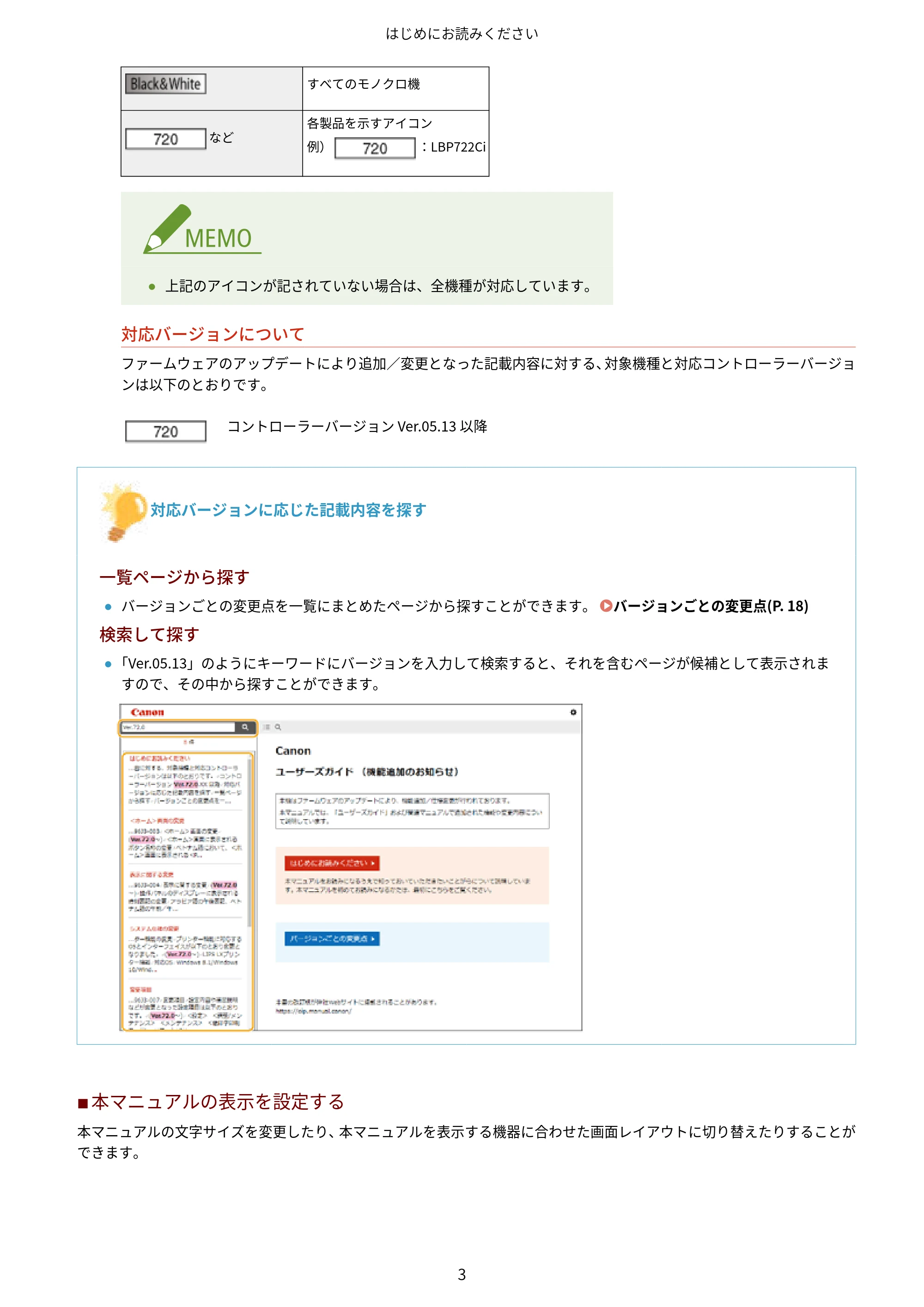
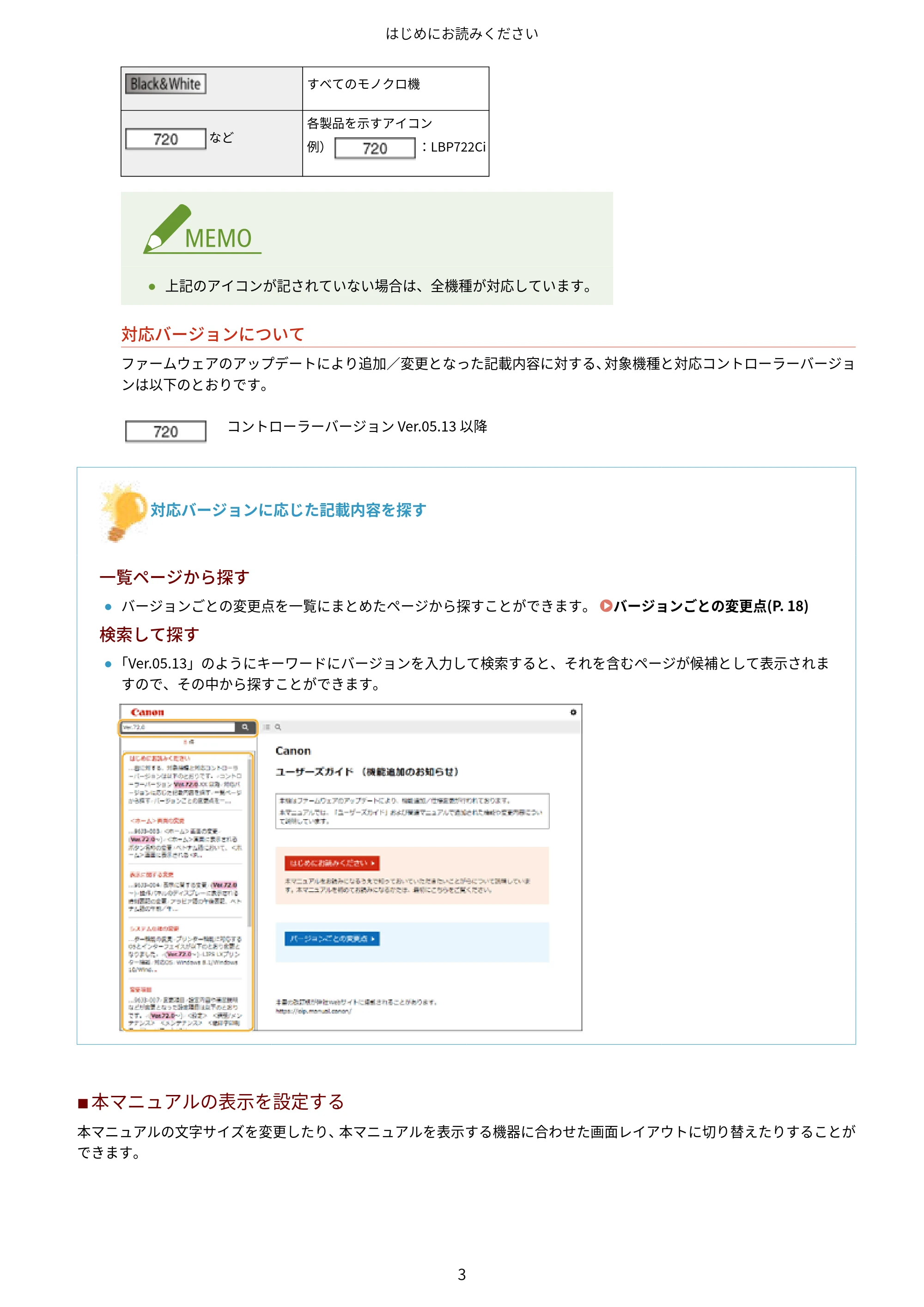
対応バージョンに応じた記載内容を探す
一覧ページから探す
- バージョンごとの変更点を一覧にまとめたページから探すことができます。 バージョンごとの変更点(P. 18)
検索して探す
- 「Ver.05.13」のようにキーワードにバージョンを入力して検索すると、それを含むページが候補として表示されま
すので、その中から探すことができます。
◼ 本マニュアルの表示を設定する
本マニュアルの文字サイズを変更したり、本マニュアルを表示する機器に合わせた画面レイアウトに切り替えたりすることが
できます。
はじめにお読みください
3
6ページ
- PDF 形式のマニュアルを見られない場合は、Adobe Acrobat Reader をアドビシステムズ社のホームページ
(https://get.adobe.com/reader/)からダウンロードしてください。
◼ 商標について
Mopria®, the Mopria® Logo and the Mopria® Alliance logo are registered trademarks and service marks of Mopria
Alliance, Inc. in the United States and other countries. Unauthorized use is strictly prohibited.
Google Cloud Print、Google Chrome、Chrome OS、Chromebook は、Google LLC の商標です。
All other trademarks are the property of their respective owners.
その他、本マニュアル中の社名や商品名は、各社の登録商標または商標です。
はじめにお読みください
4
7ページ
各種機能に関する変更
各種機能に関する変更 .......................................................................................................................................... 6
<ホーム>画面の変更 ............................................................................................................................................... 7
表示に関する変更 ..................................................................................................................................................... 8
システム仕様の変更 .................................................................................................................................................. 9
各種機能に関する変更
5
各種機能に関する変更
各種機能に関する変更
96J3-002
本機の各種機能に関する変更内容について説明しています。
<ホーム>画面の変更(P. 7)
表示に関する変更(P. 8)
システム仕様の変更(P. 9)
各種機能に関する変更
6
<ホーム>画面の変更
<ホーム>画面の変更
96J3-003
(
V
e
r
.
0
5
.
1
3
~
)
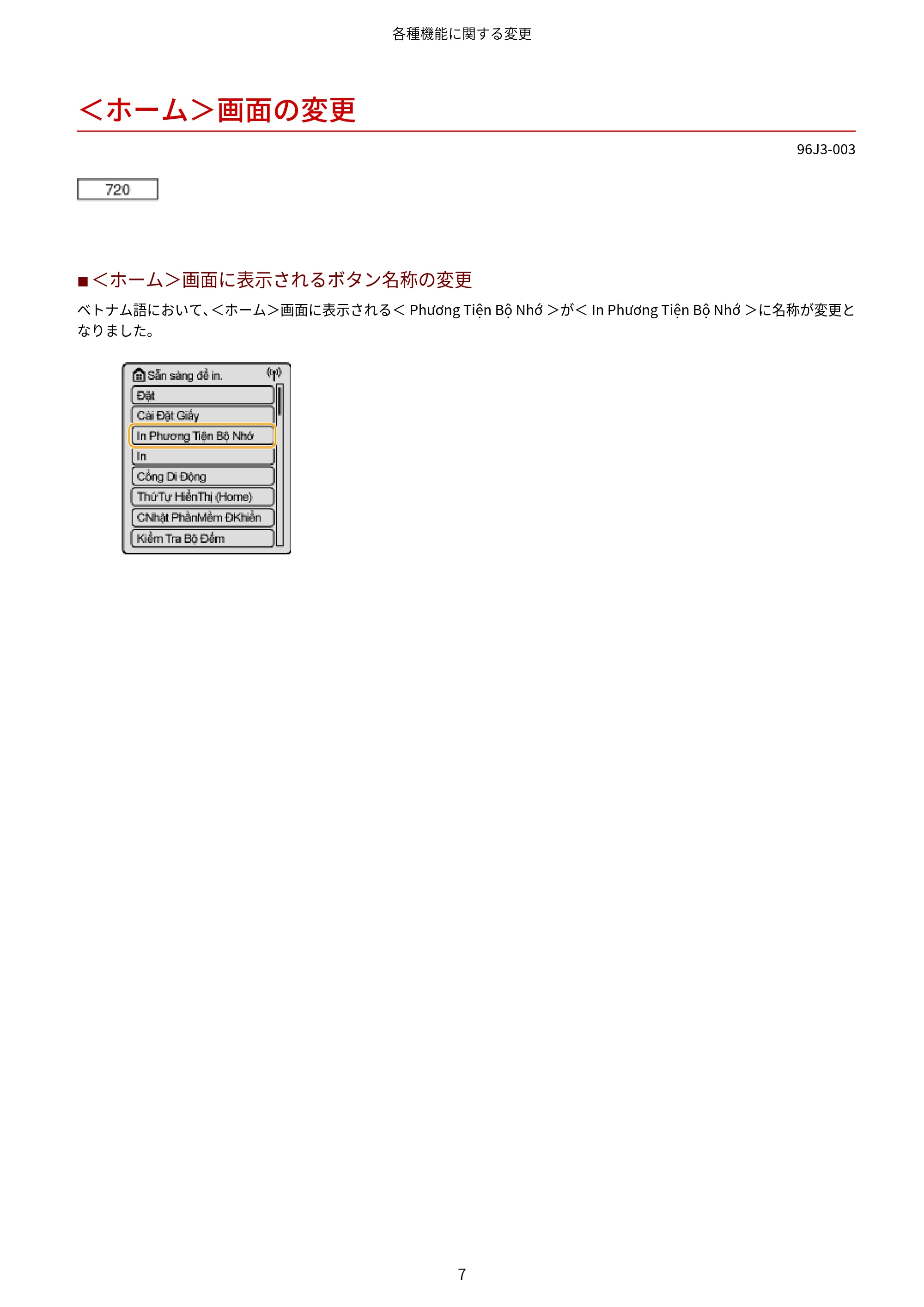
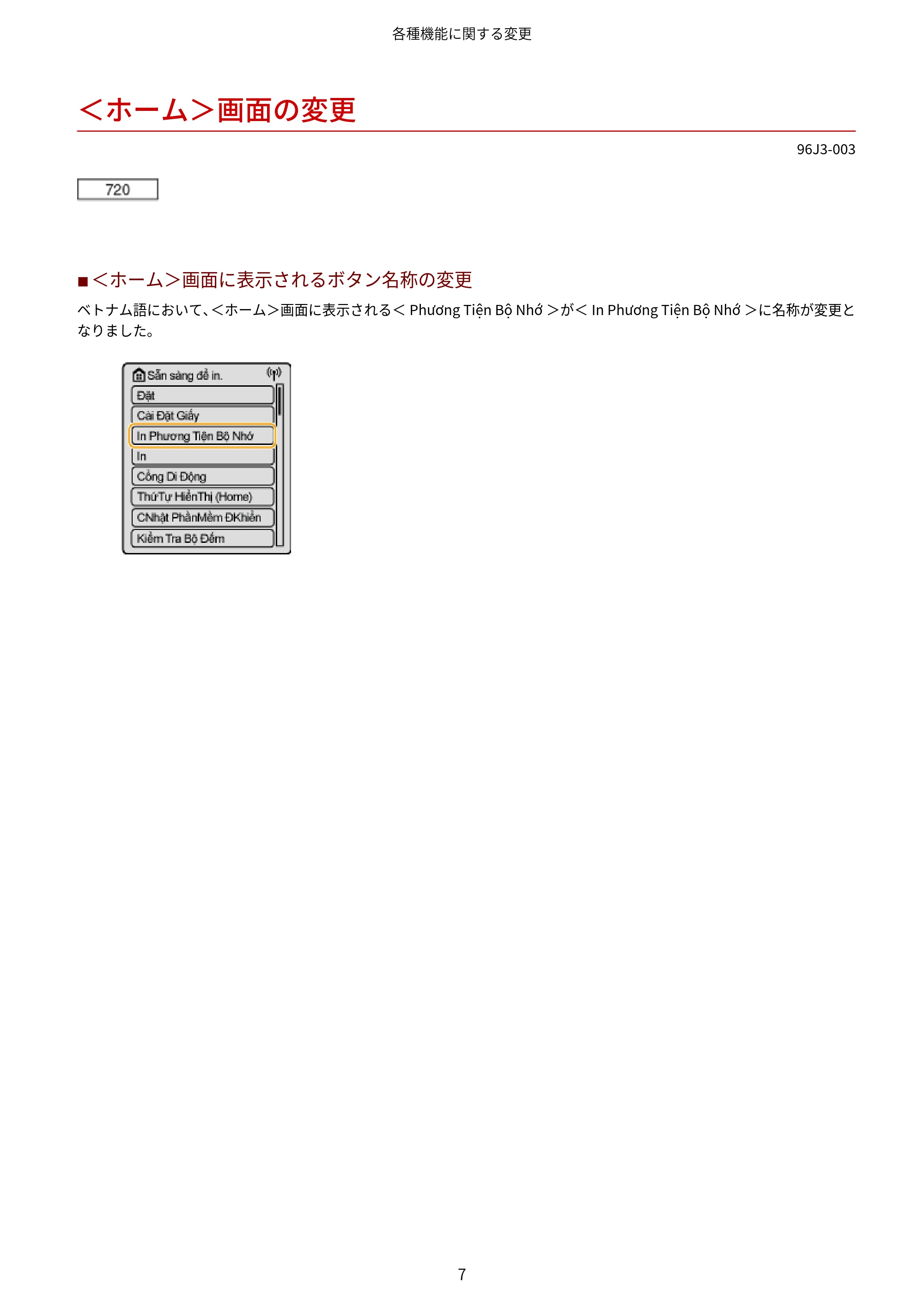
◼ <ホーム>画面に表示されるボタン名称の変更
ベトナム語において、<ホーム>画面に表示される< Phương Tiện Bộ Nhớ >が< In Phương Tiện Bộ Nhớ >に名称が変更と
なりました。
各種機能に関する変更
7
表示に関する変更
表示に関する変更
96J3-004
(
V
e
r
.
0
5
.
1
3
~
)
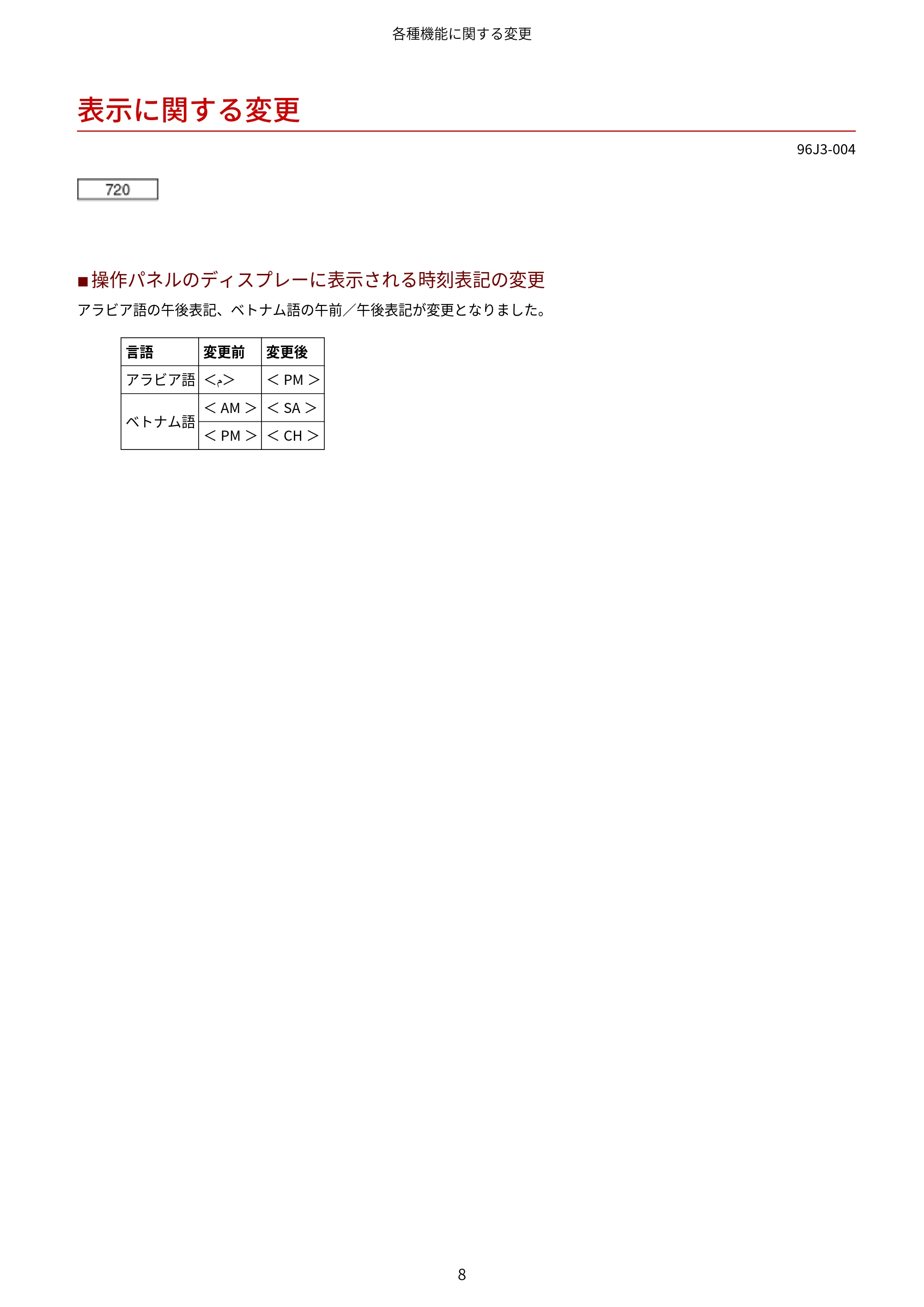
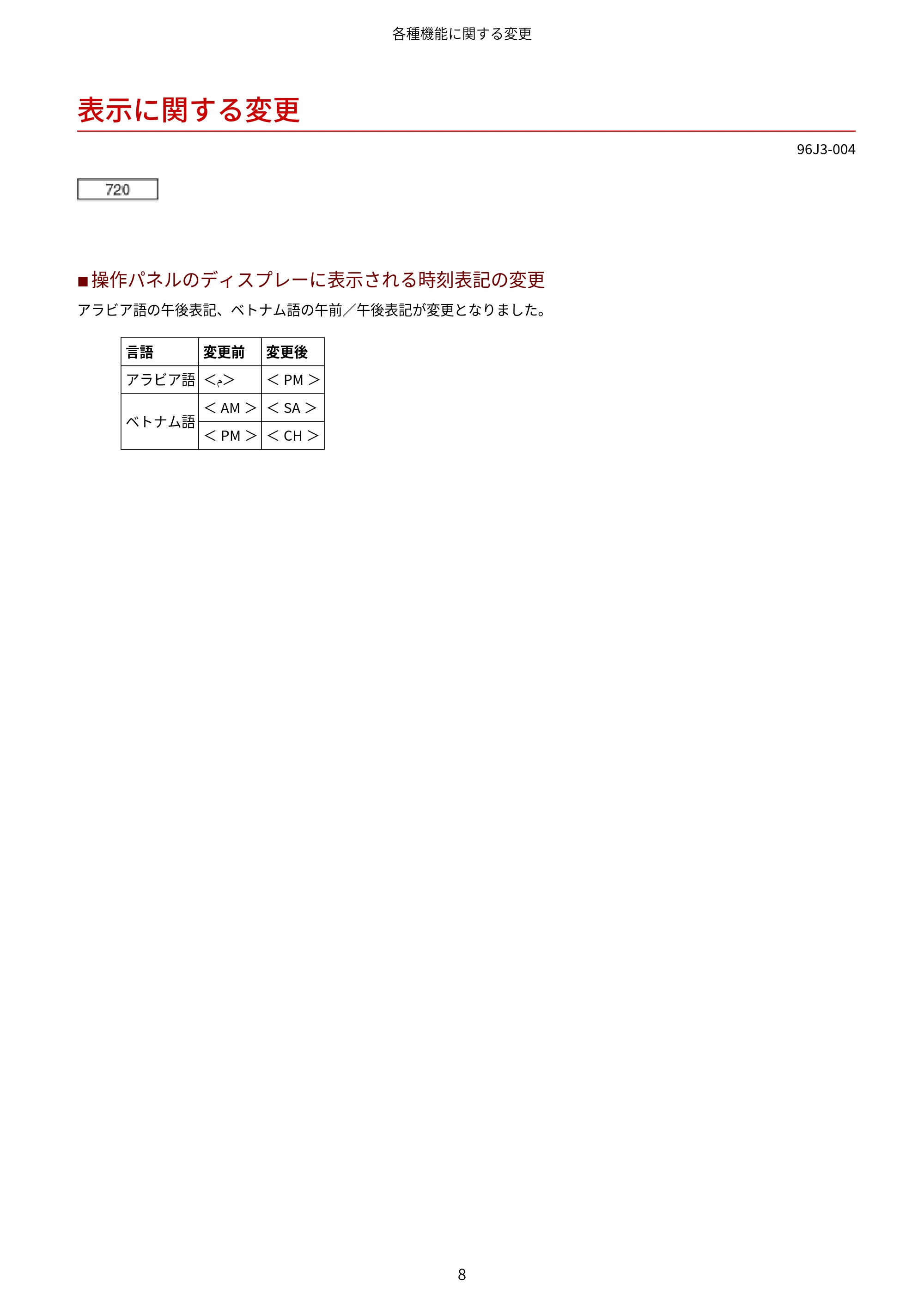
◼ 操作パネルのディスプレーに表示される時刻表記の変更
アラビア語の午後表記、ベトナム語の午前/午後表記が変更となりました。
言語 変更前 変更後
アラビア語 <م> < PM >
ベトナム語
< AM > < SA >
< PM > < CH >
各種機能に関する変更
8
システム仕様の変更
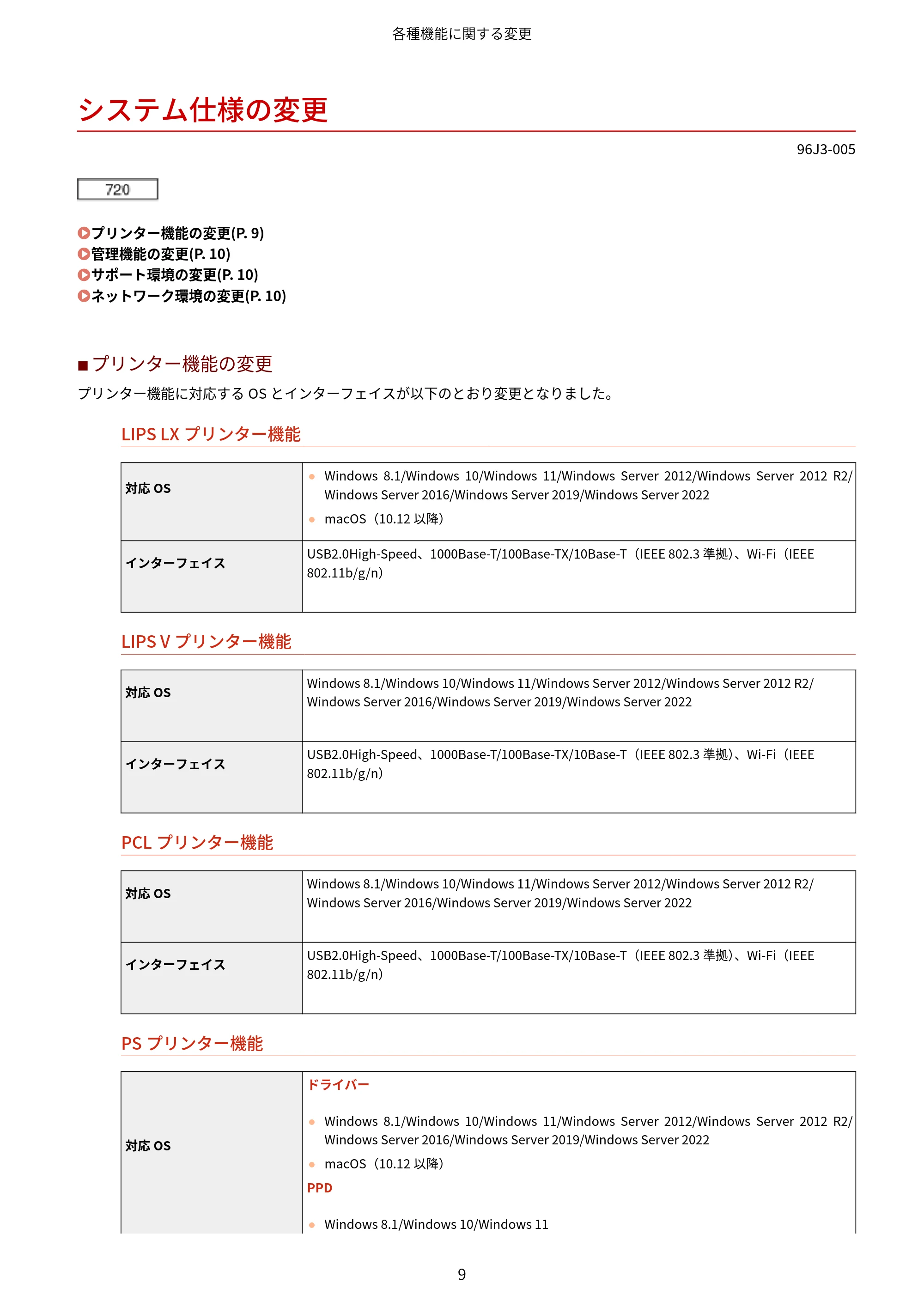
システム仕様の変更
96J3-005
(
V
e
r
.
0
5
.
1
3
~
)
プリンター機能の変更(P. 9)
管理機能の変更(P. 10)
サポート環境の変更(P. 10)
ネットワーク環境の変更(P. 10)
◼ プリンター機能の変更
プリンター機能に対応する OS とインターフェイスが以下のとおり変更となりました。
LIPS LX プリンター機能
対応 OS
- Windows 8.1/Windows 10/Windows 11/Windows Server 2012/Windows Server 2012 R2/
Windows Server 2016/Windows Server 2019/Windows Server 2022
- macOS(10.12 以降)
インターフェイス
USB2.0High-Speed、1000Base-T/100Base-TX/10Base-T(IEEE 802.3 準拠)、Wi-Fi(IEEE
802.11b/g/n)
LIPS V プリンター機能
対応 OS
Windows 8.1/Windows 10/Windows 11/Windows Server 2012/Windows Server 2012 R2/
Windows Server 2016/Windows Server 2019/Windows Server 2022
インターフェイス
USB2.0High-Speed、1000Base-T/100Base-TX/10Base-T(IEEE 802.3 準拠)、Wi-Fi(IEEE
802.11b/g/n)
PCL プリンター機能
対応 OS
Windows 8.1/Windows 10/Windows 11/Windows Server 2012/Windows Server 2012 R2/
Windows Server 2016/Windows Server 2019/Windows Server 2022
インターフェイス
USB2.0High-Speed、1000Base-T/100Base-TX/10Base-T(IEEE 802.3 準拠)、Wi-Fi(IEEE
802.11b/g/n)
PS プリンター機能
対応 OS
ドライバー
- Windows 8.1/Windows 10/Windows 11/Windows Server 2012/Windows Server 2012 R2/
Windows Server 2016/Windows Server 2019/Windows Server 2022
- macOS(10.12 以降)
PPD
- Windows 8.1/Windows 10/Windows 11
各種機能に関する変更
9
12ページ
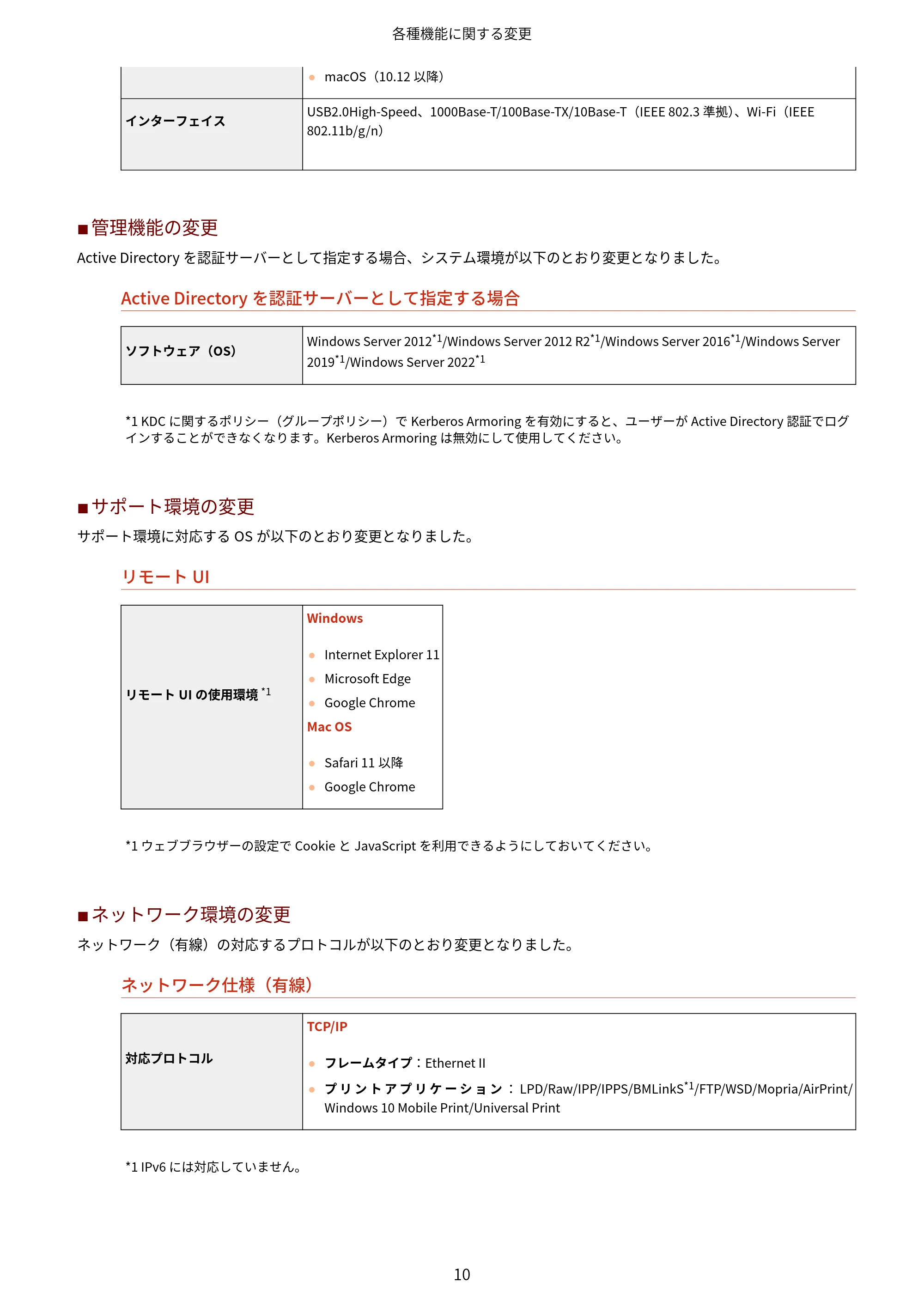
- macOS(10.12 以降)
インターフェイス
USB2.0High-Speed、1000Base-T/100Base-TX/10Base-T(IEEE 802.3 準拠)、Wi-Fi(IEEE
802.11b/g/n)
◼ 管理機能の変更
Active Directory を認証サーバーとして指定する場合、システム環境が以下のとおり変更となりました。
Active Directory を認証サーバーとして指定する場合
ソフトウェア(OS)
Windows Server 2012*1/Windows Server 2012 R2*1/Windows Server 2016*1/Windows Server
2019*1/Windows Server 2022*1
*1 KDC に関するポリシー(グループポリシー)で Kerberos Armoring を有効にすると、ユーザーが Active Directory 認証でログ
インすることができなくなります。Kerberos Armoring は無効にして使用してください。
◼ サポート環境の変更
サポート環境に対応する OS が以下のとおり変更となりました。
リモート UI
リモート UI の使用環境 *1
Windows
- Internet Explorer 11
- Microsoft Edge
- Google Chrome
Mac OS
- Safari 11 以降
- Google Chrome
*1 ウェブブラウザーの設定で Cookie と JavaScript を利用できるようにしておいてください。
◼ ネットワーク環境の変更
ネットワーク(有線)の対応するプロトコルが以下のとおり変更となりました。
ネットワーク仕様(有線)
対応プロトコル
TCP/IP
- フレームタイプ:Ethernet II
- プ リ ン ト ア プ リ ケ ー シ ョ ン : LPD/Raw/IPP/IPPS/BMLinkS*1/FTP/WSD/Mopria/AirPrint/
Windows 10 Mobile Print/Universal Print
*1 IPv6 には対応していません。
各種機能に関する変更
10
13ページ
設定/登録に関する変更
設定/登録に関する変更 ...................................................................................................................................... 12
変更項目 ................................................................................................................................................................. 13
設定/登録に関する変更
11
設定/登録に関する変更
設定/登録に関する変更
96J3-006
<設定>画面の項目に関する変更内容について説明しています。<設定>画面は<ホーム>画面で<設定>を選択すると表
示されます。
変更項目(P. 13)
設定/登録に関する変更
12
変更項目
変更項目
96J3-007
設定内容や補足説明などが変更となった設定項目は以下のとおりです。
(
V
e
r
.
0
5
.
1
3
~
)
<設定> <調整/メンテナンス> <メンテナンス> <低印字印刷モード>
- リモート UI からの設定が可能になりました。
変更前 変更後
× ○
設定/登録に関する変更
13
16ページ
ユーザーズガイドに関するその他の
変更
ユーザーズガイドに関するその他の変更 .................................................................................................... 15
ユーザーズガイドに関するその他の変更
14
ユーザーズガイドに関するその他の変更
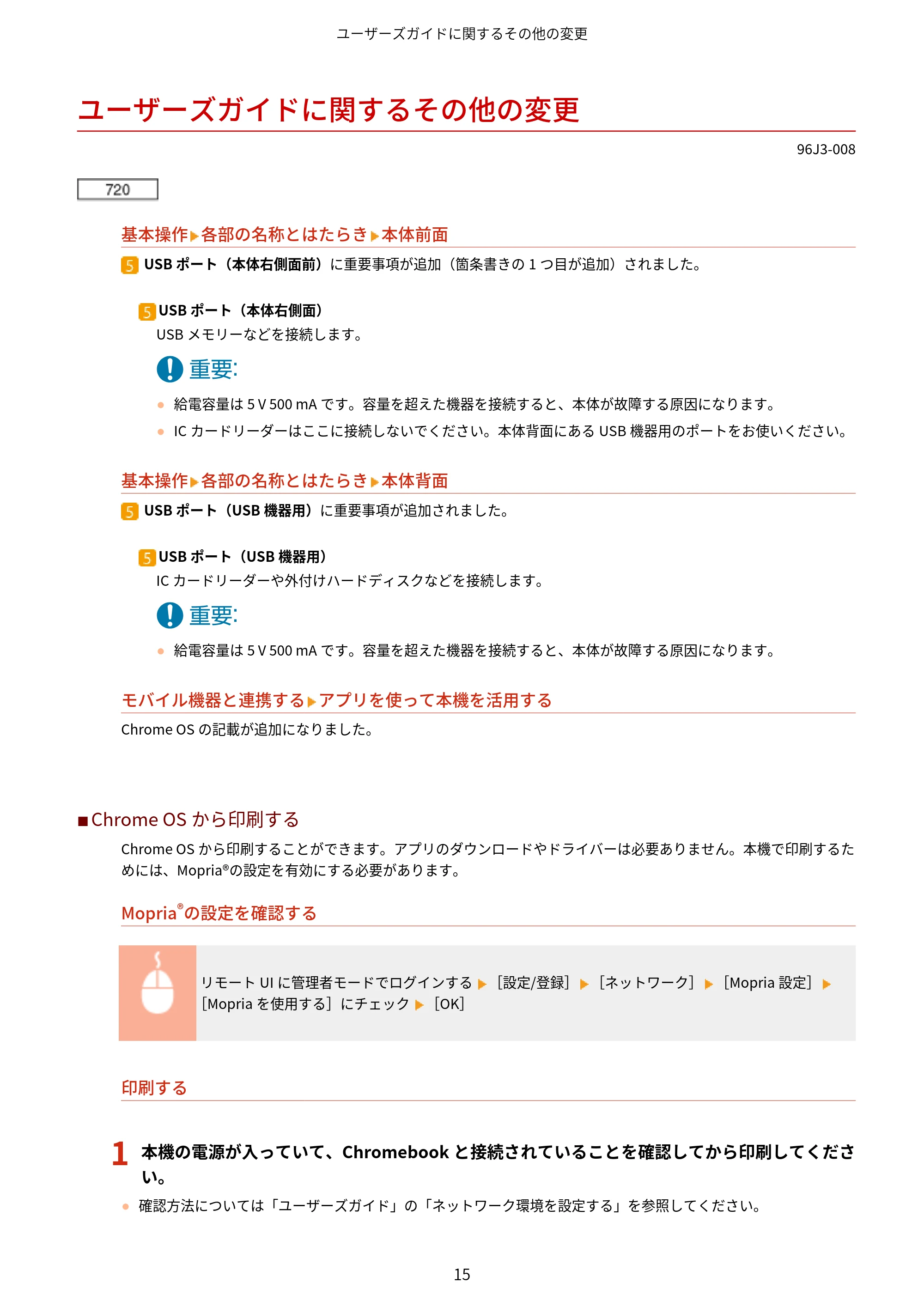
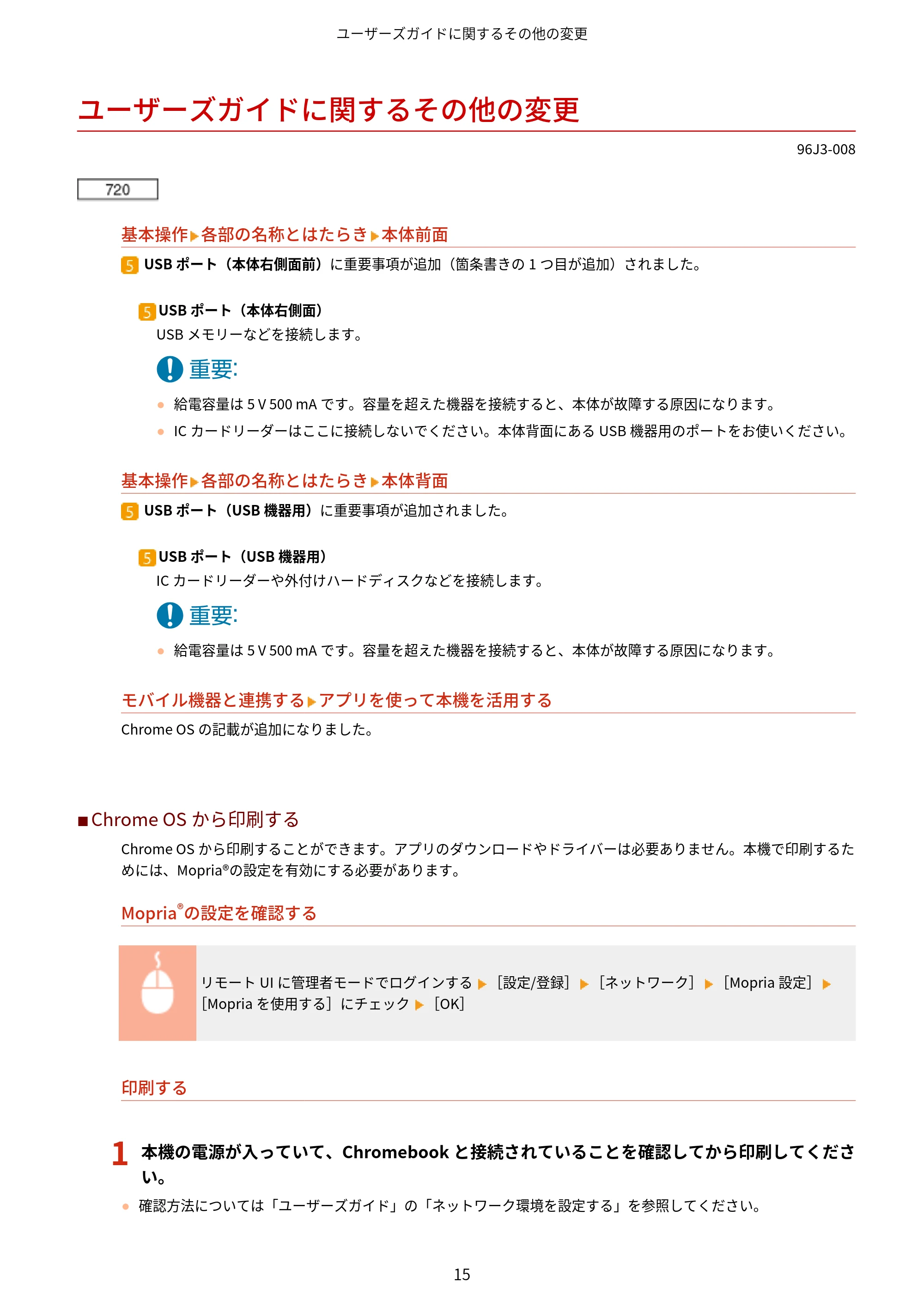
ユーザーズガイドに関するその他の変更
96J3-008
基本操作 各部の名称とはたらき 本体前面
USB ポート(本体右側面前)に重要事項が追加(箇条書きの 1 つ目が追加)されました。
USB ポート(本体右側面)
USB メモリーなどを接続します。
- 給電容量は 5 V 500 mA です。容量を超えた機器を接続すると、本体が故障する原因になります。
- IC カードリーダーはここに接続しないでください。本体背面にある USB 機器用のポートをお使いください。
基本操作 各部の名称とはたらき 本体背面
USB ポート(USB 機器用)に重要事項が追加されました。
USB ポート(USB 機器用)
IC カードリーダーや外付けハードディスクなどを接続します。
- 給電容量は 5 V 500 mA です。容量を超えた機器を接続すると、本体が故障する原因になります。
モバイル機器と連携する アプリを使って本機を活用する
Chrome OS の記載が追加になりました。
◼ Chrome OS から印刷する
Chrome OS から印刷することができます。アプリのダウンロードやドライバーは必要ありません。本機で印刷するた
めには、Mopria®の設定を有効にする必要があります。
Mopria
®
の設定を確認する
リモート UI に管理者モードでログインする [設定/登録] [ネットワーク] [Mopria 設定]
[Mopria を使用する]にチェック [OK]
印刷する
1
本機の電源が入っていて、Chromebook と接続されていることを確認してから印刷してくださ
い。
- 確認方法については「ユーザーズガイド」の「ネットワーク環境を設定する」を参照してください。
ユーザーズガイドに関するその他の変更
15
18ページ
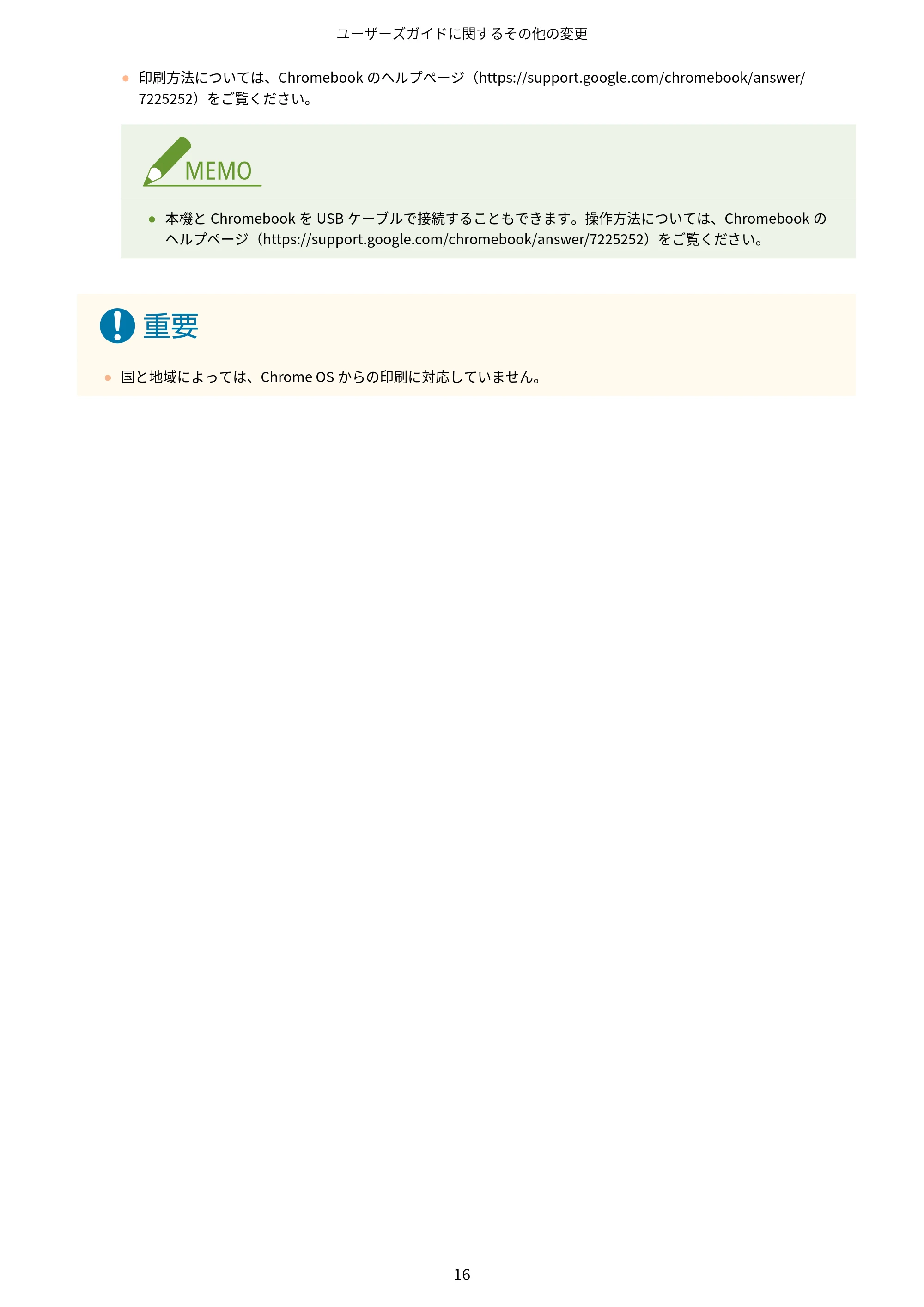
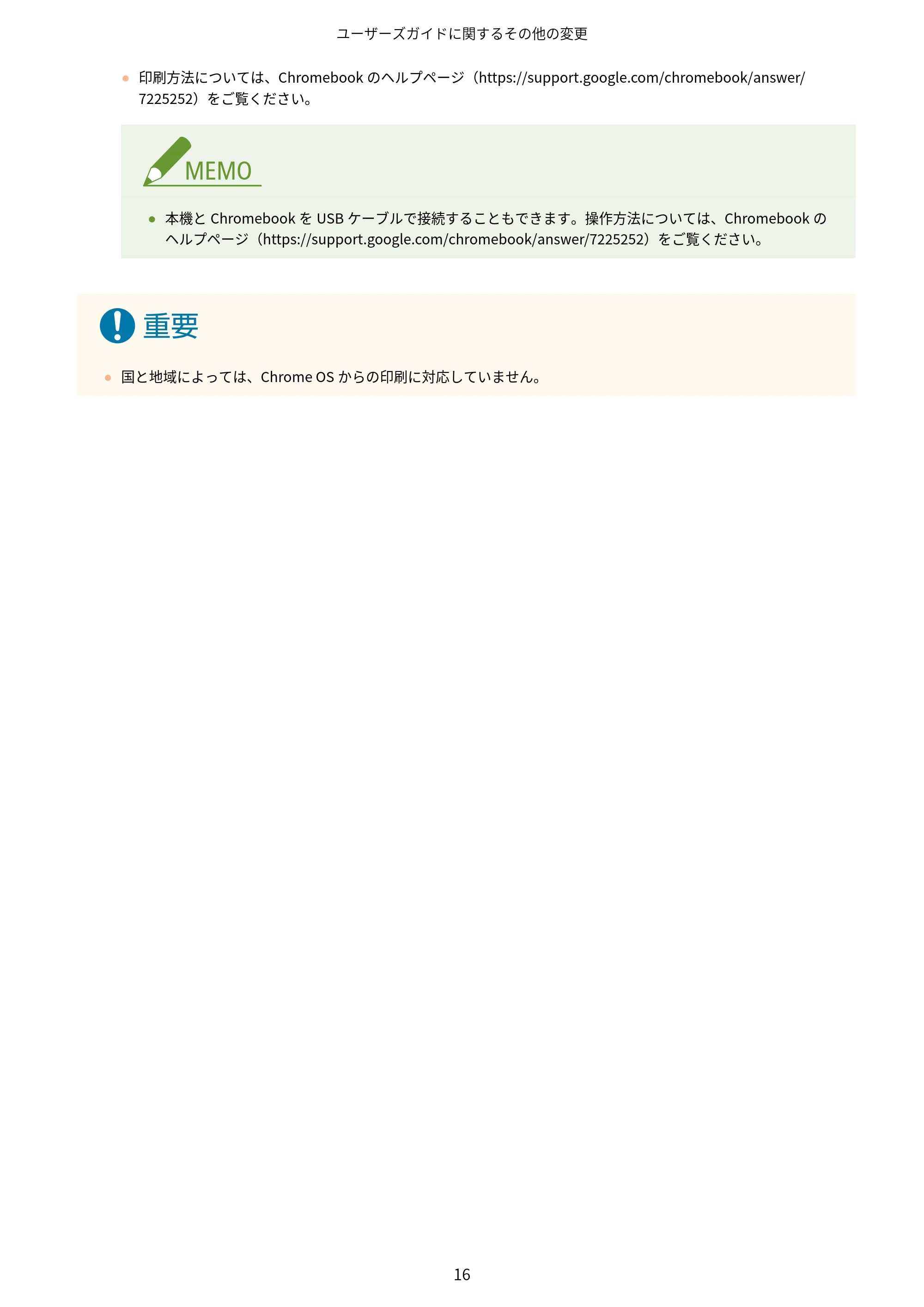
- 印刷方法については、Chromebook のヘルプページ(https://support.google.com/chromebook/answer/
7225252)をご覧ください。
- 本機と Chromebook を USB ケーブルで接続することもできます。操作方法については、Chromebook の
ヘルプページ(https://support.google.com/chromebook/answer/7225252)をご覧ください。
- 国と地域によっては、Chrome OS からの印刷に対応していません。
ユーザーズガイドに関するその他の変更
16
19ページ
バージョンごとの変更点
バージョンごとの変更点 ................................................................................................................................... 18
Ver.05.13 の変更点 .................................................................................................................................................. 19
バージョンごとの変更点
17
バージョンごとの変更点
バージョンごとの変更点
96J3-009
バージョンごとの変更点を一覧にまとめて説明しています。
Ver.05.13 の変更点(P. 19)
バージョンごとの変更点
18
Ver.05.13 の変更点
Ver.05.13 の変更点
96J3-00A
コントローラーバージョン Ver.05.13 における変更点は以下のとおりです。お使いの機種によっては利用できない機能や設定
もあります。詳しくは、各変更点のリンク先の記載をご確認ください。
各種機能に関する変更点(P. 19)
設定/登録に関する変更点(P. 19)
各種機能に関する変更点
- <ホーム>画面に表示されるボタン名称の変更
<ホーム>画面の変更(P. 7)
- 操作パネルのディスプレー表示に関する変更
表示に関する変更(P. 8)
- 各種仕様(プリンター機能/管理機能/サポート環境/ネットワーク環境)の変更
システム仕様の変更(P. 9)
設定/登録に関する変更点
- <低印字印刷モード>のリモート UI による設定を変更
変更項目(P. 13)
バージョンごとの変更点
19
22ページ
第三者のソフトウェアについて
第三者のソフトウェアについて ...................................................................................................................... 21
第三者のソフトウェアについて
20
第三者のソフトウェアについて
第三者のソフトウェアについて
96J3-00E
各バージョンの第三者のソフトウェアに関する情報は、本マニュアルの HTML 版をご確認ください。HTML 版マニュアルはオ
ンラインマニュアルサイト(https://oip.manual.canon/)からご覧になることができます。
第三者のソフトウェアについて
21
SIL OPEN FONT LICENSE
This Font Software is licensed under the SIL Open Font License,
Version 1.1.
This license is copied below, and is also available with a FAQ at:
http://scripts.sil.org/OFL
-----------------------------------------------------------
SIL OPEN FONT LICENSE Version 1.1 - 26 February 2007
-----------------------------------------------------------
PREAMBLE
The goals of the Open Font License (OFL) are to stimulate worldwide
development of collaborative font projects, to support the font
creation efforts of academic and linguistic communities, and to
provide a free and open framework in which fonts may be shared and
improved in partnership with others.
The OFL allows the licensed fonts to be used, studied, modified and
redistributed freely as long as they are not sold by themselves. The
fonts, including any derivative works, can be bundled, embedded,
redistributed and/or sold with any software provided that any reserved
names are not used by derivative works. The fonts and derivatives,
however, cannot be released under any other type of license. The
requirement for fonts to remain under this license does not apply to
any document created using the fonts or their derivatives.
DEFINITIONS
"Font Software" refers to the set of files released by the Copyright
Holder(s) under this license and clearly marked as such. This may
include source files, build scripts and documentation.
"Reserved Font Name" refers to any names specified as such after the
copyright statement(s).
"Original Version" refers to the collection of Font Software
components as distributed by the Copyright Holder(s).
"Modified Version" refers to any derivative made by adding to,
deleting, or substituting -- in part or in whole -- any of the
components of the Original Version, by changing formats or by porting
the Font Software to a new environment.
"Author" refers to any designer, engineer, programmer, technical
writer or other person who contributed to the Font Software.
PERMISSION & CONDITIONS
Permission is hereby granted, free of charge, to any person obtaining
a copy of the Font Software, to use, study, copy, merge, embed,
modify, redistribute, and sell modified and unmodified copies of the
Font Software, subject to the following conditions:
SIL OPEN FONT LICENSE
22
25ページ
1) Neither the Font Software nor any of its individual components, in
Original or Modified Versions, may be sold by itself.
2) Original or Modified Versions of the Font Software may be bundled,
redistributed and/or sold with any software, provided that each copy
contains the above copyright notice and this license. These can be
included either as stand-alone text files, human-readable headers or
in the appropriate machine-readable metadata fields within text or
binary files as long as those fields can be easily viewed by the user.
3) No Modified Version of the Font Software may use the Reserved Font
Name(s) unless explicit written permission is granted by the
corresponding Copyright Holder. This restriction only applies to the
primary font name as presented to the users.
4) The name(s) of the Copyright Holder(s) or the Author(s) of the Font
Software shall not be used to promote, endorse or advertise any
Modified Version, except to acknowledge the contribution(s) of the
Copyright Holder(s) and the Author(s) or with their explicit written
permission.
5) The Font Software, modified or unmodified, in part or in whole,
must be distributed entirely under this license, and must not be
distributed under any other license. The requirement for fonts to
remain under this license does not apply to any document created using
the Font Software.
TERMINATION
This license becomes null and void if any of the above conditions are
not met.
DISCLAIMER
THE FONT SOFTWARE IS PROVIDED "AS IS", WITHOUT WARRANTY OF ANY KIND,
EXPRESS OR IMPLIED, INCLUDING BUT NOT LIMITED TO ANY WARRANTIES OF
MERCHANTABILITY, FITNESS FOR A PARTICULAR PURPOSE AND NONINFRINGEMENT
OF COPYRIGHT, PATENT, TRADEMARK, OR OTHER RIGHT. IN NO EVENT SHALL THE
COPYRIGHT HOLDER BE LIABLE FOR ANY CLAIM, DAMAGES OR OTHER LIABILITY,
INCLUDING ANY GENERAL, SPECIAL, INDIRECT, INCIDENTAL, OR CONSEQUENTIAL
DAMAGES, WHETHER IN AN ACTION OF CONTRACT, TORT OR OTHERWISE, ARISING
FROM, OUT OF THE USE OR INABILITY TO USE THE FONT SOFTWARE OR FROM
OTHER DEALINGS IN THE FONT SOFTWARE.
SIL OPEN FONT LICENSE
23